automatic transmission MERCEDES-BENZ E-CLASS ESTATE 2015 Owner's Guide
[x] Cancel search | Manufacturer: MERCEDES-BENZ, Model Year: 2015, Model line: E-CLASS ESTATE, Model: MERCEDES-BENZ E-CLASS ESTATE 2015Pages: 497, PDF Size: 16.23 MB
Page 201 of 497
or
X Use the program selector button to change
the drive program (Y page 194).
Manual drive program Mis deactivated.
The automatic transmission switches into
the automatic drive program that was last
selected. Manuald
rive program (AMG vehicles
and vehicles with the AMG sports
package)
General notes In this drive program, you can permanently
change gear yourself by using the steering
wheel gearshift paddles. The transmission
must be in position D.
i As well as this permanent drive program
M,y ou can also activate temporary drive
program M(Y page 197).
Activating the manual drive program X
Press the program selector button
(Y page 194) repeatedly until Mappears in
the multifunction display.
X AMG vehicles: turn the drive program
selector (Y page 195) until Mappears in the
multifunction display.
The indicator Mon the drive program selec-
tor lights up in red.
Manual drive program Mcan be selected
using the program selector button or the drive
program selector. In manual drive program M,
you can change gear yourself using the steer-
ing wheel gearshift paddles if the transmis-
sion is in position D.
Upshifting X
Pull the right-hand steerin gwheel gearshift
paddle.
The automatic transmission shifts up to the next gear. AMG vehicles !
In manual gearshift program
M,the auto-
matic transmission does not shift up auto-
matically even when the engine limiting
speed for the current gear is reached.
When the engine limiting speed is reached, the fuel supply is cut to prevent the engine
from overrevving. You must make sure that the engine speed does not reach the red
area of the rev counter. Otherwise, there is
ar isk of engine damage. :
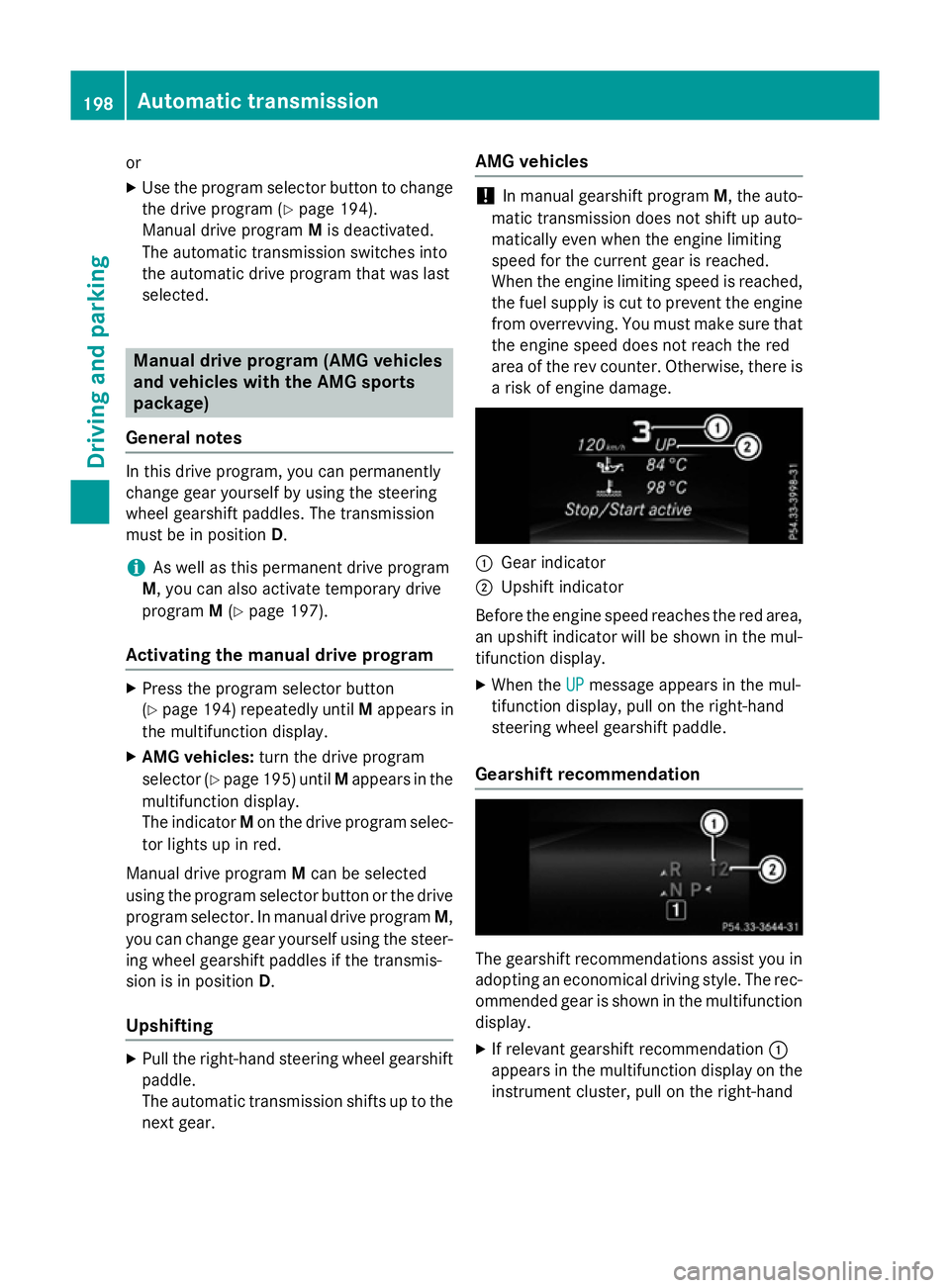
Gear indicator
; Upshift indicator
Before the engine speed reaches the red area, an upshift indicator will be shown in the mul-
tifunction display.
X When the UP UPmessage appears in the mul-
tifunction display ,pull on the right-hand
steerin gwheel gearshift paddle.
Gearshift recommendation The gearshift recommendations assist you in
adopting an economical driving style. The rec- ommended gear is shown in the multifunction
display.
X If relevant gearshift recommendation :
appears in the multifunction display on the instrument cluster, pull on the right-hand 198
Automatic transmissionDriving and parking
Page 202 of 497
steering wheel gearshift paddle
(Y
page 195).
The automatic transmission shifts to rec-
ommended gear ;.
Downshifting X
Pull the left-hand steering wheel gearshift
paddle.
The automatic transmission shifts down to
the next gear.
i For maximum acceleration, pull the left-
hand steering wheel gearshift paddleu ntil
the transmission selects the optimum gear for the current speed.
Kickdown You can also use kickdown for maximum
acceleration in manual drive program
M.
X Depress the accelerator pedal beyond the
pressure point.
The transmission shifts to alower gear
depending on the engine speed.
AMG vehicles: it is not possible to use kick-
down in manual drive program M.
Deactivating the manual drive program X
Press the program selector button
(Y page 194).
X AMG vehicles: turn the drive program
selector (Y page 195). Automatic transmission
199Driving and parking Z
Page 208 of 497
Problem
Possible causes/consequences and
M
MSolutions The key battery is discharged or nearly discharged.
X Unlock the vehicle using the emergency key element
(Y page 96).
X Open the boot lid or the tailgate.
X Manuallyu nlock the fuel filler flap using the emergency release
(Y page 202). The fuel filler flap is unlocked, but the opening mechanism is jam-
med.
X Consult aqualified specialist workshop. Parking
Important safety notes
G
WARNING
Flammable material such as leaves, grass or
twigs may ignite if they come into contact with hot parts of the exhaust system or exhaust
gas flow. There is arisk of fire.
Park the vehicle so that no flammable mate-
rial can come into contact with hot vehicle
components. In particular, do not park on dry grassland or harvested grain fields. G
WARNING
If you switch off the ignition while driving,
safety-relevant functions are only available
with limitations, or not at all. This could affect, for example, the power steering and the brake
boosting effect.Y ou will require considerably
more effort to steer and brake. There is arisk
of an accident.
Do not switch off the ignition while driving. G
WARNING
If you leave children unattended in the vehi-
cle, they may be able to set the vehicle in
motion if, for example, they:
R release the parking brake
R shift the automatic transmission out of park
position Por shift manual transmission into
neutral
R start the engine
In addition, they may operate vehicle equip-
ment and become trapped. There is arisk of
an accident and injury.
When leaving the vehicle, always take the key with you and lock the vehicle. Never leave
children unattended in the vehicle.
! Always secure the vehicle correctly
against rolling away.O therwise, the vehicle
or its drivetrain could be damaged.
To ensure that the vehicle is safeguarded
against rolling away unintentionally:
R the parking brake must be applied
R on vehicles with manual transmission,
engage 1st gear or reverse gear
R on vehicles with automatic transmission,
the transmission must be in position Pand Parking
205Driving and parking Z
Page 209 of 497
the key must be remove
dfromt he ignition
lock
R the front wheels must be turned towards
the kerb on steep uphill or downhil lgradi-
ents Switchin
goffthe engine
Important safety notes G
WARNING
Th ea utomatic transmission switches to neu-
tra lposit ionNwhen yo uswitch off the engine.
Th ev ehicl emayrollaway. There is ariskofan
accident.
After switching off the engine ,alway sswitch
to parking position P.Prevent the parked vehi-
cle fro mrolling away by applying the parking
brake.
Vehicle swithm anual transmission X
Shift to eithe r1st gear or revers egear R.
X Turn the key to position 0in the ignition
lock and remove it.
Th eimm obiliser is activated.
X Firml ydepress the parking brake.
Vehicle switha utomatic transmission X
Firml ydepress the parking brake.
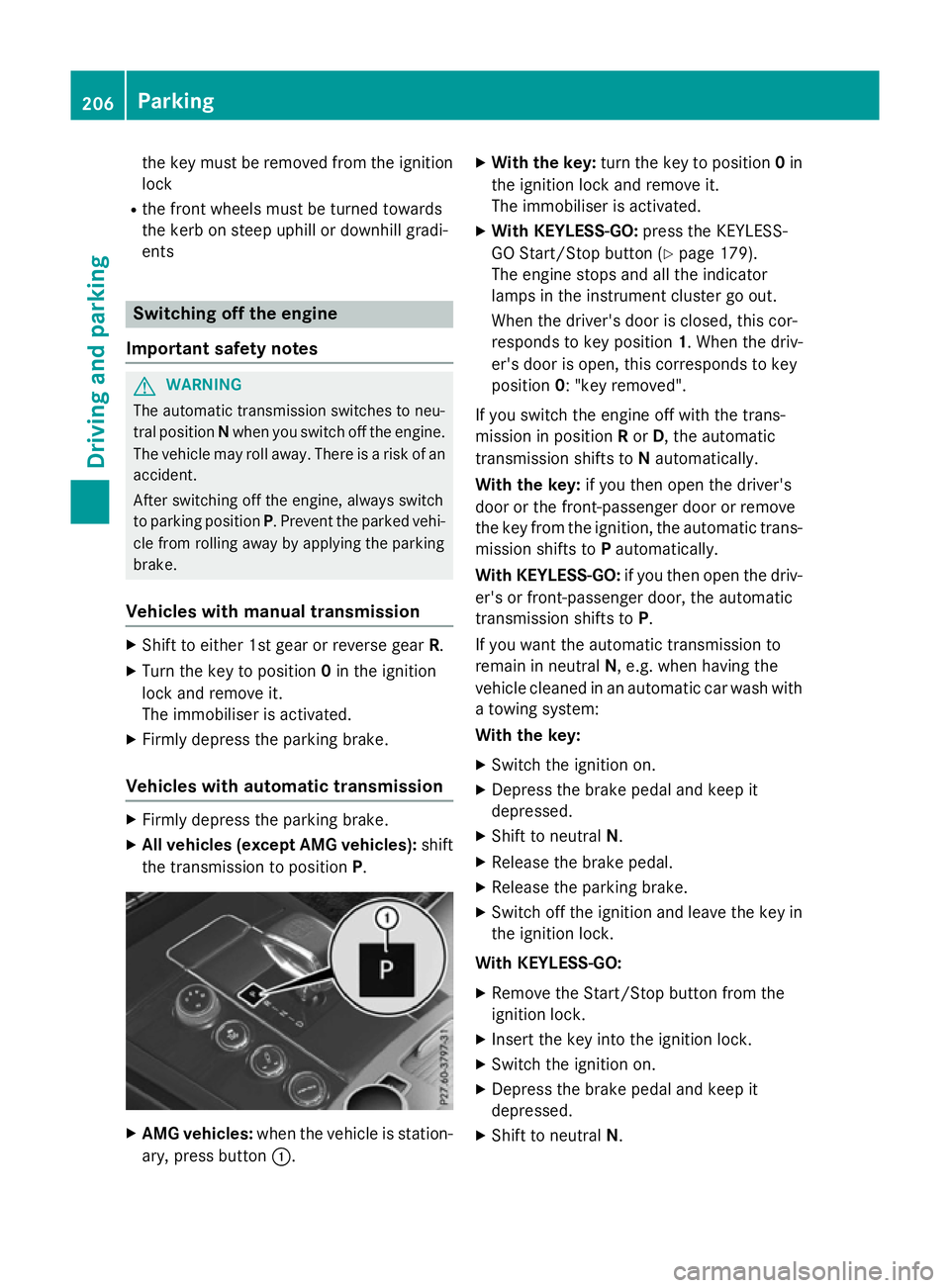
X Allv eh icle s(exce pt AM Gvehicles): shift
the transmission to position P.X
AM Gvehicles: when the vehicl eisstation-
ary, press button :. X
Wit hthe key: turnthe key to position 0in
the ignition lock and remove it.
Th eimm obiliser is activated.
X Wit hKEYLESS -GO:press the KEYLESS-
GO Start/Stop button (Y page 179).
Th ee ngine stops and al lthe indicator
lamps in the instrument cluste rgoout.
When the driver's door is closed, thi scor-
responds to key position 1.Whent he driv-
er' sd ooriso pen, thi scorresponds to key
position 0:"keyr emoved".
If yo uswitch the engine off with the trans-
mission in position Ror D,t he automatic
transmission shifts to Nautomatically.
Wit hthe key: if youtheno pent he driver's
door or the front-passenge rdoororr emove
the key fro mthe ignition, the automatic trans-
mission shifts to Pautomatically.
Wit hKEYLESS -GO:if youtheno pent he driv-
er' sorf ront-passenge rdoor, the automatic
transmission shifts to P.
If yo uwantthe automatic transmission to
remai ninneutral N,e.g.w henh avin gthe
vehicl ecleane dinana utomatic car wash with
at owing system:
Wit hthe key:
X Switch the ignition on.
X Depres sthe brake peda land kee pit
depressed.
X Shift to neutral N.
X Releas ethe brake pedal.
X Releas ethe parking brake.
X Switch off the ignition and leav ethe key in
the ignition lock.
Wit hKEYLESS -GO:
X Remov ethe Start/Stop button fro mthe
ignition lock.
X Insert the key into the ignition lock.
X Switch the ignition on.
X Depres sthe brake peda land kee pit
depressed.
X Shift to neutral N.206
ParkingDriving an
dparking
Page 210 of 497
X
Releas ethe brak epedal.
X Releas ethe parkin gbrake.
X Switc hoff th eignition and leav ethe keyin
th ei gnition lock.
The engin ecan be switched off while th evehi-
cle is in motion by pressing and holdin gthe
Start/Sto pbutto nfor about three seconds.
This function operate sind ependentl yofthe
ECO start/sto pautomatic engin eswitch-off
function. Parking brake
G
WARNING
If you mus tbrak ethe vehicl ewitht he parking
brake, th ebrakin gdistanc eisconsid erably
longer and th ewheels could lock. This increa-
ses th eriskofs kiddin gand an accident.
Only use th eparkin gbrak etob rakethe vehi-
cle when th eservic ebrak eisf aulty. Do not
apply th eparkin gbrak etoo firmly. If the
wheels lock, release th eparkin gbrak euntil
th ew heels begi nturning again. G
WARNING
If you leav echildren unattended in th evehi-
cle ,the ym ay be able to set th evehicl ein
motion if, for example, they:
R release th eparkin gbrake
R shift th eautomati ctransmission out of park
position Por shift manual transmission into
neutral
R start th eengine
In addition ,the ym ay operate vehicl eequip-
men tand become trapped .There is ariskof
an acciden tand injury.
Whe nleavin gthe vehicle, always tak ethe key
wit hyou and loc kthe vehicle. Never leave
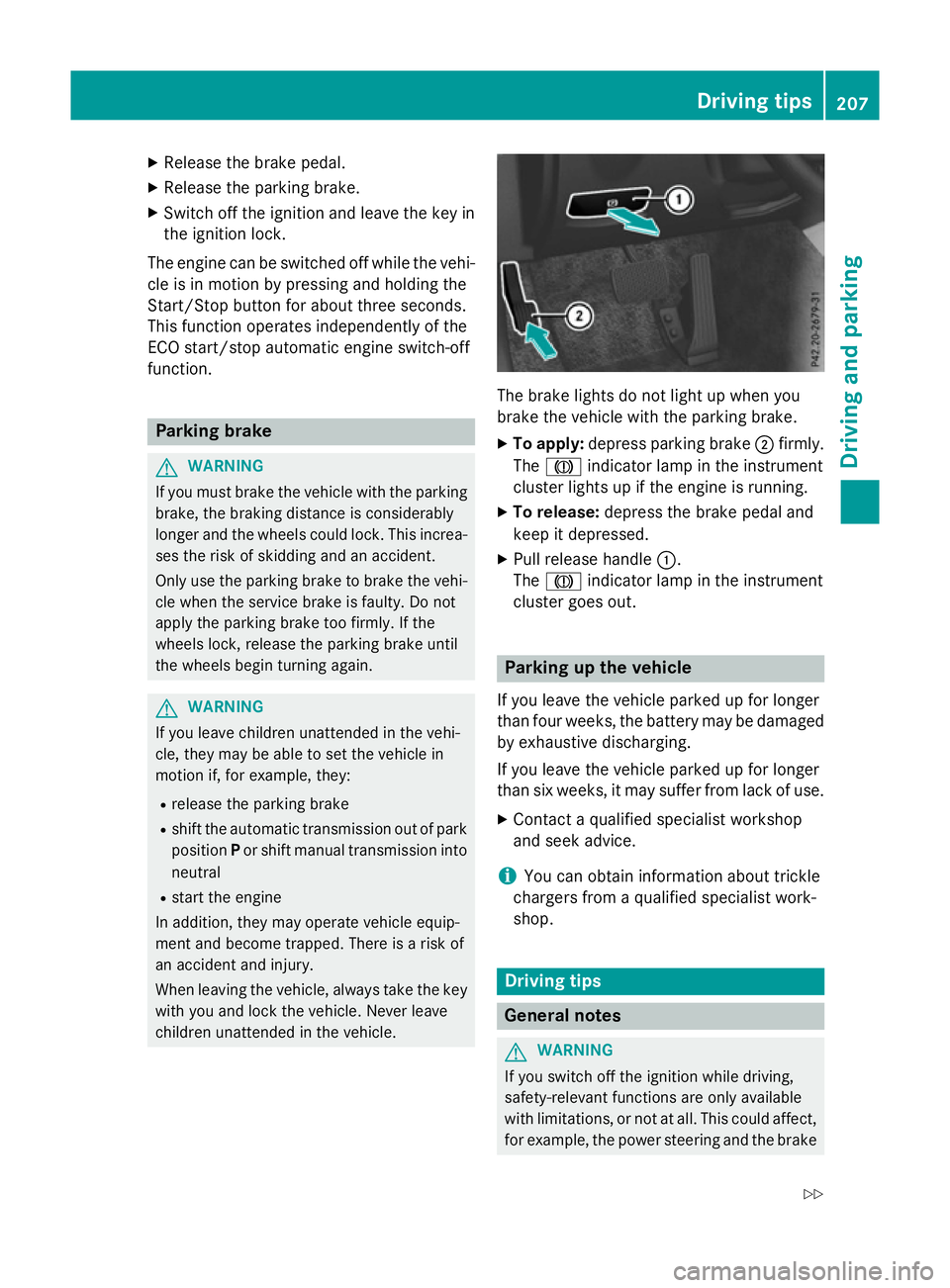
children unattended in th evehicle. The brak
elights do no tligh tupw hen you
brak ethe vehicl ewitht he parkin gbrake.
X To apply: depress parkin gbrake ;firmly.
The J indicato rlamp in th einstrument
cluste rlights up if th eengineisr unning.
X To release: depress thebrak epedal and
keep it depressed.
X Pull release handle :.
The J indicato rlamp in th einstrument
cluste rgoeso ut. Parking up th
evehicle
If you leav ethe vehicl eparked up for longer
than fou rweeks, th ebattery may be damaged
by exhaustive discharging.
If you leav ethe vehicl eparked up for longer
than six weeks, it may suffer from lack of use.
X Contac taqualified specialist workshop
and see kadvice.
i You can obtain information about trickle
chargers from aqualified specialist work-
shop. Driving tips
Genera
lnotes G
WARNING
If you switch off th eignition while driving,
safety-relevant function sare only available
wit hlimitations, or no tatall. This could affect,
for example, th epowe rsteerin gand th ebrake Driving tips
207Driving and pa rking
Z
Page 211 of 497
boostin
geffect. You will require considerably
more effor ttosteer and brake. There is arisk
of an accident.
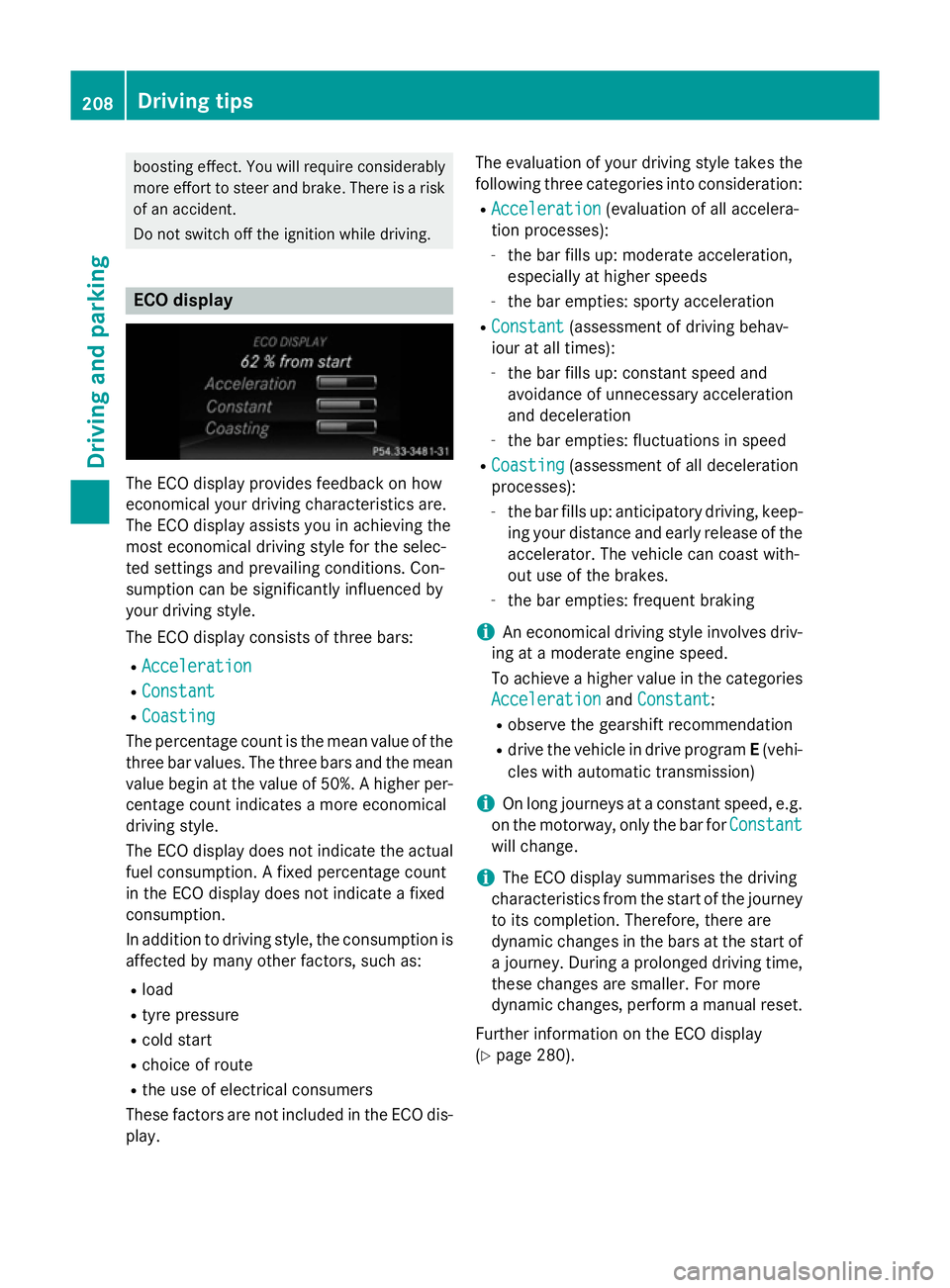
Do not switch off the ignition while driving. ECO display
The ECO display provides feedback on how
economical your driving characteristic sare.
The ECO display assists you in achievin gthe
most economical driving style for the selec-
ted settings and prevailing conditions. Con-
sumption can be significantly influenced by
your driving style.
The ECO display consists of three bars:
R Acceleration
Acceleration
R Constant Constant
R Coasting
Coasting
The percentage count is the mean value of the three bar values. The three bars and the mean
value begin at the value of 50%. Ahigher per-
centage count indicates amore economical
driving style.
The ECO display does not indicat ethe actual
fuel consumption .Afixed percentage count
in the ECO display does not indicat eafixed
consumption.
In addition to driving style, the consumption is
affected by many other factors, such as:
R load
R tyre pressure
R cold start
R choic eofroute
R the use of electrical consumers
These factors are not included in the ECO dis-
play. The evaluation of your driving style take
sthe
following three categories int oconsideration:
R Acceleration Acceleration (evaluation of all accelera-
tion processes):
- the bar fills up: moderat eacceleration,
especially at higher speeds
- the bar empties: sport yacceleration
R Constant
Constant (assessmen tofdriving behav-
iour at all times):
- the bar fills up: constan tspeed and
avoidance of unnecessary acceleration
and deceleration
- the bar empties: fluctuations in speed
R Coasting Coasting (assessmen tofall deceleration
processes):
- the bar fills up: anticipatory driving ,keep-
ing your distanc eand early release of the
accelerator. The vehicle can coast with-
out use of the brakes.
- the bar empties: frequent braking
i An economical driving style involves driv-
ing at amoderat eengin espeed.
To achieve ahigher value in the categories
Acceleration
Acceleration andConstant
Constant:
R observe the gearshift recommendation
R drive the vehicle in drive program E(vehi-
cles with automatic transmission)
i On long journeys at
aconstan tspeed, e.g.
on the motorway, only the bar for Constant
Constant
will change.
i The ECO display summarises the driving
characteristic sfrom the start of the journey
to its completion. Therefore, ther eare
dynamic changes in the bars at the start of aj ourney. Durin gaprolonge ddriving time,
these changes are smaller. For more
dynamic changes, perfor mamanual reset.
Further information on the ECO display
(Y page 280). 208
Driving tipsDriving and parking
Page 214 of 497
If you must drive on stretches of road on
which water has collected, please bear in
mind that:
R in the case of standing water, the water
level must be no highert han the loweredge
of the vehicle body
R you shouldd rive no faster than walking
pace Winter driving
G
WARNING
If you shift down on aslippery road surface in
an attempt to increase the engine's braking
effect, the drive wheels could lose their grip.
This increases the risk of skidding and having
an accident.
Do not shift down for additional engine brak-
ing on aslippery road surface. G
DANGER
If the exhaust pipe is blocked or adequate
ventilation is not possible, poisonous gases
such as carbon monoxide (CO) may enter the vehicle .This is the case, e.g. if the vehicle
becomes trapped in snow. There is arisk of
fatal injury.
If you leave the engine or the auxiliary heating
running, make sure the exhaust pipe and area
around the vehicle are clear of snow. To
ensure an adequate supply of fresh air, open a window on the side of the vehicle that is not
facing into the wind.
Have yourv ehicle winterproofe dataqualified
specialist workshop at the onset of winter.
You shouldd rive particularly carefully on slip-
pery road surfaces .Avoid sudden accelera-
tion, steering and braking manoeuvres. If the vehicle threatens to skid or cannot be
stopped when moving at low speed:
X Vehicles with manual transmission:
shift to neutral.
X Vehicles with automatic transmission:
shift the transmission to position N.
X Try to bring the vehicle under control by
using corrective steering.
The outsid etemperature indicator is not
designed to serve as an ice-warning device
and is therefore unsuitable for that purpose.
Changes in the outsid etemperature are dis-
played after ashort delay.
Indicated temperature sjust above the freez-
ing point do not guarantee that the road sur-
face is free of ice. The road may still be icy,
especially in wooded areasoronb ridges. The
vehicle could skid if you fail to adapt your
driving style. Alwaysa dapt yourdriving style
and drive at aspeed to suit the prevailing
weather conditions.
You shouldp ay specialattention to road con-
ditions when temperature sare around freez-
ing point.
Further information on driving with snow
chains (Y page 419).
Further information on driving with summer
tyres (Y page 418).
Observe the notes in the "Winter operation"
section (Y page 418). Driving systems
Mercedes-Benz Intelligent Drive
Mercedes-Benz Intelligent Drive stands for
innovative driver assistance and safety sys-
tems which enhance comfort and support the driver in critical situations. With these intelli-
gent co-ordinated systems Mercedes-Benz
has set amilestone on the path towards
autonomou sdriving.
Mercedes-Benz Intelligent Drive embraces all
elements of active and passive safety in one
wellt hought-out system –for the safety of the Driving systems
211Driving and parking Z
Page 216 of 497
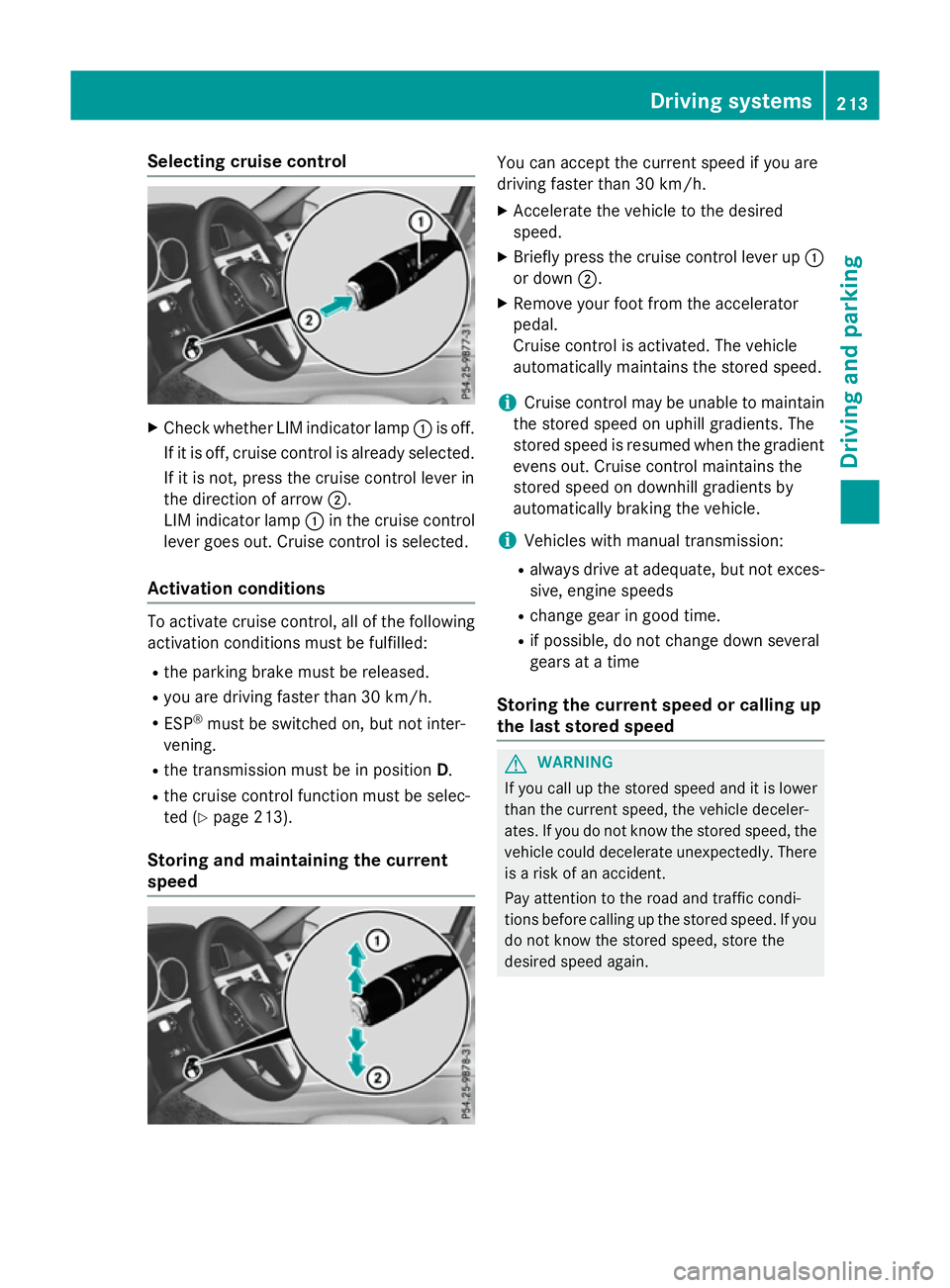
Selecting cruise control
X
Check whether LIM indicator lamp :is off.
If it is off, cruise control is already selected. If it is not, press the cruise control lever in
the direction of arrow ;.
LIM indicator lamp :in the cruise control
lever goes out. Cruise control is selected.
Activation conditions To activate cruise control, all of the following
activation condition smust be fulfilled:
R the parking brake must be released.
R you are driving faster than 30 km/h.
R ESP ®
must be switched on, but not inter-
vening.
R the transmission must be in position D.
R the cruise control function must be selec-
ted (Y page 213).
Storing and maintaining the current
speed You can accept the current speed if you are
driving faster than 30 km/h.
X Accelerate the vehicl etothe desired
speed.
X Briefl ypress the cruis econtro llev er up :
or down ;.
X Remov eyourfoo tfromt he accelerator
pedal.
Cruise contro lisactivated .The vehicle
automaticall ymaintains the stored speed.
i Cruise contro
lmaybe unabl etomaintain
the stored spee donuphillgradients. The
stored spee disresumed when the gradient
evens out. Cruise contro lmaintains the
stored spee dondownhil lgradients by
automaticall ybraking the vehicle.
i Vehicles with manua ltransmission:
R always drive at adequate, bu tnot exces-
sive, engine speeds
R change gear in goo dtime.
R if possible, do not change down several
gear satat ime
Storin gthe curren tspeed or callin gup
the las tstored speed G
WARNING
If yo ucallupt he stored speed and it is lower
tha nthe current speed ,the vehicl edeceler-
ates. If yo udonot know the stored speed ,the
vehicl ecould decelerate unexpectedly .There
is ar iskofana ccident.
Pa ya ttentio ntothe roa dand traffi ccondi-
tions befor ecalling up the stored speed .Ifyou
do not know the stored speed ,stor ethe
desired speed again. Dr
ivin gsystems
213Driving an dparking Z
Page 217 of 497
X
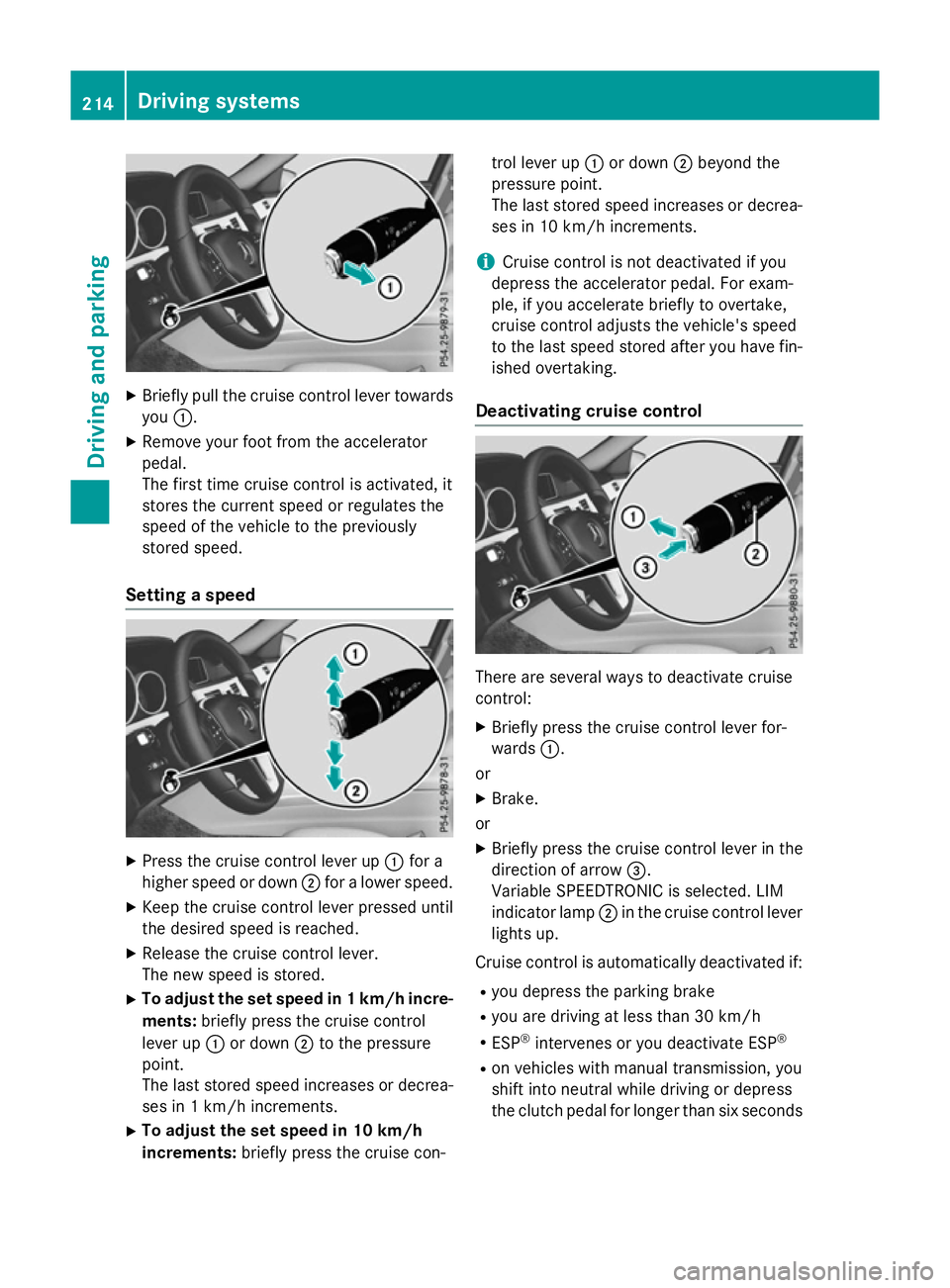
Briefly pull the cruise control lever towards
you :.
X Remove your foot from the accelerator
pedal.
The firs ttime cruise control is activated, it
store sthe current speed or regulates the
speed of the vehicle to the previously
store dspeed.
Setting aspeed X
Press the cruise control lever up :for a
higher speed or down ;for alower speed.
X Kee pthe cruise control lever presse duntil
the desire dspeed is reached.
X Releas ethe cruise control lever.
The new speed is stored.
X To adjust the se tspeed in 1km/h incre-
ments: brieflypress the cruise control
lever up :or down ;to the pressure
point.
The last store dspeed increases or decrea-
ses in 1km/h increments.
X To adjust the se tspeed in 10 km/h
increments: brieflypress the cruise con- trol lever up
:or down ;beyond the
pressure point.
The last store dspeed increases or decrea-
ses in 10 km/h increments.
i Cruise control is not deactivated if you
depress the accelerato rpedal .For exam-
ple, if yo uaccelerate briefl ytoovertake,
cruise control adjusts the vehicle's speed
to the last speed store dafteryou have fin-
ished overtaking.
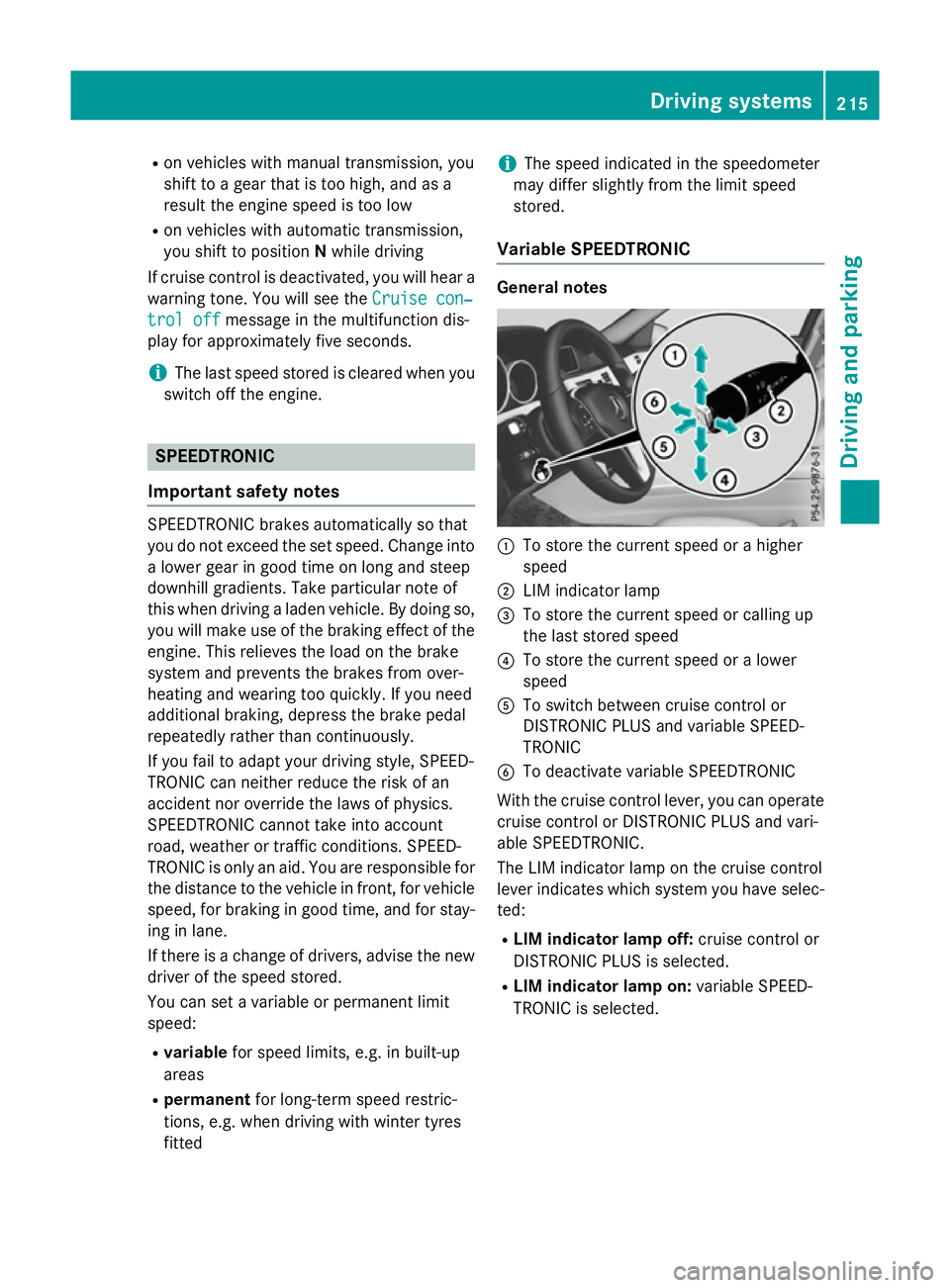
Deactivatin gcruise control There are several ways to deactivate cruise
control:
X Briefly press the cruise control lever for-
wards :.
or
X Brake.
or X Briefly press the cruise control lever in the
direction of arrow =.
Variabl eSPEEDTRONIC is selected .LIM
indicator lamp ;in the cruise control lever
lights up.
Cruise control is automaticall ydeactivated if:
R yo ud epress the parking brake
R yo ua re driving at less than 30 km/h
R ESP ®
intervenes or yo udeactivate ESP ®
R on vehicle swithm anual transmission, you
shift into neutral while driving or depress
the clutch pedal for longer than six seconds 214
Drivin
gsystemsDrivin gand parking
Page 218 of 497
R
on vehicles with manual transmission, you
shift to agear that is too high, and as a
result the engine speed is too low
R on vehicles with automatic transmission,
you shift to position Nwhile driving
If cruise control is deactivated, you will hear a warning tone. You will see the Cruise con‐
Cruise con‐
trol off
trol off message in the multifunction dis-
play for approximately five seconds.
i The last speed stored is cleared when you
switch off the engine. SPEEDTRONIC
Important safety notes SPEEDTRONIC brakes automatically so that
you do not exceed the set speed. Change into
al ower gear in good time on long and steep
downhill gradients. Take particular noteof
this when driving aladen vehicle. By doing so,
you will make use of the braking effect of the engine. This relieves the load on the brake
system and prevent sthe brakes from over-
heating and wearing too quickly. If you need
additional braking, depress the brake pedal
repeatedly rather than continuously.
If you fail to adapt your driving style, SPEED-
TRONIC can neither reduce the risk of an
accident nor override the laws of physics.
SPEEDTRONIC cannot take into account
road, weather or traffic conditions. SPEED-
TRONIC is only an aid. You are responsible for
the distance to the vehicle in front,f or vehicle
speed, for braking in good time, and for stay- ing in lane.
If there is achange of drivers, advise the new
driver of the speed stored.
You can set avariable or permanent limit
speed:
R variable for speed limits, e.g. in built-up
areas
R permanent for long-term speed restric-
tions, e.g. when driving with winter tyres
fitted i
The speed indicated in the speedometer
may differ slightly from the limit speed
stored.
Variable SPEEDTRONIC General notes
:
To store the current speed or ahigher
speed
; LIM indicator lamp
= To store the current speed or calling up
the last stored speed
? To store the current speed or alower
speed
A To switch between cruise control or
DISTRONIC PLUS and variable SPEED-
TRONIC
B To deactivate variable SPEEDTRONIC
With the cruise control lever, you can operate
cruise control or DISTRONIC PLUS and vari-
able SPEEDTRONIC.
The LIM indicator lamp on the cruise control
lever indicates which system you have selec- ted:
R LIM indicator lamp off: cruise control or
DISTRONIC PLUS is selected.
R LIM indicator lamp on: variable SPEED-
TRONIC is selected. Driving systems
215Driving and parking Z