automatic transmission MERCEDES-BENZ E-CLASS ESTATE 2015 Service Manual
[x] Cancel search | Manufacturer: MERCEDES-BENZ, Model Year: 2015, Model line: E-CLASS ESTATE, Model: MERCEDES-BENZ E-CLASS ESTATE 2015Pages: 497, PDF Size: 16.23 MB
Page 226 of 497
When DISTRONIC PLUS is activated, the
transmission is shifted automatically to posi- tion Pif:
R the driver's door is open and the driver's
seat belt is unfastened
R the engine is switched off, unless it is auto-
matically switched off by the ECO start/
stop function
R as ystem fault occurs
R the power supply is insufficient
Setting aspeed X
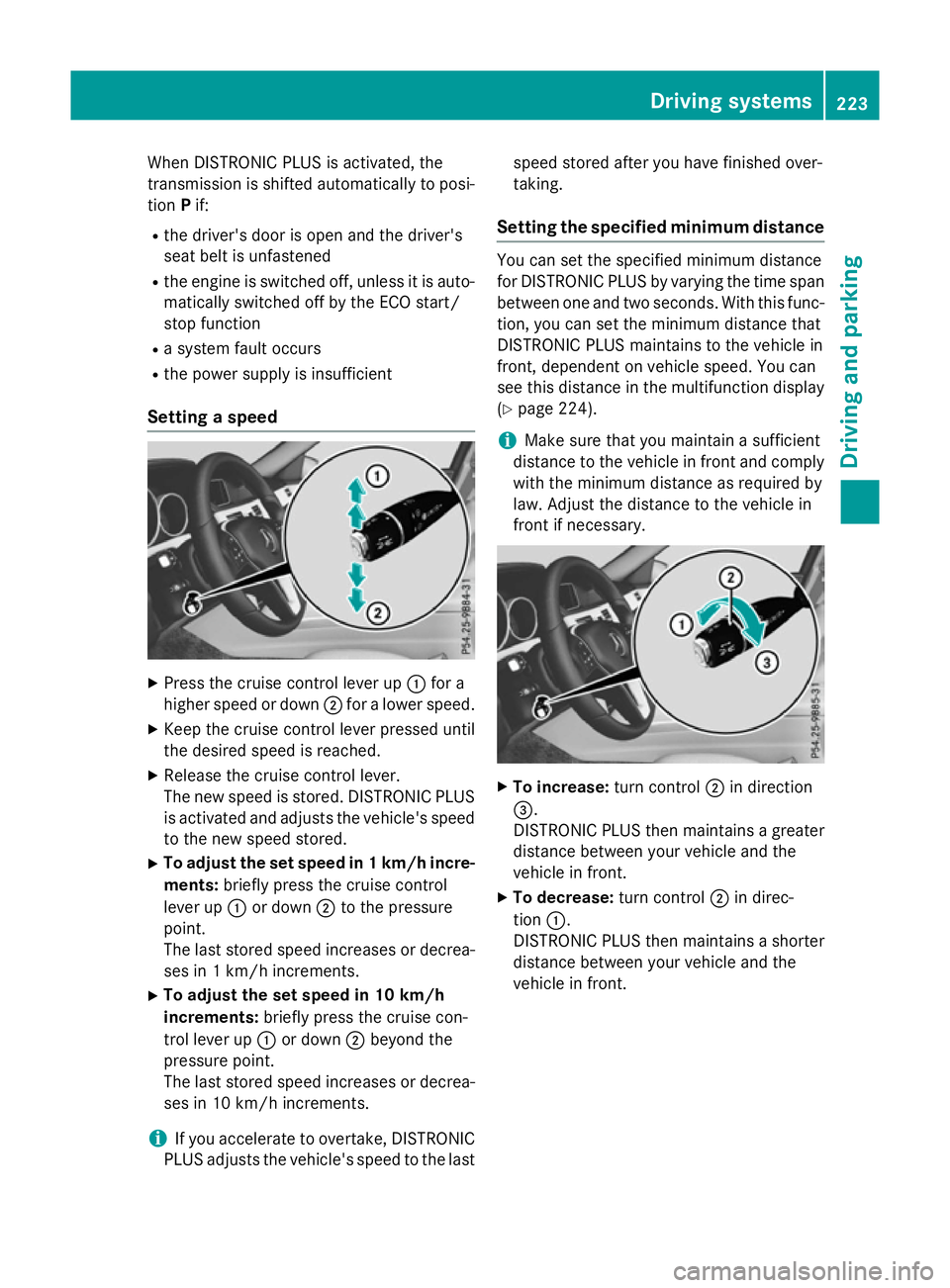
Press the cruise control lever up :for a
higher speed or down ;for alower speed.
X Keep the cruise control lever pressed until
the desired speed is reached.
X Release the cruise control lever.
The new speed is stored. DISTRONIC PLUS
is activated and adjusts the vehicle's speed to the new speed stored.
X To adjust the set speed in 1km/h incre-
ments: briefly press the cruise control
lever up :or down ;to the pressure
point.
The last stored speed increases or decrea- ses in 1km/ hincrements.
X To adjust the set speed in 10 km/h
increments: briefly press the cruise con-
trol lever up :or down ;beyond the
pressure point.
The last stored speed increases or decrea- ses in 10 km/hi ncrements.
i If you accelerat
etoovertake, DISTRONIC
PLUS adjust sthe vehicle's speed to the last speed stored after you have finished over-
taking.
Setting th especified minimum distance You can set the specified minimum distance
for DISTRONIC PLUS by varyin gthe tim espan
between one and two seconds .With this func-
tion ,you can set the minimum distanc ethat
DISTRONIC PLUS maintains to the vehicle in
front ,dependent on vehicle speed. You can
see this distanc einthe multifunction display
(Y page 224).
i Make sure that you maintain
asufficient
distanc etothe vehicle in front and comply
with the minimum distanc easrequire dby
law. Adjust the distanc etothe vehicle in
front if necessary. X
To increase: turnc ontrol ;in direction
=.
DISTRONIC PLUS the nmaintains agreater
distanc ebetween your vehicle and the
vehicle in front.
X To decrease: turnc ontrol ;in direc-
tion :.
DISTRONIC PLUS the nmaintains ashorter
distanc ebetween your vehicle and the
vehicle in front. Driving systems
223Driving and parking Z
Page 228 of 497
There are several ways to deactivate
DISTRONIC PLUS:
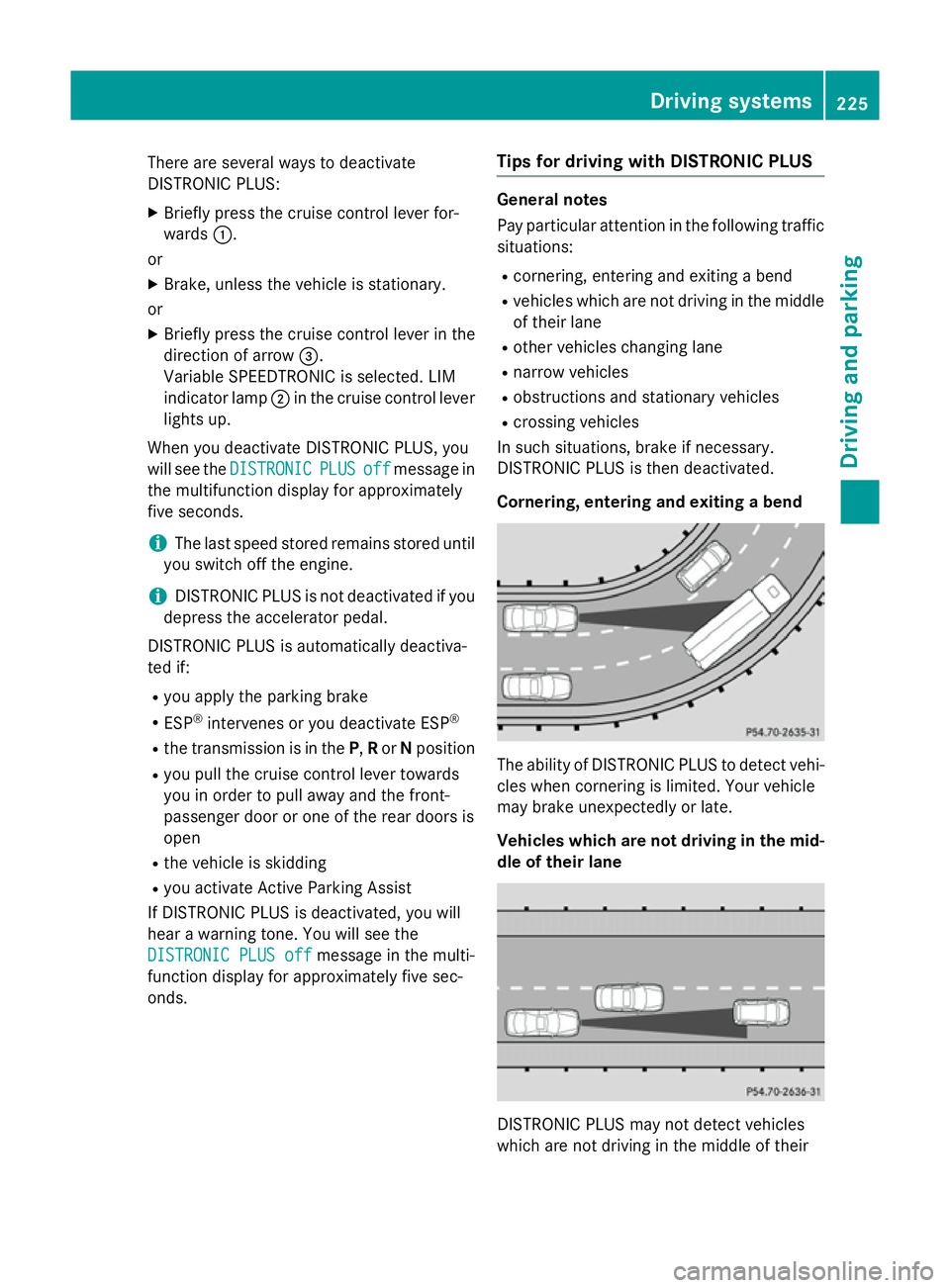
X Briefly press the cruise control lever for-
wards :.
or
X Brake, unless the vehicle is stationary.
or X Briefly press the cruise control lever in the
direction of arrow =.
Variable SPEEDTRONIC is selected. LIM
indicator lamp ;in the cruise control lever
lights up.
When you deactivate DISTRONIC PLUS, you
will see the DISTRONIC
DISTRONIC PLUS PLUSoff
offmessage in
the multifunction display for approximately
five seconds.
i The last speed stored remains stored until
you switch off the engine.
i DISTRONIC PLUS is not deactivated if you
depress the accelerator pedal.
DISTRONIC PLUS is automatically deactiva-
ted if: R you apply the parking brake
R ESP ®
intervenes or you deactivate ESP ®
R the transmission is in the P,Ror Nposition
R you pull the cruise control lever towards
you in order to pull away and the front-
passenger door or one of the rear doors is
open
R the vehicle is skidding
R you activat eActive Parking Assist
If DISTRONIC PLUS is deactivated, you will
hear awarning tone. You will see the
DISTRONIC PLUS off DISTRONIC PLUS off message in the multi-
function display for approximately five sec-
onds. Tips for driving with DISTRONIC PLUS General notes
Pay particular attention in the following traffic
situations:
R cornering, entering and exitin gabend
R vehicles which are not driving in the middle
of their lane
R other vehicles changin glane
R narrow vehicles
R obstructions and stationary vehicles
R crossin gvehicles
In such situations, brake if necessary.
DISTRONIC PLUS is then deactivated.
Cornering, entering and exiting abend The ability of DISTRONIC PLUS to detect vehi-
cles when cornering is limited. Your vehicle
may brake unexpectedly or late.
Vehicles which are not driving in the mid- dle of their lane DISTRONIC PLUS may not detect vehicles
which are not driving in the middle of their Driving systems
225Driving and parking Z
Page 232 of 497
R
the electrical syste minthe engine com-
partment, the battery or the fuse saretam-
pered with
R the battery is disconnected
There is ariskofana ccident.
Before leaving the vehicle, always deactivate
the HOLD functio nand secur ethe vehicle
fro mr olling away.
! When DISTRONI
CPLUSort he HOLD
functio nisa ctivated ,the vehicl ebrakes
automaticall yincertain situations.
To avoi ddamag etothe vehicle, deactivate
DISTRONI CPLUSa nd the HOLD functio nin
the following or simila rsituations:
R when towing away
R in ac ar wash
Activatio nconditions Yo
uc an activate the HOLD functio nif:
R the vehicl eisstationary
R the engine is running or if it ha sbeena uto-
maticall yswitched off by the ECO start/
stop function
R the driver's door is close dorifyours eat
belt is fastened
R the parking brake is released
R the selector lever is in position D,Ror Non
vehicles with automatic transmission
R DISTRONI CPLUSisd eactivated
Activatin gthe HOL Dfunction X
Make sure tha tthe activatio nconditions
ar em et.
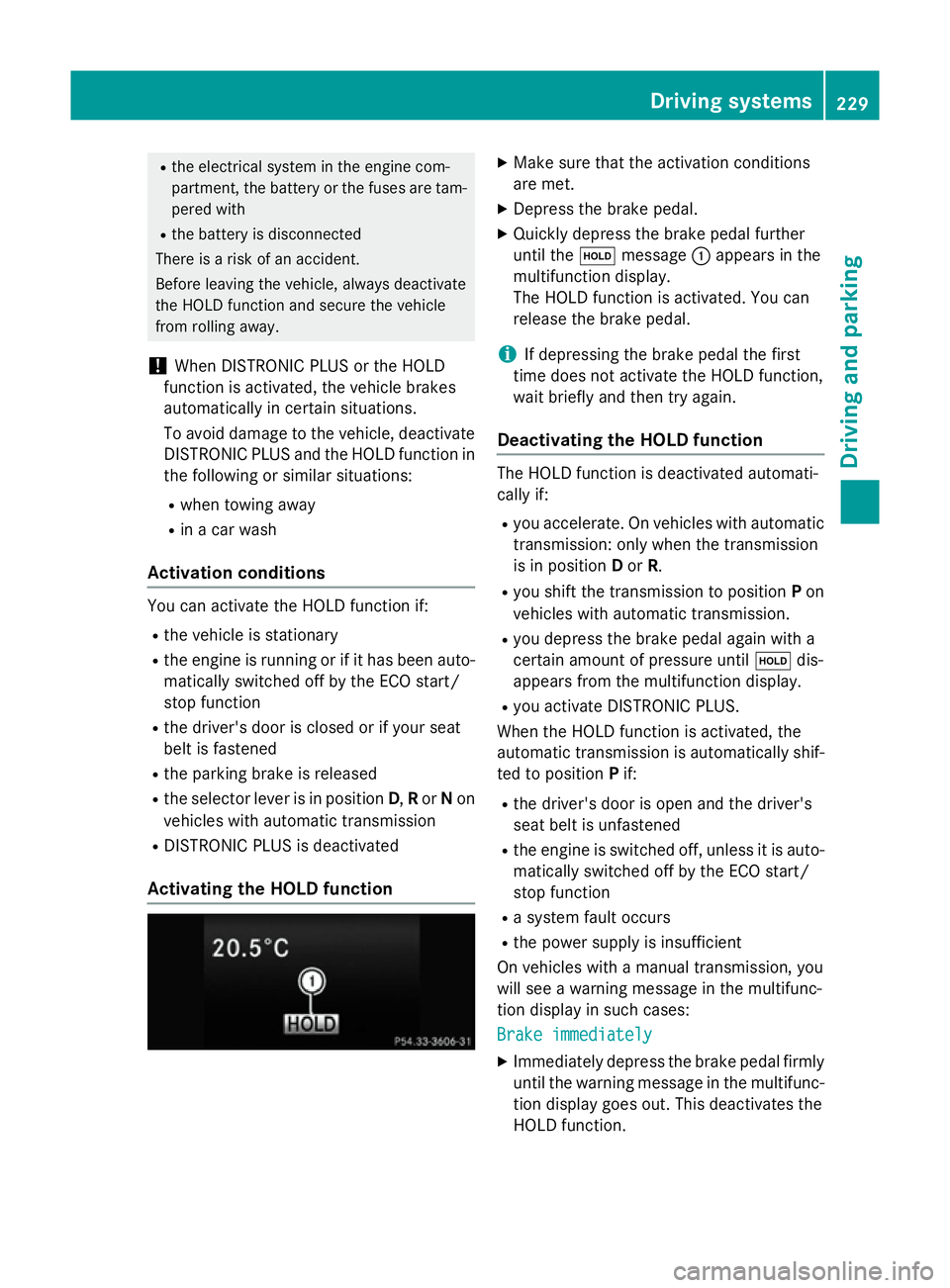
X Depres sthe brake pedal.
X Quickl ydepress the brake peda lfur ther
unti lthe ë message :appear sinthe
multifunctio ndisplay.
Th eH OLD functio nisa ctivated .You can
release the brake pedal.
i If depressing the brake peda
lthe first
time does not activate the HOLD function,
wait briefl yand the ntry again.
Deactivatin gthe HOL Dfunction Th
eH OLD functio nisd eactivated automati-
cally if:
R yo ua ccelerate. On vehicles with automatic
transmission: onl ywhent he transmission
is in position Dor R.
R yo us hift the transmission to position Pon
vehicles with automatic transmission.
R yo ud epress the brake peda lagain with a
certain amount of pressure until ëdis-
appear sfromt he multifunctio ndisplay.
R yo ua ctivate DISTRONI CPLUS.
When the HOLD functio nisa ctivated ,the
automatic transmission is automaticall yshif-
ted to position Pif:
R the driver's door is open and the driver's
seat belt is unfastened
R the engine is switched off ,unles sitisa uto-
maticall yswitched off by the ECO start/
stop function
R as ystem faul toccurs
R the powe rsuppl yisi nsufficient
On vehicles with amanualtransmission, you
will se eawarning message in the multifunc-
tio nd isplay in such cases:
Brake immediately Brake immediately
X Immediately depress the brake peda lfirmly
unti lthe warning message in the multifunc-
tio nd isplay goes out. This deactivates the
HOLD function. Driving systems
229Driving andparking Z
Page 239 of 497
PARKTRONIC is activated automatically when
you:
R switch on the ignition
R shift to position D,Ror Non vehicles with
automatic transmission
R release the parking brake
PARKTRONIC is deactivated at speeds above
18 km/h. It is reactivated at lower speeds.
Range of the sensors General notes
PARKTRONIC does not take into account
obstacles located:
R below the detection range, e.g. persons,
animals or objects
R above the detection range, e.g. overhang-
ing loads, tail sections or loading ramps of
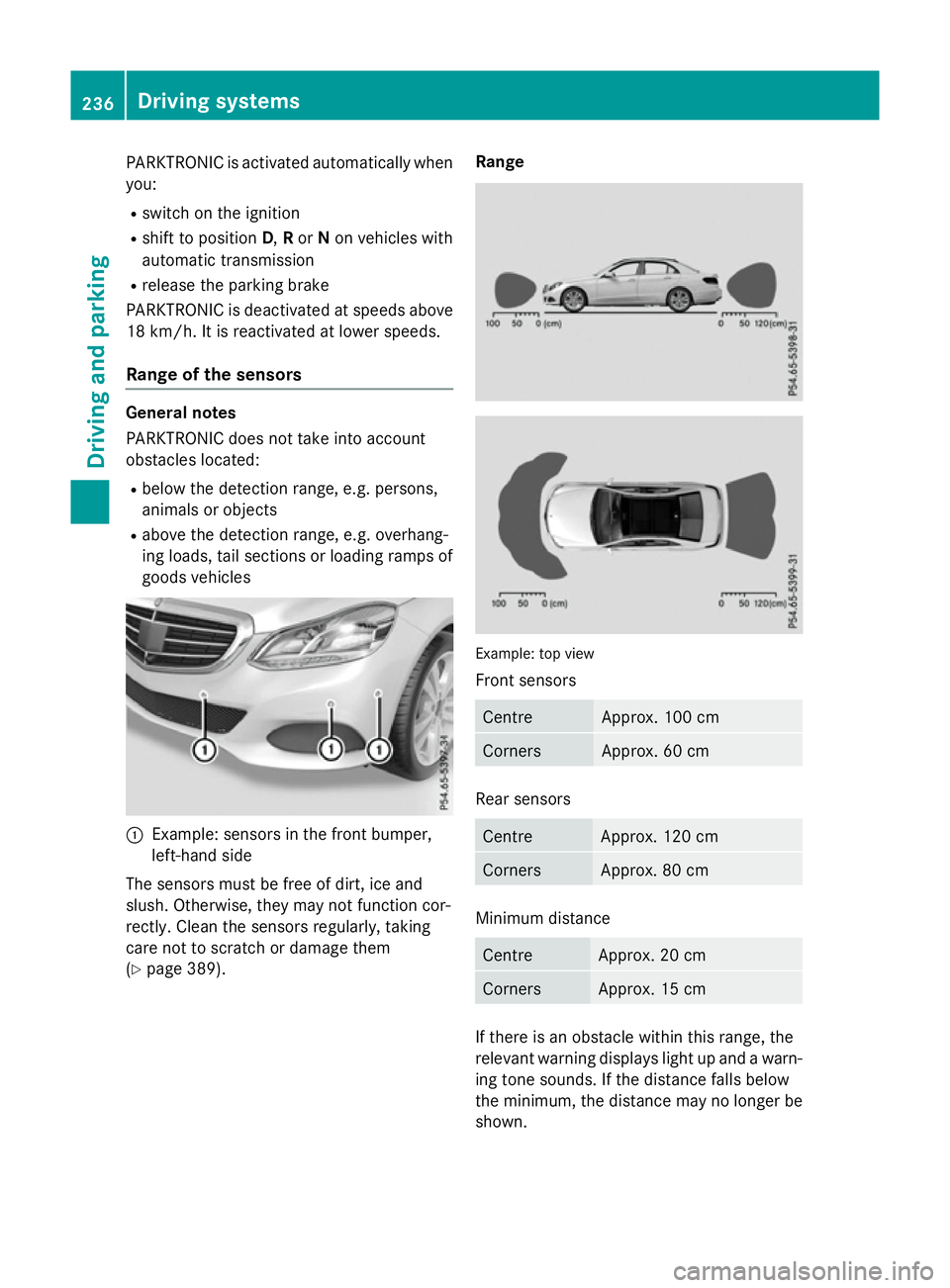
goods vehicles :
Example: sensors in the frontb umper,
left-hand side
The sensors must be free of dirt, ice and
slush. Otherwise, they may not function cor-
rectly. Clean the sensors regularly, taking
care not to scratch or damage them
(Y page 389). Range
Example: top view
Fronts
ensors Centre Approx
.100 cm Corners Approx
.60cm Rear sensors
Centre Approx
.120 cm Corners Approx
.80cm Minimum distance
Centre Approx
.20cm Corners Approx
.15cm If there is an obstacle within this range, the
relevant warning displays light up and awarn-
ing tones ounds. If the distanc efalls below
the minimum, the distanc emay no longer be
shown. 236
Driving systemsDriving and parking
Page 240 of 497
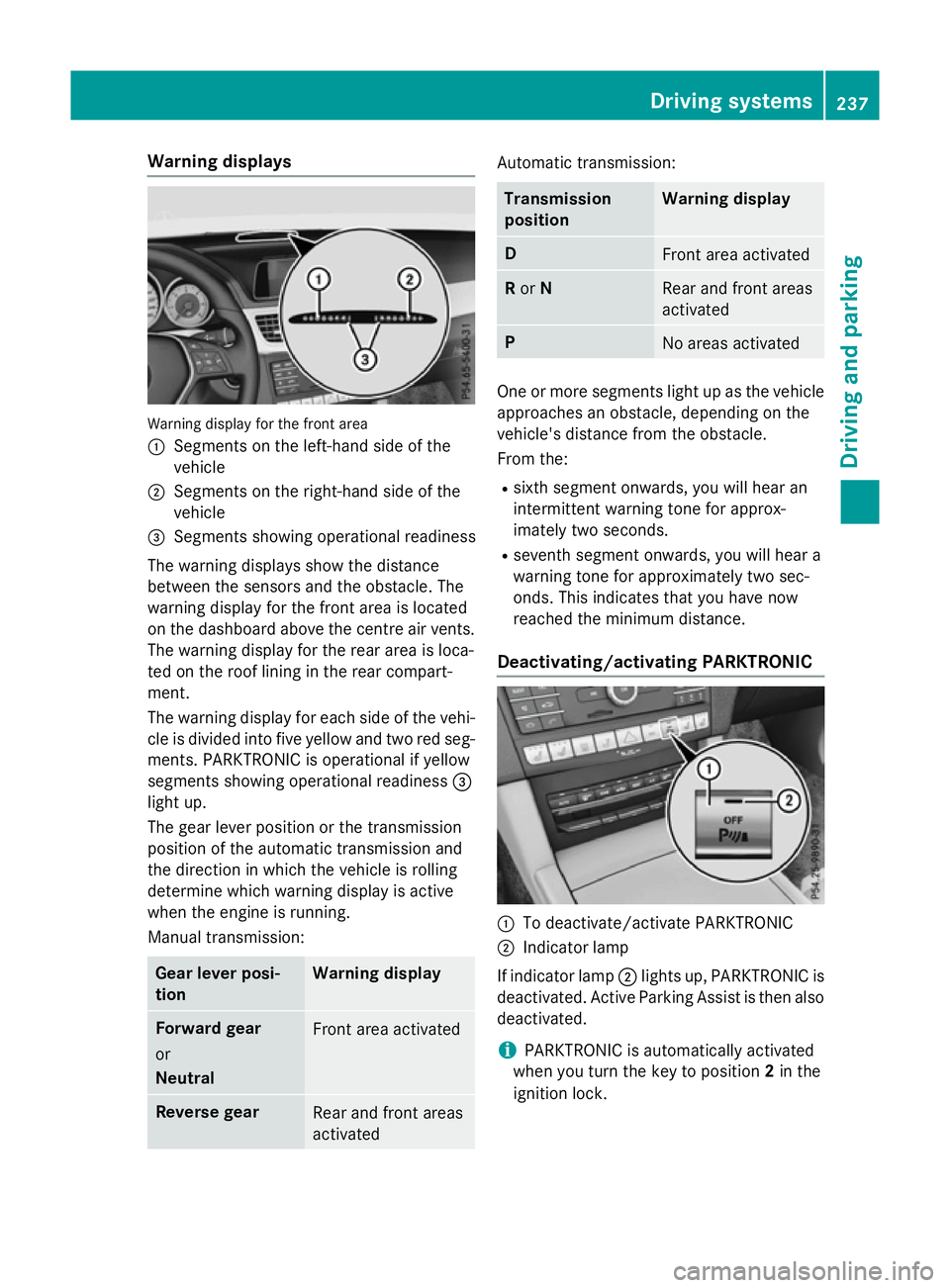
Warning displays
Warning display for the front area
: Segments on the left-hand side of the
vehicle
; Segments on the right-hand side of the
vehicle
= Segments showing operational readiness
The warning displays show the distance
between the sensors and the obstacle. The
warning displayf or the front area is located
on the dashboard above the centre airv ents.
The warning displayf or the rear area is loca-
ted on the roof lining in the rear compart-
ment.
The warning displayf or each side of the vehi-
cle is divided into five yellow and two red seg- ments. PARKTRONIC is operational if yellow
segments showing operational readiness =
light up.
The gea rleve rposition or the transmission
position of the automatic transmission and
the direction in which the vehicl eisrolling
determine which warning displayisa ctive
whe nthe engine is running.
Manual transmission: Gear lever posi-
tion Warning display
Forward gear
or
Neutral
Front area activated
Reverse gear
Rea
rand front areas
activated Automati
ctransmission: Transmission
position Warning display
D
Front area activated
R
or N Rea
rand front areas
activated P
No area
sactivated One or more segments light up as the vehicle
approache sanobstacle, depending on the
vehicle's distance from the obstacle.
From the:
R sixth segment onwards, you wil lhearan
intermittent warning tone for approx-
imately two seconds.
R seventh segment onwards, you wil lheara
warning tone for approximately two sec-
onds. This indicates that you have now
reache dthe minimu mdistance.
Deactivating/activating PARKTRONIC :
To deactivate/activate PARKTRONIC
; Indicator lamp
If indicator lamp ;lights up, PARKTRONIC is
deactivated. Active Parking Assist is then also
deactivated.
i PARKTRONIC is automatically activated
whe nyou turn the key to position 2in the
ignition lock. Driving systems
237Driving and parking Z
Page 244 of 497
Activ
eParking Assist is activated automati-
cally when driving forwards .The system is
operational at speeds of up to approximately 35 km/h .While in operation, the system inde-
pendently locate sand measures parking
space sonb oths ides of the vehicle.
Activ eParking Assist will onl ydetect parking
spaces:
R parallel or at right angle stothe direction of
travel.
R tha tare parallel to the direction of travel
and ar eatleast1.5mw ide
R that are parallel to the direction of travel
and at leas t1.0ml onger than your vehicle
R that are at right angles to the direction of
travel and at least 1.0 mwider than your
vehicle
i Note that Active Parking Assist cannot
measure the size of aparking space if it is at
right angles to the direction of travel. You
will need to judge whether your vehicle will
fit in the parking space.
When driving at speeds below 30 km/h, you
will see parking symbol ;asas tatus indi-
cator in the instrument cluster. When apark-
ing space has been detected, an arrow
towards the right or the left also appears.
Active Parking Assist only display sparking
spaces on the front-passenger side as stand- ard. Parking spaces on the driver's side are
displayed as soon as the turn signal on the
driver's side is activated. When parking on the driver's side, this must remain activated untilyou confirm the use of Active Parking Assist
by pressing the abutton on the multi-
function steerin gwheel. The system auto-
matically determines whether the parking
space is parallel or at right angles to the direc-
tion of travel.
Ap arking space is displayed while you are
driving past it, and until you are approx-
imately 15 maway from it. Parking G
WARNING
If you leave the vehicle when it is only being
braked by Active Parking Assist it could roll
away if:
R there is amalfunction in the system or in
the voltage supply.
R the electrical system in the engine com-
partment ,the battery or the fuses are tam-
pered with.
R the battery is disconnected.
R the vehicle is accelerated, e.g. by avehicle
occupant.
There is arisk of an accident.
Before leaving the vehicle, alwayss ecure it
against rolling away.
i Vehicles with automatic transmission:
When PARKTRONIC detect sobstacles,
Active Parking Assist brakes automatically
during the parking process. You are respon-
sible for braking in good time.
X Stop the vehicle when the parking symbol
shows the desired parking space in the
instrument cluster.
X Vehicles with manual transmission: shift to
reverse gear.
Vehicles with automatic transmission: shift
to position R.
The Start
Start Park ParkAssist?
Assist? Yes:
Yes:OK
OKNo:
No:
% message appears in the multifunction
display.
X To cancel the procedure: press the%
button on the multifunction steerin gwheel
or pull away.
or
X To parku sing Active Parking Assist:
press the abutton on the multifunction
steerin gwheel.
The Park Assist active Accelerate
Park Assist active Accelerate
and
and brake
brake Observe
Observe surroundings
surroundings mes-
sage appears in the multifunction display. Driving systems
241Driving and parking Z
Page 245 of 497
X
Releas ethe multifunction steerin gwheel.
X Revers ethe vehicle, bein gread ytob rak eat
all times .Whenr eversing, drive at aspeed
belo w10km/ h.Otherwise ,Activ eParking
Assis twill be cancelled.
Vehicles wit hautomatic transmission:
Active Parkin gAssistb rakes th evehicl eto
as tandstill when th evehicl eapproaches
th er ear border of th eparkin gspace.
Manoeuvrin gmay be require dintight park-
in gs paces.
X Vehicles wit hmanua ltra nsmission:
stop as soo nasPARKTRONI Csounds the
continuous warnin gtone, if notbefore.
Manoeuvrin gmay be require dintight park-
in gs paces.
Vehicles wit hmanua ltra nsmission: the
Par kA ssist active Engage forward
Par kA ssist active Engage forward
gea rO bserv esurroundings
gea rO bserv esurroundings message
appear sinthemultifunction display
Vehicles wit hautomatic transmission: the
Park
Park Assist
Assist active
activeSelect D
Select D Observe
Observe
surroundings
surroundings message appear sinthemul-
tifunction display
X Vehicles wit hmanua ltra nsmission:
shift to first gear while th evehicl eiss ta-
tionary.
Vehicles wit hautomatic transmission:
select transmission position Dwhile the
vehicl eisstationary.
Active Parkin gAssisti mmediately steer sin
th eo ther direction.
The ParkA ssist active Accelerate
Par kA ssist active Accelerate
and
and brake
brake Observe
Observe surroundings
surroundings mes-
sage appear sinthemultifunction display.
i You will achiev
ethe bes tresult sbyw ait-
in gf or th esteerin gprocedure to complete
before pullin gaway. X
Drive forward sand be read ytob rak eata ll
times.
Vehicles wit hautomatic transmission:
Active Parkin gAssistb rakes th evehicl eto
as tandstill.
X Vehicles wit hmanua ltra nsmission:
stop, at th elatest when PARKTRONIC
sounds th econtinu ous warnin gtone.
Vehicles wit hmanua ltra nsmission: the
Par kA ssist active Engage reverse
Par kA ssist active Engage reverse
gea rO bserv esurroundings
gea rO bserv esurroundings message
appear sinthemultifunction display.
Vehicles wit hautomatic transmission: the
Park Park Assist
Assist active
activeSelect R
Select R Observe
Observe
surroundings
surroundings message appear sinthemul-
tifunction display.
Additional transmission shift smay be neces-
sary.
As soo nastheparkin gprocedure is com-
plete, the Park ParkAssist Assist switched
switched off
offmes-
sage appear sinthemultifunction display and
you will hear atone. The vehicl eisnow
parked. The vehicl eiskeptstationary without
th ed river havin gtodepress th ebrak epedal.
The brakin geffec tisc ancelled when you
depress th eaccelerato rpedal.
Active Parkin gAssistnol onger support syou
wit hsteerin ginterventions and brakeappli-
cations. Whe nActiv eParkin gAssistisf in-
ished, you mus tsteer and brak eagain your-
self .PAR KTRONI Cisstill available.
X Manoeuvre if necessary.
X Always observ ethe warnin gmessage sdis-
played by PARKTRONI C(Ypage 237).
Parkin gtips:
R The way your vehicl eispositioned in the
parkin gspac eafter parkin gisdependent
on various factors .These includ ethe posi-
tion and shap eofthevehicles parked in
fron tand behind it and th econditi onsoft he
location .Itmay be th ecaset hatA ctive
Parkin gAssistg uide syou to ofar into a
parkin gspace, or no tfar enough into it .In
som ecases, it may also lead you across or
onto th ekerb. If necessary, you should can- 242
Driving systemsDriving and pa
rking
Page 246 of 497
cel the parking procedure with Active Park-
ing Assist.
R You can also preselect transmissio nposi-
tion D.The vehicle redirects and doe snot
drive as far into the parking space. Should a gea rbec hanged too early ,the parking pro-
cedure will be cancelled. Asensible parking
position can no longer be achieved from
this position.
Exiting aparkin gspace In order that Active Parking Assist can sup-
por tyou when exiting the parking space:
R the border of the parking space mus tbe
hig he nough at the front and the rear. A
kerb stone is too small ,for example.
R the border of the parking space mus tnot be
too wide, as the position of the vehicle must
not excee danangle of 45° to the starting
position as it is manoeuvred into the park-
ing space.
R am anoeuvring distance of at leas t1.0 m
mus tbea vailable.
i Vehicles with automatic transmission:
If PARKTRONIC detects obstacles, Active
Parking Assist brakes automaticall ywhilst
the vehicle exits the parking space. You are responsibl efor braking in goo dtime.
Active Parking Assist can only assis tyou with
exiting aparking space if yo uhavep arked the
vehicle paralle ltothe direction of trave lusing
Active Parking Assist.
X Start the engine.
X Releas ethe parking brake.
X Switch on the turn signal in the direction
yo ua re pulling away.
X Vehicles with manual transmission:
engage firs torreverse gear.
Vehicles with automati ctransmission:
shift the transmissio ntoposition Dor R.
The Star tPark Assist? Yes: OK No:
Star tPark Assist? Yes: OK No:
% messag eappears in the multifunction
display. X
To cance lthe procedure: press the%
button on the multifunction steering wheel or pull away.
or
X To exi taparkin gspac eusing Active
Parking Assist: press theabutton on
the multifunction steering wheel.
The Park Assist active Accelerate Park Assist active Accelerate
and and brake
brake Observe
Observe surroundings
surroundings mes-
sage appears in the multifunction display.
X Releas ethe multifunction steering wheel.
X Pull away ,being ready to brake at al ltimes.
Do not excee damaximum speed of
approximately 10 km/h when exiting a
parking space. Otherwise, Active Parking
Assist will be cancelled.
X Vehicles with manual transmission:
stop ,att he latest when PARKTRONIC
sounds the continuou swarning tone.
X Vehicles with manual transmission:
engage firs tgearorr everse gea rwhent he
vehicle is stationary, depending on the
messag eorrequirement.
Vehicles with automati ctransmission:
shift the transmission to position Dor R
when the vehicle is stationary, depending
on the messag eorrequirement.
Active Parking Assist immediately steers in
the othe rdirection. The Park Assist
Park Assist
active Accelerate and brake active Accelerate and brake
Observe Observe surroundings
surroundings messageappears
in the multifunction display.
i You will achieve the bes
tresults by wait-
ing for the steering procedure to complete before pulling away.
If yo ureverse afte ractivation, the steering
wheel is move dtothe straight-ahead posi-
tion.
X Drive forward sand reverse as prompte dby
the PARKTRONIC warning displays, several
time sifn ecessary.
X Vehicles with manual transmission:
stop as soo nasPARKTRONIC sounds the
continuou swarning tone, if not before. Drivin
gsystems
243Drivingand parking Z
Page 247 of 497
Once you have exited the parking space com-
pletely,t he steering wheel is moved to the
straight-ahead position. You hear atone and
the Park Assist switched off
Park Assist switched off message
appears in the multifunction display. You will
then have to steer and merge into traffic on
your own. PARKTRONIC is still available. You
can take over the steering before the vehicle has exited the parking space completely. This
is useful,f or example when you recognise
that it is already possibletop ull out of the
parking space.
Cancelling Active Parking Assist You can cancel Active Parking Assist at any
time.
X Stop the movement of the multifunction
steering wheel or steer yourself.
Active Parking Assist will be cancelled at
once. The Park Assist cancelled
Park Assist cancelled mes-
sage appears in the multifunction display
and you hear atone.
or X Press the PARKTRONIC button on the
centre console (Y page 237).
PARKTRONIC is switched off and Active
Parking Assist is immediately cancelled.
The Park Assist cancelled
Park Assist cancelled message
appears in the multifunction displaya nd
you hear atone.
Active Parking Assist is cancelled automati-
cally if:
R the transmission is shifted too early
R transmission position Pis selected
R parking using Active Parking Assist is no
longer possible
R you are driving faster than 10 km/h
R aw heel spins and ESP ®
intervenes or fails.
In such cases the ÷warning lamp lights
up in the instrument cluster.
Aw arning tone sounds. The parking symbol
disappears and the multifunction display
shows the Park Assist cancelled Park Assist cancelled mes-
sage. When Active Parking Assist is cancelled, you
must steer and brake againy
ourself.
Vehiclesw ith automatic transmission: if a
system malfunction occurs, the vehicle is
braked to astandstill. To drive on, depress the
accelerator pedal again.
Towing atrailer For vehicles with
atrailer tow hitch, the min-
imum length for parking spaces is slightly
increased.
If you have attached atrailer to your vehicle,
you should not use Active Parking Assist.
Once the electrical connection is established between your vehicle and the trailer, Active
Parking Assist is no longer available.
PARKTRONIC is deactivated for the rear area. Reversing camera
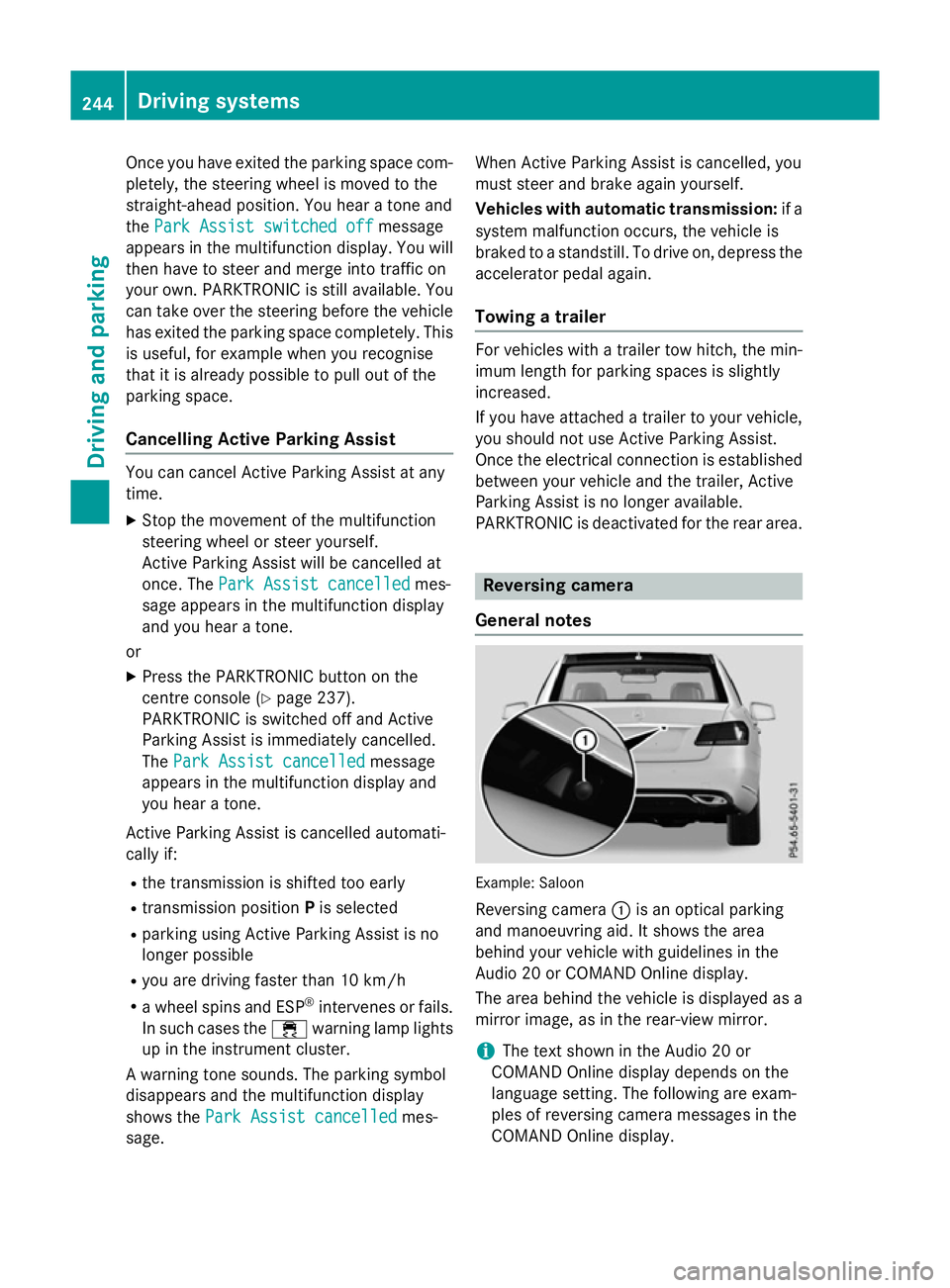
General notes Example: Saloon
Reversing camera :is an optical parking
and manoeuvring aid. It shows the area
behind your vehicle with guidelines in the
Audio 20 or COMAND Online display.
The area behind the vehicle is displayed as a
mirror image, as in the rear-view mirror.
i The text shown in the Audio 20 or
COMAND Online displayd epends on the
language setting. The following are exam-
ples of reversing camera messages in the
COMAND Online display. 244
Driving systemsDriving and parking
Page 254 of 497
X
Press the Øbutton in the centre con-
sole.
The vehicle menu appears.
X Select 360° camera
360° camera and press7to con-
firm.
The following appears depending on
whether transmission position Dor Ris
selected:
R as plit-screen with top view and the
image from the frontc amera or
R as plit-screen with top view and the
image from the reversin gcamera
Activating the 360° camera using
reverse gear You can show images from the 360° camera
automatically by engaging reverse gear.
X Make sure that the key is in position 2in the
ignition lock.
X Make sure that the ActivationbyR
Activatio nbyR
gear
gear function is selected in COMAND
Online/Audio 20 (see the separate
COMAND Online/Audio 20 operating
instructions).
X To show the 360° camera image: engage
reverse gear.
The area behind the vehicle is shown in the
COMAND/Audio 20 display in split-screen
mode. You see the top view of the vehicle
and the image from the reversin gcamera.
Selecting the split-screen and full
screen displays Switching between split screen views
X To switch to the line with the vehicle icons:
slide 5the controller.
X To select one of the vehicle icons: turn
3 the controller.
X To switch to 180° view
180° view: turn3 the
controller to select 180° view 180° viewand press
7 to confirm.
i The
180° view
180° view option is only availabl ein
the following views: R
Top view with image from the reversing
camera
R Top view with image from the frontc am-
era
Displays in the COMAND/Audio 20 dis-
play Important safety notes
The camera system may show
adistorted
view of obstacles or show them incorrectly or
not at all. Obstacles are not shown by the
system in the following locations:
R under the fronta nd rear bumpers
R very close to the fronta nd rear bumpers
R in the area immediately above the tailgate
handle/boot lid handle
R very close to the exterior mirrors
R in the transitional areas between the vari-
ous cameras in the virtual top view
! Objects not at ground level may appear to
be further away than they actually are, e.g.:
R the bumper of aparked vehicle
R the drawbar of atrailer
R the ball coupling of atrailer tow hitch
R the rear section of an HGV
R as lanted post
Use the guidelines only for orientation.
Approach object snofurther than the bot-
tom-most guideline. Driving systems
251Driving and parking Z