park assist MERCEDES-BENZ E-CLASS ESTATE 2015 Service Manual
[x] Cancel search | Manufacturer: MERCEDES-BENZ, Model Year: 2015, Model line: E-CLASS ESTATE, Model: MERCEDES-BENZ E-CLASS ESTATE 2015Pages: 497, PDF Size: 16.23 MB
Page 262 of 497
spot monitoring range from behind or from
the side. When you overtake avehicle, the
warning only occurs if the difference in speed
is less than 12 km/h.
The yellow indicator lamp goes out if reverse gear is engaged. Blind Spot Assist is then
deactivated.
The brightness of the indicator or warning
lamps is adjusted automaticallya ccording to
the ambient light.
Collision warning
If av ehicle is detected in the monitoring range
of Blind Spot Assist and you switch on the
corresponding turn signal, adoublew arning
tone sounds. Red warning lamp :flashes. If
the turn signal remains on, detected vehicles
are indicated by the flashing of red warning
lamp :.There are no further warning tones.
Activating Blind Spot Assist X Make sure that Blind Spot Assist is activa-
ted in the on-board computer
(Y page 288).
X Turn the key to position 2in the ignition
lock.
Warning lamps :in the exterior mirrors
light up red for approximately 1.5 seconds
and then turn yellow.
Towing atrailer
If you couple up atrailer, make sure that you
have correctly established the electrical con- nection. This can be accomplished by check-
ing the trailer lighting. Blind Spot Assist is
then deactivated. The indicator lamps in the
exterior mirrors light up yellow and the
Blind
Blind Spot SpotAssist
Assist not
notavailable
available when
when
towing atrailer See Owner's Manual
towing atrailer See Owner's Manual
message appears in the multifunction dis-
play.
i You can deactivate the indicator lamps in
the exterior mirrors. To do so, you will need to deactivate Blind
Spot Assist if:
R the key is in position 2in the ignition lock
R the engine is not running
R the electrical connection to the trailer
has been established
Lane Keeping Assist General notes
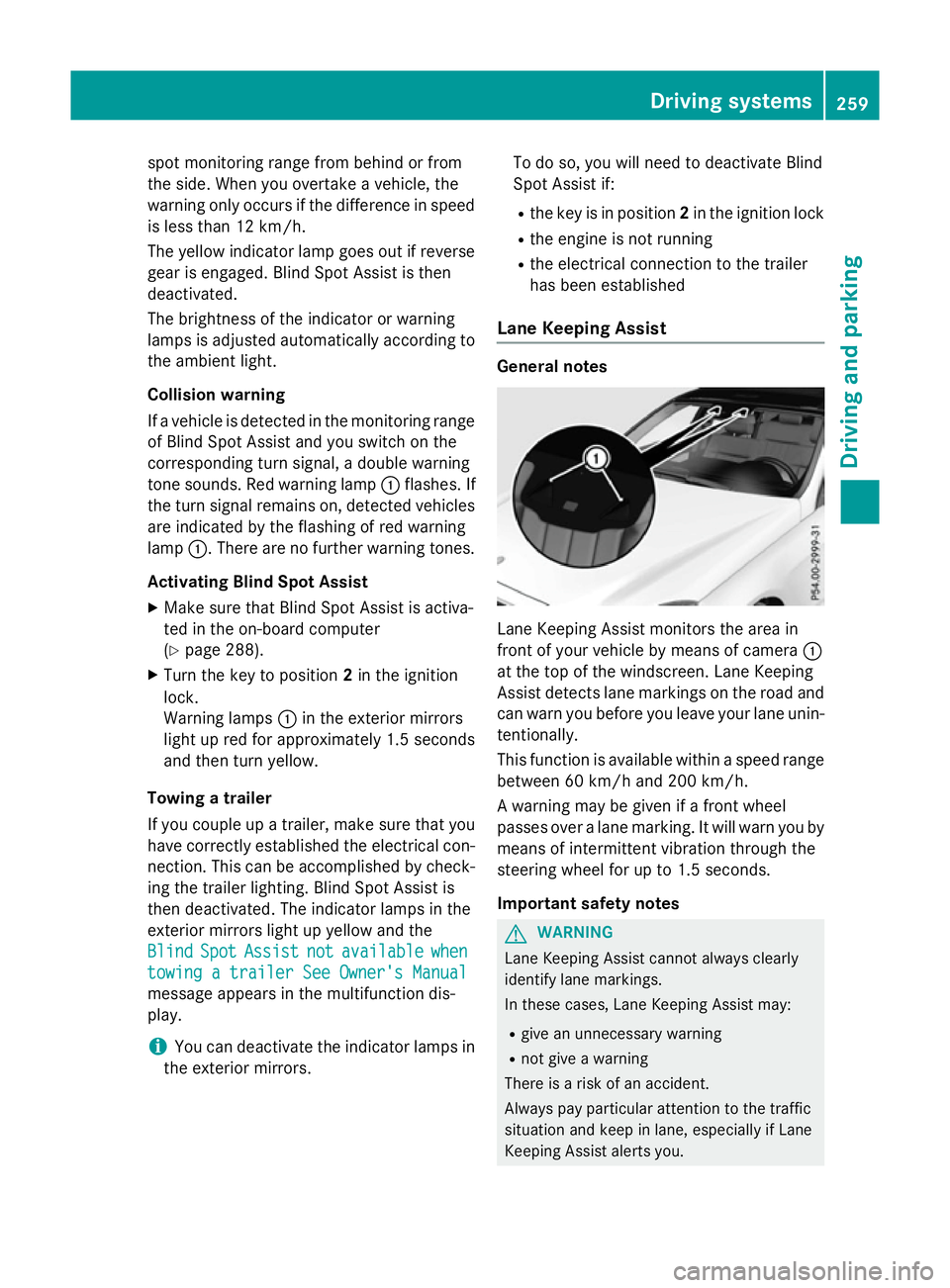
Lane Keeping Assist monitors the area in
front of your vehicle by means of camera
:
at the top of the windscreen. Lane Keeping
Assist detects lane markings on the road and
can warn you before you leave your lane unin-
tentionally.
This function is available within aspeed range
between 60 km/h and 200 km/h.
Aw arning may be given if afront wheel
passes over alane marking. It will warn you by
means of intermittent vibration through the
steering wheel for up to 1.5 seconds.
Important safety notes G
WARNING
Lane Keeping Assist cannot always clearly
identify lane markings.
In these cases, Lane Keeping Assist may:
R give an unnecessary warning
R not give awarning
There is arisk of an accident.
Always pay particular attention to the traffic
situation and keep in lane, especiallyifL ane
Keeping Assist alerts you. Driving systems
259Driving and parking Z
Page 263 of 497
G
WARNING
The Lane Keeping Assist warning does not
return the vehicl etothe original lane. There is
ar isk of an accident.
Always steer, apply the brakes or accelerate
the vehicl eyourself, especially if Lane Keep-
ing Assist alerts you.
If you fail to adapt yourd riving style,Lane
Keeping Assist can neither reduce the risk of
an accident nor overrid ethe lawsofp hysics.
Lane Keeping Assist cannot take into account
road ,weather or traffic conditions. Lane
Keeping Assist is only an aid.Y ou are respon-
sibl efor the distance to the vehicl einfront,
for vehicl espeed, for braking in good time,
and for staying in lane.
Lane Keeping Assist does not keep yourv ehi-
cle in its lane.
The system may be impaired or may not func-
tion if:
R there is poor visibility, e.g. due to insuffi-
cient illumination of the road ,ordue to
snow, rain, fog or spray
R there is glare, e.g. from oncoming traffic,
the sun or reflection from other vehicles
(e.g. if the road surface is wet)
R the windscreen is dirty ,misted up, dam-
agedorc overed,for instance by asticker,
in the vicinity of the camera
R no or several, unclea rlane markings are
present for one lane ,e.g. in aconstruction
area
R the lane markings are worn away,d ark or
covered up, e.g. by dirt or snow
R the distance to the vehicl einfront is too
smal land the lane markings thus cannot be
detected
R the lane markings change quickly, e.g.
lane sbranch off, cross one another or
merge
R the road is narrow and winding
R there are highly variable shad econditions
on the road Activating Lane Keeping Assist
X Activate Lane Keeping Assist using the on-
board computer; to do so, select Standard
Standard
or Adaptive Adaptive (Ypage2 88).
If you drive at speeds above 60 km/h and
lane markings are detected, the lines in the
assistance graphic display (Y page286)
are show ningreen. Lane Keeping Assist is
read yfor use.
Standard
If Standard Standard is selected, no warning vibration
occurs if:
R you have switched on the turn signals. In
this case, the warnings are suppresse dfor
ac ertain period of time.
R ad riving safety system intervenes, such as
ABS, BAS or ESP ®
.
Adaptive
When Adaptive Adaptive is selected, no warning vibra-
tion occurs if:
R you have switched on the turn signals. In
this case, the warnings are suppresse dfor
ac ertain period of time.
R ad riving safety system intervenes, such as
ABS, BAS or ESP ®
.
R you accelerate hard ,e.g. kickdown.
R you brake hard.
R you steer actively, e.g. swerve to avoi dan
obstacl eorchange lane quickly.
R you cut the corner on asharp bend.
In order that you are warned only when nec-
essary and in good time if you cross the lane marking, the system detects certain condi-
tions and warns you accordingly.
The warning vibration occurs earlier if:
R you approach the outer lane marking on a
bend
R the road has very widel anes, e.g.amotor-
way
R the system detects soli dlane markings 260
Driving systemsDriving and parking
Page 264 of 497
The warning vibration occurs later if:
R the road has narrow lanes
R you cut the corner on abend Active Driving Assistance package
General notes The Active Drivin
gAssistance package con-
sists of DISTRONIC PLUS (Y page 217), Active
Blind Spot Assist (Y page 261) and Active
Lane Keeping Assist (Y page 263).
Active Blind Spot Assist General notes
Active Blind Spot Assist monitors the areas
on either side of the vehicle that are not visi-
ble to the driver with two lateral, rear-facing
radar sensors. Awarning display in the exte-
rior mirrors draws your attention to vehicles
detected in the monitored area. If you then
switch on the corresponding turn signal to
change lanes, you will also receive avisual
and audibl ecollision warning. If arisk of side
impact is detected, corrective braking may
help you avoid acollision. Active Blind Spot
Assist evaluates the free space in the direc-
tion of travel and to the side before making a course-correcting brake application. For this,Active Blind Spot Assist uses the forward-
facing radar sensors.
Active Blind Spot Assist supports you from a
speed of approximately 30 km/h.
Important safety notes
Active Blind Spot Assist is only an aid and is
not asubstitute for attentive driving. G
WARNING
Active Blind Spot Assist does not react to
vehicles:
R overtaking too closely on the side, placing
them in the blind spot area
R if the differenc einthe speed of approach
and overtaking is too great As
aresult, Active Blind Spot Assist may nei-
ther give warnings nor intervene in such sit-
uations. There is arisk of an accident.
Always pay careful attention to the traffic sit- uation and maintain asafe distanc eatthe side
of the vehicle.
Radar sensors
The Active Blind Spot Assist radar sensors are integrated into the fronta nd rear bumpers
and behind acover in the radiator trim. Make
sure that the bumpers and the cover in the
radiator trim are free of dirt, ice or slush. The
rear sensors must not be covered, e.g. by
bicycle racks or overhangin gloads. Following
as evere impact or in the event of damage to
the bumpers, have the function of the radar
sensors checked at aqualified specialist
workshop. Active Blind Spot Assist may oth-
erwise no longer function properly.
Monitoring range G
WARNING
Active Blind Spot Assist does not detect all
traffic situations and road users. There is a
risk of an accident.
Always make sure that there is sufficient dis-
tancetot he side for other traffic or obstacles. Example: Saloon Driving systems
261Driving and parking Z
Page 265 of 497
Activ
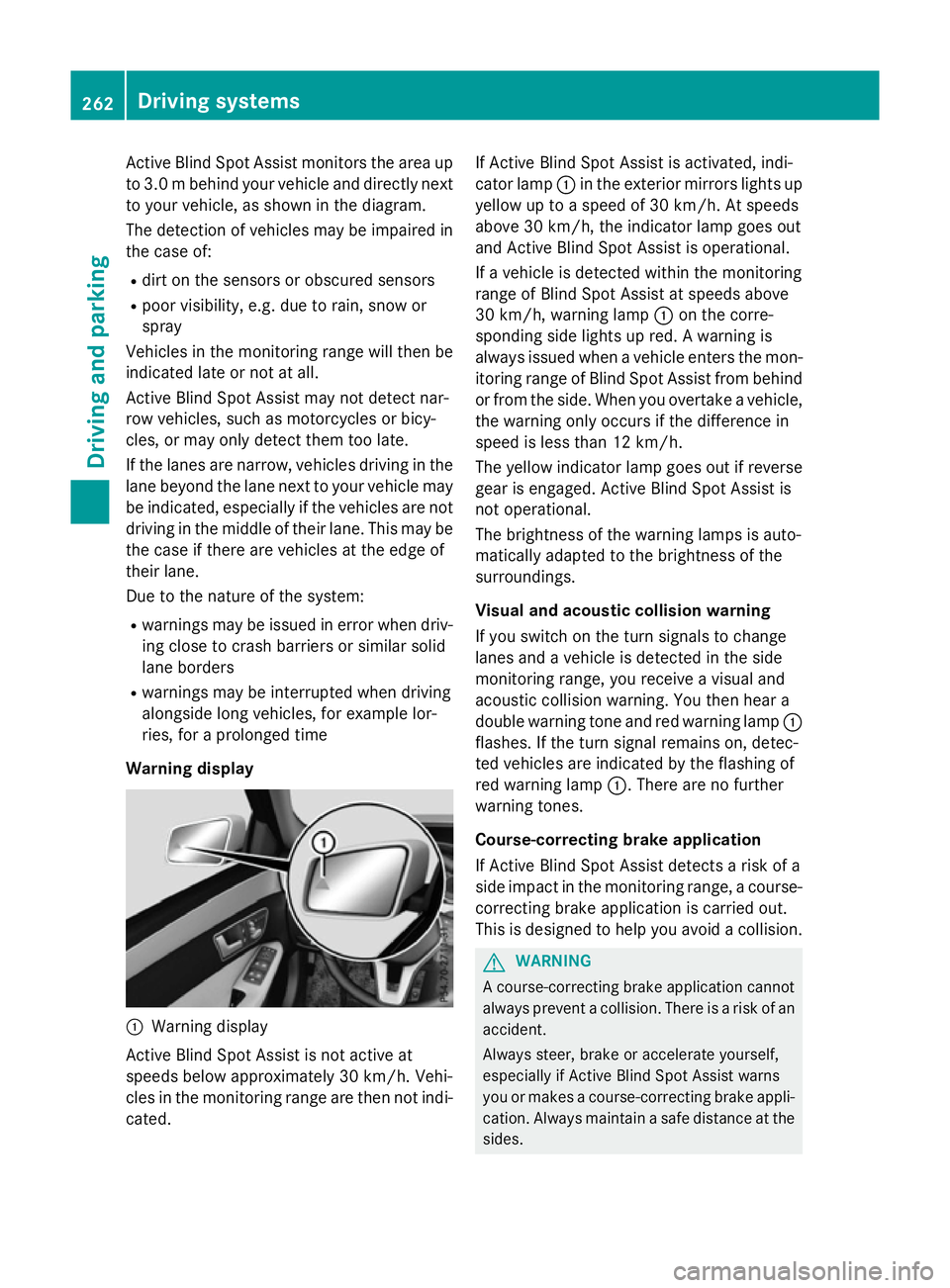
eBlind Spo tAssist monitors the area up
to 3.0 mbehind your vehicle and directly next
to your vehicle, as shown in the diagram.
The detection of vehicles may be impaired in the case of:
R dirt on the sensor sorobscured sensors
R poor visibility, e.g. due to rain, snow or
spray
Vehicles in the monitoring range will then be
indicated late or not at all.
Active Blind Spot Assist may not detec tnar-
row vehicles, such as motorcycles or bicy-
cles, or may only detec tthem too late.
If the lanes are narrow, vehicles driving in the
lane beyond the lane nexttoy our vehicle may
be indicated, especially if the vehicles are not
driving in the middle of their lane. This may be the case if ther eare vehicles at the edge of
their lane.
Due to the nature of the system:
R warnings may be issued in error when driv-
ing close to crash barriers or similar solid
lane borders
R warnings may be interrupted when driving
alongside long vehicles, for example lor-
ries, for aprolonged time
Warning display :
Warnin gdisplay
Active Blind Spot Assist is not active at
speeds below approximately 30 km/h. Vehi-
cles in the monitoring range are then not indi-
cated. If Active Blind Spot Assist is activated, indi-
cator lamp
:in the exterior mirror slights up
yellow up to aspeed of 30 km/h. At speeds
above 30 km/h, the indicator lamp goes out
and Active Blind Spot Assist is operational.
If av ehicle is detected within the monitoring
range of Blind Spot Assist at speeds above
30 km/h, warning lamp :on the corre-
spondin gside lights up red. Awarning is
alway sissued when avehicle enters the mon-
itorin grange of Blind Spot Assist from behind
or from the side. When you overtake avehicle,
the warning only occur sifthe difference in
speed is less than 12 km/h.
The yellow indicator lamp goes out if reverse gear is engaged. Active Blind Spot Assist is
not operational.
The brightness of the warning lamps is auto-
matically adapted to the brightness of the
surroundings.
Visua land acoustic collision warning
If you switch on the turn signals to change
lanes and avehicle is detected in the side
monitoring range, you receive avisual and
acoustic collision warning. You then hear a
double warning tonea nd red warning lamp:
flashes. If the turn signal remains on, detec-
ted vehicles are indicated by the flashing of
red warning lamp :.There are no further
warning tones.
Course-correcting brak eapplication
If Active Blind Spot Assist detects arisk of a
side impact in the monitoring range, acourse-
correcting brake application is carried out.
This is designed to help you avoid acollision. G
WARNING
Ac ourse-correcting brake application cannot
alway spreven tacollision. There is arisk of an
accident.
Always steer ,brake or accelerat eyourself,
especially if Active Blind Spot Assist warns
you or makes acourse-correcting brake appli-
cation .Always maintain asafe distanc eatthe
sides. 262
Driving systemsDriving and parking
Page 266 of 497
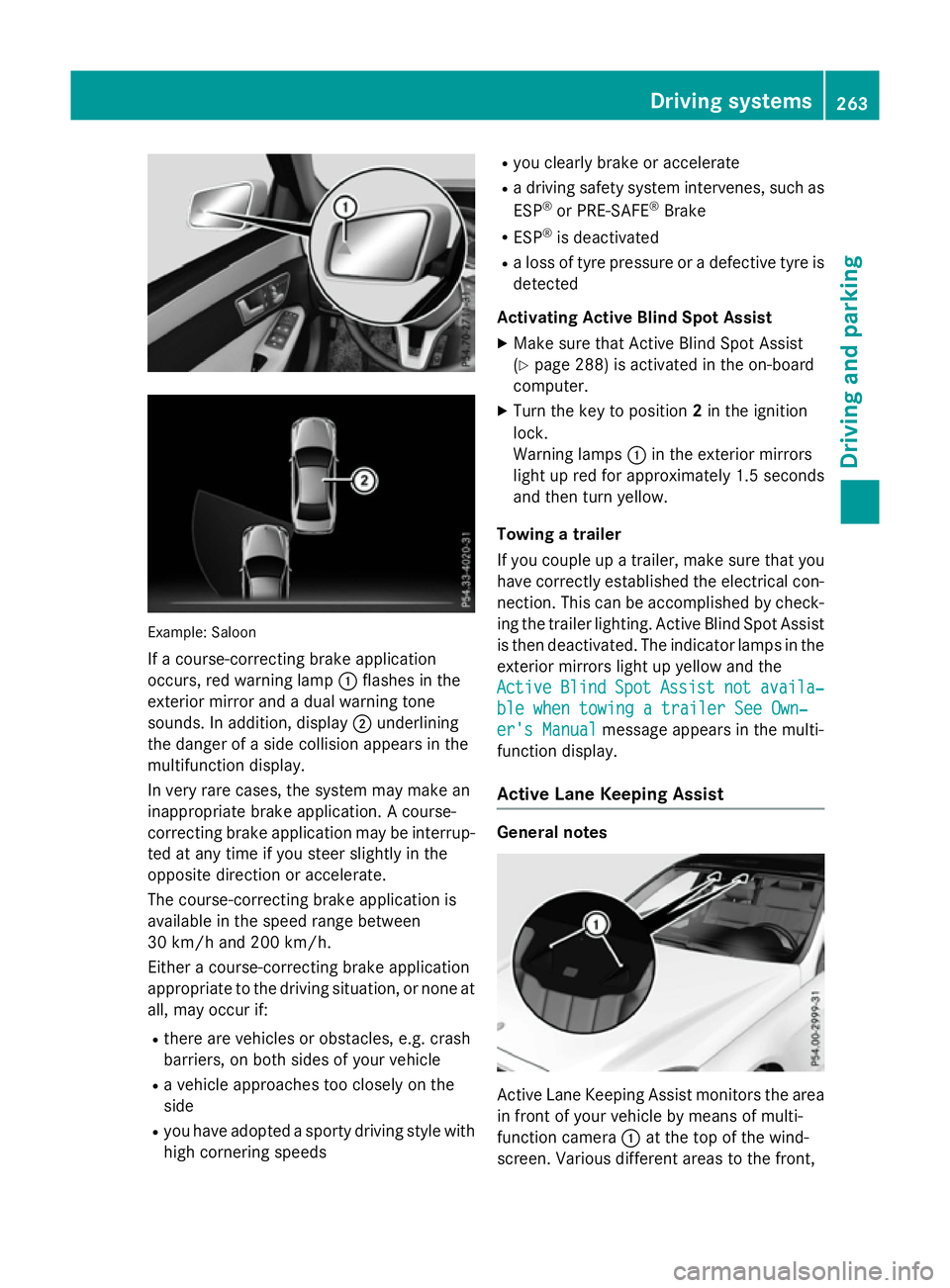
Example: Saloon
If ac ourse-correcting brake application
occurs, red warning lamp :flashe sinthe
exterio rmirror and adualw arning tone
sounds. In addition, display ;underlining
the dange rofasidec ollision appear sinthe
multifunctio ndisplay.
In ver yrarec ases, the system ma ymakean
inappropriate brake application. Acourse-
correcting brake applicatio nmaybe interrup-
ted at any time if yo ustee rsligh tlyint he
opposite direction or accelerate.
The course-correcting brake applicatio nis
availabl einthe speed range between
30 km/h and 200 km/h.
Either acourse-correcting brake application
appropriate to the driving situation, or none at all, ma yoccu rif:
R ther earevehicles or obstacles, e.g .crash
barriers ,onboths ides of your vehicle
R av ehicl eapproaches too closel yonthe
side
R yo uh avea dopt edasporty driving style with
high cornering speeds R
yo uc learly brake or accelerate
R ad riving safety system intervenes, such as
ESP ®
or PRE-SAFE ®
Brake
R ESP ®
is deactivated
R al os soft yrep ressure or adefective tyr eis
detected
Activatin gActiveB lind Spo tAssist
X Make sure tha tActive Blind Spo tAssist
(Y page 288 )isactivated in the on-board
computer.
X Turn the key to position 2in the ignition
lock.
Warning lamps :in the exterio rmirrors
light up red for approximatel y1.5 seconds
and then tur nyellow.
Towin gatrailer
If yo ucoupl eupa trailer, make sure tha tyou
have correctl yestablished the electrical con-
nection. Thi scan be accomplished by check-
ing the traile rlig hting. Active Blind Spo tAssist
is then deactivated .The indicator lamps in the
exterio rmirrors light up yellow and the
Active
Active Blind BlindSpot
SpotAssist
Assist not
notavaila‐
availa‐
ble whe ntowing atraile rSee Own‐
ble whe ntowing atraile rSee Own‐
er' sManual
er' sManual message appear sinthe multi-
functio ndisplay.
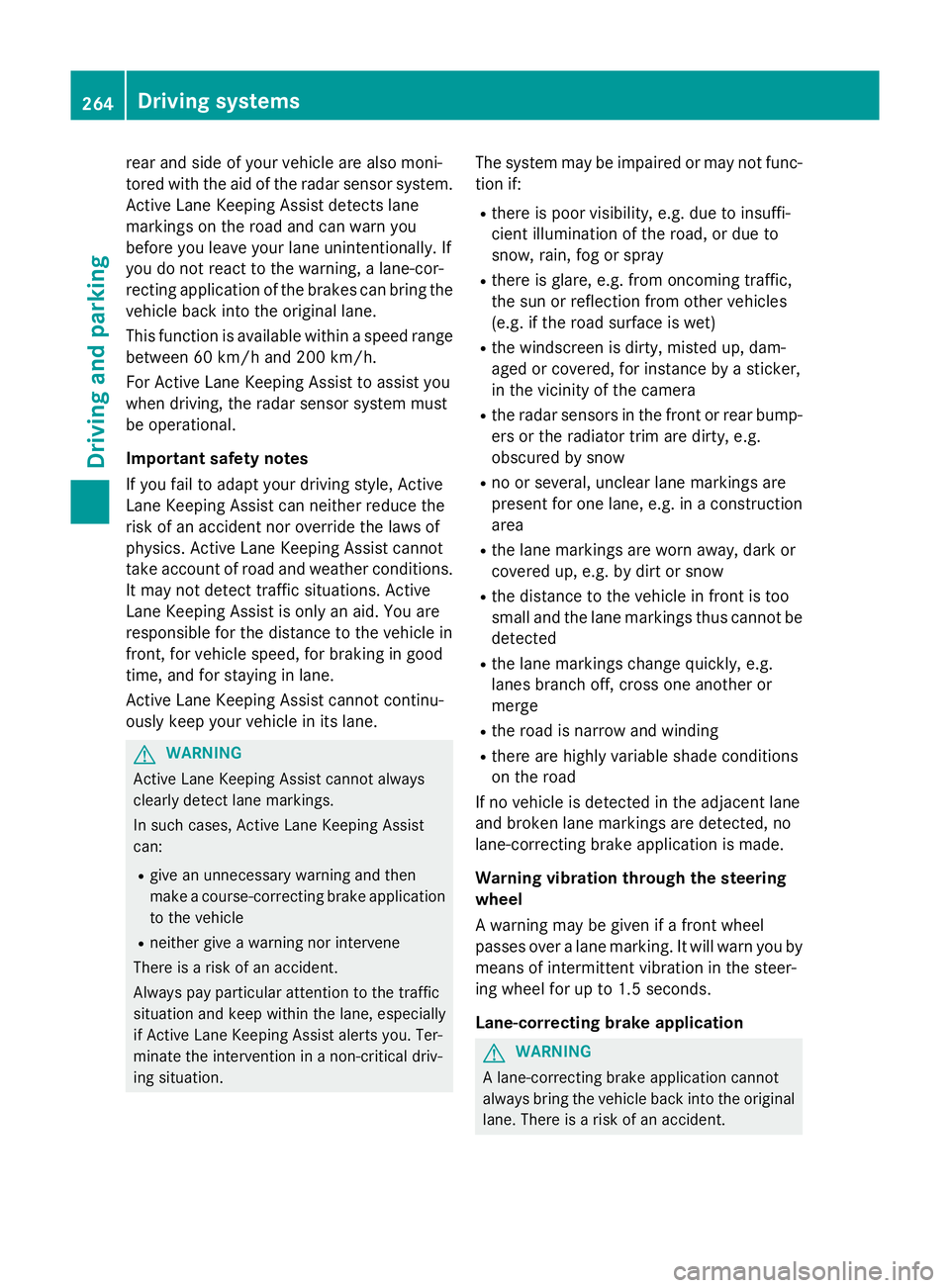
Activ eLaneK eeping Assist General notes
Active Lane Keeping Assist monitors the area
in front of your vehicl ebymeans of multi-
functio ncamera :at the top of the wind-
screen. Various different area stothe front, Driving systems
263Driving andparking Z
Page 267 of 497
rear and side of yourv
ehicleare alsom oni-
tored with the aid of the rada rsensor system.
Active Lane Keeping Assist detects lane
markings on the road and can warn you
before you leave yourl ane unintentionally.If
you do not react to the warning, alane-cor-
recting application of the brakes can bring the
vehicl eback into the original lane.
This function is available withi naspeedrange
between 60 km/h and 200 km/h.
For Active Lane Keeping Assist to assist you
when driving, the rada rsensor system must
be operational.
Important safety notes
If you fail to adapt yourd riving style,Active
Lane Keeping Assist can neither reduce the
risk of an accident nor overrid ethe lawsof
physics. Active Lane Keeping Assist cannot
take account of road and weather conditions.
It may not detect traffic situations. Active
Lane Keeping Assist is only an aid.Y ou are
responsible for the distance to the vehicl ein
front, for vehicl espeed, for braking in good
time, and for staying in lane.
Active Lane Keeping Assist cannot continu-
ousl ykeep yourv ehicleini ts lane. G
WARNING
Active Lane Keeping Assist cannot always
clearly detect lane markings.
In such cases, Active Lane Keeping Assist
can:
R give an unnecessary warning and then
make acourse-correcting brake application
to the vehicle
R neither give awarning nor intervene
There is arisk of an accident.
Always pay particular attention to the traffic
situation and keep withi nthe lane, especially
if Active Lane Keeping Assist alerts you.T er-
minate the intervention in anon-critical driv-
ing situation. The system may be impaired or may not func-
tion if:
R there is poor visibility, e.g. due to insuffi-
cient illumination of the road ,ordue to
snow, rain, fog or spray
R there is glare, e.g. from oncoming traffic,
the sun or reflectio nfrom other vehicles
(e.g. if the road surface is wet)
R the windscreen is dirty ,misted up, dam-
agedorc overed, for instance by asticker,
in the vicinity of the camera
R the rada rsensors in the front or rear bump-
ers or the radiator trim are dirty ,e.g.
obscured by snow
R no or several, unclea rlane markings are
present for one lane, e.g. in aconstruction
area
R the lane markings are worn away,d ark or
covered up, e.g. by dirt or snow
R the distance to the vehicl einfront is too
smal land the lane markings thus cannot be
detected
R the lane markings change quickly, e.g.
lanes branch off, cross one another or
merge
R the road is narrow and winding
R there are highly variable shad econditions
on the road
If no vehicl eisdetected in the adjacent lane
and broken lane markings are detected, no
lane-correcting brake application is made.
Warning vibratio nthrough the steering
wheel
Aw arning may be given if afront wheel
passes over alane marking. It willw arny ou by
means of intermittent vibration in the steer-
ing whee lfor up to 1.5 seconds.
Lane-correcting brake application G
WARNING
Al ane-correcting brake application cannot
alwaysb ring the vehicl eback into the original
lane. There is arisk of an accident. 264
Driving systemsDriving and parking
Page 268 of 497
Alway
ssteer, brake or accelerate yourself,
especially if Active Lane Keeping Assist warns
yo uorm akes alan e-correcting brake appli-
cation. G
WARNING
Active Lane Keeping Assist onl ydetects traf-
fic conditions or roa dusers to alim ited
extent. In ver yrarec ases, the system may
make an inappropriate brake application, e.g. afte rintentionally driving ove rasolid lane
marking .There is ariskofana ccident.
An inappropriate brake applicatio nmaybe
interrupte datany time if yo ustee rslightly in
the opposite direction. Alway smakes uret hat
ther eiss ufficient distance to the side for
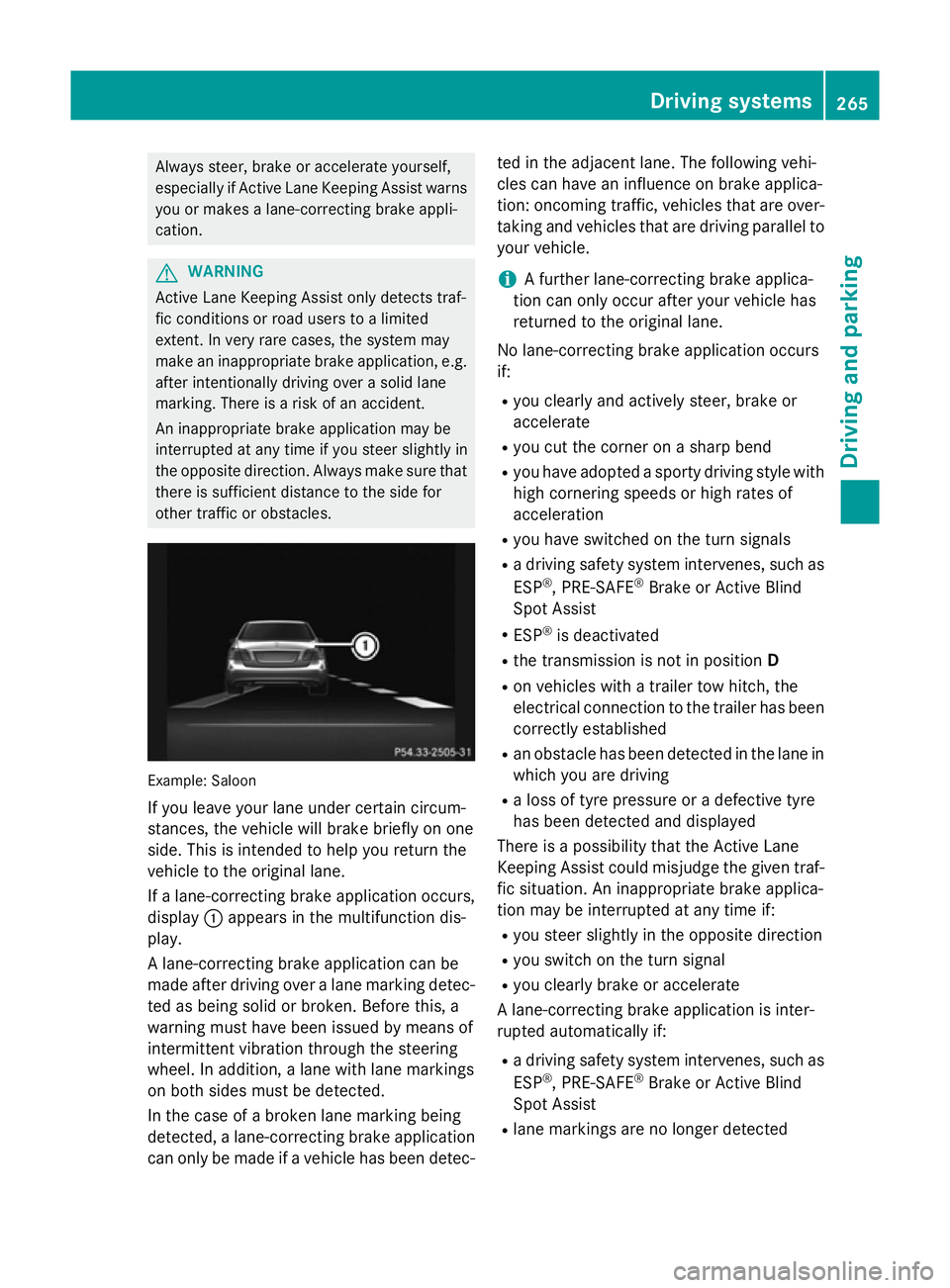
othe rtraffic or obstacles. Example: Saloon
If yo uleave your lane under certain circum-
stances, the vehicl ewillb rake briefl yonone
side .Thisisi ntende dtohelpy ou return the
vehicl etothe original lane.
If al an e-correcting brake applicatio noccurs,
display :appear sinthe multifunctio ndis-
play.
Al ane-correcting brake applicatio ncan be
made afte rdriving ove ralanem arking detec-
ted as being solid or broken. Before this, a
warning must have been issued by means of
intermittent vibratio nthroug hthe steering
wheel. In addition, alan ew ithl an em arkings
on both side smustbed etected.
In the cas eofabroken lane marking being
detected, alan e-correcting brake application
can onl ybemadeifav ehiclehasbeen detec- ted in the adjacent lane. The following vehi-
cle scan have an influence on brake applica-
tion: oncoming traffic, vehicles tha tare over-
taking and vehicles tha tare driving parallel to
your vehicle.
i Af
urthe rlan e-correcting brake applica-
tio nc an onl yoccu rafte ryourv ehicl ehas
returned to the original lane.
No lane-correcting brake applicatio noccurs
if:
R yo uc learly and activel ysteer, brake or
accelerate
R yo uc ut the corne ronasharp bend
R yo uh avea dopt edasporty driving style with
high cornering speed sorhighr ates of
acceleration
R yo uh aves witched on the turn signals
R ad riving safety system intervenes, such as
ESP ®
,P RE -SAFE ®
Brake or Active Blind
Spo tAssist
R ESP ®
is deactivated
R the transmission is not in position D
R on vehicles with atraile rtow hitch, the
electrical connectio ntothe traile rhas been
correctl yestablished
R an obstacle ha sbeend etecte dint he lane in
which yo uaredriving
R al ossoft yrep ressure or adefective tyre
ha sb eend etecte dand displayed
There is apossibility tha tthe Active Lane
Keeping Assist could misjudge the given traf-
fic situation. An inappropriate brake applica-
tio nm aybe interrupte datany time if:
R yo us tee rslightly in the opposite direction
R yo us witch on the turn signal
R yo uc learly brake or accelerate
Al ane-correcting brake applicatio nisinter-
rupte dautomaticall yif:
R ad riving safety system intervenes, such as
ESP ®
,P RE -SAFE ®
Brake or Active Blind
Spo tAssist
R lane marking sareno longe rdetected Driving systems
265Driving andparking Z
Page 270 of 497
To avoid hazardous situations:
R make sure to check the noseweight before
each journey
R use adrawbar noseweight as close as pos-
sible to the maximum noseweight
R do not exceed the maximum permissible
noseweight
R do not use anoseweight lower than the
minimum noseweight
When reversin gthe vehicle towards the
trailer, make sure there is nobody between
the trailer and the vehicle.
Couple and uncouple the trailer carefully. If
you do not couple the trailer to the towing
vehicle correctly, the trailer could become
detached.
Make sure that the following values are not
exceeded:
R the permissible trailer drawbar noseweight
R the permissible trailer load
R the permissible rear axle load of the towing
vehicle
R the maximum permissible gross vehicle
weight of both the towing vehicle and the
trailer
You will find the applicable permissible val-
ues, which must not be exceeded, in the vehi-
cle documents.
You will find the values approved by the man- ufacturer on the vehicle identification plates
and those for the towing vehicle under "Tech-
nical data" (Y page 484).
When towing atrailer, your vehicle's handling
characteristics will be different in comparison to when driving without atrailer.
The vehicle/trailer combination:
R is heavier
R is restricted in its acceleration and gradi-
ent-climbin gcapability
R has an increased braking distance
R is affected more by stron gcrosswinds
R demands more sensitive steering
R has alarger turnin gcircle This can impair the vehicle's handling char-
acteristics. Adapt your driving style accord-
ingly. Maintain
asafe distance. Drive care-
fully.
When towing atrailer, alway sadjust your
speed to the curren troad and weather con-
ditions. Do not exceed the maximum permis- sible speed for your vehicle/trailer combina-
tion. Notes on towing
atrailer
General notes Trailer towing is not permissible on the fol-
lowing models:
R E2 20 BlueTEC BlueEFFICIENCY Edition
R E1 80
R E63A MG
R E63A MG S-MODEL
R E63A MG 4MATIC
R E63A MG S-MODEL4 MATIC
i When towing
atrailer, set the tyre pres-
sure on the rear axle of the towing vehicle
for am aximum load; see the tyre pressure
table in the fuel filler flap (Y page 420).
Please notet hat when towing atrailer,
PARKTRONIC (Y page 235), Active Parking
Assist (Y page 239) and Blind Spot Assist
(Y page 257) are only available with limita-
tions, or not at all.
i On vehicles without level control, the
height of the ball coupling will alter accord-
ing to the load placed on the vehicle. If nec- essary, use atrailer with aheight-adjusta-
ble drawbar.
You will find fitting dimensions and loads
under "Technical data" (Y page 482).
Driving tips i
Observe the notes on ESP ®
trailer stabi-
lisation (Y page 86). Towing
atrailer
267Driving and parking Z
Page 273 of 497
X
Pull the ball coupling in the direction of the
arrow until it engages in avertical position.
Indicator lamp =goes out. The trailer
power socket is integrated in the ball cou-
pling and swivels out with it.
Saloon: indicator lamp ?goes out.
Estate: indicator lamp =goes out.
The multifunction display shows the
Trailer Trailer hitch
hitch Check
Checklock
lockmech.
mech. mes-
sage until the ball coupling is engaged.
X Remove the protective coverin gfrom the
ball coupling and store it in asafe place.
X Make sure that the ball of the ball coupling
is clean and greased.
HYBRID vehicles :make sure that you read
the "HYBRID" Supplement included in the
vehicle literature. Otherwise, you may not
recognise dangers. Coupling up
atrailer
X Make sure that the transmission is in posi-
tion P.
X Apply the parking brake.
X Position the trailer horizontally behind the
vehicle.
X Couple up the trailer.
X Establish the electric connection between
the vehicle and the trailer.
X Check that the trailer lighting system is
working.
Ac onnected trailer is only recognised when
the electrical connection is established
correctly and when the lighting system is
working properly. The function of other sys-
tems, such as ESP ®
,P ARKTRONIC and
Active Parking Assist also depends on this. Uncoupling
atrailer G
WARNING
If you uncouple atrailer with an engaged over-
run brake, you could trap your hand between the vehicle and the trailer drawbar. This poses
ar isk of injury.
Do not uncouple atrailer with an engaged
overrun brake. G
WARNING
Vehicles with level control:
If you disconnect the trailer cable, the vehicle is lowered. This can cause you or others to
become trapped between the vehicle body
and tyres, or underneat hthe vehicle. This
poses arisk of injury.
Make sure that no-one is in the immediate
vicinit yofthe wheel arch or underneat hthe
vehicle when disconnectin gthe trailer cable.
! Do not disconnect
atrailer with an
engaged overrun brake. Otherwise, your
vehicle could be damaged by the rebound- ing of the overrun brake.
X Make sure that the transmission is in posi-
tion P.
X Apply the parking brake.
X Secure the trailer against rolling away.
X Remove the trailer cable and decouple the
trailer. Folding in the ball coupling
G
WARNING
If you release the ball coupling or it does not
engage correctly when folding in, it will swing out. Within pivoting range of the ball coupling,
there is an increased risk of an accident and
injury.
Only release the ball coupling if the pivoting
range is unobstructed. Always make sure that the ball coupling engages when folding in.
X Place the protective coverin gonthe ball
coupling. 270
Towing
atrailerDriving and parking
Page 282 of 497
Back button
% Press briefly:
R Back
R Vehicles with Audio 20:
Switches off voice-operated con-
trol for navigatio n(seem anufac-
turer's operating instructions)
R Vehicles with COMAND Online:
Switches off LINGUATRONIC
(se ethe separate operating
instructions)
R Hides display messages or calls
up the last Trip Tripmenu function
used
R Exits the telephone book/redial
memory % Press and hold:
R Call supt he standard display in
the Trip
Trip menu Multifunctio
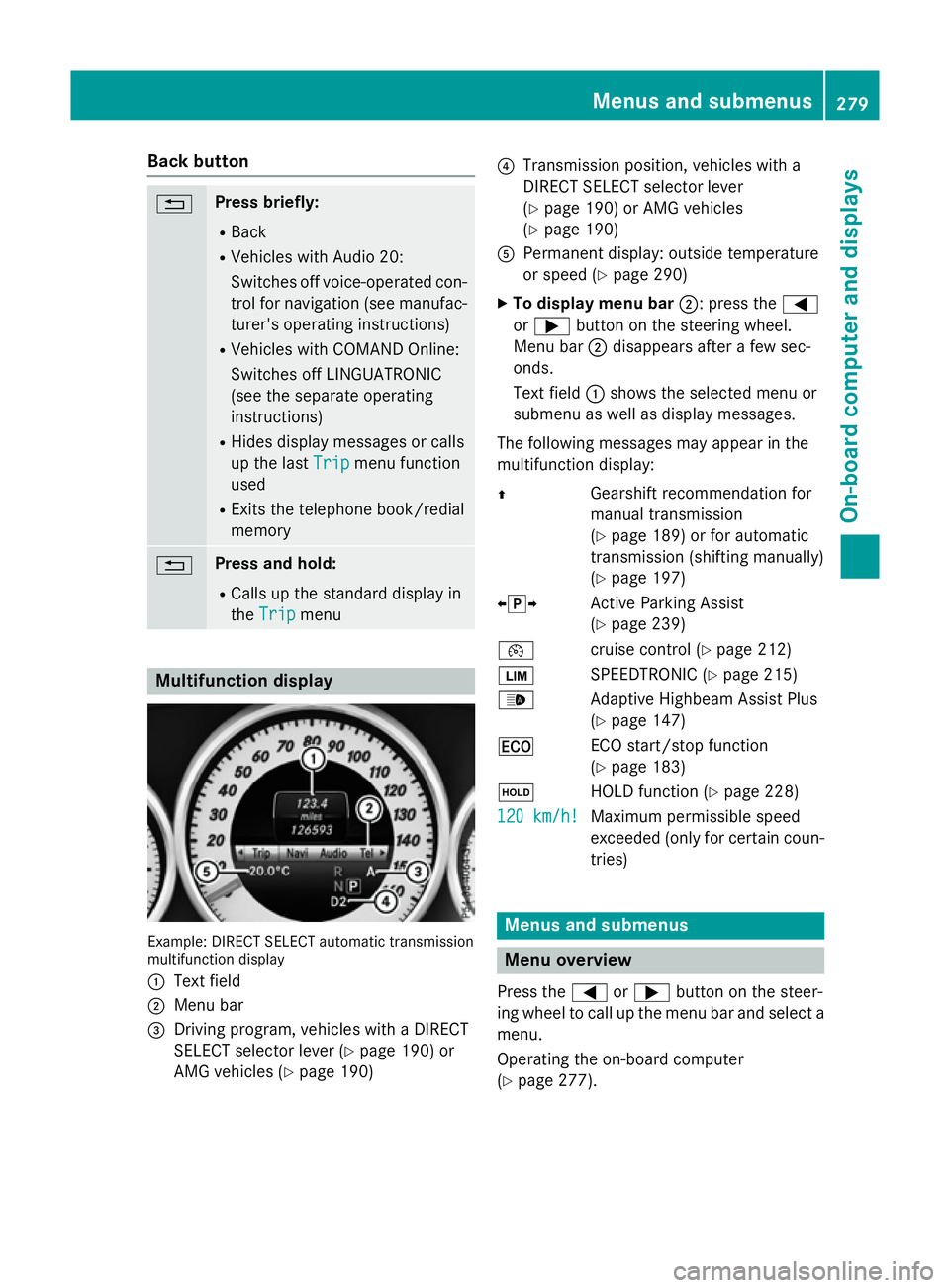
ndisplay Example: DIRECT SELEC
Tautomatic transmission
multifunctio ndisplay
: Text field
; Menu bar
= Driving program, vehicles with aDIRECT
SELECT selector lever (Y page 190)or
AMG vehicles (Y page 190) ?
Transmission position, vehicles with a
DIRECT SELECT selector lever
(Ypage 190 )orAMG vehicles
(Y page 190)
A Permanent display :outsid etemperature
or speed (Y page 290)
X To display men ubar;:p ress the =
or ; button on the steering wheel.
Menu bar ;disappears afte rafew sec-
onds.
Text field :shows the selecte dmenu or
submenu as well as display messages.
The following messages ma yappea rinthe
multifunctio ndisplay:
Z Gearshift recommendatio nfor
manua ltransmission
(Y page 189 )orfor automatic
transmission (shifting manually)
(Y page 197)
XjY Active Parking Assist
(Ypage 239)
¯ cruisecontro l(Ypage 212)
È SPEEDTRONIC (Y page 215)
_ Adaptive Highbeam Assist Plus
(Ypage 147)
¤ ECO start/sto pfunction
(Y page 183)
ë HOLD functio n(Ypage 228)
120 km/h! 120 km/h! Maximu
mpermissibl espeed
exceeded (only for certain coun-
tries) Menus and submenus
Men
uoverview
Press the =or; button on the steer-
ing whee ltocallupt he menu ba rand select a
menu.
Operating the on-boar dcomputer
(Y page 277). Menus and submenus
279On-board computer and displays Z