ESP MERCEDES-BENZ E-CLASS ESTATE 2016 User Guide
[x] Cancel search | Manufacturer: MERCEDES-BENZ, Model Year: 2016, Model line: E-CLASS ESTATE, Model: MERCEDES-BENZ E-CLASS ESTATE 2016Pages: 565, PDF Size: 11.34 MB
Page 66 of 565
#
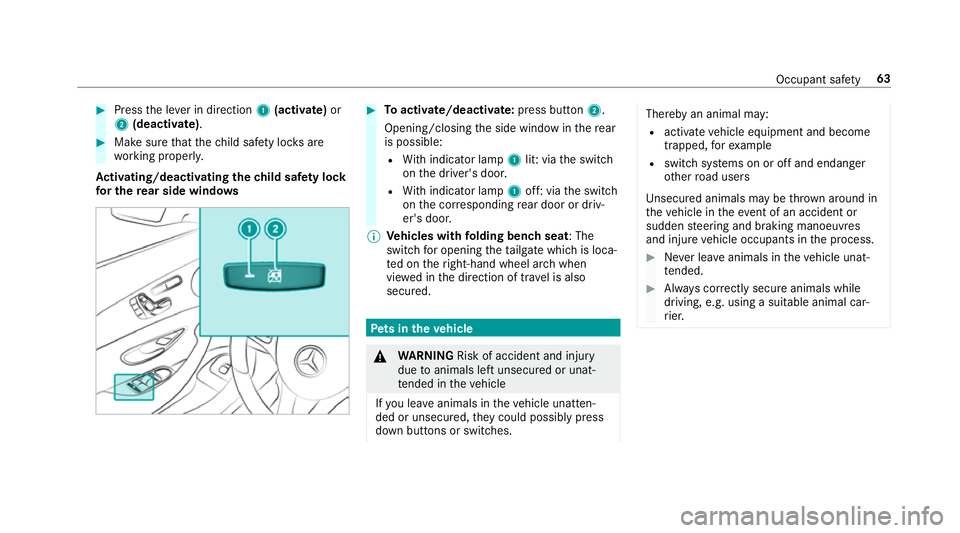
Press the le ver in direction 1(acti vate)or
2 (deactivate). #
Make sure that thech ild saf ety loc ksare
wo rking properly.
Ac tivating/deactivating the child saf ety lock
fo r the rear side windo ws #
Toactivate/deacti vate:press button 2.
Opening/closing the side window in there ar
is possible:
R With indicator lamp 1lit: via the switch
on the driver's door.
R With indicator lamp 1off: via the switch
on the cor responding rear door or driv‐
er's door.
% Vehicles with folding bench seat : The
switch for opening theta ilgate which is loca‐
te d on theright-hand wheel ar chwhen
vie we d in the direction of tr avel is also
secured. Pe
ts in the vehicle &
WARNING Risk of accident and inju ry
due toanimals left unsecured or unat‐
te nded in theve hicle
If yo u lea veanimals in theve hicle unatten‐
ded or unsecured, they could possib lypress
down buttons or switches. Thereby an animal may:
R activate vehicle equipment and become
trapped, forex ample
R swit chsystems on or off and endanger
ot her road users
Uns ecured animals may be throw n around in
th eve hicle in theeve nt of an accident or
sudden steering and braking manoeuvres
and injure vehicle occupants in the process. #
Never lea veanimals in theve hicle unat‐
te nded. #
Alw ays cor rectly secu reanimals while
driving, e.g. using a suitable animal car‐
ri er. Occupant saf
ety63
Page 69 of 565
#
Todeactivate: pressthe& button on the
ke y twice in rapid succession.
The battery check lamp of theke yflashes
twice brief lyand lights up once. #
Toactivate: press any button on thekey.
% When theve hicle is star ted with theke y in
th estow age compartment of the cent recon‐
sole (→ page 163), theke y functions are
automatical lyactivated. Inserting/removing
the emer gency key #
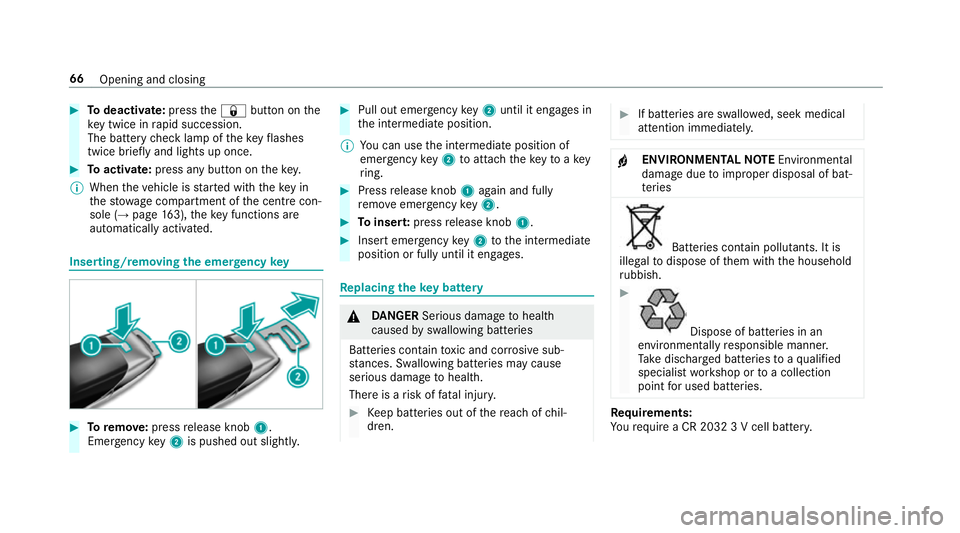
Toremo ve:press release knob 1.
Emer gency key2 is pushed out slight ly. #
Pull out emer gency key2 until it en gage s in
th e intermediate position.
% You can use the intermediate position of
emer gency key2 toattach theke yto akey
ri ng. #
Press release knob 1again and fully
re mo veemer gency key2. #
Toinser t:press release knob 1. #
Insert emer gency key2 tothe intermediate
position or fully until it engages. Re
placing the key battery &
DANG ER Serious damage tohealth
caused byswallowing batteries
Batteries contain toxic and cor rosive sub‐
st ances. Swallowing bat teries may cause
serious damage tohealth.
There is a risk of fata l injur y. #
Keep batteries out of there ach of chil‐
dren. #
If batteries are swallo wed, seek medical
attention immediately. +
ENVIRONMEN
TALNO TEEnvironmental
dama gedue toimproper disposal of bat‐
te ries Batteries conta
in pollutants. It is
illegal todispose of them with the household
ru bbish. #
Dispose of batteries in an
environmen tally responsible manner.
Ta ke dischar ged batteries toaqu alified
specialist workshop or toa collection
point for used batteries. Re
quirements:
Yo ure qu ire a CR 2032 3 V cell batter y.66
Opening and closing
Page 76 of 565
#
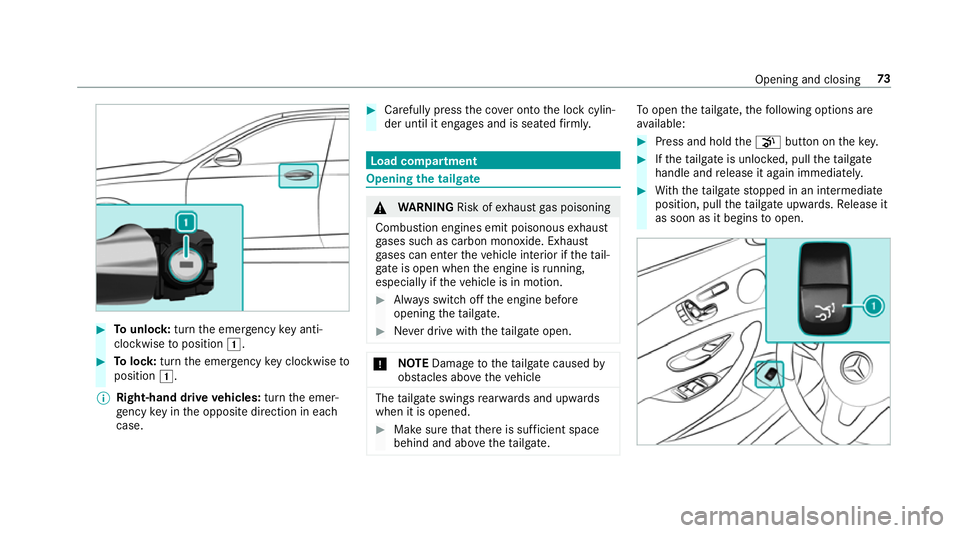
Tounlo ck:turn the emer gency key anti-
clo ckwise toposition 1. #
Tolock: turnthe emer gency key clo ckwise to
position 1.
% Right-hand drive vehicles: turnthe emer‐
ge ncy key in the opposite direction in each
case. #
Carefully press the co ver onto the lock cylin‐
der until it engages and is seated firm ly. Load compa
rtment Opening the tail
gate &
WARNING Risk ofexhaust gas poisoning
Combustion engines emit poisonous exhaust
ga ses such as carbon monoxide. Exhaust
ga ses can enter theve hicle interior if theta il‐
gate is open when the engine is running,
especially if theve hicle is in motion. #
Alw ays switch off the engine before
opening theta ilgate. #
Never drive with theta ilgate open. *
NO
TEDama getotheta ilgate caused by
obs tacles ab ovetheve hicle The
tailgate swings rear wa rds and upwards
when it is opened. #
Make sure that there is suf ficient space
behind and ab ovetheta ilgate. To
open thetai lgate, thefo llowing options are
av ailable: #
Press and hold thep button on thekey. #
Ifth eta ilgate is unloc ked, pull theta ilgate
handle and release it again immediatel y. #
With th eta ilgate stopped in an intermediate
position, pull theta ilgate upwards. Release it
as soon as it begins toopen. Opening and closing
73
Page 79 of 565
opens again slightl
y.The automatic obs tacle
de tection wi threve rsing function is only an aid.
It is not a substitute foryo ur attentiveness when
closing theta ilgate. #
When closing, make sure that no body parts
are in the closing area. &
WARNING Risk of becoming trapped
despi tereve rsing function
The reve rsing function does not react:
R tosoft, light and thin objects, e.g. fingers.
R overth e last 8 mm of the closing path.
In these situations in particular, there ve rsing
function cannot pr event someone being trap‐
ped. #
When closing, ma kesure that no body
parts are in the closing area.
If someone is trapped:
R press thep button on theke y,or
R press or pull there mo teoperating switch
on the driver's door, or R
press the closing or locking button on the
ta ilgate, or
R Pull theta ilgate handle. HANDS-FREE
ACCESS function Wi
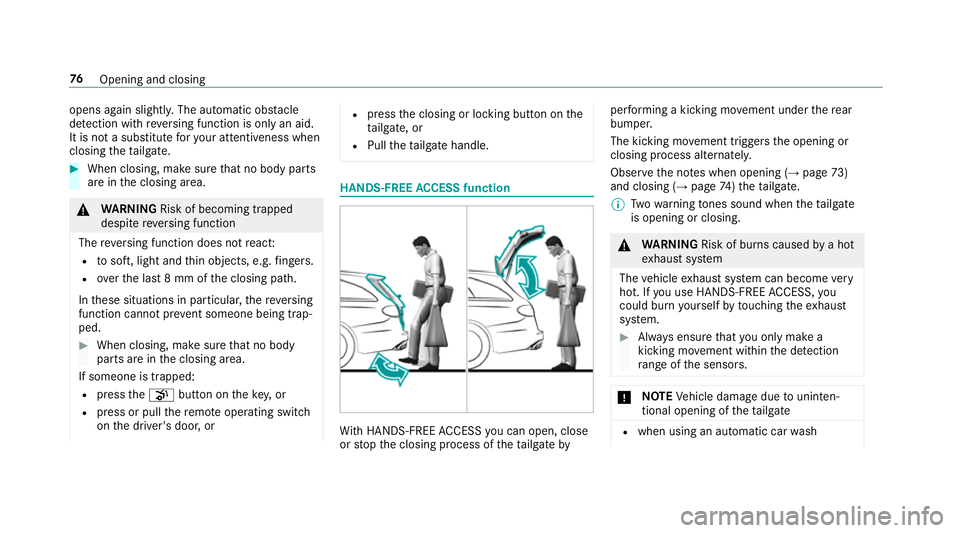
th HANDS-FREE ACCESS you can open, close
or stop the closing process of theta ilgate by per
form ing a kicking mo vement under there ar
bumper.
The kicking mo vement triggers the opening or
closing process alternatel y.
Obser vethe no tes when opening (→ page73)
and closing (→ page74)th eta ilgate.
% Twowa rning tones sound when thetai lgate
is opening or closing. &
WARNING Risk of bu rns caused bya hot
ex haust sy stem
The vehicle exhaust sy stem can become very
hot. If you use HANDS-FREE ACCESS, you
could bu rnyourself by touching theex haust
sy stem. #
Alw ays ensure that you on ly ma ke a
kicking mo vement within the de tection
ra nge of the sensors. *
NO
TEVehicle damage due tounin ten‐
tional opening of theta ilgate R
when using an automatic car wash 76
Opening and closing
Page 83 of 565
#
If someone is trapped, release the but‐
to n immedia tely or press the button in
order toreopen the side windo w. &
WARNING Risk of becoming trapped
when children opera tethe side windo ws
Children could become trapped if they oper‐
ate the side windo ws, particularly when unat‐
te nded. #
Activate theove rride feature forthe
re ar side wind ows. #
When leaving theve hicle, alw aysta ke
th eke y with you and lock theve hicle. #
Never lea vechildren unat tended in the
ve hicle. 1
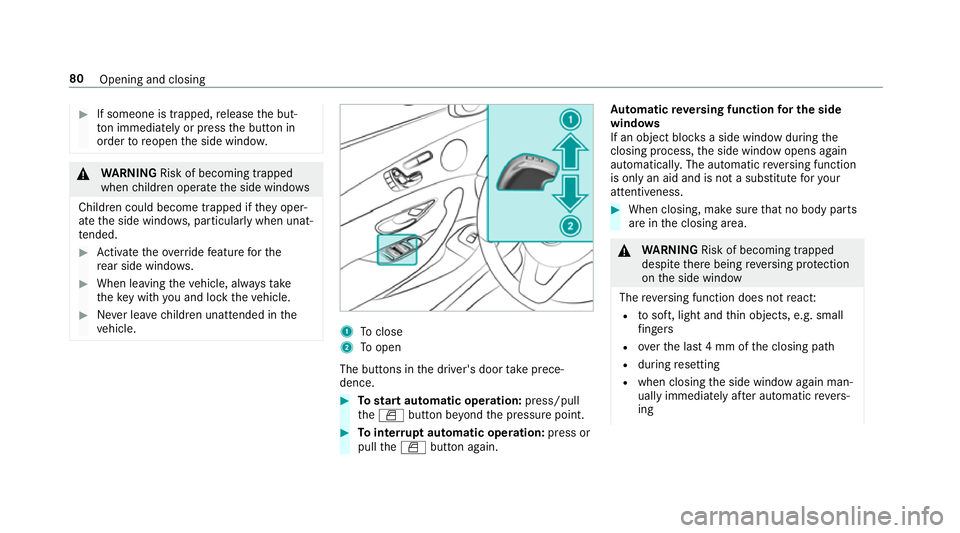
Toclose
2 Toopen
The buttons in the driver's door take prece‐
dence. #
Tostart automatic operation: press/pull
th eW button be yond the pressure point. #
Tointer rupt automatic operation: press or
pull theW button again. Au
tomatic reve rsing function for the side
windo ws
If an object bloc ksa side wind owduring the
closing process, the side window opens again
automaticall y.The automatic reve rsing function
is only an aid and is not a substitute foryo ur
attentiveness. #
When closing, make sure that no body parts
are in the closing area. &
WARNING Risk of becoming trapped
despi tethere being reve rsing pr otection
on the side window
The reve rsing function does not react:
R tosoft, light and thin objects, e.g. small
fi ngers
R overth e last 4 mm of the closing path
R during resetting
R when closing the side window again man‐
ually immediately af ter auto matic reve rs‐
ing 80
Opening and closing
Page 85 of 565
#
Tointer rupt convenience closing: release
th e& button. %
Con venience closing can also be operated
wi th KEYLESS-GO (→ page 70).Problems with
the side windo ws Problem
Possible causes/consequences and M
M Solutions
A side window cann otbe closed and
yo u cannot see the cause. #
Check tosee if any objects are in the window guide.
& WARNING Risk of entrapment if reve rsing pr otection is not activated
If yo u close a side wind owagain immediately af ter it has been bloc ked or reset, the side window closes
with increased or maximum forc e. The reve rsing feature is then not active.
Pa rts of the body could be trapped in the closing area in the process. #
Make sure that no parts of the body are in the closing area. #
Tostop the closing process, release the button or press the button again toreopen the side win‐
do w. If a side window is obstructed during closing and
reopens again slightly: #
Immediately af terth e window bloc ks, pull the cor responding button again until the side window has
closed, and hold the button for an additional second.
The side window is closed with increased forc e.
If a side window is obstructed again during closing and reopens again slightly: 82
Opening and closing
Page 88 of 565
&
WARNING Risk of entrapment even wi th
th ere ve rsing feature active
The reve rsing function does not react:
R tosoft, light and thin objects, e.g. small
fi ngers
R during the last 4 mm of the closing path
R during resetting
R when closing the sliding sunroof again
manually immediately af ter auto matic
re ve rsing
This means that there ve rsing feature cannot
pr eve nt someone being trapped in these sit‐
uations. #
When closing, make sure that no body
parts are in the closing area. #
Release the switch immediately if
somebody becomes trapped.
or #
Press the switch in any direction during
th e automatic closing process.
The closing process is stopped. Au
tomatic reve rsing function of thero ller
sunblind
If th ere is an object obstructing thero ller sun‐
blind during the closing process, thero ller sun‐
blind opens again automaticall y.The automatic
re ve rsing function is only an aid and is not a sub‐
st itute foryo ur attentiveness. #
When opening or closing thero ller sunblind,
make sure that no body parts are in the
sweep. &
WARNING Risk of becoming trapped
despi tethere ve rsing function being
active
In particular, there ve rsing function does not
re act tosoft, light and thin objects, e.g. small
fi ngers.
This means that there ve rsing function can‐
not pr event entrapment in these situations. #
When opening or closing thero ller sun‐
blind, make sure that no body parts are
in the sweep. #
Release the button immediately if
somebody becomes trapped. or
#
Press the button in any direction during
th e automatic closing process.
The closing process is stopped. Au
tomatic features of the sliding sunroof %
The term "sliding sun roof" also refers to the
panoramic sliding sunroof.
By pushing or pulling the3 button you can
inter rupt the automatic functions: "Rain closing
function when driving " and "Automatic lo wering
fe ature".
Au tomatic closing when the vehicle is sta‐
tionary
R If it starts torain (de tected bythera in sensor
on the windscreen)
R Atextreme outside temp eratures
R After six hours
R Ifth ere is a malfunction in the po wer supply
The rear of the sliding sunroof is then raised. Opening and closing
85
Page 110 of 565
The
steering wheel mo ves back tothe last drive
position in thefo llowing cases:
R you swit ch the ignition on when the driver's
door is closed
R you close the driver's door when the ignition
is switched on
The last drive position of thesteering wheel is
st ored:
R when you swit choff the ignition
R using the last setting stored using the mem‐
ory function
If yo u press one of the memory function position
buttons, the adjustment process is stopped.
The crash-responsive exit aid only functions
when the easy entry andexitfeature is active.
Setting the easy entry and exitfeature
Multimedia sy stem:
, Vehicle .
î Vehicle set-
tings .
Easy Entry/Exit #
Activate Oor deacti vate ª the function. Using
the memory function &
WARNING Risk of an accident if memo ry
function is used while driving
If yo u use the memory function on the driv‐
er's side while driving, you could lose cont rol
of theve hicle as a result of the adjustments
being made. #
Only use the memory function on the
driver's side when theve hicle is station‐
ar y. &
WARNING Risk of entrapment when set‐
ting the seat with the memory function
If yo u use the memory function toset the
seat or thesteering wheel, you and other
ve hicle occupants, especially children, could
be ent rapped. – – #
During the setting procedure of the
memory function, ensure that no body
parts are in the sweep of the seat or
th esteering wheel. #
If somebody becomes trapped, immedi‐
ately release the memory function posi‐
tion button.
The adjustment process is stopped. &
WARNING Risk of entrapment if the
memory function is activated bychildren
Children could become trapped if they acti‐
va te the memory function, particularly when
unattended. #
Never lea vechildren unat tended in the
ve hicle. #
When leaving theve hicle, alw aysta ke
th eke y with you and lock theve hicle.
This also applies tomobile phones if the
"Digital Car Key in the smartphone"
function is activated via the Mercedes
connect me web app. The memory function can be used when
the igni‐
tion is switched off.
Seat comfort positions for up tothre e people
can be stored and called up using the memory
function. Seats and
stowing 107
Page 111 of 565
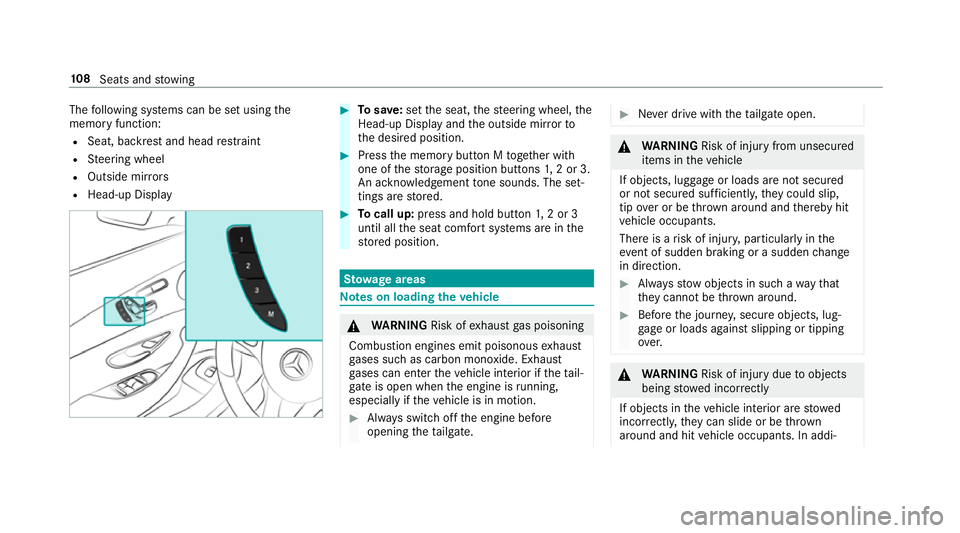
The
following sy stems can be set using the
memory function:
R Seat, backrest and head restra int
R Steering wheel
R Outside mir rors
R Head-up Display #
Tosave :set the seat, thesteering wheel, the
Head-up Display and the outside mir rorto
th e desired position. #
Press the memory button M toge ther with
one of thestorage position buttons 1,2 or 3.
An acknowledgement tone sounds. The set‐
tings are stored. #
Tocall up: press and hold button 1,2 or 3
until all the seat comfort sy stems are in the
st ored position. St
ow age areas Note
s on loading theve hicle &
WARNING Risk ofexhaust gas poisoning
Combustion engines emit poisonous exhaust
ga ses such as carbon monoxide. Exhaust
ga ses can enter theve hicle interior if theta il‐
gate is open when the engine is running,
especially if theve hicle is in motion. #
Alw ays switch off the engine before
opening theta ilgate. #
Never drive with theta ilgate open. &
WARNING Risk of inju ryfrom unsecu red
items in theve hicle
If objects, luggage or loads are not secured
or not secured suf ficientl y,they could slip,
tip ove r or be throw n around and thereby hit
ve hicle occupants.
There is a risk of injur y,particularly in the
ev ent of sudden braking or a sudden change
in direction. #
Alw aysstow objects in such a wayth at
th ey cannot be thro wn around. #
Before the journe y,secure objects, lug‐
ga ge or loads against slipping or tipping
ove r. &
WARNING Risk of inju rydue toobjects
being stowed incor rectly
If objects in theve hicle interior are stowed
incor rectly, they can slide or be thrown
around and hit vehicle occupants. In addi‐ 108
Seats and stowing
Page 115 of 565
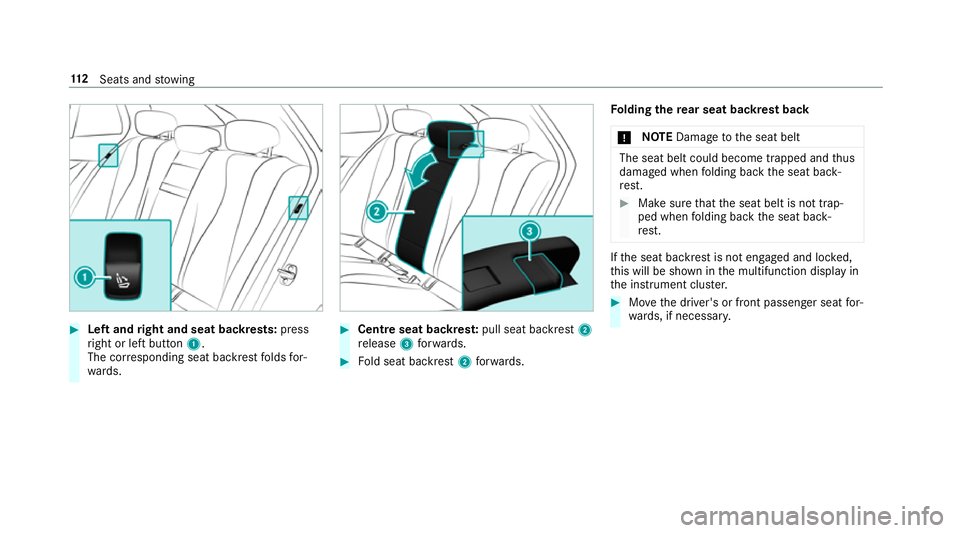
#
Left and right and seat backrests: press
ri ght or left button 1.
The cor responding seat backrest folds for‐
wa rds. #
Centre seat backres t:pull seat backrest 2
re lease 3forw ards. #
Fold seat backrest 2forw ards. Fo
lding there ar seat backrest back
* NO
TEDama getothe seat belt The seat belt could become trapped and
thus
damaged when folding back the seat back‐
re st. #
Make sure that the seat belt is not trap‐
ped when folding back the seat back‐
re st. If
th e seat backrest is not engaged and loc ked,
th is will be shown in the multifunction display in
th e instrument clus ter. #
Movethe driver's or front passenger seat for‐
wa rds, if necessar y. 11 2
Seats and stowing