light MERCEDES-BENZ E-CLASS ESTATE 2016 Owner's Manual
[x] Cancel search | Manufacturer: MERCEDES-BENZ, Model Year: 2016, Model line: E-CLASS ESTATE, Model: MERCEDES-BENZ E-CLASS ESTATE 2016Pages: 565, PDF Size: 11.34 MB
Page 78 of 565
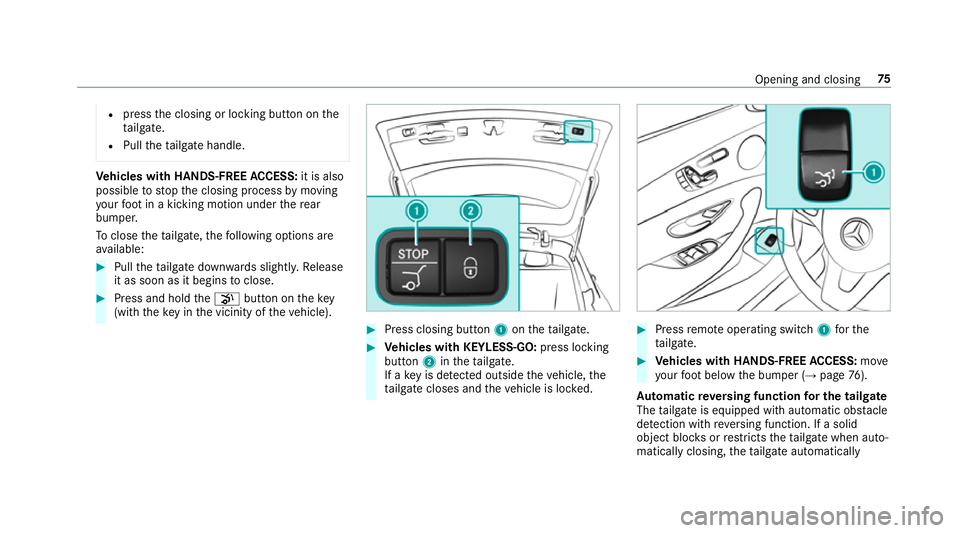
R
press the closing or locking button on the
ta ilgate.
R Pull theta ilgate handle. Ve
hicles with HANDS-FREE ACCESS: it is also
possible tostop the closing process bymoving
yo ur foot in a kicking motion under there ar
bumper.
To close thetai lgate, thefo llowing options are
av ailable: #
Pull theta ilgate down wards slightly. Release
it as soon as it begins toclose. #
Press and hold thep button on thekey
(with theke y in the vicinity of theve hicle). #
Press closing button 1ontheta ilgate. #
Vehicles with KEYLESS-GO: press locking
button 2intheta ilgate.
If a key is de tected outside theve hicle, the
ta ilgate closes and theve hicle is loc ked. #
Press remo teoperating switch 1forthe
ta ilgate. #
Vehicles with HANDS-FREE ACCESS: move
yo ur foot below the bumper (→ page76).
Au tomatic reve rsing function for the tail gate
The tailgate is equipped with automatic obs tacle
de tection wi threve rsing function. If a solid
object bloc ksorrestricts theta ilgate when auto‐
matically closing, theta ilgate automatically Opening and closing
75
Page 79 of 565
opens again slightl
y.The automatic obs tacle
de tection wi threve rsing function is only an aid.
It is not a substitute foryo ur attentiveness when
closing theta ilgate. #
When closing, make sure that no body parts
are in the closing area. &
WARNING Risk of becoming trapped
despi tereve rsing function
The reve rsing function does not react:
R tosoft, light and thin objects, e.g. fingers.
R overth e last 8 mm of the closing path.
In these situations in particular, there ve rsing
function cannot pr event someone being trap‐
ped. #
When closing, ma kesure that no body
parts are in the closing area.
If someone is trapped:
R press thep button on theke y,or
R press or pull there mo teoperating switch
on the driver's door, or R
press the closing or locking button on the
ta ilgate, or
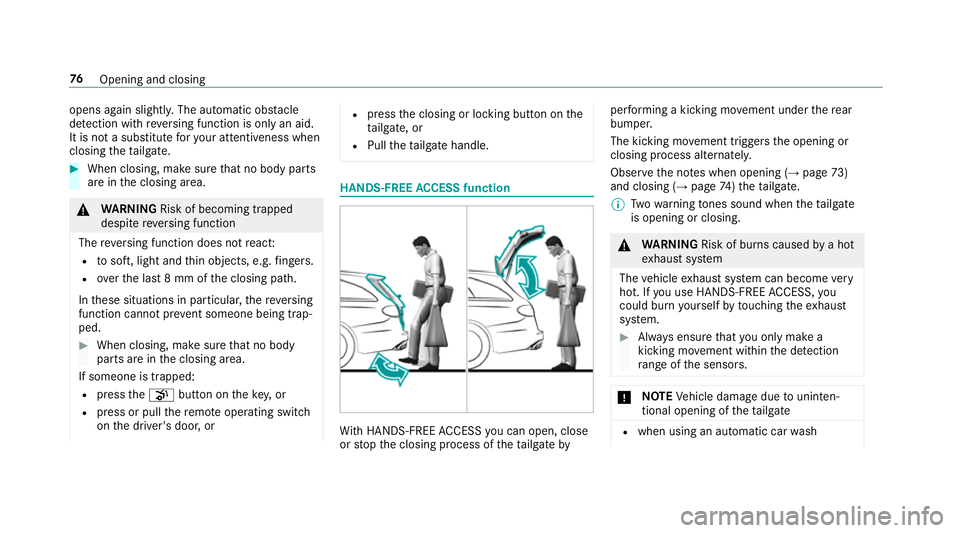
R Pull theta ilgate handle. HANDS-FREE
ACCESS function Wi
th HANDS-FREE ACCESS you can open, close
or stop the closing process of theta ilgate by per
form ing a kicking mo vement under there ar
bumper.
The kicking mo vement triggers the opening or
closing process alternatel y.
Obser vethe no tes when opening (→ page73)
and closing (→ page74)th eta ilgate.
% Twowa rning tones sound when thetai lgate
is opening or closing. &
WARNING Risk of bu rns caused bya hot
ex haust sy stem
The vehicle exhaust sy stem can become very
hot. If you use HANDS-FREE ACCESS, you
could bu rnyourself by touching theex haust
sy stem. #
Alw ays ensure that you on ly ma ke a
kicking mo vement within the de tection
ra nge of the sensors. *
NO
TEVehicle damage due tounin ten‐
tional opening of theta ilgate R
when using an automatic car wash 76
Opening and closing
Page 83 of 565
#
If someone is trapped, release the but‐
to n immedia tely or press the button in
order toreopen the side windo w. &
WARNING Risk of becoming trapped
when children opera tethe side windo ws
Children could become trapped if they oper‐
ate the side windo ws, particularly when unat‐
te nded. #
Activate theove rride feature forthe
re ar side wind ows. #
When leaving theve hicle, alw aysta ke
th eke y with you and lock theve hicle. #
Never lea vechildren unat tended in the
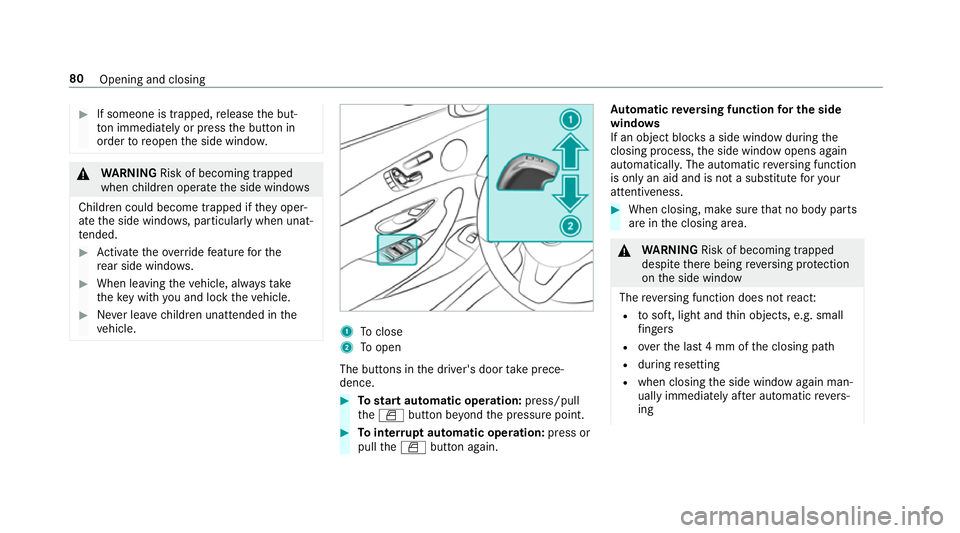
ve hicle. 1
Toclose
2 Toopen
The buttons in the driver's door take prece‐
dence. #
Tostart automatic operation: press/pull
th eW button be yond the pressure point. #
Tointer rupt automatic operation: press or
pull theW button again. Au
tomatic reve rsing function for the side
windo ws
If an object bloc ksa side wind owduring the
closing process, the side window opens again
automaticall y.The automatic reve rsing function
is only an aid and is not a substitute foryo ur
attentiveness. #
When closing, make sure that no body parts
are in the closing area. &
WARNING Risk of becoming trapped
despi tethere being reve rsing pr otection
on the side window
The reve rsing function does not react:
R tosoft, light and thin objects, e.g. small
fi ngers
R overth e last 4 mm of the closing path
R during resetting
R when closing the side window again man‐
ually immediately af ter auto matic reve rs‐
ing 80
Opening and closing
Page 85 of 565
#
Tointer rupt convenience closing: release
th e& button. %
Con venience closing can also be operated
wi th KEYLESS-GO (→ page 70).Problems with
the side windo ws Problem
Possible causes/consequences and M
M Solutions
A side window cann otbe closed and
yo u cannot see the cause. #
Check tosee if any objects are in the window guide.
& WARNING Risk of entrapment if reve rsing pr otection is not activated
If yo u close a side wind owagain immediately af ter it has been bloc ked or reset, the side window closes
with increased or maximum forc e. The reve rsing feature is then not active.
Pa rts of the body could be trapped in the closing area in the process. #
Make sure that no parts of the body are in the closing area. #
Tostop the closing process, release the button or press the button again toreopen the side win‐
do w. If a side window is obstructed during closing and
reopens again slightly: #
Immediately af terth e window bloc ks, pull the cor responding button again until the side window has
closed, and hold the button for an additional second.
The side window is closed with increased forc e.
If a side window is obstructed again during closing and reopens again slightly: 82
Opening and closing
Page 88 of 565
&
WARNING Risk of entrapment even wi th
th ere ve rsing feature active
The reve rsing function does not react:
R tosoft, light and thin objects, e.g. small
fi ngers
R during the last 4 mm of the closing path
R during resetting
R when closing the sliding sunroof again
manually immediately af ter auto matic
re ve rsing
This means that there ve rsing feature cannot
pr eve nt someone being trapped in these sit‐
uations. #
When closing, make sure that no body
parts are in the closing area. #
Release the switch immediately if
somebody becomes trapped.
or #
Press the switch in any direction during
th e automatic closing process.
The closing process is stopped. Au
tomatic reve rsing function of thero ller
sunblind
If th ere is an object obstructing thero ller sun‐
blind during the closing process, thero ller sun‐
blind opens again automaticall y.The automatic
re ve rsing function is only an aid and is not a sub‐
st itute foryo ur attentiveness. #
When opening or closing thero ller sunblind,
make sure that no body parts are in the
sweep. &
WARNING Risk of becoming trapped
despi tethere ve rsing function being
active
In particular, there ve rsing function does not
re act tosoft, light and thin objects, e.g. small
fi ngers.
This means that there ve rsing function can‐
not pr event entrapment in these situations. #
When opening or closing thero ller sun‐
blind, make sure that no body parts are
in the sweep. #
Release the button immediately if
somebody becomes trapped. or
#
Press the button in any direction during
th e automatic closing process.
The closing process is stopped. Au
tomatic features of the sliding sunroof %
The term "sliding sun roof" also refers to the
panoramic sliding sunroof.
By pushing or pulling the3 button you can
inter rupt the automatic functions: "Rain closing
function when driving " and "Automatic lo wering
fe ature".
Au tomatic closing when the vehicle is sta‐
tionary
R If it starts torain (de tected bythera in sensor
on the windscreen)
R Atextreme outside temp eratures
R After six hours
R Ifth ere is a malfunction in the po wer supply
The rear of the sliding sunroof is then raised. Opening and closing
85
Page 89 of 565
Ra
in closing function when driving
Ve hicles with a panoramic sliding sunroof: if
it starts torain, thera ised sliding sunroof is
automatically lo wered while theve hicle is in
motion.
Au tomatic lo weringfeature
Ve hicles with a panoramic sliding sunroof: if
th e sliding sunroof is raised at there ar, the slid‐
ing sunroof is automatically lo wered slightly at
higher speeds. Atlow speeds it is raised again
automaticall y. &
WARNING Risk of entrapment byauto‐
matic lo wering of the sliding sunroof
At high speeds thera ised sliding sunroof
automatically lo wersslightly at there ar.
This could trap you or other persons. #
Make sure that nobody reaches into the
sweep of the sliding sunroof whilst the
ve hicle is in motion. #
If somebody becomes trapped, immedi‐
ately pull back the sliding sunroof
switch.
The sliding sunroof lifts during opening. Problems with
the sliding sunroof %
The term "sliding sun roof" also refers to the
panoramic sliding sunroof. Problem
Possible causes/consequences and M MSolutions
The sliding sunroof cann otbe closed
and you cannot see the cause. &
WARNING Risk of entrapment byclosing the sliding sunroof again
If yo u close the sliding sunroof again immediately af ter it has been bloc ked or reset, the sliding sunroof
closes with increased or maximum forc e.
The reve rsing feature is then not active. Parts of the body could be trapped in the closing area in the
process. This poses an increased risk of injury or evenfa ta l injur y. #
Make sure that no parts of the body are in the closing area. #
Release the switch immediately if somebody becomes trapped.
or 86
Opening and closing
Page 90 of 565
Problem
Possible causes/consequences and M
MSolutions #
Press the switch in any direction during the automatic closing process.
The closing process is stopped. If
th e sliding sunroof is obstructed during closing and reopens again slightly: #
Immediately af ter auto matic reve rsing, pull and hold the3 button down again tothe point of resist‐
ance until the sliding sunroof is closed.
The sliding sunroof is closed with increased forc e.
If th e sliding sunroof is obstructed again and reopens again slightly: #
Repeat the pr evious step.
The sliding sunroof is closed again with increased forc e.
Ve hicles without a panoramic slid‐
ing sunroof: the sliding sunroof does
not operate smoo thly. #
Raise the sliding sunroof fully at there ar. #
Press the3 button for ano ther second. #
Use automatic operation tofully raise and then close the sliding sunroof.
Ve hicles with a panoramic sliding
sunroof :th e sliding sunroof or the
ro ller sunblind does not opera te
smoo thly. #
Pull the3 button down repeatedly tothe point of resis tance until the sliding sunroof is fully closed. #
Pull the3 button for ano ther second. #
Pull and hold the3 button down until thero ller sunblind is comple tely closed. #
Pull the3 button for ano ther second. #
Use automatic operation tofully open and then close the sliding sunroof. Opening and closing
87
Page 93 of 565
Cor
rect driver's seat position &
WARNING Risk of inju rythro ugh adjust‐
ing vehicle settings while theve hicle is in
motion
Yo u could lose cont rol of theve hicle in the
fo llowing situations:
R ifyo u adjust the driver's seat, the head
re stra ints, thesteering wheel or the mir‐
ro r while theve hicle is in motion
R ifyo ufast enyour seat belt while theve hi‐
cle is in motion #
Before starting the engine: adjust the
driver's seat, the head restra ints, the
st eering wheel or the mir ror and fasten
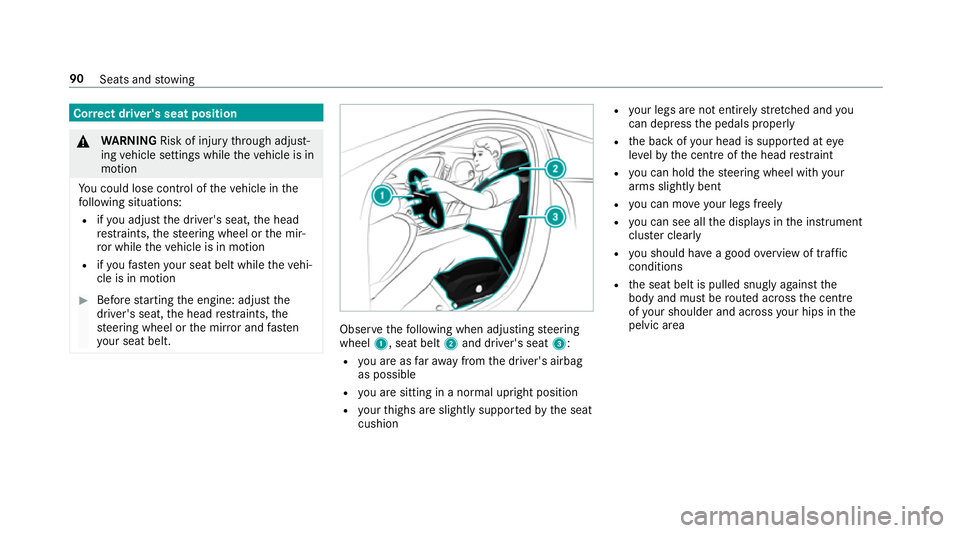
yo ur seat belt. Obser
vethefo llowing when adjusting steering
wheel 1, seat belt 2and driver's seat 3:
R you are as faraw ay from the driver's airbag
as possible
R you are sitting in a no rmal upright position
R your thighs are slight lysuppor tedby the seat
cushion R
your legs are not entirely stre tched and you
can dep ress the pedals properly
R the back of your head is suppo rted at eye
le ve lby the cent reofthe head restra int
R you can hold thesteering wheel with your
arms slightly bent
R you can mo veyour legs freely
R you can see all the displa ysinthe instrument
clus ter clea rly
R you should ha vea good overview of traf fic
conditions
R the seat belt is pulled snugly against the
body and must be routed across the cent re
of your shoulder and across your hips in the
pelvic area 90
Seats and stowing
Page 98 of 565
#
Press button 1repeatedly until the indica‐
to r lamp in the button lights up.
The front passenger seat is selected. #
Adjust the front passenger seat using the
buttons in the door control panel on the driv‐
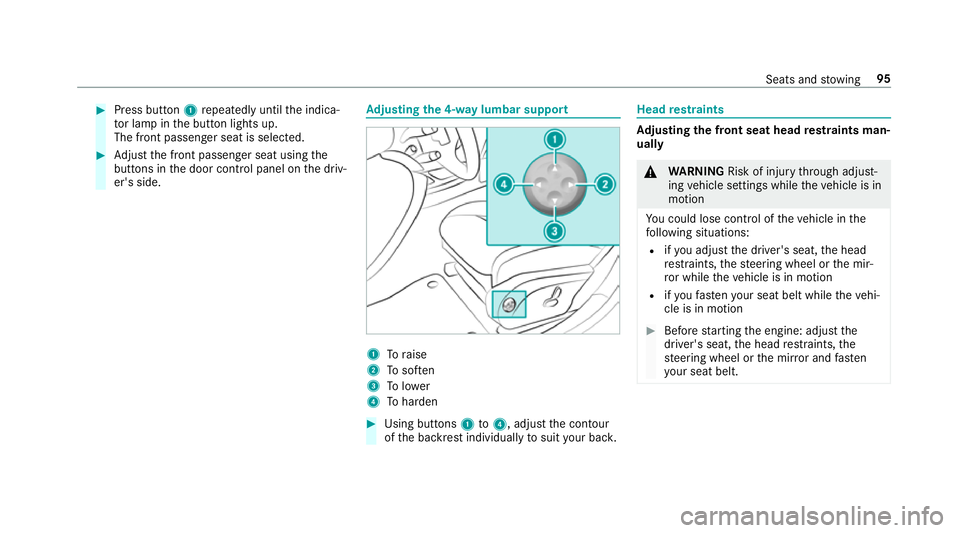
er's side. Ad
justing the 4-w aylumbar support 1
Toraise
2 Tosof ten
3 Tolower
4 Toharden #
Using buttons 1to4 , adjust the conto ur
of the backrest individually tosuit your bac k. Head
restra ints Ad
justing the front seat head restra ints man‐
ually &
WARNING Risk of inju rythro ugh adjust‐
ing vehicle settings while theve hicle is in
motion
Yo u could lose cont rol of theve hicle in the
fo llowing situations:
R ifyo u adjust the driver's seat, the head
re stra ints, thesteering wheel or the mir‐
ro r while theve hicle is in motion
R ifyo ufast enyour seat belt while theve hi‐
cle is in motion #
Before starting the engine: adjust the
driver's seat, the head restra ints, the
st eering wheel or the mir ror and fasten
yo ur seat belt. Seats and
stowing 95
Page 100 of 565
Ad
justing the gap between the head
re stra int and the back of your head: #
Tomo veforw ards: pullthe head restra int
fo rw ards. #
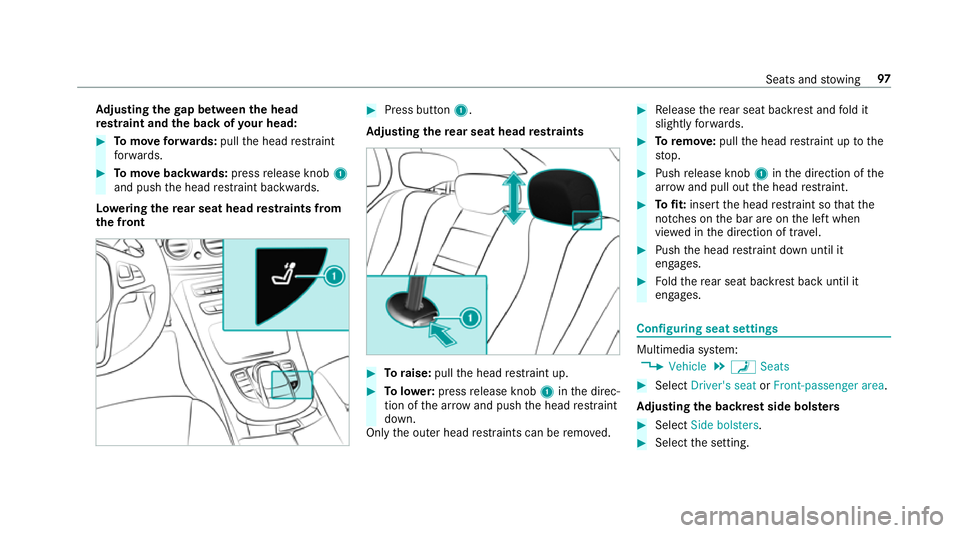
Tomo vebackwards: pressrelease knob 1
and push the head restra int backwards.
Lo weri ngthere ar seat head restra ints from
th e front #
Press button 1.
Ad justing the rear seat head restra ints #
Toraise: pullthe head restra int up. #
Tolowe r:press release knob 1inthe direc‐
tion of the ar row and push the head restra int
down.
Only the outer head restra ints can be remo ved. #
Release there ar seat backrest and fold it
slight lyforw ards. #
Toremo ve:pull the head restra int up tothe
st op. #
Push release knob 1inthe direction of the
ar row and pull out the head restra int. #
Tofit: inse rtthe head restra int so that the
notches on the bar are on the left when
vie we d in the direction of tra vel. #
Push the head restra int down until it
engages. #
Foldthere ar seat backrest back until it
engages. Configuring seat settings
Multimedia sy
stem:
, Vehicle .
a Seats #
Select Driver's seat orFront-passenger area.
Ad justing the backrest side bols ters #
Select Side bolsters . #
Select the setting. Seats and
stowing 97