light MERCEDES-BENZ E-CLASS ESTATE 2016 Repair Manual
[x] Cancel search | Manufacturer: MERCEDES-BENZ, Model Year: 2016, Model line: E-CLASS ESTATE, Model: MERCEDES-BENZ E-CLASS ESTATE 2016Pages: 565, PDF Size: 11.34 MB
Page 171 of 565
ECO display
The ECO display summarises
the driving style
from thest art of the journey toits completion
and assists you in achieving the most economi‐
cal driving style.
Yo u can influence consum ption if you:
R drive with particular care
R drive theve hicle in drive program E
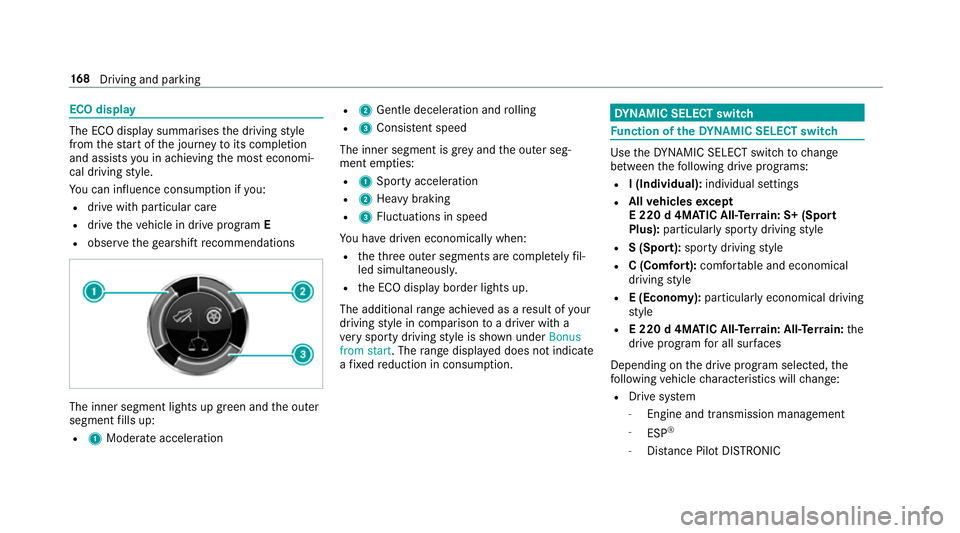
R obser vethege arshift recommendations The inner segment lights up green and
the outer
segment fills up:
R 1 Moderate acceleration R
2 Gentle decele ration and rolling
R 3 Consis tent speed
The inner segment is gr eyand the outer seg‐
ment em pties:
R 1 Sporty acceleration
R 2 Heavy braking
R 3 Fluctuations in speed
Yo u ha vedriven economically when:
R theth re e outer segments are comple tely fil‐
led simultaneousl y.
R the ECO display border lights up.
The additional range achi eved as a result of your
driving style in comparison toa driver with a
ve ry sporty driving style is shown under Bonus
from start. The range displ ayed does not indicate
a fixe dre duction in consum ption. DY
NA MIC SELECT switch Fu
nction of theDY NA MIC SELECT switch Use
theDY NA MIC SELECT switch tochange
between thefo llowing drive programs:
R I (Individual): individual settings
R Allvehicles except
E 220 d 4MATIC All‑Ter rain: S+ (Sport
Plus): particularly sporty driving style
R S (Sport): sporty driving style
R C (Comfort): comfortable and economical
driving style
R E (Economy): particularly economical driving
st yle
R E 220 d 4MATIC All‑Ter rain: All‑Ter rain: the
drive prog ram for all sur faces
Depending on the drive program selected, the
fo llowing vehicle characteristics will change:
R Drive sy stem
- Engine and transmission management
- ESP ®
- Distance Pilot DISTRONIC 16 8
Driving and pa rking
Page 185 of 565
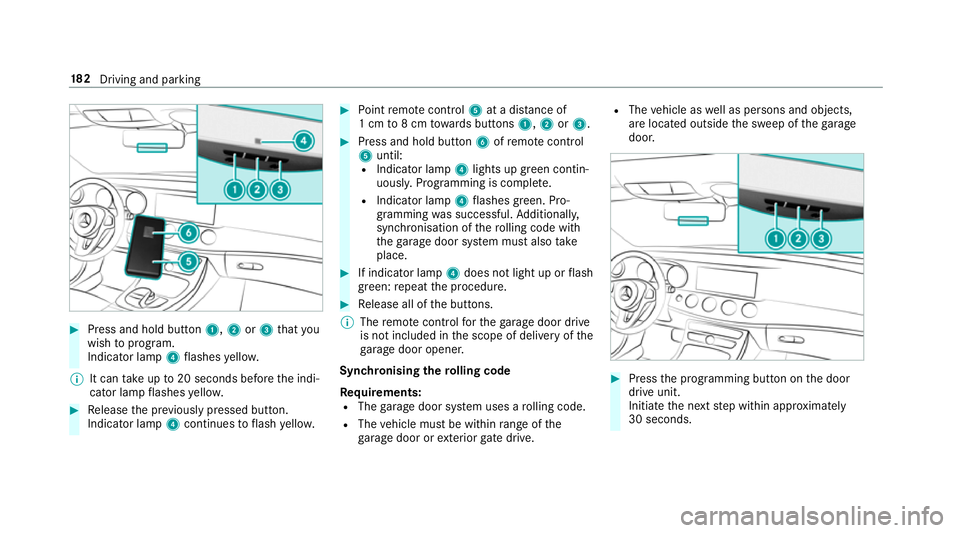
#
Press and hold button 1,2or3 that you
wish toprog ram.
Indicator lamp 4flashes yello w.
% It can take up to20 seconds before the indi‐
cator lamp flashes yello w. #
Release the pr eviously pressed button.
Indicator lamp 4continues toflash yello w. #
Point remo tecontrol 5at a di stance of
1 cm to8 cm towa rds buttons 1,2or3. #
Press and hold button 6ofremo tecontrol
5 until:
R Indicator la mp4lights up green contin‐
uousl y.Programming is comple te.
R Indicator lamp 4flashes green. Pro‐
gr amming was successful. Additionally,
synchronisation of thero lling code with
th ega rage door sy stem must also take
place. #
If indicator lamp 4does not light up or flash
green: repeat the procedure. #
Release all of the buttons.
% The remo tecontrol forth ega rage door drive
is not included in the scope of delivery of the
ga rage door opener.
Synchronising thero lling code
Re quirements:
R The garage door sy stem uses a rolling code.
R The vehicle must be within range of the
ga rage door or exterior gate drive. R
The vehicle as well as persons and objects,
are located outside the sweep of thega rage
door. #
Press the programming button on the door
drive unit.
Initiate the next step within appr oximately
30 seconds. 18 2
Driving and pa rking
Page 187 of 565
th
e pr eviously pressed button again until the
ga rage door opens or closes.
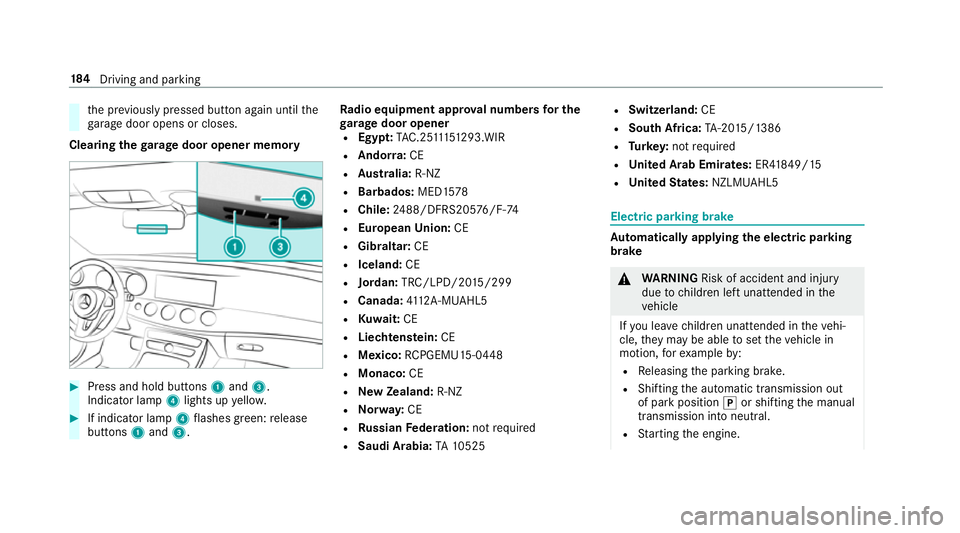
Clearing thega rage door opener memo ry#
Press and hold buttons 1and 3.
Indicator lamp 4lights up yello w. #
If indicator lamp 4flashes green: release
buttons 1and 3. Ra
dio equipment appr oval numbers for the
ga rage door opener
R Egypt: TAC.2 5111 51 293.WIR
R Ando rra: CE
R Austra lia: R-NZ
R Barbados: MED1578
R Chile: 2488/DFRS205 76/F-74
R European Union: CE
R Gibraltar: CE
R Iceland: CE
R Jordan: TRC/LPD/20 15/299
R Canada: 4112 A-MUAHL5
R Kuwa it:CE
R Liechtens tein: CE
R Mexico: RCPGEMU15-0448
R Monaco: CE
R New Zealand: R-NZ
R Norway: CE
R Russian Federation: notrequ ired
R Saudi Arabia: TA10525 R
Switzerland: CE
R South Africa: TA-20 15/1386
R Turkey: not requ ired
R United Arab Emirates: ER41849/15
R United States: NZLMUAHL5 Electric parking brake
Au
tomatically applying the electric parking
brake &
WARNING Risk of accident and inju ry
due tochildren left unat tended in the
ve hicle
If yo u lea vechildren unat tended in theve hi‐
cle, they may be able toset theve hicle in
motion, forex ample by:
R Releasing the parking brake.
R Shifting the automatic transmission out
of park position jor shifting the manual
transmission into neutral.
R Starting the engine. 184
Driving and pa rking
Page 188 of 565
In addition,
they may operate vehicle equip‐
ment. #
Never lea vechildren and animals unat‐
te nded in theve hicle. #
When leaving theve hicle, alw aysta ke
th eke y with you and lock theve hicle.
This also applies tomobile phones if the
"Digital Car Key in the smartphone"
function is activated via the Mercedes
connect me web app. Ve
hicles with manual transmission:
The electric parking brake is applied while the
ve hicle is being kept stationary bythe HOLD
function if one of thefo llowing conditions are
fulfilled:
R The engine is switched off.
R The seat belt tongue is not inser ted in the
seat belt buckle of the driver's seat and the
driver's door is opened.
R There is a sy stem malfunction.
R The po wer supp lyis insuf ficient.
R The vehicle is stationary for a lengt hyperiod. When
the electric parking brake is applied,
th e! indicator lamp lights up in the instru‐
ment clus ter.
The electric parking brake is not automatically
applied if the engine is switched off bythe ECO
st art/ stop function.
Ve hicles with automatic transmission:
The electric parking brake is applied if the trans‐
mission is in position jand one of thefo llow‐
ing conditions is fulfilled:
R The engine is switched off.
R The seat belt tongue is not inser ted in the
seat belt buckle of the driver's seat and the
driver's door is opened.
% Toprev ent application: pull the handle of the
electric parking brake.
In thefo llowing situations, the electric parking
brake is also engaged:
R The Dis tance Pilot DISTRONIC brings the
ve hicle toast andstill.
R The HOLD function is keeping theve hicle sta‐
tionar y. R
Parking Pilot is keeping theve hicle station‐
ar y.
This is only the case if one of thefo llowing con‐
ditions is also fulfilled:
R The engine is switched off.
R The seat belt tongue is not inser ted in the
seat belt buckle of the driver's seat and the
driver's door is opened.
R There is a sy stem malfunction.
R The po wer supply is insuf ficient.
R The vehicle is stationary for a lengt hyperiod.
When the electric parking brake is applied,
th e! indicator lamp lights up in the instru‐
ment clus ter.
The electric parking brake is not automatically
applied if the engine is switched off bythe ECO
st art/ stop function.
Re leasing the electric pa rking brake auto‐
matically
Ve hicles with manual transmission: Driving and parking
18 5
Page 191 of 565
Driving and driving saf
ety sy stems Driving sy
stems and your responsibility Yo
ur vehicle is equipped with driving sy stems
which assist you in driving, parking and manoeu‐
vring theve hicle. The driving sy stems are aids
and do not relie ve you of your responsibility. Pay
attention tothe tra ffic conditions at all times
and inter vene when necessa ry. Be aware of the
limitations rega rding the safe use of these sys‐
te ms. Fu
nction of thera dar senso rs Some driving and driving sa
fety sy stems use
ra dar sensors tomonitor the area in front of,
behind or next totheve hicle (depending on the
ve hicle's equipment).
Depending on theve hicle's equipment, thera dar
sensors are integrated behind the bumpers
and/or behind thera diator grille. Keep these
parts free of dirt, ice and slush . The sensors
must not be co vered, forex ample bybicycle
ra ck s, ove rhanging loads or radar-reflecting
st icke rs.Fo llowing an impact and in theeve nt of associated dama
ge, which may not be visible, to
th e bumpers or radiator grille, ha vethe function
of thera dar sensors checked at a qualified spe‐
cialist workshop. The driver assis tance sy stem
may no longer workproperly. Overview of driving sy
stems and driving
saf ety sy stems In
this section, you will find information about
th efo llowing driving sy stems and driving saf ety
sy stems:
R 360° Camera (→ page 224)
R ABS (Anti-lock BrakingSystem)
(→ page 189)
R Distance Pilot DISTRONIC (→ page 202)
R Adaptive brake lights (→ page199)
R AIR BODY CONTROL (→ page214)
R Active Brake Assi st (→page 194)
R Active Lane Keeping Assist (→ page244)
R ATTENTION ASSIST (→ page 238)
R BAS (Bra keAssist System) (→ page189)
R DYNA MIC BODY CONTROL (→ page214) R
EBD ( Electronic Brakefo rc eDistribution)
(→ page 193)
R ESP ®
(Electronic Stability Program)
(→ page 189)
R DRIVE PIL OT (→page 209)
R HOLD function (→ page212)
R Steering Pilot (→ page 209)
R Limiter (→ page199)
R Parking Pilot (→ page 227)
R Parking Assist PARKTRONIC (→ page218)
R Reversing camera (→ page 221)
R Cruise control (→ page199)
R Blind Spot Assi stand Active Blind Spot Assi st
( → page 242)
R Traf fic Sign Assi st (→page 239) 18 8
Driving and pa rking
Page 192 of 565
Fu
nctions of ABS (anti-lock braking sy stem) ABS
regulates the brake pressure in critical driv‐
ing situations:
R During braking, the wheels are pr evented
from blocking, e.g. due tomaximum full-s top
braking or insuf ficient traction of the tyres.
R Vehicle steerability while braking is ensured.
R ABS is active from speeds of appr ox.
8 km/h.
If ABS inter venes when braking, you will feel a
pulsing in the brake pedal. The pulsating brake
pedal can be an indication of hazardous road
conditions and can ser veas a reminder totake
ex tra care while driving.
Sy stem limits
ABS may be impaired or may not function if a
malfunction has occur red and theye llow !
ABS warning lamp lights up continuously in the
instrument clus ter af terth e engine is star ted. Fu
nction of BAS (Brake Assist Sy stem) &
WARNING Risk of an accident caused by
a malfunction in BAS (Brake Assi stSys‐
te m)
If BA S is malfunctioning, the braking dis tance
may increase in an emergency braking situa‐
tion. #
Dep ress the brake pedal with full force
in emer gency braking situations. ABS
pr eve nts the wheels from locking. BA
S suppo rts yo ur eme rgency braking situation
with additional brake forc e.
If yo u depress the brake pedal quickl y,BA S is
acti vated:
R BAS au tomatical lyboosts the brake pres‐
sure.
R BAS can sho rten the braking dis tance.
R ABS pr events the wheels from locking.
The brakes will function as usual once you
re lease the brake pedal. BAS is deactivated. Fu
nctions of ESP ®
(Electronic Stability Pro‐
gr am) &
WARNING Risk of skidding if ESP ®
is
malfunctioning
If ESP ®
is malfunctioning, ESP ®
cannot car ry
out vehicle stabilisation. In addition, other
driving saf ety sy stems are switched off. #
Drive on carefull y. #
Have ESP ®
ch ecked at a qualified spe‐
cialist workshop. &
WARNING Risk of skidding if ESP ®
is
deactivated
If yo u deactivate ESP ®
, ESP ®
cannot car ry
out vehicle stabilisation. #
ESP ®
should on lybe deactivated in the
fo llowing situations. ESP
®
monitors and impr oves driving stability and
traction, particular ly inthefo llowing situations:
R When pulling away on wet or slippe ryroads. Driving and parking
18 9
Page 193 of 565
R
When braking.
R Vehicles with trailer hitch: In trailer opera‐
tion from speeds of 65 km/h, if theve hicle/
trailer combination begins tosw ay from side
to side.
R Instro ng sidewinds when you are driving
fast erthan 80 km/h.
ESP ®
can stabilise theve hicle byinter vening in
th efo llowing ways:
R One or more wheels are braked.
R The engine output is adap ted according to
th e situation.
ESP ®
is deactivated if the ESP ®
OFF å warn‐
ing lamp lights up continuously in the instrument
clus ter:
R Driving stability will no lon ger be impr oved.
R Vehicles with trailer hitch: Stabilisation of
th eve hicle/trailer combination is no longer
active.
R Crosswind Assist is no longer active.
R The drive wheels could spin. R
ETS/4ETS traction control is still active.
% Even when ESP ®
is deactivated, you are still
assis tedby ESP ®
when braking.
ESP ®
is inter vening if the ESP ®
÷ warning
lamp flashes in the instrument clus ter:
R Do not deacti vate ESP ®
.
R Only depress the accelera tor pedal as far as
is necessar y.
R Adapt your driving style to suit the cur rent
ro ad and weather conditions.
Deactivate ESP ®
in thefo llowing situations to
impr ovetraction:
R When using snow chains.
R In deep sn ow.
R On sand or gr avel.
% Spinning the wheels results in a cutting
action which pr ovides better grip.
ESP ®
is deactivated if theå ESP®
OFF warn‐
ing lamp lights up continuously in the instrument
clus ter. If
th e ESP ®
÷ warning lamp lights up continu‐
ousl y,ESP ®
is not available due toa malfunction.
Obse rve any information which may be displa yed
in the instrument clus ter:
R Warning and indicator lamps (→ page 501)
R Display messages (→ page445)
ETS/4ETS (Electronic Traction Sy stem)
ETS/4E TStraction control is pa rtof ESP ®
.
ETS/4ETS can impr ovetheve hicle's traction by
inter vening in thefo llowing ways:
R The drive wheels are braked individually if
th ey spin.
R More drive torque is transferred tothe wheel
or wheels with traction.
Influence of drive prog rams on ESP ®
The drive programs enable ESP ®
to adapt todif‐
fe re nt we ather and road conditions as well as
th e driver's prefer red driving style. You can
select the drive programs using theDY NA MIC
SELECT switch. 19 0
Driving and pa rking
Page 196 of 565
Ac
tivating/deactivating ESP ®
(Electronic Sta‐
bility Prog ram) Multimedia sy
stem:
, Vehicle .
k Assistance .
ESP #
Activate Oor deacti vate ª the function.
ESP ®
is deactivated if the ESP ®
OFF å warn‐
ing lamp lights up continuously in the instrument
clus ter.
Obser vethe information on warning lamps and
display messages which may be shown in the
instrument clus ter. Fu
nctions of ESP ®
Crosswind Assist ESP
®
Crosswind Assist de tects sudden gu sts of
side wind and helps the driver tokeep theve hi‐
cle in the lane:
R ESP ®
Crosswind Assist is active at vehicle
speeds between 80 km/h and 200 km/h
when driving stra ight ahead or cornering
slight ly. R
The vehicle is stabilised bymeans of individ‐
ual brake application on one side. Fu
nctions of ESP ®
trailer stabilisation &
WARNING Risk of accident in poor road
and weather conditions
In poor road and weather conditions, the
trailer stabilisation cannot pr event lu rching of
th eve hicle/trailer combination. Trailers with
a high centre of grav ity may tip over before
ESP ®
de tects this. #
Alw ays adapt your driving style to suit
th e cur rent road and weather condi‐
tions. When driving with a trailer, ESP
®
can stabilise
yo ur vehicle if the trailer begins tosw ay from
side toside:
R ESP ®
trailer stabilisation is active abo ve
speeds of 65 km/h. R
Slight sw aying is reduced bymeans of a tar‐
ge ted, individual brake application on one
side.
R Intheeve nt of intense sw aying, the engine
output is also reduced and all wheels are
braked.
ESP ®
trailer stabilisation may be impaired or
may not function if:
R The trailer is not connec ted cor rectly or is
not de tected prope rly by theve hicle. Fu
nction of EBD (Electronic Brake forc e Dis‐
tribution) EBD is
characterised bythefo llowing:
R Monitoring and regulating the brake pressure
on there ar wheels.
R Impr oved driving stability when braking,
especially on bends. Driving and parking
19 3
Page 197 of 565
Fu
nction of Active Brake Assi stAc
tive Brake Assi stconsi sts of:
R Distance warning function
R Autonomous braking function
R Situation-dependent braking assi stance
R Vehicles with the Driving Assistance
pa ckage: Evasi veSteering Assist
Ac tive Brake Assi stcan help youto minimise the
ri sk of a collision with vehicles or pedestrians or
to reduce the ef fects of su cha collision.
If Ac tive Brake Assi sthas de tected a risk of colli‐
sion, you will be warned visually and acousti‐
cally.
If yo u do not react tothe visual or acoustic warn‐
ing, autonomous braking can be initiated in criti‐
cal situations.
In especially critical situations, Active Brake
Assi stcan initia teautonomous braking direct ly.
In this case, the visual and acoustic warning
occurs simultaneously with the braking applica‐
tion. If
yo u apply the brake yourself in a critical situa‐
tion or apply the brake during autonomous brak‐
ing, situation-dependent braking assis tance
occu rs. This increases the brake pressure up to
maximum full-s top braking if necessar y.
If th e autonomous braking function or the situa‐
tion-dependent braking assis tance is trig gered,
additional pr eventive measures for occupant
pr otection (PRE-SAFE ®
) may also be initiated, if
th eve hicle is equipped with these. &
WARNING Risk of an accident caused by
limited de tection per form ance of Active
Brake Assi st
Ac tive Brake Assi stcannot al ways clearly
identify objects and compl extraf fic situa‐
tions.
In su chcases, Active Brake Assi stmight:
R give an unnecessa rywa rning or brake the
ve hicle
R not give a warning or not brake theve hi‐
cle. #
Alw ays pay careful attention tothe traf‐
fi c situation; do not rely on Active Brake
Assi stalone. #
Beready tobrake and take evasive
action if necessar y. Also obser
vethe sy stem limits of Active Brake
Assi st.
The individual subfunctions are available in
th efo llowing speed ranges:
Distance warning function
The dis tance warning function issues a warning
at speeds:
R From appr oximately 30 km/h, if over se veral
seconds the dis tance maintained totheve hi‐
cle tr avelling in front is insuf ficient forthe
driven speed. The dis tancewarning lamp
th en lights up in the instrument clus ter·.
R From appr oximately 7 km/h, if your vehicle
is critically close toave hicle or pedestrian.
An intermittent warning tone sounds and the
dis tance warning lamp lights up in the instru‐
ment clus ter·. 194
Driving and pa rking
Page 200 of 565
Cancelling a brake application of
Active
Brake Assi st
Yo u can cancel a brake application of Active
Brake Assi stat any time by:
R Dep ressing the accelera tor pedal fully.
R Releasing the brake pedal.
Ac tive Brake Assi stcancels the inter vention
when at least one of thefo llowing conditions is
fulfilled:
R You manoeuv retoavoid the obs tacle.
R The reis no longer a risk of collision.
R An obs tacle is no longer de tected in front of
yo ur vehicle.
Evasive Steering Assist
Evasive Steering Assist has thefo llowing charac‐
te rist ics:
R Can de tect stationary or crossing pedes‐
trians.
R Can assist the driver with additional steering
assis tance if it de tects a swerving manoeu‐
vre. R
Can be acti vatedby an abrupt steering mo ve‐
ment during a swerving manoeuvre.
R Can assi stduring swerving and stra ightening
of theve hicle.
R Can react from a speed of appr oximately
20 km/h up toa speed of appr oximately
70 km/h.
R You can pr eventthe assis tance at any time
by active steering. &
WARNING Risk of an accident despi te
Evasive Steering Assist
Evasive Steering Assist cann otalw ays clear ly
identify objects and complex traf fic situa‐
tions.
In addition, thesteering support of Evasive
St eering Assist is generally not su fficient to
av oid a collision.
In such cases Evasive Steering Assist can:
R give an unnecessary warning or pr ovide
assis tance
R not gi veawa rning or not pr ovide assis‐
ta nce #
Alw ays pay careful attention tothe traf‐
fi c situation; do not rely on Ev asive
St eering Assist alone. #
Beready tobrake and take evasive
action, if necessar y. #
Preve ntthe assis tance byactively steer‐
ing in non-critical driving situations. #
Drive at an appropriate speed if pedes‐
trians are close tothe path of your vehi‐
cle. Also obser
vethe sy stem limits of Evasive Steer‐
ing Assist.
Sy stem limits
Ac tive Brake Assi stmay be impaire d or may not
function in thefo llowing situations:
R In sno w,rain, fog, heavy spr ay, if there is
gl are, in direct sunlight or in great lyvarying
light conditions.
R Ifth e sensors are dirty, mis ted up, damaged
or co vered. Driving and parking
197