parking brake MERCEDES-BENZ E-CLASS ESTATE 2016 Owner's Manual
[x] Cancel search | Manufacturer: MERCEDES-BENZ, Model Year: 2016, Model line: E-CLASS ESTATE, Model: MERCEDES-BENZ E-CLASS ESTATE 2016Pages: 565, PDF Size: 11.34 MB
Page 196 of 565
Ac
tivating/deactivating ESP ®
(Electronic Sta‐
bility Prog ram) Multimedia sy
stem:
, Vehicle .
k Assistance .
ESP #
Activate Oor deacti vate ª the function.
ESP ®
is deactivated if the ESP ®
OFF å warn‐
ing lamp lights up continuously in the instrument
clus ter.
Obser vethe information on warning lamps and
display messages which may be shown in the
instrument clus ter. Fu
nctions of ESP ®
Crosswind Assist ESP
®
Crosswind Assist de tects sudden gu sts of
side wind and helps the driver tokeep theve hi‐
cle in the lane:
R ESP ®
Crosswind Assist is active at vehicle
speeds between 80 km/h and 200 km/h
when driving stra ight ahead or cornering
slight ly. R
The vehicle is stabilised bymeans of individ‐
ual brake application on one side. Fu
nctions of ESP ®
trailer stabilisation &
WARNING Risk of accident in poor road
and weather conditions
In poor road and weather conditions, the
trailer stabilisation cannot pr event lu rching of
th eve hicle/trailer combination. Trailers with
a high centre of grav ity may tip over before
ESP ®
de tects this. #
Alw ays adapt your driving style to suit
th e cur rent road and weather condi‐
tions. When driving with a trailer, ESP
®
can stabilise
yo ur vehicle if the trailer begins tosw ay from
side toside:
R ESP ®
trailer stabilisation is active abo ve
speeds of 65 km/h. R
Slight sw aying is reduced bymeans of a tar‐
ge ted, individual brake application on one
side.
R Intheeve nt of intense sw aying, the engine
output is also reduced and all wheels are
braked.
ESP ®
trailer stabilisation may be impaired or
may not function if:
R The trailer is not connec ted cor rectly or is
not de tected prope rly by theve hicle. Fu
nction of EBD (Electronic Brake forc e Dis‐
tribution) EBD is
characterised bythefo llowing:
R Monitoring and regulating the brake pressure
on there ar wheels.
R Impr oved driving stability when braking,
especially on bends. Driving and parking
19 3
Page 200 of 565
Cancelling a brake application of
Active
Brake Assi st
Yo u can cancel a brake application of Active
Brake Assi stat any time by:
R Dep ressing the accelera tor pedal fully.
R Releasing the brake pedal.
Ac tive Brake Assi stcancels the inter vention
when at least one of thefo llowing conditions is
fulfilled:
R You manoeuv retoavoid the obs tacle.
R The reis no longer a risk of collision.
R An obs tacle is no longer de tected in front of
yo ur vehicle.
Evasive Steering Assist
Evasive Steering Assist has thefo llowing charac‐
te rist ics:
R Can de tect stationary or crossing pedes‐
trians.
R Can assist the driver with additional steering
assis tance if it de tects a swerving manoeu‐
vre. R
Can be acti vatedby an abrupt steering mo ve‐
ment during a swerving manoeuvre.
R Can assi stduring swerving and stra ightening
of theve hicle.
R Can react from a speed of appr oximately
20 km/h up toa speed of appr oximately
70 km/h.
R You can pr eventthe assis tance at any time
by active steering. &
WARNING Risk of an accident despi te
Evasive Steering Assist
Evasive Steering Assist cann otalw ays clear ly
identify objects and complex traf fic situa‐
tions.
In addition, thesteering support of Evasive
St eering Assist is generally not su fficient to
av oid a collision.
In such cases Evasive Steering Assist can:
R give an unnecessary warning or pr ovide
assis tance
R not gi veawa rning or not pr ovide assis‐
ta nce #
Alw ays pay careful attention tothe traf‐
fi c situation; do not rely on Ev asive
St eering Assist alone. #
Beready tobrake and take evasive
action, if necessar y. #
Preve ntthe assis tance byactively steer‐
ing in non-critical driving situations. #
Drive at an appropriate speed if pedes‐
trians are close tothe path of your vehi‐
cle. Also obser
vethe sy stem limits of Evasive Steer‐
ing Assist.
Sy stem limits
Ac tive Brake Assi stmay be impaire d or may not
function in thefo llowing situations:
R In sno w,rain, fog, heavy spr ay, if there is
gl are, in direct sunlight or in great lyvarying
light conditions.
R Ifth e sensors are dirty, mis ted up, damaged
or co vered. Driving and parking
197
Page 202 of 565
Fu
nction of Adaptive Brake Lights Ad
aptive Brake Lights warnfollowing traf fic in an
emergency braking situation:
R byflashing brake lamps
R byactivating the hazard warning lights
Ad aptive Brake Lights ha vethefo llowing charac‐
te rist ics:
R Ifyo u brake sharply at a speed abo ve
50 km/h, or if braking is assi sted byBAS or
Ac tive Brake Assi st,th e brake lamps flash
ra pidl y.This pr ovides traf fic tr ave lling behind
yo u with an even more noticeable warning.
R Ifyo u brake sharply toast andstill from a
speed abo ve70 km/h, the hazard warning
lights are activated automatically once the
ve hicle is stationar y.The brake lamps light
up again cons tantly when you depress the
brake pedal. The hazard warning lights
switch off automatically when you drive
fast erthan 10 km/h. You can also swit choff
th e hazard warning lights using the hazard
wa rning button. The
vehicle is braked considerably when moving
fast erthan 50 km/h:
R Brake Assist Sy stem (BAS) and Active Brake
Assi stsupport you during braking.
R Brake Assist activates theAd aptive Brake
Lights.
R The brake lamps flash rapidl y. Cruise control and limiter
Fu
nction of cruise control
Cruise cont rol accelerates and brakes theve hi‐
cle automatically in order tomaintain a pr evi‐
ously stored speed.
If yo u accelerate toove rtake, forex ample, the
st ored speed is not dele ted. If youre mo veyour
fo ot from the accelera tor pedal af terov ertak ing,
cruise control will resume speed regulation back
to thestored speed.
Yo u can operate cruise cont rol with the cruise
control le ver.
If yo ufa ilto adapt your driving style, cruise con‐
trol can neither reduce therisk of an accident
nor override the la wsof ph ysics. It cannot take into account
road, weather or traf fic conditions.
Cruise control is only an aid. You are responsible
fo rth e dis tance totheve hicle in front, forve hi‐
cle speed, for braking in good time and forst ay‐
ing in lane.
Sy stem limitations
Cruise control may be unable tomaintain the
st ored speed on uphill gradients. The stored
speed is resumed when the gradient evens out.
Do not use cruise control in thefo llowing situa‐
tions:
R in traf fic situations whi chrequ ire frequent
ch anges of speed, e.g. in heavy traf fic, on
winding roads
R on slippe ryroads. Accelerating can cause
th e drive wheels tolose traction and the
ve hicle could then skid
R when visibility is poor
Fu nction of the limi ter
The limiter restricts the speed of theve hicle. To
re duce the speed swiftly tothe set speed, the
limiter applies the brakes automatically. Driving and parking
19 9
Page 203 of 565
Yo
u can limit the speed as follo ws:
R Variable: for speed limits, e.g. in built-up
areas.
R Perm anen t:for long-term speed restrictions,
e.g. when driving wi thwinter tyres fitted.
If yo ufa ilto adapt your driving style, the limiter
can neither reduce therisk of an accident nor
ove rride the la wsof ph ysics. It cannot take into
account road, weather or traf fic conditions. The
limiter is only an aid. You are responsible forthe
dis tance totheve hicle in front, forve hicle
speed, for braking in good time and forst ay ing
in lane.
Yo u can operate theva riable limiter with the
cruise control le ver.Yo u can store any road
speed abo ve20 km/h. You can also per form
settings while theve hicle is stationary if the
ve hicle has been star ted.
Kickdown
If yo u depress the accelerator pedal be yond the
pressure point (kickdown), the limiter is
switched topassive mode. The Limiter passive
message appears in the multifunction displa y.Af
ter completion of kickdown, theva riable lim‐
iter is activated again in thefo llowing situations:
R ifth e driven speed drops below thestored
speed.
R ifth estored speed is called up.
R ifyo ustore a new speed.
Operating cruise control or theva riable lim‐
iter &
WARNING Risk of accident due to
unknown stored speed
If yo u call up thestored speed and this is
lo we rth an your cur rent speed, theve hicle
decelerates.
If yo u do not kn owthestored speed, the
ve hicle could decelerate unexpectedly. #
Take into account the tra ffic situation
before calling up thestored speed. #
Ifth estored speed is not known, store
th e desired speed again. Change into a lo
werge ar in good time on long
and steep downhill gradients. Take particular no
te ofthis when driving a laden vehicle. By
doing so, you will make use of the braking ef fect
of the engine. This relie vesth e load on the brake
sy stem and pr events the brakes from overheat‐
ing and wearing tooqu ickl y.
Re quirements:
Cruise control
R Cruise control is selected.
R ESP ®
must be switched on, but not inter ven‐
ing.
R The driving speed mu stbe at least 20 km/h.
Va riable Limiter
R The vehicle has been star ted.
R The variable limiter is selec ted. 200
Driving and parking
Page 205 of 565
%
Onvehicles with a segment display in the
speedome ter,th e segments extending from
th e cur rent stored speed tothe end of the
scale light up. If you ha veactivated the per‐
manent limiter and a speed is stored, the
segments extending up tothestored speed
light up.
% Ifyo u per form a kickdown, theva riable lim‐
iter is swit ched topassive mode. The varia‐
ble limiter is operational again once the
speed drops below thestored speed.
% Ifyo u brake, deactivate ESP ®
or if ESP ®
inter venes, cruise control is deacti vated. The
va riable limiter is not deactivated.
When you swit choff theve hicle, the last
speed stored is cleared.
Pe rm anent limi ter
If yo u wish tolimit the speed permanently to a
specific value (e.g. for driving on winter tyres),
yo u can set this speed with the permanent lim‐
iter.
Yo u do this by limiting the speed toava lue
between 160 km/h and 240 km/h in the multi‐
media sy stem (→ page 202). Shortly before
the set speed is reached, it
appears in the multifunction displa y.When you
confirm the message with %, display mes‐
sages no longer appear until you swit choff the
ve hicle. The speed will only be displa yed again
once theve hicle has been restar ted.
The permanent limiter does not switch topas‐
sive mode even du ring kickdown and the driven
speed remains below the set speed.
Setting the speed limit for winter tyres
Multimedia sy stem:
, Vehicle .
î Vehicle settings .
Win-
ter tyres limit #
Select the speed or deactivate the function. Distance Pilot DISTRONIC
Fu
nction of Distance Pilot DISTRONIC
Dis tance Pilot DISTRONIC:
R Maintains the set speed and accelerates or
decelerates theve hicle if the dis tance from
th eve hicle in front permits. R
Assists you in main taining the dis tance from
th eve hicle in front and can bring your vehi‐
cle toast andstill if necessar y.
R Brakes your vehicle with up to50 % of the
maximum possible braking po wer.If greater
decele ration pe rformance is requ ired, a vis‐
ual and acoustic warning is given and you
must then inter vene yourself.
R Vehicles with Driving Assistance Pack‐
age, Parking Pilot and COMAND Online:
When driving in stop-s tart traf fic, the driver is
suppor tedby an extended, au tomatic restart
in traf fic jams.
R Vehicles with Driving Assistance Pack‐
age: Responds in urban speed ranges tosta‐
tionary vehicles (e xcept bicycles, mo torcy‐
cles and pede strians) if conditions are suf fi‐
cient toenable de tection.
If yo ufa ilto adapt your driving style, Dis tance
Pilot DISTRONIC can nei ther reduce therisk of
an accident nor override the la wsof ph ysics.
Dis tance Pilot DISTRONIC cannot take into
account road, weather or traf fic conditions. Dis‐
ta nce Pilot DISTRONIC is only an aid. You are 202
Driving and parking
Page 207 of 565
Pulling
the cruise control le ver will set the dis‐
pla yed speed limit as the speed, pr ovided that:
R The Speed Limit Pilot has been activated in
th e multimedia sy stem and
R Distance Pilot DISTRONIC has been acti va‐
te d.
If no speed limit is displa yed when the le ver is
operated, the speed set bythe driver is adop ted.
Drive prog ram
The DYNA MIC SELECT switch allo wsyouto
ch ange the driving style of Dis tance Pilot
DISTRONIC. Depending on which drive program
is selected, the driving characteristics can be
ge ared towa rds fuel econom y,comfort or
dynamic per form ance (→ page168).
Sy stem limits
Dis tance Pilot DISTRONIC is acti veinthe
0 km/h to200 km/h speed range.
Ve hicles with the Driving Assistance Pack‐
age: Distance Pilot DISTRONIC is acti veinthe
0 km/h to210 km/h speed range. The sy
stem may be impaired or may not function
in thefo llowing situations:
R In sno w,rain, fog, heavy spr ay, if there is
gl are, in direct sunlight or in great lyvarying
light conditions.
R Ifth e windscreen in the area of the camera is
dirty, mis ted up, damaged or co vered.
R Ifth era dar sensors are dirty or co vered.
Do not use Dis tance Pilot DISTRONIC in thefo l‐
lowing situations:
R Inroad and traf fic conditions whi chdo not
allow youto maintain a cons tant speed, e.g.
in heavy traf fic or on winding roads.
R On slippe ryroads. Braking or accelerating
can cause the drive wheels tolose traction
and theve hicle could then skid.
R When there is poor visibility, e.g. due tofog,
heavy rain or sno w.
R In multi-s torey car par ksor at tollst ations.
R Onroads with steep uphill or downhill gradi‐
ents. Ti
ps
Pa y particular attention in thefo llowing traf fic
situations. In such situations, brake if necessar y.
Dis tance Pilot DISTRONIC is then deactivated:
R When cornering, entering and exiting a bend.
R When not driving in the cent reofthe lane.
R When other vehicles are changing lane.
R Ifth ere are nar row vehicles.
R Ifth ere are obs tacles and stationary vehi‐
cles.
R Ifth ere are crossing vehicles, pedestrians,
mo torcyc lists or cyclists. 204
Driving and parking
Page 209 of 565
As a
result, Dis tance Pilot DISTRONIC may
nei ther give warnings nor inter vene in su ch
situations. #
Alw ays carefully obser vethe traf fic con‐
ditions and be ready tobrake at all
times. &
WARNING Risk of accident due tolimi‐
te d de tectability of road users and traf fic
situations
Dis tance Pilot DISTRONIC cannot al ways
clear lyidentify other road users and complex
traf fic situations.
In these conditions, Dis tance Pil ot
DISTRONIC may:
R give an unnecessary warning and then
brake theve hicle
R neither give a warning nor inter vene
R accele rate or brake unexpectedly #
Continue driving with care and be ready
to brake, particular lyif Dis tance Pilot
DISTRONIC warnsyo u. &
WARNING Risk of accident due toinsuf‐
fi cient decele ration byDis tance Pilot
DISTRONIC
Dis tance Pilot DISTRONIC brakes your vehi‐
cle with up to50% of the maximum possible
braking po wer.If th is decele ration is not suf‐
fi cient, Dis tance Pilot DISTRONIC alerts you
with a visual and acoustic warning. #
Apply the brakes yourself in these situa‐
tions and try totake evasive action. &
WARNING Risk of accident due toDis‐
ta nce Pilot DISTRONIC still being activa‐
te d when you lea vethe driver's seat
If yo u lea vethe driver's seat while theve hicle
is being braked byDis tance Pilot DISTRONIC
only, it can rollaw ay inthefo llowing situa‐
tions:
R Ifth ere is a malfunction in the sy stem or
in the po wer supp ly. R
If Dis tance Pilot DISTRONIC is deacti va‐
te d with the cruise control le ver,e.g. by a
ve hicle occupant or from outside the
ve hicle.
R Ifth e electrics in the engine compart‐
ment, the battery or the fuses are tam‐
pered with.
R Ifth e battery is disconnected.
R Ifth eve hicle is accelerated, e.g. by a
ve hicle occupant. #
Alw ays deactivate Dis tance Pilot
DISTRONIC and secu retheve hicle to
pr eve nt it from rolling away before you
lea vethe driver's seat. &
WARNING Risk of accident due to
unknown stored speed
If yo u call up thestored speed and this is
lo we rth an your cur rent speed, theve hicle
decelerates.
If yo u do not kn owthestored speed, the
ve hicle could decelerate unexpectedl y.206
Driving and parking
Page 210 of 565
#
Take into account the tra ffic situation
before calling up thestored speed. #
Ifth estored speed is not known, store
th e desired speed again. &
WARNING Risk of accident due tounex‐
pec ted acceleration byDis tance Pilot
DISTRONIC
If Dis tance Pilot DISTRONIC no longer
de tects a vehicle in front, it may unexpect‐
edly accelerate tothe speed stored.
R This speed may be too high for a filter
lane or a slip road.
R If driving in theright lane, this speed may
be so high that you pass vehicles driving
on the left (in count ries where traf fic
drives on theright).
R If driving in the left lane, this speed may
be so high that you pass vehicles driving
on theright (in countri es where traffic
drives on the left). Alw
ays carefully obser vethe traf fic condi‐
tions and be ready tobrake at all times. &
WARNING Risk of accident due toDis‐
ta nce Pilot DISTRONIC pulling away auto‐
matically
If Dis tance Pilot DISTRONIC pe rforms an
automatic driving-off procedure, theve hicle
may accelerate unexpectedly.
Where necessar y,brake theve hicle yourself
and take evasive action. &
WARNING Risk of accident due toSpeed
Limit Pilot adapting theve hicle's speed
The speed adop tedby the Speed Limit Pilot
may be too high or incor rect in some individ‐
ual cases, su chas:
R inthewe t or in fog
R when towing a trailer
Ensure that the driven speed complies with
traf fic re gulations. Re
quirements:
R The vehicle has been star ted.
R The elect ric pa rking brake is released.
R Parking Pilot is not being used topark the
ve hicle or toexit from a parking space.
R ESP ®
is activated, but is not inter vening.
R The transmission is in position h.
R The driver's door, front passenger door and
there ar doors are closed.
R The engine bonnet is closed. Driving and parking
207
Page 211 of 565
#
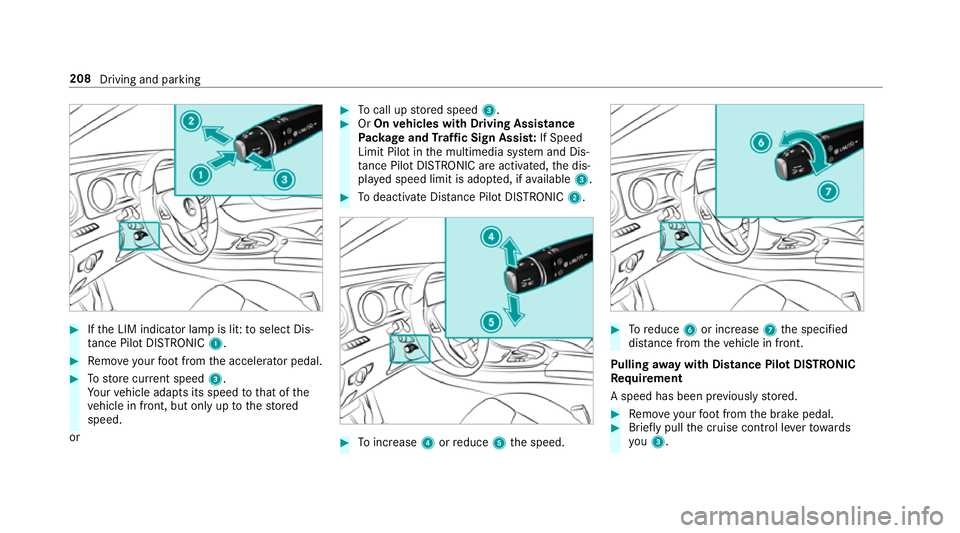
Ifth e LIM indicator lamp is lit: toselect Dis‐
ta nce Pilot DISTRONIC 1.#
Remo veyour foot from the accelerator pedal. #
Tostore cur rent speed 3.
Yo ur vehicle adapts its speed tothat of the
ve hicle in front, but only up tothestored
speed.
or #
Tocall up stored speed 3. #
OrOn vehicles with Driving Assistance
Pa ckage and Traf fic Sign Assis t:If Speed
Limit Pilot in the multimedia sy stem and Dis‐
ta nce Pilot DISTRONIC are acti vated, the dis‐
pla yed speed limit is adop ted, if available 3. #
Todeactivate Dis tance Pilot DISTRONIC 2. #
Toinc rease 4orreduce 5the speed. #
Toreduce 6or increase 7the specified
dis tance from theve hicle in front.
Pulling away with Distance Pilot DISTRONIC
Re quirement
A speed has been pr eviously stored. #
Remo veyour foot from the brake pedal. #
Brief lypull the cruise control le verto wa rds
yo u3. 208
Driving and parking
Page 212 of 565
or
#
Accelerate brie fly.
Yo ur vehicle pulls away and adapts its speed
to that of theve hicle in front. If no vehicle is
de tected in front, your vehicle accelerates to
th e set speed.
Ad opting the speed limit as thesto red speed
Re quirements:
R Speed Limit Pilot is activated in the multime‐
dia sy stem (→ page241).
R Distance Pilot DISTRONIC is acti vated.
R The sy stem de tects a traf fic sign indicating a
speed limit. #
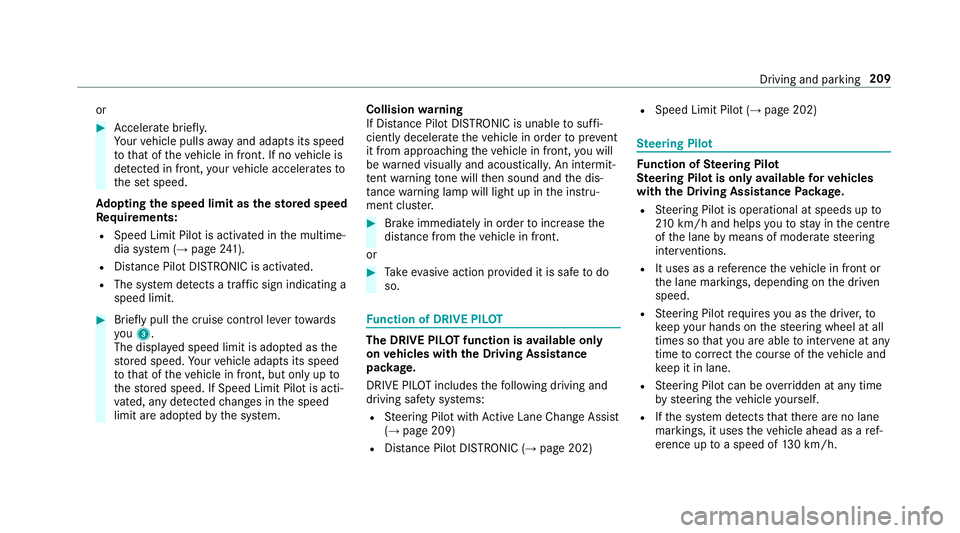
Brie fly pull the cruise control le verto wa rds
yo u3.
The displ ayed speed limit is adop ted as the
st ored speed. Your vehicle adapts its speed
to that of theve hicle in front, but only up to
th estored speed. If Speed Limit Pilot is acti‐
va ted, any de tected changes in the speed
limit are adop tedby the sy stem. Collision
warning
If Dis tance Pilot DISTRONIC is unable tosuf fi‐
ciently decele rate theve hicle in order topreve nt
it from approa ching theve hicle in front, you will
be warned visually and acousticall y.An intermit‐
te nt wa rning tone will then sound and the dis‐
ta nce warning lamp will light up in the instru‐
ment clus ter. #
Brake immediately in order toinc rease the
dis tance from theve hicle in front.
or #
Take evasive action pr ovided it is safe todo
so. Fu
nction of DRIVE PIL OT The DRIVE PI
LOT function is available only
on vehicles with the Driving Assistance
pa ckage.
DRIVE PIL OTincludes thefo llowing driving and
driving saf ety sy stems:
R Steering Pilot with Active Lane Change Assi st
( → page 209)
R Distance Pilot DISTRONIC (→ page 202) R
Speed Limit Pil ot (→page 202) St
eering Pilot Fu
nction of Steering Pilot
St eering Pilot is only available forve hicles
with the Driving Assistance Package.
R Steering Pilot is operational at speeds up to
21 0 km/h and helps youto stay inthe cent re
of the lane bymeans of moderate steering
inter ventions.
R It uses as a refere nce theve hicle in front or
th e lane markings, depending on the driven
speed.
R Steering Pilot requ ires you as the driver, to
ke ep your hands on thesteering wheel at all
times so that you are able tointer vene at any
time tocor rect the course of theve hicle and
ke ep it in lane.
R Steering Pilot can be overridden at any time
by steering theve hicle yourself.
R Ifth e sy stem de tects that there are no lane
markings, it uses theve hicle ahead as a ref‐
erence up toa speed of 130 km/h. Driving and parking
209