display MERCEDES-BENZ E-CLASS ESTATE 2016 Repair Manual
[x] Cancel search | Manufacturer: MERCEDES-BENZ, Model Year: 2016, Model line: E-CLASS ESTATE, Model: MERCEDES-BENZ E-CLASS ESTATE 2016Pages: 565, PDF Size: 11.34 MB
Page 261 of 565
Ad
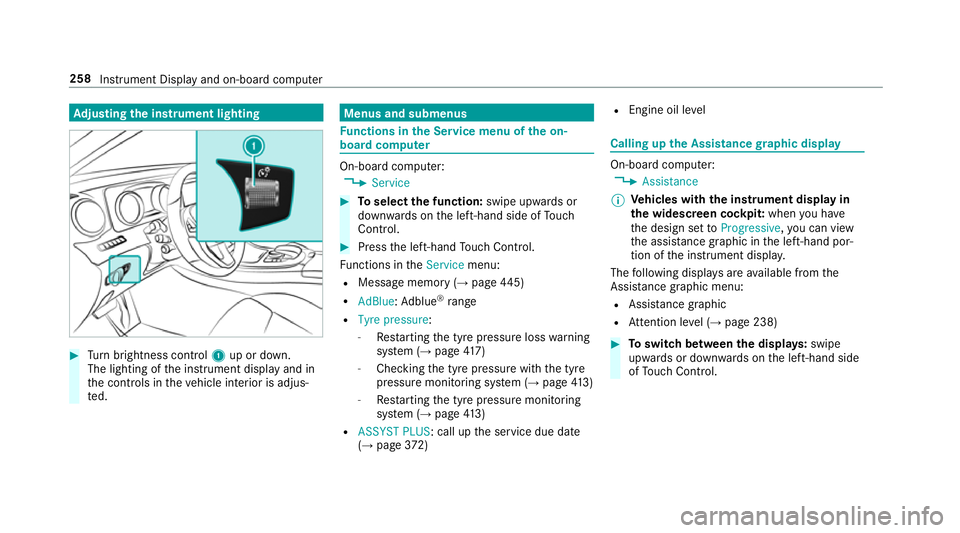
justing the in stru ment lighting #
Turn brightness control 1up or down.
The lighting of the instrument display and in
th e controls in theve hicle interior is adjus‐
te d. Menus and submenus
Fu
nctions in the Service menu of the on-
board compu ter On-board computer:
, Service #
Toselect the function: swipe upwards or
down wards on the left-hand side of Touch
Control. #
Press the left-hand Touch Control.
Fu nctions in theService menu:
R Message memory (→ page445)
R AdBlue: Adblue ®
ra nge
R Tyre pressure:
-Restarting the tyre pressure loss warning
sy stem (→ page417)
- Che cking the tyre pressure with the tyre
pressure monitoring sy stem (→ page413)
- Restarting the tyre pressure monitoring
sy stem (→ page413)
R ASSYST PLUS: call up the service due date
(→ page 372) R
Engine oil le vel Calling up
the Assistance graphic display On-board computer:
, Assistance
% Ve
hicles with the instrument display in
th e widescreen cockpit: whenyou ha ve
th e design set toProgressive ,yo u can view
th e assis tance graphic in the left-hand por‐
tion of the instrument displa y.
The following displa ysare available from the
Assi stance graphic menu:
R Assis tance graphic
R Attention le vel (→ page 238) #
Toswitch between the displa ys:swipe
up wa rds or down wards on the left-hand side
of Touch Control. 258
Instru ment Display and on-board computer
Page 262 of 565
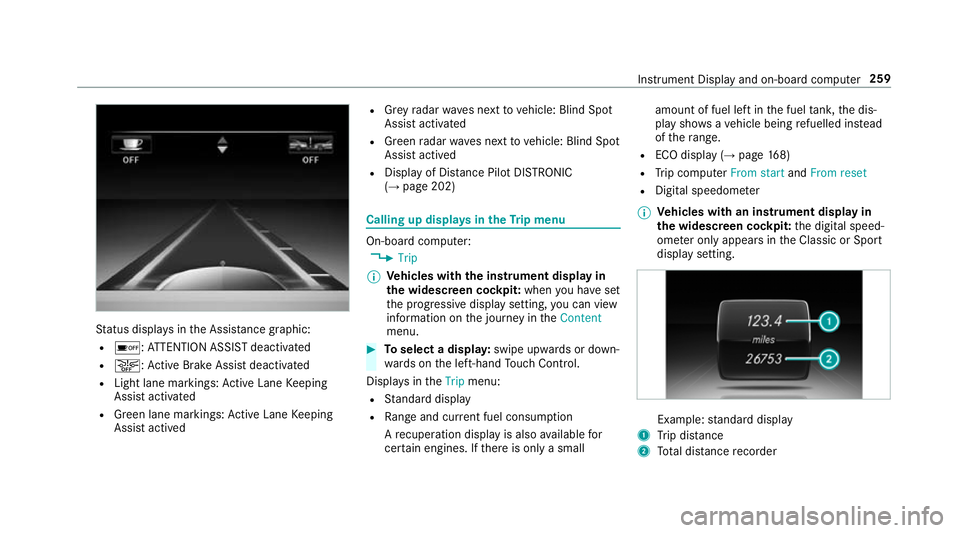
St
atus displa ysinthe Assis tance graphic:
R é: ATTENTION ASSIST deactivated
R æ: Active Brake Assi stdeactivated
R Light lane markings: Active Lane Keeping
Assist activated
R Green lane markings: Active Lane Keeping
Assist actived R
Grey radar waves next tovehicle: Blind Spot
Assist activated
R Green radar waves next tovehicle: Blind Spot
Assist actived
R Display of Dis tance Pilot DISTRONIC
(→ page 202) Calling up displa
ysintheTr ip menu On-board computer:
, Trip
% Ve
hicles with the instrument display in
th e widescreen cockpit: whenyou ha veset
th e progressive display setting, you can view
information on the journey in theContent
menu. #
Toselect a displa y:swipe upwards or down‐
wa rds on the left-hand Touch Control.
Displa ysintheTrip menu:
R Standard display
R Range and cur rent fuel consu mption
A recuperation displ ayis also available for
cer tain engines. If there is only a small amount of fuel left in
the fuel tank, the dis‐
play sho wsave hicle being refuelled ins tead
of thera nge.
R ECO displ ay (→page 168)
R Trip computer From startandFrom reset
R Digital speedom eter
% Ve
hicles with an instrument display in
th e widescreen cockpit: the digital speed‐
ome ter only appears in the Classic or Sport
display setting. Example:
standard display
1 Trip dis tance
2 Total dis tance recorder Instrument Display and on-board compu
ter259
Page 263 of 565
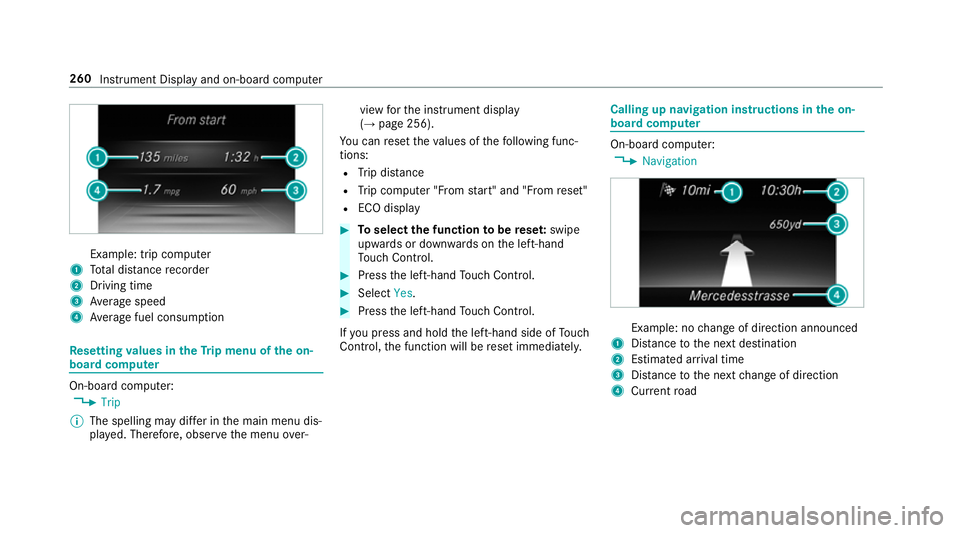
Example: trip computer
1 Total dis tance recorder
2 Driving time
3 Average speed
4 Average fuel consum ption Re
setting values in theTr ip menu of the on-
board compu terOn-board computer:
, Trip
% The spelling may dif fer in the main menu dis‐
pla yed. Therefore, obser vethe menu over‐ view
forth e instrument display
(→ page 256).
Yo u can reset theva lues of thefo llowing func‐
tions:
R Trip dis tance
R Trip computer "F rom start" and "F rom reset"
R ECO display #
Toselect the function tobe rese t:swipe
upwards or down wards on the left-hand
To uch Control. #
Press the left-hand Touch Control. #
Select Yes. #
Press the left-hand Touch Control.
If yo u press and hold the left-hand side of Touch
Control, the function will be reset immediately. Calling up navigation instructions in
the on-
board compu ter On-board computer:
, Navigation Example: no
change of direction announced
1 Distance tothe next destination
2 Estimated ar riva l time
3 Distance tothe next change of direction
4 Current road 260
Instru ment Display and on-board computer
Page 264 of 565
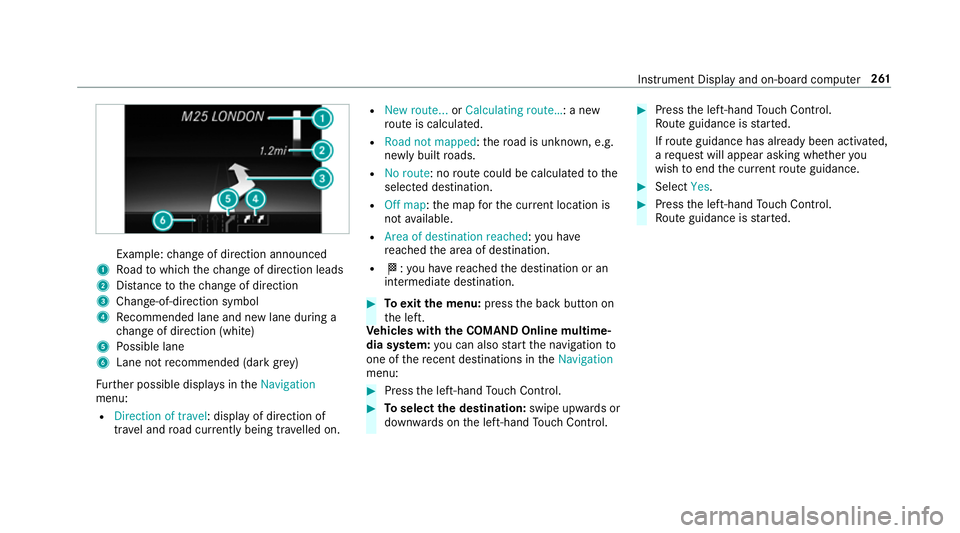
Example:
change of direction announced
1 Road towhich thech ange of direction leads
2 Distance tothech ange of direction
3 Chan ge-of-direction symbol
4 Recommended lane and new lane du ring a
ch ange of direction (white)
5 Possible lane
6 Lane not recommended (da rkgrey)
Fu rther possible displa ysintheNavigation
menu:
R Direction of travel: display of direction of
tra vel and road cur rently being tr avelled on. R
New route... orCalculating route… : a new
ro ute is calculated.
R Road not mapped :th ero ad is unknown, e.g.
newly built roads.
R No route: no route could be calculated tothe
selected destination.
R Off map: the map forth e cur rent location is
not available.
R Area of destination reached :yo u ha ve
re ached the area of destination.
R O: you ha vereached the destination or an
intermediate destination. #
Toexitth e menu: pressthe back button on
th e left.
Ve hicles with the COMAND Online multime‐
dia sy stem: you can also start the navigation to
one of there cent destinations in theNavigation
menu: #
Press the left-hand Touch Control. #
Toselect the destination: swipe upwards or
down wards on the left-hand Touch Control. #
Press the left-hand Touch Control.
Ro ute guidance is star ted.
If ro ute guidance has already been activated,
a re qu est will appear asking whe ther you
wish toend the cur rent route guidance. #
Select Yes. #
Press the left-hand Touch Control.
Ro ute guidance is star ted. Instrument Display and on-board computer
261
Page 265 of 565
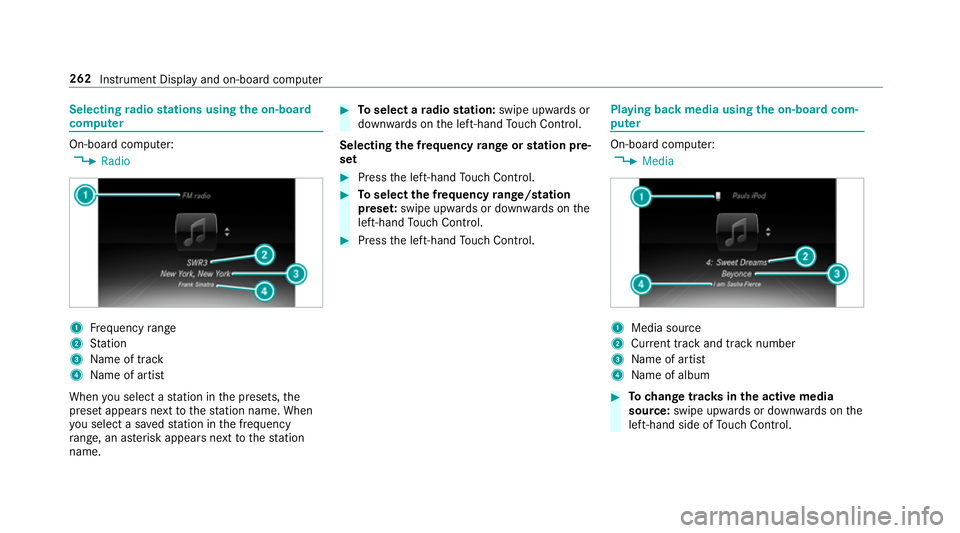
Selecting
radio stations using the on-boa rd
compu ter On-board computer:
, Radio 1
Frequency range
2 Station
3 Name of track
4 Name of artist
When you select a station in the presets, the
preset appears next tothest ation name. When
yo u select a sa vedstation in the frequency
ra nge, an as terisk appears nexttothest ation
name. #
Toselect a radio station: swipe upwards or
down wards on the left-hand Touch Control.
Selecting the frequency range or station pre‐
set #
Press the left-hand Touch Control. #
Toselect the frequency range/station
prese t:swipe upwards or down wards on the
left-hand Touch Control. #
Press the left-hand Touch Control. Playing back media using
the on-boa rdcom‐
pu ter On-board computer:
, Media 1
Media source
2 Current track and track number
3 Name of artist
4 Name of album #
Tochange trac ksinthe active media
source: swipe upwards or down wards on the
left-hand side of Touch Control. 262
Instru ment Display and on-board computer
Page 267 of 565
R
Updating data...: the call list is being upda‐
te d.
R Importing contacts... :th e conta cts from the
mobile phone or from a storage medium are
impor ted.
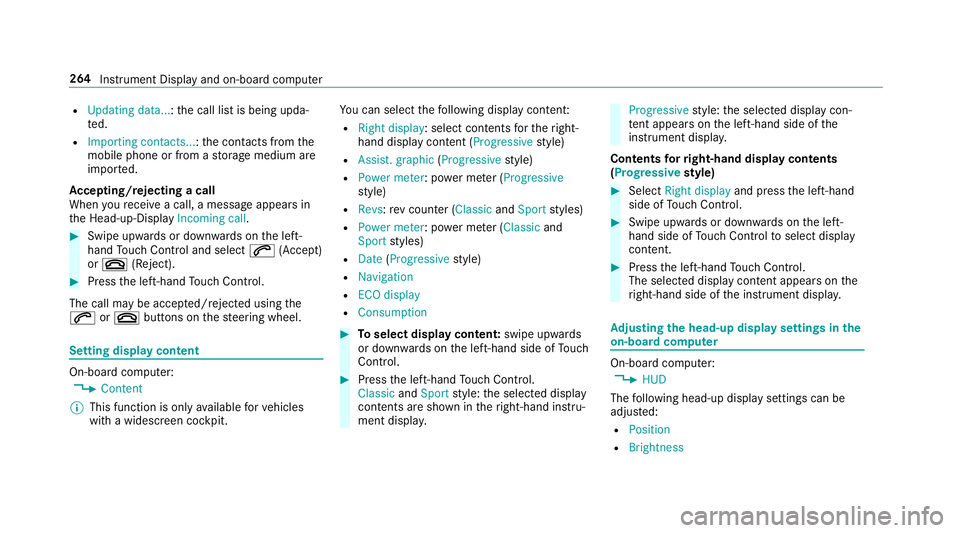
Ac cepting/rejecting a call
When youre cei vea call, a message appears in
th e Head-up-Display Incoming call.#
Swipe upwards or down wards on the left-
hand Touch Control and select 6(Accept)
or ~ (Reject). #
Press the left-hand Touch Control.
The call may be accep ted/rejec ted using the
6 or~ buttons on thesteering wheel. Setting display content
On-board computer:
, Content
% This function is only available forve hicles
with a widescreen cockpit. Yo
u can select thefo llowing display con tent:
R Right display: select contents forth eright-
hand display content (Progressive style)
R Assist. graphic (Progressivestyle)
R Power meter : power me ter (Progressive
st yle)
R Revs :re v counter ( ClassicandSport styles)
R Power meter : power me ter (Classic and
Sport styles)
R Date (Progressive style)
R Navigation
R ECO display
R Consumption #
Toselect display content: swipe upwards
or down wards on the left-hand side of Touch
Control. #
Press the left-hand Touch Control.
Classic andSport style: the selected display
conte nts are shown in theright-hand instru‐
ment displa y. Progressive
style: the selected display con‐
te nt appears on the left-hand side of the
instrument displa y.
Contents forri ght-hand display contents
(Progressive style) #
Select Right display and pressthe left-hand
side of Touch Control. #
Swipe upwards or down wards on the left-
hand side of Touch Control toselect display
content. #
Press the left-hand Touch Control.
The selected displ aycontent appea rson the
ri ght-hand side of the instrument displa y. Ad
justing the head-up display settings in the
on-board co mputer On-board computer:
, HUD
The following head-up display settings can be
adjus ted:
R Position
R Brightness 264
Instrument Display and on-board computer
Page 268 of 565
R
Display content #
Toselect the setting: swipe upwards or
down wards on the left-hand Touch Control. #
Press the left-hand Touch Control. #
Toadjust theva lue: swipe upwards or
down wards on the left-hand Touch Control. #
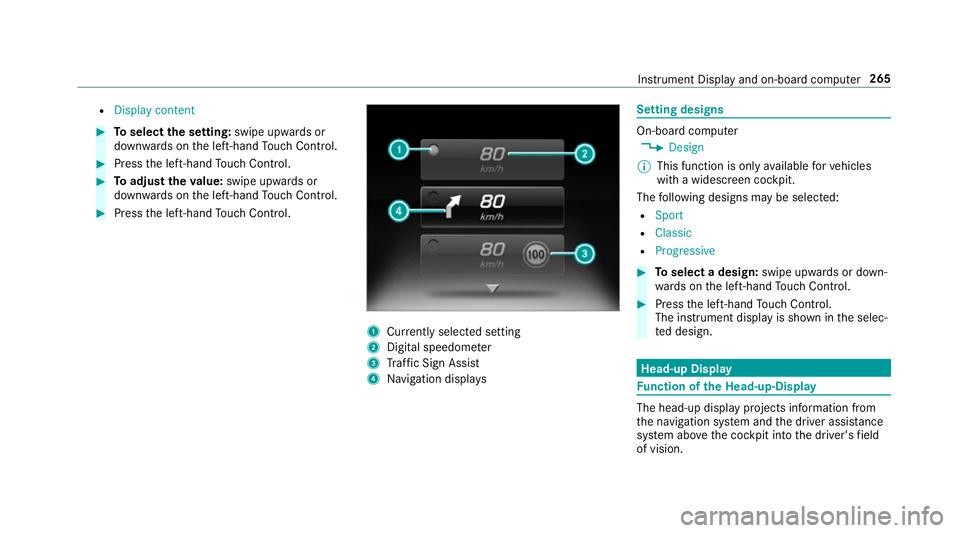
Press the left-hand Touch Control. 1
Currently selected setting
2 Digital speedome ter
3 Traf fic Sign Assi st
4 Navigation displa ys Setting designs
On-board computer
, Design
% This function is only available forve hicles
with a widescreen cockpit.
The following designs may be selec ted:
R Sport
R Classic
R Progressive #
Toselect a design: swipe upwards or down‐
wa rds on the left-hand Touch Control. #
Press the left-hand Touch Control.
The instrument displ ayis shown in the selec‐
te d design. Head-up Display
Fu
nction of the Head-up-Display The head-up display projects information from
th
e navigation sy stem and the driver assis tance
sy stem abo vethe cockpit into the driver's field
of vision. Instrument Display and on-board computer
265
Page 269 of 565
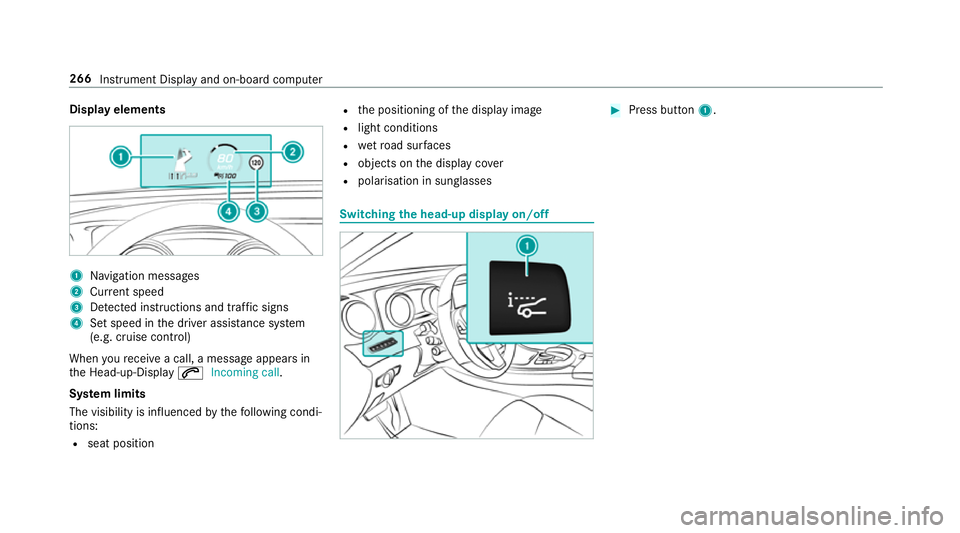
Display elements
1
Navigation messa ges
2 Current speed
3 Detected instructions and traf fic signs
4 Set speed in the driver assis tance sy stem
(e.g. cruise control)
When youre cei vea call, a message appears in
th e Head-up-Display 6Incoming call.
Sy stem limits
The visibility is influenced bythefo llowing condi‐
tions:
R seat position R
the positioning of the display image
R light conditions
R wetro ad sur faces
R objects on the display co ver
R polarisation in sunglasses Switching
the head-up display on/off #
Press button 1. 266
Instru ment Display and on-board computer
Page 271 of 565
Vo
ice prom pting #
Tostart or continue a dialogue: pressthe
ó button on the multifunction steering
wheel.
Yo u can say a command af ter an acou stic
signal. #
Tocor rect an ent ry:say theCorrection
command. #
Toselect an entry from the selection lis t:
say the line number or the conte nts. #
Tobrows eth e selection lis t:say theCon-
tinue orBack command. #
Tointer rupt the dialogue: saythePause
command. #
Tocancel the dialogue: saytheCancel
command. Operable functions
Yo
u can use the LINGU ATRO NIC voice control
sy stem tooperate thefo llowing equipment
re ga rdless of thefe atures:
R Telephone R
Text messa ges
R Navigation
R Address book
R Radio
R Audio (memory card, Media Inter face, USB
and Blu etoo th®
audio)
R TV
R Vehicle Command types
A distinction is made between
thefo llowing
command types:
R Global commands can be said at any time
and rega rdless of the cur rent application,
e.g. theNavigate to, CallorText message to
commands.
R Application-specific commands are only
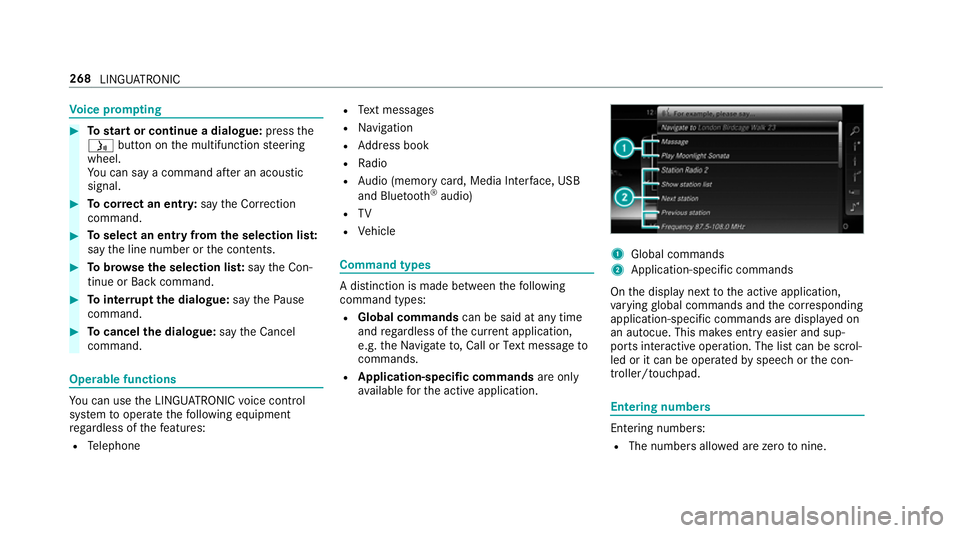
av ailable forth e active application. 1
Global commands
2 Application-specific commands
On the display next tothe active application,
va rying global commands and the cor responding
application-specific commands are displa yed on
an autocue. This makes ent ryeasier and sup‐
ports interactive operation. The list can be scrol‐
led or it can be operated byspeech or the con‐
troller/touchpad. Entering numbers
Ente
ring numbe rs:
R The numbers allo wed are zerotonine . 268
LINGUATRONIC
Page 273 of 565
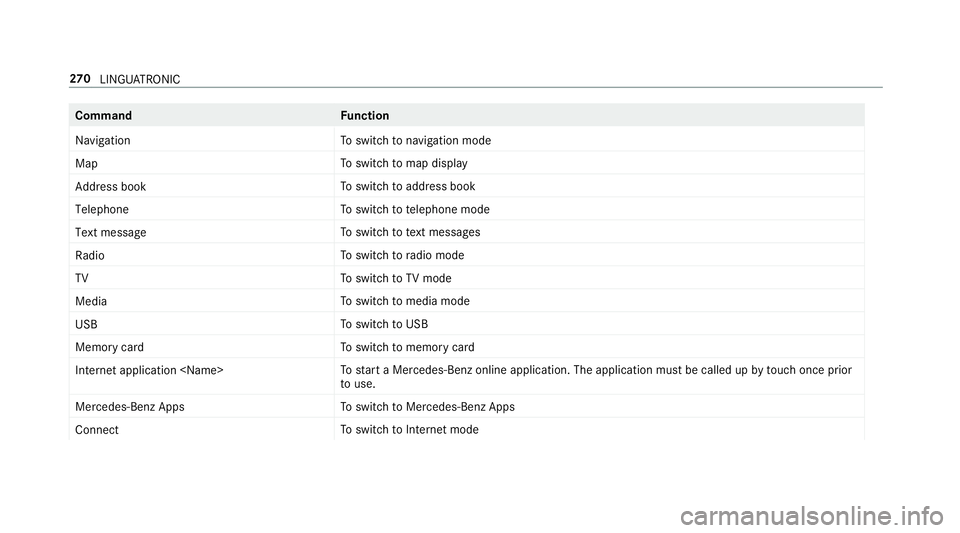
Command
Function
Navigation To
switch tonavigation mode
Map To
switch tomap display
Address book To
switch toaddress book
Telephone To
switch totelephone mode
Text message To
switch totext messa ges
Radio To
switch toradio mode
TV To
switch toTV mode
Media To
switch tomedia mode
USB To
switch toUSB
Memory card To
switch tomemory card
Internet application
start a Mercedes-Benz online application. The application must be called up bytouch once prior
to use.
Mercedes-Benz Apps To
switch toMercedes-Benz Apps
Connect To
switch toInternet mode 270
LINGU ATRO NIC