display MERCEDES-BENZ E-CLASS ESTATE 2016 Owner's Manual
[x] Cancel search | Manufacturer: MERCEDES-BENZ, Model Year: 2016, Model line: E-CLASS ESTATE, Model: MERCEDES-BENZ E-CLASS ESTATE 2016Pages: 565, PDF Size: 11.34 MB
Page 153 of 565
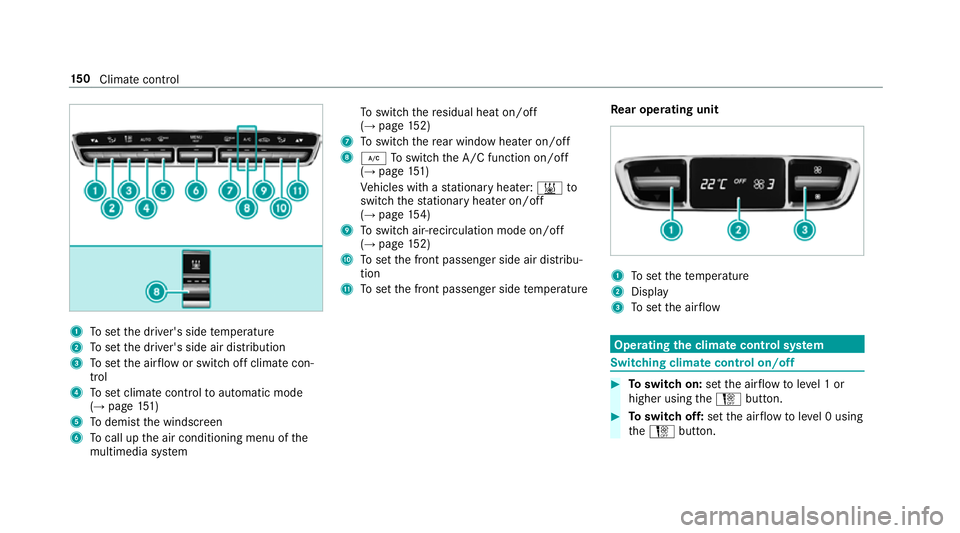
1
Toset the driver's side temp erature
2 Toset the driver's side air distribution
3 Toset the air flow or switch off climate con‐
trol
4 Toset climate contro lto automatic mode
(→ page 151)
5 Todemist the windscreen
6 Tocall up the air conditioning menu of the
multimedia sy stem To
switch there sidual heat on/off
(→ page 152)
7 Toswitch there ar wind owheater on/off
8 ¿ Toswitch the A/C function on/off
(→ page 151)
Ve hicles with a stationary heater: &to
switch thest ationary heater on/off
(→ page 154)
9 Toswitch air-recirculation mode on/off
(→ page 152)
A Toset the front passenger side air distribu‐
tion
B Toset the front passenger side temp erature Re
ar operating unit 1
Toset thete mp erature
2 Display
3 Toset the air flow Operating
the clima tecont rol sy stem Switching clima
tecont rol on/off #
Toswitch on: setthe air flow toleve l 1 or
higher using theH button. #
Toswitch off: setthe air flow toleve l 0 using
th eH button. 15 0
Climate cont rol
Page 154 of 565
%
When the climate control is switched off, the
windo wscan mist up faster. Only switch off
th e climate control brief ly.Ac
tivating/deactivating the A/C function via
the control panel The A/C function cools, heats and dehumidifies
th
e interior air in theve hicle. #
Press button ¿.
Deactivate the A/C function only briefly other‐
wise the windo wscan mist up more quickl y.
Condensation may drip from the underside of
th eve hicle when cooling mode is active. This is
not a sign that there is a malfunction. Ac
tivating/deactivating the A/C function
using the multimedia sy stem Multimedia sy
stem:
, Vehicle .
b Climate control .
A/C
The A/C function heats, cools and dehumidifies
th eve hicle's interior air. #
Switch the function on Oor off ª. Setting climate control
toautomatic mode In auto
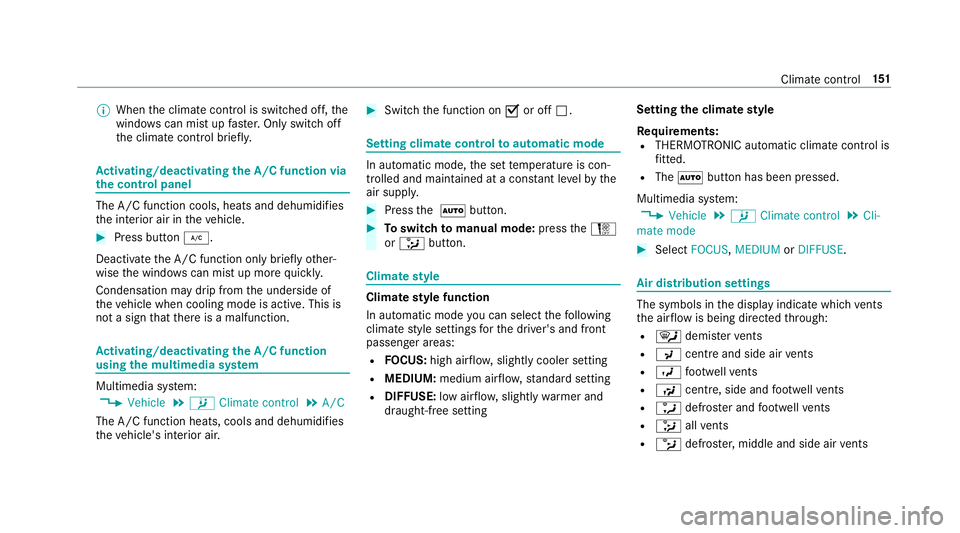
matic mode, the set temp erature is con‐
trolled and maintained at a const ant levelby the
air suppl y. #
Press the à button. #
Toswitch tomanual mode: presstheH
or _ button. Climate
style Climate
style function
In automatic mode you can select thefo llowing
climate style settings forth e driver's and front
passenger areas:
R FOCUS: high air flow , slightly cooler setting
R MEDIUM: medium air flow ,st andard setting
R DIFFUSE: low airflow , slightly warmer and
draught-f ree setting Setting
the clima testyle
Requ irements:
R THERMOTRONIC automatic climate control is
fitted.
R The à button has been pressed.
Multimedia sy stem:
, Vehicle .
b Climate control .
Cli-
mate mode #
Select FOCUS, MEDIUM orDIFFUSE . Air distribution settings
The symbols in
the display indicate which vents
th e air flow is being directed thro ugh:
R ¯ demis terve nts
R P centre and side air vents
R O foot we llve nts
R S centre, side and foot we llve nts
R a defros ter and foot we llve nts
R _ allvents
R b defros ter,middle and side air vents Clima
tecontrol 151
Page 166 of 565
%
You can check the suitability of your mobile
phone byentering the phone number at
http://www.mercedes.me.
Information about suitable mobile phones
can be obtained from your Mercedes-Benz
service centre or at http://www.mercedes-
benz.com/connect.
% The function is on lyavailable in combination
with Mercedes me connect and on lyin cer‐
ta in countries.
% Protective cases around the mobile phone
can impair the functionality.
St arting theve hicle for the firs t time af ter
activating the function #
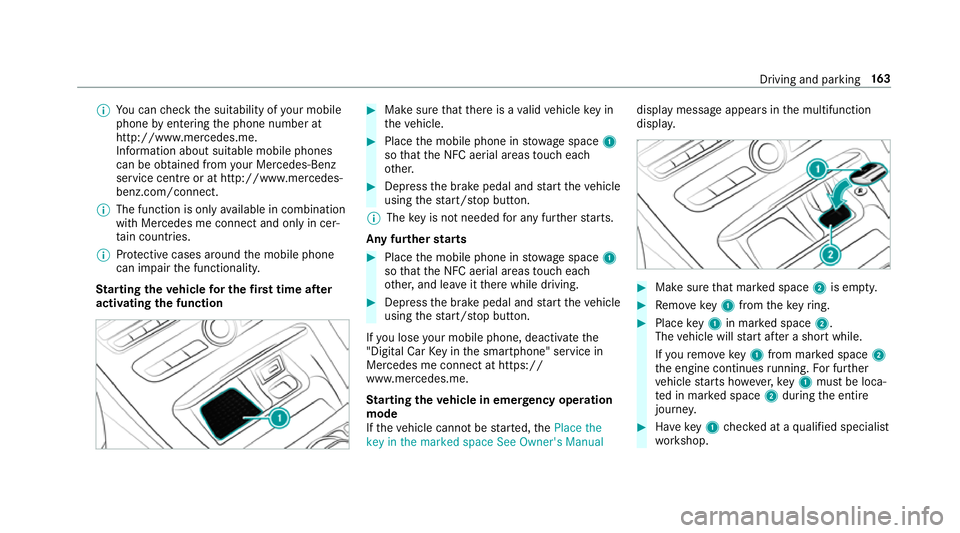
Make sure that there is a valid vehicle key in
th eve hicle. #
Place the mobile phone in stowage space 1
so that the NFC aerial areas touch each
ot her. #
Depress the brake pedal and start theve hicle
using thest art/ stop button.
% The key is not needed for any fur ther starts.
Any fu rther starts #
Place the mobile phone in stowage space 1
so that the NFC aerial areas touch each
ot her, and lea veitth ere while driving. #
Depress the brake pedal and start theve hicle
using thest art/ stop button.
If yo u lose your mobile phone, deactivate the
"Digital Car Key in the smartphone" service in
Mercedes me connect at https://
www.mercedes.me.
St arting theve hicle in emer gency operation
mode
If th eve hicle cannot be star ted, thePlace the
key in the marked space See Owner's Manual display message appears in
the multifunction
displa y. #
Make sure that mar ked space 2is em pty. #
Remo vekey1 from theke yring. #
Place key1 in mar ked space 2.
The vehicle will start af ter a short while.
If yo ure mo vekey1 from mar ked space 2
th e engine continues running. For fur ther
ve hicle starts ho wever,ke y1 must be loca‐
te d in mar ked space 2during the entire
journe y. #
Have key1 checked at a qualified specialist
wo rkshop. Driving and parking
16 3
Page 169 of 565
#
Never use the brake pedal as a foot re st. #
Do not depress the brake pedal and the
accelerator pedal at the same time
while driving. *
NO
TECausing wearto the brake linings
by permanently depressing the brake
pedal #
Do not permanently depress the brake
pedal while driving. #
Touse braking ef fect of the engine,
shift toa lo werge ar in good time. *
NO
TEDama getothe driv etra in and
engine when pulling away #
Do not warm upthe engine when sta‐
tionar y.Pull away immediatel y. #
Avoid high engine speeds and full thro t‐
tle until the engine has reached its
operating temp erature. #
Do not allow the wheels tospin. *
NO
TEDama getothe catalytic con verter
due tonon-combu sted fuel The engine is not
running smo othly and is
misfiring.
Non-combus ted fuel may get into the cata‐
lytic con verter. #
Only depress the accelera tor pedal
slightl y. #
Have the cause rectified immediately at
a qu alified specialist workshop. Limited braking ef
fect on salt-trea tedro ads:
R due tosalt build-up on the brake discs and
brake lining, the braking dis tance can
increase conside rably or result in braking
only on one side.
R maintain a much greater dis tance totheve hi‐
cle in front.
To preve nt salt build-up:
R brake occasionally while paying attention to
th e tra ffic conditions. R
carefully depress the brake pedal at the end
of the journey and when starting the next
journe y. ECO
start/s top function Ope
ration of the ECO start/s top function
The engine is switched off au tomatical ly:
R Vehicles with manual transmission: Ifyou
brake theve hicle, shift into neutral iwhen
tr ave lling at a low speed and then release the
clutch pedal.
R Vehicles with automatic transmission: If
yo u brake theve hicle toast andstill in trans‐
mission position hori.
R If all vehicle conditions for an auto matic
engine stop are met.
The è symbol appears in the multifunction
display when theve hicle is stationar y.If not all
th eve hicle conditions are met, theç symbol
appears in the multifunction displa y.16 6
Driving and pa rking
Page 170 of 565
The engine is
restar ted automatically if:
R Vehicles with manual transmission: Yo u
depress the clutch pedal.
R Vehicles with manual transmission: Yo u
engage reve rsege ar k.
R Vehicles with automatic transmission: In
transmission position h,youre lease the
brake pedal when the HOLD function is not
active.
R Vehicles with automatic transmission:
Yo u shift out of transmission position j.
R Vehicles with automatic transmission:
Yo u shift into transmission position hor
k.
R You depress the accelerator pedal.
R Allvehicles except
E 220 d 4MATIC All‑Ter rain: You swit chto
drive program S+
R E 220 d 4MATIC All‑Ter rain: You swit chto
drive program All‑Terrain.
R Youch ange theve hicle le vel.
R An automatic engine start is necessar y.If
th e engine was switched off bythe ECO start/
st op function and you lea vetheve hicle, a warn‐
ing tone sounds. The Vehicle is operational
Switch off the ignition before exiting display
messa gealso appears in the multifunction dis‐
pla y.
If yo u do not swit choff the ignition, the ignition
is automatically switched off af ter one minute. Switching
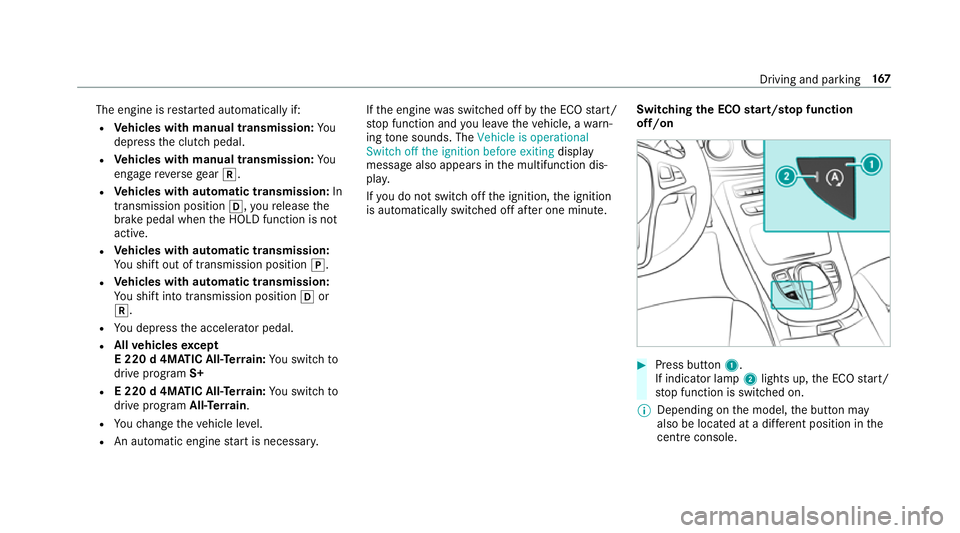
the ECO start/s top function
off/on #
Press button 1.
If indicator la mp2lights up, the ECO start/
st op function is switched on.
% Depending on the model, the button may
also be located at a dif fere nt position in the
centre console. Driving and pa
rking 167
Page 171 of 565
ECO display
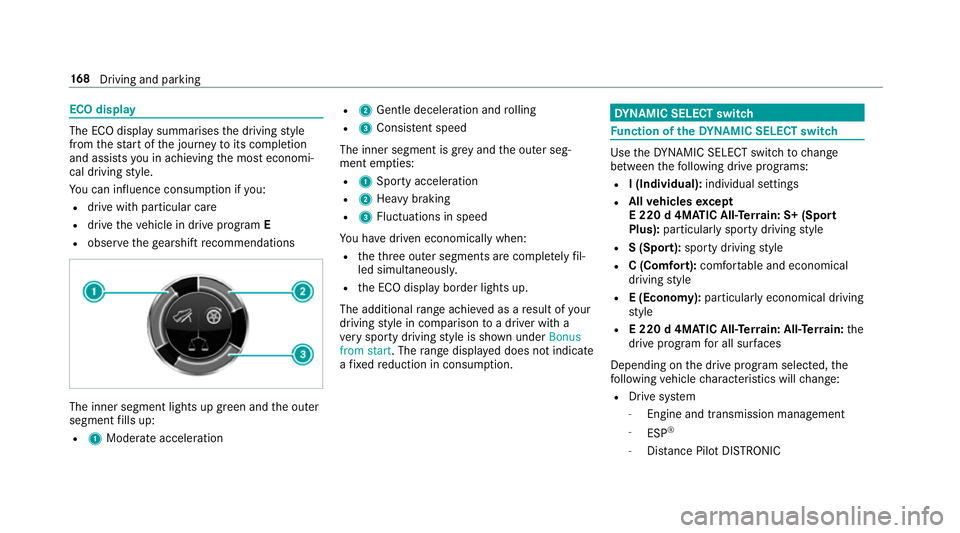
The ECO display summarises
the driving style
from thest art of the journey toits completion
and assists you in achieving the most economi‐
cal driving style.
Yo u can influence consum ption if you:
R drive with particular care
R drive theve hicle in drive program E
R obser vethege arshift recommendations The inner segment lights up green and
the outer
segment fills up:
R 1 Moderate acceleration R
2 Gentle decele ration and rolling
R 3 Consis tent speed
The inner segment is gr eyand the outer seg‐
ment em pties:
R 1 Sporty acceleration
R 2 Heavy braking
R 3 Fluctuations in speed
Yo u ha vedriven economically when:
R theth re e outer segments are comple tely fil‐
led simultaneousl y.
R the ECO display border lights up.
The additional range achi eved as a result of your
driving style in comparison toa driver with a
ve ry sporty driving style is shown under Bonus
from start. The range displ ayed does not indicate
a fixe dre duction in consum ption. DY
NA MIC SELECT switch Fu
nction of theDY NA MIC SELECT switch Use
theDY NA MIC SELECT switch tochange
between thefo llowing drive programs:
R I (Individual): individual settings
R Allvehicles except
E 220 d 4MATIC All‑Ter rain: S+ (Sport
Plus): particularly sporty driving style
R S (Sport): sporty driving style
R C (Comfort): comfortable and economical
driving style
R E (Economy): particularly economical driving
st yle
R E 220 d 4MATIC All‑Ter rain: All‑Ter rain: the
drive prog ram for all sur faces
Depending on the drive program selected, the
fo llowing vehicle characteristics will change:
R Drive sy stem
- Engine and transmission management
- ESP ®
- Distance Pilot DISTRONIC 16 8
Driving and pa rking
Page 172 of 565
R
Suspension
R Steering
R Availability of the ECO start/ stop function
% Time until the next vehicle star t:
R Less than four hours: the last selected
drive program is active.
R More than four hours: drive program Cis
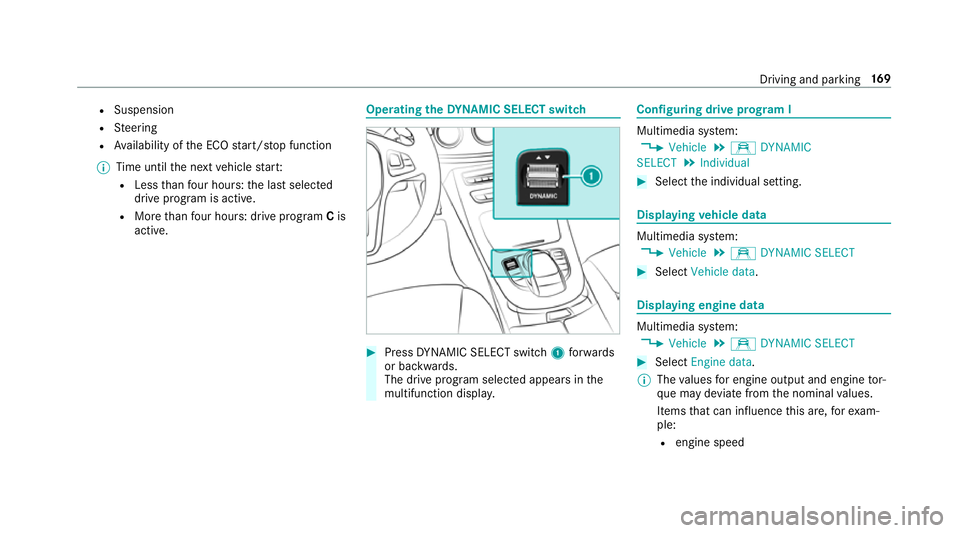
active. Ope
rating the DYNA MIC SELECT switch #
Press DYNA MIC SELECT switch 1forw ards
or backwards.
The drive prog ram selected appears in the
multifunction displa y. Configuring drive prog
ram I Multimedia sy
stem:
, Vehicle .
e DYNAMIC
SELECT .
Individual #
Select the individual setting. Displaying
vehicle data Multimedia sy
stem:
, Vehicle .
e DYNAMIC SELECT #
Select Vehicle data . Displaying engine data
Multimedia sy
stem:
, Vehicle .
e DYNAMIC SELECT #
Select Engine data.
% The values for engine output and engine tor‐
qu e may deviate from the nominal values.
Items that can influence this are, forex am‐
ple:
R engine speed Driving and parking
16 9
Page 175 of 565
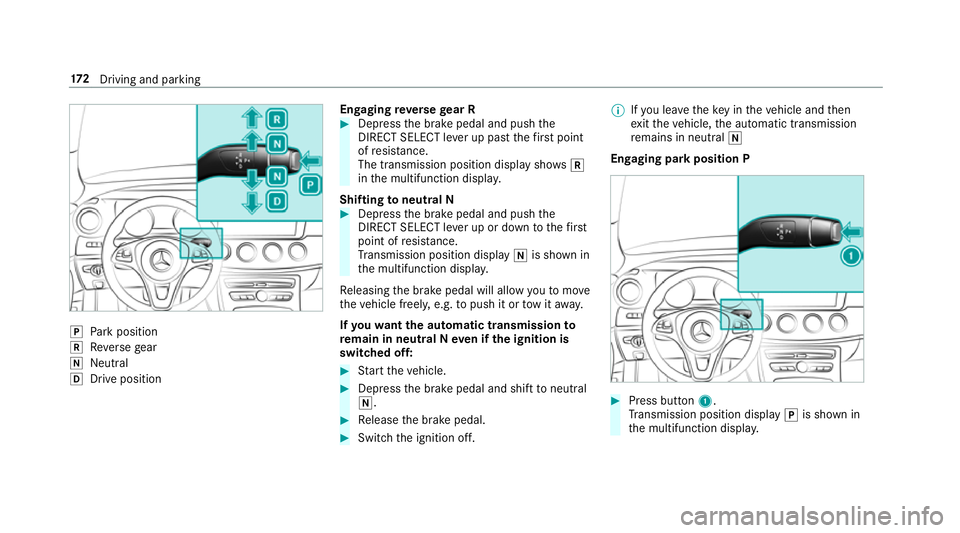
j
Park position
k Reversege ar
i Neut ral
h Drive position En
gaging reve rsege ar R #
Depress the brake pedal and push the
DIRECT SELECT le ver up past thefirs t point
of resis tance.
The transmission position displ aysho wsk
in the multifunction displa y.
Shifting toneutral N #
Depress the brake pedal and push the
DIRECT SELECT le ver up or down tothefirst
point of resis tance.
Tr ansmission position display iis shown in
th e multifunction displa y.
Re leasing the brake pedal will allow youto mo ve
th eve hicle freely, e.g. topush it or tow it away.
If yo uwa ntthe automatic transmission to
re main in neutral N even if the ignition is
switched off: #
Start theve hicle. #
Depress the brake pedal and shift toneutral
i. #
Release the brake pedal. #
Switch the ignition off. %
Ifyo u lea vetheke y in theve hicle and then
ex itth eve hicle, the automatic transmission
re mains in neutral i
Engaging park position P #
Press button 1.
Tr ansmission position display jis shown in
th e multifunction displa y.17 2
Driving and pa rking
Page 182 of 565
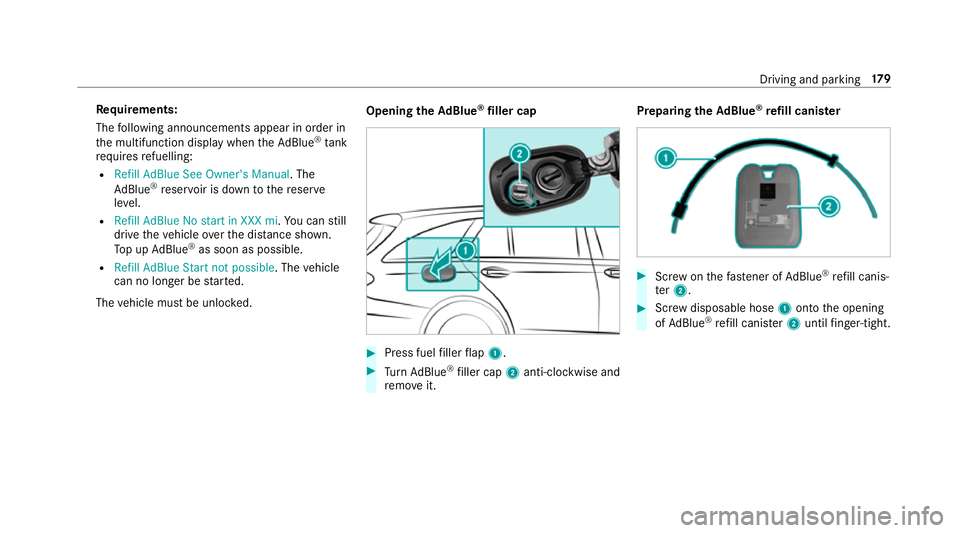
Re
quirements:
The following announcements appear in order in
th e multifunction display when theAd Blue ®
tank
requ iresrefuelling:
R Refill AdBlue See Owner's Manual . The
Ad Blue ®
re ser voir is down tothere ser ve
le ve l.
R Refill AdBlue No start in XXX mi. You can still
drive theve hicle overth e dis tance shown.
To p up AdBlue ®
as soon as possible.
R Refill AdBlue Start not possible. The vehicle
can no longer be star ted.
The vehicle must be unloc ked. Opening
theAd Blue ®
filler cap #
Press fuel filler flap 1. #
Turn AdBlue ®
filler cap 2anti-clockwise and
re mo veit. Preparing
theAd Blue ®
re fill canis ter #
Screw onthefast ener of AdBlue ®
re fill canis‐
te r2. #
Screw disposable hose 1onto the opening
of Ad Blue ®
re fill canis ter2 until finger-tight. Driving and pa
rking 17 9
Page 183 of 565
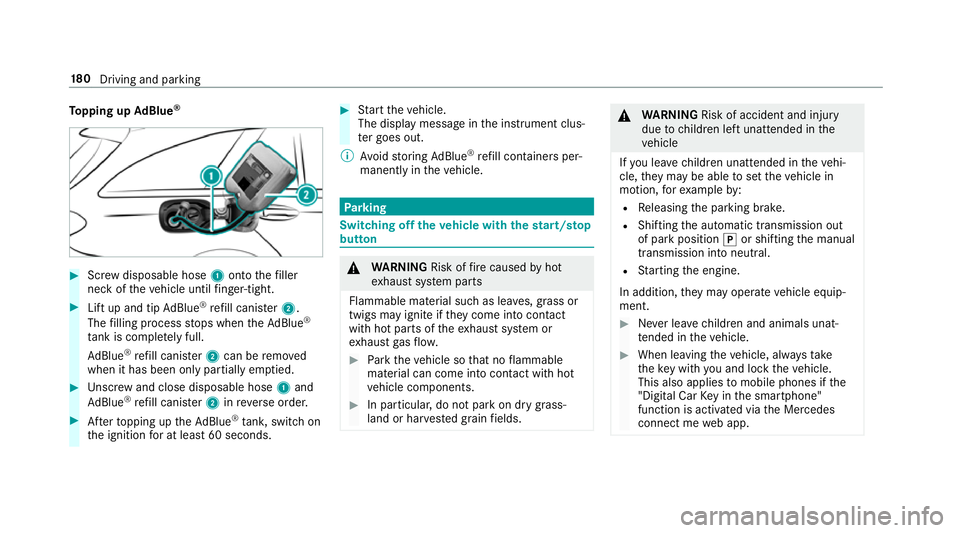
To
pping up AdBlue ® #
Screw disposable hose 1onto thefiller
neck of theve hicle until finger-tight. #
Lift up and tip AdBlue ®
re fill canis ter2.
The filling process stops when theAd Blue ®
ta nk is compl etely full.
Ad Blue ®
re fill canis ter2 can be remo ved
when it has been only partially em ptied. #
Unscr ew and close disposable hose 1and
Ad Blue ®
re fill canis ter2 inreve rse order. #
Afterto pping up theAd Blue ®
tank, switch on
th e ignition for at least 60 seconds. #
Start theve hicle.
The display message in the instrument clus‐
te r goes out.
% Avoid storing AdBlue ®
re fill con tainers per‐
manently in theve hicle. Pa
rking Switching off
theve hicle with thest art/s top
button &
WARNING Risk offire caused byhot
ex haust sy stem parts
Flammable material such as lea ves, grass or
twigs may ignite if they come into contact
wi th hot parts of theex haust sy stem or
ex haust gasflow. #
Park theve hicle so that no flammable
material can come into con tact wi thhot
ve hicle components. #
In particular, do not park on dry grass‐
land or har vested grain fields. &
WARNING Risk of accident and inju ry
due tochildren left unat tended in the
ve hicle
If yo u lea vechildren unat tended in theve hi‐
cle, they may be able toset theve hicle in
motion, forex ample by:
R Releasing the parking brake.
R Shifting the automatic transmission out
of park position jor shifting the manual
transmission into neutral.
R Starting the engine.
In addition, they may operate vehicle equip‐
ment. #
Never lea vechildren and animals unat‐
te nded in theve hicle. #
When leaving theve hicle, alw aysta ke
th eke y with you and lock theve hicle.
This also applies tomobile phones if the
"Digital Car Key in the smartphone"
function is activated via the Mercedes
connect me web app. 18 0
Driving and pa rking