reset MERCEDES-BENZ E-CLASS ESTATE 2017 User Guide
[x] Cancel search | Manufacturer: MERCEDES-BENZ, Model Year: 2017, Model line: E-CLASS ESTATE, Model: MERCEDES-BENZ E-CLASS ESTATE 2017Pages: 585, PDF Size: 11.8 MB
Page 309 of 585
R
Details
Informatio nabout thep ending sy stem
updat eisdisplayed.
R Later
The updat ecan be downloaded manually at a
later time (→ page305).
If th ed ownload is comple teda nd theu pdat eis
re ady fori ns tallation ,you will be informed of this
af te rt he next ignition cycle, fore xamp le.
Re quirements fort he ins tallation:
R The ignition is switched off.
R Notesa nd warnings ha vebeen read and
accep ted.
R The elect ricp arkin gb rake is applied.
If all requ irements ar emet,t he updat ewill be
ins talled. The multimedia sy stem cann otbe
operated while theu pdat eisb eing ins talled and
ve hicle functions ar erestricted. If er
rors should occur during thei nstallation ,the
multimedia sy stem automaticall yattem ptsto
re stor et he pr evious version. If restoration of the
pr ev ious version is no tpossible ,asymbol
appear sonthe centre console displ ay.P lease
consult aqualified specialis tworks hop to
re sol vethep roblem. Re
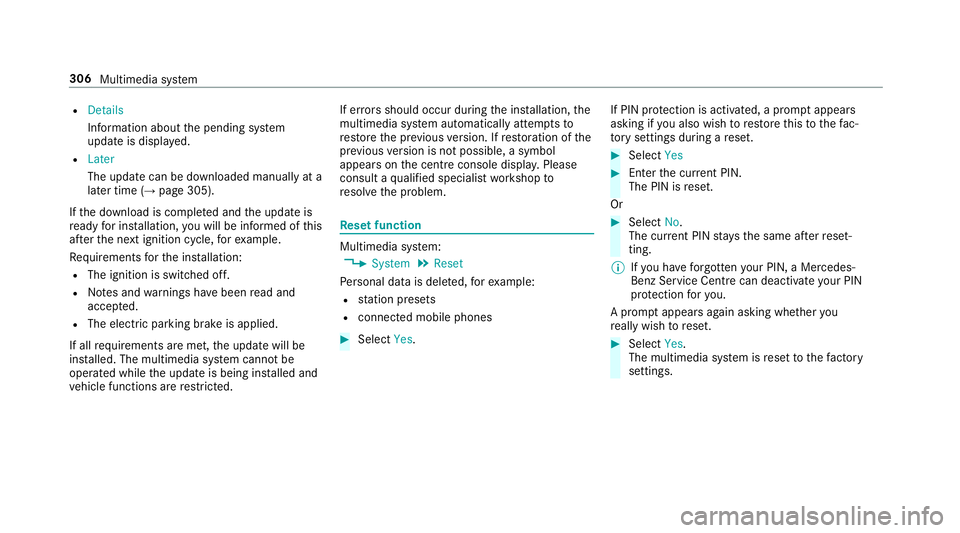
setfunction Multimedia sy
stem:
, System .
Reset
Pe rsonal dat aisdeleted, fore xamp le:
R statio npresets
R connec tedm obile phones #
Select Yes. If PIN pr
otection is activated, apromp tappears
asking if youa lso wish torestor et his tothef ac‐
to ry settings during areset. #
Select Yes #
Enter thec urrent PIN.
The PIN is reset.
Or #
Select No.
The cur rent PIN stay st he same af terr eset‐
ting.
% Ifyo uh ave forg otteny our PIN ,aMercedes-
Ben zServic eCentr ecan deactivat eyour PIN
pr otection fory ou.
Ap romp tappear sagain asking whe ther you
re all yw ish toreset. #
Select Yes.
The multimedia sy stem is rese ttot hefactory
settings. 306
Multimedia sy stem
Page 328 of 585
#
Todel eted estination suggestions: select
Reset history .
Using extern al destinations and routes
External destinations and routes can be recei ved
from thef ollowing sources:
R Mercedes-Benz Apps
R door-to-door navigation
Ap romp tappear sonthe media displa y.
Re cei vedd estinations and routes ar esaved in
th ep reviou sdestinations. #
Ifad estination is received: selectYesand
continue wit hmethod 1or2.
or #
Ifad estination wasreceived wit hphoto
information, select Start routeguidance.
Ro uteg uidance starts. #
Method 1: if routeg uidance is no tactive,
select Start rout eguidance.
The routetot he destination is calculated.
The map sho ws theroute. Routeg uidance
th en begins. #
Method 2: if routeg uidance is active, select
Start ne wrout eguidance orSet as next
intermediat edestination .
Start ne wrout eguidance:t herecei vedd esti‐
nation address is se tasanewd estination.
The pr evious destination sand intermediate
destination saredele ted. Ro uteg uidance to
th en ew destination begins.
Set as nexti ntermediate destination :the
re cei vedd estination address is se tasthe
next ne wintermedia tedestination. Route
guidance begins. #
Arout ehas bee nreceived: selectStart
rout eguidance from th ebeginning orStart
rout eguidance from curren tlocation.
Ro uteg uidance starts from thes elected
position. Ro
uteg uidanc ewith cur rent traf ficr epo rts Tr
af fici nformation overview
% The services ar enotavailable in everycoun‐
tr y. Tr
af ficr eports can be recei vedw itht he following
services:
R LiveT raffic In form ation
R FM RDS-TMC
It is no tpossible touse bo thservices simul‐
ta neously.
Liv eT raffic In form ation or FM RDS-TMC is
displ ayedw ithas ymbol.
% Hazar dalerts can be recei vedu sing theC ar-
to -X service.
% Therema ybed iffe re nces betwee nthe traf fic
re ports recei veda nd thea ctual road and
traf ficc onditions.
Impor tant informatio nonLiveT raffic In form a‐
tion:
R Current tra ffic reports ar ereceived via the
Interne tconnection or via dat aroaming (for
sele cted European count ries).
R The tra ffic situation is updated at short, regu‐
lar inter vals.
R In selec tedE uropean count ries, thes ubscrip‐
tion service is available free of charge fora Multimedi
asyst em 325
Page 381 of 585
Ra
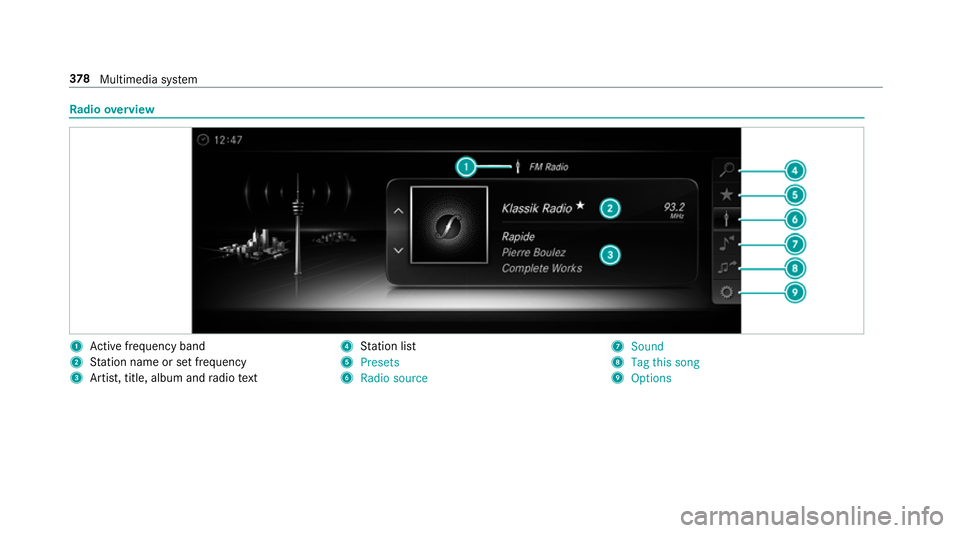
dio overview 1
Activef reque ncy band
2 Statio nnameors etfrequency
3 Artist, title, album and radio text 4
Statio nlist
5 Presets
6 Radio source 7
Sound
8 Tag this song
9 Options 378
Multimedia sy stem
Page 382 of 585
Setting
thef requ ency band Multimedia sy
stem:
, Radio .
Þ Radio source #
Select afrequ ency band. Selecting
aradio station Multimedi
asystem:
, Radio #
Navigat eupord own. Calling up
ther adio station list Multimedi
asystem:
, Radio .
è #
Select astation. Sear
ching forr adio station susin gstation
name sord irectf requencyentry Multimedi
asystem:
, Radio .
è .
è #
Ente rastatio nn ameorf requency. #
Select a.
The sea rchr esults ar edispla yed. #
Select astation. St
oring radio stations Multimedi
asystem:
, Radio .
ß Presets #
Select Store curren tstation in the presets . Editing
radio station presets Multimedi
asystem:
, Radio .
ß Presets
Moving stations: #
Highlight aprese te ntr yand navigat etothe
left. #
Select Move highlighted station. #
Select apreset.
Deleting stations: #
Highlight aprese te ntr yand navigat etothe
left. #
Select Delete highlighted station. #
Select Yes. Calling up
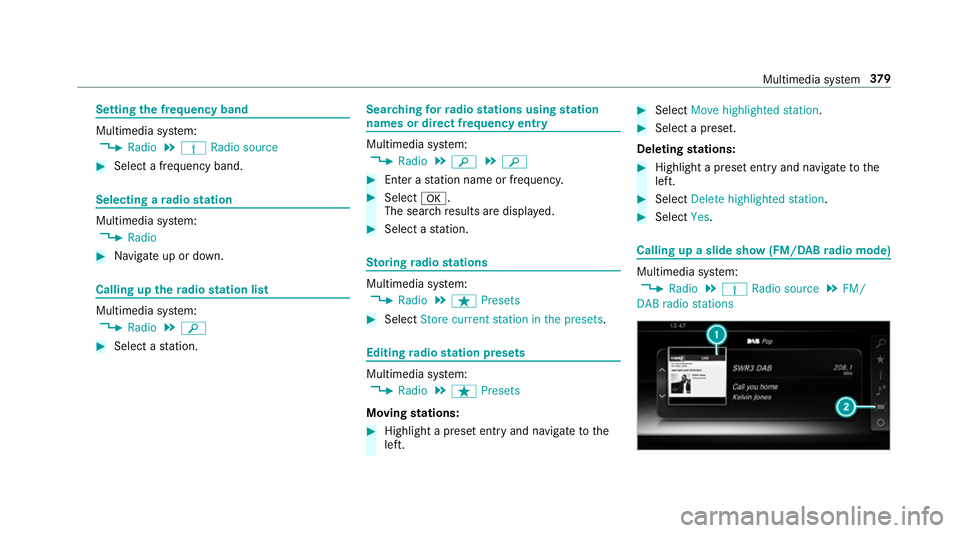
aslide sho w(FM/DAB radio mode) Multimedia sy
stem:
, Radio .
Þ Radio source .
FM/
DABr adio stations Multimedia sy
stem 37 9
Page 386 of 585
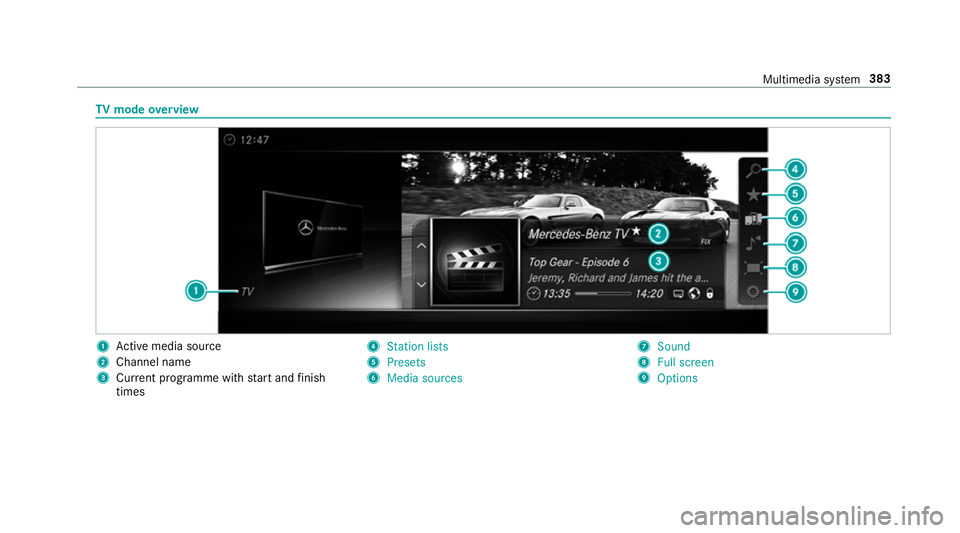
TV
mode overview 1
Activem edia sou rce
2 Channe lname
3 Current programme wi thstar ta nd finish
times 4
Station lists
5 Presets
6 Media sources 7
Sound
8 Fullscreen
9 Options Multimedia sy
stem 383
Page 387 of 585
Overvie
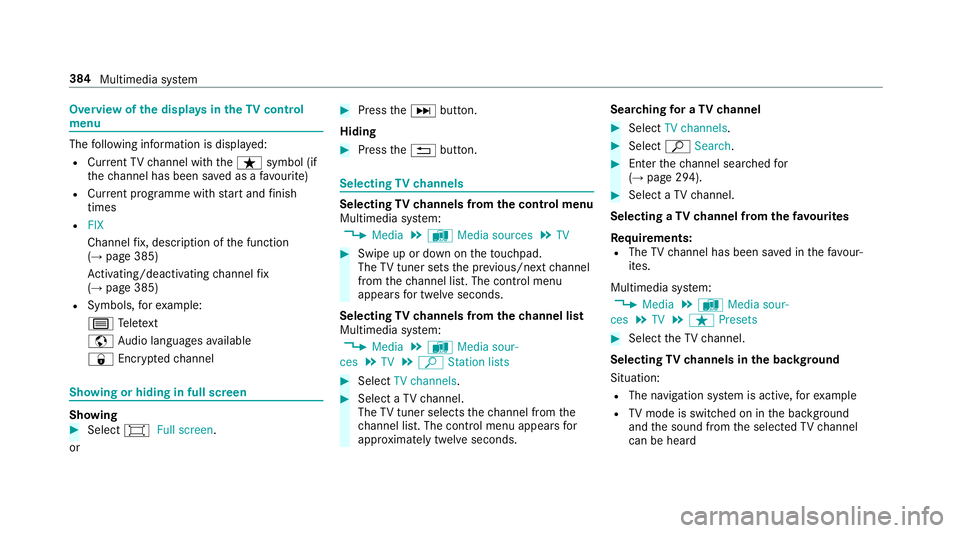
wofthe dis play sint heTV cont rol
menu The
following informatio nisdisplayed:
R Cur rent TV channel wit hthe ß symbol (if
th ec hannel has been sa vedasaf avourite)
R Cur rent programme wi thstar ta nd finish
times
R FIX
Channe lfix, desc ript ionoft he function
(→ pag e385)
Ac tivating/deactivating channel fix
( → pag e385)
R Symbols, fore xamp le:
p Telete xt
z Audio languages available
r Encryp tedc hannel Showing or hiding in full screen
Showing
#
Select #Full screen.
or #
Press theD button.
Hiding #
Press the% button. Selecting
TVchannels Selecting
TVchannels from thec ontrol menu
Multimedia sy stem:
, Media .
à Media sources .
TV #
Swipe up or down on thet ouchpad.
The TVtune rsetst he pr evious/n extc hannel
from thec hannel list. The control menu
appear sfor twelv eseconds.
Selecting TVchannels from thec hanne llist
Multimedi asystem:
, Media .
à Media sour-
ces .
TV .
ª Station lists #
Select TV channels. #
Select aTVchannel.
The TVtune rselect sthe channel from the
ch annel list. The control men uappear sfor
appr oximatel ytwe lves econds. Sear
ching foraTVc hannel #
Select TV channels . #
Select ªSearch . #
Enter thec hannel sear ched for
( → pag e294). #
Select aTVchannel.
Selecting aTVchanne lfro mt hefavo urites
Re quirements:
R The TVchannel has been sa vedint hefavo ur‐
ites.
Multimedia sy stem:
, Media .
à Media sour-
ces .
TV .
ß Presets #
Select theTVc hannel.
Selecting TVchannels in theb ackg round
Situation: R The navigation sy stem is active, fore xamp le
R TVmode is switched on in theb ackg round
and thes ound from thes elected TVchannel
can be heard 384
Multimedia sy stem
Page 389 of 585
Quic
k-saving aTVchannel
Multimedi asystem:
, Media .
à Media sources .
TV #
In full-screen mode, press thet ouchpad for
longer than thre es econds.
The cur rent TV channel is stored in the
fa vo urites in then exta vailable position.
St oring TVchannels
Multimedi asystem:
, Media .
à Media sour-
ces .
TV .
ß Presets #
Select Store curren tstation in the presets .
The cur rent channel is stored in thef avo ur‐
ites in then exta vailable position. #
Alternatively: highlight thec hannel in the
ch annel lis tand stor easaf avourite.
Moving channels in thef avo urites #
Highlight achannel in thef avo urites. #
Select ¥Movehighlighted station. #
Highligh tthe ne wposition. #
Confir mthe position. Deleting
channels #
Highlight achannel in thef avo urites. #
Select ¥Deletehighlighted station. #
Select Yes. TV
prog ramme Overvi
ewof audio languag eand subtitles
Au dio language
R It is possible tochoose between se veral
audio languages when aprogramme is broad‐
cas tinm ultiple languages.
R If,fore xamp le, En glish is se tasthe sy stem
languag eand aTVc hannel is broadcasting in
th is language, En glish is selec teda utomati‐
cally.
The prog ramme transmission ma ybeindica ted
wit hthe following symbols:
m Programme wit haudioexplanation sfor
th ev isuall yimp aired
o Stereo broadcast
n Programme fort he hearing impaired 5.1
Broadcas
tinsurround sound
If as ymbol is no tshown, thep rogramme
is either broadcas tinmonoort he trans‐
mission properties ar eunknow n.
Subtitles
R The functio niss witched on: subtitle sare
shown in thes elected languag efor thec ur‐
re nt programme (i favailable).
Setting theTVa udio language
Multimedi asystem:
, Media .
à Media sour-
ces .
TV .
Z Options #
Select Audio/subtitles. #
Select one of thea vailable audio languages.
The audio languag eselec tedo nlya pplies to
th ec urrent programme.
Settin gthe TV subtitles
Multimedia sy stem:
, Media .
à Media sour-
ces .
TV .
Z Options #
Select Audio/subtitles. 386
Multimedia sy stem
Page 390 of 585
#
Select Show subtitles.
Switc hthe subtitles on Oor off ª. #
Select one of thea vailable languages fort he
subtitles.
The languag eselected only applies tothe
cur rent programme. Te
lete xt Te
lete xt ove rview
Te lete xt pa gesa relocated between pag e100
an dp age8 99.
Ad ynamic telete xt pa geconsi stsofs everal sub‐
pages.
Information on MHEG-5 digital telete xt:
R digi taltelete xt is only available in som ecoun‐
tries, e.g .the UK and Ne wZealand
R interactiv emultimedia applications suc has
we ather fore casts, ne wsreports and sport
re sults ar eavailable
R it ma ytakes ome time befor eallth ep ages
load Showing
telete xt
Multimedia sy stem:
, Media .
à Media sour-
ces .
TV .
Z Options .
Teletext #
Tocall up thep revious or next telete xt
page: swipe upwards or down wardsont he
to uchpad. #
Toenter numbers: press and holdthe
to uchpad. #
Entert he number sinquicksuccession. #
Toselect asubpage: swipe leftorright on
th et ouchpad.
% The subpag ecurrently selected is ma rked by
ab lue symbol. #
Toretur ntot heTV prog ramme: pressand
hol dthe % button.
MHEG-5 digital telete xt #
Ifth et ele text is displ ayed, press and hold on
th et ouchpad.
Ac olour selection bar appears. #
Select acolour.
The dat acontent is displ ayed. #
Toenter numbers: select123. #
Entert he number sinquicksuccession. #
Toretur ntot heTV prog ramme: selectTV. Pictu
resettings Pictur
esettings overview
The following pictur eformat settings ar eavaila‐
ble:
R Automatic
R 16:9
R 4:3
R Zoom
The brightnes sisautomaticall yset.
Selecting pictur esettings
Multimedia sy stem:
, Media .
à Media sour-
ces .
TV .
Z Options #
Select Picture format. Multimedia sy
stem 387
Page 397 of 585
th
er adiator and parts of thee xhau stsystem. #
Letthe engine cool down and only
to uc ht he component parts described
below: &
WARNING Risk of inju ryfrom using the
windscreen wiper swhile thee ngine bon‐
ne tiso pen
When thee ngine bonn etis open ,and the
windscreen wiper saresetinm otion, youc an
be trapped bythew iper linkage. #
Alw ayss witc hoffthew indscreen wip‐
er sa nd ignition befor eopening the
engine bonn et. #
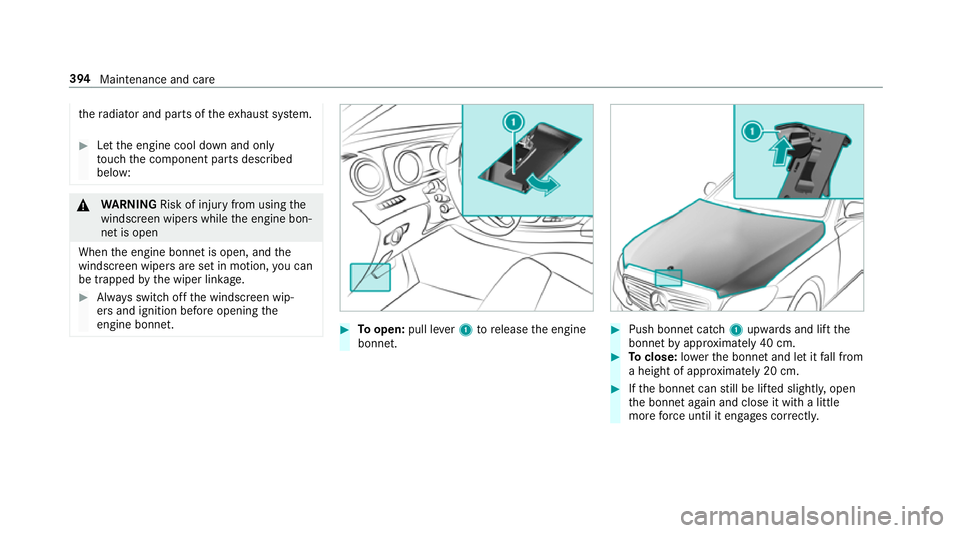
Toopen: pull lever1torelease thee ngine
bonn et. #
Push bonne tcatch 1upwards and lif tthe
bonne tbyapproximatel y40cm. #
Toclose: lowe rthe bonne tand le titfall from
ah eight of appr oximatel y20cm. #
Ifth eb onnet canstill be lif teds lightl y,open
th eb onnet again and close it wit halittle
mor eforce until it engages cor rectly. 394
Maintenance and care
Page 405 of 585
Note
sonc areofc ar parts &
WARNING Risk of entrapment if the
windscreen wiper sareswit ched on while
th ew indscreen is being cleaned
If th ew indscreen wiper saresetinm otion
while youa recleanin gthe windscreen or
wiper blades, youc an be trapped bythe
wiper arm. #
Alw ayss witc hoffthew indscreen wip‐
er sa nd thei gnition befor ecleanin gthe
windscreen or wiperb lades. &
WARNING Risk of bu rnsf romt ailpipes
and tailpipe trim
The tailpipe and tailpipe trim can become
ve ry hot. If youc om eintoc ontact wit hthese
parts of thev ehicle, youc ould bur nyourself. #
Alw aysbep articular lycareful around
th et ailpipe and thet ailpipe trim. #
Allo wthe vehicle parts tocool down
befor eyou touc ht hem. Obser
vethef ollowing information: Note
sonc leaning and car eA voiding vehicl edamage
Wheels/rims Usewate rand acid-free whee lcleaners. R
Do no tuse acidic whee lcleaner storemovebrak edust.
This could damag ewheel bolts and brak ecomponents.
R Toavoid cor rosion of theb rake discs and brak epads,
driv ethe vehicle foraf ewminutes af terc leaning before
parking it. The brak ediscs and brak epadsw armupa nd
dr yo ut.
Wi ndo ws
Cleanthew indo wsonthei nside and outside using adamp
clo thand cleanin gagentsr ecommende dbyMercedes-Benz. Do no
tuse dr ycloth sora brasiv eorsolve nt-based cleaning
agents toclean thei nside of windo ws.402
Maintenanc eand care