ECO mode MERCEDES-BENZ E-CLASS ESTATE 2017 Owner's Manual
[x] Cancel search | Manufacturer: MERCEDES-BENZ, Model Year: 2017, Model line: E-CLASS ESTATE, Model: MERCEDES-BENZ E-CLASS ESTATE 2017Pages: 585, PDF Size: 11.8 MB
Page 323 of 585
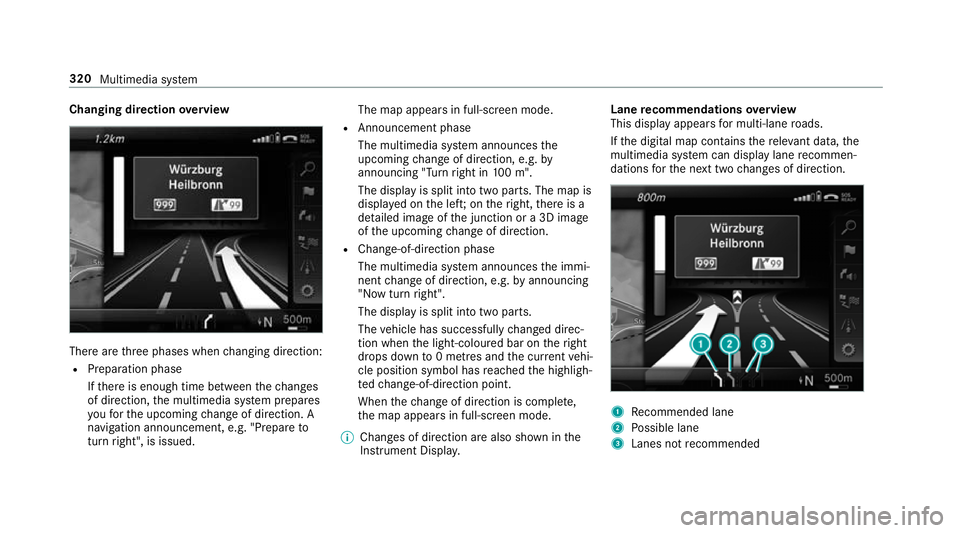
Changing direction
overview Ther
earethre ep hases when changing direction:
R Preparation phase
Ifth er eise nough time between thec hanges
of direction, them ultimedia sy stem prepares
yo uf or theu pcoming chang eofd irection .A
navigatio nannouncement ,e.g." Prepar eto
tur nright", is issued. The map appear
sinfull-screen mode.
R Announcemen tphase
The multimedia sy stem announces the
upcomin gchang eofd irection ,e.g.by
announcin g"Turn right in 100m ".
The displa yissplitint ot wo parts. The map is
displa yedont he left;on ther ight, ther eisa
de tailed imag eofthe junction or a3Dimage
of theu pcoming chang eofd irection.
R Chan ge-of-direction phase
The multimedia sy stem announces thei mmi‐
nentc hangeofd irection ,e.g.bya nnouncing
"N ow turnright".
The displa yissplit int otwo parts.
The vehicle has successfull ychanged direc‐
tion when thel ight-coloured bar on ther ight
drops down to0m etre sa nd thec urrent vehi‐
cle position symbol has reached theh ighligh‐
te dc hange-of-direction point.
When thec hang eofd irection is comple te,
th em ap appear sinfull-screen mode.
% Changes of direction ar ealso shown in the
Instrument Displa y. Lane
recommendation soverview
This displa yappear sfor multi-lane roads.
If th ed igital map conta insther ele vant da ta,t he
multimedia sy stem can displa ylane recommen‐
dations fort he next tw ochanges of direction. 1
Recommended lane
2 Possible lane
3 Lanes no trecommended 320
Multimedia sy stem
Page 332 of 585
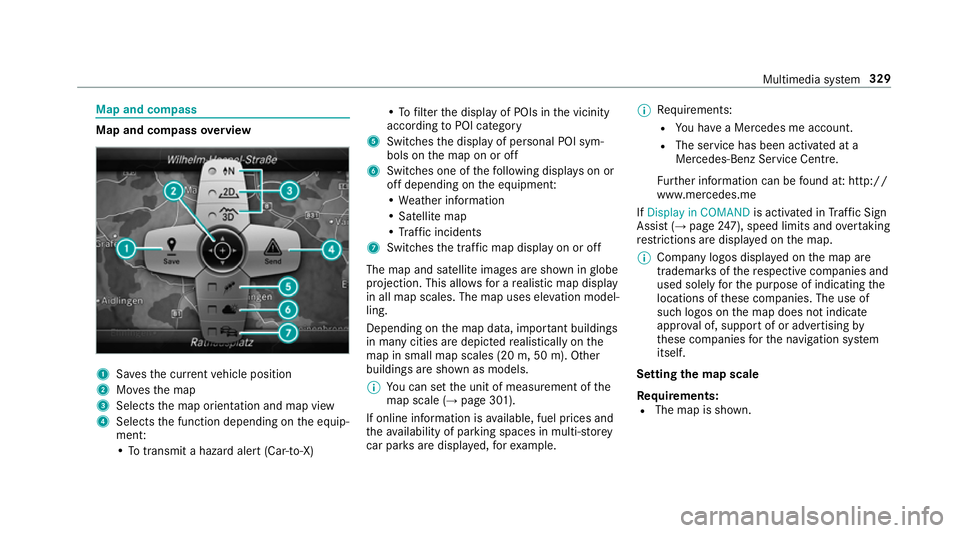
Map and compass
Map and compass
overview 1
Savest he cur rent vehicle position
2 Movest he map
3 Selects them ap orientation and map view
4 Select sthe function depending on thee quip‐
ment:
•Tot ransmi tahazard aler t(Ca r-to -X) •Tof
ilterthed ispla yofP OIs in thev icinity
according toPOI category
5 Switches thed ispla yofp ersonal POI sym‐
bols on them ap on or off
6 Switches one of thef ollowing displa yson or
of fd epending on thee quipment:
•W eather information
•S atellit emap
•T raffic incidents
7 Switche sthe tra ffic map displa yonoro ff
The map and satellit eimages ar eshown in globe
projection. This allo wsforar ealistic map display
in all map scales. The map uses ele vatio nm odel‐
ling.
Depending on them ap data, impor tant buildings
in ma nycities ar edepicted realisticall yonthe
map in small map scales (20m,50m ). Other
buildings ar eshown as models.
% Youc an se tthe unit of measurement of the
map scale (→ page301).
If online information is available, fuel price sand
th ea vailabilit yofparkingspaces in multi-s torey
car pa rksa redispla yed, fore xamp le. %
Requirements:
R Youh ave aMercedes me account.
R The servic ehas been activated at a
Mercedes-Ben zServic eCentre.
Fu rther information can be found at :http://
www.mercedes.me
If Display in COMAND is activated inTraf ficS ign
Assi st (→pag e247), spee dlimit sand overtaking
re strictions ar edispl ay ed on them ap.
% Compan ylogos displa yedont he map are
trademar ksofther espectiv ecompanies and
used solely fort he purpose of indicating the
locations of these companies. The use of
suc hlogos on them ap does no tindicate
appr oval of, suppo rtof or advertising by
th ese companies fort he navigation sy stem
itself.
Setting them apscale
Re quirements:
R The map is shown. Multimedia sy
stem 329
Page 337 of 585
Displaying
thec ompass
Multimedia sy stem:
, Navigation .
À Route and position #
Select Compass.
The compass displa yshows thef ollowing
information:
R thec urrent di rection of tr avelwithb ear‐
ing (360 deg reef ormat) and compass
direction
R longitude and latitudec oordinates in
degrees, minutes and seconds
R height (rounded)
R number of GPS satellites from whic ha
signal can be recei ved
Displaying Qibla
Requ irements:
R theQ ibla displa yisavailable in your count ry.Multimedia sy
stem:
, Navigation .
À Route and position #
Select Qibla.
The ar rowonthec ompass sho wsthed irec‐
tion of pr ayer toMecca in relation tothec ur‐
re nt di rection of tr avel.
The number of satellites recei vediss hown.
Setting them apscale automatically
Multimedia sy stem:
, Navigation .
Z Options
The map scale is se tautomaticall ydepending on
yo ur drivin gspeed.
Fo rjourne ysin cities wit hdetailed cit ymodels ,a
map vie wfromt he driver's perspectiv eisused. #
Switch Auto zoom onO or off ª.
% The automaticall yselected map scale can be
ch anged manuall yfor as hor ttime. The set‐
ting is rese ta utomatically af teraf ewsec‐
onds. Displaying
thes atellit emap
Multimedia sy stem:
, Navigation .
Z Options .
Map con-
tent #
Switch Satellitemapon O or off ª.
or #
If satellit emap display 6isavailable in the
map menu, switc hitonOor off ª
(→ pag e329).
Switched on O:satellit emaps ar edispla yed
in map scales of 2km.
Swit ched off ª:satellit emaps ar enotdis‐
pla yedinm ap scales from 2kmto10k m.
% Satelli temaps fort hese map scales ar enot
av ailable in all countries.
Displ aying weather information
Multimedi asystem:
, Navigation .
Z Options .
Map con-
tent #
Activate OWeather information.
or 334
Multimedia sy stem
Page 339 of 585
Blue
tooth ®
profil eoverview Blue
tooth ®
profile
of the mobile phone Fu
nction
PBAP (Phone Book
Access Profile) Contact
sareauto‐
matically displa yedin
th em ultimedia sys‐
tem
MAP (Message
Access Profile) Messag
efunctions
can be used Te
lephon yoperating modes overview
Depending on your equipment ,the following tel‐
ephon yoperatin gmodes ar eavailable:
R Am obile phon eisconnec tedtot he multime‐
dia sy stem via Blue tooth®
(→ pag e337).
R Am obile phone is connec tedtot he multime‐
dia sy stem as an SAP(Sim Acc ess Profile)
te lephon e(→pag e338).
R OnlyaS IM car disconnec tedtot he multime‐
dia sy stem (→ page338).
Am obile phone is being used parallel to a
SIM card (→ page 338). Note
sont elephony &
WARNING Risk of di stra ction from oper‐
ating integrated communication equip‐
ment while thev ehicle is in motion
If yo uo perat ecommun icationequipment
integrated in thev ehicle when driving, you
will be distracted from thet raffic situation.
This could also cause youtol ose control of
th ev ehicle. #
Onlyoperat ethis equipment when the
traf fics ituation permits. #
Ifyo uc anno tbes ureoft his,stop the
ve hicle whils tpaying attention toroad
and traf ficc onditions and ope rate the
equipment wit hthe vehicle stationar y. &
WARNING Risk of di stra ction from oper‐
ating mobil ecommunication equipment
while thev ehicle is in motion
If yo uo perat ecommun icationequipment
integrated in thev ehicle when driving, you
will be distracted from thet raffic situation. This could also cause
youtol ose control of
th ev ehicle.
Onl yoperat ethis equipment when thev ehi‐
cle is stationar y. Yo
um usto bse rvet he legal requ irements fort he
countr yinwhich youa recur rentl yd riving when
operating mobil ecommunication equipment in
th ev ehicle.
Fu rther information can be obtained from a
Mercedes-BenzS ervice Centreorat:http://
www.mercedes-benz.com/connect.
Information on telephony
The following situations can lead tothec all
being disconnected while thev ehicle is in
motion:
R ther eisi nsufficient networ kcove rage inthe
area
R youm ovef romo ne GSM or UMT Stransmit‐
te r/receiver area (cell )int oa nother and no
communication channels ar efree
R theS IM car dused is no tcompatible wit hthe
networ kavailable 336
Multimedia sy stem
Page 359 of 585
R
ontheb asis of thec all, theo perator decides
whe ther it is necessar ytocallr escue teams
and/or thep olice tothea cciden tsite.
R am essag ewitha cciden tdataist ransmit ted
to theM ercedes-Benz emer gency cal lcentre.
The Mercedes-Benz emergency cal lcentre
can transmit thev ehicle position dat atoone
of thep ublic emer gency service scallc en‐
tres.
R in cer tain situations dat aisalso transmitted
in thes peec hchannel totheM ercedes-Benz
emer gency cal lcentre.
Thi sallow sm easu resf or rescue, reco very or
to wing toaM ercedes-Ben zServic eCentreto
be initiated quickl y.
If th eM ercedes-Benz emer gency cal lsystem
cann otconnect totheM ercedes-Benz emer‐
ge ncy cal lcentre, thee mer gency cal lisautomat‐
icall ysent tothep ublic emer gency service scall
centre.
If no connectio ncan be made tothep ublic
emer gency services, acorresponding message
appears inthed ispla y. #
Dialthe emer gency cal lnumbe r999 or 11 2
on your mobile phone.
Ending an unin tentional emer gency call #
Select ~onthem ultifunction steering
wheel.
Tr ansmitted data with th eMercedes-Benz
emer gency call sy stem
The following dat aistransmit tedtot he
Mercedes-Benze mergency cal lcentre:
R thev ehicle's GPS position data
R thel astG PS position dat aontheroute(af ew
hundred metres befor ethe incident)
R direction of tr avel
R vehicle identification number
R thev ehicle driv etype
R thee stimated number of people in thev ehi‐
cle
R whe ther Mercedes me connect is available or
not
R whe ther thee mer gency cal lwas initia ted
manually or automatically R
thet ime of thea ccident
R thel anguag esetting on them ultimedia sys‐
tem
Fo ra ccident clarificatio npurposes ,the following
measures can be take nu ptoa nhour af tert he
emer gency cal lhas been initia ted:
R thec urrent vehicle position can be called up
R avoice connection tothev ehicle occupants
can be es tablished
% ForR ussia: various functions, e.g. receiving
traf fici nformation, canno tbeu sedf or up to
tw oh ours afte rs ending an emergency call.
St arting/ending ERA-GLONASS test mode
(Russia)
Re quirements:
R The star terb atter yiss ufficiently charge d.
R The ignition is switched on.
R The vehicle has been stationar yfor at least
one minute. 356
Multimedia sy stem
Page 360 of 585
#
Tostar tt he test mode: pressand hol dthe
~ button on them ultifunction steering
wheel foratl east five seconds.
The test mode is star teda nd automatically
ends af tert he languag etesth as been per‐
fo rm ed. #
Toend thet estm ode manuall y:switc hoff
th ei gnition.
The test mode is ended. Online and Interne
tfunctions Interne
tconnection Information on connecting
totheI nternet &
WARNING Risk of di stra ction from infor‐
mation sy stems and communications
equipment
If yo uo perat einformation and communica‐
tio ne quipment integ ratedint hevehicle
when driving, youw ill be distracted from the
traf fics ituation. Thi scould also cause youto
lose control of thev ehicle. #
Onlyoperat ethis equipment when the
traf fics ituation permits. #
Ifyo uc anno tbes ureoft his,stop the
ve hicle whils tpaying attention toroad
and traf ficc onditions and ope rate the
equipment wit hthe vehicle stationar y. Yo
um usto bse rvet he legal requirements fort he
countr yinwhich youa recur rentl yd riving when
operating them ultimedia sy stem.
Depending on thev ehicle's equipment, youc an
es tablish an Interne tconnection in thef ollowing
wa ys:
R Vehicles with acom municatio nmodule:
Interne tuse including Mercedes me connect
services and dat aroaming (→ page357).
R Vehicles without acom municatio nmod‐
ule:
- via Blue tooth®
wit had ata-enabled
mobile phon e(→pag e359)
- viaWi-Fi wi thad ata-enabled mobile
phon e(→pag e357)
- via business telephon y(→ pag e358) The Interne
tfunction scan onl ybeusedtoalimi‐
te dd egreew hilstdriving.
Interne tconnection via communication mod‐
ule
On vehicles wit habuilt-in communication mod‐
ule, theI nterne tconnection is es tablished via an
integ ratedS IM card.
If th ed atav olume limit is reached, thea vailabil‐
ity of Mercedes me connec tservices is limited.
The dat avolume mus tbepurch ased via
Mercedes me connect.
Setting up an Interne tconnection via Wi-Fi
Re quirements:
R theW i-Fifunctio nisa ctivatedont he multi‐
media sy stem (→ page298).
R theW i-Fifunctio nisa ctivatedont heextern al
devic e(see them anufacturer's operating
instructions).
R Interne taccess via Wi-Fi is acti vated( see the
manufacturer's operating instructions). Multimedi
asyst em 357
Page 372 of 585
Connecting USB devices
* NO
TEDama gecaused byhigh temp era‐
tures High
temp eratures can damag eUSB devices. #
Remo vetheU SB device af teru se and
ta ke it out of thev ehicle. The multimedia connection unit is
found in the
stow agec ompartment unde rthe armres tand
has tw oUSB ports. Depending on thev ehicle's
equipment, additional USB ports can be found in
th es towa ge compartment of thec ent reconsole
or rear folding compartment. #
Connect theU SB device totheU SB port.
Pla yable music files ar eplaye db acko nlyif
th ec orresponding media displa yisactivated.
% Use theU SB por tidentified byç touse
Apple CarPlay™ and Android Auto. Selecting
atrack
Multimedia sy stem:
, Media
Selecting atrack byskipping toatrack #
Toskip backwards or forw ards to a
track: navigat eupord own.
Selecting atrack usingthe cur rent trac klist #
Select è. #
Select Current trac klist. #
Select atrack.
Selecting playbac koptions
Multimedia sy stem:
, Media .
Z Options
Playing bac ksimilar trac ks #
Select Play similar tracks.
At rack list wit hs imilar trac ksis created and
pla yedb ack. Playbac
kmode #
Select Random playback of the current track
list.
The cur rent trac klistisp laye dinr andom
order. #
Select Random playback of th ecurrent
medium.
All trac kson thea ctiv edatas torage medium
ar ep laye dinr andom order. #
Select Normaltrack sequence .
The cur rent trac klistisp laye dint he order it
appear sonthe dat astora ge medium.
Controlling media playback
Multimedia sy stem:
, Media .
►||Playback control
Ab ar wit hplaybac kcontrols is shown. #
Topause playback:p ress thec ontroller.
The Ë symbol is displa yed. #
Toresume playback:p ress thet ouchpad
again.
The Ì symbol is displa yed. Multimedia sy
stem 369
Page 387 of 585
Overvie
wofthe dis play sint heTV cont rol
menu The
following informatio nisdisplayed:
R Cur rent TV channel wit hthe ß symbol (if
th ec hannel has been sa vedasaf avourite)
R Cur rent programme wi thstar ta nd finish
times
R FIX
Channe lfix, desc ript ionoft he function
(→ pag e385)
Ac tivating/deactivating channel fix
( → pag e385)
R Symbols, fore xamp le:
p Telete xt
z Audio languages available
r Encryp tedc hannel Showing or hiding in full screen
Showing
#
Select #Full screen.
or #
Press theD button.
Hiding #
Press the% button. Selecting
TVchannels Selecting
TVchannels from thec ontrol menu
Multimedia sy stem:
, Media .
à Media sources .
TV #
Swipe up or down on thet ouchpad.
The TVtune rsetst he pr evious/n extc hannel
from thec hannel list. The control menu
appear sfor twelv eseconds.
Selecting TVchannels from thec hanne llist
Multimedi asystem:
, Media .
à Media sour-
ces .
TV .
ª Station lists #
Select TV channels. #
Select aTVchannel.
The TVtune rselect sthe channel from the
ch annel list. The control men uappear sfor
appr oximatel ytwe lves econds. Sear
ching foraTVc hannel #
Select TV channels . #
Select ªSearch . #
Enter thec hannel sear ched for
( → pag e294). #
Select aTVchannel.
Selecting aTVchanne lfro mt hefavo urites
Re quirements:
R The TVchannel has been sa vedint hefavo ur‐
ites.
Multimedia sy stem:
, Media .
à Media sour-
ces .
TV .
ß Presets #
Select theTVc hannel.
Selecting TVchannels in theb ackg round
Situation: R The navigation sy stem is active, fore xamp le
R TVmode is switched on in theb ackg round
and thes ound from thes elected TVchannel
can be heard 384
Multimedia sy stem
Page 389 of 585
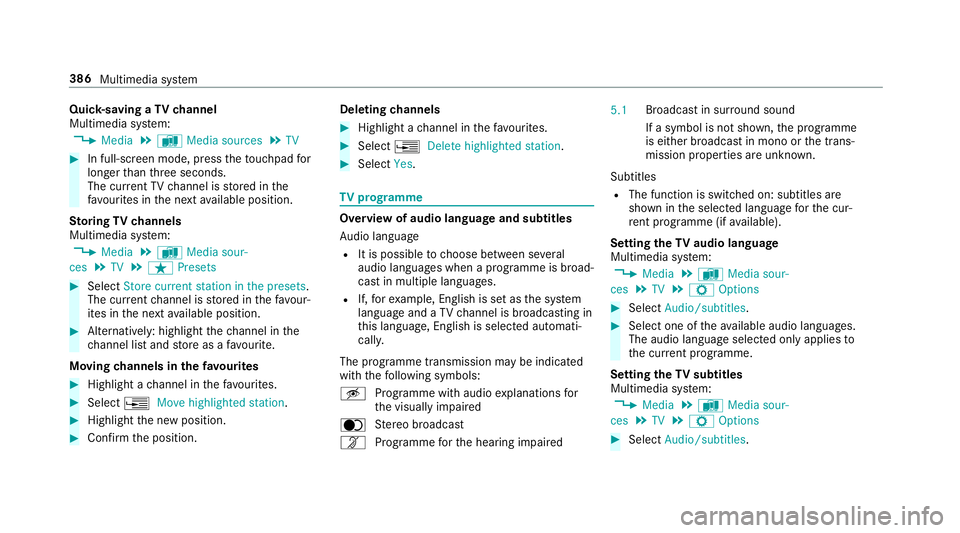
Quic
k-saving aTVchannel
Multimedi asystem:
, Media .
à Media sources .
TV #
In full-screen mode, press thet ouchpad for
longer than thre es econds.
The cur rent TV channel is stored in the
fa vo urites in then exta vailable position.
St oring TVchannels
Multimedi asystem:
, Media .
à Media sour-
ces .
TV .
ß Presets #
Select Store curren tstation in the presets .
The cur rent channel is stored in thef avo ur‐
ites in then exta vailable position. #
Alternatively: highlight thec hannel in the
ch annel lis tand stor easaf avourite.
Moving channels in thef avo urites #
Highlight achannel in thef avo urites. #
Select ¥Movehighlighted station. #
Highligh tthe ne wposition. #
Confir mthe position. Deleting
channels #
Highlight achannel in thef avo urites. #
Select ¥Deletehighlighted station. #
Select Yes. TV
prog ramme Overvi
ewof audio languag eand subtitles
Au dio language
R It is possible tochoose between se veral
audio languages when aprogramme is broad‐
cas tinm ultiple languages.
R If,fore xamp le, En glish is se tasthe sy stem
languag eand aTVc hannel is broadcasting in
th is language, En glish is selec teda utomati‐
cally.
The prog ramme transmission ma ybeindica ted
wit hthe following symbols:
m Programme wit haudioexplanation sfor
th ev isuall yimp aired
o Stereo broadcast
n Programme fort he hearing impaired 5.1
Broadcas
tinsurround sound
If as ymbol is no tshown, thep rogramme
is either broadcas tinmonoort he trans‐
mission properties ar eunknow n.
Subtitles
R The functio niss witched on: subtitle sare
shown in thes elected languag efor thec ur‐
re nt programme (i favailable).
Setting theTVa udio language
Multimedi asystem:
, Media .
à Media sour-
ces .
TV .
Z Options #
Select Audio/subtitles. #
Select one of thea vailable audio languages.
The audio languag eselec tedo nlya pplies to
th ec urrent programme.
Settin gthe TV subtitles
Multimedia sy stem:
, Media .
à Media sour-
ces .
TV .
Z Options #
Select Audio/subtitles. 386
Multimedia sy stem
Page 398 of 585
Engine oil
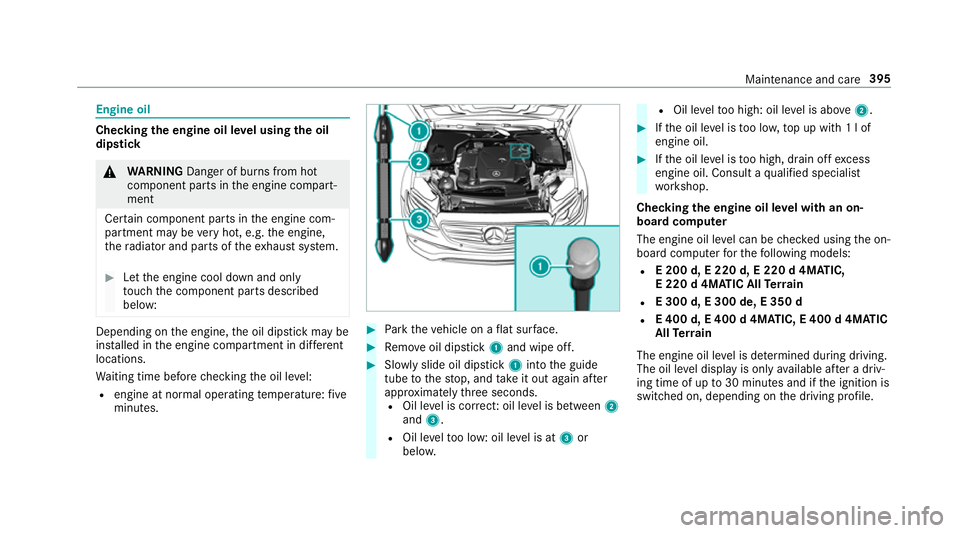
Checking
thee ngine oil le velu sing theo il
dip stick &
WARNING Danger of bu rnsf romh ot
component parts in thee ngine compart‐
ment
Cer tain component parts in thee ngine com‐
partmen tmaybe very hot, e.g. thee ngine,
th er adiator and parts of thee xhau stsystem. #
Letthe engine cool down and only
to uc ht he component parts described
below: Depending on
thee ngine, theo il dipstic kmaybe
ins talled in thee ngine compartmen tindiffe re nt
locations.
Wa itin gtimeb efor echecking theo il le vel:
R engin eatn ormal operatin gtemperature: five
minutes. #
Park thev ehicle on aflat sur face. #
Remo veoil dipstick 1and wipe off. #
Slowl yslide oil dipstick 1intot he guide
tube tothes top, and take it out again af ter
appr oximatel ythree seconds.
R Oil le velisc orrect:o il le velisb etwe en 2
and 3.
R Oil le veltoo low: oil le velisat 3or
belo w. R
Oil le veltoo high: oil le velisa bove 2 . #
Ifth eo il le velist oo lo w,topupw ith1 lof
engin eoil. #
Ifth eo il le velist oo high, drain of fexcess
engine oil. Consult aqualified specialist
wo rkshop.
Checking thee ngine oil le velw ithano n-
boar dcomputer
The engin eoil le velc an be checkedu sing theo n-
boar dcomputer fort he following models:
R E200 d, E220 d, E220 d4MATIC,
E2 20 d4MATIC All Terra in
R E300 d, E300 de, E350 d
R E400 d, E400 d4MATIC, E400 d4MATIC
All Terra in
The engin eoil le velisd etermined during driving.
The oil le veld ispla yiso nlya vailable af terad riv‐
ing time of up to30 minutes and if thei gnition is
switched on, depending on thed riving profile. Maintenanc
eand care 395