ad blue MERCEDES-BENZ E-CLASS ESTATE 2017 Owner's Manual
[x] Cancel search | Manufacturer: MERCEDES-BENZ, Model Year: 2017, Model line: E-CLASS ESTATE, Model: MERCEDES-BENZ E-CLASS ESTATE 2017Pages: 585, PDF Size: 11.8 MB
Page 360 of 585
#
Tostar tt he test mode: pressand hol dthe
~ button on them ultifunction steering
wheel foratl east five seconds.
The test mode is star teda nd automatically
ends af tert he languag etesth as been per‐
fo rm ed. #
Toend thet estm ode manuall y:switc hoff
th ei gnition.
The test mode is ended. Online and Interne
tfunctions Interne
tconnection Information on connecting
totheI nternet &
WARNING Risk of di stra ction from infor‐
mation sy stems and communications
equipment
If yo uo perat einformation and communica‐
tio ne quipment integ ratedint hevehicle
when driving, youw ill be distracted from the
traf fics ituation. Thi scould also cause youto
lose control of thev ehicle. #
Onlyoperat ethis equipment when the
traf fics ituation permits. #
Ifyo uc anno tbes ureoft his,stop the
ve hicle whils tpaying attention toroad
and traf ficc onditions and ope rate the
equipment wit hthe vehicle stationar y. Yo
um usto bse rvet he legal requirements fort he
countr yinwhich youa recur rentl yd riving when
operating them ultimedia sy stem.
Depending on thev ehicle's equipment, youc an
es tablish an Interne tconnection in thef ollowing
wa ys:
R Vehicles with acom municatio nmodule:
Interne tuse including Mercedes me connect
services and dat aroaming (→ page357).
R Vehicles without acom municatio nmod‐
ule:
- via Blue tooth®
wit had ata-enabled
mobile phon e(→pag e359)
- viaWi-Fi wi thad ata-enabled mobile
phon e(→pag e357)
- via business telephon y(→ pag e358) The Interne
tfunction scan onl ybeusedtoalimi‐
te dd egreew hilstdriving.
Interne tconnection via communication mod‐
ule
On vehicles wit habuilt-in communication mod‐
ule, theI nterne tconnection is es tablished via an
integ ratedS IM card.
If th ed atav olume limit is reached, thea vailabil‐
ity of Mercedes me connec tservices is limited.
The dat avolume mus tbepurch ased via
Mercedes me connect.
Setting up an Interne tconnection via Wi-Fi
Re quirements:
R theW i-Fifunctio nisa ctivatedont he multi‐
media sy stem (→ page298).
R theW i-Fifunctio nisa ctivatedont heextern al
devic e(see them anufacturer's operating
instructions).
R Interne taccess via Wi-Fi is acti vated( see the
manufacturer's operating instructions). Multimedi
asyst em 357
Page 362 of 585
Setting up an Interne
tconnection via Blue‐
to oth ®
Re quirements:
R Am obile phon eisconnec tedtot he multime‐
dia sy stem via Blue tooth®
(→ pag e337).
To connect via Blu etoo th®
,t he mobile phone
supports one of thef ollowing Blue tooth®
pro‐
fi les:
R DUN (Dial- UpNet working)
R PAN( Personal AreaNet wo rk)
The Interne tconnection via Blue tooth®
is restric‐
te dord oes no tfunction if:
R them obile phone is switched off
R them obile phone networ kcoverag eisi nsuf‐
fi cient
R mobil edatau se is deactivated on them obile
phone
R theB luetooth ®
function on them ultimedia
sy stem is switched of fand them obile phone
is to be connec tedv ia Blue tooth® R
theB luetooth ®
function is switched of fon
th em obile phone and them obile phone is to
be connec tedv ia Blue tooth®
R neither them obile phone networ knorthe
mobil ephone allow simultaneous use of a
te lephon eand an Interne tconnection
R them obile phone has no tbeen enabled for
Interne taccess via Blue tooth®
If am obilep hone is connected tothem ultimedia
sy stem fort he firs tt im ev ia Blu etoo th®
,y ou will
be assi sted thro ugh thep rocess of setting up an
Interne tconnection.
The Interne tconnection can also be confi gured
manually.
Fu rther information can be obtained at http://
www.mercedes-benz.com/connect or from a
Mercedes-BenzS ervice Centre. Multimedia sy
stem:
, System .
ö Connectivity .
Inter-
net settings
Blue tooth ®
connection via PAN #
Select them obile phone.
The Interne tconnection is es tablished.
Blue tooth ®
connection via DUN #
Select them obile phone. #
Select thep redefined access dat aofthe
mobile phone networ kprovider
(→ pag e358).
or #
Manuall ysetthea ccess dat aofthe mobile
phone networ kprovide r(→pag e358).
% Setthe access dat ainaccordance wit hyour
dat apacka ge .O therwise, additiona lcosts
ma ybei ncurred. Youc an contact your
mobile phon enetwo rkprov ider toobtain the
precise access data. Multimedia sy
stem 359
Page 363 of 585
Switching
theB luet oo th®
pr ofile
Re quirements:
R The mobile phon esupports theD UN and
PA NB luetooth ®
profiles.
Multimedia sy stem:
, System .
ö Connectivity .
Inter-
net settings #
Toswitc hfromD UNtoPAN: select the
mobil ephone. #
Select ¥. #
Select Change configuration. #
Activate OAutomatic configuration.
The Interne tconnectio nisa utomatically con‐
fi gured using theP AN Blue tooth®
profile. #
Toswitc hfromP ANtoDUN: select the
mobil ephone. #
Select ¥. #
Select Change configuration. #
Deactivate ªAutomatic configuration. #
Select Configure settings using COMAND . #
Configuri ngtheI nterne tconnection using
prese torm anual access dat a(→pag e359).
% While using business telephon y,it is no tpos‐
sible toswitc hBluetooth ®
profiles.
Editing access data
Requ irements:
R The mobile phon esupports theB luetooth ®
DUN profile.
Multimedia sy stem:
, System .
ö Connectivity .
Inter-
net settings #
Highlight them obile phone. #
Select ¥. #
Select Change configuration . #
Form obil ephone swithP AN an dDUN:
select Configur esettings using COMAND. #
Configur ethe Interne tconnection using pre‐
se torm anual access dat a(→pag e359). Cancelling Interne
taccess permission fora
mobil ephone
Multimedia sy stem:
, System .
ö Connectivity .
Inter-
net settings #
Highlight them obile phone. #
Select ¥. #
Select Deleteconfiguration. #
Select Yes.
Displaying mobile phone details
Multimedia sy stem:
, System .
ö Connectivity .
Inter-
net settings #
Highlight them obile phone. #
Select ¥. #
Select Details.
Establishing an Interne tconnection
Multimedia sy stem:
, Connect #
Fore xamp le, select zBrowser . 360
Multimedia sy stem
Page 364 of 585
%
The multimedia sy stem usually es tablishes
th eI nterne tconnection automaticall y.Ifthe
multimedia sy stem is no tconnected tothe
Internet, theI nterne tconnection is es tab‐
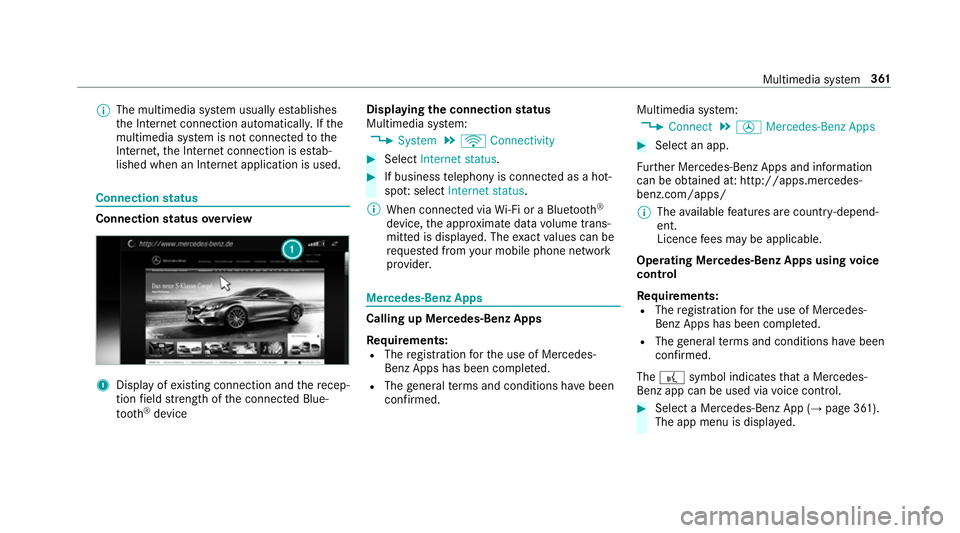
lished when an Interne tapplication is used. Connection
status Connectio
nstatus overview 1
Displa yofexisting connection an dthe recep‐
tion field stre ngt hoft he connected Blue‐
tooth ®
device Displaying
thec onnection status
Multimedi asystem:
, System .
ö Connectivity #
Select Internet status . #
If business telephon yisconnec tedasah ot‐
spo t:select Internet status.
% When connected via Wi-Fi or aBluet oo th®
device, thea ppr oximat edatav olume trans‐
mitted is displa yed. The exact values can be
re qu estedf romy our mobile phone network
pr ov ider. Mercedes-Benz Apps
Calling up Mercedes-Benz Apps
Re
quirements:
R The registration fort he use of Mercedes-
Benz Apps has been comple ted.
R The general term sa nd conditions ha vebeen
con firm ed. Multimedia sy
stem:
, Connect .
Ú Mercedes-Benz Apps #
Select an app.
Fu rther Mercedes-BenzA pps and information
can be obtained at :http://apps.mercedes-
benz.com/apps/
% The available features ar ecountr y-depend‐
ent.
Licence fees ma ybea pplicable.
Operating Mercedes-Benz Apps using voice
control
Re quirements:
R The registration fort he use of Mercedes-
Benz Apps has been comple ted.
R The general term sa nd conditions ha vebeen
con firm ed.
The ? symbol indicates that aM ercedes-
Ben zapp can be used via voice control. #
Selec taMercedes-Benz App (→ page361).
The app men uisdisplayed. Multimedia sy
stem 361
Page 368 of 585
Setting
theI nterne tradio options
Multimedia sy stem:
, Radio .
Þ Radio source .
TuneIn
Radio .
Z Options
The following option sareavailable:
R Select Stream:s electthe stre am qualit y.
R Login to TuneIn Account :log in to your
Tu neIn user account.
R Log Ou tofAccount :log outofy ourTuneIn
user account. #
Select an option. Media
Au
dio mode In
fo rm ation on thea udio mode &
WARNING Risk of di stra ction whe nhan‐
dling da tastorag emedia
If yo uh andle adatas torage medium while
driving, your attentio nisdivertedf romt he traf
ficc onditions .Thisc ould also cause you
to lose control of thev ehicle. #
Onlyhandle adatas tora ge medium
when thev ehicle is stationar y. Pe
rm issible file sy stems:
R FAT32
R exFAT
R NTFS
Pe rm issible dat astorage medium:
R SD card
R USB storag edevice
R iPod ®
/iPhone ®
R MTP devices
R Blue tooth ®
audio equipment
% R
The multimedia sy stem supports atotal
of up to50,000 files.
R Dat astorage media up to2TBa resup‐
por ted( 32-bit address space). Suppor
tedf ormats:
R MP3
R WMA
R AAC
R WAV
R FLAC
R ALAC
% Obser vethef ollowing no tes:
R Due tothel arge variet yofa vailable
music files rega rding encoders, sampling
ra tesa nd dat arates, playba ckcannot
alw aysbeg uaranteed.
R Due tothew ide rang eofU SB devices
av ailable on them arke t, pl aybac kcann ot
be guaranteed fora ll USB devices.
R Cop y-pr otected music files or DRM
enc rypte dfiles canno tbeplaye db ack.
R MP3 pla yers mus tsuppor tMediaTrans‐
fe rP rotocol (MTP). Multimedia sy
stem 365
Page 377 of 585
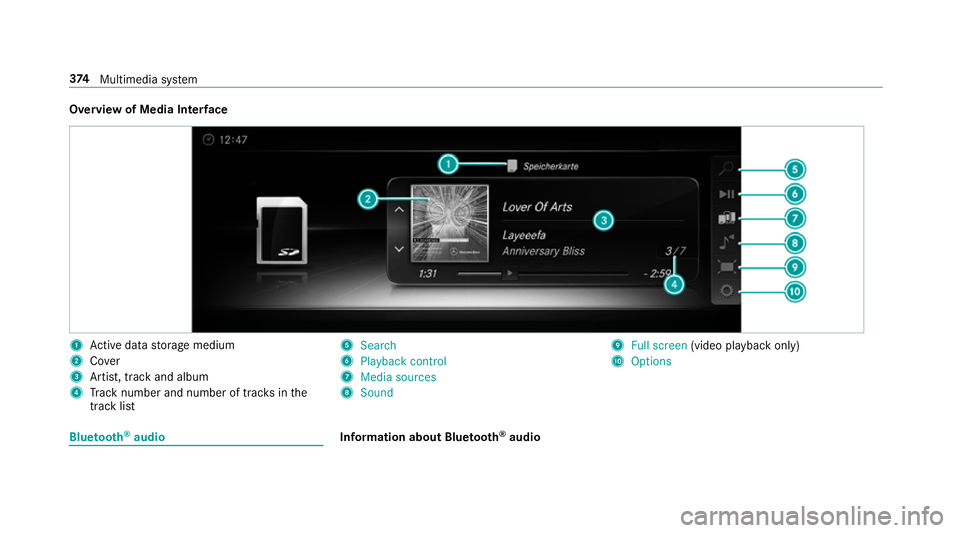
Overvie
wofMedia Inter face 1
Actived atas tora ge medium
2 Cover
3 Artist, trac kand album
4 Trac kn umber and number of trac ksinthe
trac klist 5
Search
6 Playback control
7 Media sources
8 Sound 9
Fullscreen (video pl aybac konly)
A Options Blue
tooth ®
audio Information about Blue
tooth ®
audio 374
Multimedia sy stem
Page 378 of 585
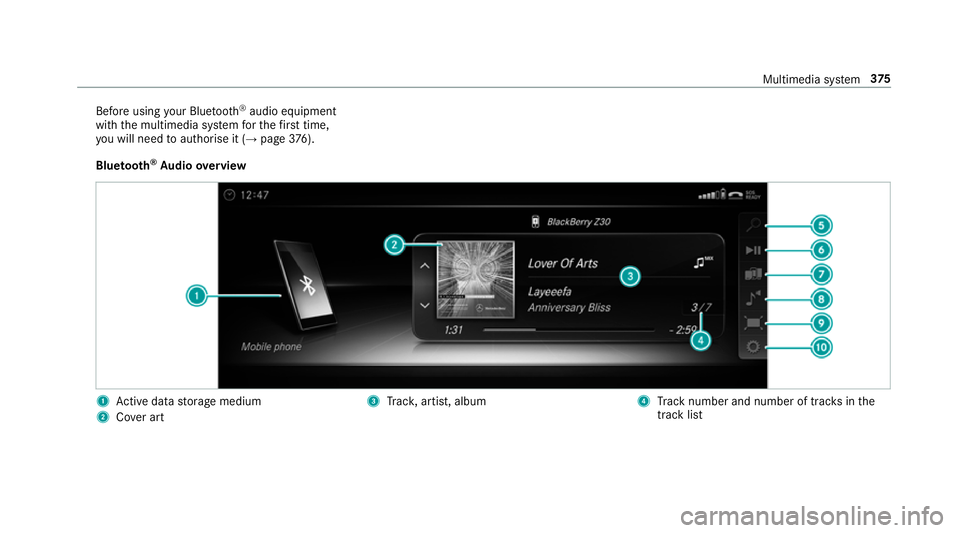
Befor
eusing your Blue tooth®
audio equipment
wit hthe multimedia sy stem fort he firs tt ime,
yo uw ill need toauthorise it (→ page376).
Blue tooth ®
Au dio overview 1
Actived atas tora ge medium
2 Covera rt 3
Trac k, artist, album 4
Trac kn umber and number of trac ksinthe
trac klist Multimedia sy
stem 375
Page 379 of 585
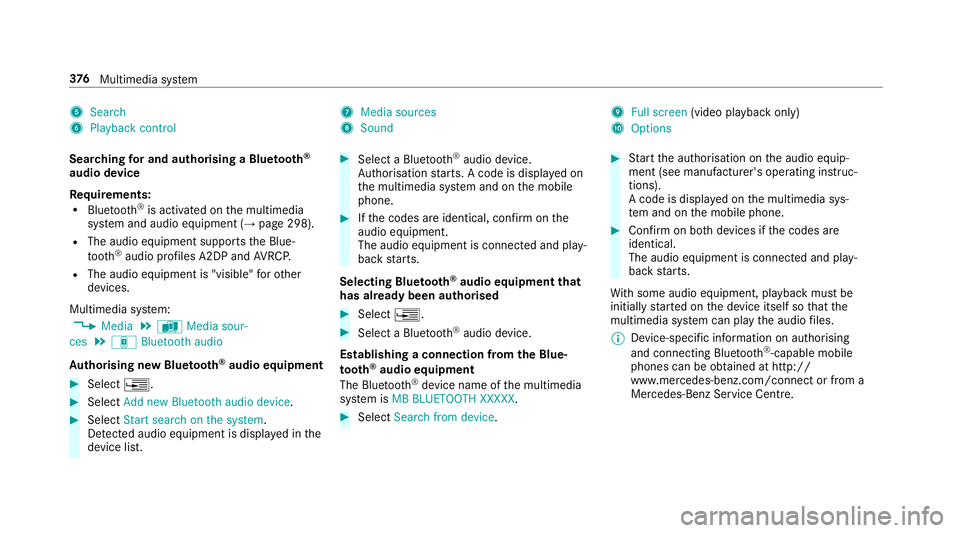
5
Search
6 Playback control 7
Media sources
8 Sound 9
Fullscreen (video pl aybac konly)
A Options
Sear ching fora nd authorisin gaBluetooth ®
audio device
Requ irements:
R Blue tooth ®
is activated on them ultimedia
sy stem and audio equipment (→ page298).
R The audio equipment supports theB lue‐
tooth ®
audio profiles A2DP and AVRC P.
R The audio equipment is "visible" foro ther
devices.
Multimedia sy stem:
, Media .
à Media sour-
ces .
á Bluetoot haudio
Au thorising ne wBluet oo th®
audio equipment #
Select ¥. #
Select Add new Bluetooth audio device. #
Select Start search on the system .
De tected audi oequipment is displ ayed in the
device list. #
Select aBluetooth ®
audio device.
Auth orisation starts .Ac odeisd isplayedon
th em ultimedia sy stem and on them obile
phone. #
Ifth ec odes ar eidentical, confi rmonthe
audio equipment.
The audio equipment is connec teda nd play‐
bac kstarts.
Selecting Blu etoo th®
audio equipment that
has already bee nauthorised #
Select ¥. #
Select aBluetooth ®
audio device.
Establishing aconnection from theB lue‐
to oth ®
audio equipment
The Blue tooth®
device name of them ultimedia
sy stem is MB BLUETOOTH XXXXX. #
Select Search from device. #
Startt he authorisation on thea udio equip‐
ment (see manufacturer's operating instruc‐
tions).
Ac ode is displa yedont he multimedia sys‐
te ma nd on them obile phone. #
Confir monb othd evices if thec odes are
identical.
The audio equipment is connected and play‐
bac kstarts.
Wi th some audioe quipment, playbac kmustbe
initially star tedont he device itself so that the
multimedia sy stem can pla ythe audio files.
% Device-specific informatio nonauthorising
and connectin gBluetooth ®
-capable mobile
phones can be obtained at http://
ww w.mercedes-benz.com/connect or from a
Mercedes-Benz Service Centre. 376
Multimedia sy stem
Page 380 of 585

Ac
tivatin gBluetooth ®
audio
Multimedi asystem:
, Media .
à Media sources #
Select áBluetoot haudio.
The multimedia sy stem activates thec onnec‐
te dB luetooth ®
audio equipment.
Selecting amusic pla yer
Multimedia sy stem:
, Media .
à Media sour-
ces .
á Bluetoot haudio #
Select aBluetooth ®
audio device.
If multiple music pla yers arep resen tont he
Blue tooth ®
audio equipment alista ppears. #
Select amusic pla yer.
Playbac kstarts.
Sear ching forat rack
Multimedia sy stem:
, Media .
à Media sour-
ces .
á Bluetoot haudio #
Select ª. #
Select acategor y.
At rack list appears. #
Select atrac k.
% The function is onl yavailable when the
mobil ephone and them usic pla yers elected
on them obile phone suppor tthis function.
Switching Blue tooth ®
audio equipment via
NFC
Requ irements:
R Obser vethen otes on using NFC
(→ pag e340).
R The Blue tooth®
audio overvie wisd isplayed
( → pag e377). #
Ligh tlyp ress theN FC area on them obile
phone (see them anufacturer's operating
instructions).
If th em obile phone has already been author‐
ised on them ultimedia sy stem as Blue tooth®
audio equipment ,itisnowconnec ted.
If th em obile phone is authorised on them ul‐
timedia sy stem as Blue tooth ®
audio equip‐ men
tfor thef irst time, it is connected af ter
confirming thei nstruction sfor them obile
phone (see them anufacturer's operating
instructions).
Disconnecting Blue tooth ®
audio equipment
Multimedi asystem:
, Telephone .
á Media sources #
Select aBluetooth ®
audio device. #
Select ¥Deauthorise. #
Select Yes. Ra
dio Switchin
gontheradio Multimedia sy
stem:
, Radio #
Alternatively: press the$ button.
The radio displa yappears. Youw ill hear the
las tstatio np laye dont he las tfrequ ency
band selected. Multimedia sy
stem 377
Page 456 of 585
+
ENVIRONMENTAL
NOTEEnvironmental
pollution caused byenvironmen tally ir re‐
sponsible disposal #
Dispose of operating fluids in an envi‐
ro nmentally responsible manner. Service products include
thef ollowing:
R fuels
R exhaus tgas af tertre atment additives, e.g.
Ad Blue ®
R lubricants
R coolant
R brak efluid
R washer fluid
R climat econtrol sy stem refrigerant
Only use products app rove dbyM ercedes-Benz.
Damag ecaused bytheu se of products that ha ve
no tb eena pprove disn otcoveredbyt he
Mercedes-Benzw arrant yorg oodwill gestures.
Yo uc an identif yservic eproducts appr ovedby
Mercedes-Benzbyt hefollowing insc ript ion on
th ec ontainers: R
MB- Freigabe (e.g. MB-Fr eigabe 229.51 )
R MB-Appr oval (e.g. MB-App rova l2 29.51)
Fu rther information on appr ovedservice prod‐
ucts:
R intheM ercedes-Benz Specification sfor
Servic eProducts at http://b evo.mercedes-
benz.co m(byentering thed esignation)
R intheM ercedes-Benz Specification sfor
Servic eProducts in theM ercedes-Benz BeVo
app (b yentering thed esignation)
R ataq ualified specialis tworks hop &
WARNING ‑Riskoff ireore xplosion
caused byfuel
Fu els ar ehighl yinflammable. #
Youm usta void fire ,n aked flames ,cre‐
atin gspar ksand smoking. #
Befor erefuelling ,switc hoffthee ngine
and auxiliar yheating if your vehicle is
equipped wit hauxiliary heating. &
WARNING Risk of inju ryfrom fuel
Fu els ar epoisonous and harmful to your
health #
Do no tswa llowf uel or le titcomeinto
contact wit hskin, eyes or clo thing. #
Do no tinhale fuel vapour. #
Keep children away from fuel.
If yo uoro ther people come int ocontact with
fuel, obser vethef ollowing: #
Immediatel yrins efueloffyo ur skin with
soap and water. #
If fuel comes int ocontact wit hyour
ey es, immediatel yrins ethem thor‐
oughl ywithc lean water.Seek medical
attentio nimmediately. #
Ifyo us wallowf uel, seek medical atten‐
tio nimmediatel y.Do no tinduce vomit‐
ing. #
Chang eimmediately out of clo thing that
has com eintoc ontact wi thfuel. Te
ch nica ldata 453