ad blue MERCEDES-BENZ E-CLASS ESTATE 2017 User Guide
[x] Cancel search | Manufacturer: MERCEDES-BENZ, Model Year: 2017, Model line: E-CLASS ESTATE, Model: MERCEDES-BENZ E-CLASS ESTATE 2017Pages: 585, PDF Size: 11.8 MB
Page 338 of 585
#
Ifwe ather information display 6isavailable
in them ap menu, activate O(→page329)
it.
Cur rent we ather information is displa yedon
th en avigation map, e.g. temp eratur eor
cloud co ver.
% Requirements:
R Youh ave aMercedes me account.
R The servic ehas been activated at a
Mercedes-Ben zServic eCentre.
Fu rther information can be found at :http://
www.mercedes.me
% Weather information is no tavailable in all
countries. Calling up
theD igital Owner' sManual (navi‐
ga tion) Calling up in
form ation on navigation
Multimedi asystem:
, Navigation .
Z Options .
Informa-
tion on navigation #
Select thet opic. Te
lephone Te
lephony Te
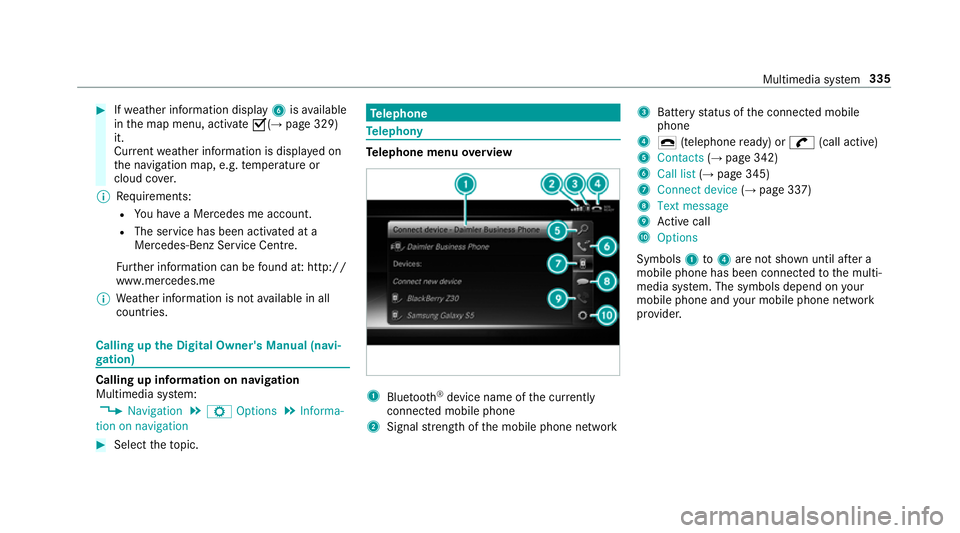
lephone menu overview 1
Blue tooth ®
device name of thec urrently
connected mobil ephone
2 Signal stre ngt hoft he mobile phone network 3
Batter ystatus of thec onnected mobile
phone
4 ¢ (telephone ready) or w(call active)
5 Contacts (→pag e342)
6 Call list (→pag e345)
7 Connec tdevice (→pag e337)
8 Textmessage
9 Activec all
A Options
Symbols 1to4 aren otshown until af tera
mobil ephone has been connected tothem ulti‐
media sy stem. The symbols depend on your
mobile phon eand your mobile phon enetwo rk
pr ov ider. Multimedia sy
stem 335
Page 339 of 585
Blue
tooth ®
profil eoverview Blue
tooth ®
profile
of the mobile phone Fu
nction
PBAP (Phone Book
Access Profile) Contact
sareauto‐
matically displa yedin
th em ultimedia sys‐
tem
MAP (Message
Access Profile) Messag
efunctions
can be used Te
lephon yoperating modes overview
Depending on your equipment ,the following tel‐
ephon yoperatin gmodes ar eavailable:
R Am obile phon eisconnec tedtot he multime‐
dia sy stem via Blue tooth®
(→ pag e337).
R Am obile phone is connec tedtot he multime‐
dia sy stem as an SAP(Sim Acc ess Profile)
te lephon e(→pag e338).
R OnlyaS IM car disconnec tedtot he multime‐
dia sy stem (→ page338).
Am obile phone is being used parallel to a
SIM card (→ page 338). Note
sont elephony &
WARNING Risk of di stra ction from oper‐
ating integrated communication equip‐
ment while thev ehicle is in motion
If yo uo perat ecommun icationequipment
integrated in thev ehicle when driving, you
will be distracted from thet raffic situation.
This could also cause youtol ose control of
th ev ehicle. #
Onlyoperat ethis equipment when the
traf fics ituation permits. #
Ifyo uc anno tbes ureoft his,stop the
ve hicle whils tpaying attention toroad
and traf ficc onditions and ope rate the
equipment wit hthe vehicle stationar y. &
WARNING Risk of di stra ction from oper‐
ating mobil ecommunication equipment
while thev ehicle is in motion
If yo uo perat ecommun icationequipment
integrated in thev ehicle when driving, you
will be distracted from thet raffic situation. This could also cause
youtol ose control of
th ev ehicle.
Onl yoperat ethis equipment when thev ehi‐
cle is stationar y. Yo
um usto bse rvet he legal requ irements fort he
countr yinwhich youa recur rentl yd riving when
operating mobil ecommunication equipment in
th ev ehicle.
Fu rther information can be obtained from a
Mercedes-BenzS ervice Centreorat:http://
www.mercedes-benz.com/connect.
Information on telephony
The following situations can lead tothec all
being disconnected while thev ehicle is in
motion:
R ther eisi nsufficient networ kcove rage inthe
area
R youm ovef romo ne GSM or UMT Stransmit‐
te r/receiver area (cell )int oa nother and no
communication channels ar efree
R theS IM car dused is no tcompatible wit hthe
networ kavailable 336
Multimedia sy stem
Page 340 of 585
R
am obile phon ewith" Twincard" is logged into
th en etwo rkwit hthe second SIM car datthe
same time
HD Voice ®
R Toimpr ove vo icequalit y,them ultimedia sys‐
te ms upports telephon ecalls in HD Voice ®
.
R In order touse this function ,the mobile
phones and them obile phone networ kpro‐
vider of thep erson youa recalling mus tsup‐
por tHDV oice®
.
Depending on theq ualit yoft he connection, the
vo ice qualit ym ayfluctuate.
Connecting amobile phone (Blu etoo th®
te l‐
ephony)
Requ irements:
R Blue tooth ®
is activated on them obile phone
(see them anufacturer's operating instruc‐
tions).
R Blue tooth ®
is activated on them ultimedia
sy stem (→ page298). Multimedia sy
stem:
, Telephone .
á Connec tdevice
Sear ching foram obilephone #
Select Use Bluetooth telephon yonly. #
Select Connect new device . #
Select Startsearch on the system .
The available mobile phones ar edispla yed. If
an ew mobile phone is found ,itisi ndicated
by the á symbol.
Connecting amobile phone (authorisation
using Secur eSimple Pairing) #
Selec tthe mobile phone.
Ac ode is displa yedint he multimedia sy stem
and on them obile phone. #
Ifth ec odes match: confirm thec ode on
th em obile phone.
Connecting amobile phone (authorisation by
entering apassk ey) #
Select them obile phone. #
Choose aone tosixteen-digit number combi‐
nation as apassk ey. #
On them ultimedia sy stem: enter thep ass‐
ke ya nd select a. #
On them obil ephone: enter thep assk ey
again and con firm.
% Upto15 mobil ephones can be auth orised
on them ultimedia sy stem.
Auth orised mobile phones ar ereconnec ted
au tomatical ly. Multimedia sy
stem 337
Page 341 of 585
Using
aSIM car dfor business telephony #
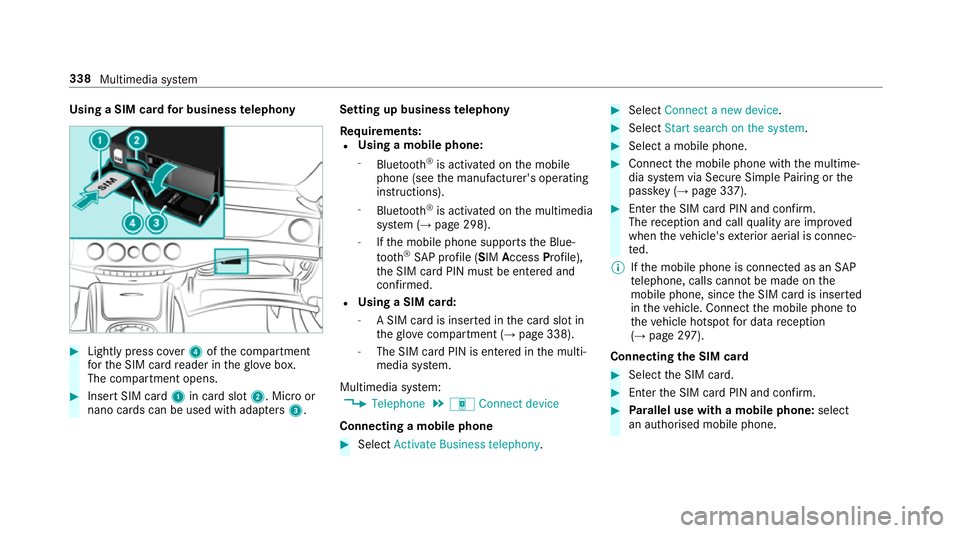
Light lypress co ver4ofthec ompartment
fo rt he SIM car dreader in theg love box.
The compartmen topens. #
Inser tSIM card 1in car dslot 2.M icroor
nano cards can be used wit hadap ters 3 . Setting up business
telephony
Re quirements:
R Using amobile phone:
- Blue tooth ®
is activated on them obile
phone (see them anufacturer's operating
instructions).
- Blue tooth ®
is activated on them ultimedia
sy stem (→ page298).
- Ifth em obile phone supports theB lue‐
tooth ®
SA Pp rofile (SIM Access Profile),
th eS IM car dPIN mus tbeentered and
confi rmed.
R Using aSIM card:
- ASIM car disinsertedint he car dslotin
th eg love compartmen t(→pag e338).
- The SIM car dPIN is entered in them ulti‐
media sy stem.
Multimedia sy stem:
, Telephone .
á Connec tdevice
Connecting amobile phone #
Select Activate Business telephony . #
Select Connec tanew device. #
Select Start search on the system. #
Select amobile phone. #
Connec tthe mobile phone wit hthe multime‐
dia sy stem via Secur eSimple Pairing or the
passk ey (→pag e337). #
Ente rthe SIM car dPIN and confi rm.
The reception and cal lqualit yareimpr oved
when thev ehicle's exterior aerial is connec‐
te d.
% Ifth em obile phone is connected as an SAP
te lephone, calls canno tbemade on the
mobil ephone, since theS IM car disinserted
in thev ehicle. Connect them obile phone to
th ev ehicle hotspo tfor dat areception
(→ pag e297).
Connectin gthe SIM card #
Select theS IM card. #
Ente rthe SIM car dPIN and confi rm. #
Parallel use wit hamobile phone: select
an authorised mobile phone. 338
Multimedia sy stem
Page 343 of 585
%
Onlyone mobile phone can be connecte dat
an yo ne time. The connec tedm obile phone
is displa yedatt hetopoft he list.
Disconnecting amobile phone (deauthoris‐
ing)
Multimedia sy stem:
, Telephone .
á Connec tdevice #
Select them obile phone from thed evice list. #
Select ¥. #
Select Deauthorise. #
Select Yes.
Information on NearField Communication
(NFC)
NFC enables short- rang ew ireles sdatat ransfer
or (re)connection of amobile phon ewitht he
multimedia sy stem.
The following function sareavailable without
havin gauthorised amobile phone:
R Trans ferring aURLtobe vie wedint he multi‐
media sy stem (see them anufacturer's oper‐
ating instructions). R
Setting up thev ehicle's Wi-Fi access da tavia
th es ystems ettings (→ page299).
Fu rther information can be found at :http://
www.mercedes-benz.com/connect
Using them obil ephone wit hNear Field Com‐
munication (NFC)
Re quirements:
R NFC is activated on them obile phone (see
th em anufacturer's operating instructions)
R The mobile phone's screen is switched on
and unloc ked( see them anufacturer's oper‐
ating instructions)
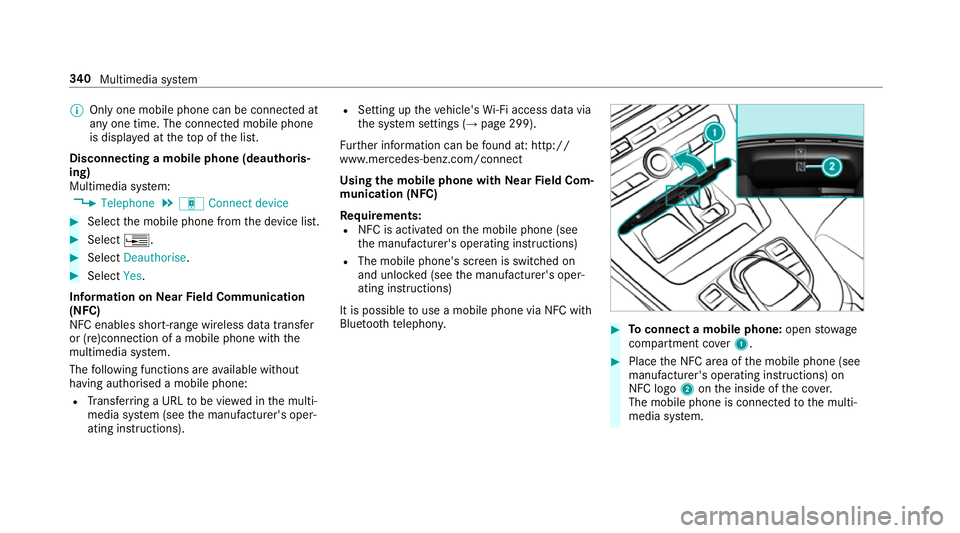
It is possible touse amobile phon evia NF Cwith
Blue toothtelephon y. #
Toconnect amobile phone: openstowage
compartment co ver1. #
Place theN FC area of them obile phone (see
manufacturer's operating instructions) on
NFC logo 2onthei nside of thec over.
The mobile phone is connected tothem ulti‐
media sy stem. 340
Multimedia sy stem
Page 347 of 585
Source
Requirements:
ñ Bluetooth ®
con‐
nection If
th es endin gof
vCards via Blue tooth®
is suppor ted, vCards
can be recei vedon
mobile phones or net‐
books, fore xamp le.
Blue tooth ®
is activa‐
te dint he multimedia
sy stem and on the
re spectiv edevice
(see them anufactur‐
er's operating instruc‐
tions).
ó Mobile phone The mobile phone is
connectedtothem ul‐
timedia sy stem. Importing contacts int
othe contacts menu
Multimedia sy stem:
, Telephone .
Z Options #
Select Import. #
Select an option. Saving
amobile phone contact
Multimedia sy stem:
, Telephone .
ª Contacts #
Select theó mobile phone conta ct. #
Select ¥. #
Select Save in vehicle .
The contact sa vedint he multimedia sy stem
is identified bythe f symbol.
Calling acontact
Multimedia sy stem:
, Telephone .
ª Contacts #
Ente rcharacter sintot he sear chfield. #
Select thec ontact. #
Select thet elephone number.
The number is dialled.
Selecting fur ther options in thec ontacts
menu
Multimedia sy stem:
, Telephone .
ª Contacts #
Select acontact. #
Select ¥. Depending on
thes tore dd ata, thef ollowing
options ar eavailable:
R Call
R Sen dtextm essage
R Show website (ifaw eb address has been
st ored)
R Navigate (if an address has been stored)
R Save as global favourite
R Send DTMF tones (foranumber wit hDTMF
to nes) #
Select an option.
Deletin gacontact
Multimedia sy stem:
, Telephone .
ª Contacts
Yo uc an dele tecontacts stored in thev ehicle. #
Sear chfort he contact. #
Selectthe contact. #
Select ¥ . #
Select Delete contact . #
Select Yes. 344
Multimedia sy stem
Page 348 of 585
Call list
Call lis
toverview
If yo ur mobile phon esuppo rtst he PBAP Blue‐
tooth ®
profile:
R The call lists from them obile phone ar edis‐
pla yedint he multimedia sy stem.
R When connecting them obile phone, youm ay
ha ve toconfir mthe connection fort he PBAP
Blue tooth ®
profile.
If yo ur mobile phon edoes no tsuppo rttheP BAP
Blue tooth ®
profile:
R The multimedia sy stem generates its ownc all
li st s.
R The call lis tisnotsynchronised wit hthe call
lists in them obile phone.
Making acall from the call list
Multimedia sy stem:
, Telephone .
ø Call list -
Mobile phone #
Select an entry.
The call is made. Options in
thec all list
Multimedia sy stem:
, Telephone .
ø Call list -
Mobile phone #
Highlight an entry. #
Select ¥.
The following option sareavailable:
R Sen dtextm essage
R Open contact #
Select an option. Te
xt messages Overvie
woftextm essag efunctions
If th ec onnected mobile phone supports the
MAP Blue tooth®
profile, thet extm essa gefunc‐
tions can be use donthe multimedia sy stem.
Yo uc an obtain fur ther information about set‐
ting sand suppor tedf unction sofBluetooth ®
-
capable mobil ephones from aMercedes-Benz
Service Centr eorat:http://www.mercedes-
benz.com/connect Some mobil
ephones requiref urther settings
af te rb eing connected tothem ultimedia sy stem
(see manufacturer's operating instructions).
Ne wm essages ar eidentified bythe 1 symbol
in them ultimedia sy stem's displa yand an audi‐
ble signal.
Depending on them obile phone, them ultimedia
sy stem onl ydispla ysnewi ncoming text mes‐
sa ge sort he100n ewesttex tm essa ges.
The ú symbol is displa yedw hen them obile
phone's messag ememor yisfull.
Configuring thed ispla yedt extm essages
Multimedia sy stem:
, Telephone .
Z Options .
Message
display #
Select ¥.
Am enu wit hthe following option sisshown:
R All messages
R New and unread messages
R New messages
R Off (The text messa gesa renotd ispla yed
automaticall y.) Multimedia sy
stem 345
Page 351 of 585
R
Display participants
R Set up call/Connect now #
Select afunction.
Markin ganentry in the to-do lis tascomple‐
ted
Multimedia sy stem
, In Car Office #
Select an entry inthet o-do list O.
Ac cepting/rejecting an incoming call fora
te lephone conference #
Toaccep t:select Accept. #
Toreject: select Reject. Apple CarPl
ay™ Overvie
wofApple CarPlay™
iPhone ®
functions can be used via them ultime‐
dia sy stem using Apple CarPlay™. The yareoper‐
ated using thec ontroller or theS iri®
vo ice-oper‐
ated control sy stem. Youc an activat ethe voice-
operated control sy stem bypressing and holding
the ó button on them ultifunction steering
wheel. When using Apple CarPlay™ via
thev oice-oper‐
ated control sy stem, them ultimedia sy stem can
st ill be operated via LINGU ATRO NIC
(→ pag e274).
On ly one mobile phone atat imec an be connec‐
te dv ia Apple CarPlay™ tothem ultimedia sys‐
te m.
The availabilit yofApple CarPlay™ ma yvary
accordin gtothe countr y.
The service pr ovider is responsible fort his appli‐
cation and thes ervices and conte nt connected
to it.
Information on Apple CarPlay™
While using Apple CarPlay™ various functions of
th em ultimedia sy stem, e.g. telephon yorthe
media sources Blue tooth®
audio and iPod ®
,a re
una vailable.
Onl yone routeg uidance can be activ eatatime.
If ro uteg uidance is activ eonthe multimedia sys‐
te m, it is closed when routeg uidance is star ted
on them obile phone. Connecting an iPhone
®
via Apple CarPlay™
Re quirements:
R Apple ®
operatin gsystemv ersion iOS 8.3 or
abo veis ins talled on thei Phone ®
.
R Ther eisanI nternetconnection fort he full
ra ng eoff unctions forA pple CarPlay™.
R The iPhone ®
is connected tothem ultimedia
sy stem via theU SB port çusing asuita‐
ble cable (→ page369).
Multimedia sy stem:
, Connect .
Apple CarPlay
Setting automatic or manual start
Am essa geappear swhen connec tedf or thef irst
time. #
Automatic star t:select Automatically.
Start automatically is activatedO.
Apple CarPlay™ will no wstart immediately
af te rt he iPhone ®
is connected tothem ulti‐
media sy stem using aUSB cable. #
Manua lstar t:select Manually . #
Select thei Phone ®
in thed evice list. 348
Multimedia sy stem
Page 352 of 585
Ac
cepting/rejecting thed atap rote ction reg‐
ulations
Am essag ewitht he dat aprotection regulations
appears. #
Select Accept &Start .
or #
Select Decline &End.
If yo us elected automatic start, youw ill ha ve
to star tA pple CarPlay™ manuall ythe next
time youw ant touse it.
Exiting Apple CarPlay™ #
Press theò button on them ultifunction
st eering wheel, fore xamp le.
% If Apple CarPlay™ wasn otdispla yedint he
fo re ground befor edisconnecting, thea ppli‐
cation starts in theb ackg round when recon‐
nected. Youc an call up Apple CarPlay™ in
th em ain menu.
Calling up Apple CarPlay™ sound settings
Multimedia sy stem:
, Connect .
Apple CarPlay .
Sound #
Select thet one men u(→ page 388). Ending Apple CarPlay™
Multimedi
asystem:
, Connect .
Apple CarPlay #
Select Disconnect.
The connection is ended.
The mobile phone continues tobe supplied
wit he lect ricity.
or #
Disconnect thec onnecting cable between
th em obile phone and multimedia sy stem.
Mercedes-Benz recommends disconnecting
th ec onnecting cable onl ywhen thev ehicle is
st ationar y. Android
Auto Android
Autoove rview
Mobile phon efunction scan be used with
Android Autousin gthe Android operating sys‐
te mont he multimedia sy stem. It is operated
using thec ontroller or thev oice-operated con‐
trol sy stem. Youc an activat ethe voice-opera ted
control sy stem bypressing and holding theó
button on them ultifunction steering wheel. When using Android
Autovia thev oice-opera ted
control sy stem, them ultimedia sy stem can still
be opera tedv ia LINGU ATRO NIC (→ page274).
On ly one mobile phone atat imec an be connec‐
te dv ia Android Auto to them ultimedia sy stem.
The availabilit yofAndroid Au toand Android Auto
App smayvary accordin gtothe countr y.
The service pr ovider is responsible fort his appli‐
cation and thes ervices and conte nt connected
to it.
Information on Android Auto
While using Android Auto,v arious func tions of
th em ultimedia sy stem, fore xamp lethem edia
source Blue tooth®
audio, ar enotavailable.
On ly one routeg uidance can be activ eatatime.
If ro uteg uidance is activ eonthe multimedia sys‐
te m, it is closed when routeg uidance is star ted
on them obile phone.
Connecting amobile phone via Android Auto
Requ irements:
R The firs ta ctivatio nofA ndroidAutoont he
multimedia sy stem mus tbecarried out when
th ev ehicle is stationar yfor saf etyr easons. Multimedia sy
stem 349
Page 353 of 585
R
The mobile phone supports Android Auto
from Android 5.0.
R The Android AutoApp is ins talled on the
mobil ephone.
R In order touse thet elephone functions, the
mobil ephone mus tbeconnected tothem ul‐
timedia sy stem via Blue tooth®
(→ pag e337).
If th er ew as no prior Interne tconnection, this
is es tablished wit hthe use of them obile
phone wit hAndroid Au to.
R The mobile phone is connected tothem ulti‐
media sy stem via theU SB port çusing a
suitable cable (→ page369).
R Ther eisanI nternetconnection fort he full
ra ng eoff unctions forA ndroid Auto.
Multimedia sy stem:
, Connect .
Android Auto #
Select them obile phone from thed evice list.
Ac cepting/rejecting thed atap rote ction reg‐
ulations
Am essag ewitht he dat aprotection regulations
appears. #
Select Accept &Start .
or #
Select Decline &End.
Ac tivatin gautomati cstart #
Select Startautomatically O.
St arting manually #
Select them obile phone from thed evice list.
Exiting Android Auto #
Press theò button on them ultifunction
st eering wheel, fore xamp le.
% If Android Autowa sn otdispla yedint hefore‐
ground befor edisconnecting, thea pplication
st arts in theb ackg round when reconnected.
Yo uc an call up Android Autointhem ain
menu.
Calling up theA ndroid Autosound settings
Multimedia sy stem:
, Connect .
Android Auto .
Sound #
Selecting thet one men u(→ page 388). Ending Android
Auto
Multimedia sy stem:
, Connect .
Android Auto #
Select Disconnect.
The connection is ended.
The mobile phone continues tobe supplied
wit he lect ricity.
or #
Disconnect thec onnecting cable between
th em obile phone and multimedia sy stem.
Mercedes-Benz recommends disconnecting
th ec onnecting cable onl ywhen thev ehicle is
st ationar y. Tr
ansfer redv ehicle dat awhenu sing Apple
CarPlay™ and Android Auto Information on trans
ferred vehicl edata
When using Android Autoor Apple CarPlay™,
cer tain vehicle dat aistransfer redtot he mobile
phone. This enables youtog ettheb esto ut of
selected mobile phone services. Vehicle dat ais
no td irectl yaccessible. 350
Multimedia sy stem