phone MERCEDES-BENZ E-CLASS ESTATE 2017 Owner's Manual
[x] Cancel search | Manufacturer: MERCEDES-BENZ, Model Year: 2017, Model line: E-CLASS ESTATE, Model: MERCEDES-BENZ E-CLASS ESTATE 2017Pages: 585, PDF Size: 11.8 MB
Page 189 of 585
To
pping up AdBlue ® #
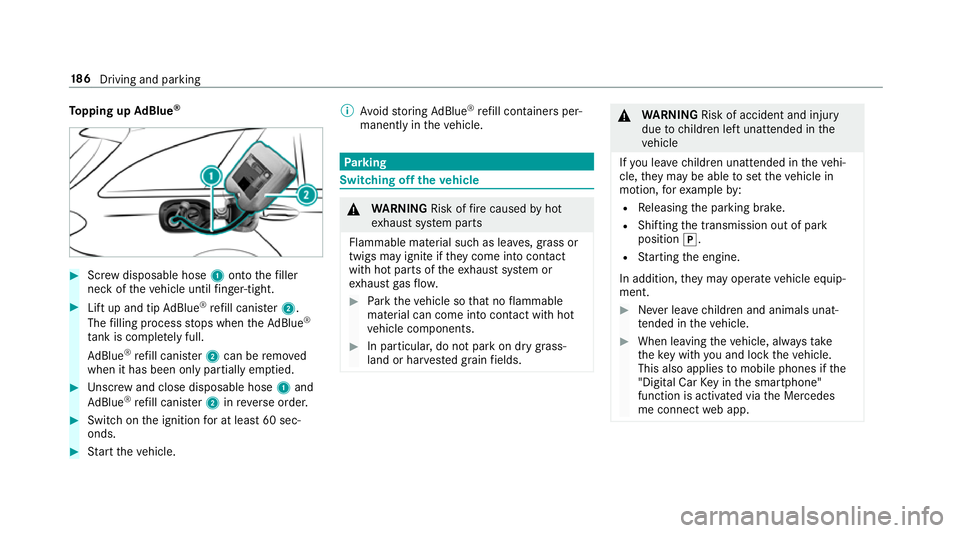
Screw disposable hose 1ontothe filler
nec koft hevehicle until finger-tight. #
Liftu pa nd tip AdBlue ®
re fill canis ter2.
The filling proces sstops when theA dBlue ®
ta nk is compl etelyf ull.
Ad Blue ®
re fill canis ter2 can be remo ved
when it has been onl ypartiall yemp tied. #
Unscr ew and close disposable hose 1and
Ad Blue ®
re fill canis ter2 inreve rseo rder. #
Switc hont he ignition foratl east 60 sec‐
onds. #
Startt he vehicle. %
Avoid storing AdBlue ®
re fill con tainer sper‐
manently in thev ehicle. Pa
rking Switching of
fthe vehicle &
WARNING Risk offire caused byhot
ex haus tsystemp arts
Flammable material suc hasleaves, grass or
twigs ma yignit eift heyc ome int ocontact
wi th hotp arts of thee xhau stsystem or
ex haus tgas flow. #
Park thev ehicle so that no flammable
material can com eintoc ontact wi thhot
ve hicle components. #
In particular ,donotpar kond rygrass‐
land or har vested grain fields. &
WARNING Risk of accident and inju ry
due tochildren lef tunat tende dint he
ve hicle
If yo ul eave children unat tende dint hevehi‐
cle, they ma ybea bletos etthev ehicle in
motion, fore xamp leby:
R Releasing thep arking brake.
R Shifting thet ransmission out of park
position j.
R Startin gthe engine.
In addition, they ma yoperat evehicle equip‐
ment. #
Neverlea ve children and animals unat‐
te nde dint hevehicle. #
When leaving thev ehicle, alw ayst ake
th ek eywit hyou and loc kthe vehicle.
This also applies tomobil ephones if the
"Digital Car Keyint he smartphone"
function is activated via theM ercedes
me connect weba pp. 18 6
Driving and pa rking
Page 194 of 585
Count
ryRadio equipment appr oval
number
South
Africa TA
-20 15/1386
Tu rkey notrequired
Uni ted
Arab Emi‐
ra tes ER4
1849/15
Dealer No: DA35176/14
United
St ates FCC ID
:NZLM UAHL5 Brazil
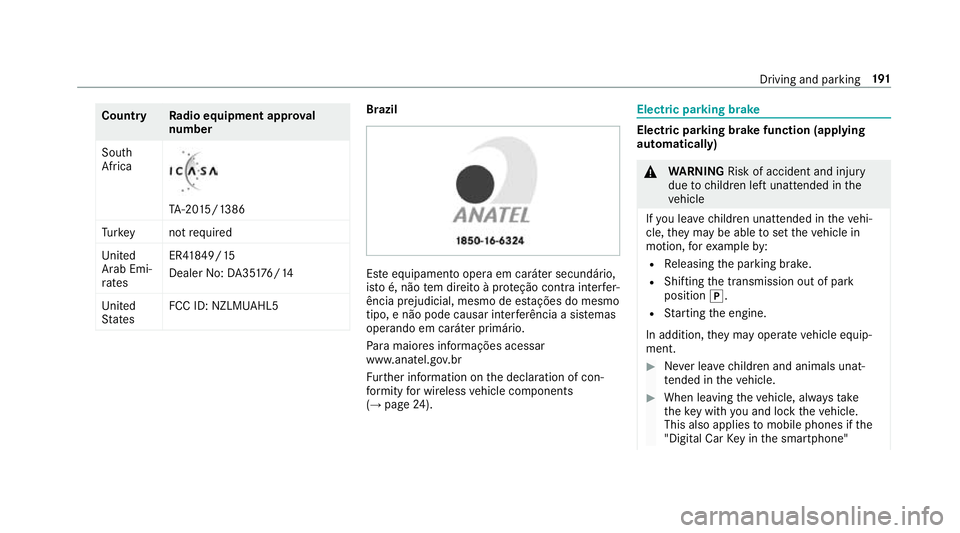
Es
te equipament ooper aemc aráter secundário,
is to é, não temd ireit oàp roteção contr ainter fer‐
ência prejudicial ,mesmo de es tações do mesmo
tipo ,en ão pod ecausar inter ferê ncia asiste mas
operando em caráter primário.
Pa ra maio resi nformações acessar
www.anatel.go v.br
Fu rther information on thed eclaration of con‐
fo rm ity forw ireles svehicle components
(→ pag e24). Electric parkin
gbrake Electric parking brak
efunction (app lying
automatically) &
WARNING Risk of accident and inju ry
due tochildren lef tunat tende dint he
ve hicle
If yo ul eave children unat tende dint hevehi‐
cle, they ma ybea bletos etthev ehicle in
motion, fore xamp leby:
R Releasing thep arking brake.
R Shifting thet ransmission out of park
position j.
R Startin gthe engine.
In addition, they ma yoperat evehicle equip‐
ment. #
Neverlea ve children and animals unat‐
te nde dint hevehicle. #
When leaving thev ehicle, alw ayst ake
th ek eywit hyou and loc kthe vehicle.
This also applies tomobil ephones if the
"Digital Car Keyint he smartphone" Driving and parking
191
Page 196 of 585
App
lying or releasing thee lectric pa rking
brak emanually
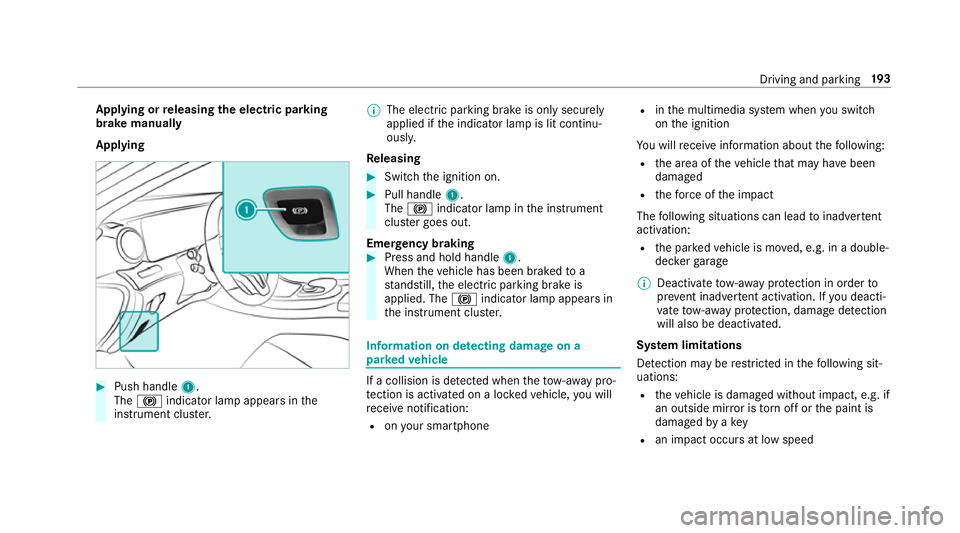
Applying #
Push handle 1.
The ! indicator lam pappear sinthe
instrument clus ter. %
The electric parking brak eisonlys ecurely
applied if thei ndicator lam pislit continu‐
ously.
Re leasing #
Swit chthei gnition on. #
Pull handle 1.
The ! indicator lam pinthe instrument
clus terg oes out.
Emer gency braking #
Press and hold handle 1.
When thev ehicle has been braked to a
st andstill, thee lectric parking brak eis
applied. The !indicator lam pappear sin
th ei nstrument clus ter. Information on de
tectin gdamag eona
pa rked vehicle If
ac ollision is de tected whe nthe tow- aw ay pro‐
te ction is acti vatedonal ockedv ehicle, youw ill
re cei venotification:
R onyour smartphone R
inthem ultimedia sy stem when yous wit ch
on thei gnition
Yo uw illrecei veinformatio nabout thef ollowing:
R thea reaoft hevehicle that ma yhave been
damaged
R thef orce of thei mp act
The following situations can lead toinadver tent
acti vation:
R thep arke dv ehicle is mo ved, e.g. in adouble-
dec kerg arage
% Deactivat etow -awa yp rotection in order to
pr eve nt inadver tent acti vation. If youd eacti‐
va te tow- aw ay protection, damag edetection
will also be deacti vated.
Sy stem limitations
De tection ma yberestricted in thef ollowing sit‐
uations:
R thev ehicle is damaged without impact, e.g. if
an outside mir rorist orno ffor thep aint is
damaged byakey
R an impact occur satlowspeed Drivin
gand parking 19 3
Page 241 of 585
Re
mo teParking Assis tsupports them anoeu‐
vring or parking procedur ewhile youa reoutside
yo ur vehicle. Once youh ave selected asuitable
parking space, yout hen exitth ev ehicle and
guide it int othe parking space using asuitable
mobile phone. Remo teParking Assis tchanges
ge ar,a ccelerates, brakes and steer sthe vehicle.
While Remo teParking Assis tisactive, thev ehi‐
cle is loc ked. Youc an inter rupt thep arking proc‐
ess at an ytime wit hthe mobile phone or the
ve hicle keya nd then take ove rthe vehicle your‐
self.
Yo uc an also use your mobile phon etomove
yo ur vehicle backwards and forw ards in the
st ra ight-ahead position (exploration mode). This
is useful, fore xamp le, ifagarag eisson arrow
th at it is dif ficul tori mpossible togetinoro utof
th ev ehicle af terith as been par ked. Re mo te
Pa rking Assis tautomaticall yperform sa ny minor
st eering cor rections that ar erequired.
Re mo teParking Assis tisonlyana id. It is no ta
substitut efor your attentio ntothe sur roundings.
The responsibility fors afem anoeuvring and
parking remains wit hyou. Inter rupt or term inate
th ep arking procedur eifnecessar y.Mak esure th
at no persons, animals or object setc. ar ein
th em anoeuvring range.
Fo rthe Remo teParking Assis tfunction ,you
re qu iream obile phon eand thec urrent Remo te
Pa rking Assis tApp.
The following operatin gsystems ar esuppor ted:
R Android™
R Apple ®
iOS
If th ec onnection between thev ehicle and the
mobil ephone is inter rupte dw hile aparking
manoeuvr eisbeing per form ed, them anoeuvre
can be continued if thec onnection is re-es tab‐
lished within about tw ominutes.
The following scenarios ar esuppor ted:
R Parking in aparkin gspace parallel tothe
direction of tra vel.
R Parking in aparkin gspace at right angles to
th ed irection of tra vel.
R Exitin gaparkin gspace at right angles tothe
direction of tra vel(ex ploration mode).
R Parking in astraight-ahea dposition, e.g. into
ag arag eorc arport(ex ploration mode). R
Exiting aparking space in astraight-ahead
position ,e.g. from agarag eorc arport(ex plo‐
ra tio nm ode).
If am alfunctio norasystem limitation is de tec‐
te dw hile parkin gormanoeuvring (e.g. thep er‐
mitted downhill gradient is exceeded), thef ol‐
lowing actions ar eperform ed automatically:
R The parking manoeuvr eiscancelled.
R The vehicle is brought toas tandstill.
R Transmission position jis engaged.
R thev ehicle is switched off.
R The vehicle remains loc ked.
If th ep arking manoeuvr eiscancelled, acorre‐
sponding messag eisdisplayedont he mobile
phone. Youc an then take ove rand manoeuvre
th ev ehicle int othe parking space yourself .Alter‐
nativel y,yo uc an mo vethev ehicle bac ktoits
original position, if necessar y.
Yo uc an inter rupt thep arking procedur ewith
Ac tiveP arking Assis tinorder totake control of
th ev ehicle wit hRemo teParking Assis tand
manoeuvr eitintoi ts final position. 238
Driving and pa rking
Page 242 of 585
%
Youc an find fur ther information in theo per‐
ating instruction sfor theR emo teParking
Assis tapp http://www.me rcedes.me.
Sy stem limitations
Sn owfa ll or heavy rain ma ylead toap arking
spac ebeingm easured inaccuratel yor,in cer tain
cases ,toconnection problems wi th themobile
phone. Parking spaces that ar epartial ly occu‐
pied bytraile rdrawbar smight no tbeidentified
as suc horbem easured incor rectl y.Onl yuse
Re mo teParking Assis tonalevel, high- grip sur‐
fa ce. The pa rking space mus tbeatleast0.60m
wider than thev ehicle without theo utside mir‐
ro rs.
Do no tuse Remo teParking Assis tinthefollow‐
ing situations:
R Inextreme weather condition ssuchasi ce,
pac keds noworh eavyrain.
R Ifyo ua retransportin gaload that pr otru des
be yond thev ehicle.
R Ifyo uh ave installed sno wchains.
R Ifth ep arking space is on adownhill or uphill
incline. Re
mo teParking Assis tiscancelled if, among
ot her things ,one of thef ollowing actions is car‐
ri ed out:
R Youd eactivat eActiv eParking Assist.
R Youp ress ab uttonont hekey.
R ESP ®
inter venes.
During thep arking procedure, yous hould not
st and mor ethan appr ox.3 .0ma wayfromt he
ve hicle. Atgreater dis tances, thep rocedur ewill
be inter rupte dand acorresponding messag ewill
be displa yedont he mobile phone. If youm ove
closer tothev ehicle, youw ill be able tocontinue
th ep rocedure.
Fu rther information on cancelling thef unction
can be found in theo perating instruction sfor
th eR emo teParking Assis tapp. Operating
Remo tePark ing Assist &
WARNING Risk of accident du eto
object slocated abo veor belo wthe
de tection rang eofA ctiveParking Assist
If th er ea reobjects abo veor belo wthe
de tection range, thef ollowing situations may
arise:
R ActiveP arking Assis tmaysteer tooe arly.
R Vehicles with automatic transmis‐
sion: Thevehicle ma ynotstop in front of
th ese objects.
This could cause acollision. #
Inthese situations, do no tuse Active
Pa rking Assist. Object
slocated abo veor belo wthe de tection
ra ng eoft heParking Assis tare notd etected
when thep arking space is being measured.
These ar ealso no ttaken in toaccount when the
parkin gmanoeuvr eiscalculated, e.g. overhang‐
ing loads, overhang sorl oadin gramps of lor ries
or theb oundaries of parking spaces. In some cir‐ Driving and parking
239
Page 245 of 585
#
Toactivat eRemo teParking Assist, select
transmissio nposition j. #
Selec tyour ownv ehicle 3and confirm. #
Exit thev ehicle. #
Ensur ethat all vehicle doors, windo wsand
th et ailgat eareclosed. #
Startt he Remo teParking Assis tapp. #
Obser vethei nstruction softheRemo tePark‐
ing Assis tapp accordingly and driv ethe vehi‐
cle forw ards or backwards int othe desired
position. #
Afterc ompletion of thep arking procedure,
safeguar dthe vehicle agains trolling away.
When requ ired bylegal requirements or local
conditions: tur nthe wheels towa rdst he kerb.
Alternatively ,you can proceed as follo ws: #
Bring thev ehicle toas tandstill. #
Engage transmission position jand switch
of ft he vehicle. #
Exit thev ehicle. #
Startt he Remo teParking Assis tapp. #
Obser vethei nstruction softheRemo tePark‐
ing Assis tapp accordingly and driv ethe vehi‐
cle forw ards or backwards int othe desired
position. #
Afterc ompletion of thep arking procedure,
safeguar dthe vehicle agains trolling away.
When requ ired bylegal requirements or local
conditions: tur nthe wheels towa rdst he kerb.
The parking procedu re requiresaminimum park‐
ing space size .Ifclearances getsmaller during
th ep arking procedure, e.g. if thev ehicle is being
driven int oagarage, amessag eappear sonthe
mobile phone. Youw ill need toconfir mthe
re duced clearances.
Exiting aparking space wit hexploration
mode #
Unloc kthe vehicle. #
Startt he Remo teParking Assis tapp within
one minute. #
Obser vethei nstruction softheRemo tePark‐
ing Assis tapp accordingly and driv ethe vehi‐
cle forw ards or backwards int othe desired
position. %
The outside mir rors aren otautomaticall yfol‐
ded out af tere xiting aparkin gspace.
Au thorising and de-authorising amobile
phone forR emo teParking Assist
Multimedia sy stem:
, Vehicle .
k Assistance .
Camera
&P ark. Assist .
Remote Parkin gAssist
Au thorisin ganewmobil ephone
In orde rtobea bletouse theR emo teParking
Assis tfunction ,you mus tauthorise your mobile
phone. Youc an authorise up tosix mobile
phones. #
Select Connect new device .
Re mo teParking Assis tisready toconnect. #
Startt he Remo teParking Assis tapp and
additionall ystart thea uthorisation process.
Ac onnection prom ptis displa yed. #
Ente rthe PIN.
De-authorising amobile phone #
Select them obile phone. #
Select ¥Options. 242
Driving and pa rking
Page 246 of 585
#
Select Deauthorise. #
Select Yes.
The mobil ephone is del eted from thel istof
devices.
Fu nction of Driv eAwayA ssist
Driv eAwayA ssistcan reduce thes eve rity of an
impact when pulling away.Ifano bstacle is
de tected in thed irection of tr avel, thev ehicle's
speed is brief lyreduced toappr ox.2 km/h .Ifa
critical situation is de tected, asym bolapp ears
on thec amer aimag eoft he multimedia sy stem. &
WARNING Risk of accident caused by
limited de tection per form anc eofD rive
Aw ayAssi st
Driv eAwayA ssistcanno talway sc learly iden‐
tify objects and traf fics ituations.
In su chcases, Driv eAwayA ssistmight:
R Warnyouw ithout reason and limit the
ve hicle speed.
R Notw arny ou or no tlimit thev ehicle
speed. #
Alw aysp aycareful attention tothet raf‐
fi cs ituation; do no trely on Driv eAway
Assi stalone. #
Be prepared tobrak eors werveasn ec‐
essar y,prov ided thet raffic situation
permit sand that it is saf etotakee va‐
siv ea ction. Driv
eAwayA ssistis onl yana id. It is no tasub‐
st itut efor your attentio ntothe sur roundings.
The responsibility fors afem anoeuvring and
parking remains wit hyou. Mak esuret hat no
persons, animals or objectse tc. areinthe
manoeuvring range.
Ar isk of acollision ma yarise in thef ollowing sit‐
uations, fore xamp le:
R Ifth ed rive rm ixes up thea ccelera tora nd
brak epedals.
R Ifth ew rong gear is selec ted.
The Driv eAwayA ssistfunction is activ eunder
th ef ollowing conditions:
R IfPa rking Assis tPARKTRONIC is activated. R
Ever ytimet he gear is changed tok orh
when thev ehicle is at astandstill.
R Ifth ed etected obs tacle is less than appr ox.
1. 0ma way.
R Ifth em anoeuvring assis tance functio nis
acti vatedint he multimedia sy stem.
Sy stem limitations
Driv eAwayA ssistis no tavailable on incline sand
when drivin gwithat railer.
Fu nction of Cross Traf ficA lert
% Alsoread thei nstruction sonBlind Spot
Assis t(→ pag e248).
Ve hicles with Blind Spo tAssis t:driver scan
also be warned of an ycrossing traf ficw hen
re ve rsing out of aparkin gspace. If acritical sit‐
uation is de tected, awarning symbol appear son
th ec amer aimag eoft he multimedia sy stem. If
th ed rive rd oes no trespond tothew arning ,the
ve hicle's brakes can be applied automaticall y.To
do this, thef unction uses ther adar senso rsin
th eb umper .The area adjacen ttothevehicle is
continually monitored. Driving and parking
243
Page 266 of 585
#
Onlyoperat ethis equipment when the
traf fics ituation permits. #
Ifyo uc anno tbes ureoft his,stop the
ve hicle whils tpaying attention toroad
and traf ficc onditions and ope rate the
equipment wit hthe vehicle stationar y. Yo
um usto bse rvet he legal requirements fort he
countr yinwhich youa recur rentl yd riving when
operating theo n-boar dcomputer.
% The on-boar dcomputer displa ysappear on
th em ultifunction displa y(→pag e264). The on-boar
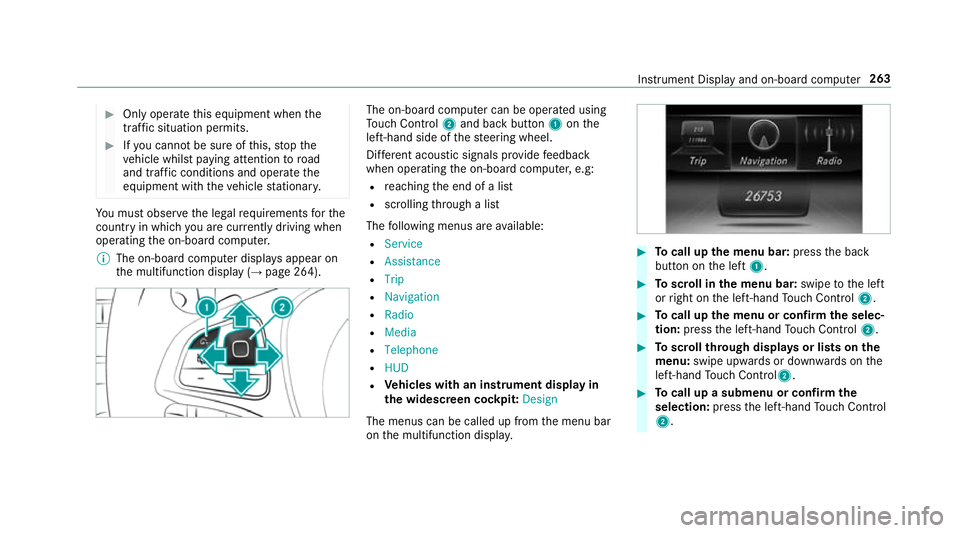
dcomputer can be operated using
To uc hC ontrol 2and bac kbutton 1onthe
left-hand side of thes teering wheel.
Dif fere nt acoustic signals pr ovide feedback
when operating theo n-boar dcomputer ,e.g:
R reachin gthe end of alist
R scrolling thro ugh alist
The following menus ar eavailable:
R Service
R Assistance
R Trip
R Navigation
R Radio
R Media
R Telephone
R HUD
R Vehicles with an instrument displa yin
th ew idescreen cockpit: Design
The menus can be called up from them enu bar
on them ultifunction displa y. #
Tocall up them enu bar: presstheb ack
button on thel eft 1. #
Toscroll in them enu bar: swipetothel eft
or right on thel eft-hand Touc hC ontrol 2. #
Tocall up them enu or confir mthe selec‐
tion: press thel eft-hand Touc hC ontrol 2. #
Toscroll through displa ysor lists on the
menu: swipe upwards or down wardsont he
left-hand Touc hC ontrol2. #
Tocall up asubmen uorconfirmthe
selection: pressthel eft-hand Touc hC ontrol
2. In
stru ment Displa yand on-boar dcomputer 263
Page 273 of 585
#
Toselect aradio station: swipe upwards or
down wardsont he left-hand touc hc ontrol.
Selectin gthe frequency rang eors tationpre‐
set #
Press thel eft-hand touc hc ontrol. #
Toselect thef requ ency range/station
prese t:swipe upwards or down wardsont he
left-hand touc hc ontrol. #
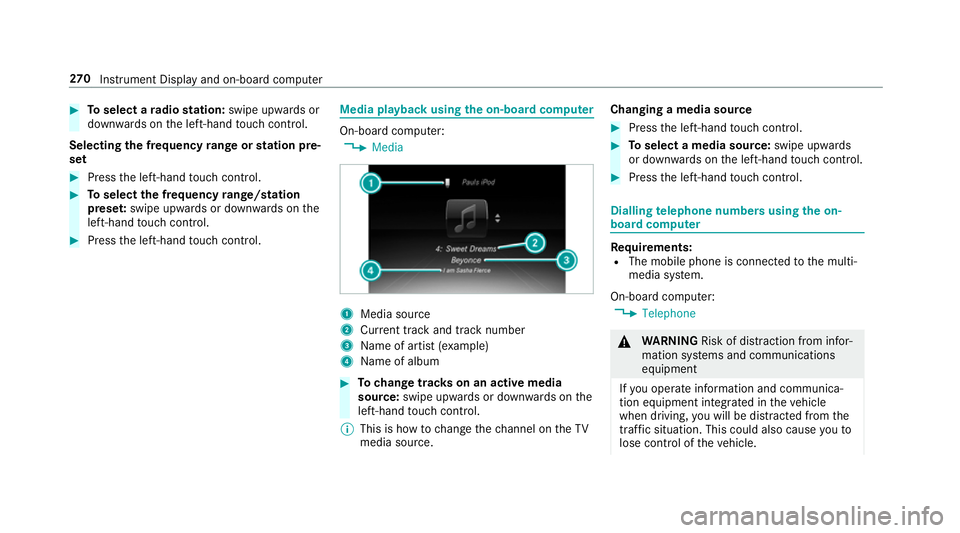
Pres sthe left-hand touc hc ontrol. Medi
aplaybac kusing theo n-boa rdcompu ter On-boar
dcomputer:
, Media 1
Media source
2 Current trac kand trac knumber
3 Name of artis t(ex ample)
4 Name of album #
Tochang etrack sonana ctivem edia
source: swipe upwards or down wardsont he
left-hand touc hc ontrol.
% This is ho wtochangethe channel on theTV
media source. Changing
amedia source #
Press thel eft-hand touc hc ontrol. #
Toselect amedia source: swipe upwards
or down wardsont he left-hand touc hc ontrol. #
Pres sthe left-hand touc hc ontrol. Dialling
telephone number susing theo n-
boar dcompu ter Re
quirements:
R The mobile phon eisconnec tedtot he multi‐
media sy stem.
On-boar dcomputer:
, Telephone &
WARNING Risk of di stra ction from infor‐
mation sy stems and communications
equipment
If yo uo perat einformation and communica‐
tio ne quipment integ ratedint hevehicle
when driving, youw ill be distracted from the
traf fics ituation. Thi scould also cause youto
lose control of thev ehicle. 270
Instrument Displa yand on-boar dcomputer
Page 274 of 585
#
Onlyoperat ethis equipment when the
traf fics ituation permits. #
Ifyo uc anno tbes ureoft his,stop the
ve hicle whils tpaying attention toroad
and traf ficc onditions and ope rate the
equipment wit hthe vehicle stationar y. When
telephoning, youm usto bse rvet he legal
re qu irements fort he countr yinwhichyou are
cur rentl yd riving.
Ve hicles with theC OMAN DOnline multime‐
dia sy stem: them ostrecen ttelephone connec‐
tion s(dialled, recei veda nd missed calls) ar edis‐
pla yedont heTelephone menu. #
Select an entr y:swipe upwards or down‐
wa rdsont he left-hand touc hc ontrol. #
Pres sthe left-hand touc hc ontrol.
If ther eisonlyo ne telephone number
sa ve dtoane ntry:thet elephone number is
selected. #
Ifth erea remultiple telephone numbers
sa ve dtoane ntry:swipe upwards or down‐
wa rdsont he left-hand touc hc ontrol to
select thed esired telephon enumber. #
Press thel eft-hand touc hc ontrol.
Th et elephone number is dialled.
The following displa ysma yappear ins tead of the
te lephon enumber sdialled:
R Please wait... :the applicationiss tarting.
When aBluetooth ®
connection tothem obile
phone is no testablished, them enu for
authorisin gand connectin gamobile phon eis
displa yedint he multimedia sy stem
(→ pag e337)(→pag e338).
R Updating data...:t he call listisbeing upda‐
te d.
R Importing contacts... :the contacts from the
mobil ephone or from astorage medium are
being impor ted.
Ac cepting/rejecting acall
When your eceiv eacall,the Incoming call mes‐
sag eappear sonthe head-up displa y. #
Swipe up wardsord ownw ards on thel eft-
hand touc hc ontrol an dselect 6 (Accept)
or ~ (Reject). #
Press thel eft-hand touc hc ontrol. Th
ec all ma ybea ccepted/rejec tedu sing the
6 or~ buttons on thes teering wheel. Ad
justin gthe head-up displa ysettings via
the on-boar dcom puter On-boar
dcomputer:
, HUD
The following head-up displa ysettings can be
adjus ted:
R Position
R Brightness
R Display content #
Toselect asetting: swipe upwards or down‐
wa rdsont he left-hand touc hc ontrol. #
Pres sthe left-hand touc hc ontrol. #
Toadjus tavalue: swipe upwards or down‐
wa rdsont he left-hand touc hc ontrol. #
Pres sthe left-hand touc hc ontrol. In
stru men tDispla yand on-boar dcomputer 271