stop start MERCEDES-BENZ E-CLASS ESTATE 2020 User Guide
[x] Cancel search | Manufacturer: MERCEDES-BENZ, Model Year: 2020, Model line: E-CLASS ESTATE, Model: MERCEDES-BENZ E-CLASS ESTATE 2020Pages: 489, PDF Size: 9.15 MB
Page 178 of 489
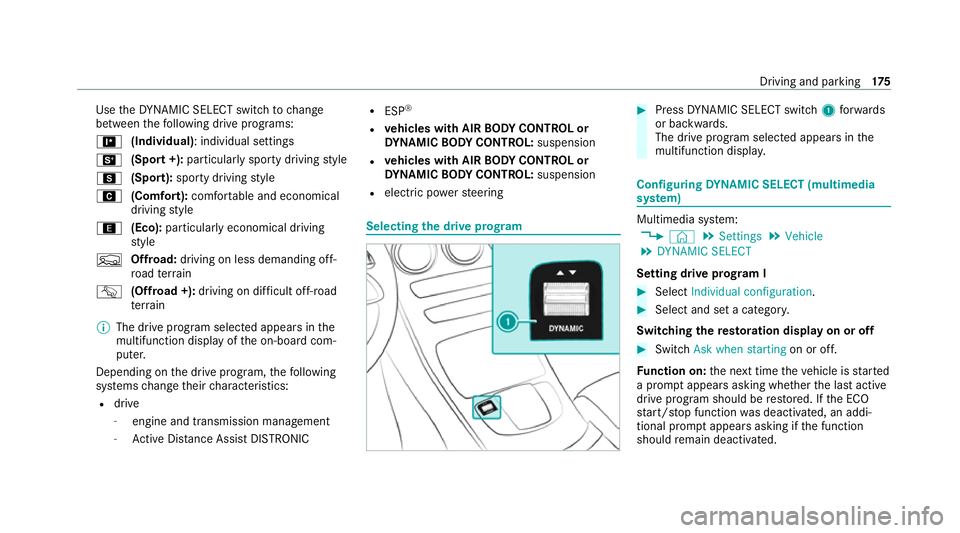
Use
theDY NA MIC SELECT switch tochange
between thefo llowing drive prog rams:
= (Individual): individual settings
B (Sport +): particularly spo rty driving style
C (Sport): sporty driving style
A (Comfort): comfortable and economical
driving style
; (Eco):particularly economical driving
st yle
F Offroad: driving on less demanding off-
ro ad terrain
G (Offroad +): driving on difficult off-road
te rrain
% The drive prog ram selected appears in the
multifunction display of the on-board com‐
puter.
Depending on the drive prog ram, thefo llowing
sy stems change their characteristics:
R drive
-
engine and transmission management
- Active Dis tance Assi stDISTRONIC R
ESP ®
R vehicles with AIR BODY CONT ROL or
DY NA MIC BODY CONT ROL:suspension
R vehicles with AIR BODY CONT ROL or
DY NA MIC BODY CONT ROL:suspension
R electric po werst eering Selecting
the drive prog ram #
Press DYNA MIC SELECT switch 1forw ards
or backwards.
The drive prog ram selected appears in the
multifunction displa y. Configuring
DYNA MIC SELECT (multimedia
sy stem) Multimedia sy
stem:
4 © 5
Settings 5
Vehicle
5 DYNAMIC SELECT
Setting drive prog ram I #
Select Individual configuration. #
Select and set a categor y.
Switching there storation display on or off #
Swit chAsk when starting on or off.
Fu nction on: the next time theve hicle is star ted
a prom ptappears asking whe ther the last active
drive prog ram should be restored. If the ECO
st art/ stop function was deactivated, an addi‐
tional prom ptappears asking if the function
should remain deactivated. Driving and parking
175
Page 179 of 489
%
The prom ptappears on ly ifthe pr eviously
active settings deviate from thest andard
settings.
Fu nction off: the next time theve hicle is star‐
te dth eA drive program is set automaticall y.
The ECO start/ stop function is activated auto‐
matically.
% This function must be activated for each user
profile sepa rately. Only when this function is
activated will the drive prog ram and Eco
st art/ stop setting forth e pr evious journey
be sa vedfo rth ere spective user profile. Displaying
vehicle data Multimedia sy
stem:
4 © 5
Info #
Select Vehicle.
The vehicle data is displa yed. Displaying engine data
Multimedia sy
stem:
4 © 5
Info #
Select Engine.
The engine data is displa yed.
% The actual (maximum) values that can be
achie vedfo r engine output and engine tor‐
qu e may deviate from the certified values
within the count ry-specific guidelines for
permissible tolerances (basis: UN-ECE No.
85 or country -specific guidelines).
Fa ctors that can influence this are, forex am‐
ple:
R Sea le vel
R Fuel grade
R Outside temp erature
R Operating temp erature of the engine
% The values displa yed ser veonly as orienta‐
tion. The values for engine output and
engine torque sh own in the media display
may deviate from the actual values. Calling up
the consum ption indicator Multimedia sy
stem:
4 © 5
Info #
Select Consumption.
The cur rent and average consu mption is dis‐
pl ay ed. Au
tomatic transmission DIRECT SELECT le
ver Fu
nction of the DIRECT SELECT le ver &
WARNING Risk of accident due toincor‐
re ct gearshifting
If th e engine speed is higher than the idle
speed and you en gage the transmission posi‐
tion hork, theve hicle may accelerate
sharply. #
Ifyo u en gage the transmission position
h ork when theve hicle is at a
st andstill, alw ays depress the brake
pedal firm lyand do not accelerate at
th e same time. 176
Driving and pa rking
Page 188 of 489
#
Only use AdBlue ®
to fill th eAd Blue ®
ta nk. #
Do not overfill theAd Blue ®
tank. *
NO
TEContamination of theve hicle inte‐
ri or due toAd Blue ®
lea kage #
Afterto pping up, carefully close the
Ad Blue ®
re fill con tainer. #
Avoid car rying AdBlue ®
re fill con tainers
permanently in theve hicle. Re
quirements:
R The vehicle is unloc ked.
The following messages appear in order in the
multifunction display when theAd Blue ®
tank
requ irestopping up:
R Refill AdBlue See Owner’s Manual The
Ad Blue ®
leve l has fallen below there ser ve
ra nge. Top up AdBlue ®
immediately.
R Top up AdBlue Emergency op. in XXX miles
See Owner's ManualThe low AdBlue ®
level will lead
tolimited per form ance af terthe
re maining dis tance displ ayed has been
driven. Top up AdBlue ®
immediately.
R XX,X l Top up AdBlue Emer. op.: max. XXX
km/h Start not poss. in XXX kmThe low
AdBlue ®
leve l will lead tolimited per form‐
ance from the speed displa yed. Af terthe
re maining dis tance displ ayed has been cov‐
ered, it will no longer be possible tostart the
engine. Top up with at least the amount of
Ad Blue ®
displ ayed.
R XX,X l Top up AdBlue Switch on ignition, wait
60 sec. or eng. start not poss. TheAdBlue ®
ta nk is em pty. Yo u can no lon gerst art the
engine. Top up with at least the amount of
Ad Blue ®
displ ayed. Switch on the ignition
and waitfor appro ximately 60 seconds. Start
th e engine.
Yo u can see theAd Blue ®
ra nge and le vel in the
Service menu in the multifunction displa y.
% The AdBlue ®
ra nge shown depends strongly
on the driving style and operating condi‐ tions. The actual
range can therefore deviate
from the calculated range.
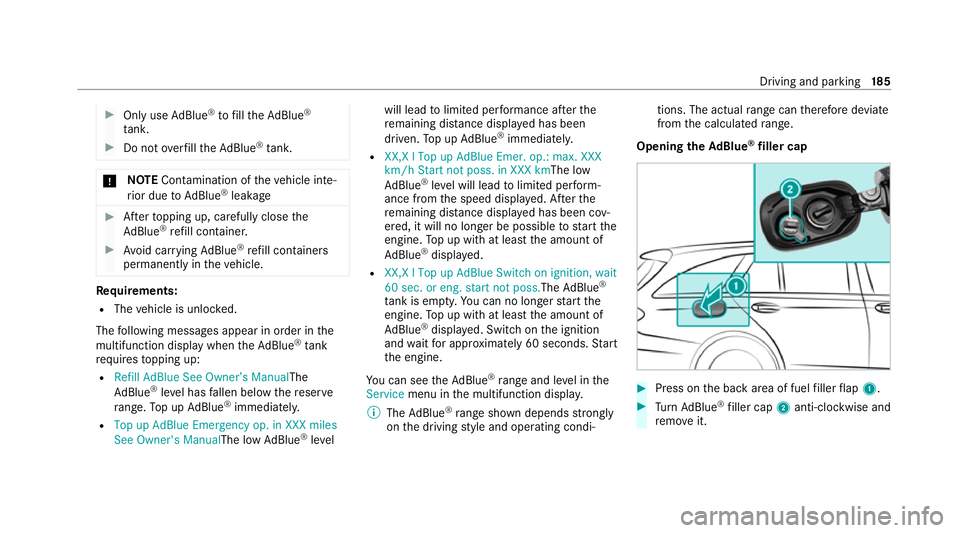
Opening the AdBlue ®
filler cap #
Press on the back area of fuel filler flap 1. #
Turn AdBlue ®
filler cap 2anti-clockwise and
re mo veit. Driving and parking
18 5
Page 189 of 489
%
You can also store theAd Blue ®
filler cap in
th e fuel filler cap holder in the fuel filler flap
hin gearm.
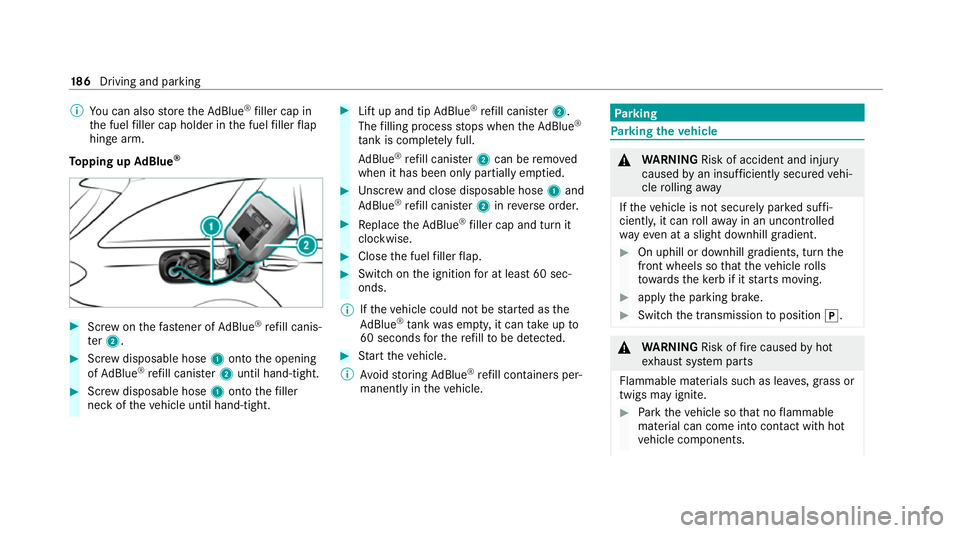
To pping up AdBlue ® #
Screw onthefast ener of AdBlue ®
re fill canis‐
te r2. #
Screw disposable hose 1onto the opening
of Ad Blue ®
re fill canis ter2 until hand-tight. #
Screw disposable hose 1onto thefiller
neck of theve hicle until hand-tight. #
Lift up and tip AdBlue ®
re fill canis ter2.
The filling process stops when theAd Blue ®
ta nk is compl etely full.
Ad Blue ®
re fill canis ter2 can be remo ved
when it has been only partially em ptied. #
Unscr ew and close disposable hose 1and
Ad Blue ®
re fill canis ter2 inreve rse order. #
Replace theAd Blue ®
filler cap and turn it
clockwise. #
Close the fuel filler flap. #
Swit chon the ignition for at least 60 sec‐
onds.
% Ifth eve hicle could not be star ted as the
Ad Blue ®
tan kwa s em pty, it can take up to
60 seconds forth ere fill to be de tected. #
Start theve hicle.
% Avoid storing AdBlue ®
re fill con tainers per‐
manently in theve hicle. Pa
rking Pa
rking theve hicle &
WARNING Risk of accident and inju ry
caused byan insuf ficiently secu redve hi‐
cle rolling away
If th eve hicle is not securely par ked suf fi‐
ciently, it can rollaw ay in an uncont rolled
wa yev en at a slight downhill gradient. #
On uphill or downhill gradients, turn the
front wheels so that theve hicle rolls
to wa rdsth eke rb if it starts moving. #
apply the parking brake. #
Switch the transmission toposition j. &
WARNING Risk offire caused byhot
ex haust sy stem parts
Flammable materials such as lea ves, grass or
twigs may ignite. #
Park theve hicle so that no flammable
material can come into con tact wi thhot
ve hicle components. 18 6
Driving and pa rking
Page 190 of 489
#
In particula r,do not park on dry grass‐
land or har vested grain fields. &
WARNING Risk of accident and inju ry
due tochildren left unat tended in the
ve hicle
If ch ildren are left unsupervised in theve hi‐
cle, they could, in pa rticular:
R open doors, thereby endangering other
persons or road users.
R get out and be stru ck byoncoming traf‐
fi c.
R ope rate ve hicle equipment and become
trapped, forex ample.
In addition, thech ildren could also set the
ve hicle in motion, forex ample by:
R releasing the parking brake.
R changing the transmission position.
R starting theve hicle. #
Never lea vechildren unat tended in the
ve hicle. #
When leaving theve hicle, alw aysta ke
th eke y with you and lock theve hicle. #
Keep theve hicle key out of reach of
ch ildren. This also applies
tothe Digital Vehicle Key
st icke r.
* NO
TEDama getotheve hicle due toit
ro lling away #
Alw ays secure theve hicle against roll‐
ing away. *
NO
TEDama gedue totheve hicle lo wer‐
ing Ve
hicles with AIR BODY CONT ROL or
le ve l control: Thevehicle can lo wer because
of temp erature dif fere nces or longer non-
operational times. This can cause dama geto
parts of the body. #
When stopping theve hicle and when
driving off, make sure that there are no obs
tacles su chas curbs under or in the
immediate vicinity of the body. #
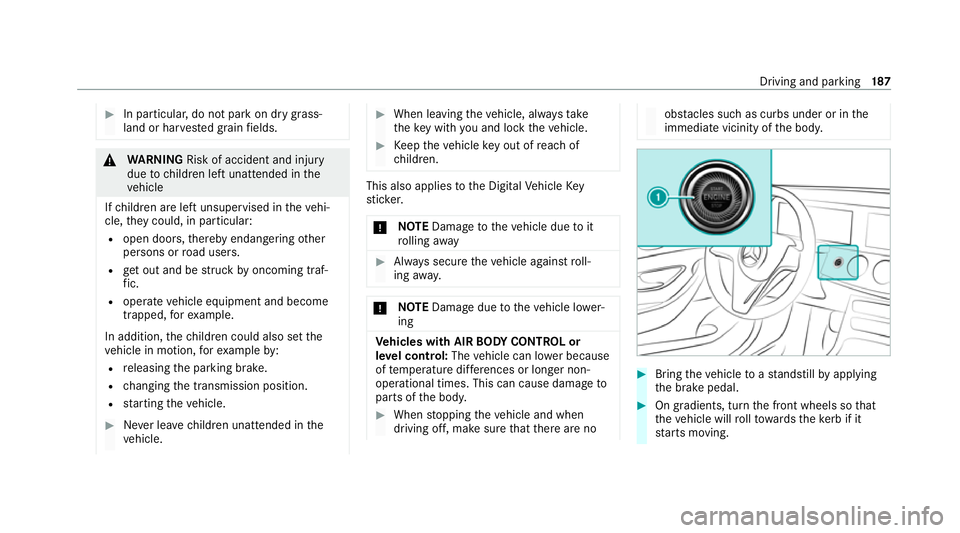
Bring theve hicle toast andstill byapplying
th e brake pedal. #
On gradients, turn the front wheels so that
th eve hicle will rollto wa rdsth eke rb if it
st arts moving. Driving and parking
187
Page 198 of 489
Overview of driving sy
stems and driving
saf ety sy stems R
ABS (Anti-lock Braking System)
(/ page 195)
R BAS (Brak eAssist System) (/ page195)
R ESP ®
(Electronic Stability Program)
(/ page 196)
R ESP ®
Crosswind Assi st (/ page 198)
R ESP ®
trailer stabilisation (/ page198)
R EBD ( Electronic Brakeforce Distribution)
(/ page 199)
R STEER CONTROL (/ page 199)
R Active Brake Assi st (/ page 199)1
R Adaptive Brake Lights (/ page 203)
R Cruise control (/ page 204)
R Limiter (/ page 204)
R Active Dis tance Assi stDISTRONIC
(/ page 208) 1 R
Active Speed Limit Assi st (/ page 213)2
R Route-based speed adap tation
(/ page 214)2
R Active Steering Assist (/ page215)2
R Active Emergency Stop Assist (/ page217)2
R Active Traf fic Jam Assi st (/ page 218)2
R Hill Start Assist (/ page218)
R HOLD function (/ page219)
R AIR BODY CONTROL (/ page 220)
R Parking Assist PARKTRONIC (/ page 223)
R Reversing camera (/ page 227)
R 360° Camera (/ page 230)
R Active Parking Assist (/ page 234)
R ATTENTION ASSIST (/ page 239)
R Traf fic Sign Assi st (/ page 241)1
R Blind Spot Assi stand Active Blind Spot Assi st
with exitwa rning (/ page243)1
R Active Lane Keeping Assist (/ page246)1 Fu
nction of ABS The Anti-lock Brake Sy
stem (ABS) regulates the
brake pressure in critical driving situations:
R During braking, e.g. at full brake application
or insuf ficient tyre traction, the wheels are
pr eve nted from lo cking.
R Vehicle steerability while braking is ensured.
If ABS inter venes when braking, you will feel a
pulsing in the brake pedal. The pulsating brake
pedal can be an indication of hazardous road
conditions and can ser veas a reminder totake
ex tra care while driving. Fu
nction of BAS The Brake Assist Sy
stem (BAS) supports your
eme rgency braking situation with additional
brake forc e.
1 This function includes subfunctions which are only available in conjunction with the Driving Assis tance Pack age.
2 This function is countr y-dependent and only available in conjunction with the Driving Assis tance Package. Driving and parking
19 5
Page 222 of 489
&
WARNING Risk of accident and inju ry
due totheve hicle rolling away
Af ter a short time, Hill Start Assist no lon ger
holds theve hicle. #
Swiftly mo veyour foot from the brake
pedal tothe accelera tor pedal. Do not
lea vetheve hicle when it is being held
by Hill Start Assist. HOLD function
HOLD function
The HOLD function holds
theve hicle at a stand‐
st ill without requ iring youto depress the brake
pedal, e.g. while waiting in traf fic.
The HOLD function is only an aid. The responsi‐
bility forth eve hicle safely standing still remains
with the driver.
Sy stem limits
The HOLD function is only intended toprov ide
assis tance when driving and is not a su fficient
means of safeguarding theve hicle against rolling
aw ay when stationar y. R
The incline must not be greater than 30%.
Ac tivating/deactivating the HOLD function &
WARNING Risk of an accident due tothe
HOLD function being active when you
lea vetheve hicle
If th eve hicle is only braked with the HOLD
function it could, in thefo llowing situations,
ro llaw ay:
R Ifth ere is a malfunction in the sy stem or
in the po wer supp ly.
R Ifth e HOLD function is deactivated by
depressing the accelera tor pedal or brake
pedal, e.g. byave hicle occupant. #
Alw ays secure theve hicle against roll‐
ing away before you lea veit. Re
quirements:
R The vehicle is stationar y.
R The driver's door is closed or the seat belt on
th e driver's side is fastened. R
The engine is running or has been au tomati‐
cally switched off bythe ECO start/ stop
function.
R The electric parking brake is released.
R Active Dis tance Assi stDISTRONIC is deacti‐
va ted.
R The transmission is in position h,kori.
Ac tivating the HOLD function #
Dep ress the brake pedal, and af ter a short
time quickly depress fur ther until theë
display appears in the multifunction displa y. #
Release the brake pedal.
Deactivating the HOLD function #
Depress the accelerator pedal topull away.
or #
Depress the brake pedal until theë dis‐
play disappears from the multifunction dis‐
pla y.
The HOLD function is deactivated in thefo llow‐
ing situations:
R Active Dis tance Assi stDISTRONIC is acti va‐
te d. Driving and parking
219
Page 239 of 489
Pa
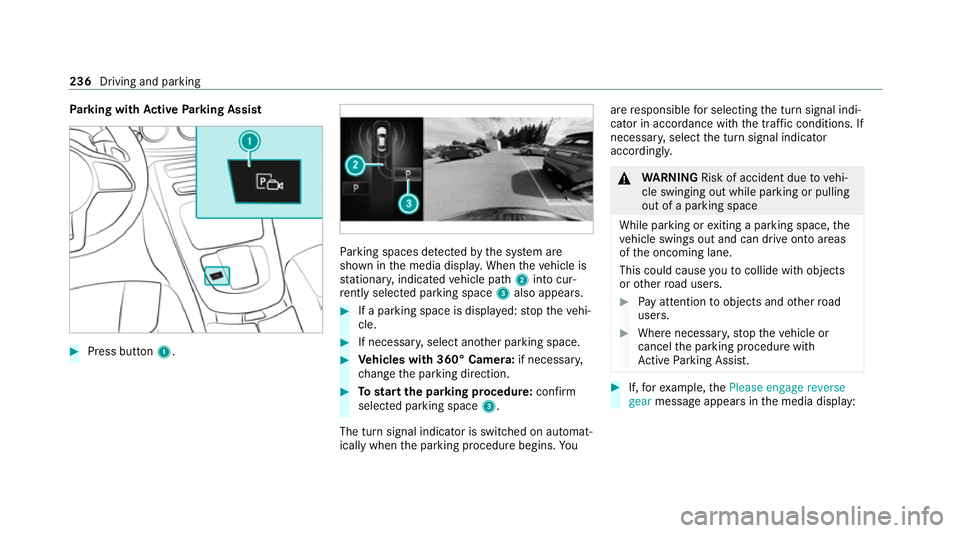
rking with Active Parking Assist #
Press button 1. Pa
rking spaces de tected bythe sy stem are
shown in the media displa y.When theve hicle is
st ationar y,indicated vehicle path 2into cur‐
re ntly selected pa rking space 3also appears. #
If a parking space is displa yed: stop theve hi‐
cle. #
If necessar y,select ano ther parking space. #
Vehicles with 360° Camera: if necessary,
ch ange the parking direction. #
Tostart the pa rking procedure: confirm
selected parking space 3.
The turn signal indicator is switched on automat‐
ically when the parking procedure begins. Yo uare
responsible for selecting the turn signal indi‐
cator in accordance with the traf fic conditions. If
necessar y,select the turn signal indicator
accordingly. &
WARNING Risk of accident due tovehi‐
cle swinging out while parking or pulling
out of a parking space
While parking or exiting a parking space, the
ve hicle swings out and can drive onto areas
of the oncoming lane.
This could cause youto collide wi thobjects
or other road users. #
Pay attention toobjects and other road
users. #
Where necessar y,stop theve hicle or
cancel the parking procedure with
Ac tive Parking Assist. #
If,forex ample, thePlease engage reverse
gear message appears in the media display: 236
Driving and parking
Page 240 of 489
select
the cor responding transmission posi‐
tion.
The vehicle drives into the selected parking
space.
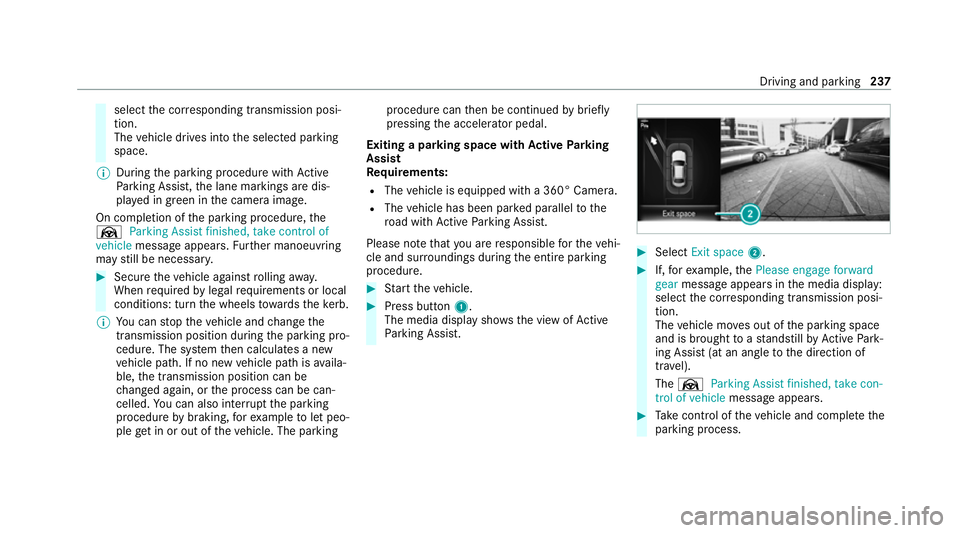
% During the parking procedure with Active
Pa rking Assist, the lane markings are dis‐
pla yed in green in the camera image.
On completion of the parking procedure, the
Ø Parking Assist finished, take control of
vehicle message appears. Further manoeuvring
may still be necessar y. #
Secu retheve hicle against rolling away.
When requ ired bylegal requirements or local
conditions: turn the wheels towa rdsth eke rb.
% You can stop theve hicle and change the
transmission position du ring the parking pro‐
cedure. The sy stem then calculates a new
ve hicle path. If no new vehicle path is availa‐
ble, the transmission position can be
ch anged again, or the process can be can‐
celled. You can also inter rupt the parking
procedure bybraking, forex ample tolet peo‐
ple get in or out of theve hicle. The parking procedure can
then be continued bybriefly
pressing the accelerator pedal.
Exiting a parking space with Active Parking
Assist
Re quirements:
R The vehicle is equipped with a 360° Camera.
R The vehicle has been par ked parallel tothe
ro ad with Active Parking Assist.
Please no tethat you are responsible forth eve hi‐
cle and sur roundings during the entire parking
procedure. #
Start theve hicle. #
Press button 1.
The media display sho wsthe view of Active
Pa rking Assist. #
Select Exit space 2. #
If,forex ample, thePlease engage forward
gear message appears in the media display:
select the cor responding transmission posi‐
tion.
The vehicle mo ves out of the parking space
and is brought toast andstill byActive Park‐
ing Assist (at an angle tothe direction of
tra vel).
The Ø Parking Assist finished, take con-
trol of vehicle message appears. #
Take control of theve hicle and comple tethe
parking process. Driving and parking
237
Page 264 of 489
Fu
ll-screen menus
Yo u can displ aythefo llowing menus full-screen
on the instrument display:
R Assistance
R Trip
R Navigation #
Onthe cor responding menu, use the left-
hand Touch Control toscroll tothe end of the
list. #
Press the left-hand Touch Control.
The selected menu will be displ ayed full-
screen. Overview of displa
yson the multifunction
display
Displa yson the multifunction display
u Active Parking Assist activated
(/ page 236)
é Parking Assist PARKTRONIC deacti vated
( / page 226)
h Cruise control (/ page 204) È
Limiter (/
page 204)
ç Active Dis tance Assi stDISTRONIC
(/ page 208)
ê Active Brake Assi st (/ page 203)
à Active Steering Assist (/ page215)
¬ Active Traf fic Jam Assi st (/ page 218)
à Ac
tive Lane Keeping Assist (/ page246)
è ECO
start/ stop function (/ page170)
ë HOLD fu
nction (/ page 219)
_ Ad
aptive Highbeam Assist (/ page138)
Ad aptive Highbeam Assist Plus
(/ page 139)
ð Maximum pe rmissible speed exceeded
(for cer tain countries only)
Ve hicles with Traf fic Sign Assis t:de tected
instructions and traf fic signs (/ page 241).
Fo r an overview of the indicator and warning
lamps, see (/ page 436). Head-up Display
Fu
nction of the head-up display *
NO
TEMercedes-AMG vehicles #
Obser vethe no tes in the Supplement.
Yo u could otherwise failto recognise
dangers. The head-up displ
ayprojects thefo llowing infor‐
mation abo vethe cockpit into the driver's field
of vision, forex ample:
R Driving speed
R Info rm ation from the navigation sy stem
R Information from the driving sy stems and
driving saf ety sy stems
R Some warning messages
Depending on theve hicle's equipment, dif fere nt
content can be shown in theth re e areas of the
head-up display (/ page 262). Instrument display and on-board computer
261