stop start MERCEDES-BENZ E-CLASS ESTATE 2020 Owner's Manual
[x] Cancel search | Manufacturer: MERCEDES-BENZ, Model Year: 2020, Model line: E-CLASS ESTATE, Model: MERCEDES-BENZ E-CLASS ESTATE 2020Pages: 489, PDF Size: 9.15 MB
Page 287 of 489
Te
lephone Te
lephony Note
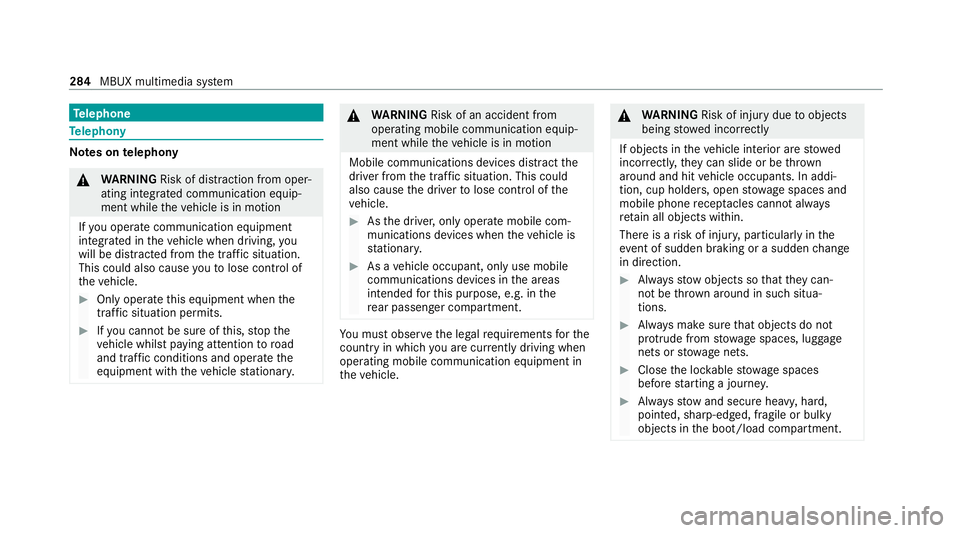
s ontelephony &
WARNING Risk of di stra ction from oper‐
ating integrated communication equip‐
ment while theve hicle is in motion
If yo u operate communication equipment
integrated in theve hicle when driving, you
will be distracted from the tra ffic situation.
This could also cause youto lose control of
th eve hicle. #
Only operate this equipment when the
traf fic situation permits. #
Ifyo u cannot be sure of this, stop the
ve hicle whilst paying attention toroad
and traf fic conditions and ope rate the
equipment with theve hicle stationar y. &
WARNING Risk of an accident from
ope rating mobile communication equip‐
ment while theve hicle is in motion
Mobile communications devices distract the
driver from the traf fic situation. This could
also cause the driver tolose control of the
ve hicle. #
Asthe driver, only operate mobile com‐
munications devices when theve hicle is
st ationar y. #
As a vehicle occupant, only use mobile
communications devices in the areas
intended forth is purpose, e.g. in the
re ar passenger compartment. Yo
u must obse rveth e legal requirements forthe
country in whi chyou are cur rently driving when
operating mobile communication equipment in
th eve hicle. &
WARNING Risk of inju rydue toobjects
being stowed inco rrectly
If objects in theve hicle interior are stowed
incor rectly, they can slide or be thrown
around and hit vehicle occupants. In addi‐
tion, cup holders, open stowage spaces and
mobile phone recep tacles cannot al ways
re tain all objects within.
There is a risk of injur y,particularly in the
ev ent of sudden braking or a sudden change
in direction. #
Alw aysstow objects so that they can‐
not be throw n around in su chsitua‐
tions. #
Alw ays make sure that objects do not
pr otru de from stowage spaces, luggage
nets or stowage nets. #
Close the loc kable stow age spaces
before starting a journe y. #
Alw aysstow and secure heavy, hard,
poin ted, sharp-edged, fragile or bulky
objects in the boot/load compartment. 284
MBUX multimedia sy stem
Page 309 of 489
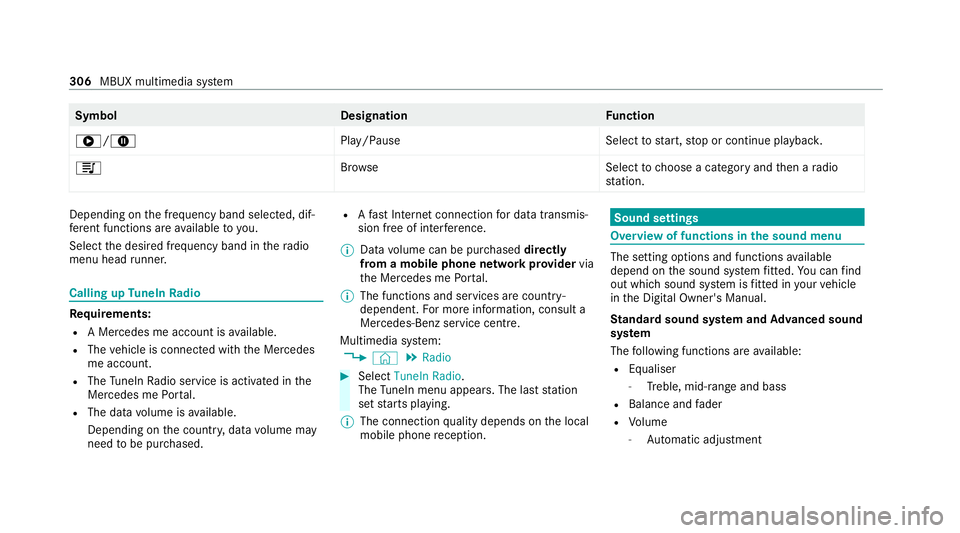
Symbol
DesignationFunction
6/8 Play/PauseSelecttostart, stop or continue playbac k.
5 Brows eS electtochoose a category and then a radio
st ation. Depending on
the frequency band selected, dif‐
fe re nt functions are available to you.
Select the desired frequency band in thera dio
menu head runner. Calling up
TuneIn Radio Re
quirements:
R A Mercedes me account is available.
R The vehicle is connected with the Mercedes
me account.
R The TuneIn Radio service is activated in the
Mercedes me Portal.
R The data volume is available.
Depending on the count ry, data volume may
need tobe pur chased. R
Afast Internet connection for data transmis‐
sion free of inter fere nce.
% Data volume can be pur chased directly
from a mobile phone network pr ovider via
th e Mercedes me Portal.
% The functions and services are countr y-
dependent. For more information, consult a
Mercedes-Benz service centre.
Multimedia sy stem:
4 © 5
Radio #
Select TuneIn Radio.
The TuneIn menu appears. The la st station
set starts playing.
% The connection quality depends on the local
mobile phone reception. Sound settings
Overview of functions in the sound menu
The setting options and functions
available
depend on the sound sy stem fitted. You can find
out which sound sy stem is fitted in your vehicle
in the Digital Owner's Manual.
St andard sound sy stem and Advanced sound
sy stem
The following functions are available:
R Equaliser
- Treble, mid-range and bass
R Balance and fader
R Volume
- Automatic adju stment 306
MBUX multimedia sy stem
Page 397 of 489
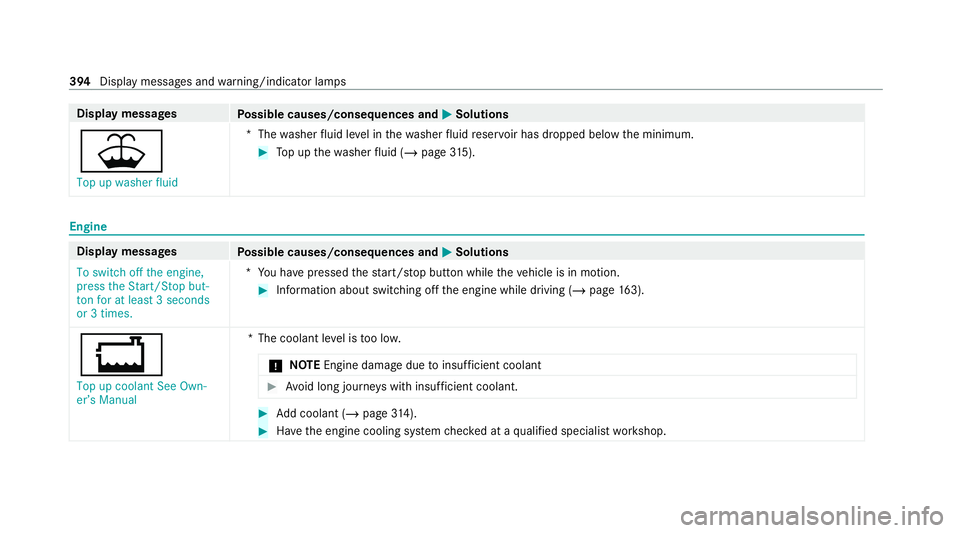
Display messages
Possible causes/consequences and M
MSolutions
¥ Top up washer fluid *T
hewasher fluid le vel in thewa sher fluid reser voir has dropped below the minimum. #
Top up thewa sher fluid (/ page315). Engine
Dis
play messages
Possible causes/consequences and M
MSolutions
To switch off the engine,
press the Start/Stop but-
ton for at least 3 seconds
or 3 times. *Y
ou ha vepressed thest art/ stop button while theve hicle is in motion. #
Information about switching off the engine while driving (/ page163).
+
Top up coolant See Own-
er’s Manual *T
he coolant le vel is too lo w.
* NO
TEEngine dama gedue toinsuf ficient coolant #
Avoid long journe yswith insuf ficient coolant. #
Add coolant (/ page314). #
Have the engine cooling sy stem checked at a qualified specialist workshop. 394
Display messages and warning/indicator lamps
Page 415 of 489
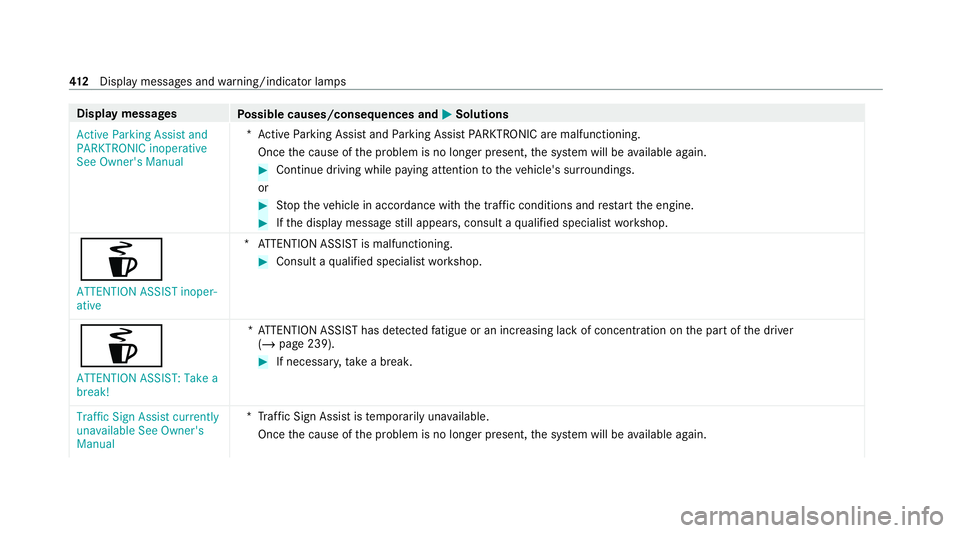
Display messages
Possible causes/consequences and M
MSolutions
Active Parking Assist and
PARKTRONIC inoperative
See Owner's Manual *A
ctive Parking Assist and Parking Assist PARKTRONIC are malfunctioning.
Once the cause of the problem is no longer present, the sy stem will be available again. #
Continue driving while paying attention totheve hicle's sur roundings.
or #
Stop theve hicle in accordance with the tra ffic conditions and restart the engine. #
Ifth e display message still appears, consult a qualified specialist workshop.
é
ATTENTION ASSIST inoper-
ative *A
TTENTION ASSIST is malfunctioning. #
Consult a qualified specialist workshop.
é ATTENTION ASSIST: Take a
break! *A
TTENTION ASSIST has de tected fatigue or an increasing la ckof concentration on the part of the driver
(/ page 239). #
If necessar y,take a break.
Traffic Sign Assist currently
unavailable See Owner's
Manual *T
raffic Sign Assist is temp orarily una vailable.
Once the cause of the problem is no longer present, the sy stem will be available again. 412
Displaymessa ges and warning/indicator lamps
Page 416 of 489
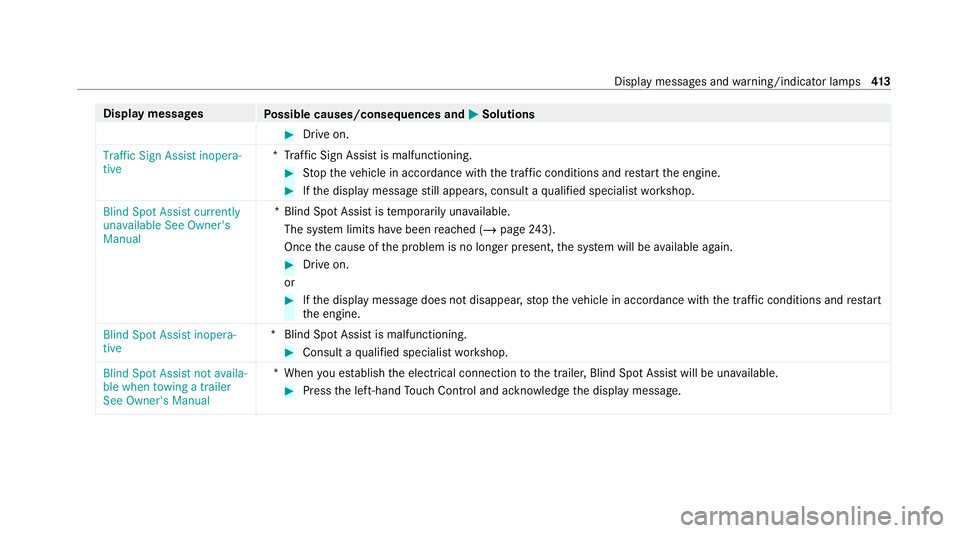
Display messages
Possible causes/consequences and M
MSolutions #
Drive on.
Traffic Sign Assist inopera-
tive *T
raffic Sign Assist is malfunctioning. #
Stop theve hicle in accordance with the tra ffic conditions and restart the engine. #
Ifth e display message still appears, consult a qualified specialist workshop.
Blind Spot Assist currently
unavailable See Owner's
Manual *B
lind Spot Assist is temp orarily una vailable.
The sy stem limits ha vebeen reached (/ page243).
On ce the cause of the problem is no longer present, the sy stem will be available again. #
Drive on.
or #
Ifth e display message does not disappear, stop theve hicle in accordance with the tra ffic conditions and restart
th e engine.
Blind Spot Assist inopera-
tive *B
lind Spot Assist is malfunctioning. #
Consult a qualified specialist workshop.
Blind Spot Assist not availa-
ble when towing a trailer
See Owner's Manual *W
hen you es tablish the electrical connection tothe trailer, Blind Spot Assist will be una vailable. #
Press the left-hand Touch Control and ackn owledge the display message. Display messages and
warning/indicator lamps 413
Page 417 of 489
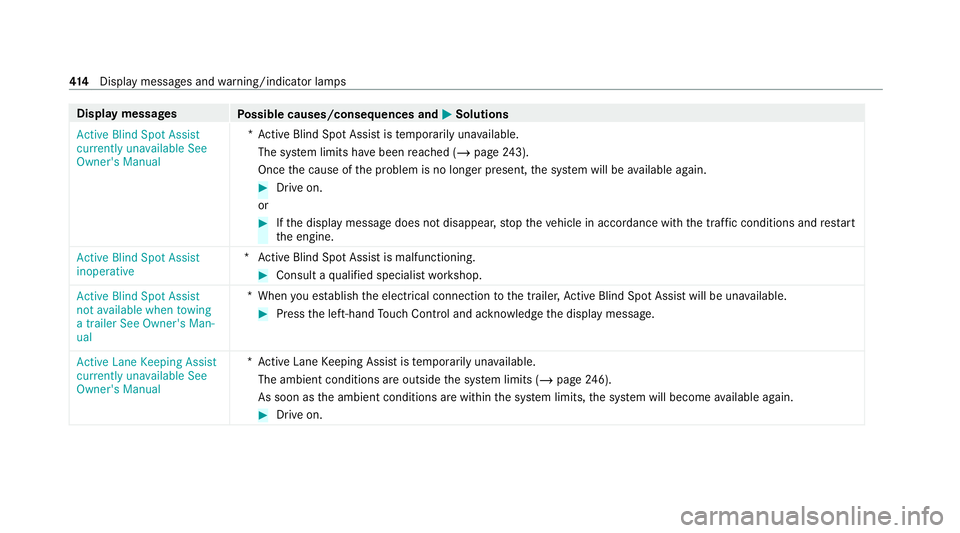
Display messages
Possible causes/consequences and M
MSolutions
Active Blind Spot Assist
currently unavailable See
Owner's Manual *A
ctive Blind Spot Assi stistemp orarily una vailable.
The sy stem limits ha vebeen reached (/ page243).
On ce the cause of the problem is no longer present, the sy stem will be available again. #
Drive on.
or #
Ifth e display message does not disappear, stop theve hicle in accordance with the tra ffic conditions and restart
th e engine.
Active Blind Spot Assist
inoperative *A
ctive Blind Spot Assi stis malfunctioning. #
Consult a qualified specialist workshop.
Active Blind Spot Assist
not available when towing
a trailer See Owner's Man-
ual *W
hen you es tablish the electrical connection tothe trailer, Active Blind Spot Assi stwill be una vailable. #
Press the left-hand Touch Control and ackn owledge the display message.
Active Lane Keeping Assist
currently unavailable See
Owner's Manual *A
ctive Lane Keeping Assist is temp orarily una vailable.
The ambient conditions are outside the sy stem limits (/ page246).
As soon as the ambient conditions are within the sy stem limits, the sy stem will become available again. #
Drive on. 414
Displaymessa ges and warning/indicator lamps
Page 418 of 489
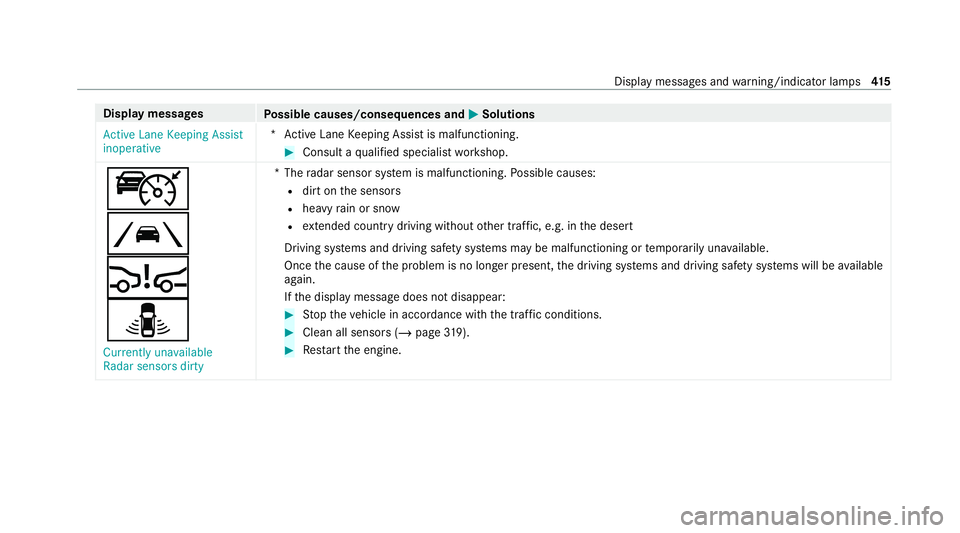
Display messages
Possible causes/consequences and M
MSolutions
Active Lane Keeping Assist
inoperative *A
ctive Lane Keeping Assist is malfunctioning. #
Consult a qualified specialist workshop.
ç
Ã
Ä
¸ Currently unavailable
Radar sensors dirty *T
heradar sensor sy stem is malfunctioning. Possible causes:
R dirt on the sensors
R heavy rain or snow
R extended country driving wi thout other traf fic, e.g. in the desert
Driving sy stems and driving saf ety sy stems may be malfunctioning or temp orarily una vailable.
Once the cause of the problem is no longer present, the driving sy stems and driving saf ety sy stems will be available
again.
If th e display message does not disappear: #
Stop theve hicle in accordance with the tra ffic conditions. #
Clean all sensors (/ page319). #
Restart the engine. Display messages and
warning/indicator lamps 415
Page 424 of 489
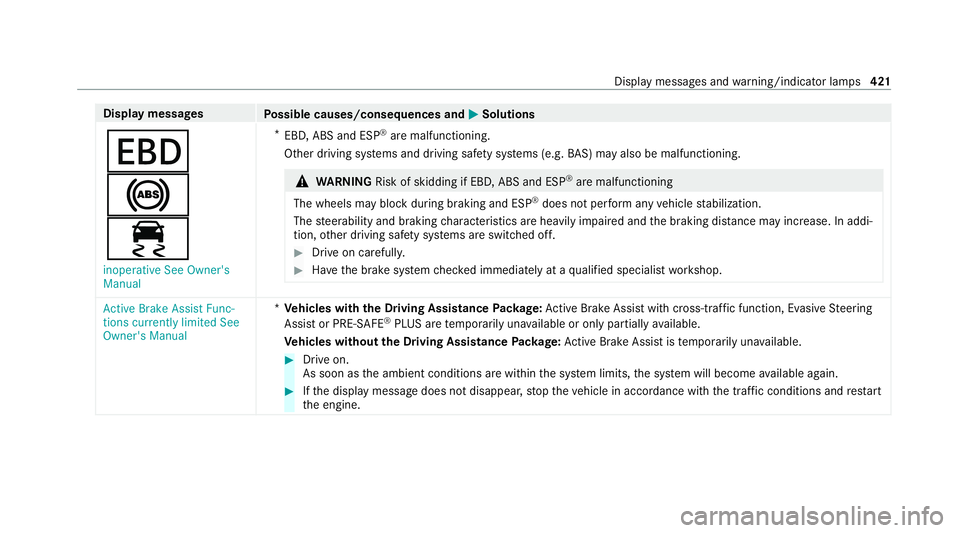
Display messages
Possible causes/consequences and M
MSolutions
T
!
÷ inoperative See Owner's
Manual *
EBD, ABS and ESP ®
are malfunctioning.
Other driving sy stems and driving saf ety sy stems (e.g. BAS) may also be malfunctioning. &
WARNING Risk of skidding if EBD, ABS and ESP ®
are malfunctioning
The wheels may block du ring braking and ESP ®
does not pe rform any vehicle stabilization.
The steerability and braking characteristics are heavily impaired and the braking dis tance may increase. In addi‐
tion, other driving saf ety sy stems are switched off. #
Drive on carefull y. #
Have the brake sy stem checked immediately at a qualified specialist workshop. Active Brake Assist Func-
tions currently limited See
Owner's Manual *
Ve hicles with the Driving Assistance Package: Active Brake Assi stwith cross-traf fic function, Evasi veSteering
Assist or PRE‑SAFE ®
PLUS are temp orarily una vailable or only partially available.
Ve hicles without the Driving Assistance Package: Active Brake Assi stistemp orarily una vailable. #
Drive on.
As soon as the ambient conditions are within the sy stem limits, the sy stem will become available again. #
Ifth e display message does not disappear, stop theve hicle in accordance with the tra ffic conditions and restart
th e engine. Display messages and
warning/indicator lamps 421
Page 430 of 489
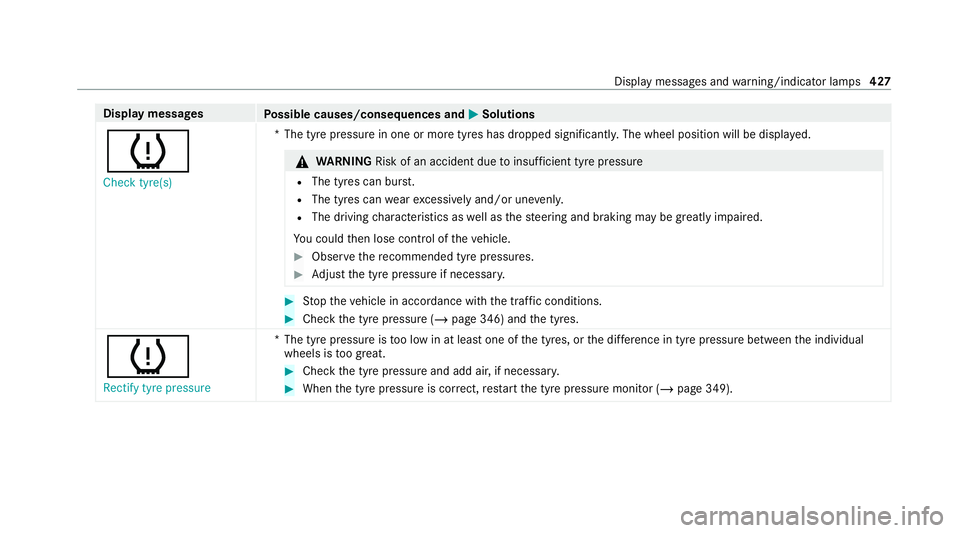
Display messages
Possible causes/consequences and M
MSolutions
h Check tyre(s) *T
he tyre pressure in one or more tyres has dropped significantl y.The wheel position will be displa yed. &
WARNING Risk of an accident due toinsuf ficient tyre pressure
R The tyres can bu rst.
R The tyres can wearexc essively and/or une venly.
R The driving characteristics as well as thesteering and braking may be greatly impaired.
Yo u could then lose control of theve hicle. #
Obser vethere commended tyre pressures. #
Adjust the tyre pressure if necessar y. #
Stop theve hicle in accordance with the tra ffic conditions. #
Check the tyre pressure (/ page 346) andthe tyres.
h
Rectify tyre pressure *T
he tyre pressure is too low in at least one of the tyres, or the dif fere nce in tyre pressure between the individual
wheels is too great. #
Check the tyre pressure and add air, if necessar y. #
When the tyre pressure is cor rect, restart the tyre pressure monitor (/ page 349). Display messages and
warning/indicator lamps 427
Page 433 of 489
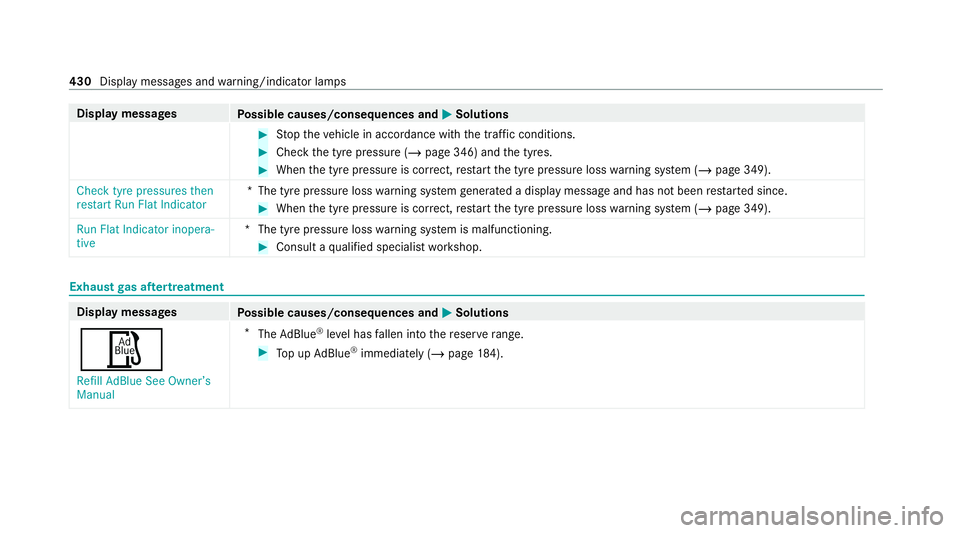
Display messages
Possible causes/consequences and M
MSolutions #
Stop theve hicle in accordance with the tra ffic conditions. #
Check the tyre pressure (/ page 346) andthe tyres. #
When the tyre pressure is cor rect, restart the tyre pressure loss warning sy stem (/ page 349).
Check tyre pressures then
restart Run Flat Indicator *T
he tyre pressure loss warning sy stem generated a displ aymessa geand has not been restar ted since. #
When the tyre pressure is cor rect, restart the tyre pressure loss warning sy stem (/ page 349).
Run Flat Indicator inopera-
tive *T
he tyre pressure loss warning sy stem is malfunctioning. #
Consult a qualified specialist workshop. Exhaust
gas af tertre atment Display messages
Possible causes/consequences and M MSolutions
Ø Refill AdBlue See Owner’s
Manual *
The AdBlue ®
leve l has fallen into there ser verange. #
Top up AdBlue ®
immediately (/ page 184). 430
Displaymessa ges and warning/indicator lamps