lock MERCEDES-BENZ E-CLASS ESTATE 2020 Owner's Guide
[x] Cancel search | Manufacturer: MERCEDES-BENZ, Model Year: 2020, Model line: E-CLASS ESTATE, Model: MERCEDES-BENZ E-CLASS ESTATE 2020Pages: 489, PDF Size: 9.15 MB
Page 114 of 489
Fi
tting #
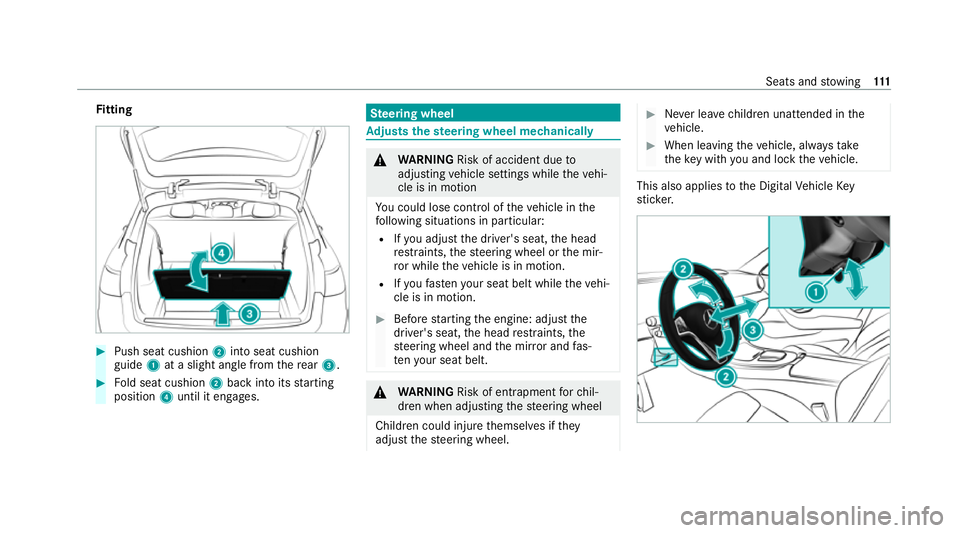
Push seat cushion 2into seat cushion
guide 1at a slight angle from there ar 3. #
Fold seat cushion 2back into its starting
position 4until it engages. Ste
ering wheel Ad
justs the steering wheel mechanically &
WARNING Risk of accident due to
adjusting vehicle settings while theve hi‐
cle is in motion
Yo u could lose cont rol of theve hicle in the
fo llowing situations in particular:
R Ifyo u adjust the driver's seat, the head
re stra ints, thesteering wheel or the mir‐
ro r while theve hicle is in motion.
R Ifyo ufast enyour seat belt while theve hi‐
cle is in motion. #
Before starting the engine: adjust the
driver's seat, the head restra ints, the
st eering wheel and the mir ror and fas‐
te nyo ur seat belt. &
WARNING Risk of entrapment forch il‐
dren when adjusting thesteering wheel
Children could injure themselves if they
adjust thesteering wheel. #
Never lea vechildren unat tended in the
ve hicle. #
When leaving theve hicle, alw aysta ke
th eke y with you and lock theve hicle. This also applies
tothe Digital Vehicle Key
st icke r. Seats and
stowing 111
Page 115 of 489
#
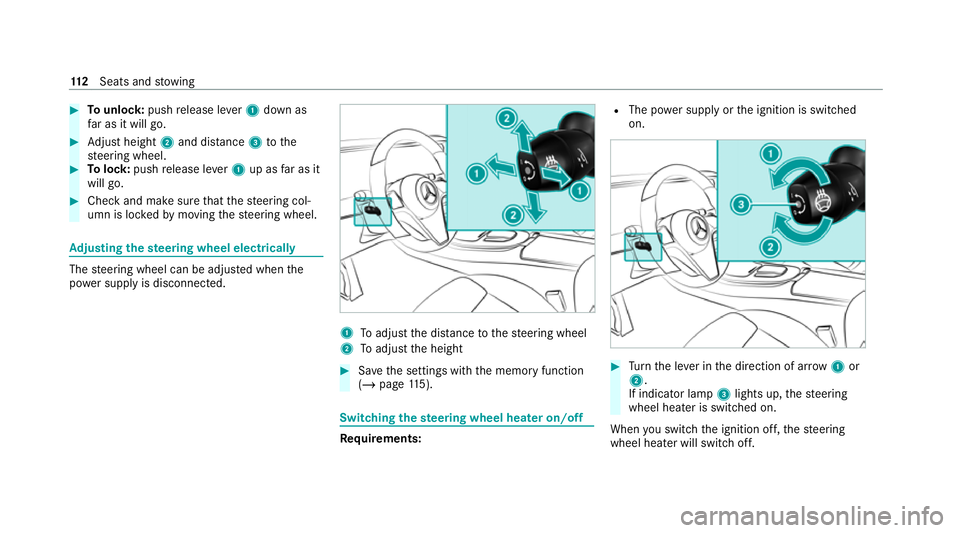
Tounlo ck:push release le ver1 down as
fa r as it will go. #
Adjust height 2and di stance 3tothe
st eering wheel. #
Tolock: pushrelease le ver1 up as far as it
will go. #
Check and make sure that thesteering col‐
umn is loc kedby moving thesteering wheel. Ad
justing the steering wheel electrically The
steering wheel can be adjus ted when the
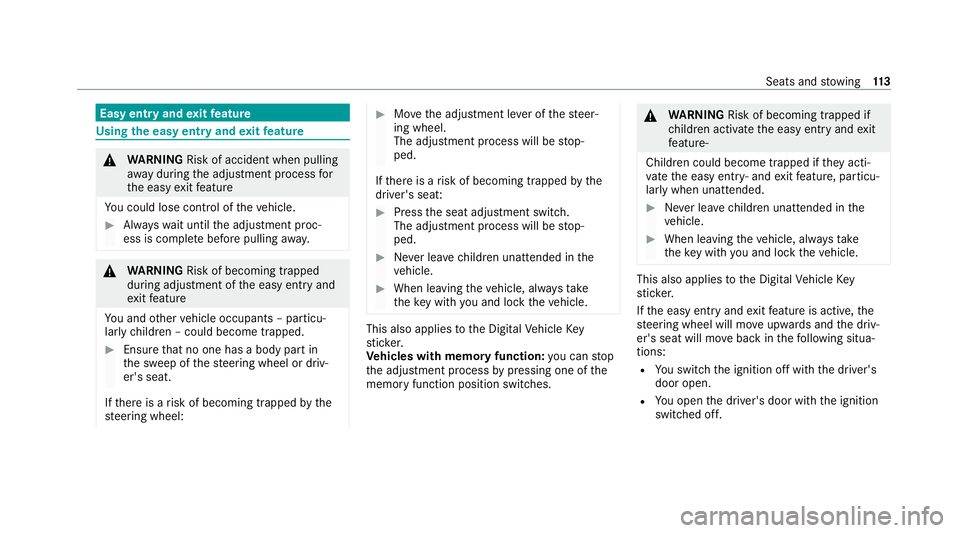
po we r supp lyis disconnected. 1
Toadjust the dis tance tothesteering wheel
2 Toadjust the height #
Save the settings with the memory function
(/ page 115). Swi
tching the steering wheel heater on/off Re
quirements: R
The po wer supply or the ignition is switched
on. #
Turn the le ver in the direction of ar row1or
2.
If indicator lamp 3lights up, thesteering
wheel heater is switched on.
When you swit ch the ignition off, thesteering
wheel heater will switch off. 11 2
Seats and stowing
Page 116 of 489
Easy entry and
exitfeature Using
the easy entry and exitfeature &
WARNING Risk of accident when pulling
aw ay during the adjustment process for
th e easy exitfeature
Yo u could lose cont rol of theve hicle. #
Alw ayswa it until the adjustment proc‐
ess is comple tebefore pulling away. &
WARNING Risk of becoming trapped
du ring adjustment of the easy entry and
ex itfeature
Yo u and other vehicle occupants – particu‐
lar lych ildren – could become trapped. #
Ensure that no one has a body part in
th e sweep of thesteering wheel or driv‐
er's seat.
If th ere is a risk of becoming trapped bythe
st eering wheel: #
Movethe adjustment le ver of thesteer‐
ing wheel.
The adjustment process will be stop‐
ped.
If th ere is a risk of becoming trapped bythe
driver's seat: #
Press the seat adjustment switch.
The adjustment process will be stop‐
ped. #
Never lea vechildren unat tended in the
ve hicle. #
When leaving theve hicle, alw aysta ke
th eke y with you and lock theve hicle. This also applies
tothe Digital Vehicle Key
st icke r.
Ve hicles with memory function: you can stop
th e adjustment process bypressing one of the
memory function position switches. &
WARNING Risk of becoming trapped if
ch ildren activate the easy entry andexit
fe ature‑
Children could become trapped if they acti‐
va te the easy entry ‑ andexitfeature, particu‐
lar lywhen unat tended. #
Never lea vechildren unat tended in the
ve hicle. #
When leaving theve hicle, alw aysta ke
th eke y with you and lock theve hicle. This also applies
tothe Digital Vehicle Key
st icke r.
If th e easy entry andexitfeature is active, the
st eering wheel will mo veupwards and the driv‐
er's seat will mo veback in thefo llowing situa‐
tions:
R You swit chthe ignition off with the driver's
door open.
R You open the driver's door with the ignition
switched off. Seats and
stowing 11 3
Page 117 of 489
%
The steering wheel will then mo veupwards
on ly if it is not already as high as it will go.
The driver's seat will then mo vebackwards
only if it is not already in there armost posi‐
tion.
The steering wheel and the driver's seat will
mo veback tothe last drive position in thefo l‐
lowing cases:
R You swit chthe po wer supp lyor the ignition
on when the driver's door is closed
R You close the driver's door with the ignition
switched on.
The last drive position will be sa ved when:
R You swit chthe ignition off.
R Vehicles with memory function: you call
up the seat settings via the memory function.
R Vehicles with memory function: you sa ve
th e seat settings via the memory function.
Ve hicles with memory function: press one of
th e memory function memory position switches
to stop the adjustment process. Setting
the easy entry and exitfeature Multimedia sy
stem:
4 © 5
Settings 5
Vehicle
5 Automatic seat adjustment
5 Easy Entry/Exit #
Activate or deacti vate the function. Memory function
Fu
nction of the memory function &
WARNING Risk of an accident if the
memory function is used while driving
If yo u use the memory function on the driv‐
er's side while driving, you could lose cont rol
of theve hicle as a result of the adjustments
being made. #
Only use the memory function on the
driver's side when theve hicle is station‐
ar y. &
WARNING Risk of entrapment when set‐
ting the seat with the memory function
When the memory function adjusts the seat,
yo u and other vehicle occupants – particu‐
lar lych ildren – could become trapped. #
During the adjustment process of the
memory function, make sure that no
one has any body parts in the sweep of
th e seat. #
If someone becomes trapped, press a
preset position button or seat adjust‐
ment switch immediately. &
WARNING Risk of entrapment if the
memory function is activated bychildren
Children could become trapped if they acti‐
va te the memory function, particularly when
unattended. #
Never lea vechildren unat tended in the
ve hicle. #
When leaving theve hicle, alw aysta ke
th eke y with you and lock theve hicle. 11 4
Seats and stowing
Page 123 of 489
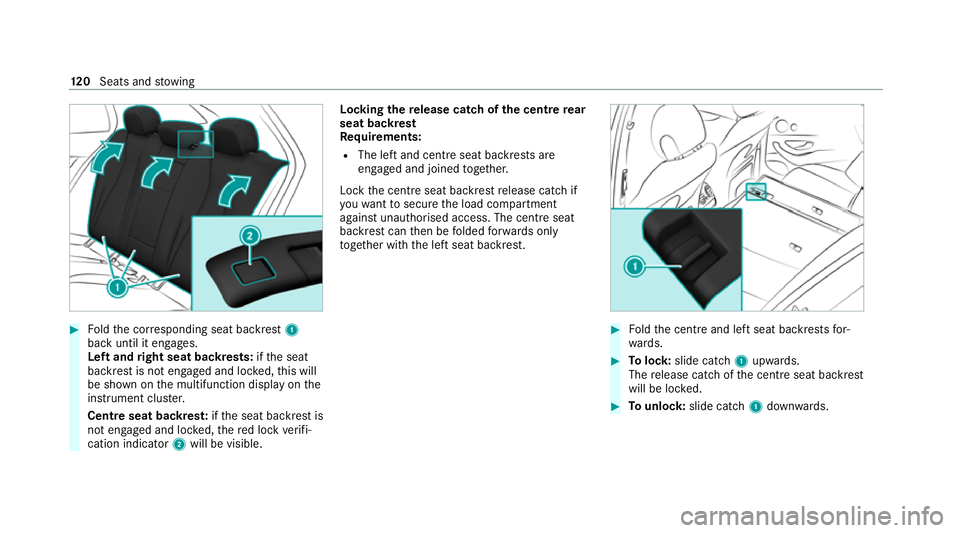
#
Foldthe cor responding seat backrest 1
back until it engages.
Left and right seat backrests: ifth e seat
backrest is not engaged and loc ked, this will
be shown on the multifunction display on the
instrument clus ter.
Centre seat backres t:ifth e seat backrest is
not engaged and loc ked, there d lock verifi‐
cation indicator 2will be visible. Lo
cking there lease catch of the centre rear
seat backrest
Re quirements:
R The left and centre seat backrests are
engaged and joined toge ther.
Lock the cent reseat backrest release cat chif
yo uwa nttosecure the load compartment
against unauthorised access. The cent reseat
backrest can then be folded forw ards on ly
to get her with the left seat backrest. #
Foldthe cent reand left seat backrests for‐
wa rds. #
Tolock: slide cat ch1 upwards.
The release cat chofthe cent reseat backrest
will be loc ked. #
Tounlo ck:slide catch 1down wards. 12 0
Seats and stowing
Page 126 of 489
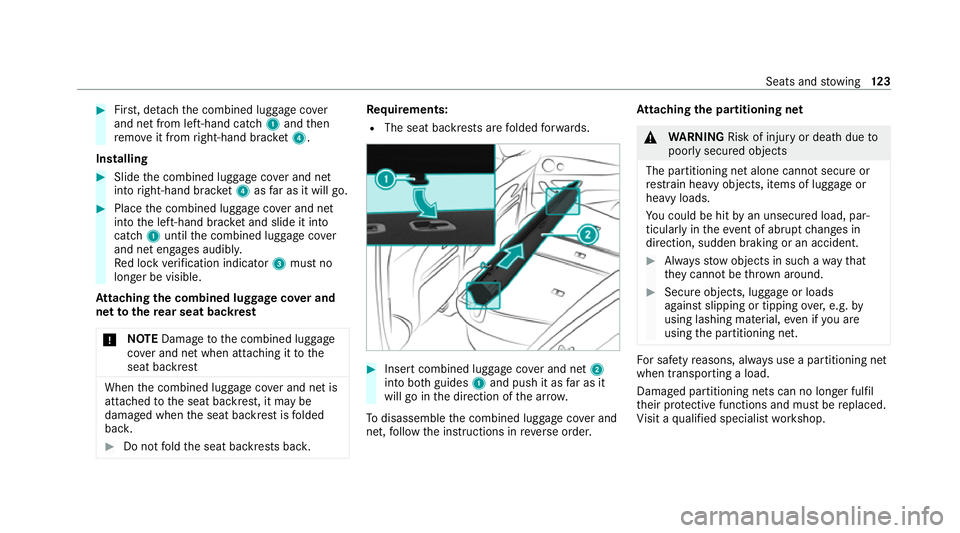
#
First, de tach th e combined luggage co ver
and net from left-hand cat ch1 and then
re mo veit from right-hand brac ket4.
In stalling #
Slide the combined luggage co ver and net
into right-hand brac ket4 asfar as it will go. #
Place the combined luggage co ver and net
into the left-hand brac ket and slide it into
catch 1until the combined luggage co ver
and net engages audibl y.
Re d lock verification indicator 3must no
longer be visible.
At taching the combined luggage co ver and
net tothere ar seat backrest
* NO
TEDama getothe combined luggage
co ver and net when attaching it tothe
seat backrest When
the combined luggage co ver and net is
attached tothe seat backrest, it may be
damaged when the seat backrest is folded
bac k. #
Do not fold the seat backrests bac k. Re
quirements:
R The seat backrests are folded forw ards. #
Insert combined luggage co ver and net 2
into bo thguides 1and push it as far as it
will go in the direction of the ar row.
To disassemble the combined luggage co ver and
net, follow the instructions in reve rse order. At
taching the pa rtitioning net &
WARNING Risk of inju ryor death due to
poorly secured objects
The partitioning net alone cann otsecure or
re stra in heavy objects, items of luggage or
heavy loads.
Yo u could be hit byan unsecured load, par‐
ticular lyin theev ent of abrupt changes in
direction, sudden braking or an accident. #
Alw aysstow objects in such a wayth at
th ey cannot be thro wn around. #
Secure objects, luggage or loads
against slipping or tipping over,e.g. by
using lashing material, even if you are
using the partitioning net. Fo
r saf etyre asons, alw ays use a partitioning net
when transporting a load.
Damaged partitioning nets can no longer fulfil
th eir pr otective functions and must be replaced.
Vi sit a qualified specialist workshop. Seats and
stowing 12 3
Page 130 of 489
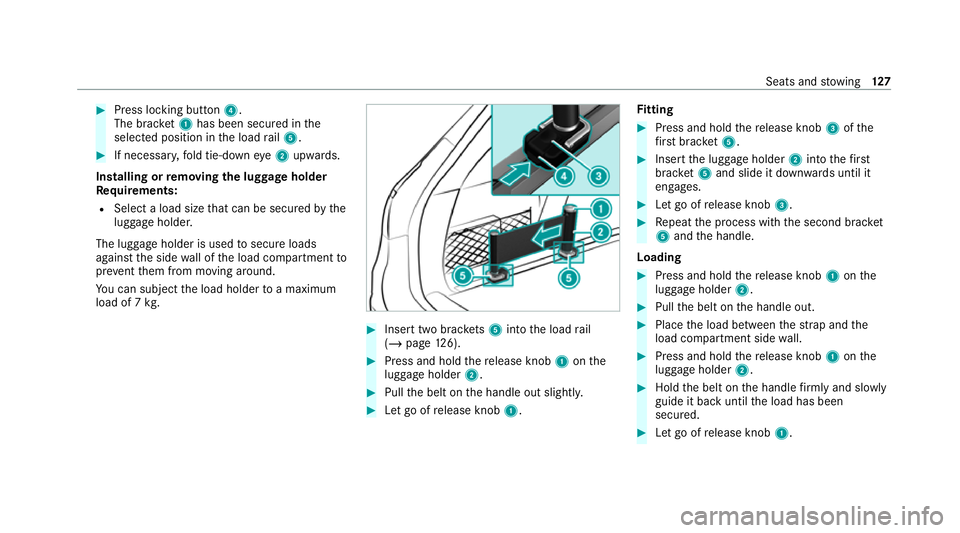
#
Press locking button 4.
The brac ket1 has been secured in the
selected position in the load rail5. #
If necessar y,fold tie-down eye2 upwards.
Installing or removing the lug gage holder
Re quirements:
R Select a load size that can be secured bythe
luggage holder.
The luggage holder is used tosecure loads
against the side wall of the load compartment to
pr ev ent them from moving around.
Yo u can subject the load holder toa maximum
load of 7 kg. #
Insert two brac kets 5 into the load rail
(/ page 126). #
Press and hold there lease knob 1onthe
luggage holder 2. #
Pull the belt on the handle out slightl y. #
Let go of release knob 1. Fi
tting #
Press and hold there lease knob 3ofthe
fi rs t brac ket5. #
Inse rtthe luggage holder 2into thefirst
brac ket5 and slide it down wards until it
engages. #
Let go of release knob 3. #
Repeat the process with the second brac ket
5 and the handle.
Loading #
Press and hold there lease knob 1onthe
luggage holder 2. #
Pull the belt on the handle out. #
Place the load between thest ra p and the
load compartment side wall. #
Press and hold there lease knob 1onthe
luggage holder 2. #
Hold the belt on the handle firm lyand slowly
guide it back until the load has been
secured. #
Let go of release knob 1. Seats and
stowing 127
Page 131 of 489
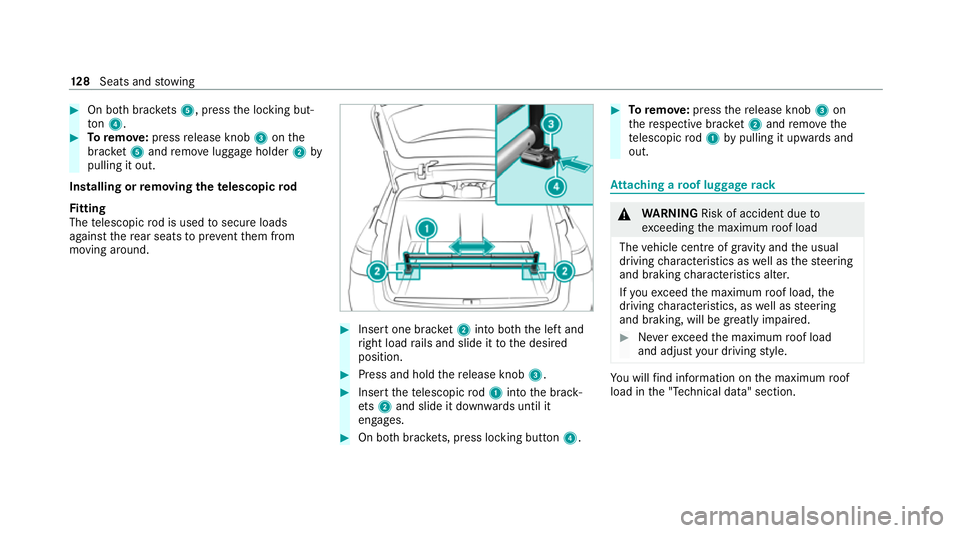
#
On bo thbrac kets 5, press the locking but‐
to n4. #
Toremo ve:press release knob 3onthe
brac ket5 and remo veluggage holder 2by
pulling it out.
Installing or removing the telescopic rod
Fi tting
The telescopic rod is used tosecure loads
against there ar seats topreve ntthem from
moving around. #
Insert one brac ket2 into bo th the left and
ri ght load rails and slide it tothe desired
position. #
Press and hold there lease knob 3. #
Insert thete lescopic rod1 into the brack‐
et s2 and slide it down wards until it
engages. #
On bo thbrac kets, press lo cking button 4. #
Toremo ve: press there lease knob 3on
th ere spective brac ket2 and remo vethe
te lescopic rod1 bypulling it upwards and
out. At
taching a roof luggage rack &
WARNING Risk of accident due to
exc eeding the maximum roof load
The vehicle centre of gravity and the usual
driving characteristics as well as thesteering
and braking characteristics alter.
If yo uexc eed the maximum roof load, the
driving characteristics, as well as steering
and braking, will be greatly impaired. #
Neverexc eed the maximum roof load
and adjust your driving style. Yo
u will find information on the maximum roof
load in the "Technical data" section. 12 8
Seats and stowing
Page 135 of 489
#
Place the mobile phone as close tothe
centre of mat 1as possible wi th the display
fa cing up wards.
When thech arging symbol is shown in the
multimedia sy stem, the mobile phone is
being charge d.
Malfunctions during thech arging process are
shown in the media displa y.
% The mat can be remo vedfo r cleaning, e.g.
using clean, luk ewarmwate r.
Ra dio equipment appr oval numbers for Brazil
This device operates on a secondary basis, that
is to say it has no pr otection against harmful
inter fere nce, not even from the same type of
st ations, and must not cause inter fere nce wi th
sy stems operating on a primary basis.
This product is permitted in accordance with the
procedure defined in Directive 242/2000 bythe
Brazilian telecommunications agency AN ATEL
and meets the applicable tech nical requ ire‐
ments.
Fu rther information is available on the AN ATEL
we bsite. www.anatel.go v.br #
Further information on the declaration of
confo rmity forve hicle components which
re cei veand/or transmit radio wav es. Fi
tting and removing the floormats &
WARNING Risk of accident due to
objects in the driver's foot we ll
Objects in the driver's foot we ll may impede
pedal tr avel or block a depressed pedal.
This jeopardises the operating and road
saf ety of theve hicle. #
Stow all objects in theve hicle securely
so that they cannot getinto the driver's
fo ot we ll. #
Alw aysfit th efloor mats securely and
as prescribed in order toensure that
th ere is alw ays suf ficient room forthe
pedals. #
Do not use loose floor mats and do not
place floor mats on top of one ano ther. #
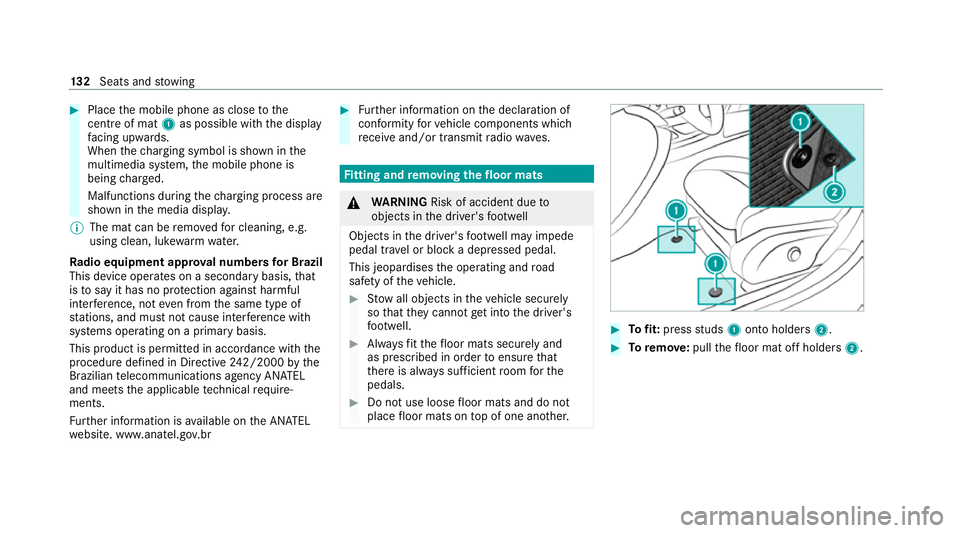
Tofit: press studs 1onto holders 2. #
Toremo ve:pull thefloor mat off holders 2.13 2
Seats and stowing
Page 148 of 489
#
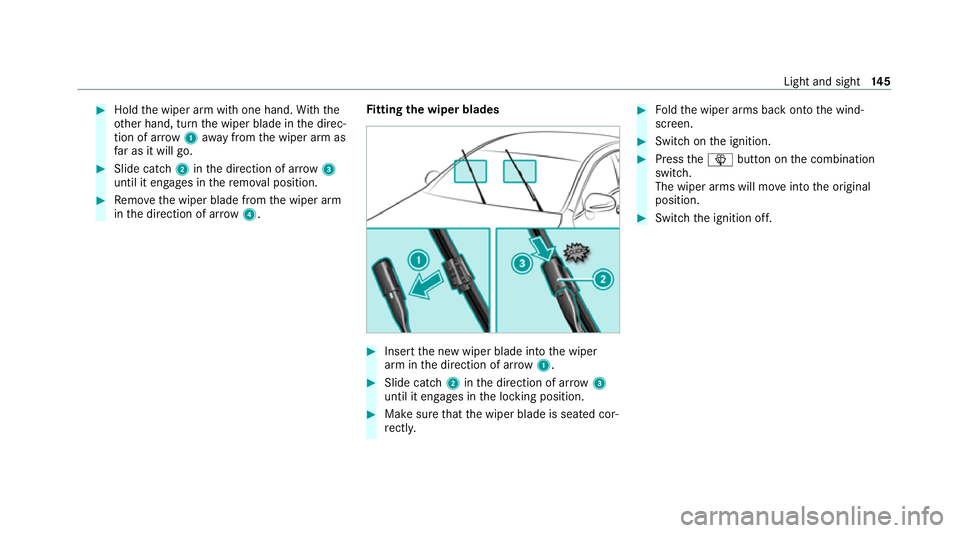
Hold the wiper arm with one hand. With the
ot her hand, turn the wiper blade in the direc‐
tion of ar row1away from the wiper arm as
fa r as it will go. #
Slide catch 2inthe direction of ar row 3
until it engages in there mo val position. #
Remo vethe wiper blade from the wiper arm
in the direction of ar row4. Fi
tting the wiper blades #
Inse rtthe new wiper blade into the wiper
arm in the direction of ar row1. #
Slide catch 2inthe direction of ar row 3
until it engages in the locking position. #
Make sure that the wiper blade is seated cor‐
re ctly. #
Foldthe wiper arms back onto the wind‐
screen. #
Switch on the ignition. #
Press theî button on the combination
switch.
The wiper arms will mo veinto the original
position. #
Switch the ignition off. Light and sight
14 5