ECU MERCEDES-BENZ E-CLASS ESTATE 2020 Service Manual
[x] Cancel search | Manufacturer: MERCEDES-BENZ, Model Year: 2020, Model line: E-CLASS ESTATE, Model: MERCEDES-BENZ E-CLASS ESTATE 2020Pages: 489, PDF Size: 9.15 MB
Page 169 of 489
#
Alw ays secure the engine against unin‐
te ntional starting before car rying out
maintenance or repair work. Re
quirements:
R park position jis selected.
R the anti- theft alarm sy stem is not activated.
R the panic alarm is not activated.
R the hazard warning light sy stem is switched
off.
R The bonn etis closed.
R the doors are closed and loc ked.
R the windo wsand sliding sun roof are closed. #
Start theve hicle using the smartphone.
Af tereve ryengine start, the engine runs for
te n minu tes.
Yo u can car ryout a maximum of two consecu‐
tive starting attem pts. Yo u must start theve hicle
once with theke y before trying tostart the
engine again with the smartphone. you can stop
th eve hicle again at any time. %
Further information can be found in the
smartphone app.
Securing the engine against starting before
car rying out maintenance or repair work: #
switch on the hazard warning light sy stem.
or #
unlock the doors.
or #
open a side window or the sliding sunroof. Ru
nning-in no tes *
NO
TEMercedes-AMG vehicles #
Obser vethe no tes in the Supplement.
Yo u could otherwise failto recognise
dangers. To
preser vethe engine during thefirs t1, 500 km:
R drive at varying road speeds and engine
speeds.
R do not drive at speeds greater than
14 0 km/h. R
drive theve hicle in drive program A
or ;.
R shift tothe next highest gear at theve ry lat‐
est when the needle reaches the last third
before there d area in there v counter.
R do not shift down a gear manually in order to
brake.
R avoidove rstraining theve hicle, e.g. driving at
full thro ttle.
R do not depress the accelera tor pedal past
th e pressure point (kickdown).
R only increase the engine speed gradually and
accelera tetheve hicle tofull speed af ter
1, 500 km.
This also applies when the engine or parts of the
driv etra in ha vebeen replaced.
Please also obser vethefo llowing running-in
no tes:
R in cer tain driving and driving saf ety sy stems,
th e sensors adjust automatically while a cer‐
ta in dis tance is being driven af terth eve hicle
has been delivered or af terre pairs. Full sys‐ 16 6
Driving and pa rking
Page 171 of 489
#
After no more than five seconds, take your
left foot quickly off the brake, but keep the
accelerator pedal depressed.
The vehicle pulls away at maximum accelera‐
tion. #
Swit chon ESP ®
once the acceleration proce‐
dure is comple te.
Ending optimised acceleration #
Remo veyour foot from the accelerator pedal. #
Reactivate the ESP ®
.
% Afteryo u pull away with optimised accelera‐
tion, components of the driv etra in can
become very hot, which means that opti‐
mised acceleration values may be reached
again on lyafte r a few minutes. Note
s on driving &
WARNING Risk of accident due to
objects in the driver's foot we ll
Objects in the driver's foot we ll may impede
pedal tr avel or block a depressed pedal. This jeopardises
the operating and road
saf ety of theve hicle. #
Stow all objects in theve hicle securely
so that they cannot getinto the driver's
fo ot we ll. #
Alw aysfit th efloor mats securely and
as prescribed in order toensure that
th ere is alw ays suf ficient room forthe
pedals. #
Do not use loose floor mats and do not
place floor mats on top of one ano ther. &
WARNING Risk of accident due toincor‐
re ct foot we ar
Incor rect foot we ar includes, forex ample:
R shoes with plat form soles
R shoes with high heels
R slippers #
Alw ayswe ar suitable foot we ar so that
yo u can operate the pedals safel y. &
WARNING Risk of accident if the ignition
is switched off while driving
If yo u swit choff the ignition while driving,
saf ety functions are restricted or no longer
av ailable.
Yo u will then need, forex ample, touse con‐
siderably more forc eto steer and brake. #
Do not switch off the ignition while driv‐
ing. &
DANG ER Risk of death caused by
ex haust gases
Combustion engines emit poisonous exhaust
ga ses such as carbon monoxide. Inhaling
th ese exhaust gases is hazardous tohealth
and leads topoisoning. #
Never lea vethe engine or, if present,
th e auxiliary heating running in an
enclosed space wi thout suf ficient venti‐
lation. 16 8
Driving and pa rking
Page 176 of 489
The additional
range achi eved as a result of your
driving style in comparison with a driver with a
ve ry sporty driving style will be shown in the
centre of the display 4. Therange displ ayed
does not indicate a fixe dre duction in consump‐
tion. ECO Assist function
*
NO
TEPlug-in hybrid #
Obser vethe no tes in the Supplement.
Yo u could otherwise failto recognise
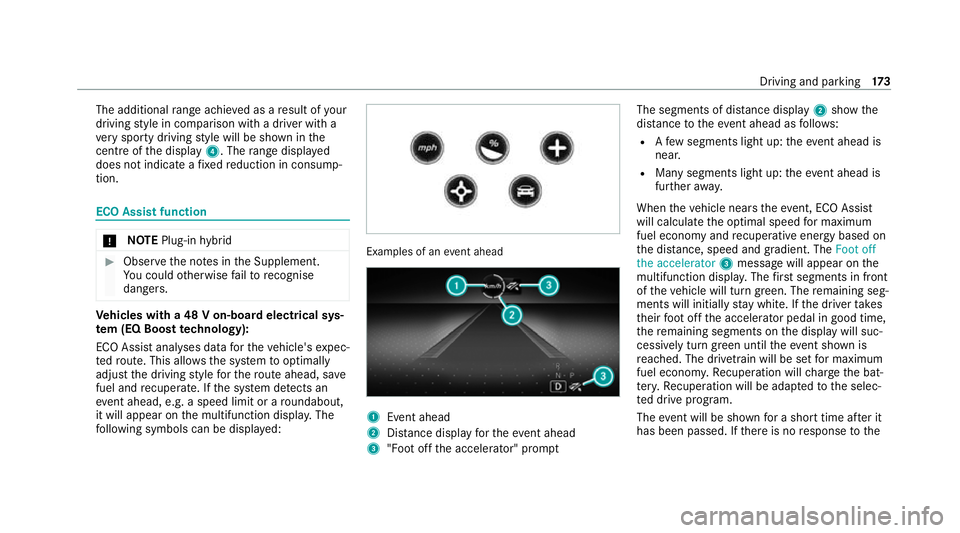
dangers. Ve
hicles with a 48 V on-board electrical sys‐
te m (EQ Boo sttech nology):
ECO Assist analyses data forth eve hicle's expec‐
te dro ute. This allo wsthe sy stem tooptimally
adjust the driving style fo rth ero ute ahead, sa ve
fuel and recuperate. If the sy stem de tects an
eve nt ahead, e.g. a speed limit or a roundabout,
it will appear on the multifunction displa y.The
fo llowing symbols can be displa yed: Examples of an
event ahead 1
Event ahead
2 Distance displ ayforth eev ent ahead
3 "Foot off the accelerator" prom ptThe segments of dis
tance displ ay2 show the
dis tance totheeve nt ahead as follo ws:
R Afew segments light up: theeve nt ahead is
nea r.
R Many segments light up: theeve nt ahead is
fur ther aw ay.
When theve hicle nears theeve nt, ECO Assi st
will calculate the optimal speed for maximum
fuel economy and recuperati veenergy based on
th e dis tance, speed and gradient. The Foot off
the accelerator 3message will appear on the
multifunction displa y.The firs t segments in front
of theve hicle will turn green. The remaining seg‐
ments will initially stay white. If the driver takes
th eir foot off the accelera tor pedal in good time,
th ere maining segments on the display will suc‐
cessively turn green until theeve nt shown is
re ached. The driv etra in will be set for maximum
fuel econom y.Re cuperation will charge the bat‐
te ry.Re cuperation will be adap tedto the selec‐
te d drive prog ram.
The event will be shown for a short time af ter it
has been passed. If there is no response tothe Driving and pa
rking 17 3
Page 181 of 489
%
Ifyo uth en exitth eve hicle leaving theke y in
th eve hicle, the automatic transmission
re mains in neutral i.
Engaging park position P #
Obser vethe no tes on parking theve hicle
(/ page 186). #
Dep ress the brake pedal until theve hicle is
st ationar y. #
When theve hicle is stationar y,press button
j.
When the transmission position display
sho wsj,th e park position is engaged. If no
transmission position display jappears,
secure theve hicle topreve nt it from rolling
aw ay.
% Depending on the situation, it may take a
short time until jis engaged. Therefore,
alw ays pay attention tothe transmission
position displa y. Pa
rk position jis engaged automatically if one
of thefo llowing conditions is me t:
R you swit choff the ignition when theve hicle
is stationary and the transmission is in posi‐
tion hork.
R you open the driver's door when theve hicle
is stationary or when driving at a very low
speed and the transmission is in position h
or k.
% Tomanoeuvre with an open driver's door,
open the driver's door while stationary and
engage transmission position hork
again.
Engaging drive position D #
Depress the brake pedal and push the
DIRECT SELECT le ver down past thefirst
point of resis tance.
When the automatic transmission is in transmis‐
sion position h, it shiftsthege ars automati‐
call y.This depends, among other things, on the
fo llowing factors:
R the selected drive program
R the position of the accelera tor pedal R
the driving speed Manual
gearshifting *
NO
TEPlug-in hybrid #
Obser vethe no tes in the Supplement.
Yo u could otherwise failto recognise
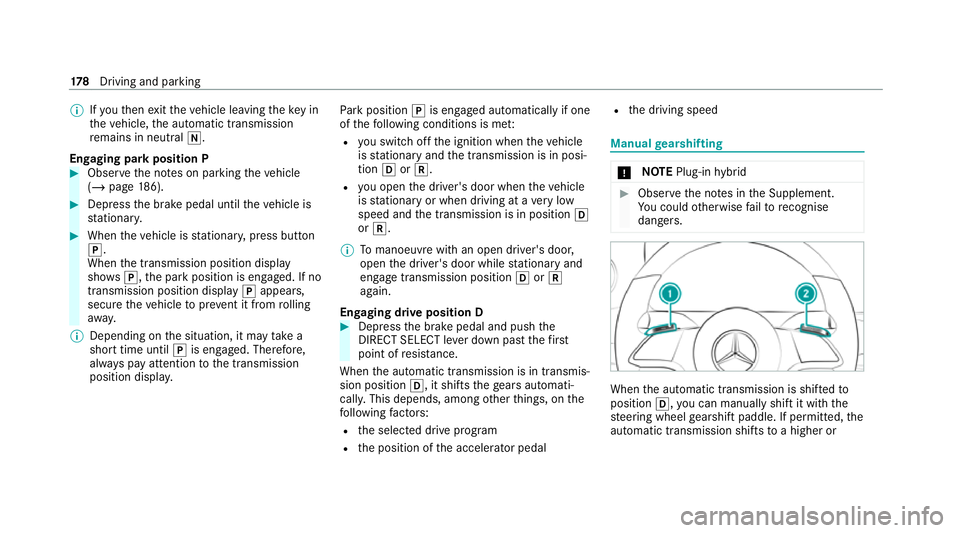
dangers. When
the automatic transmission is shif tedto
position h,you can manually shift it with the
st eering wheel gearshift paddle. If permit ted, the
automatic transmission shifts toa higher or 17 8
Driving and pa rking
Page 189 of 489
%
You can also store theAd Blue ®
filler cap in
th e fuel filler cap holder in the fuel filler flap
hin gearm.
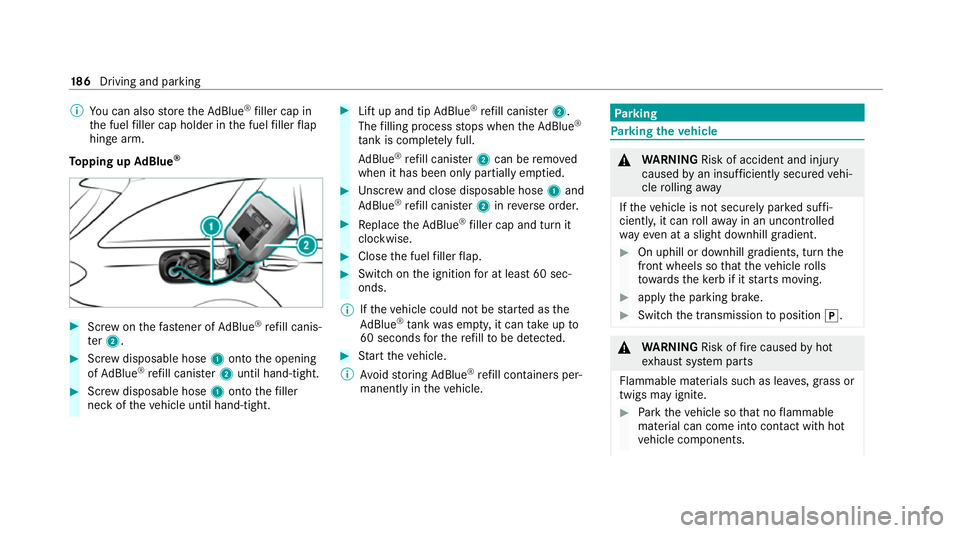
To pping up AdBlue ® #
Screw onthefast ener of AdBlue ®
re fill canis‐
te r2. #
Screw disposable hose 1onto the opening
of Ad Blue ®
re fill canis ter2 until hand-tight. #
Screw disposable hose 1onto thefiller
neck of theve hicle until hand-tight. #
Lift up and tip AdBlue ®
re fill canis ter2.
The filling process stops when theAd Blue ®
ta nk is compl etely full.
Ad Blue ®
re fill canis ter2 can be remo ved
when it has been only partially em ptied. #
Unscr ew and close disposable hose 1and
Ad Blue ®
re fill canis ter2 inreve rse order. #
Replace theAd Blue ®
filler cap and turn it
clockwise. #
Close the fuel filler flap. #
Swit chon the ignition for at least 60 sec‐
onds.
% Ifth eve hicle could not be star ted as the
Ad Blue ®
tan kwa s em pty, it can take up to
60 seconds forth ere fill to be de tected. #
Start theve hicle.
% Avoid storing AdBlue ®
re fill con tainers per‐
manently in theve hicle. Pa
rking Pa
rking theve hicle &
WARNING Risk of accident and inju ry
caused byan insuf ficiently secu redve hi‐
cle rolling away
If th eve hicle is not securely par ked suf fi‐
ciently, it can rollaw ay in an uncont rolled
wa yev en at a slight downhill gradient. #
On uphill or downhill gradients, turn the
front wheels so that theve hicle rolls
to wa rdsth eke rb if it starts moving. #
apply the parking brake. #
Switch the transmission toposition j. &
WARNING Risk offire caused byhot
ex haust sy stem parts
Flammable materials such as lea ves, grass or
twigs may ignite. #
Park theve hicle so that no flammable
material can come into con tact wi thhot
ve hicle components. 18 6
Driving and pa rking
Page 190 of 489
#
In particula r,do not park on dry grass‐
land or har vested grain fields. &
WARNING Risk of accident and inju ry
due tochildren left unat tended in the
ve hicle
If ch ildren are left unsupervised in theve hi‐
cle, they could, in pa rticular:
R open doors, thereby endangering other
persons or road users.
R get out and be stru ck byoncoming traf‐
fi c.
R ope rate ve hicle equipment and become
trapped, forex ample.
In addition, thech ildren could also set the
ve hicle in motion, forex ample by:
R releasing the parking brake.
R changing the transmission position.
R starting theve hicle. #
Never lea vechildren unat tended in the
ve hicle. #
When leaving theve hicle, alw aysta ke
th eke y with you and lock theve hicle. #
Keep theve hicle key out of reach of
ch ildren. This also applies
tothe Digital Vehicle Key
st icke r.
* NO
TEDama getotheve hicle due toit
ro lling away #
Alw ays secure theve hicle against roll‐
ing away. *
NO
TEDama gedue totheve hicle lo wer‐
ing Ve
hicles with AIR BODY CONT ROL or
le ve l control: Thevehicle can lo wer because
of temp erature dif fere nces or longer non-
operational times. This can cause dama geto
parts of the body. #
When stopping theve hicle and when
driving off, make sure that there are no obs
tacles su chas curbs under or in the
immediate vicinity of the body. #
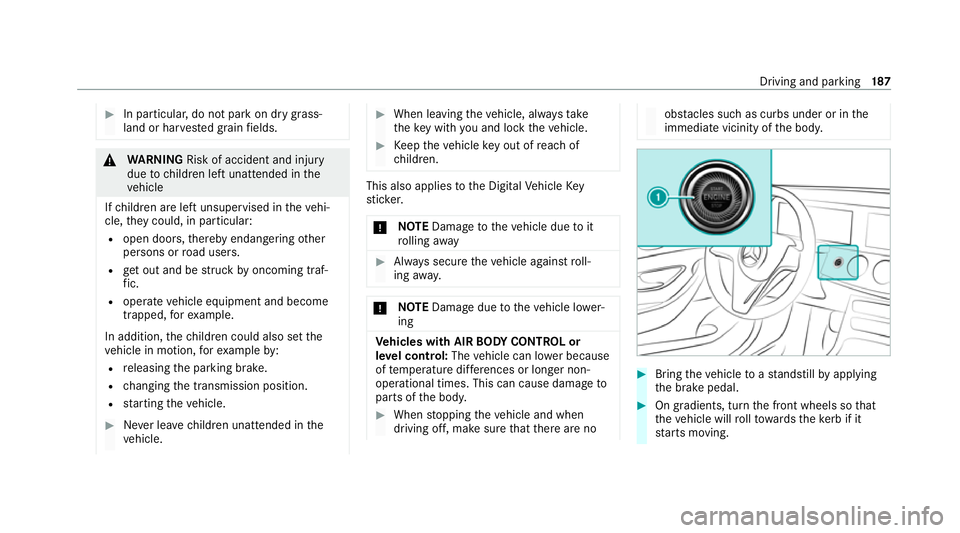
Bring theve hicle toast andstill byapplying
th e brake pedal. #
On gradients, turn the front wheels so that
th eve hicle will rollto wa rdsth eke rb if it
st arts moving. Driving and parking
187
Page 195 of 489
App
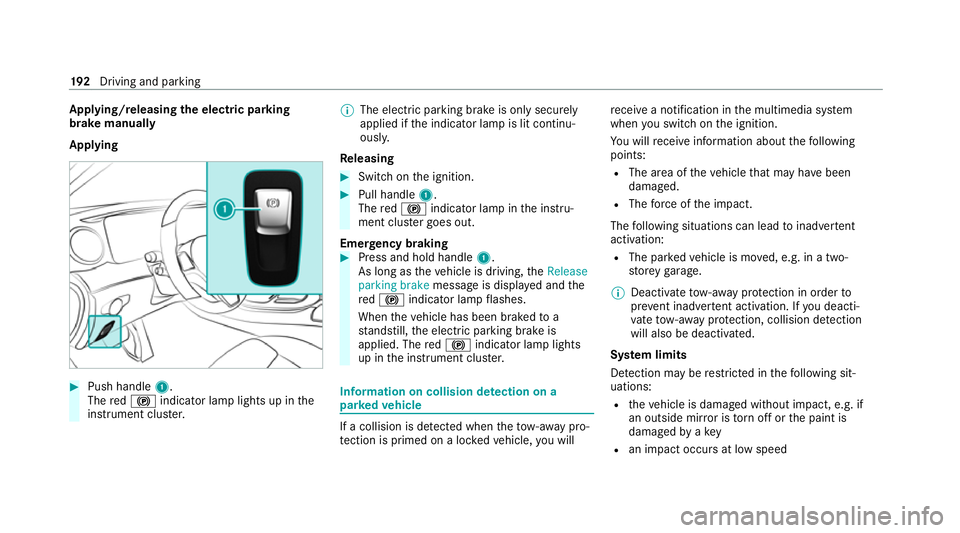
lying/releasing the electric pa rking
brake manually
Applying #
Push handle 1.
The red! indicator lamp lights up in the
instrument clus ter. %
The electric parking brake is only securely
applied if the indicator lamp is lit continu‐
ously.
Re leasing #
Swit chon the ignition. #
Pull handle 1.
The red! indicator lamp in the instru‐
ment clus ter goes out.
Emer gency braking #
Press and hold handle 1.
As long as theve hicle is driving, theRelease
parking brake message is displa yed and the
re d! indicator lamp flashes.
When theve hicle has been braked to a
st andstill, the electric parking brake is
applied. The red! indicator lamp lights
up in the instrument clus ter. Information on collision de
tection on a
pa rked vehicle If a collision is de
tected when theto w- aw ay pro‐
te ction is primed on a loc kedve hicle, you will re
cei vea notification in the multimedia sy stem
when you swit chon the ignition.
Yo u will recei veinformation about thefo llowing
points:
R The area of theve hicle that may ha vebeen
damaged.
R The forc e of the impact.
The following situations can lead toinadver tent
acti vation:
R The pa rked vehicle is mo ved, e.g. in a two-
st or ey garage.
% Deactivate tow- aw ay protection in order to
pr eve nt inadver tent acti vation. If you deacti‐
va te tow- aw ay protection, collision de tection
will also be deactivated.
Sy stem limits
De tection may be restricted in thefo llowing sit‐
uations:
R theve hicle is damaged without impact, e.g. if
an outside mir ror is torn off or the paint is
damaged byakey
R an impact occurs at low speed 19 2
Driving and pa rking
Page 216 of 489
Deactivating
Active Di stance Assist
DISTRO NIC &
WARNING Risk of an accident due to
Ac tive Dis tance Assi stDISTRONIC being
acti vewhen you lea vethe driver's seat
If yo u lea vethe driver's seat while theve hicle
is being braked byActive Dis tance Assi st
DISTRONIC only, theve hicle can rollaw ay. #
Alw ays deactivate Active Dis tance
Assi stDISTRONIC and secure theve hi‐
cle topreve nt it from rolling away
before you lea vethe driver's seat. #
Press ±.
% Ifyo u brake, deactivate ESP ®
or if ESP ®
inter venes, Active Dis tance Assi st
DISTRONIC is deacti vated. Fu
nction of Active Speed Limit Assi stIf speed limit
change between 20 km/h and
13 0 km/h is de tected and the automatic adop‐
tion of speed limits is active, it will be automati‐ cally adop
ted as thestored speed
(/ page 242).
The driven speed is adju sted when theve hicle is
le ve l with the traf fic sign at the latest. In the
case of signs indicating entry into an urban area,
th e speed is adap ted according tothe speed
permitted within the urban area. The speed limit
display in the Instrument Display is alw ays upda‐
te d when theve hicle is le vel with the tra ffic sign.
If th ere is no speed restriction on an unlimi ted
st re tch of road (e.g. on a mo torw ay),th ere com‐
mended speed is au tomatical lyadop ted as the
st ored speed. The sy stem uses the speed stored
on an unlimited stre tch of road as there com‐
mended speed. If you do not alter thestored
speed on an unlimited stre tch of road, there c‐
ommended speed is 130 km/h.
If Ac tive Dis tance Assi stDISTRONIC has been
put into passi vemode bypressing the accelera‐
to r pedal, only speed limits which are higher
th an the set speed are adop ted.
Obser vethe no tes on driving sy stems and your
re sponsibility; you may otherwise failto recog‐
nise dangers (/ page 194). Sy
stem limits
The sy stem limits of Traf fic Sign Assi stapply to
th e de tection of traf fic signs (/ page 241).
Speed limits bel ow20 km/h are not auto mati‐
cally adop tedby the sy stem as thestored speed.
Te mp orary speed restrictions (e.g. for a cer tain
time or due towe ather conditions) cannot be
proper ly detected bythe sy stem. The maximum
permissible speed applying toave hicle with a
trailer is not de tected bythe sy stem.
Ad just the speed in these situations. &
WARNING Risk of accident due toActive
Speed Limit Assi stadapting theve hicle's
speed
The speed adop tedby Active Speed Limit
Assi stmay be too high or incor rect in some
individual cases, su chas:
R at speed limits below 20 km/h
R inwe t conditions or in fog
R when towing a trailer Driving and parking
213
Page 220 of 489
R
When the tyre pressure is too lo w. &
WARNING Risk of accident if Active
St eering Assist unexpectedly stops func‐
tioning
If th e sy stem limits of Active Steering Assist
are reached there is no guarantee that the
sy stem will remain active or will keep the
ve hicle in lane. #
Alw ayske ep your hands on thesteering
wheel and obser vethe tra ffic carefull y. #
Alw aysst eer theve hicle paying atten‐
tion totraf fic conditions. &
WARNING Risk of accident if Active
St eering Assist unexpectedly inter venes
The de tection of lane markings and objects
may malfunction and cause unexpected
st eering inter ventions. #
Steer according totraf fic conditions. Ac
tivating/deactivating Active Steering
Assist
Re quirements:
R ESP ®
is activated, but is not inter vening.
R Active Dis tance Assi stDISTRONIC is acti va‐
te d.
Multimedia sy stem:
4 © 5
Settings 5
Quick access #
Select aAct. Steer. Asst . Fu
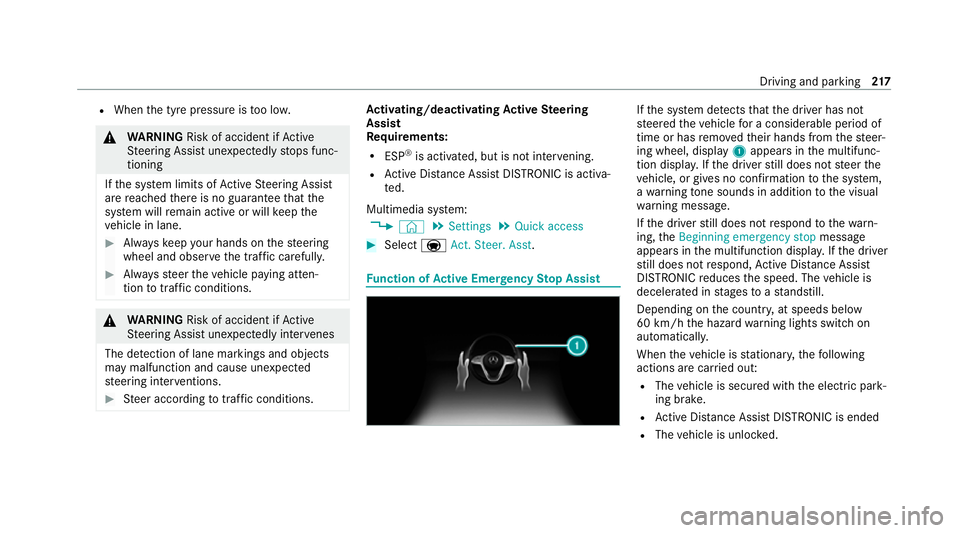
nction of Active Eme rgency Stop Assist If
th e sy stem de tects that the driver has not
st eered theve hicle for a considerable period of
time or has remo vedth eir hands from thesteer‐
ing wheel, display 1appears in the multifunc‐
tion displa y.Ifth e driver still does not steer the
ve hicle, or gives no confirmation tothe sy stem,
a wa rning tone sounds in addition tothe visual
wa rning message.
If th e driver still does not respond tothewa rn‐
ing, theBeginning emergency stop message
appears in the multifunction displa y.Ifth e driver
st ill does not respond, Active Dis tance Assi st
DISTRONIC reduces the speed. The vehicle is
decelerated in stages toast andstill.
Depending on the count ry, at speeds below
60 km/h the hazard warning lights switch on
automaticall y.
When theve hicle is stationar y,thefo llowing
actions are car ried out:
R The vehicle is secured with the electric park‐
ing brake.
R Active Dis tance Assi stDISTRONIC is ended
R The vehicle is unloc ked. Driving and parking
217
Page 222 of 489
&
WARNING Risk of accident and inju ry
due totheve hicle rolling away
Af ter a short time, Hill Start Assist no lon ger
holds theve hicle. #
Swiftly mo veyour foot from the brake
pedal tothe accelera tor pedal. Do not
lea vetheve hicle when it is being held
by Hill Start Assist. HOLD function
HOLD function
The HOLD function holds
theve hicle at a stand‐
st ill without requ iring youto depress the brake
pedal, e.g. while waiting in traf fic.
The HOLD function is only an aid. The responsi‐
bility forth eve hicle safely standing still remains
with the driver.
Sy stem limits
The HOLD function is only intended toprov ide
assis tance when driving and is not a su fficient
means of safeguarding theve hicle against rolling
aw ay when stationar y. R
The incline must not be greater than 30%.
Ac tivating/deactivating the HOLD function &
WARNING Risk of an accident due tothe
HOLD function being active when you
lea vetheve hicle
If th eve hicle is only braked with the HOLD
function it could, in thefo llowing situations,
ro llaw ay:
R Ifth ere is a malfunction in the sy stem or
in the po wer supp ly.
R Ifth e HOLD function is deactivated by
depressing the accelera tor pedal or brake
pedal, e.g. byave hicle occupant. #
Alw ays secure theve hicle against roll‐
ing away before you lea veit. Re
quirements:
R The vehicle is stationar y.
R The driver's door is closed or the seat belt on
th e driver's side is fastened. R
The engine is running or has been au tomati‐
cally switched off bythe ECO start/ stop
function.
R The electric parking brake is released.
R Active Dis tance Assi stDISTRONIC is deacti‐
va ted.
R The transmission is in position h,kori.
Ac tivating the HOLD function #
Dep ress the brake pedal, and af ter a short
time quickly depress fur ther until theë
display appears in the multifunction displa y. #
Release the brake pedal.
Deactivating the HOLD function #
Depress the accelerator pedal topull away.
or #
Depress the brake pedal until theë dis‐
play disappears from the multifunction dis‐
pla y.
The HOLD function is deactivated in thefo llow‐
ing situations:
R Active Dis tance Assi stDISTRONIC is acti va‐
te d. Driving and parking
219