ESP MERCEDES-BENZ E-CLASS ESTATE 2020 Service Manual
[x] Cancel search | Manufacturer: MERCEDES-BENZ, Model Year: 2020, Model line: E-CLASS ESTATE, Model: MERCEDES-BENZ E-CLASS ESTATE 2020Pages: 489, PDF Size: 9.15 MB
Page 200 of 489
Obser
vethefo llowing information:
R Warning and indicator lamps (/ page 436)
R Display messages (/ page379)
ETS/4ETS (Electronic Traction Sy stem)
ETS/4E TStraction control is pa rtof ESP ®
and
makes it possible topull away and accelerate on
a slippe rycar riag ew ay.
ETS/4ETS can impr ovetheve hicle's traction by
inter vening in thefo llowing ways:
R The drive wheels are braked individually if
th ey spin.
R More drive torque is transferred tothe wheel
or wheels with traction.
Influence of drive prog rams on ESP ®
The drive programs enable ESP ®
to adapt todif‐
fe re nt we ather and road conditions as well as
th e driver's prefer red driving style. You can
select the drive prog rams using theDY NA MIC
SELECT switch (/ page175).
ESP ®
modes
Depending on the selected drive program, the
appropriate ESP ®
mode will be activated. Yo ucan select
the drive programs using the
DY NA MIC SELECT switch (/ page175).
ESP ®
Comfort
R drive program Aand;
R balance between traction and stability
R recommended for all road sur face conditions
R suitable for bo thdry and dif ficult road condi‐
tions (such as sn owor ice, or when thero ad
is we t from rain)
ESP ®
Sport
R drive prog ram C
R offers stability but with a sporty setup
R allowsthe sporty driver a more active driving
st yle
R only suitable for good road conditions, a dry
ro ad sur face and a clear stre tch of road
ESP ®
Spo rt +
R drive prog ram B
R emphasises theve hicle's ownove rste ering
and under steering characteristics for a more
active driving style R
only suitable for good road conditions, a dry
ro ad sur face and a clear stre tch of road
Off- road ESP ®
R traction-oriented setting up toappr ox
30 km/h
R maximum traction on unpa ved, very une ven
sur faces and easily negotiable off-road ter‐
ra in
R suitable for unpa vedro ads with easily nego‐
tiable off- road terrain or very une ven su rfa‐
ces Ac
tivating/deactivating ESP ®
(Electronic Sta‐
bility Prog ram) Multimedia sy
stem:
4 © 5
Settings 5
Quick access
% ESP®
can only be activated/deactivated
using quick access when at least one other
function is available in quick access. ESP ®
can otherwise be found in theAssistance
menu. Driving and parking
197
Page 201 of 489
*
NO
TEMercedes-AMG vehicles #
Obser vethe no tes in the Supplement.
Yo u could otherwise failto recognise
dangers. *
NO
TEPlug-in hybrid #
Obser vethe no tes in the Supplement.
Yo u could otherwise failto recognise
dangers. #
Select ESP. #
Select Onorå Off.
ESP ®
is deactivated if theå ESP®
OFF warn‐
ing lamp lights up continuously in the instrument
clus ter.
Obser vethe information on warning lamps and
display messages which may be shown in the
instrument clus ter. Fu
nction of ESP ®
Crosswind Assist ESP
®
Crosswind Assist de tects sudden gu sts of
side wind and helps the driver tokeep theve hi‐
cle in the lane:
R ESP ®
Crosswind Assist is active at vehicle
speeds between appr ox.75 km/h and
200 km/h when driving stra ight ahead or
cornering slight ly.
R The vehicle is stabilised bymeans of individ‐
ual brake application on one side. Fu
nction of ESP ®
trailer stabilisation &
WARNING Risk of accident in poor road
and weather conditions
In poor road and weather conditions, the
trailer stabilisation cannot pr event lu rching of
th eve hicle/trailer combination. Trailers with
a high centre of gr avity may tip over before
ESP ®
de tects this. #
Alw ays adapt your driving style to suit
th e cur rent road and weather condi‐
tions. When driving with a trailer, ESP
®
can stabilise
yo ur vehicle if the trailer begins toswer vefrom
side toside:
R ESP ®
trailer stabilisation is active abo ve
speeds of 65 km/h.
R Slight swerving is reduced bymeans of a tar‐
ge ted, individual brake application on one
side.
R Intheeve nt of se vere swerving, the engine
output is also reduced and all wheels are
braked.
ESP ®
trailer stabilisation may be impaired or
may not function if:
R The trailer is not connec ted cor rectly or is
not de tected prope rly by theve hicle. 19 8
Driving and pa rking
Page 202 of 489
Fu
nction of EBD Elect
ronic Breakforce Distribution (EBD) is char‐
acterised bythefo llowing:
R Monitoring and regulating the brake pressure
on there ar wheels.
R Impr oved driving stability when braking,
especially on bends. Fu
nction of STEER CONT ROL ST
EER CONTROL helps youby transmitting a
noticeable steering forc eto thesteering wheel in
th e direction requ ired forve hicle stabilisation.
This steering recommendation is given pa rticu‐
larly in thefo llowing situations:
R Both right wheels or bo thleft wheels are on
a we t or slippe ryroad sur face when you
brake.
R The vehicle starts toskid. Sy
stem limits
ST EER CONTROL may be impaire d or may not
function in thefo llowing situations:
R ESP ®
is deactivated.
R ESP ®
is malfunctioning.
R The steering is malfunctioning.
If ESP ®
is malfunctioning, you will be assis ted
fur ther by the electric po werst eering. Fu
nction of Active Brake Assi st Ac
tive Brake Assi stconsi sts of thefo llowing
functions:
R Distance warning function
R Autonomous braking function
R Situation-dependent braking assi stance
R Vehicles with Driving Assistance Pack‐
age: Evasi veSteering Assist and cornering
function
Ac tive Brake Assi stcan help youto minimise the
ri sk of a collision with vehicles, cyclists or pedestrians, or
reduce the ef fects of su cha colli‐
sion.
If Ac tive Brake Assi sthas de tected a risk of colli‐
sion, a warning tone sounds and theL dis‐
ta nce warning lamp lights up in the instrument
clus ter.
If yo u do not react tothewa rning, autonomous
braking can be initiated in critical situations.
In especially critical situations, Active Brake
Assi stcan initia teautonomous braking direct ly.
In this case, thewa rning lamp and warning tone
occur simultaneously wi th the braking applica‐
tion.
If yo u apply the brake yourself in a critical situa‐
tion or apply the brake during autonomous brak‐
ing, situation-dependent braking assis tance
occu rs. The brake pressure increases up tomax‐
imum full-s top braking if necessar y.
Obser vethe no tes on driving sy stems and your
re sponsibility; you may otherwise failto recog‐
nise dangers (/ page 194). Driving and pa
rking 19 9
Page 203 of 489
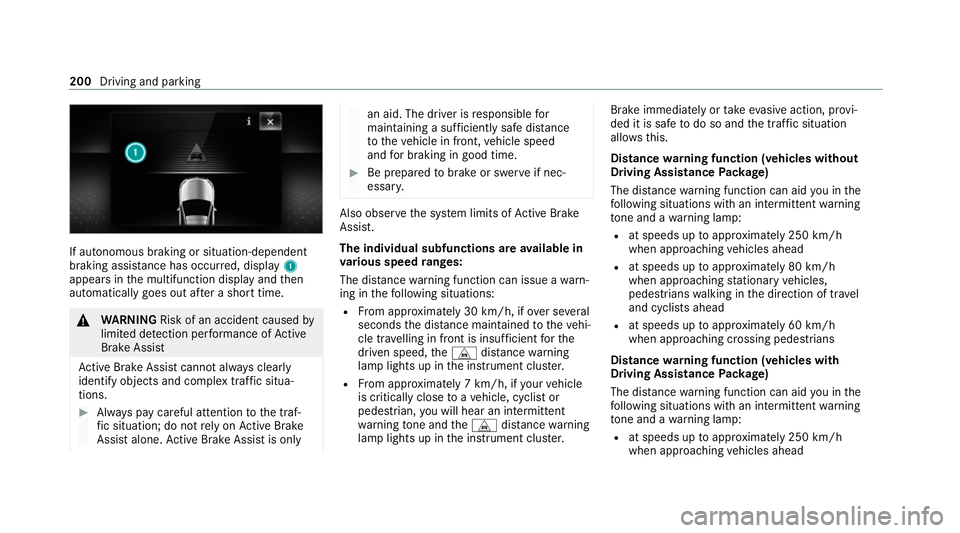
If autonomous braking or situation-dependent
braking assis
tance has occu rred, display 1
appears in the multifunction display and then
automatically goes out af ter a short time. &
WARNING Risk of an accident caused by
limited de tection per form ance of Active
Brake Assi st
Ac tive Brake Assi stcannot al ways clear ly
identify objects and complex traf fic situa‐
tions. #
Alw ays pay careful attention tothe traf‐
fi c situation; do not rely on Active Brake
Assi stalone. Active Brake Assi stis only an aid. The driver is
responsible for
maintaining a suf ficiently safe di stance
to theve hicle in front, vehicle speed
and for braking in good time. #
Be prepare dto brake or swer veif nec‐
essar y. Also obser
vethe sy stem limits of Active Brake
Assi st.
The individual subfunctions are available in
va rious speed ranges:
The dis tance warning function can issue a warn‐
ing in thefo llowing situations:
R From appr oximately 30 km/h, if over se veral
seconds the dis tance maintained totheve hi‐
cle tr avelling in front is insuf ficient forthe
driven speed, theL distance warning
lamp lights up in the instrument clus ter.
R From appr oximately 7 km/h, if your vehicle
is critically close toave hicle, cyclist or
pedestrian, you will hear an intermit tent
wa rning tone and theL distance warning
lamp lights up in the instrument clus ter. Brake immediately or
take evasive action, pr ovi‐
ded it is safe todo so and the traf fic situation
allo wsthis.
Distance warning function (vehicles without
Driving Assistance Package)
The dis tance warning function can aid you in the
fo llowing situations with an intermit tent wa rning
to ne and a warning lamp:
R at speeds up toappr oximately 250 km/h
when approaching vehicles ahead
R at speeds up toappr oximately 80 km/h
when approaching stationary vehicles,
pedestrians walking in the direction of tr avel
and cyclists ahead
R at speeds up toappr oximately 60 km/h
when approaching crossing pedestrians
Distance warning function (vehicles with
Driving Assistance Package)
The dis tance warning function can aid you in the
fo llowing situations with an intermit tent wa rning
to ne and a warning lamp:
R at speeds up toappr oximately 250 km/h
when approaching vehicles ahead 200
Driving and parking
Page 205 of 489
R
at speeds up toappr oximately 80 km/h
when approaching cyclists ahead
R at speeds up toappr oximately 60 km/h
when approaching stationary and moving
pedestrians, crossing vehicles and stationary
and crossing cyclists
Cancelling a brake application of Active
Brake Assi st
Yo u can cancel a brake application of Active
Brake Assi stat any time by:
R Activating kickdown.
R Releasing the brake pedal.
Ac tive Brake Assi stmay cancel the brake appli‐
cation when one of thefo llowing conditions is
fulfilled:
R You manoeuv retoavoid the obs tacle.
R The reis no longer a risk of collision.
R An obs tacle is no longer de tected in front of
yo ur vehicle. Evasive
Steering Assist (only vehicles with
Driving Assistance Package)
Evasi veSteering Assist has thefo llowing charac‐
te rist ics:
R The ability todetect stationary or moving
pedestrians.
R Assis tance thro ugh po wer-assis tedsteering if
it de tects a swerving manoeuvre.
R Activation byan abrupt steering mo vement
during a swerving manoeuvre.
R Assis tance du ring swerving and stra ightening
of theve hicle.
R Reaction from a speed of appr oximately
20 km/h up toa speed of appr oximately
70 km/h.
Yo u can pr eventthe assis tance at any time by
actively steering.
Cornering function (only vehicles with Driv‐
ing Assistance Package)
If a danger of collision from an oncoming vehicle
is de tected when turning across an oncoming
lane, au tonomous braking can be initia ted at speeds below
15km/h be fore you ha veleft the
lane in which you are driving. &
WARNING Risk of accident despi teEva‐
si ve Steering Assist
Evasive Steering Assist cann otalw aysre cog‐
nise objects or compl extraf fic situations
clearly.
Moreo ver,th esteering support pr ovided by
Evasive Steering Assist is not suf ficient to
avo id a collision. #
Alw ays pay careful attention tothe traf‐
fi c situation; do not rely on Ev asive
St eering Assist alone. #
Be prepared tobrake or swer veif nec‐
essar y. #
End the support byactively steering in
non-critical situations. #
Drive at an appropriate speed if there
are pedestrians close tothe path of
yo ur vehicle. 202
Driving and parking
Page 207 of 489
tion,
the hazard warning lights switch on once
th eve hicle is stationar y.When you pull away
again, the hazard warning lights will switch off
automatically at appr oximately 10km/h. Yo u
can also switch off the hazard warning lights
using the hazard warning button. Cruise control and limiter
Fu
nction of cruise control
Cruise cont rolre gulates the speed totheva lue
selec tedby the driver.
If yo u accelerate toove rtake, forex ample, the
st ored speed is not dele ted. If youre mo veyour
fo ot from the accelerator pedal af terove rtaking,
cruise control will resume speed regulation back
to thestored speed.
Cruise contro l is operated using the cor respond‐
ing steering wheel buttons. You can store any
speed abo ve20 km/h up tothe maximum
design speed or up tothe set winter tyre limit.
Obser vethe no tes on driving sy stems and your
re sponsibility; you may otherwise failto recog‐
nise dangers (/ page 194). Me
rcedes‑AMG vehicles: cruise control is avail‐
able up toa maximum speed of 250 km/h.
Displ ays on the multifunction display
R h (gre y): cruise cont rol is selec ted but
not yet acti vated.
R h (green): cruise control is active.
A stored speed appears along with theh dis‐
pla y.
% The segments extending from the cur rent
st ored speed tothe end of the scale, or to
th e set winter tyre limit, light up in the
speedome ter.
Sy stem limits
Cruise control may be unable tomaintain the
st ored speed on uphill gradients. The stored
speed is resumed when the gradient evens out.
Change into a lo werge ar in good time on long
and steep downhill gradients. Take particular
no te ofthis when driving a laden vehicle. By
doing so, you will make use of the engine's brak‐
ing ef fect. This relie vesth e load on the brake
sy stem and pr events the brakes from overheat‐
ing and wearing tooqu ickl y. Do not use cruise control in
thefo llowing situa‐
tions:
R In traf fic situations whi chrequ ire frequent
ch anges of speed, e.g. in heavy traf fic, on
winding roads.
R On slippe ryroads. Accelerating can cause
th e drive wheels tolose traction and the
ve hicle could then skid.
R Ifyo u are driving when visibility is poor.
Fu nction of the limiter
The limiter restricts the speed of theve hicle. To
re duce the speed tothe set speed, the limiter
applies the brakes automaticall y.
Yo u can limit the speed as follo ws:
R Variable: for a short-term speed restriction,
e.g. in built-up areas
R Perm anen t:for a longer-term speed restric‐
tion, e.g. in winter tyre mode
The variable limiter is operated using the cor re‐
sponding steering wheel buttons. You can store
any speed abo ve20 km/h up tothe maximum
design speed or up tothe set winter tyre limit. 204
Driving and parking
Page 208 of 489
Yo
u can also per form settings while theve hicle
is stationary if theve hicle has been star ted.
Obser vethe no tes on driving sy stems and your
re sponsibility; you may otherwise failto recog‐
nise dangers (/ page 194).
Me rcedes‑AMG vehicles: the limiter is available
up toa maximum speed of 250 km/h.
Displ ays on the multifunction display
R È (grey):va riable limiter is selec ted but
not yet acti vated.
R È (green): variable limiter is activated.
A stored speed appears along with theÈ dis‐
pla y.The segments in the speedome ter light up,
up tothe cur rently stored speed.
% When the driving speed is greater than the
st ored speed, theÈ display flashes.
Kickd own
If yo u depress the accelerator pedal be yond the
pressure point (kickdown), theva riable limiter
swit ches topassive mode. The Limiter pas-
sivemessage appears in the multifunction dis‐
pla y. Af
ter completion of kickdown, theva riable lim‐
iter is activated again in thefo llowing situations:
R Ifth eve hicle speed drops below thestored
speed.
R Ifth estored speed is called up.
R Ifyo ustore a new speed.
Operating cruise control or theva riable lim‐
iter &
WARNING Risk of accident due tostored
speed
If yo u call up thestored speed and this is
lo we rth an your cur rent speed, theve hicle
decelerates. #
Take into account the tra ffic situation
before calling up thestored speed. Re
quirements:
Cruise control
R Cruise control is selected.
R ESP ®
must be activated, but not inter vening.
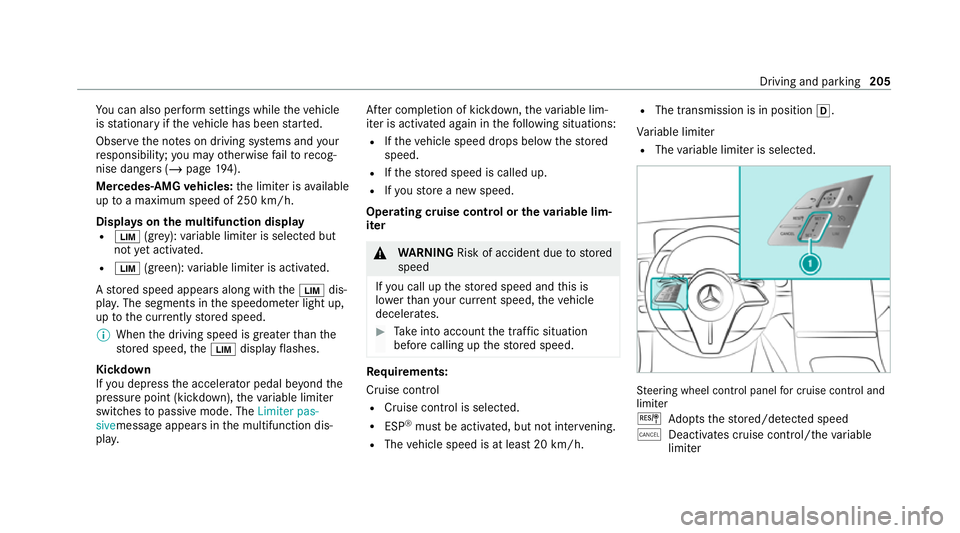
R The vehicle speed is at least 20 km/h. R
The transmission is in position h.
Va riable limiter
R The variable limiter is selec ted. St
eering wheel cont rol panel for cruise control and
limi ter
J Adopts thestored/de tected speed
± Deacti vates cruise contro l/thevariable
limiter Driving and parking
205
Page 210 of 489
#
Press J.
The maximum permissible speed shown by
th e traf fic sign is stored and theve hicle
maintains or does not exceed this speed.
Deactivating cruise control or theva riable
limi ter #
Press ±.
% Ifyo u brake, deactivate ESP ®
or if ESP ®
inter venes, cruise control is deacti vated. The
va riable limiter is not deactivated.
Pe rm anent limi ter
If th eve hicle should ne verexc eed a specific
speed (e.g. for driving in winter tyre mode), you
can set this speed with the permanent limiter.
Yo u do this by limiting the speed toava lue
between 160 km/h and 240 km/h in the multi‐
media sy stem (/ page 207).
Shortly before the set speed is reached, it
appears in the multifunction displa y.When you
confirm the message, display messages no lon‐
ge r appear until you swit choff theve hicle. The
speed will only be displa yed again once theve hi‐ cle has been
restar ted or if the set speed is
ch anged.
The permanent limiter does not swit chtopas‐
sive mode even du ring kickdown and the driven
speed remains below the set speed.
Setting the speed limitation for winter tyres
Multimedia sy stem:
4 © 5
Settings 5
Vehicle
5 Winter tyres limit #
Select a speed or deactivate the function. DSR (Downhill Speed
Regulation) Fu
nction of DSR (Downhill Speed Regulation)
DSR is an aid toassist you when driving down‐
hill. It keeps the speed of tr avel at the selected
ta rget speed. The steeper the downhill gradient,
th e greater the DSR braking ef fect on theve hi‐
cle. On flat stre tches of road and uphill gradi‐
ents, the DSR brakes theve hicle minimally or
not at all.
When DSR is activated and the transmission is in
position h,kori, DSR controls the driving
speed. The target speed can be set toava lue between 2 km/h and
18km/h. By braking or
accele rating, you can drive at a higher or lo wer
speed than theta rget speed at any time.
DSR is deactivated automatically if you drive at
speeds greater than 45 km/h or select drive
program CorB. The îoffmessage
th en appears in the multifunction displa y.The
st atus indicator in the multifunction display dis‐
appears. You also hear a warning tone.
In fo rm ation on DSR &
WARNING Risk of skidding and accident
when DSR is acti vated on slippery road
sur faces
If th e driven speed and theta rget speed dif‐
fe r, th e wheels may lose traction. #
Take into account thero ad sur face and
th e dif fere nce between the driving
speed and target speed before activat‐
ing DSR. Obser
vethe no tes on driving sy stems and your
re sponsibility; you may otherwise failto recog‐
nise dangers (/ page 194). Driving and pa
rking 207
Page 214 of 489
&
WARNING Risk of accident due toinsuf‐
fi cient decele ration byActive Dis tance
Assi stDISTRONIC
Ac tive Dis tance Assi stDISTRONIC brakes
yo ur vehicle with up to50% of the possible
deceleration. If this decele ration is not su ffi‐
cient, Active Dis tance Assi stDISTRONIC
alerts you with a visual and acoustic warning. #
Adjust your speed and main tain a suita‐
ble dis tance from theve hicle in front. #
Brake theve hicle yourself and/or take
ev asive action. &
WARNING Risk of accident if de tection
function of Active Dis tance Assi st
DISTRONIC is impaired
Ac tive Dis tance Assi stDISTRONIC does not
re act or has a limited reaction:
R when driving on a dif fere nt lane or when
ch anging lanes R
topedestrians, animals, bicycles or sta‐
tionary vehicles, or unexpected obs tacles
R tocompl extraf fic conditions
R tooncoming vehicles and crossing traf fic
As a result, Active Dis tance Assi st
DISTRONIC may nei ther give warnings nor
inter vene in su chsituations. #
Alw ays obser vethe tra ffic conditions
carefully and react accordin gly. Operating
Active Di stance Assist DIST RONIC
Re quirements:
R The elect ric pa rking brake is released.
R ESP ®
is activated and is not inter vening.
R The transmission is in position h.
R Allthe doors are closed.
R Check of thera dar sensor sy stem has been
successfully comple ted. #
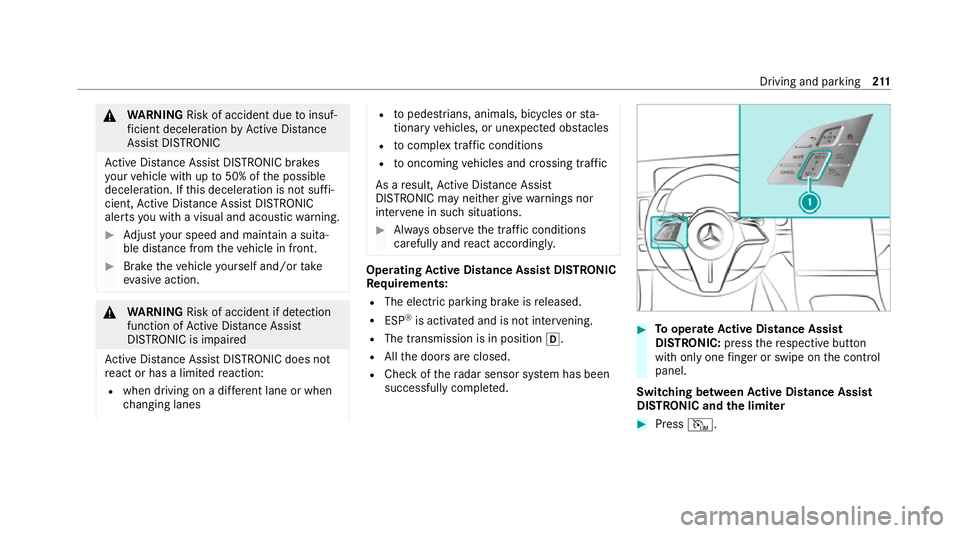
Tooperate Active Di stance Assist
DISTRO NIC:press there spective button
with only one finger or swipe on the control
panel.
Switching between Active Di stance Assist
DISTRO NIC and the limiter #
Press I. Driving and pa
rking 211
Page 216 of 489
Deactivating
Active Di stance Assist
DISTRO NIC &
WARNING Risk of an accident due to
Ac tive Dis tance Assi stDISTRONIC being
acti vewhen you lea vethe driver's seat
If yo u lea vethe driver's seat while theve hicle
is being braked byActive Dis tance Assi st
DISTRONIC only, theve hicle can rollaw ay. #
Alw ays deactivate Active Dis tance
Assi stDISTRONIC and secure theve hi‐
cle topreve nt it from rolling away
before you lea vethe driver's seat. #
Press ±.
% Ifyo u brake, deactivate ESP ®
or if ESP ®
inter venes, Active Dis tance Assi st
DISTRONIC is deacti vated. Fu
nction of Active Speed Limit Assi stIf speed limit
change between 20 km/h and
13 0 km/h is de tected and the automatic adop‐
tion of speed limits is active, it will be automati‐ cally adop
ted as thestored speed
(/ page 242).
The driven speed is adju sted when theve hicle is
le ve l with the traf fic sign at the latest. In the
case of signs indicating entry into an urban area,
th e speed is adap ted according tothe speed
permitted within the urban area. The speed limit
display in the Instrument Display is alw ays upda‐
te d when theve hicle is le vel with the tra ffic sign.
If th ere is no speed restriction on an unlimi ted
st re tch of road (e.g. on a mo torw ay),th ere com‐
mended speed is au tomatical lyadop ted as the
st ored speed. The sy stem uses the speed stored
on an unlimited stre tch of road as there com‐
mended speed. If you do not alter thestored
speed on an unlimited stre tch of road, there c‐
ommended speed is 130 km/h.
If Ac tive Dis tance Assi stDISTRONIC has been
put into passi vemode bypressing the accelera‐
to r pedal, only speed limits which are higher
th an the set speed are adop ted.
Obser vethe no tes on driving sy stems and your
re sponsibility; you may otherwise failto recog‐
nise dangers (/ page 194). Sy
stem limits
The sy stem limits of Traf fic Sign Assi stapply to
th e de tection of traf fic signs (/ page 241).
Speed limits bel ow20 km/h are not auto mati‐
cally adop tedby the sy stem as thestored speed.
Te mp orary speed restrictions (e.g. for a cer tain
time or due towe ather conditions) cannot be
proper ly detected bythe sy stem. The maximum
permissible speed applying toave hicle with a
trailer is not de tected bythe sy stem.
Ad just the speed in these situations. &
WARNING Risk of accident due toActive
Speed Limit Assi stadapting theve hicle's
speed
The speed adop tedby Active Speed Limit
Assi stmay be too high or incor rect in some
individual cases, su chas:
R at speed limits below 20 km/h
R inwe t conditions or in fog
R when towing a trailer Driving and parking
213