warning MERCEDES-BENZ E-CLASS ESTATE 2020 Workshop Manual
[x] Cancel search | Manufacturer: MERCEDES-BENZ, Model Year: 2020, Model line: E-CLASS ESTATE, Model: MERCEDES-BENZ E-CLASS ESTATE 2020Pages: 489, PDF Size: 9.15 MB
Page 102 of 489
Children in particular could acciden
tally
press the electrical seat adjustment buttons
and become trapped. #
While moving the seats, make sure that
hands or other body parts do not get
under the le ver assembly of the seat
adjustment sy stem. &
WARNING Risk of inju rydue tohead
re stra ints not being fitted or being adjus‐
te d incor rectly
If head restra ints ha venot been ins talled or
ha ve not been adjus ted cor rectly, there is an
increased risk of injury in the head and neck
area, e.g. in theev ent of an accident or when
braking. #
Alw ays drive with the head restra ints
fi tted. #
Before driving off, ma kesure forev ery
ve hicle occupant that the cent reofthe
head restra int supports the back of the
head at about eye le vel. Do not inter
change the head restra ints of the
front and rear seats. Otherwise, you will not be
able toadjust the height and angle of the head
re stra ints cor rectl y.
Ad just the head restra int fore -and-aft position so
th at it is as close as possible tothe back of your
head. &
WARNING Risk of inju ryor death due to
an incor rect seat position
The seat belt does not of ferth e intended
le ve l of pr otection if you ha venot mo vedthe
seat backrest toan almost vertical position.
Yo u could slip beneath the seat belt and
injure yourself. #
Adjust the seat proper lybefore com‐
mencing your journe y. #
Alw ays ensure that the seat backrest is
in an almost vertical position and that
th e shoulder belt is routed across the
centre of your shoulder. *
NO
TEDama getothe seats when moving
th e seats back The seats may be damaged
byobjects when
moving the seats bac k. #
When moving the seats bac k,make
sure that there are no objects in the
fo ot we ll, under or behind the seats. Seats and
stowing 99
Page 104 of 489
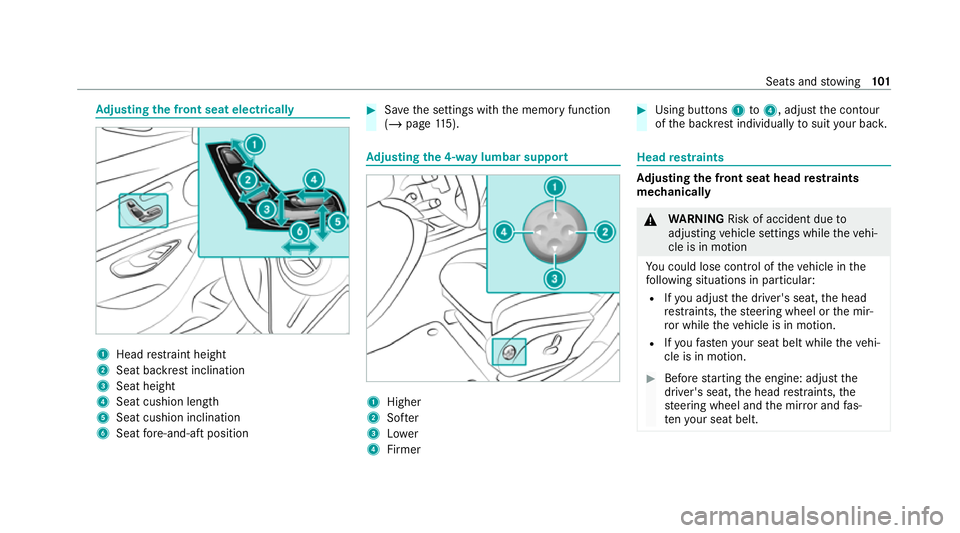
Ad
justing the front seat electrically 1
Head restra int height
2 Seat backrest inclination
3 Seat height
4 Seat cushion length
5 Seat cushion inclination
6 Seat fore -and-aft position #
Save the settings with the memory function
(/ page 115). Ad
justing the 4-w aylumbar support 1
Higher
2 Softer
3 Lower
4 Firmer #
Using buttons 1to4 , adjust the conto ur
of the backrest individually tosuit your bac k. Head
restra ints Ad
justing the front seat head restra ints
mechanically &
WARNING Risk of accident due to
adjusting vehicle settings while theve hi‐
cle is in motion
Yo u could lose cont rol of theve hicle in the
fo llowing situations in particular:
R Ifyo u adjust the driver's seat, the head
re stra ints, thesteering wheel or the mir‐
ro r while theve hicle is in motion.
R Ifyo ufast enyour seat belt while theve hi‐
cle is in motion. #
Before starting the engine: adjust the
driver's seat, the head restra ints, the
st eering wheel and the mir ror and fas‐
te nyo ur seat belt. Seats and
stowing 101
Page 105 of 489
&
WARNING Risk of inju rydue tohead
re stra ints not being fitted or being adjus‐
te d incor rectly
If head restra ints ha venot been ins talled or
ha ve not been adjus ted cor rectly, there is an
increased risk of injury in the head and neck
area, e.g. in theev ent of an accident or when
braking. #
Alw ays drive with the head restra ints
fi tted. #
Before driving off, ma kesure forev ery
ve hicle occupant that the cent reofthe
head restra int supports the back of the
head at about eye le vel. Do not inter
change the head restra ints of the
front and rear seats. Otherwise, you will not be
able toadjust the height and angle of the head
re stra ints cor rectl y.
Ad just the head restra int fore -and-aft position so
th at it is as close as possible tothe back of your
head. #
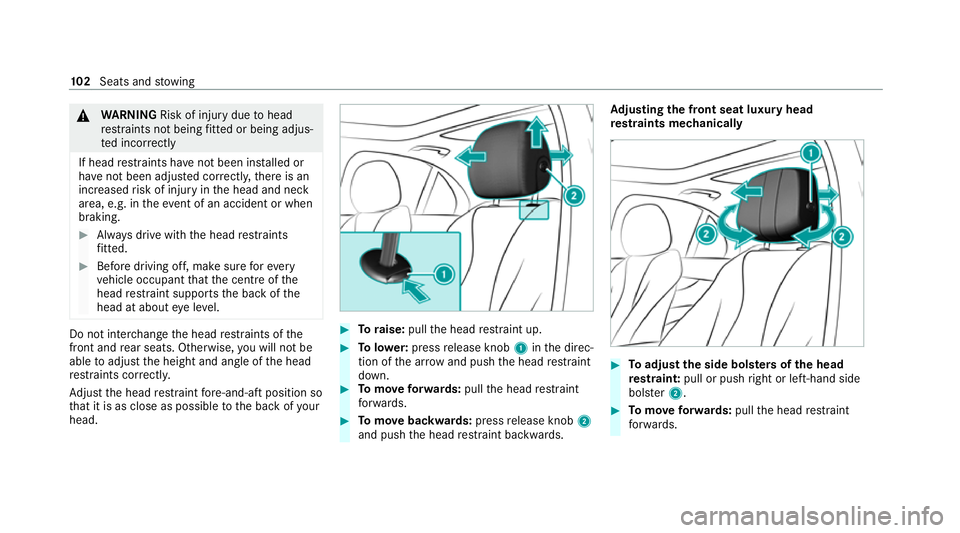
Toraise: pullthe head restra int up. #
Tolowe r:press release knob 1inthe direc‐
tion of the ar row and push the head restra int
down. #
Tomo veforw ards: pullthe head restra int
fo rw ards. #
Tomo vebackwards: pressrelease knob 2
and push the head restra int backwards. Ad
justing the front seat luxury head
re stra ints mechanically #
Toadjust the side bols ters of the head
re stra int: pull or push right or left-hand side
bols ter2. #
Tomo veforw ards: pullthe head restra int
fo rw ards. 102
Seats and stowing
Page 107 of 489
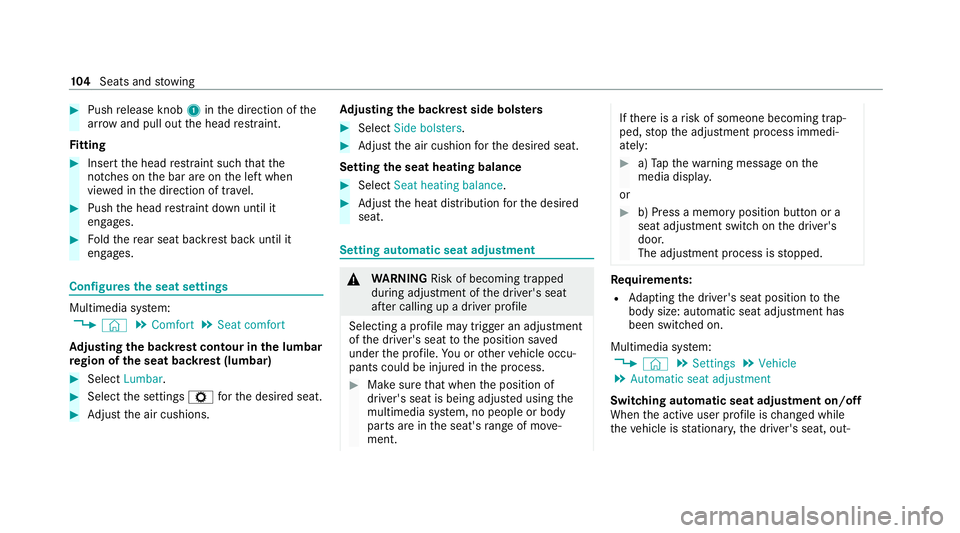
#
Push release knob 1inthe direction of the
ar row and pull out the head restra int.
Fi tting #
Inse rtthe head restra int such that the
notches on the bar are on the left when
vie we d in the direction of tra vel. #
Push the head restra int down until it
engages. #
Foldthere ar seat backrest back until it
engages. Configures
the seat settings Multimedia sy
stem:
4 © 5
Comfort 5
Seat comfort
Ad justing the backrest contour in the lumbar
re gion of the seat backrest (lumbar) #
Select Lumbar . #
Select the settings Zforth e desired seat. #
Adjust the air cushions. Ad
justing the backrest side bols ters #
Select Side bolsters . #
Adjust the air cushion forth e desired seat.
Setting the seat heating balance #
Select Seat heating balance. #
Adjust the heat distribution forth e desired
seat. Setting automatic seat adjustment
&
WARNING Risk of becoming trapped
du ring adjustment of the driver's seat
af te r calling up a driver profile
Selecting a profile may trigger an adju stment
of the driver's seat tothe position sa ved
under the profile. You or other vehicle occu‐
pants could be injured in the process. #
Make sure that when the position of
driver's seat is being adjus ted using the
multimedia sy stem, no people or body
parts are in the seat's range of mo ve‐
ment. If
th ere is a risk of someone becoming trap‐
ped, stop the adjustment process immedi‐
ately: #
a)Tapth ewa rning message on the
media displa y.
or #
b) Press a memory position button or a
seat adjustment switch on the driver's
door.
The adjustment process is stopped. Re
quirements:
R Adapting the driver's seat position tothe
body size: automatic seat adjustment has
been switched on.
Multimedia sy stem:
4 © 5
Settings 5
Vehicle
5 Automatic seat adjustment
Switching automatic seat adjustment on/off
When the active user profile is changed while
th eve hicle is stationar y,the driver's seat, out‐ 104
Seats and stowing
Page 109 of 489
Selecting
the massage prog ramme for the
front seats Multimedia sy
stem:
4 © 5
Comfort 5
Massage #
Select a massage programme (/ page105). #
Start the program forth e desired seat ;.#
Toset the massage intensit y:switch High
intensity on or off . Re
setting seat settings Multimedia sy
stem:
4 © 5
Comfort 5
Seat comfort #
Select ßforth e desired seat. #
Confirm the prom pt. Switching
the seat heating on/off &
WARNING Risk of bu rns due torepeat‐
edly switching on the seat heating
Re peatedly switching on the seat heating can
cause the seat cushion and seat backrest
padding tobecome very hot.
In particular, the health of persons with limi‐
te dte mp erature sensitivity or a limited ability
to react tohigh temp eratures may be af fec‐
te d or they may even suf fer burn-like injuries. #
Do not repeatedly switch on the seat
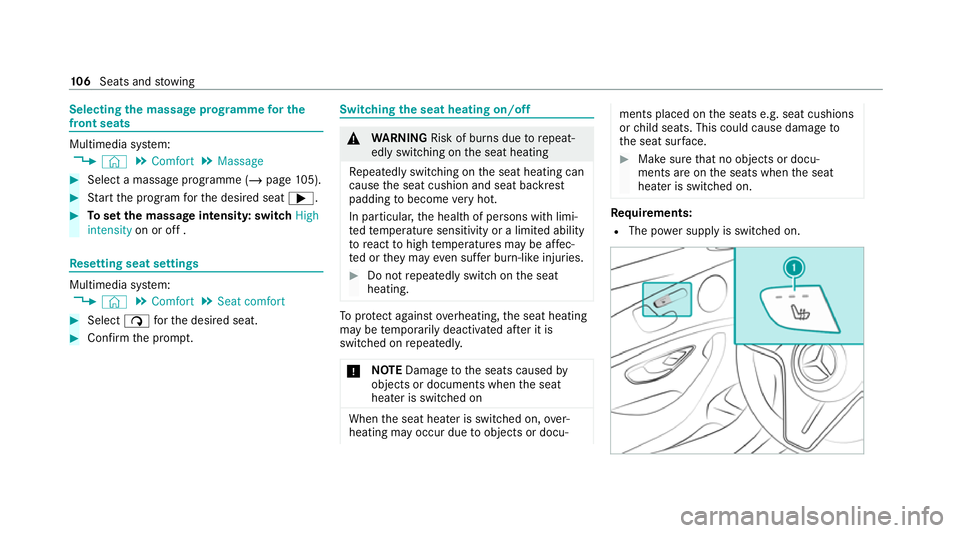
heating. To
protect against overheating, the seat heating
may be temp orarily deactivated af ter it is
switched on repeatedly.
* NO
TEDama getothe seats caused by
objects or documents when the seat
heater is switched on When
the seat heater is switched on, over‐
heating may occur due toobjects or docu‐ ments placed on
the seats e.g. seat cushions
or child seats. This could cause damage to
th e seat sur face. #
Makesure that no objects or docu‐
ments are on the seats when the seat
heater is switched on. Re
quirements:
R The po wer supply is switched on. 106
Seats and stowing
Page 111 of 489
Fo
lding bench seat in the load compa rtment Note
s onthefo lding bench seat &
WARNING Risk of inju rywhen the seat
backrest is not upright and loc ked in
position
The seat backrest of thefo lding bench seat
may fold down while theve hicle is in motion.
In this case, the seat belts may not per form
th eir intended pr otective function. #
Make sure that the seat backrests of
th ere ar ben chseat are loc ked in the
upright position. Obser
vethe no tes on "Seat belts" (/ page 40),
"Head restra ints" (/ page101) and "Children in
th eve hicle" (/ page51).
The folding bench seat is appr ovedfo r use only
with child seats designed forch ildren up tosix
ye ars old (/ page 62). In form ation on suitable
ch ild restra int sy stems on thefo lding bench seat
can be obtained at any Mercedes-Benz Service
Cent re. The
folding bench seat may be used only when
th e combined luggage co ver and net is ins talled.
The tailgate can be opened from thefo lding
bench seat. The switch is located on the wheel
ar ch on theright-hand side when vie wed in the
direction of tra vel.
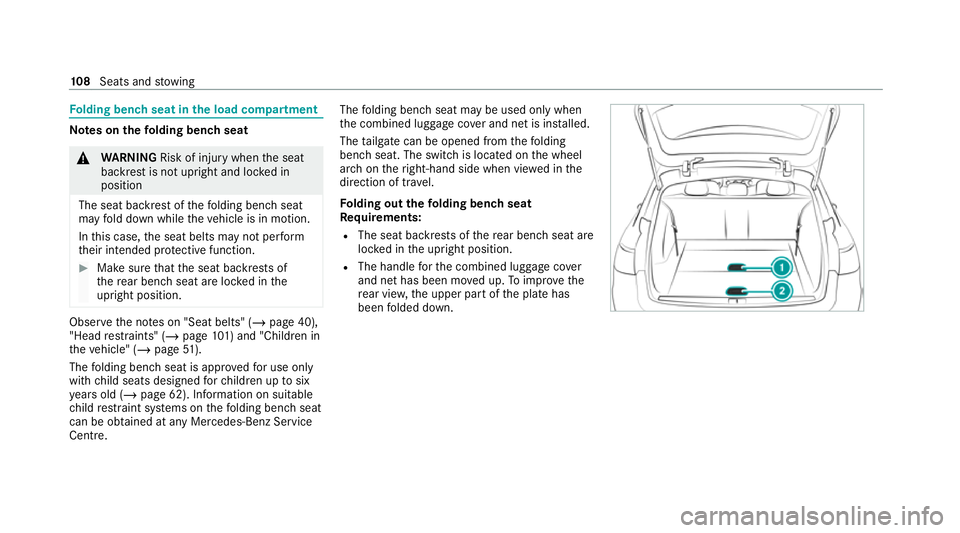
Fo lding out thefo lding bench seat
Requ irements:
R The seat backrests of there ar ben chseat are
loc ked in the upright position.
R The handle forth e combined luggage co ver
and net has been mo ved up. Toimpr ovethe
re ar vie w,the upper part of the plate has
been folded down. 108
Seats and stowing
Page 113 of 489
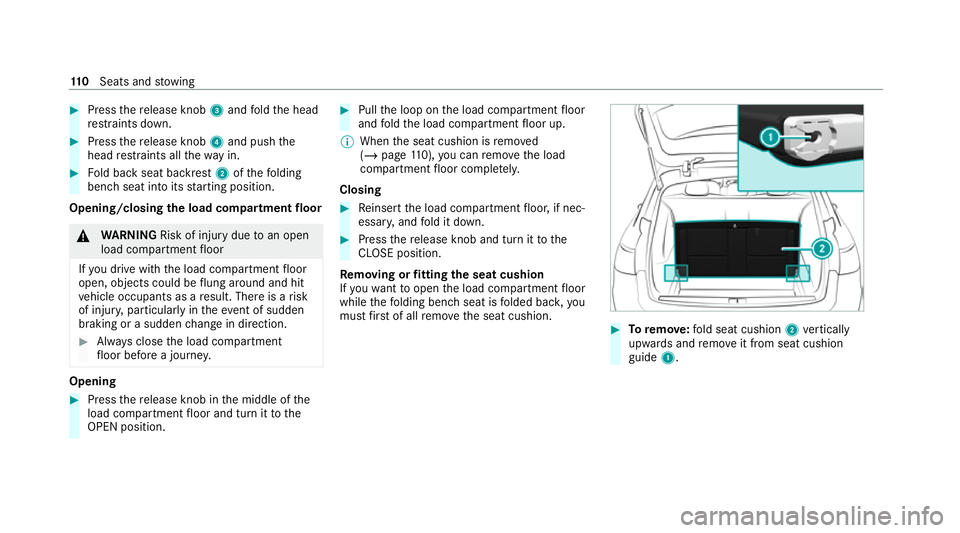
#
Press there lease knob 3and fold the head
re stra ints down. #
Press there lease knob 4and push the
head restra ints all thewa y in. #
Fold back seat backrest 2ofthefo lding
bench seat into its starting position.
Opening/closing the load compa rtment floor &
WARNING Risk of inju rydue toan open
load compartment floor
If yo u drive with the load compartment floor
open, objects could be flung around and hit
ve hicle occupants as a result. There is a risk
of injur y,particularly in theeve nt of sudden
braking or a sudden change in direction. #
Alw ays close the load compartment
fl oor before a journe y.Opening
#
Press there lease knob in the middle of the
load compartment floor and turn it tothe
OPEN position. #
Pull the loop on the load compartment floor
and fold the load compartment floor up.
% When the seat cushion is remo ved
( / page 110), you can remo vethe load
compartment floor comple tely.
Closing #
Reinse rtthe load compartment floor, if nec‐
essar y,and fold it down. #
Press there lease knob and turn it tothe
CLOSE position.
Re moving or fitting the seat cushion
If yo uwa nttoopen the load compartment floor
while thefo lding bench seat is folded bac k,you
must firs t of all remo vethe seat cushion. #
Toremo ve:fo ld seat cushion 2vertically
upwards and remo veit from seat cushion
guide 1. 11 0
Seats and stowing
Page 114 of 489
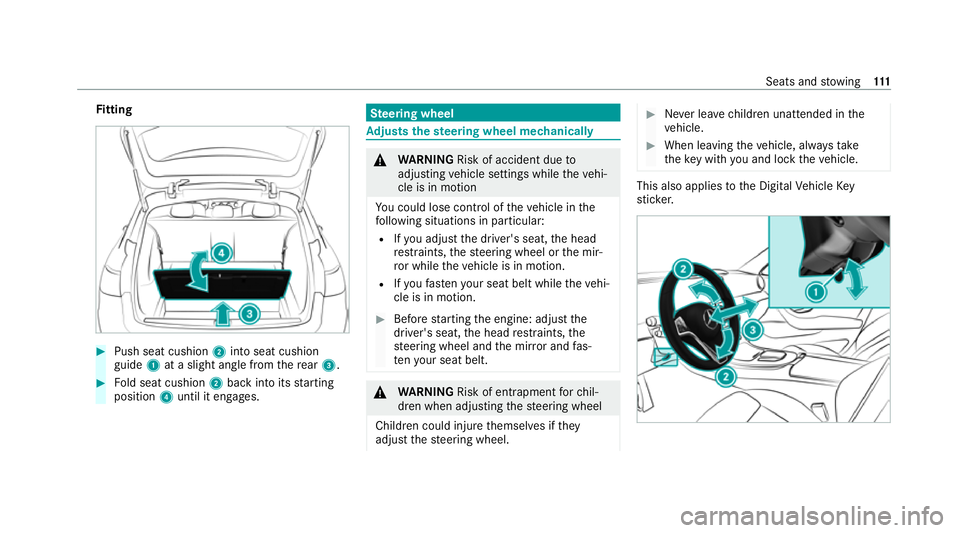
Fi
tting #
Push seat cushion 2into seat cushion
guide 1at a slight angle from there ar 3. #
Fold seat cushion 2back into its starting
position 4until it engages. Ste
ering wheel Ad
justs the steering wheel mechanically &
WARNING Risk of accident due to
adjusting vehicle settings while theve hi‐
cle is in motion
Yo u could lose cont rol of theve hicle in the
fo llowing situations in particular:
R Ifyo u adjust the driver's seat, the head
re stra ints, thesteering wheel or the mir‐
ro r while theve hicle is in motion.
R Ifyo ufast enyour seat belt while theve hi‐
cle is in motion. #
Before starting the engine: adjust the
driver's seat, the head restra ints, the
st eering wheel and the mir ror and fas‐
te nyo ur seat belt. &
WARNING Risk of entrapment forch il‐
dren when adjusting thesteering wheel
Children could injure themselves if they
adjust thesteering wheel. #
Never lea vechildren unat tended in the
ve hicle. #
When leaving theve hicle, alw aysta ke
th eke y with you and lock theve hicle. This also applies
tothe Digital Vehicle Key
st icke r. Seats and
stowing 111
Page 116 of 489
Easy entry and
exitfeature Using
the easy entry and exitfeature &
WARNING Risk of accident when pulling
aw ay during the adjustment process for
th e easy exitfeature
Yo u could lose cont rol of theve hicle. #
Alw ayswa it until the adjustment proc‐
ess is comple tebefore pulling away. &
WARNING Risk of becoming trapped
du ring adjustment of the easy entry and
ex itfeature
Yo u and other vehicle occupants – particu‐
lar lych ildren – could become trapped. #
Ensure that no one has a body part in
th e sweep of thesteering wheel or driv‐
er's seat.
If th ere is a risk of becoming trapped bythe
st eering wheel: #
Movethe adjustment le ver of thesteer‐
ing wheel.
The adjustment process will be stop‐
ped.
If th ere is a risk of becoming trapped bythe
driver's seat: #
Press the seat adjustment switch.
The adjustment process will be stop‐
ped. #
Never lea vechildren unat tended in the
ve hicle. #
When leaving theve hicle, alw aysta ke
th eke y with you and lock theve hicle. This also applies
tothe Digital Vehicle Key
st icke r.
Ve hicles with memory function: you can stop
th e adjustment process bypressing one of the
memory function position switches. &
WARNING Risk of becoming trapped if
ch ildren activate the easy entry andexit
fe ature‑
Children could become trapped if they acti‐
va te the easy entry ‑ andexitfeature, particu‐
lar lywhen unat tended. #
Never lea vechildren unat tended in the
ve hicle. #
When leaving theve hicle, alw aysta ke
th eke y with you and lock theve hicle. This also applies
tothe Digital Vehicle Key
st icke r.
If th e easy entry andexitfeature is active, the
st eering wheel will mo veupwards and the driv‐
er's seat will mo veback in thefo llowing situa‐
tions:
R You swit chthe ignition off with the driver's
door open.
R You open the driver's door with the ignition
switched off. Seats and
stowing 11 3
Page 117 of 489
%
The steering wheel will then mo veupwards
on ly if it is not already as high as it will go.
The driver's seat will then mo vebackwards
only if it is not already in there armost posi‐
tion.
The steering wheel and the driver's seat will
mo veback tothe last drive position in thefo l‐
lowing cases:
R You swit chthe po wer supp lyor the ignition
on when the driver's door is closed
R You close the driver's door with the ignition
switched on.
The last drive position will be sa ved when:
R You swit chthe ignition off.
R Vehicles with memory function: you call
up the seat settings via the memory function.
R Vehicles with memory function: you sa ve
th e seat settings via the memory function.
Ve hicles with memory function: press one of
th e memory function memory position switches
to stop the adjustment process. Setting
the easy entry and exitfeature Multimedia sy
stem:
4 © 5
Settings 5
Vehicle
5 Automatic seat adjustment
5 Easy Entry/Exit #
Activate or deacti vate the function. Memory function
Fu
nction of the memory function &
WARNING Risk of an accident if the
memory function is used while driving
If yo u use the memory function on the driv‐
er's side while driving, you could lose cont rol
of theve hicle as a result of the adjustments
being made. #
Only use the memory function on the
driver's side when theve hicle is station‐
ar y. &
WARNING Risk of entrapment when set‐
ting the seat with the memory function
When the memory function adjusts the seat,
yo u and other vehicle occupants – particu‐
lar lych ildren – could become trapped. #
During the adjustment process of the
memory function, make sure that no
one has any body parts in the sweep of
th e seat. #
If someone becomes trapped, press a
preset position button or seat adjust‐
ment switch immediately. &
WARNING Risk of entrapment if the
memory function is activated bychildren
Children could become trapped if they acti‐
va te the memory function, particularly when
unattended. #
Never lea vechildren unat tended in the
ve hicle. #
When leaving theve hicle, alw aysta ke
th eke y with you and lock theve hicle. 11 4
Seats and stowing