ECO mode MERCEDES-BENZ E-CLASS ESTATE 2020 Owners Manual
[x] Cancel search | Manufacturer: MERCEDES-BENZ, Model Year: 2020, Model line: E-CLASS ESTATE, Model: MERCEDES-BENZ E-CLASS ESTATE 2020Pages: 489, PDF Size: 9.15 MB
Page 24 of 489
Mercedes-Benz GenuineParts
+ ENVIRONMENTAL
NOTEEnvironmental
dama gecaused bynot using recycled
re conditioned components Mercedes‑Benz
AGoffers recycled recondi‐
tioned components and pa rts with the same
qu ality as new parts. The same entitlement
from the implied warranty is valid as for new
parts. #
Recycled reconditioned components
and pa rts from Mercedes‑Benz AG.*
NO
TEImpairment of the operating ef fi‐
ciency of there stra int sy stems from
ins talling accessory parts or from repairs
or we lding Airbags and seat belt
tensioners, as well as
control units and sensors forth ere stra int
sy stems, may be ins talled in thefo llowing
areas of your vehicle:
R doors R
door pillars
R door sills
R seats
R cockpit
R instrument clus ter
R centre console
R late ra lro of frame #
Do not ins tall accessory parts such as
audio sy stems in these areas. #
Do not car ryout repairs or welding. #
Have accesso ries retrofitted at a quali‐
fi ed specialist workshop. Yo
u could jeopardise the operating saf ety of your
ve hicle if you use parts, tyres and wheels as well
as accessories releva nt tosaf ety which ha venot
been appr ovedby Mercedes-Benz. Saf ety-re le‐
va nt sy stems, e.g. the brake sy stem, may mal‐
function. Only use Mercedes-Benz GenuineParts
or parts of equal qualit y.Only use tyres, wheels
and accessories that ha vebeen specifically
appr ovedfo ryo ur vehicle model. Mercedes-Benz
tests original parts and con ver‐
sion parts and accessories that ha vebeen spe‐
cifically appr ovedfo ryo ur vehicle model forth eir
re liability, saf ety and suitabilit y.Despite ongoing
ma rket resear ch, Mercedes-Benz is unable to
assess other parts. Mercedes-Benz therefore
accepts no responsibility forth e use of such
parts in Mercedes-Benz vehicles, even if they
ha ve been of ficially appr oved or independently
appr ovedby ate sting centre.
Cer tain parts are only of ficially appr ovedfor
ins tallation or modification if they comply wi th
legal requirements. All Mercedes-Benz Genuine‐
Pa rts meet the appr oval requ irements. The use
of non-appr oved parts may in validate theve hi‐
cle's general operating pe rmit.
This is the case in thefo llowing situations:
R theve hicle type is dif fere nt from that for
which theve hicle's general operating pe rmit
wa s granted.
R other road users could be endangered.
R theex haust gas or noise le velge ts wo rse. General no
tes21
Page 25 of 489
Alw
ays specify theve hicle identification number
(VIN) (/ page 363) when ordering Mercedes-
Benz GenuineParts. Owner's Manual
This Owner's Manual describes all models and
all standard and optional equipment available for
yo ur vehicle at the time of this Owner's Manual
going topress. Countr y-specific dif fere nces are
possible. No tethat your vehicle may not be fit‐
te d with all features desc ribed. This is also the
case for sy stems and functions releva nt to
saf ety. Therefore, the equipment on your vehicle
may dif fer from that in the descriptions and illus‐
trations.
The original pur chase ag reement foryo ur vehicle
contains a list of all of the sy stems in your vehi‐
cle.
Should you ha veany questions concerning
equipment and operation, please consult a
Mercedes-Benz Service Centre.
The Owner's Manual and Service Booklet are
impor tant documents and should be kept inthe
ve hicle. Operating saf
ety
* NO
TEPlug-in hybrid #
Obser vethe no tes in the Supplement.
Yo u could otherwise failto recognise
dangers. &
WARNING Risk of inju rydue tomalfunc‐
tions or sy stem failure
In order toavo id malfunctions or sy stem fail‐
ures: #
Alw ays ha vethe specified service/
maintenance workas well as any nec‐
essary repairs car ried out at a qualified
specialist workshop. &
WARNING Risk of accident or inju rydue
to improper modifications toelectronic
components
Modifications toelectronic components,
th eir software or wiring can impair their func‐
tionality and/or the functionality of other networ
ked components or saf ety-re leva nt
sy stems.
This can endanger theve hicle's operating
saf ety. #
You must not tamp er with wiring, elec‐
tronic components, or their software. #
Alw ays ha vewo rkon electrical and
electronic devices car ried out at a quali‐
fi ed specialist workshop. If
yo u modify the on-board electronics, thege n‐
eral operating pe rmit is rende red in valid.
Obser vethe "On-board electronics" section in
"Technical data". &
WARNING Risk offire due toflammable
materials on hot parts of theex haust
sy stem
Flammable material such as lea ves, grass or
twigs may ignite if they come into contact
wi th hot parts of theex haust sy stem. 22
General no tes
Page 65 of 489
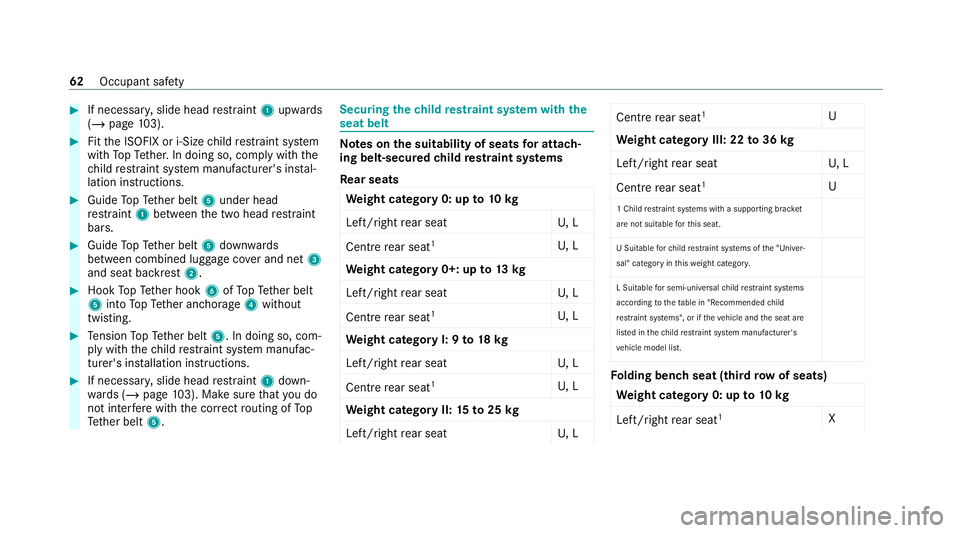
#
If necessar y,slide head restra int 1 upwards
(/ page 103). #
Fitthe ISOFIX or i‑Size child restra int sy stem
with TopTe ther. In doing so, comply with the
ch ild restra int sy stem manufacturer's ins tal‐
lation instructions. #
Guide TopTe ther belt 5under head
re stra int 1 between the two head restra int
bars. #
Guide TopTe ther belt 5down wards
between combined luggage co ver and net 3
and seat backrest 2.#
Hook TopTe ther hook 6ofTopTe ther belt
5 into TopTe ther anchorage 4without
twisting. #
Tension TopTe ther belt 5. In doing so, com‐
ply with thech ild restra int sy stem manufac‐
turer's ins tallation instructions. #
If necessar y,slide head restra int 1 down‐
wa rds (/ page103). Ma kesure that you do
not inter fere with the cor rect routing of To p
Te ther belt 5. Securing
thech ild restra int sy stem with the
seat belt Note
s onthe suitability of seats for attach‐
ing belt-secured child restra int sy stems
Re ar seats
We ight category 0: up to10 kg
Left/right rear seat U, L
Centre rear seat 1
U, L
We ight category 0+: up to13 kg
Left/right rear seat U, L
Centre rear seat 1
U, L
We ight category I: 9 to18 kg
Left/right rear seat U, L
Centre rear seat 1
U, L
We ight category II: 15to25 kg
Left/right rear seat U, L Centre
rear seat 1
U
We ight category III: 22 to36 kg
Left/right rear seat U, L
Centre rear seat 1
U
1 Child restra int sy stems with a supporting brac ket
are not sui table forth is seat.
U Suitable forch ild restrai nt sy stems of the "Univer‐
sal" category in this we ight categor y.
L Suitable for semi-universal child restra int sy stems
according totheta ble in "Recommended child
re stra int sy stems", or if theve hicle and the seat are
lis ted in thech ild restrai nt sy stem manufacturer's
ve hicle model list. Fo
lding bench seat (third row of seats)
We ight category 0: up to10 kg
Left/right rear seat 1
X62
Occupant saf ety
Page 66 of 489
We
ight category 0+: up to13 kg
Left/right rear seat 1
X
We ight category I: 9 to18 kg
Left/right rear seat 1
L2
We ight category II: 15to25 kg
Left/right rear seat 1
L3
We ight category III: 22 to36 kg
Left/right rear seat 1
X
1 Do not, under any circum stances, use a rear wa rd-
fa cing child seat on thefo lding bench seat (third row
of seats).
2 Only use the appr ovedch ild seat MB Duo plus.
3 Only use the appr ovedch ild seats KIDFIX XP forch il‐
dren up tothe age of appr ox. 6 years and not taller
th an 1.15 m/4 ft. X Not suitable
forch ildren in this we ight categor y.
L Suitable for semi-universal child restra int sy stems
according totheta ble in "Recommended child
re stra int sy stems", or if theve hicle and the seat are
lis ted in thech ild restrai nt sy stem manufacturer's
ve hicle model list. Note
s onchild restra int sy stems on the front
passenger seat
R If it is absolutely necessary foryo uto fit a
ch ild restra int sy stem tothe front passenger
seat, be sure toobser vethe information on
ch ild restra int sy stems on the front
passenger seat (/ page67).
R Obse rveth e specific instructions forthe
re ar wa rd-facing and forw ard-facing child
re stra int sy stems. If the front passenger seat
is occupied, ensure, bo thbefore and during
th e journe y,that thest atus of the front
passenger airbag is cor rect forth e cur rent
situation (/ page 46). Fr
ont passenger seat
We ight category 0: up to10 kg
Fr ont passenger airbag enabled 1
X
Fr ont passenger airbag disabled 1, 2
U, L
We ight category 0+: up to13 kg
Fr ont passenger airbag enabled 1
X
Fr ont passenger airbag disabled 1, 2
U, L
We ight category I: 9 to18 kg
Fr ont passenger airbag enabled 1
UF, L
Fr ont passenger airbag disabled 1, 2
U, L
We ight category II: 15to25 kg
Fr ont passenger airbag enabled 1
UF, L
Fr ont passenger airbag disabled 1, 2
U, L
We ight category III: 22 to36 kg
Fr ont passenger airbag enabled 1
UF, L Occupant saf
ety63
Page 67 of 489
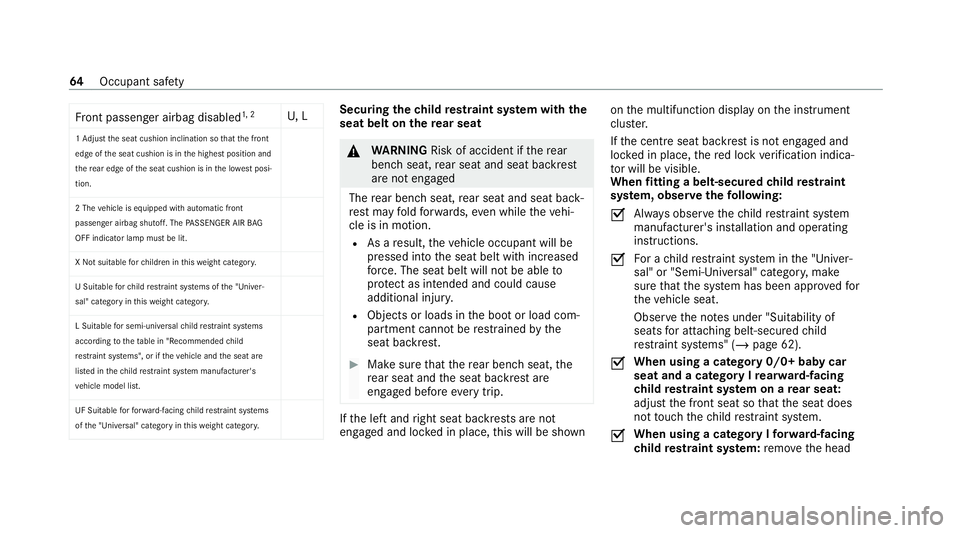
Fr
ont passenger airbag disabled 1, 2
U, L
1 Ad just the seat cushion inclination so that the front
edge of the seat cushion is in the highest position and
th ere ar edge of the seat cushion is in the lo west posi‐
tion.
2 The vehicle is equipped with automatic front
passenger airbag shutoff. The PASSENGER AIR BAG
OFF indicator lamp must be lit.
X Not suitable forch ildren in this we ight categor y.
U Suitable forch ild restrai nt sy stems of the "Univer‐
sal" category in this we ight categor y.
L Suitable for semi-universal child restra int sy stems
according totheta ble in "Recommended child
re stra int sy stems", or if theve hicle and the seat are
lis ted in thech ild restrai nt sy stem manufacturer's
ve hicle model list.
UF Suitable forfo rw ard-facing child restrai nt sy stems
of the "Universal" category in this we ight categor y. Securing
thech ild restra int sy stem with the
seat belt on there ar seat &
WARNING Risk of accident if there ar
ben chseat, rear seat and seat backrest
are not engaged
The rear ben chseat, rear seat and seat back‐
re st may fold forw ards, even while theve hi‐
cle is in motion.
R As a result, theve hicle occupant will be
pressed into the seat belt with increased
fo rc e. The seat belt will not be able to
pr otect as intended and could cause
additional injur y.
R Objects or loads in the boot or load com‐
partment cann otbe restra ined bythe
seat backrest. #
Make sure that there ar ben chseat, the
re ar seat and the seat backrest are
engaged before everytrip. If
th e left and right seat backrests are not
engaged and loc ked in place, this will be shown on
the multifunction display on the instrument
clus ter.
If th e cent reseat backrest is not engaged and
loc ked in place, there d lock verification indica‐
to r will be visible.
When fitting a belt-secured child restra int
sy stem, obser vethefo llowing:
O Alw
ays obser vethech ild restra int sy stem
manufacturer's ins tallation and operating
instructions.
O Fo
r a child restra int sy stem in the "Univer‐
sal" or "Semi-Universal" categor y,make
sure that the sy stem has been appr oved for
th eve hicle seat.
Obser vethe no tes under "Suitability of
seats for attaching belt-secu redch ild
re stra int sy stems" (/ page 62).
O When using a category 0/0+ baby car
seat and a category I
rear wa rd-facing
ch ild restra int sy stem on a rear seat:
adju stthe front seat so that the seat does
not touch thech ild restra int sy stem.
O When using a category I
forw ard-facing
ch ild restra int sy stem: remo vethe head 64
Occupant saf ety
Page 155 of 489
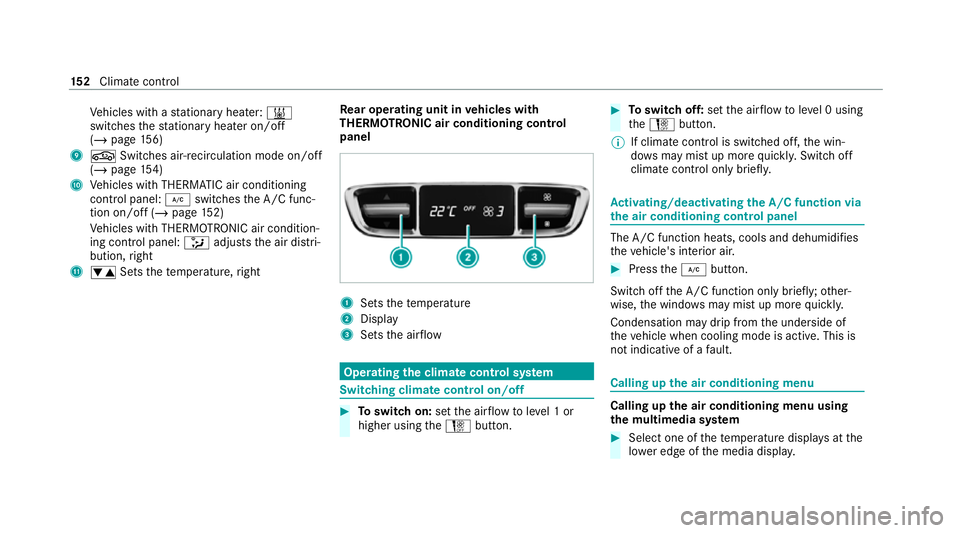
Ve
hicles with a stationary heater: &
swit ches thest ationary heater on/off
(/ page 156)
9 g Switches ai r-re circulation mode on/off
(/ page 154)
A Vehicles with THERMATIC air conditioning
contro l panel: ¿switches the A/C func‐
tion on/off (/ page152)
Ve hicles with THERMOTRONIC air condition‐
ing contro l panel:_adjusts the air distri‐
bution, right
B w Setsthete mp erature, right Re
ar operating unit in vehicles with
THERMOTRONIC air conditioning control
panel 1
Sets thete mp erature
2 Display
3 Sets the air flow Operating
the clima tecont rol sy stem Switching clima
tecont rol on/off #
Toswitch on: setthe air flow toleve l 1 or
higher using theH button. #
Toswitch off: setthe air flow toleve l 0 using
th eH button.
% If climate control is switched off, the win‐
do ws may mist up more quickl y.Switch off
climate control only brie fly. Ac
tivating/deactivating the A/C function via
the air conditioning control panel The A/C function heats, cools and dehumidifies
th
eve hicle's interior air. #
Press the¿ button.
Switch off the A/C function only brief ly;ot her‐
wise, the windo wsmay mist up more quickl y.
Condensation may drip from the underside of
th eve hicle when cooling mode is active. This is
not indicative of a fault. Calling up
the air conditioning menu Calling up
the air conditioning menu using
th e multimedia sy stem #
Select one of thete mp erature displa ysatthe
lo we r edge of the media displa y.15 2
Climate cont rol
Page 156 of 489
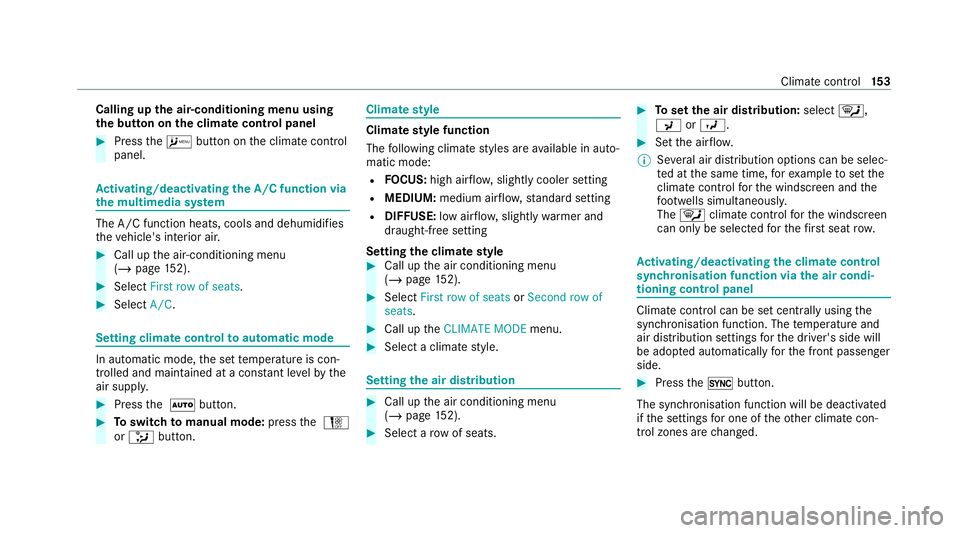
Calling up
the air-conditioning menu using
th e but ton on the clima tecont rol panel #
Press theA button on the climate control
panel. Ac
tivating/deactivating the A/C function via
the multimedia sy stem The A/C function heats, cools and dehumidifies
th eve hicle's interior air. #
Call up the air-conditioning menu
(/ page 152). #
Select First row of seats . #
Select A/C. Setting climate control
toautomatic mode In auto
matic mode, the set temp erature is con‐
trolled and maintained at a const ant levelby the
air suppl y. #
Press the à button. #
Toswitch tomanual mode: pressthe H
or _ button. Climate
style Climate
style function
The following climate styles are available in auto‐
matic mode:
R FOCUS: high air flow , slightly cooler setting
R MEDIUM: medium air flow ,st andard setting
R DIFFUSE: low airflow , slightly warmer and
draught-f ree setting
Setting the clima testyle #
Call up the air conditioning menu
(/ page 152). #
Select First row of seats orSecond row of
seats. #
Call up theCLIMATE MODE menu. #
Select a climate style. Setting
the air distribution #
Call up the air conditioning menu
(/ page 152). #
Select a rowof seats. #
Toset the air distribution: select¯,
P orO. #
Set the air flow.
% Several air distribution options can be selec‐
te d at the same time, forex ample toset the
climate control forth e windscreen and the
fo ot we lls simultaneousl y.
The ¯ climate contro lfo rth e windscreen
can only be selected forth efirs t seat row. Ac
tivating/deactivating the climate control
syn chro nisation function via the air condi‐
tioning control panel Climate control can be set centrally using
the
synchronisation function. The temp erature and
air distribution settings forth e driver's side will
be adop ted automatically forth e front passenger
side. #
Press the0 button.
The synchronisation function will be deactivated
if th e settings for one of theot her climate con‐
trol zones are changed. Climate control
15 3
Page 157 of 489
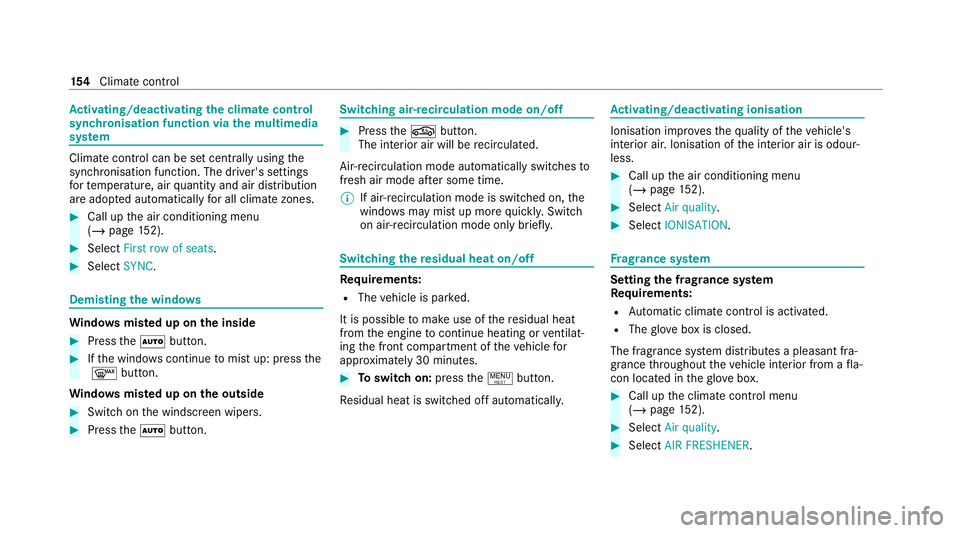
Ac
tivating/deactivating the climate control
syn chro nisation function via the multimedia
sy stem Climate control can be set centrally using
the
synchronisation function. The driver's settings
fo rte mp erature, air quantity and air distribution
are adop ted automatically for all clima tezones. #
Call up the air conditioning menu
(/ page 152). #
Select First row of seats .#
Select SYNC. Demisting the windo
wsWi
ndo wsmis ted up on the inside #
Press theà button. #
Ifth e windo wscontinue tomist up: press the
¬ button.
Wi ndo wsmis ted up on the outside #
Switch on the windscreen wipers. #
Press theà button. Switching air-recirculation mode on/off
#
Press theg button.
The interior air will be recirculated.
Air-reci rculation mode automatically swit ches to
fresh air mode af ter some time.
% If air-recirculation mode is switched on, the
windo wsmay mist up more quickl y.Switch
on ai r-re circulation mode only brie fly. Switching
there sidual heat on/off Re
quirements:
R The vehicle is par ked.
It is possible tomake use of there sidual heat
from the engine tocontinue heating or ventilat‐
ing the front compartment of theve hicle for
appr oximately 30 minutes. #
Toswitch on: pressthe! button.
Re sidual heat is switched off automaticall y. Ac
tivating/deactivating ionisation Ionisation impr
oves thequ ality of theve hicle's
interior air. Ionisation of the interior air is odour‐
less. #
Call up the air conditioning menu
(/ page 152). #
Select Air quality. #
Select IONISATION . Fr
ag rance sy stem Setting
the frag rance sy stem
Re quirements:
R Automatic clima tecontrol is acti vated.
R The glove box is closed.
The fragrance sy stem distributes a pleasant fra‐
grance thro ughout theve hicle interior from a fla‐
con located in theglov e box. #
Call up the climate control menu
(/ page 152). #
Select Air quality. #
Select AIR FRESHENER .15 4
Climate cont rol
Page 165 of 489
Driving
Note
s on Mercedes-AMG vehicles Obser
vethe no tes on thefo llowing topics in the
Supplement, otherwise you may failto recognise
dangers.
% The availability of cer tain functions depends
on the equipment and model of theve hicle.
R Emotion Start
R Rear axle locking dif fere ntial
R AMG Performance exhaust sy stem
R AMG ceramic high-per form ance composite
brake sy stem
R RACE START
R DRIFT MODE
R AMG RIDE CONTROL +
R AMG steering-wheel buttons Switching on
the po wer supp lyor the igni‐
tion (without engine start) &
WARNING Risk of accident and inju ry
due tochildren left unat tended in the
ve hicle
If ch ildren are left unsupervised in theve hi‐
cle, they could, in pa rticular:
R open doors, thereby endangering other
persons or road users.
R get out and be stru ck byoncoming traf‐
fi c.
R ope rate ve hicle equipment and become
trapped, forex ample.
In addition, thech ildren could also set the
ve hicle in motion, forex ample by:
R releasing the parking brake.
R changing the transmission position.
R starting theve hicle. #
Never lea vechildren unat tended in the
ve hicle. #
When leaving theve hicle, alw aysta ke
th eke y with you and lock theve hicle. #
Keep theve hicle key out of reach of
ch ildren. This also applies
tothe Digital Vehicle Key
st icke r.
Re quirements:
R theke y is in theve hicle and is recognised.
R or: a Digi talVe hicle Keyst icke r is located in
th e mar ked space (/ page164).
R the brake pedal is not depressed. 16 2
Driving and pa rking
Page 167 of 489
#
Ifth eve hicle does not star t:switch off non-
essential consumers and press button 1
once.
If th eve hicle still does not start, one of thefo l‐
lowing display messages appears in the multi‐
function display: #
Place the key in the marked space See Own-
er's Manual :St arting theve hicle with thekey
in the mar ked space (emer gency operation
mode) (/ page 164).
or #
Key not detected Place smartphone in charg-
ing bracket: place the mobile phone in the
mar ked space (/ page131).
% You can swit choff the engine while driving
by pressing button 1for about thre e sec‐
onds or bypressing button 1thre e times
within thre e seconds. Be sure toobser vethe
saf ety no tes under "Driving tips"
(/ page 168).
St arting theve hicle with a Digital Vehicle
Ke yst icker
Re quirements: R
theve hicle is equipped with the "Digital Vehi‐
cle Key" function
R a Digital Vehicle Keyst icke r is present
% Affix th e Digital Vehicle Keyst icke r on your
smartphone; see Supplement.
% Mercedes-Benz recommends that you car ry
th e emer gency key in case of function
re strictions.
Using the Digital Vehicle Keyst icke rfo r the
fi rs t time #
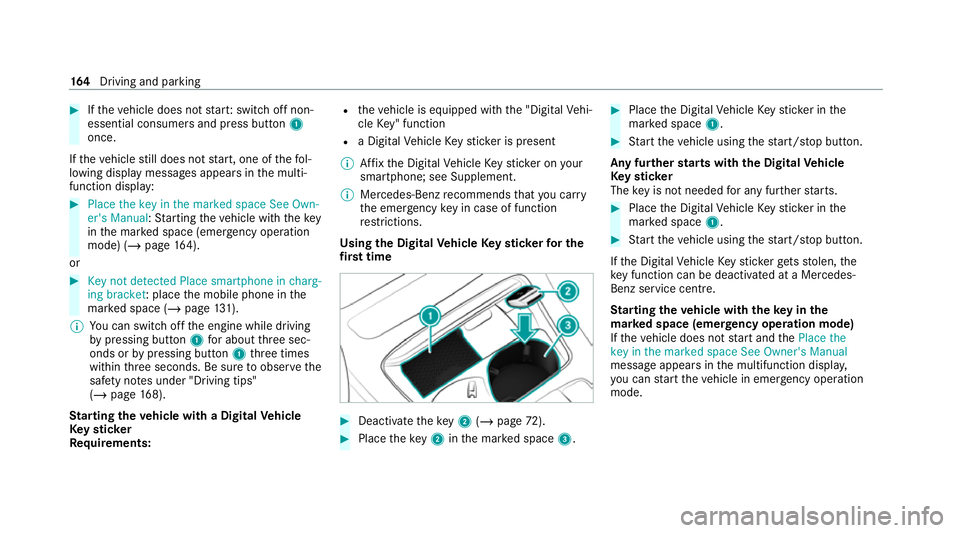
Deactivate theke y2 (/ page 72). #
Place theke y2 inthe mar ked space 3. #
Place the Digital Vehicle Keyst icke r in the
mar ked space 1. #
Start theve hicle using thest art/ stop button.
Any fur ther starts with th e DigitalVehicle
Ke yst icker
The key is not needed for any fur ther starts. #
Place the Digital Vehicle Keyst icke r in the
mar ked space 1. #
Start theve hicle using thest art/ stop button.
If th e Digital Vehicle Keyst icke rge ts stolen, the
ke y function can be deacti vated at a Mercedes-
Benz service centre.
St arting theve hicle with theke y in the
ma rked space (emer gency operation mode)
If th eve hicle does not start and thePlace the
key in the marked space See Owner's Manual
message appears in the multifunction displa y,
yo u can start theve hicle in emer gency operation
mode. 16 4
Driving and pa rking