fuel MERCEDES-BENZ E-CLASS SALOON 2008 User Guide
[x] Cancel search | Manufacturer: MERCEDES-BENZ, Model Year: 2008, Model line: E-CLASS SALOON, Model: MERCEDES-BENZ E-CLASS SALOON 2008Pages: 401, PDF Size: 6.89 MB
Page 71 of 401
Opening and closing
68(Y
page 109). You can close them using
the convenience closing feature
(Y page 109).
i If the vehicle has been parked for a long
time, you must pull the door handle to acti-
vate the KEYLESS GO functions.
Important notes R
If the KEYLESS GO key is removed from the
vehicle (e.g. in luggage or an article of
clothing), it will no longer be possible to
lock or start the vehicle.
R If the KEYLESS GO key is removed from the
vehicle while the engine is running, e.g. if
the front passenger leaves the vehicle with
the KEYLESS GO key, the following mes-
sage will appear in the multi-function dis-
play as you pull away: Key not detec-
ted.
R If the KEYLESS GO key is in the vehicle, the
vehicle can be started at any time. If you
have left the KEYLESS GO key in the vehi-
cle, the following message will appear in
the multi-function display when you lock
the vehicle: Key still in vehicle .Factory settings X
To unlock centrally: pull the door handle.
The turn signals flash once. The locking
knobs in the doors pop up. The anti-theft
alarm system* is deactivated.
When it is dark, the surround lighting also
comes on if it is activated in the on-board
computer.
i If you do not open either a door or the
boot lid/tailgate after you have unlocked
the vehicle, it will automatically relock after
approximately 40 seconds.
i There is a danger of the vehicle being
unlocked unintentionally. This could occur
if the KEYLESS GO key is within one metre
of the vehicle and the door handle is
splashed with water. This could also occur
when cleaning the door handle. 1
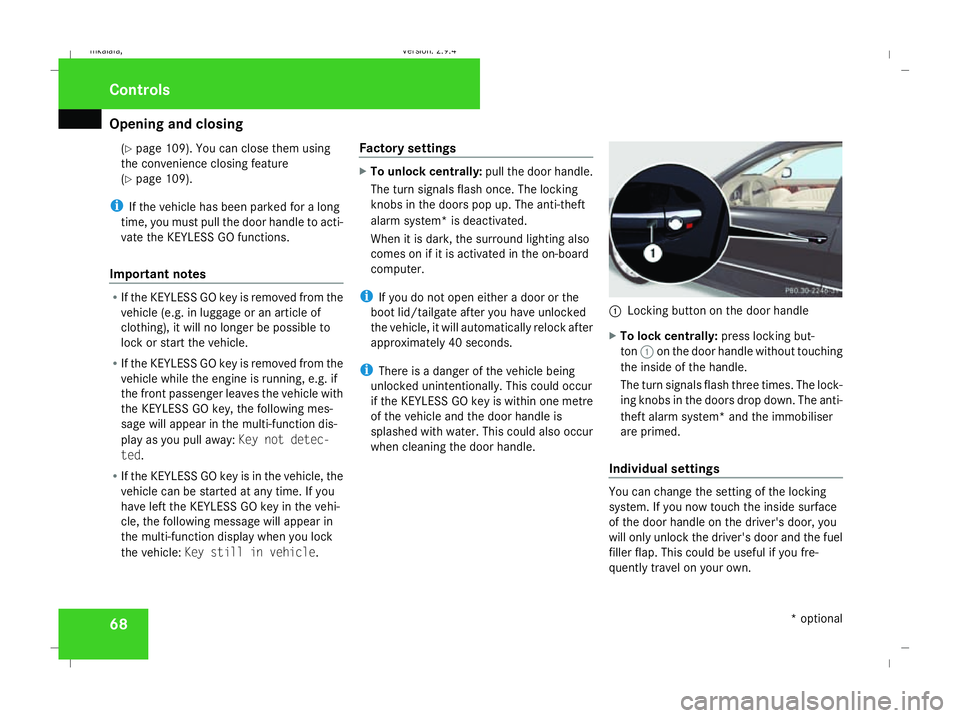
Locking button on the door handle
X To lock centrally: press locking but-
ton 1on the door handle without touching
the inside of the handle.
The turn signals flash three times. The lock-
ing knobs in the doors drop down. The anti-
theft alarm system* and the immobiliser
are primed.
Individual settings You can change the setting of the locking
system. If you now touch the inside surface
of the door handle on the driver's door, you
will only unlock the driver's door and the fuel
filler flap. This could be useful if you fre-
quently travel on your own. Controls
* optional
211_AKB; 2; 5, en-GB
mkalafa,
Version: 2.9.4 2008-02-29T16:57:07+01:00 - Seite 68Dateiname: 6515_3416_02_buchblock.pdf; preflight
Page 122 of 401
Transmission
119
currently selected and engaged is shown in
the display.
Upshifting
X
Briefly press the selector lever to the right
towards D+
or
X Pull the right-hand steering wheel gearshift
paddle (Y page 118).
The automatic transmission shifts up to the
next gear.
Vehicles with AMG engines
! In manual gearshift program M, the auto-
matic transmission does not shift up auto-
matically even when the limiting speed for
the current gear is reached. When the lim-
iting speed is reached, the fuel supply is cut
to prevent the engine from overrevving.
You must make sure that the engine speed
does not reach the red area of the rev coun-
ter. There is otherwise a risk of engine
damage.
X Shift up a gear when the ^upshift symbol
appears in the display instead of M.
When the AMG display is switched on, the
display colour changes to red and UPappears next to the gear indicator, instructing you to
shift up.
Downshifting G
Risk of accident
Do not change down for additional engine
braking on a slippery road surface. This
could cause the drive wheels to lose their
grip and the vehicle could skid.
X Briefly press the selector lever to the left
towards D-
or
X Pull the left-hand steering wheel gearshift
paddle (Y page 118).
The automatic transmission shifts down to
the next gear.
i For maximum acceleration, pull the left-
hand steering wheel gearshift paddle until
the transmission selects the optimum gear
for the current speed.
Kickdown
i It is not possible to use kickdown in the
manual gearshift program Mon vehicles
with AMG engines. You can also use kickdown for maximum
acceleration in manual gearshift program
M.
X Depress the accelerator pedal beyond the
pressure point.
The transmission shifts to a lower gear
depending on the engine speed.
i It is not possible to shift gears using the
steering wheel gearshift paddles during
kickdown. Controls
211_AKB; 2; 5, en-GB
mkalafa
,V ersion: 2.9.4
2008-02-29T16:57:07+01:00 - Seite 119 ZDateiname: 6515_3416_02_buchblock.pdf; preflight
Page 124 of 401
On-board computer
121Resetting the trip meter
X Select the standard display menu
(Y page 125).
X Press and hold reset button 1until the trip
meter is reset. Speedometer with segments
The segments in the speedometer indicate
which speed range is available.
Cruise control mode:
The segments light up from the stored speed
to the maximum speed.
Distronic* mode:
One or two segments around the stored
speed light up.
Variable Speedtronic mode:
The segments light up from the start of the
scale to the selected limit speed. Rev counter
The red band in the rev counter indicates the
engine's overrevving range. The fuel supply is
interrupted to protect the engine when the
red band is reached.
! Do not drive in the overrevving range.
Doing so will damage the engine. H
Environmental note
Avoid driving at high engine speeds, as this
increases your vehicle's consumption
unnecessarily and pollutes the environ-
ment through increased emissions. Outside temperature display
G
Risk of accident
The road surface may be icy, especially in
wooded areas or on bridges, even if tem-
peratures are just above freezing point. The
vehicle could skid if you fail to adapt your
driving style. You should therefore always
adapt your driving style and speed to suit
the weather conditions.
There is a short delay before a change in out-
side temperature is displayed. On-board computer
Points to remember
The on-board computer is activated as soon
as the key is turned to position 1in the igni-
tion lock. You can use the on-board computer
to call up information relating to your vehicle
and to make and adjust settings.
You can call up the next service due date,
select the display language for the instrument
cluster and set other functions. G
Risk of accident
Only use the on-board computer when road
and traffic conditions permit. You would
otherwise be distracted and unable to con-
centrate properly on driving, and could
cause an accident.
The on-board computer shows information in
the multi-function display. Controls
* optional
211_AKB; 2; 5, en-GB
mkalafa,
Version: 2.9.4
2008-02-29T16:57:07+01:00 - Seite 121 ZDateiname: 6515_3416_02_buchblock.pdf; preflight
Page 141 of 401
On-board computer
138 G
Risk of fire and poisoning
The operation of the auxiliary heating pro-
duces hot, toxic exhaust fumes. The fuel
vapours produced during refuelling could
ignite on the hot exhaust system.
Do not switch on the auxiliary heating at
filling stations or in enclosed spaces, for
instance, a garage, if there is no air extrac-
tion system.
You could otherwise endanger yourself and
others.
The Auxiliary heat. function can be called
up directly.
X Turn the key to position 1or 2in the ignition
lock.
X Press the button for the auxiliary heating on
the centre console (Y page 178).
or
X Press the èor· button to select the
Settings... menu.
X Press the jbutton to call up the selec-
tion of submenus.
X Press the æorç button to select the
Heater submenu.
X Press the jbutton to select Auxiliary
heat.. X
Press the æorç button to select
one of the three switch-on times or Timer
off (auxiliary heating switched off).
When a switch-on time is selected, the yel-
low indicator lamp lights up in the auxiliary
heating button.
X Press the j,èorÿ button to
select a different display.
Changing the switch-on time for the
auxiliary heating* This function is only displayed if you have
selected a switch-on time. Here you can enter
the time at which the auxiliary heating is to
be switched on.
X
Press the èor· button to select the
Settings... menu.
X Press the jbutton to call up the selec-
tion of submenus.
X Press the æorç button to select the
Heater submenu.
X Press the jbutton to select Switch-on
time X Set hours.
X Press the æorç button to set the
hour. X
Press the jbutton to select Switch-on
time X Set minutes .
X Press the æorç button to set the
minutes.
After changing from one menu to another,
the new time setting is stored. The yellow
indicator lamp lights up on the button for
the auxiliary heating on the centre console.
X Press the j,èorÿ button to
select a different display.
Activating/deactivating the easy-
entry/exit feature* i
For more information on the easy-entry/
exit feature, see (Y page 90). G
Risk of injury
When the easy-entry/exit feature is active,
the steering wheel moves. There is a risk of
occupants becoming trapped. Before acti-
vating the easy-entry/exit feature, make
sure that nobody can become trapped.
Do not leave children unsupervised in the
vehicle, even if they are secured in a child
restraint system. The children could open
the driver's door and thereby unintention- Controls
* optional
211_AKB; 2; 5, en-GB
mkalafa,
Version: 2.9.4 2008-02-29T16:57:07+01:00 - Seite 138Dateiname: 6515_3416_02_buchblock.pdf; preflight
Page 143 of 401
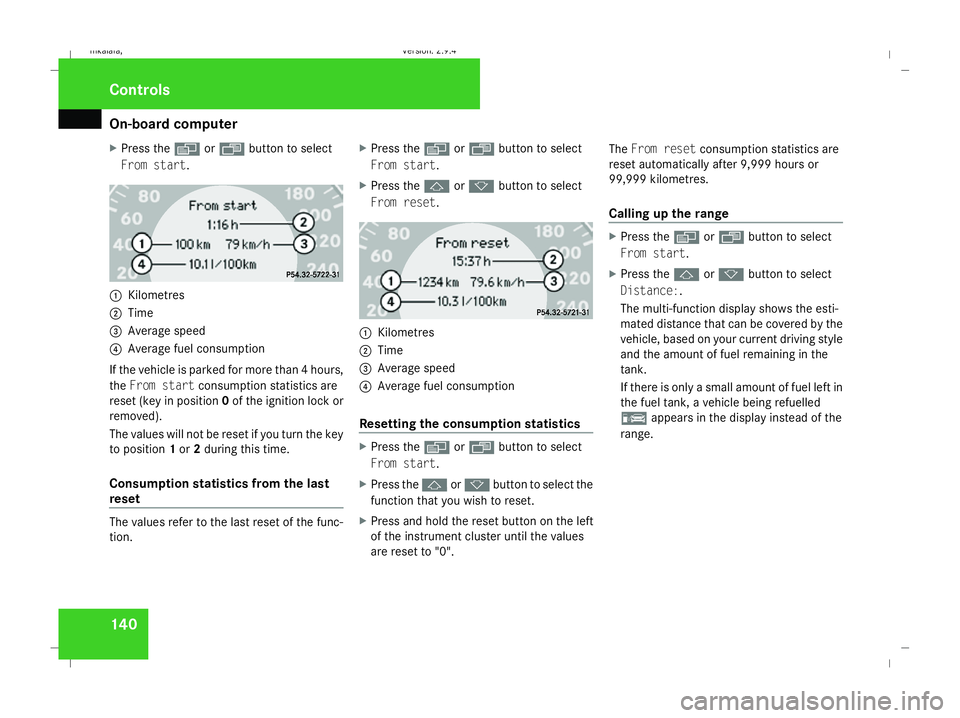
On-board computer
140
X
Press the èor· button to select
From start. 1
Kilometres
2 Time
3 Average speed
4 Average fuel consumption
If the vehicle is parked for more than 4 hours,
the From start consumption statistics are
reset (key in position 0of the ignition lock or
removed).
The values will not be reset if you turn the key
to position 1or 2during this time.
Consumption statistics from the last
reset The values refer to the last reset of the func-
tion. X
Press the èor· button to select
From start.
X Press the jork button to select
From reset. 1
Kilometres
2 Time
3 Average speed
4 Average fuel consumption
Resetting the consumption statistics X
Press the èor· button to select
From start.
X Press the jork button to select the
function that you wish to reset.
X Press and hold the reset button on the left
of the instrument cluster until the values
are reset to "0". The
From reset consumption statistics are
reset automatically after 9,999 hours or
99,999 kilometres.
Calling up the range X
Press the èor· button to select
From start.
X Press the jork button to select
Distance:.
The multi-function display shows the esti-
mated distance that can be covered by the
vehicle, based on your current driving style
and the amount of fuel remaining in the
tank.
If there is only a small amount of fuel left in
the fuel tank, a vehicle being refuelled
¿ appears in the display instead of the
range. Controls
211_AKB; 2; 5, en-GB
mkalafa, Version: 2.9.4 2008-02-29T16:57:07+01:00 - Seite 140Dateiname: 6515_3416_02_buchblock.pdf; preflight
Page 180 of 401
Air conditioning
177
X
To deactivate: press theTbutton.
REST is no longer shown in the display.
i The residual heat automatically switches
off after around 30 minutes or if:
R the ignition is switched on
R the battery voltage drops Switching auxiliary heating/ventila-
tion* on/off
G
Risk of poisoning
Exhaust fumes are produced when the aux-
iliary heating is in operation. Inhaling these
exhaust fumes can be poisonous. You
should therefore switch off the auxiliary
heating in confined spaces without an
extraction system, e.g. a garage. G
Risk of fire
When operating the auxiliary heating, parts
of the vehicle may become very hot, and
highly inflammable material such as fuels
could be ignited. Operating the auxiliary
heating is thus prohibited at filling stations
or when your vehicle is being refuelled. You must therefore switch off the auxiliary heat-
ing at filling stations.
The auxiliary heating heats the air in the vehi-
cle interior to a temperature between 20 †
and 24 †, without depending on heat emitted
by the running engine. The auxiliary heating
is operated using fuel directly from the vehi-
cle's fuel tank. For this reason, the tank con-
tent must be at least at reserve fuel level to
ensure that the auxiliary heating functions.
The auxiliary heating/ventilation automati-
cally adjusts to changes in temperature and
weather conditions. For this reason, the aux-
iliary heating could switch from ventilation
mode to heating mode or from heating mode
to ventilation mode.
You cannot use the auxiliary ventilation to
cool the vehicle interior to a temperature
lower than the outside temperature.
Before activating X
Make sure that the key is in position 2in
the ignition lock.
X Set the temperature to a value between
20 † and 24 †.
The auxiliary heating/ventilation can be acti-
vated even when the air conditioning is being controlled manually. Optimum comfort can
be attained when the system is set to auto-
matic mode. Set the desired temperature
within this range. If a higher temperature is
set, the vehicle is heated to 24 †. If a lower
temperature is set, the vehicle is heated to
20 †.
Activating/deactivating the auxiliary
heating/ventilation
The auxiliary heating/ventilation can be acti-
vated or deactivated using the remote control
or the button on the centre console.
The on-board computer can be used to spec-
ify up to three departure times, one of which
may be preselected (Y
page 138). Cont
rols
* optional
211_AKB; 2; 5, en-GB
mkalafa ,V ersion: 2.9.4
2008-02-29T16:57:07+01:00 - Seite 177 ZDateiname: 6515_3416_02_buchblock.pdf; preflight
Page 182 of 401
Air conditioning
179
i
More information about the auxiliary
heating can be found in the "Practical
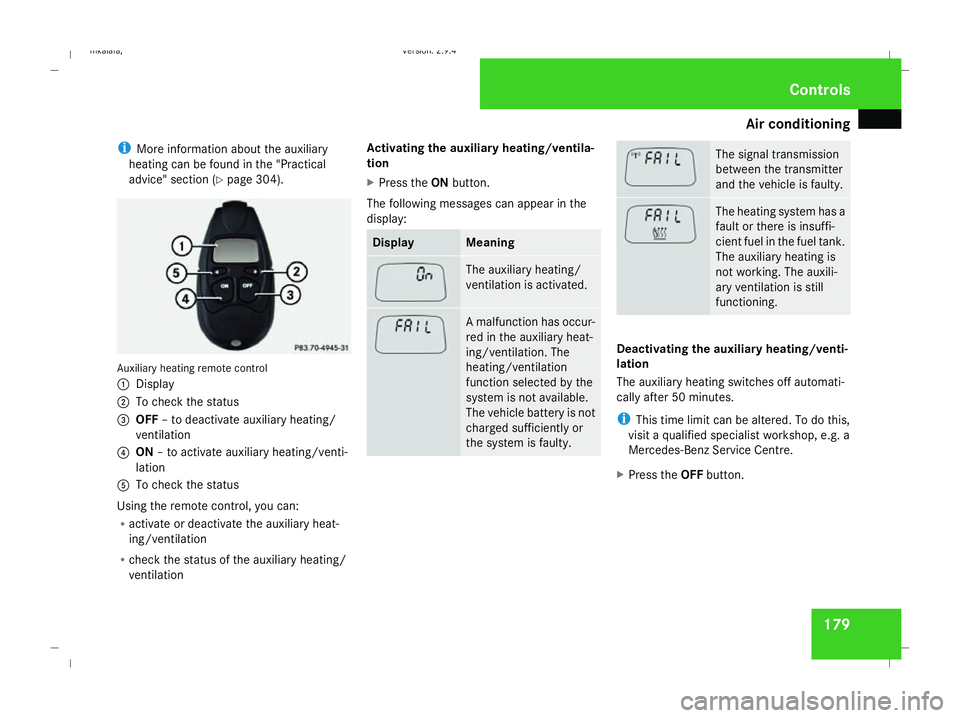
advice" section (Y page 304). Auxiliary heating remote control
1 Display
2 To check the status
3 OFF – to deactivate auxiliary heating/
ventilation
4 ON – to activate auxiliary heating/venti-
lation
5 To check the status
Using the remote control, you can:
R activate or deactivate the auxiliary heat-
ing/ventilation
R check the status of the auxiliary heating/
ventilation Activating the auxiliary heating/ventila-
tion
X
Press the ONbutton.
The following messages can appear in the
display: Display Meaning
The auxiliary heating/
ventilation is activated.
A malfunction has occur-
red in the auxiliary heat-
ing/ventilation. The
heating/ventilation
function selected by the
system is not available.
The vehicle battery is not
charged sufficiently or
the system is faulty. The signal transmission
between the transmitter
and the vehicle is faulty.
The heating system has a
fault or there is insuffi-
cient fuel in the fuel tank.
The auxiliary heating is
not working. The auxili-
ary ventilation is still
functioning.
Deactivating the auxiliary heating/venti-
lation
The auxiliary heating switches off automati-
cally after 50 minutes.
i
This time limit can be altered. To do this,
visit a qualified specialist workshop, e.g. a
Mercedes-Benz Service Centre.
X Press the OFFbutton. Cont
rols
211_AKB; 2; 5, en-GB
mkalafa
, Version: 2.9.4 2008-02-29T16:57:07+01:00 - Seite 179 ZDateiname: 6515_3416_02_buchblock.pdf; preflight
Page 220 of 401
217
Running-in notes
............................... 218
Refuelling ........................................... 218
Engine compartment ........................222
Tyres and wheels .............................. 227
Winter driving ................................... 234
Driving tips ........................................ 236
Driving abroad ................................... 238
Trailer towing .................................... 239
Service ............................................... 243
Care .................................................... 244 Operation
211_AKB; 2; 5, en-GB
mkalafa,
Version: 2.9.4 2008-02-29T16:57:07+01:00 - Seite 217Dateiname: 6515_3416_02_buchblock.pdf; preflight
Page 221 of 401
Refuelling
218 Running-in notes
The first 1,500 km
If you treat the engine with sufficient care
from the very start, it will reward you with
excellent performance for a very long period
afterwards.
R You should therefore drive at varying road
and engine speeds for the first 1,500 km.
R Avoid heavy loads, e.g. driving at full throt-
tle, during this time. Do not exceed 2
/ 3 of
the maximum permissible engine speed for
each gear.
R Change gear in good time.
R Do not shift down a gear manually in order
to brake.
Vehicles with automatic transmission*:
R Try to avoid depressing the accelerator
pedal beyond the pressure point (kick-
down).
R Only use ranges 3,2or 1for slow driving,
e.g. in mountainous terrain.
After 1,500 km you may gradually bring the
vehicle up to full road and engine speeds.
Additional driving tips for AMG vehicles: R
Do not drive faster than 140 km/h for the
first 1,500 km.
R Only bring the engine up to a maximum
speed of 4,500 rpm for a brief period.
i You should also observe these notes if the
engine or rear axle transmission on your
vehicle has been replaced. AMG vehicles with a rear axle differ-
ential lock*
Your vehicle is equipped with a self-locking
differential on the rear axle. To better protect
the differential gear on the rear axle, you
should perform an oil change after a running-
in phase of 3,000 km. This oil change will
increase the service life of your differential.
Have the oil change performed at a qualified
specialist workshop. Mercedes-Benz recom-
mends that you use a Mercedes-Benz Service
Centre for this purpose. Refuelling
Refuelling
G
Risk of explosion
Fuel is highly flammable. Fire, naked flames
and smoking are therefore prohibited when
handling fuels.
Switch off the engine and the auxiliary heat-
ing* before refuelling. G
Risk of injury
Do not come into direct contact with fuel.
Direct skin contact with fuels or the inha-
lation of fuel vapours is a health hazard. G
Risk of fire
Do not use petrol to refuel vehicles with a
diesel engine. Never mix diesel with petrol.
This causes damage to the fuel system and
engine and could result in the vehicle catch-
ing fire.
! Do not use petrol to refuel vehicles with a
diesel engine. Do not use diesel to refuel
vehicles with a petrol engine. Even small
amounts of the wrong fuel will cause dam-
age to the injection system. Damage result-
ing from adding the wrong fuel is not
covered by the warranty. Operation
* optional
211_AKB; 2; 5, en-GB
mkalafa
,V ersion: 2.9.4
2008-02-29T16:57:07+01:00 - Seite 218 Dateiname: 6515_3416_02_buchblock.pdf; preflight
Page 222 of 401
Refuelling
219
!
If the wrong fuel has been added by mis-
take, do not switch on the ignition. If you
do, the fuel could enter the fuel lines. The
tank and the fuel lines would then have to
be emptied. Inform a qualified specialist
workshop and have the tank and the fuel
lines emptied completely.
When you open or close the vehicle with the
key or KEYLESS GO*, the fuel filler flap is
automatically unlocked or locked.
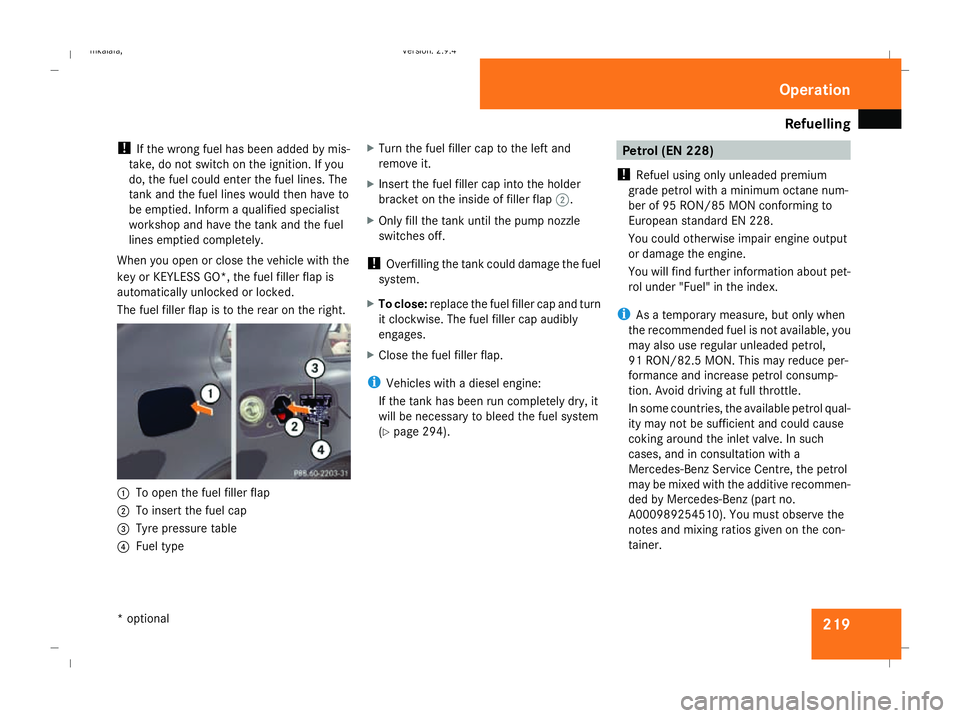
The fuel filler flap is to the rear on the right. 1
To open the fuel filler flap
2 To insert the fuel cap
3 Tyre pressure table
4 Fuel type X
Turn the fuel filler cap to the left and
remove it.
X Insert the fuel filler cap into the holder
bracket on the inside of filler flap 2.
X Only fill the tank until the pump nozzle
switches off.
! Overfilling the tank could damage the fuel
system.
X To close: replace the fuel filler cap and turn
it clockwise. The fuel filler cap audibly
engages.
X Close the fuel filler flap.
i Vehicles with a diesel engine:
If the tank has been run completely dry, it
will be necessary to bleed the fuel system
(Y page 294). Petrol (EN 228)
! Refuel using only unleaded premium
grade petrol with a minimum octane num-
ber of 95 RON/85 MON conforming to
European standard EN 228.
You could otherwise impair engine output
or damage the engine.
You will find further information about pet-
rol under "Fuel" in the index.
i As a temporary measure, but only when
the recommended fuel is not available, you
may also use regular unleaded petrol,
91 RON/82.5 MO N. Thismay reduce per-
formance and increase petrol consump-
tion. Avoid driving at full throttle.
In some countries, the available petrol qual-
ity may not be sufficient and could cause
coking around the inlet valve. In such
cases, and in consultation with a
Mercedes-Benz Service Centre, the petrol
may be mixed with the additive recommen-
ded by Mercedes-Benz (part no.
A000989254510). You must observe the
notes and mixing ratios given on the con-
tainer. Operation
* optional
211_AKB; 2; 5, en-GB
mkalafa,
Version: 2.9.4 2008-02-29T16:57:07+01:00 - Seite 219 ZDateiname: 6515_3416_02_buchblock.pdf; preflight