phone MERCEDES-BENZ E-CLASS SALOON 2008 Owner's Manual
[x] Cancel search | Manufacturer: MERCEDES-BENZ, Model Year: 2008, Model line: E-CLASS SALOON, Model: MERCEDES-BENZ E-CLASS SALOON 2008Pages: 401, PDF Size: 6.89 MB
Page 228 of 401
Engine compartment
225
i
The difference in quantity between mini-
mum mark 3and maximum mark 2is
approximately 2 litres.
i On vehicles with a 4-cylinder petrol
engine and vehicles with an 8-cylinder pet-
rol engine, the difference between MIN
mark 3and MAX mark 2is approxi-
mately 1.5 litres.
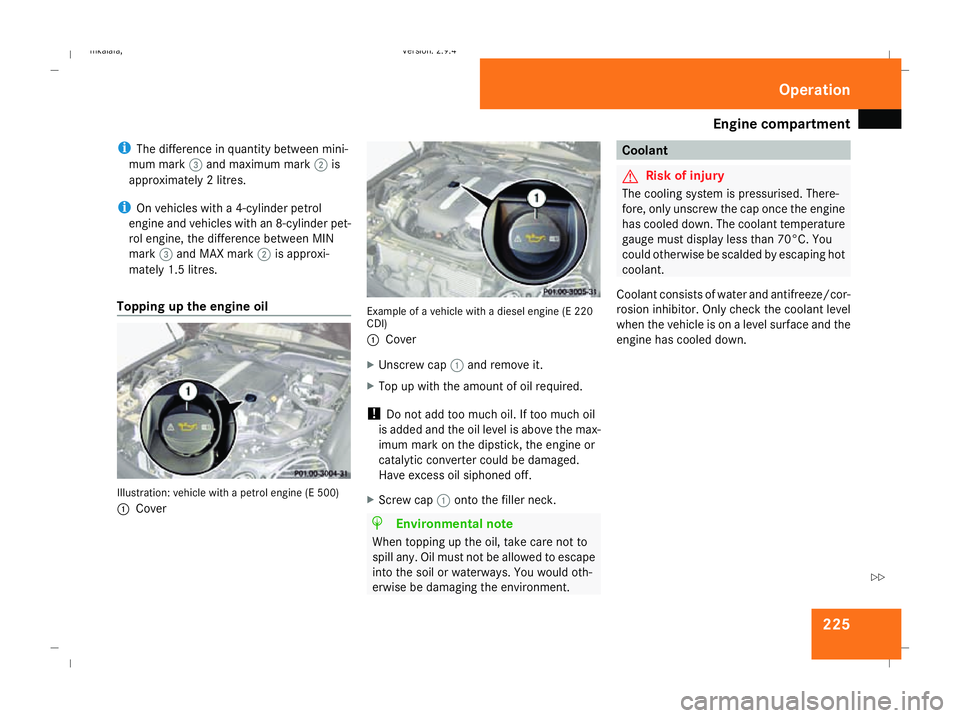
Topping up the engine oil Illustration: vehicle with a petrol engine (E 500)
1
Cover Example of a vehicle with a diesel engine (E 220
CDI)
1 Cover
X Unscrew cap 1and remove it.
X Top up with the amount of oil required.
! Do not add too much oil. If too much oil
is added and the oil level is above the max-
imum mark on the dipstick, the engine or
catalytic converter could be damaged.
Have excess oil siphoned off.
X Screw cap 1onto the filler neck. H
Environmental note
When topping up the oil, take care not to
spill any. Oil must not be allowed to escape
into the soil or waterways. You would oth-
erwise be damaging the environment. Coolant
G
Risk of injury
The cooling system is pressurised. There-
fore, only unscrew the cap once the engine
has cooled down. The coolant temperature
gauge must display less than 70°C. You
could otherwise be scalded by escaping hot
coolant.
Coolant consists of water and antifreeze/cor-
rosion inhibitor. Only check the coolant level
when the vehicle is on a level surface and the
engine has cooled down. Operation
211_AKB; 2; 5, en-GB
mkalafa,
Version: 2.9.4
2008-02-29T16:57:07+01:00 - Seite 225 ZDateiname: 6515_3416_02_buchblock.pdf; preflight
Page 235 of 401
Tyres and wheels
232Restart Run Flat Indicator?
Yes Cancel
disappears.
The tyre pressure values stored at the last
restart will continue to be monitored. Checking the tyre pressure electroni-
cally*
The tyre pressure monitor only functions if
the correct wheel electronics are fitted to all
wheels. These monitor the pressure in all four
tyres, which you have set when restarting the
tyre pressure monitor. The monitor warns you
when the pressure drops in one or more of
the tyres. G
Risk of accident
The tyre pressure monitor does not warn
you of an incorrectly set tyre pressure. The
table on the inside of the fuel filler flap will
help you decide whether the tyre pressures
should be corrected.
The tyre pressure monitor is not able to
warn you of a sudden loss of pressure, e.g.
if the tyre is penetrated by a foreign object.
In the event of a sudden loss of pressure,
bring the vehicle to a halt by braking care-
fully. Do not make any sudden steering
movements when doing so. i
The operation of the tyre pressure moni-
tor can be affected by interference from
radio transmitting equipment (e.g. radio
headphones, two-way radios) that may be
being operated in or near the vehicle.
i If you are carrying a deflated tyre in the
vehicle, you may only reactivate the tyre
pressure monitor if:
R the deflated tyre is no longer in the vehi-
cle
R you have adjusted the tyre pressure cor-
rectly
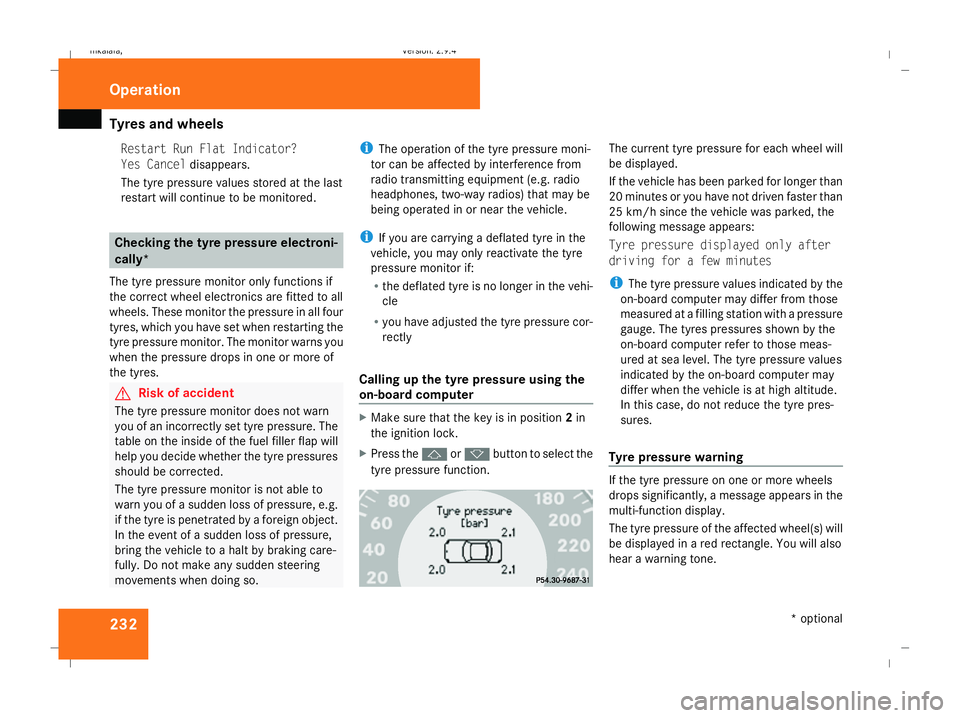
Calling up the tyre pressure using the
on-board computer X
Make sure that the key is in position 2in
the ignition lock.
X Press the jork button to select the
tyre pressure function. The current tyre pressure for each wheel will
be displayed.
If the vehicle has been parked for longer than
20 minutes or you have not driven faster than
25 km/h since the vehicle was parked, the
following message appears:
Tyre pressure displayed only after
driving for a few minutes
i
The tyre pressure values indicated by the
on-board computer may differ from those
measured at a filling station with a pressure
gauge. The tyres pressures shown by the
on-board computer refer to those meas-
ured at sea level. The tyre pressure values
indicated by the on-board computer may
differ when the vehicle is at high altitude.
In this case, do not reduce the tyre pres-
sures.
Tyre pressure warning If the tyre pressure on one or more wheels
drops significantly, a message appears in the
multi-function display.
The tyre pressure of the affected wheel(s) will
be displayed in a red rectangle. You will also
hear a warning tone.Operation
* optional
211_AKB; 2; 5, en-GB
mkalafa
,V ersion: 2.9.4
2008-02-29T16:57:07+01:00 - Seite 232 Dateiname: 6515_3416_02_buchblock.pdf; preflight
Page 249 of 401
Care
246R
battery
R connectors
R lights
R seals
Damaged seals or electrical components
can lead to failures or leaks.
Cleaning the wiper blades and the out-
side of the windscreen G
Risk of injury
Turn the key to position 0in the ignition
lock before cleaning the windscreen or the
wiper blades. There is otherwise a risk of
the windscreen wipers being set in motion
and causing injury.
X Turn the key to position 1in the ignition
lock (Y page 76).
X Set the windscreen wipers to position
u on the combination switch
(Y page 105).
X Turn the key to position 0or remove it when
the wiper arms are vertical (Y page 76).!
Only fold the wiper arms away from the
windscreen when they are in a vertical posi-
tion, otherwise you will damage the bonnet.
X Fold the wiper arms away from the wind-
screen until you feel them engage.
X Clean the windscreen and the wiper blades.
X Fold the windscreen wipers back again
before the ignition is switched on.
! Do not clean the wiper blades too often,
otherwise the rubber may become porous,
resulting in wiper noise.
Cleaning the windows !
Do not use dry cloths, abrasive products,
solvents or cleaning agents containing sol-
vents to clean the inside of the windows.
Clean the insides of the windows with a
damp cloth or commercially-available glass
cleaner. Avoid touching the inside of the
rear windscreen and the side windows with
hard objects, e.g. ice scrapers or rings. You
could otherwise cause damage to the win-
dows, rear window heating or aerial on the
rear window. i
Anti-glare film retrofitted to the insides of
the windows could interfere with radio or
mobile phone reception, especially if it is
conductive or metal-coated film. Informa-
tion about anti-glare film can be obtained
from any Mercedes-Benz Service Centre.
Cleaning the headlamps X
Clean the headlamp lenses with a wet
sponge.
! Only use washer fluid which is suitable
for plastic lenses. Unsuitable washer fluid
could damage the plastic lenses of the
headlamps.
Do not use the following:
R dry cloths
R abrasive cleaning agents
R solvents
R cleaning agents containing solvent
You could otherwise scratch or damage the
surface of the lenses. Operation
211_AKB; 2; 5, en-GB
mkalafa,
Version: 2.9.4 2008-02-29T16:57:07+01:00 - Seite 246Dateiname: 6515_3416_02_buchblock.pdf; preflight
Page 284 of 401
Display
messages 281Display messages Possible cause/consequence Possible solution
¿ There is only a small amount of fuel in the
fuel tank. X
Refuel at the nearest filling station. W Reserve fuel level The fuel level has fallen below the reserve
range. The operation of the auxiliary heat-
ing* can no longer be guaranteed. X
Refuel at the nearest filling station. t Enter PIN: You have not yet logged on to your mobile
phone*. X
Enter the PIN for the SIM card. t Bluetooth ready The Bluetooth connection between your
mobile phone and the audio system or
COMAND APS* is not activated. X
The Bluetooth connection between your
mobile phone and the audio system or
COMAND APS* is not activated, see separate
operating instructions. t No telephone
inserted Your mobile phone is not inserted in the
bracket*. X
Insert mobile phone into the bracket*
(Y page 211). W Top up washer fluid The washer fluid level in the washer fluid
reservoir has dropped below the mini-
mum. X
Top up the washer fluid (Y page 226). Practical advi
ce
* optional
211_AKB; 2; 5, en-GB
mkalafa,
Version: 2.9.4 2008-02-29T16:57:07+01:00 - Seite 281 ZDateiname: 6515_3416_02_buchblock.pdf; preflight
Page 287 of 401
Troubleshooting
284 Problem Possible cause/consequence Suggested solutions
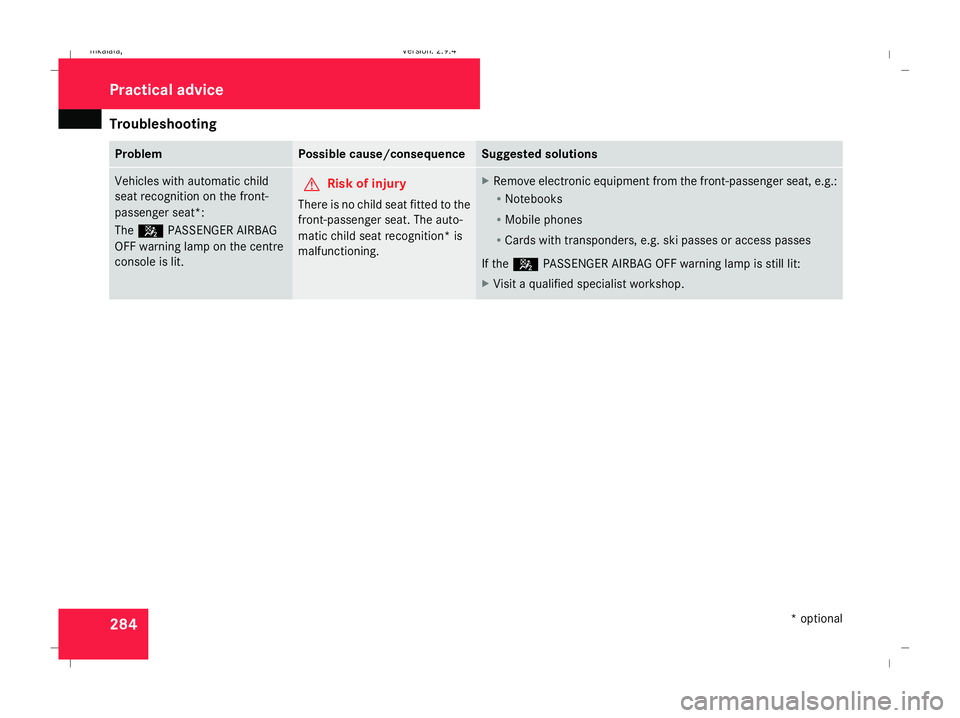
Vehicles with automatic child
seat recognition on the front-
passenger seat*:
The 5 PASSENGER AIRBAG
OFF warning lamp on the centre
console is lit. G
Risk of injury
There is no child seat fitted to the
front-passenger seat. The auto-
matic child seat recognition* is
malfunctioning. X
Remove electronic equipment from the front-passenger seat, e.g.:
R
Notebooks
R Mobile phones
R Cards with transponders, e.g. ski passes or access passes
If the 5 PASSENGER AIRBAG OFF warning lamp is still lit:
X Visit a qualified specialist workshop. Practical advice
* optional
211_AKB; 2; 5, en-GB
mkalafa
,V ersion: 2.9.4
2008-02-29T16:57:07+01:00 - Seite 284 Dateiname: 6515_3416_02_buchblock.pdf; preflight
Page 349 of 401
Vehicle identification plates
346phones/wireless devices in the vehicle.
This also ensures that interference
between these devices and the vehicle's
electronics is kept to a minimum. If instal-
led, the exterior aerial conducts the elec-
tromagnetic fields transmitted by a mobile
phone to the exterior of the vehicle. Frequency range Maximum trans-
mission output
(watts)
Short wave
(< 50 MHz) 100
4 m waveband 20
2 m waveband 50
70 cm waveband 35
25 cm waveband 10
!
If electrical or electronic equipment
which does not comply with the above
installation conditions is operated inside
the vehicle, the vehicle's operating permit
may be invalidated (EU Directive
95/54/EC) - Automotive EMC directive) Vehicle identification plates
Vehicle identification plate with vehi-
cle identification number (VIN) and
paint code number
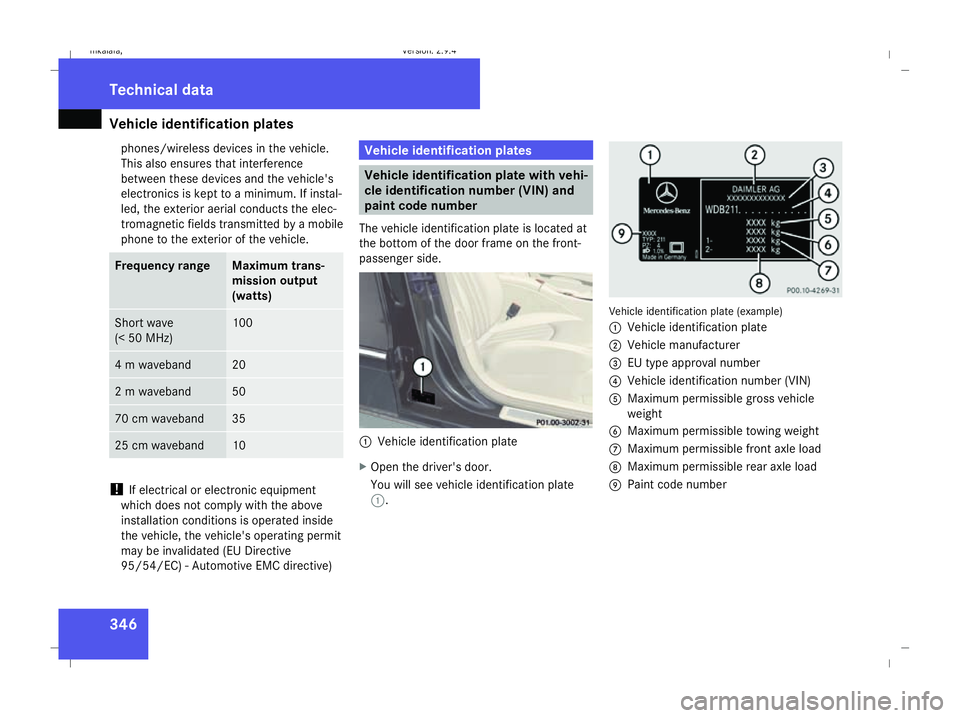
The vehicle identification plate is located at
the bottom of the door frame on the front-
passenger side. 1
Vehicle identification plate
X Open the driver's door.
You will see vehicle identification plate
1. Vehicle identification plate (example)
1
Vehicle identification plate
2 Vehicle manufacturer
3 EU type approval number
4 Vehicle identification number (VIN)
5 Maximum permissible gross vehicle
weight
6 Maximum permissible towing weight
7 Maximum permissible front axle load
8 Maximum permissible rear axle load
9 Paint code number Technical data
211_AKB; 2; 5, en-GB
mkalafa,
Version: 2.9.4
2008-02-29T16:57:07+01:00 - Seite 346 Dateiname: 6515_3416_02_buchblock.pdf; preflight