warning MERCEDES-BENZ E-CLASS SALOON 2008 Workshop Manual
[x] Cancel search | Manufacturer: MERCEDES-BENZ, Model Year: 2008, Model line: E-CLASS SALOON, Model: MERCEDES-BENZ E-CLASS SALOON 2008Pages: 401, PDF Size: 6.89 MB
Page 237 of 401
Winter driving
234
!
On vehicles fitted with a tyre pressure
monitor*, electronic components are loca-
ted in the wheel.
Tyre fitting tools should not be applied in
the area of the valve, as this could damage
the electronic components.
Always have the wheels interchanged/
changed at a qualified specialist workshop,
e.g. a Mercedes-Benz Service Centre. Winter driving
Points to remember
Have your vehicle winterproofed at a qualified
specialist workshop, e.g. at a Mercedes-Benz
Service Centre, at the onset of winter. Winter tyres
Use winter tyres at temperatures below +7 °
C and on snow or ice-covered roads. Only
then can the effect of the ABS, ESP ®
and
4MATIC* driving systems be ensured in win-
ter too.
Use winter tyres of the same make and tread
on all wheels to maintain safe handling char-
acteristics. G
Risk of accident
Winter tyres with a tread depth of less than
4 mm must be replaced immediately. They
are no longer suitable for winter use, can
no longer provide sufficient grip. This could
cause you to lose control of your vehicle
and cause an accident.
Always observe the maximum permitted
speed specified for the winter tyres you have
fitted. If you fit winter tyres which have a lower maximum permitted speed than that of
the vehicle, affix an appropriate warning sign
in the driver's field of vision. This can be
obtained at a qualified specialist workshop,
e.g. from a Mercedes-Benz Service Centre.
In such circumstances, you should also
restrict the maximum speed of the vehicle
using permanent Speedtronic 32
to the maxi-
mum permissible speed for winter tyres
(Y page 154).
Once you have fitted the winter tyres:
X Check the tyre pressures (Y page 229).
X Restart the tyre pressure moni-
tor* (Y page 232). G
Risk of accident
If you fit the spare wheel* when driving with
winter tyres, bear in mind that driving sta-
bility will be impaired owing to unstable
cornering characteristics caused by the dif-
ferent tyres. You should therefore adapt
your driving style and drive carefully.
Have the spare wheel* replaced at the
nearest qualified specialist workshop
which has the necessary specialist knowl-
edge and tools to carry out the work
required. Mercedes-Benz recommends
32 Only available for certain countries. Operation
* optional
211_AKB; 2; 5, en-GB
mkalafa,
Version: 2.9.4 2008-02-29T16:57:07+01:00 - Seite 234Dateiname: 6515_3416_02_buchblock.pdf; preflight
Page 247 of 401
Care
244 Exceeding the service due date
One of the following messages appears in the
multi-function display:
Service A overdue by .. days
Service A overdue by .. km
You will also hear a warning tone.
A qualified specialist workshop, e.g. a
Mercedes-Benz Service Centre, will reset the
service indicator when it carries out the nec-
essary service work.
i If you fail to have the service performed
by the specified date, you may be contra-
vening the relevant laws, your warranty
may be invalidated and ex gratia claims
may be refused. Calling up the service due date
Use the buttons on the multi-function steer-
ing wheel.
X Switch on the ignition.
X Press èorÿ to select the Basic
display menu (Y page 125).
X Press jork to select the service
information.
The 9 service symbol and the service
due date are displayed.
X To select a different display, press j,
è orÿ. Care
Notes on care
Regular and proper care maintains the value
of your vehicle.
i It is advisable to use Mercedes-Benz care
products.
Scratches, corrosive deposits, areas affected
by corrosion and damage caused by inade-
quate care cannot always be completely
repaired. In such cases, visit a qualified spe-
cialist workshop immediately, e.g. a
Mercedes-Benz Service Centre.
Repair damage caused by loose chippings
and remove the following substances imme-
diately, whilst avoiding rubbing too hard:
R Soak insect remains with insect remover
and rinse off afterwards.
R Soak bird droppings with water and rinse
off afterwards.
R Remove tree resin, oils, fuels and greases
by rubbing gently with a cloth soaked in
petroleum ether or lighter fluid.
R Use silicone remover to remove wax.
R Use tar remover to remove tar stains. Operation
211_AKB; 2; 5, en-GB
mkalafa,
Version: 2.9.4 2008-02-29T16:57:07+01:00 - Seite 244Dateiname: 6515_3416_02_buchblock.pdf; preflight
Page 255 of 401
Where will I find...?
252 Where will I find...?
Warning triangle
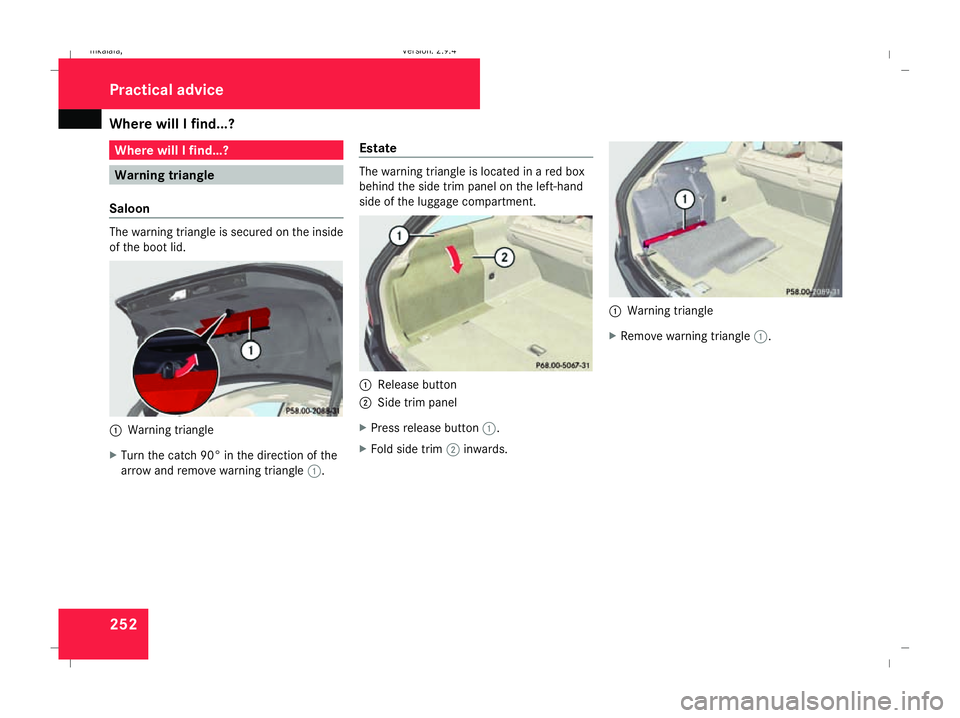
Saloon The warning triangle is secured on the inside
of the boot lid. 1
Warning triangle
X Turn the catch 90° in the direction of the
arrow and remove warning triangle 1.Estate The warning triangle is located in a red box
behind the side trim panel on the left-hand
side of the luggage compartment.
1
Release button
2 Side trim panel
X Press release button 1.
X Fold side trim 2inwards. 1
Warning triangle
X Remove warning triangle 1.Practical advice
211_AKB; 2; 5, en-GB
mkalafa,
Version: 2.9.4 2008-02-29T16:57:07+01:00 - Seite 252Dateiname: 6515_3416_02_buchblock.pdf; preflight
Page 256 of 401

Where will I find...?
253
Setting up the warning triangle
1
Retainer
2 Side reflectors
3 Feet
X Fold feet 3down and out to the side.
X Pull side reflectors 2upwards to form a
triangle and lock them at the top using
retainer 1. First-aid kit
i Check the expiry date of the first-aid kit
annually, and replace the contents if nec-
essary.
The first-aid kit is located in the stowage com-
partment under the front-passenger seat. 1
Handle
X To open: pull handle 1up.
X Fold the cover forwards.
X Remove the first-aid kit. Fire extinguisher*
i Have the fire extinguisher refilled after
each use and checked every two years.
Otherwise, it may fail in an emergency.
Observe the legal requirements in all coun-
tries concerned.
The fire extinguisher is located in the stowage
compartment underneath the driver's seat. 1
Handle
2 Cover
X To open: pull handle 1up.
X Pull cover 2forwards in the direction of
the arrow.
X Remove the fire extinguisher from the
stowage compartment. Practical advice
* optional
211_AKB; 2; 5, en-GB
mkalafa,
Version: 2.9.4 2008-02-29T16:57:07+01:00 - Seite 253 ZDateiname: 6515_3416_02_buchblock.pdf; preflight
Page 260 of 401
Display
messages 257Display messages
Notes
The on-board computer shows warnings or
malfunctions in the multi-function display.
Certain display messages are accompanied
by a warning tone or a continuous tone.
The multi-function display shows high-priority
display messages in red. In the following
tables, these display messages are printed in
red.
Please respond in accordance with the dis-
play messages and follow the additional
notes in this Owner's Manual. G
Risk of accident
No further messages can be displayed if the
instrument cluster and/or the multi-func-
tion display fails.
This means that you will not see information
about the driving situation, such as the speed, outside temperature, warning/indi-
cator lamps, display messages or system
failures. The vehicle's handling character-
istics may be affected. Adjust your driving
style and speed accordingly.
Immediately consult a qualified specialist
workshop which has the necessary special-
ist knowledge and tools to carry out the
work required. Mercedes-Benz recom-
mends that you use a Mercedes-Benz
Service Centre for this purpose. In particu-
lar, work relevant to safety or on safety-
related systems must be carried out at a
qualified specialist workshop.
When you stop and park the vehicle, please
observe the instructions provided for HOLD
(Y page 155) and parking ( Ypage 113).
The following tables contain all the display
messages. Hiding display messages After a few seconds, the on-board computer
automatically hides some low priority display
messages. Other messages remain visible in
the multi-function display until you hide them
yourself.
Some high priority display messages cannot
be hidden. The multi-function display shows
these messages continuously until the cau-
ses of the messages have been remedied.
Use the buttons on the multi-function steer-
ing wheel.
X
Use the è,·,jork button
to select another display.
The on-board computer saves certain dis-
play messages in the message mem-
ory (Ypage 131). Practical advice
211_AKB; 2; 5, en-GB
mkalafa,
Version: 2.9.4
2008-02-29T16:57:07+01:00 - Seite 257 ZDateiname: 6515_3416_02_buchblock.pdf; preflight
Page 263 of 401
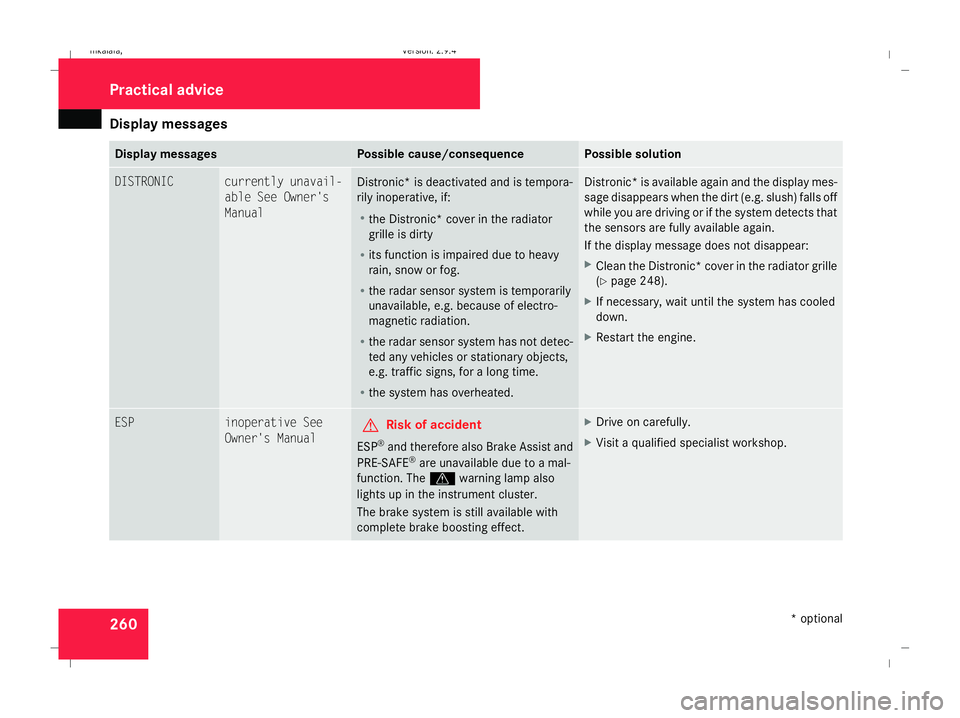
Display
messages 260 Display messages Possible cause/consequence Possible solution
DISTRONIC currently unavail-
able See Owner's
Manual
Distronic
* is deactivated and is tempora-
rily inoperative, if:
R the Distronic* cover in the radiator
grille is dirty
R its function is impaired due to heavy
rain, snow or fog.
R the radar sensor system is temporarily
unavailable, e.g. because of electro-
magnetic radiation.
R the radar sensor system has not detec-
ted any vehicles or stationary objects,
e.g. traffic signs, for a long time.
R the system has overheated. Distronic* is available again and the display mes-
sage disappears when the dirt (e.g. slush) falls off
while you are driving or if the system detects that
the sensors are fully available again.
If the display message does not disappear:
X
Clean the Distronic* cover in the radiator grille
(Y page 248).
X If necessary, wait until the system has cooled
down.
X Restart the engine. ESP inoperative See
Owner's Manual
G
Risk of accident
ESP ®
and therefore also Brake Assist and
PRE-SAFE ®
are unavailable due to a mal-
function. The vwarning lamp also
lights up in the instrument cluster.
The brake system is still available with
complete brake boosting effect. X
Drive on carefully.
X Visit a qualified specialist workshop. Practical advice
* optional
211_AKB; 2; 5, en-GB
mkalafa
,V ersion: 2.9.4
2008-02-29T16:57:07+01:00 - Seite 260 Dateiname: 6515_3416_02_buchblock.pdf; preflight
Page 267 of 401
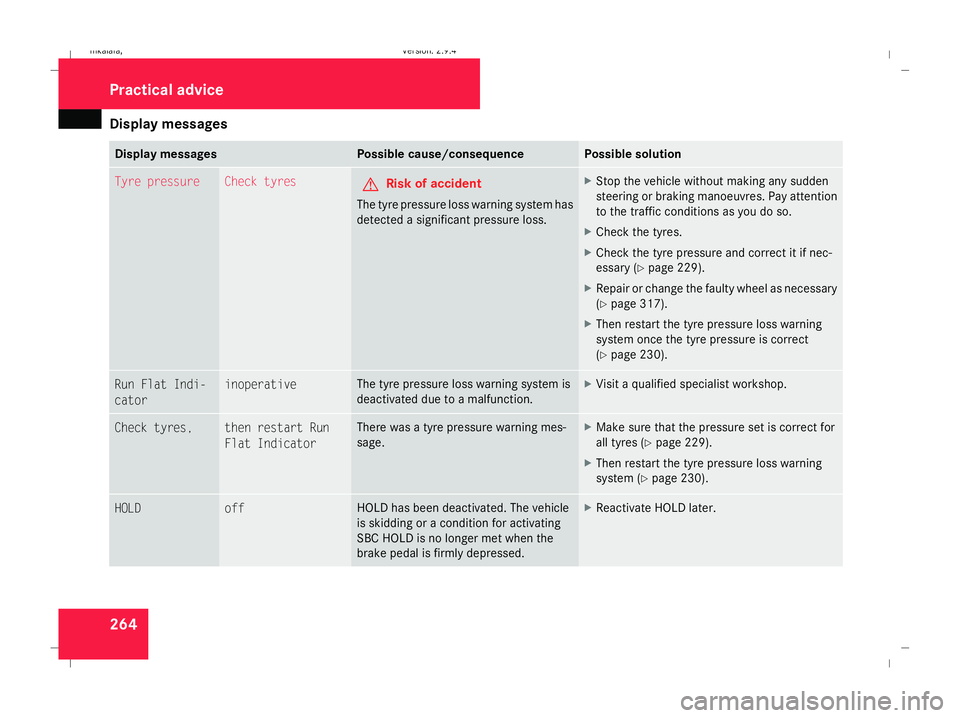
Display
messages 264 Display messages Possible cause/consequence Possible solution
Tyre pressure Check tyres
G
Risk of accident
The tyre pressure loss warning system has
detected a significant pressure loss. X
Stop the vehicle without making any sudden
steering or braking manoeuvres. Pay attention
to the traffic conditions as you do so.
X Check the tyres.
X Check the tyre pressure and correct it if nec-
essary (Y page 229).
X Repair or change the faulty wheel as necessary
(Y page 317).
X Then restart the tyre pressure loss warning
system once the tyre pressure is correct
(Y page 230). Run Flat Indi-
cator inoperative The tyre pressure loss warning system is
deactivated due to a malfunction. X
Visit a qualified specialist workshop. Check tyres, then restart Run
Flat Indicator There was a tyre pressure warning mes-
sage. X
Make sure that the pressure set is correct for
all tyres (Y page 229).
X Then restart the tyre pressure loss warning
system (Y page 230). HOLD off HOLD has been deactivated. The vehicle
is skidding or a condition for activating
SBC HOLD is no longer met when the
brake pedal is firmly depressed. X
Reactivate HOLD later. Practical advi
ce
211_AKB; 2; 5, en-GB
mkalafa,
Version: 2.9.4 2008-02-29T16:57:07+01:00 - Seite 264Dateiname: 6515_3416_02_buchblock.pdf; preflight
Page 272 of 401
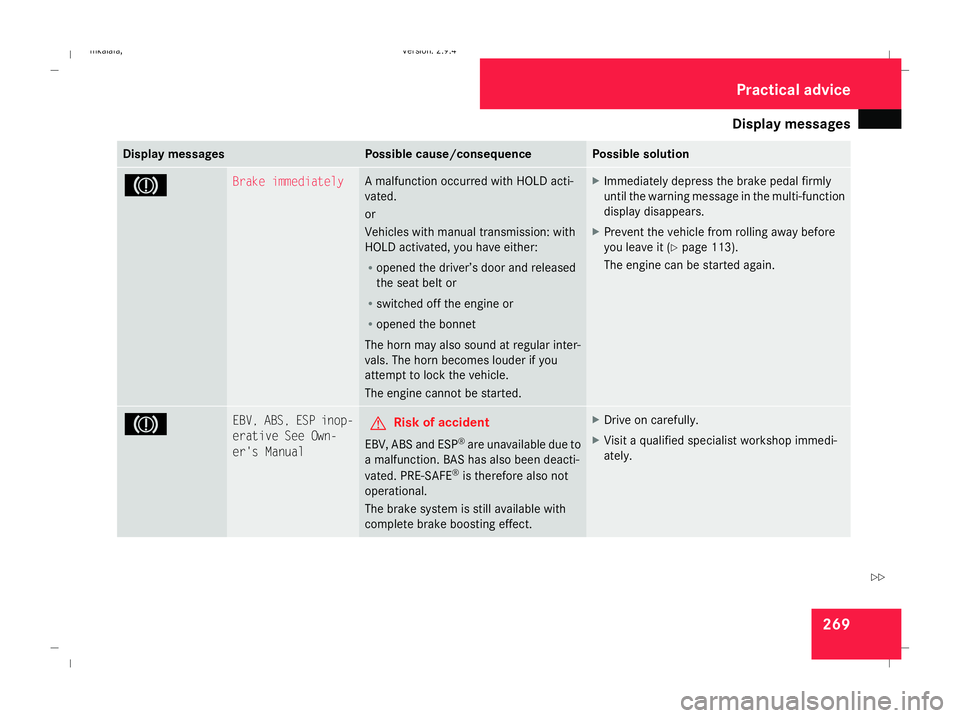
Display
messages 269Display messages Possible cause/consequence Possible solution
3 Brake immediately A malfunction occurred with HOLD acti-
vated.
or
Vehicles with manual transmission: with
HOLD activated, you have either:
R
opened the driver’s door and released
the seat belt or
R switched off the engine or
R opened the bonnet
The horn may also sound at regular inter-
vals. The horn becomes louder if you
attempt to lock the vehicle.
The engine cannot be started. X
Immediately depress the brake pedal firmly
until the warning message in the multi-function
display disappears.
X Prevent the vehicle from rolling away before
you leave it (Y page 113).
The engine can be started again. 3 EBV, ABS, ESP inop-
erative See Own-
er's Manual G
Risk of accident
EBV, ABS and ESP ®
are unavailable due to
a malfunction. BAS has also been deacti-
vated. PRE-SAFE ®
is therefore also not
operational.
The brake system is still available with
complete brake boosting effect. X
Drive on carefully.
X Visit a qualified specialist workshop immedi-
ately. Practical advi
ce
211_AKB; 2; 5, en-GB
mkalafa,
Version: 2.9.4 2008-02-29T16:57:07+01:00 - Seite 269 ZDateiname: 6515_3416_02_buchblock.pdf; preflight
Page 275 of 401
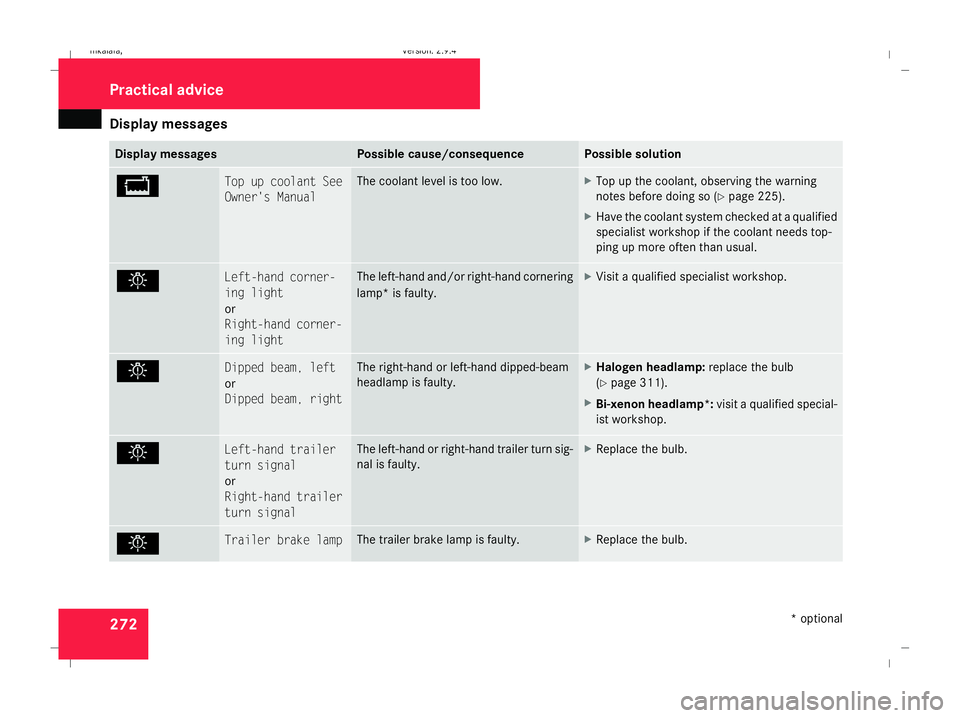
Display
messages 272 Display messages Possible cause/consequence Possible solution
B Top up coolant See
Owner's Manual The coolant level is too low. X
Top up the coolant, observing the warning
notes before doing so (Y page 225).
X Have the coolant system checked at a qualified
specialist workshop if the coolant needs top-
ping up more often than usual. . Left-hand corner-
ing light
or
Right-hand corner-
ing light The left-hand and/or right-hand cornering
lamp* is faulty. X
Visit a qualified specialist workshop. . Dipped beam, left
or
Dipped beam, right The right-hand or left-hand dipped-beam
headlamp is faulty. X
Halogen headlamp: replace the bulb
(Y page 311).
X Bi-xenon headlamp*: visit a qualified special-
ist workshop. . Left-hand trailer
turn signal
or
Right-hand trailer
turn signal The left-hand or right-hand trailer turn sig-
nal is faulty. X
Replace the bulb. . Trailer brake lamp The trailer brake lamp is faulty. X
Replace the bulb. Practical advi
ce
* optional
211_AKB; 2; 5, en-GB
mkalafa,
Version: 2.9.4 2008-02-29T16:57:07+01:00 - Seite 272Dateiname: 6515_3416_02_buchblock.pdf; preflight
Page 282 of 401
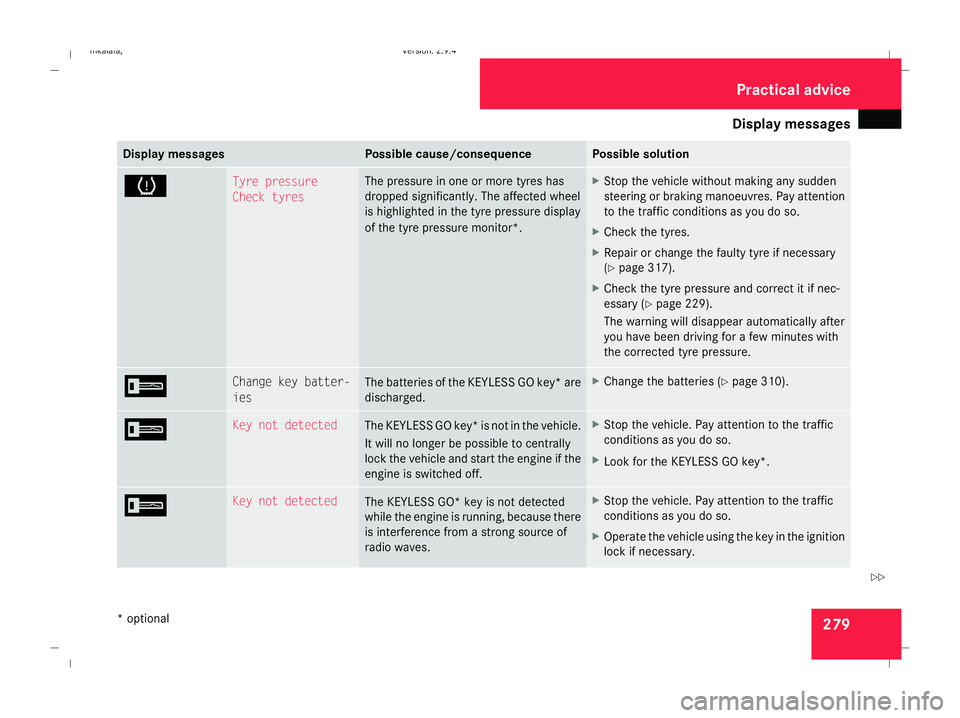
Display
messages 279Display messages Possible cause/consequence Possible solution
H Tyre pressure
Check tyres The pressure in one or more tyres has
dropped significantly. The affected wheel
is highlighted in the tyre pressure display
of the tyre pressure monitor*. X
Stop the vehicle without making any sudden
steering or braking manoeuvres. Pay attention
to the traffic conditions as you do so.
X Check the tyres.
X Repair or change the faulty tyre if necessary
(Y page 317).
X Check the tyre pressure and correct it if nec-
essary (Y page 229).
The warning will disappear automatically after
you have been driving for a few minutes with
the corrected tyre pressure. I Change key batter-
ies The batteries of the KEYLESS GO key* are
discharged. X
Change the batteries (Y page 310).I Key not detected
The KEYLESS GO key* is not in the vehicle.
It will no longer be possible to centrally
lock the vehicle and start the engine if the
engine is switched off. X
Stop the vehicle. Pay attention to the traffic
conditions as you do so.
X Look for the KEYLESS GO key *.I Key not detected
The
KEYLESS GO* key is not detected
while the engine is running, because there
is interference from a strong source of
radio waves. X
Stop the vehicle. Pay attention to the traffic
conditions as you do so.
X Operate the vehicle using the key in the ignition
lock if necessary. Practical advice
* optional
211_AKB; 2; 5, en-GB
mkalafa
,V ersion: 2.9.4
2008-02-29T16:57:07+01:00 - Seite 279 ZDateiname: 6515_3416_02_buchblock.pdf; preflight