wheel MERCEDES-BENZ E-CLASS SALOON 2008 Workshop Manual
[x] Cancel search | Manufacturer: MERCEDES-BENZ, Model Year: 2008, Model line: E-CLASS SALOON, Model: MERCEDES-BENZ E-CLASS SALOON 2008Pages: 401, PDF Size: 6.89 MB
Page 149 of 401
Driving sys
tems 146 Distronic does not react to:
R
pedestrians
R stationary obstacles on the road, e.g. sta-
tionary or parked vehicles
R oncoming and crossing traffic
Distronic may not detect narrow vehicles
driving in front, e.g. motorcycles, or vehi-
cles driving on a different line. Therefore,
always pay attention to traffic conditions
even when Distronic is activated. Other-
wise, you may fail to recognise dangers in
time, could cause an accident and injure
yourself and others.
If a slower-moving vehicle is detected in front,
Distronic causes your vehicle to brake and
maintain a preset distance to the vehicle in
front. G
Risk of accident
Distronic cannot take account of road and
traffic conditions. Deactivate, or do not
activate, Distronic if it does not detect the
vehicle in front, or if it no longer detects it.
This is especially the case:
R before corners
R on filter lanes R
when changing to a lane with faster mov-
ing traffic
R in complex driving situations or where
the lanes are diverted, e.g. at motorway/
roadway construction sites
Otherwise, Distronic maintains the current
speed or accelerates to the set speed.
Distronic cannot take account of weather
conditions. Deactivate, or do not activate,
Distronic:
R if the roads are slippery, snow-covered or
icy. The wheels could lose their grip
under braking or acceleration. The vehi-
cle could start to skid.
R if the sensors are dirty or there is poor
visibility, e.g. due to snow, rain or fog.
Distance control may be impaired.
Always pay attention to traffic conditions
even when Distronic is activated. Other-
wise, you may fail to recognise dangers in
time, could cause an accident and injure
yourself and others.
If there is no vehicle in front, Distronic oper-
ates in the same way as cruise control. Dis-
tronic functions in the 30 km/h to
180 km/h range. G
Risk of accident
Distronic brakes your vehicle at a maximum
of 2 m/s 2
, depending on its speed. This
corresponds to approximately 20% of your
vehicle's maximum braking power. You
must also apply the brakes yourself if this
braking power is not sufficient.
If Distronic detects a risk of collision with a
vehicle in front, an intermittent warning
tone sounds. In addition, the ldistance
warning lamp in the instrument cluster
lights up. Brake to avoid a collision.
Cruise control lever With the cruise control lever you can operate
Distronic and variable Speedtronic.
The LIM indicator lamp on the cruise control
lever indicates which system you have selec-
ted:
R
LIM indicator lamp off:
Distronic is selected
R LIM indicator lamp lit:
variable Speedtronic is selected Controls
211_AKB; 2; 5, en-GB
mkalafa
,V ersion: 2.9.4
2008-02-29T16:57:07+01:00 - Seite 146 Dateiname: 6515_3416_02_buchblock.pdf; preflight
Page 151 of 401
Driving sys
tems 148
Adjustment in 10 km/h increments X
Briefly press the cruise control lever up
1 for a higher speed or down 4for a
lower speed.
The last speed stored is increased or
reduced.
Making fine adjustments in 1 km/h
increments X
For a higher speed: briefly pull the cruise
control lever towards you 3.
or
X Keep the cruise control lever pulled
towards you 3until the desired speed is
reached.
Selecting the current or last stored
speed G
Risk of accident
Only select a stored speed if you know what
that speed is and whether it is suitable for
the current situation. Otherwise, sudden
acceleration or braking could endanger you
or others. X
Briefly pull the cruise control lever towards
you 3.
X Remove your foot from the accelerator
pedal.
Distronic is activated and accepts the cur-
rent speed if it is activated for the first time,
or adjusts the vehicle's speed to the last
speed stored.
Setting the specified minimum distance
for Distronic You can set the specified minimum distance
for Distronic by varying the time span
between one and two seconds. This time span
determines the distance that Distronic should
maintain from the vehicle in front, depending
on the road speed. You can read this distance
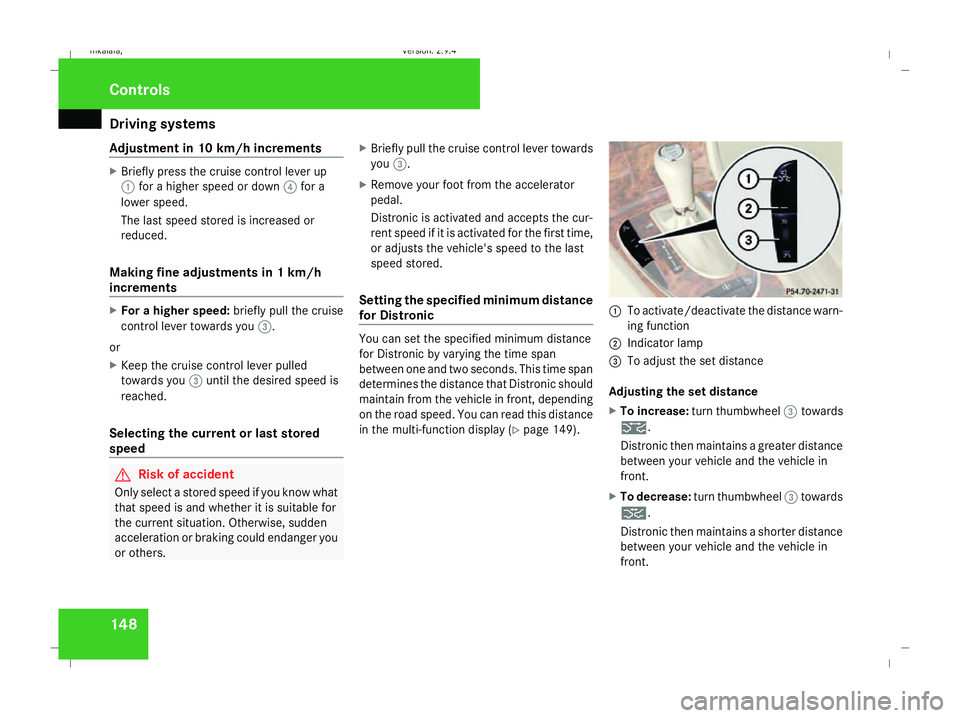
in the multi-function display (Y page 149). 1
To activate/deactivate the distance warn-
ing function
2 Indicator lamp
3 To adjust the set distance
Adjusting the set distance
X To increase: turn thumbwheel 3towards
¯.
Distronic then maintains a greater distance
between your vehicle and the vehicle in
front.
X To decrease: turn thumbwheel 3towards
®.
Distronic then maintains a shorter distance
between your vehicle and the vehicle in
front. Controls
211_AKB; 2; 5, en-GB
mkalafa
,V ersion: 2.9.4
2008-02-29T16:57:07+01:00 - Seite 148 Dateiname: 6515_3416_02_buchblock.pdf; preflight
Page 155 of 401
Driving sys
tems 152
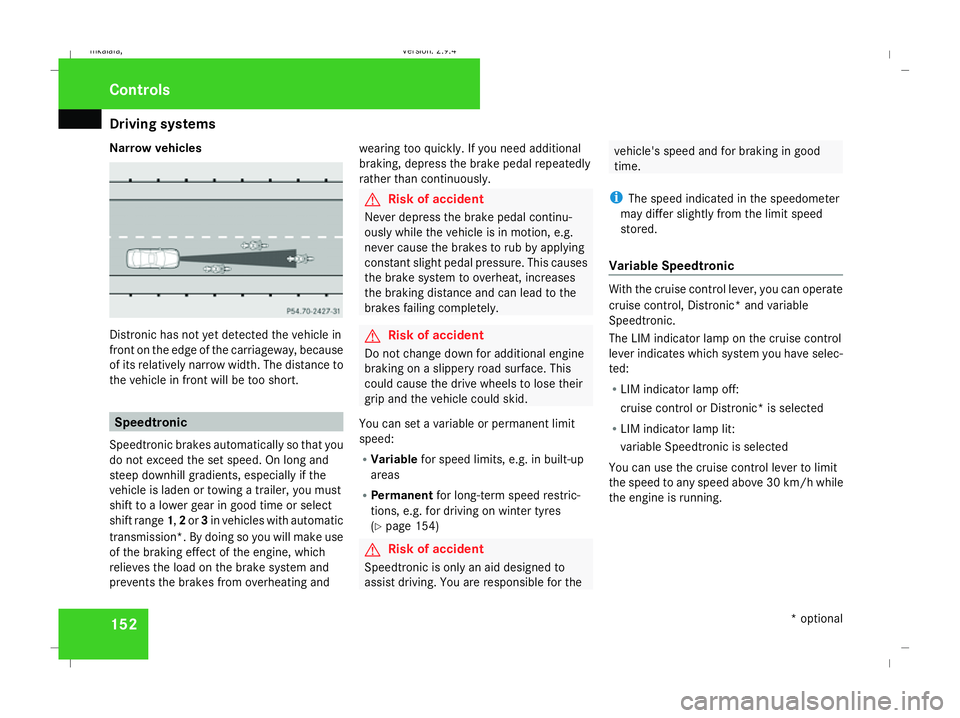
Narrow vehicles
Distronic has not yet detected the vehicle in
front on the edge of the carriageway, because
of its relatively narrow width. The distance to
the vehicle in front will be too short. Speedtronic
Speedtronic brakes automatically so that you
do not exceed the set speed. On long and
steep downhill gradients, especially if the
vehicle is laden or towing a trailer, you must
shift to a lower gear in good time or select
shift range 1,2or 3in vehicles with automatic
transmission*. By doing so you will make use
of the braking effect of the engine, which
relieves the load on the brake system and
prevents the brakes from overheating and wearing too quickly. If you need additional
braking, depress the brake pedal repeatedly
rather than continuously. G
Risk of accident
Never depress the brake pedal continu-
ously while the vehicle is in motion, e.g.
never cause the brakes to rub by applying
constant slight pedal pressure. This causes
the brake system to overheat, increases
the braking distance and can lead to the
brakes failing completely. G
Risk of accident
Do not change down for additional engine
braking on a slippery road surface. This
could cause the drive wheels to lose their
grip and the vehicle could skid.
You can set a variable or permanent limit
speed:
R Variable for speed limits, e.g. in built-up
areas
R Permanent for long-term speed restric-
tions, e.g. for driving on winter tyres
(Y page 154) G
Risk of accident
Speedtronic is only an aid designed to
assist driving. You are responsible for the vehicle's speed and for braking in good
time.
i The speed indicated in the speedometer
may differ slightly from the limit speed
stored.
Variable Speedtronic With the cruise control lever, you can operate
cruise control, Distronic* and variable
Speedtronic.
The LIM indicator lamp on the cruise control
lever indicates which system you have selec-
ted:
R LIM indicator lamp off:
cruise control or Distronic* is selected
R LIM indicator lamp lit:
variable Speedtronic is selected
You can use the cruise control lever to limit
the speed to any speed above 30 km/ hwhile
the engine is running. Controls
* optional
211_AKB; 2; 5, en-GB
mkalafa,
Version: 2.9.4 2008-02-29T16:57:07+01:00 - Seite 152Dateiname: 6515_3416_02_buchblock.pdf; preflight
Page 159 of 401
Driving sys
tems 156 R
HOLD is deactivated by depressing the
accelerator pedal or the brake pedal
R there is a malfunction in the system or an
interruption in the power supply, e.g. bat-
tery failure
R the electrical system in the engine com-
partment, the battery or the fuses are
tampered with
R the battery is disconnected G
Risk of accident
If you wish to leave the vehicle or park it,
deactivate HOLD and secure the vehicle
against rolling away.
You will see a warning message in the multi-
function display if HOLD is activated and:
R the driver's door is opened and you release
the seat belt
R the ignition is switched off
R the bonnet is opened
Vehicles with manual transmission:
Brake immediately
X Immediately depress the brake pedal firmly
until the warning message in the multi-
function display goes out. This deactivates
HOLD. Vehicles with automatic transmission*:
Selector lever in park position
X Move the selector lever to Pto prevent the
vehicle from rolling away.
HOLD is deactivated. The warning message
in the multi-function display goes out.
A horn will also sound at regular intervals if
HOLD is activated and you:
R stop the engine and open the driver's door
R open the bonnet
The horn draws your attention to the fact that
the vehicle has been parked while HOLD is
still activated. The sound becomes louder if
you attempt to lock the vehicle. The vehicle
is not locked until HOLD is deactivated.
i If the ignition has been switched off, the
engine cannot be restarted until HOLD is
deactivated.
If there is a fault in the system or power supply
while HOLD is activated, the Brake immedi-
ately message appears in the multi-function
display. Immediately depress the brake firmly
until the warning message disappears from
the multi-function display, or in vehicles with
automatic transmission*, move the selector
lever to P. This deactivates HOLD. AIRMATIC DC*
Vehicle level Your vehicle automatically adjusts its ride
height to reduce petrol consumption and
improve driving safety.
The following vehicle levels are possible:
R
Normal
R Raised
R Lowered
The "Normal" and "Raised" vehicle levels can
be set manually.
The "Lowered" vehicle level is set automati-
cally:
R at speeds above 140 km/h
R if you have selected "Sports tuning I or
II" (Y page 157)
Setting the vehicle level manually
Select the "Normal" setting for normal road
surfaces and "Raised" for driving with snow
chains or on particularly poor road surfaces. G
Risk of injury
Make sure that nobody is in the vicinity of
the wheel housing or under the vehicle Controls
* optional
211_AKB; 2; 5, en-GB
mkalafa
,V ersion: 2.9.4
2008-02-29T16:57:07+01:00 - Seite 156 Dateiname: 6515_3416_02_buchblock.pdf; preflight
Page 161 of 401
Driving sys
tems 158
Sports tuning II
X
Press button 1twice.
Two indicator lamps 2light up.
The vehicle level is lowered by 15 mm.
Comfort tuning
X Press button 1repeatedly until indicator
lamps 2go out.
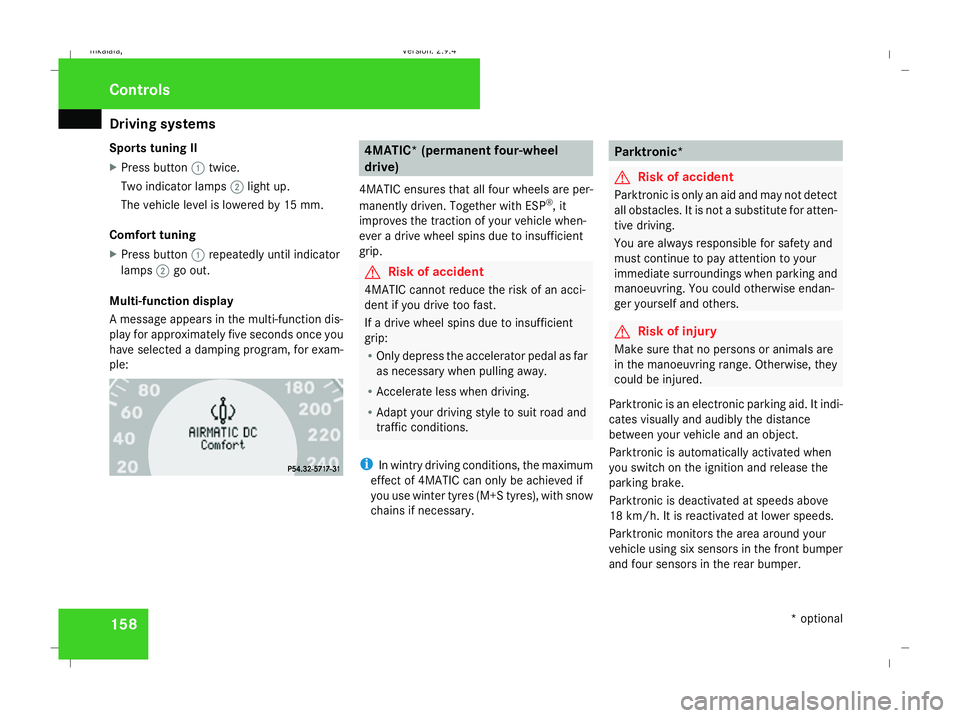
Multi-function display
A message appears in the multi-function dis-
play for approximately five seconds once you
have selected a damping program, for exam-
ple: 4MATIC* (permanent four-wheel
drive)
4MATIC ensures that all four wheels are per-
manently driven. Together with ESP ®
, it
improves the traction of your vehicle when-
ever a drive wheel spins due to insufficient
grip. G
Risk of accident
4MATIC cannot reduce the risk of an acci-
dent if you drive too fast.
If a drive wheel spins due to insufficient
grip:
R Only depress the accelerator pedal as far
as necessary when pulling away.
R Accelerate less when driving.
R Adapt your driving style to suit road and
traffic conditions.
i In wintry driving conditions, the maximum
effect of 4MATIC can only be achieved if
you use winter tyres (M+S tyres), with snow
chains if necessary. Parktronic*
G
Risk of accident
Parktronic is only an aid and may not detect
all obstacles. It is not a substitute for atten-
tive driving.
You are always responsible for safety and
must continue to pay attention to your
immediate surroundings when parking and
manoeuvring. You could otherwise endan-
ger yourself and others. G
Risk of injury
Make sure that no persons or animals are
in the manoeuvring range. Otherwise, they
could be injured.
Parktronic is an electronic parking aid. It indi-
cates visually and audibly the distance
between your vehicle and an object.
Parktronic is automatically activated when
you switch on the ignition and release the
parking brake.
Parktronic is deactivated at speeds above
18 km/h. It is reactivated at lower speeds.
Parktronic monitors the area around your
vehicle using six sensors in the front bumper
and four sensors in the rear bumper. Controls
* optional
211_AKB; 2; 5, en-GB
mkalafa
, Version: 2.9.4 2008-02-29T16:57:07+01:00 - Seite 158Dateiname: 6515_3416_02_buchblock.pdf; preflight
Page 173 of 401
Air conditioning
170
X
To switch on: press theœbutton.
The indicator lamp in the œbutton
comes on.
X To deactivate: press theœbutton.
The indicator lamp in the œbutton goes
out. The cooling with air dehumidification
function has a delayed switch-off feature.
i The cooling with air dehumidification
function in the rear compartment is only
operative if the 4-zone Thermotronic cool-
ing with air dehumidification function* is
switched on. Controlling the air conditioning auto-
matically
In automatic mode, the set temperature is
maintained at a constant level fully automat-
ically. To do so, the system automatically
regulates the temperature of the dispensed
air, the airflow and the air distribution.
The automatic air conditioning will achieve
optimal operation if "cooling with air dehu-
midification" is also activated. If necessary,
cooling with air dehumidification can be deac-
tivated. X
Make sure that the key is in position 2in
the ignition lock.
X Set the desired temperature.
X To activate: press theUbutton.
The AUTO display for the air distribution and
airflow comes on. The indicator lamp 27
on
the U button lights up. Airflow and air
distribution are set to automatic mode.
X To deactivate: press theQor·
button.
The AUTO display for the airflow goes out.
The automatic control is deactivated and
the airflow is controlled according to the
selected setting. Automatic air distribution
remains activated.
or
X 2-zone Thermatic only: press the©or
ª air distribution button.
The AUTO display for the air distribution
goes out. The automatic control is deacti-
vated and the air distribution is controlled
according to the selected setting. Auto-
matic airflow remains activated. or
X
4-zone Thermotronic only*: turn air dis-
tribution thumbwheel 1or7 to the
desired symbol ( Ypage 166).
The indicator lamp in the Ubutton goes
out. The automatic control is deactivated
and the air distribution is controlled
according to the selected setting. Auto-
matic airflow remains activated. Setting the temperature
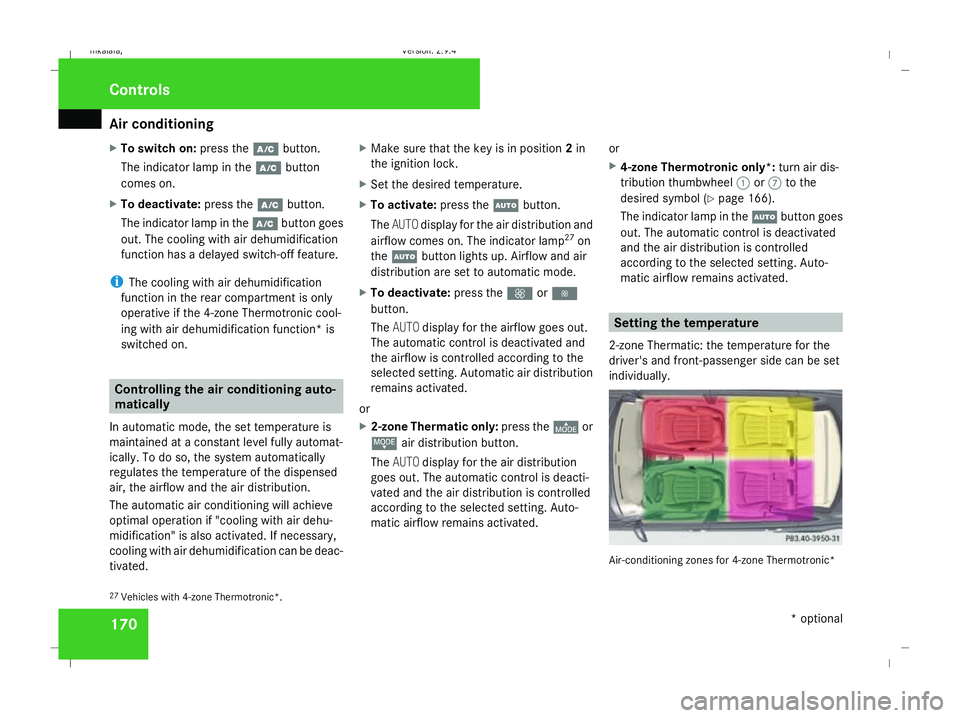
2-zone Thermatic: the temperature for the
driver's and front-passenger side can be set
individually. Air-conditioning zones for 4-zone Thermotronic*
27 Vehicles with 4-zone Thermotronic*. Controls
* optional
211_AKB; 2; 5, en-GB
mkalafa
, Version: 2.9.4 2008-02-29T16:57:07+01:00 - Seite 170Dateiname: 6515_3416_02_buchblock.pdf; preflight
Page 174 of 401
Air conditioning
171
4-zone Thermotronic*: the temperature for
each of the four air-conditioning zones can be
set individually. You can set the temperature
separately for the driver's and front-
passenger sides as well as for the left and
right sides of the rear compartment.
Setting the temperature in the front
compartment using 2-zone Thermatic X
Make sure that the key is in position 2in
the ignition lock.
X To increase/reduce: turn thumbwheels
1 and 7clockwise or anti-clockwise
(Y page 164). Only change the temperature
setting in small increments. Start at 22 †.
Setting the temperature in the front
compartment via 4-zone
Thermotronic* X
Make sure that the key is in position 2in
the ignition lock.
X To increase/reduce: press the$or
% button. Only change the temperature
setting in small increments. Start at 22 †.
The set temperature is shown in the 4-zone
Thermotronic* display. Setting the temperature in the rear
compartment via 4-zone
Thermotronic* X
Make sure that the key is in position 2in
the ignition lock.
X Press the ™button.
The 4-zone Thermotronic* display switches
to the rear-compartment air-conditioning
settings.
X To increase/reduce: press the$or
% button. Only change the temperature
setting in small increments. Start at 22 †.
The set temperature is shown in the 4-zone
Thermotronic* display. The 4-zone
Thermotronic* display changes back to the
standard display about five seconds after a
button is pressed.
i You can also return to the standard dis-
play by pressing the ™button again. Setting the rear-compartment temper-
ature via the rear-compartment air con-
ditioning* X
Make sure that the key is in position 2in
the ignition lock.
X To increase/reduce: press the$or
% button. Only change the temperature
setting in small increments. Start at 22 †. Adjusting the air vents
G
Risk of injury
Very hot or very cold air can flow from the
air vents. This could cause burns or frost-
bite to bare skin in the immediate vicinity
of the vents. Keep bare skin away from
these air outlets. If necessary, direct the
airflow away to a different area of the vehi-
cle interior.
Please observe the following notes to ensure
that the air can flow freely through the air
vents:
R Keep the air inlet between the windscreen
and the bonnet free of deposits, such as ice Cont
rols
* optional
211_AKB; 2; 5, en-GB
mkalafa ,V ersion: 2.9.4
2008-02-29T16:57:07+01:00 - Seite 171 ZDateiname: 6515_3416_02_buchblock.pdf; preflight
Page 175 of 401
Air conditioning
172and snow, to guarantee the supply of fresh
air into the vehicle interior.
R Never cover the vents or air inlet and outlet
grilles in the vehicle interior.
i Position the sliders for the centre air
vents in the central position to provide vir-
tually draught-free ventilation.
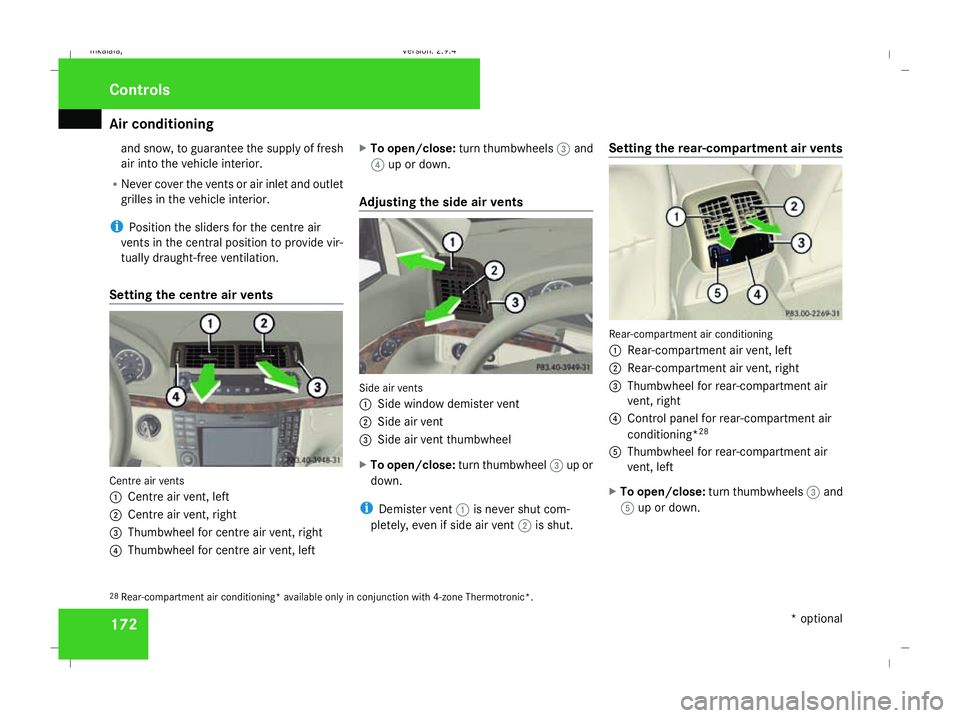
Setting the centre air vents Centre air vents
1
Centre air vent, left
2 Centre air vent, right
3 Thumbwheel for centre air vent, right
4 Thumbwheel for centre air vent, left X
To open/close: turn thumbwheels 3and
4 up or down.
Adjusting the side air vents Side air vents
1
Side window demister vent
2 Side air vent
3 Side air vent thumbwheel
X To open/close: turn thumbwheel 3up or
down.
i Demister vent 1is never shut com-
pletely, even if side air vent 2is shut. Setting the rear-compartment air vents Rear-compartment air conditioning
1
Rear-compartment air vent, left
2 Rear-compartment air vent, right
3 Thumbwheel for rear-compartment air
vent, right
4 Control panel for rear-compartment air
conditioning* 28
5 Thumbwheel for rear-compartment air
vent, left
X To open/close: turn thumbwheels 3and
5 up or down.
28 Rear-compartment air conditioning* available only in conjunction with 4-zone Thermotronic*. Cont
rols
* optional
211_AKB; 2; 5, en-GB
mkalafa
,V ersion: 2.9.4
2008-02-29T16:57:07+01:00 - Seite 172 Dateiname: 6515_3416_02_buchblock.pdf; preflight
Page 176 of 401
Air conditioning
173
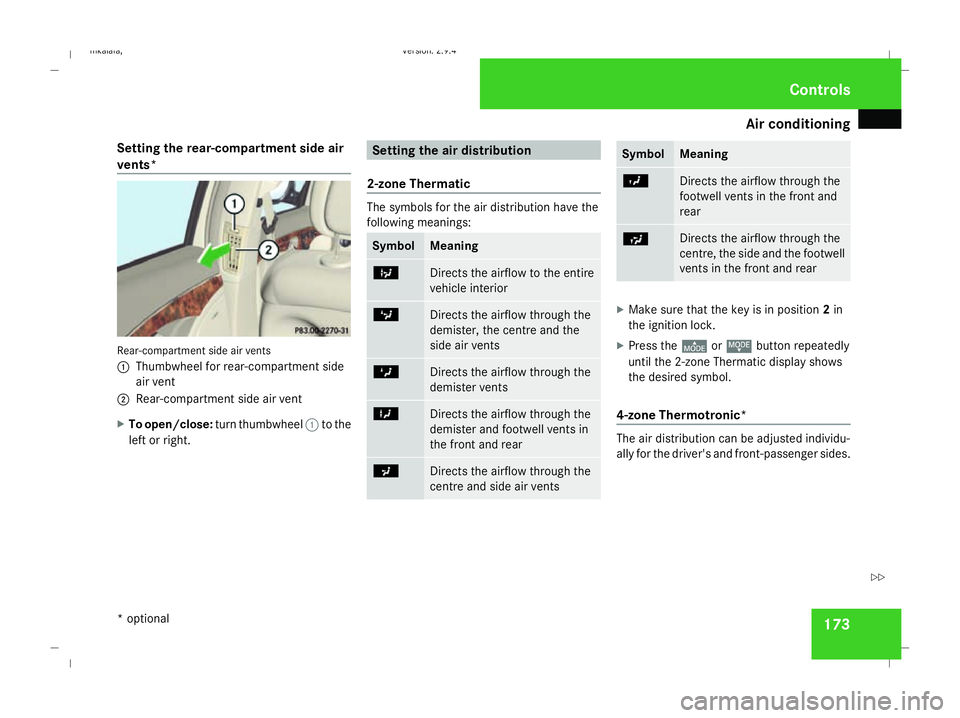
Setting the rear-compartment side air
vents* Rear-compartment side air vents
1
Thumbwheel for rear-compartment side
air vent
2 Rear-compartment side air vent
X To open/close: turn thumbwheel 1to the
left or right. Setting the air distribution
2-zone Thermatic The symbols for the air distribution have the
following meanings: Symbol Meaning
b
Directs the airflow to the entire
vehicle interior c
Directs the airflow through the
demister, the centre and the
side air vents Z
Directs the airflow through the
demister vents X
Directs the airflow through the
demister and footwell vents in
the front and rear a
Directs the airflow through the
centre and side air vents Symbol Meaning
Y
Directs the airflow through the
footwell vents in the front and
rear
Ú Directs the airflow through the
centre, the side and the footwell
vents in the front and rear
X
Make sure that the key is in position 2in
the ignition lock.
X Press the ©orª button repeatedly
until the 2-zone Thermatic display shows
the desired symbol.
4-zone Thermotronic* The air distribution can be adjusted individu-
ally for the driver's and front-passenger sides. Cont
rols
* optional
211_AKB; 2; 5, en-GB
mkalafa
,V ersion: 2.9.4
2008-02-29T16:57:07+01:00 - Seite 173 ZDateiname: 6515_3416_02_buchblock.pdf; preflight
Page 177 of 401
Air conditioning
174
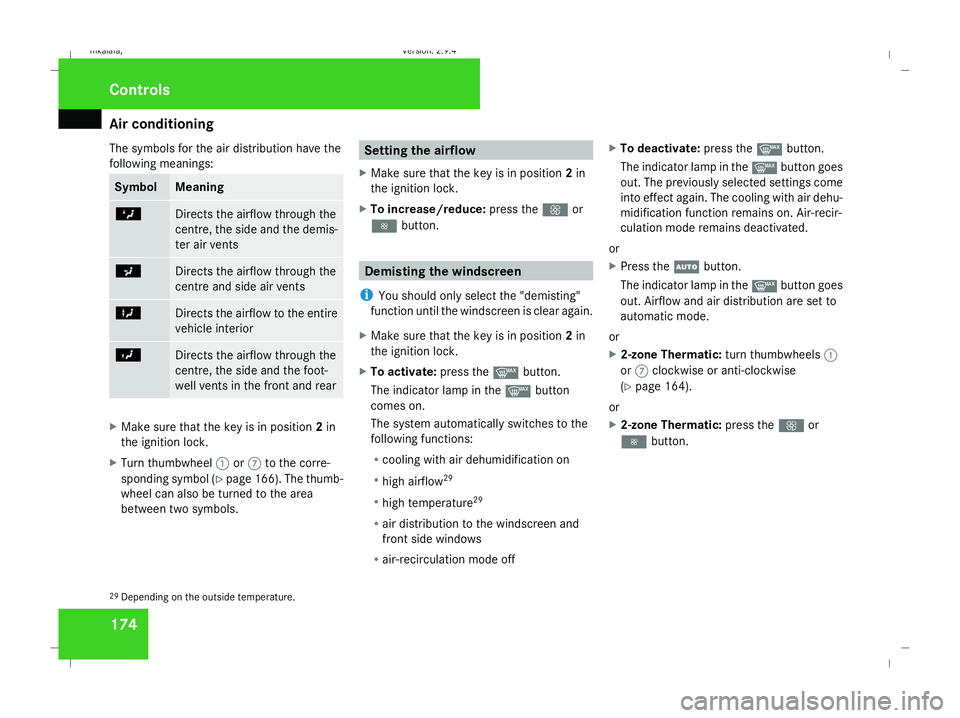
The symbols for the air distribution have the
following meanings: Symbol Meaning
Z
Directs the airflow through the
centre, the side and the demis-
ter air vents
a
Directs the airflow through the
centre and side air vents
X
Directs the airflow to the entire
vehicle interior
Y
Directs the airflow through the
centre, the side and the foot-
well vents in the front and rear
X
Make sure that the key is in position 2in
the ignition lock.
X Turn thumbwheel 1or7 to the corre-
sponding symbol (Y page 166). The thumb-
wheel can also be turned to the area
between two symbols. Setting the airflow
X Make sure that the key is in position 2in
the ignition lock.
X To increase/reduce: press theQor
· button. Demisting the windscreen
i You should only select the "demisting"
function until the windscreen is clear again.
X Make sure that the key is in position 2in
the ignition lock.
X To activate: press theybutton.
The indicator lamp in the ybutton
comes on.
The system automatically switches to the
following functions:
R cooling with air dehumidification on
R high airflow 29
R high temperature 29
R air distribution to the windscreen and
front side windows
R air-recirculation mode off X
To deactivate: press theybutton.
The indicator lamp in the ybutton goes
out. The previously selected settings come
into effect again. The cooling with air dehu-
midification function remains on. Air-recir-
culation mode remains deactivated.
or
X Press the Ubutton.
The indicator lamp in the ybutton goes
out. Airflow and air distribution are set to
automatic mode.
or
X 2-zone Thermatic: turn thumbwheels1
or 7 clockwise or anti-clockwise
(Y page 164).
or
X 2-zone Thermatic: press theQor
· button.
29 Depending on the outside temperature. Cont
rols
211_AKB; 2; 5, en-GB
mkalafa
,V ersion: 2.9.4
2008-02-29T16:57:07+01:00 - Seite 174 Dateiname: 6515_3416_02_buchblock.pdf; preflight