radio MERCEDES-BENZ E-CLASS SALOON 2008 Owners Manual
[x] Cancel search | Manufacturer: MERCEDES-BENZ, Model Year: 2008, Model line: E-CLASS SALOON, Model: MERCEDES-BENZ E-CLASS SALOON 2008Pages: 401, PDF Size: 6.89 MB
Page 14 of 401
11
Navigation men
u.. . . . . . . . . . . . .130
Settings menu . . . . . . . . . . . . . . . .131
Standard display menu . . . . . . . . .125
Telephone menu . . . . . . . . . . . . . .141
Time/date submenu . . . . . . . . . . .132
Trip computer menu . . . . . . . . . . . .139
TV menu . . . . . . . . . . . . . . . . . . . . .130
Vehicle submenu . . . . . . . . . . . . . .133
One-touch gearshifting . . . . . . . . . ..116
Operating system see On-board computer
Outside temperature display . . . . ..121
On-board computer . . . . . . . . . . . .126
Overhead control panel
Overview . . . . . . . . . . . . . . . . . . . . .34
Own number sending (mobile
phone) . . . . . . . . . . . . . . . . . . . . . . . . .212 P
Paint code number . . . . . . . . . . . . ..346
Panorama sliding sunroof . . . . . . . ..183
Opening/closing . . . . . . . . . . . . . .183
Raising/lowering . . . . . . . . . . . . . .184
Resetting . . . . . . . . . . . . . . . . . . . .185
Parking . . . . . . . . . . . . . . . . . . . . . . . .113
Parking aid . . . . . . . . . . . . . . . . . . . . . .92
Parktronic . . . . . . . . . . . . . . . . . . .158
Parking brake . . . . . . . . . . . . . . . . . . .113
Display message . . . . . . . . . . . . . .270 Parking lamps
Display message . . . . . . . . . . . . . .276
Parking lock
Releasing manually (automatic
transmission) . . . . . . . . . . . . . . . . .309
Parking position
Exterior mirror . . . . . . . . . . . . . . . . .92
Parktronic . . . . . . . . . . . . . . . . . . . . . .158
Activating/deactivating . . . . . . . . .160
Malfunction . . . . . . . . . . . . . . . . . .298
Range of the sensors . . . . . . . . . . .159
Trailer towing . . . . . . . . . . . . . . . . .161
Warning display . . . . . . . . . . . . . . .160
PASSENGER AIRBAG OFF warning
lamp . . . . . . . . . . . . . . . . . . . . . . .49, 283
Performance . . . . . . . . . . . . . . . . . . .352
Permanent four-wheel drive see 4MATIC
Permanent Speedtronic . . . . . . . . ..154
Petrol Minimum grad e.. . . . . . . . . . . . . .219
Plastic hooks . . . . . . . . . . . . . . . . . . .191
Plastic trim Cleaning . . . . . . . . . . . . . . . . . . . . .247
Power supply (trailer) . . . . . . . . . . ..242
Power windows see Side window
Pre-emptive occupant safety system
see PRE-SAFE ®
PRE-SAFE ®
system . . . . . . . . . . . . . . . .46PRE-SAFE
®
System
Display message . . . . . . . . . . . . . .262
Program selector button
Automatic transmission . . . . . . . . .117
Pulling away . . . . . . . . . . . . . . . . . . . .112 R
RACETIMER (on-board computer) ..1 27
Radio Changing a station (on-board
computer) . . . . . . . . . . . . . . . . . . .129
see separate operating instructions
Radio-controlled equipment
Installatio n.. . . . . . . . . . . . . . . . . .214
Rain closing feature
Sliding/tilting sunroo f.. . . . . . . ..182
Rain sensor
Windscreen wipers . . . . . . . . . . . . .106
Range (on-board computer) . . . . . ..140
R button see Reset button
Rear bench seat
Folding forward/back . . . . . .195, 198
Rear foglamp
Display message . . . . . . . . . . . . . .275
Rear seat backrest
Display message . . . . . . . . . . . . . .270 Index
211_AKB; 2; 5, en-GB
mkalafa,
Version: 2.9.4
2008-02-29T16:57:07+01:00 - Seite 11 Dateiname: 6515_3416_02_buchblock.pdf; preflight
Page 16 of 401
13
Shift ranges
Automatic transmission . . . . . . . . .116
Display in the speedometer . . . . . .115
Sidebags . . . . . . . . . . . . . . . . . . . . . . . .45
Side window Fault . . . . . . . . . . . . . . . . . . . . . . . .300
Opening/closing . . . . . . . . . . . . . .107
Resetting . . . . . . . . . . . . . . . . . . . .108
Side windows
Cleaning . . . . . . . . . . . . . . . . . . . . .246
Skibag . . . . . . . . . . . . . . . . . . . . . . . . .188
Sliding/tilting sunroof . . . . . . . . . ..180
Rain closing feature . . . . . . . . . . . .182
Resetting . . . . . . . . . . . . . . . . . . . .182
Sliding sunroof
see Panorama sliding/tilting sunroof
see Sliding/tilting sunroof
Snow chains . . . . . . . . . . . . . . . . . . . .235
Socket Cockpit . . . . . . . . . . . . . . . . . . . . . .210
Rear compartment . . . . . . . . . . . . .210
Spare wheel
Fitting . . . . . . . . . . . . . . . . . . . . . . .323
Storage location . . . . . . . . . . . . . . .254
Technical data . . . . . . . . . . . . . . . .365
Spectacles compartment . . . . . . . ..206
Speed Technical data . . . . . . . . . . . . . . . .352
Speed limiter
Speedtronic . . . . . . . . . . . . . . . . . .152 Speedometer
Digital speedometer (on-board
computer) . . . . . . . . . . . . . . . . . . .126
Segments . . . . . . . . . . . . . . . . . . . .121
Setting the unit (on-board com-
puter) . . . . . . . . . . . . . . . . . . . . . . .133
Speedtronic . . . . . . . . . . . . . . . . . . . .152
Display message . . . . . . . . . . . . . .265
Permanent . . . . . . . . . . . . . . . . . . .154
Variabl e.. . . . . . . . . . . . . . . . . . . .152
SRS (Supplemental Restraint Sys-
tem) . . . . . . . . . . . . . . . . . . . . . . . . . . . .41
Warning lamp . . . . . . . . . . . . . . . . . .41
Standard display (on-board com-
puter) . . . . . . . . . . . . . . . . . . . . . . . . .125
Selecting the displa y.. . . . . . . . ..134
Station
see Radio
Status line (on-board computer) . ..1 23
Selecting the displa y.. . . . . . . . ..134
Steering wheel
Adjusting . . . . . . . . . . . . . . . . . . . . .89
Buttons (on-board computer) . . . . .122
Storing settings . . . . . . . . . . . . . . . .93
Steering wheel gearshift paddles ..1 18
Steering wheel heating . . . . . . . . . . ..90
Malfunction indicator lamp . . . . . .283
Stowage compartment . . . . . . . . . ..205
Armrest (in front) . . . . . . . . . . . . . .206
Armrest (under) . . . . . . . . . . . . . . .206 Centre console . . . . . . . . . . . . . . .
.206
Centre console (rear) . . . . . . . . . . .207
Glove compartment . . . . . . . . . . . .205
Rear seat armrest . . . . . . . . . . . . .207
Stowage compartments
Overview . . . . . . . . . . . . . . . . . . . . .36
Stowage space
Cup holder . . . . . . . . . . . . . . . . . . .186
Stowage well
Boot floor (underneath) . . . . . . . . .192
underneath luggage compart-
ment floo r.. . . . . . . . . . . . . . . . . .192
Submenu (on-board computer) . . ..1 32
Convenience . . . . . . . . . . . . . . . . .133
Dynamic driving sea t.. . . . . . . . ..139
Heating . . . . . . . . . . . . . . . . . . . . .133
Instrument cluster . . . . . . . . . . . . .132
Lighting . . . . . . . . . . . . . . . . . . . . .133
Time/date . . . . . . . . . . . . . . . . . . .132
Vehicle . . . . . . . . . . . . . . . . . . . . . .133
Summer opening . . . . . . . . . . . . . . . .109
Sun visor . . . . . . . . . . . . . . . . . . . . . . .207
Supplemental Restraint System see SRS
Supplemental Restraint System (SRS)
Display message . . . . . . . . . . . . . .265
Warning lamp . . . . . . . . . . . . . . . . .289
Surround lighting
Switching on/off (on-board com-
puter) . . . . . . . . . . . . . . . . . . . . . . .135 Index
211_AKB; 2; 5, en-GB
mkalafa,
Version: 2.9.4
2008-02-29T16:57:07+01:00 - Seite 13 Dateiname: 6515_3416_02_buchblock.pdf; preflight
Page 17 of 401
14
Switching off the alarm
ATA . . . . . . . . . . . . . . . . . . . . . . . . . .62T
Tailgate Display message . . . . . . . . . . . . . .266
Emergency unlocking . . . . . . . . . . .308
Limiting the opening angl e.. . . . . ..76
Opening/closing (manually) . . . . . . .70
Tail lamps
Display message . . . . . . . . . . . . . .276
Tank capacity . . . . . . . . . . . . . . . . . . .377
Technical data Acceleration . . . . . . . . . . . . . . . . . .354
Engine . . . . . . . . . . . . . . . . . . . . . .348
Speed . . . . . . . . . . . . . . . . . . . . . . .352
Trailer loads . . . . . . . . . . . . . . . . . .376
Tyres . . . . . . . . . . . . . . . . . . . . . . .357
Vehicle dimensions . . . . . . . . . . . .366
Vehicle weights . . . . . . . . . . . . . . .369
Wheels . . . . . . . . . . . . . . . . . . . . . .357
Telephone
see Mobile phone
Telescopic lever . . . . . . . . . . . . . . . . .239
Telescopic rod (Easy-Pack fix kit) ..2 04
Temperature Engine oil (on-board computer) . . .126
Outside temperature . . . . . . . . . . .121 Thermatic
Malfunction indicator lamp . . . . . .283
Thermotronic
Malfunction indicator lamp . . . . . .283
Third brake lamp
Display message . . . . . . . . . . . . . .274
Through-loading feature . . . . . . . . ..195
Tightening torque . . . . . . . . . . . . . ..327
Time Lap time (on-board computer) . . . .127
Setting (on-board computer) . . . . .134
Setting the time (on-board com-
puter) . . . . . . . . . . . . . . . . . . . . . . .134
Timer (on-board computer) . . . . . ..127
TIREFIT kit Storage location . . . . . . . . . . . . . . .255
Using . . . . . . . . . . . . . . . . . . . . . . .318
Total distance recorder
. . . . . . . . . . . . . . . . . . . . . . . . . . . . .27, 29
Resetting the trip meter . . . . . . . . .121
Tow-away protection . . . . . . . . . . . . ..63
Towing . . . . . . . . . . . . . . . . . . . . . . . .339
Towing eye Fitting . . . . . . . . . . . . . . . . . . . . . . .338
Removing . . . . . . . . . . . . . . . . . . . .339
Tow-starting . . . . . . . . . . . . . . . . . . . .339
Trailer 7-pin connector . . . . . . . . . . . . . . .242
Display message . . . . . .268, 272, 273
Power supply . . . . . . . . . . . . . . . . .242 Trailer loads
Technical data . . . . . . . . . . . . . . . .376
Trailer tow hitch . . . . . . . . . . . . . . . .239
Notes on care . . . . . . . . . . . . . . . .248
Trailer towing
Driving tips . . . . . . . . . . . . . . . . . . .240
Mounting dimensions . . . . . . . . . . .375
Parktroni c.. . . . . . . . . . . . . . . . . .161
Transmission output (maximum)
Telephone/two-way radio . . . . . . .345
Transport (vehicle) . . . . . . . . . . . . ..340
Trip computer Menu (on-board computer) . . . . . .139
Trip meter . . . . . . . . . . . . . . . . . . . . . .125
Resetting . . . . . . . . . . . . . . . . . . . .121
Turn signal lamps
Display message . . . . . . . . . .273, 274
TV
Operating (on-board computer) . . .130
Two-way radio
Installatio n.. . . . . . . . . . . . . . . . . .345
Tyre grip . . . . . . . . . . . . . . . . . . . . . . .237
Tyre pressure . . . . . . . . . . . . . . . . . . .229
Calling up (on-board computer) . .232
Display message . . . . . . . . . .262, 278
Table (see Fuel filler flap) . . . . . . . .219
see Tyre pressure
Tyre pressure loss warning system 230
Tyre pressure monitor Warning lamp . . . . . . . . . . . . . . . . .289 Index
211_AKB; 2; 5, en-GB
mkalafa,
Version: 2.9.4 2008-02-29T16:57:07+01:00 - Seite 14Dateiname: 6515_3416_02_buchblock.pdf; preflight
Page 70 of 401

Opening and closing
67
X
To change the setting: press thek
and j buttons simultaneously for
approximately six seconds until the battery
check lamp flashes twice.
The key now functions as follows:
X To unlock the driver's door: press the
k button once.
X To unlock centrally: press thekbut-
ton twice.
X To lock centrally: press thejbutton.
Restoring the factory settings X
Press the kandj buttons simulta-
neously for approximately six seconds until
the battery check lamp flashes twice. KEYLESS GO key*
The optional equipment supplied with your
vehicle includes two KEYLESS GO keys. KEY-
LESS GO allows you to lock/unlock and start
the vehicle simply by carrying the KEYLESS
GO key with you. When you touch the surface
of the sensors on the vehicle's door handles,
KEYLESS GO establishes a radio connection
between the vehicle and the key.
When you touch the inner surface of the door
handle or press the button on the tailgate
handle (Estate), your vehicle unlocks cen-
trally if the factory settings have not been
changed:
R the doors
R the boot lid/tailgate
R the fuel filler flap
When starting the engine and whilst driving,
KEYLESS GO also checks whether a valid
KEYLESS GO key is in the vehicle by periodi-
cally establishing radio contact. G
Risk of accident
If children are left unsupervised in the vehi-
cle, they could open a door from the inside,
even if it has been locked. Or they could
start the vehicle if a valid KEYLESS GO key is in the vehicle and they press the KEY-
LESS GO button on the gear selector lever.
They could endanger themselves and oth-
ers. Never leave children unsupervised in
the vehicle. Switch off the engine and take
the KEYLESS GO key with you, even if you
are only leaving the vehicle for a short time. 1
j To lock the vehicle
2 i To unlock the boot lid/tailgate*
3 k To unlock the vehicle
4 Battery check lamp
i You can also use the KEYLESS GO key to
open and close the side windows and the
sliding/tilting sunroof* or the panorama
sliding sunroof *.You can open them using
the summer opening feature Controls
* optional
211_AKB; 2; 5, en-GB
mkalafa,
Version: 2.9.4
2008-02-29T16:57:07+01:00 - Seite 67 ZDateiname: 6515_3416_02_buchblock.pdf; preflight
Page 125 of 401
On-board computer
122 Multi-function steering wheel
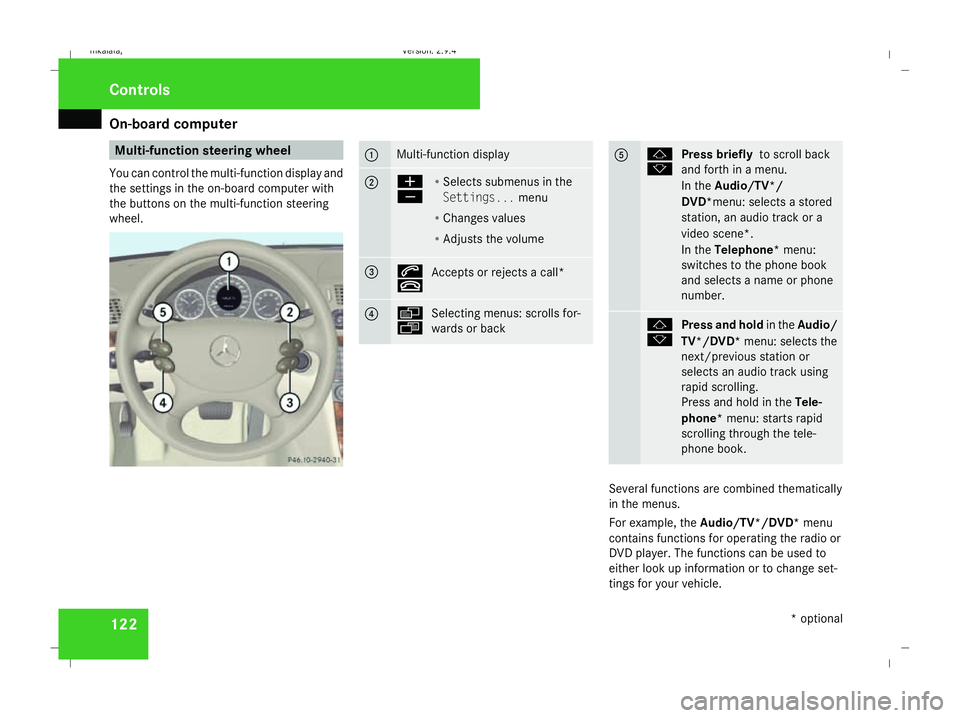
You can control the multi-function display and
the settings in the on-board computer with
the buttons on the multi-function steering
wheel. 1 Multi-function display
2 æ
ç
R
Selects submenus in the
Settings... menu
R Changes values
R Adjusts the volume 3 s
t
Accepts or rejects a call* 4 è
ÿ
Selecting menus: scrolls for-
wards or back 5 j
k
Press briefly
to scroll back
and forth in a menu.
In the Audio/TV*/
DVD*menu: selects a stored
station, an audio track or a
video scene*.
In the Telephone* menu:
switches to the phone book
and selects a name or phone
number. j
k
Press and hold
in theAudio/
TV*/DVD* menu: selects the
next/previous station or
selects an audio track using
rapid scrolling.
Press and hold in the Tele-
phone* menu: starts rapid
scrolling through the tele-
phone book. Several functions are combined thematically
in the menus.
For example, the Audio/TV*/DVD* menu
contains functions for operating the radio or
DVD player. The functions can be used to
either look up information or to change set-
tings for your vehicle. Controls
* optional
211_AKB; 2; 5, en-GB
mkalafa,
Version: 2.9.4 2008-02-29T16:57:07+01:00 - Seite 122Dateiname: 6515_3416_02_buchblock.pdf; preflight
Page 128 of 401
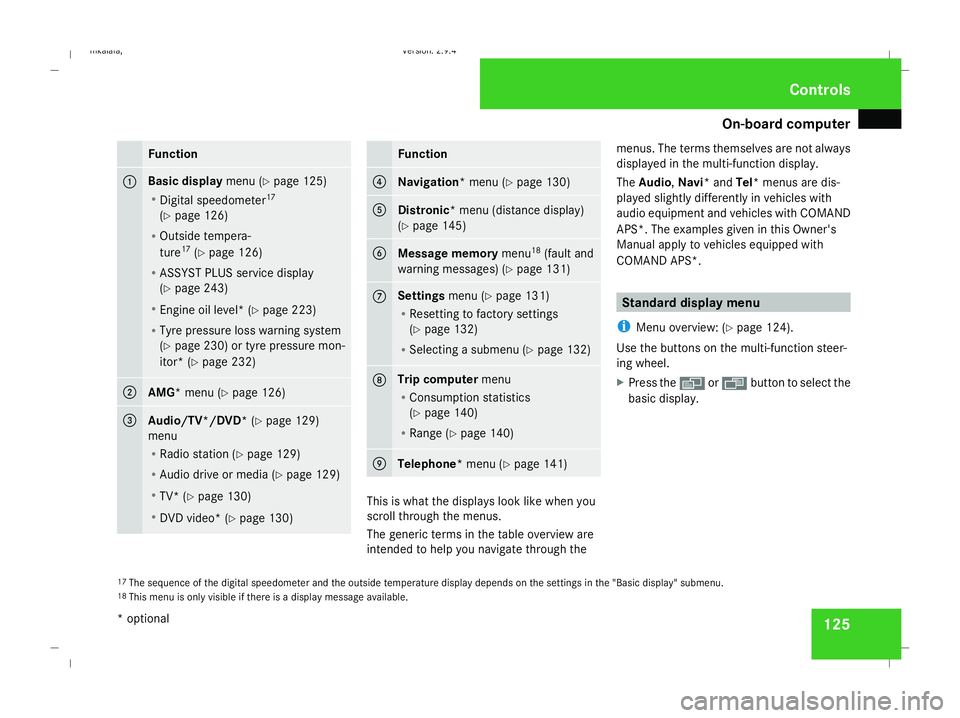
On-board computer
125Function
1 Basic display
menu (Ypage 125)
R Digital speedometer 17
(Y page 126)
R Outside tempera-
ture 17
(Y page 126)
R ASSYST PLUS service display
(Y page 243)
R Engine oil level* (Y page 223)
R Tyre pressure loss warning system
(Y page 230) or tyre pressure mon-
itor* (Y page 232) 2
AMG* menu (Y
page 126) 3
Audio/TV*/DVD*
(Ypage 129)
menu
R Radio station ( Ypage 129)
R Audio drive or media (Y page 129)
R TV* (Y page 130)
R DVD video* (Y page 130) Function
4
Navigation* menu (Y
page 130) 5
Distronic
* menu (distance display)
(Y page 145) 6
Message memory
menu18
(fault and
warning messages) (Y page 131) 7 Settings
menu (Ypage 131)
R Resetting to factory settings
(Y page 132)
R Selecting a submenu (Y page 132) 8 Trip computer
menu
R Consumption statistics
(Y page 140)
R Range (Y page 140) 9
Telephone*
menu (Ypage 141) This is what the displays look like when you
scroll through the menus.
The generic terms in the table overview are
intended to help you navigate through themenus. The terms themselves are not always
displayed in the multi-function display.
The Audio, Navi* and Tel* menus are dis-
played slightly differently in vehicles with
audio equipment and vehicles with COMAND
APS*. The examples given in this Owner's
Manual apply to vehicles equipped with
COMAND APS*. Standard display menu
i Menu overview: (Y page 124).
Use the buttons on the multi-function steer-
ing wheel.
X Press the èor· button to select the
basic display.
17 The sequence of the digital speedometer and the outside temperature display depends on the settings in the "Basic display" submenu.
18 This menu is only visible if there is a display message available. Controls
* optional
211_AKB; 2; 5, en-GB
mkalafa,
Version: 2.9.4
2008-02-29T16:57:07+01:00 - Seite 125 ZDateiname: 6515_3416_02_buchblock.pdf; preflight
Page 132 of 401
On-board computer
129Audio/TV*/DVD* menu
Use the functions in the Audio/TV/DVD
menu to operate the audio equipment or
COMAND APS*. If the audio equipment or
COMAND APS* is switched off, the multi-
function display shows the Audio offmes-
sage.
i Menu overview: see (Y page 124).
Use the buttons on the multi-function steer-
ing wheel.
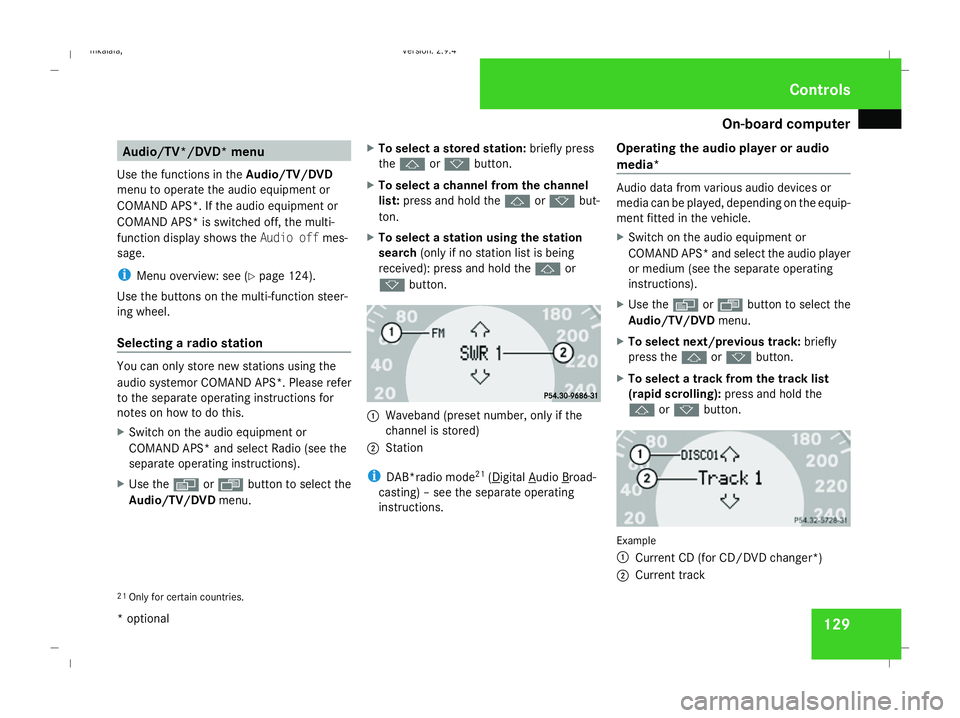
Selecting a radio station You can only store new stations using the
audio systemor COMAND APS *.Please refer
to the separate operating instructions for
notes on how to do this.
X Switch on the audio equipment or
COMAND APS* and select Radio (see the
separate operating instructions).
X Use the èor· button to select the
Audio/TV/DVD menu. X
To select a stored station: briefly press
the j ork button.
X To select a channel from the channel
list: press and hold the jork but-
ton.
X To select a station using the station
search (only if no station list is being
received): press and hold the jor
k button. 1
Waveband (preset number, only if the
channel is stored)
2 Station
i DAB*radio mode 21
( Digital Audio Broad-
casting) – see the separate operating
instructions. Operating the audio player or audio
media* Audio data from various audio devices or
media can be played, depending on the equip-
ment fitted in the vehicle.
X
Switch on the audio equipment or
COMAND APS* and select the audio player
or medium (see the separate operating
instructions).
X Use the èor· button to select the
Audio/TV/DVD menu.
X To select next/previous track: briefly
press the jork button.
X To select a track from the track list
(rapid scrolling): press and hold the
j ork button. Example
1
Current CD (for CD/DVD changer*)
2 Current track
21 Only for certain countries. Controls
* optional
211_AKB; 2; 5, en-GB
mkalafa,
Version: 2.9.4 2008-02-29T16:57:07+01:00 - Seite 129 ZDateiname: 6515_3416_02_buchblock.pdf; preflight
Page 181 of 401
Air conditioning
178
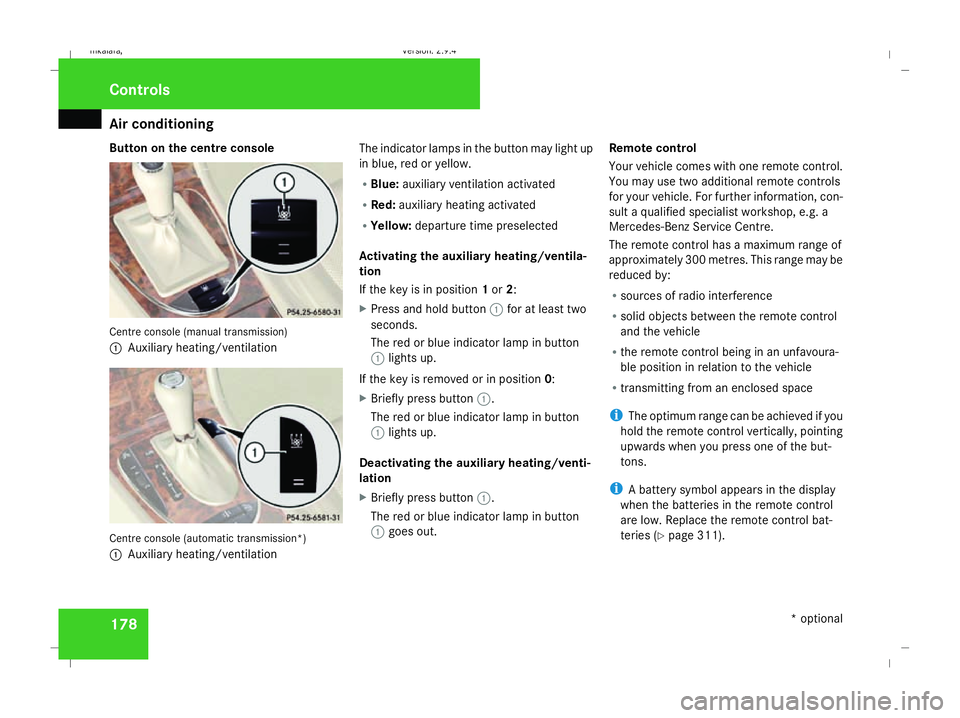
Button on the centre console
Centre console (manual transmission)
1
Auxiliary heating/ventilation Centre console (automatic transmission*)
1 Auxiliary heating/ventilation The indicator lamps in the button may light up
in blue, red or yellow.
R
Blue: auxiliary ventilation activated
R Red: auxiliary heating activated
R Yellow: departure time preselected
Activating the auxiliary heating/ventila-
tion
If the key is in position 1or 2:
X Press and hold button 1for at least two
seconds.
The red or blue indicator lamp in button
1 lights up.
If the key is removed or in position 0:
X Briefly press button 1.
The red or blue indicator lamp in button
1 lights up.
Deactivating the auxiliary heating/venti-
lation
X Briefly press button 1.
The red or blue indicator lamp in button
1 goes out. Remote control
Your vehicle comes with one remote control.
You may use two additional remote controls
for your vehicle. For further information, con-
sult a qualified specialist workshop, e.g. a
Mercedes-Benz Service Centre.
The remote control has a maximum range of
approximately 300 metres. This range may be
reduced by:
R sources of radio interference
R solid objects between the remote control
and the vehicle
R the remote control being in an unfavoura-
ble position in relation to the vehicle
R transmitting from an enclosed space
i The optimum range can be achieved if you
hold the remote control vertically, pointing
upwards when you press one of the but-
tons.
i A battery symbol appears in the display
when the batteries in the remote control
are low. Replace the remote control bat-
teries (Y page 311). Controls
* optional
211_AKB; 2; 5, en-GB
mkalafa
, Version: 2.9.4 2008-02-29T16:57:07+01:00 - Seite 178Dateiname: 6515_3416_02_buchblock.pdf; preflight
Page 214 of 401
Features
211Mobile phone*
G
Risk of accident
Observe the legal requirements of the
country in which you are currently driving
regarding operating mobile communica-
tions equipment in a vehicle.
If it is permitted by law to operate commu-
nications equipment while the vehicle is in
motion, you must only do so when the traf-
fic situation allows. You could otherwise be
distracted from the traffic conditions,
cause an accident and injure yourself and
others.
Two-way radios and fax equipment used
without low-reflection exterior aerials can
interfere with the vehicle's electronics and
thereby jeopardise the operating safety of
the vehicle and your safety. You must there-
fore only use this equipment if it is correctly
connected to a separate reflection-free
exterior aerial. G
Risk of injury
Excessive electromagnetic radiation may
cause damage to your health and the health
of others. Using an exterior aerial takes into
account current scientific discussions relating to the possible health risk posed by
electromagnetic fields.
i In order to ensure optimum signal quality
for mobile phones and to minimise mutual
interference between the vehicle electron-
ics and mobile phones, Mercedes-Benz rec-
ommends the use of an approved exterior
aerial. An exterior aerial conducts the elec-
tromagnetic fields generated by a wireless
device to the exterior of the vehicle; the
field strength within the vehicle interior is
lower than in a vehicle that does not have
an exterior aerial.
i There are various mobile phone brackets
that may be fitted to your vehicle; in some
cases these are country-specific. You can
obtain these mobile phone brackets from a
qualified specialist workshop, e.g. a
Mercedes-Benz Service Centre. The func-
tions and services available when you use
the phone depend on your mobile phone
model and service provider.
The mobile phone bracket is in the armrest.
X Open the telephone compartment
(Y page 206). Inserting the mobile phone into the
mobile phone bracket If the mobile phone is inserted into the mobile
phone bracket, you can only speak to the per-
son you are calling using the hands-free sys-
tem.
! Do not attempt to remove the mobile
phone and the telephone bracket together.
You could otherwise damage the mobile
phone bracket.
X Remove the cover of the aerial plug from
the back of the mobile phone and keep it in
a safe place. Cont
rols
* optional
211_AKB; 2; 5, en-GB
mkalafa ,V ersion: 2.9.4
2008-02-29T16:57:07+01:00 - Seite 211 ZDateiname: 6515_3416_02_buchblock.pdf; preflight
Page 217 of 401
Features
214 Infrared reflecting windscreen*
The infrared reflecting glass prevents the
vehicle interior from becoming too hot. It also
blocks radio waves up into the gigahertz
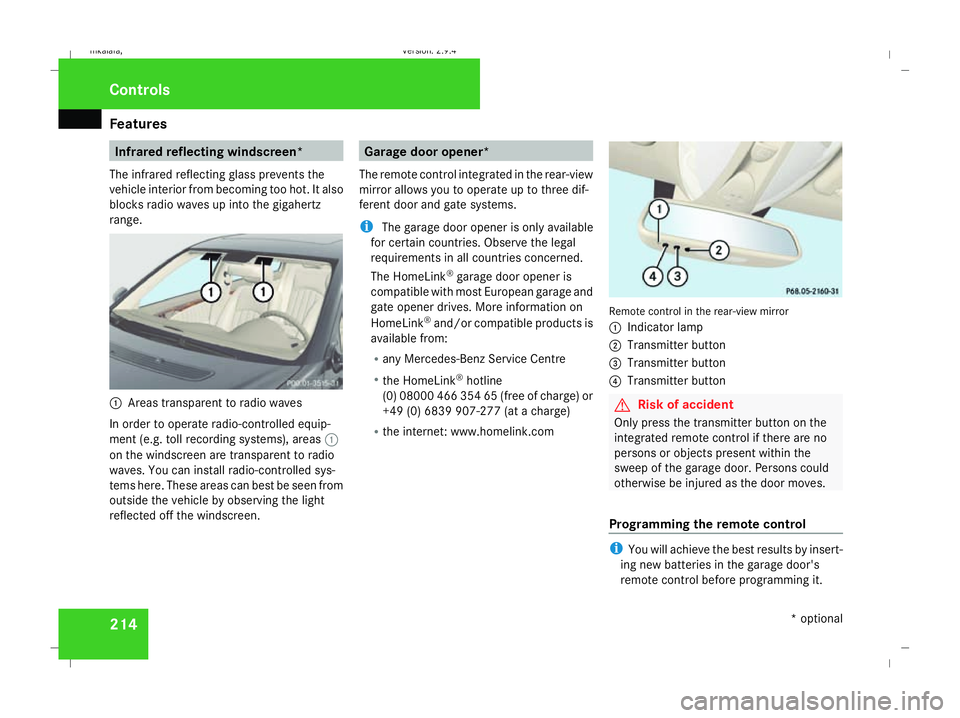
range. 1
Areas transparent to radio waves
In order to operate radio-controlled equip-
ment (e.g. toll recording systems), areas 1
on the windscreen are transparent to radio
waves. You can install radio-controlled sys-
tems here. These areas can best be seen from
outside the vehicle by observing the light
reflected off the windscreen. Garage door opener*
The remote control integrated in the rear-view
mirror allows you to operate up to three dif-
ferent door and gate systems.
i The garage door opener is only available
for certain countries. Observe the legal
requirements in all countries concerned.
The HomeLink ®
garage door opener is
compatible with most European garage and
gate opener drives. More information on
HomeLink ®
and/or compatible products is
available from:
R any Mercedes-Benz Service Centre
R the HomeLink ®
hotline
(0) 08000 466 354 65 (free of charge) or
+49 (0) 6839 907-27 7(at a charge)
R the internet: www.homelink.com Remote control in the rear-view mirror
1
Indicator lamp
2 Transmitter button
3 Transmitter button
4 Transmitter button G
Risk of accident
Only press the transmitter button on the
integrated remote control if there are no
persons or objects present within the
sweep of the garage door. Persons could
otherwise be injured as the door moves.
Programming the remote control i
You will achieve the best results by insert-
ing new batteries in the garage door's
remote control before programming it. Controls
* optional
211_AKB; 2; 5, en-GB
mkalafa,
Version: 2.9.4 2008-02-29T16:57:07+01:00 - Seite 214Dateiname: 6515_3416_02_buchblock.pdf; preflight