wheel MERCEDES-BENZ E-CLASS SALOON 2009 Owners Manual
[x] Cancel search | Manufacturer: MERCEDES-BENZ, Model Year: 2009, Model line: E-CLASS SALOON, Model: MERCEDES-BENZ E-CLASS SALOON 2009Pages: 373, PDF Size: 12.37 MB
Page 254 of 373
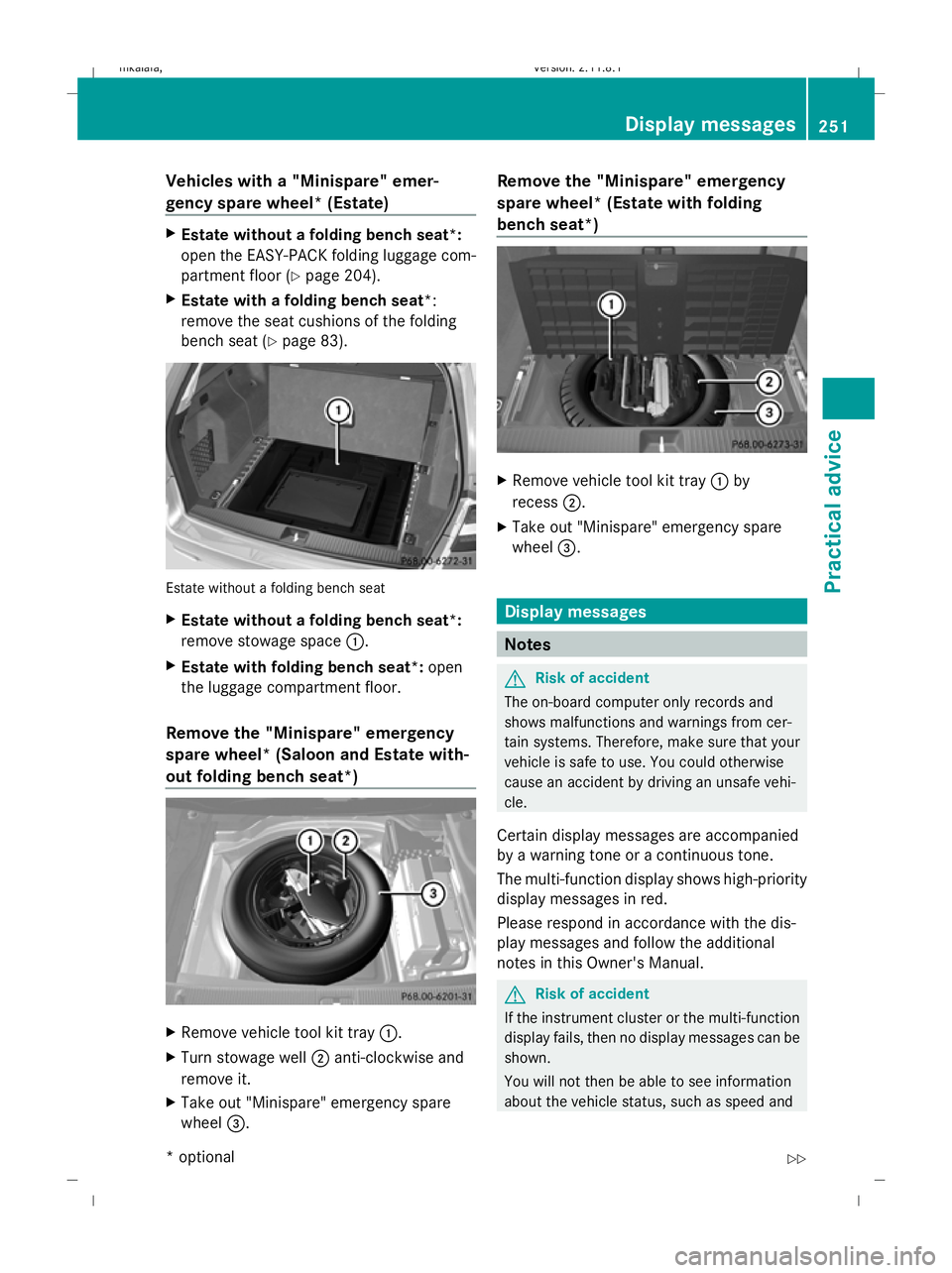
Vehicles with a "Minispare" emer-
gency spare wheel* (Estate)
X
Estate without a folding bench seat*:
open the EASY-PACK folding luggage com-
partment floor ( Ypage 204).
X Estate with a folding bench seat *:
remove the seat cushions of the folding
bench seat (Y page 83). Estate without a folding bench seat
X
Estate without a folding bench seat*:
remove stowage space :.
X Estate with folding bench seat*: open
the luggage compartment floor.
Remove the "Minispare" emergency
spare wheel* (Saloon and Estate with-
out folding bench seat*) X
Remove vehicle tool kit tray :.
X Turn stowage well ;anti-clockwise and
remove it.
X Take out "Minispare" emergency spare
wheel =. Remove the "Minispare" emergency
spare wheel* (Estate with folding
bench seat*)
X
Remove vehicle tool kit tray :by
recess ;.
X Take out "Minispare" emergency spare
wheel =. Display messages
Notes
G
Risk of accident
The on-board computer only records and
shows malfunctions and warnings from cer-
tain systems. Therefore, make sure that your
vehicle is safe to use. You could otherwise
cause an accident by driving an unsafe vehi-
cle.
Certain display messages are accompanied
by a warning tone or a continuous tone.
The multi-function display shows high-priority
display messages in red.
Please respond in accordance with the dis-
play messages and follow the additional
notes in this Owner's Manual. G
Risk of accident
If the instrument cluster or the multi-function
display fails, then no display messages can be
shown.
You will not then be able to see information
about the vehicle status, such as speed and Display messages
251Practical advice
* optional
212_AKB; 2; 4, en-GB
mkalafa,
Version: 2.11.8.1 2009-05-05T14:17:16+02:00 - Seite 251 Z
Dateiname: 6515346702_buchblock.pdf; erzeugt am 07. May 2009 14:17:07; WK
Page 255 of 373
outside temperature, warning and indicator
lamps, display messages or the failure of sys-
tems. The vehicle’s handling characteristics
may be affected. Adapt your driving style and
speed accordingly.
Immediately consult a qualified specialist
workshop which has the necessary specialist
knowledge and tools to carry out the work
required. Mercedes-Benz recommends that
you use a Mercedes-Benz Service Centre for
this purpose. In particular, work relevant to
safety or on safety-related systems must be
carried out at a qualified specialist workshop.
When you stop and park the vehicle, please
observe the instructions provided for HOLD
(Y page 151)and parking (Y page 107).
Calling up display messages The on-board computer saves certain display
messages, which you can call up.
X Press =or; on the steering wheel
to select the Servicemenu.
If there are display messages, the multi-
function display shows, e.g. 2 messages.
X Using 9or: select the entry, e.g.
2 messages. X
Confirm with a.
X Using :or9 scroll through the dis-
play messages.
Hiding display messages You cannot hide display messages of the
highest priority. The multi-function display
shows these messages continuously until
their causes have been remedied.
Use the buttons on the multi-function steer-
ing wheel.
X
Use the aor% button on the steer-
ing wheel to hide the display message.
The following tables contain all the display
messages. Text messages
G
Risk of accident and injury
The operating safety of the vehicle can be compromised if maintenance work is carried out
incorrectly. This could cause you to lose control of the vehicle and cause an accident. The safety
systems may also not be able to protect you or others as they are designed to do.
Always have maintenance work carried out at a qualified specialist workshop. The qualified spe-
cialist workshop must have the necessary specialist knowledge and tools to carry out the work
required. Mercedes-Benz recommends that you use a Mercedes-Benz Service Centre for this
purpose. In particular, work relevant to safety or on safety-related systems must be carried out
at a qualified specialist workshop. 252
Display messagesPractical advice
212_AKB; 2; 4, en-GB
mkalafa,
Version: 2.11.8.1 2009-05-05T14:17:16+02:00 - Seite 252
Dateiname: 6515346702_buchblock.pdf; erzeugt am 07. May 2009 14:17:07; WK
Page 261 of 373
Display messages
Possible causes/consequences and
X
X Solutions Lane Keep‐
ing Assist currently
unavaila‐
ble See
Owner's
Manual
Lane Keeping Assist* is deactivated and temporarily inoper-
ative if:
R
the windscreen is dirty in the camera’s field of vision.
R visibility is impaired due to heavy rain, snow, spray or fog.
R there are no lane markings for a longer period.
R the lane markings are worn, dark or covered, for example
by dirt or snow.
Lane Keeping Assist* is operational again and the display
message disappears when:
R the dirt (e.g. slush) drops away while you are driving.
R the system detects that the camera is fully operational
again.
If the display message continues to be shown:
X Clean the windscreen (Y page 242).Lane Keep‐
ing Assist inopera‐
tive
Lane Keeping Assist* has malfunctioned.
X
Visit a qualified specialist workshop. Tyre pres‐
sure Check
tyres
G
Risk of accident
The tyre pressure loss warning system has detected a signif-
icant loss in pressure. A warning tone also sounds.
X Stop the vehicle without making any sudden steering or
braking manoeuvres. Pay attention to traffic conditions as
you do so.
X Check the tyres.
X Check the tyre pressure. If necessary, set the correct tyre
pressure ( Ypage 225).
X If necessary, repair any defective tyres or change the wheel
(Y page 309).
X Restart the tyre pressure loss warning system once the tyre
pressure is correct (Y page 226).Run Flat
Indicator inopera‐
tive The tyre pressure loss warning system is faulty.
X
Visit a qualified specialist workshop. Check
tyre pres‐
sures then
restart
Run Flat
Indicator A display message for the tyre pressure loss warning system
was shown.
X
Set the correct tyre pressure for all tyres (Y page 225).
X Restart the tyre pressure loss warning system
(Y page 226). 258
Display
messagesPractical advice
* optional
212_AKB; 2; 4, en-GB
mkalafa
,V ersion: 2.11.8.1
2009-05-05T14:17:16+02:00 - Seite 258
Dateiname: 6515346702_buchblock.pdf; erzeugt am 07. May 2009 14:17:08; WK
Page 262 of 373
Display messages
Possible causes/consequences and
X
X Solutions Tyre
press.
monitor currently
unavaila‐
ble No sensor signals can be received due to radio interference.
The tyre pressure monitor* has temporarily malfunctioned.
X
Drive on.
The tyre pressure monitor* restarts automatically as soon
as the problem has been solved. Tyre
press.
monitor inopera‐
tive
The tyre pressure monitor* is faulty.
X
Visit a qualified specialist workshop. Tyre
press.
monitor inopera‐
tive No
wheel sen‐
sors The fitted wheels do not have suitable tyre pressure sensors.
X
Fit wheels with suitable tyre pressure sensors.
The tyre pressure monitor* is activated automatically after
driving for a few minutes. Check tyre(s)
G
Risk of accident
Vehicles with tyre pressure monitor*: the tyre pressure has
dropped significantly in one or more of the tyres. The wheel
position is displayed in the instrument cluster. A warning tone
also sounds.
X Stop the vehicle without making any sudden steering or
braking manoeuvres. Pay attention to traffic conditions as
you do so.
X Correct the tyre pressure (Y page 225).
X If necessary, repair any defective tyres or change the wheel
(Y page 309). Caution, tyre
defect
G
Risk of accident
Vehicles with the tyre pressure monitor*: the pressure is
dropping rapidly in one or more of the tyres. The wheel posi-
tion is displayed in the instrument cluster. A warning tone also
sounds.
X Stop the vehicle without making any sudden steering or
braking manoeuvres. Pay attention to traffic conditions as
you do so.
X Repair the faulty tyre or replace the wheel ( Ypage 309). Rectify tyre pres‐
sure
Vehicles with tyre pressure monitor*: the pressure is insuffi-
cient in at least one of the tyres or the pressure difference
between the individual tyres is too great.
X
Check the tyre pressures at the next opportunity. If neces-
sary, correct the tyre pressure (Y page 225). Display
messages
259Practical advice
* optional
212_AKB; 2; 4, en-GB
mkalafa
,V ersion: 2.11.8.1
2009-05-05T14:17:16+02:00 - Seite 259 Z
Dateiname: 6515346702_buchblock.pdf; erzeugt am 07. May 2009 14:17:08; WK
Page 263 of 373
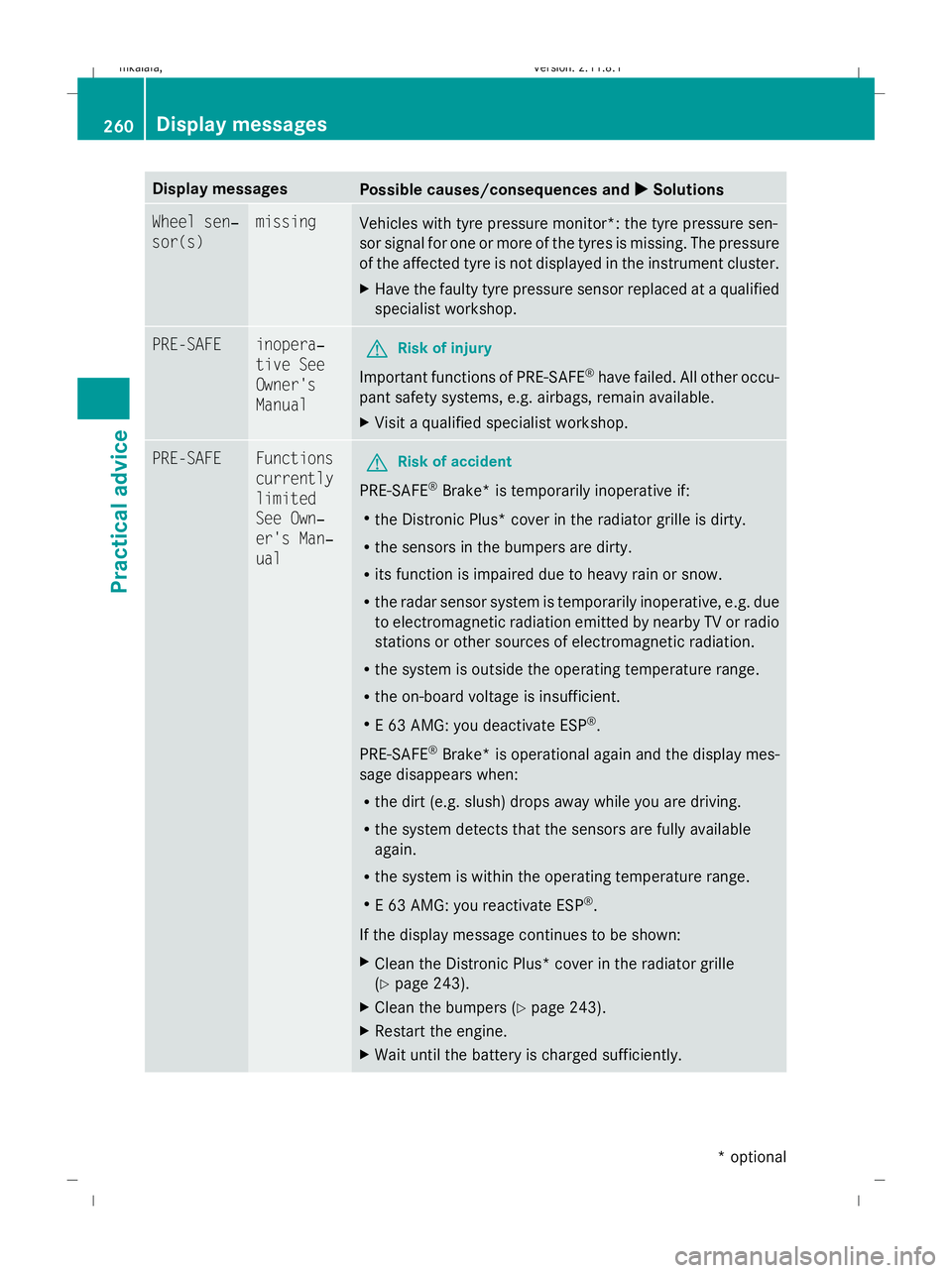
Display messages
Possible causes/consequences and
X
X Solutions Wheel sen‐
sor(s) missing
Vehicles with tyre pressure monitor*: the tyre pressure sen-
sor signal for one or more of the tyres is missing. The pressure
of the affected tyre is not displayed in the instrument cluster.
X
Have the faulty tyre pressure sensor replaced at a qualified
specialist workshop. PRE-SAFE inopera‐
tive See
Owner's
Manual
G
Risk of injury
Important functions of PRE-SAFE ®
have failed. All other occu-
pant safety systems, e.g. airbags, remain available.
X Visit a qualified specialist workshop. PRE-SAFE Functions
currently
limited
See Own‐
er's Man‐
ual
G
Risk of accident
PRE-SAFE ®
Brake* is temporarily inoperative if:
R the Distronic Plus* cover in the radiator grille is dirty.
R the sensors in the bumpers are dirty.
R its function is impaired due to heavy rain or snow.
R the radar sensor system is temporarily inoperative, e.g. due
to electromagnetic radiation emitted by nearby TV or radio
stations or other sources of electromagnetic radiation.
R the system is outside the operating temperature range.
R the on-board voltage is insufficient.
R E 63 AMG: you deactivate ESP ®
.
PRE-SAFE ®
Brake *is operational again and the display mes-
sage disappears when:
R the dirt (e.g. slush) drops away while you are driving.
R the system detects that the sensors are fully available
again.
R the system is within the operating temperature range.
R E 63 AMG: you reactivate ESP ®
.
If the display message continues to be shown:
X Clean the Distronic Plus* cover in the radiator grille
(Y page 243).
X Clean the bumpers (Y page 243).
X Restart the engine.
X Wait until the battery is charged sufficiently. 260
Display messagesPractical advice
* optional
212_AKB; 2; 4, en-GB
mkalafa,
Version: 2.11.8.1 2009-05-05T14:17:16+02:00 - Seite 260
Dateiname: 6515346702_buchblock.pdf; erzeugt am 07. May 2009 14:17:09; WK
Page 279 of 373
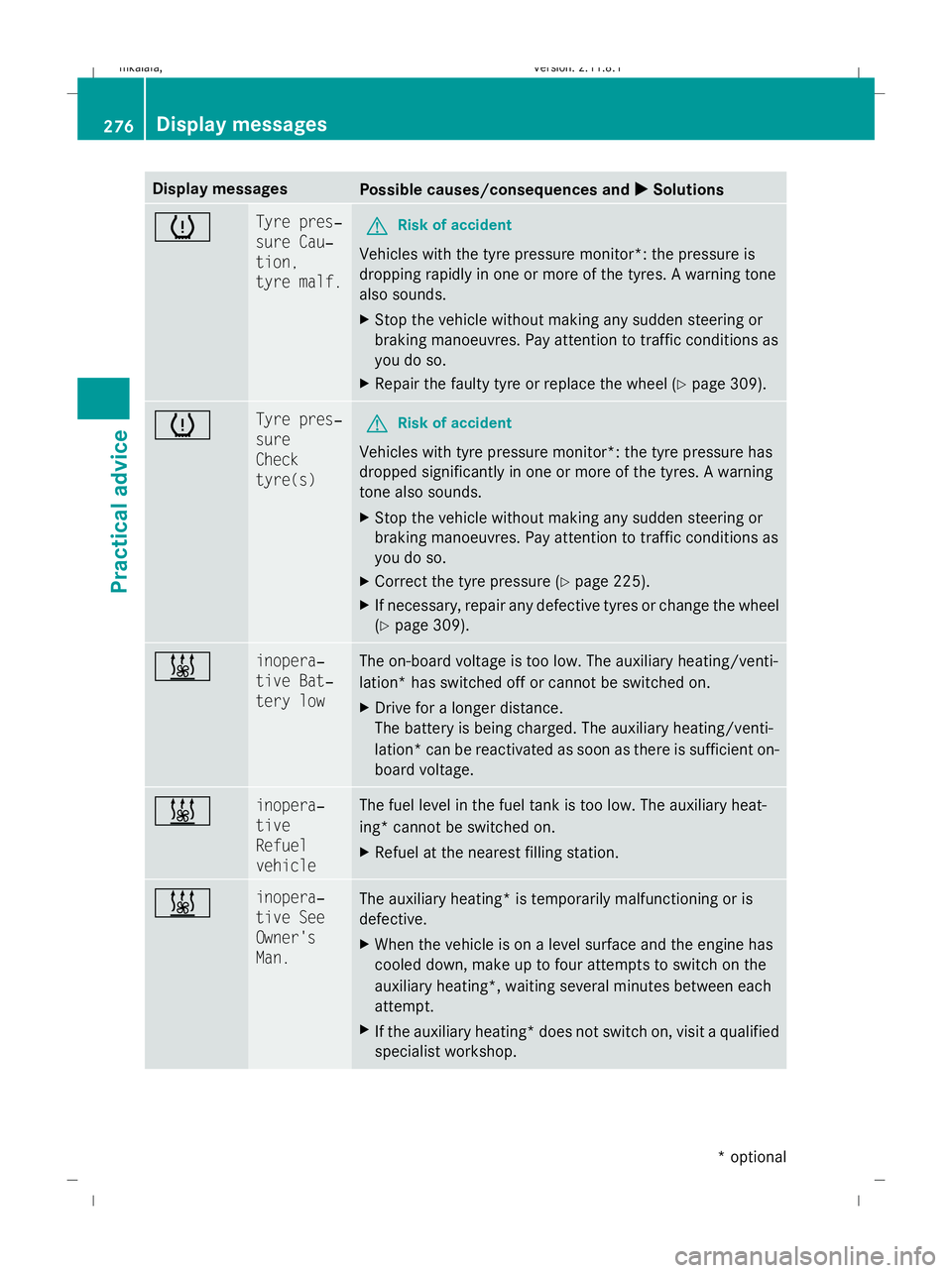
Display messages
Possible causes/consequences and
X
X Solutions h Tyre pres‐
sure Cau‐
tion,
tyre malf.
G
Risk of accident
Vehicles with the tyre pressure monitor*: the pressure is
dropping rapidly in one or more of the tyres. A warning tone
also sounds.
X Stop the vehicle without making any sudden steering or
braking manoeuvres. Pay attention to traffic conditions as
you do so.
X Repair the faulty tyre or replace the wheel ( Ypage 309). h Tyre pres‐
sure
Check
tyre(s)
G
Risk of accident
Vehicles with tyre pressure monitor*: the tyre pressure has
dropped significantly in one or more of the tyres. A warning
tone also sounds.
X Stop the vehicle without making any sudden steering or
braking manoeuvres. Pay attention to traffic conditions as
you do so.
X Correct the tyre pressure (Y page 225).
X If necessary, repair any defective tyres or change the wheel
(Y page 309). & inopera‐
tive Bat‐
tery low The on-board voltage is too low. The auxiliary heating/venti-
lation* has switched off or cannot be switched on.
X
Drive for a longer distance.
The battery is being charged. The auxiliary heating/venti-
lation *can be reactivated as soon as there is sufficient on-
board voltage. & inopera‐
tive
Refuel
vehicle The fuel level in the fuel tank is too low. The auxiliary heat-
ing* cannot be switched on.
X
Refuel at the nearest filling station. & inopera‐
tive See
Owner's
Man.
The auxiliary heating
*is temporarily malfunctioning or is
defective.
X When the vehicle is on a level surface and the engine has
cooled down, make up to four attempts to switch on the
auxiliary heating*, waiting several minutes between each
attempt.
X If the auxiliary heating* does not switch on, visit a qualified
specialist workshop. 276
Display messagesPractical advice
* optional
212_AKB; 2; 4, en-GB
mkalafa,
Version: 2.11.8.1 2009-05-05T14:17:16+02:00 - Seite 276
Dateiname: 6515346702_buchblock.pdf; erzeugt am 07. May 2009 14:17:11; WK
Page 282 of 373
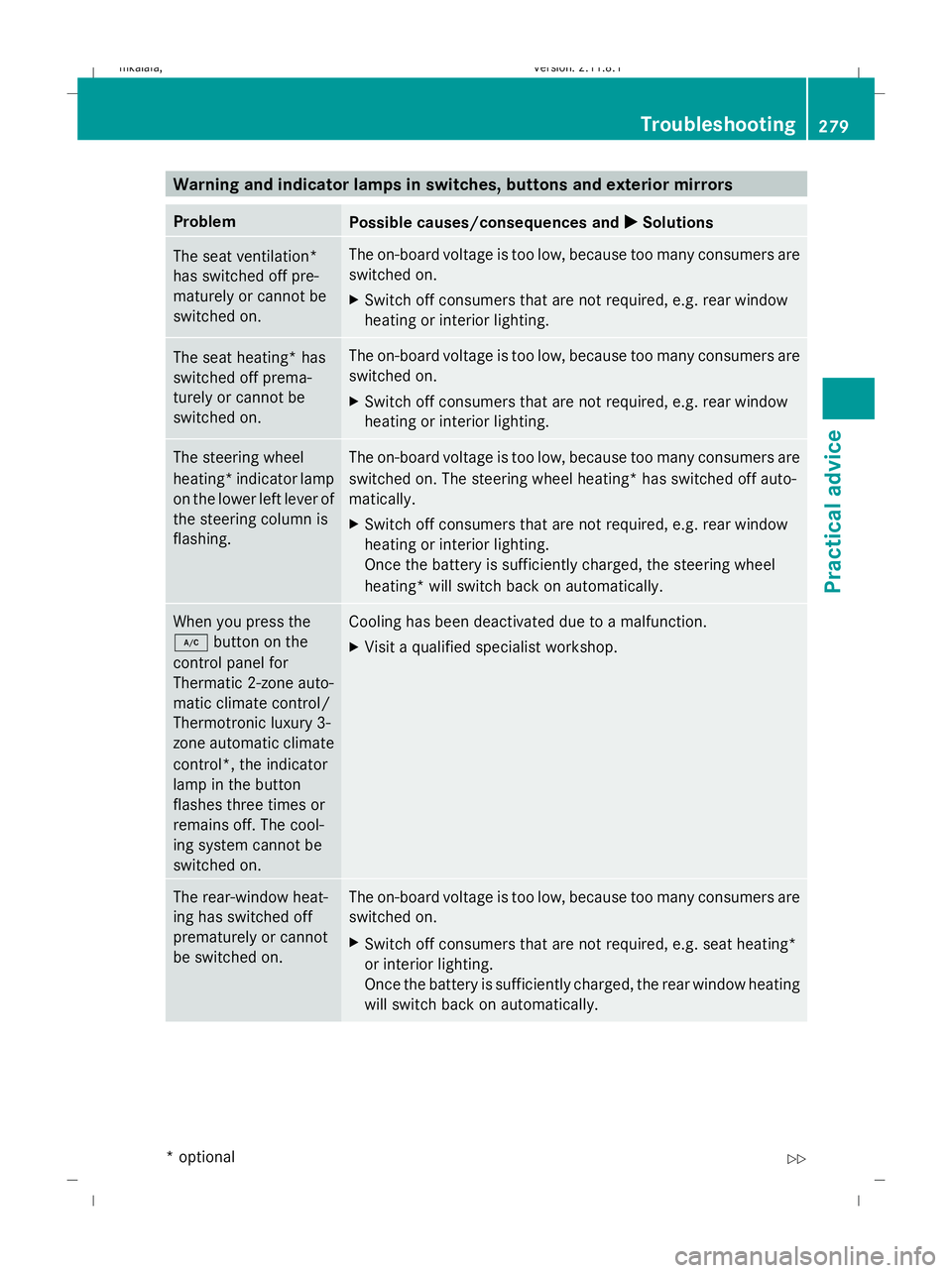
Warning and indicator lamps in switches, buttons and exterior mirrors
Problem
Possible causes/consequences and
X
X Solutions The seat ventilation*
has switched off pre-
maturely or cannot be
switched on. The on-board voltage is too low, because too many consumers are
switched on.
X
Switch off consumers that are not required, e.g. rear window
heating or interior lighting. The seat heating* has
switched off prema-
turely or cannot be
switched on. The on-board voltage is too low, because too many consumers are
switched on.
X
Switch off consumers that are not required, e.g. rear window
heating or interior lighting. The steering wheel
heating* indicator lamp
on the lower left lever of
the steering column is
flashing. The on-board voltage is too low, because too many consumers are
switched on. The steering wheel heating* has switched off auto-
matically.
X
Switch off consumers that are not required, e.g. rear window
heating or interior lighting.
Once the battery is sufficiently charged, the steering wheel
heating* will switch back on automatically. When you press the
¿
button on the
control panel for
Thermatic 2-zone auto-
matic climate control/
Thermotronic luxury 3-
zone automatic climate
control*, the indicator
lamp in the button
flashes three times or
remains off. The cool-
ing system cannot be
switched on. Cooling has been deactivated due to a malfunction.
X Visit a qualified specialist workshop. The rear-window heat-
ing has switched off
prematurely or cannot
be switched on. The on-board voltage is too low, because too many consumers are
switched on.
X
Switch off consumers that are not required, e.g. seat heating*
or interior lighting.
Once the battery is sufficiently charged, the rear window heating
will switch back on automatically. Troubleshooting
279Practical advice
* optional
212_AKB; 2; 4, en-GB
mkalafa,
Version: 2.11.8.1 2009-05-05T14:17:16+02:00 - Seite 279 Z
Dateiname: 6515346702_buchblock.pdf; erzeugt am 07. May 2009 14:17:11; WK
Page 284 of 373
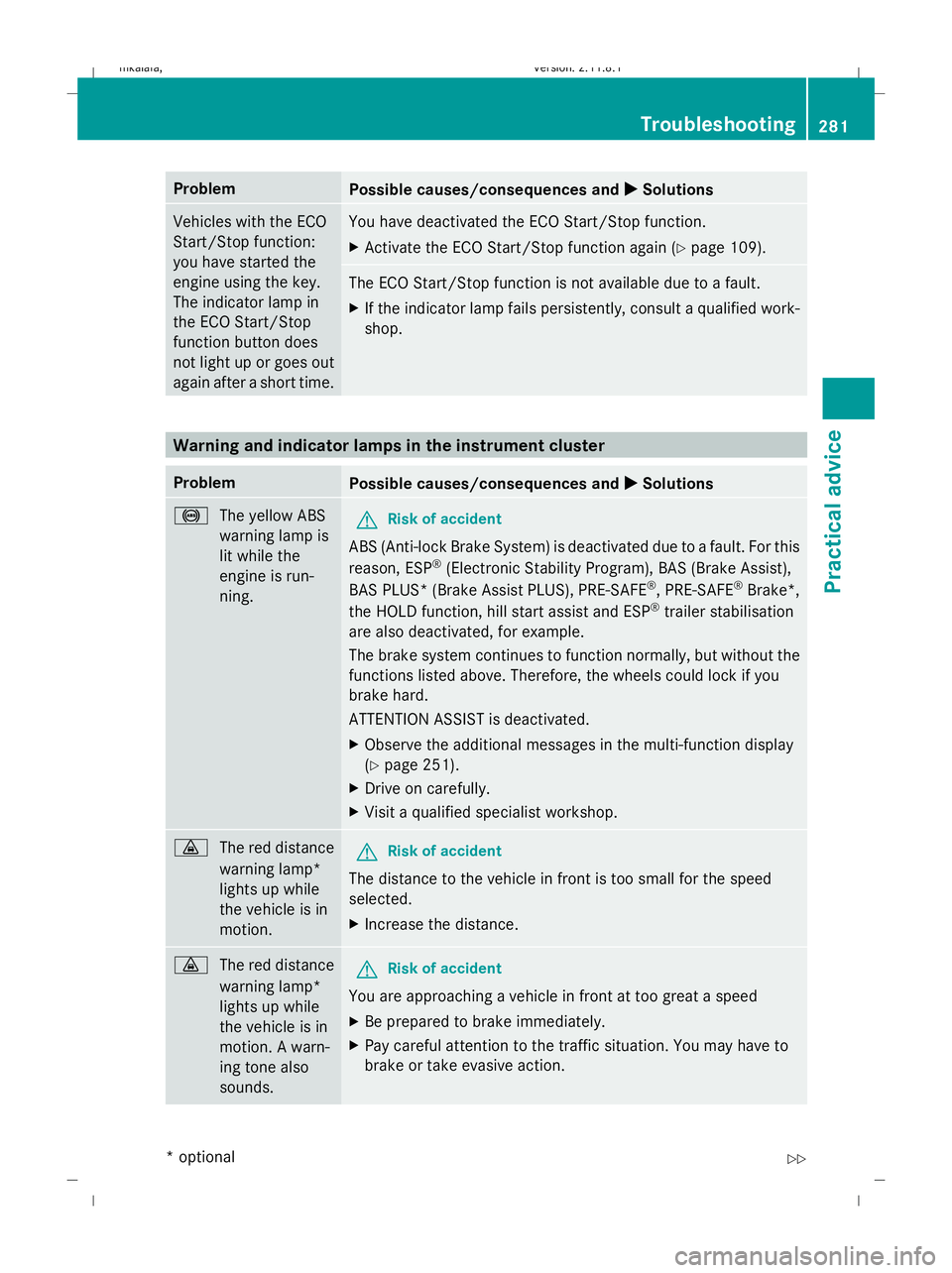
Problem
Possible causes/consequences and
X
X Solutions Vehicles with the ECO
Start/Stop function:
you have started the
engine using the key.
The indicator lamp in
the ECO Start/Stop
function button does
not light up or goes out
again after a short time. You have deactivated the ECO Start/Stop function.
X
Activate the ECO Start/Stop function again (Y page 109). The ECO Start/Stop function is not available due to a fault.
X If the indicator lamp fails persistently, consult a qualified work-
shop. Warning and indicator lamps in the instrument cluster
Problem
Possible causes/consequences and
X
X Solutions !
The yellow ABS
warning lamp is
lit while the
engine is run-
ning. G
Risk of accident
ABS (Anti-lock Brake System) is deactivated due to a fault. For this
reason, ESP ®
(Electronic Stability Program), BAS (Brake Assist),
BAS PLUS* (Brake Assist PLUS), PRE-SAFE ®
, PRE-SAFE ®
Brake*,
the HOLD function, hill start assist and ESP ®
trailer stabilisation
are also deactivated, for example.
The brake system continues to function normally, but without the
functions listed above. Therefore, the wheels could lock if you
brake hard.
ATTENTION ASSIST is deactivated.
X Observe the additional messages in the multi-function display
(Y page 251).
X Drive on carefully.
X Visit a qualified specialist workshop. ·
The red distance
warning lamp*
lights up while
the vehicle is in
motion. G
Risk of accident
The distance to the vehicle in front is too small for the speed
selected.
X Increase the distance. ·
The red distance
warning lamp*
lights up while
the vehicle is in
motion. A warn-
ing tone also
sounds. G
Risk of accident
You are approaching a vehicle in front at too great a speed
X Be prepared to brake immediately.
X Pay careful attention to the traffic situation. You may have to
brake or take evasive action. Troubleshooting
281Practical advice
* optional
212_AKB; 2; 4, en-GB
mkalafa,
Version: 2.11.8.1 2009-05-05T14:17:16+02:00 - Seite 281 Z
Dateiname: 6515346702_buchblock.pdf; erzeugt am 07. May 2009 14:17:12; WK
Page 285 of 373
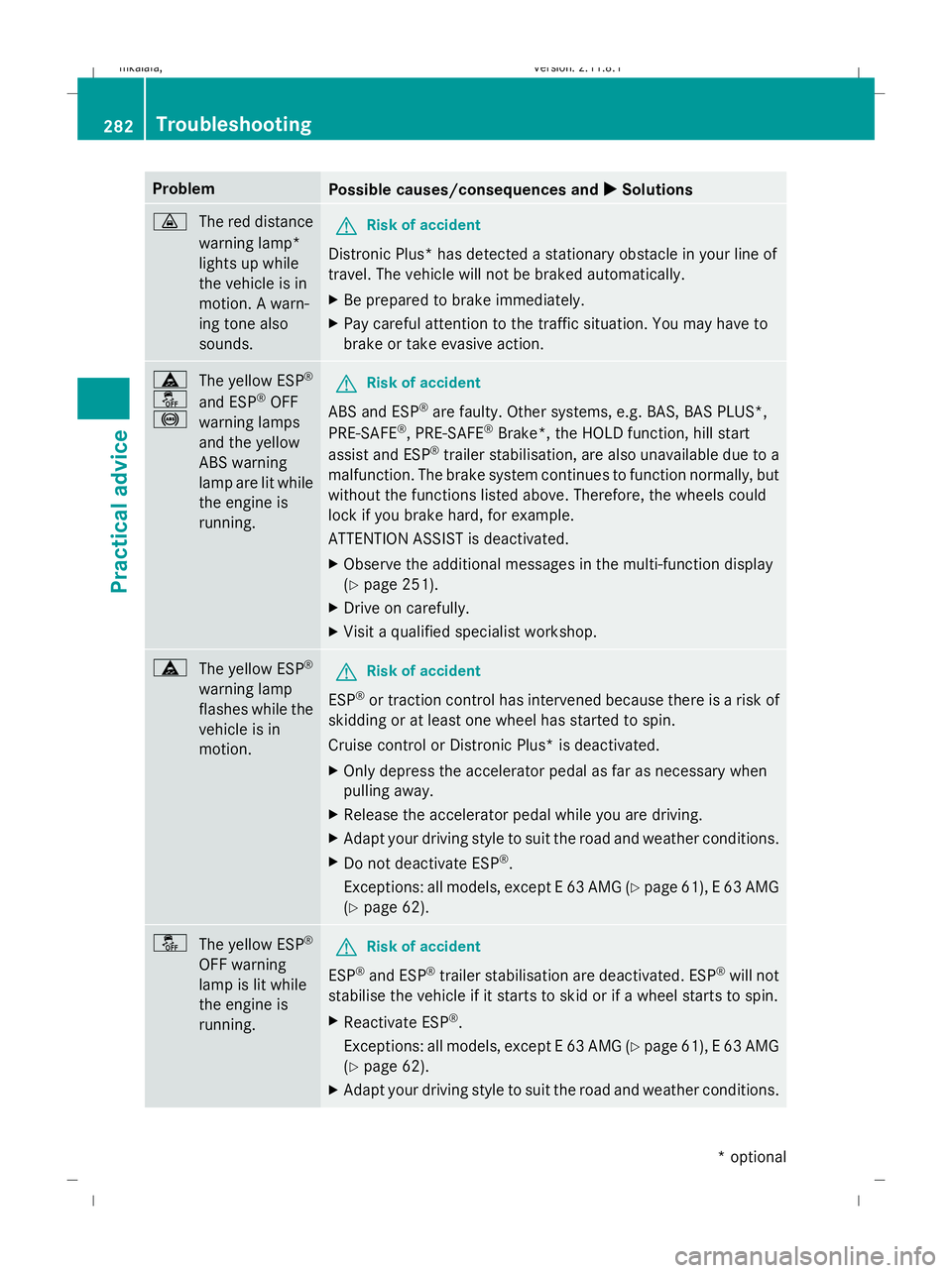
Problem
Possible causes/consequences and
X XSolutions ·
The red distance
warning lamp*
lights up while
the vehicle is in
motion. A warn-
ing tone also
sounds. G
Risk of accident
Distronic Plus* has detected a stationary obstacle in your line of
travel. The vehicle will not be braked automatically.
X Be prepared to brake immediately.
X Pay careful attention to the traffic situation. You may have to
brake or take evasive action. ä
å
!
The yellow ESP
®
and ESP ®
OFF
warning lamps
and the yellow
ABS warning
lamp are lit while
the engine is
running. G
Risk of accident
ABS and ESP ®
are faulty. Other systems, e.g. BAS, BAS PLUS*,
PRE-SAFE ®
, PRE-SAFE ®
Brake*, the HOLD function, hill start
assist and ESP ®
trailer stabilisation, are also unavailable due to a
malfunction. The brake system continues to function normally, but
without the functions listed above. Therefore, the wheels could
lock if you brake hard, for example.
ATTENTION ASSIST is deactivated.
X Observe the additional messages in the multi-function display
(Y page 251).
X Drive on carefully.
X Visit a qualified specialist workshop. ä
The yellow ESP ®
warning lamp
flashes while the
vehicle is in
motion. G
Risk of accident
ESP ®
or traction control has intervened because there is a risk of
skidding or at least one wheel has started to spin.
Cruise control or Distronic Plus* is deactivated.
X Only depress the accelerator pedal as far as necessary when
pulling away.
X Release the accelerator pedal while you are driving.
X Adapt your driving style to suit the road and weather conditions.
X Do not deactivate ESP ®
.
Exceptions: all models, except E 63 AMG (Y page 61), E 63 AMG
(Y page 62). å
The yellow ESP ®
OFF warning
lamp is lit while
the engine is
running. G
Risk of accident
ESP ®
and ESP ®
trailer stabilisation are deactivated. ESP ®
will not
stabilise the vehicle if it starts to skid or if a wheel starts to spin.
X Reactivate ESP ®
.
Exceptions: all models, except E 63 AMG (Y page 61), E 63 AMG
(Y page 62).
X Adapt your driving style to suit the road and weather conditions. 282
TroubleshootingPractical advice
* optional
212_AKB; 2; 4, en-GB
mkalafa,
Version: 2.11.8.1 2009-05-05T14:17:16+02:00 - Seite 282
Dateiname: 6515346702_buchblock.pdf; erzeugt am 07. May 2009 14:17:12; WK
Page 286 of 373
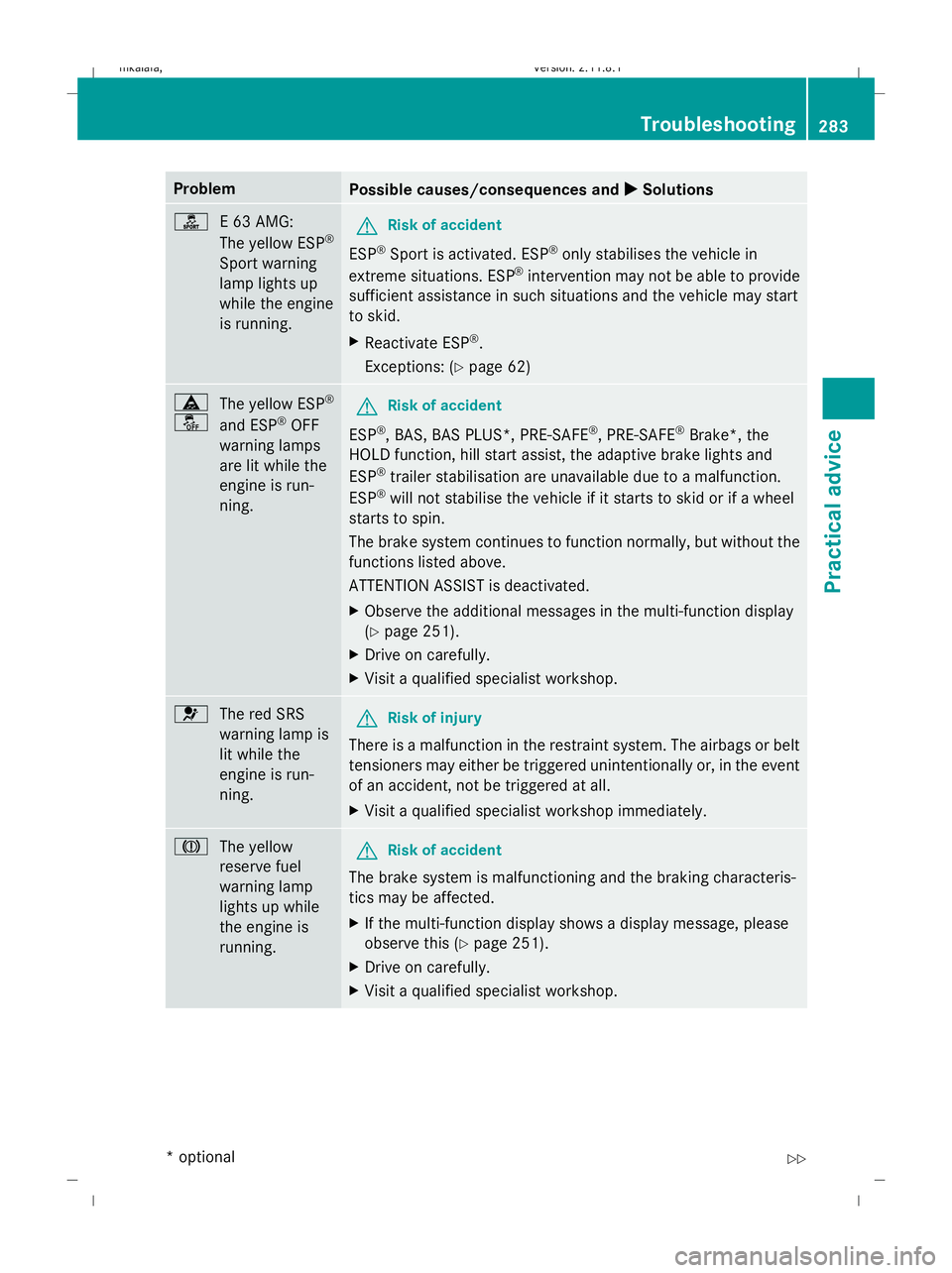
Problem
Possible causes/consequences and
X
X Solutions ì
E 63 AMG:
The yellow ESP ®
Sport warning
lamp lights up
while the engine
is running. G
Risk of accident
ESP ®
Sport is activated. ESP ®
only stabilises the vehicle in
extreme situations. ESP ®
intervention may not be able to provide
sufficient assistance in such situations and the vehicle may start
to skid.
X Reactivate ESP ®
.
Exceptions: (Y page 62) ä
å
The yellow ESP
®
and ESP ®
OFF
warning lamps
are lit while the
engine is run-
ning. G
Risk of accident
ESP ®
, BAS, BAS PLUS*, PRE-SAFE ®
, PRE-SAFE ®
Brake*, the
HOLD function, hill start assist, the adaptive brake lights and
ESP ®
trailer stabilisation are unavailable due to a malfunction.
ESP ®
will not stabilise the vehicle if it starts to skid or if a wheel
starts to spin.
The brake system continues to function normally, but without the
functions listed above.
ATTENTION ASSIST is deactivated.
X Observe the additional messages in the multi-function display
(Y page 251).
X Drive on carefully.
X Visit a qualified specialist workshop. 6
The red SRS
warning lamp is
lit while the
engine is run-
ning. G
Risk of injury
There is a malfunction in the restraint system. The airbags or belt
tensioners may either be triggered unintentionally or, in the event
of an accident, not be triggered at all.
X Visit a qualified specialist workshop immediately. J
The yellow
reserve fuel
warning lamp
lights up while
the engine is
running. G
Risk of accident
The brake system is malfunctioning and the braking characteris-
tics may be affected.
X If the multi-function display shows a display message, please
observe this (Y page 251).
X Drive on carefully.
X Visit a qualified specialist workshop. Troubleshooting
283Practical advice
* optional
212_AKB; 2; 4, en-GB
mkalafa,
Version: 2.11.8.1 2009-05-05T14:17:16+02:00 - Seite 283 Z
Dateiname: 6515346702_buchblock.pdf; erzeugt am 07. May 2009 14:17:12; WK