warning lights MERCEDES-BENZ E-CLASS SALOON 2009 User Guide
[x] Cancel search | Manufacturer: MERCEDES-BENZ, Model Year: 2009, Model line: E-CLASS SALOON, Model: MERCEDES-BENZ E-CLASS SALOON 2009Pages: 373, PDF Size: 12.37 MB
Page 65 of 373
You should always adapt your driving style to
suit prevailing road and weather conditions.
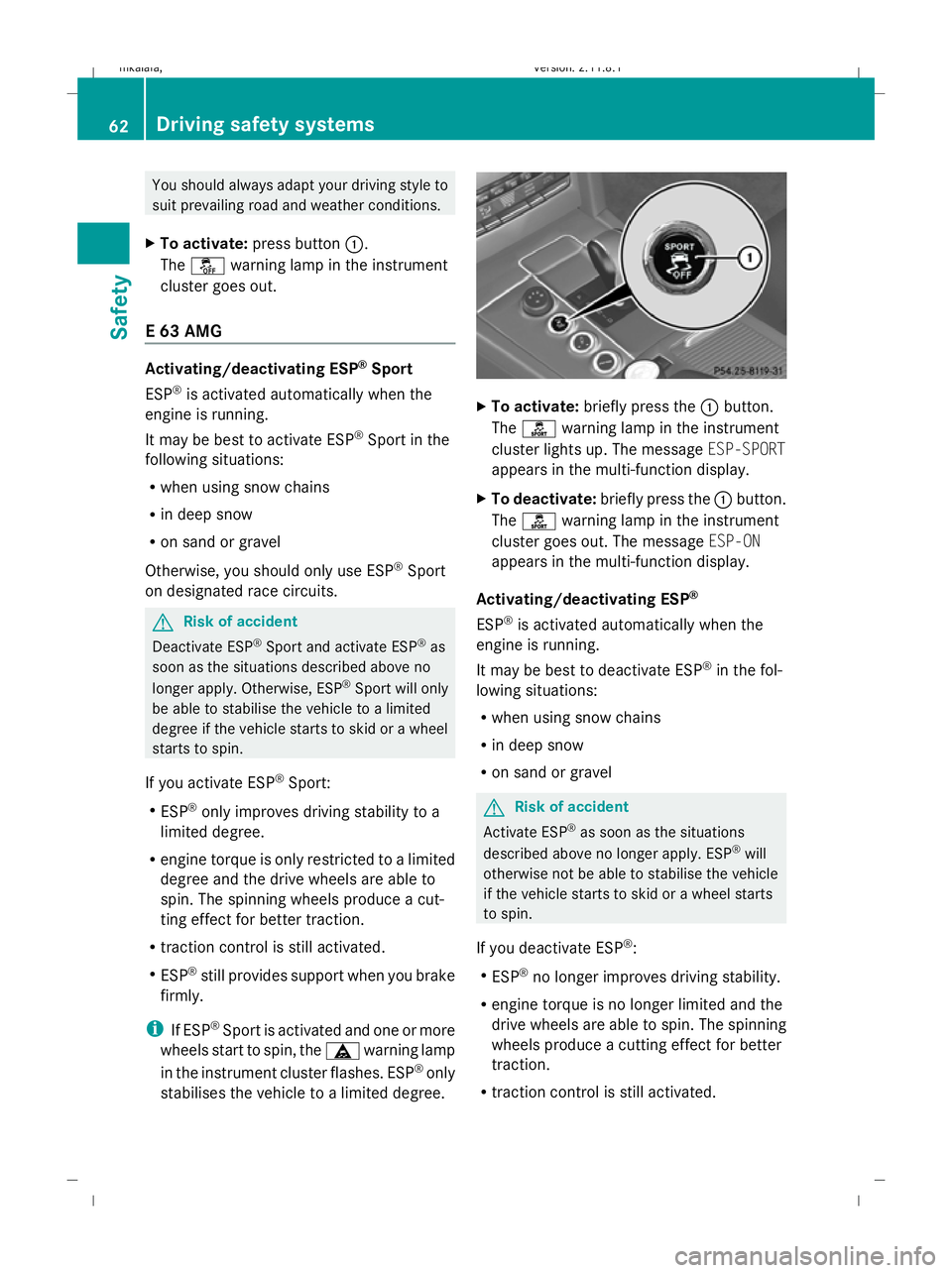
X To activate: press button :.
The å warning lamp in the instrument
cluster goes out.
E 63 AMG Activating/deactivating ESP
®
Sport
ESP ®
is activated automatically when the
engine is running.
It may be best to activate ESP ®
Sport in the
following situations:
R when using snow chains
R in deep snow
R on sand or gravel
Otherwise, you should only use ESP ®
Sport
on designated race circuits. G
Risk of accident
Deactivate ESP ®
Sport and activate ESP ®
as
soon as the situations described above no
longer apply. Otherwise, ESP ®
Sport will only
be able to stabilise the vehicle to a limited
degree if the vehicle starts to skid or a wheel
starts to spin.
If you activate ESP ®
Sport:
R ESP ®
only improves driving stability to a
limited degree.
R engine torque is only restricted to a limited
degree and the drive wheels are able to
spin. The spinning wheels produce a cut-
ting effect for better traction.
R traction control is still activated.
R ESP ®
still provides support when you brake
firmly.
i If ESP ®
Sport is activated and one or more
wheels start to spin, the äwarning lamp
in the instrument cluster flashes. ESP ®
only
stabilises the vehicle to a limited degree. X
To activate: briefly press the :button.
The ì warning lamp in the instrument
cluster lights up. The message ESP-SPORT
appears in the multi-function display.
X To deactivate: briefly press the :button.
The ì warning lamp in the instrument
cluster goes out. The message ESP-ON
appears in the multi-function display.
Activating/deactivating ESP ®
ESP ®
is activated automatically when the
engine is running.
It may be best to deactivate ESP ®
in the fol-
lowing situations:
R when using snow chains
R in deep snow
R on sand or gravel G
Risk of accident
Activate ESP ®
as soon as the situations
described above no longer apply. ESP ®
will
otherwise not be able to stabilise the vehicle
if the vehicle starts to skid or a wheel starts
to spin.
If you deactivate ESP ®
:
R ESP ®
no longer improves driving stability.
R engine torque is no longer limited and the
drive wheels are able to spin. The spinning
wheels produce a cutting effect for better
traction.
R traction control is still activated. 62
Driving safety systemsSafety
212_AKB; 2; 4, en-GB
mkalafa,
Version: 2.11.8.1 2009-05-05T14:17:16+02:00 - Seite 62
Dateiname: 6515346702_buchblock.pdf; erzeugt am 07. May 2009 14:15:43; WK
Page 66 of 373
R
ESP ®
still provides support when you brake
firmly.
R PRE-SAFE ®
is not available. It will also not
be activated if you brake firmly with the
assistance of ESP.
R PRE-SAFE ®
Brake* is not available. It will
also not be activated if you brake firmly
with the assistance of ESP ®
.
i If ESP ®
is deactivated and one or more
wheels start to spin, the äwarning lamp
in the instrument cluster does not flash. In
such situations, ESP ®
will not stabilise the
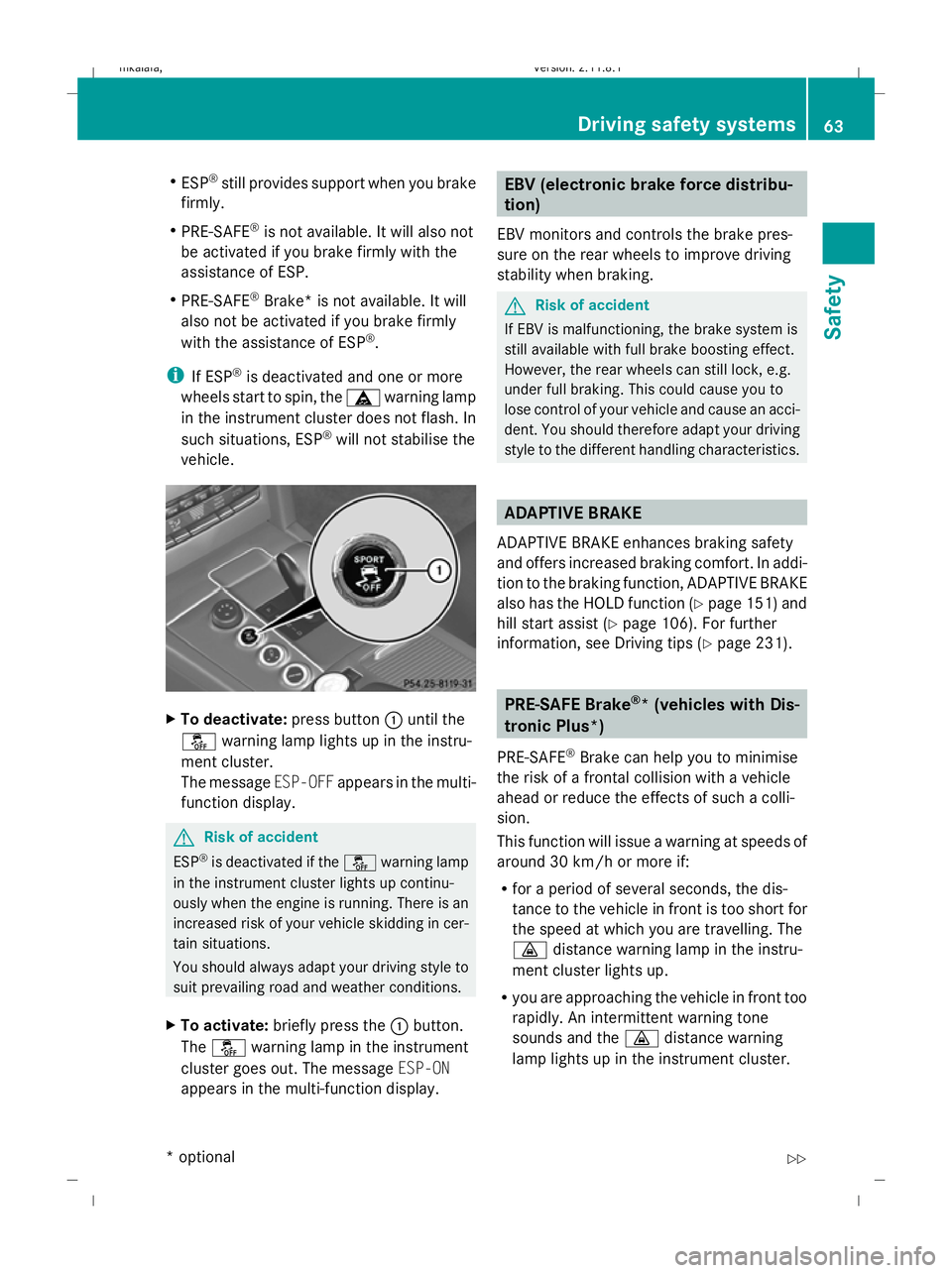
vehicle. X
To deactivate: press button:until the
å warning lamp lights up in the instru-
ment cluster.
The message ESP-OFFappears in the multi-
function display. G
Risk of accident
ESP ®
is deactivated if the åwarning lamp
in the instrument cluster lights up continu-
ously when the engine is running. There is an
increased risk of your vehicle skidding in cer-
tain situations.
You should always adapt your driving style to
suit prevailing road and weather conditions.
X To activate: briefly press the :button.
The å warning lamp in the instrument
cluster goes out. The message ESP-ON
appears in the multi-function display. EBV (electronic brake force distribu-
tion)
EBV monitors and controls the brake pres-
sure on the rear wheels to improve driving
stability when braking. G
Risk of accident
If EBV is malfunctioning, the brake system is
still available with full brake boosting effect.
However, the rear wheels can still lock, e.g.
under full braking. This could cause you to
lose control of your vehicle and cause an acci-
dent. You should therefore adapt your driving
style to the different handling characteristics. ADAPTIVE BRAKE
ADAPTIVE BRAKE enhances braking safety
and offers increased braking comfort. In addi-
tion to the braking function, ADAPTIVE BRAKE
also has the HOLD function (Y page 151) and
hill start assist (Y page 106). For further
information, see Driving tips (Y page 231). PRE-SAFE Brake
®
* (vehicles with Dis-
tronic Plus*)
PRE-SAFE ®
Brake can help you to minimise
the risk of a frontal collision with a vehicle
ahead or reduce the effects of such a colli-
sion.
This function will issue a warning at speeds of
around 30 km/h or more if:
R for a period of several seconds, the dis-
tance to the vehicle in front is too short for
the speed at which you are travelling. The
· distance warning lamp in the instru-
ment cluster lights up.
R you are approaching the vehicle in front too
rapidly. An intermittent warning tone
sounds and the ·distance warning
lamp lights up in the instrument cluster. Driving safety systems
63Safety
* optional
212_AKB; 2; 4, en-GB
mkalafa,
Version: 2.11.8.1 2009-05-05T14:17:16+02:00 - Seite 63 Z
Dateiname: 6515346702_buchblock.pdf; erzeugt am 07. May 2009 14:15:43; WK
Page 67 of 373
Due to the nature of the system, particularly
complicated driving conditions may cause the
system to display an unnecessary warning. G
Risk of accident
Pay particular attention to the traffic condi-
tions if the ·distance warning lamp in the
instrument cluster lights up or an intermittent
warning tone sounds. If necessary, brake or
manoeuvre to avoid an obstacle.
If the driver and passengers have fastened
their seat belts, PRE-SAFE ®
Brake can also
can also perform the following at speeds of
above approximately 30 km/h:
R brake the vehicle automatically from a
speed of up to around 200 km/h
R trigger preventative passenger protection
measures (PRE-SAFE ®
) G
Risk of accident
PRE-SAFE ®
Brake is only an aid to assist you
when driving. You are responsible for main-
taining a safe distance from other vehicles,
the vehicle's speed and for braking in good
time. Always pay attention to the traffic con-
ditions. Otherwise, you may recognise dan-
gers too late, cause an accident and injure
yourself and others.
With the help of the radar sensor system,
PRE-SAFE ®
Brake can detect obstacles that
are in front of your vehicle for an extended
period of time. If you approach an obstacle
and PRE-SAFE ®
Brake detects a risk of a col-
lision, the system will initially alert you both
visually and acoustically. If you do not brake
or steer, the vehicle will at first automatically
brake slightly. In the event of an increased
risk of a collision, PRE-SAFE ®
is activated
(Y page 42). If the risk of collision persists and
you do not brake, manoeuvre or accelerate
significantly yourself, an automatic full brake
application may be carried out. G
Risk of accident
Only clearly identified obstacles will trigger a
warning and initiate braking assistance by
PRE-SAFE ®
Brake.
In particular, the detection of obstacles can
be restricted if there is:
R dirt on the sensors or the sensors are cov-
ered
R snow or heavy rain
R interference by other radar sources
R the possibility of strong radar reflections,
for example in multi-storey car parks
PRE-SAFE ®
Brake does not react to persons,
animals, oncoming vehicles, crossing traffic
or when cornering.
PRE-SAFE ®
Brake may not detect narrow
vehicles such as motorcycles and vehicles
driving on a different line. G
Risk of accident
Depending on the current speed, PRE-SAFE ®
Brake decelerates your vehicle by up to
4 m/s 2
before performing possible emer-
gency braking. This is equivalent to approx-
imately 40 % of the maximum braking power
of the vehicle. You must also apply the brakes
yourself to limit the effects of the collision or
to avoid the collision. Automatic emergency
braking is not performed until immediately
prior to an accident in the event that you are
unable to avoid one by, for instance, taking
evasive action.
In order to maintain the appropriate distance
to the vehicle in front and thus prevent a
crash, you must apply the brakes yourself.
At speeds up to approximately 70 km/h,
PRE-SAFE ®
Brake can also detect stationary
obstacles, for example stopped or parked
vehicles. 64
Driving safety systemsSafety
212_AKB; 2; 4, en-GB
mkalafa,
Version: 2.11.8.1 2009-05-05T14:17:16+02:00 - Seite 64
Dateiname: 6515346702_buchblock.pdf; erzeugt am 07. May 2009 14:15:44; WK
Page 94 of 373
Unfastening the belt
X
Press release button ?and guide belt
tongue ;back towards belt sash
guide :. Belt warning for driver and front
passenger
The 7 seat belt warning lamp in the instru-
ment cluster reminds you that all occupants
should fasten their seat belts. It is either lit
continuously or flashes. Additionally, there
may be a warning tone.
The 7 seat belt warning lamp goes out and
the warning tone ceases as soon as the driver
and front passenger have fastened their seat
belts.
For certain countries only: regardless of
whether the driver or the front passenger
already have their seat belt fastened, the
7 seat belt warning lamp lights up for six
seconds after the engine has been started. It
then goes out if both the driver and the front
passenger have fastened their seat belt.
i Further information about the 7seat
belt warning lamp (Y page 286). Belt height adjustment
You can adjust the seat belt height on the
driver's seat and the front-passenger seat.
Estate: you can also adjust the belt height on
the outer rear bench seats.
Adjust the belt to a height that allows it to be
routed across the middle of your shoulder. X
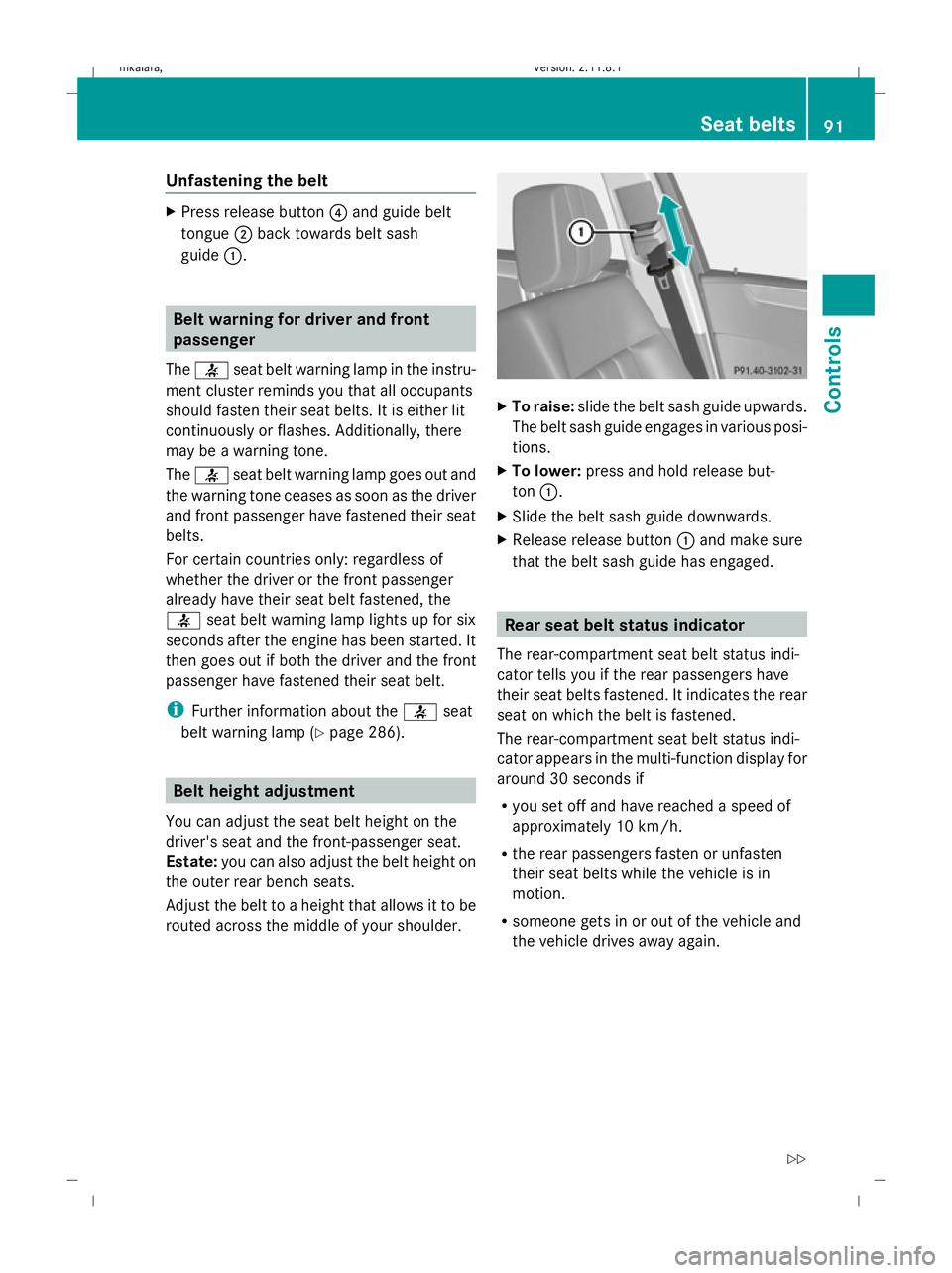
To raise: slide the belt sash guide upwards.
The belt sash guide engages in various posi-
tions.
X To lower: press and hold release but-
ton :.
X Slide the belt sash guide downwards.
X Release release button :and make sure
that the belt sash guide has engaged. Rear seat belt status indicator
The rear-compartment seat belt status indi-
cator tells you if the rear passengers have
their seat belts fastened. It indicates the rear
seat on which the belt is fastened.
The rear-compartment seat belt status indi-
cator appears in the multi-function display for
around 30 seconds if
R you set off and have reached a speed of
approximately 10 km/h.
R the rear passengers fasten or unfasten
their seat belts while the vehicle is in
motion.
R someone gets in or out of the vehicle and
the vehicle drives away again. Seat belts
91Controls
212_AKB; 2; 4, en-GB
mkalafa, Version: 2.11.8.1 2009-05-05T14:17:16+02:00 - Seite 91 Z
Dateiname: 6515346702_buchblock.pdf; erzeugt am 07. May 2009 14:15:57; WK
Page 99 of 373
The system may not recognise the following
road users
R
Road users that have no lighting, e.g.
pedestrians
R Road users that have poor lighting, e.g.
cyclists
R Road users whose lighting is not clearly
visible, e.g. road users behind a crash bar-
rier
R On rare occasions: road users that have
lights may be recognised too late or not at
all.
The automatic main-beam headlamps will not
be deactivated, or they may be activated
despite road users travelling in front of, or
approaching, the vehicle.
Thus, you could cause an accident and injure
yourself and others. Always observe traffic
conditions and, if necessary, dip the lights
manually.
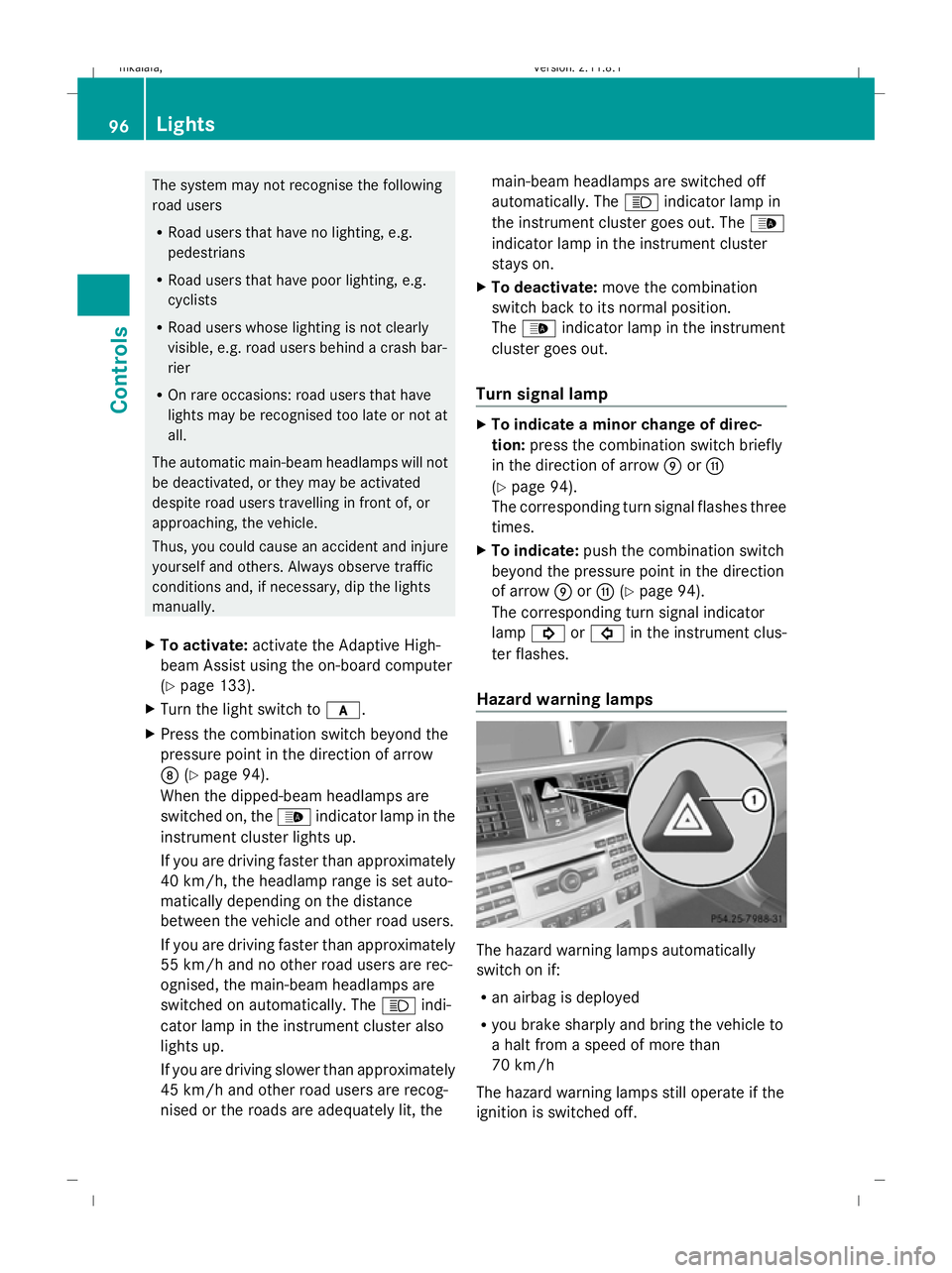
X To activate: activate the Adaptive High-
beam Assist using the on-board computer
(Y page 133).
X Turn the light switch to c.
X Press the combination switch beyond the
pressure point in the direction of arrow
D (Ypage 94).
When the dipped-beam headlamps are
switched on, the _indicator lamp in the
instrument cluster lights up.
If you are driving faster than approximately
40 km/h, the headlamp range is set auto-
matically depending on the distance
between the vehicle and other road users.
If you are driving faster than approximately
55 km/h and no other road users are rec-
ognised, the main-beam headlamps are
switched on automatically. The Kindi-
cator lamp in the instrument cluster also
lights up.
If you are driving slower than approximately
45 km/h and other road users are recog-
nised or the roads are adequately lit, the main-beam headlamps are switched off
automatically. The
Kindicator lamp in
the instrument cluster goes out. The _
indicator lamp in the instrument cluster
stays on.
X To deactivate: move the combination
switch back to its normal position.
The _ indicator lamp in the instrument
cluster goes out.
Turn signal lamp X
To indicate a minor change of direc-
tion: press the combination switch briefly
in the direction of arrow EorG
(Y page 94).
The corresponding turn signal flashes three
times.
X To indicate: push the combination switch
beyond the pressure point in the direction
of arrow EorG (Ypage 94).
The corresponding turn signal indicator
lamp ! or# in the instrument clus-
ter flashes.
Hazard warning lamps The hazard warning lamps automatically
switch on if:
R
an airbag is deployed
R you brake sharply and bring the vehicle to
a halt from a speed of more than
70 km/h
The hazard warning lamps still operate if the
ignition is switched off. 96
LightsControls
212_AKB; 2; 4, en-GB
mkalafa,
Version: 2.11.8.1 2009-05-05T14:17:16+02:00 - Seite 96
Dateiname: 6515346702_buchblock.pdf; erzeugt am 07. May 2009 14:16:00; WK
Page 100 of 373
X
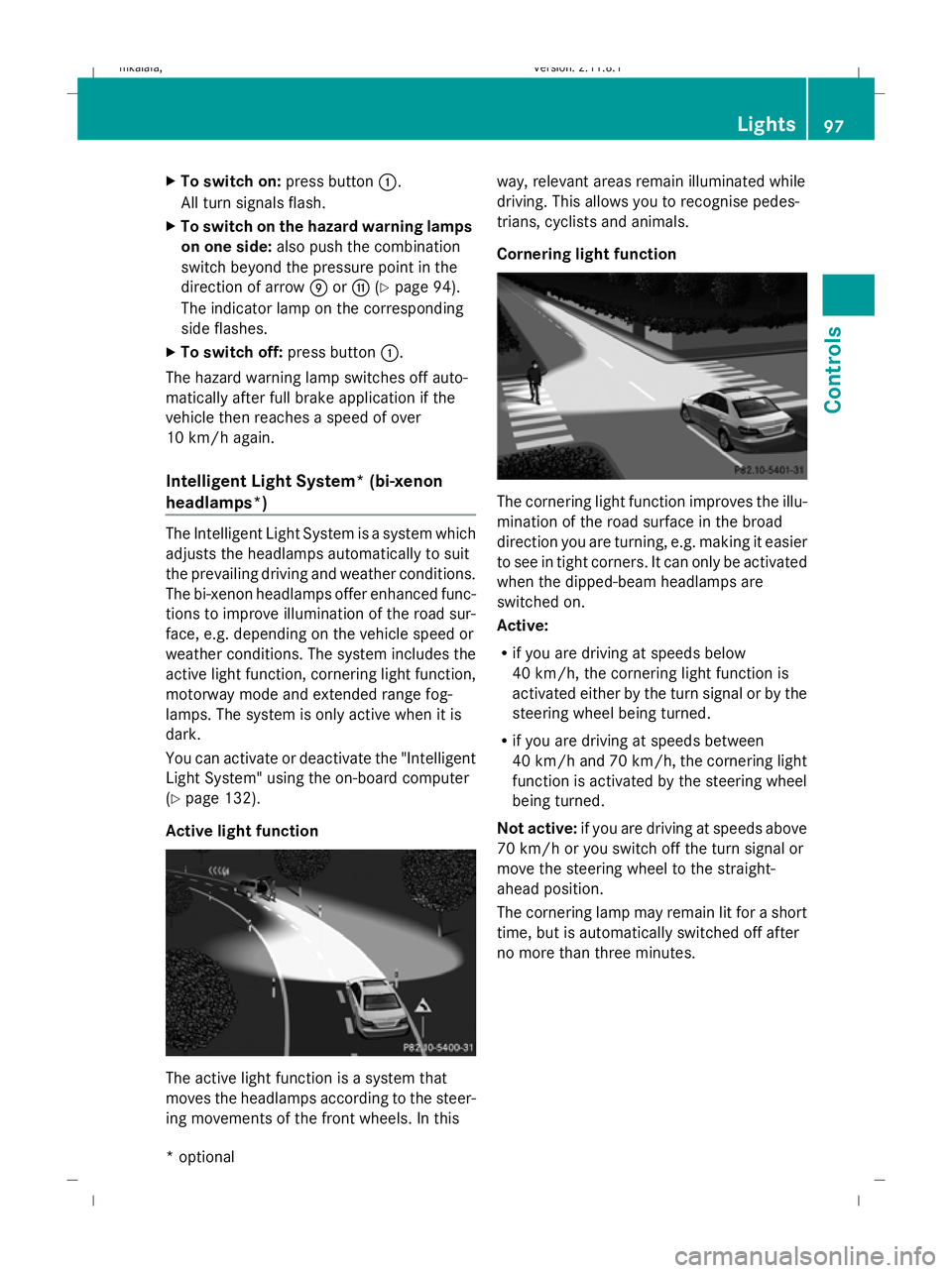
To switch on: press button:.
All turn signals flash.
X To switch on the hazard warning lamps
on one side: also push the combination
switch beyond the pressure point in the
direction of arrow EorG (Ypage 94).
The indicator lamp on the corresponding
side flashes.
X To switch off: press button:.
The hazard warning lamp switches off auto-
matically after full brake application if the
vehicle then reaches a speed of over
10 km/h again.
Intelligent Light System* (bi-xenon
headlamps*) The Intelligent Light System is a system which
adjusts the headlamps automatically to suit
the prevailing driving and weather conditions.
The bi-xenon headlamps offer enhanced func-
tions to improve illumination of the road sur-
face, e.g. depending on the vehicle speed or
weather conditions. The system includes the
active light function, cornering light function,
motorway mode and extended range fog-
lamps. The system is only active when it is
dark.
You can activate or deactivate the "Intelligent
Light System" using the on-board computer
(Y page 132).
Active light function The active light function is a system that
moves the headlamps according to the steer-
ing movements of the front wheels. In this way, relevant areas remain illuminated while
driving. This allows you to recognise pedes-
trians, cyclists and animals.
Cornering light function
The cornering light function improves the illu-
mination of the road surface in the broad
direction you are turning, e.g. making it easier
to see in tight corners. It can only be activated
when the dipped-beam headlamps are
switched on.
Active:
R
if you are driving at speeds below
40 km/h, the cornering light function is
activated either by the turn signal or by the
steering wheel being turned.
R if you are driving at speeds between
40 km/h and 70 km/h, the cornering light
function is activated by the steering wheel
being turned.
Not active: if you are driving at speeds above
70 km/h or you switch off the turn signal or
move the steering wheel to the straight-
ahead position.
The cornering lamp may remain lit for a short
time, but is automatically switched off after
no more than three minutes. Lights
97Controls
* optional
212_AKB; 2; 4, en-GB
mkalafa,
Version: 2.11.8.1 2009-05-05T14:17:16+02:00 - Seite 97 Z
Dateiname: 6515346702_buchblock.pdf; erzeugt am 07. May 2009 14:16:00; WK
Page 110 of 373
Parking
G
Risk of accident
Only remove the key from the ignition lock
when the vehicle is stationary, as you cannot
steer the vehicle with the key removed.
Never leave children unsupervised in the vehi-
cle. They could release the parking brake. This
could lead to a serious or fatal accident. G
Risk of fire
Make sure that the exhaust system does not
under any circumstances come into contact
with easily ignitable material such as dry grass
or petrol. Otherwise, the flammable material
may ignite and set the vehicle on fire.
To ensure that the vehicle is secured against
rolling away unintentionally:
R the parking brake must be applied
R on vehicles with manual transmission,
engage first gear or reverse gear
R on vehicles with automatic transmission*,
the transmission must be in position Pand
the key must be removed from the ignition
lock
R on steep uphill or downhill gradients, turn
the front wheels towards the kerb
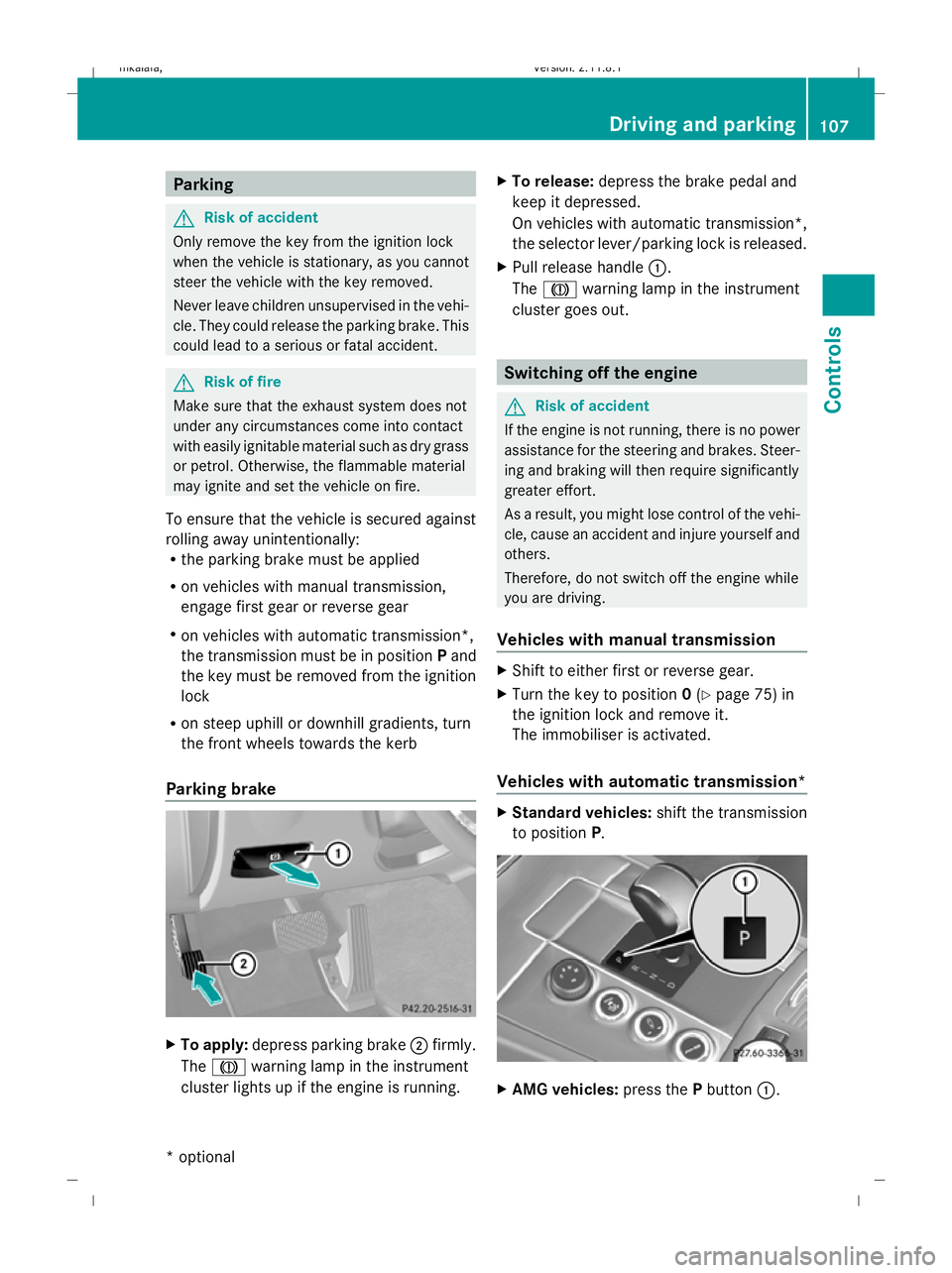
Parking brake X
To apply: depress parking brake ;firmly.
The J warning lamp in the instrument
cluster lights up if the engine is running. X
To release: depress the brake pedal and
keep it depressed.
On vehicles with automatic transmission*,
the selector lever/parking lock is released.
X Pull release handle :.
The J warning lamp in the instrument
cluster goes out. Switching off the engine
G
Risk of accident
If the engine is not running, there is no power
assistance for the steering and brakes. Steer-
ing and braking will then require significantly
greater effort.
As a result, you might lose control of the vehi-
cle, cause an accident and injure yourself and
others.
Therefore, do not switch off the engine while
you are driving.
Vehicles with manual transmission X
Shift to either first or reverse gear.
X Turn the key to position 0(Y page 75) in
the ignition lock and remove it.
The immobiliser is activated.
Vehicles with automatic transmission* X
Standard vehicles: shift the transmission
to position P. X
AMG vehicles: press thePbutton :. Driving and parking
107Controls
* optional
212_AKB; 2; 4, en-GB
mkalafa,
Version: 2.11.8.1 2009-05-05T14:17:16+02:00 - Seite 107 Z
Dateiname: 6515346702_buchblock.pdf; erzeugt am 07. May 2009 14:16:05; WK
Page 143 of 373
Adjustment in 10 km/h increments
X
Briefly press the cruise control lever
beyond the pressure point, up :for a
higher speed or down ?for a lower speed.
The last speed stored is increased or
reduced.
Deactivating cruise control There are several ways to deactivate cruise
control:
X
Briefly press the cruise control lever for-
wards B.
or
X Brake.
or
X Briefly press the cruise control lever in the
direction of arrow A.
Variable Speedtronic is selected. LIM indi-
cator lamp ;in the cruise control lever
lights up.
Cruise control is automatically deactivated if:
R you depress the parking brake.
R you drive at less than 30 km/h
R ESP ®
intervenes or you deactivate ESP ®
R you change into neutral in a vehicle with
manual transmission while driving or if the
clutch is depressed for longer than 6 sec-
onds
R on vehicles with manual transmission, you
shift to a higher gear and as a result the
engine speed is too low
R you move the selector lever to Non vehi-
cles with automatic transmission* while
driving
If cruise control is deactivated, you will hear
a warning tone. You see the Cruise con‐
trol off message in the multi-function dis-
play for approximately five seconds.
i The last speed stored is cleared when you
switch off the engine. Distronic Plus*
i Distronic Plus is not available in all coun-
tries.
Distronic Plus regulates the speed and auto-
matically maintains the distance to the vehi-
cle in front. It brakes automatically in order
to avoid exceeding the set speed. On long and
steep downhill gradients, especially if the
vehicle is laden or towing a trailer, you must
select shift range 1,2or 3in good time. By
doing so, you will make use of the braking
effect of the engine, which relieves the load
on the brake system and prevents the brakes
from overheating and wearing too quickly. G
Risk of accident
Do not change down for additional engine
braking on a slippery road surface. This could
cause the drive wheels to lose their grip and
the vehicle could skid. G
Risk of accident
Distronic Plus is only an aid designed to assist
driving. The driver is fully responsible for the
vehicle's distance from other vehicles, the
vehicle's speed and for braking in good time.
Distronic Plus does not react to:
R pedestrians
R stationary obstacles on the road, e.g. stop-
ped or parked vehicles
R oncoming and crossing traffic
Distronic Plus may not detect narrow vehicles
driving in front, e.g. motorcycles, or vehicles
driving on a different line. Therefore, always
pay attention to traffic conditions even when
Distronic Plus is activated. Otherwise, you
may fail to recognise dangers in time, cause
an accident and injure yourself and others.
If a slower-moving vehicle is detected in front,
Distronic Plus causes your vehicle to brake
and maintain a preset distance to the vehicle
in front. 140
Driving systemsCont
rols
* optional
212_AKB; 2; 4, en-GB
mkalafa
,V ersion: 2.11.8.1
2009-05-05T14:17:16+02:00 - Seite 140
Dateiname: 6515346702_buchblock.pdf; erzeugt am 07. May 2009 14:16:17; WK
Page 144 of 373
G
Risk of accident
Distronic Plus cannot take account of road
and traffic conditions. If Distronic does not
recognise or no longer recognises the vehicle
in front, do not activate Distronic or, if it is
already active, deactivate it. This is especially
the case:
R before corners
R in filter lanes
R when changing to a lane with faster moving
traffic
R in complex driving situations or where the
lanes are diverted, e.g. at motorway/road-
way construction sites
Otherwise, Distronic Plus maintains the cur-
rent speed or accelerates up to the set speed.
Distronic Plus cannot take account of weather
conditions. Deactivate, or do not activate,
Distronic Plus:
R if the roads are slippery, snow-covered or
icy. The wheels could lose their grip when
braking or accelerating. The vehicle could
start to skid.
R if the sensors are dirty or there is poor vis-
ibility, e.g. due to snow, rain or fog. Dis-
tance control may be impaired.
Always pay attention to traffic conditions
even when Distronic Plus is activated. Other-
wise, you may fail to recognise dangers in
time, cause an accident and injure yourself
and others.
The radar sensor system is automatically
deactivated near radio telescope facilities
(Y page 362).
If you want Distronic Plus to assist you, the
radar sensor system must be activated and
operational.
If no car is driving in front of you, Distronic
Plus works like cruise control in the speed
range between 30 km/h and 200 km/h. If a
vehicle is driving in front of you, Distronic Plus
works in the speed range between 0 km/h
and 200 km/h. Do not use Distronic Plus while driving on
roads with steep gradients. G
Risk of accident
Distronic Plus brakes your vehicle at a maxi-
mum of 4m/s2
depending on its speed. This
corresponds to approximately 40% of your
vehicle's maximum brake force. You must
also apply the brakes yourself if this braking
power is not sufficient.
If Distronic Plus detects a risk of collision with
a vehicle in front, an intermittent warning tone
sounds. In addition, the ·distance warn-
ing lamp in the instrument cluster lights up.
Brake to avoid a collision.
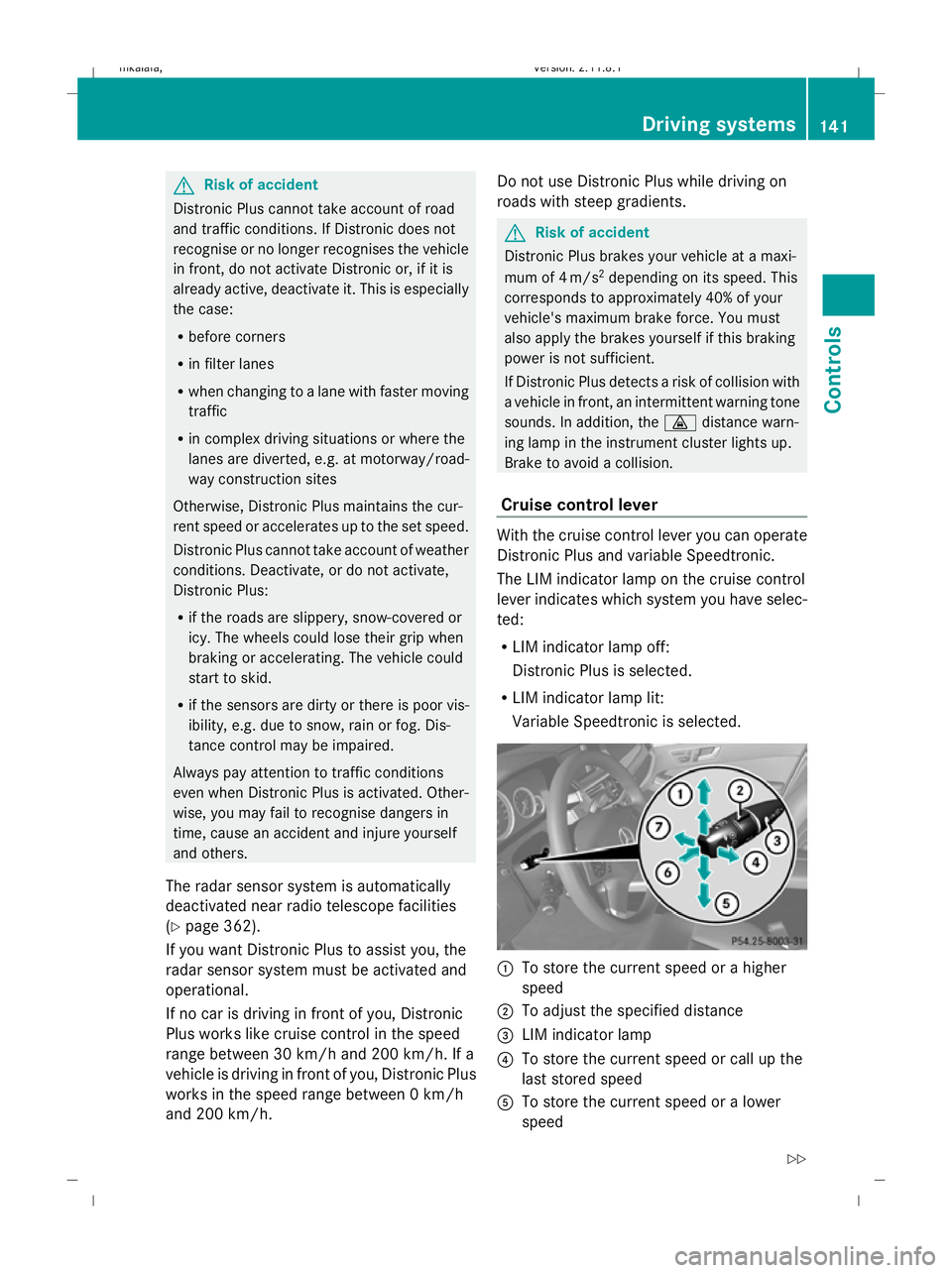
Cruise control lever With the cruise control lever you can operate
Distronic Plus and variable Speedtronic.
The LIM indicator lamp on the cruise control
lever indicates which system you have selec-
ted:
R
LIM indicator lamp off:
Distronic Plus is selected.
R LIM indicator lamp lit:
Variable Speedtronic is selected. :
To store the current speed or a higher
speed
; To adjust the specified distance
= LIM indicator lamp
? To store the current speed or call up the
last stored speed
A To store the current speed or a lower
speed Driving systems
141Controls
212_AKB; 2; 4, en-GB
mkalafa,V ersion: 2.11.8.1
2009-05-05T14:17:16+02:00 - Seite 141 Z
Dateiname: 6515346702_buchblock.pdf; erzeugt am 07. May 2009 14:16:17; WK
Page 162 of 373
One or more segments light up as the vehicle
approaches an obstacle, depending on the
vehicle's distance to the obstacle.
From the:
R
sixth segment onwards, you will hear an
intermittent warning tone for approx-
imately two seconds.
R seventh segment onwards, you will hear a
warning tone for approximately two sec-
onds. You have reached the minimum dis-
tance.
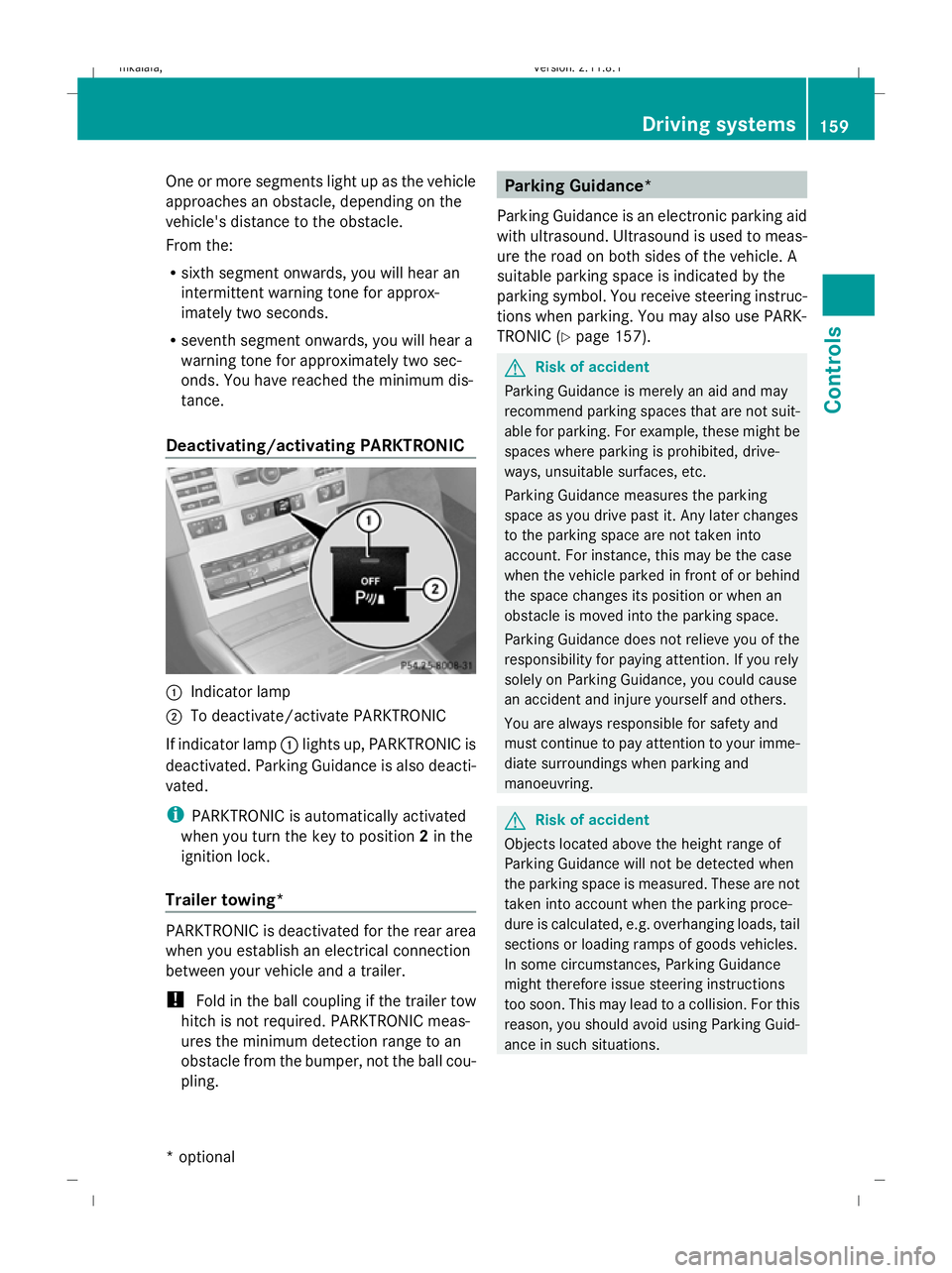
Deactivating/activating PARKTRONIC :
Indicator lamp
; To deactivate/activate PARKTRONIC
If indicator lamp :lights up, PARKTRONIC is
deactivated. Parking Guidance is also deacti-
vated.
i PARKTRONIC is automatically activated
when you turn the key to position 2in the
ignition lock.
Trailer towing* PARKTRONIC is deactivated for the rear area
when you establish an electrical connection
between your vehicle and a trailer.
!
Fold in the ball coupling if the trailer tow
hitch is not required. PARKTRONIC meas-
ures the minimum detection range to an
obstacle from the bumper, not the ball cou-
pling. Parking Guidance*
Parking Guidance is an electronic parking aid
with ultrasound. Ultrasound is used to meas-
ure the road on both sides of the vehicle. A
suitable parking space is indicated by the
parking symbol. You receive steering instruc-
tions when parking. You may also use PARK-
TRONIC (Y page 157). G
Risk of accident
Parking Guidance is merely an aid and may
recommend parking spaces that are not suit-
able for parking. For example, these might be
spaces where parking is prohibited, drive-
ways, unsuitable surfaces, etc.
Parking Guidance measures the parking
space as you drive past it. Any later changes
to the parking space are not taken into
account. For instance, this may be the case
when the vehicle parked in front of or behind
the space changes its position or when an
obstacle is moved into the parking space.
Parking Guidance does not relieve you of the
responsibility for paying attention. If you rely
solely on Parking Guidance, you could cause
an accident and injure yourself and others.
You are always responsible for safety and
must continue to pay attention to your imme-
diate surroundings when parking and
manoeuvring. G
Risk of accident
Objects located above the height range of
Parking Guidance will not be detected when
the parking space is measured. These are not
taken into account when the parking proce-
dure is calculated, e.g. overhanging loads, tail
sections or loading ramps of goods vehicles.
In some circumstances, Parking Guidance
might therefore issue steering instructions
too soon. This may lead to a collision. For this
reason, you should avoid using Parking Guid-
ance in such situations. Driving systems
159Controls
* optional
212_AKB; 2; 4, en-GB
mkalafa,
Version: 2.11.8.1 2009-05-05T14:17:16+02:00 - Seite 159 Z
Dateiname: 6515346702_buchblock.pdf; erzeugt am 07. May 2009 14:16:23; WK