lights MERCEDES-BENZ E-CLASS SALOON 2009 Owner's Manual
[x] Cancel search | Manufacturer: MERCEDES-BENZ, Model Year: 2009, Model line: E-CLASS SALOON, Model: MERCEDES-BENZ E-CLASS SALOON 2009Pages: 373, PDF Size: 12.37 MB
Page 96 of 373
It should:
R
fit snugly across your body.
R be routed across the middle of your
shoulder.
R be routed in your pelvic area across the
hip joints. Lights
Exterior lighting
Notes on the exterior lighting For safety reasons, Mercedes-Benz recom-
mends that you drive with the lights switched
on even during the daytime. In some coun-
tries, daytime operation of headlamps varies
due to legal and voluntary requirements. In
these countries, daytime driving lights are
automatically switched on when the engine is
started.
The exterior lighting (except the side lamp/
parking lamp) switches off automatically if
you:
R remove the key from the ignition lock
R open the driver's door with the ignition
turned off (key in position 0in the ignition
lock).
! Switch off the side lamps and parking
lamp when you leave the vehicle. This pre-
vents the battery from discharging. Information about driving abroad Converting to symmetrical dipped beam
when driving abroad:
switch the headlamps
to symmetrical dipped beam in countries in
which traffic drives on the opposite side of the
road to the country where the vehicle is reg-
istered. This prevents oncoming traffic from
being dazzled.
Have the headlamps converted at a qualified
specialist workshop, e.g. a Mercedes-Benz
Service Centre, as close to the border as pos-
sible before driving in these countries. Sym-
metrical lights do not illuminate as large an
area of the edge of the carriageway.
Converting to asymmetrical dipped beam
after returning: have the headlamps conver-
ted back to asymmetrical dipped beam at a
qualified specialist workshop, e.g. a
Mercedes-Benz Service Centre, as soon as
possible after crossing the border when
returning.
Vehicles with Intelligent Light System*: if
the headlamps are converted to symmetrical
dipped beam, not all light functions are avail-
able. "Motorway mode" and the "extended
range foglamps" are deactivated
(Y page 133). Lights
93Controls
* optional
212_AKB; 2; 4, en-GB
mkalafa
,V ersion: 2.11.8.1
2009-05-05T14:17:16+02:00 - Seite 93 Z
Dateiname: 6515346702_buchblock.pdf; erzeugt am 07. May 2009 14:15:59; WK
Page 97 of 373
Function
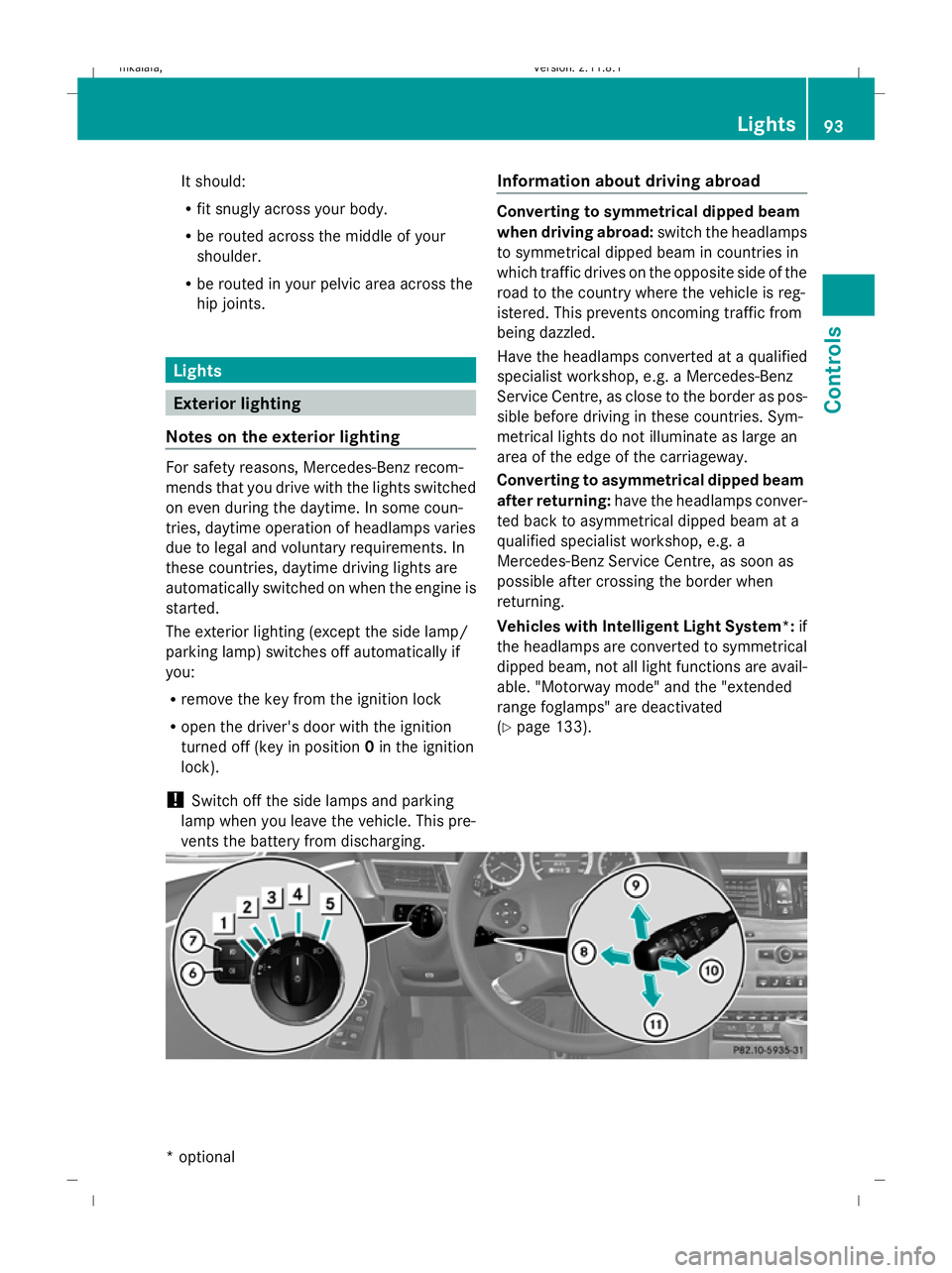
Light switch
1
W
Left-hand parking lamp 2
X
Right-hand parking lamp 3
T
Side lamps, licence plate and
instrument lighting 4
c
Automatic headlamp mode/
daytime driving lights 5
L
Dipped-beam headlamps/
main-beam headlamps 21 B
R
Rear foglamp C
N
Foglamps 22 Combination switch
D
K
Main-beam headlamps 21 E
!
Right-hand turn signal F
Headlamp flasher
G
#
Left-hand turn signal Dipped-beam headlamps
X
Turn the ignition key to position 2in the
ignition lock or start the engine.
X To activate: turn the light switch to L.
The L indicator lamp in the instrument
cluster lights up.
Daytime driving lights X
Activate the daytime driving lights function
via the on-board computer (Y page 132).
X To activate: turn the light switch to c.
When the engine is on: depending on the
ambient light conditions, the daytime driv-
ing lights or the dipped-beam headlamps
are switched on. When the dipped-beam headlamps are
switched on, the Lindicator lamp in the
instrument cluster lights up.
Automatic headlamp mode G
Risk of accident
If the light switch is set to the cposition,
the light will not come on automatically in
foggy conditions. This could endanger you
and others. Therefore, turn the light switch to
L in the dark or in fog.
The automatic headlamp feature is only an
aid. The driver is responsible for the vehicle's
lighting at all times. G
Risk of accident
When it is dark or foggy, turn the light switch
from c toL in good time. You could
otherwise cause an accident if the headlamps
were to switch off temporarily.
X To switch on: turn the light switch to
c.
Key in position 1in the ignition lock: the
side lamp is switched on or off automati-
cally depending on the brightness of the
ambient light.
When the engine is running: depending on
the ambient light conditions, the daytime
driving lights 23
or the dipped-beam head-
lamps (in addition to the side lamp) are
switched on or off automatically.
When the dipped-beam headlamps are
switched on, the Lindicator lamp in the
instrument cluster lights up.
Foglamps Only vehicles with front foglamps have the
"Foglamps" function.
21 You must switch on the dipped-beam headlamps before you can switch on the main-beam headlamps.
22 Only vehicles with front foglamps have the "Foglamps" function.
23 If you have activated the "Daytime driving lights" function in the on-board computer. 94
LightsControls
212_AKB; 2; 4, en-GB
mkalafa
,V ersion: 2.11.8.1
2009-05-05T14:17:16+02:00 - Seite 94
Dateiname: 6515346702_buchblock.pdf; erzeugt am 07. May 2009 14:15:59; WK
Page 98 of 373
G
Risk of accident
If you suspect that driving conditions will be
foggy, turn the light switch to Lbefore you
start your journey. Otherwise, your vehicle
may not be visible and you could endanger
yourself and others.
i If you switch the engine off (key in posi-
tion 1 in the ignition lock) and then restart
it, the previous foglamp settings are
restored.
X Turn the ignition key to position 2in the
ignition lock or start the engine.
X To switch on: turn the light switch to
T, Lorc.
X Press the Nbutton.
The green Nindicator lamp in the instru-
ment cluster lights up.
X To switch off: press theNbutton.
The green Nindicator lamp in the instru-
ment cluster goes out.
Rear foglamp i
If you switch the engine off (key in posi-
tion 1 in the ignition lock) and then restart
it, the previous settings for the rear fog
lamp are restored.
X Turn the ignition key to position 2in the
ignition lock or start the engine.
X Turn the light switch to Lorc 24
.
X To switch on: press theRbutton.
The yellow Rindicator lamp in the
instrument cluster lights up.
X To switch off: press theRbutton.
The yellow Rindicator lamp in the
instrument cluster goes out.
Vehicles with foglamps: when the light switch
is in position T, the rear fog lamp can only
be switched on if the foglamps (without
dipped-beam headlamps) are switched on. Manual main-beam headlamps X
Turn the ignition key to position 2in the
ignition lock or start the engine.
X To activate: turn the light switch to L.
X Press the combination switch beyond the
pressure point in the direction of arrow
D (Ypage 94).
The K indicator lamp in the instrument
cluster lights up.
X To deactivate: move the combination
switch back to its normal position.
The K indicator lamp in the instrument
cluster goes out.
Adaptive Highbeam Assist* Depending on the road and traffic conditions,
the headlamp range control of the dipped-
beam headlamps and the main-beam head-
lamps is controlled using an optical sensor.
This is located on the front overhead control
panel. This reduces the glare to other road
users and improves the illumination of the
road. There is no sudden change in light inten-
sity during the transition from dipped-beam
to main beam.
G
Risk of accident
Adaptive Highbeam Assist is only an aid
designed to assist driving. The driver is
responsible for adjusting the vehicle's lighting
to the prevailing light, vision and traffic con-
ditions.
The system may be impaired or deactivated:
R if there is poor visibility, e.g. due to snow,
rain, fog or spray
R if the area of the windscreen around the
optical sensor is dirty, misted up or covered
up, e.g. by a sticker.
24 The automatic headlamps are only switched on if you start the engine. Lights
95Controls
* optional
212_AKB; 2; 4, en-GB
mkalafa
,V ersion: 2.11.8.1
2009-05-05T14:17:16+02:00 - Seite 95 Z
Dateiname: 6515346702_buchblock.pdf; erzeugt am 07. May 2009 14:15:59; WK
Page 99 of 373
The system may not recognise the following
road users
R
Road users that have no lighting, e.g.
pedestrians
R Road users that have poor lighting, e.g.
cyclists
R Road users whose lighting is not clearly
visible, e.g. road users behind a crash bar-
rier
R On rare occasions: road users that have
lights may be recognised too late or not at
all.
The automatic main-beam headlamps will not
be deactivated, or they may be activated
despite road users travelling in front of, or
approaching, the vehicle.
Thus, you could cause an accident and injure
yourself and others. Always observe traffic
conditions and, if necessary, dip the lights
manually.
X To activate: activate the Adaptive High-
beam Assist using the on-board computer
(Y page 133).
X Turn the light switch to c.
X Press the combination switch beyond the
pressure point in the direction of arrow
D (Ypage 94).
When the dipped-beam headlamps are
switched on, the _indicator lamp in the
instrument cluster lights up.
If you are driving faster than approximately
40 km/h, the headlamp range is set auto-
matically depending on the distance
between the vehicle and other road users.
If you are driving faster than approximately
55 km/h and no other road users are rec-
ognised, the main-beam headlamps are
switched on automatically. The Kindi-
cator lamp in the instrument cluster also
lights up.
If you are driving slower than approximately
45 km/h and other road users are recog-
nised or the roads are adequately lit, the main-beam headlamps are switched off
automatically. The
Kindicator lamp in
the instrument cluster goes out. The _
indicator lamp in the instrument cluster
stays on.
X To deactivate: move the combination
switch back to its normal position.
The _ indicator lamp in the instrument
cluster goes out.
Turn signal lamp X
To indicate a minor change of direc-
tion: press the combination switch briefly
in the direction of arrow EorG
(Y page 94).
The corresponding turn signal flashes three
times.
X To indicate: push the combination switch
beyond the pressure point in the direction
of arrow EorG (Ypage 94).
The corresponding turn signal indicator
lamp ! or# in the instrument clus-
ter flashes.
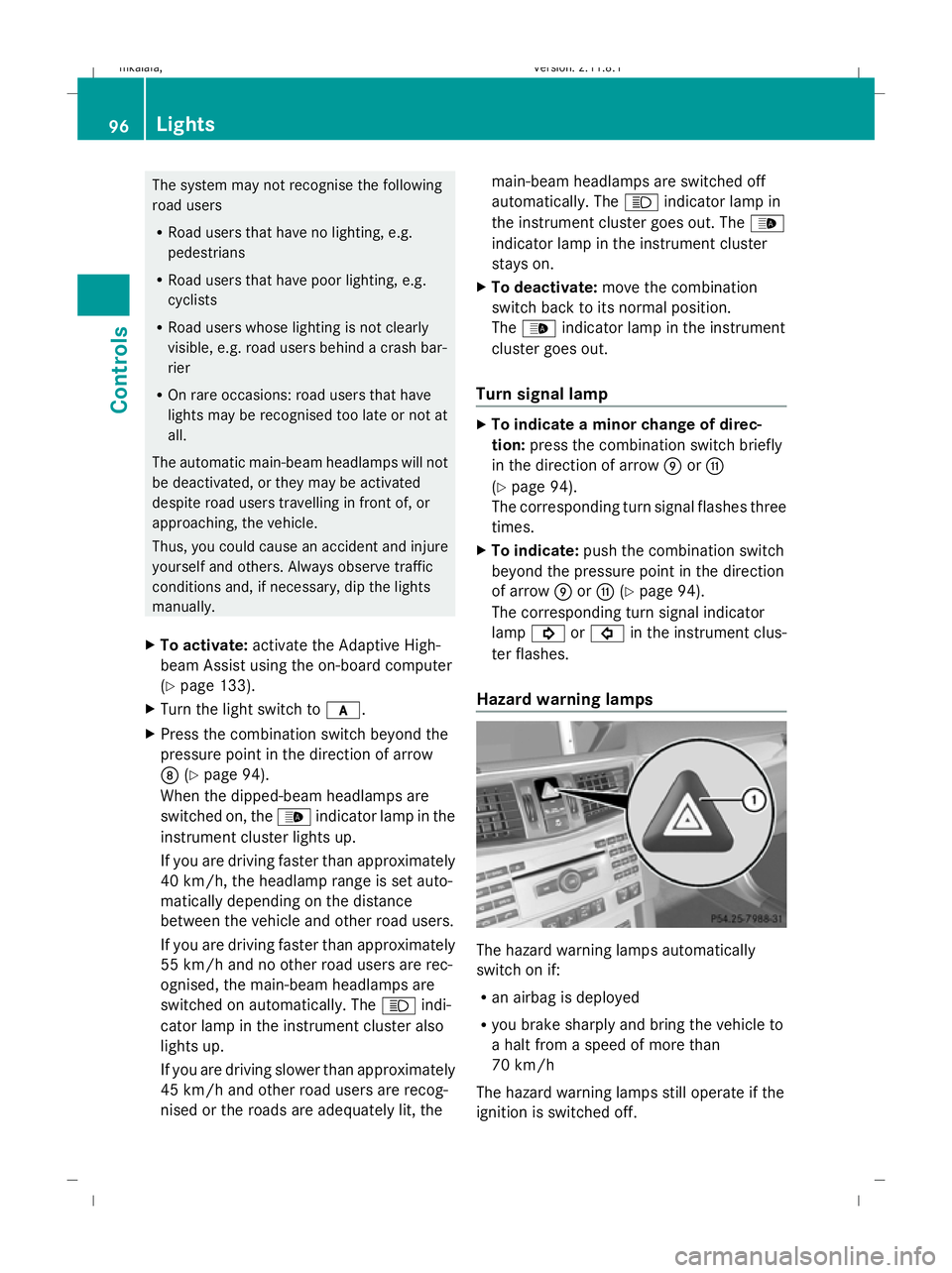
Hazard warning lamps The hazard warning lamps automatically
switch on if:
R
an airbag is deployed
R you brake sharply and bring the vehicle to
a halt from a speed of more than
70 km/h
The hazard warning lamps still operate if the
ignition is switched off. 96
LightsControls
212_AKB; 2; 4, en-GB
mkalafa,
Version: 2.11.8.1 2009-05-05T14:17:16+02:00 - Seite 96
Dateiname: 6515346702_buchblock.pdf; erzeugt am 07. May 2009 14:16:00; WK
Page 100 of 373
X
To switch on: press button:.
All turn signals flash.
X To switch on the hazard warning lamps
on one side: also push the combination
switch beyond the pressure point in the
direction of arrow EorG (Ypage 94).
The indicator lamp on the corresponding
side flashes.
X To switch off: press button:.
The hazard warning lamp switches off auto-
matically after full brake application if the
vehicle then reaches a speed of over
10 km/h again.
Intelligent Light System* (bi-xenon
headlamps*) The Intelligent Light System is a system which
adjusts the headlamps automatically to suit
the prevailing driving and weather conditions.
The bi-xenon headlamps offer enhanced func-
tions to improve illumination of the road sur-
face, e.g. depending on the vehicle speed or
weather conditions. The system includes the
active light function, cornering light function,
motorway mode and extended range fog-
lamps. The system is only active when it is
dark.
You can activate or deactivate the "Intelligent
Light System" using the on-board computer
(Y page 132).
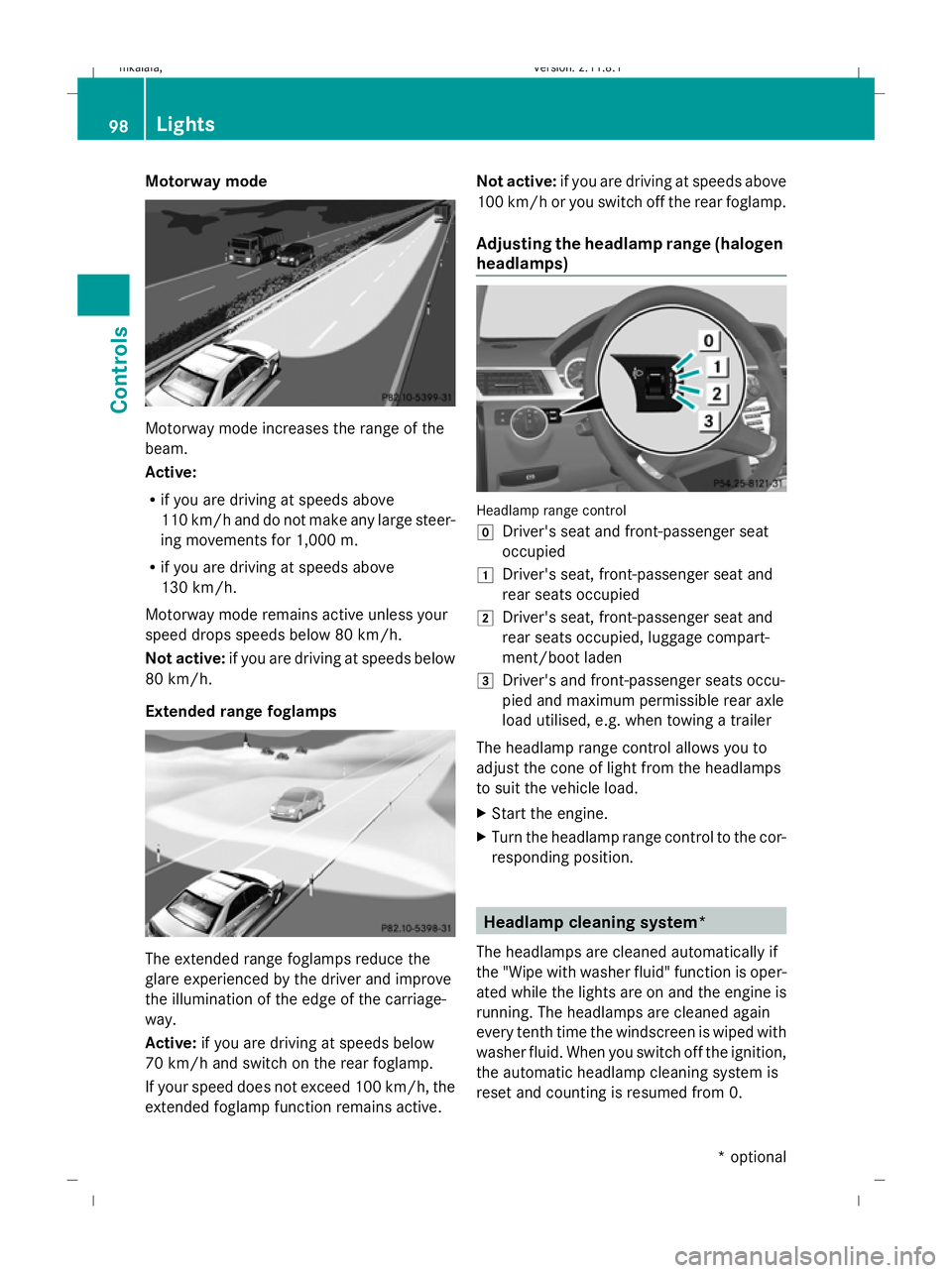
Active light function The active light function is a system that
moves the headlamps according to the steer-
ing movements of the front wheels. In this way, relevant areas remain illuminated while
driving. This allows you to recognise pedes-
trians, cyclists and animals.
Cornering light function
The cornering light function improves the illu-
mination of the road surface in the broad
direction you are turning, e.g. making it easier
to see in tight corners. It can only be activated
when the dipped-beam headlamps are
switched on.
Active:
R
if you are driving at speeds below
40 km/h, the cornering light function is
activated either by the turn signal or by the
steering wheel being turned.
R if you are driving at speeds between
40 km/h and 70 km/h, the cornering light
function is activated by the steering wheel
being turned.
Not active: if you are driving at speeds above
70 km/h or you switch off the turn signal or
move the steering wheel to the straight-
ahead position.
The cornering lamp may remain lit for a short
time, but is automatically switched off after
no more than three minutes. Lights
97Controls
* optional
212_AKB; 2; 4, en-GB
mkalafa,
Version: 2.11.8.1 2009-05-05T14:17:16+02:00 - Seite 97 Z
Dateiname: 6515346702_buchblock.pdf; erzeugt am 07. May 2009 14:16:00; WK
Page 101 of 373
Motorway mode
Motorway mode increases the range of the
beam.
Active:
R if you are driving at speeds above
110 km/h and do not make any large steer-
ing movements for 1,000 m.
R if you are driving at speeds above
130 km/h.
Motorway mode remains active unless your
speed drops speeds below 80 km/h.
Not active: if you are driving at speeds below
80 km/h.
Extended range foglamps The extended range foglamps reduce the
glare experienced by the driver and improve
the illumination of the edge of the carriage-
way.
Active: if you are driving at speeds below
70 km/h and switch on the rear foglamp.
If your speed does not exceed 100 km/h, the
extended foglamp function remains active. Not active:
if you are driving at speeds above
100 km/h or you switch off the rear foglamp.
Adjusting the headlamp range (halogen
headlamps) Headlamp range control
g
Driver's seat and front-passenger seat
occupied
1 Driver's seat, front-passenger seat and
rear seats occupied
2 Driver's seat, front-passenger seat and
rear seats occupied, luggage compart-
ment/boot laden
3 Driver's and front-passenger seats occu-
pied and maximum permissible rear axle
load utilised, e.g. when towing a trailer
The headlamp range control allows you to
adjust the cone of light from the headlamps
to suit the vehicle load.
X Start the engine.
X Turn the headlamp range control to the cor-
responding position. Headlamp cleaning system*
The headlamps are cleaned automatically if
the "Wipe with washer fluid" function is oper-
ated while the lights are on and the engine is
running. The headlamps are cleaned again
every tenth time the windscreen is wiped with
washer fluid. When you switch off the ignition,
the automatic headlamp cleaning system is
reset and counting is resumed from 0. 98
LightsControls
* optional
212_AKB; 2; 4, en-GB
mkalafa,
Version: 2.11.8.1 2009-05-05T14:17:16+02:00 - Seite 98
Dateiname: 6515346702_buchblock.pdf; erzeugt am 07. May 2009 14:16:01; WK
Page 108 of 373
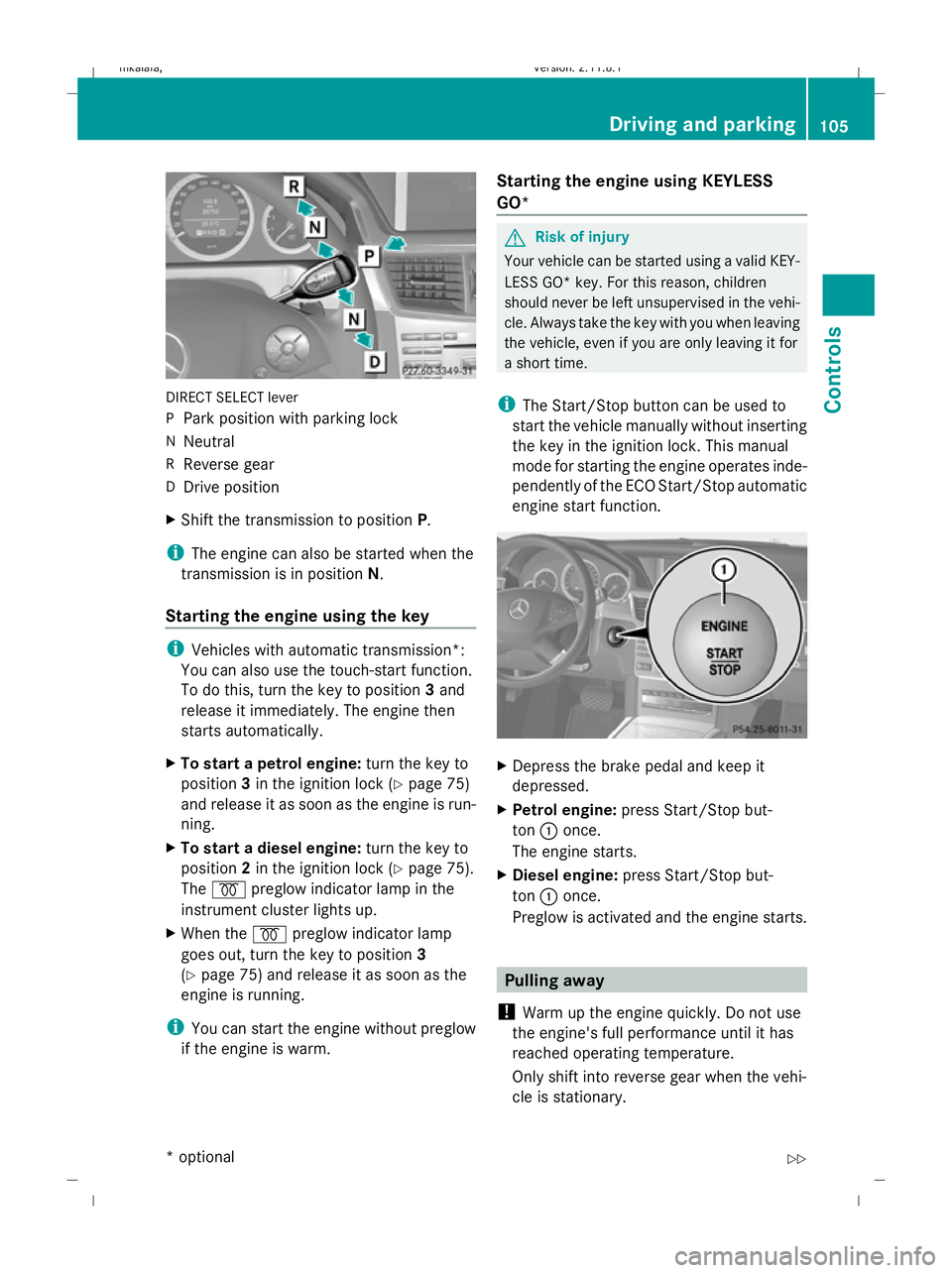
DIRECT SELECT lever
P
Park position with parking lock
N Neutral
R Reverse gear
D Drive position
X Shift the transmission to position P.
i The engine can also be started when the
transmission is in position N.
Starting the engine using the key i
Vehicles with automatic transmission*:
You can also use the touch-start function.
To do this, turn the key to position 3and
release it immediately. The engine then
starts automatically.
X To start a petrol engine: turn the key to
position 3in the ignition lock (Y page 75)
and release it as soon as the engine is run-
ning.
X To start a diesel engine: turn the key to
position 2in the ignition lock (Y page 75).
The % preglow indicator lamp in the
instrument cluster lights up.
X When the %preglow indicator lamp
goes out, turn the key to position 3
(Y page 75) and release it as soon as the
engine is running.
i You can start the engine without preglow
if the engine is warm. Starting the engine using KEYLESS
GO* G
Risk of injury
Your vehicle can be started using a valid KEY-
LESS GO* key. For this reason, children
should never be left unsupervised in the vehi-
cle. Always take the key with you when leaving
the vehicle, even if you are only leaving it for
a short time.
i The Start/Stop button can be used to
start the vehicle manually without inserting
the key in the ignition lock. This manual
mode for starting the engine operates inde-
pendently of the ECO Start/Stop automatic
engine start function. X
Depress the brake pedal and keep it
depressed.
X Petrol engine: press Start/Stop but-
ton :once.
The engine starts.
X Diesel engine: press Start/Stop but-
ton :once.
Preglow is activated and the engine starts. Pulling away
! Warm up the engine quickly. Do not use
the engine's full performance until it has
reached operating temperature.
Only shift into reverse gear when the vehi-
cle is stationary. Driving and parking
105Controls
* optional
212_AKB; 2; 4, en-GB
mkalafa,
Version: 2.11.8.1 2009-05-05T14:17:16+02:00 - Seite 105 Z
Dateiname: 6515346702_buchblock.pdf; erzeugt am 07. May 2009 14:16:04; WK
Page 110 of 373
Parking
G
Risk of accident
Only remove the key from the ignition lock
when the vehicle is stationary, as you cannot
steer the vehicle with the key removed.
Never leave children unsupervised in the vehi-
cle. They could release the parking brake. This
could lead to a serious or fatal accident. G
Risk of fire
Make sure that the exhaust system does not
under any circumstances come into contact
with easily ignitable material such as dry grass
or petrol. Otherwise, the flammable material
may ignite and set the vehicle on fire.
To ensure that the vehicle is secured against
rolling away unintentionally:
R the parking brake must be applied
R on vehicles with manual transmission,
engage first gear or reverse gear
R on vehicles with automatic transmission*,
the transmission must be in position Pand
the key must be removed from the ignition
lock
R on steep uphill or downhill gradients, turn
the front wheels towards the kerb
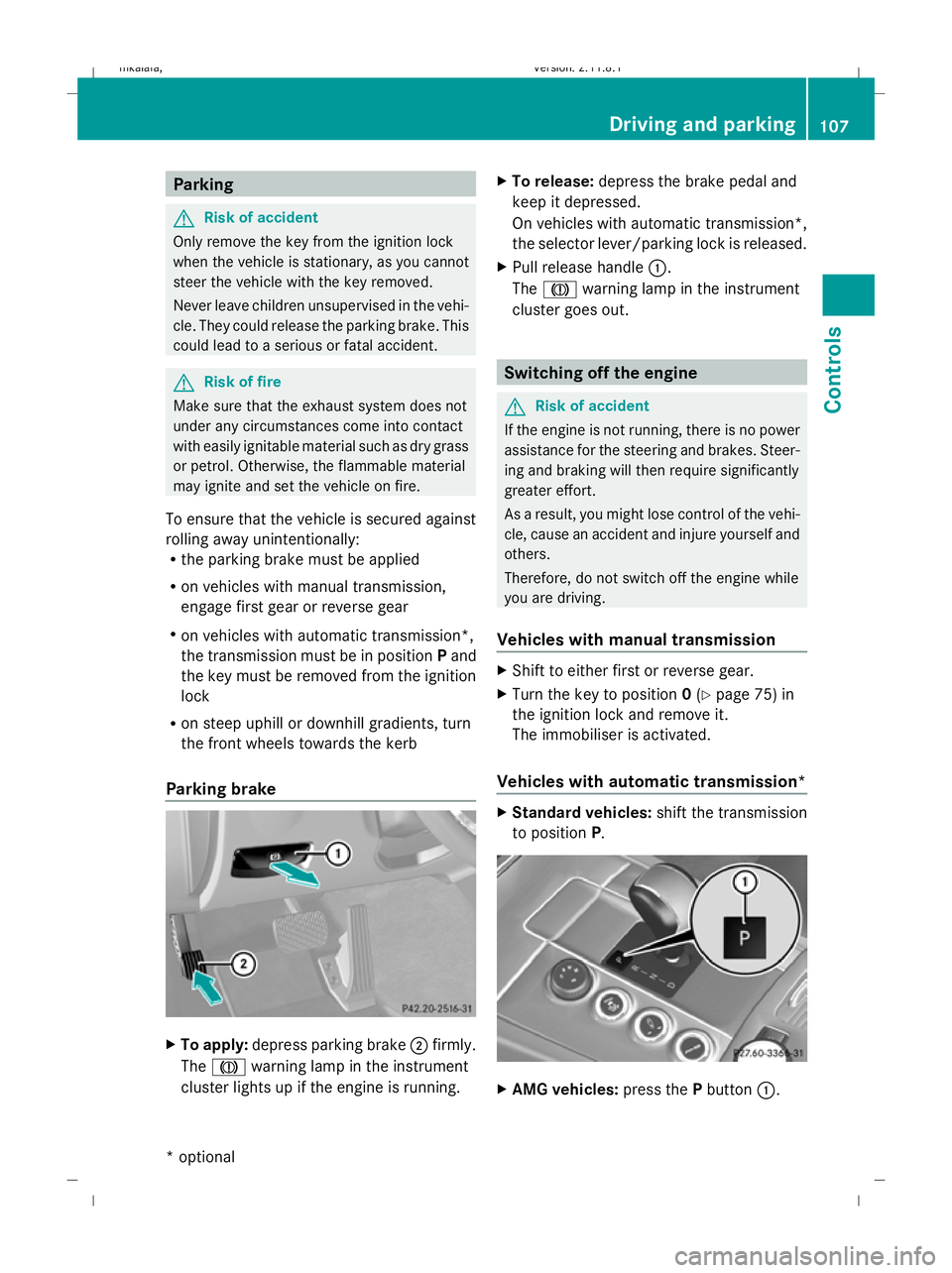
Parking brake X
To apply: depress parking brake ;firmly.
The J warning lamp in the instrument
cluster lights up if the engine is running. X
To release: depress the brake pedal and
keep it depressed.
On vehicles with automatic transmission*,
the selector lever/parking lock is released.
X Pull release handle :.
The J warning lamp in the instrument
cluster goes out. Switching off the engine
G
Risk of accident
If the engine is not running, there is no power
assistance for the steering and brakes. Steer-
ing and braking will then require significantly
greater effort.
As a result, you might lose control of the vehi-
cle, cause an accident and injure yourself and
others.
Therefore, do not switch off the engine while
you are driving.
Vehicles with manual transmission X
Shift to either first or reverse gear.
X Turn the key to position 0(Y page 75) in
the ignition lock and remove it.
The immobiliser is activated.
Vehicles with automatic transmission* X
Standard vehicles: shift the transmission
to position P. X
AMG vehicles: press thePbutton :. Driving and parking
107Controls
* optional
212_AKB; 2; 4, en-GB
mkalafa,
Version: 2.11.8.1 2009-05-05T14:17:16+02:00 - Seite 107 Z
Dateiname: 6515346702_buchblock.pdf; erzeugt am 07. May 2009 14:16:05; WK
Page 119 of 373
the left-hand steering wheel gearshift pad-
dle until the transmission shifts to the opti-
mal gear for the current speed.
X To deactivate: press program selector
button :repeatedly until Cor Sappears
in the display.
Kickdown
i On vehicles with AMG engines, it is not
possible to use kickdown in manual drive
program M.
You can also use kickdown for maximum
acceleration in manual drive program M.
X Depress the accelerator pedal beyond the
pressure point.
The transmission shifts to a lower gear
depending on the engine speed.
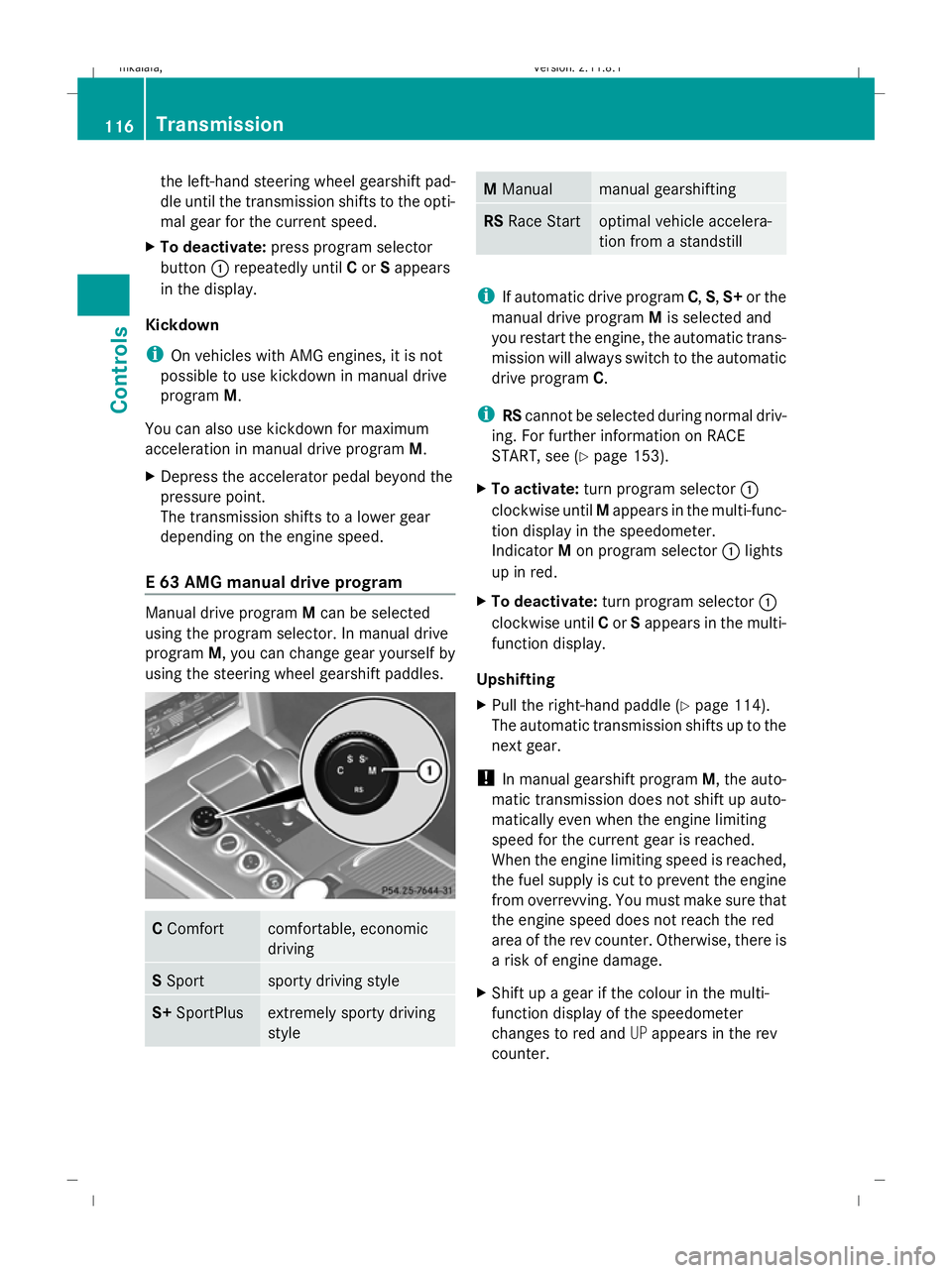
E 63 AMG manual drive program Manual drive program
Mcan be selected
using the program selector. In manual drive
program M, you can change gear yourself by
using the steering wheel gearshift paddles. C
Comfort comfortable, economic
driving
S
Sport sporty driving style
S+
SportPlus extremely sporty driving
style M
Manual manual gearshifting
RS
Race Start optimal vehicle accelera-
tion from a standstill
i
If automatic drive program C,S,S+ or the
manual drive program Mis selected and
you restart the engine, the automatic trans-
mission will always switch to the automatic
drive program C.
i RScannot be selected during normal driv-
ing. For further information on RACE
START, see (Y page 153).
X To activate: turn program selector :
clockwise until Mappears in the multi-func-
tion display in the speedometer.
Indicator Mon program selector :lights
up in red.
X To deactivate: turn program selector :
clockwise until Cor Sappears in the multi-
function display.
Upshifting
X Pull the right-hand paddle (Y page 114).
The automatic transmission shifts up to the
next gear.
! In manual gearshift program M, the auto-
matic transmission does not shift up auto-
matically even when the engine limiting
speed for the current gear is reached.
When the engine limiting speed is reached,
the fuel supply is cut to prevent the engine
from overrevving. You must make sure that
the engine speed does not reach the red
area of the rev counter. Otherwise, there is
a risk of engine damage.
X Shift up a gear if the colour in the multi-
function display of the speedometer
changes to red and UPappears in the rev
counter. 116
TransmissionControls
212_AKB; 2; 4, en-GB
mkalafa
,V ersion: 2.11.8.1
2009-05-05T14:17:16+02:00 - Seite 116
Dateiname: 6515346702_buchblock.pdf; erzeugt am 07. May 2009 14:16:09; WK
Page 122 of 373
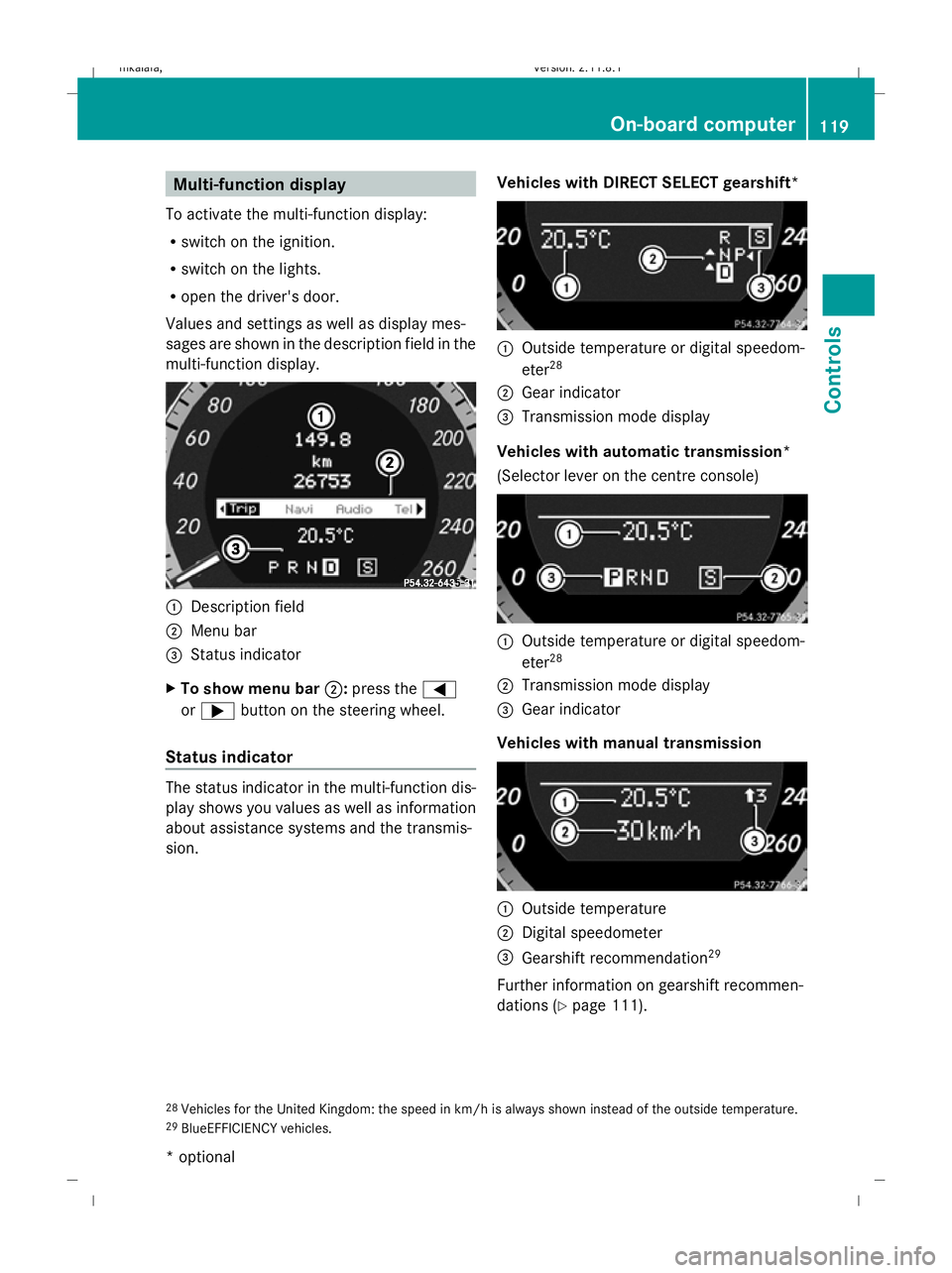
Multi-function display
To activate the multi-function display:
R switch on the ignition.
R switch on the lights.
R open the driver's door.
Values and settings as well as display mes-
sages are shown in the description field in the
multi-function display. :
Description field
; Menu bar
= Status indicator
X To show menu bar ;:press the =
or ; button on the steering wheel.
Status indicator The status indicator in the multi-function dis-
play shows you values as well as information
about assistance systems and the transmis-
sion. Vehicles with DIRECT SELECT gearshift* :
Outside temperature or digital speedom-
eter 28
; Gear indicator
= Transmission mode display
Vehicles with automatic transmission*
(Selector lever on the centre console) :
Outside temperature or digital speedom-
eter 28
; Transmission mode display
= Gear indicator
Vehicles with manual transmission :
Outside temperature
; Digital speedometer
= Gearshift recommendation 29
Further information on gearshift recommen-
dations (Y page 111).
28 Vehicles for the United Kingdom: the speed in km/h is always shown instead of the outside temperature.
29 BlueEFFICIENCY vehicles. On-board computer
119Controls
* optional
212_AKB; 2; 4, en-GB
mkalafa,
Version: 2.11.8.1 2009-05-05T14:17:16+02:00 - Seite 119 Z
Dateiname: 6515346702_buchblock.pdf; erzeugt am 07. May 2009 14:16:10; WK