lane assist MERCEDES-BENZ E-CLASS SALOON 2009 Owners Manual
[x] Cancel search | Manufacturer: MERCEDES-BENZ, Model Year: 2009, Model line: E-CLASS SALOON, Model: MERCEDES-BENZ E-CLASS SALOON 2009Pages: 373, PDF Size: 12.37 MB
Page 8 of 373
ASSYST PLUS service interval dis-
play ..................................................... 239
Calling up the date (on-board
computer) ...................................... 239
Display message ............................ 239
ATA (anti-theft alarm system) ............65
Switching off the alarm ....................66
ATTENTION ASSIST ...........................163
Activating/deactivating (on-
board computer) ............................ 130
Display message ............................ 265
AUTO lights
Display message ............................ 271
Automatic car wash ..........................240
Automatic engine start With ECO Start/Stop function .......109
Automatic engine switch-off
Using the ECO Start/Stop func-
tion ................................................ 108
Automatic lane recognition system
see Lane Keeping Assist ................130
Automatic transmission
Changing gear yoursel f.................. 112
Display message ............................ 253
Driving tips .................................... 114
Emergency running mode ..............293
Kickdown ....................................... 114
Malfunction ................................... .293
One-touch gearshifting ..................112
Program selector button ................113
Releasing the parking lock man-
ually ............................................... 301
Selector lever positions .................111
Shift ranges ................................... 113
Trailer towing ................................. 114
Auxiliary heating ............................... 181
Display message ............................ 276
Notes ............................................. 181
Remote control .............................. 182
Setting (on-board computer) .......... 135
Auxiliary ventilation ..........................181 B
Backrest Display message ............................ 277
Bag hook ............................................ 200Ball coupling
Folding in ....................................... 237
Folding out ..................................... 234
BAS (Brake Assist) ............................... 59
BAS PLUS (Brake Assist System
Plus*) .................................................... 59
Battery Changing (auxiliary heating
remote control) .............................. 304
Changing (key )............................... 304
Charging ........................................ 322
Checking (key) ............................... 304
Check lamp (key )........................... 304
Disconnecting ................................ 321
Display message ...........253, 265, 274
Fitting the battery ..........................323
Jump-starting ................................. 323
Maintenance (vehicle) .................... 319
Reconnecting ................................. 323
Removing/fitting ........................... 322
Vehicle battery .............................. 319
Belt force limiters
Activation ......................................... 37
Belt height adjustment .......................91
Belt tensioners Activation ......................................... 37
Belt warning ......................................... 91
Blind Spot Assist ............................... 167
Activating/deactivating (on-
board computer) ............................ 130
Display message ............................ 261
Indicator lamp ................................ 280
Trailer towing ................................. 169
Warning lamp ................................. 280
BlueTEC
AdBlue ®
......................................... 335
Bonnet
Active bonnet (pedestrian protec-
tion) ............................................... 219
Bonnet catch ................................. 220
Display message ............................ 263
Opening/closing ........................... 219
Resetting the active bonnet
(pedestrian protection) after
being triggered .............................. 302
Bonnet release lever
Release leve r................................. 220 Index
5 212_AKB; 2; 4, en-GB
mkalafa,
Version: 2.11.8.1 2009-05-05T14:17:16+02:00 - Seite 5Dateiname: 6515346702_buchblock.pdf; erzeugt am 07. May 2009 14:15:26; WK
Page 11 of 373
Driver's knee airbag
............................41
Driver's seat position ..........................92
Driving abroad ................................... 233
Driving safety systems .......................58
ABS .................................................. 58
ADAPTIVE BRAKE ............................. 63
Adaptive brake lamps ......................60
BAS .................................................. 59
BAS PLUS ........................................ 59
EBV .................................................. 63
ESP ®
............................................... 60
PRE-SAFE ®
Brake ............................ .63
Driving systems ................................ 137
4MATIC .......................................... 156
AIRMATIC (except E 63 AMG) ........154
AMG Ride Control sports suspen-
sion (E 63 AMG) ............................. 155
ATTENTION ASSIST ........................163
Blind Spot Assist ............................ 167
Cruise control ................................ 138
Distronic Plus ................................ 140
HOLD function ............................... 151
Lane Keeping Assist ......................169
Lane package ................................ 167
Night View Assist Plus ...................165
Parking Guidance ........................... 159
Parktroni c...................................... 157
RACE START (E 63 AMG) ...............153
Reversing camera ..........................162
Speed Limit Assist .........................164
Speedtronic ................................... 148
Driving tips ........................................ 114
Braking .......................................... 231
Distronic Plus ................................ 147
Driving abroad .............................. 233
Driving on wet roads .....................233
Fording ......................................... 233
Trailer towing ................................. 235
Winter ............................................ 231
DVD audio
Operating (on-board computer) .....127
DVD video
Operating (on-board computer) .....127 E
EASY-ENTRY feature ............................ 85
Activating/deactivating (on-
board computer) ............................ 136
EASY-EXIT feature ............................... 85
Crash-responsive ............................. 85
EASY-PACK convenience box ...........201
Easy-Pack fix kit ................................ 202
EASY-PACK folding luggage-com-
partment floor ................................... 204
EASY-PACK loading sill protector ....205
EBV (electronic brake force distri-
bution) .................................................. 63
Display message ............................ 266
ECO Start/Stop function ..................108
Electronic brake force distribution See EBV ........................................... 63
Electronic Stability Program
see ESP ®
......................................... 60
Electronic Traction Support
see ETS
Emergency key element
Lost ............................................... 297
Emergency locking
Vehicle .......................................... .299
Emergency release
Fuel filler fla p................................. 301
Emergency running mode
Automatic transmission .................293
Emergency spare wheel
Storage location ............................ 249
Emergency starting ...........................326
Emergency unlocking Boot ............................................... 300
Tailgate .......................................... 300
Vehicle .......................................... .299
Engine
Running irregularl y......................... 292
Starting problems ..........................291
Starting with KEYLESS GO .............105
Starting with the key ..................... .103
Switching off .................................. 107
Engine diagnostics warning
lamp .................................................... 285
Engine electronics .............................330
Malfunction ................................... .291
Engine number .................................. 3338
Index 212_AKB; 2; 4, en-GB
mkalafa,
Version: 2.11.8.1 2009-05-05T14:17:16+02:00 - Seite 8Dateiname: 6515346702_buchblock.pdf; erzeugt am 07. May 2009 14:15:26; WK
Page 14 of 373
Loss
............................................... 297
Malfunction ................................... .296
Modifying the programming .............71
KEYLESS GO
Button .............................................. 75
Changing the battery .....................304
Checking the battery .....................304
Convenience closing ......................103
Display message ............................ 274
Locking ............................................ 70
Malfunction ................................... .296
Starting the engine ........................105
Unlocking ......................................... 70
Key positions
Key .................................................. 75
KEYLESS GO .................................... 75
Kickdown ........................... 114, 116, 117 L
Lamps see Warning and indicator lamps
Lane-change assistant
see Blind Spot Assist .....................167
Lane Keeping Assist .......................... 169
Activating/deactivating (on-
board computer) ............................ 130
Display message ............................ 258
Lane package ..................................... 167
Lashing eyelets ................................. 197
Licence plate lighting Display message ............................ 272
Lighting
see Lights
Lights
Active light function .........................97
Automatic headlamp mode ..............94
Combination switch .........................93
Cornering light function ...................97
Daytime driving lights ......................94
Dipped-beam headlamps .................94
Display message ............................ 273
Foglamps ................................... 94, 98
Hazard warning lamps .....................96
Headlamp flasher ............................. 94
Headlamp range .............................. 98
Light switch ..................................... 93
Main-beam headlamps ..................... 95 Motorway mode
............................... 98
Rear foglamp ................................... 95
Switching surround lighting on/
off (on-board computer) ................. 134
Switching the daytime driving
lights on/off (on-board computer) .132
Switching the exterior lighting
delayed switch-off on/off (on-
board computer) ............................ 134
Switching the Intelligent Light
System on/off (on-board com-
puter) ............................................. 133
Turn signals ..................................... 96
LIM indicator lamp
Cruise control ................................ 138
Distronic Plus ................................ 141
Variable Speedtronic .....................149
Loading guidelines ............................187
Loading sill protector ........................ 205
Locking Automatic ........................................ 72
Emergency locking ........................299
From the inside (central locking
button) ............................................. 71
Luggage compartment enlarge-
ment ................................................... 196
Luggage compartment floor stowage well, unde r....................... 204
Luggage cover ................................... 198
Luggage holder (EASY-PACK load-
securing kit) ....................................... 203
Luggage net Front-passenger footwell ...............193
Lumbar support ................................... 78
4-way ............................................... 78
Luxury head restraint .........................81 M
Main-beam headlamps Adaptive Highbeam Assist .............133
Display message .................... 253, 272
Maintenance
Battery ........................................... 319
Manual drive program ..............115, 116
Manual transmission ........................110
Massage function (PULSE) .................81 Index
11 212_AKB; 2; 4, en-GB
mkalafa,
Version: 2.11.8.1 2009-05-05T14:17:16+02:00 - Seite 11Dateiname: 6515346702_buchblock.pdf; erzeugt am 07. May 2009 14:15:27; WK
Page 132 of 373
X
If only one telephone number is stored
for a name: press the6ora button
to start dialling.
or
X If there is more than one number for a
particular name: press the6ora
button to display the numbers.
X Press the 9or: button to select the
number you want to dial.
X Press the 6ora button to start dial-
ling.
or
X If you do not want to make a call: press
the ~ button.
Redialling The on-board computer saves the last names
or numbers dialled in the redial memory.
X
Press the =or; button on the steer-
ing wheel to select the Telmenu.
X Press the 6button to switch to the
redial memory.
X Press the 9or: button to select the
desired name or number.
X Press the 6ora button to start dial-
ling. Assistance menu
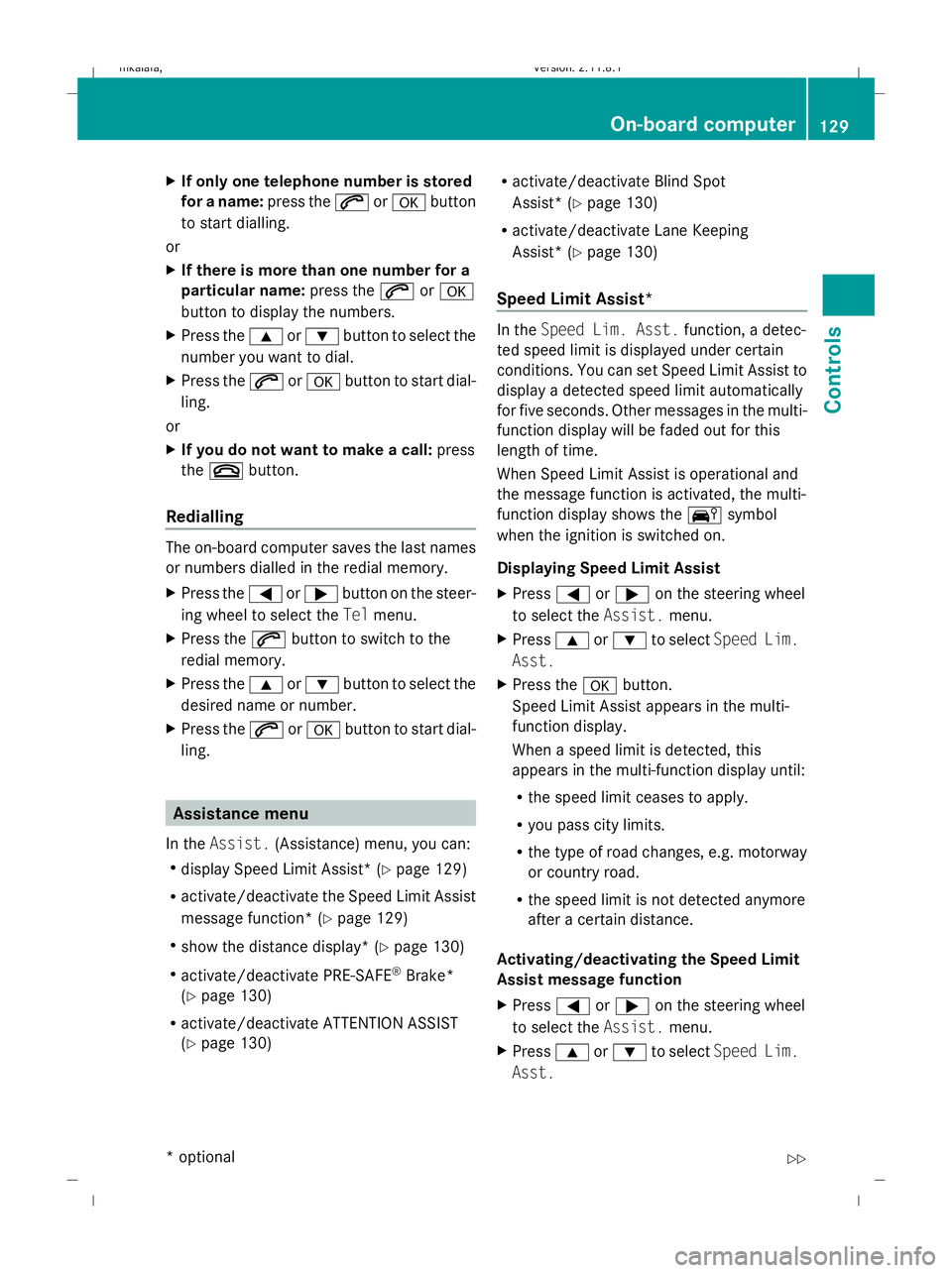
In the Assist. (Assistance) menu, you can:
R display Speed Limit Assist * (Ypage 129)
R activate/deactivate the Speed Limit Assist
message function* (Y page 129)
R show the distance display* ( Ypage 130)
R activate/deactivate PRE-SAFE ®
Brake*
(Y page 130)
R activate/deactivate ATTENTION ASSIST
(Y page 130) R
activate/deactivate Blind Spot
Assist* (Y page 130)
R activate/deactivate Lane Keeping
Assist* (Y page 130)
Speed Limit Assist* In the
Speed Lim. Asst. function, a detec-
ted speed limit is displayed under certain
conditions. You can set Speed Limit Assist to
display a detected speed limit automatically
for five seconds. Other messages in the multi-
function display will be faded out for this
length of time.
When Speed Limit Assist is operational and
the message function is activated, the multi-
function display shows the Äsymbol
when the ignition is switched on.
Displaying Speed Limit Assist
X Press =or; on the steering wheel
to select the Assist.menu.
X Press 9or: to select Speed Lim.
Asst.
X Press the abutton.
Speed Limit Assist appears in the multi-
function display.
When a speed limit is detected, this
appears in the multi-function display until:
R the speed limit ceases to apply.
R you pass city limits.
R the type of road changes, e.g. motorway
or country road.
R the speed limit is not detected anymore
after a certain distance.
Activating/deactivating the Speed Limit
Assist message function
X Press =or; on the steering wheel
to select the Assist.menu.
X Press 9or: to select Speed Lim.
Asst. On-board computer
129Controls
* optional
212_AKB; 2; 4, en-GB
mkalafa,
Version: 2.11.8.1 2009-05-05T14:17:16+02:00 - Seite 129 Z
Dateiname: 6515346702_buchblock.pdf; erzeugt am 07. May 2009 14:16:15; WK
Page 133 of 373
X
Press the abutton.
Speed Limit Assist appears in the multi-
function display.
X Press the :button.
The current selection is displayed.
X To activate or deactivate: pressa.
A detected speed limit appears automati-
cally for five seconds.
Showing the distance display* This function is only available with Distronic
Plus*.
X Press =or; on the steering wheel
to select the Assist.menu.
X Press the 9or: button to select
Distance display.
X Press the abutton.
The Distronic Plus* distance display
appears in the multi-function display.
Activating/deactivating PRE-SAFE ®
Brake* This function is only available with Distronic
Plus*.
X Press =or; on the steering wheel
to select the Assist.menu.
X Press 9or: to select PRE-SAFE
Brake.
X Press a.
The current selection is displayed.
X To activate or deactivate: pressa
again.
When PRE-SAFE ®
Brake is activated, the
multi-function display shows the Äsym-
bol.
Activating/deactivating ATTENTION
ASSIST X
Press =or; on the steering wheel
to select the Assist.menu.
X Press 9or: to select the Atten‐
tion Asst. menu. X
Press a.
The current selection is displayed.
X To activate or deactivate: pressa
again.
When ATTENTION ASSIST is activated, the
À symbol appears in the multi-function
display when the ignition is on.
Activating/deactivating Blind Spot
Assist* X
Press =or; on the steering wheel
to select the Assist.menu.
X Press 9or: to select Blind Spot
Asst.
X Press a.
The current selection is displayed.
X To activate or deactivate: pressa
again.
Activating/deactivating Lane Keeping
Assist* X
Press =or; on the steering wheel
to select the Assist.menu.
X Press 9or: to select the Lane
Keep. Asst. menu.
X Press a.
The current selection is displayed.
X To activate or deactivate: pressa
again.
When Lane Keeping Assist is activated, the
à symbol appears in the multi-function
display when the ignition is on. Service menu
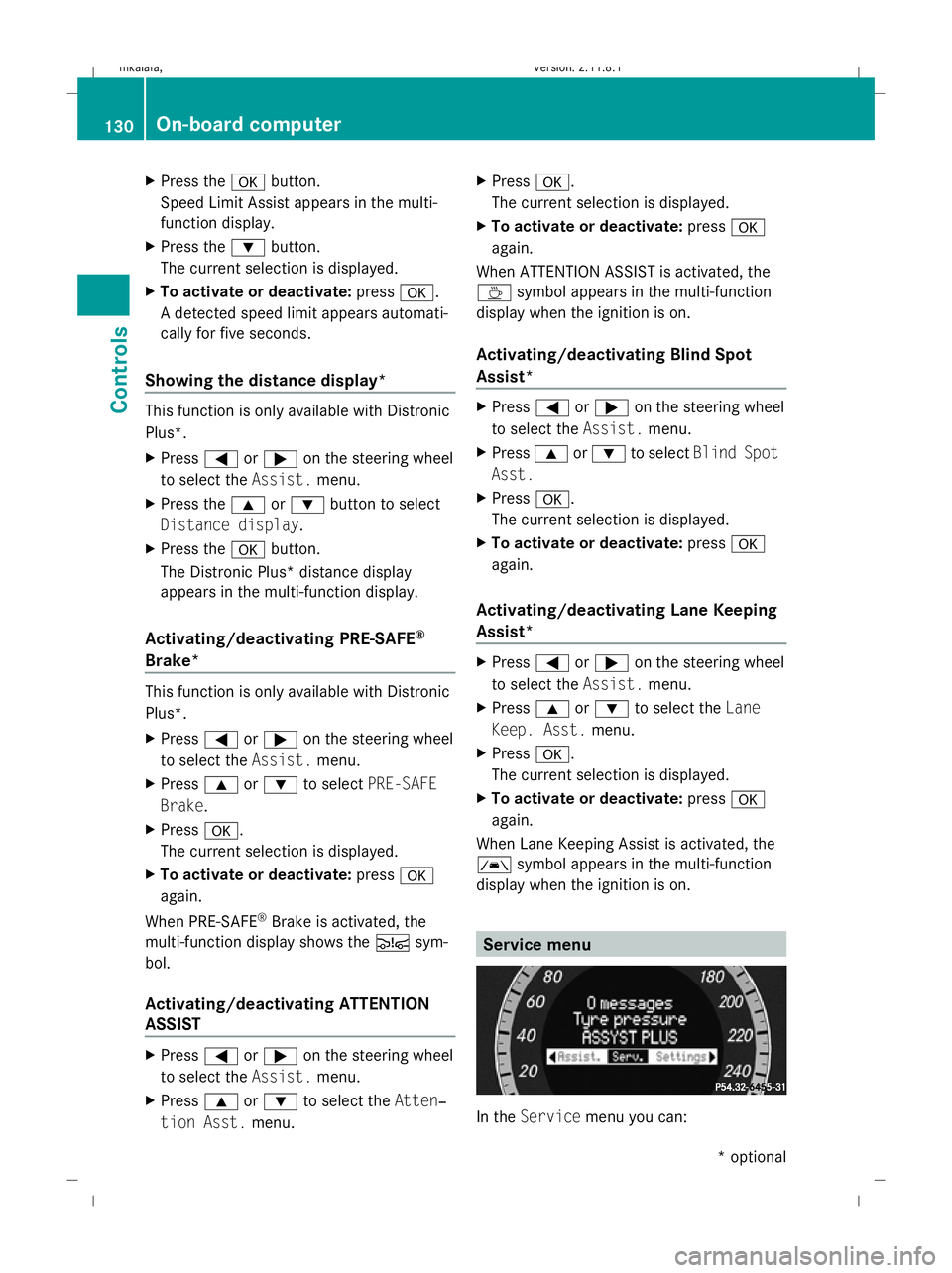
In the
Service menu you can: 130
On-board computerControls
* optional
212_AKB; 2; 4, en-GB
mkalafa,
Version: 2.11.8.1 2009-05-05T14:17:16+02:00 - Seite 130
Dateiname: 6515346702_buchblock.pdf; erzeugt am 07. May 2009 14:16:15; WK
Page 140 of 373
X
Press the =or; button on the steer-
ing wheel to select the Settingsmenu.
X Press the :or9 button to select the
Convenience submenu.
X Press the abutton to confirm.
X Press the :or9 button to select the
Fold in mirrors when locking: func-
tion.
You will see the selected setting: onor
off.
X Press the abutton to save the setting.
Restoring the factory settings For safety reasons, not all functions are reset:
the Limit Speed (winter tyres): func-
tion in permanent Speedtronic can only be set
in the Vehicle submenu. If you want to reset
the Daytime driving lamps: in theLight
submenu, you must turn the key in the igni-
tion lock to position 1.
X Press the =or; button on the steer-
ing wheel to select the Settingsmenu.
X Press the :or9 button to select the
Factory setting submenu.
X Press the abutton to confirm.
The Reset all settings? message
appears.
X Press the :or9 button to select
Yes orNo.
X Press the abutton to confirm the selec-
tion.
If you have selected Yes, the multi-function
display shows a confirmation message. Driving systems
Overview of driving systems
The vehicle's driving systems are described
on the following pages:
R cruise control, Distronic Plus* and Speed-
tronic, which are used to control the speed
of the vehicle
R HOLD function, which makes pulling away
easier, particularly on steep uphill gradi-
ents
R RACE START (E 63 AMG), which makes pull-
ing away on race tracks easier
R AIRMATIC* (except E 63 AMG), which is
used to adjust the vehicle's suspension
system
R AMG RIDE CONTROL sports suspension
(E 63 AMG), which is used to adjust the
vehicle's suspension system
R 4MATIC* (permanent four-wheel drive), for
optimum traction
R PARKTRONIC* and Parking Guidance*,
which assist you in finding a parking space,
as well as when manoeuvring and parking
R reversing camera*, which assists you when
parking and manoeuvring
R ATTENTION ASSIST, which helps you
detect tiredness or increasing lapses in
concentration
R Speed Limit Assist*, which shows you
speed limits that are detected in the multi-
function display
R Night View Assist Plus*, which assists you
when driving in the dark
R lane package*, which assists you with Blind
Spot Assist when changing lanes and warns
you against leaving your lane unintention-
ally with Lane Keeping Assist
The ABS, BAS, BAS PLUS*, adaptive brake
lights, ESP ®
, EBV and ADAPTIVE BRAKE driv-
ing safety systems and the PRE-SAFE ® Driving systems
137Controls
* optional
212_AKB; 2; 4, en-GB
mkalafa,
Version: 2.11.8.1 2009-05-05T14:17:16+02:00 - Seite 137 Z
Dateiname: 6515346702_buchblock.pdf; erzeugt am 07. May 2009 14:16:16; WK
Page 144 of 373
G
Risk of accident
Distronic Plus cannot take account of road
and traffic conditions. If Distronic does not
recognise or no longer recognises the vehicle
in front, do not activate Distronic or, if it is
already active, deactivate it. This is especially
the case:
R before corners
R in filter lanes
R when changing to a lane with faster moving
traffic
R in complex driving situations or where the
lanes are diverted, e.g. at motorway/road-
way construction sites
Otherwise, Distronic Plus maintains the cur-
rent speed or accelerates up to the set speed.
Distronic Plus cannot take account of weather
conditions. Deactivate, or do not activate,
Distronic Plus:
R if the roads are slippery, snow-covered or
icy. The wheels could lose their grip when
braking or accelerating. The vehicle could
start to skid.
R if the sensors are dirty or there is poor vis-
ibility, e.g. due to snow, rain or fog. Dis-
tance control may be impaired.
Always pay attention to traffic conditions
even when Distronic Plus is activated. Other-
wise, you may fail to recognise dangers in
time, cause an accident and injure yourself
and others.
The radar sensor system is automatically
deactivated near radio telescope facilities
(Y page 362).
If you want Distronic Plus to assist you, the
radar sensor system must be activated and
operational.
If no car is driving in front of you, Distronic
Plus works like cruise control in the speed
range between 30 km/h and 200 km/h. If a
vehicle is driving in front of you, Distronic Plus
works in the speed range between 0 km/h
and 200 km/h. Do not use Distronic Plus while driving on
roads with steep gradients. G
Risk of accident
Distronic Plus brakes your vehicle at a maxi-
mum of 4m/s2
depending on its speed. This
corresponds to approximately 40% of your
vehicle's maximum brake force. You must
also apply the brakes yourself if this braking
power is not sufficient.
If Distronic Plus detects a risk of collision with
a vehicle in front, an intermittent warning tone
sounds. In addition, the ·distance warn-
ing lamp in the instrument cluster lights up.
Brake to avoid a collision.
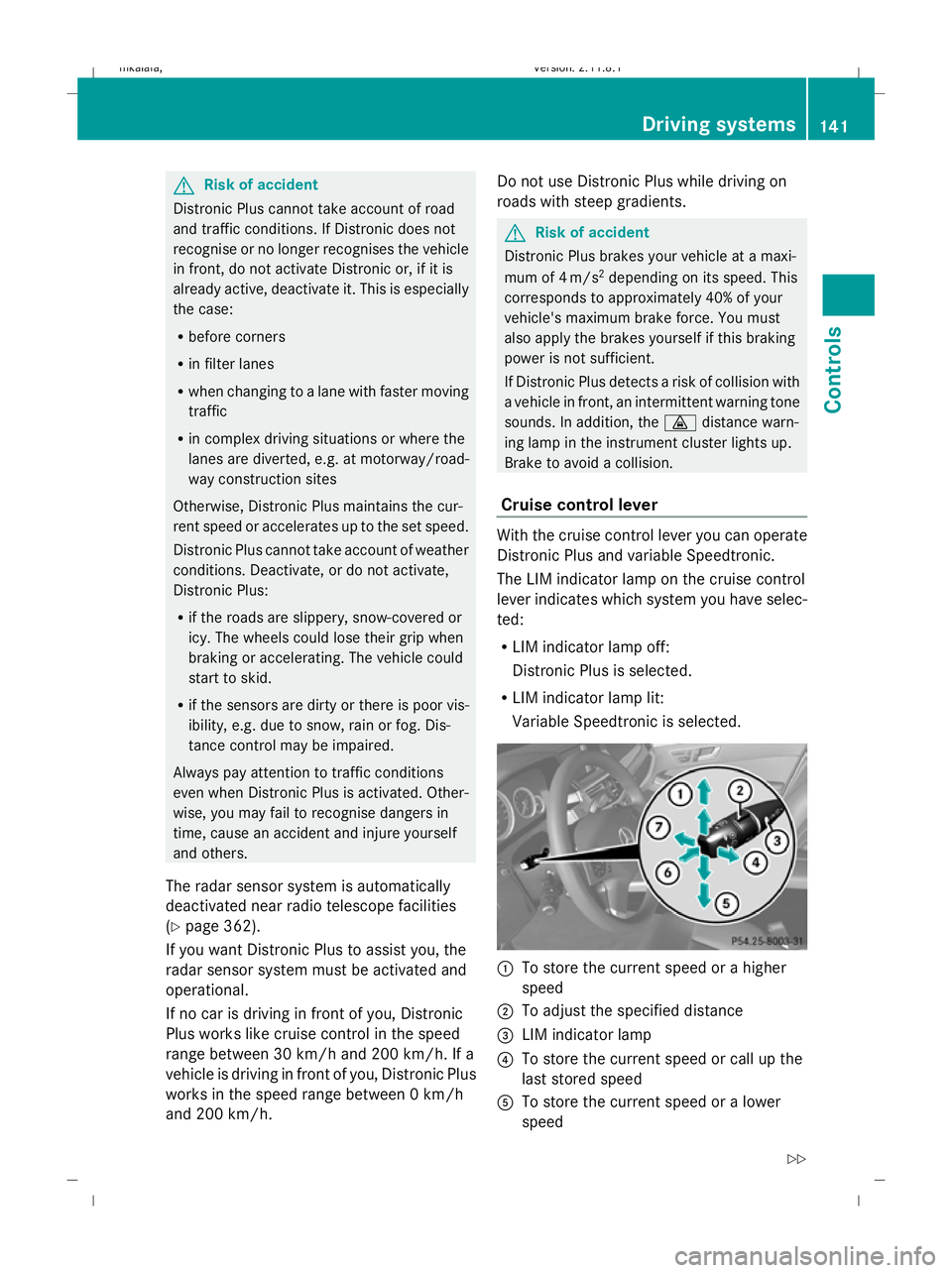
Cruise control lever With the cruise control lever you can operate
Distronic Plus and variable Speedtronic.
The LIM indicator lamp on the cruise control
lever indicates which system you have selec-
ted:
R
LIM indicator lamp off:
Distronic Plus is selected.
R LIM indicator lamp lit:
Variable Speedtronic is selected. :
To store the current speed or a higher
speed
; To adjust the specified distance
= LIM indicator lamp
? To store the current speed or call up the
last stored speed
A To store the current speed or a lower
speed Driving systems
141Controls
212_AKB; 2; 4, en-GB
mkalafa,V ersion: 2.11.8.1
2009-05-05T14:17:16+02:00 - Seite 141 Z
Dateiname: 6515346702_buchblock.pdf; erzeugt am 07. May 2009 14:16:17; WK
Page 151 of 373
of its narrow width. The distance to the vehi-
cle in front will be too short.
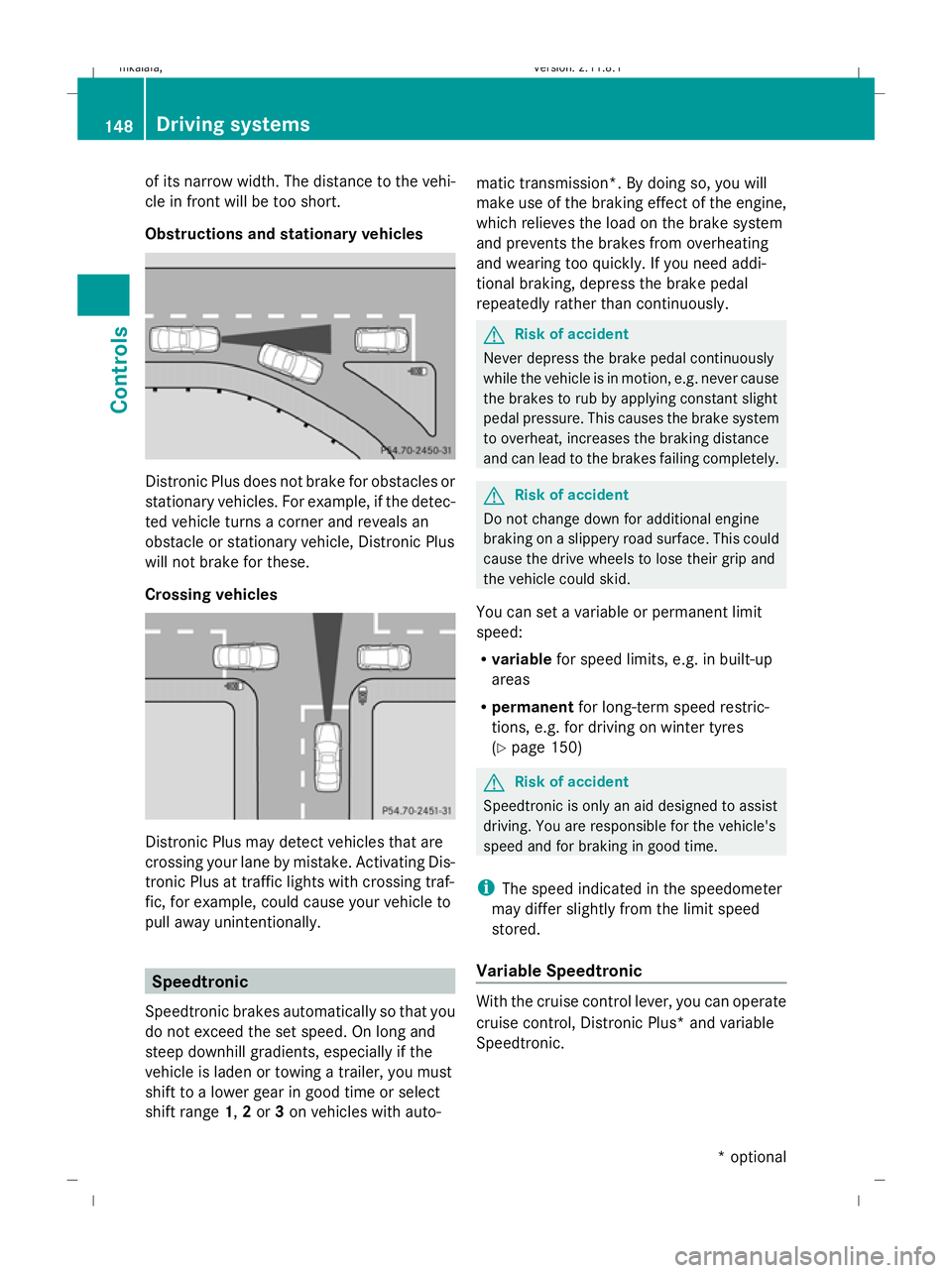
Obstructions and stationary vehicles Distronic Plus does not brake for obstacles or
stationary vehicles. For example, if the detec-
ted vehicle turns a corner and reveals an
obstacle or stationary vehicle, Distronic Plus
will not brake for these.
Crossing vehicles Distronic Plus may detect vehicles that are
crossing your lane by mistake. Activating Dis-
tronic Plus at traffic lights with crossing traf-
fic, for example, could cause your vehicle to
pull away unintentionally. Speedtronic
Speedtronic brakes automatically so that you
do not exceed the set speed. On long and
steep downhill gradients, especially if the
vehicle is laden or towing a trailer, you must
shift to a lower gear in good time or select
shift range 1,2or 3on vehicles with auto- matic transmission*. By doing so, you will
make use of the braking effect of the engine,
which relieves the load on the brake system
and prevents the brakes from overheating
and wearing too quickly. If you need addi-
tional braking, depress the brake pedal
repeatedly rather than continuously. G
Risk of accident
Never depress the brake pedal continuously
while the vehicle is in motion, e.g. never cause
the brakes to rub by applying constant slight
pedal pressure. This causes the brake system
to overheat, increases the braking distance
and can lead to the brakes failing completely. G
Risk of accident
Do not change down for additional engine
braking on a slippery road surface. This could
cause the drive wheels to lose their grip and
the vehicle could skid.
You can set a variable or permanent limit
speed:
R variable for speed limits, e.g. in built-up
areas
R permanent for long-term speed restric-
tions, e.g. for driving on winter tyres
(Y page 150) G
Risk of accident
Speedtronic is only an aid designed to assist
driving. You are responsible for the vehicle's
speed and for braking in good time.
i The speed indicated in the speedometer
may differ slightly from the limit speed
stored.
Variable Speedtronic With the cruise control lever, you can operate
cruise control, Distronic Plus* and variable
Speedtronic.148
Driving systemsControls
* optional
212_AKB; 2; 4, en-GB
mkalafa,
Version: 2.11.8.1 2009-05-05T14:17:16+02:00 - Seite 148
Dateiname: 6515346702_buchblock.pdf; erzeugt am 07. May 2009 14:16:20; WK
Page 166 of 373
R
the boot lid/tail gate is open
R in heavy rain, snow or fog
R at night or in very dark places
R if the camera is exposed to very bright light
R if the area is lit by fluorescent light (the dis-
play may flicker)
R if there is a sudden change in temperature,
e.g. when driving into a heated garage in
winter
R if the camera lens is dirty or obstructed
R if the rear of your vehicle is damaged. In this
event have the camera position and setting
checked at a qualified specialist workshop.
Mercedes-Benz recommends that you use
a Mercedes-Benz Service Centre for this
purpose.
Do not use the reversing camera in these
types of situation. You could, otherwise,
injure others or damage objects and your
vehicle while you are parking.
Activating the reversing camera X
Make sure that the key is in position 2in
the ignition lock.
X Make sure that the "Reversing camera"
function is selected in COMAND APS (see
the separate operating instructions for
COMAND APS).
X Engage reverse gear.
The area behind the vehicle is shown in the
COMAND APS display.
You can select not to show the area behind
the vehicle in the COMAND APS display (see
the separate operating instructions for
COMAND APS). ATTENTION ASSIST
ATTENTION ASSIST helps you on long, monot-
onous journeys such as on motorways and
trunk roads. It is active at speeds between 80
and 180 km/h. If ATTENTION ASSIST detects tiredness or increasing lapses in concentra-
tion on the part of the driver, it suggests a
break. G
Risk of accident
ATTENTION ASSIST is only an aid and may
detect your tiredness or lapses in concentra-
tion too late or not at all. It is not a substitute
for a well rested and attentive driver.
Fatigue may cause you to recognise hazard-
ous situations too late, misjudge a situation
or react slower. For this reason, make sure
you feel rested before you begin driving and
during your journey. Always take breaks in
good time and regularly, especially during
long journeys. Otherwise, you may fail to rec-
ognise dangers in time, cause an accident and
injure yourself and others.
ATTENTION ASSIST assesses your level of
fatigue or increasing inattentiveness taking
into consideration the following criteria:
R personal driving style, e.g. steering charac-
teristics
R driving conditions, e. g. time, driving time
ATTENTION ASSIST's functionality is restric-
ted and warnings are delayed or do not
appear at all:
R if the road condition is poor, e.g. large
bumps or potholes
R there is a strong side wind
R you have adopted a very sporty driving style
with high cornering speeds or driving with
a high rate of acceleration
R if you are predominantly driving slower
than 80 km/h or faster than 180 km/h
R if you are currently operating or making a
call using COMAND APS*
R in active driving situations, for example, if
you are changing lanes or changing the
vehicle speed Driving systems
163Controls
* optional
212_AKB; 2; 4, en-GB
mkalafa
,V ersion: 2.11.8.1
2009-05-05T14:17:16+02:00 - Seite 163 Z
Dateiname: 6515346702_buchblock.pdf; erzeugt am 07. May 2009 14:16:24; WK
Page 168 of 373
R
the windscreen is dirty, misted up or cov-
ered, for instance by a sticker, in the vicinity
of the camera.
R the traffic signs are covered, for instance
by dirt, snow or trees.
R the traffic signs are poorly illuminated.
R there are ambiguous traffic signs, for
instance near roadworks or on multi-lane
roads.
Traffic signs always have priority over the
Speed Limit Assist display. Speed Limit Assist
cannot detect road and traffic conditions. It is
not a substitute for attentive driving.
Always pay attention to traffic conditions and
your surroundings. Otherwise, you may fail to
recognise dangers in time, cause an accident
and injure yourself and others.
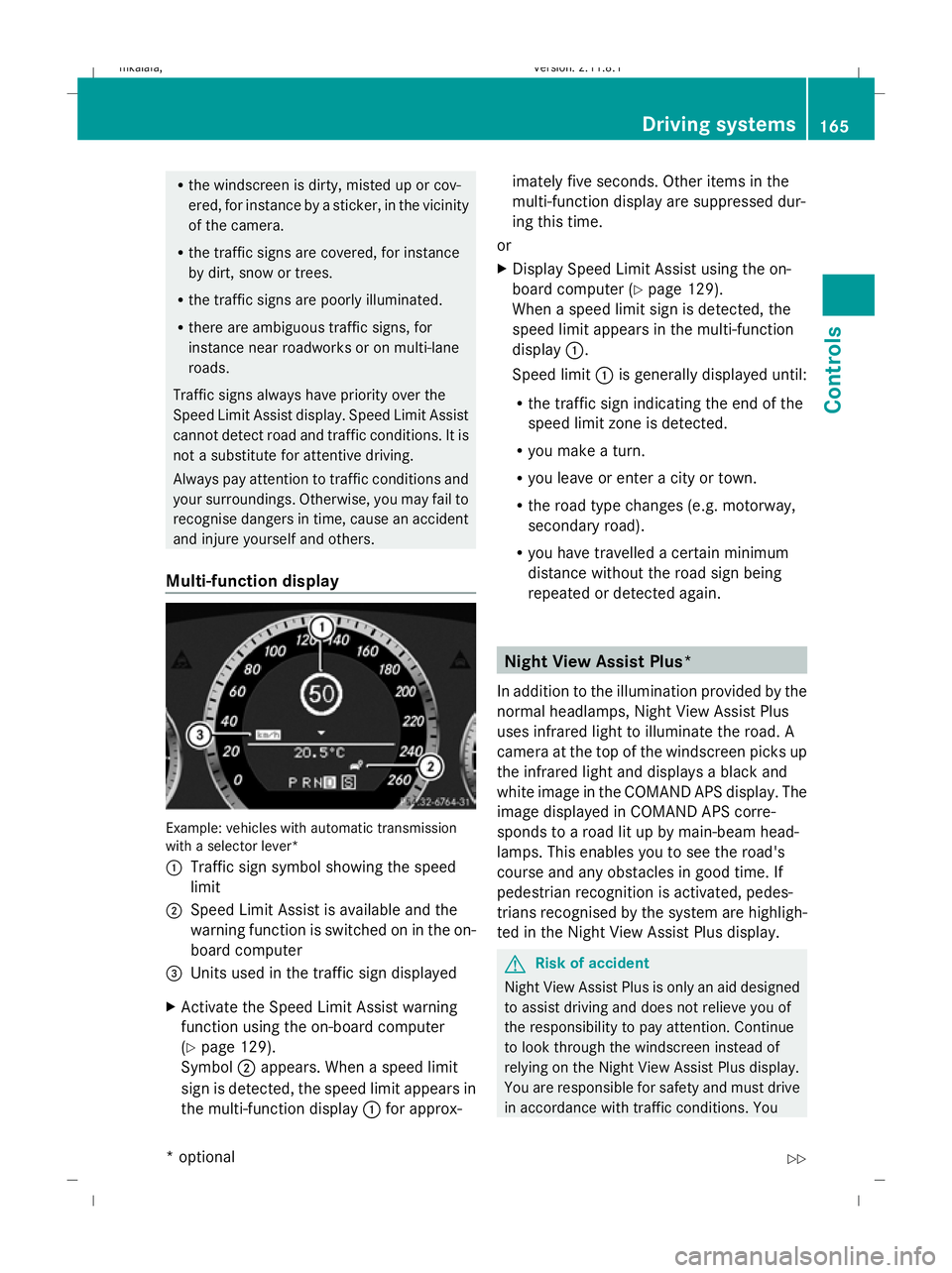
Multi-function display Example: vehicles with automatic transmission
with a selector lever*
:
Traffic sign symbol showing the speed
limit
; Speed Limit Assist is available and the
warning function is switched on in the on-
board computer
= Units used in the traffic sign displayed
X Activate the Speed Limit Assist warning
function using the on-board computer
(Y page 129).
Symbol ;appears. When a speed limit
sign is detected, the speed limit appears in
the multi-function display :for approx- imately five seconds. Other items in the
multi-function display are suppressed dur-
ing this time.
or
X Display Speed Limit Assist using the on-
board computer (Y page 129).
When a speed limit sign is detected, the
speed limit appears in the multi-function
display :.
Speed limit :is generally displayed until:
R the traffic sign indicating the end of the
speed limit zone is detected.
R you make a turn.
R you leave or enter a city or town.
R the road type changes (e.g. motorway,
secondary road).
R you have travelled a certain minimum
distance without the road sign being
repeated or detected again. Night View Assist Plus*
In addition to the illumination provided by the
normal headlamps, Night View Assist Plus
uses infrared light to illuminate the road. A
camera at the top of the windscreen picks up
the infrared light and displays a black and
white image in the COMAND APS display. The
image displayed in COMAND APS corre-
sponds to a road lit up by main-beam head-
lamps. This enables you to see the road's
course and any obstacles in good time. If
pedestrian recognition is activated, pedes-
trians recognised by the system are highligh-
ted in the Night View Assist Plus display. G
Risk of accident
Night View Assist Plus is only an aid designed
to assist driving and does not relieve you of
the responsibility to pay attention. Continue
to look through the windscreen instead of
relying on the Night View Assist Plus display.
You are responsible for safety and must drive
in accordance with traffic conditions. You Driving systems
165Controls
* optional
212_AKB; 2; 4, en-GB
mkalafa
,V ersion: 2.11.8.1
2009-05-05T14:17:16+02:00 - Seite 165 Z
Dateiname: 6515346702_buchblock.pdf; erzeugt am 07. May 2009 14:16:25; WK