tow MERCEDES-BENZ E-CLASS SALOON 2011 Owner's Manual
[x] Cancel search | Manufacturer: MERCEDES-BENZ, Model Year: 2011, Model line: E-CLASS SALOON, Model: MERCEDES-BENZ E-CLASS SALOON 2011Pages: 409, PDF Size: 10.47 MB
Page 92 of 409
R
open a door from inside the vehicle at any
time, even if it has been locked
R start the vehicle using akey which has been
left in the vehicle
R release the parking brake
They could thereby endanger themselves and
others. Never leave children unsupervised in
the vehicle. Always take the key with you
when leaving the vehicle, even if you are only
leaving it for a short time. Unlocking and opening the doors
from the inside
For all countries except the United King-
dom: you can open a door from inside the
vehicle even if it has been locked.
Only for the United Kingdom: if the vehicle
has been locked with the key, the double lock
function is activated as standard. It is then
not possible to open the doors from inside the
vehicle. Deactivate the interior motion sensor
(Y page 78) before you lock the vehicle with
the key. The doors can then be opened from
the inside after the vehicle has been locked
from the outside with the key.
You can only open the rear doors from inside
the vehicle if they are not secured by the
child-proof locks (Y page 68).X
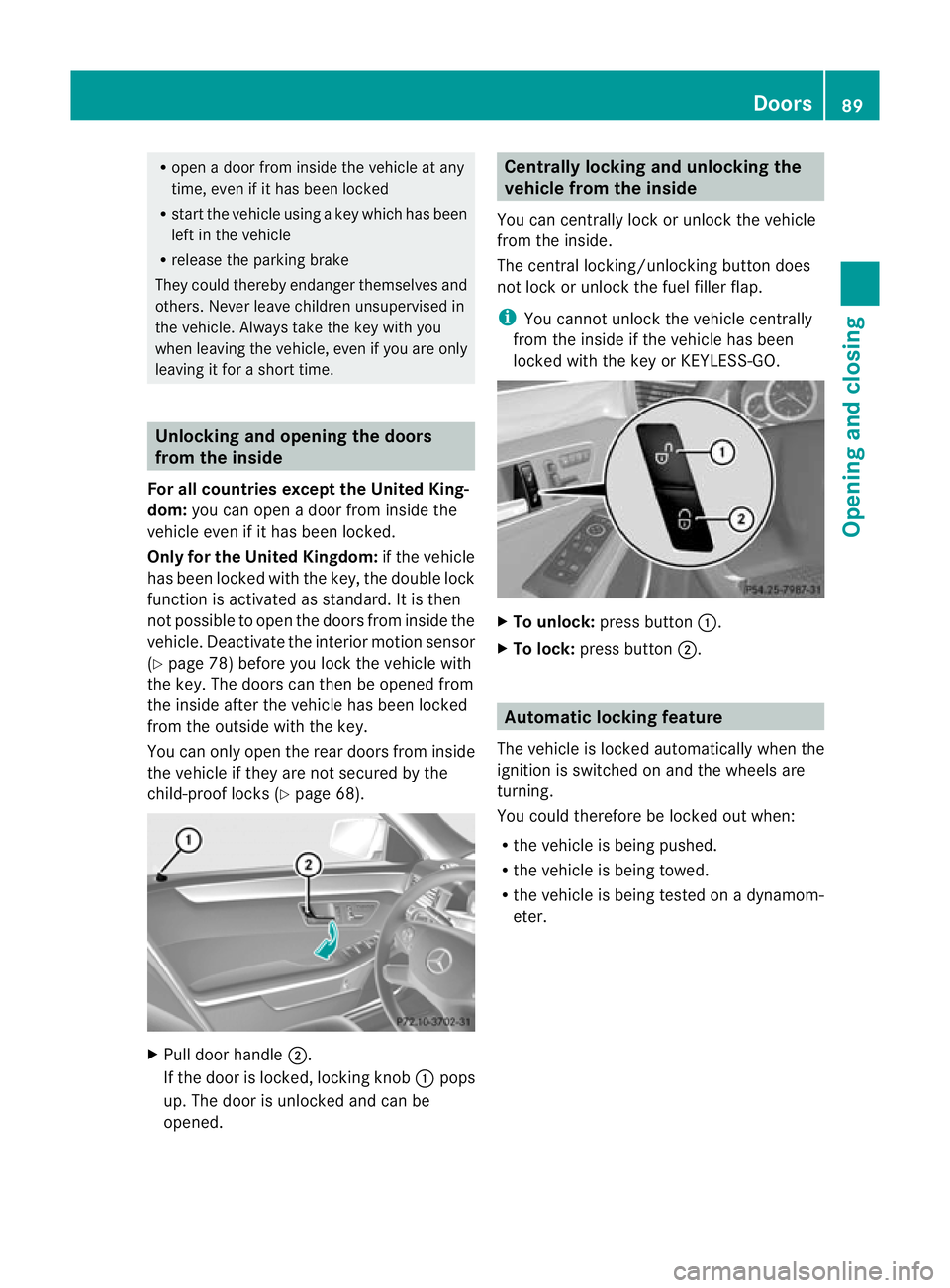
Pull door handle ;.
If the door is locked, locking knob :pops
up. The door is unlocked and can be
opened. Centrally locking and unlocking the
vehicle from the inside
You can centrally lock or unlock the vehicle
from the inside.
The central locking/unlocking button does
not lock or unlock the fuel filler flap.
i You cannot unlock the vehicle centrally
from the inside if the vehicle has been
locked with the key or KEYLESS-GO. X
To unlock: press button :.
X To lock: press button ;. Automatic locking feature
The vehicle is locked automatically when the
ignition is switched on and the wheels are
turning.
You could therefore be locked out when:
R the vehicle is being pushed.
R the vehicle is being towed.
R the vehicle is being tested on a dynamom-
eter. Doors
89Opening and closing Z
Page 114 of 409
Folding bench seat in the luggage
compartment (Estate)
Important safety notes G
WARNING
The rear seat backrests must be locked in the
upright position if you are using the folding
bench seat in the luggage compartment.
Do no tpull away unless th ehead restraint in
the folding bench seat is fitted correctly.
Make sure that the centre of the head
restraint supports the seat occupant's head
at about eye level. This can reduce the risk of
injury to a child in the event of an accident.
Ensure that the seat belt is routed correctly
across the body and the seat belt buckle is
engaged.
Never leave children unsupervised in the vehi-
cle. This applies even if they are secured in a
child restraint system.
Secure children as recommended; see the
"Children in the vehicle" section. G
WARNING
Only replace damaged covers with genuine
covers.
Make sure that items of luggage and other
objects in the luggage compartment are well
secured.
Otherwise, the load could cause injury in the
event of sharp braking, a sudden change in
direction or an accident.
The folding bench seat in the luggage com-
partmen tis only suitable for persons no more
than 1.40 m tall and weighing a maximum of
50 kg.
The maximum permissible weight may be
reduced by:
R extensive optional extras
R vehicle load
R trailer towing
Observe the maximum gross vehicle weight
and the permissible axle load, which can be found on the vehicle identification plate
(Y
page 382).
The combined luggage cover and net must be
fitted if you are using the folding bench seat
(Y page 300).
Folding out the folding benchs eat X
Make sure that the backrests of the rear
bench seat are locked in the uprigh tposi-
tion.
X Move the handle for the combined luggage
cover and net upwards (Y page 300).
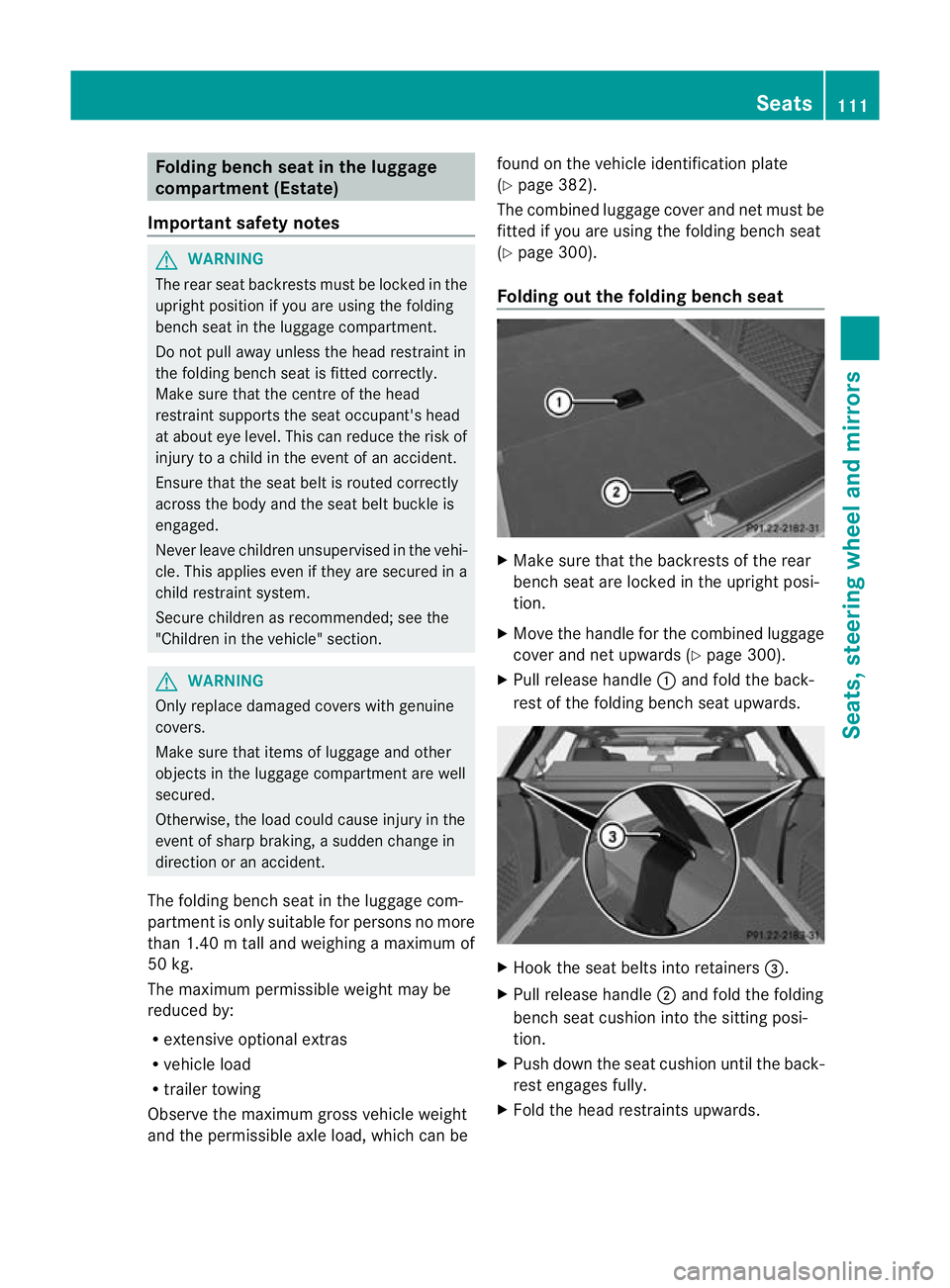
X Pull release handle :and fold the back-
rest of the folding bench seat upwards. X
Hook the seat belts into retainers =.
X Pull release handle ;and fold the folding
bench seat cushion into the sitting posi-
tion.
X Push down the seat cushion until the back-
rest engages fully.
X Fold the head restraints upwards. Seats
111Seats, steering wheel and mirrors Z
Page 127 of 409
X
Press the Rbutton.
The yellow Rindicator lamp in the
instrument cluster lights up.
X To switch off the rear foglamp: press the
R button.
The yellow Rindicator lamp in the
instrument cluster goes out.
Vehicles with frontf oglamps: when the light
switch is in the Tposition, the rear fog-
lamp can only be switched on if the foglamps
(without dipped-beam headlamps) are
switched on.
i If you switch the engine off (key in posi-
tion 1in the ignition lock) and then restart
it, the previous rear foglamp settings are
restored.
Adjusting the headlam prange (halogen
headlamps) The headlamp range control allows you to
adjust the cone of light from the headlamps
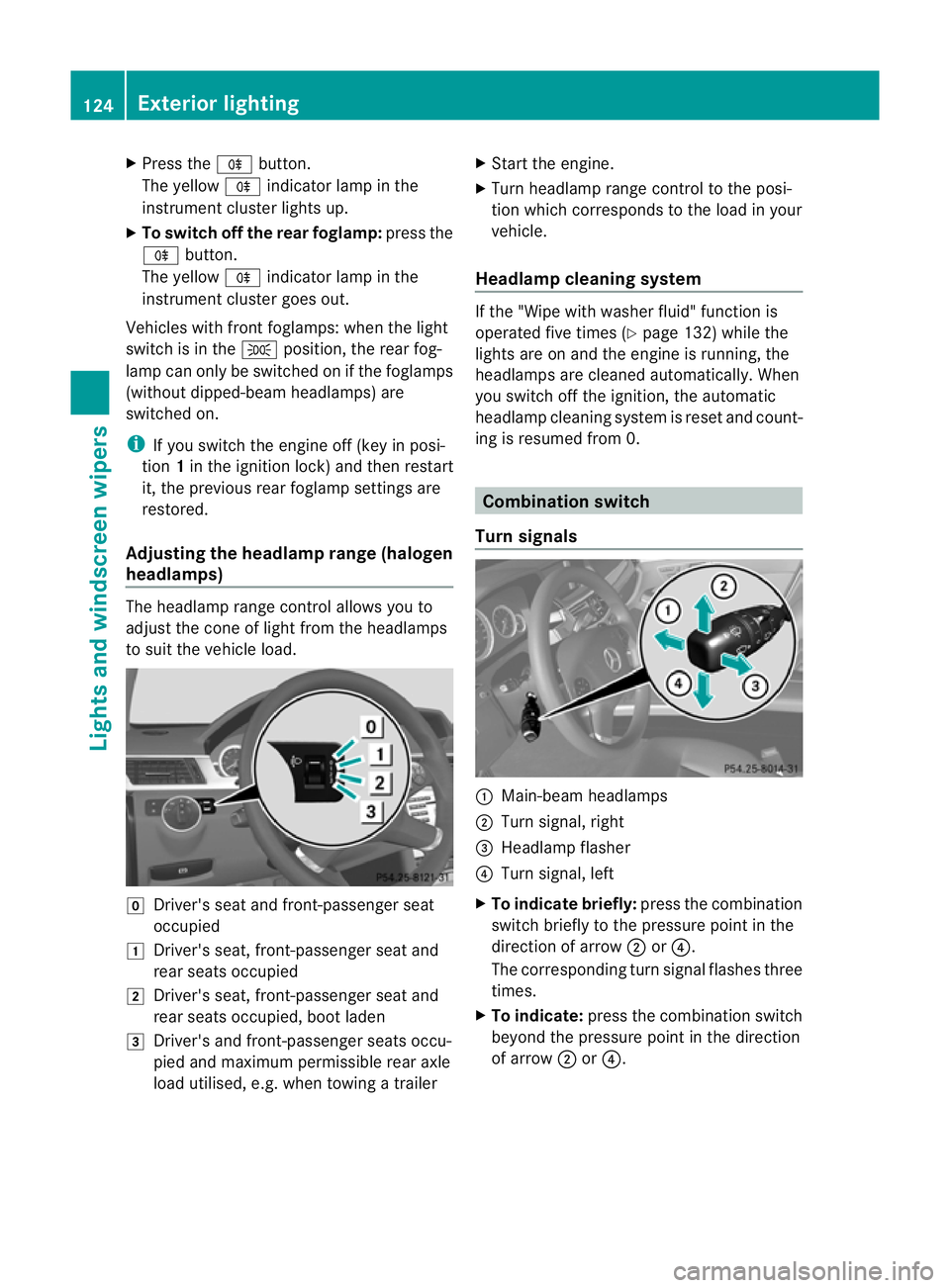
to sui tthe vehicle load. g
Driver's seat and front-passenger seat
occupied
1 Driver's seat, front-passenger seat and
rear seats occupied
2 Driver's seat, front-passenger seat and
rear seats occupied, boot laden
3 Driver's and front-passenger seats occu-
pied and maximum permissible rear axle
load utilised, e.g. when towing a trailer X
Start the engine.
X Turn headlamp range control to the posi-
tion which corresponds to the load in your
vehicle.
Headlampc leaning system If the "Wipe with washer fluid" function is
operated five times (Y
page 132) while the
lights are on and the engine is running, the
headlamps are cleaned automatically. When
you switch off the ignition, the automatic
headlamp cleaning syste mis reset and count-
ing is resumed from 0. Combination switch
Turn signals :
Main-beam headlamps
; Turn signal, right
= Headlamp flasher
? Turn signal, left
X To indicate briefly: press the combination
switch briefly to the pressure point in the
direction of arrow ;or?.
The corresponding turn signal flashes three
times.
X To indicate: press the combination switch
beyond the pressure point in the direction
of arrow ;or?. 124
Exterior lightingLights and windscreen wipers
Page 156 of 409
Useful information
............................154
Running-in notes ............................... 154
Driving ............................................... 154
Manual transmission ........................163
Automatic transmission ...................164
Refuelling ........................................... 172
Parking ............................................... 176
Driving tips ........................................ 178
Driving systems ................................ 181
Towing atrailer ................................. 221 153Driving and parking
Page 170 of 409
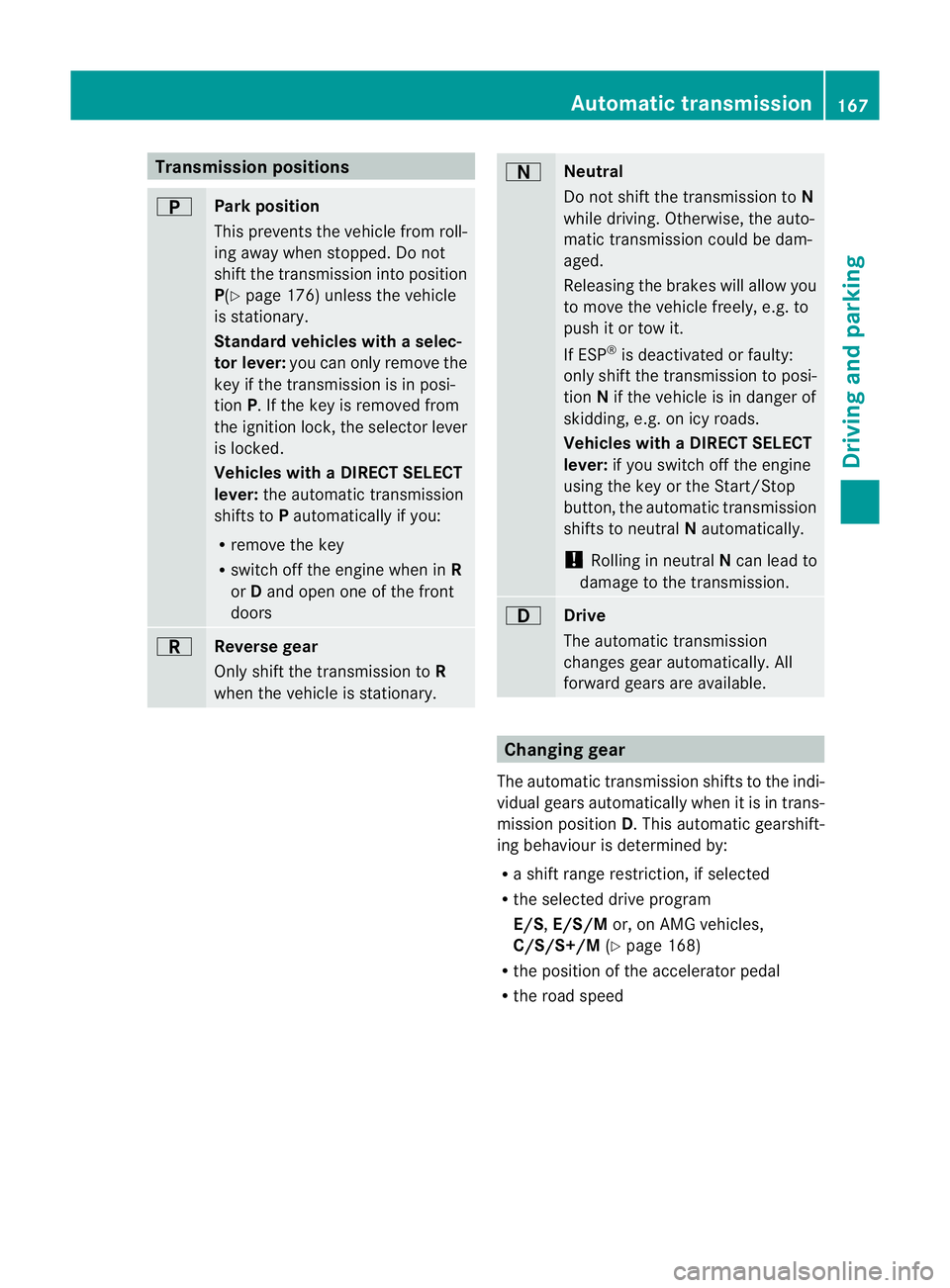
Transmission positions
B
Park position
This prevents the vehicle fro
mroll-
ing away when stopped. Do not
shift the transmission into position
P(Y page 176) unless the vehicle
is stationary.
Standard vehicles with aselec-
tor lever: you can only remove the
key if the transmission is in posi-
tion P. If the key is removed from
the ignitio nlock, the selector lever
is locked.
Vehicles with aDIRECT SELECT
lever: the automatic transmission
shifts to Pautomatically if you:
R remove the key
R switch off the engine when in R
or Dand open one of the front
doors C
Reverse gear
Only shif
tthe transmission to R
when the vehicle is stationary. A
Neutral
Do not shift the transmission to
N
while driving. Otherwise, the auto-
matic transmission could be dam-
aged.
Releasing the brakes will allow you
to move the vehicle freely, e.g. to
push it or tow it.
If ESP ®
is deactivated or faulty:
only shift the transmission to posi-
tion Nif the vehicle is in danger of
skidding, e.g. on icy roads.
Vehicles with aDIRECT SELECT
lever: if you switch off th eengine
using the key or the Start/Stop
button, the automatic transmission
shifts to neutral Nautomatically.
! Rolling in neutral Ncan lead to
damage to the transmission. 7
Drive
The automatic transmission
changes gear automatically. All
forward gears are available. Changing gear
The automatic transmission shifts to the indi-
vidual gears automatically when it is in trans-
mission position D.This automatic gearshift-
ing behaviouri s determined by:
R a shift range restriction, if selected
R the selected drive program
E/S, E/S/M or, on AMG vehicles,
C/S/S+/M (Ypage 168)
R the position of the accelerator pedal
R the road speed Automatic transmission
167Driving and parking Z
Page 171 of 409
Driving tips
Accelerator pedal position Your style of driving influences how the auto-
matic transmissio
nshifts gear:
R little throttle: early upshifts
R more throttle: late upshifts
AMG vehicles When shifting down, the double-clutch func-
tion is active regardless of the currently selec-
ted drive program. The double-clutch function
reduces load change reactions and is condu-
cive to a sporty driving style. The sound gen-
erated by the double-clutchf
unction depends
on the drive program selected.
Kickdown Use kickdown for maximum acceleration.
X
Depress the accelerato rpedal beyond the
pressure point.
The transmission shifts to a lower gear
depending on the engine speed.
X Ease off the accelerator pedal once the
desired speed is reached.
The automatic transmission shifts back up.
Trailer towing X
Drive in the middle of the engine speed
range on uphill gradients.
X Shift down to shift range 3or
2(Y page 169) depending on the uphill or
downhill gradient, even if cruise control,
DISTRONIC PLUS or SPEEDTRONIC is acti-
vated. Program selector button
General notes The program selector button allows you to
choose between differen tdriving character-
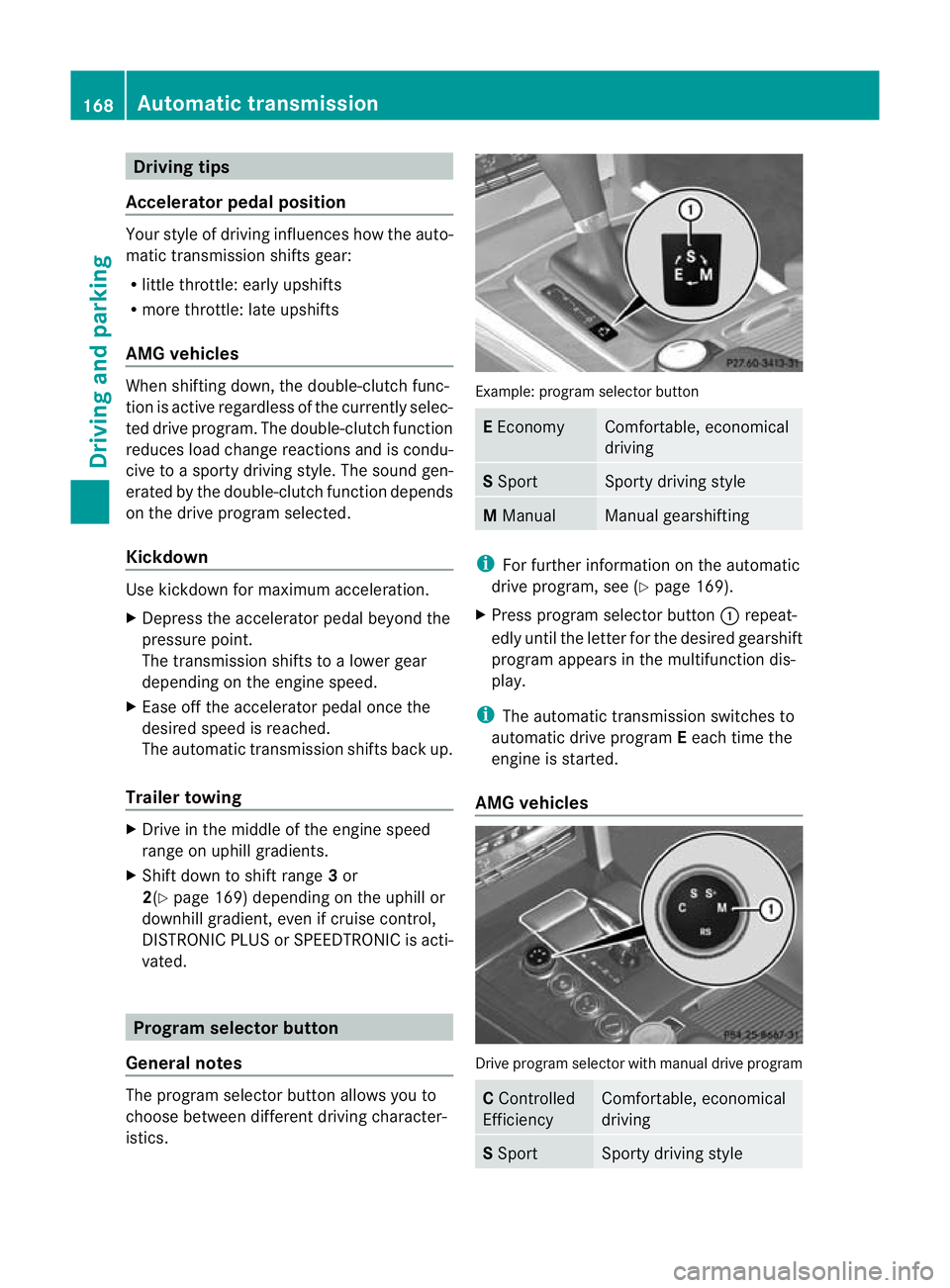
istics. Example
:program selector button E
Economy Comfortable, economical
driving
S
Sport Sporty driving style
M
Manual Manual gearshifting
i
For further information on the automatic
drive program, see (Y page 169).
X Press progra mselecto rbutton :repeat-
edly until the lette rfor the desired gearshift
program appears in the multifunction dis-
play.
i The automatic transmission switches to
automatic drive program Eeach time the
engine is started.
AMG vehicles Drive program selector with manual drive program
C
Controlled
Efficiency Comfortable, economical
driving
S
Sport Sporty driving style168
Automatic transmissionDriving and parking
Page 173 of 409
When the automatic transmission is in posi-
tion
D, it is possible to restrict or derestrict
the shift range (Y page 169).
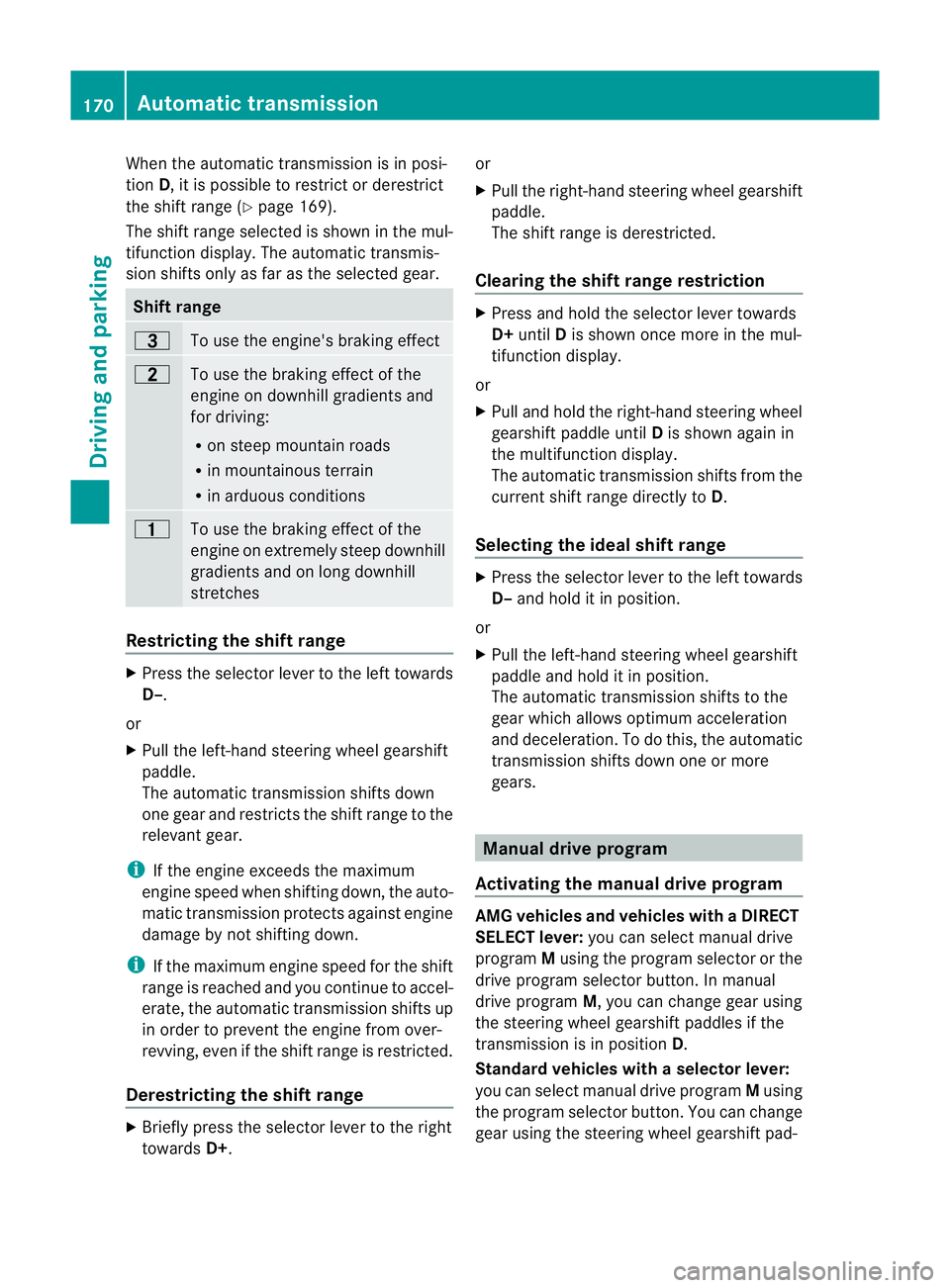
The shift range selected is shown in the mul-
tifunction display. The automatic transmis-
sion shifts only as far as the selected gear. Shift range
=
To use the engine's braking effect
5
To use the braking effect of the
engine on downhill gradients and
for driving:
R
on steep mountain roads
R in mountainous terrain
R in arduous conditions 4
To use the braking effect of the
engine on extremely steep downhill
gradients and on long downhill
stretches
Restricting the shift range
X
Press the selecto rlever to the left towards
D–.
or
X Pull the left-hand steering wheel gearshift
paddle.
The automatic transmission shifts down
one gear and restricts the shift range to the
relevant gear.
i If the engine exceeds the maximum
engine speed when shifting down, the auto-
matic transmission protects against engine
damage by not shifting down.
i If the maximum engine speed for the shift
range is reached and you continue to accel-
erate, the automatic transmission shifts up
in order to prevent the engine from over-
revving, even if the shift range is restricted.
Derestricting the shift range X
Briefly press the selector lever to the right
towards D+. or
X
Pull the right-hand steering wheel gearshift
paddle.
The shift range is derestricted.
Clearing the shift range restriction X
Press and hold the selector lever towards
D+ until Dis shown once more in the mul-
tifunction display.
or
X Pull and hold the right-hand steering wheel
gearshift paddle until Dis shown again in
the multifunction display.
The automatic transmission shifts from the
current shift range directly to D.
Selecting the ideal shift range X
Press the selector lever to the left towards
D– and hold it in position.
or
X Pull the left-hand steering wheel gearshift
paddle and hold it in position.
The automatic transmission shifts to the
gear which allows optimum acceleration
and deceleration .To do this, the automatic
transmission shifts down one or more
gears. Manual drive program
Activating the manual drive program AMG vehicles and vehicles with
aDIRECT
SELECT lever: you can select manual drive
program Musing the program selector or the
drive program selector button. In manual
drive program M, you can change gear using
the steering wheel gearshif tpaddles if the
transmission is in position D.
Standar dvehicles with aselector lever:
you can selec tmanual drive program Musing
the program selecto rbutton .You can change
gear using the steering wheel gearshift pad- 170
Automatic transmissionDriving and parking
Page 174 of 409
dles or the selector lever in manual drive pro-
gram Mif the transmission is in position D.
X Press the program selector button
(Y page 168 )repeatedly until Mappears in
the multifunction display.
X AMG vehicles: turn the drive program
selector (Y page 168)u ntilMappears in the
multifunctio ndisplay.
The indicator Mon the drive program selec-
tor lights up in red.
Upshifting X
Briefly press the selector lever to the right
towards D+.
or
X Pull the right-hand steering wheel gearshift
paddle (Y page 169).
The automatic transmission shifts up to the
next gear.
Vehicles with AMG engines
! In manual gearshift program M, the auto-
matic transmission does not shift up auto-
matically even when the engine limiting
speed for the current gear is reached.
When the engine limiting speed is reached,
the fuel supply is cut to prevent the engine
fro mo verrevving. You must make sure that
the engine speed does not reach the red
area of the rev counter. Otherwise, there is
a risk of engine damage.
X Shift up a gearift he colour in the multi-
function display in the speedometer
changes to red and the UP display message
is shown.
Downshifting X
Briefly press the selector lever to the left
towards D–.
or
X Pull the left-hand steering wheel gearshift
paddle (Y page 169).
The automatic transmission shifts down to
the next gear. i
If you desire maximum acceleration, push
the selector lever to the left or pull and hold
the left-hand steering wheel gearshift pad-
dle until the transmission shifts to the opti-
mal gear for the current speed.
Kickdown i
Vehicles with an AMG engine: it is not
possible to use kickdown in manual drive
program M.
You can also use kickdown for maximum
acceleration in manual drive program M.
X Depress the accelerator pedal beyond the
pressure point.
The transmission shifts to a lower gear
depending on the engine speed.
Switching off the manuald rive program X
Standard vehicles with aselector lever
and vehicles with aDIRECT SELECT
lever: press the program selector button
(Y page 168) until Eor Sappears in the
multifunction display.
X AMG vehicles: turn the drive program
selector (Y page 168) until C,Sor S+
appears in the multifunction display. Automatic transmission
171Driving and parking Z
Page 175 of 409
Problems with the transmission
Problem Possible causes/consequences and
M Solutions
The transmission has
problems shifting gear. The transmission is losing oil.
X
Have the transmission checked at a qualified specialist work-
shop immediately. The acceleration ability
is deteriorating.
The transmission no
longer changes gear. The transmission is in emergency mode.
It is only possible to shift into
secondgear and reverse gear.
X Stop.
X Shift the transmission to position P.
X Switch off the engine.
X Wait at least 10seconds before restarting the engine.
X Shift the transmission to position Dor R.
If D is selected, the transmission shifts into secondgear; ifRis
selected, the transmission shifts into reverse gear.
X Have the transmission checked at a qualified specialist work-
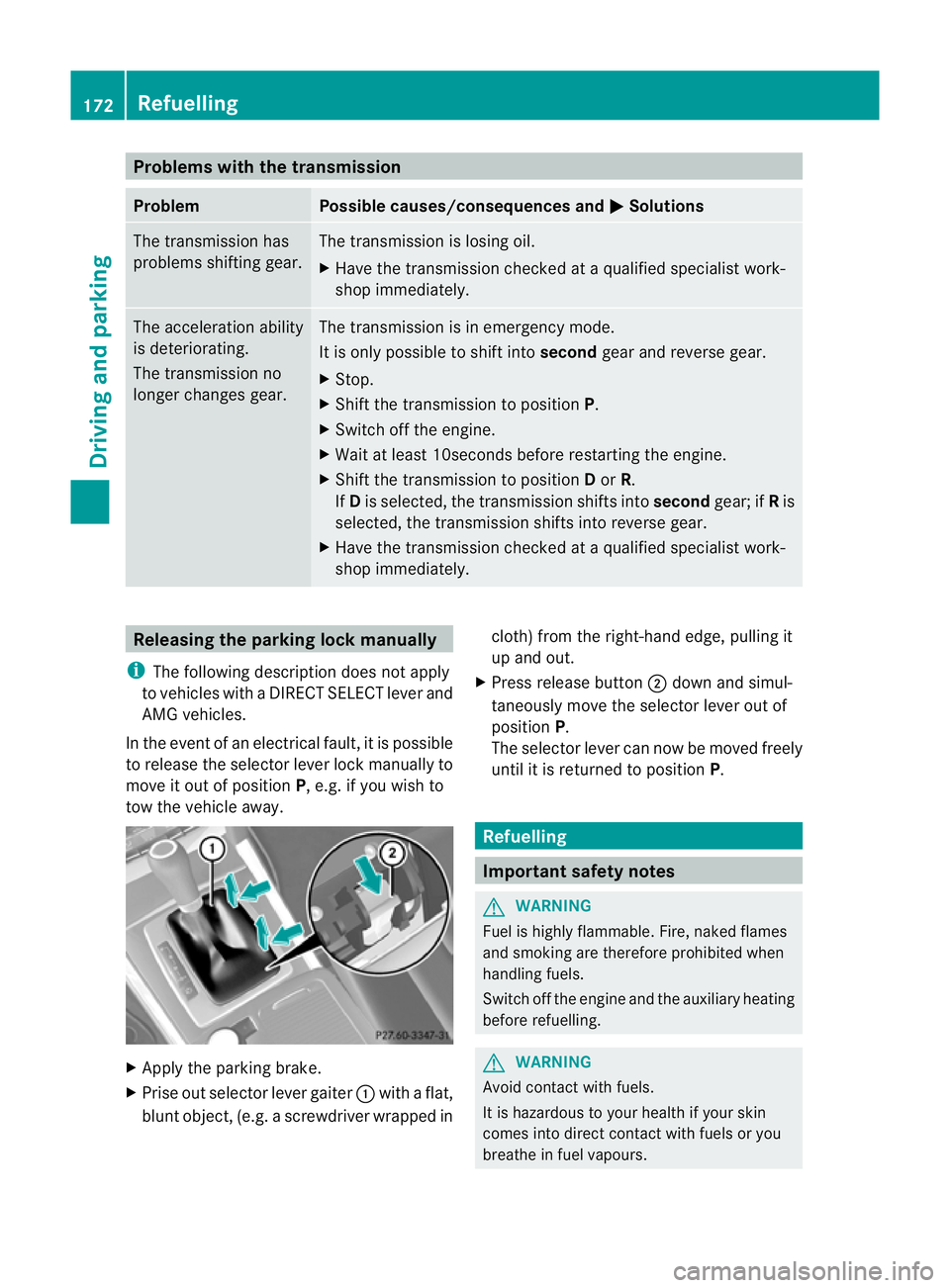
shop immediately. Releasing the parking lock manually
i The following description does not apply
to vehicles with a DIRECT SELECT lever and
AMG vehicles.
In the event of an electrical fault, it is possible
to release the selector lever lock manually to
move it out of position P, e.g. if you wish to
tow the vehicle away. X
Apply the parking brake.
X Prise out selector lever gaiter :with a flat,
blunt object, (e.g. ascrewdriver wrapped in cloth) from the right-hand edge, pulling it
up and out.
X Press release button ;dow nand simul-
taneously move the selecto rlever out of
position P.
The selector lever can now be moved freely
until it is returned to position P. Refuelling
Important safety notes
G
WARNING
Fuel is highly flammable. Fire, naked flames
and smoking are therefore prohibited when
handling fuels.
Switch off the engine and the auxiliary heating
before refuelling. G
WARNING
Avoid contact with fuels.
It is hazardous to your health if your skin
comes into direct contact with fuels or you
breathe in fuel vapours. 172
RefuellingDriving and parking
Page 179 of 409
Problem Possible causes/consequences and
M Solutions
The fuel filler flap can-
not be opened. The fuel filler flap is not unlocked.
or
The key battery is discharged.
X
Unlock the vehicle using the emergency key element
(Y page 84).
X Open the boot lid or the tailgate.
X Manually unlock the fuel filler flap using the emergency release
(Y page 174). The fuel filler flap is unlocked, but the opening mechanism is jam-
med.
X
Consult a qualified specialist workshop. Parking
Important safety notes
G
WARNING
Only remove the key from the ignition lock
when the vehicle is stationary, as you cannot
steer the vehicle when the key is removed.
Never leave children unsupervised in the vehi-
cle. They could release the parking brake. This
could lead to a serious or fatal accident. G
WARNING
Under no circumstances should the exhaust
system come into contact with flammable
materials such as dry grass or petrol, for
example. Do not park the vehicle on dry grass-
land or harvested grain fields. The hot exhaust
system could otherwise ignite the flammable
material and set the vehicle on fire.
To ensure that the vehicle is secured against
rolling away unintentionally:
R the parking brake must be firmly applied.
R on vehicles with manual transmission,
engage first gear or reverse gear.
R on vehicles with automatic transmission,
the transmission must be in position Pand the key must be removed from the ignition
lock.
R on uphill or downhill gradients, turn the
front wheels towards the kerb. Switching off the engine
Important safety notes G
WARNING
If the engine is not running, there is no power
assistance for the steering and brakes. Steer-
ing and braking then requires significantly
greater effort.
As a result, you might lose control of the vehi-
cle, cause an accident and injure yourself and
others.
Therefore, do not switch off the engine while
you are driving.
Vehicles with manual transmission X
Shift to either first gear or reverse gear R.
X Turn the key to position 0in the ignition
lock and remove it.
The immobiliser is activated.
X Apply the parking brake firmly. 176
ParkingDriving and parking