display MERCEDES-BENZ E-CLASS SALOON 2011 Service Manual
[x] Cancel search | Manufacturer: MERCEDES-BENZ, Model Year: 2011, Model line: E-CLASS SALOON, Model: MERCEDES-BENZ E-CLASS SALOON 2011Pages: 409, PDF Size: 10.47 MB
Page 164 of 409
Activating (excep
tfor AMG vehicles)
X Press button :.
Indicator lamp ;lights up. If all conditions
for automatic engine switch-off
(Y page 159) are fulfilled, the ¤symbol
is shown in gree ninthe multifunction dis-
play.
If not all conditions for automatic engine
switch-off (Y page 159) are fulfilled, the
¤ symbol is shown in yellow in the mul-
tifunction display. If this is the case, the
ECO start/stop function is not available.
Activating (AMG vehicles)
X Press button :.
Indicator lamp ;lights up. If drive pro-
gram S,S+ orMis active, the automatic
transmission switches to drive program C.
If all conditions for automatic engine
switch-off (Y page 159) are fulfilled, the
¤ symbol is shown in green in the mul-
tifunction display. In addition, the Stop/Start active message is shown in the
AMG menu in the multifunction display.
If not all conditions have been fulfilled for
automatic engine switch-off (Y page 159),
the Stop/Start inactive message is
shown in the AMG menu of the multifunc-
tion display and the ¤symbol is shown
in yellow. If this is the case, the ECO start/
stop function is not available. Driving
161Driving and parking Z
Page 165 of 409
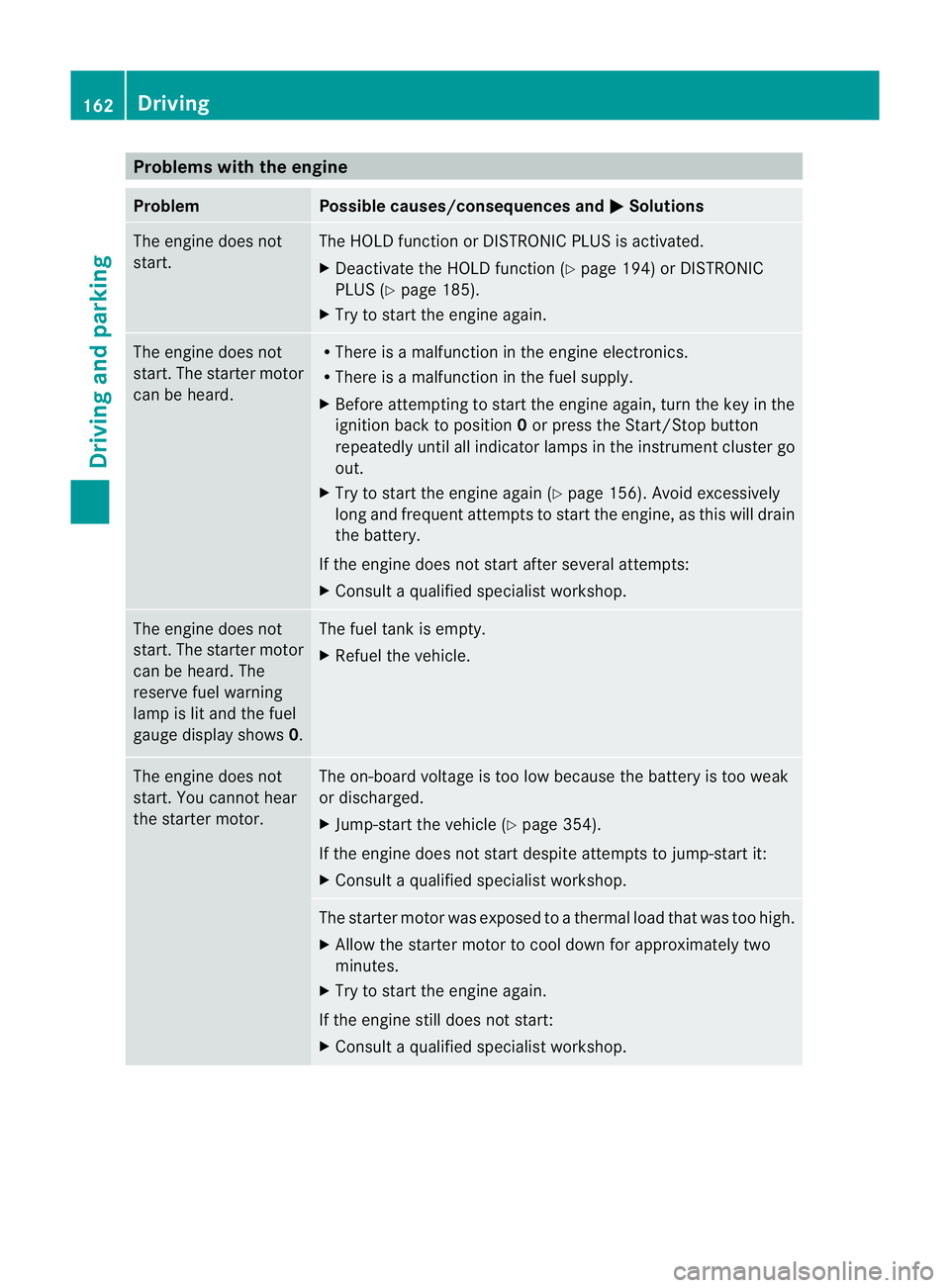
Problems with the engine
Problem Possible causes/consequences and
M Solutions
The engine does not
start. The HOLD function or DISTRONIC PLUS is activated.
X
Deactivate the HOLD function (Y page 194) or DISTRONIC
PLUS (Y page 185).
X Try to start the engine again. The engine does not
start. The starter motor
can be heard. R
There is a malfunction in the engine electronics.
R There is a malfunction in the fuel supply.
X Before attempting to start the engine again, turn the key in the
ignition back to position 0or press the Start/Stop button
repeatedly until all indicator lamps in the instrumen tcluster go
out.
X Try to start the engine again (Y page 156). Avoid excessively
long and frequent attempts to start the engine, as this will drain
the battery.
If the engine does not start after several attempts:
X Consult a qualified specialist workshop. The engine does not
start
.The starter motor
can be heard. The
reserve fuel warning
lamp is lit and the fuel
gauge display shows 0. The fuel tank is empty.
X
Refuel the vehicle. The engine does not
start. You cannot hear
the starter motor. The on-board voltage is too low because the battery is too weak
or discharged.
X
Jump-start the vehicle (Y page 354).
If the engine does not start despite attempts to jump-start it:
X Consult a qualified specialist workshop. The starter motor was exposed to a thermal load that was too high.
X
Allow the starter motor to cool down for approximately two
minutes.
X Try to start the engine again.
If the engine still does not start:
X Consult a qualified specialist workshop. 162
DrivingDriving and parking
Page 166 of 409
Problem Possible causes/consequences and
M Solutions
Vehicles with a petrol
engine:
The engine is not run-
ning smoothly and is
misfiring. There is a malfunction in the engine electronics or in a mechanical
component of the engine management system.
X
Only depress the accelerator pedal slightly.
Otherwise, non-combusted fuel may get into the catalytic con-
verter and damage it.
X Have the cause rectified immediately at a qualified specialist
workshop. The coolant tempera-
ture display is showing
more than 120 †. The
coolant warning lamp
may also be lit and a
warning tone may
sound. The coolant level is too low. The coolant is too hot and the engine
is no longer being cooled sufficiently.
X Stop as soon as possible and allow the engine and the coolant
to cool down.
X Check the coolant level (Y page 324). Observe the warning
notes as you do so and top up the coolant if necessary. If the coolant level is correct, the engine radiator fan may be faulty.
The coolant is too hot and the engine is no longer being cooled
sufficiently.
X If the coolant temperature is less than 120 †, you can continue
driving to the nearest qualified specialist workshop.
X Avoid heavy loads on the engine as you do so, e.g. driving on
mountain roads and stop-start traffic. Manual transmission
Important safety notes
G
WARNING
The movement of the pedals must not be
impaired in any way. Do not keep any objects
in the driver's footwell. Make sure that floor-
mats or carpets are correctly secured and
that there is sufficient clearance for the ped-
als.
Do not place several floormats on top of one
another. G
WARNING
Do not change down for additional engine
braking on a slippery road surface. This could
cause the drive wheels to lose their grip and
the vehicle could skid. This could cause you to lose control of your vehicle and cause an
accident.
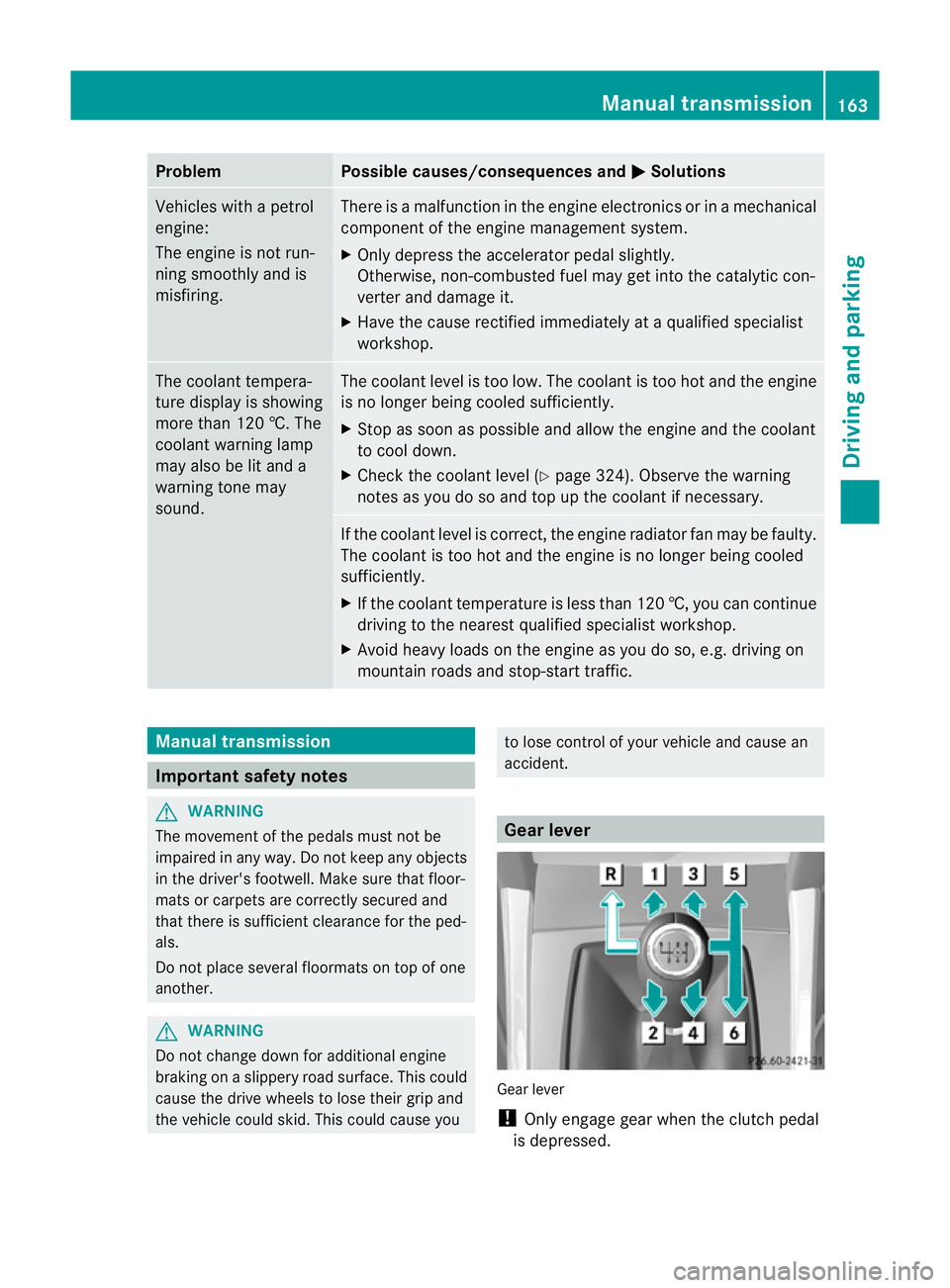
Gear lever
Gear lever
!
Only engage gear when the clutch pedal
is depressed. Manual transmission
163Driving and parking Z
Page 167 of 409
!
When shifting between 5thand 6thgear,
you should always push the gear lever all
the way to the right. Otherwise, you could
shift unintentionally into 3rdor4th gear
and damage the transmission.
If you shift down at too high a speed (trans-
mission braking), this can cause the engine
to overrev, leading to engine damage.
Do not use the clutch bite point to keep the
vehicle stationary on uphill gradients.
There is otherwise a risk of damaging the
clutch.
! On long and steep downhill gradients,
especially if the vehicle is ladenort owing
a trailer, you must shift into gear 1, 2or3
in good time. This uses the engine's braking
effect .This relieves the load on the brake
system and prevents the brakes from over-
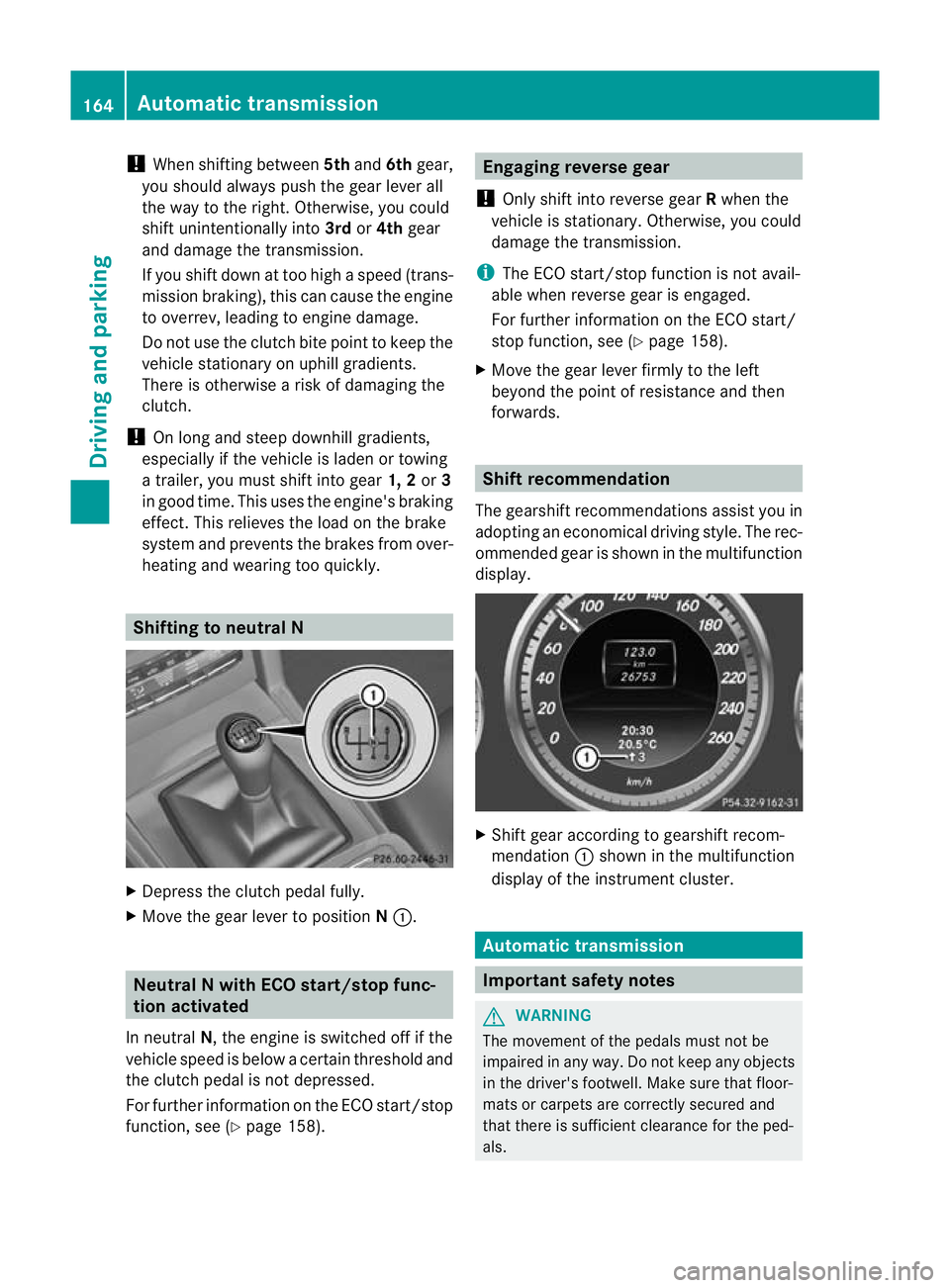
heating and wearing too quickly. Shifting to neutral N
X
Depress the clutch pedal fully.
X Move the gear lever to position N:. Neutral N with ECO start/stop func-
tion activated
In neutral N, the engine is switched off if the
vehicle speed is below a certain threshold and
the clutch pedal is not depressed.
For further information on the ECO start/stop
function, see (Y page 158). Engaging reverse gear
! Only shift into reverse gear Rwhen the
vehicle is stationary. Otherwise, you could
damage the transmission.
i The ECO start/stop function is not avail-
able when reverse gear is engaged.
For further information on the ECO start/
stop function, see (Y page 158).
X Move the gear lever firmly to the left
beyond the point of resistance and then
forwards. Shift recommendation
The gearshift recommendations assist you in
adopting an economical driving style. The rec-
ommended gear is shown in the multifunction
display. X
Shift gear according to gearshift recom-
mendation :shown in the multifunction
display of the instrumentc luster. Automatic transmission
Important safety notes
G
WARNING
The movemen tofthe pedals must not be
impaired in any way.D o not keep any objects
in the driver's footwell. Make sure that floor-
mats or carpets are correctly secured and
that there is sufficient clearance for the ped-
als. 164
Automatic transmissionDriving and parking
Page 168 of 409
Do not place several floormats on top of one
another.
G
WARNING
Do not change down for additional engine
braking on a slippery roa dsurface. This could
cause the drive wheels to lose their grip and
the vehicle could skid. This could cause you
to lose control of your vehicle and cause an
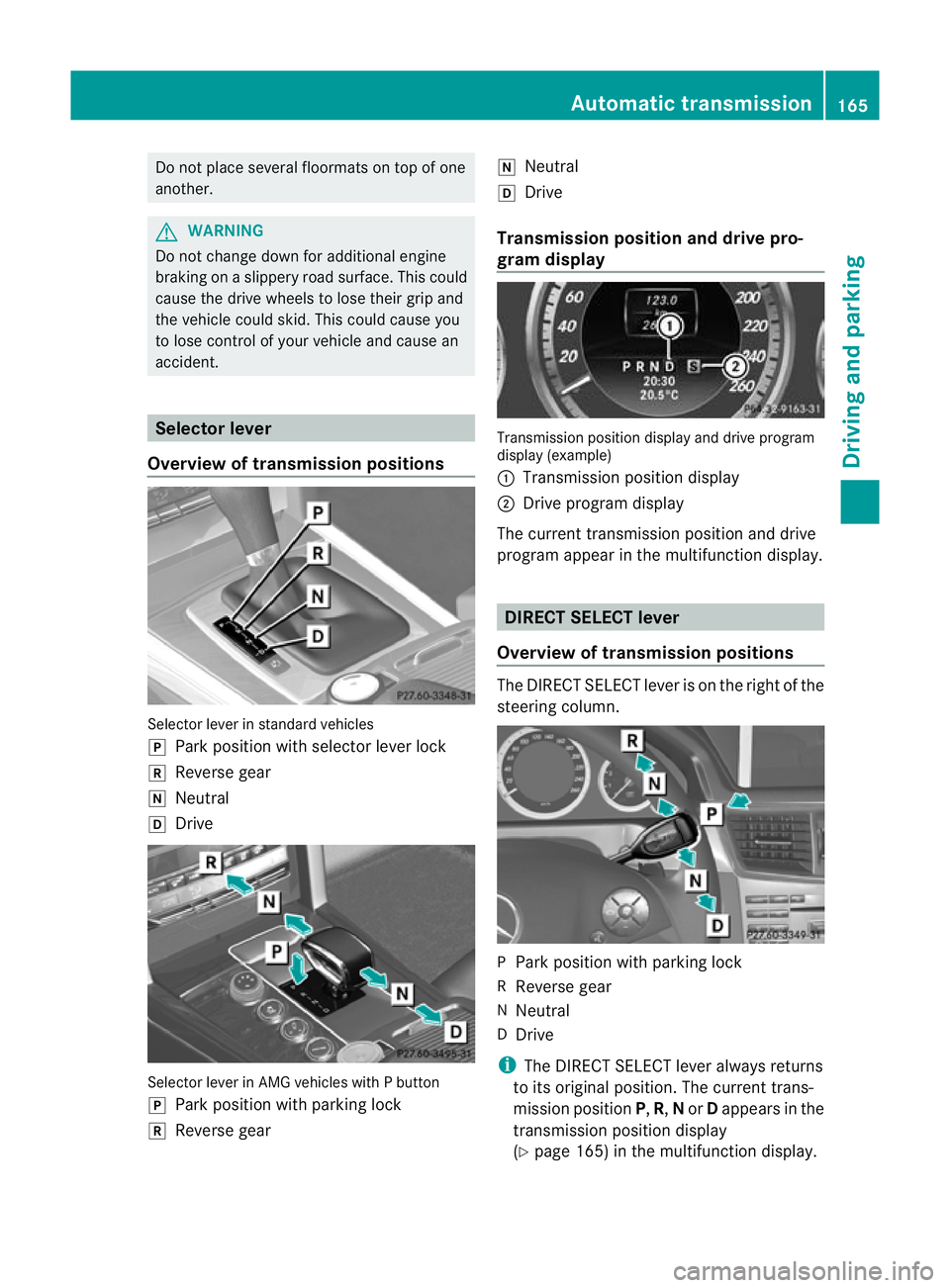
accident. Selector lever
Overview of transmission positions Selector leve
rinstandar dvehicles
j Park position with selecto rlever lock
k Reverse gear
i Neutral
h Drive Selector lever in AMG vehicles with P button
j
Park position with parking lock
k Reverse gear i
Neutral
h Drive
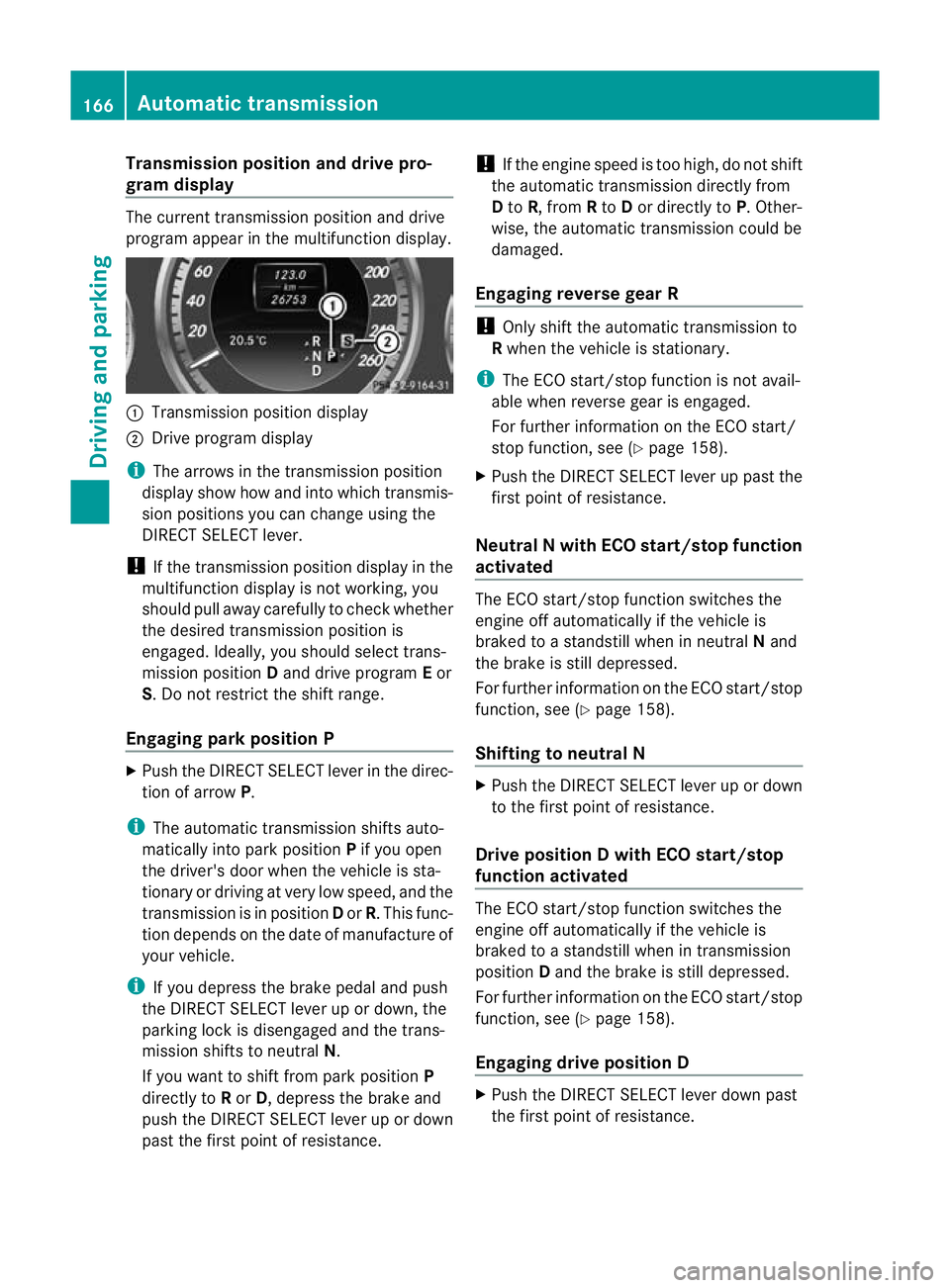
Transmission position and drive pro-
gram display Transmission position display and drive program
display (example)
:
Transmission position display
; Drive program display
The curren ttransmission position and drive
progra mappear in the multifunction display. DIRECT SELECT lever
Overview of transmission positions The DIRECT SELECT lever is on the right of the
steering column.
P
Park position with parking lock
R Reverse gear
N Neutral
D Drive
i The DIRECT SELECT lever always returns
to its original position .The current trans-
mission position P,R, Nor Dappears in the
transmission position display
(Y page 165) in the multifunction display. Automatic transmission
165Driving and parking Z
Page 169 of 409
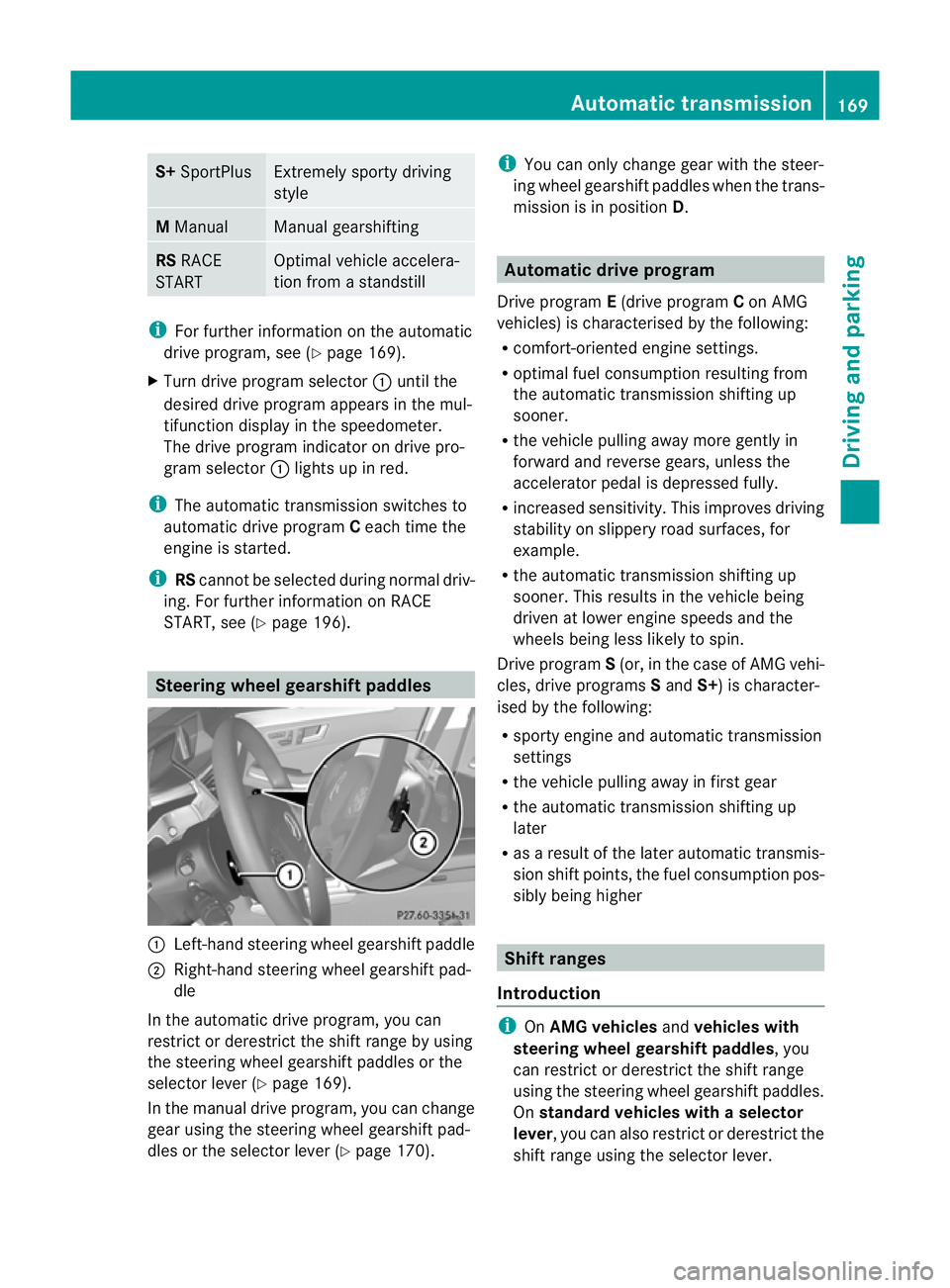
Transmission position and drive pro-
gram display
The current transmission positio
nand drive
progra mappear in the multifunction display. :
Transmission position display
; Drive program display
i The arrows in the transmission position
display show how and into which transmis-
sion positions you can change using the
DIRECT SELECT lever.
! If the transmission position display in the
multifunction display is not working, you
should pull away carefully to chec kwhether
the desired transmission position is
engaged. Ideally, you should select trans-
mission position Dand drive program Eor
S. Do not restrict the shift range.
Engaging parkp osition PX
Push the DIRECT SELECT lever in the direc-
tion of arrow P.
i The automatic transmission shifts auto-
matically into park position Pif you open
the driver's door when the vehicle is sta-
tionary or driving at very low speed, and the
transmission is in position Dor R.T his func-
tion depends on the date of manufacture of
your vehicle.
i If you depress the brake pedal and push
the DIRECT SELECT lever up or down, the
parking lock is disengaged and the trans-
mission shifts to neutral N.
If you want to shift from park position P
directly to Ror D, depress the brake and
push the DIRECT SELECT lever up or down
past the first point of resistance. !
If the engine speed is too high, do not shift
the automatic transmission directly from
D to R, from Rto Dor directly to P. Other-
wise, the automatic transmission could be
damaged.
Engaging reverse gear R !
Only shift the automatic transmission to
R when the vehicle is stationary.
i The ECO start/stop function is not avail-
able when reverse gear is engaged.
For further information on the ECO start/
stop function, see (Y page 158).
X Push the DIRECT SELECT lever up past the
first point of resistance.
Neutral N with ECO start/stop function
activated The ECO start/stop function switches the
engine off automatically if the vehicle is
braked to a standstill when in neutral
Nand
the brake is still depressed.
For further information on the ECO start/stop
function, see (Y page 158).
Shifting to neutral N X
Push the DIRECT SELECT lever up or down
to the first point of resistance.
Drive position D with ECO start/stop
function activated The ECO start/stop function switches the
engine off automatically if the vehicle is
braked to a standstill when in transmission
position
Dand the brake is still depressed.
For further information on the ECO start/stop
function, see (Y page 158).
Engaging drive position D X
Push the DIRECT SELECT lever down past
the first point of resistance. 166
Automatic transmissionDriving and parking
Page 172 of 409
S+
SportPlus Extremely sporty driving
style
M
Manual Manual gearshifting
RS
RACE
START Optimal vehicle accelera-
tion from a standstill
i
For further information on the automatic
drive program, see (Y page 169).
X Turn drive program selector :until the
desired drive program appears in the mul-
tifunction display in the speedometer.
The drive program indicator on drive pro-
gram selector :lights up in red.
i The automatic transmission switches to
automatic drive program Ceach time the
engine is started.
i RScannot be selected during normal driv-
ing. For further information on RACE
START, see (Y page 196). Steering wheel gearshift paddles
:
Left-hand steering wheel gearshift paddle
; Right-hand steering wheel gearshift pad-
dle
In the automatic drive program, you can
restrict or derestrict the shift range by using
the steering wheel gearshift paddles or the
selector lever (Y page 169).
In the manual drive program, you can change
gear using the steering wheel gearshift pad-
dles or the selector lever (Y page 170).i
You can only change gear with the steer-
ing wheel gearshift paddles when the trans-
mission is in position D. Automatic drive program
Drive program E(drive program Con AMG
vehicles) is characterised by the following:
R comfort-oriented engine settings.
R optimal fuel consumption resulting from
the automatic transmission shifting up
sooner.
R the vehicle pulling away more gently in
forward and reverse gears, unless the
accelerator pedal is depressed fully.
R increased sensitivity. This improves driving
stability on slippery road surfaces, for
example.
R the automatic transmission shifting up
sooner. This results in the vehicle being
driven at lower engine speeds and the
wheels being less likely to spin.
Drive program S(or, in the case of AMG vehi-
cles, drive programs Sand S+) is character-
ised by the following:
R sporty engine and automatic transmission
settings
R the vehicle pulling away in first gear
R the automatic transmission shifting up
later
R as a result of the later automatic transmis-
sion shift points, the fuel consumption pos-
sibly being higher Shift ranges
Introduction i
OnAMG vehicles andvehicles with
steering wheel gearshift paddles, you
can restrict or derestrict the shift range
using the steering wheel gearshift paddles.
On standard vehicles with aselector
lever , you can also restric torderestrict the
shift range using the selector lever. Automatic transmission
169Driving and parking Z
Page 173 of 409
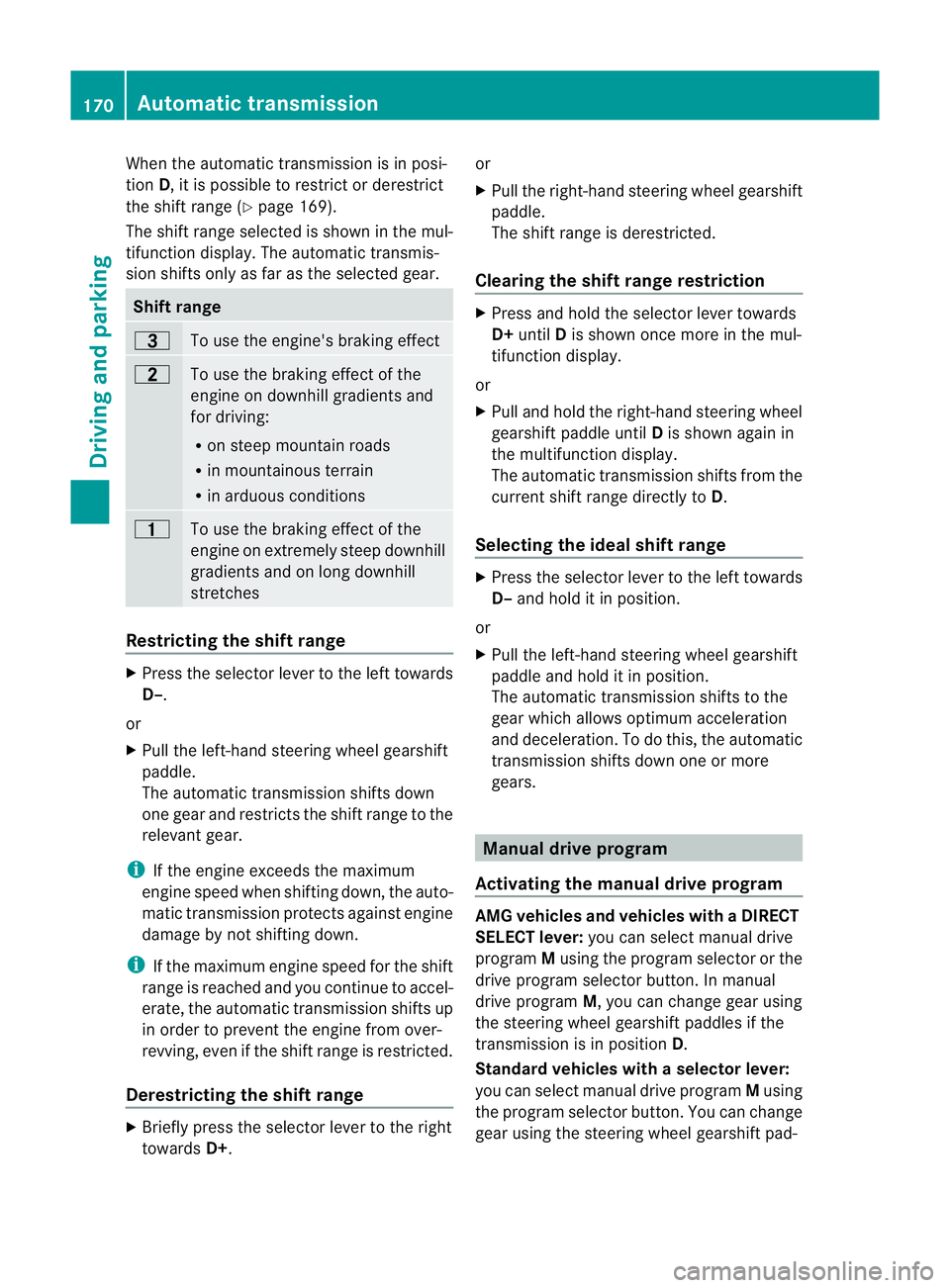
When the automatic transmission is in posi-
tion
D, it is possible to restrict or derestrict
the shift range (Y page 169).
The shift range selected is shown in the mul-
tifunction display. The automatic transmis-
sion shifts only as far as the selected gear. Shift range
=
To use the engine's braking effect
5
To use the braking effect of the
engine on downhill gradients and
for driving:
R
on steep mountain roads
R in mountainous terrain
R in arduous conditions 4
To use the braking effect of the
engine on extremely steep downhill
gradients and on long downhill
stretches
Restricting the shift range
X
Press the selecto rlever to the left towards
D–.
or
X Pull the left-hand steering wheel gearshift
paddle.
The automatic transmission shifts down
one gear and restricts the shift range to the
relevant gear.
i If the engine exceeds the maximum
engine speed when shifting down, the auto-
matic transmission protects against engine
damage by not shifting down.
i If the maximum engine speed for the shift
range is reached and you continue to accel-
erate, the automatic transmission shifts up
in order to prevent the engine from over-
revving, even if the shift range is restricted.
Derestricting the shift range X
Briefly press the selector lever to the right
towards D+. or
X
Pull the right-hand steering wheel gearshift
paddle.
The shift range is derestricted.
Clearing the shift range restriction X
Press and hold the selector lever towards
D+ until Dis shown once more in the mul-
tifunction display.
or
X Pull and hold the right-hand steering wheel
gearshift paddle until Dis shown again in
the multifunction display.
The automatic transmission shifts from the
current shift range directly to D.
Selecting the ideal shift range X
Press the selector lever to the left towards
D– and hold it in position.
or
X Pull the left-hand steering wheel gearshift
paddle and hold it in position.
The automatic transmission shifts to the
gear which allows optimum acceleration
and deceleration .To do this, the automatic
transmission shifts down one or more
gears. Manual drive program
Activating the manual drive program AMG vehicles and vehicles with
aDIRECT
SELECT lever: you can select manual drive
program Musing the program selector or the
drive program selector button. In manual
drive program M, you can change gear using
the steering wheel gearshif tpaddles if the
transmission is in position D.
Standar dvehicles with aselector lever:
you can selec tmanual drive program Musing
the program selecto rbutton .You can change
gear using the steering wheel gearshift pad- 170
Automatic transmissionDriving and parking
Page 174 of 409
dles or the selector lever in manual drive pro-
gram Mif the transmission is in position D.
X Press the program selector button
(Y page 168 )repeatedly until Mappears in
the multifunction display.
X AMG vehicles: turn the drive program
selector (Y page 168)u ntilMappears in the
multifunctio ndisplay.
The indicator Mon the drive program selec-
tor lights up in red.
Upshifting X
Briefly press the selector lever to the right
towards D+.
or
X Pull the right-hand steering wheel gearshift
paddle (Y page 169).
The automatic transmission shifts up to the
next gear.
Vehicles with AMG engines
! In manual gearshift program M, the auto-
matic transmission does not shift up auto-
matically even when the engine limiting
speed for the current gear is reached.
When the engine limiting speed is reached,
the fuel supply is cut to prevent the engine
fro mo verrevving. You must make sure that
the engine speed does not reach the red
area of the rev counter. Otherwise, there is
a risk of engine damage.
X Shift up a gearift he colour in the multi-
function display in the speedometer
changes to red and the UP display message
is shown.
Downshifting X
Briefly press the selector lever to the left
towards D–.
or
X Pull the left-hand steering wheel gearshift
paddle (Y page 169).
The automatic transmission shifts down to
the next gear. i
If you desire maximum acceleration, push
the selector lever to the left or pull and hold
the left-hand steering wheel gearshift pad-
dle until the transmission shifts to the opti-
mal gear for the current speed.
Kickdown i
Vehicles with an AMG engine: it is not
possible to use kickdown in manual drive
program M.
You can also use kickdown for maximum
acceleration in manual drive program M.
X Depress the accelerator pedal beyond the
pressure point.
The transmission shifts to a lower gear
depending on the engine speed.
Switching off the manuald rive program X
Standard vehicles with aselector lever
and vehicles with aDIRECT SELECT
lever: press the program selector button
(Y page 168) until Eor Sappears in the
multifunction display.
X AMG vehicles: turn the drive program
selector (Y page 168) until C,Sor S+
appears in the multifunction display. Automatic transmission
171Driving and parking Z
Page 176 of 409
G
WARNING
Do not use petrol to refuel a diesel tank. Never
mix diesel with petrol. Doing so could damage
the fuel system and the engine. The vehicle
could also catch fire.
! Do not use petrol to refuel vehicles with a
diesel engine. Do not use diesel to refuel
vehicles with a petrol engine. Even small
amounts of the wrong fuel result in damage
to the fuel system and the engine.
! Do not switch on the ignition if you acci-
dentally refuel with the wrong fuel .Other-
wise, the fuel will ente rthe fuel lines. Notify
a qualified specialist workshop and have
the fuel tank and fuel lines drained com-
pletely.
! Overfilling the fuel tank could damage the
fuel system.
! Take care not to spill any fuel on painted
surfaces. You could otherwise damage the
paintwork.
! Use a filter when adding fuel from a fuel
can. The fuel lines and/or the diesel injec-
tion system could otherwise be blocked by
particles from the fuel can.
Further information on fuel and on fuel grades
can be found in the "Fuel" section
(Y page 384). Refuelling
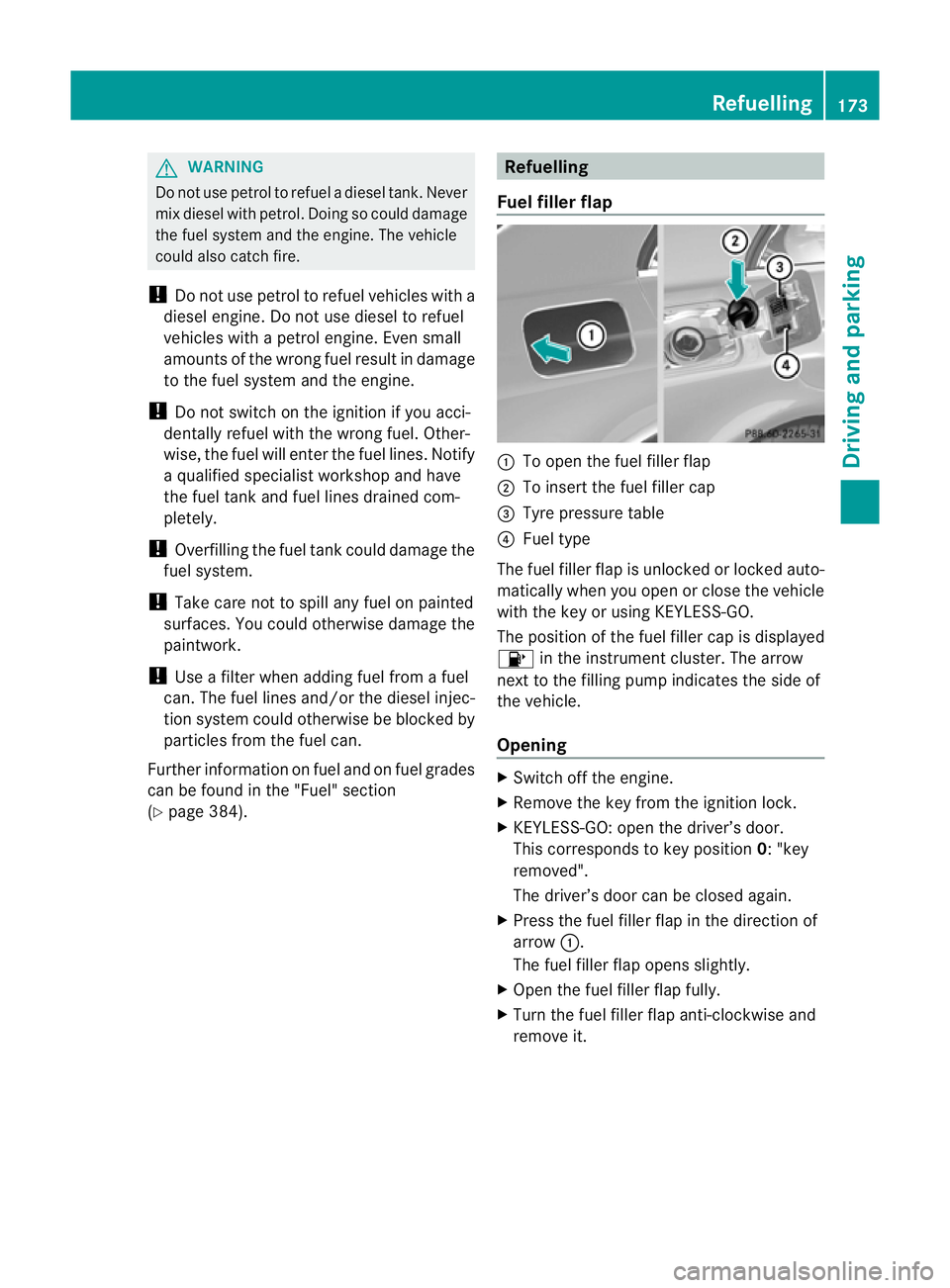
Fuel filler flap :
To open the fuel filler flap
; To insert the fuel filler cap
= Tyre pressure table
? Fuel type
The fuel filler flap is unlocked or locked auto-
matically when you open or close the vehicle
with the key or using KEYLESS-GO.
The position of the fuel filler cap is displayed
8 in the instrument cluster. The arrow
next to the filling pump indicates the side of
the vehicle.
Opening X
Switch off the engine.
X Remove the key from the ignition lock.
X KEYLESS-GO: open the driver’s door.
This corresponds to key position 0: "key
removed".
The driver’s door can be closed again.
X Press the fuel filler flap in the direction of
arrow :.
The fuel filler flap opens slightly.
X Open the fuel filler flap fully.
X Turn the fuel filler flap anti-clockwise and
remove it. Refuelling
173Driving and parking Z