tow MERCEDES-BENZ E-CLASS SALOON 2015 Owners Manual
[x] Cancel search | Manufacturer: MERCEDES-BENZ, Model Year: 2015, Model line: E-CLASS SALOON, Model: MERCEDES-BENZ E-CLASS SALOON 2015Pages: 497, PDF Size: 16.23 MB
Page 365 of 497
X
Fold the cover of the rea rsea tarmrest back
dow nagain if necessary.
X To close: lift the cover of the rea rsea ta rm-
rest.
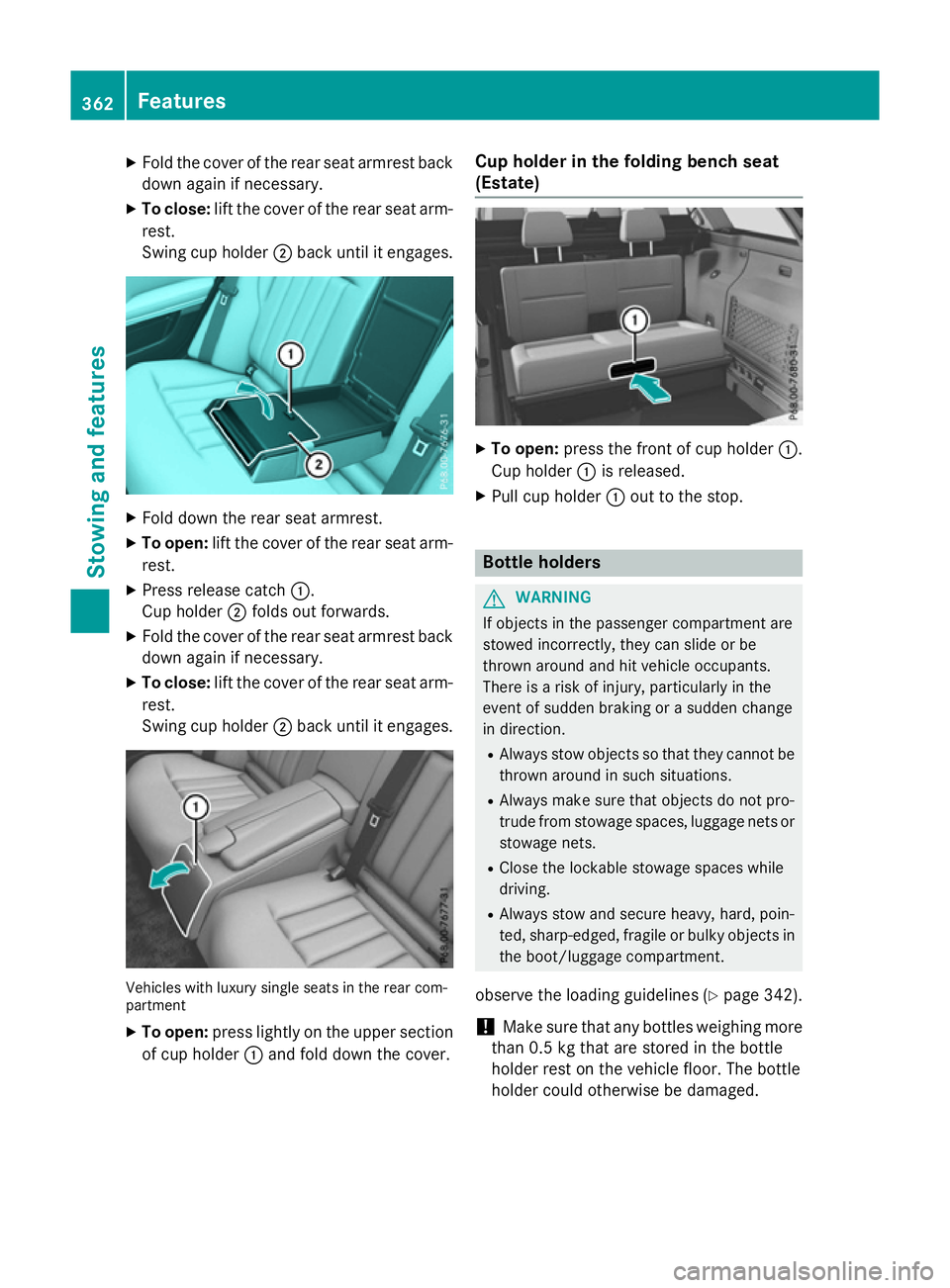
Swing cup holder ;back unti litengages. X
Fold dow nthe rea rseata rmrest.
X To open: lift the cover of the rea rsea ta rm-
rest.
X Pres srelease catch :.
Cu ph older ;folds ou tforwards.
X Fold the cover of the rea rsea tarmrest back
dow nagain if necessary.
X To close: lift the cover of the rea rsea ta rm-
rest.
Swing cup holder ;back unti litengages. Vehicles with luxury single seats in the rea
rcom-
partment
X To open: press lightl yonthe upper section
of cup holder :and fol ddownthe cover. Cup holder in the folding benc
hseat
(Estate) X
To open: press the front of cup holder :.
Cu ph older :is released.
X Pull cup holder :outtot he stop. Bottle holders
G
WARNING
If objects in the passenger compartment are
stowed incorrectly ,they can slide or be
throw naround and hit vehicle occupants.
There is ariskofi njury, particularly in the
event of sudden braking or asudden change
in direction.
R Alway sstow objects so that they cannot be
throw naround in such situations.
R Alway smake sur ethat objects do not pro-
trud efrom stowag espaces, luggage nets or
stowag enets.
R Close the lockabl estowag espaces while
driving.
R Alway sstow and secure heavy, hard, poin-
ted, sharp-edged ,fragil eorb ulky objects in
the boot/luggage compartment.
observe the loading guidelines (Y page 342).
! Make sure that any bottles weighing more
than 0.5 kg that are store dinthe bottle
holder rest on the vehicle floor. The bottle
holder could otherwise be damaged. 362
FeaturesStowinga
nd features
Page 366 of 497
X
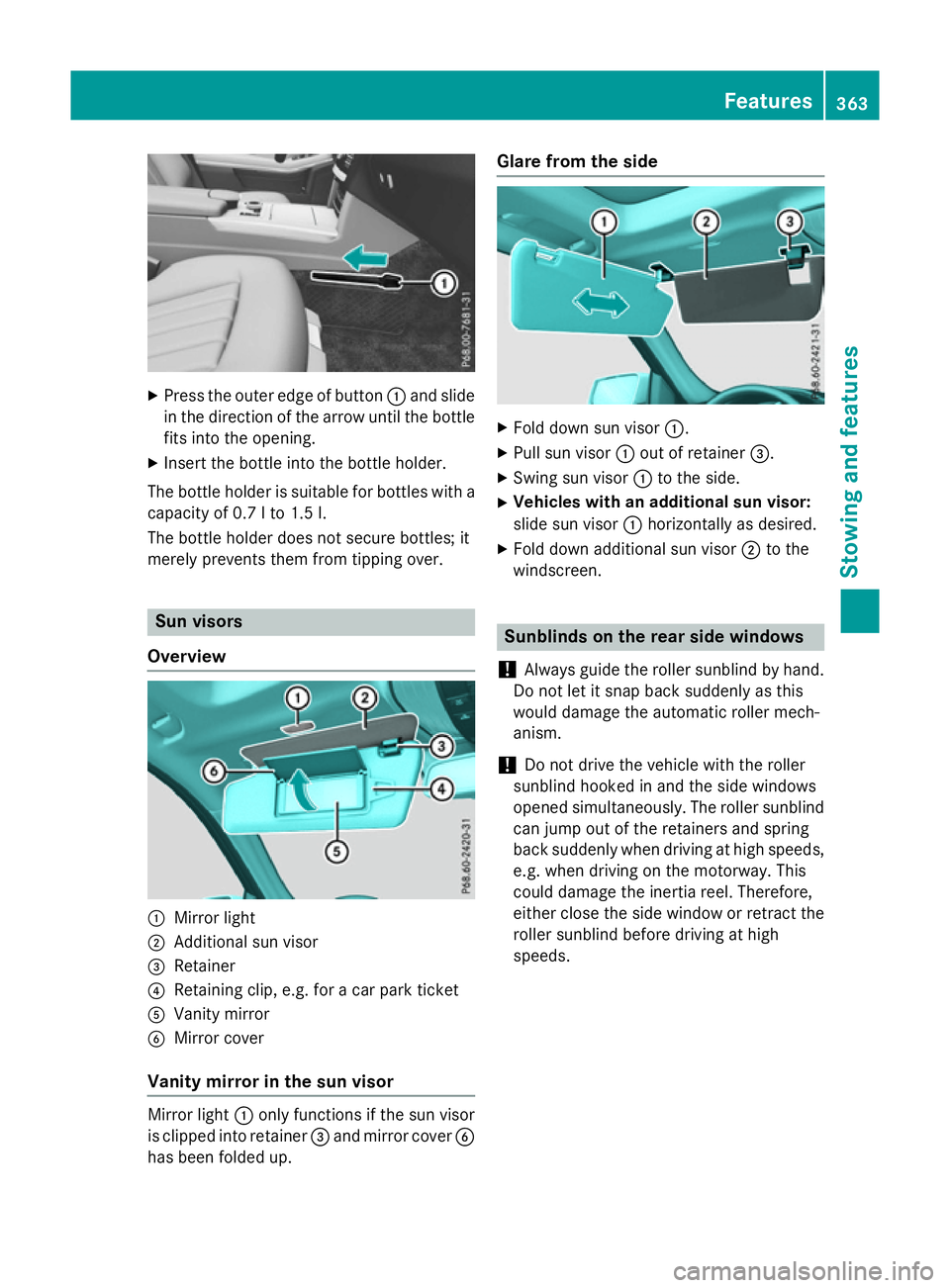
Press the outer edge of button :and slide
in the direction of the arrow until the bottle
fits into the opening.
X Inser tthe bottle into the bottle holder.
The bottle holder is suitable for bottles with a
capacity of 0.7 lto1 .5l.
The bottle holder does not secure bottles; it
merely prevent sthem from tipping over. Sun visors
Overview :
Mirror light
; Additional sun visor
= Retainer
? Retaining clip, e.g. for acar park ticket
A Vanity mirror
B Mirror cover
Vanit ymirror in the sun visor Mirror light
:only functions if the sun visor
is clipped into retainer =and mirror cover B
has been folded up. Glare from the side
X
Fold down sun visor :.
X Pull sun visor :out of retainer =.
X Swing sun visor :to the side.
X Vehicles with an additional sun visor:
slide sun visor :horizontally as desired.
X Fold down additional sun visor ;to the
windscreen. Sunblinds on the rear side windows
! Always guide the roller sunblind by hand.
Do not let it snap back suddenly as this
would damage the automatic roller mech-
anism.
! Do not drive the vehicle with the roller
sunblind hooked in and the side windows
opened simultaneously. The roller sunblind can jump out of the retainers and spring
back suddenly when driving at high speeds,
e.g. when driving on the motorway. This
could damage the inertia reel. Therefore,
either close the side window or retrac tthe
roller sunblind before driving at high
speeds. Features
363Stowing and features Z
Page 368 of 497
Ashtray
Fron tashtray !
The stowage spac
eunder th eashtray is
no th eat resistant .Befor ep lacing lit ciga-
rette sint heashtray, mak esuret hatthe
ashtray is properly engaged. Otherwise, the
stowage spac ecould be damaged. X
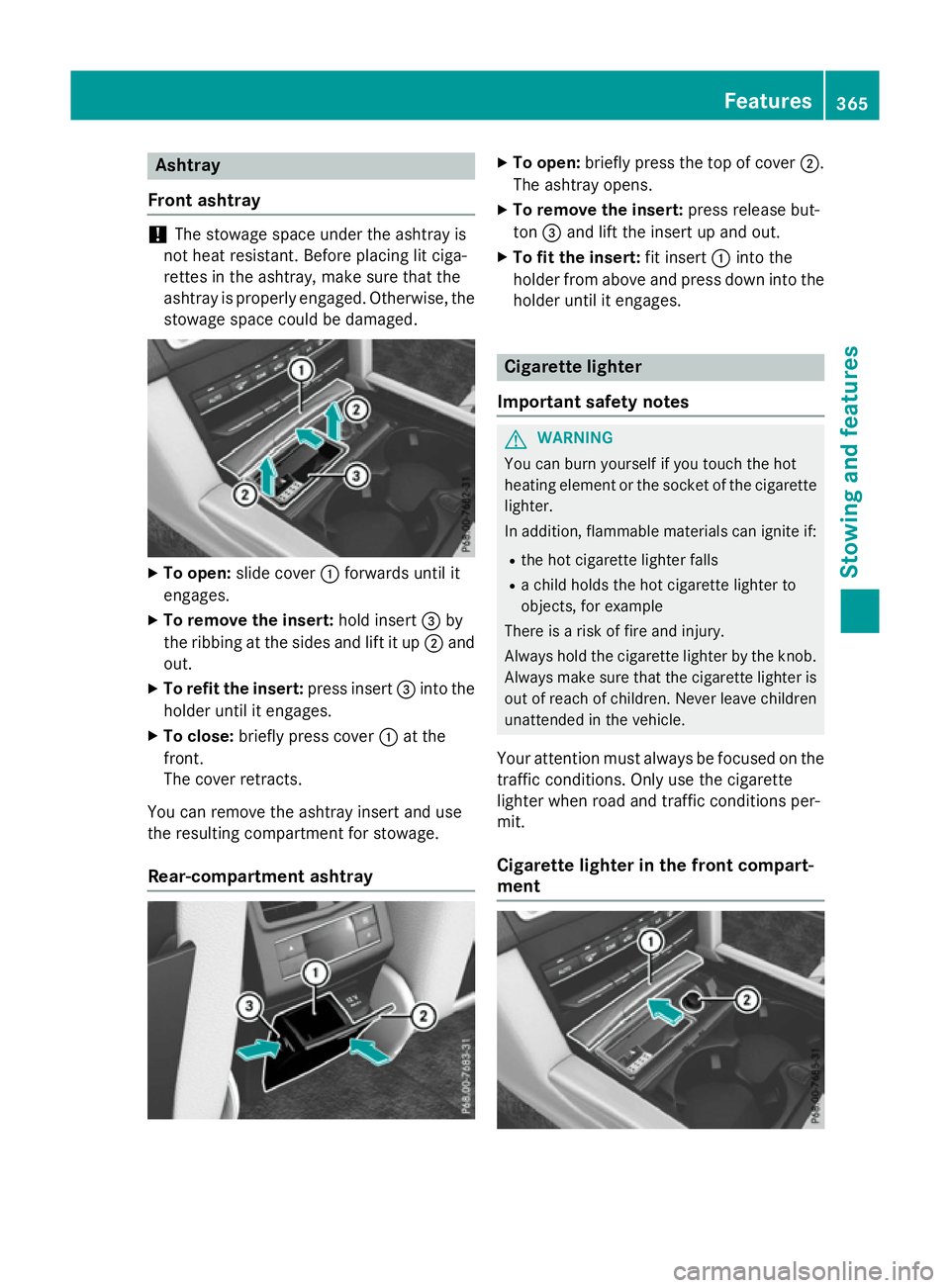
To open: slide cover :forwards until it
engages.
X To remove th einsert: hold insert =by
th er ibbing at th eside sand lift it up ;and
out.
X To refit th einsert: press insert =intothe
holder until it engages.
X To close: briefly press cover :at the
front.
The cover retracts.
You can remove th eashtray insert and use
th er esulting compartmen tfor stowage.
Rear-compartmen tashtray X
To open: briefly press th etop of cover ;.
The ashtray opens.
X To remove th einsert: press release but-
ton =and lift th einsert up and out.
X To fit th einsert: fit insert :intot he
holder from abov eand press down int othe
holder until it engages. Cigarette lighter
Important safety notes G
WARNING
You can burn yourself if you touch th ehot
heating elemen torthesocke tofthecigarette
lighter.
In addition ,flammabl ematerials can ignit eif:
R theh ot cigarette lighte rfalls
R ac hild hold sthe hot cigarette lighte rto
objects ,for example
There is ariskoff irea nd injury.
Always hold th ecigarette lighte rbytheknob.
Always mak esuret hatthe cigarette lighte ris
out of reac hofchildren .Never leav echildren
unattended in th evehicle.
Your attention mus talways be focused on the
traffic conditions. Only use th ecigarette
lighte rwhen road and traffic condition sper-
mit.
Cigarette lighter in th efront compart-
ment Features
365Stowing and featu res Z
Page 369 of 497
X
Turn the key to position 2in the ignition
lock (Y page 179).
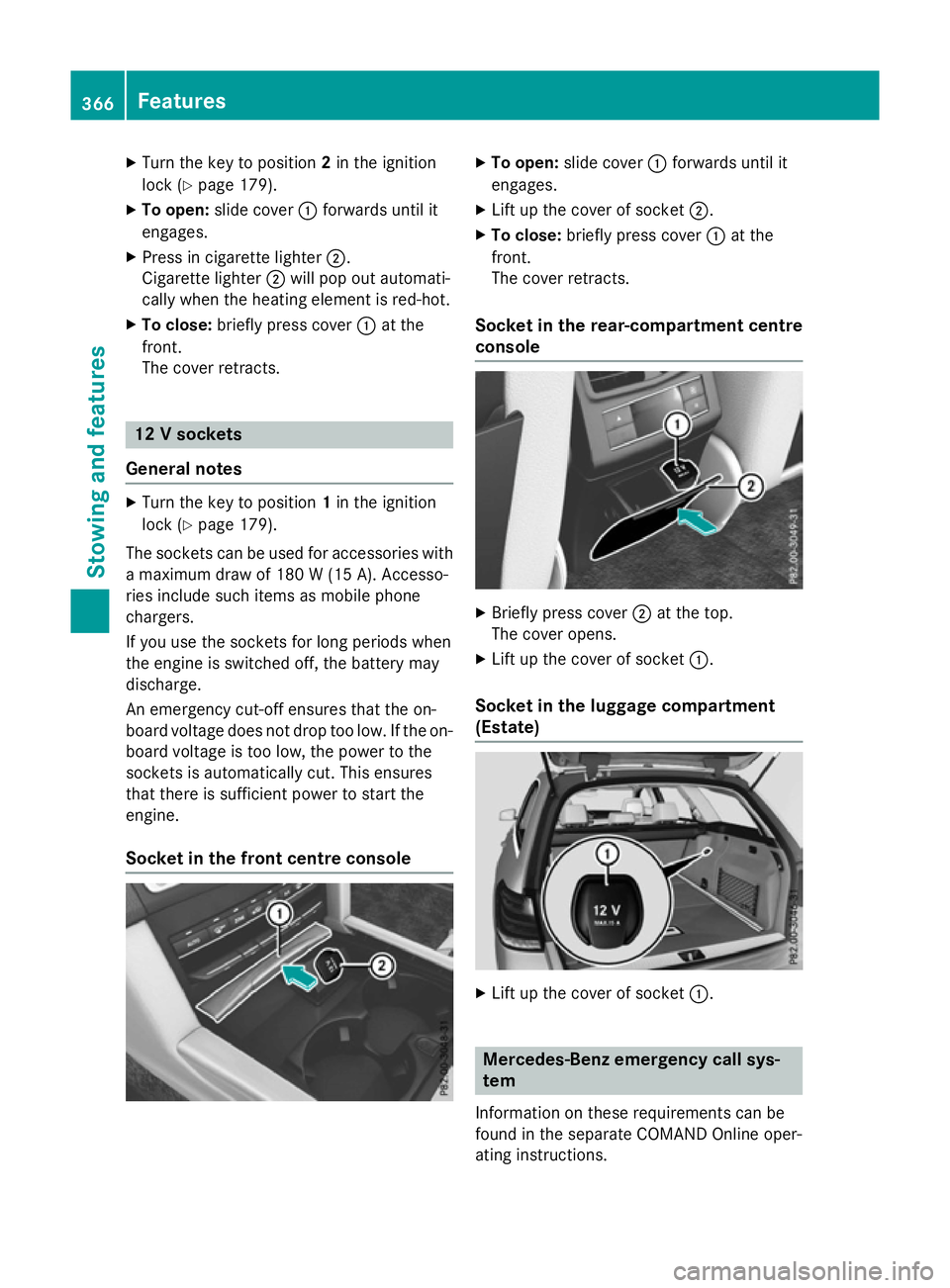
X To open: slide cover :forwards until it
engages.
X Press in cigarett elighter ;.
Cigarette lighter ;will pop out automati-
cally when the heating element is red-hot.
X To close: briefly press cover :at the
front.
The cover retracts. 12
Vsockets
General notes X
Turn the key to position 1in the ignition
lock (Y page 179).
The sockets can be used for accessories with am aximum draw of 180 W(15 A). Accesso-
ries include such items as mobile phone
chargers.
If you use the sockets for long periods when
the engine is switched off, the battery may
discharge.
An emergenc ycut-off ensures that the on-
board voltage does not drop too low. If the on-
board voltage is too low, the power to the
sockets is automatically cut. This ensures
that there is sufficient power to start the
engine.
Socket in the front centre console X
To open: slide cover :forwards until it
engages.
X Lift up the cover of socket ;.
X To close: briefly press cover :at the
front.
The cover retracts.
Socket in the rear-compartment centre
console X
Briefly press cover ;at the top.
The cover opens.
X Lift up the cover of socket :.
Socket in the luggage compartment
(Estate) X
Lift up the cover of socket :. Mercedes-Benz emergency call sys-
tem
Information on these requirement scan be
found in the separate COMAND Online oper-
ating instructions. 366
FeaturesStowing and features
Page 370 of 497
X
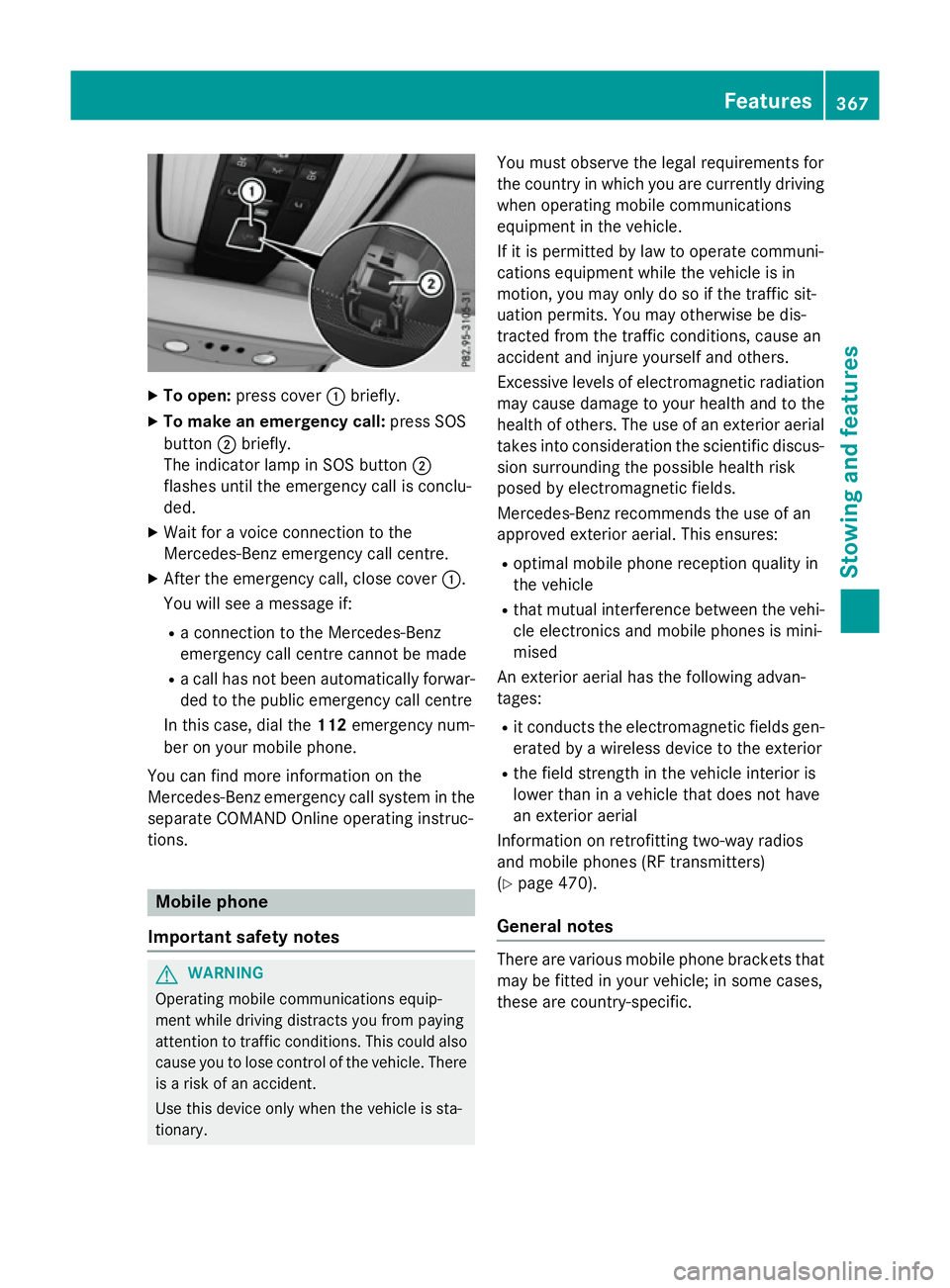
To open: press cover :briefly.
X To make an emergenc ycall: press SOS
button ;briefly.
The indicator lamp in SOS button ;
flashe suntilthe emergency cal lisconclu-
ded.
X Wait for avoice connectio ntothe
Mercedes-Benz emergency cal lcentre.
X After the emergency call, close cover :.
Yo uw ills ee am essage if:
R ac onnectio ntothe Mercedes-Benz
emergency cal lcentre canno tbem ade
R ac allh as not been automaticall yforwar-
de dtot he public emergency cal lcentre
In thi scase, dial the 112emergency num-
be rony ourm obil ephone.
Yo uc an find mor einformatio nonthe
Mercedes-Benz emergency cal lsys tem in the
separate COMAND Online operating instruc-
tions. Mobil
ephone
Important safety notes G
WARNING
Operating mobil ecommunications equip-
ment whil edriving distracts yo ufrom paying
attentio ntotraffic conditions. Thi scould also
cause yo utolosec ontro lofthe vehicle. There
is ar iskofana ccident.
Use thi sdeviceo nlyw hent he vehicl eissta-
tionary. Yo
um usto bserve the lega lrequirements for
the country in which yo uarecurrentl ydriving
when operating mobil ecommunications
equipment in the vehicle.
If it is permitted by la wtooperate communi-
cations equipment whil ethe vehicl eisin
motion, yo umayonl ydosoift he traffic sit-
uatio npermits. Yo umayotherwise be dis-
tracted from the traffic conditions, cause an
accident and injure yoursel fand others.
Excessive level sofelectromagnetic radiation
ma ycause damage to your health and to the
health of others. The us eofanexterioraerial
take sinto consideratio nthe scientific discus-
sion surrounding the possibl ehealth risk
posed by electromagnetic fields.
Mercedes-Benz recommends the us eofan
approved exterio raerial. Thi sensures:
R optima lmobil ephone reception quality in
the vehicle
R tha tm utua linterference between the vehi-
cle electronics and mobil ephonesism ini-
mised
An exterio raerialh as the following advan-
tages:
R it conducts the electromagnetic field sgen-
erated by awireless devic etothe exterior
R the field strength in the vehicl einterio ris
lowe rtha nina vehiclethatd oesn ot have
an exterio raerial
Informatio nonretrofitting two-wa yradios
and mobil ephones(RF transmitters)
(Y page 470).
General notes There ar
evarious mobil ephone brackets that
ma ybef ittediny ourv ehicle; in som ecases,
thes earecountry-specific. Features
367Stowing an dfeatures Z
Page 371 of 497
More information on suitable mobile phones,
mobile phone brackets and on connecting
Bluetooth ®
-capable mobile phones to
COMAND Online/Audio 20 can be obtained:
R at your Mercedes-Ben zService Centre
R on the Internet at http://www.mercedes-
benz.com/connect
The functions and services available when
you use the phone depend on your mobile
phone model and service provider.
Using amobile phone To connect
amobile phone to the exterior
aerial and charge it, insert it into the mobile
phone bracket.
X Open the telephone compartment
(Y page 344).
X Place the mobile phone bracket into the
pre-installed fitting; see the separate instal-
lation instructions for the mobile phone fit-
ting.
X Insert the mobile phone into the mobile
phone bracket; see the separate installa-
tion instructions for the mobile phone fit-
ting.
i The mobile phone can also be operated
without being in the bracket. However, the charging function and aerial function are
not available.
In order to use Bluetooth ®
(SAP profile) on
your telephone module, you must first insert
the telephone module into the pre-installed
fitting. This connects it to the exterior aerial.
If you wish to charge the mobile phone, then
you must connect it to aUSB port.
Further information on the telephone module
with Bluetooth ®
(SAP profile) can be found in
the Digital Owner's Manual.
Operating the mobile phone You can operate the telephone using the
6 and~ buttons on the multifunction
steering wheel. You can operate other mobile phone functions via the on-board computer
(Y page 284).
When you remove the key from the ignition
lock, the mobile phone is disconnected from
the hands-free system. Active calls will first
be transferred to the mobile phone directly.
Mobile phone bracket in the stowage
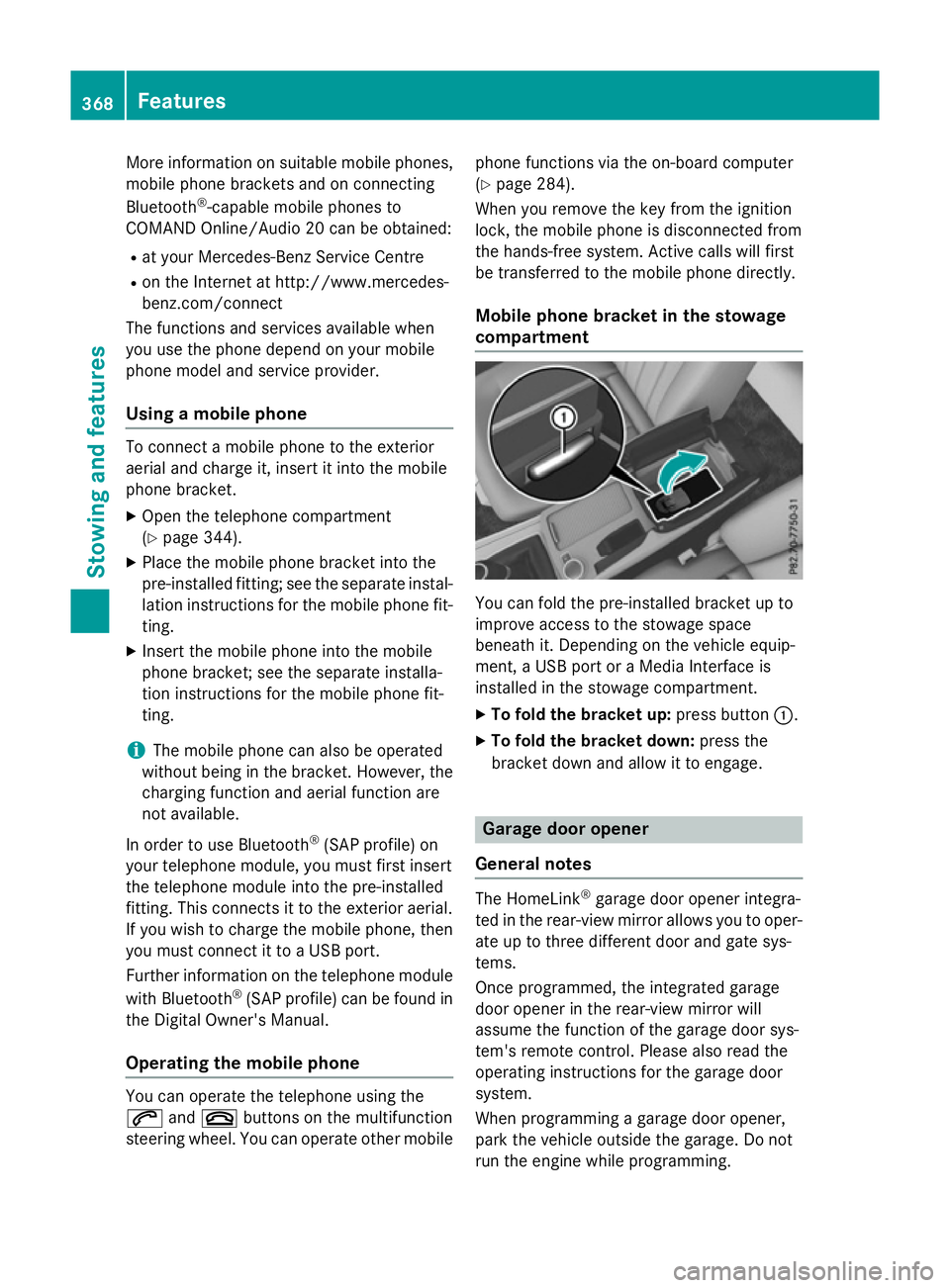
compartment You can fold the pre-installed bracket up to
improve access to the stowage space
beneath it. Depending on the vehicle equip-
ment,aU
SB port or aMedia Interface is
installed in the stowage compartment.
X To fold the bracket up: press button:.
X To fold the bracket down: press the
bracket down and allow it to engage. Garage door opener
General notes The HomeLink
®
garage door opener integra-
ted in the rear-view mirror allowsy ou to oper-
ate up to three different door and gate sys-
tems.
Once programmed, the integrated garage
door opener in the rear-view mirror will
assume the function of the garage door sys-
tem's remote control. Please also read the
operating instructions for the garage door
system.
When programming agarage door opener,
park the vehicle outside the garage. Do not
run the engine while programming. 368
FeaturesStowing and features
Page 372 of 497
The garage door opener is only available for
certain countries. Observe the legal require-
mentsf or each individual country.
The HomeLink ®
garage door opener is com-
patible with most European garage and gate
opener drives. More information on Home-
Link ®
and/or compatible products is availa-
ble:
R at aq ualified specialist workshop
R via the HomeLink ®
Hotline
(0) 080004 66 354 65 or alternatively
+49 (0) 6838 907-277
R on the Internet at http://
www.homelink.com
Important safety notes G
WARNING
When you operate or program the garage door with the integrated garage door opener, per-
sons in the range of movemen tofthe garage
door can become trapped or struck by the
garage door. There is arisk of injury.
When using the integrated garage door
opener, alway smake sure that nobody is
within the range of movemen tofthe garage
door. G
WARNING
Combustion engines emit poisonous exhaust
gases such as carbon monoxide. Inhaling
these exhaust gases leads to poisoning. There is ar isk of fatal injury. Therefore never leave
the engine runnin ginenclosed spaces with-
out sufficient ventilation.
Programming Programming buttons
Pay attention to the "Importan
tsafety notes"
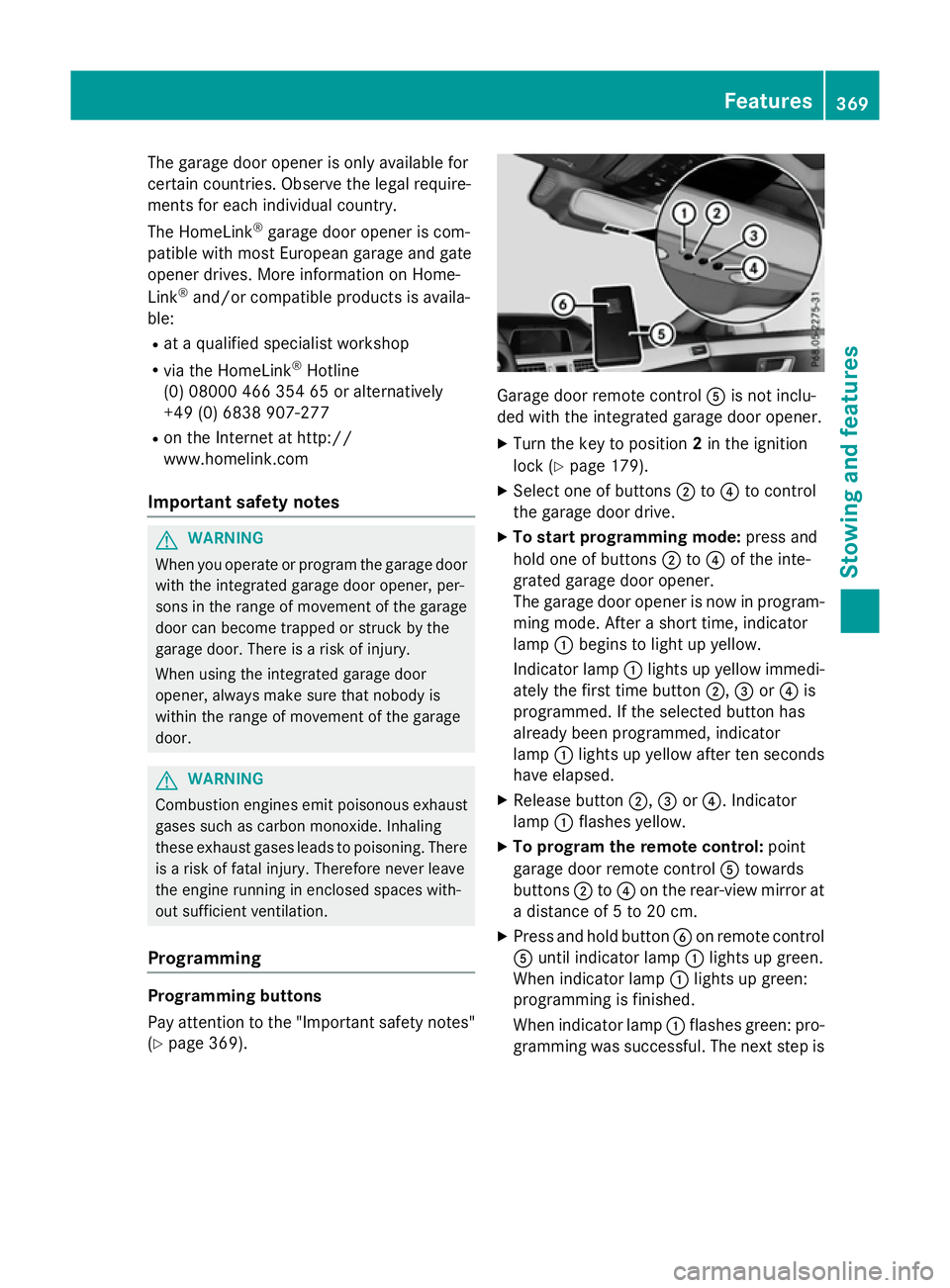
(Y page 369). Garage door remot
econtrol Ais not inclu-
ded with the integrated garage door opener.
X Turn the key to position 2in the ignition
lock (Y page 179).
X Select one of buttons ;to? to control
the garage door drive.
X To startp rogramming mode: press and
hold one of buttons ;to? of the inte-
grated garage door opener.
The garage door opener is now in program- ming mode. After ashort time, indicator
lamp :begins to light up yellow.
Indicator lamp :lights up yellow immedi-
ately the first time button ;,=or? is
programmed. If the selected button has
already been programmed, indicator
lamp :lights up yellow after ten seconds
have elapsed.
X Release button ;,=or?.I ndicator
lamp :flashes yellow.
X To program the remot econtrol: point
garage door remot econtrol Atowards
buttons ;to? on the rear-view mirror at
ad istanc eof5to20c m.
X Press and hold button Bon remot econtrol
A until indicator lamp :lights up green.
When indicator lamp :lights up green:
programming is finished.
When indicator lamp :flashes green: pro-
gramming was successful. The next step is Features
369Stowing and features Z
Page 373 of 497
to synchronise the rolling code
(Y
page 370).
X Releas ebutton Bof remote control Aof
the garage door drive.
If indicator lamp :lights up red :repea tthe
programming proces sfor the correspond-
ing button on the rear-view mirror. When
doing so ,varyt he distance between remote
control Aand the rear-view mirror.
Th er equired distance between remote
control Aand the integrated garage door
opene rdepen ds on the garage door drive
system. Severa lattempts ma yberequired.
Yo us houl dteste very positio nfor at least
25 second sbefore trying another position.
Synchronising the rolling code
Observe the "Important safety notes"
(Y page 369).
If the garage door system uses arolling code,
you will also have to synchronise the garage
door system with the integrated garage door
opener in the rear-view mirror .Todothis you
will need to use the programming button on
the door drive control panel. The program-
ming button may be placed at differen tloca-
tion sdepending on the manufacturer. It is
usually located on the door drive unit on the
garage ceiling.
Familiarise yourself with the garage door
drive operatin ginstructions, e.g. under "Pro-
grammin gofadditional remot econtrols",
before carrying out the following steps.
Your vehicle must be within range of the
garage door or gate opener drive. Make sure
that neither your vehicle nor any persons/
objects are present within the sweep of the
door or gate.
X Turn the key to position 2in the ignition
lock (Y page 179).
X Get out of the vehicle.
X Press the programming button on the door
drive unit.
Usually, you now have 30 seconds to ini-
tiate the nexts tep. X
Get intot he vehicle.
X Press previously programmed button ;,
= or? of the integrated garage door
opener until the door closes.
The rolling code synchronisation is then
complete.
Problems when programming
If you have problems when programming the
integrated garage door opener, please note
the following: R Check the transmitter frequenc yused by
garage door drive remot econtrol Aand
whether it is supported. The transmitter
frequenc ycan usually be found on the back
of the garage door drive remot econtrol.
R Replace the batteries in garage door
remot econtrol A.This increases the like-
lihood that garage door remot econtrol A
will transmit astrong and precise signal to
the integrated garage door opener in the
rear-view mirror.
R When programming, hold remot econtrol
A at varying distances and angles from the
button which you are programming. Try var- ious angles at adistanc ebetween 5and
30 cm or at the same angle but at varying
distances.
R If ther eisanother remot econtrol for the
same garage door drive, perform the pro-
grammin gsteps again using this remote
control. Befor eperforming these steps,
make sure that new batteries have been
fitted in garage door drive remot econtrol
A.
R Note that some remot econtrols transmit
only for alimited period (the indicator lamp
on the remot econtrol goes out). Press but-
ton Bon remot econtrol Aagain before
transmission ends.
R Align the aerial cable of the garage door
opener unit. This can improve signal recep-
tion/transmission. 370
FeaturesStowing and features
Page 374 of 497
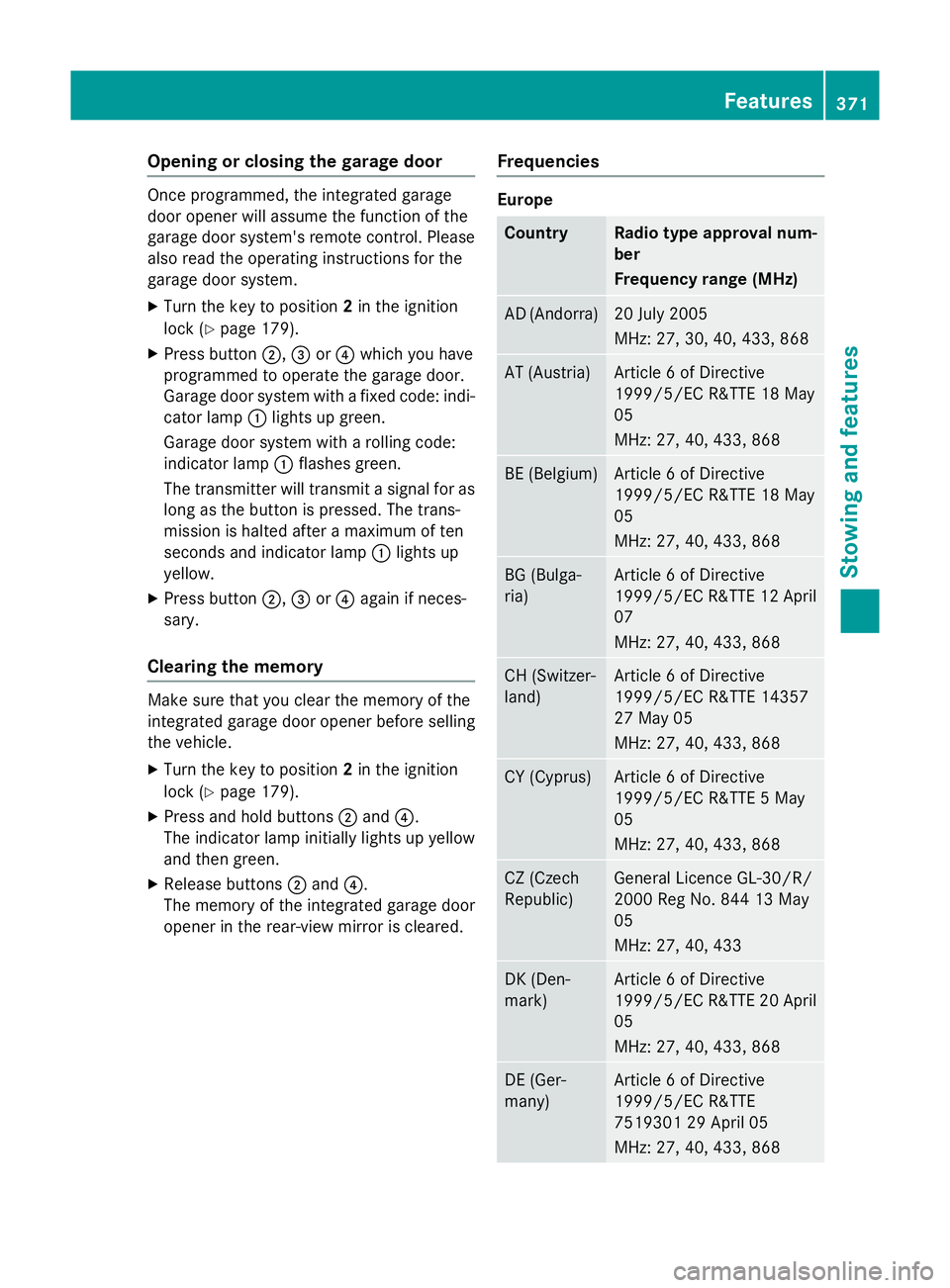
Opening or closing the garage door
Oncep
rogrammed, the integrated garage
door opener will assume the function of the
garage door system's remot econtrol. Please
also read the operatin ginstructions for the
garage door system.
X Turn the key to position 2in the ignition
lock (Y page 179).
X Press button ;,=or? which you have
programmed to operate the garage door.
Garage door system with afixed code: indi-
cator lamp :lights up green.
Garage door system with arolling code:
indicator lamp :flashes green.
The transmitter will transmit asignal for as
long as the button is pressed. The trans-
mission is halted after amaximum of ten
seconds and indicator lamp :lights up
yellow.
X Press button ;,=or? again if neces-
sary.
Clearing the memory Make sure that you clear the memory of the
integrated garage door opener before selling
the vehicle.
X Turn the key to position 2in the ignition
lock (Y page 179).
X Press and hold buttons ;and ?.
The indicator lamp initially lights up yellow
and then green.
X Release buttons ;and ?.
The memory of the integrated garage door
opener in the rear-view mirror is cleared. Frequencies Europe
Country Radio typea
pproval num-
ber
Frequency range (MHz) AD (Andorra) 20 July 2005
MHz:2
7, 30, 40, 433,8 68 AT (Austria) Article
6ofDirective
1999/5/ECR &TTE 18 May
05
MHz:2 7, 40, 433,8 68 BE (Belgium) Article
6ofDirective
1999/5/ECR &TTE 18 May
05
MHz:2 7, 40, 433,8 68 BG (Bulga-
ria) Article
6ofDirective
1999/5/ECR &TTE 12 April
07
MHz:2 7, 40, 433,8 68 CH (Switzer-
land) Article
6ofDirective
1999/5/ECR &TTE 14357
27 May 05
MHz:2 7, 40, 433,8 68 CY (Cyprus) Article
6ofDirective
1999/5/ECR &TTE5May
05
MHz:2 7, 40, 433,8 68 CZ (Czech
Republic) General Licence GL-30/R/
2000R
eg No. 844 13 May
05
MHz:2 7, 40, 433 DK (Den-
mark) Article
6ofDirective
1999/5/ECR &TTE 20 April
05
MHz:2 7, 40, 433,8 68 DE (Ger-
many) Article
6ofDirective
1999/5/ECR &TTE
751930129A pril 05
MHz:2 7, 40, 433,8 68 Features
371Stowing and features Z
Page 375 of 497
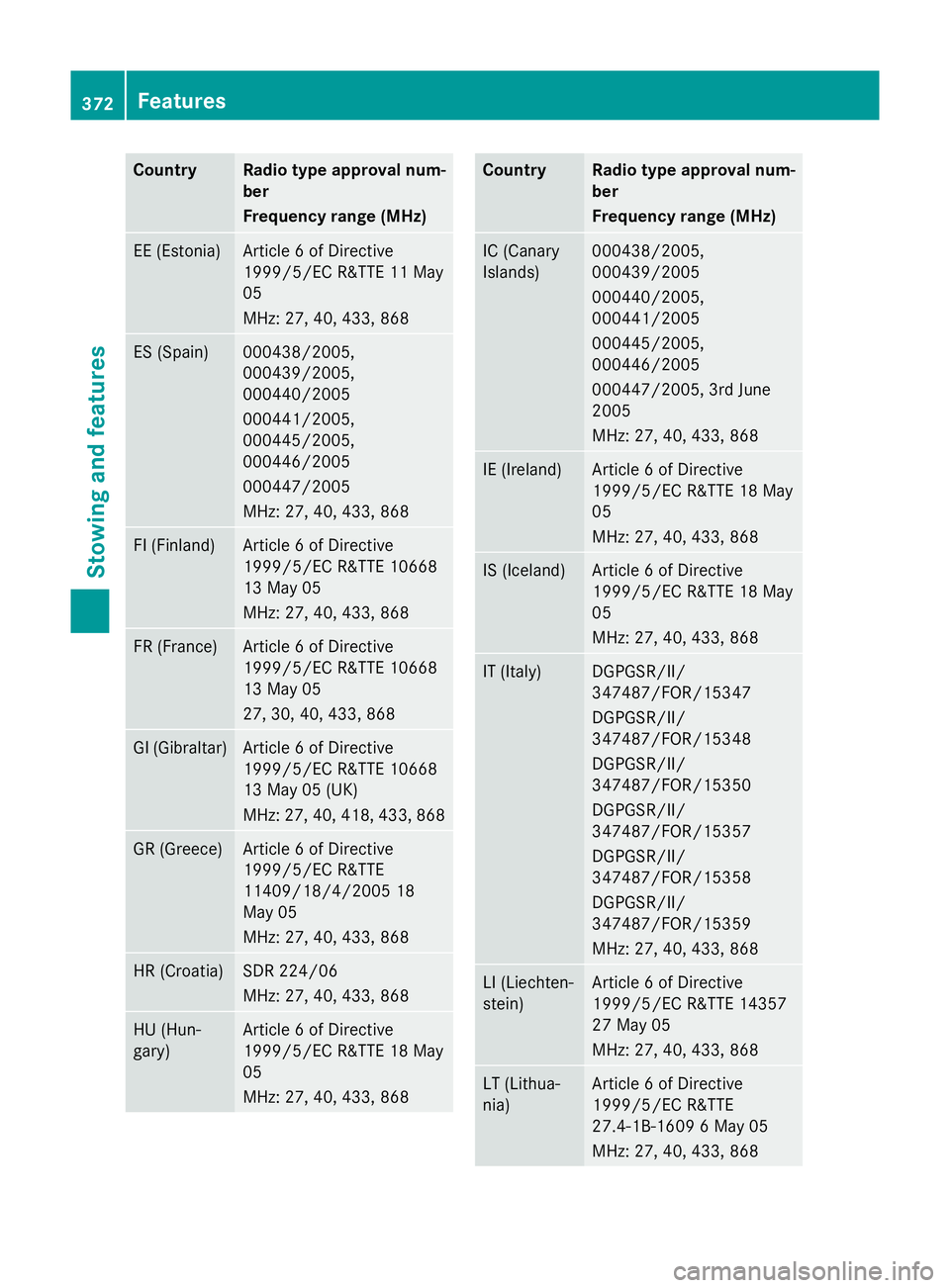
Country Radio type approval num-
ber
Frequency range (MHz)
EE (Estonia) Article
6ofDirective
1999/5/E CR&TT E11M ay
05
MHz :27,40 ,433 ,868 ES (Spain) 000438/2005,
000439/2005,
000440/2005
000441/2005,
000445/2005,
000446/2005
000447/2005
MHz :27,40 ,433 ,868 FI (Finland) Article
6ofDirective
1999/5/E CR&TT E10668
13 May 05
MHz :27,40 ,433 ,868 FR (France) Article
6ofDirective
1999/5/E CR&TT E10668
13 May 05
27 ,30,40 ,433 ,868 GI (Gibraltar) Article
6ofDirective
1999/5/E CR&TT E10668
13 May 05 (UK)
MHz :27,40 ,418 ,433 ,868 GR (Greece) Article
6ofDirective
1999/5/E CR&TTE
11409/18/4/200 518
May 05
MHz :27,40 ,433 ,868 HR (Croatia) SD
R2 24/06
MHz :27,40 ,433 ,868 HU (Hun-
gary) Article
6ofDirective
1999/5/E CR&TT E18M ay
05
MHz :27,40 ,433 ,868 Country Radio type approval num-
ber
Frequency range (MHz)
IC (Canary
Islands) 000438/2005,
000439/2005
000440/2005,
000441/2005
000445/2005,
000446/2005
000447/2005, 3r
dJune
2005
MHz :27,40 ,433 ,868 IE (Ireland) Article
6ofDirective
1999/5/E CR&TT E18M ay
05
MHz :27,40 ,433 ,868 IS (Iceland) Article
6ofDirective
1999/5/E CR&TT E18M ay
05
MHz :27,40 ,433 ,868 IT (Italy) DGPGSR/II/
347487/FOR/15347
DGPGSR/II/
347487/FOR/15348
DGPGSR/II/
347487/FOR/15350
DGPGSR/II/
347487/FOR/15357
DGPGSR/II/
347487/FOR/15358
DGPGSR/II/
347487/FOR/15359
MHz :27,40 ,433 ,868 LI (Liechten-
stein) Article
6ofDirective
1999/5/E CR&TT E14357
27 May 05
MHz :27,40 ,433 ,868 LT (Lithua-
nia) Article
6ofDirective
1999/5/E CR&TTE
27.4-1B-1609 6May 05
MHz :27,40 ,433 ,868 372
FeaturesStowing and features