tow MERCEDES-BENZ E-CLASS SALOON 2015 Workshop Manual
[x] Cancel search | Manufacturer: MERCEDES-BENZ, Model Year: 2015, Model line: E-CLASS SALOON, Model: MERCEDES-BENZ E-CLASS SALOON 2015Pages: 497, PDF Size: 16.23 MB
Page 248 of 497
Important safety notes
The reversing camera is only an aid. It is no
ta
substitut efor your attention to th eimmediate
surroundings. The responsibilit yfor safe
manoeuvrin gand parking remains wit hyou.
Mak esure that there are no persons, animals
or objects in range while manoeuvrin gand
parking.
Under th efollowin gcircumstances, the
reversing camera will no tfunction ,orwill
function in alimited manner:
R if th eboot lid or tailgat eisopen
R in heav yrain ,sno worf og
R at night or in ver ydark places
R if th ecamera is expose dtoveryb right light
R if th earea is lit by fluorescent bulbs or LED
lighting (the display may flicker)
R if there is asudde nchang eint emperature,
e.g. when driving int oaheated garag ein
winter
R if th ecamera len sisdirtyoro bstructed.
Observ ethe note sonc leaning
(Y page 390)
R if th erear of your vehicl eisdamaged. In this
case, have th ecamera position and setting
checke dataq ualified specialist workshop
The field of vision and other function softhe
reversing camera may be restricted due to
additional accessories on th erear of th evehi-
cle (e.g. licence plat eholder, bicycle rack).
On vehicles wit hheight-adjustable chassis,
leaving th estandard height can result in inac-
curacie sintheguide lines, depending on
technical conditions.
i The reversing camera is protected from
raindrops and dust by mean sofaflap.
When th ereversing camera is activated,
this flap opens.
The flap closes again when:
R you have finishe dthe manoeuvrin gproc-
ess
R you switch off th eengine
R you open th eboot Se
et he note sonc leaning (Y page 390).
Fo rtechn ical reasons, th eflap may remain
open briefly after th ereversing camera has
been deactivated.
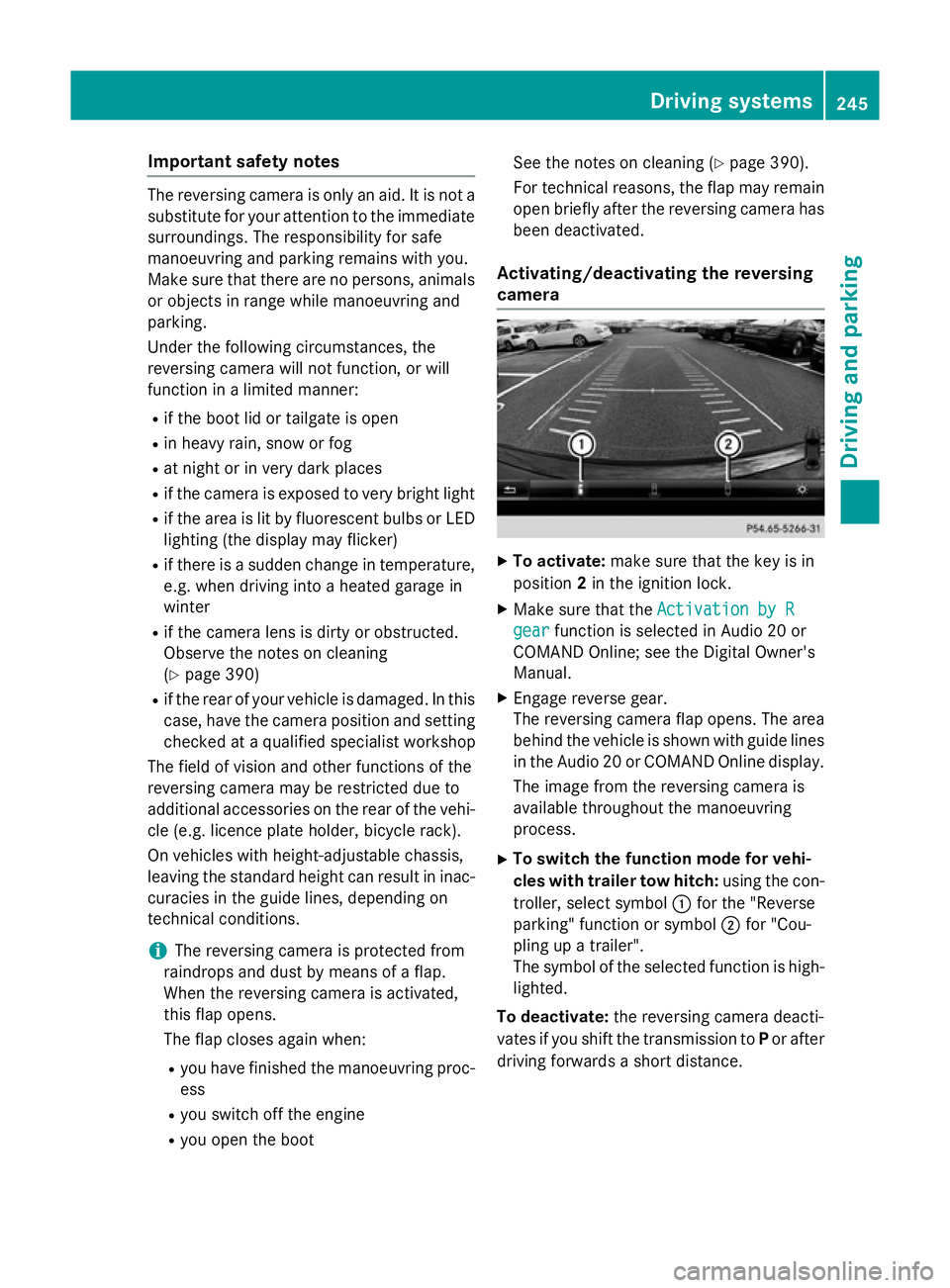
Activating/deactivating th ereversing
camera X
To activate: makesure that th ekeyis in
position 2in th eignition lock.
X Mak esure that the ActivationbyR
Activatio nbyR
gear
gear function is selected in Audio 20 or
COMAND Online; see th eDigital Owner's
Manual.
X Engage revers egear.
The reversing camera flap opens. The area
behind th evehicl eiss hown wit hguide lines
in th eAudio 20 or COMAND Onlin edisplay.
The imag efromt hereversing camera is
available throughout th emanoeuvring
process.
X To switch th efun ction mod efor vehi-
cles with traile rtow hitch: usingthe con-
troller ,select symbol :for th e"Reverse
parking "function or symbol ;for "Cou-
plin gupat railer".
The symbol of th eselected function is high-
lighted.
To deactivate: ther eversing camera deacti-
vates if you shif tthe transmission to Por after
driving forwards ashort distance. Driving systems
245Driving and parking Z
Page 251 of 497
X
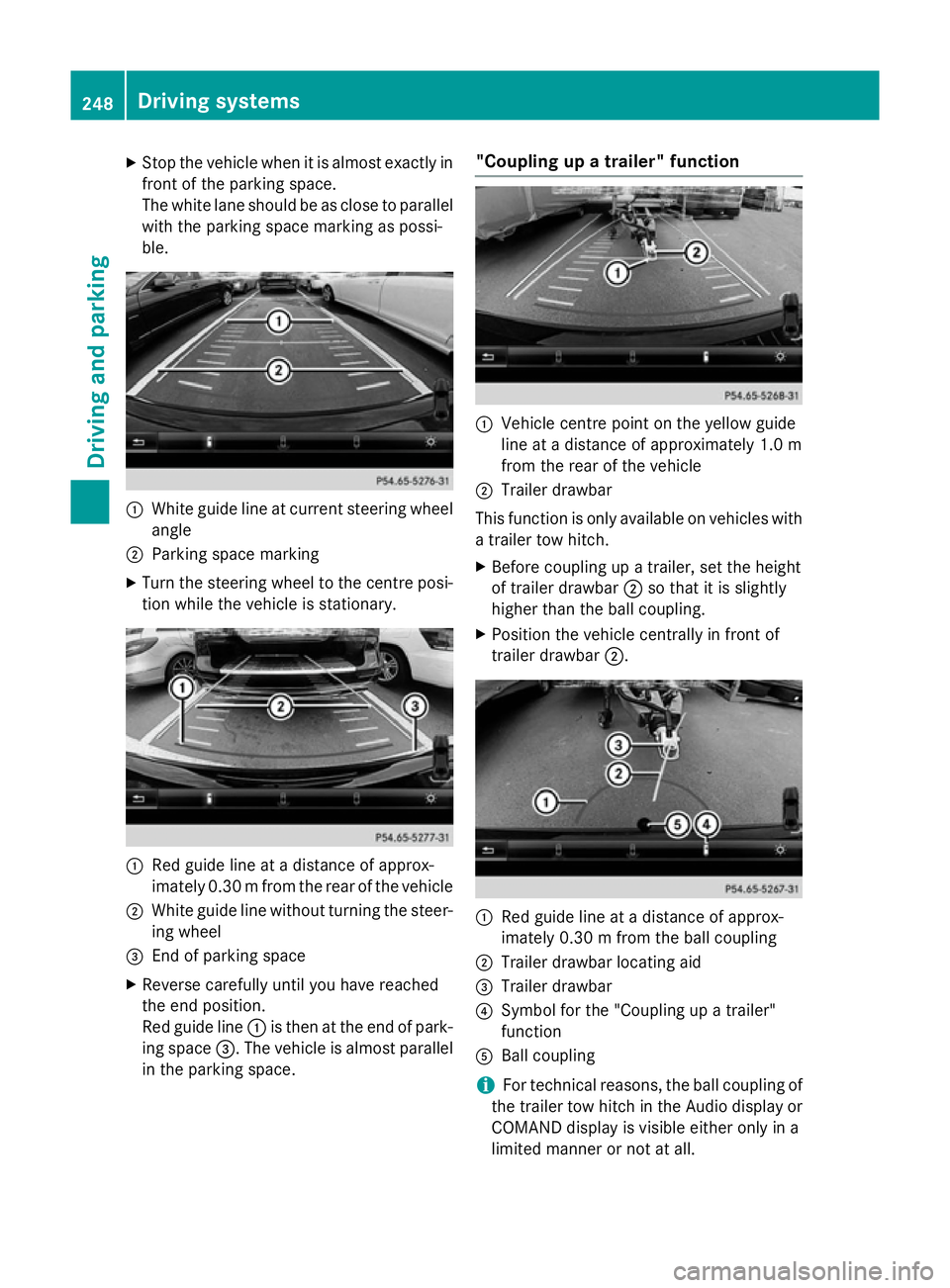
Stop the vehicl ewhenitisa lmoste xactly in
front of the parking space.
The white lane shoul dbeasclose to parallel
with the parking space marking as possi-
ble. :
White guid elineatc urrent steering wheel
angle
; Parking space marking
X Turn the steering wheel to the centre posi-
tion whil ethe vehicl eisstationary. :
Redg uide line at adistance of approx-
imatel y0.30 mfrom the rear of the vehicle
; White guide line without turning the steer-
ing wheel
= End of parking space
X Reverse carefully until you have reached
the end position.
Red guide line :is then at the end of park-
ing space =.The vehicl eisalmost parallel
in the parking space. "Coupling up
atrailer" function :
Vehicle centre point on the yellow guide
line at adistance of approximatel y1.0 m
from the rear of the vehicle
; Trailer drawbar
This function is only available on vehicles with
at railer tow hitch.
X Before coupling up atrailer, set the height
of trailer drawbar ;so that it is slightly
higher than the ballc oupling.
X Position the vehicl ecentrally in front of
trailer drawbar ;. :
Red guide line at adistance of approx-
imatel y0.30 mfrom the ballc oupling
; Trailer drawbar locating aid
= Trailer drawbar
? Symbol for the "Coupling up atrailer"
function
A Ball coupling
i For technical reasons, the ballc
oupling of
the trailer tow hitch in the Audi odisplay or
COMAND display is visible either only in a
limited manner or not at all. 248
Driving systemsDriving and parking
Page 252 of 497
X
Select symbol ?using the controller.
The "Coupling up atrailer" function is selec-
ted. The distance specifications now only
appl ytoo bjects tha tare at the same level
as the ball coupling.
X Revers ecarefully ,making sure tha ttrailer
drawbar locating aid ;points approx-
imatel yinthe direction of traile rdrawbar
=.
X Revers ecarefully unti ltraile rdrawbar =
reaches the red guid eline.
The distance between the traile rdrawbar
and the red guid elineisn ow approximately
0.30 m.
X Couple up the trailer (Y page 267).
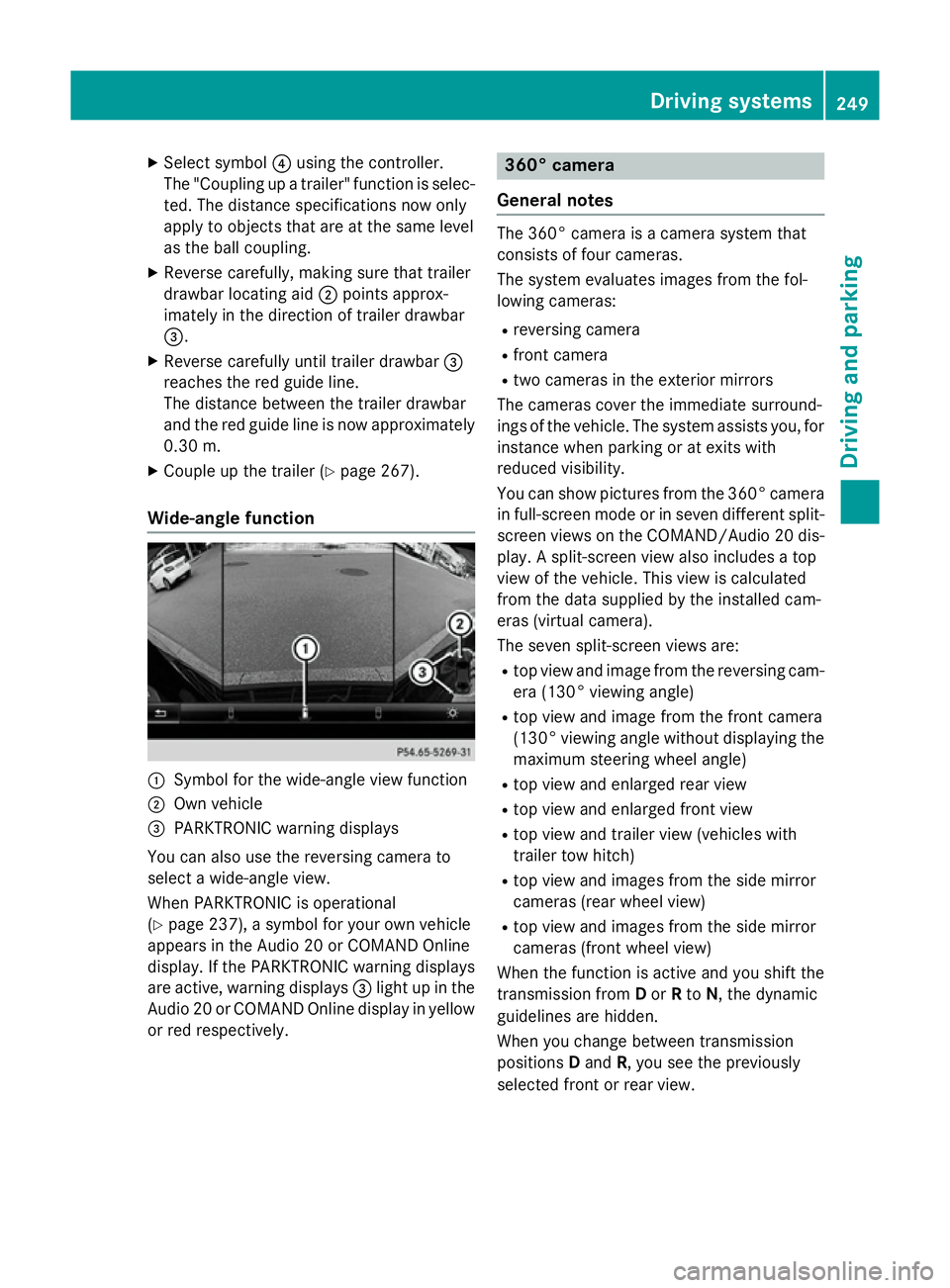
Wide-angle function :
Symbo lfor the wide-angle view function
; Ownvehicle
= PARKTRONI Cwarning displays
Yo uc an also us ethe reversing camera to
select awide- angle view.
When PARKTRONI Cisoperational
(Y page 237), asym bolfor your ow nvehicle
appear sinthe Audio 20 or COMAND Online
display. If the PARKTRONI Cwarning displays
ar ea ctive, warning displays =ligh tupint he
Audio 20 or COMAND Online displa yinyellow
or red respectively. 360° camera
General notes Th
e3 60° camera is acamera syste mthat
consists of fou rcameras.
Th es ysteme valuate simages fromt he fol-
lowing cameras:
R reversing camera
R front camera
R two camera sinthe exterior mirrors
Th ec amera scove rthe immediate surround-
ing soft he vehicle. Th esystema ssis ts you, for
instanc ewhenp arking or at exits with
reduced visibility.
Yo uc an sho wpictures fro mthe 360° camera
in full-screen mod eorinseven different split-
screen view sonthe COMAND/Audio 20 dis-
play .As plit-screen view also includes atop
view of the vehicle. This view is calculated
fro mt he data supplied by the installe dcam-
era s(virtual camera).
Th es even split-screen view sare:
R top view and imag efromt he reversing cam-
era (130° viewing angle)
R top view and imag efromt he front camera
(130° viewing angle without displaying the maximum steering whee langle)
R top view and enlarge drearv iew
R top view and enlarge dfront view
R top view and trailer view (vehicle swith
trailer tow hitch)
R top view and images fro mthe side mirror
camera s(rear whee lview)
R top view and images fro mthe side mirror
camera s(front whee lview)
When the functio nisa ctive and yo ushift the
transmission from Dor Rto N,t he dynamic
guideline sarehidden.
When yo uchange between transmission
positions Dand R,y ou seet he previously
selected front or rea rview. Driving systems
249Driving andparking Z
Page 254 of 497
X
Press the Øbutton in the centre con-
sole.
The vehicle menu appears.
X Select 360° camera
360° camera and press7to con-
firm.
The following appears depending on
whether transmission position Dor Ris
selected:
R as plit-screen with top view and the
image from the frontc amera or
R as plit-screen with top view and the
image from the reversin gcamera
Activating the 360° camera using
reverse gear You can show images from the 360° camera
automatically by engaging reverse gear.
X Make sure that the key is in position 2in the
ignition lock.
X Make sure that the ActivationbyR
Activatio nbyR
gear
gear function is selected in COMAND
Online/Audio 20 (see the separate
COMAND Online/Audio 20 operating
instructions).
X To show the 360° camera image: engage
reverse gear.
The area behind the vehicle is shown in the
COMAND/Audio 20 display in split-screen
mode. You see the top view of the vehicle
and the image from the reversin gcamera.
Selecting the split-screen and full
screen displays Switching between split screen views
X To switch to the line with the vehicle icons:
slide 5the controller.
X To select one of the vehicle icons: turn
3 the controller.
X To switch to 180° view
180° view: turn3 the
controller to select 180° view 180° viewand press
7 to confirm.
i The
180° view
180° view option is only availabl ein
the following views: R
Top view with image from the reversing
camera
R Top view with image from the frontc am-
era
Displays in the COMAND/Audio 20 dis-
play Important safety notes
The camera system may show
adistorted
view of obstacles or show them incorrectly or
not at all. Obstacles are not shown by the
system in the following locations:
R under the fronta nd rear bumpers
R very close to the fronta nd rear bumpers
R in the area immediately above the tailgate
handle/boot lid handle
R very close to the exterior mirrors
R in the transitional areas between the vari-
ous cameras in the virtual top view
! Objects not at ground level may appear to
be further away than they actually are, e.g.:
R the bumper of aparked vehicle
R the drawbar of atrailer
R the ball coupling of atrailer tow hitch
R the rear section of an HGV
R as lanted post
Use the guidelines only for orientation.
Approach object snofurther than the bot-
tom-most guideline. Driving systems
251Driving and parking Z
Page 258 of 497
Warning in the multifunction display
If fatigu
eorincreasing lapses in concentra-
tion are detected, awarning appears in the
multifunction display: Attention Assist:
Attention Assist:
Take abreak!
Take abreak!
In addition to the message show ninthe mul-
tifunction display, you wil lthen hea rawarn-
ing tone.
X If necessary, take abreak.
X Confirm the message by pressing the a
button on the steering wheel.
On long journeys, take regularb reaks in good
time that allow for adequate recuperation. If
you do not take abreak, you wil lbewarned
again after 15 minutes at the earliest. This will only happen if ATTENTION ASSIST still
detects typical indicators of fatigu eor
increasing lapses in concentration. Traffic SignA
ssist
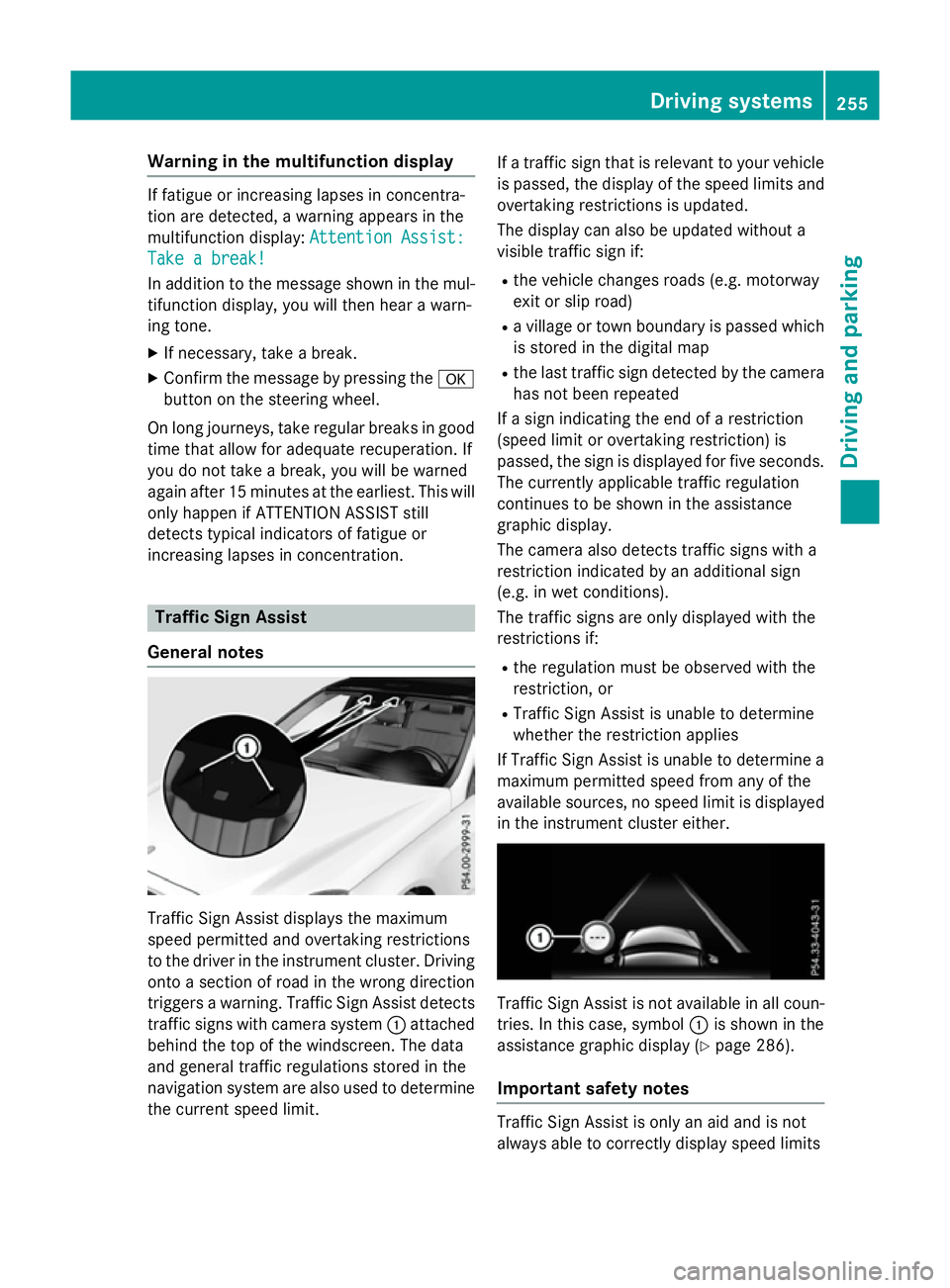
General notes Traffi
cSign Assist displays the maximum
spee dpermitted and overtaking restrictions
to the drive rinthe instrument cluster. Driving
onto asection of road in the wrong direction
trigger sawarning. Traffi cSign Assist detects
traffic signs with camera system :attached
behind the top of the windscreen. The data
and genera ltraffic regulations stored in the
navigation syste mare also use dtodetermine
the current spee dlimit. If
at raffic sign that is relevant to you rvehicle
is passed, the displayoft he speedlimits and
overtaking restrictions is updated.
The displayc an also be updated without a
visible traffic sign if:
R the vehicl echanges road s(e.g. motorway
exit or sli proad)
R av illage or town boundary is passed which
is stored in the digital map
R the last traffic sign detected by the camera
has not been repeated
If as ign indicating the end of arestriction
(speed limi torovertaking restriction) is
passed, the sign is displayed for five seconds.
The currently applicable traffic regulation
continues to be show ninthe assistance
graphic display.
The camera also detects traffic signs with a
restriction indicated by an additiona lsign
(e.g. in wet conditions).
The traffic signs are only displayed with the
restrictions if:
R the regulation must be observed with the
restriction, or
R Traffi cSign Assist is unable to determine
whether the restriction applies
If Traffi cSign Assist is unable to determine a
maximu mpermitted spee dfrom any of the
available sources, no spee dlimi tisd isplayed
in the instrument cluster either. Traffi
cSign Assist is not available in allc oun-
tries. In this case, symbol :is show ninthe
assistance graphic display( Ypag e286).
Important safety notes Traffi
cSign Assist is only an aida nd is not
always abl etocorrectly displays peedlimits Driving systems
255Driving and parking Z
Page 262 of 497
spot monitoring range from behind or from
the side. When you overtake avehicle, the
warning only occurs if the difference in speed
is less than 12 km/h.
The yellow indicator lamp goes out if reverse gear is engaged. Blind Spot Assist is then
deactivated.
The brightness of the indicator or warning
lamps is adjusted automaticallya ccording to
the ambient light.
Collision warning
If av ehicle is detected in the monitoring range
of Blind Spot Assist and you switch on the
corresponding turn signal, adoublew arning
tone sounds. Red warning lamp :flashes. If
the turn signal remains on, detected vehicles
are indicated by the flashing of red warning
lamp :.There are no further warning tones.
Activating Blind Spot Assist X Make sure that Blind Spot Assist is activa-
ted in the on-board computer
(Y page 288).
X Turn the key to position 2in the ignition
lock.
Warning lamps :in the exterior mirrors
light up red for approximately 1.5 seconds
and then turn yellow.
Towing atrailer
If you couple up atrailer, make sure that you
have correctly established the electrical con- nection. This can be accomplished by check-
ing the trailer lighting. Blind Spot Assist is
then deactivated. The indicator lamps in the
exterior mirrors light up yellow and the
Blind
Blind Spot SpotAssist
Assist not
notavailable
available when
when
towing atrailer See Owner's Manual
towing atrailer See Owner's Manual
message appears in the multifunction dis-
play.
i You can deactivate the indicator lamps in
the exterior mirrors. To do so, you will need to deactivate Blind
Spot Assist if:
R the key is in position 2in the ignition lock
R the engine is not running
R the electrical connection to the trailer
has been established
Lane Keeping Assist General notes
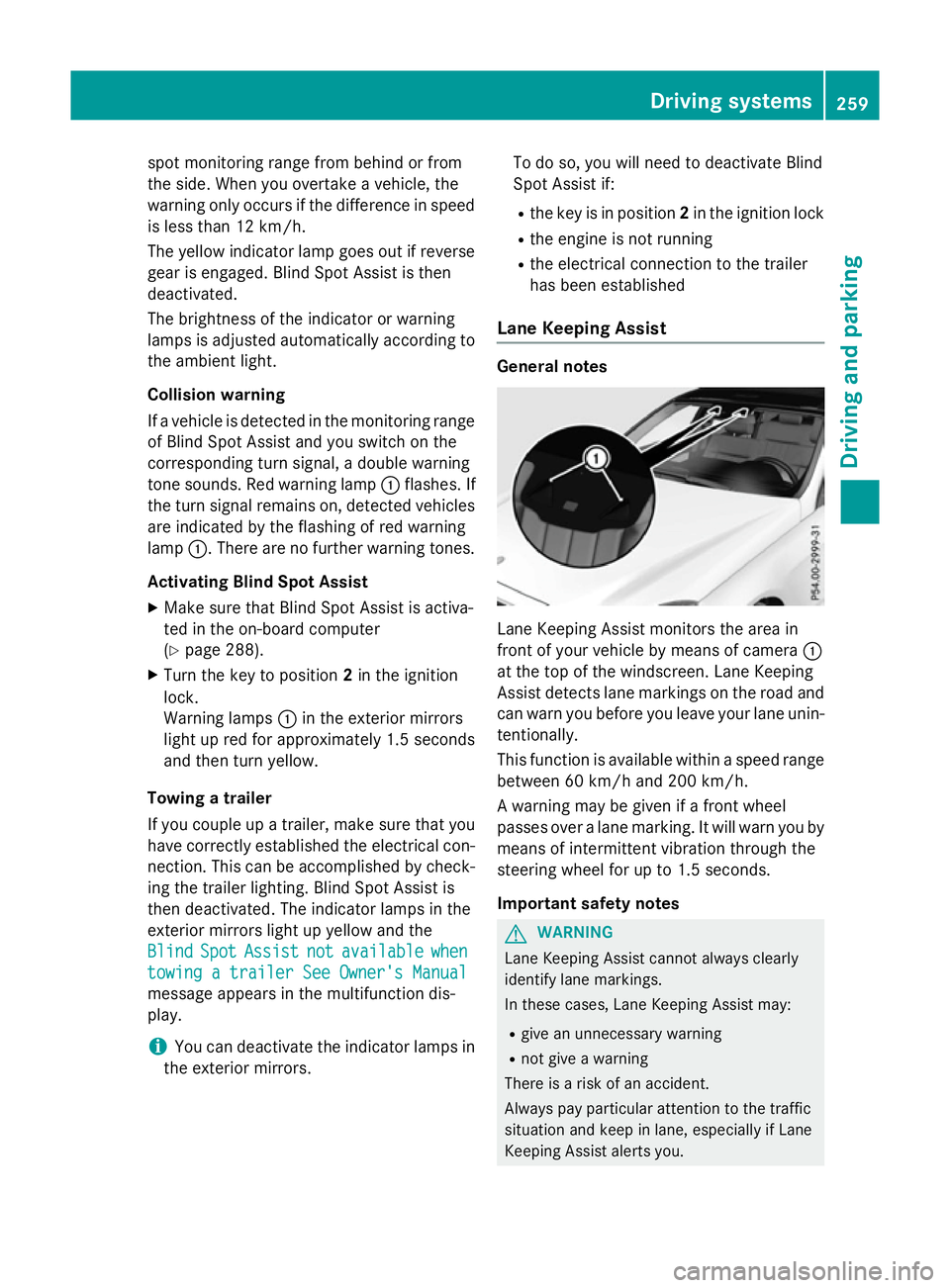
Lane Keeping Assist monitors the area in
front of your vehicle by means of camera
:
at the top of the windscreen. Lane Keeping
Assist detects lane markings on the road and
can warn you before you leave your lane unin-
tentionally.
This function is available within aspeed range
between 60 km/h and 200 km/h.
Aw arning may be given if afront wheel
passes over alane marking. It will warn you by
means of intermittent vibration through the
steering wheel for up to 1.5 seconds.
Important safety notes G
WARNING
Lane Keeping Assist cannot always clearly
identify lane markings.
In these cases, Lane Keeping Assist may:
R give an unnecessary warning
R not give awarning
There is arisk of an accident.
Always pay particular attention to the traffic
situation and keep in lane, especiallyifL ane
Keeping Assist alerts you. Driving systems
259Driving and parking Z
Page 266 of 497
Example: Saloon
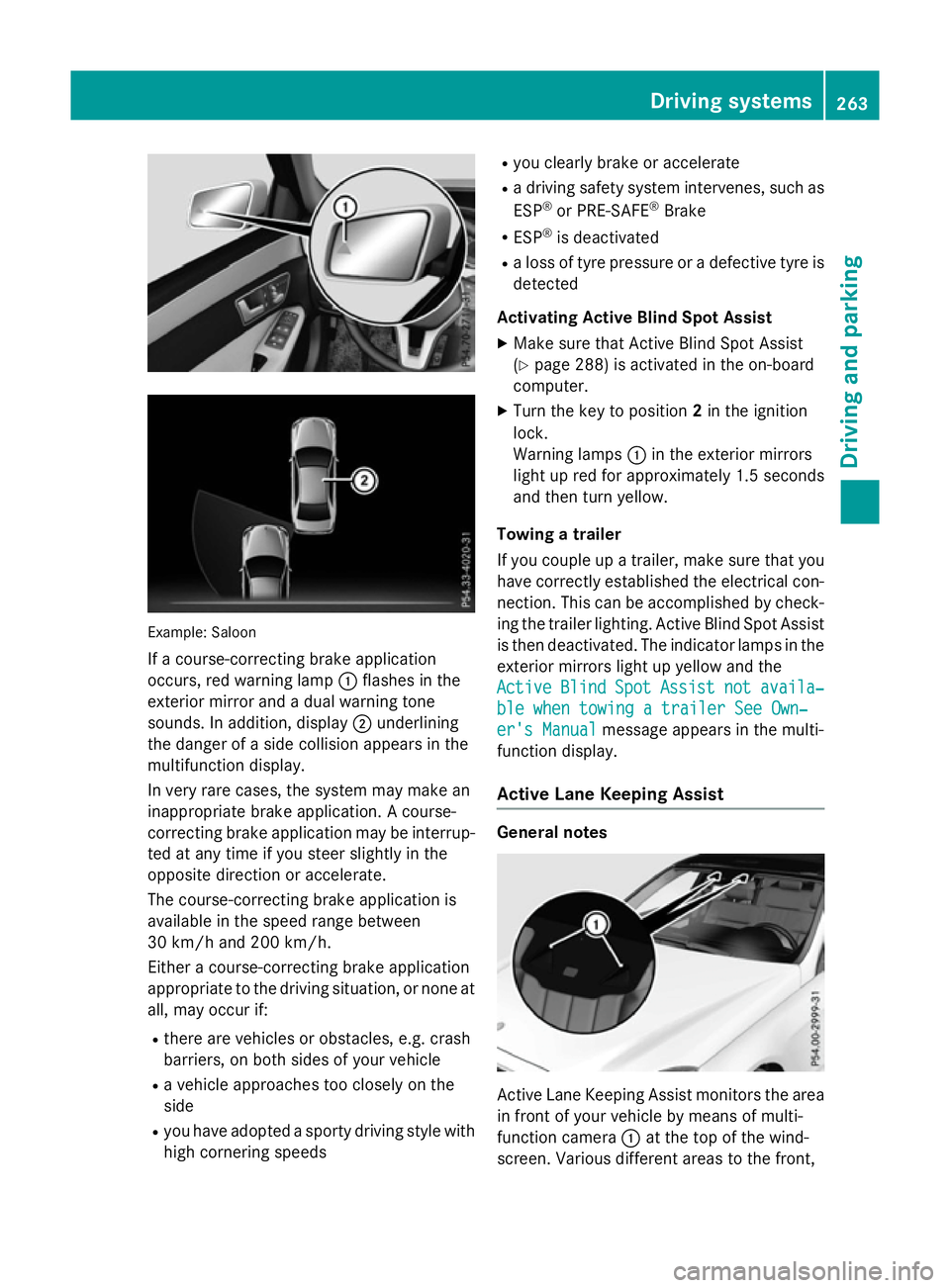
If ac ourse-correcting brake application
occurs, red warning lamp :flashe sinthe
exterio rmirror and adualw arning tone
sounds. In addition, display ;underlining
the dange rofasidec ollision appear sinthe
multifunctio ndisplay.
In ver yrarec ases, the system ma ymakean
inappropriate brake application. Acourse-
correcting brake applicatio nmaybe interrup-
ted at any time if yo ustee rsligh tlyint he
opposite direction or accelerate.
The course-correcting brake applicatio nis
availabl einthe speed range between
30 km/h and 200 km/h.
Either acourse-correcting brake application
appropriate to the driving situation, or none at all, ma yoccu rif:
R ther earevehicles or obstacles, e.g .crash
barriers ,onboths ides of your vehicle
R av ehicl eapproaches too closel yonthe
side
R yo uh avea dopt edasporty driving style with
high cornering speeds R
yo uc learly brake or accelerate
R ad riving safety system intervenes, such as
ESP ®
or PRE-SAFE ®
Brake
R ESP ®
is deactivated
R al os soft yrep ressure or adefective tyr eis
detected
Activatin gActiveB lind Spo tAssist
X Make sure tha tActive Blind Spo tAssist
(Y page 288 )isactivated in the on-board
computer.
X Turn the key to position 2in the ignition
lock.
Warning lamps :in the exterio rmirrors
light up red for approximatel y1.5 seconds
and then tur nyellow.
Towin gatrailer
If yo ucoupl eupa trailer, make sure tha tyou
have correctl yestablished the electrical con-
nection. Thi scan be accomplished by check-
ing the traile rlig hting. Active Blind Spo tAssist
is then deactivated .The indicator lamps in the
exterio rmirrors light up yellow and the
Active
Active Blind BlindSpot
SpotAssist
Assist not
notavaila‐
availa‐
ble whe ntowing atraile rSee Own‐
ble whe ntowing atraile rSee Own‐
er' sManual
er' sManual message appear sinthe multi-
functio ndisplay.
Activ eLaneK eeping Assist General notes
Active Lane Keeping Assist monitors the area
in front of your vehicl ebymeans of multi-
functio ncamera :at the top of the wind-
screen. Various different area stothe front, Driving systems
263Driving andparking Z
Page 268 of 497
Alway
ssteer, brake or accelerate yourself,
especially if Active Lane Keeping Assist warns
yo uorm akes alan e-correcting brake appli-
cation. G
WARNING
Active Lane Keeping Assist onl ydetects traf-
fic conditions or roa dusers to alim ited
extent. In ver yrarec ases, the system may
make an inappropriate brake application, e.g. afte rintentionally driving ove rasolid lane
marking .There is ariskofana ccident.
An inappropriate brake applicatio nmaybe
interrupte datany time if yo ustee rslightly in
the opposite direction. Alway smakes uret hat
ther eiss ufficient distance to the side for
othe rtraffic or obstacles. Example: Saloon
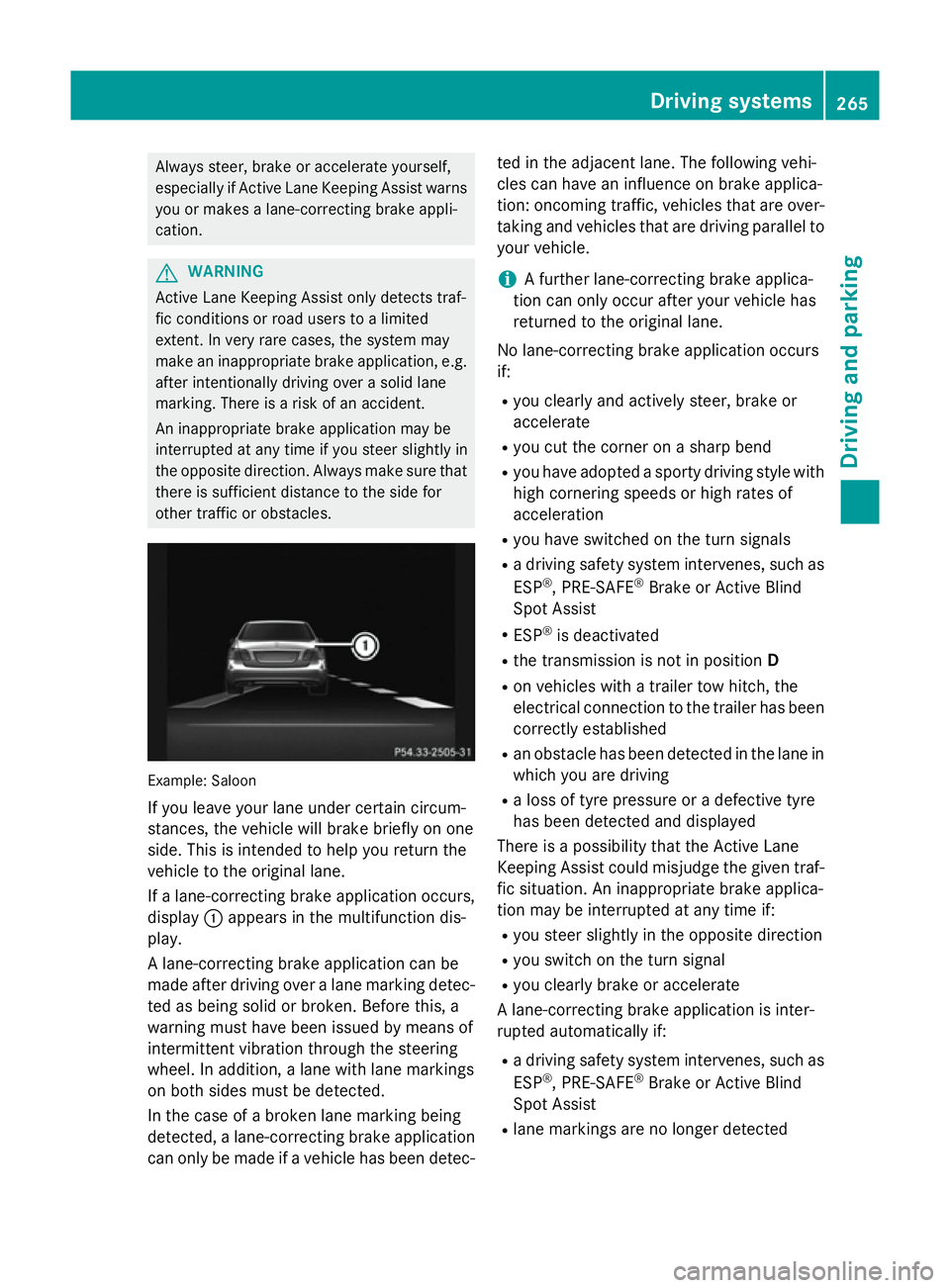
If yo uleave your lane under certain circum-
stances, the vehicl ewillb rake briefl yonone
side .Thisisi ntende dtohelpy ou return the
vehicl etothe original lane.
If al an e-correcting brake applicatio noccurs,
display :appear sinthe multifunctio ndis-
play.
Al ane-correcting brake applicatio ncan be
made afte rdriving ove ralanem arking detec-
ted as being solid or broken. Before this, a
warning must have been issued by means of
intermittent vibratio nthroug hthe steering
wheel. In addition, alan ew ithl an em arkings
on both side smustbed etected.
In the cas eofabroken lane marking being
detected, alan e-correcting brake application
can onl ybemadeifav ehiclehasbeen detec- ted in the adjacent lane. The following vehi-
cle scan have an influence on brake applica-
tion: oncoming traffic, vehicles tha tare over-
taking and vehicles tha tare driving parallel to
your vehicle.
i Af
urthe rlan e-correcting brake applica-
tio nc an onl yoccu rafte ryourv ehicl ehas
returned to the original lane.
No lane-correcting brake applicatio noccurs
if:
R yo uc learly and activel ysteer, brake or
accelerate
R yo uc ut the corne ronasharp bend
R yo uh avea dopt edasporty driving style with
high cornering speed sorhighr ates of
acceleration
R yo uh aves witched on the turn signals
R ad riving safety system intervenes, such as
ESP ®
,P RE -SAFE ®
Brake or Active Blind
Spo tAssist
R ESP ®
is deactivated
R the transmission is not in position D
R on vehicles with atraile rtow hitch, the
electrical connectio ntothe traile rhas been
correctl yestablished
R an obstacle ha sbeend etecte dint he lane in
which yo uaredriving
R al ossoft yrep ressure or adefective tyre
ha sb eend etecte dand displayed
There is apossibility tha tthe Active Lane
Keeping Assist could misjudge the given traf-
fic situation. An inappropriate brake applica-
tio nm aybe interrupte datany time if:
R yo us tee rslightly in the opposite direction
R yo us witch on the turn signal
R yo uc learly brake or accelerate
Al ane-correcting brake applicatio nisinter-
rupte dautomaticall yif:
R ad riving safety system intervenes, such as
ESP ®
,P RE -SAFE ®
Brake or Active Blind
Spo tAssist
R lane marking sareno longe rdetected Driving systems
265Driving andparking Z
Page 269 of 497
Activatin
gActive Lane Keeping Assist
X Activat eActiv eLaneK eepin gAssist using
th eo n-bo ard computer; to do so, select
Standard
Standard orAdaptive
Adaptive (Ypage 288).
If you driv eatspeeds abov e60km/ hand
lane markings are detected, th elines in the
assistance graphic display (Y page 286)
are shown in green .ActiveL aneK eeping
Assist is read yfor use.
If Standard
Standard is selected, no warning vibra-
tion occur sif:
R you have switched on th eturns ignals. In
this case, th ewarning sare suppressed
for acertai nperiod of time.
R ad riving safet ysystem intervenes, such
as ABS, BA SorESP®
.
When Adaptive
Adaptive is selected, no warning
vibration occur sif:
R you have switched on th eturns ignals. In
this case, th ewarning sare suppressed
for acertai nperiod of time.
R ad riving safet ysystem intervenes, such
as ABS, BA SorESP®
.
R you accelerate hard ,e.g.k ickdown.
R you brak ehard.
R you steer actively, e.g. swerve to avoi dan
obstacle or chang elane quickly.
R you cut th ecorner onashar pbend.
In order that you are warned only when nec-
essary and in good time if you cross th elane
marking, th esystem detect scertai ncondi-
tion sand warn syou accordingly.
The warning vibration occur searlier if:
R you approac hthe outer lane markin gona
bend
R ther oad has ver ywide lanes, e.g. amotor-
way
R thes ystem detect ssolid lane markings
The warning vibration occur slater if:
R ther oad has narrow lanes
R you cut th ecorner onabend Towing
atrailer
If you couple up atrailer ,makes ure that you
have correctly established th eelectrical con-
nection .This can be accomplished by check-
ing th etrailer lighting. Towin
gatrailer Important safety notes
G
WARNING
You could lose control of th evehicle/trailer
combination if it begins to swerve. The vehi-
cle/traile rcom bination could eve noverturn.
Ther eisar iskofana ccident.
On no accoun tshould you attemp tto
straighten out th evehicle/traile rcom bina-
tio nbyi ncreasing speed. Decrease your
spee dand do no tcountersteer. Brake if nec-
essary. G
WARNING
If th emaximum th epermissible load for acar-
rier system is exceeded, th ecarrier could
come loos efromt hevehicl eand endanger
other road users. Ther eisariskofana ccident
and injury.
Never excee dthe permissible noseweight
when usin gacarrier.
Exceedin gthe maximum permissible nose-
weigh tofthetrailer drawbar on th eball cou-
plin gm ay caus edamag etothefollowing:
R your vehicle
R thet railer
R theb all coupling
R trailer to whitch
The vehicle/traile rcom bination could
become unstable.
If th enoseweight used is lower than th emin-
imum permissible noseweight ,the vehicle/
trailer combination could also become unsta- ble. 266
Towin
gatrailerDriving and pa rking
Page 270 of 497
To avoid hazardous situations:
R make sure to check the noseweight before
each journey
R use adrawbar noseweight as close as pos-
sible to the maximum noseweight
R do not exceed the maximum permissible
noseweight
R do not use anoseweight lower than the
minimum noseweight
When reversin gthe vehicle towards the
trailer, make sure there is nobody between
the trailer and the vehicle.
Couple and uncouple the trailer carefully. If
you do not couple the trailer to the towing
vehicle correctly, the trailer could become
detached.
Make sure that the following values are not
exceeded:
R the permissible trailer drawbar noseweight
R the permissible trailer load
R the permissible rear axle load of the towing
vehicle
R the maximum permissible gross vehicle
weight of both the towing vehicle and the
trailer
You will find the applicable permissible val-
ues, which must not be exceeded, in the vehi-
cle documents.
You will find the values approved by the man- ufacturer on the vehicle identification plates
and those for the towing vehicle under "Tech-
nical data" (Y page 484).
When towing atrailer, your vehicle's handling
characteristics will be different in comparison to when driving without atrailer.
The vehicle/trailer combination:
R is heavier
R is restricted in its acceleration and gradi-
ent-climbin gcapability
R has an increased braking distance
R is affected more by stron gcrosswinds
R demands more sensitive steering
R has alarger turnin gcircle This can impair the vehicle's handling char-
acteristics. Adapt your driving style accord-
ingly. Maintain
asafe distance. Drive care-
fully.
When towing atrailer, alway sadjust your
speed to the curren troad and weather con-
ditions. Do not exceed the maximum permis- sible speed for your vehicle/trailer combina-
tion. Notes on towing
atrailer
General notes Trailer towing is not permissible on the fol-
lowing models:
R E2 20 BlueTEC BlueEFFICIENCY Edition
R E1 80
R E63A MG
R E63A MG S-MODEL
R E63A MG 4MATIC
R E63A MG S-MODEL4 MATIC
i When towing
atrailer, set the tyre pres-
sure on the rear axle of the towing vehicle
for am aximum load; see the tyre pressure
table in the fuel filler flap (Y page 420).
Please notet hat when towing atrailer,
PARKTRONIC (Y page 235), Active Parking
Assist (Y page 239) and Blind Spot Assist
(Y page 257) are only available with limita-
tions, or not at all.
i On vehicles without level control, the
height of the ball coupling will alter accord-
ing to the load placed on the vehicle. If nec- essary, use atrailer with aheight-adjusta-
ble drawbar.
You will find fitting dimensions and loads
under "Technical data" (Y page 482).
Driving tips i
Observe the notes on ESP ®
trailer stabi-
lisation (Y page 86). Towing
atrailer
267Driving and parking Z