brake sensor MERCEDES-BENZ E-CLASS SALOON 2015 User Guide
[x] Cancel search | Manufacturer: MERCEDES-BENZ, Model Year: 2015, Model line: E-CLASS SALOON, Model: MERCEDES-BENZ E-CLASS SALOON 2015Pages: 497, PDF Size: 16.23 MB
Page 97 of 497
Useful information
i This Owner's Manual describes all mod-
els, series and optional equipment for your
vehicle that were available at the time of
going to press. National variation sare pos-
sible. Not ethat your vehicle may not be
equipped with all of the function sdescri-
bed. This is also the case for system sand
function srelevan ttosafety.
i Read the information on qualified special-
ist workshops: (Y page 27). Key
Important safet
ynotes
United Kingdom only: G
WARNING
When the double lock sare activated, the
doors can no longer be opened from the
inside. People in the vehicle can no longer get out, e.g. in hazardous situations. There is a
risk of injury.
Therefore, do not leave any people unsuper-
vised in the vehicle, particularly children ,eld-
erly people or people in need of special assis-
tance. Do not activate the double lock when
people are in the vehicle.
If the vehicle has been locked from the out-
side, the double lock function is activated as
standard. It is then not possible to open the
doors from inside the vehicle. You can deac-
tivat ethe double lock function by deactivat-
ing the interior motion sensor (Y page 91).
The doors can then be opened from the inside after the vehicle has been locked from the
outside.
The anti-theft alarm system is triggered if thedoor is opened from the inside. Switc hoff the
alarm (Y page 89).
All countries: G
WARNING
If children are left unsupervised in the vehicle, they could:
R open doors, thereby endangering other per-
sons or road users
R get out and be struck by oncoming traffic
R operate vehicle equipment and become
trapped, for example
In addition ,the children could also set the
vehicle in motion, for example, if they:
R release the parkin gbrake
R shift the automatic transmission out of park
position Porshift manual transmission into
neutral
R start the engine
There is arisk of an acciden tand injury.
When leaving the vehicle, always tak ethe key
with you and lock the vehicle. Never leave
children and animals unattended in the vehi-
cle. Keep the keys out of the reach of children. G
WARNING
If you attach heavy or large objects to the key, the key could be unintentionally turned in the
ignition lock .This could cause the engin eto
be switched off. There is arisk of an accident.
Do not attach any heavy or large objects to the
key. Remove any bulky keyrings before insert-
ing the key int othe ignition lock.
! Keep the key away from strong magnetic
fields. Otherwise, the remot econtro lfunc-
tion could be affected.
Stron gmagnetic fields can occur in the
vicinity of powerful electrical installations.
Do not keep the key: R with electronic devices ,e.g. am obile
phone or another key
R with metallic objects, e.g. coin sormetal
film
R inside metallic objects, e.g. ametal case
This can affec tthe key's functionality. 94
KeyOpening and closing
Page 104 of 497
In addition, the childre
ncould also set the
vehicle in motion, for example ,ifthey:
R release the parking brake
R shift the automatic transmission out of park
positio nPors hift manualt ransmission into
neutral
R start the engine
There is arisk of an accident and injury.
When leaving the vehicle ,always take the key
with you and lock the vehicle .Never leave
childre nand animal sunattended in the vehi-
cle. Keep the keys out of the reach of children.
Stow luggage or loads preferably in the boot/
luggage compartment. Observe the loading
guidelines (Y page 342). Unlockinga
nd opening the doors
from the inside
For all countries except the United King-
dom: you can open adoor from inside the
vehicle even if it has been locked.
If the vehicle has previously been locked from
the outside, opening adoor from the inside
willt rigger the anti-theft alarm system.
Switch off the alarm (Y page 89).
United Kingdom only: if the vehicle has
been locked with the key from the outside,
the double-lock function is activated as
standard. It is then not possible to open the
doors from inside the vehicle .You can deac-
tivate the double lock function by deactivat-
ing the interior motion sensor (Y page 91).
The doors can then be opened from the inside after the vehicle has been locked from the
outside. The anti-theft alarm system is trig-
gered if the door is opened from the inside.
Switch off the alarm (Y page 89).
For all countries: you can only open the rear
doors from inside the vehicle if they are not
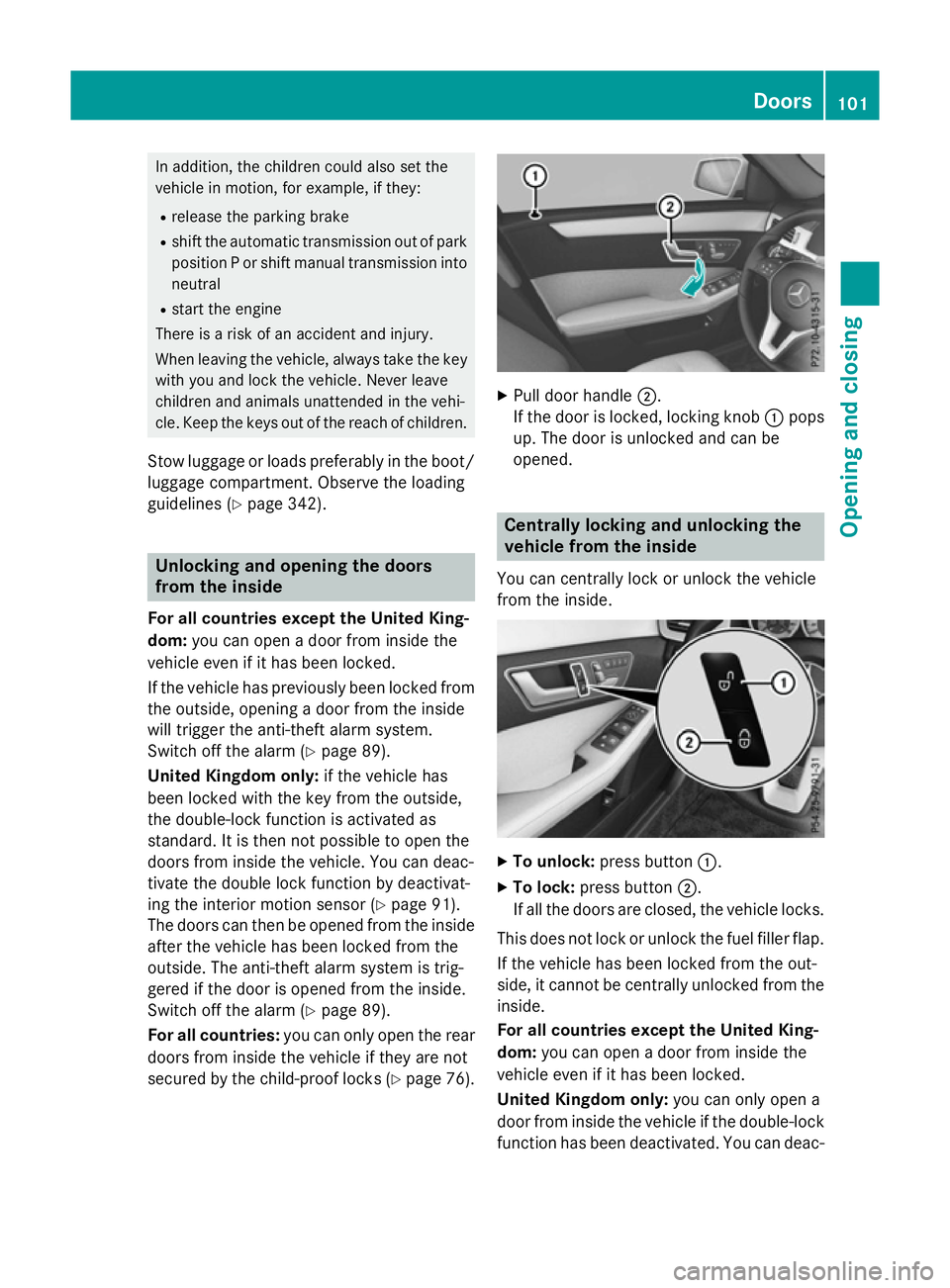
secured by the child-proo flocks (Y page 76). X
Pulld oor handle ;.
If the door is locked, locking knob :pops
up. The door is unlocked and can be
opened. Centrally locking and unlocking the
vehicle from the inside
You can centrally lock or unlock the vehicle
from the inside. X
To unlock: press button :.
X To lock: press button ;.
If all the doors are closed, the vehicle locks.
This does not lock or unlock the fuel filler flap.
If the vehicle has been locked from the out-
side, it cannot be centrally unlocked from the inside.
For all countries except the United King-
dom: you can open adoor from inside the
vehicle even if it has been locked.
United Kingdom only: you can only open a
door from inside the vehicle if the double-lock
function has been deactivated. You can deac- Doors
101Opening and closing Z
Page 181 of 497
Useful information
i This Owner's Manual describes all mod-
els, series and optional equipment for your
vehicle that were available at the time of
going to press. National variation sare pos-
sible. Not ethat your vehicle may not be
equipped with all of the function sdescri-
bed. This is also the case for system sand
function srelevan ttosafety.
i Read the information on qualified special-
ist workshops: (Y page 27). Running-in notes
Important safet
ynotes
In certain drivin gand drivin gsafet ysystems,
the sensors adjust automatically while acer-
tain distance is being driven after the vehicle has been delivered or after repairs. Full sys-
tem effectiveness is not reached until the end
of this teach-in process.
Brak epads/linings and discs that are either
new or have been replaced only achieve opti- mum brakin geffec tafter several hundred kil-
ometres of driving. Compensate for the
reduced brakin geffec tbya pplying greater
forc etot he brake pedal. The first 1,500 km
If you treat the engin ewith sufficient care
from the very start ,you will be rewarded with
excellent performanc efor the remainder of
the engine's life.
R Driv eatv arying road speeds and engine
speeds for the first 1,50 0km.
R Avoid overstraining the vehicle during this
period, e.g. drivin gatfull throttle.
R Change gear in good time, before the rev
counter needle is Ôof the way to the red
area of the rev counter. R
Do not shift down agear manually in order
to brake.
R Vehicles with automatic transmission:
try to avoid depressin gthe accelerator
pedal beyond the point of resistance (kick-
down).
Additional running-in notes for AMG vehicles:
R Do not drive at speeds above 140 km/ hfor
the first 1,500 km.
R Only allow the engine to reach amaximum
engine speed of 4,500 rpm briefly.
After 1,500 km, you may graduall yaccelerate
the vehicle to full road and engine speeds.
i You should also observe these notes on
running-in if the engine or parts of the drive
train on your vehicle have been replaced. AMG vehicles with self-locking rear
axle differential
Your vehicle is equipped with aself-locking
differential on the rear axle.
Change the oil to improve protection of the
rear axle differential:
R after arunning-in period of 3,000 km
R every 50,000 km or 3years
These oil changes prolong the service life of
the differential. Have the oil change carried
out at aqualified specialist workshop. Driving
Important safety notes
G
WARNING
Object sinthe driver's footwell may restrict
the clearance around the pedals or block a
depressed pedal. This jeopardises the oper-
ating and road safety of the vehicle. There is a risk of an accident.
Stow all object ssecurely in the vehicle so that
they do not get into the driver's footwell.
Always fit the floormats securely and as pre-
scribed in order to ensure that there is always 178
DrivingDriving and parking
Page 220 of 497
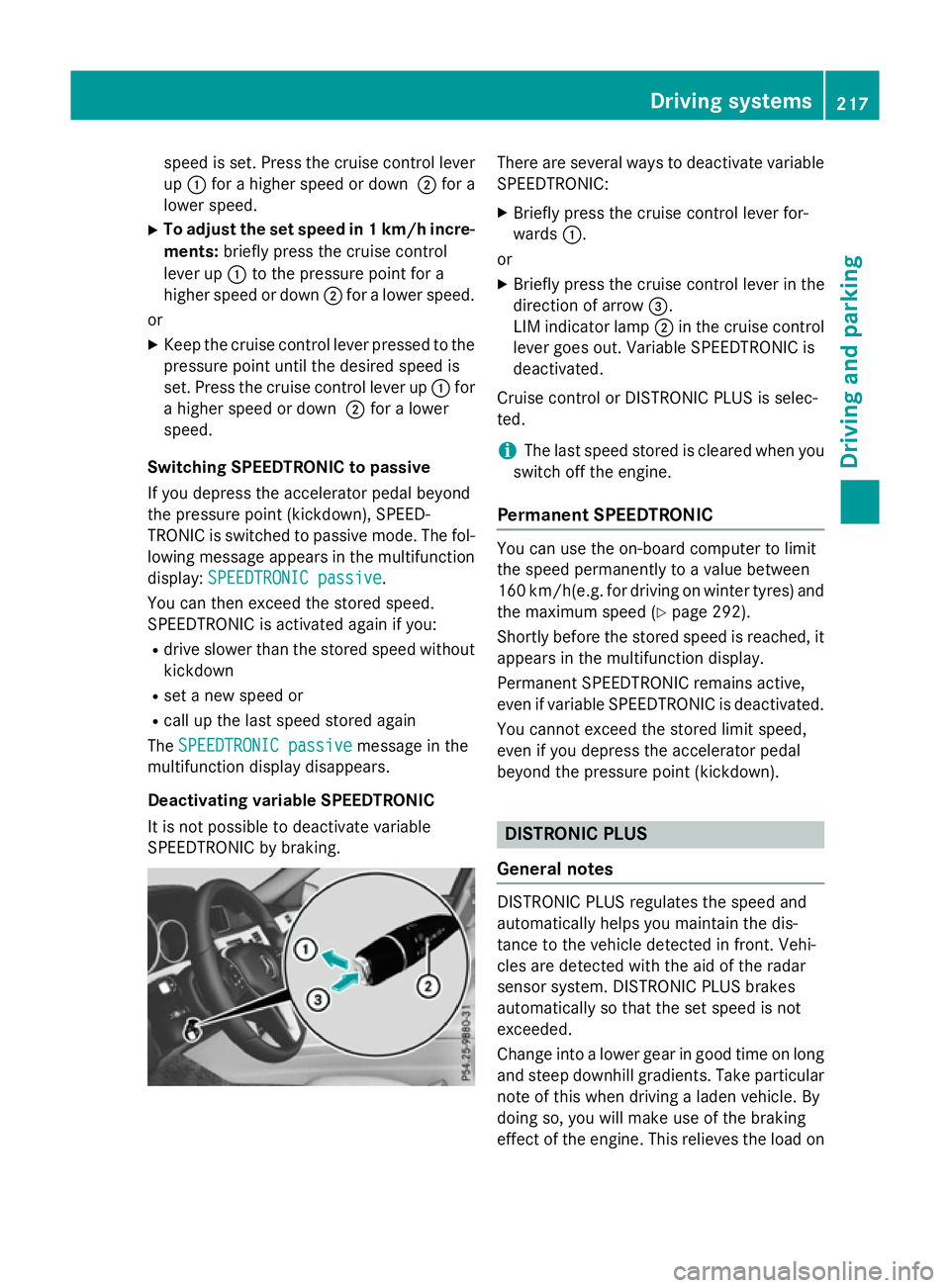
speed is set. Press the cruise control lever
up : for ahigher speed or down ;for a
lower speed.
X To adjust the set speed in 1km/h incre-
ments: briefly press the cruise control
lever up :to the pressure point for a
higher speed or down ;for alower speed.
or
X Keep the cruise control lever pressed to the
pressure point until the desired speed is
set. Press the cruise control lever up :for
ah igher speed or down ;for alower
speed.
Switching SPEEDTRONIC to passive
If you depress the accelerator pedal beyond
the pressure point (kickdown), SPEED-
TRONIC is switched to passive mode. The fol-
lowing message appears in the multifunction
display: SPEEDTRONIC passive SPEEDTRONIC passive.
You can then exceed the stored speed.
SPEEDTRONIC is activated againify ou:
R drive slower than the stored speed without
kickdown
R set anew speed or
R call up the last speed stored again
The SPEEDTRONIC passive
SPEEDTRONIC passive message in the
multifunction displayd isappears.
Deactivating variable SPEEDTRONIC
It is not possible to deactivate variable
SPEEDTRONIC by braking. There are several waystod
eactivate variable
SPEEDTRONIC:
X Briefly press the cruise control lever for-
wards :.
or X Briefly press the cruise control lever in the
direction of arrow =.
LIM indicator lamp ;in the cruise control
lever goes out. Variable SPEEDTRONIC is
deactivated.
Cruise control or DISTRONIC PLUS is selec-
ted.
i The last speed stored is cleared when you
switch off the engine.
Permanent SPEEDTRONIC You can use the on-board computer to limit
the speed permanently to
avalue between
160 km/h(e.g. for driving on winter tyres) and the maximum speed (Y page 292).
Shortly before the stored speed is reached, it appears in the multifunction display.
Permanent SPEEDTRONIC remains active,
even if variableS PEEDTRONIC is deactivated.
You cannot exceed the stored limit speed,
even if you depress the accelerator pedal
beyond the pressure point (kickdown). DISTRONIC PLUS
General notes DISTRONIC PLUS regulates the speed and
automaticallyh
elps you maintain the dis-
tance to the vehicle detected in front.V ehi-
cles are detected with the aid of the radar
sensor system. DISTRONIC PLUS brakes
automaticallysot hat the set speed is not
exceeded.
Change into alower gear in good time on long
and steep downhill gradients. Take particular note of this when driving aladen vehicle. By
doing so, you will make use of the braking
effect of the engine. This relieves the load on Driving systems
217Driving and parking Z
Page 238 of 497
25 mm
.The leve lchange also occurs when
stationary.
If you drive faster than 170 km/h, the rear
axle leve lisset to amiddle level. Thi sincrea-
ses road safety and reduces airr esistance. If
you then drive slower than 150 km/h, the
leve loft he rear axle is again adjusted to cor-
respond to the selected suspension mode.
Load compensation
The vehicle can compensate differences in
the vehicle leve lbyraising or lowering the
rear axle .Thisist he case ,for example, when
people get out of the vehicle or whe nlug gage
is removed.
Al oadc ompensation occurs if:
R ad oor, the boot lid or the tailgate is opened
R the parked vehicle is unlocked
The engine needs to be running for larger level
changes. 4MATIC (permanent all-whee
ldrive)
If you fai ltoadapt you rdriving style, 4MATIC
can neither reduce the risk of an accident nor override the laws of physics. 4MATIC cannot
take account of road ,weather and traffic con-
ditions. 4MATIC is only an aid. You are
responsibl efor the distance to the vehicle in
front, for vehicle speed, for braking in good
time, and for staying in lane.
If ad rive wheel spins due to insufficient grip:
R whe npulling away,o nly depress the accel-
erato rpedal as far as is necessary.
R accelerate les swhend riving.
! Never tow the vehicle with one axle
raised. Thi smay damage the transfer case.
Damag eofthis sort is not covered by the
Mercedes-Benz implied warranty. All
wheels must remain eithe ronthe ground or
be fully raised. Observe the instructions for towing the vehicle with allw heels in full
contact with the ground.
i In wintry driving conditions, the maximum
effect of 4MATIC can only be achieved if you use winter tyres
(M+S tyres), with snow
chains if necessary.
4MATIC ensures that allf our wheels are per-
manently driven. Together with ESP ®
,it
improves the traction of you rvehicle when-
ever adrive wheel spins due to insufficient
grip. PARKTRONIC
Important safety notes PARKTRONI
Cisanelectronic parking aidw ith
ultrasoni csensors .Itmonitors the area
around you rvehicle using six sensors in the
front bumper and six sensors in the rear
bumper. PARKTRONI Cindicates visually and
audibly the distance between you rvehicle
and an object.
PARKTRONI Cisonly an aid. It is not asubsti-
tute for you rattention to the immediate sur-
roundings. The responsibility for safe
manoeuvring and parking remains with you.
Make sure that there are no persons, animals
or objects in range while manoeuvring and
parking.
! When parking, pay particular attention to
objects above or below the sensors ,such
as flower pots or trailer drawbars.
PARKTRONI Cdoes not detect such objects
whe nthey are in the immediate vicinity of
the vehicle. You coul ddamage the vehicle
or the objects.
The sensors may not detect snow and
objects which absorb ultrasoni csources.
Ultrasonic sources, such as an automatic
car wash, alorry's compressed-air brakes
or ap neumatic drill, coul dcause
PARKTRONI Ctomalfunction.
PARKTRONI Cmay not function correctly on
uneve nterrain. Driving systems
235Driving and parking Z
Page 239 of 497
PARKTRONIC is activated automatically when
you:
R switch on the ignition
R shift to position D,Ror Non vehicles with
automatic transmission
R release the parking brake
PARKTRONIC is deactivated at speeds above
18 km/h. It is reactivated at lower speeds.
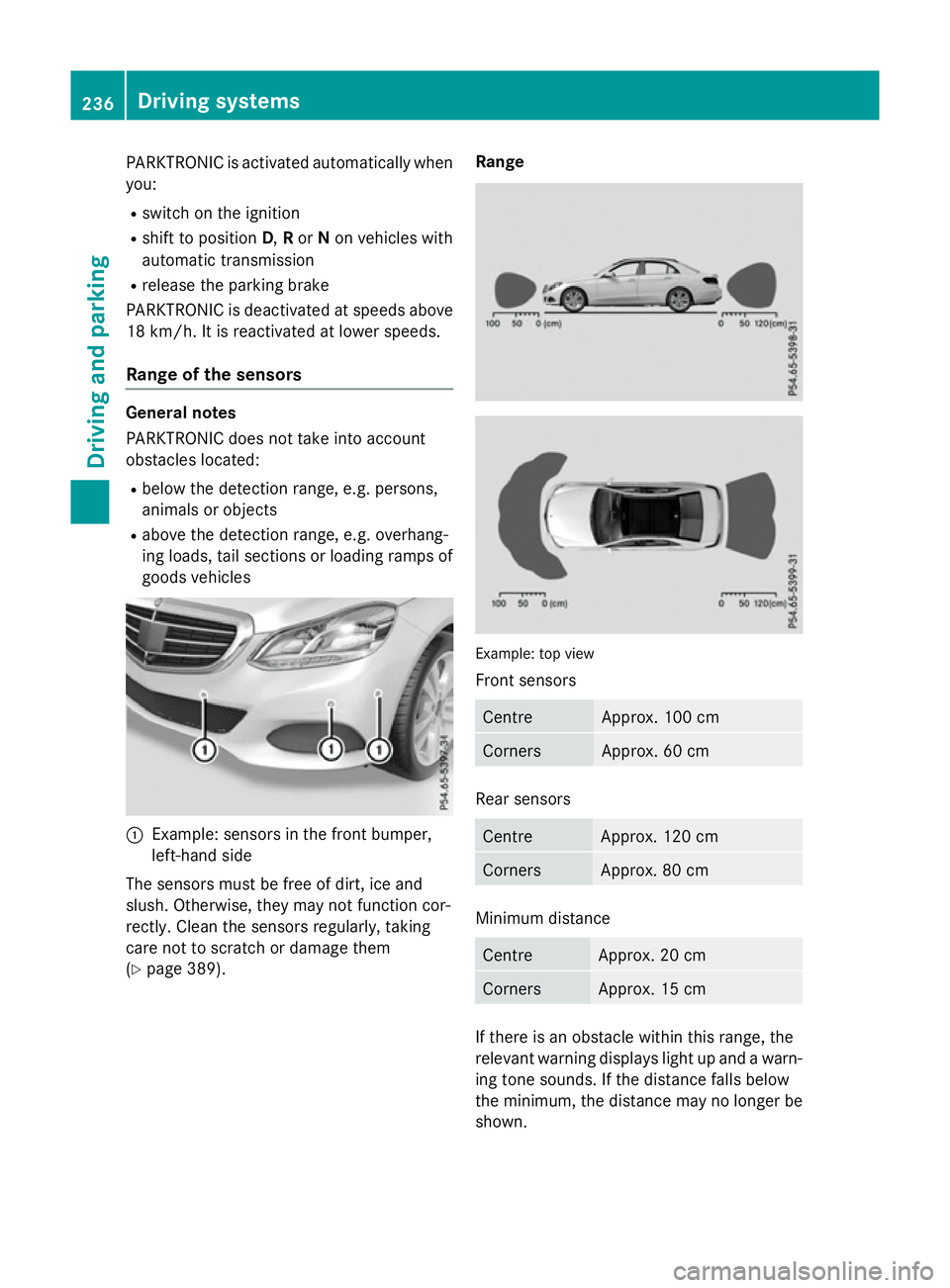
Range of the sensors General notes
PARKTRONIC does not take into account
obstacles located:
R below the detection range, e.g. persons,
animals or objects
R above the detection range, e.g. overhang-
ing loads, tail sections or loading ramps of
goods vehicles :
Example: sensors in the frontb umper,
left-hand side
The sensors must be free of dirt, ice and
slush. Otherwise, they may not function cor-
rectly. Clean the sensors regularly, taking
care not to scratch or damage them
(Y page 389). Range
Example: top view
Fronts
ensors Centre Approx
.100 cm Corners Approx
.60cm Rear sensors
Centre Approx
.120 cm Corners Approx
.80cm Minimum distance
Centre Approx
.20cm Corners Approx
.15cm If there is an obstacle within this range, the
relevant warning displays light up and awarn-
ing tones ounds. If the distanc efalls below
the minimum, the distanc emay no longer be
shown. 236
Driving systemsDriving and parking
Page 242 of 497
Problems with PARKTRONIC
Problem
Possible causes/consequences and
M
MSolutions Only the red segments
in the PARKTRONIC
warning displaysa
re lit.
You also hear awarning
tone for approximately
two seconds.
PARKTRONIC is then
deactivated and the
indicator lamp on the
PARKTRONIC button
lights up. PARKTRONIC has malfunctioned and has switched off.
X If problems persist, have PARKTRONIC checked at aqualified
specialist workshop. Only the red segments
in the PARKTRONIC
warning displaysa
re lit.
PARKTRONIC is then
deactivated. The PARKTRONIC sensors are dirty or there is interference.
X Cleant he PARKTRONIC sensors (Y page 389).
X Switch the ignition back on. The problem may be caused by an external source of radio or
ultrasound waves.
X See if PARKTRONIC functions in adifferent location. Active Parking Assist
General notes Active Parking Assist is an electronic parking
aid with ultrasound. It measures the road on
both sides of the vehicle. Aparking symbol
indicates asuitable parking space. Active
steering intervention and brake application
can assist you during parking. You may also
use PARKTRONIC (Y page 235).
i The active braking application is only
available on vehicles with automatic trans- mission.
Important safety notes Active Parking Assist is only an aid. It is not a
substitute for your attention to the immediate surroundings. The responsibility for safe
manoeuvring and parking remains with you.
Make sure that no persons, animals or
objectsa re in the manoeuvring range. When PARKTRONIC is switched off, Active
Parking Assist is also unavailable. G
WARNING
While parking or pulling out of aparking
space, the vehicle swings out and can drive
onto areas of the oncomingl ane. This could
cause you to collide with other road users.
There is arisk of an accident.
Pay attention to other road users. Stop the
vehicle if necessary or cancel the Active Park- ing Assist parking procedure.
! If unavoidable, you should drive over
obstacles such as kerbs slowly and not at a
sharp angle. Otherwise, you may damage
the wheels or tyres.
Active Parking Assist may also display spaces not suitable for parking, e.g.:
R parking or stopping prohibitions
R in front of drivewaysore ntrances and exits
R unsuitable surfaces Driving systems
239Driving and parking Z
Page 264 of 497
The warning vibration occurs later if:
R the road has narrow lanes
R you cut the corner on abend Active Driving Assistance package
General notes The Active Drivin
gAssistance package con-
sists of DISTRONIC PLUS (Y page 217), Active
Blind Spot Assist (Y page 261) and Active
Lane Keeping Assist (Y page 263).
Active Blind Spot Assist General notes
Active Blind Spot Assist monitors the areas
on either side of the vehicle that are not visi-
ble to the driver with two lateral, rear-facing
radar sensors. Awarning display in the exte-
rior mirrors draws your attention to vehicles
detected in the monitored area. If you then
switch on the corresponding turn signal to
change lanes, you will also receive avisual
and audibl ecollision warning. If arisk of side
impact is detected, corrective braking may
help you avoid acollision. Active Blind Spot
Assist evaluates the free space in the direc-
tion of travel and to the side before making a course-correcting brake application. For this,Active Blind Spot Assist uses the forward-
facing radar sensors.
Active Blind Spot Assist supports you from a
speed of approximately 30 km/h.
Important safety notes
Active Blind Spot Assist is only an aid and is
not asubstitute for attentive driving. G
WARNING
Active Blind Spot Assist does not react to
vehicles:
R overtaking too closely on the side, placing
them in the blind spot area
R if the differenc einthe speed of approach
and overtaking is too great As
aresult, Active Blind Spot Assist may nei-
ther give warnings nor intervene in such sit-
uations. There is arisk of an accident.
Always pay careful attention to the traffic sit- uation and maintain asafe distanc eatthe side
of the vehicle.
Radar sensors
The Active Blind Spot Assist radar sensors are integrated into the fronta nd rear bumpers
and behind acover in the radiator trim. Make
sure that the bumpers and the cover in the
radiator trim are free of dirt, ice or slush. The
rear sensors must not be covered, e.g. by
bicycle racks or overhangin gloads. Following
as evere impact or in the event of damage to
the bumpers, have the function of the radar
sensors checked at aqualified specialist
workshop. Active Blind Spot Assist may oth-
erwise no longer function properly.
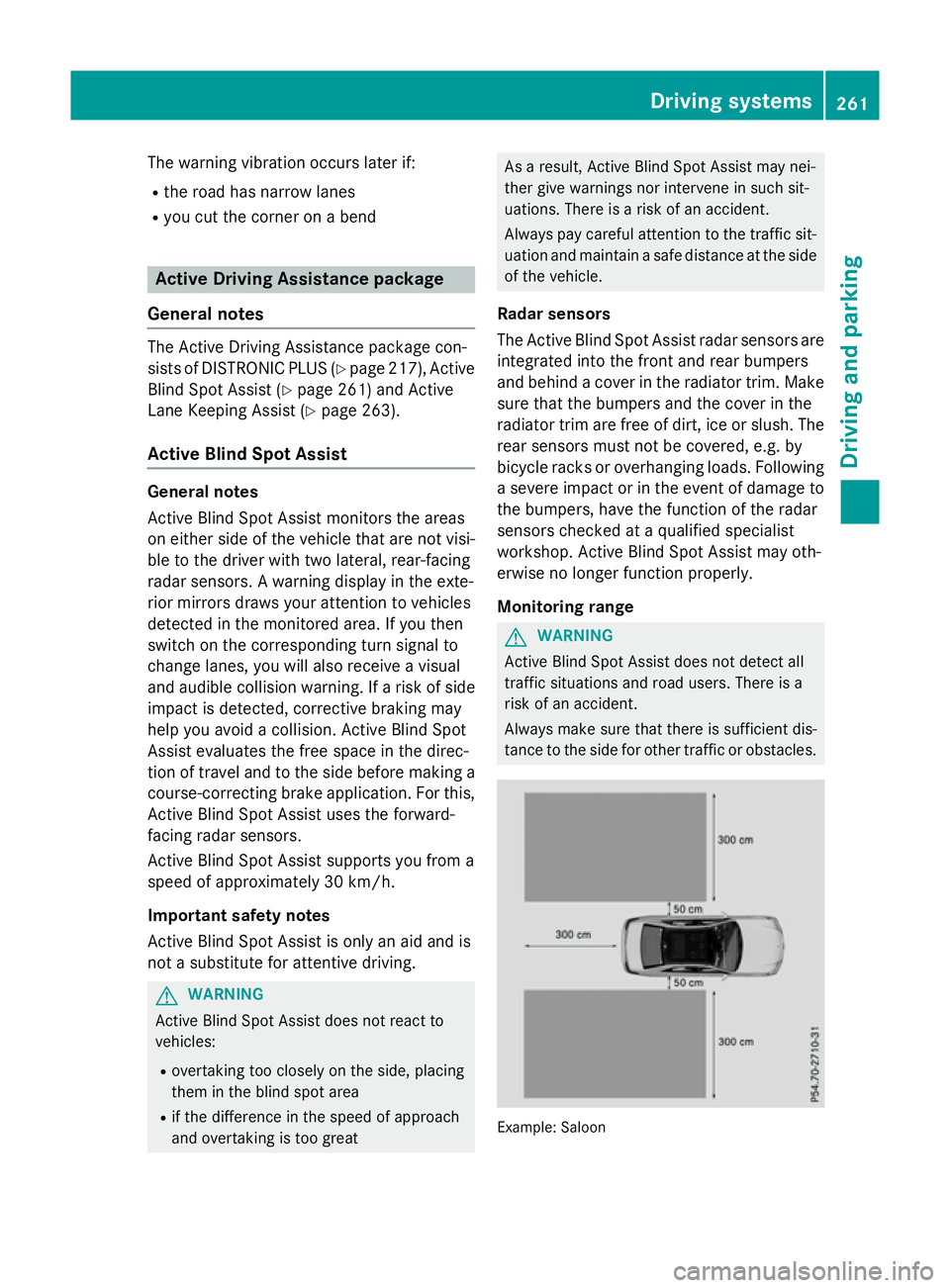
Monitoring range G
WARNING
Active Blind Spot Assist does not detect all
traffic situations and road users. There is a
risk of an accident.
Always make sure that there is sufficient dis-
tancetot he side for other traffic or obstacles. Example: Saloon Driving systems
261Driving and parking Z
Page 265 of 497
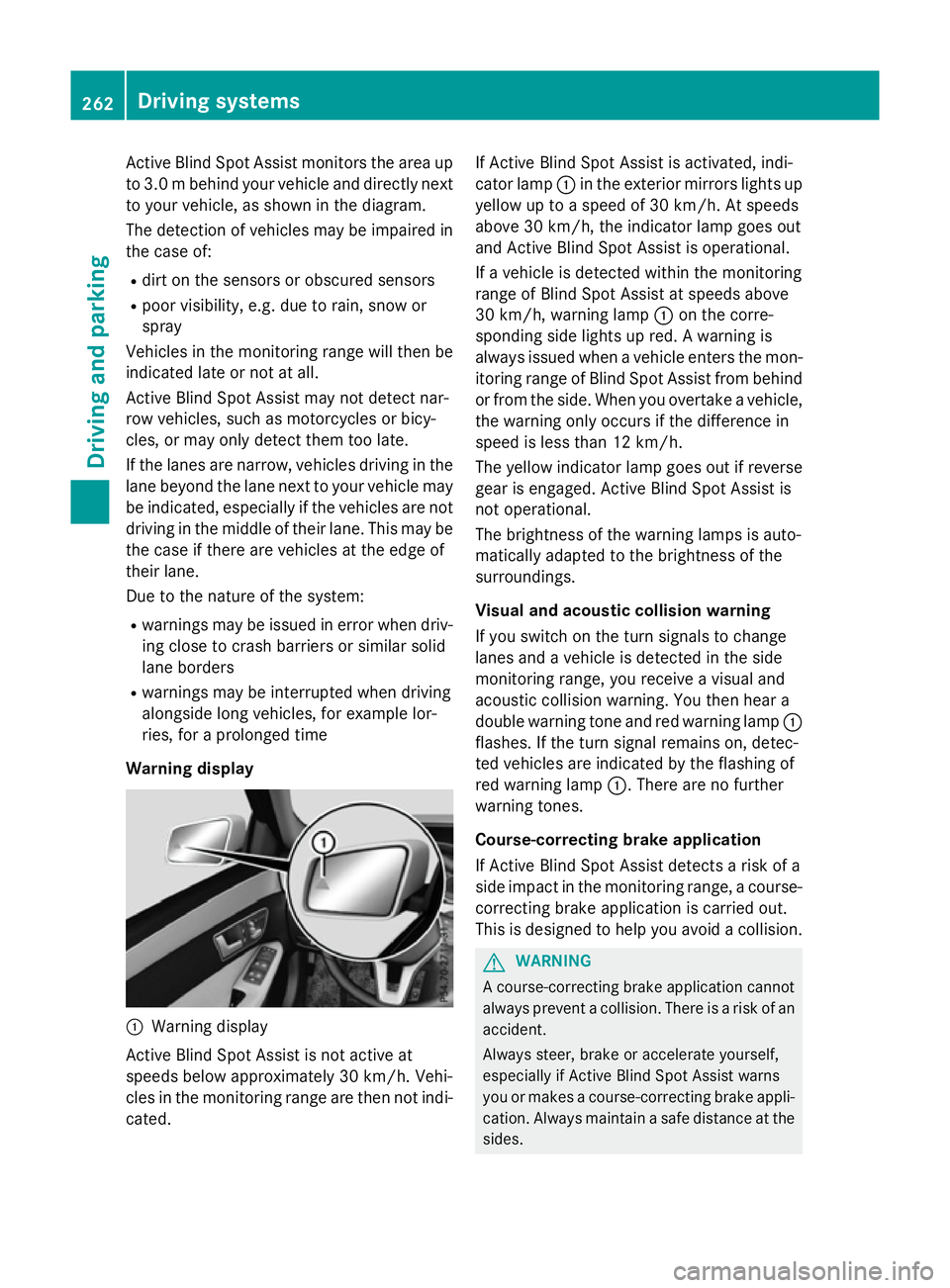
Activ
eBlind Spo tAssist monitors the area up
to 3.0 mbehind your vehicle and directly next
to your vehicle, as shown in the diagram.
The detection of vehicles may be impaired in the case of:
R dirt on the sensor sorobscured sensors
R poor visibility, e.g. due to rain, snow or
spray
Vehicles in the monitoring range will then be
indicated late or not at all.
Active Blind Spot Assist may not detec tnar-
row vehicles, such as motorcycles or bicy-
cles, or may only detec tthem too late.
If the lanes are narrow, vehicles driving in the
lane beyond the lane nexttoy our vehicle may
be indicated, especially if the vehicles are not
driving in the middle of their lane. This may be the case if ther eare vehicles at the edge of
their lane.
Due to the nature of the system:
R warnings may be issued in error when driv-
ing close to crash barriers or similar solid
lane borders
R warnings may be interrupted when driving
alongside long vehicles, for example lor-
ries, for aprolonged time
Warning display :
Warnin gdisplay
Active Blind Spot Assist is not active at
speeds below approximately 30 km/h. Vehi-
cles in the monitoring range are then not indi-
cated. If Active Blind Spot Assist is activated, indi-
cator lamp
:in the exterior mirror slights up
yellow up to aspeed of 30 km/h. At speeds
above 30 km/h, the indicator lamp goes out
and Active Blind Spot Assist is operational.
If av ehicle is detected within the monitoring
range of Blind Spot Assist at speeds above
30 km/h, warning lamp :on the corre-
spondin gside lights up red. Awarning is
alway sissued when avehicle enters the mon-
itorin grange of Blind Spot Assist from behind
or from the side. When you overtake avehicle,
the warning only occur sifthe difference in
speed is less than 12 km/h.
The yellow indicator lamp goes out if reverse gear is engaged. Active Blind Spot Assist is
not operational.
The brightness of the warning lamps is auto-
matically adapted to the brightness of the
surroundings.
Visua land acoustic collision warning
If you switch on the turn signals to change
lanes and avehicle is detected in the side
monitoring range, you receive avisual and
acoustic collision warning. You then hear a
double warning tonea nd red warning lamp:
flashes. If the turn signal remains on, detec-
ted vehicles are indicated by the flashing of
red warning lamp :.There are no further
warning tones.
Course-correcting brak eapplication
If Active Blind Spot Assist detects arisk of a
side impact in the monitoring range, acourse-
correcting brake application is carried out.
This is designed to help you avoid acollision. G
WARNING
Ac ourse-correcting brake application cannot
alway spreven tacollision. There is arisk of an
accident.
Always steer ,brake or accelerat eyourself,
especially if Active Blind Spot Assist warns
you or makes acourse-correcting brake appli-
cation .Always maintain asafe distanc eatthe
sides. 262
Driving systemsDriving and parking
Page 267 of 497
rear and side of yourv
ehicleare alsom oni-
tored with the aid of the rada rsensor system.
Active Lane Keeping Assist detects lane
markings on the road and can warn you
before you leave yourl ane unintentionally.If
you do not react to the warning, alane-cor-
recting application of the brakes can bring the
vehicl eback into the original lane.
This function is available withi naspeedrange
between 60 km/h and 200 km/h.
For Active Lane Keeping Assist to assist you
when driving, the rada rsensor system must
be operational.
Important safety notes
If you fail to adapt yourd riving style,Active
Lane Keeping Assist can neither reduce the
risk of an accident nor overrid ethe lawsof
physics. Active Lane Keeping Assist cannot
take account of road and weather conditions.
It may not detect traffic situations. Active
Lane Keeping Assist is only an aid.Y ou are
responsible for the distance to the vehicl ein
front, for vehicl espeed, for braking in good
time, and for staying in lane.
Active Lane Keeping Assist cannot continu-
ousl ykeep yourv ehicleini ts lane. G
WARNING
Active Lane Keeping Assist cannot always
clearly detect lane markings.
In such cases, Active Lane Keeping Assist
can:
R give an unnecessary warning and then
make acourse-correcting brake application
to the vehicle
R neither give awarning nor intervene
There is arisk of an accident.
Always pay particular attention to the traffic
situation and keep withi nthe lane, especially
if Active Lane Keeping Assist alerts you.T er-
minate the intervention in anon-critical driv-
ing situation. The system may be impaired or may not func-
tion if:
R there is poor visibility, e.g. due to insuffi-
cient illumination of the road ,ordue to
snow, rain, fog or spray
R there is glare, e.g. from oncoming traffic,
the sun or reflectio nfrom other vehicles
(e.g. if the road surface is wet)
R the windscreen is dirty ,misted up, dam-
agedorc overed, for instance by asticker,
in the vicinity of the camera
R the rada rsensors in the front or rear bump-
ers or the radiator trim are dirty ,e.g.
obscured by snow
R no or several, unclea rlane markings are
present for one lane, e.g. in aconstruction
area
R the lane markings are worn away,d ark or
covered up, e.g. by dirt or snow
R the distance to the vehicl einfront is too
smal land the lane markings thus cannot be
detected
R the lane markings change quickly, e.g.
lanes branch off, cross one another or
merge
R the road is narrow and winding
R there are highly variable shad econditions
on the road
If no vehicl eisdetected in the adjacent lane
and broken lane markings are detected, no
lane-correcting brake application is made.
Warning vibratio nthrough the steering
wheel
Aw arning may be given if afront wheel
passes over alane marking. It willw arny ou by
means of intermittent vibration in the steer-
ing whee lfor up to 1.5 seconds.
Lane-correcting brake application G
WARNING
Al ane-correcting brake application cannot
alwaysb ring the vehicl eback into the original
lane. There is arisk of an accident. 264
Driving systemsDriving and parking