ECO mode MERCEDES-BENZ E-CLASS SALOON 2015 Owner's Manual
[x] Cancel search | Manufacturer: MERCEDES-BENZ, Model Year: 2015, Model line: E-CLASS SALOON, Model: MERCEDES-BENZ E-CLASS SALOON 2015Pages: 497, PDF Size: 16.23 MB
Page 231 of 497
DISTRONI
CPLUSS teering Assist does not
provide assistance:
R on ver ysharp corners
R when towing atrailer
R al ossoft yrep ressure or adefective tyre
ha sb eend etecte dand displayed
Pa ya ttentio nalsotot he important safety
note sfor DISTRONI CPLUS(Ypage 218).
Th es teering interventions ar ecarried out
with alimit ed steering moment. Th esystem
requires the driver to kee phishands on the
steering whee land to steer himself.
If yo udon ot steer yourself or if yo utake your
hands off the steering whee lfor ap rolonged
period of time, the syste mwillf irst alert you
with avisual warning. Asteering whee lsym-
bo lappears in the multifunctio ndisplay .Ifyou
have still not started to steer and have not
take nholdoft he steering whee lafter five
second satthe latest, awarning tone also
sounds to remind yo utotake contro lofthe
vehicle. Steering Assist and Stop&G oPilot
switch to passive mode. DISTRONI CPLUS
remains active.
Activatin gSteering Assist and Stop&Go
Pilot
X Activate the DISTRONI CPLUSw ithS teer-
ing Assist and Stop&G oPilot functio nusing
the on-board compute r(Ypage 288).
The DTR+:
DTR+: steering steering assistant
assistant On
Onmes-
sage appear sinthe multifunctio ndisplay.
Steering Assist and Stop&G oPilot are
active.
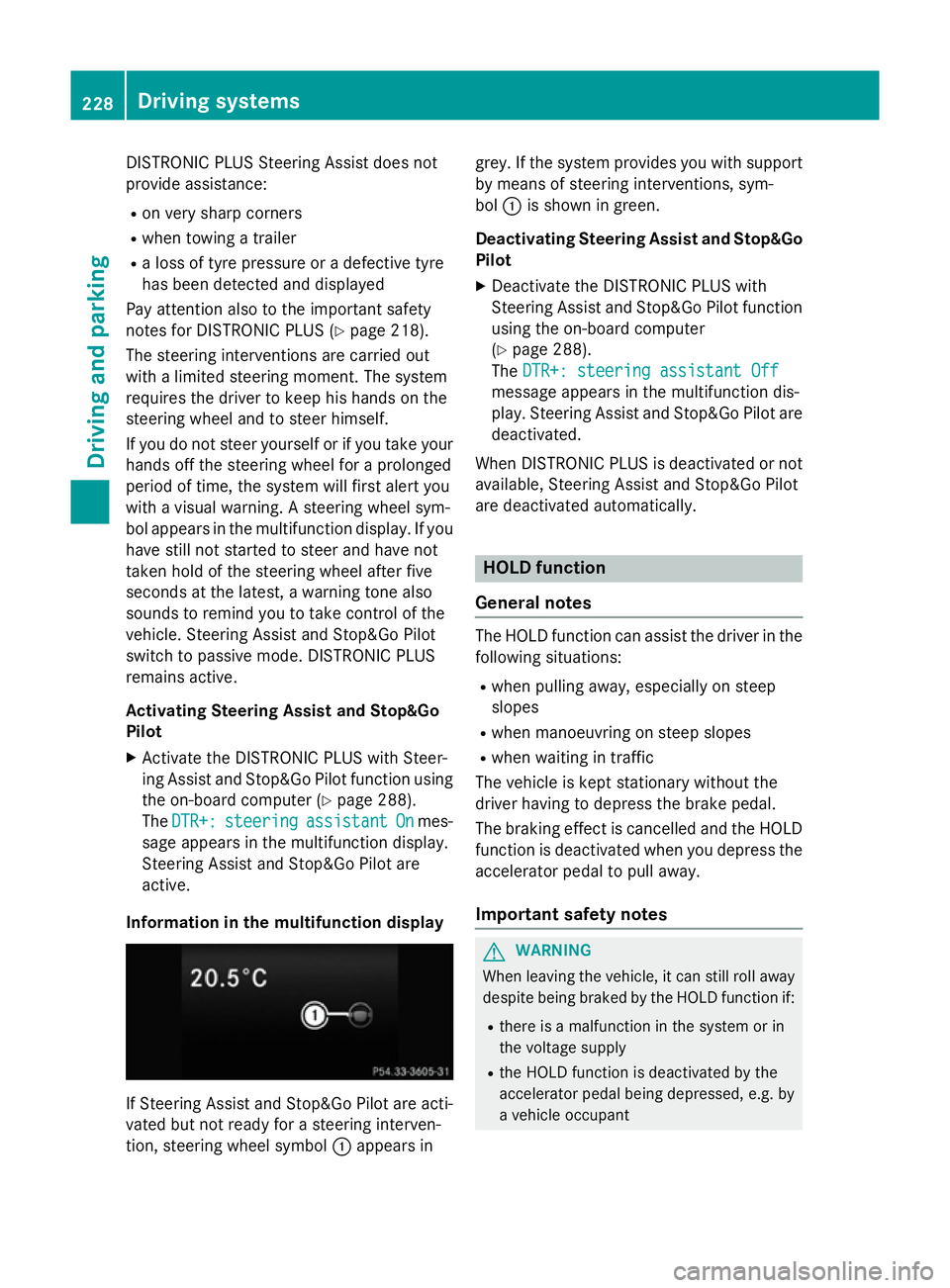
Informatio ninthe multifunction display If Steering Assist and Stop&G
oPilot area cti-
vated bu tnot ready for asteering interven-
tion, steering whee lsym bol :appear sin grey. If the syste
mprovide syou with support
by means of steering interventions, sym-
bol :is shown in green.
Deactivatin gSteering Assist and Stop&Go
Pilot
X Deactivate the DISTRONI CPLUSw ith
Steering Assist and Stop&G oPilot function
using the on-board computer
(Y page 288).
The DTR+: steering assistant Off DTR+: steering assistant Off
message appear sinthe multifunctio ndis-
play .Steering Assist and Stop&G oPilot are
deactivated.
When DISTRONI CPLUSisd eactivated or not
available, Steering Assist and Stop&G oPilot
ar ed eactivated automatically. HOL
Dfunction
General notes Th
eH OLD functio ncan assist the driver in the
following situations:
R when pulling away ,especially on steep
slopes
R when manoeuvring on steep slopes
R when waiting in traffic
Th ev ehicl eisk epts tationar ywithout the
driver having to depress the brake pedal.
Th eb raking effect is cancelle dand the HOLD
functio nisd eactivated when yo udepress the
accelerator peda ltopulla way.
Important safety notes G
WARNING
When leaving the vehicle, it can still rol laway
despite being braked by the HOLD functio nif:
R there is amalfunctio ninthe syste morin
the voltag esupply
R the HOLD functio nisd eactivated by the
accelerator peda lbeing depressed, e.g .by
av ehicl eoccupant 228
Driving systemsDriving an
dparking
Page 233 of 497
On vehicles with
amanual transmission, you
will also hear ahorn at regulari ntervals if the
HOLD function is activated and you:
R switch the engine off, open the driver's
door and take off your seat belt
The sounding of the horn alerts you to the fact
that the vehicle has been parked while the
HOLD function is still activated. If you attempt to lock the vehicle, the tone becomes louder.
The vehicle is not locked until the HOLD func- tion is deactivated.
i If the engine has been switched off, it
cannot be started againu ntil the HOLD
function has been deactivated. RACE START
Important safety notes i
Observe the safety notes for the SPORT
handling mode (Y page 85).
Only activate RACE START on dedicated race
circuits.
RACE START enables optimum acceleration
from astanding start. The precondition for
this is asuitableh igh-grip road surface.
i RACE START is only available in AMG vehi-
cles.
Activation conditions You can activate RACE START if:
R the doors are closed
R the engine is running and it has reached an
operating temperature of approximately
80 †. This is the case when the engine oil
temperature in the multifunction display
stops flashing.
R SPORT handling mode is activated
(Y page 85).
R the steering wheel is in the straight-ahead
position R
the vehicle is stationary and the brake
pedal is depressed (left foot)
R the transmission is in position D
Activating RACE START X
Depress the brake pedal with your left foot
and keep it depressed.
X Turn the drive program selector clockwise
(Y page 195) until the RSlamp lights up.
The RACE START Confirm: Paddle UP RACE START Confirm: Paddle UP
Cancel: Paddle DOWN
Cancel: Paddle DOWN message appears
in the multifunction display.
i If the activation conditions are no longer
fulfilled, RACE START is cancelled. The
RACE RACE START
START cancelled
cancelled message appears
in the multifunction display.
X To cancel: pull the left steering wheel shift
paddle( Ypage 195).
or
X To confirm: pull the right steering wheel
shift paddle( Ypage 195).
The RACE START available Depress RACE START available Depress
accelerator
accelerator message appears in the mul-
tifunction display.
i If you do not depress the accelerator
pedal fully within two seconds, RACE
START is cancelled. The RACE RACESTART
START not
not
possible
possible See
SeeOwner's
Owner's Manual
Manual message
appears in the multifunction display.
X Fully depress the accelerator pedal.
The engine speed rises to approximately
3,500 rpm.
The RACE START Release brake to RACE START Release brake to
start
start message appears in the multifunc-
tion display.
i If you do not release the brake pedal
within five seconds, RACE START is cancel-
led. The RACE
RACESTART
START cancelled
cancelled message
appears in the multifunction display.
X Take your foot off the brake, but keep the
accelerator pedal depressed.
The vehicle pullsa wayatmaximum accel-
eration. 230
Driving systemsDriving and parking
Page 234 of 497
The
RACE
RACE START
START active
active message appears
in the multifunction display.
RACE START is deactivated when the vehicle
reaches aspeed of approximately 50 km/h.
Drive program S+is activated. SPORT han-
dling mode remains activated.
RACE START is deactivated immediately if
you release the accelerator pedal during
RACE START or if any of the activation condi-
tions are no longer fulfilled. The RACE RACESTART
START
not possible See Owner's Manual
not possible See Owner's Manual mes-
sage appears in the multifunction display.
i After using it several times in short suc-
cession, RACE START will be unavailable
until acertain distanc ehas been driven. AIRMATIC
Vehicle level Important safety notes
G
WARNING
People's limbs may become trapped if they
are located underneat hthe vehicle or
between the vehicle body and the tyres when the vehicle is lowering. There is adanger of
injury.
When lowering the vehicle, make sure no one
is underneat hthe vehicle or in the immediate
vicinit yofthe wheel arches. G
WARNING
Vehicles with level control:
The vehicle is slightly lowered if you:
R have selected comfor tsuspension tuning
and
R you lock the vehicle within approximately
60 seconds of switchin goff the engine
You and people in the vicinit yofthe wheel
arch or the underbody may thus become trap- ped. There is arisk of injury.
Make sure that nobody is in the vicinit yofthe
wheel arch or the underbody when you lock
the vehicle. !
The vehicle is lowered by about 15 mm if:
R you have selected "Comfort tuning"
R you switch off the engine and
R you lock the vehicle within approximately
60 seconds
When parking, position your vehicle so that it does not make contact with the kerb as
the vehicle is lowered. Your vehicle could
otherwise be damaged.
If you unlock the vehicle within 60 seconds of
having switched the engine off, the vehicle is
lowered slightly when Comfort suspension
mode is selected.
Observe the notes on driving with atrailer
(Y page 267).
Your vehicle regulates its height automati-
cally. All-roun dlevel control ensures the best
possible suspension and constant ground
clearance, even with aladen vehicle. When
you drive fast, the vehicle is lowered auto-
matically to improve driving safety and to
reduce fuel consumption.
The following vehicle levels are possible:
R Normal
R Raised (vehicles without 4MATIC): the vehi-
cle is raised by approximately 25 mm when compared with the normal level
R Raised (vehicles with 4MATIC): the vehicle
is raised by approximately 35 mm when
compared with the normal level
R Lowered: the vehicle is lowered by approx-
imately 10 mm when compared with the
normal level
The "Normal" and "Raised" vehicle levels can be set manually.
The "Lowered" vehicle level is set automati-
cally:
R at speeds above 140 km/h
R if you have selected "Sport mode"
(Y page 232) Driving systems
231Driving and parking Z
Page 236 of 497
X
Press button :.
Indicator lamp =lights up. You have selec-
ted "Comfort mode".
The AIRMATIC COMFORT
AIRMATIC COMFORT message appears
in the multifunction display. AMG RIDE CONTROL sport
ssuspen-
sion
Important safety notes G
WARNING
People's limbs may become trapped if they
are located underneat hthe vehicle or
between the vehicle body and the tyres when the vehicle is lowering. There is adanger of
injury.
When lowering the vehicle, make sure no one
is underneat hthe vehicle or in the immediate
vicinit yofthe wheel arches. G
WARNING
Vehicles with level control:
The vehicle is slightly lowered if you:
R have selected comfor tsuspension tuning
and
R you lock the vehicle within approximately
60 seconds of switchin goff the engine
You and people in the vicinit yofthe wheel
arch or the underbody may thus become trap- ped. There is arisk of injury.
Make sure that nobody is in the vicinit yofthe
wheel arch or the underbody when you lock
the vehicle.
! The vehicle is lowered by about 20 mm if:
R you have selected "Comfort tuning"
R you switch off the engine and
R you lock the vehicle within approximately
60 seconds
When parking, position your vehicle so that it does not make contact with the kerb as
the vehicle is lowered. Your vehicle could
otherwise be damaged. Suspension setting General notes
The electronically controlled damping system
works continuously. This improves driving
safety and ride comfort.
The damping is tuned individually to each
wheel and depends on:
R your driving style, e.g. sporty
R the road surface condition, e.g. bumps
R your individual selection of Sport ,Sport +
or Comfort
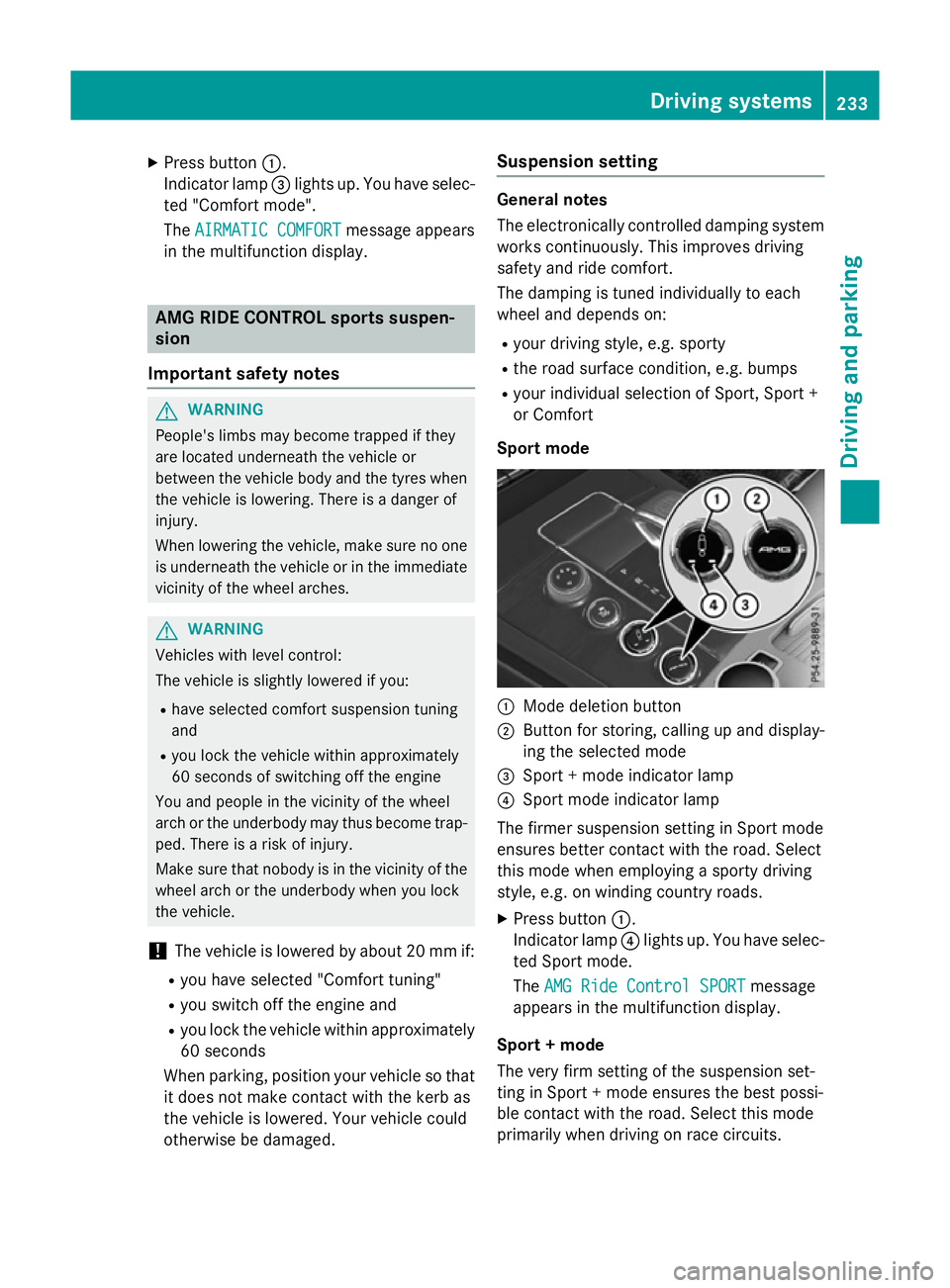
Sport mode :
Mode deletion button
; Button for storing, calling up and display-
ing the selected mode
= Sport +mode indicator lamp
? Sport mode indicator lamp
The firmer suspension setting in Sport mode
ensures better contact with the road. Select
this mode when employing asporty driving
style, e.g. on winding country roads.
X Press button :.
Indicator lamp ?lights up. You have selec-
ted Sport mode.
The AMG Ride Control SPORT AMG Ride Control SPORT message
appears in the multifunction display.
Sport +mode
The very firm setting of the suspension set-
ting in Sport +mode ensures the best possi-
ble contact with the road. Select this mode
primarily when driving on race circuits. Driving systems
233Driving and parking Z
Page 237 of 497
If indicator lamps
=and ?are off:
X Press button :twice.
Indicator lamps =and ?lightu p. You
have selected Sport +mode.
The AMG
AMG Ride
Ride Control
Control SPORT +
SPORT +message
appears in the multifunction display.
If indicator lamp ?lights up:
X Press button :once.
Second indicator lamp =lights up. You
have selected Sport +mode.
The AMG
AMG Ride
Ride Control
Control SPORT +
SPORT +message
appears in the multifunction display.
Comfort mode
When Comfort mode is selected, the handling
characteristics of yourv ehicle are more com-
fortable .Select this mode if you prefer amore
comfortable driving style. Select Comfort
mode also when driving fast on straight roads, e.g. on straight stretches of motorway.
X Press button :repeatedly until indicator
lamps =and ?go out.
You have selected Comfort mode.
The AMG Ride Control COMFORT
AMG Ride Control COMFORT mes-
sage appears in the multifunction display.
Storing and calling up settings
Once the suspension setting and drive pro-
gram have been selected, you can store and
call up yours ettings using AMG button ;.
X To store: press and hold AMG button ;
until you hear atone.
X To call up: press AMG button ;.
The stored suspension setting and drive
program are selected.
X To display: brieflypress AMG button ;.
Yours election appears in the multifunction
display. Vehicl
elevel Important safety notes
G
WARNING
People's limbs may become trapped if they
are located underneath the vehicle or
betwee nthe vehicle body and the tyres when
the vehicle is lowering. There is adanger of
injury.
When lowering the vehicle ,make sure no one
is underneath the vehicle or in the immediate vicinity of the wheela rches.
The vehicle may be lowered if you press the
suspension setting selector button or the
AMG button. The vehicle is lowered even if the
vehicle is at astandstill.
! If Sport or Sport
+suspension tuning has
been selected, the vehicle's ground clear-
ance decreases. Make sure that no objects
become trapped or that the vehicle has not
been damaged, for example, on the kerb.
i The vehicle level at the rear axle may
change visibly if you park the vehicle and
the outsid etemperature changes. If the
temperature drops, the vehicle level low-
ers; with an increase in temperature ,the
vehicle level rises.
Changing the rear axle level
This function is only available for the E63
AMG 4MATIC.
The vehicle level at the rear axle depends on
the selected suspension mode and the vehi-
cle speed.
The vehicle level at the rear axle changes
whiled riving depending on which suspension
mode is selected:
R Comfort: +10 mm
R Sport +and Sport: -15 mm
When changing from Comfort to Sport or
Sport +, the axle is lowered approximately
25 mm. When changing from Sport or Sport +
to Comfort, the axle is raiseda pproximately234
Driving systemsDriving and parking
Page 253 of 497
Distance
smeasured by PARKTRONI Cwill
also be opticall ydisplayed:
R as red or yellow brackets around the vehi-
cle symbo lintop view in split-screen mode
or
R at the bottom righ tasred or yellow brack-
ets around the vehicl esym bolinf ull-s creen
mode
Th elinet hicknes sand colou rofthe brackets
sho whow fart he vehicl eisfromano bject.
R yellow brackets with thi nlines:
PARKTRONI Cisactive
R yellow brackets with normal lines :an
object is present in close range of the vehi-
cle
R red line: an object is present in the imme-
diate close range of the vehicle
Important safety notes Th
e3 60° camera is onl yanaidand ma yshow
ad istorted view of obstacles, sho wthem
incorrectly or not at all. Th e360° camera is
not asubst itute for attentiv edriving.
Th er esponsibility for safe manoeuvring and
parking remains with you. Make sure that
there ar enopersons, animals or objects in
range whil emanoeuvring and parking.
Yo ua realways responsibl efor safety ,and
must always pa yattentio ntoyours urround-
ing sw henp arking and manoeuvring. This
applie stothe area sbehin d, in front of and
beside the vehicle. Yo ucould otherwise
endanger yourself and others.
Th e3 60° camera will not functio norwill
functio nonlyinal imited manner:
R if the doors ar eopen
R if the exterior mirrors ar efolde din
R if the boot lid/tailgate is open
R in heav yrain, sno worfog
R at night or in ver ydarkp laces
R if the camera sareexpose dtoveryb right
light
R if the area is li tbyfluorescent bulb sorLED
lighting (th edisplay mayflicker) R
if there is asudde nchange in temperature,
e.g .whend riving into aheatedg arag ein
winter
R if the camera lense saredirty or covered
R if the vehicl ecomponents in which the
camera sarefitte daredamaged. In this
event, have the camera positio nand setting
checked at aquali fied specialis tworkshop.
Do not us ethe 360° under such circumstan-
ces .You could otherwis einjure others or
damage objects when parking the vehicle.
Guid elines ar ealway sshown at roa dlevel.In
trailer mode, the guid elines ar eshown at the
level of the trailer coupling.
On vehicles with height-adjustabl echassis,
depending on technica lconditions ,leavi ng
the standard height can resul tin:
R inaccuracie sinthe guid elines
R inaccuracie sinthe displa yofgenerated
images (to pview)
Activatio nconditions Th
e3 60° camera imag ecan be displaye dif:
R your vehicl eisequippe dwitha3 60° cam-
era
R the key is in position 2in the ignition lock
R COMAND Online/Audi o20isswitched on
R the 360°camera
360 °camera functio niss witched on
Activatin gthe 360° camera X
Press the Øbutton in the centr econ-
sol efor longe rtha nt wo seconds.
Th ef ollowing appear sdepen ding on
whether transmission position Dor Ris
selected:
R as plit- screen with top view and the
imag efromt he front camera or
R as plit- screen with top view and the
imag efromt he reversing camera
or 250
Driving systemsDriving an
dparking
Page 270 of 497
To avoid hazardous situations:
R make sure to check the noseweight before
each journey
R use adrawbar noseweight as close as pos-
sible to the maximum noseweight
R do not exceed the maximum permissible
noseweight
R do not use anoseweight lower than the
minimum noseweight
When reversin gthe vehicle towards the
trailer, make sure there is nobody between
the trailer and the vehicle.
Couple and uncouple the trailer carefully. If
you do not couple the trailer to the towing
vehicle correctly, the trailer could become
detached.
Make sure that the following values are not
exceeded:
R the permissible trailer drawbar noseweight
R the permissible trailer load
R the permissible rear axle load of the towing
vehicle
R the maximum permissible gross vehicle
weight of both the towing vehicle and the
trailer
You will find the applicable permissible val-
ues, which must not be exceeded, in the vehi-
cle documents.
You will find the values approved by the man- ufacturer on the vehicle identification plates
and those for the towing vehicle under "Tech-
nical data" (Y page 484).
When towing atrailer, your vehicle's handling
characteristics will be different in comparison to when driving without atrailer.
The vehicle/trailer combination:
R is heavier
R is restricted in its acceleration and gradi-
ent-climbin gcapability
R has an increased braking distance
R is affected more by stron gcrosswinds
R demands more sensitive steering
R has alarger turnin gcircle This can impair the vehicle's handling char-
acteristics. Adapt your driving style accord-
ingly. Maintain
asafe distance. Drive care-
fully.
When towing atrailer, alway sadjust your
speed to the curren troad and weather con-
ditions. Do not exceed the maximum permis- sible speed for your vehicle/trailer combina-
tion. Notes on towing
atrailer
General notes Trailer towing is not permissible on the fol-
lowing models:
R E2 20 BlueTEC BlueEFFICIENCY Edition
R E1 80
R E63A MG
R E63A MG S-MODEL
R E63A MG 4MATIC
R E63A MG S-MODEL4 MATIC
i When towing
atrailer, set the tyre pres-
sure on the rear axle of the towing vehicle
for am aximum load; see the tyre pressure
table in the fuel filler flap (Y page 420).
Please notet hat when towing atrailer,
PARKTRONIC (Y page 235), Active Parking
Assist (Y page 239) and Blind Spot Assist
(Y page 257) are only available with limita-
tions, or not at all.
i On vehicles without level control, the
height of the ball coupling will alter accord-
ing to the load placed on the vehicle. If nec- essary, use atrailer with aheight-adjusta-
ble drawbar.
You will find fitting dimensions and loads
under "Technical data" (Y page 482).
Driving tips i
Observe the notes on ESP ®
trailer stabi-
lisation (Y page 86). Towing
atrailer
267Driving and parking Z
Page 286 of 497
An
ew route is calculated.
R Roa dnot mapped
Roa dnot mapped
The vehicl eposit ioni sinsid ethe area of the
digital ma pbutthe roa disnot recognised,
e.g .new roads ,car parks or private land.
R No route
No route
No route could be calculate dtothe selec-
ted destination.
R O:y ouhave reache dthe destination or an
intermediate destination. Audio menu
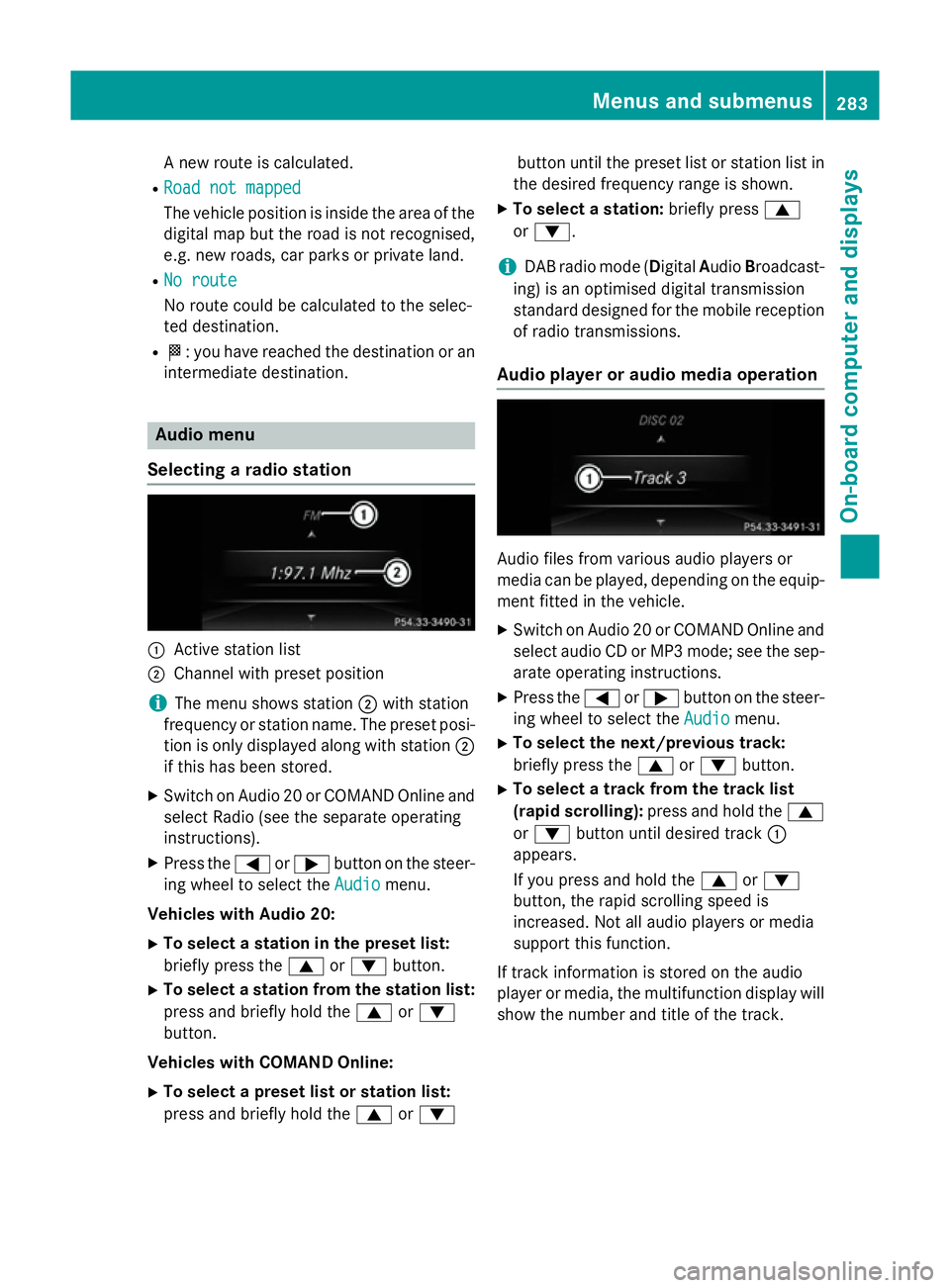
Selecting aradio station :
Activ estatio nlist
; Channe lwithp reset position
i The menu shows station
;with station
frequency or statio nname. The preset posi-
tio niso nlyd isplayed along with station ;
if thi shasbeen stored.
X Switch on Audio 20 or COMAND Online and
select Radi o(seet he separate operating
instructions).
X Press the =or; button on the steer-
ing whee ltoselect the Audio Audiomenu.
Vehicle swithA udio 20:
X To select astation in the preset list:
briefl ypress the 9or: button.
X To select astation from the station list:
press and briefl yholdt he 9 or:
button.
Vehicle swithC OMAN DOnline:
X To select apreset list or station list:
press and briefl yholdt he 9 or: button unti
lthe preset list or statio nlistin
the desired frequency range is shown.
X To select astation: brieflypress 9
or :.
i DAB radi
omode(Digit alAudio Broadcast-
ing )isano ptimised digital transmission
standard designe dfor the mobil ereception
of radi otransmissions.
Audio player or audi omediaoperation Audio files fro
mvarious audi oplayer sor
media can be played ,depen ding on the equip-
ment fitte dinthe vehicle.
X Switch on Audio 20 or COMAND Online and
select audi oCDorMP3 mode; see the sep-
arate operating instructions.
X Press the =or; button on the steer-
ing whee ltoselect the Audio
Audiomenu.
X To select the next/previous track:
briefl ypress the 9or: button.
X To select atrack fro mthe track list
(rapi dscrolling): press and hol dthe 9
or : button unti ldesir ed track :
appears.
If yo upress and hol dthe 9 or:
button, the rapi dscrolling spee dis
increased .Not al laudio players or media
support thi sfun ction.
If track informatio niss tored on the audio
player or media ,the multifunctio ndisplay will
sho wthe numbe rand titl eofthe track. Menus and submenus
283On-board computer and displays Z
Page 295 of 497
X
Press the :or9 button to set the
colour to SOLAR SOLAR,NEUTRAL NEUTRAL orPOLAR
POLAR.
X Press the aor% button to save the
setting.
Activating/deactivating the surround
lighting and exterior lighting delayed
switch-off
X Press the =or; button on the steer-
ing wheel to select the Settings
Settings menu.
X Press the :or9 button to select the
Light Light submenu.
X Press ato confirm.
X Press the :or9 button to select the
Surround lighting
Surround lighting function.
If the Surround
Surround lighting
lightingfunction is acti-
vated, the light cone and the area around
the vehicle are displayed in orange in the
multifunction display.
X Press the abutton to save the setting.
Deactivating delayed switch-off of the exte-
rior lighting temporarily:
X Before leaving the vehicle, turn the key to
position 0in the ignition lock.
X Turn the key to position 2in the ignition
lock.
The exterior lighting delayed switch-off is
deactivated.
Delayed switch-off of the exterior lighting is
reactivated the next time you start the
engine.
If you have activated the Surround light‐
Surround light‐
ing
ing function and the light switch is set to
Ã,t he following functions are activated
when it is dark:
R surround lighting: the exterior lighting
remains lit for 40 seconds after unlocking
with the key. If you start the engine, the
surround lighting is switched off and auto-
matic headlamp mode is activated
(Y page 143).
R exterior lighting delayed switch-off: the
exterior lighting remains lit for 60 seconds
after the engine is switched off. If you close all the doors and the boot lid/tailgate, the
exterior lighting goes off after 15 seconds.
i Dependin
gonyour vehicle's equipment,
when the surround lighting and delayed
switch-off exterior lighting are on, the fol-
lowing light up:
R Side lamps
R Surround lighting in the exterior mirrors
Activating/deactivating the interior light-
ing delayed switch-off
If you activat ethe Light. delay Switch Light. delay Switch
off
off function, the interior lighting remains on
for 20 seconds after you remove the key from the ignition lock.
X Press the =or; button on the steer-
ing wheel to select the Settings
Settings menu.
X Press the :or9 button to select the
Light
Light submenu.
X Press ato confirm.
X Press the :or9 button to select the
Light. delay
Light. delay function.
If the Light. delay
Light. delay function has been
switched on, the vehicle interior is dis-
played in orange in the multifunction dis-
play.
X Press the abutton to save the setting.
Vehicle Setting permanent SPEEDTRONIC
X Press the =or; button on the steer-
ing wheel to select the Settings Settingsmenu.
X Press the :or9 button to select the
Vehicle
Vehicle submenu.
X Press ato confirm.
X Press :or9 to select the Limit
Limit
speed (winter tyres):
speed (winter tyres): function.
You will see the curren tsetting.
X Press ato confirm.
X Press the :or9 button to adjust
permanen tSPEEDTRONIC in increment sof
ten (240 km/h 240 km/h to160 km/h
160 km/h). The Off
Offset- 292
Menus and submenusOn-board computer and displays
Page 299 of 497
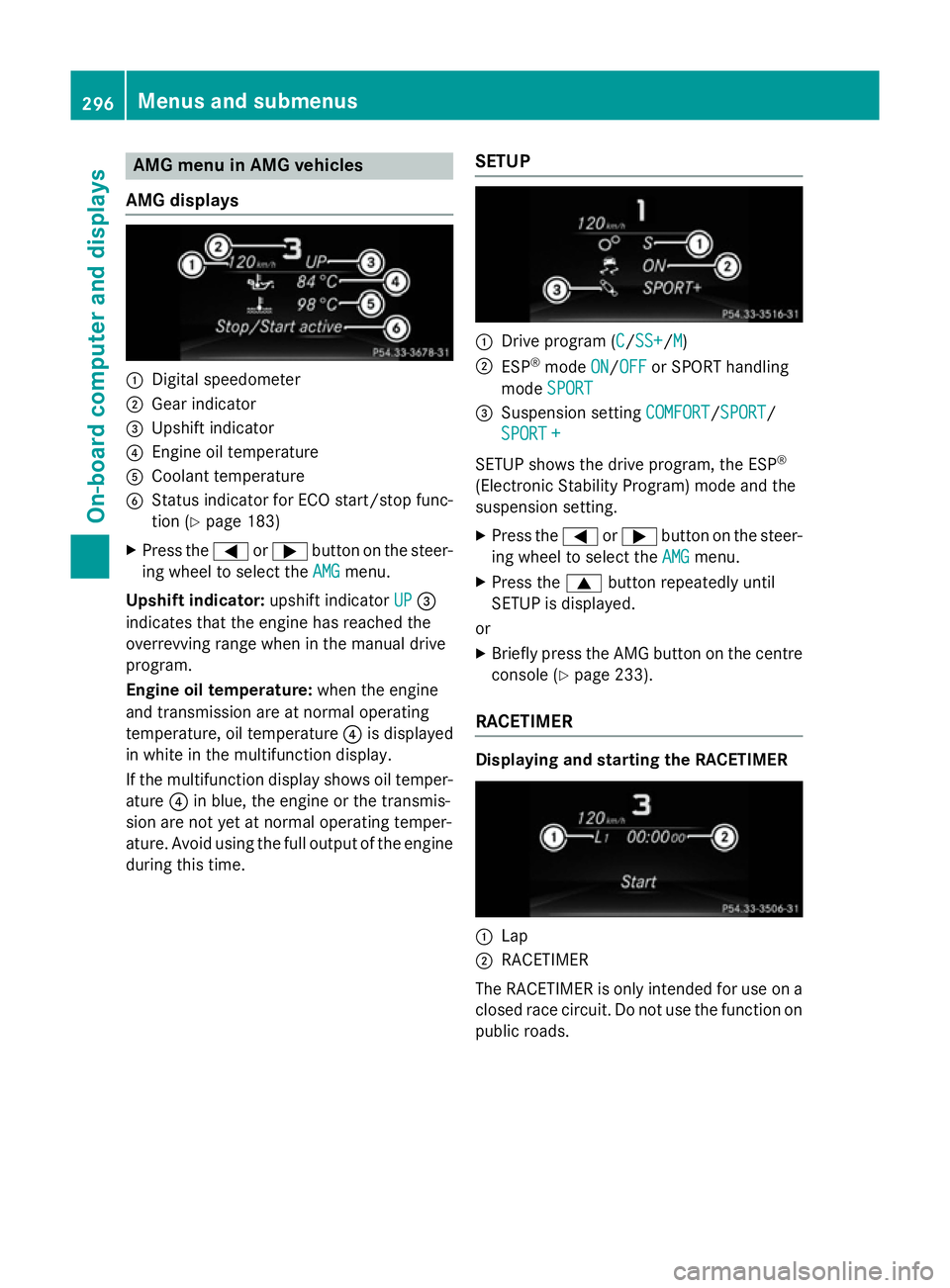
AMG men
uinAMG vehicles
AMG displays :
Digital speedometer
; Gear indicator
= Upshif tindicator
? Engin eoil temperature
A Coolan ttem perature
B Status indicator for ECO start/sto pfunc-
tion (Y page 183)
X Press the =or; buttononthesteer-
ing whee ltos elect the AMG
AMG menu.
Upshift indicator: upshift indicatorUP
UP=
indicates that th eengineh as reached the
overrevving range when in th emanual drive
program.
Engin eoil temperature: when theengine
and transmission are at normal operating
temperature, oil temperature ?is displayed
in whit einthemultifunction display.
If th emultifunction display shows oil temper-
ature ?in blue, th eengineort hetransmis-
sion are no tyet at normal operating temper-
ature. Avoid usin gthe full output of th eengine
during this time. SETUP :
Drive program (C C/SS+ SS+ /MM)
; ESP ®
mode ON
ON/OFF
OFF or SPORT handling
mode SPORT
SPORT
= Suspension setting COMFORT
COMFORT/SPORT
SPORT/
SPORT +
SPORT +
SETUP shows th edrivep rogram ,the ESP ®
(Electronic Stabilit yProgram )modea nd the
suspension setting.
X Press the =or; buttononthesteer-
ing whee ltos elect the AMG
AMG menu.
X Press the 9buttonrepeatedly until
SETUP is displayed.
or
X Briefly press th eAMG butto nont hecentre
console (Y page 233).
RACETIMER Displaying and starting th
eRACETIMER :
Lap
; RACETIMER
The RACETIMER is only intended for use on a closed rac ecircuit .Don otuse th efunction on
public roads. 296
Menu
sand sub menusOn-boardcomputer an ddisplays