boot MERCEDES-BENZ E-CLASS SALOON 2015 Owner's Manual
[x] Cancel search | Manufacturer: MERCEDES-BENZ, Model Year: 2015, Model line: E-CLASS SALOON, Model: MERCEDES-BENZ E-CLASS SALOON 2015Pages: 497, PDF Size: 16.23 MB
Page 208 of 497
Problem
Possible causes/consequences and
M
MSolutions The key battery is discharged or nearly discharged.
X Unlock the vehicle using the emergency key element
(Y page 96).
X Open the boot lid or the tailgate.
X Manuallyu nlock the fuel filler flap using the emergency release
(Y page 202). The fuel filler flap is unlocked, but the opening mechanism is jam-
med.
X Consult aqualified specialist workshop. Parking
Important safety notes
G
WARNING
Flammable material such as leaves, grass or
twigs may ignite if they come into contact with hot parts of the exhaust system or exhaust
gas flow. There is arisk of fire.
Park the vehicle so that no flammable mate-
rial can come into contact with hot vehicle
components. In particular, do not park on dry grassland or harvested grain fields. G
WARNING
If you switch off the ignition while driving,
safety-relevant functions are only available
with limitations, or not at all. This could affect, for example, the power steering and the brake
boosting effect.Y ou will require considerably
more effort to steer and brake. There is arisk
of an accident.
Do not switch off the ignition while driving. G
WARNING
If you leave children unattended in the vehi-
cle, they may be able to set the vehicle in
motion if, for example, they:
R release the parking brake
R shift the automatic transmission out of park
position Por shift manual transmission into
neutral
R start the engine
In addition, they may operate vehicle equip-
ment and become trapped. There is arisk of
an accident and injury.
When leaving the vehicle, always take the key with you and lock the vehicle. Never leave
children unattended in the vehicle.
! Always secure the vehicle correctly
against rolling away.O therwise, the vehicle
or its drivetrain could be damaged.
To ensure that the vehicle is safeguarded
against rolling away unintentionally:
R the parking brake must be applied
R on vehicles with manual transmission,
engage 1st gear or reverse gear
R on vehicles with automatic transmission,
the transmission must be in position Pand Parking
205Driving and parking Z
Page 238 of 497
25 mm
.The leve lchange also occurs when
stationary.
If you drive faster than 170 km/h, the rear
axle leve lisset to amiddle level. Thi sincrea-
ses road safety and reduces airr esistance. If
you then drive slower than 150 km/h, the
leve loft he rear axle is again adjusted to cor-
respond to the selected suspension mode.
Load compensation
The vehicle can compensate differences in
the vehicle leve lbyraising or lowering the
rear axle .Thisist he case ,for example, when
people get out of the vehicle or whe nlug gage
is removed.
Al oadc ompensation occurs if:
R ad oor, the boot lid or the tailgate is opened
R the parked vehicle is unlocked
The engine needs to be running for larger level
changes. 4MATIC (permanent all-whee
ldrive)
If you fai ltoadapt you rdriving style, 4MATIC
can neither reduce the risk of an accident nor override the laws of physics. 4MATIC cannot
take account of road ,weather and traffic con-
ditions. 4MATIC is only an aid. You are
responsibl efor the distance to the vehicle in
front, for vehicle speed, for braking in good
time, and for staying in lane.
If ad rive wheel spins due to insufficient grip:
R whe npulling away,o nly depress the accel-
erato rpedal as far as is necessary.
R accelerate les swhend riving.
! Never tow the vehicle with one axle
raised. Thi smay damage the transfer case.
Damag eofthis sort is not covered by the
Mercedes-Benz implied warranty. All
wheels must remain eithe ronthe ground or
be fully raised. Observe the instructions for towing the vehicle with allw heels in full
contact with the ground.
i In wintry driving conditions, the maximum
effect of 4MATIC can only be achieved if you use winter tyres
(M+S tyres), with snow
chains if necessary.
4MATIC ensures that allf our wheels are per-
manently driven. Together with ESP ®
,it
improves the traction of you rvehicle when-
ever adrive wheel spins due to insufficient
grip. PARKTRONIC
Important safety notes PARKTRONI
Cisanelectronic parking aidw ith
ultrasoni csensors .Itmonitors the area
around you rvehicle using six sensors in the
front bumper and six sensors in the rear
bumper. PARKTRONI Cindicates visually and
audibly the distance between you rvehicle
and an object.
PARKTRONI Cisonly an aid. It is not asubsti-
tute for you rattention to the immediate sur-
roundings. The responsibility for safe
manoeuvring and parking remains with you.
Make sure that there are no persons, animals
or objects in range while manoeuvring and
parking.
! When parking, pay particular attention to
objects above or below the sensors ,such
as flower pots or trailer drawbars.
PARKTRONI Cdoes not detect such objects
whe nthey are in the immediate vicinity of
the vehicle. You coul ddamage the vehicle
or the objects.
The sensors may not detect snow and
objects which absorb ultrasoni csources.
Ultrasonic sources, such as an automatic
car wash, alorry's compressed-air brakes
or ap neumatic drill, coul dcause
PARKTRONI Ctomalfunction.
PARKTRONI Cmay not function correctly on
uneve nterrain. Driving systems
235Driving and parking Z
Page 248 of 497
Important safety notes
The reversing camera is only an aid. It is no
ta
substitut efor your attention to th eimmediate
surroundings. The responsibilit yfor safe
manoeuvrin gand parking remains wit hyou.
Mak esure that there are no persons, animals
or objects in range while manoeuvrin gand
parking.
Under th efollowin gcircumstances, the
reversing camera will no tfunction ,orwill
function in alimited manner:
R if th eboot lid or tailgat eisopen
R in heav yrain ,sno worf og
R at night or in ver ydark places
R if th ecamera is expose dtoveryb right light
R if th earea is lit by fluorescent bulbs or LED
lighting (the display may flicker)
R if there is asudde nchang eint emperature,
e.g. when driving int oaheated garag ein
winter
R if th ecamera len sisdirtyoro bstructed.
Observ ethe note sonc leaning
(Y page 390)
R if th erear of your vehicl eisdamaged. In this
case, have th ecamera position and setting
checke dataq ualified specialist workshop
The field of vision and other function softhe
reversing camera may be restricted due to
additional accessories on th erear of th evehi-
cle (e.g. licence plat eholder, bicycle rack).
On vehicles wit hheight-adjustable chassis,
leaving th estandard height can result in inac-
curacie sintheguide lines, depending on
technical conditions.
i The reversing camera is protected from
raindrops and dust by mean sofaflap.
When th ereversing camera is activated,
this flap opens.
The flap closes again when:
R you have finishe dthe manoeuvrin gproc-
ess
R you switch off th eengine
R you open th eboot Se
et he note sonc leaning (Y page 390).
Fo rtechn ical reasons, th eflap may remain
open briefly after th ereversing camera has
been deactivated.
Activating/deactivating th ereversing
camera X
To activate: makesure that th ekeyis in
position 2in th eignition lock.
X Mak esure that the ActivationbyR
Activatio nbyR
gear
gear function is selected in Audio 20 or
COMAND Online; see th eDigital Owner's
Manual.
X Engage revers egear.
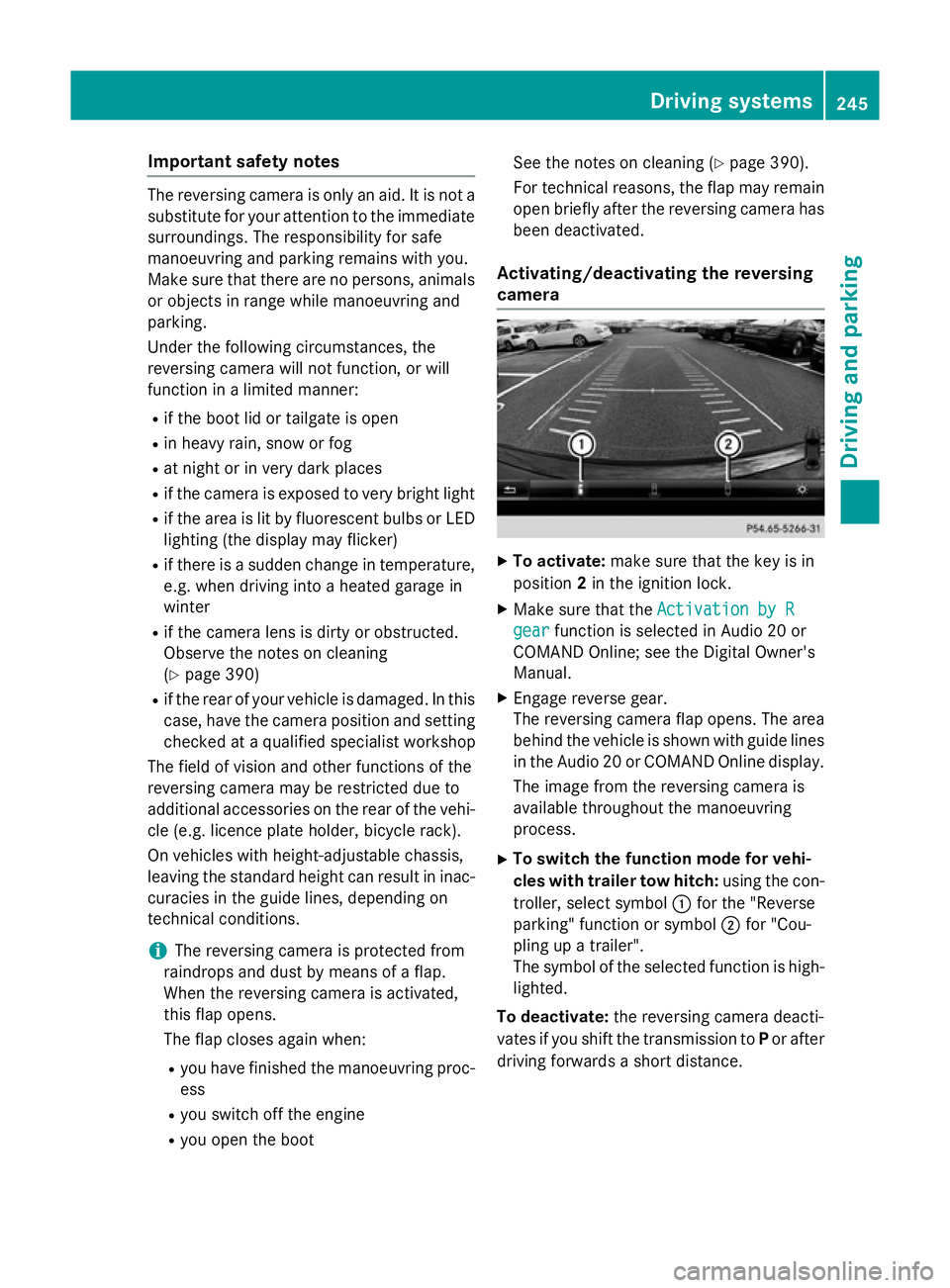
The reversing camera flap opens. The area
behind th evehicl eiss hown wit hguide lines
in th eAudio 20 or COMAND Onlin edisplay.
The imag efromt hereversing camera is
available throughout th emanoeuvring
process.
X To switch th efun ction mod efor vehi-
cles with traile rtow hitch: usingthe con-
troller ,select symbol :for th e"Reverse
parking "function or symbol ;for "Cou-
plin gupat railer".
The symbol of th eselected function is high-
lighted.
To deactivate: ther eversing camera deacti-
vates if you shif tthe transmission to Por after
driving forwards ashort distance. Driving systems
245Driving and parking Z
Page 253 of 497
Distance
smeasured by PARKTRONI Cwill
also be opticall ydisplayed:
R as red or yellow brackets around the vehi-
cle symbo lintop view in split-screen mode
or
R at the bottom righ tasred or yellow brack-
ets around the vehicl esym bolinf ull-s creen
mode
Th elinet hicknes sand colou rofthe brackets
sho whow fart he vehicl eisfromano bject.
R yellow brackets with thi nlines:
PARKTRONI Cisactive
R yellow brackets with normal lines :an
object is present in close range of the vehi-
cle
R red line: an object is present in the imme-
diate close range of the vehicle
Important safety notes Th
e3 60° camera is onl yanaidand ma yshow
ad istorted view of obstacles, sho wthem
incorrectly or not at all. Th e360° camera is
not asubst itute for attentiv edriving.
Th er esponsibility for safe manoeuvring and
parking remains with you. Make sure that
there ar enopersons, animals or objects in
range whil emanoeuvring and parking.
Yo ua realways responsibl efor safety ,and
must always pa yattentio ntoyours urround-
ing sw henp arking and manoeuvring. This
applie stothe area sbehin d, in front of and
beside the vehicle. Yo ucould otherwise
endanger yourself and others.
Th e3 60° camera will not functio norwill
functio nonlyinal imited manner:
R if the doors ar eopen
R if the exterior mirrors ar efolde din
R if the boot lid/tailgate is open
R in heav yrain, sno worfog
R at night or in ver ydarkp laces
R if the camera sareexpose dtoveryb right
light
R if the area is li tbyfluorescent bulb sorLED
lighting (th edisplay mayflicker) R
if there is asudde nchange in temperature,
e.g .whend riving into aheatedg arag ein
winter
R if the camera lense saredirty or covered
R if the vehicl ecomponents in which the
camera sarefitte daredamaged. In this
event, have the camera positio nand setting
checked at aquali fied specialis tworkshop.
Do not us ethe 360° under such circumstan-
ces .You could otherwis einjure others or
damage objects when parking the vehicle.
Guid elines ar ealway sshown at roa dlevel.In
trailer mode, the guid elines ar eshown at the
level of the trailer coupling.
On vehicles with height-adjustabl echassis,
depending on technica lconditions ,leavi ng
the standard height can resul tin:
R inaccuracie sinthe guid elines
R inaccuracie sinthe displa yofgenerated
images (to pview)
Activatio nconditions Th
e3 60° camera imag ecan be displaye dif:
R your vehicl eisequippe dwitha3 60° cam-
era
R the key is in position 2in the ignition lock
R COMAND Online/Audi o20isswitched on
R the 360°camera
360 °camera functio niss witched on
Activatin gthe 360° camera X
Press the Øbutton in the centr econ-
sol efor longe rtha nt wo seconds.
Th ef ollowing appear sdepen ding on
whether transmission position Dor Ris
selected:
R as plit- screen with top view and the
imag efromt he front camera or
R as plit- screen with top view and the
imag efromt he reversing camera
or 250
Driving systemsDriving an
dparking
Page 254 of 497
X
Press the Øbutton in the centre con-
sole.
The vehicle menu appears.
X Select 360° camera
360° camera and press7to con-
firm.
The following appears depending on
whether transmission position Dor Ris
selected:
R as plit-screen with top view and the
image from the frontc amera or
R as plit-screen with top view and the
image from the reversin gcamera
Activating the 360° camera using
reverse gear You can show images from the 360° camera
automatically by engaging reverse gear.
X Make sure that the key is in position 2in the
ignition lock.
X Make sure that the ActivationbyR
Activatio nbyR
gear
gear function is selected in COMAND
Online/Audio 20 (see the separate
COMAND Online/Audio 20 operating
instructions).
X To show the 360° camera image: engage
reverse gear.
The area behind the vehicle is shown in the
COMAND/Audio 20 display in split-screen
mode. You see the top view of the vehicle
and the image from the reversin gcamera.
Selecting the split-screen and full
screen displays Switching between split screen views
X To switch to the line with the vehicle icons:
slide 5the controller.
X To select one of the vehicle icons: turn
3 the controller.
X To switch to 180° view
180° view: turn3 the
controller to select 180° view 180° viewand press
7 to confirm.
i The
180° view
180° view option is only availabl ein
the following views: R
Top view with image from the reversing
camera
R Top view with image from the frontc am-
era
Displays in the COMAND/Audio 20 dis-
play Important safety notes
The camera system may show
adistorted
view of obstacles or show them incorrectly or
not at all. Obstacles are not shown by the
system in the following locations:
R under the fronta nd rear bumpers
R very close to the fronta nd rear bumpers
R in the area immediately above the tailgate
handle/boot lid handle
R very close to the exterior mirrors
R in the transitional areas between the vari-
ous cameras in the virtual top view
! Objects not at ground level may appear to
be further away than they actually are, e.g.:
R the bumper of aparked vehicle
R the drawbar of atrailer
R the ball coupling of atrailer tow hitch
R the rear section of an HGV
R as lanted post
Use the guidelines only for orientation.
Approach object snofurther than the bot-
tom-most guideline. Driving systems
251Driving and parking Z
Page 272 of 497
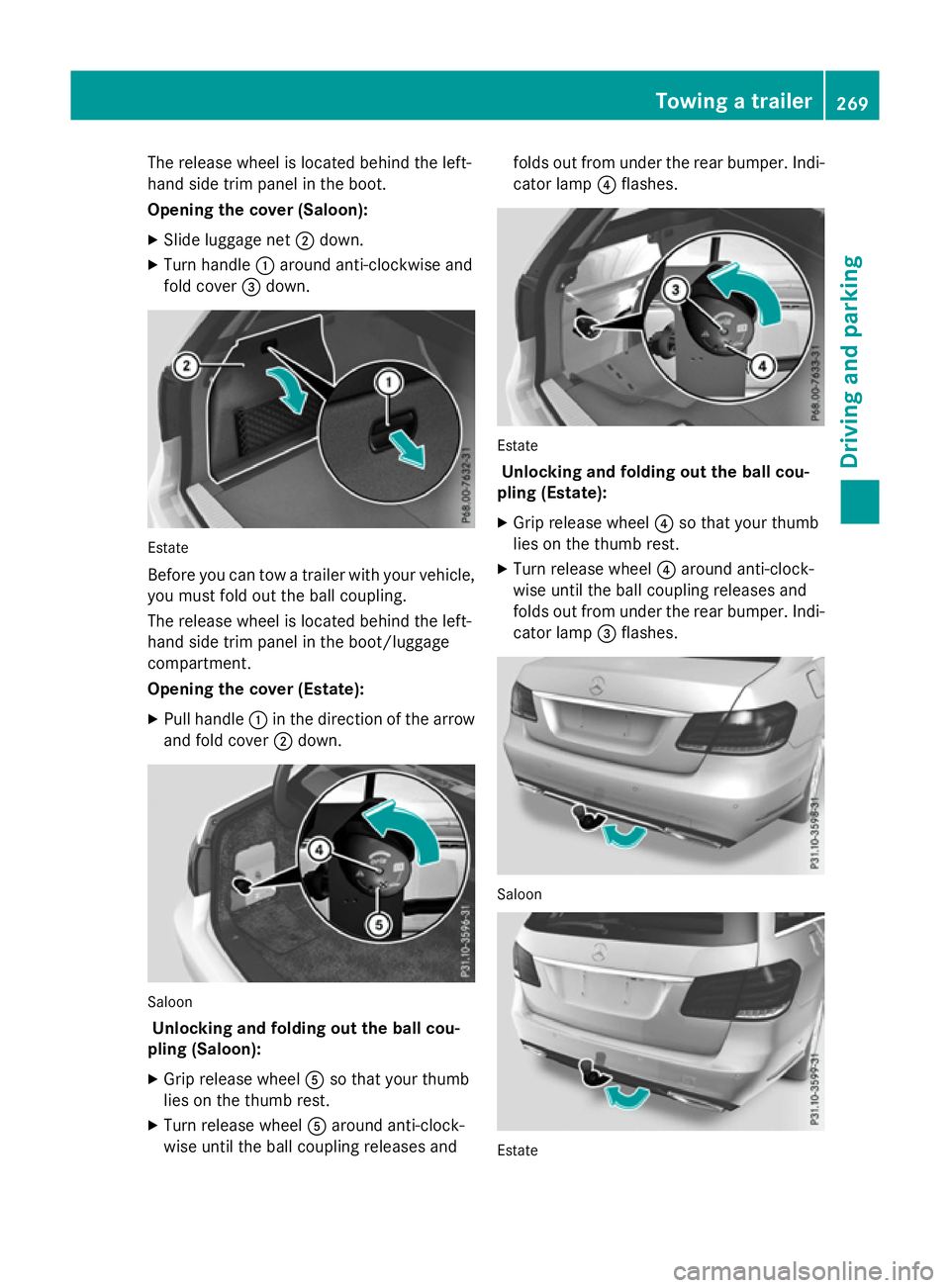
The release wheel is located behind the left-
hand side trim panel in the boot.
Opening the cover (Saloon):
X Slide luggage net ;down.
X Turn handle :around anti-clockwise and
fold cover =down. Estate
Before you can tow
atrailer with your vehicle,
you must fold out the ball coupling.
The release wheel is located behind the left-
hand side trim panel in the boot/luggage
compartment.
Opening the cover (Estate):
X Pull handle :in the direction of the arrow
and fold cover ;down. Saloon
Unlocking and folding out the ball cou-
pling (Saloon):
X Grip release wheel Aso that your thumb
lies on the thumb rest.
X Turn release wheel Aaround anti-clock-
wise until the ball coupling releases and folds out from under the rear bumper. Indi-
cator lamp ?flashes. Estate
Unlocking and folding out the ball cou-
pling (Estate):
X Grip release wheel ?so that your thumb
lies on the thumb rest.
X Turn release wheel ?around anti-clock-
wise until the ball coupling releases and
folds out from under the rear bumper. Indi- cator lamp =flashes. Saloon
Estate Towing
atrailer
269Driving and parking Z
Page 274 of 497
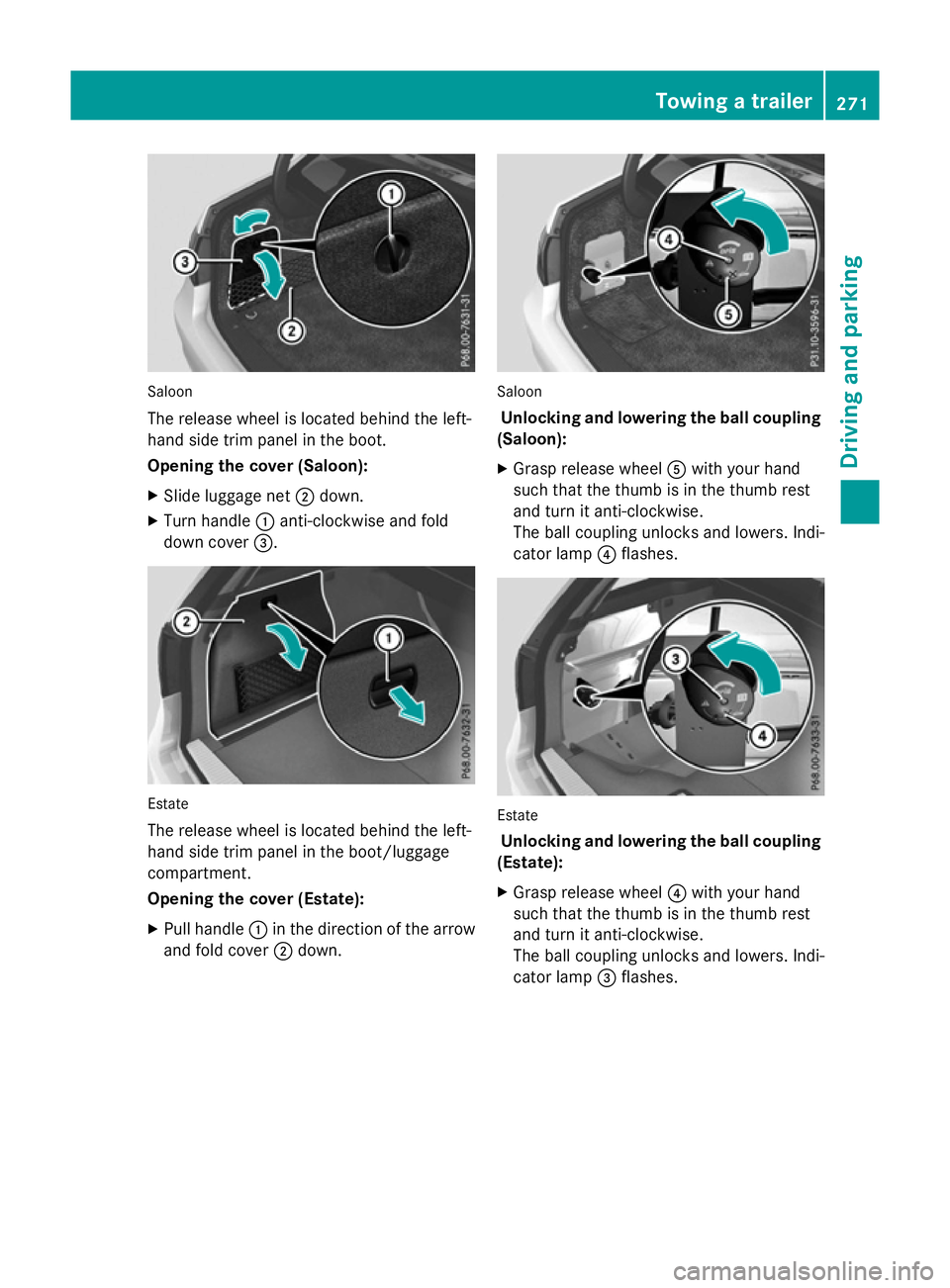
Saloon
The release wheel is located behind the left-
hand sid etrim panel in the boot.
Opening the cover (Saloon):
X Slide luggage net ;down.
X Turn handle :anti-clockwise and fold
dow ncover =. Estate
The release wheel is located behind the left-
hand sid etrim panel in the boot/luggage
compartment.
Opening the cover (Estate):
X Pull handle :in the direction of the arrow
and fol dcover ;down. Saloon
Unlockin gand lowering the bal lcou pling
(Saloon):
X Grasp release wheel Awith your hand
such that the thum bisinthe thum brest
and turn it anti-clockwise.
The ball coupling unlocks and lowers. Indi-
cator lamp ?flashes. Estate
Unlockin gand lowering the bal lcou pling
(Estate):
X Grasp release wheel ?with your hand
such that the thum bisinthe thum brest
and turn it anti-clockwise.
The ball coupling unlocks and lowers. Indi-
cator lamp =flashes. Towin
gatrailer
271Drivingand parking Z
Page 295 of 497
X
Press the :or9 button to set the
colour to SOLAR SOLAR,NEUTRAL NEUTRAL orPOLAR
POLAR.
X Press the aor% button to save the
setting.
Activating/deactivating the surround
lighting and exterior lighting delayed
switch-off
X Press the =or; button on the steer-
ing wheel to select the Settings
Settings menu.
X Press the :or9 button to select the
Light Light submenu.
X Press ato confirm.
X Press the :or9 button to select the
Surround lighting
Surround lighting function.
If the Surround
Surround lighting
lightingfunction is acti-
vated, the light cone and the area around
the vehicle are displayed in orange in the
multifunction display.
X Press the abutton to save the setting.
Deactivating delayed switch-off of the exte-
rior lighting temporarily:
X Before leaving the vehicle, turn the key to
position 0in the ignition lock.
X Turn the key to position 2in the ignition
lock.
The exterior lighting delayed switch-off is
deactivated.
Delayed switch-off of the exterior lighting is
reactivated the next time you start the
engine.
If you have activated the Surround light‐
Surround light‐
ing
ing function and the light switch is set to
Ã,t he following functions are activated
when it is dark:
R surround lighting: the exterior lighting
remains lit for 40 seconds after unlocking
with the key. If you start the engine, the
surround lighting is switched off and auto-
matic headlamp mode is activated
(Y page 143).
R exterior lighting delayed switch-off: the
exterior lighting remains lit for 60 seconds
after the engine is switched off. If you close all the doors and the boot lid/tailgate, the
exterior lighting goes off after 15 seconds.
i Dependin
gonyour vehicle's equipment,
when the surround lighting and delayed
switch-off exterior lighting are on, the fol-
lowing light up:
R Side lamps
R Surround lighting in the exterior mirrors
Activating/deactivating the interior light-
ing delayed switch-off
If you activat ethe Light. delay Switch Light. delay Switch
off
off function, the interior lighting remains on
for 20 seconds after you remove the key from the ignition lock.
X Press the =or; button on the steer-
ing wheel to select the Settings
Settings menu.
X Press the :or9 button to select the
Light
Light submenu.
X Press ato confirm.
X Press the :or9 button to select the
Light. delay
Light. delay function.
If the Light. delay
Light. delay function has been
switched on, the vehicle interior is dis-
played in orange in the multifunction dis-
play.
X Press the abutton to save the setting.
Vehicle Setting permanent SPEEDTRONIC
X Press the =or; button on the steer-
ing wheel to select the Settings Settingsmenu.
X Press the :or9 button to select the
Vehicle
Vehicle submenu.
X Press ato confirm.
X Press :or9 to select the Limit
Limit
speed (winter tyres):
speed (winter tyres): function.
You will see the curren tsetting.
X Press ato confirm.
X Press the :or9 button to adjust
permanen tSPEEDTRONIC in increment sof
ten (240 km/h 240 km/h to160 km/h
160 km/h). The Off
Offset- 292
Menus and submenusOn-board computer and displays
Page 345 of 497
Useful information
i This Owner's Manual describes all mod-
els, series and optional equipment for your
vehicle that were available at the time of
going to press. National variation sare pos-
sible. Not ethat your vehicle may not be
equipped with all of the function sdescri-
bed. This is also the case for system sand
function srelevan ttosafety.
i Read the information on qualified special-
ist workshops: (Y page 27). Stowage areas
Loading guidelines
G
WARNING
If objects, luggage or loads are not secured or not secured sufficiently, they could slip, tip
over or be flung around and thereby hit vehicle
occupants .There is arisk of injury, especially
when brakin gorabruptly changing directions.
Always stor eobjects so that they cannot be
flung around. Secure objects, luggage or
loads against slipping or tippin gbefore the
journey. G
WARNING
Combustion engines emit poisonous exhaust
gases such as carbon monoxide. Exhaust
gases can enter the vehicle interior if the boot
lid/tailgat eisopen when the engin eisrun-
ning, especially if the vehicle is in motion.
There is arisk of poisoning.
Always switc hoff the engin ebefore opening
the boot lid/tailgate. Never drive with the
boot lid/tailgat eopen. G
WARNING
The exhaust tail pipe and tail pipe trim can
becom every hot. If you come int ocontact
with thes eparts of the vehicle, you could burn
yourself. There is arisk of injury. Always be particularly careful around the
exhaust tail pipe and the tail pipe trim .Allow
thes ecomponents to cool down before touch-
ing them.
The handling characteristic sofaladen vehi-
cle are dependen tonthe distribution of the
load within the vehicle. For this reason ,you
should observ ethe following notes when
transporting aload:
R neve rexceed the maximum permissible
gross vehicle weight or the permissible axle loads for the vehicle (includin goccupants).
R the boot/luggage compartment is the pre-
ferred place to stor eobjects.
R position heavy loads as far forwards as pos-
sible and as low down in the boot/luggagecompartment as possible.
R the load must not protrude above the upper
edge of the seat backrests.
R always place the load against the rear or
fron tseat backrests .Make sure that the
seat backrests are securely locked into
place.
R always place the load behind unoccupied
seats if possible.
R use the lashing eyelets and the luggage
net stot ransport loads and luggage.
R only use lashing eyelets and fastenin gcom-
ponents that are suitable for the weight and size of the load.
R when transporting objects in the luggage
compartment,t he combined luggage cover
and net must always be installed (luggage
compartment cove rand safet ynet).
R secure the load with sufficiently strong and
wear-resistan tlashing material. Pad sharp
edges for protection.
i Load restraint
sare available at any quali-
fied specialist workshop, e.g. aMercedes-
Ben zService Centre. 342
Stowage areasStowing and features
Page 346 of 497
Stowage compartments
Important safety notes G
WARNING
If objectsint he passenger compartmen tare
stowed incorrectly, they can slide or be
thrown around and hit vehicle occupants.
There is arisk of injury, particularly in the
event of sudden braking or asudden change
in direction.
R Always stow objectssot hat they cannot be
thrown around in such situations.
R Always make sure that objectsdon ot pro-
trude from stowage spaces, luggage nets or stowage nets.
R Close the lockable stowage spaces while
driving.
R Always stow and secure heavy, hard, poin-
ted, sharp-edged, fragile or bulky objectsin
the boot/luggage compartment.
Observe the loading guidelines (Y page 342).
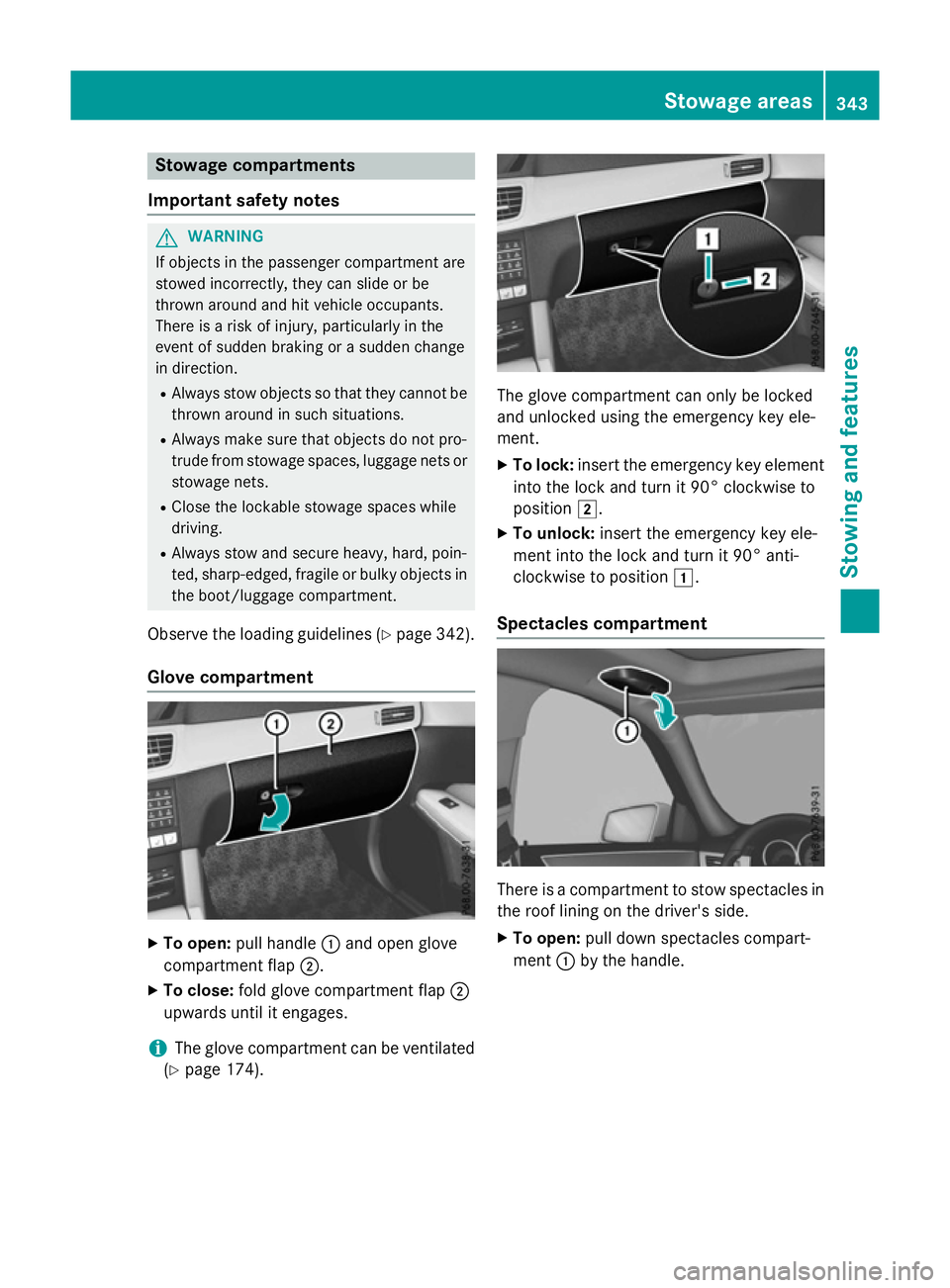
Glove compartment X
To open: pull handle :and open glove
compartmen tflap ;.
X To close: fold glove compartmen tflap ;
upwards until it engages.
i The glove compartmen
tcan be ventilated
(Y page 174). The glove compartmen
tcan only be locked
and unlocked using the emergency key ele-
ment.
X To lock: insert the emergency key element
into the lock and turn it 90° clockwise to
position 2.
X To unlock: insert the emergency key ele-
ment into the lock and turn it 90° anti-
clockwise to position 1.
Spectacles compartment There is
acompartmen ttostow spectacles in
the roof lining on the driver's side.
X To open: pull down spectacles compart-
ment :by the handle. Stowage areas
343Stowing and features Z