tow MERCEDES-BENZ E-CLASS SALOON 2015 Owner's Guide
[x] Cancel search | Manufacturer: MERCEDES-BENZ, Model Year: 2015, Model line: E-CLASS SALOON, Model: MERCEDES-BENZ E-CLASS SALOON 2015Pages: 497, PDF Size: 16.23 MB
Page 191 of 497
Problem
Possible causes/consequences and
M
MSolutions Vehicles with
apetrol
engine:
The engine is not run-
ning smoothly and is
misfiring. There is
amalfunction in the engine electronics or in amechanical
componentoft he engine management system.
X Only depress the accelerator pedal slightly.
Otherwise, non-combusted fuel may get into the catalytic con-
verter and damage it.
X Have the cause rectified immediately at aqualified specialist
workshop. The coolant tempera-
ture display is showing
more than 120 †. The
coolant warning lamp
may also be on and a
warning tone may
sound. The coolant level is too low. The coolant is too hot and the engine
is no longer being cooled sufficiently.
X Stop as soon as possible and allow the engine and the coolant to
cool down.
X Check the coolant level (Y page 382). Observe the warning
notes as you do so and top up the coolant if necessary. If the coolant level is correct,t
he engine radiator fan may be faulty.
The coolant is too hot and the engine is no longer being cooled
sufficiently.
X If the coolant temperature is below 120 †, you can continue
driving to the nearest qualified specialist workshop.
X Avoid heavy loads on the engine as you do so, e.g. driving in
mountainous terrain and stop-start traffic. Manual transmission
Gear lever
! Only engage gear when the clutch pedal is
depressed.
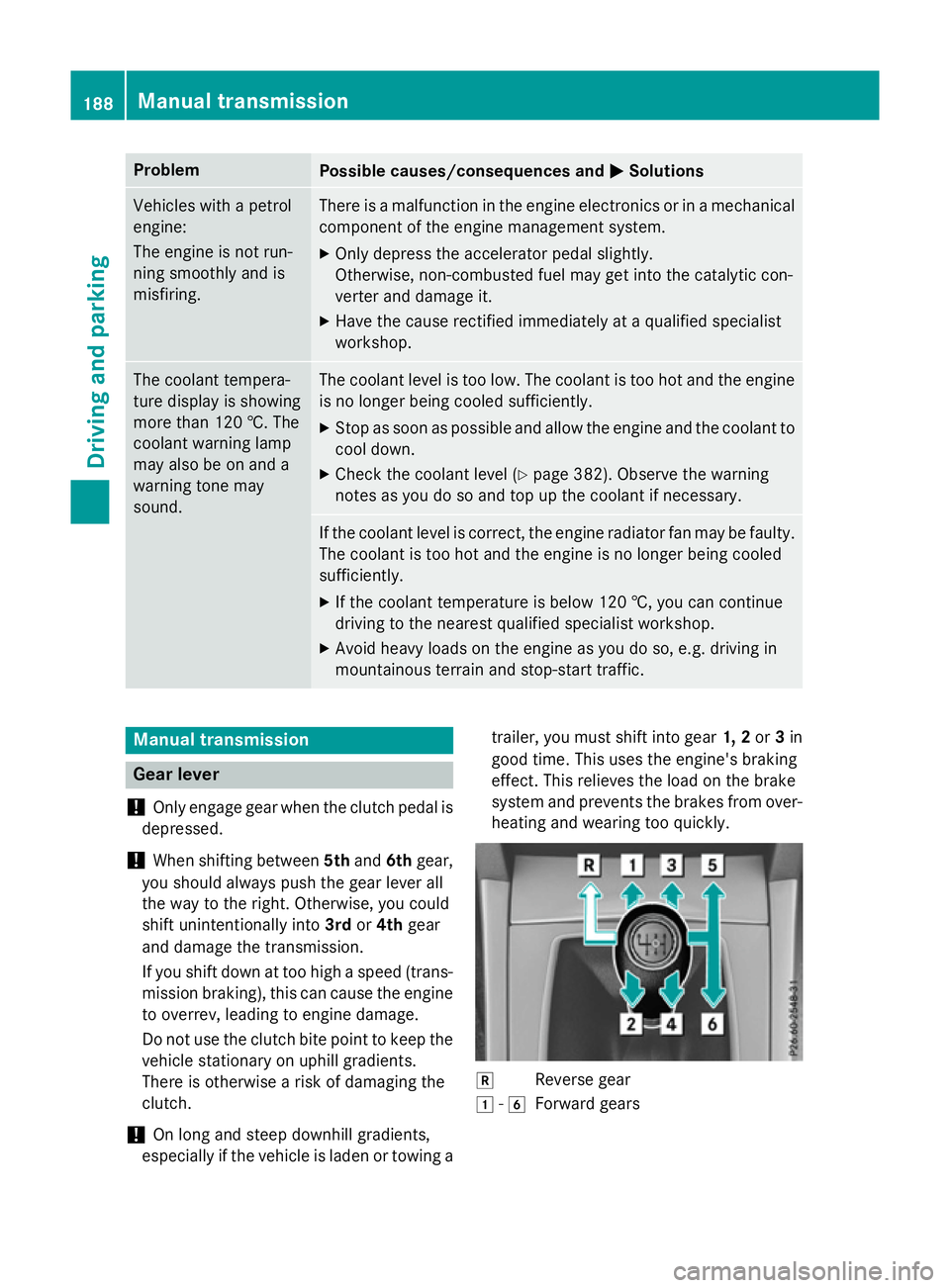
! When shifting between
5thand 6thgear,
you should always push the gear lever all
the way to the right. Otherwise, you could
shift unintentionally into 3rdor4th gear
and damage the transmission.
If you shift down at too high aspeed (trans-
mission braking), this can cause the engine to overrev, leading to engine damage.
Do not use the clutch bite point to keep the
vehicle stationary on uphill gradients.
There is otherwise arisk of damaging the
clutch.
! On long and steep downhill gradients,
especially if the vehicle is laden or towing a trailer, you must shift into gear
1, 2or3in
good time. This uses the engine's braking
effect.T his relieves the load on the brake
system and preventst he brakes from over-
heating and wearing too quickly. k
Reverse gear
1 -6
Forward gears 188
Manual transmissionDriving and parking
Page 196 of 497
Transmission positions
B Park position
Thi
sprevents the vehicl efromr oll-
ing away when stopped. Onl yshift
the transmission into position P
when the vehicl eisstationary
(Y page 244).
Park position Pis automatically
engaged if:
R yo us witch off the engine using
the key and remove the key
R yo us witch off the engine using
the key or using the Start/Stop
button and open the driver's
door or front-passenge rdoor
R yo uo pent he driver's door when
the vehicl eisstationar yordriv-
ing at ver ylow spee dand the
transmission is in position Dor R C Revers
egear
Onl yshift the transmission into
position Rwhen the vehicl eissta-
tionary. A Neutral
Do not shift the transmission to
N
whil edriving .Otherwise, the auto-
matic transmission could be dam-
aged.
No powe ristransmitted fro mthe
engine to the drive wheels.
Releasing the brakes will allo wyou
to mov ethe vehicl efreely, e.g .to
push it or tow it.
If ESP ®
is deactivated or faulty:
shift the transmission onl ytoposi-
tion Nif the vehicl eisindangerof
skidding ,e.g.oni cy roads.
If yo uswitch the engine off with the
transmission in position Ror D,t he
automatic transmission shifts to N
automatically.
! Rolling in neutral
Ncan lead to
damage to the transmission. 7 Drive
The automatic transmission
change sgeara utomatically. All
forward gear sareavailable. Driving tips
Changin ggear The automatic transmission shifts to the indi-
vidua lgears automaticall ywhenitisint rans-
mission position D.Gearshifting is deter-
mined by:
R the selected drive progra m(Ypage 194)
R the positio nofthe accelerator pedal
(Y page 193)
R the roa dspeed
Accelerator peda lposition Your style of driving influences how the auto-
matic transmission shifts gear:
R little throttle :early upshifts
R mor ethrottle :lat eu pshifts Automati
ctransmission
193Driving andparking Z
Page 197 of 497
AMG vehicles
When shifting down
,the double-clutch func-
tion is active regardless of th ecurrentl yselec-
te dd rivep rogram .The double-clutch function
reduce sload chang ereaction sand is condu-
civ etoas portydriving style. The soun dgen-
erated by th edouble-clutch function depends
on th edrivep rogram selected.
Kickdown Use kickdown for maximum acceleration:
X Depress th eaccelerato rpedal beyon dthe
pressur epoint.
The transmission shifts to alower gear
depending on th eengines peed.
X Eas eoff th eaccelerato rpedal once the
desired spee disreached.
The automatic transmission shifts bac kup.
Towing atrailer Towin
gatrailer is no tpossible wit hall mod-
els. Fo rfurther information ,see
(Y page 267).
X Drive in th emiddle of th eengines peed
range on uphill gradients.
X Manua ldrive program: depending on the
uphill or downhill gradient, shif tint oag ear
(Y page 197) in whic hthe engin ewill run in
th em iddle of th eengines pee drange. This
also applie sifcruise control ,DISTR ONIC
PLU SorS PEEDTR ONICare activated. Program selector button
Genera lnotes The program selector butto
nallows you to
choos ebetween differen tdriving character-
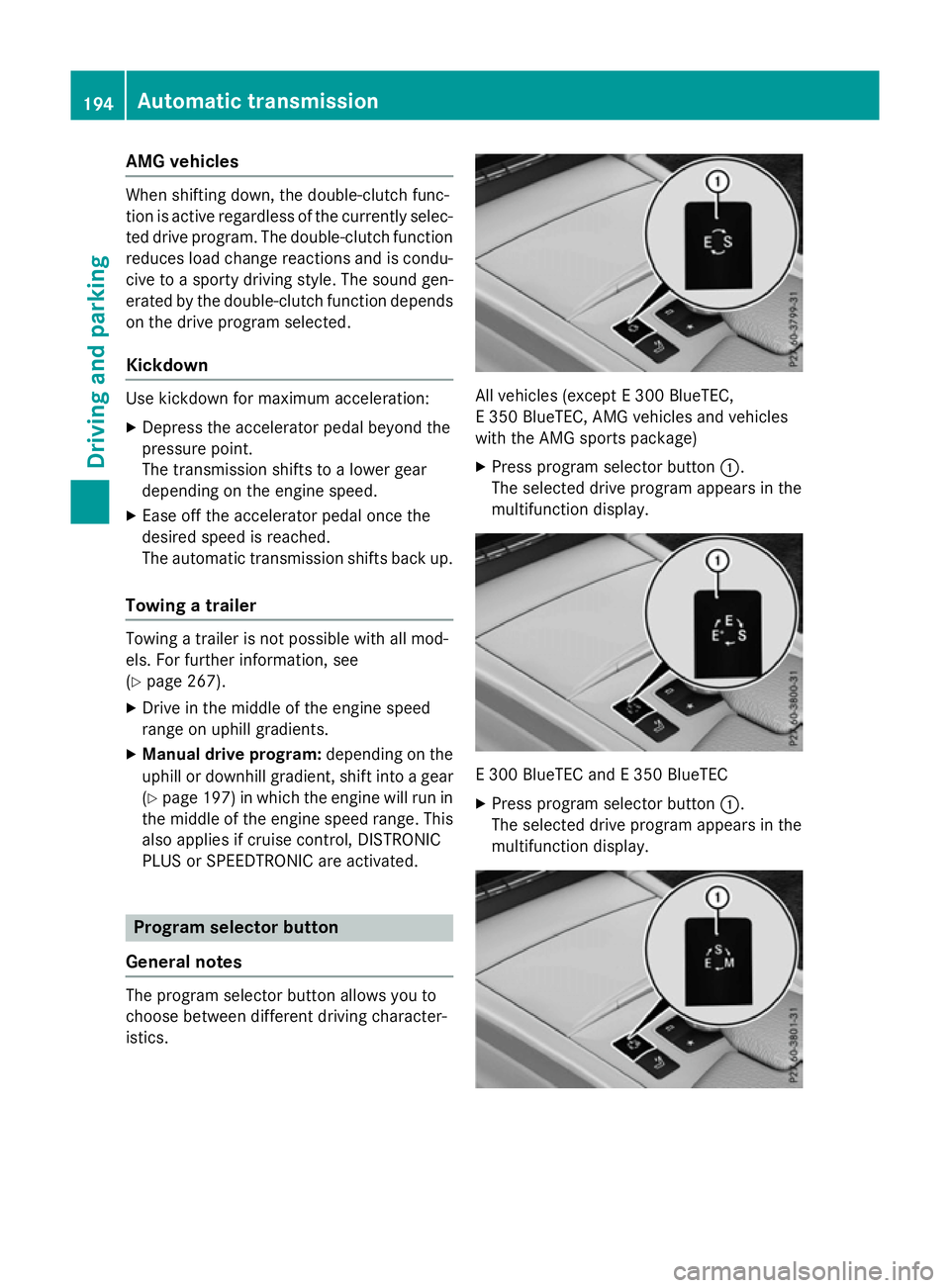
istics. All vehicles (except
E300 BlueTEC,
E3 50 BlueTEC, AM Gvehicles and vehicles
wit hthe AM Gsport spackage)
X Press program selector button :.
The selected driv eprogram appear sinthe
multifunction display. E3
00 BlueTE CandE3 50 BlueTEC
X Press program selector button :.
The selected driv eprogram appear sinthe
multifunction display. 194
Automatic trans
missionDriving andparking
Page 209 of 497
the key must be remove
dfromt he ignition
lock
R the front wheels must be turned towards
the kerb on steep uphill or downhil lgradi-
ents Switchin
goffthe engine
Important safety notes G
WARNING
Th ea utomatic transmission switches to neu-
tra lposit ionNwhen yo uswitch off the engine.
Th ev ehicl emayrollaway. There is ariskofan
accident.
After switching off the engine ,alway sswitch
to parking position P.Prevent the parked vehi-
cle fro mrolling away by applying the parking
brake.
Vehicle swithm anual transmission X
Shift to eithe r1st gear or revers egear R.
X Turn the key to position 0in the ignition
lock and remove it.
Th eimm obiliser is activated.
X Firml ydepress the parking brake.
Vehicle switha utomatic transmission X
Firml ydepress the parking brake.
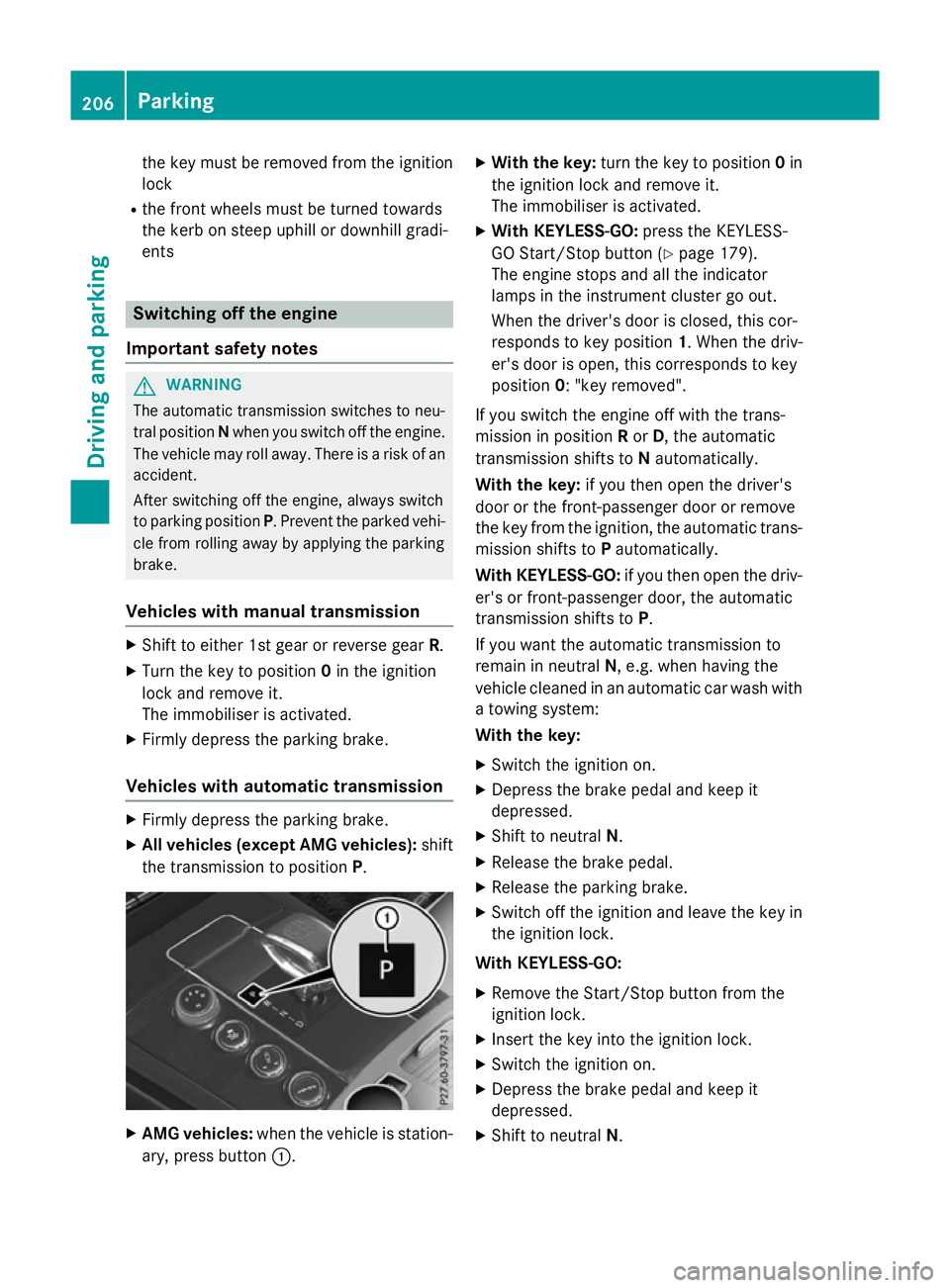
X Allv eh icle s(exce pt AM Gvehicles): shift
the transmission to position P.X
AM Gvehicles: when the vehicl eisstation-
ary, press button :. X
Wit hthe key: turnthe key to position 0in
the ignition lock and remove it.
Th eimm obiliser is activated.
X Wit hKEYLESS -GO:press the KEYLESS-
GO Start/Stop button (Y page 179).
Th ee ngine stops and al lthe indicator
lamps in the instrument cluste rgoout.
When the driver's door is closed, thi scor-
responds to key position 1.Whent he driv-
er' sd ooriso pen, thi scorresponds to key
position 0:"keyr emoved".
If yo uswitch the engine off with the trans-
mission in position Ror D,t he automatic
transmission shifts to Nautomatically.
Wit hthe key: if youtheno pent he driver's
door or the front-passenge rdoororr emove
the key fro mthe ignition, the automatic trans-
mission shifts to Pautomatically.
Wit hKEYLESS -GO:if youtheno pent he driv-
er' sorf ront-passenge rdoor, the automatic
transmission shifts to P.
If yo uwantthe automatic transmission to
remai ninneutral N,e.g.w henh avin gthe
vehicl ecleane dinana utomatic car wash with
at owing system:
Wit hthe key:
X Switch the ignition on.
X Depres sthe brake peda land kee pit
depressed.
X Shift to neutral N.
X Releas ethe brake pedal.
X Releas ethe parking brake.
X Switch off the ignition and leav ethe key in
the ignition lock.
Wit hKEYLESS -GO:
X Remov ethe Start/Stop button fro mthe
ignition lock.
X Insert the key into the ignition lock.
X Switch the ignition on.
X Depres sthe brake peda land kee pit
depressed.
X Shift to neutral N.206
ParkingDriving an
dparking
Page 212 of 497
Brakes
Important safety notes G
WARNING
If yo ushift down on aslipper yroads urface in
an attempt to increas ethe engine's braking
effect, the drive wheels could lose thei rgrip.
Thi sincreases the ris kofskidding and having
an accident.
Do not shift down for additional engine brak-
ing on aslipper yroads urface.
Downhil lgradients Do not depress the brake peda
lcontinuously
whil ethe vehicl eisinmotion, e.g .never
cause the brakes to ru bbyconstantly apply-
ing light pressure to the pedal. Thi sresults in
excessive and premature wear to the brake
pads.
Chang einto alower gearing oodtime on long
and stee pdownhil lgradients.
Take particula rnote of thi swhend riving a
lade nvehicl eand when towing atrailer.
i Thi
salsoa pplies if youhavea ctivated
cruis econtrol, SPEEDTRONIC or
DISTRONIC PLUS.
Thi sw illu se the braking effect of the engine,
so less braking will be required to maintain
vehicl espeed .Thisr elieves the load on the
brake system and prevents the brakes from
overheating and wearing too quickly.
Heavy and light loads G
WARNING
The braking system can overheat if yo ulea ve
your foo tonthe brake peda lwhile driving.
Thi sincreases the braking distance and could
eve ncause the braking system to fail. There is
ar iskofana ccident.
Never us ethe brake peda lasafootrest. Do
not simultaneousl ydepress both the brake
peda land the accelerato rpedal whiledriving. !
Depressing the brake peda
lconstantly
results in excessive and premature wear to
the brake pads.
If the brakes have been subjected to aheavy
load ,don ot stop the vehicl eimmediately, but
drive on for ashort while. Thi sallow sthe air-
flo wtoc ool the brakes more quickly.
If the brakes have been used onl ymoderately,
yo us houl doccasionall ytest thei reffective-
ness .Todot his, brake more firmly from a
highe rspeed whil epayin gattentio ntothe
traffic conditions. Thi simprove sthe gri pof
the brakes.
Wet road surfaces If yo
uhaved riven for alon gtime in heavy rain
withou tbraking ,ther em aybe adelayed reac-
tio nfrom the brakes when braking for the first
time .Thism ayalso occu rafte rac ar wash or
afte rdriving throug hdeepw ater.
Yo uw illh av etod epress the brake peda lmore
firmly .Maintain agreate rdistance to the vehi-
cle in front.
After driving on awetroa dorh aving the vehi-
cle washed, brake firmly whil epayin gatten-
tio ntot he traffic conditions. Thi swillw armup
the brake discs, thereb ydrying them more
quickl yand protecting them against corro-
sion.
Limite dbraking performanc eonsalt-
treate droads If yo
udrive on salt-treate droads, alayer of
salt ma yform on the brake discs and pads.
Thi scan increas ethe braking distance con-
siderably.
R In order to prevent any salt build-up, apply
the brakes occasionall ywhile paying atten-
tio ntot he traffic conditions.
R Carefull ydepress the brake peda latthe
end of the journey and when starting the
next journey.
R Maintain amuchg reate rdistance to the
vehicl einfront. Driving tips
209Driving andparking Z
Page 214 of 497
If you must drive on stretches of road on
which water has collected, please bear in
mind that:
R in the case of standing water, the water
level must be no highert han the loweredge
of the vehicle body
R you shouldd rive no faster than walking
pace Winter driving
G
WARNING
If you shift down on aslippery road surface in
an attempt to increase the engine's braking
effect, the drive wheels could lose their grip.
This increases the risk of skidding and having
an accident.
Do not shift down for additional engine brak-
ing on aslippery road surface. G
DANGER
If the exhaust pipe is blocked or adequate
ventilation is not possible, poisonous gases
such as carbon monoxide (CO) may enter the vehicle .This is the case, e.g. if the vehicle
becomes trapped in snow. There is arisk of
fatal injury.
If you leave the engine or the auxiliary heating
running, make sure the exhaust pipe and area
around the vehicle are clear of snow. To
ensure an adequate supply of fresh air, open a window on the side of the vehicle that is not
facing into the wind.
Have yourv ehicle winterproofe dataqualified
specialist workshop at the onset of winter.
You shouldd rive particularly carefully on slip-
pery road surfaces .Avoid sudden accelera-
tion, steering and braking manoeuvres. If the vehicle threatens to skid or cannot be
stopped when moving at low speed:
X Vehicles with manual transmission:
shift to neutral.
X Vehicles with automatic transmission:
shift the transmission to position N.
X Try to bring the vehicle under control by
using corrective steering.
The outsid etemperature indicator is not
designed to serve as an ice-warning device
and is therefore unsuitable for that purpose.
Changes in the outsid etemperature are dis-
played after ashort delay.
Indicated temperature sjust above the freez-
ing point do not guarantee that the road sur-
face is free of ice. The road may still be icy,
especially in wooded areasoronb ridges. The
vehicle could skid if you fail to adapt your
driving style. Alwaysa dapt yourdriving style
and drive at aspeed to suit the prevailing
weather conditions.
You shouldp ay specialattention to road con-
ditions when temperature sare around freez-
ing point.
Further information on driving with snow
chains (Y page 419).
Further information on driving with summer
tyres (Y page 418).
Observe the notes in the "Winter operation"
section (Y page 418). Driving systems
Mercedes-Benz Intelligent Drive
Mercedes-Benz Intelligent Drive stands for
innovative driver assistance and safety sys-
tems which enhance comfort and support the driver in critical situations. With these intelli-
gent co-ordinated systems Mercedes-Benz
has set amilestone on the path towards
autonomou sdriving.
Mercedes-Benz Intelligent Drive embraces all
elements of active and passive safety in one
wellt hought-out system –for the safety of the Driving systems
211Driving and parking Z
Page 215 of 497
vehicl
eoccupants and that of other road
users.
Further information on driving safety systems (Y page7 7). Cruise control
General notes Cruise control maintains
aconstant road
spee dfor you.Itb rakes automatically in order
to avoi dexceeding the set speed. You must
select alow gearing ood time on long and
steep downhill gradients, especially if the
vehicl eisladen or towing atrailer. By doing
so, you willm ake use of the braking effect of
the engine. This relieves the loadont he brake
system and prevents the brakes from over-
heating and wearing too quickly.
Use cruise control only if road and traffic con- ditions are appropriate for maintaining a
stead yspee dfor ap rolonged period. You can
store any road spee dabove 30 km/h.
Important safety notes If you fail to adapt yourd
riving style,cruise
control can neither reduce the risk of an acci-
dent nor overrid ethe lawsofp hysics. Cruise
control cannot take into account road,
weather or traffic conditions. Cruise control is only an aid.Y ou are responsibl efor the dis-
tance to the vehicl einfront, for vehicl espeed,
for braking in good time, and for staying in the lane.
Do not use cruise control:
R in road and traffic conditions which do not
allow you to maintai naconstant speed
(e.g. in heavy traffic or on winding roads)
R on smooth or slippery roads. Braking or
accelerating can caus ethe drive wheels to
lose traction and the vehicl ecouldt hen
skid
R when there is poor visibility, e.g. due to fog,
heavy rain or snow If there is
achange of drivers, advise the new
drive rofthe spee dstored.
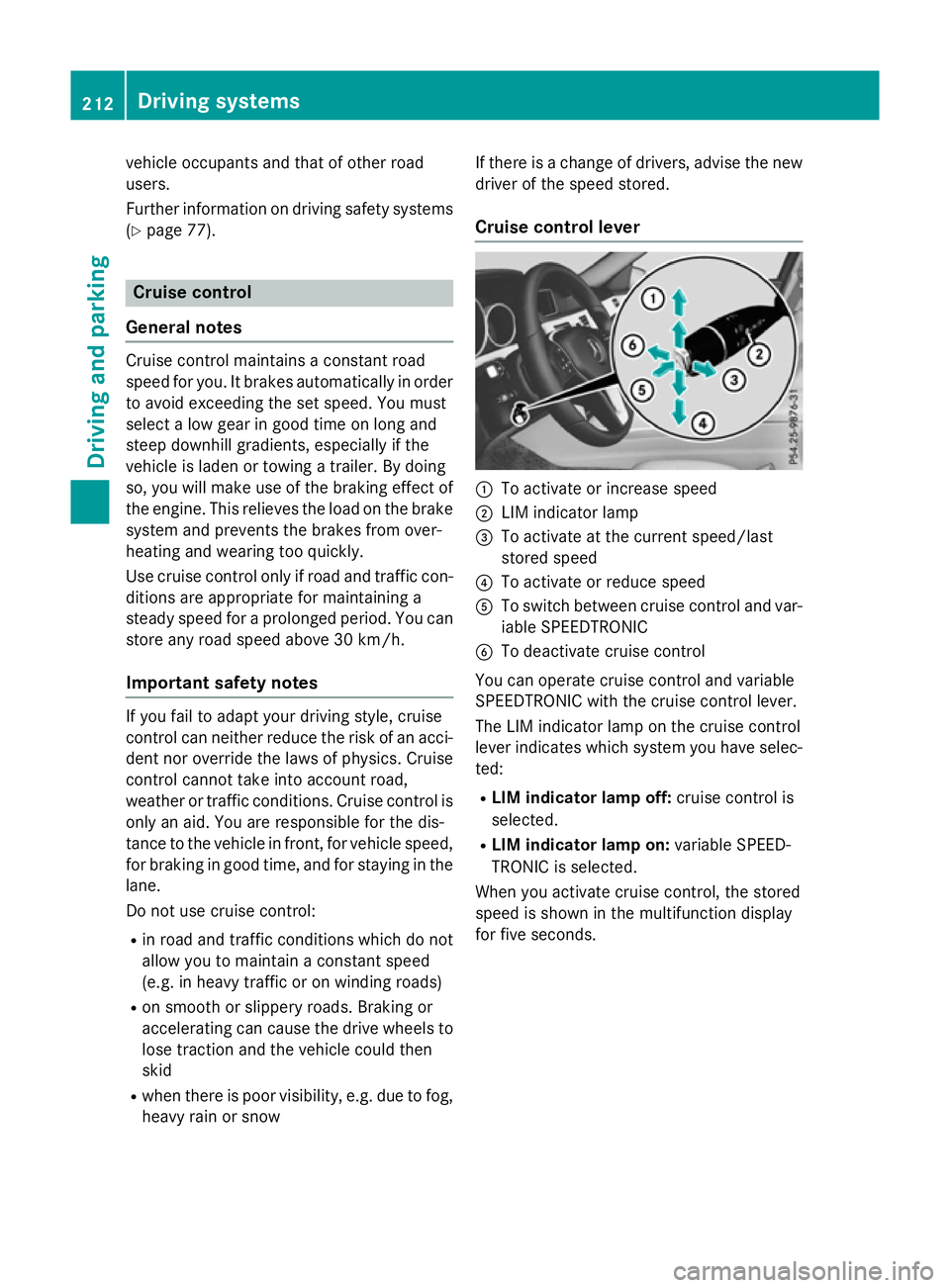
Cruise control lever :
To activate or increase speed
; LIM indicator lamp
= To activate at the current speed/last
stored speed
? To activate or reduce speed
A To switch between cruise control and var-
iable SPEEDTRONIC
B To deactivate cruise control
You can operate cruise control and variable
SPEEDTRONIC with the cruise control lever.
The LIM indicator lamp on the cruise control
leve rindicates which system you have selec-
ted:
R LIMi ndicator lamp off: cruise control is
selected.
R LIMi ndicator lamp on: variable SPEED-
TRONIC is selected.
When you activate cruise control, the stored
spee diss hownint he multifunction display
for five seconds. 212
Driving systemsDriving and parking
Page 217 of 497
X
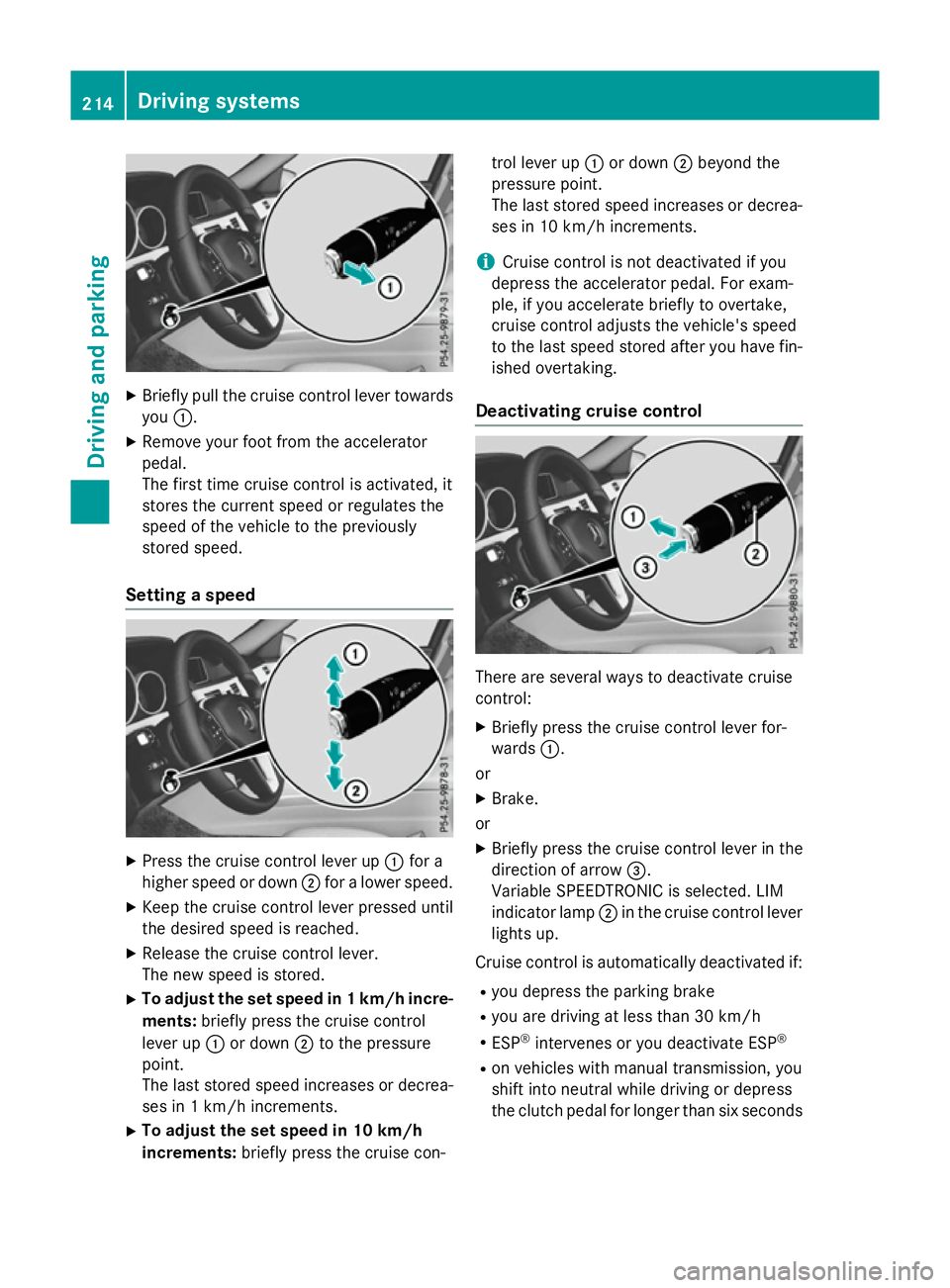
Briefly pull the cruise control lever towards
you :.
X Remove your foot from the accelerator
pedal.
The firs ttime cruise control is activated, it
store sthe current speed or regulates the
speed of the vehicle to the previously
store dspeed.
Setting aspeed X
Press the cruise control lever up :for a
higher speed or down ;for alower speed.
X Kee pthe cruise control lever presse duntil
the desire dspeed is reached.
X Releas ethe cruise control lever.
The new speed is stored.
X To adjust the se tspeed in 1km/h incre-
ments: brieflypress the cruise control
lever up :or down ;to the pressure
point.
The last store dspeed increases or decrea-
ses in 1km/h increments.
X To adjust the se tspeed in 10 km/h
increments: brieflypress the cruise con- trol lever up
:or down ;beyond the
pressure point.
The last store dspeed increases or decrea-
ses in 10 km/h increments.
i Cruise control is not deactivated if you
depress the accelerato rpedal .For exam-
ple, if yo uaccelerate briefl ytoovertake,
cruise control adjusts the vehicle's speed
to the last speed store dafteryou have fin-
ished overtaking.
Deactivatin gcruise control There are several ways to deactivate cruise
control:
X Briefly press the cruise control lever for-
wards :.
or
X Brake.
or X Briefly press the cruise control lever in the
direction of arrow =.
Variabl eSPEEDTRONIC is selected .LIM
indicator lamp ;in the cruise control lever
lights up.
Cruise control is automaticall ydeactivated if:
R yo ud epress the parking brake
R yo ua re driving at less than 30 km/h
R ESP ®
intervenes or yo udeactivate ESP ®
R on vehicle swithm anual transmission, you
shift into neutral while driving or depress
the clutch pedal for longer than six seconds 214
Drivin
gsystemsDrivin gand parking
Page 219 of 497
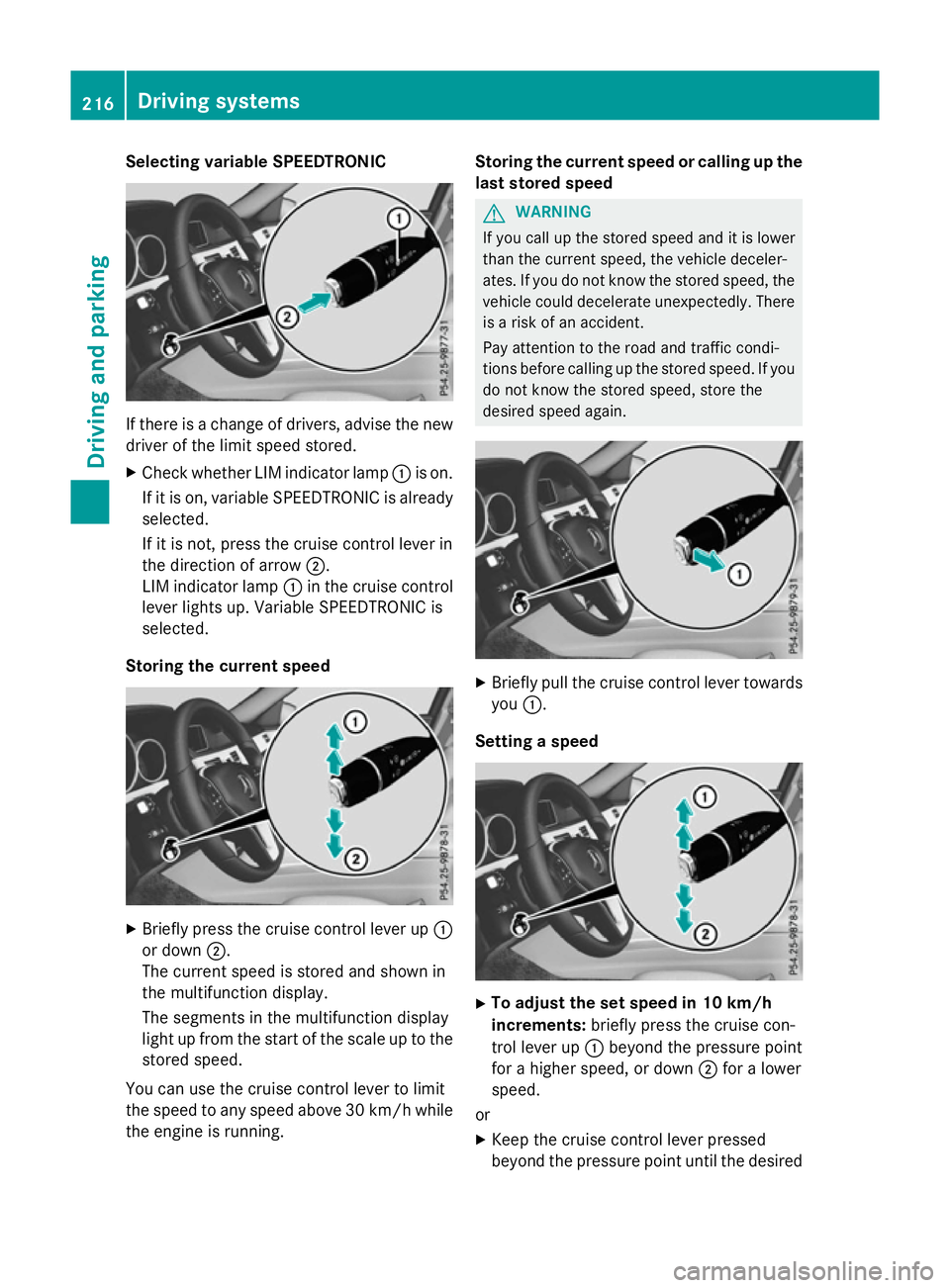
Selecting variable SPEEDTRONIC
If there is
achange of drivers, advise the new
driver of the limit speed stored.
X Check whether LIM indicator lamp :is on.
If it is on, variable SPEEDTRONIC is already
selected.
If it is not, press the cruise control lever in
the direction of arrow ;.
LIM indicator lamp :in the cruise control
lever lights up. Variable SPEEDTRONIC is
selected.
Storing the current speed X
Briefly press the cruise control lever up :
or down ;.
The current speed is stored and shown in
the multifunction display.
The segments in the multifunction display
light up from the start of the scale up to the
stored speed.
You can use the cruise control lever to limit
the speed to any speed above 30 km/hw hile
the engine is running. Storing the current speed or calling up the
last stored speed G
WARNING
If you call up the stored speed and it is lower
than the current speed, the vehicle deceler-
ates. If you do not know the stored speed, the vehicle could decelerate unexpectedly. There
is ar isk of an accident.
Pay attention to the road and traffic condi-
tions before calling up the stored speed. If you do not know the stored speed, store the
desired speed again. X
Briefly pull the cruise control lever towards
you :.
Setting aspeed X
To adjust the set speed in 10 km/h
increments: briefly press the cruise con-
trol lever up :beyond the pressure point
for ahigher speed, or down ;for alower
speed.
or X Keep the cruise control lever pressed
beyond the pressure point until the desired 216
Driving systemsDriving and parking
Page 221 of 497
the brake syste
mand prevents the brakes
fro mo verheating and wearing too quickly.
If DISTRONIC PLU Sdetects tha tthere is arisk
of ac ollision, yo uwillbew arned visually and
acoustically. Without your intervention,
DISTRONIC PLU Scannot prevent acollision.
An intermittent warning tone will the nsound
and the distance warning lamp will ligh tupin
the instrument cluster. Brake immediatel yto
increase the distance to the vehicl edriving in
front, or take evasive action, provide ditis
safe to do so.
For DISTRONIC PLU Stoassistyou ,the radar
senso rsystemm ustbeo perational.
DISTRONIC PLU Soperates in the range
between 0km/h and 200 km/h.
Do not us eDISTRONIC PLU Swhile driving on
roads with steep gradients.
Important safety notes G
WARNING
Hybri dvehicles :ensur ethaty ou rea dthe
"HYBRID" supplement. Yo ucould otherwise
fail to recognis edangers. G
WARNING
DISTRONIC PLU Sdoesn ot react to:
R people or animals
R stationar yobstacle sont he road, e.g .stop-
pe dorp arked vehicles
R oncoming and crossing traffic
As aresult, DISTRONIC PLU Smayneithe rgive
warnings nor intervene in such situations.
There is ariskofana ccident.
Alway spaycarefu lattentio ntothe traffi csit-
uatio nand be ready to brake. G
WARNING
DISTRONIC PLU Scannot always clearly rec-
ognis eother roa dusers and complex traffic
conditions. In such cases
,DISTRONIC PLU Smay:
R give an unnecessary warning and then
brake the vehicle
R neithe rgiveaw arning nor intervene
R accelerate or brake unexpectedly
There is ariskofana ccident.
Continu etodrive carefull yand be prepared to
brake, particularl yifDISTRONIC PLU Swarns
you. G
WARNING
DISTRONIC PLU Sbrakes your vehicl ewithup
to 50% of the maximum possibl edeceleration.
If thi sdeceleratio nisn ot sufficient,
DISTRONIC PLU Salerts yo uwithav isual and
acoustic warning. There is ariskofana cci-
dent.
Apply the brakes yourself in these situations
and try to take evasive action.
! When DISTRONIC PLU
Sorthe HOLD
functio nisa ctivated ,the vehicl ebrakes
automaticall yincertainsituations.
To avoi ddamag etothe vehicle, deactivate
DISTRONIC PLU Sand the HOL Dfunctio nin
the following or simila rsituations:
R when towing away
R in ac ar wash
If yo ufailtoa dapt your driving style,
DISTRONIC PLU Scan neithe rreduc ethe risk
of an accident nor override the laws of phys-
ics .D ISTRONIC PLU Scannot take roa dand
weather conditions or traffi cconditions into
account. DISTRONIC PLU Siso nlyana id.Y ou
ar er esponsibl efor the distance to the vehicle
in front, for vehicl espeed, for braking in good
time, and for staying in lane.
Do not us eDISTRONIC PLUS:
R in roa dand traffi cconditions which do not
allo wyouto maintain aconstant speed, e.g.
in heav ytraffi coronw inding roads
R on smooth or slippery roads .Braking or
accelerating can cause the drive wheels to 218
Driving systemsDriving an
dparking