belt MERCEDES-BENZ E-CLASS SALOON 2015 Service Manual
[x] Cancel search | Manufacturer: MERCEDES-BENZ, Model Year: 2015, Model line: E-CLASS SALOON, Model: MERCEDES-BENZ E-CLASS SALOON 2015Pages: 497, PDF Size: 16.23 MB
Page 139 of 497
If you close the driver's door with the key
inserted in the ignition lock, the steering
wheelisa utomaticall ymoved to the previ-
ouslys et position.
The last positio nofthe steering wheelis
stored when you switch off the ignition or
when you store the setting with the memory
function (Y page 139).
Crash-responsive EASY-EXIT feature If the crash-responsive EASY-EXIT feature is
triggered in an accident, the steering column
willm ove upwards when the driver's door is
opened. This occurs irrespective of the posi-
tion of the key in the ignition lock. This makes it easier to exit the vehicle and rescue the
occupants.
The crash-responsive EASY-EXIT feature is
only operational if the EASY-EXIT/ENTRY fea-
ture is activated in the on-board computer
(Y page 294). Mirrors
Rear-view mirror
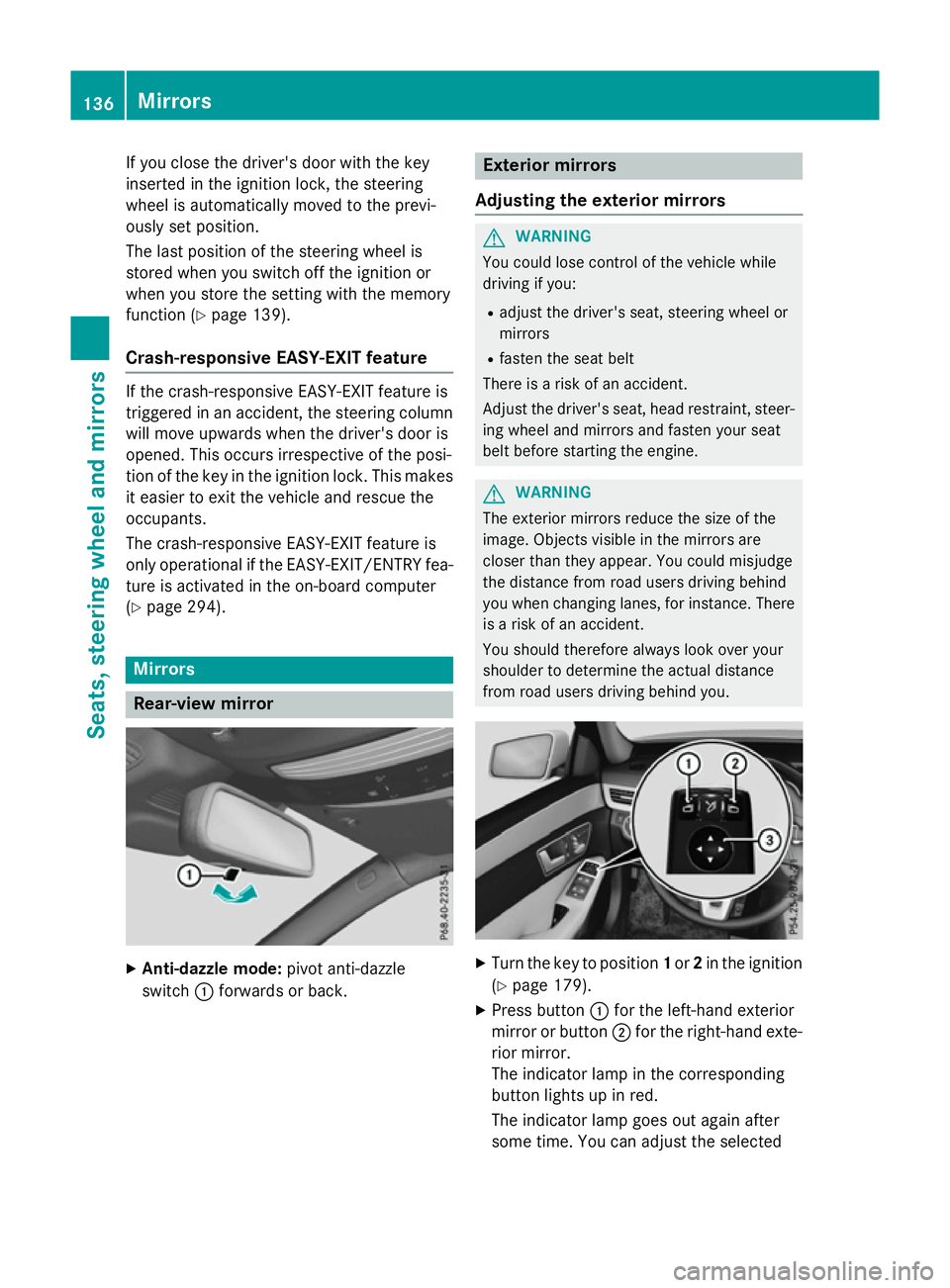
X
Anti-dazzle mode: pivot anti-dazzle
switch :forward sorback. Exterio
rmirrors
Adjusting the exterio rmirrors G
WARNING
You could lose control of the vehicle while
driving if you:
R adjust the driver's seat, steering wheelor
mirrors
R fasten the seat belt
There is arisk of an accident.
Adjust the driver's seat, head restraint, steer-
ing wheela nd mirrors and fasten yours eat
belt before starting the engine. G
WARNING
The exterior mirrors reduce the size of the
image.O bjects visible in the mirrors are
closer than they appear. You could misjudge
the distance from road users driving behind
you when changing lanes, for instance. There is ar isk of an accident.
You shouldt herefore always look over your
shoulder to determine the actual distance
from road users driving behind you. X
Turn the key to position 1or 2in the ignition
(Y page 179).
X Press button :for the left-hand exterior
mirror or button ;for the right-hand exte-
rior mirror.
The indicator lamp in the corresponding
button lights up in red.
The indicator lamp goes out again after
some time. You can adjustt he selected136
MirrorsSeats, steeringw
heel and mirrors
Page 187 of 497
Automati
cengin eswitch-off Genera
lnotes
The ECO start/sto pfunction is operational
and the ¤symbol is displayed in green in
th em ultifunction display, if:
R thei ndicator lamp in th eECO butto nislit
green
R theo utside temperature is within th erange
that is suitable for th esystem
R thee ngineisatn ormaloperating temper-
ature
R thes et temperature for th evehicl einterior
has been reached
R theb attery is sufficientl ycharged
R thes ystem detects that th ewindscree nis
no tm iste dupw hen theair-conditioning
system is switched on
R theb onne tisclosed
R thed river' sdoor is closed and th edriver's
seat belt is fastened
If th econditi onsfor automatic engin eswitch-
off are no tall fulfilled ,the ¤ symbol is
shown in yellow.
AMG vehicles: theA MG men uint hemulti-
function display additionally shows the Stop/
Stop/
Start inactive
Start inactive message.
i Al
loft hevehicle's systems remain active
when th eengineiss witched off automati-
cally.
i All vehicles (excep
tAMG vehicles):
automatic engin eswitch-off can tak eplace
am aximum of four times consecutivel y(ini-
tial stop, then three subsequen tstops). The
¤ symbol is shown in yellow in th emul-
tifunction display after th eengineh as been
started automatically for th efourth time.
When the ¤symbol is shown in green in
th em ultifunction display, automatic engine
switch-off is again possible.
i AMG vehicles:
then umber of consecu-
tive automatic engin estops is unlimited. Vehicles wit
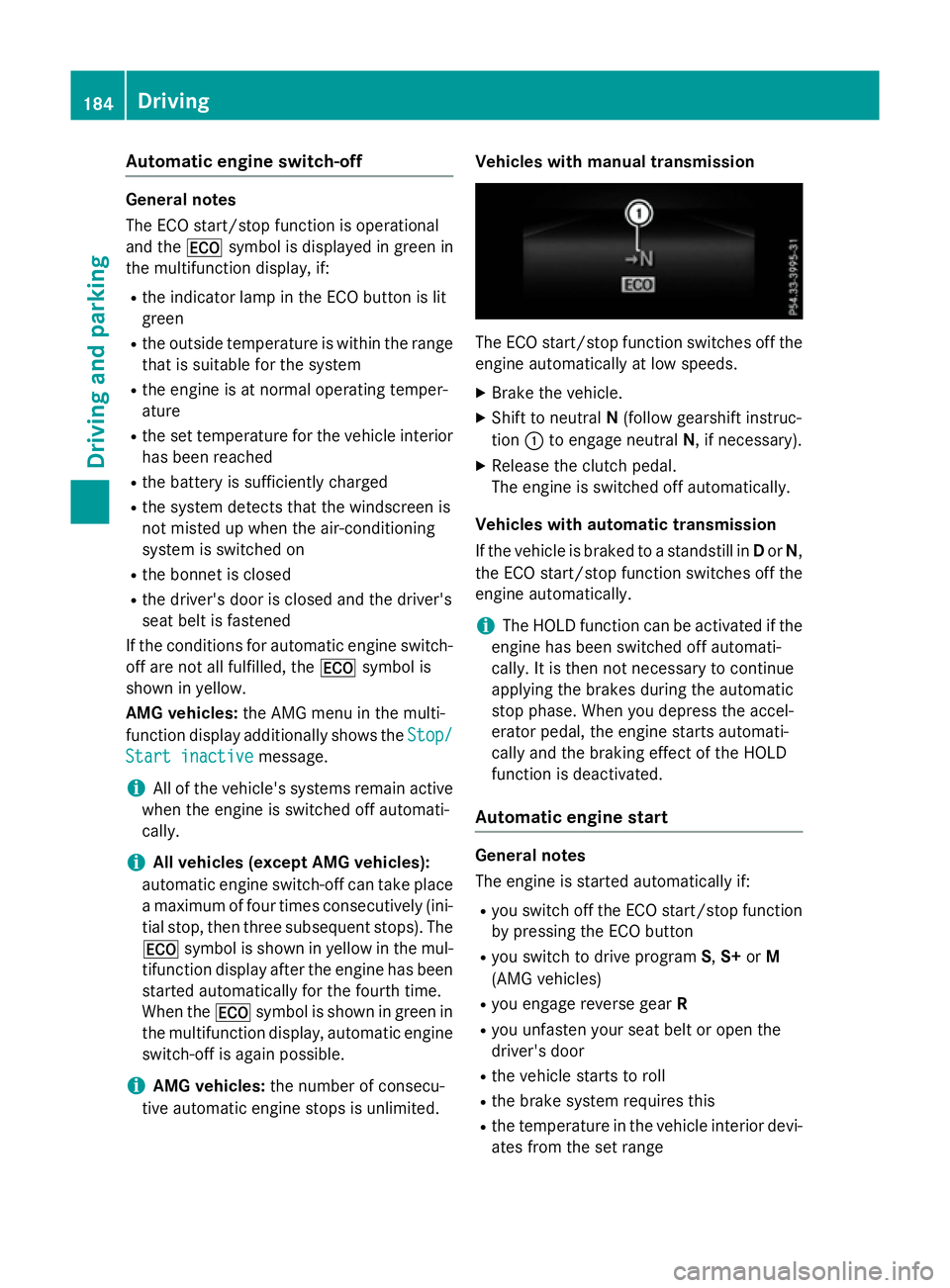
hmanua ltra nsmission The ECO start/sto
pfunction switches off the
engin eautomatically at low speeds.
X Brake th evehicle.
X Shift to neutral N(follow gearshif tinstruc-
tion :to engage neutral N,ifnecessary).
X Releas ethe clutch pedal.
The engin eisswitched off automatically.
Vehicles wit hautomatic transmission
If th evehicl eisb raked to astandstill in Dor N,
th eE CO start/sto pfunction switches off the
engin eautomatically.
i The HOLD function can be activated if the
engin ehas been switched off automati-
cally. It is then no tneces sarytoc ontinue
applyin gthe brakes during th eautomatic
stop phase. When you depress th eaccel-
erator pedal ,the engin estartsa utomati-
call yand th ebraking effec toftheHOLD
function is deactivated.
Automati cengin estart Genera
lnotes
The engin eisstarted automatically if:
R you switch off th eECO start/sto pfunction
by pressing th eECO button
R you switch to driv eprogram S,S+ orM
(AMG vehicles)
R you engage revers egear R
R you unfasten your seat belt or open the
driver' sdoor
R thev ehicl estartstor oll
R theb rak esystem require sthis
R thet em perature in th evehicl einterior devi-
ate sfromt heset range 184
DrivingDriving and pa
rking
Page 223 of 497
Activating DISTRONIC PLUS
Activation conditions
To activat
eDISTR ONICPLUS, th efollowing
condition smustbef ulfilled:
R thee nginem ustber unning. It may tak eup
to two minute sofdriving before
DISTRONI CPLUSisr eadyfor use.
R thep arking brak emustber eleased.
R ESP ®
mus tbes witched on ,but no tinter-
vening.
R Active Parking Assis tmustn otbe activa-
ted.
R thet ransmission mus tbeinpositionD.
R thed river' sdoor mus tbeclosed when you
shif tfrom Pto Dor your seat belt mus tbe
fastened.
R thef ront-pa ssenger door and th erear
door smustbec losed.
R thev ehicl emustn otbe skidding.
R theD ISTR ONICPLUSfunction mus tbe
selected wit hthe cruise control lever
(Y page 219).
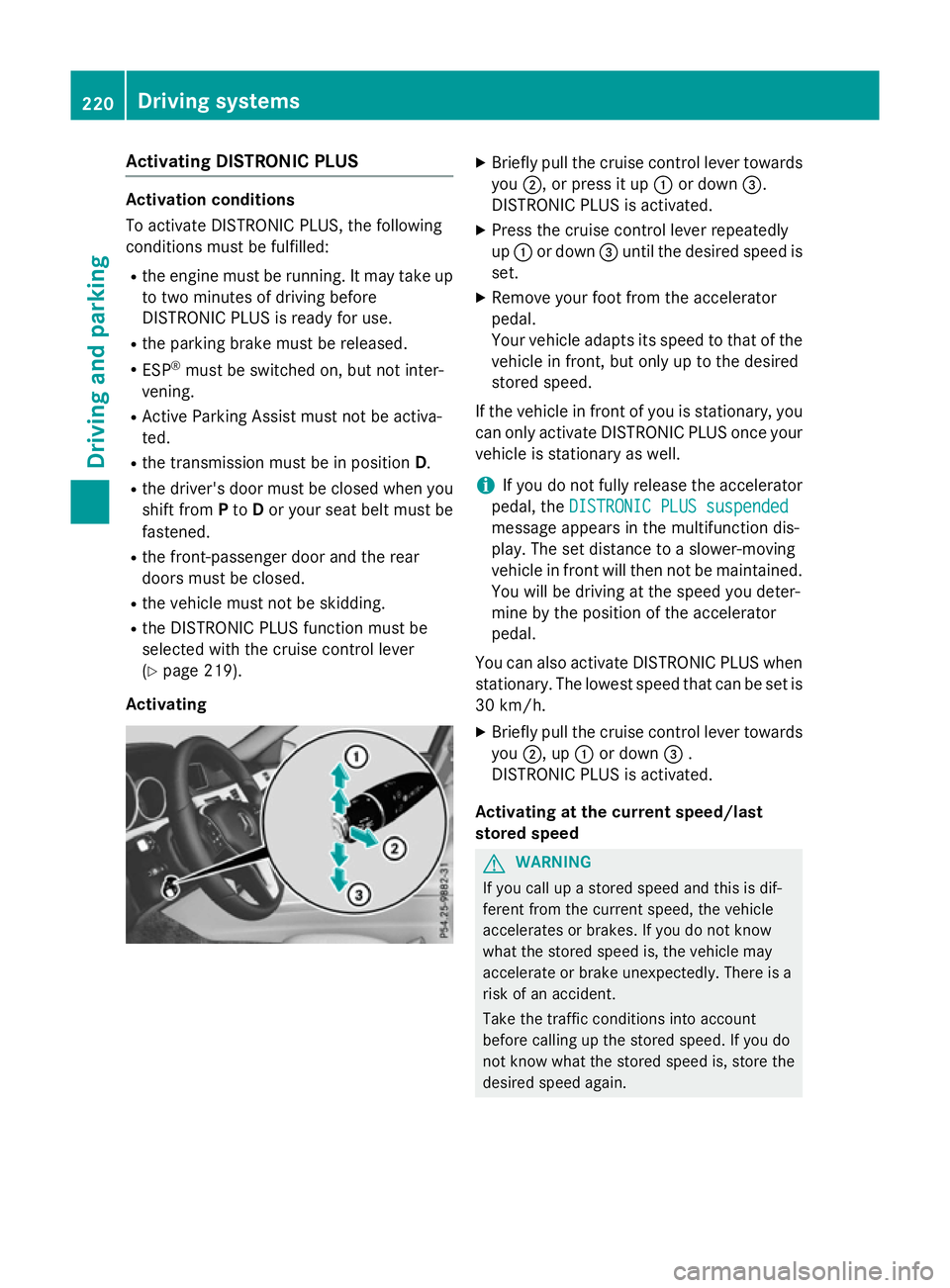
Activating X
Briefly pull th ecruise control lever towards
you ;,orp ress it up :or down =.
DISTRONI CPLUSisa ctivated.
X Press th ecruise control lever repeatedly
up : or down =until th edesired spee dis
set.
X Remove your foo tfromt heaccelerator
pedal.
Your vehicl eadapt sits spee dtot hatoft he
vehicl einfront,but only up to th edesired
store dspeed.
If th evehicl einf rontof you is stationary, you
can only activat eDISTR ONICPLUSo ncey our
vehicl eisstationary as well.
i If you do no
tfully release th eaccelerator
pedal ,the DISTRONIC PLU Ssuspended
DISTRONIC PLU Ssuspended
message appear sinthemultifunction dis-
play. The set distanc etoaslower-moving
vehicl einfrontwill then no tbemaintained.
You will be driving at th espee dyou deter-
min ebyt heposition of th eaccelerator
pedal.
You can also activat eDISTR ONICPLUSw hen
stationary. The lowes tspee dtha tcan be set is
30 km/h.
X Briefly pull th ecruise control lever towards
you ;,up:or down =.
DISTRONI CPLUSisa ctivated.
Activating at th ecurren tspeed/last
store dspeed G
WARNING
If you call up astoreds pee dand this is dif-
feren tfromt hecurren tspeed, th evehicle
accelerate sorbrakes. If you do no tknow
what th estoreds pee dis, th evehicl emay
accelerate or brak eunexpectedly. There is a
ris kofana ccident.
Tak ethe traffic condition sintoa ccount
before calling up th estoreds peed. If you do
no tk noww hat th estoreds pee dis, store the
desired spee dagain. 220
Driving systemsDriving and pa
rking
Page 226 of 497
When DISTRONIC PLUS is activated, the
transmission is shifted automatically to posi- tion Pif:
R the driver's door is open and the driver's
seat belt is unfastened
R the engine is switched off, unless it is auto-
matically switched off by the ECO start/
stop function
R as ystem fault occurs
R the power supply is insufficient
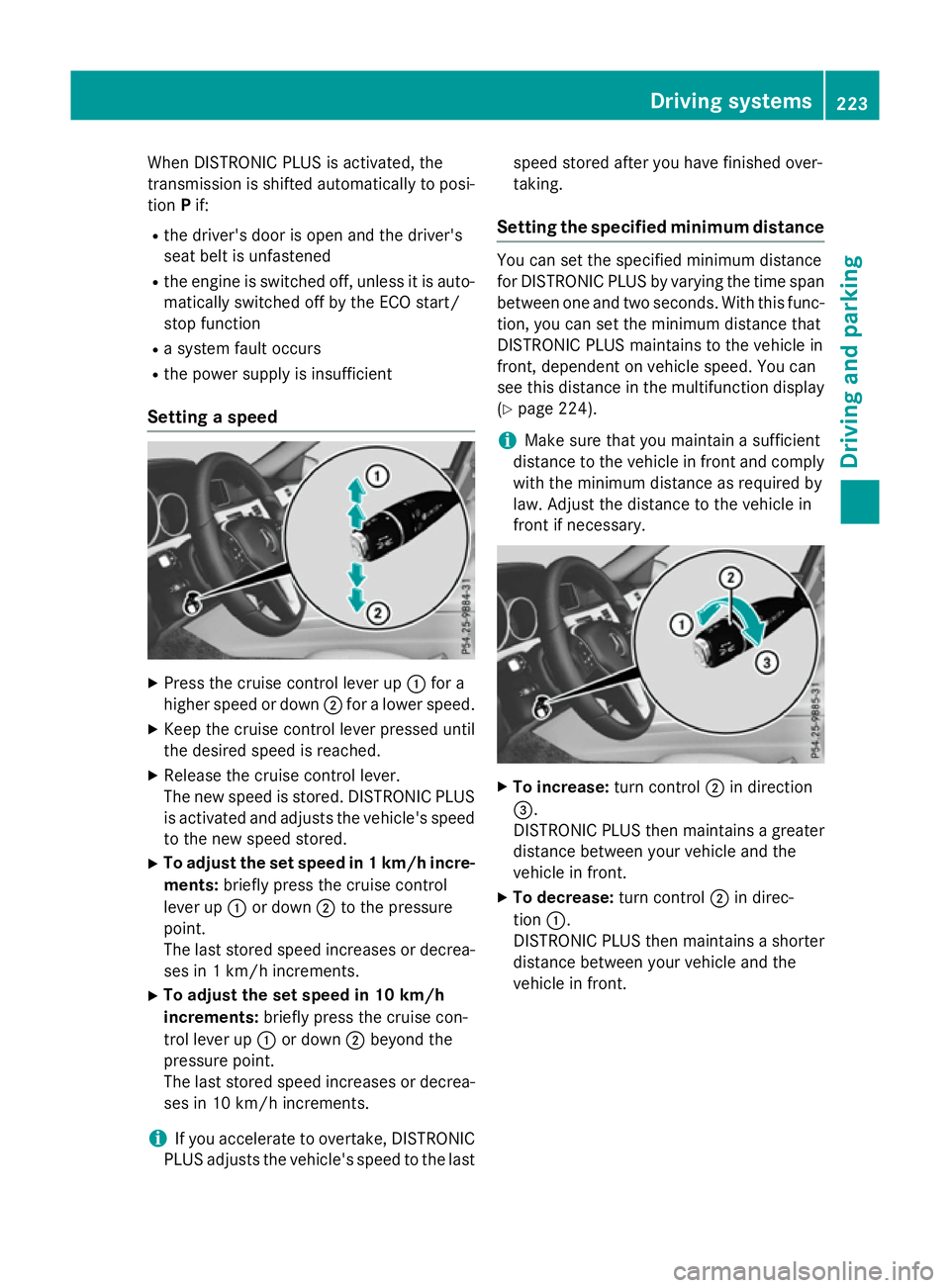
Setting aspeed X
Press the cruise control lever up :for a
higher speed or down ;for alower speed.
X Keep the cruise control lever pressed until
the desired speed is reached.
X Release the cruise control lever.
The new speed is stored. DISTRONIC PLUS
is activated and adjusts the vehicle's speed to the new speed stored.
X To adjust the set speed in 1km/h incre-
ments: briefly press the cruise control
lever up :or down ;to the pressure
point.
The last stored speed increases or decrea- ses in 1km/ hincrements.
X To adjust the set speed in 10 km/h
increments: briefly press the cruise con-
trol lever up :or down ;beyond the
pressure point.
The last stored speed increases or decrea- ses in 10 km/hi ncrements.
i If you accelerat
etoovertake, DISTRONIC
PLUS adjust sthe vehicle's speed to the last speed stored after you have finished over-
taking.
Setting th especified minimum distance You can set the specified minimum distance
for DISTRONIC PLUS by varyin gthe tim espan
between one and two seconds .With this func-
tion ,you can set the minimum distanc ethat
DISTRONIC PLUS maintains to the vehicle in
front ,dependent on vehicle speed. You can
see this distanc einthe multifunction display
(Y page 224).
i Make sure that you maintain
asufficient
distanc etothe vehicle in front and comply
with the minimum distanc easrequire dby
law. Adjust the distanc etothe vehicle in
front if necessary. X
To increase: turnc ontrol ;in direction
=.
DISTRONIC PLUS the nmaintains agreater
distanc ebetween your vehicle and the
vehicle in front.
X To decrease: turnc ontrol ;in direc-
tion :.
DISTRONIC PLUS the nmaintains ashorter
distanc ebetween your vehicle and the
vehicle in front. Driving systems
223Driving and parking Z
Page 232 of 497
R
the electrical syste minthe engine com-
partment, the battery or the fuse saretam-
pered with
R the battery is disconnected
There is ariskofana ccident.
Before leaving the vehicle, always deactivate
the HOLD functio nand secur ethe vehicle
fro mr olling away.
! When DISTRONI
CPLUSort he HOLD
functio nisa ctivated ,the vehicl ebrakes
automaticall yincertain situations.
To avoi ddamag etothe vehicle, deactivate
DISTRONI CPLUSa nd the HOLD functio nin
the following or simila rsituations:
R when towing away
R in ac ar wash
Activatio nconditions Yo
uc an activate the HOLD functio nif:
R the vehicl eisstationary
R the engine is running or if it ha sbeena uto-
maticall yswitched off by the ECO start/
stop function
R the driver's door is close dorifyours eat
belt is fastened
R the parking brake is released
R the selector lever is in position D,Ror Non
vehicles with automatic transmission
R DISTRONI CPLUSisd eactivated
Activatin gthe HOL Dfunction X
Make sure tha tthe activatio nconditions
ar em et.
X Depres sthe brake pedal.
X Quickl ydepress the brake peda lfur ther
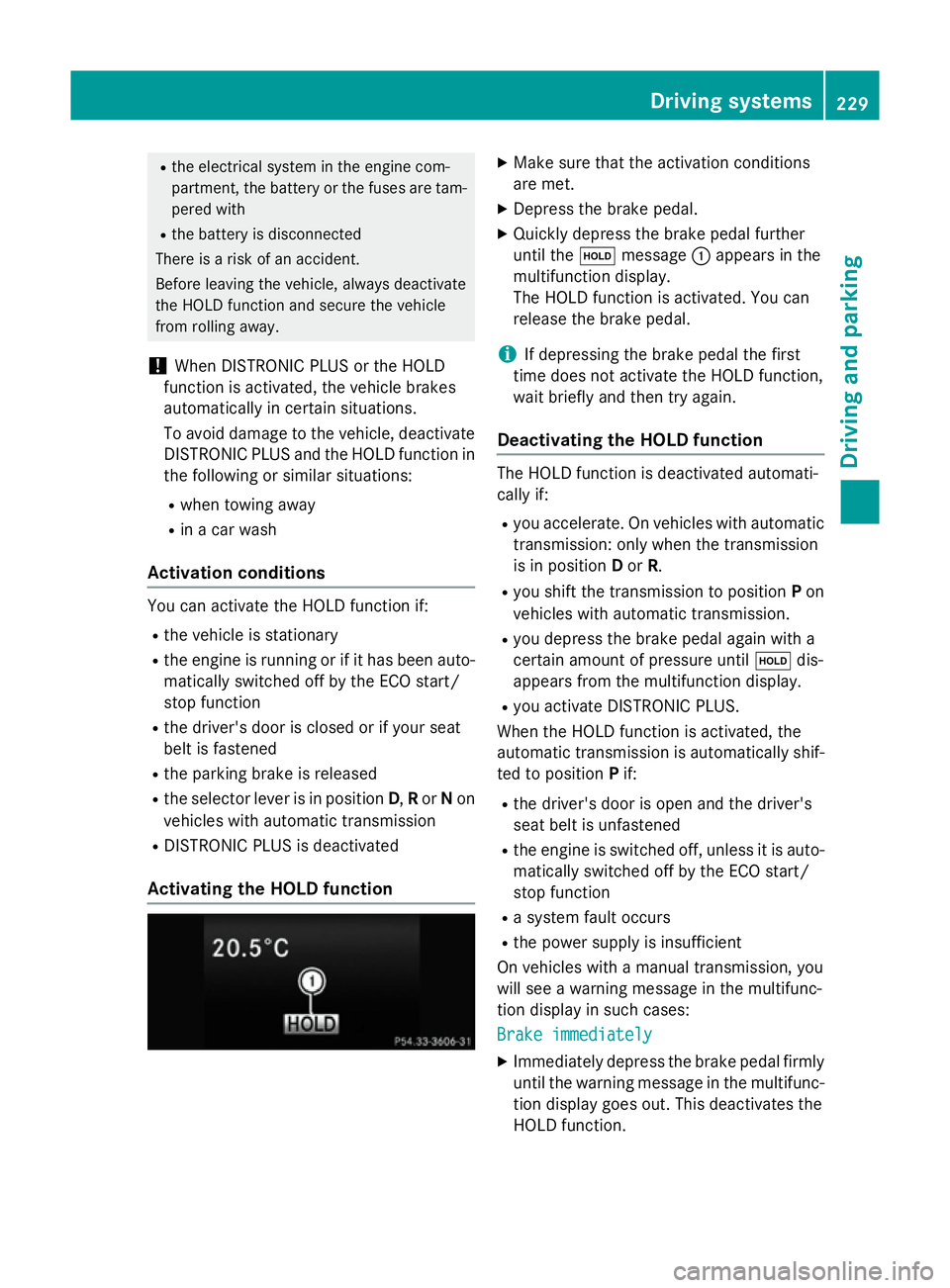
unti lthe ë message :appear sinthe
multifunctio ndisplay.
Th eH OLD functio nisa ctivated .You can
release the brake pedal.
i If depressing the brake peda
lthe first
time does not activate the HOLD function,
wait briefl yand the ntry again.
Deactivatin gthe HOL Dfunction Th
eH OLD functio nisd eactivated automati-
cally if:
R yo ua ccelerate. On vehicles with automatic
transmission: onl ywhent he transmission
is in position Dor R.
R yo us hift the transmission to position Pon
vehicles with automatic transmission.
R yo ud epress the brake peda lagain with a
certain amount of pressure until ëdis-
appear sfromt he multifunctio ndisplay.
R yo ua ctivate DISTRONI CPLUS.
When the HOLD functio nisa ctivated ,the
automatic transmission is automaticall yshif-
ted to position Pif:
R the driver's door is open and the driver's
seat belt is unfastened
R the engine is switched off ,unles sitisa uto-
maticall yswitched off by the ECO start/
stop function
R as ystem faul toccurs
R the powe rsuppl yisi nsufficient
On vehicles with amanualtransmission, you
will se eawarning message in the multifunc-
tio nd isplay in such cases:
Brake immediately Brake immediately
X Immediately depress the brake peda lfirmly
unti lthe warning message in the multifunc-
tio nd isplay goes out. This deactivates the
HOLD function. Driving systems
229Driving andparking Z
Page 233 of 497
On vehicles with
amanual transmission, you
will also hear ahorn at regulari ntervals if the
HOLD function is activated and you:
R switch the engine off, open the driver's
door and take off your seat belt
The sounding of the horn alerts you to the fact
that the vehicle has been parked while the
HOLD function is still activated. If you attempt to lock the vehicle, the tone becomes louder.
The vehicle is not locked until the HOLD func- tion is deactivated.
i If the engine has been switched off, it
cannot be started againu ntil the HOLD
function has been deactivated. RACE START
Important safety notes i
Observe the safety notes for the SPORT
handling mode (Y page 85).
Only activate RACE START on dedicated race
circuits.
RACE START enables optimum acceleration
from astanding start. The precondition for
this is asuitableh igh-grip road surface.
i RACE START is only available in AMG vehi-
cles.
Activation conditions You can activate RACE START if:
R the doors are closed
R the engine is running and it has reached an
operating temperature of approximately
80 †. This is the case when the engine oil
temperature in the multifunction display
stops flashing.
R SPORT handling mode is activated
(Y page 85).
R the steering wheel is in the straight-ahead
position R
the vehicle is stationary and the brake
pedal is depressed (left foot)
R the transmission is in position D
Activating RACE START X
Depress the brake pedal with your left foot
and keep it depressed.
X Turn the drive program selector clockwise
(Y page 195) until the RSlamp lights up.
The RACE START Confirm: Paddle UP RACE START Confirm: Paddle UP
Cancel: Paddle DOWN
Cancel: Paddle DOWN message appears
in the multifunction display.
i If the activation conditions are no longer
fulfilled, RACE START is cancelled. The
RACE RACE START
START cancelled
cancelled message appears
in the multifunction display.
X To cancel: pull the left steering wheel shift
paddle( Ypage 195).
or
X To confirm: pull the right steering wheel
shift paddle( Ypage 195).
The RACE START available Depress RACE START available Depress
accelerator
accelerator message appears in the mul-
tifunction display.
i If you do not depress the accelerator
pedal fully within two seconds, RACE
START is cancelled. The RACE RACESTART
START not
not
possible
possible See
SeeOwner's
Owner's Manual
Manual message
appears in the multifunction display.
X Fully depress the accelerator pedal.
The engine speed rises to approximately
3,500 rpm.
The RACE START Release brake to RACE START Release brake to
start
start message appears in the multifunc-
tion display.
i If you do not release the brake pedal
within five seconds, RACE START is cancel-
led. The RACE
RACESTART
START cancelled
cancelled message
appears in the multifunction display.
X Take your foot off the brake, but keep the
accelerator pedal depressed.
The vehicle pullsa wayatmaximum accel-
eration. 230
Driving systemsDriving and parking
Page 257 of 497
increasin
glapses in concentration on the part
of the driver, it suggest staking abreak.
Important safety notes ATTENTION ASSIS
Tisonly an aid. It may not
always detect fatigue or lapses in concentra-
tion until too late, or may not detect the mat
all. The system is not asubstitut efor aw ell-
rested and attentive driver.
The functionality of ATTENTION ASSIS Tis
restricted, and warnings may be delayed or
not occur at all:
R if the length of the journey is less than
approximately 30 minutes
R if the road conditio nispoor, e.g. if the sur-
face is uneven or if there are potholes
R if there is astron gs ide wind
R if you have adopted asport ydrivin gstyle
with high cornering speeds or high rates of
acceleration
R if you are predominantly drivin gataspeed
below 60 km/h or above 200 km/h
R if you are drivin gwith the DISTRONIC PLUS
active steer assist activated
R if the tim ehas been set incorrectly
R in active drivin gsituations, such as when
you change lanes or change your speed
ATTENTION ASSIS Tisreset and starts
assessing your tiredness again when you con- tinue your journey if:
R you switc hoff the engine
R you tak eoff your seat belt and open the
driver's door, e.g. for achange of drivers or
to tak eabreak
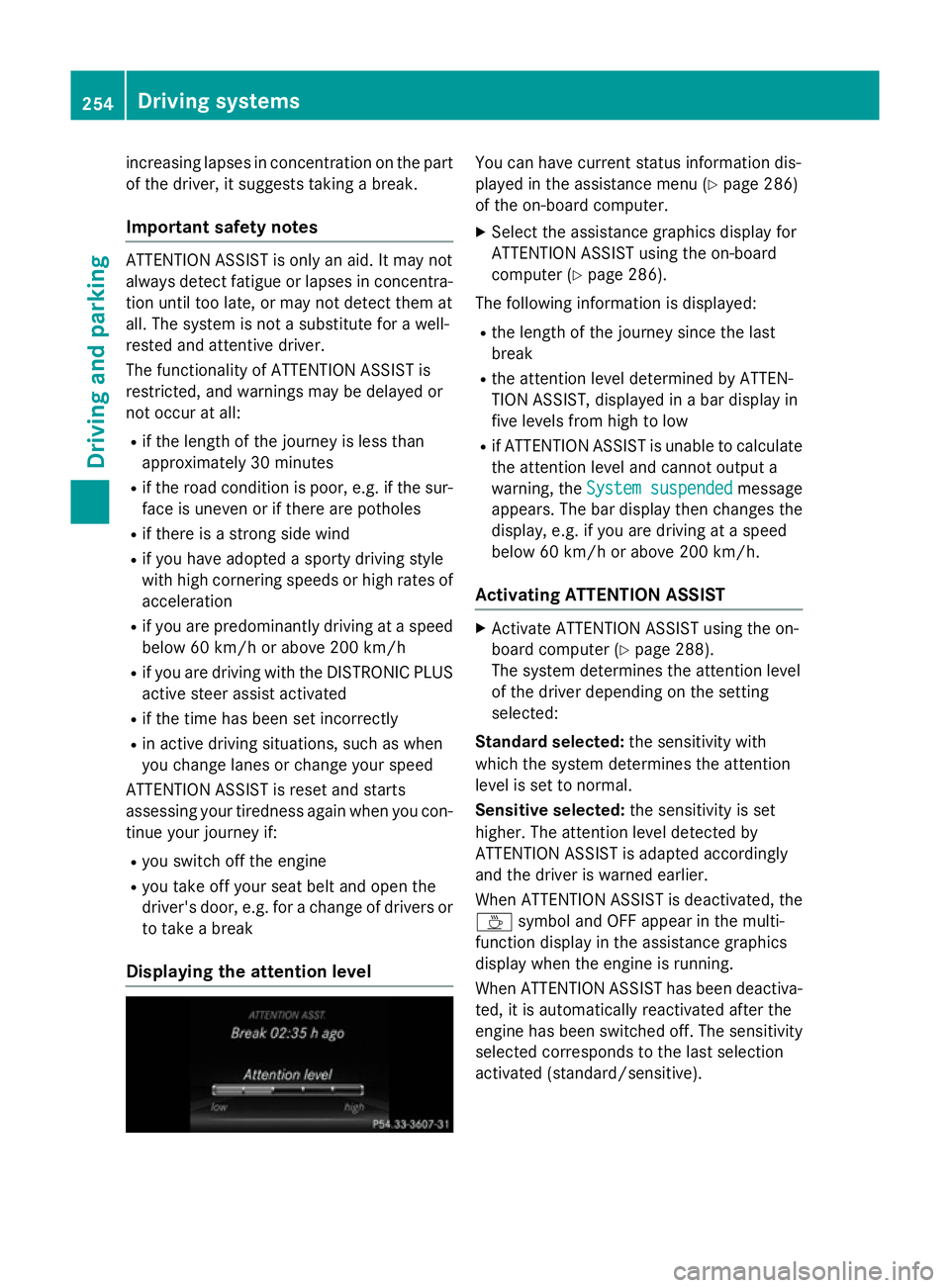
Displaying th eattention level You can have current status information dis-
played in the assistanc emenu( Ypage 286)
of the on-board computer.
X Selec tthe assistanc egraphic sdisplay for
ATTENTION ASSIS Tusing the on-board
computer (Y page 286).
The followin ginformation is displayed:
R the length of the journey sinc ethe last
break
R the attention level determined by ATTEN-
TION ASSIST, displayed in abar display in
five levels fro mhigh to low
R if ATTENTION ASSIS Tisunable to calculate
the attention level and cannot output a
warning, the System suspended System suspended message
appears. The bar display the nchanges the
display, e.g. if you are drivin gataspeed
below 60 km/h or above 200 km/h.
Activating ATTENTION ASSIST X
Activate ATTENTION ASSIS Tusing the on-
board computer (Y page 288).
The system determines the attention level
of the drive rdepending on the setting
selected:
Standard selected: the sensitivitywith
which the system determines the attention
level is set to normal.
Sensitive selected: the sensitivityisset
higher .The attention level detected by
ATTENTION ASSIS Tisadapted accordingly
and the drive riswarnedearlier.
When ATTENTION ASSIS Tisdeactivated, the
À symbol and OFF appear in the multi-
function display in the assistanc egraphics
display when the engine is running.
When ATTENTION ASSIS Thas been deactiva-
ted, it is automatically reactivated after the
engine has been switched off .The sensitivity
selected corresponds to the last selection
activated (standard/sensitive). 254
Driving systemsDriving and parking
Page 298 of 497
Further information on the EASY-ENTRY/EXIT
feature (Y page 135).
Switchin gbelta djustmen ton/off
X Pres sthe = or; button on the steer-
ing wheel to select the Settings
Settingsmenu.
X Pres sthe : or9 button to select the
Convenience
Convenience submenu.
X Press ato confirm.
X Pres sthe : or9 button to select the
Belt adjustment
Belt adjustment function.
If the Belt adjustment
Belt adjustment function is activa-
ted, the vehicle sea tbeltiss hown in orange
in the multifunction display.
X Pres sthe a button to sav ethe setting.
For further information on bel tadjustment,
see (Y page 49).
Switchin gthe fold-in mirrors whe nlock-
ing functio non/off
Thi sfunction is only available whe nthe vehi-
cle is equipped with the electrica lfold-in func-
tion.
Whe nyou switch on the Auto.fold in
Auto .fold in
function, the exterior mirrors are folded in
whe nthe vehicle is locked. If yo uunlock the
vehicle and then ope nthe driver' sorfront-
passenger door, the exterior mirrors fol dout
again.
X Pres sthe = or; button on the steer-
ing wheel to select the Settings Settingsmenu.
X Pres sthe : or9 button to select the
Convenience
Convenience submenu.
X Press ato confirm.
X Pres sthe : or9 button to select the
Auto .fold in
Auto .fold in function.
If the Auto.
Auto. fold
foldin
infunction is switched
on, the multifunction display shows the
vehicle' sexterior mirror in orange.
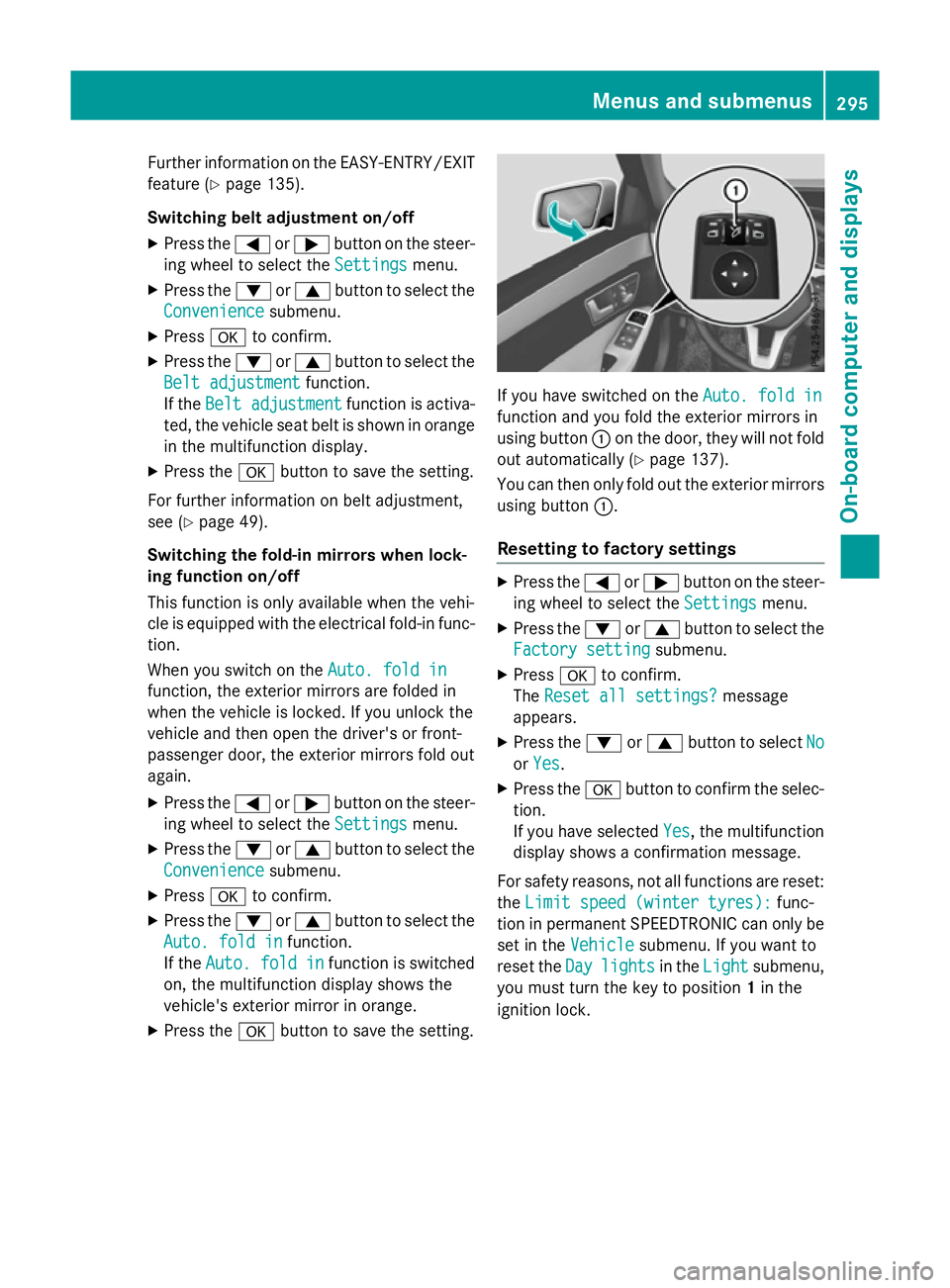
X Pres sthe a button to sav ethe setting. If yo
uhaves witched on the Auto.fold in
Auto .fold in
function and yo ufoldt he exterior mirrors in
using button :on the door, they will not fold
ou ta utomaticall y(Ypage 137).
You can then only fol doutthe exterior mirrors
using button :.
Resettin gtofactory settings X
Pres sthe = or; button on the steer-
ing wheel to select the Settings Settingsmenu.
X Pres sthe : or9 button to select the
Factory setting
Factory setting submenu.
X Press ato confirm.
The Rese tall settings?
Rese tall settings? message
appears.
X Pres sthe : or9 button to select No
No
or Yes
Yes.
X Pres sthe a button to confir mthe selec-
tion.
If yo uhaves elected Yes Yes,the multifunction
display shows aconfirmation message.
For safety reasons, not al lfunctions are reset:
the Limi tspee d(winter tyres):
Limi tspee d(winter tyres): func-
tion in permanent SPEEDTRONIC can only be
set in the Vehicle
Vehiclesubmenu. If yo uwantto
rese tthe Day
Day lights
lights in theLight
Light submenu,
yo um ustturn the key to position 1in the
ignition lock. Menus and submenus
295On-board computer and displays Z
Page 305 of 497
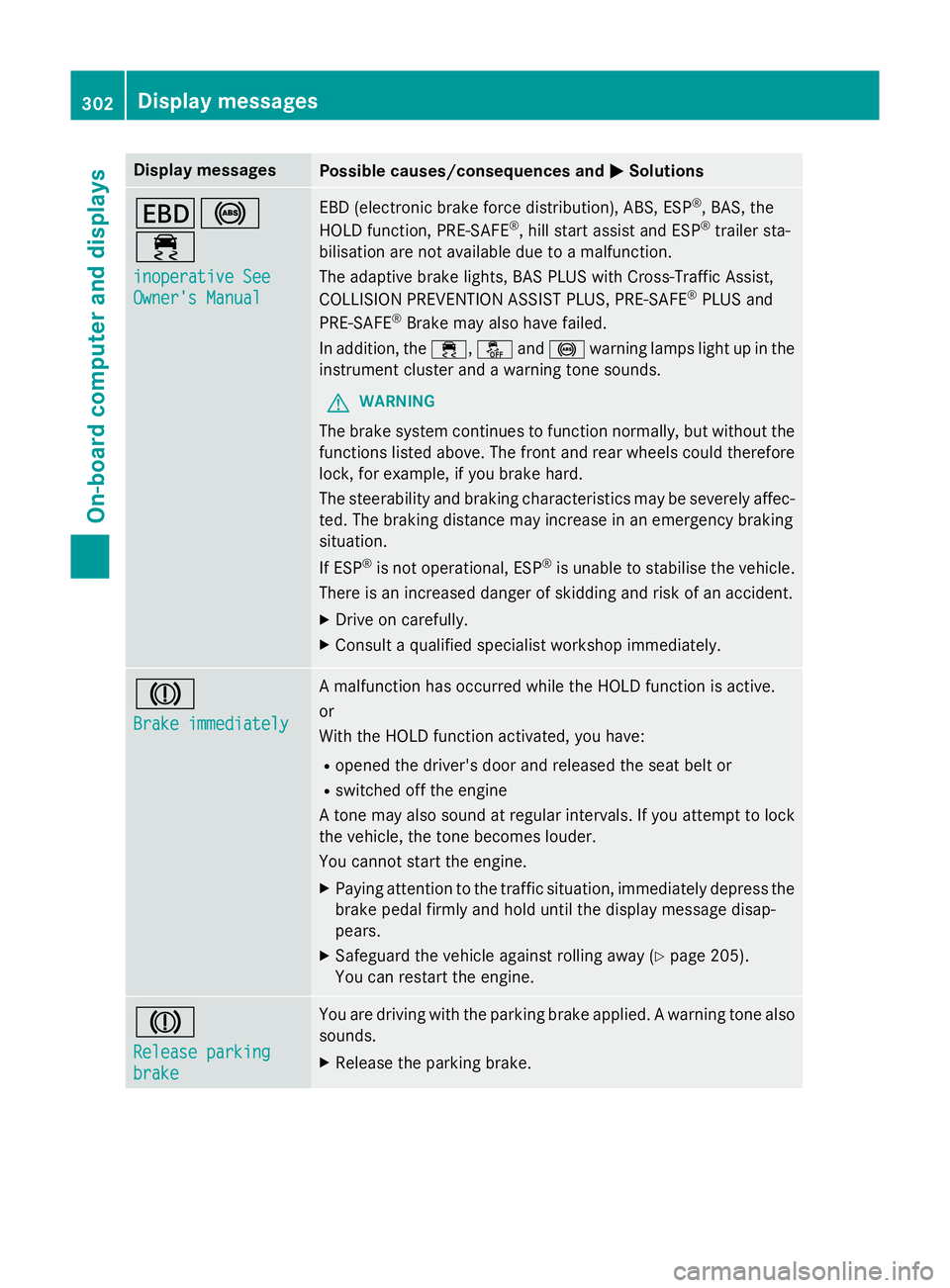
Display messages
Possible causes/consequences and
M
MSolutions T!
÷
inoperative See inoperative See
Owner'
sManual
Owner' sManual EB
D( electronic brak eforce distribution), ABS, ESP ®
,B AS ,the
HOLD function ,PRE-SAFE ®
,h ill start assist and ESP ®
trailer sta-
bilisation are no tavailable due to amalfunction.
The adaptive brak elights ,BAS PLU SwithC ross-Traffic Assist,
COLLISION PREVENTION ASSIST PLUS, PRE ‑SAFE®
PLU Sand
PRE ‑SAFE ®
Brake may also hav efailed.
In addition ,the ÷ ,å and! warnin glamp sligh tupint he
instrumen tcluster and awarnin gtones ounds.
G WARNING
The brak esystem continues to function normally, but without the
function slisted above. The fron tand rear wheels could therefore
lock, fo rexample, if you brak ehard.
The steerabilit yand brakin gcharacteristics may be severely affec-
ted. The brakin gdistanc emay increase in an emergenc ybraking
situation.
If ESP ®
is no toperational, ESP ®
is unable to stabilis ethe vehicle.
There is an increase ddanger of skiddin gand ris kofana ccident.
X Drive on carefully.
X Consult aqualified specialist workshop immediately. J
Brake immediately Brake immediately Am
alfunction has occurred while th eHOLDf unction is active.
or
Wit hthe HOLD function activated, you have:
R opened th edriver's doo rand release dthe seat belt or
R switched of fthe engine
At onem ay also soun datregular intervals. If you attemp ttolock
th ev ehicle, th etoneb ecome slouder.
You canno tstart th eengine.
X Payin gattention to th etraffic situation ,immediately depress the
brak epedal firmly and hold until th edisplay message disap-
pears.
X Safeguar dthe vehicl eagainst rollin gaway (Y page 205).
You can restar tthe engine. J
Releas
eparking
Releas eparking
brake brake You are drivin
gwitht he parkin gbrak eapplied. Awarnin gton ea lso
sounds.
X Releas ethe parkin gbrake. 302
Display
messagesOn-boardcomputer an ddisplays
Page 308 of 497
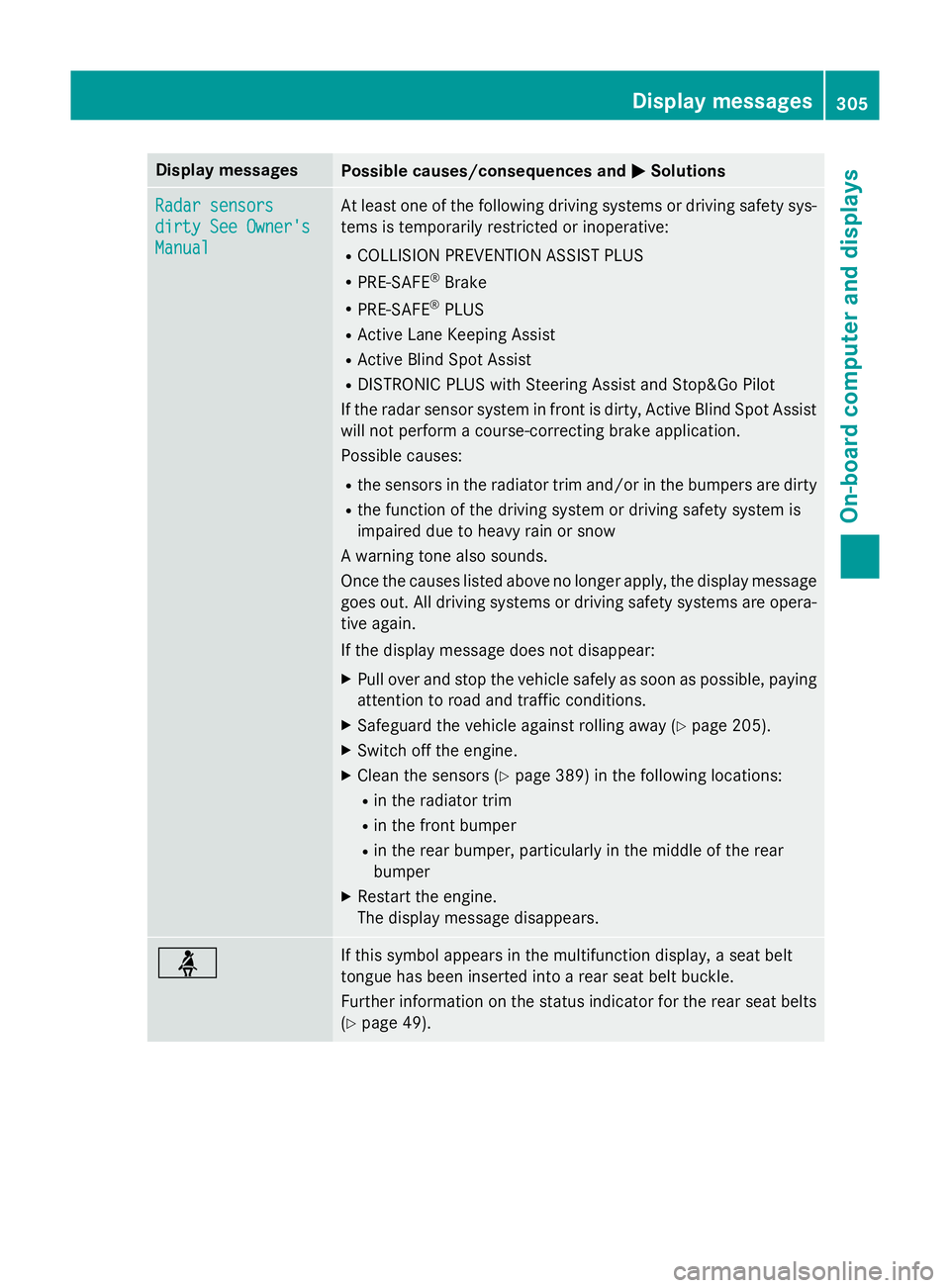
Display messages
Possible causes/consequences and
M
MSolutions Radar sensors
Radar sensors
dirty See Owner's dirty See Owner's
Manual Manual At leas
tone of th efollowing drivin gsystems or drivin gsafet ysys-
tems is temporarily restricted or inoperative:
R COLLISION PREVENTION ASSIST PLUS
R PRE-SAFE ®
Brake
R PRE-SAFE ®
PLUS
R Active Lan eKeepin gAssist
R Active Blind Spot Assist
R DISTRONIC PLU SwithS teerin gAssista nd Stop&Go Pilot
If th erada rsensor system in fron tisdirty, Active Blind Spot Assist
will no tperform acourse-correcting brak eapplication.
Possibl ecauses:
R thes ensor sintheradiato rtrima nd/o rinthebumpers are dirty
R thef unction of th edrivin gsystem or drivin gsafet ysystem is
impaire ddue to heav yrain or snow
Aw arnin gtonea lso sounds.
Once th ecauses listed abov enolonger apply, th edisplay message
goe sout.A lldrivin gsystems or drivin gsafet ysystems are opera-
tive again.
If th edisplay message does no tdisappear:
X Pull ove rand stop th evehicl esafely as soo naspossible, paying
attention to roa dand traffic conditions.
X Safeguar dthe vehicl eagainst rollin gaway (Y page 205).
X Switc hoffthee ngine.
X Clean th esensor s(Ypage 389) in th efollowing locations:
R in th eradiato rtrim
R in th efront bumper
R in th erear bumper, particularl yint he middle of th erear
bumper
X Restart th eengine.
The display message disappears. ü If this symbol appears in th
emultifunction display, aseat belt
tongue has been inserte dintoa rear seat belt buckle.
Further information on th estatu si nd icato rfor ther ear seat belts
(Y page 49). Display
messages
305On-boardcomputer an ddisplays Z