key MERCEDES-BENZ E-CLASS SALOON 2015 Repair Manual
[x] Cancel search | Manufacturer: MERCEDES-BENZ, Model Year: 2015, Model line: E-CLASS SALOON, Model: MERCEDES-BENZ E-CLASS SALOON 2015Pages: 497, PDF Size: 16.23 MB
Page 154 of 497
X
Insert bulbh older;into the lamp and turn
it clockwise.
X Align housing cover :and turn it clock-
wise until it engages.
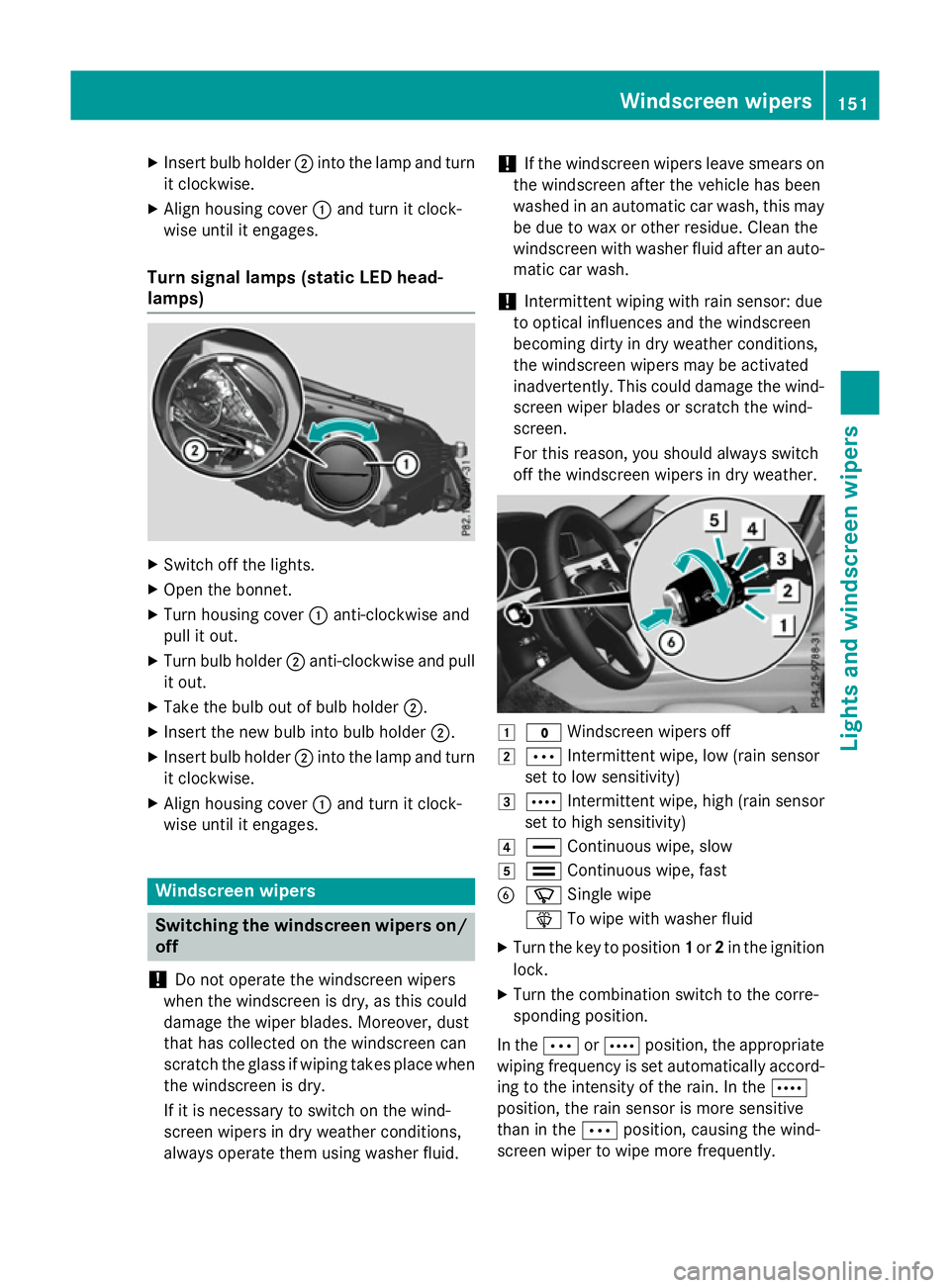
Turn signal lamps (static LED head-
lamps) X
Switch off the lights.
X Open the bonnet.
X Turn housing cover :anti-clockwise and
pullito ut.
X Turn bulbh older;anti-clockwise and pull
it out.
X Take the bulbo ut of bulbholder;.
X Insert the new bulbi nto bulbholder;.
X Insert bulbh older;into the lamp and turn
it clockwise.
X Align housing cover :and turn it clock-
wise until it engages. Windscreen wipers
Switching the windscreen wipers on/
off
! Do not operate the windscree
nwipers
when the windscree nisdry, as this could
damage the wiper blades. Moreover, dust
that has collected on the windscree ncan
scratch the glass if wiping takes place when the windscree nisdry.
If it is necessary to switch on the wind-
screen wipers in dry weather conditions,
alwayso perate them using washer fluid. !
If the windscree
nwipers leave smears on
the windscree nafter the vehicle has been
washed in an automatic car wash, this may
be due to wax or other residue. Clean the
windscree nwith washer fluida fter an auto-
matic car wash.
! Intermittent wiping with rain sensor: due
to optical influences and the windscreen
becoming dirty in dry weather conditions,
the windscree nwipers may be activated
inadvertently .This could damage the wind-
screen wiper blades or scratch the wind-
screen.
For this reason, you shoulda lwaysswitch
off the windscree nwipers in dry weather. 1
$ Windscreen wipers off
2 Ä Intermittent wipe, low (rains ensor
set to low sensitivity)
3 Å Intermittent wipe, high (rains ensor
set to high sensitivity)
4 ° Continuou swipe, slow
5 ¯ Continuou swipe, fast
B í Single wipe
î To wipew ith washer fluid
X Turn the key to position 1or 2in the ignition
lock.
X Turn the combination switch to the corre-
sponding position.
In the ÄorÅ position, the appropriate
wiping frequency is set automaticall yaccord-
ing to the intensity of the rain. In the Å
position, the rain sensor is more sensitive
than in the Äposition, causing the wind-
screen wiper to wipem ore frequently. Windscreen wipers
151Lights and windscreenw ipers Z
Page 155 of 497
If the wiper blades are worn, the windscreen
willnol onger be wiped properly. This could
prevent you from observing the traffic condi-
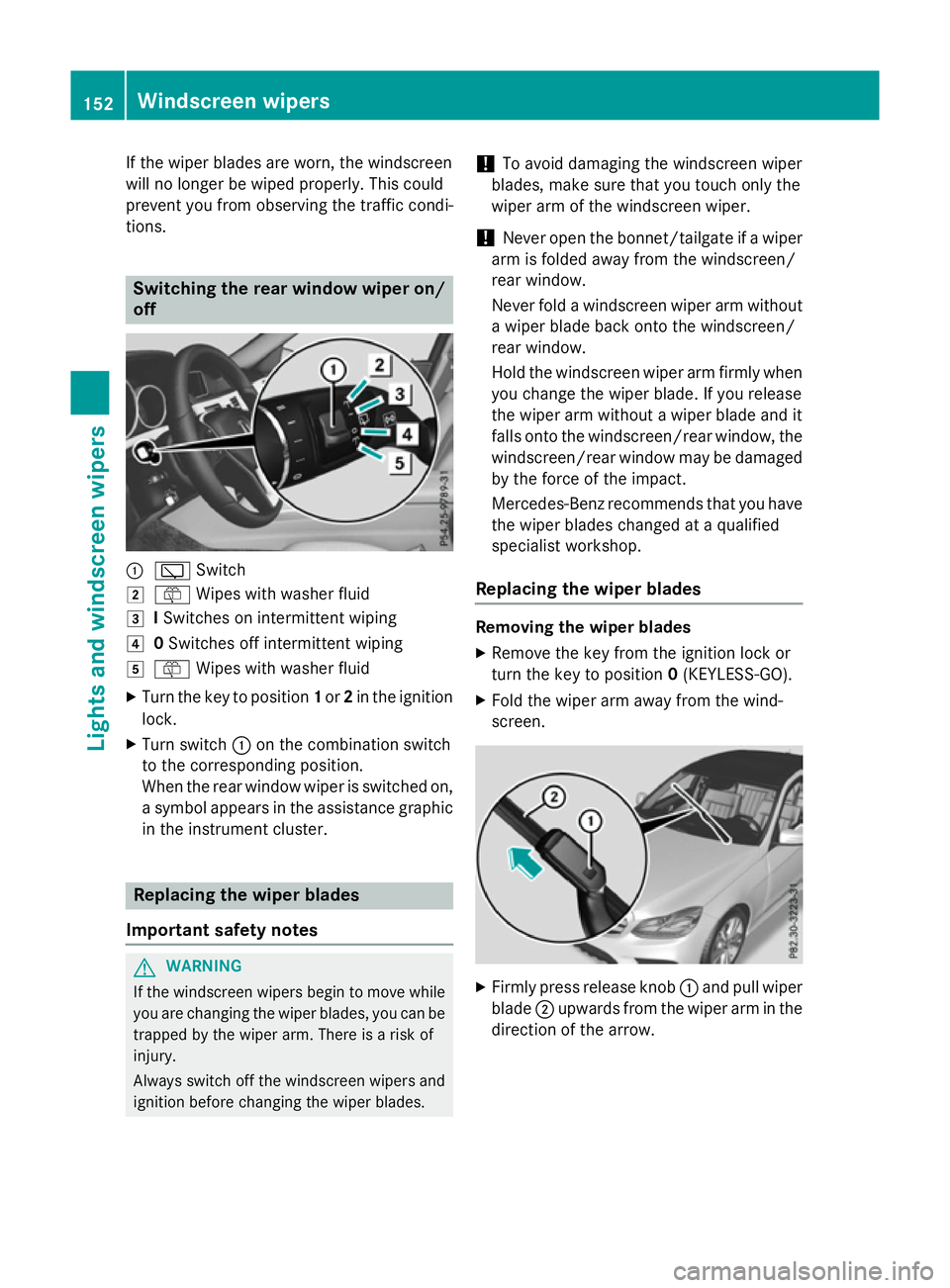
tions. Switching the rear window wipero
n/
off :
è Switch
2 ô Wipesw ith washer fluid
3 ISwitches on intermittent wiping
4 0Switches off intermittent wiping
5 ô Wipesw ith washer fluid
X Turn the key to position 1or 2in the ignition
lock.
X Turn switch :on the combination switch
to the corresponding position.
When the rear window wiper is switched on,
as ymbola ppears in the assistance graphic
in the instrument cluster. Replacing the wiperb
lades
Important safety notes G
WARNING
If the windscree nwipers begintom ove while
you are changing the wiper blades, you can be trapped by the wiper arm. There is arisk of
injury.
Alwayss witch off the windscree nwipers and
ignition before changing the wiper blades. !
To avoid damaging the windscree
nwiper
blades, make sure that you touch only the
wiper arm of the windscree nwiper.
! Never open the bonnet/tailgate if
awiper
arm is folded awayf rom the windscreen/
rear window.
Never fold awindscree nwiper arm without
aw iper blade back onto the windscreen/
rear window.
Hold the windscree nwiper arm firmly when
you change the wiper blade. If you release
the wiper arm withou tawiper blade and it
fallso nto the windscreen/rear window ,the
windscreen/rear window may be damaged
by the force of the impact.
Mercedes-Benz recommends that you have
the wiper blades changed at aqualified
specialist workshop.
Replacing the wiperb lades Removing the wiperb
lades
X Remove the key from the ignition lock or
turn the key to position 0(KEYLESS-GO).
X Fold the wiper arm awayf rom the wind-
screen. X
Firmly press release knob :and pullw iper
blade ;upwards from the wiper arm in the
direction of the arrow. 152
Windscreen wipersLights and windscreenw
ipers
Page 156 of 497
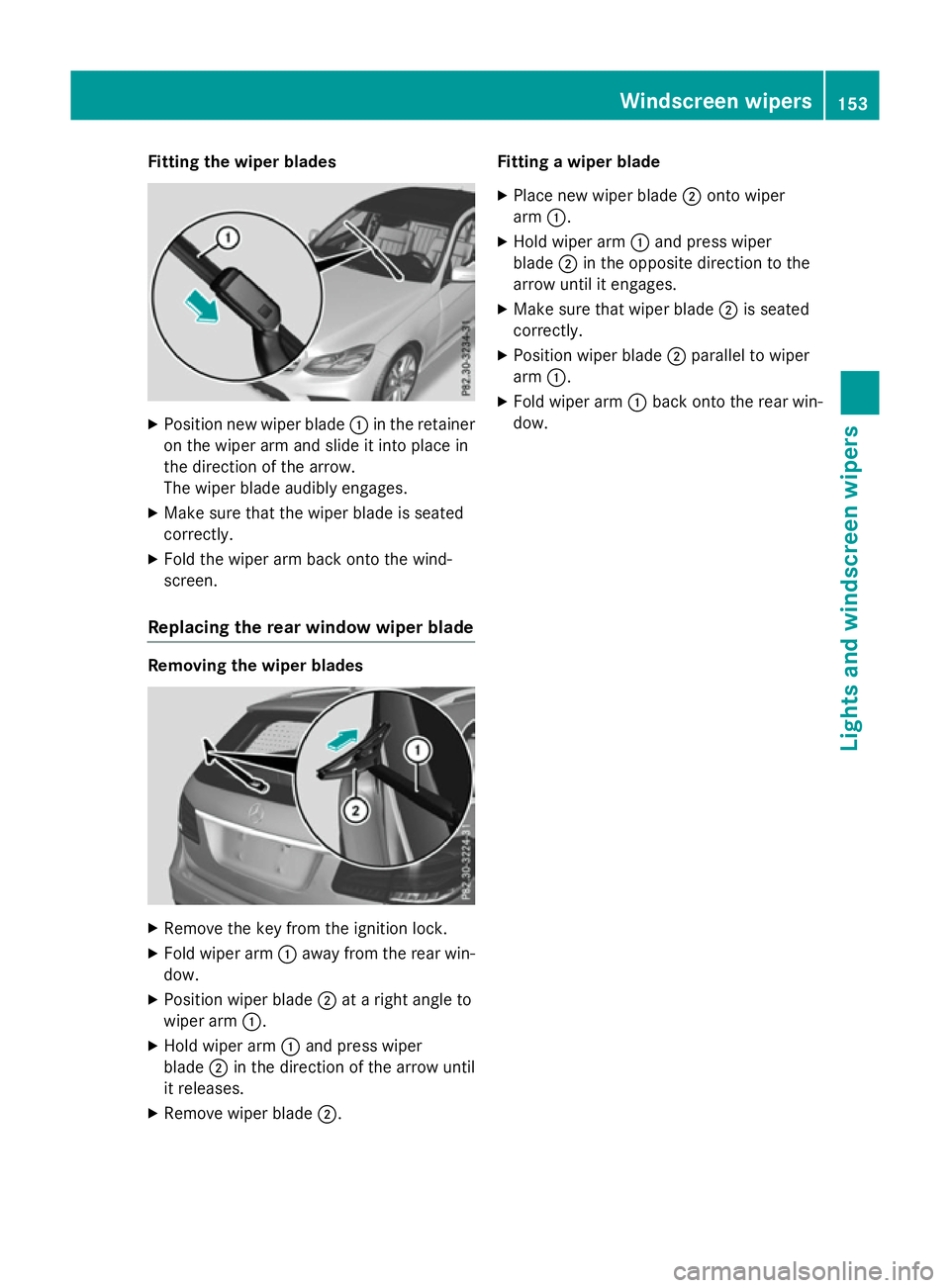
Fitting th
ewiper blades X
Positio nnew wiper blade :in th eretainer
on th ewiper arm and slide it int oplacein
th ed irection of th earrow.
The wiper blade audibly engages.
X Mak esure that th ewiper blade is seated
correctly.
X Fold th ewiper arm back onto th ewind-
screen.
Replacin gthe rea rwindow wiper blade Removing th
ewiper blades X
Remove th ekeyfrom th eignition lock.
X Fold wiper arm :away from th erear win-
dow.
X Positio nwiper blade ;atar igh tangle to
wiper arm :.
X Hol dw iper arm :and press wiper
blade ;in th edirection of th earrow until
it releases.
X Remove wiper blade ;. Fitting
awiper blade
X Plac enew wiper blade ;onto wiper
arm :.
X Hol dw iper arm :and press wiper
blade ;in th eopposit edirection to the
arrow until it engages.
X Mak esure that wiper blade ;is seated
correctly.
X Positio nwiper blade ;parallel to wiper
arm :.
X Fold wiper arm :back onto th erear win-
dow. Windscreen wipers
153Lightsand windscreen wipers Z
Page 157 of 497
Problems with the windscreen wipers
Problem
Possible causes/consequences and
M
MSolutions The windscreen wipers
are jammed. Leaves or snow, for example, may be obstructing the windscreen
wiper movement.T he wiper motor has been deactivated.
X For safety reasons, you should remove the key from the ignition
lock.
or
X Switch off the engine using the Start/Stop button and open the
driver's door.
X Remove the cause of the obstruction.
X Switch the windscreen wipers back on. The windscreen wipers
fail completely. The windscreen wiper drive is malfunctioning.
X Select another wiper speed on the combination switch.
X Have the windscreen wipers checked at aqualified specialist
workshop. 154
Windscreen wipersLights and windscreen wipers
Page 159 of 497
Useful information
i This Owner's Manual describes all mod-
els, series and optional equipment for your
vehicle that were available at the time of
going to press. National variation sare pos-
sible. Not ethat your vehicle may not be
equipped with all of the function sdescri-
bed. This is also the case for system sand
function srelevan ttosafety.
i Read the information on qualified special-
ist workshops: (Y page 27). Overview of climat
econtrol systems Genera
lnotes
Observ ethe settings recommende donthe
following pages. The windows could other-
wise mist up.
To preven tthe windows from misting up:
R switc hoff climat econtro lonly briefly
R switc hona ir-recirculation mode only
briefly
R switc hont he coolin gwith air dehumidifi-
cation function
R switc hont he windscreen demisting func-
tion briefly, if required
Climate contro lregulates the temperature
and the humidity in the vehicle interior and
filter sundesirable substances out of the air.
Climate contro lisonly operational when the
engin eisrunning. Optimum operation is only
achieved when the side windows and the roof
are closed.
The residual heat function can only be acti-
vated or deactivated with the ignition
switched off (Y page 167).
i Ventilate the vehicle for
abrief period
during warm weather, e.g. using the con-
venience openin gfeature (Y page 111).
This will speed up the coolin gprocess and
the desired interior temperature will be
reached more quickly. i
The integrated filter filter
sout most par-
ticles of dust and soot and completely fil-
ter sout pollen. It also reduces gaseous pol-
lutant sand odours. Aclogged filter reduces
the amount of air supplied to the vehicle
interior. For this reason ,you should always
observ ethe interval for replacin gthe filter,
which is specified in the Service Booklet. As this depends on environmental conditions,
e.g. heavy air pollution, the interval may be shorter than stated in the Service Booklet.
i It is possible that the residual heat func-
tion may be activated automatically an hour
after the key has been removed. The vehi-
cle is then ventilated for 30 minutes to dry the automatic climat econtrol. 156
Overview of climat
econtrol systemsClimat econtrol
Page 163 of 497
Information on using THERMOTRONIC
automatic climat econtrol
automatic climat econtrol The followin
gcontai ns instruction sand rec-
ommendation stoenable you to get th emost
out of your THERMOTRONI Cautomatic cli-
mat econtrol.
R Activat eclimat econtro lusin gthe à and
¿ buttons .The indicator lamps above
the à and¿ buttons ligh tup.
R In automatic mode, you can also set the
climat emode( FOCUS ,MEDIU MorD IF-
FUSE). The MEDIUM leve lisrecommended.
R Se tthe temperature to 22 †.
R Only use th e"Windscree ndemisting "func-
tion briefly until th ewindscree nisclear
again.
R Only use air-recirculation mod ebriefly, e.g.
if there are unpleasan toutside odour sor
when in atunnel. The windows could oth-
erwise mis tupasnof resh air is drawn into
th ev ehicl eina ir-recirculation mode.
R Use th eZON Efunction to adopt th etem-
peratur esetting sonthedriver' sside for
th ef ront-pa ssenger side and th erear com-
partmen taswell. The indicator lamp above
the á buttongoes out.
R Use th eresidual heat function if you want to
heat or ventilat ethe vehicl einterio rwhen
th ei gnition is switched off .The residual
heat function can only be activated or deac- tivated wit hthe ignition switched off.
R If you chang ethe setting softheclimate
control system, th eclimat estatus display
appear sfor approximately three seconds
at th ebotto moft hescree nintheAudio or
COMAND display (see th eseparate oper-
ating instructions). You will see th ecurrent
setting softhevarious climat econtro lfunc-
tions.
ECO start/stop function During automatic engin
eswitch-off ,the cli-
mat econtro lonlyo perate satareducedcapa- city. If you require th
efull climat econtro lout-
put ,you can switch off th eECO start/stop
function by pressin gthe ECO button
(Y page 185). Operating th
eclimat econtrol system Activating/deactivating th
eair condi-
tioning
General notes When th
eclimat econtro lisswitched off ,the
air suppl yand air circulation are also
switched off .The windows could mis tup.
Therefore, only switch off climat econtrol
briefly.
i Switc
honc limatecontro lprimarily using
the à button(Ypage 162).
Switchin gon/off X
Turn th ekeyto position 2in th eignition
loc k(Ypage 179).
X To switch on: press theÃbutton.
The indicator lamp abov ethe à button
lights up. Airflo wand air distribution are set
to automatic mode.
or
X Press the ^button.
The indicator lamp abov ethe ^ button
goes out .The previous setting sare reacti-
vated.
X To deactivate: press the^button.
The indicator lamp abov ethe ^ button
lights up. Switchin
gcooling with air dehumidi-
fication on/off
General notes If you deactivat
ethe "Coolin gwitha ir-dehu-
midification "function ,the air inside th evehi-
cle will no tbecooled. The air inside th evehi-
cle will also no tbedehumidified. The win-
dows can mis tupmoreq uickly. Therefore, 160
Operating th
eclimat econtrol systemClimat econt rol
Page 165 of 497
Problems with the "Cooling with air dehumidification" function
Problem
Possible causes/consequences and
M
MSolutions The indicator lamp over
the ¿ button
flashes three times or
remains off. The cool-
ing with air dehumidifi-
cation function cannot
be activated. The cooling with air dehumidification function has been deactiva-
ted due to amalfunction.
X Visit aqualified specialist workshop. Setting climate control to automatic
mode
General notes In automatic mode, the set temperature is
maintained automatically at
aconstant level.
The system automatically regulates the tem-
perature of the dispensed air, the airflow and
the air distribution.
The automatic mode functions optimally
when the "Cooling with air dehumidification"
function is activated. If desired, cooling with
air dehumidification can be deactivated.
If you deactivate the "Cooling with air-dehu-
midification" function, the air inside the vehi-
cle will not be cooled. The air inside the vehi- cle will also not be dehumidified. The win-
dows can mist up more quickly. Therefore,
deactivate the "Cooling with air-dehumidifi-
cation" function only briefly.
Activating and changing the mode X
Turn the key to position 2in the ignition
lock (Y page 179).
X Set the desired temperature.
X To activate: press theÃbutton.
The indicator lamp above the Ãbutton
lights up. Automatic air distribution and air-
flow are activated.
i THERMOTRONIC automatic climate con-
trol: when automatic mode is activated, you can set the climate mode (Y page 162).
X To switch to manualm ode:THERMATIC automatic climate control:
press air distribution adjustment switch
F
(Y page 157).
THERMOTRONIC automatic climate con-
trol: press air distribution adjustment
switch I(Ypage 159).
The indicator lamp above the Ãbutton
goes out.
or
X THERMATIC automatic climate control:
press airflow adjustment switch G
(Y page 157).
THERMOTRONIC automatic climate con-
trol: press airflow adjustment switch H
(Y page 159).
The indicator lamp above the Ãbutton
goes out. Setting the climate mode
The "Set climate mode" function is only avail-
able with THERMOTRONIC automatic climate control.
In automatic mode you can select the follow-
ing climate modes:
FOCUS high airflow that is set slightly cooler
MEDIUM medium airflow, standard setting
DIFFUSE low airflow that is set slightly warmer and with less of adraught 162
Operating the climate control systemClimatec
ontrol
Page 166 of 497
X
Turn the key to position 2in the ignition
lock (Y page 179).
X Press the Ãbutton.
X Press climate mode selection button Gup
or down and select the desired level
(Y page 159). Setting the temperature
THERMATIC automatic climate control Different temperatures can be set for the
driver's and front-passenger sides.
X Turn the key to position 2in the ignition
lock (Y page 179).
X To increase or reduce the temperature
in the front compartment: press temper-
ature adjustmen tswitch EorH up or
down (Y page 157).
Only change the temperature setting in
small increments. Start at 22 †.
THERMOTRONIC automatic climate
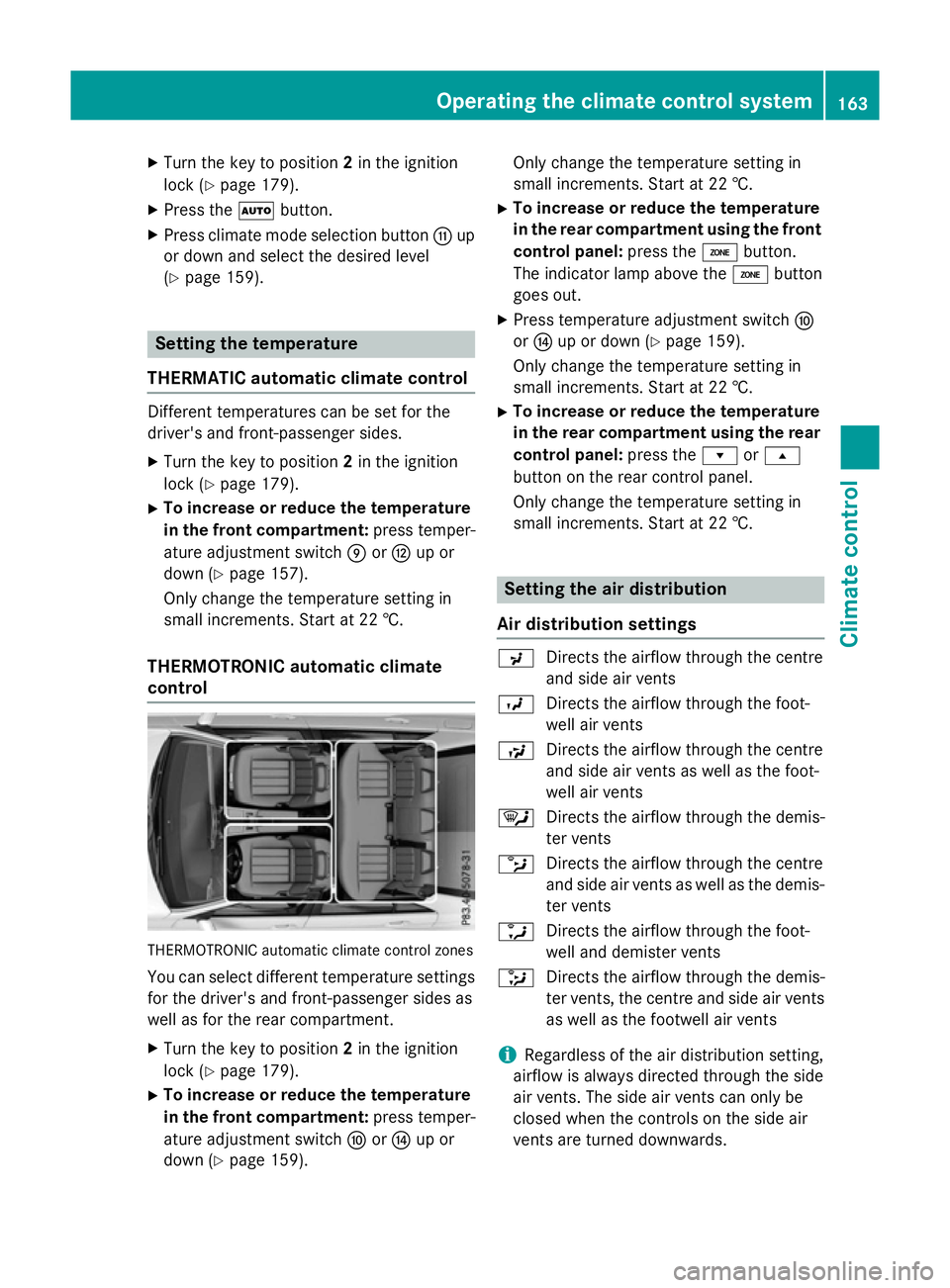
control THERMOTRONIC automatic climate control zones
You can select different temperature settings for the driver's and front-passenger sides as
well as for the rear compartment.
X Turn the key to position 2in the ignition
lock (Y page 179).
X To increase or reduce the temperature
in the front compartment: press temper-
ature adjustmen tswitch ForJ up or
down (Y page 159). Only change the temperature setting in
small increments. Start at 22 †.
X To increase or reduce the temperature
in the rear compartment using the front
control panel: press theábutton.
The indicator lamp above the ábutton
goes out.
X Press temperature adjustmen tswitch F
or J up or down (Y page 159).
Only change the temperature setting in
small increments. Start at 22 †.
X To increase or reduce the temperature
in the rear compartment using the rear
control panel: press therors
button on the rear control panel.
Only change the temperature setting in
small increments. Start at 22 †. Setting the air distribution
Air distribution settings P
Directsthe airflow through the centre
and side air vents
O Directsthe airflow through the foot-
well air vents
S Directsthe airflow through the centre
and side air ventsasw ell as the foot-
well air vents
¯ Directsthe airflow through the demis-
ter vents
b Directsthe airflow through the centre
and side air ventsasw ell as the demis-
ter vents
a Directsthe airflow through the foot-
well and demister vents
_ Directsthe airflow through the demis-
ter vents, the centre and side air vents
as well as the footwell air vents
i Regardless of the air distribution setting,
airflow is alway sdirected through the side
air vents. The side air ventsc an only be
closed when the controls on the side air
ventsa re turned downwards. Operating the climate control system
163Climate control
Page 167 of 497
Setting the air distribution
X
Turn the key to position 2in the ignition
lock (Y page 179).
X THERMATIC automatic climate control:
press air distribution adjustment switch F
up or down, until the desired symbol
appears in the display (Y page 157).
X THERMOTRONIC automatic climate con-
trol: press air distribution adjustment
switch Iup or down, until the desired
symbol appears in the display
(Y page 159). Setting the airflow
THERMATIC automatic climate control X
Turn the key to position 2in the ignition
lock (Y page 179).
X To increase or reduce: press airflow
adjustment switch Gup or down
(Y page 157).
THERMOTRONIC automatic climate
control X
Turn the key to position 2in the ignition
lock (Y page 179).
X To increase or reduce the front-com-
partment airflow: press airflow adjust-
ment switch Hup or down (Y page 159).
X To increase/reduce the rear-compart-
ment airflow: press theKorI but-
ton.
If the battery is not charged sufficiently, the
blower output may be reduced. Once the bat- tery is sufficiently charged again, full blower
output will be available. Switching the ZONE function on/off
X To activate: press theábutton.
The indicator lamp above the ábutton
lights up. THERMATIC automatic climate control: the
temperature settingf or the driver's side is
not adopted for the front-passenger side.
THERMOTRONIC automatic climate con-
trol: the temperature settingf or the driver's
side is not adopted for the front-passenger side and the rear compartment.
X To deactivate: press theábutton.
The indicator lamp above the ábutton
goes out.
THERMATIC automatic climate control: the
temperature settingf or the driver's side is
adopted for the front-passenger side.
THERMOTRONIC automatic climate con-
trol: the temperature settingf or the driver's
side is adopted for the front-passenger side and the rear compartment. Demisting the windscreen
You can use this function to defrost the wind-
screen or to demist the inside of the wind-
screen and the side windows.
Switch off the windscreen demisting function
as soon as the windscreen is clear again.
X Turn the key to position 2in the ignition
lock (Y page 179).
X To activate: press the¬button.
The indicator lamp above the ¬button
lights up.
The climate control system switches to the
following functions:
R high airflow
R high temperature
R air distribution to the windscreen and
front side windows
R air-recirculation mode off
If the battery is not charged sufficiently, the
blower output may be reduced. Once the bat- tery is sufficiently charged again, full blower
output will be available again. 164
Operating the climate control systemClimatec
ontrol
Page 168 of 497
X
To deactivate: press the¬button.
The indicator lamp above the ¬button
goe sout.T he previous settings ar ereacti-
vated .Air-recirculatio nmoder emains
deactivated.
or X Press the Ãbutton.
The indicator lamp above the ¬button
goe sout.A irflo wand ai rdistributio nareset
to automatic mode.
or
X THERMATI Cautomatic climate control:
press temperatur eadjustment switch E
or H up or down (Y page 157).
THERMOTRONIC automatic climate con-
trol :press temperatur eadjustment switch
F orJ up or down (Y page 159). Demistin
gthe windows
Window smisted up on the inside X
Activate the ¿cooling with ai rdehu-
midification function.
X Activate automatic mode Ã.
X Adjust the side ai rvents so tha tthe heated
ai risd irecte dtowards the side windows.
X If the windows continue to mis tup,activate
the "Windscreen demisting "fun ction ¬.
i Yo
us houl donlys elect thi ssetting until
the windscree nisc lear again.
Window smisted up on the outside X
THERMATI Cautomatic climate control:
press ai rdistributio nadjustment switch F
up or down (Y page 157), unti lthe P or
O symbo lappears in the display.
X THERMOTRONIC automatic climate con-
trol :press ai rdistributio nadjustment
switch Iup or down (Y page 159), until
the P orO symbo lappears in the
display.
X Adjust the side ai rvents so tha tnoairis
directe dtowards the side windows. Rea
rwindo wh eating
General notes The rea
rwindo wh eating ha sahighc urrent
draw. Yo ushoul dtherefore switch it off as
soo nasthe windo wisclear.Ito therwise
switches off automaticall yafter several
minutes.
If the battery voltag eistoo low, the rea rwin-
do wh eating ma yswitch off.
Switchin gon/off X
Turn the key to position 2in the ignition
lock (Y page 179).
X Press the ¤button.
The indicator lamp above the ¤button
lights up or goe sout. Operatin
gthe climate contro lsystem
165Climate control