ESP MERCEDES-BENZ E-CLASS SALOON 2015 Manual PDF
[x] Cancel search | Manufacturer: MERCEDES-BENZ, Model Year: 2015, Model line: E-CLASS SALOON, Model: MERCEDES-BENZ E-CLASS SALOON 2015Pages: 497, PDF Size: 16.23 MB
Page 242 of 497
Problems with PARKTRONIC
Problem
Possible causes/consequences and
M
MSolutions Only the red segments
in the PARKTRONIC
warning displaysa
re lit.
You also hear awarning
tone for approximately
two seconds.
PARKTRONIC is then
deactivated and the
indicator lamp on the
PARKTRONIC button
lights up. PARKTRONIC has malfunctioned and has switched off.
X If problems persist, have PARKTRONIC checked at aqualified
specialist workshop. Only the red segments
in the PARKTRONIC
warning displaysa
re lit.
PARKTRONIC is then
deactivated. The PARKTRONIC sensors are dirty or there is interference.
X Cleant he PARKTRONIC sensors (Y page 389).
X Switch the ignition back on. The problem may be caused by an external source of radio or
ultrasound waves.
X See if PARKTRONIC functions in adifferent location. Active Parking Assist
General notes Active Parking Assist is an electronic parking
aid with ultrasound. It measures the road on
both sides of the vehicle. Aparking symbol
indicates asuitable parking space. Active
steering intervention and brake application
can assist you during parking. You may also
use PARKTRONIC (Y page 235).
i The active braking application is only
available on vehicles with automatic trans- mission.
Important safety notes Active Parking Assist is only an aid. It is not a
substitute for your attention to the immediate surroundings. The responsibility for safe
manoeuvring and parking remains with you.
Make sure that no persons, animals or
objectsa re in the manoeuvring range. When PARKTRONIC is switched off, Active
Parking Assist is also unavailable. G
WARNING
While parking or pulling out of aparking
space, the vehicle swings out and can drive
onto areas of the oncomingl ane. This could
cause you to collide with other road users.
There is arisk of an accident.
Pay attention to other road users. Stop the
vehicle if necessary or cancel the Active Park- ing Assist parking procedure.
! If unavoidable, you should drive over
obstacles such as kerbs slowly and not at a
sharp angle. Otherwise, you may damage
the wheels or tyres.
Active Parking Assist may also display spaces not suitable for parking, e.g.:
R parking or stopping prohibitions
R in front of drivewaysore ntrances and exits
R unsuitable surfaces Driving systems
239Driving and parking Z
Page 244 of 497
Activ
eParking Assist is activated automati-
cally when driving forwards .The system is
operational at speeds of up to approximately 35 km/h .While in operation, the system inde-
pendently locate sand measures parking
space sonb oths ides of the vehicle.
Activ eParking Assist will onl ydetect parking
spaces:
R parallel or at right angle stothe direction of
travel.
R tha tare parallel to the direction of travel
and ar eatleast1.5mw ide
R that are parallel to the direction of travel
and at leas t1.0ml onger than your vehicle
R that are at right angles to the direction of
travel and at least 1.0 mwider than your
vehicle
i Note that Active Parking Assist cannot
measure the size of aparking space if it is at
right angles to the direction of travel. You
will need to judge whether your vehicle will
fit in the parking space.
When driving at speeds below 30 km/h, you
will see parking symbol ;asas tatus indi-
cator in the instrument cluster. When apark-
ing space has been detected, an arrow
towards the right or the left also appears.
Active Parking Assist only display sparking
spaces on the front-passenger side as stand- ard. Parking spaces on the driver's side are
displayed as soon as the turn signal on the
driver's side is activated. When parking on the driver's side, this must remain activated untilyou confirm the use of Active Parking Assist
by pressing the abutton on the multi-
function steerin gwheel. The system auto-
matically determines whether the parking
space is parallel or at right angles to the direc-
tion of travel.
Ap arking space is displayed while you are
driving past it, and until you are approx-
imately 15 maway from it. Parking G
WARNING
If you leave the vehicle when it is only being
braked by Active Parking Assist it could roll
away if:
R there is amalfunction in the system or in
the voltage supply.
R the electrical system in the engine com-
partment ,the battery or the fuses are tam-
pered with.
R the battery is disconnected.
R the vehicle is accelerated, e.g. by avehicle
occupant.
There is arisk of an accident.
Before leaving the vehicle, alwayss ecure it
against rolling away.
i Vehicles with automatic transmission:
When PARKTRONIC detect sobstacles,
Active Parking Assist brakes automatically
during the parking process. You are respon-
sible for braking in good time.
X Stop the vehicle when the parking symbol
shows the desired parking space in the
instrument cluster.
X Vehicles with manual transmission: shift to
reverse gear.
Vehicles with automatic transmission: shift
to position R.
The Start
Start Park ParkAssist?
Assist? Yes:
Yes:OK
OKNo:
No:
% message appears in the multifunction
display.
X To cancel the procedure: press the%
button on the multifunction steerin gwheel
or pull away.
or
X To parku sing Active Parking Assist:
press the abutton on the multifunction
steerin gwheel.
The Park Assist active Accelerate
Park Assist active Accelerate
and
and brake
brake Observe
Observe surroundings
surroundings mes-
sage appears in the multifunction display. Driving systems
241Driving and parking Z
Page 246 of 497
cel the parking procedure with Active Park-
ing Assist.
R You can also preselect transmissio nposi-
tion D.The vehicle redirects and doe snot
drive as far into the parking space. Should a gea rbec hanged too early ,the parking pro-
cedure will be cancelled. Asensible parking
position can no longer be achieved from
this position.
Exiting aparkin gspace In order that Active Parking Assist can sup-
por tyou when exiting the parking space:
R the border of the parking space mus tbe
hig he nough at the front and the rear. A
kerb stone is too small ,for example.
R the border of the parking space mus tnot be
too wide, as the position of the vehicle must
not excee danangle of 45° to the starting
position as it is manoeuvred into the park-
ing space.
R am anoeuvring distance of at leas t1.0 m
mus tbea vailable.
i Vehicles with automatic transmission:
If PARKTRONIC detects obstacles, Active
Parking Assist brakes automaticall ywhilst
the vehicle exits the parking space. You are responsibl efor braking in goo dtime.
Active Parking Assist can only assis tyou with
exiting aparking space if yo uhavep arked the
vehicle paralle ltothe direction of trave lusing
Active Parking Assist.
X Start the engine.
X Releas ethe parking brake.
X Switch on the turn signal in the direction
yo ua re pulling away.
X Vehicles with manual transmission:
engage firs torreverse gear.
Vehicles with automati ctransmission:
shift the transmissio ntoposition Dor R.
The Star tPark Assist? Yes: OK No:
Star tPark Assist? Yes: OK No:
% messag eappears in the multifunction
display. X
To cance lthe procedure: press the%
button on the multifunction steering wheel or pull away.
or
X To exi taparkin gspac eusing Active
Parking Assist: press theabutton on
the multifunction steering wheel.
The Park Assist active Accelerate Park Assist active Accelerate
and and brake
brake Observe
Observe surroundings
surroundings mes-
sage appears in the multifunction display.
X Releas ethe multifunction steering wheel.
X Pull away ,being ready to brake at al ltimes.
Do not excee damaximum speed of
approximately 10 km/h when exiting a
parking space. Otherwise, Active Parking
Assist will be cancelled.
X Vehicles with manual transmission:
stop ,att he latest when PARKTRONIC
sounds the continuou swarning tone.
X Vehicles with manual transmission:
engage firs tgearorr everse gea rwhent he
vehicle is stationary, depending on the
messag eorrequirement.
Vehicles with automati ctransmission:
shift the transmission to position Dor R
when the vehicle is stationary, depending
on the messag eorrequirement.
Active Parking Assist immediately steers in
the othe rdirection. The Park Assist
Park Assist
active Accelerate and brake active Accelerate and brake
Observe Observe surroundings
surroundings messageappears
in the multifunction display.
i You will achieve the bes
tresults by wait-
ing for the steering procedure to complete before pulling away.
If yo ureverse afte ractivation, the steering
wheel is move dtothe straight-ahead posi-
tion.
X Drive forward sand reverse as prompte dby
the PARKTRONIC warning displays, several
time sifn ecessary.
X Vehicles with manual transmission:
stop as soo nasPARKTRONIC sounds the
continuou swarning tone, if not before. Drivin
gsystems
243Drivingand parking Z
Page 247 of 497
Once you have exited the parking space com-
pletely,t he steering wheel is moved to the
straight-ahead position. You hear atone and
the Park Assist switched off
Park Assist switched off message
appears in the multifunction display. You will
then have to steer and merge into traffic on
your own. PARKTRONIC is still available. You
can take over the steering before the vehicle has exited the parking space completely. This
is useful,f or example when you recognise
that it is already possibletop ull out of the
parking space.
Cancelling Active Parking Assist You can cancel Active Parking Assist at any
time.
X Stop the movement of the multifunction
steering wheel or steer yourself.
Active Parking Assist will be cancelled at
once. The Park Assist cancelled
Park Assist cancelled mes-
sage appears in the multifunction display
and you hear atone.
or X Press the PARKTRONIC button on the
centre console (Y page 237).
PARKTRONIC is switched off and Active
Parking Assist is immediately cancelled.
The Park Assist cancelled
Park Assist cancelled message
appears in the multifunction displaya nd
you hear atone.
Active Parking Assist is cancelled automati-
cally if:
R the transmission is shifted too early
R transmission position Pis selected
R parking using Active Parking Assist is no
longer possible
R you are driving faster than 10 km/h
R aw heel spins and ESP ®
intervenes or fails.
In such cases the ÷warning lamp lights
up in the instrument cluster.
Aw arning tone sounds. The parking symbol
disappears and the multifunction display
shows the Park Assist cancelled Park Assist cancelled mes-
sage. When Active Parking Assist is cancelled, you
must steer and brake againy
ourself.
Vehiclesw ith automatic transmission: if a
system malfunction occurs, the vehicle is
braked to astandstill. To drive on, depress the
accelerator pedal again.
Towing atrailer For vehicles with
atrailer tow hitch, the min-
imum length for parking spaces is slightly
increased.
If you have attached atrailer to your vehicle,
you should not use Active Parking Assist.
Once the electrical connection is established between your vehicle and the trailer, Active
Parking Assist is no longer available.
PARKTRONIC is deactivated for the rear area. Reversing camera
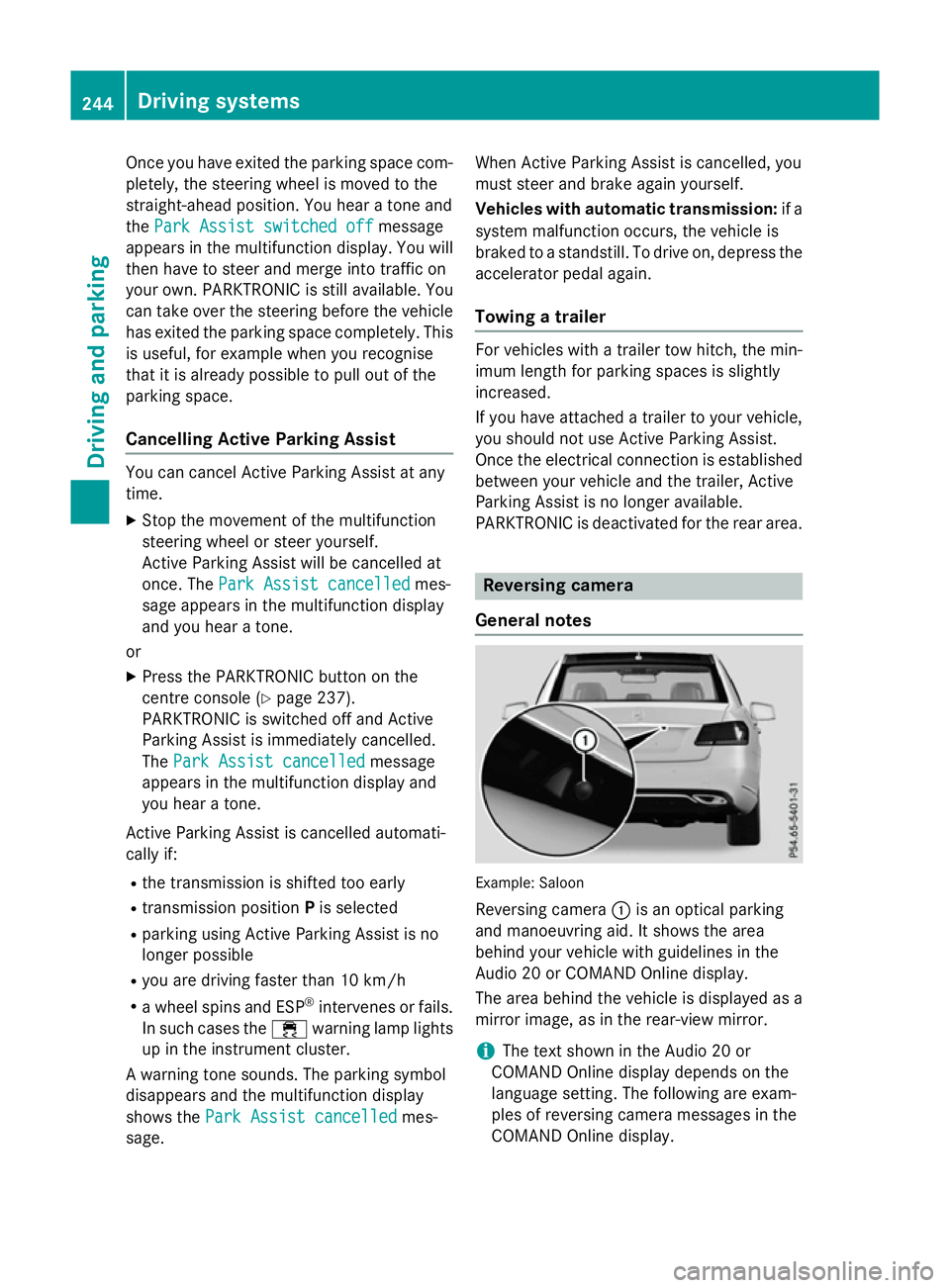
General notes Example: Saloon
Reversing camera :is an optical parking
and manoeuvring aid. It shows the area
behind your vehicle with guidelines in the
Audio 20 or COMAND Online display.
The area behind the vehicle is displayed as a
mirror image, as in the rear-view mirror.
i The text shown in the Audio 20 or
COMAND Online displayd epends on the
language setting. The following are exam-
ples of reversing camera messages in the
COMAND Online display. 244
Driving systemsDriving and parking
Page 248 of 497
Important safety notes
The reversing camera is only an aid. It is no
ta
substitut efor your attention to th eimmediate
surroundings. The responsibilit yfor safe
manoeuvrin gand parking remains wit hyou.
Mak esure that there are no persons, animals
or objects in range while manoeuvrin gand
parking.
Under th efollowin gcircumstances, the
reversing camera will no tfunction ,orwill
function in alimited manner:
R if th eboot lid or tailgat eisopen
R in heav yrain ,sno worf og
R at night or in ver ydark places
R if th ecamera is expose dtoveryb right light
R if th earea is lit by fluorescent bulbs or LED
lighting (the display may flicker)
R if there is asudde nchang eint emperature,
e.g. when driving int oaheated garag ein
winter
R if th ecamera len sisdirtyoro bstructed.
Observ ethe note sonc leaning
(Y page 390)
R if th erear of your vehicl eisdamaged. In this
case, have th ecamera position and setting
checke dataq ualified specialist workshop
The field of vision and other function softhe
reversing camera may be restricted due to
additional accessories on th erear of th evehi-
cle (e.g. licence plat eholder, bicycle rack).
On vehicles wit hheight-adjustable chassis,
leaving th estandard height can result in inac-
curacie sintheguide lines, depending on
technical conditions.
i The reversing camera is protected from
raindrops and dust by mean sofaflap.
When th ereversing camera is activated,
this flap opens.
The flap closes again when:
R you have finishe dthe manoeuvrin gproc-
ess
R you switch off th eengine
R you open th eboot Se
et he note sonc leaning (Y page 390).
Fo rtechn ical reasons, th eflap may remain
open briefly after th ereversing camera has
been deactivated.
Activating/deactivating th ereversing
camera X
To activate: makesure that th ekeyis in
position 2in th eignition lock.
X Mak esure that the ActivationbyR
Activatio nbyR
gear
gear function is selected in Audio 20 or
COMAND Online; see th eDigital Owner's
Manual.
X Engage revers egear.
The reversing camera flap opens. The area
behind th evehicl eiss hown wit hguide lines
in th eAudio 20 or COMAND Onlin edisplay.
The imag efromt hereversing camera is
available throughout th emanoeuvring
process.
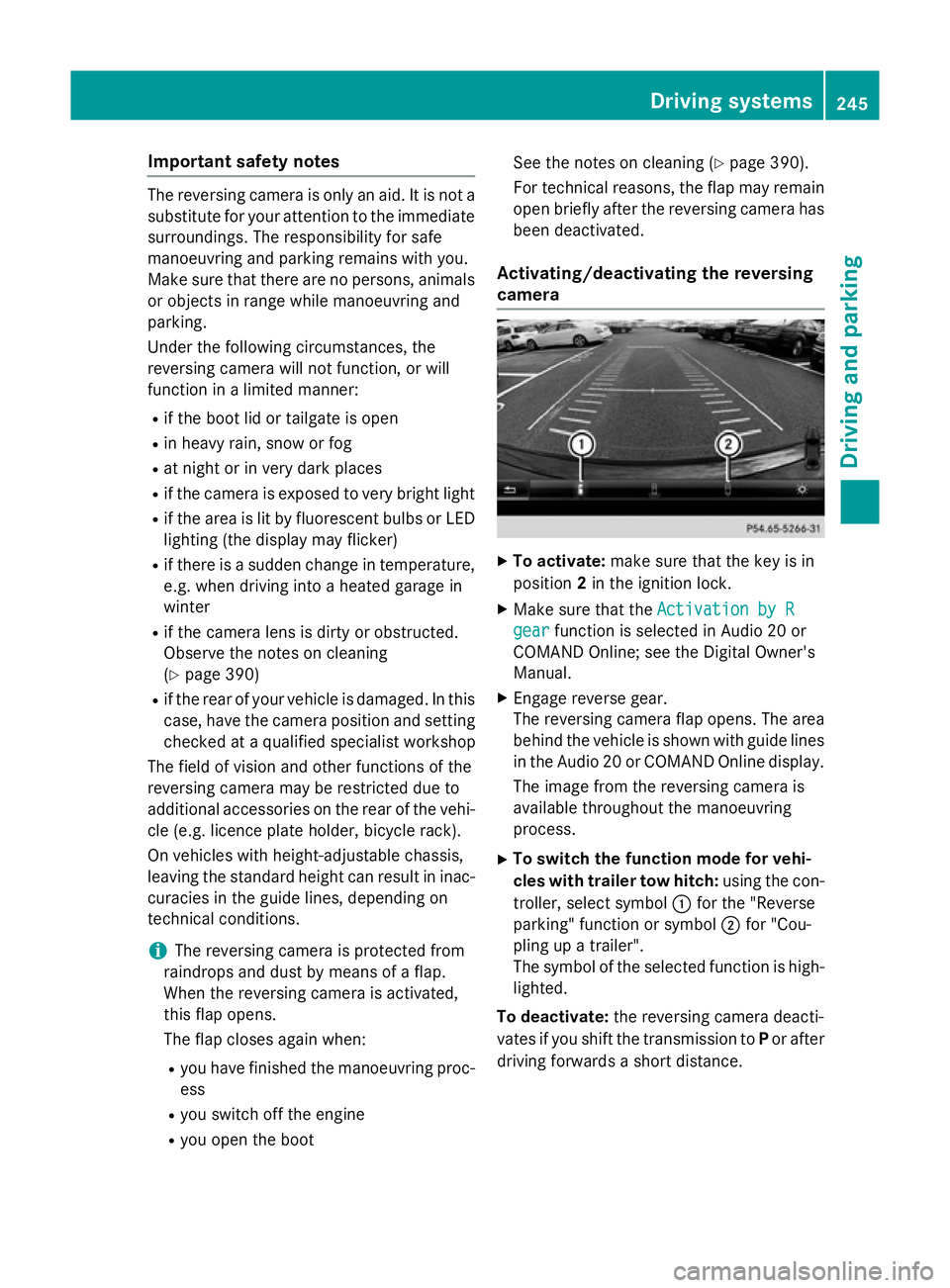
X To switch th efun ction mod efor vehi-
cles with traile rtow hitch: usingthe con-
troller ,select symbol :for th e"Reverse
parking "function or symbol ;for "Cou-
plin gupat railer".
The symbol of th eselected function is high-
lighted.
To deactivate: ther eversing camera deacti-
vates if you shif tthe transmission to Por after
driving forwards ashort distance. Driving systems
245Driving and parking Z
Page 249 of 497
Display
sintheAudio 20/COMAND
Online display The reversin
gcamera may sho wadistorted
vie wofo bstacles or sho wthemi ncorrectly or
no tata ll. Obstacles are no tshown by the
reversin gcamera in th efollowing locations:
R ver yclose to th erearb umper
R under th erearb umper
R in th eareai mmediately abov ethe tailgate
handle
! Objects no
tatgroun dlevel may appear to
be further away than they actually are ,e.g.:
R theb umper of aparke dvehicle
R thed rawbar of atrailer
R theb all couplin gofatrailer to whitch
R ther ears ection of an HGV
R as lante dpost
Use th eguidelines only fo rorientation.
Approach objects no further than th ebot-
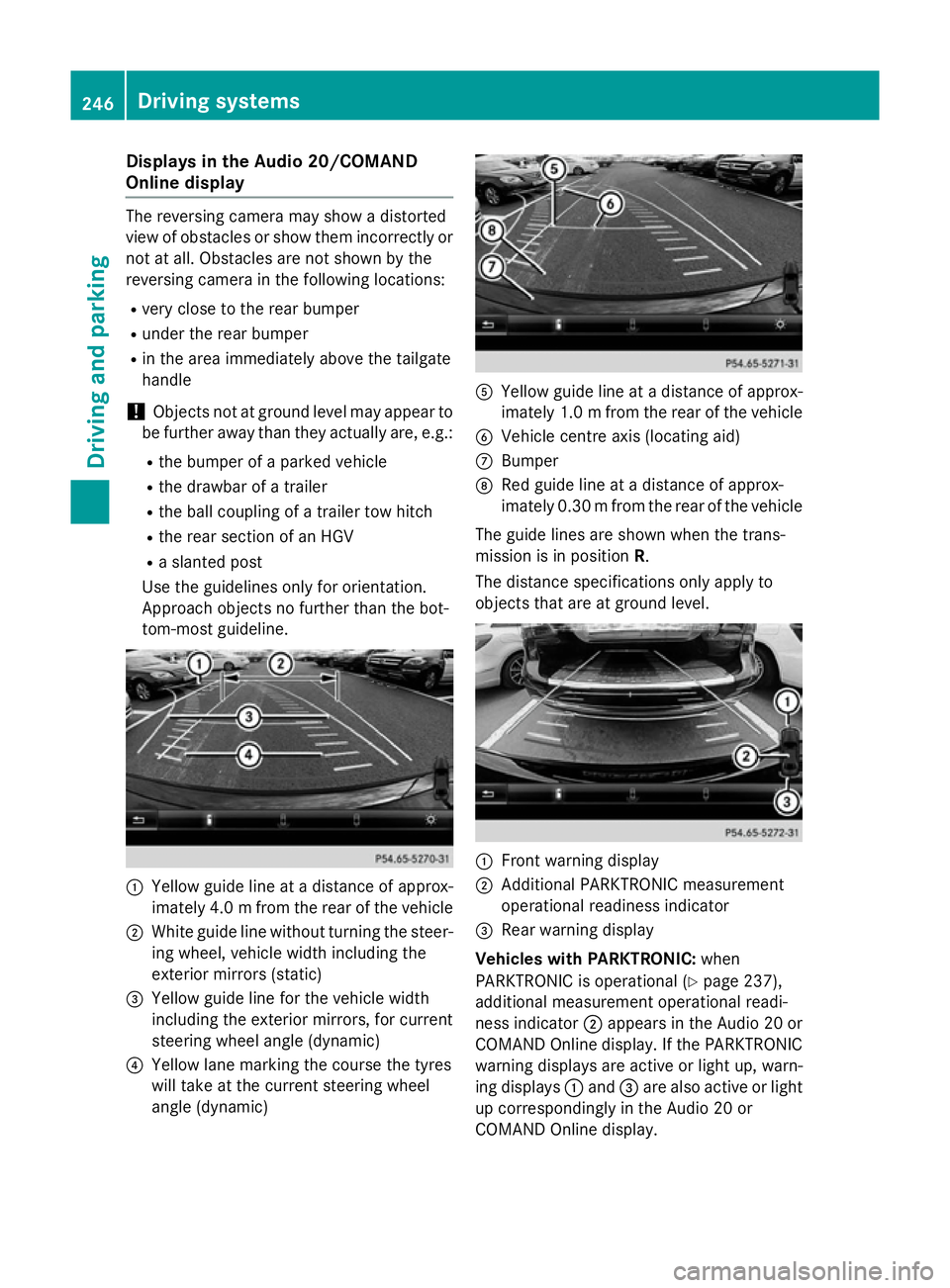
tom-most guideline. :
Yello wguidelineatad istanceofapprox-
imately 4. 0mfrom the rear of the vehicle
; White guide line without turning the steer-
ing wheel, vehicl ewidth including the
exterior mirrors (static)
= Yellow guide line for the vehicl ewidth
including the exterior mirrors, for current
steering whee langle (dynamic)
? Yellow lane marking the course the tyres
willt ake at the current steering wheel
angle (dynamic) A
Yellow guide line at adistance of approx-
imatel y1.0mf rom the rear of the vehicle
B Vehicle centre axis (locating aid)
C Bumper
D Red guide line at adistance of approx-
imatel y0.30 mfrom the rear of the vehicle
The guide lines are show nwhen the trans-
mission is in position R.
The distance specifications only apply to
objects that are at ground level. :
Front warning display
; Additional PARKTRONIC measurement
operational readiness indicator
= Rearw arning display
Vehicles with PARKTRONIC: when
PARKTRONIC is operational (Y page237),
additiona lmeasurement operational readi-
ness indicator ;appears in the Audi o20or
COMAND Online display.Ift he PARKTRONIC
warning displaysa re active or light up, warn-
ing displays :and =are alsoa ctive or light
up correspondingly in the Audi o20or
COMAND Online display. 246
Driving systemsDriving and parking
Page 252 of 497
X
Select symbol ?using the controller.
The "Coupling up atrailer" function is selec-
ted. The distance specifications now only
appl ytoo bjects tha tare at the same level
as the ball coupling.
X Revers ecarefully ,making sure tha ttrailer
drawbar locating aid ;points approx-
imatel yinthe direction of traile rdrawbar
=.
X Revers ecarefully unti ltraile rdrawbar =
reaches the red guid eline.
The distance between the traile rdrawbar
and the red guid elineisn ow approximately
0.30 m.
X Couple up the trailer (Y page 267).
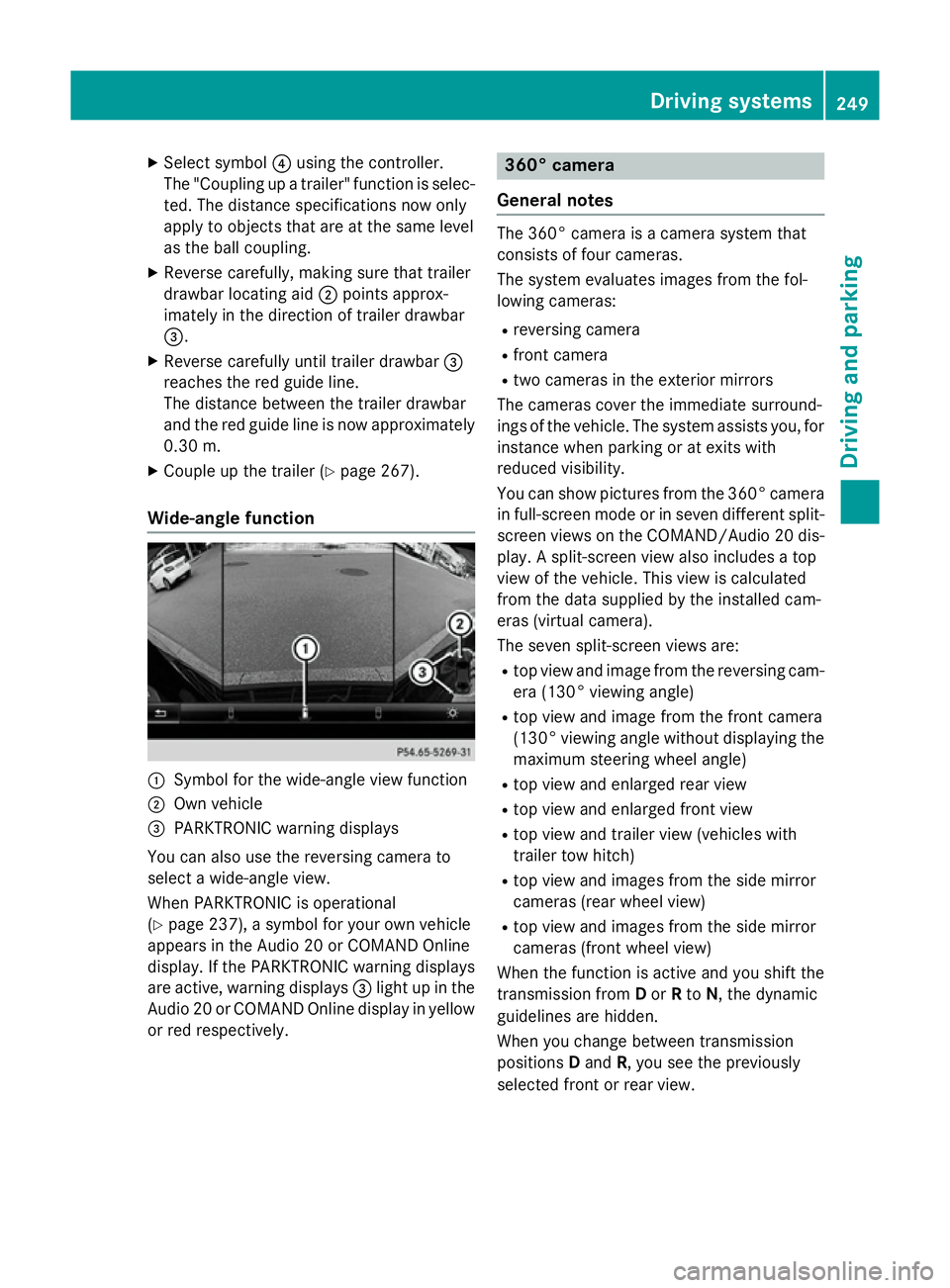
Wide-angle function :
Symbo lfor the wide-angle view function
; Ownvehicle
= PARKTRONI Cwarning displays
Yo uc an also us ethe reversing camera to
select awide- angle view.
When PARKTRONI Cisoperational
(Y page 237), asym bolfor your ow nvehicle
appear sinthe Audio 20 or COMAND Online
display. If the PARKTRONI Cwarning displays
ar ea ctive, warning displays =ligh tupint he
Audio 20 or COMAND Online displa yinyellow
or red respectively. 360° camera
General notes Th
e3 60° camera is acamera syste mthat
consists of fou rcameras.
Th es ysteme valuate simages fromt he fol-
lowing cameras:
R reversing camera
R front camera
R two camera sinthe exterior mirrors
Th ec amera scove rthe immediate surround-
ing soft he vehicle. Th esystema ssis ts you, for
instanc ewhenp arking or at exits with
reduced visibility.
Yo uc an sho wpictures fro mthe 360° camera
in full-screen mod eorinseven different split-
screen view sonthe COMAND/Audio 20 dis-
play .As plit-screen view also includes atop
view of the vehicle. This view is calculated
fro mt he data supplied by the installe dcam-
era s(virtual camera).
Th es even split-screen view sare:
R top view and imag efromt he reversing cam-
era (130° viewing angle)
R top view and imag efromt he front camera
(130° viewing angle without displaying the maximum steering whee langle)
R top view and enlarge drearv iew
R top view and enlarge dfront view
R top view and trailer view (vehicle swith
trailer tow hitch)
R top view and images fro mthe side mirror
camera s(rear whee lview)
R top view and images fro mthe side mirror
camera s(front whee lview)
When the functio nisa ctive and yo ushift the
transmission from Dor Rto N,t he dynamic
guideline sarehidden.
When yo uchange between transmission
positions Dand R,y ou seet he previously
selected front or rea rview. Driving systems
249Driving andparking Z
Page 253 of 497
Distance
smeasured by PARKTRONI Cwill
also be opticall ydisplayed:
R as red or yellow brackets around the vehi-
cle symbo lintop view in split-screen mode
or
R at the bottom righ tasred or yellow brack-
ets around the vehicl esym bolinf ull-s creen
mode
Th elinet hicknes sand colou rofthe brackets
sho whow fart he vehicl eisfromano bject.
R yellow brackets with thi nlines:
PARKTRONI Cisactive
R yellow brackets with normal lines :an
object is present in close range of the vehi-
cle
R red line: an object is present in the imme-
diate close range of the vehicle
Important safety notes Th
e3 60° camera is onl yanaidand ma yshow
ad istorted view of obstacles, sho wthem
incorrectly or not at all. Th e360° camera is
not asubst itute for attentiv edriving.
Th er esponsibility for safe manoeuvring and
parking remains with you. Make sure that
there ar enopersons, animals or objects in
range whil emanoeuvring and parking.
Yo ua realways responsibl efor safety ,and
must always pa yattentio ntoyours urround-
ing sw henp arking and manoeuvring. This
applie stothe area sbehin d, in front of and
beside the vehicle. Yo ucould otherwise
endanger yourself and others.
Th e3 60° camera will not functio norwill
functio nonlyinal imited manner:
R if the doors ar eopen
R if the exterior mirrors ar efolde din
R if the boot lid/tailgate is open
R in heav yrain, sno worfog
R at night or in ver ydarkp laces
R if the camera sareexpose dtoveryb right
light
R if the area is li tbyfluorescent bulb sorLED
lighting (th edisplay mayflicker) R
if there is asudde nchange in temperature,
e.g .whend riving into aheatedg arag ein
winter
R if the camera lense saredirty or covered
R if the vehicl ecomponents in which the
camera sarefitte daredamaged. In this
event, have the camera positio nand setting
checked at aquali fied specialis tworkshop.
Do not us ethe 360° under such circumstan-
ces .You could otherwis einjure others or
damage objects when parking the vehicle.
Guid elines ar ealway sshown at roa dlevel.In
trailer mode, the guid elines ar eshown at the
level of the trailer coupling.
On vehicles with height-adjustabl echassis,
depending on technica lconditions ,leavi ng
the standard height can resul tin:
R inaccuracie sinthe guid elines
R inaccuracie sinthe displa yofgenerated
images (to pview)
Activatio nconditions Th
e3 60° camera imag ecan be displaye dif:
R your vehicl eisequippe dwitha3 60° cam-
era
R the key is in position 2in the ignition lock
R COMAND Online/Audi o20isswitched on
R the 360°camera
360 °camera functio niss witched on
Activatin gthe 360° camera X
Press the Øbutton in the centr econ-
sol efor longe rtha nt wo seconds.
Th ef ollowing appear sdepen ding on
whether transmission position Dor Ris
selected:
R as plit- screen with top view and the
imag efromt he front camera or
R as plit- screen with top view and the
imag efromt he reversing camera
or 250
Driving systemsDriving an
dparking
Page 257 of 497
increasin
glapses in concentration on the part
of the driver, it suggest staking abreak.
Important safety notes ATTENTION ASSIS
Tisonly an aid. It may not
always detect fatigue or lapses in concentra-
tion until too late, or may not detect the mat
all. The system is not asubstitut efor aw ell-
rested and attentive driver.
The functionality of ATTENTION ASSIS Tis
restricted, and warnings may be delayed or
not occur at all:
R if the length of the journey is less than
approximately 30 minutes
R if the road conditio nispoor, e.g. if the sur-
face is uneven or if there are potholes
R if there is astron gs ide wind
R if you have adopted asport ydrivin gstyle
with high cornering speeds or high rates of
acceleration
R if you are predominantly drivin gataspeed
below 60 km/h or above 200 km/h
R if you are drivin gwith the DISTRONIC PLUS
active steer assist activated
R if the tim ehas been set incorrectly
R in active drivin gsituations, such as when
you change lanes or change your speed
ATTENTION ASSIS Tisreset and starts
assessing your tiredness again when you con- tinue your journey if:
R you switc hoff the engine
R you tak eoff your seat belt and open the
driver's door, e.g. for achange of drivers or
to tak eabreak
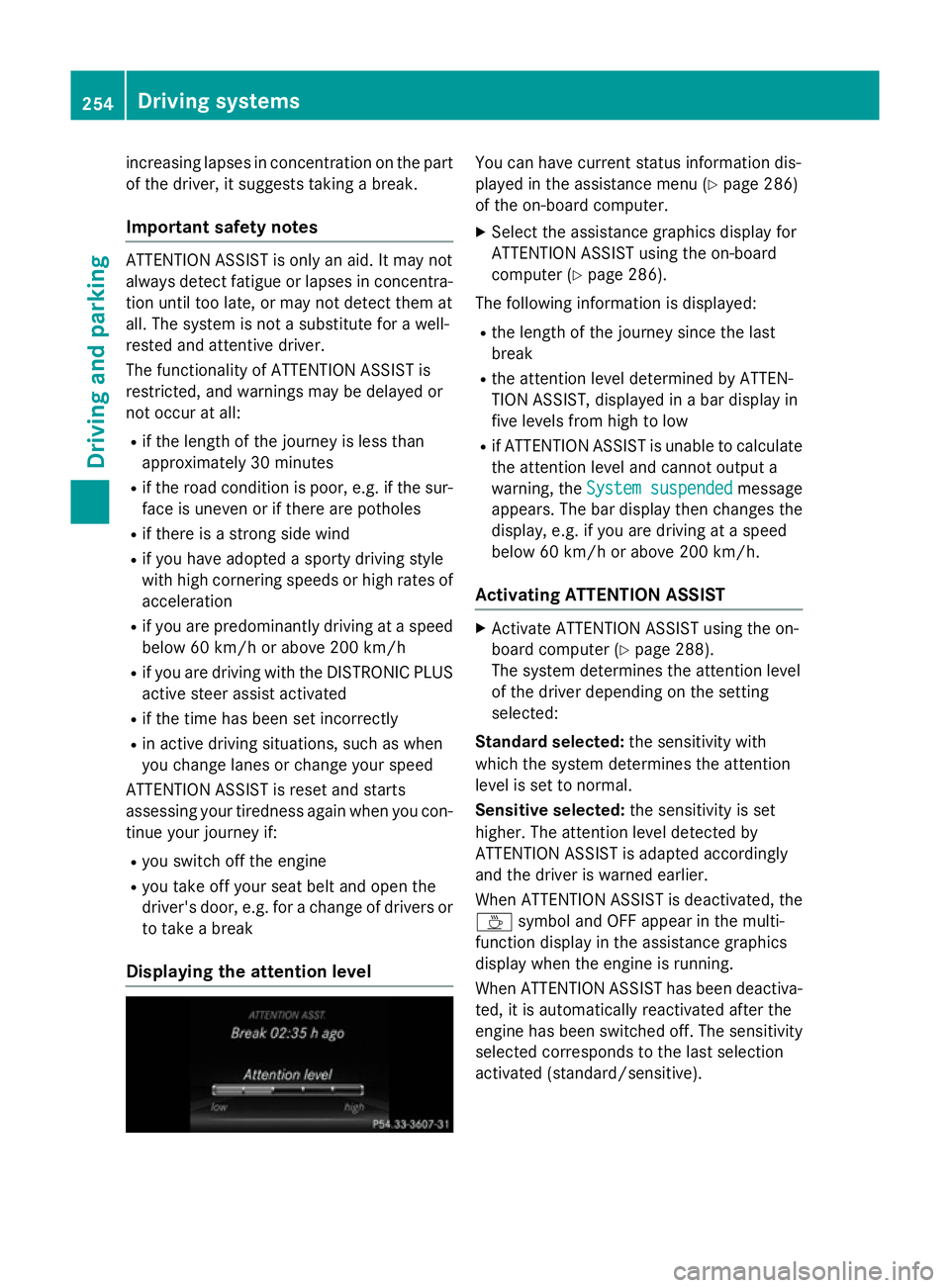
Displaying th eattention level You can have current status information dis-
played in the assistanc emenu( Ypage 286)
of the on-board computer.
X Selec tthe assistanc egraphic sdisplay for
ATTENTION ASSIS Tusing the on-board
computer (Y page 286).
The followin ginformation is displayed:
R the length of the journey sinc ethe last
break
R the attention level determined by ATTEN-
TION ASSIST, displayed in abar display in
five levels fro mhigh to low
R if ATTENTION ASSIS Tisunable to calculate
the attention level and cannot output a
warning, the System suspended System suspended message
appears. The bar display the nchanges the
display, e.g. if you are drivin gataspeed
below 60 km/h or above 200 km/h.
Activating ATTENTION ASSIST X
Activate ATTENTION ASSIS Tusing the on-
board computer (Y page 288).
The system determines the attention level
of the drive rdepending on the setting
selected:
Standard selected: the sensitivitywith
which the system determines the attention
level is set to normal.
Sensitive selected: the sensitivityisset
higher .The attention level detected by
ATTENTION ASSIS Tisadapted accordingly
and the drive riswarnedearlier.
When ATTENTION ASSIS Tisdeactivated, the
À symbol and OFF appear in the multi-
function display in the assistanc egraphics
display when the engine is running.
When ATTENTION ASSIS Thas been deactiva-
ted, it is automatically reactivated after the
engine has been switched off .The sensitivity
selected corresponds to the last selection
activated (standard/sensitive). 254
Driving systemsDriving and parking
Page 259 of 497
and overtakin
grestrictions. Traffic signs
always have priorit yoverthe Traffic Sign
Assist display.
The system may be either functionally
impaired or temporarily unavailable if:
R visibilit yispoor,e.g.d ue to snow, rain ,fog
or spray
R there is glare ,e.g.fro mt hesun bein glow in
th es ky
R there is dirt ,ice or mistin gonthewind-
scree ninthevicinity of th ecamera
R traffic sign sare hard to detect (dirt, ice,
snow)
R thet raffic sign sare insufficiently lit at night
R sign sare ambiguous (e.g. traffic sign son
construction sites or in adjacen tlanes)
R thei nformatio ninthedigital stree tmap of
th en avigation system is incorrect or out of
date
Switching th emessag efun ction on/off If you have activated th
eTraffic Sig nAssist
display in th eon-bo ard computer, th etraffic
regulation s(speed limit sand overtaking
restrictions) are displayed in th einstrument
cluste rfor fiv eseconds respectively. The
wrong-way warning and th etraffic sign dis-
play for spee dlimit sand overtakin grestric-
tions remain active eve nwhen th edisplay has
been deactivated.
X Switch on th eTraffic Sig nAssist message
function via th eon-bo ard computer
(Y page 286).
Instrumen tcluster display Showing th
eassistance graphic
X Call up th eassistance graphic sdisplay
function usin gthe on-board computer
(Y page 286).
X Select th eTraffic Sig nAssist display.
Detected traffic sign sare displayed in the
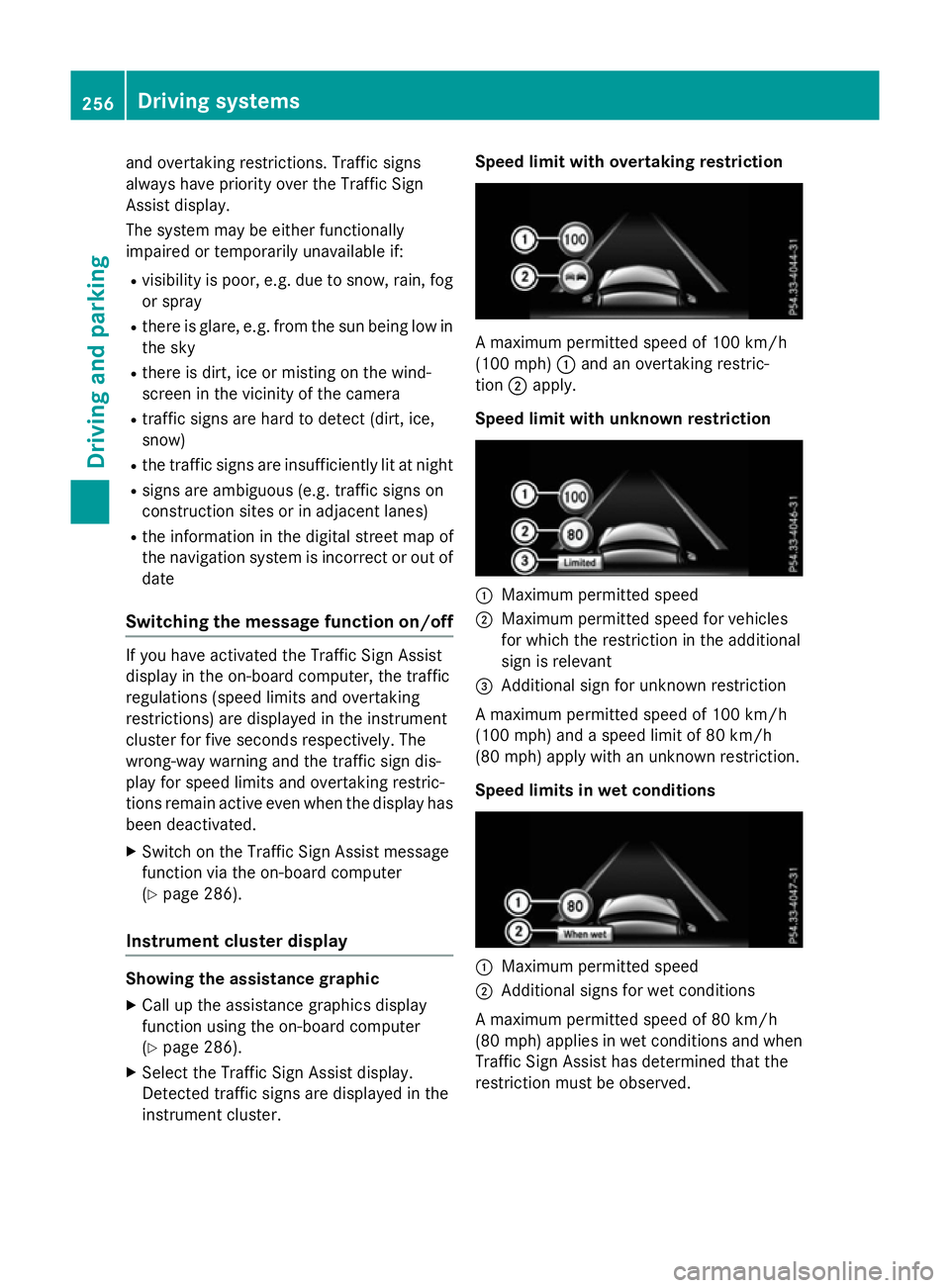
instrumen tcluster. Speed limit with overtaking restriction
Am
aximum permitted spee dof100km/h
(10 0m ph):and an overtakin grestric-
tion ;apply.
Speed limit with unknown restriction :
Maximum permitted speed
; Maximum permitted spee dfor vehicles
for whic hthe restriction in th eadditional
sign is relevant
= Additional sign for unknown restriction
Am aximum permitted spee dof100km/h
(10 0m ph)and aspee dlimit of 80 km/h
(80 mph )apply wit hanunknown restriction.
Speed limits in wet conditions :
Maximum permitted speed
; Additional sign sfor wet conditions
Am aximum permitted spee dof80km/h
(80 mph )applies in wet condition sand when
Traffic Sig nAssist has determine dthatthe
restriction must be observed. 256
Driving systemsDriving and parking