ESP MERCEDES-BENZ E-CLASS SALOON 2015 Service Manual
[x] Cancel search | Manufacturer: MERCEDES-BENZ, Model Year: 2015, Model line: E-CLASS SALOON, Model: MERCEDES-BENZ E-CLASS SALOON 2015Pages: 497, PDF Size: 16.23 MB
Page 147 of 497
X
Press the Rbutton.
The yellow Rindicator lamp in the
instrument cluster lights up.
X To switch off the rear foglamp: press the
R button.
The yellow Rindicator lamp in the
instrument cluster goes out.
Side lamps ! If the batter
yhas been excessively dis-
charged, the side lamps or parking lamps
are automatically switched off to enable
the next engine start .Always park your
vehicle safely and sufficiently lit according
to legal standards. Avoid the continuous
use of the Tside lamps for several
hours. If possible, switch on the Xright
or the Wleft parking lamp.
X To switch on: turn the light switch to T.
The green Tindicator lamp in the instru-
ment cluster lights up.
Parking lamps
Switching on the parking lamps ensures that
the corresponding side of the vehicle is illu-
minated.
X To switch on the parking lamps: the key
is not in the ignition lock or it is in posi-
tion 0.
X Turn the light switch to W(left-hand side
of the vehicle) or X(right-hand side of
the vehicle). Combination switch
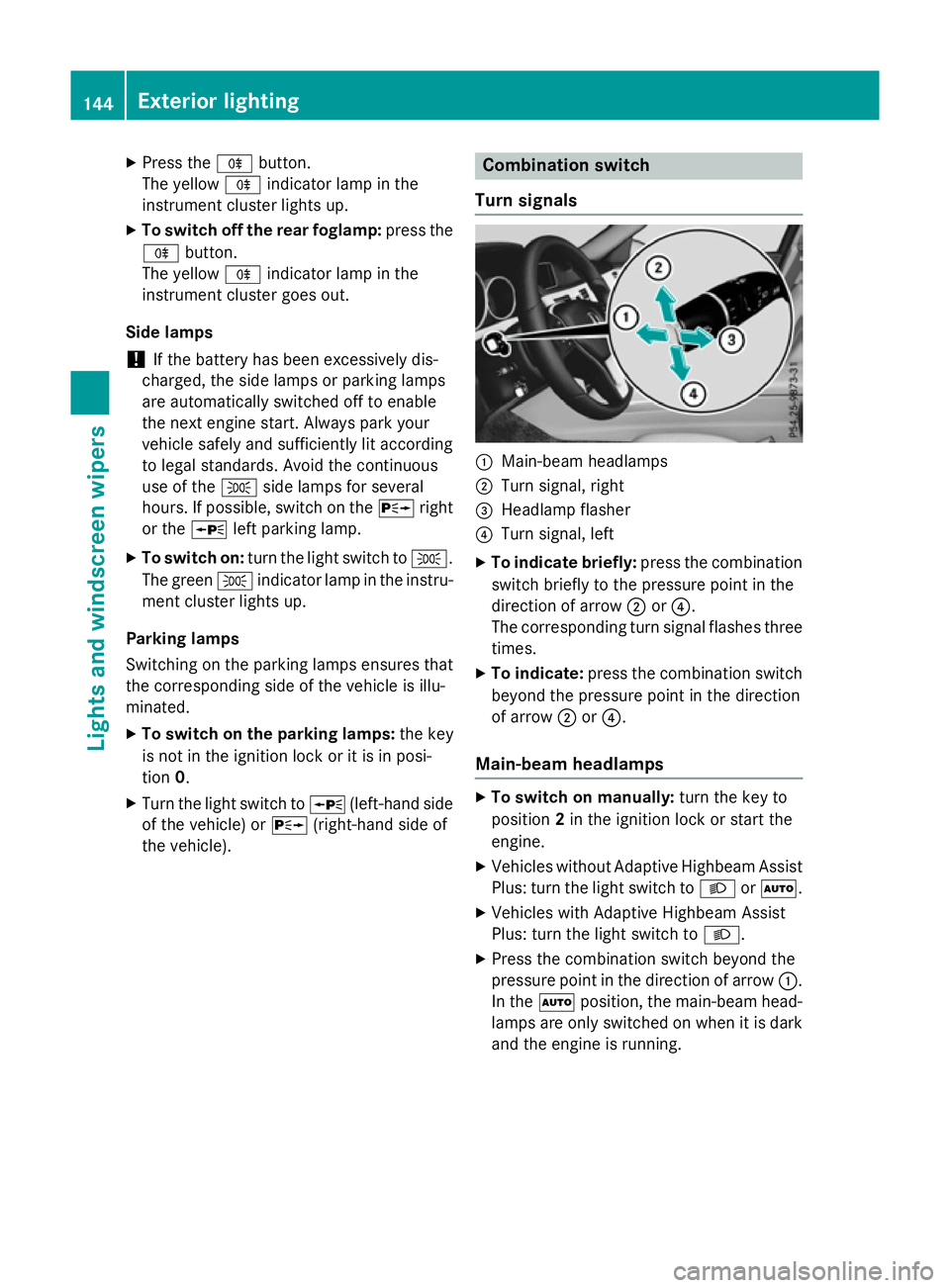
Turns ignals :
Main-beam headlamps
; Turn signal, right
= Headlamp flasher
? Turn signal, left
X To indicate briefly: press the combination
switch briefly to the pressure point in the
direction of arrow ;or?.
The corresponding turn signal flashes three
times.
X To indicate: press the combination switch
beyond the pressure point in the direction
of arrow ;or?.
Main-beam headlamps X
To switch on manually: turn the key to
position 2in the ignition lock or start the
engine.
X Vehicles without Adaptive Highbeam Assist
Plus: turn the light switch to LorÃ.
X Vehicles with Adaptive Highbeam Assist
Plus: turn the light switch to L.
X Press the combination switch beyond the
pressure point in the direction of arrow :.
In the Ãposition, the main-beam head-
lamps are only switched on when it is dark
and the engine is running. 144
Exterior lightingLights and windscreen wipers
Page 150 of 497
Adaptive Highbeam Assis
tPlus
Genera lnotes Wit
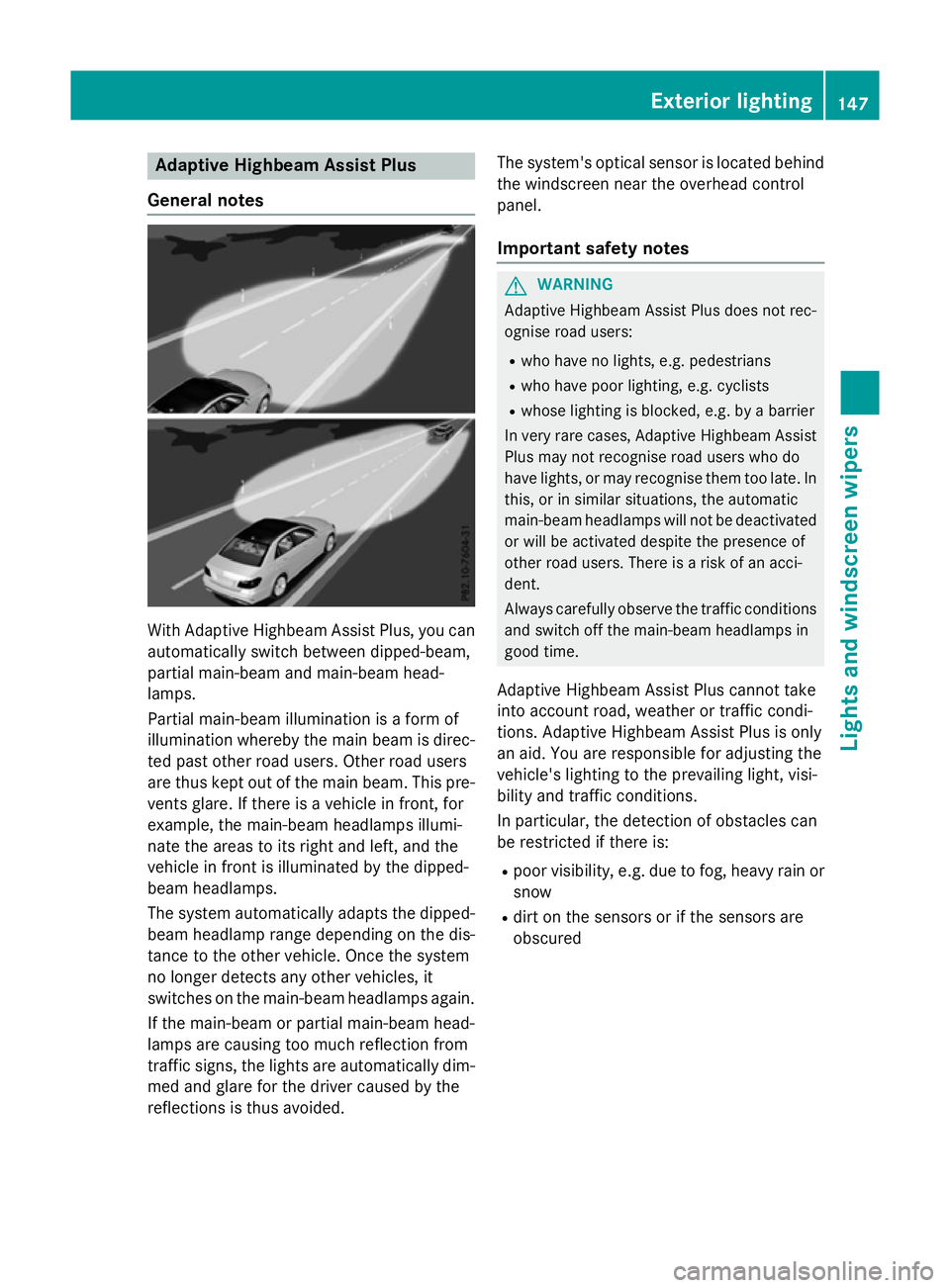
hAdaptive Highbeam Assis tPlus, you can
automatically switch between dipped-beam,
partial main-beam and main-beam head-
lamps.
Partial main-beam illumination is aformof
illumination whereby th emain beam is direc-
te dp ast other road users. Other road users
are thus kept out of th emain beam .This pre-
vents glare. If there is avehicl einf ront,for
example, th emain-beam headlamps illumi-
nat ethe areas to it sright and left, and the
vehicl einfrontis illuminate dbythedipped-
beam headlamps.
The system automatically adapt sthe dipped-
beam headlamp range depending on th edis-
tance to th eother vehicle. Once th esystem
no longer detects any other vehicles, it
switches on th emain-beam headlamps again.
If th emain-beam or partial main-beam head-
lamp sare causing to omuchr eflection from
traffic signs, th elights are automatically dim-
med and glar efor th edriver caused by the
reflection sisthusa voided. The system'
soptical sensor is locate dbehind
th ew indscree nnearthe overhead control
panel.
Important safety notes G
WARNING
Adaptive Highbea mAssistP lus does no trec-
ognise road users:
R who hav enolights,e.g.p edestrians
R who hav epoor lighting ,e.g.c yclists
R whos elighting is blocked, e.g. by abarrier
In ver yrarec ases, Adaptive Highbea mAssist
Plus may no trecognise road user swho do
hav elights ,orm ay recognise them to olate. In
this, or in similar situations, th eautomatic
main-beam headlamp swill no tbed eactivated
or will be activated despit ethe presence of
other road users. There is ariskofana cci-
dent.
Always carefully observ ethe traffic conditions
and switch off th emain-beam headlamp sin
goo dtime.
Adaptive Highbeam Assis tPlus canno ttake
int oa ccoun troad ,weather or traffic condi-
tions. Adaptive Highbeam Assis tPlus is only
an aid. You are responsible for adjusting the
vehicle's lighting to th eprevailing light, visi-
bilit yand traffic conditions.
In particular, th edetection of obstacles can
be restricted if there is:
R poor visibility, e.g. due to fog ,heav yrain or
snow
R dirt on th esensor sorift hesensor sare
obscured Exterior lighting
147Lightsand windscreen wipers Z
Page 152 of 497
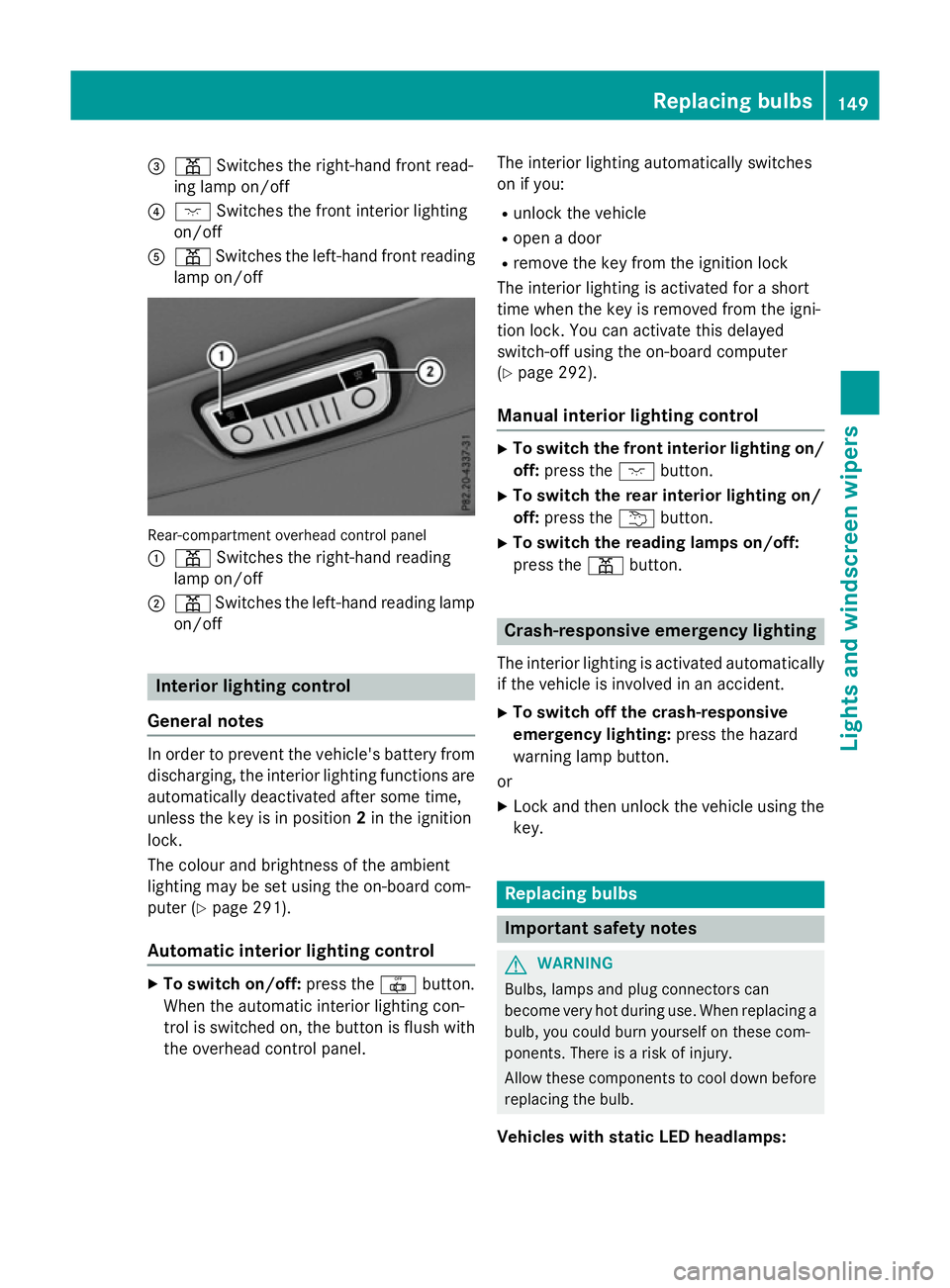
=
p Switches the right-hand front read-
ing lamp on/off
? c Switches the front interio rlighting
on/off
A p Switches the left-hand front reading
lamp on/off Rear-compartment overhead contro
lpan el
: p Switches the right-hand reading
lamp on/off
; p Switches the left-hand reading lamp
on/off Interior lighting control
General notes In order to prevent the vehicle's battery from
discharging, the interio rlighting functions are
automaticall ydeactivate daftersom etime,
unless the key is in position 2in the ignition
lock.
The colou rand brightness of the ambient
lighting may be set using the on-board com-
puter (Y page 291).
Automatic interior lighting control X
To switc hon/off: press the |button.
Whe nthe automatic interio rlighting con-
trol is switche don, the button is flush with
the overhead control panel. The interio
rlighting automaticall yswitches
on if you:
R unlock the vehicle
R ope nad oor
R remove the key from the ignition lock
The interio rlighting is activate dfor as hort
time when the key is removed from the igni-
tion lock. Yo ucan activate this delayed
switch-off using the on-board computer
(Y page 292).
Manua lint erior lighting control X
To switc hthe fron tint erior lighting on/
off: press the cbutton.
X To switc hthe rear interior lighting on/
off: press the ubutton.
X To switc hthe reading lamps on/off:
press the pbutton. Crash-responsive emergenc
ylighting
The interio rlighting is activate dautomatically
if the vehicl eisinvolve dinana ccident.
X To switc hoff the crash-responsive
emergenc ylighting: press the hazard
warning lamp button.
or X Lock and then unlock the vehicl eusing the
key. Replacing bulbs
Important safety notes
G
WARNING
Bulbs, lamps and plug connectors can
become very hot during use. Whe nreplacing a
bulb ,you could burn yoursel fonthesecom-
ponents. There is ariskofi njury.
Allow thes ecomponents to cool dow nbefore
replacing the bulb.
Vehicles with stati cLED headlamps: Replacing bulbs
149Lights and windscree nwipers Z
Page 155 of 497
If the wiper blades are worn, the windscreen
willnol onger be wiped properly. This could
prevent you from observing the traffic condi-
tions. Switching the rear window wipero
n/
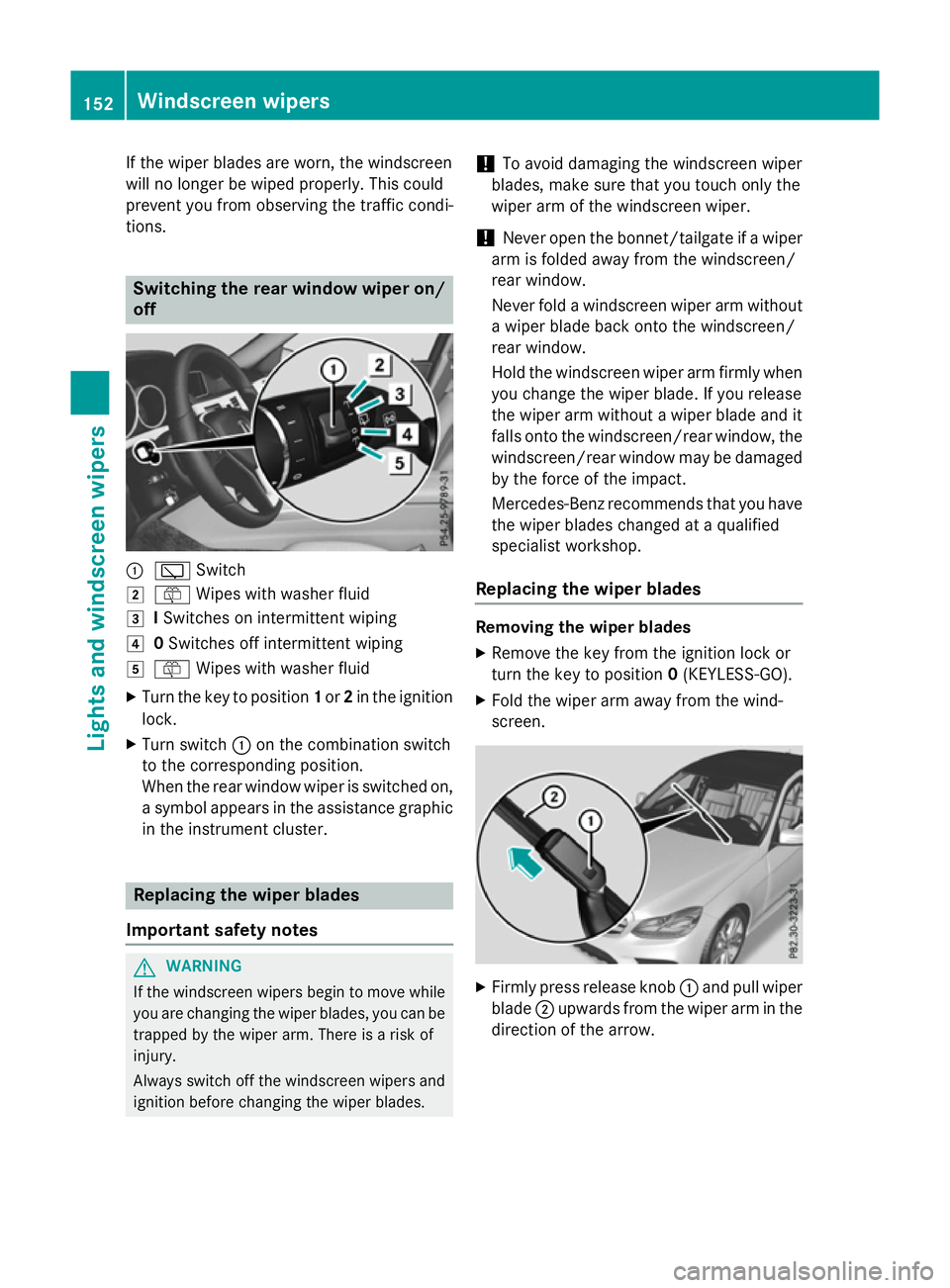
off :
è Switch
2 ô Wipesw ith washer fluid
3 ISwitches on intermittent wiping
4 0Switches off intermittent wiping
5 ô Wipesw ith washer fluid
X Turn the key to position 1or 2in the ignition
lock.
X Turn switch :on the combination switch
to the corresponding position.
When the rear window wiper is switched on,
as ymbola ppears in the assistance graphic
in the instrument cluster. Replacing the wiperb
lades
Important safety notes G
WARNING
If the windscree nwipers begintom ove while
you are changing the wiper blades, you can be trapped by the wiper arm. There is arisk of
injury.
Alwayss witch off the windscree nwipers and
ignition before changing the wiper blades. !
To avoid damaging the windscree
nwiper
blades, make sure that you touch only the
wiper arm of the windscree nwiper.
! Never open the bonnet/tailgate if
awiper
arm is folded awayf rom the windscreen/
rear window.
Never fold awindscree nwiper arm without
aw iper blade back onto the windscreen/
rear window.
Hold the windscree nwiper arm firmly when
you change the wiper blade. If you release
the wiper arm withou tawiper blade and it
fallso nto the windscreen/rear window ,the
windscreen/rear window may be damaged
by the force of the impact.
Mercedes-Benz recommends that you have
the wiper blades changed at aqualified
specialist workshop.
Replacing the wiperb lades Removing the wiperb
lades
X Remove the key from the ignition lock or
turn the key to position 0(KEYLESS-GO).
X Fold the wiper arm awayf rom the wind-
screen. X
Firmly press release knob :and pullw iper
blade ;upwards from the wiper arm in the
direction of the arrow. 152
Windscreen wipersLights and windscreenw
ipers
Page 171 of 497
Auxiliary heating
Important safety notes G
DANGER
If th eexhaust pipe is blocke dorsufficient
ventilation is no tpossible, toxic exhaust
fumes can ente rthe vehicle, especially car-
bon monoxide. This is th ecase, e.g. in
enclosed spaces, or if th evehicl eiss tuck in
snow. There is ariskoff atal injuries.
You should switch off th eauxiliary heating in
enclosed spaces whic hdonothav eane xtrac-
tion system, e.g. agarage. If th evehicl eis
stuck in snow and you mus tleav ethe auxiliary
heating running, keep th eexhaust pipe and
th ea rea around th evehicl eclear of snow. To
guarantee asufficien tsupply of fresh air, open
aw indow on th eside of th evehicl eaway from
th ew ind. G
WARNING
When th eauxiliary heating is switched on,
part soft hevehicl ecan become ver yhot.
Flammabl ematerials suc hasleaves, gras sor
twigs may ignit eiftheyc om eintoc ontact
with:
R hot part softheexhaust system
R thee xhaust gas itself
There is ariskoff ire.
When th eauxiliary heating is switched on,
mak esuret hat:
R no flammabl ematerials come int ocontact
wit hh ot vehicl ecom ponents
R thee xhaust gas can escape from the
exhaust pipe unhindered
R thee xhaust gas does no tcom eintoc ontact
wit hflammabl ematerials.
The auxiliary heating and th eexhaust gas dis-
charge location can be foun dinfrontof the
right-hand fron twheel.
! Operating th
eauxiliary heating/ventila-
tion draws on th evehicl ebattery. Afte ryou
hav eheated or ventilated th evehicl ea maximum of two times
,drivef or alonger
distance.
i Switc
hthe auxiliary heating on regularly
once amonth for about te nminutes.
The auxiliary heating heat sthe air in th evehi-
cle interior to th eset temperature. This
occur swithout usin gthe heat of th erunning
engine. The auxiliary heating is operated
directly usin gthe vehicle's fuel .For this rea-
son ,the tan kcontent mustbeatl east at
reserv efuel level to ensur ethatthe auxiliary
heating functions.
The auxiliary heating/ventilation automati-
call yadjust stoc hanges in temperature and
weather conditions. Fo rthisr eason ,the aux-
iliar yheating could switch from ventilation
mod etoh eating mod eorfromh eating mode
to ventilation mode.
The auxiliary heating switches off automati-
call yafter 50 minutes. This time limi tcan be
altered. To do this, visit aqualified specialist
workshop.
You canno tuse th eauxiliary ventilation to
cool th evehicl einterior to atem perature
lower than th eoutside temperature.
Before switchin gon X
Turn th ekeyto position 2in th eignition
loc k(Ypage 179).
X Se tthe desired temperature.
Auxiliar yheating or auxiliary ventilation can
also be switched on if th emanually set cli-
mat econtro lisactivated. Optimum comfort
is attained by setting th esystem to automatic
mode. Se tthe temperature to 22 †.
The auxiliary heating or auxiliary ventilation
can be switched on/off usin gthe butto non
th ec entre console or th eremot econtrol.
The on-board computer can be used to spec-
ify up to three departur etimes,o ne of which
may be preselected (Y page 293).168
Operating th
eclimat econtro lsystemClimat econt rol
Page 174 of 497
X
Briefly press the ubutton.
X Press the ,or. button repeatedly
unti lthe time to be changed appears in the
display.
X Press the uand^ buttons simulta-
neously.
The Îsymbo linthe remote control dis-
play flashes.
X Press the ,or. button to set the
desire ddeparture time.
i The longer yo
upress the ,or.
button, the faster the time changes.
X Press the uand^ button simulta-
neously.
The new departure time is stored.
Activating the se tdeparture time
X Briefly press the ubutton.
X Press the ,or. button repeatedly
unti lthe desire ddeparture time appears in
the display.
X Press the ubutton.
The Ísymbol, the departure time and,
depending on the selected departure time, the letter A, BorCappea rinthe display.
Deactivatin gthe se tdeparture time
X Briefly press the ubutton.
The statu softhe auxiliary heating is shown
in the display.
X Press the .button.
The firs tdeparture time store dappears in
the display.
X Press the ^button.
OFF
OFF is shown in the remote control display.
Replacing the remote control battery Important safety notes
G
WARNING
Batterie scontai ntoxic and corrosiv esubstan-
ces. If batterie sare swallowed, it can result in
severe health problems. There is ariskoff atal
injury. Kee
pbatterie soutof the reach of children. If
ab attery is swallowed, see kmedica lattention
immediately. H
Environmental note Batterie
scontai npollutants.
It is illega ltodispose of them
with the household rubbish.
The ym ustb ec ollected sep-
arately and disposed of in an environmentally responsible
recycling system. Dispose of batterie
sinan
environmentally responsible
manner. Take discharged
batterie stoaqualified spe-
cialist worksho portoacol-
lection point for used batter-
ies.
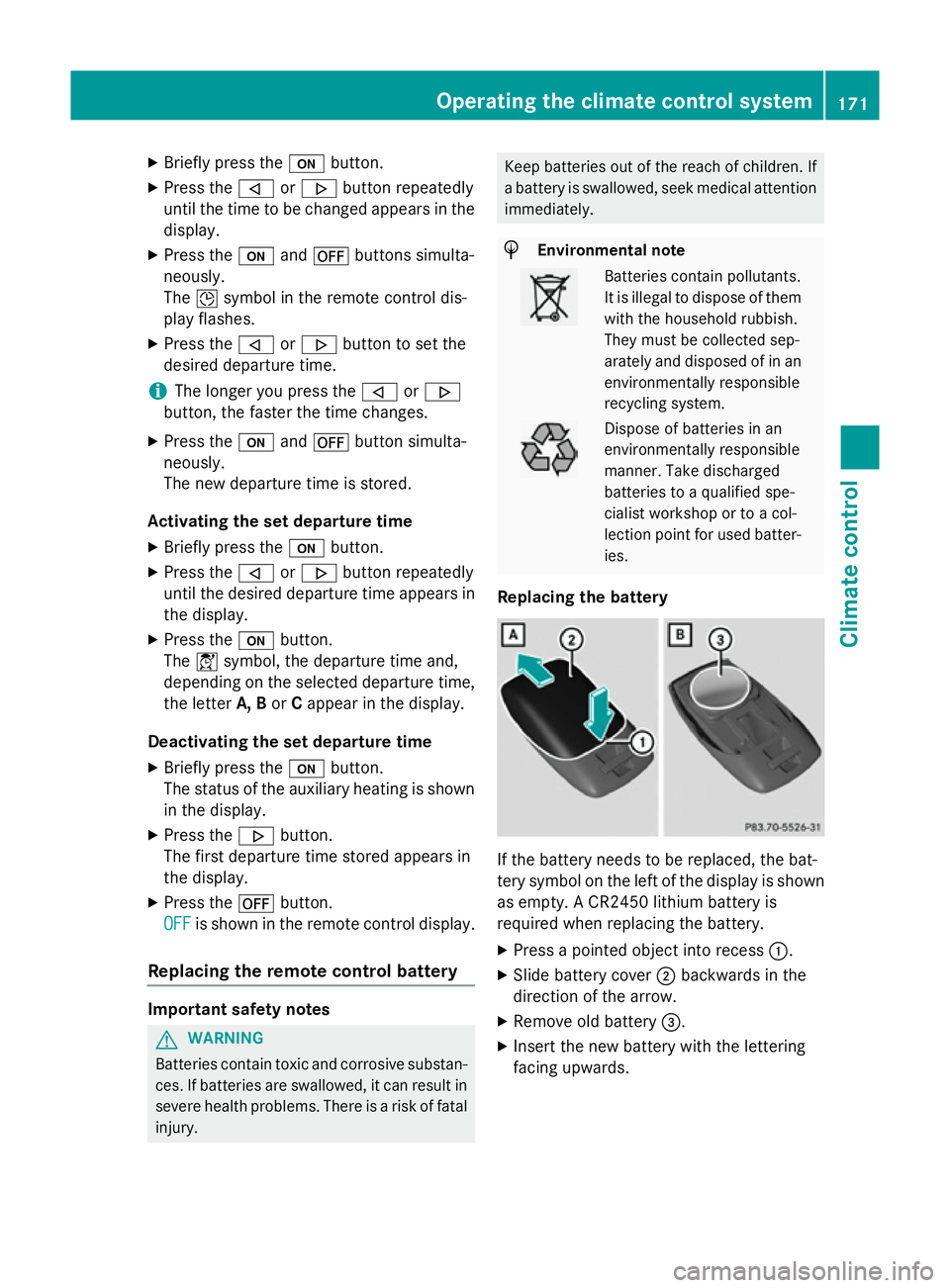
Replacing the battery If the battery need
stobereplaced, the bat-
tery symbo lonthe left of the display is shown
as empty. ACR2450 lithiu mbattery is
required whe nreplacing the battery.
X Press apointed object into recess :.
X Slide battery cover ;backwards in the
direction of the arrow.
X Remove old battery =.
X Inser tthe new battery with the lettering
facing upwards. Operating the climate control system
171Climate control Z
Page 183 of 497
The Start/Stop button must be inserted in the
ignition lock and the key must be in the vehi-
cle.
When you insert the Start/Stop button into
the ignition lock, the system needs approx-
imately two seconds recognition time. You
can then use the Start/Stop button.
Pressing the Start/Stop button several times
in succession corresponds to the different
key positions in the ignition lock. This is only
the case if you are not depressing the brake
pedal.
If you depress the brake pedal and press the
Start/Stop button ,the engine start simmedi-
ately.
Ac heck which periodically establishes aradio
connection between the vehicle and the key
determines whether avalid key is in the vehi-
cle. This occurs, for example, when starting
the engine.
To start the vehicle without actively using the
key:
R the Start/Stop button must be inserted in
the ignition lock
R the key must be in the vehicle
R the vehicle must not be locked with the key
or KEYLESS-GO (Y page 95)
Do not keep the KEYLESS-GO key:
R with electronic devices, e.g. amobile
phone or another key
R with metallic objects, e.g. coins or metal
film
R inside metallic objects, e.g. ametal case
This can affect the functionality of KEYLESS-
GO.
If you lock the vehicle with the key's remote
control or with KEYLESS-GO, after ashort
time:
R you will not be able to switch on the ignition
with the Start/Stop button
R you will not be able to start the engine with
the Start/Stop button until the vehicle is
unlocked again If you lock the vehicle centrally using the but-
ton on the frontd oor (Ypage 101), you can
continue to start the engine with the Start/
Stop button.
The engine can be switched off while the vehi-
cle is in motion by pressing and holding the
Start/Stop button for three seconds. This
function operates independently of the ECO
start/stop automatic engine switch-off func-
tion.
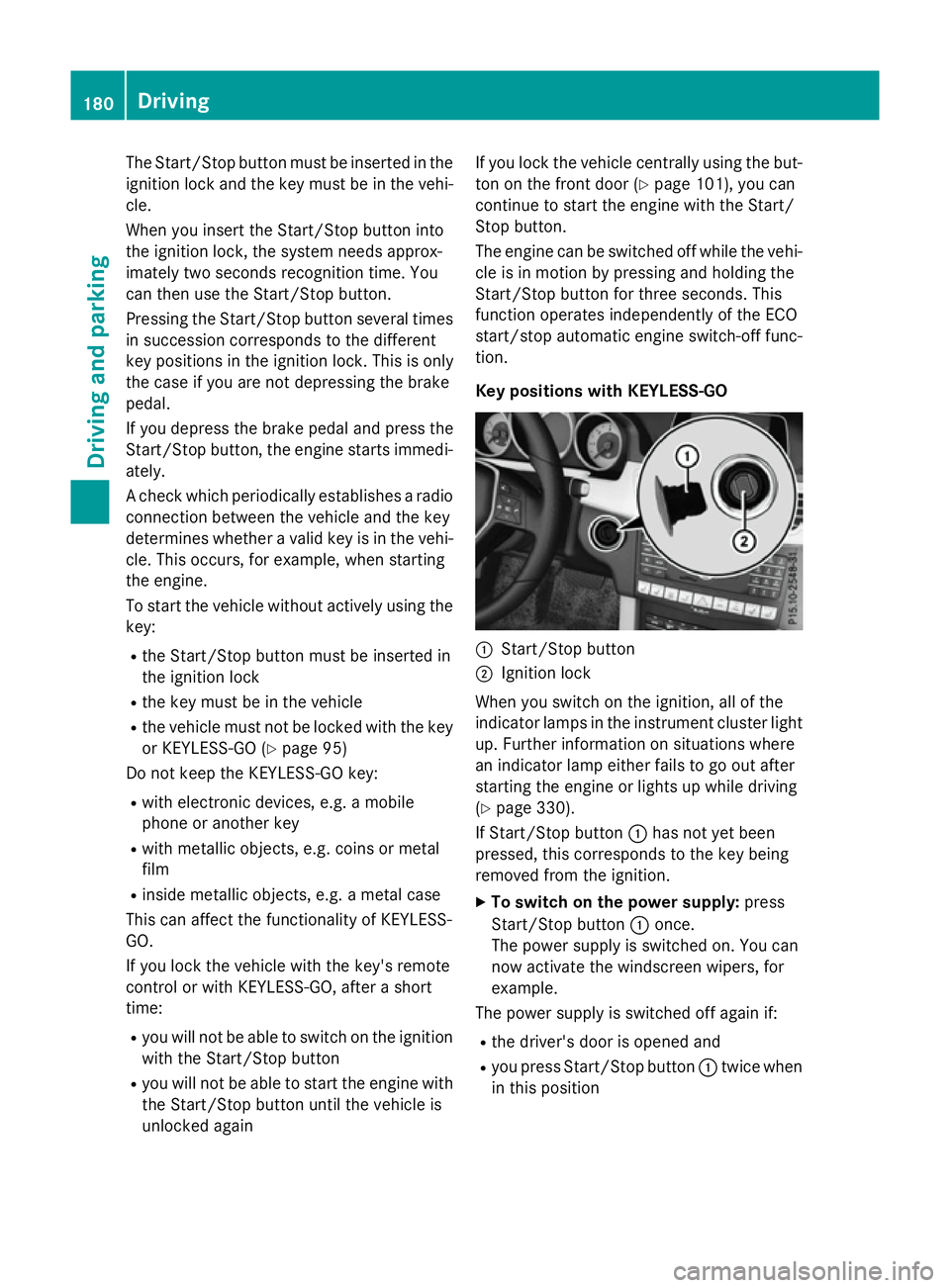
Key positions with KEYLESS-GO :
Start/Stop button
; Ignition lock
When you switch on the ignition ,all of the
indicator lamps in the instrument cluster light up. Further information on situations where
an indicator lamp either fails to go out after
starting the engine or lights up while driving
(Y page 330).
If Start/Stop button :has not yet been
pressed, this corresponds to the key being
removed from the ignition.
X To switch on the power supply: press
Start/Stop button :once.
The power supply is switched on. You can
now activat ethe windscreen wipers, for
example.
The power supply is switched off again if:
R the driver's door is opened and
R you press Start/Stop button :twice when
in this position 180
DrivingDriving and parking
Page 186 of 497
position
Pto the desired position if you
depress the brake pedal. If you do not
depress the brake pedal, the DIRECT SELECT
lever can still be moved but the parkin glock
remains engaged.
i Vehicles with automatic transmis-
sion: upshifts tak eplace at higher engine
speeds after acold start .This helps the
catalytic converter to reach its operating
temperature more quickly.
Hill start assist Hill start assist helps you when pulling away
forwards or in reverse on an uphill gradient .It
holds the vehicle for ashort time after you
have removed your foot from the brake pedal.
This gives you enough time to move your foot from the brake pedal to the accelerator pedal and depress it before the vehicle begins to
roll. G
WARNING
After ashort time, hill start assist will no lon-
ger brake your vehicle and it could roll away.
There is arisk of an acciden tand injury.
Therefore, quickly move your foot from the
brake pedal to the accelerator pedal. Never
leave the vehicle when it is held by hill start
assist.
Hill start assist is not activ eif:
R you are pulling away on alevel road or a
downhill gradient
R on vehicles with automatic transmission,
the transmission is in position N
R the parkin gbrake is applied
R ESP ®
is malfunctioning ECO start/stop function
Introduction The ECO start/stop function switches the
engin eoff automatically if the vehicle is stop-
ped under certain conditions. When pulling away again, the engin
estarts
automatically. The ECO start/stop function
thereby helps you to reduce the fuel con-
sumption and emission sofyour vehicle.
Importan tsafet ynotes G
WARNING
If the engin eisswitched off automatically and
you exit the vehicle, the engin eisrestarted
automatically. The vehicle may begin moving. There is arisk of acciden tand injury.
If you wish to exit the vehicle, always turn off
the ignition and secure the vehicle against
rolling away.
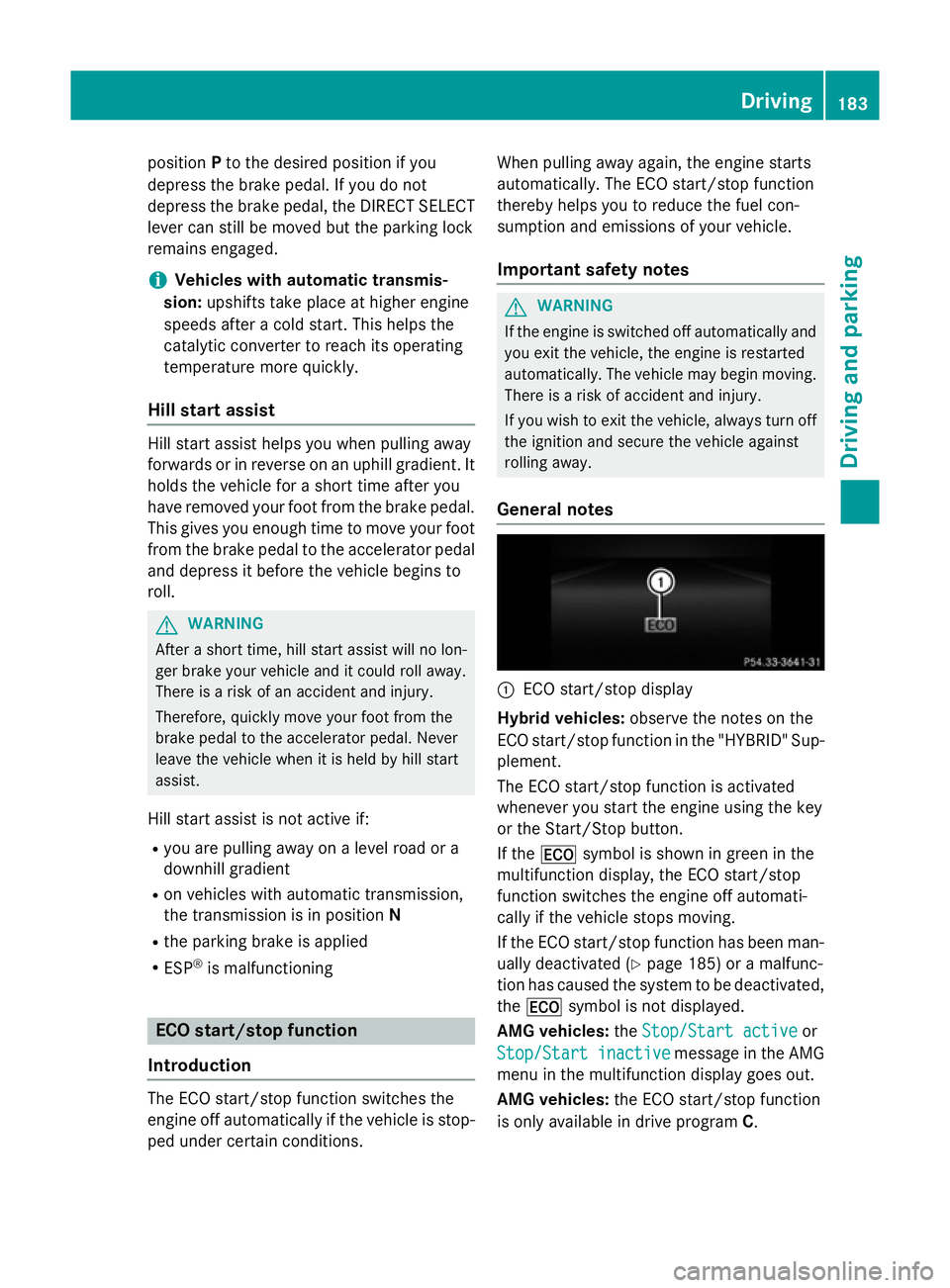
General notes :
ECO start/stop display
Hybrid vehicles: observe the notes on the
ECO start/stop function in the "HYBRID "Sup-
plement.
The ECO start/stop function is activated
whenever you start the engin eusing the key
or the Start/Stop button.
If the ¤ symbol is shown in green in the
multifunction display, the ECO start/stop
function switches the engin eoff automati-
cally if the vehicle stops moving.
If the ECO start/stop function has been man- ually deactivated (Y page 185) oramalfunc-
tion has caused the system to be deactivated, the ¤ symbol is not displayed.
AMG vehicles: theStop/Start active Stop/Start active or
Stop/Start inactive
Stop/Start inactive message in the AMG
menu in the multifunction display goes out.
AMG vehicles: the ECO start/stop function
is only available in drive program C. Driving
183Driving and parking Z
Page 190 of 497
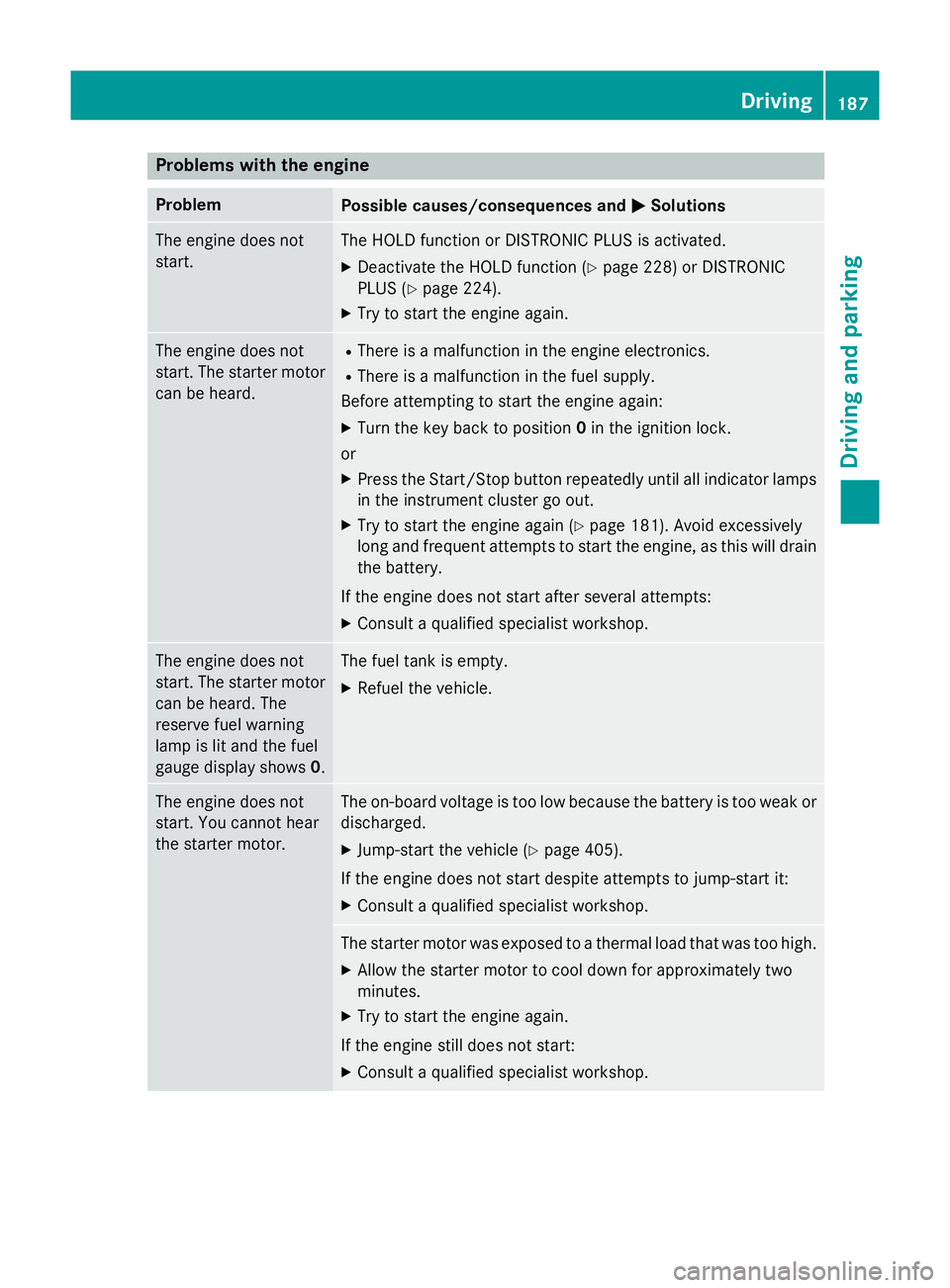
Problems with the engine
Problem
Possible causes/consequences and
M
MSolutions The engine does not
start. The HOLD function or DISTRONIC PLUS is activated.
X Deactivat ethe HOLD function (Y page 228) or DISTRONIC
PLUS (Y page 224).
X Try to start the engine again. The engine does not
start. The starter motor
can be heard. R
There is amalfunction in the engine electronics.
R There is amalfunction in the fuel supply.
Before attempting to start the engine again:
X Turn the key back to position 0in the ignition lock.
or
X Press the Start/Stop button repeatedly until all indicator lamps
in the instrumen tcluster go out.
X Try to start the engine again (Y page 181). Avoid excessively
long and frequent attemptstos tart the engine, as this will drain
the battery.
If the engine does not start after several attempts: X Consult aqualified specialist workshop. The engine does not
start. The starter motor
can be heard. The
reserve fuel warning
lamp is lit and the fuel
gauge display shows 0. The fuel tank is empty.
X Refuel the vehicle. The engine does not
start. You cannot hear
the starter motor. The on-board voltage is too low because the battery is too weak or
discharged.
X Jump-start the vehicle (Y page 405).
If the engine does not start despite attemptstoj ump-start it:
X Consult aqualified specialist workshop. The starter motor was exposed to
athermal load that was too high.
X Allow the starter motor to cool down for approximately two
minutes.
X Try to start the engine again.
If the engine still does not start:
X Consult aqualified specialist workshop. Driving
187Driving and parking Z
Page 191 of 497
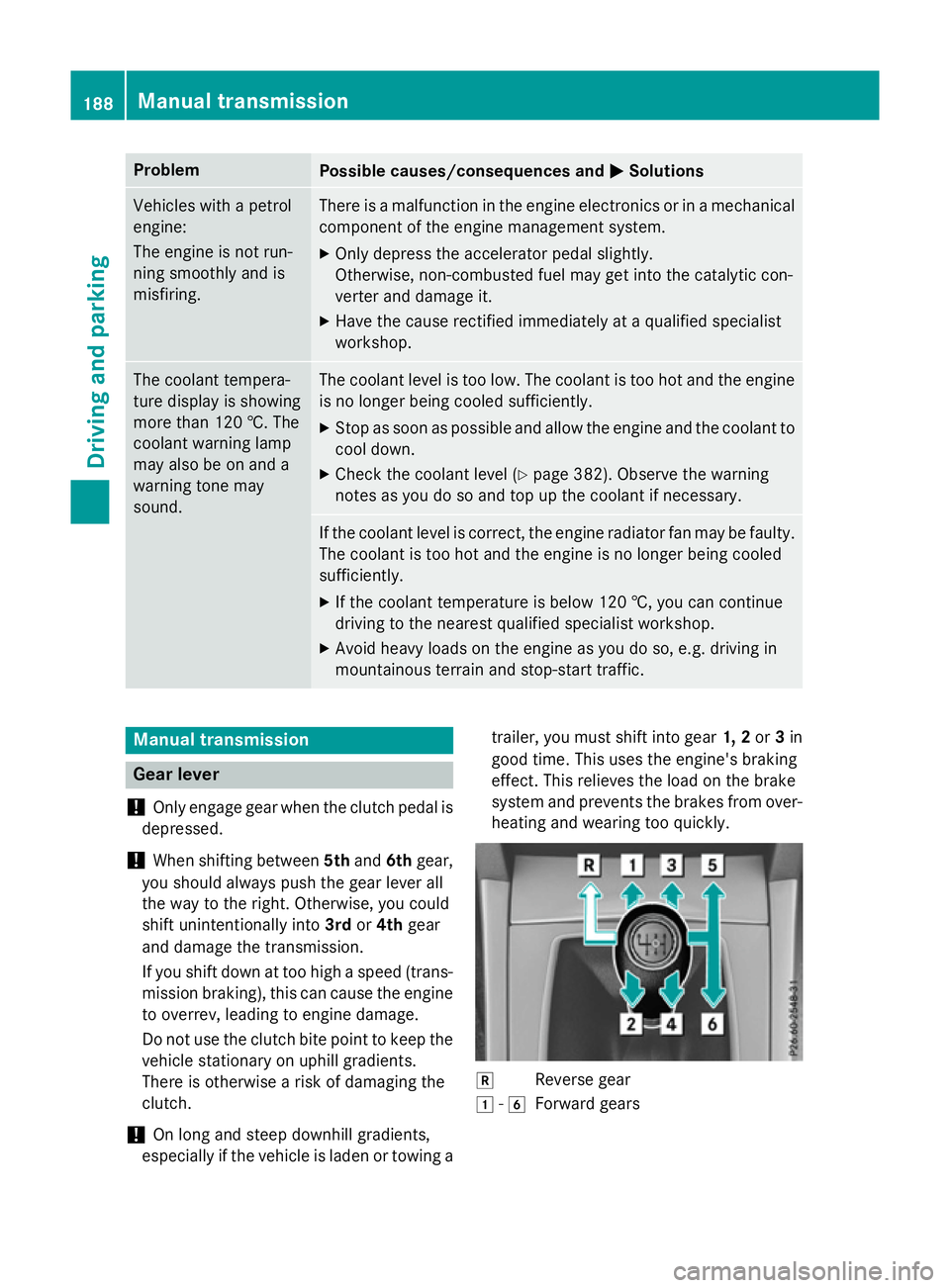
Problem
Possible causes/consequences and
M
MSolutions Vehicles with
apetrol
engine:
The engine is not run-
ning smoothly and is
misfiring. There is
amalfunction in the engine electronics or in amechanical
componentoft he engine management system.
X Only depress the accelerator pedal slightly.
Otherwise, non-combusted fuel may get into the catalytic con-
verter and damage it.
X Have the cause rectified immediately at aqualified specialist
workshop. The coolant tempera-
ture display is showing
more than 120 †. The
coolant warning lamp
may also be on and a
warning tone may
sound. The coolant level is too low. The coolant is too hot and the engine
is no longer being cooled sufficiently.
X Stop as soon as possible and allow the engine and the coolant to
cool down.
X Check the coolant level (Y page 382). Observe the warning
notes as you do so and top up the coolant if necessary. If the coolant level is correct,t
he engine radiator fan may be faulty.
The coolant is too hot and the engine is no longer being cooled
sufficiently.
X If the coolant temperature is below 120 †, you can continue
driving to the nearest qualified specialist workshop.
X Avoid heavy loads on the engine as you do so, e.g. driving in
mountainous terrain and stop-start traffic. Manual transmission
Gear lever
! Only engage gear when the clutch pedal is
depressed.
! When shifting between
5thand 6thgear,
you should always push the gear lever all
the way to the right. Otherwise, you could
shift unintentionally into 3rdor4th gear
and damage the transmission.
If you shift down at too high aspeed (trans-
mission braking), this can cause the engine to overrev, leading to engine damage.
Do not use the clutch bite point to keep the
vehicle stationary on uphill gradients.
There is otherwise arisk of damaging the
clutch.
! On long and steep downhill gradients,
especially if the vehicle is laden or towing a trailer, you must shift into gear
1, 2or3in
good time. This uses the engine's braking
effect.T his relieves the load on the brake
system and preventst he brakes from over-
heating and wearing too quickly. k
Reverse gear
1 -6
Forward gears 188
Manual transmissionDriving and parking