ad blue MERCEDES-BENZ E-CLASS SALOON 2015 Owners Manual
[x] Cancel search | Manufacturer: MERCEDES-BENZ, Model Year: 2015, Model line: E-CLASS SALOON, Model: MERCEDES-BENZ E-CLASS SALOON 2015Pages: 497, PDF Size: 16.23 MB
Page 7 of 497
1, 2,
3...
4ETS (Electronic Traction System) see ETS/4ETS (Electronic Trac-
tion System)
4MATIC (permanent all-wheel
drive)
Function/notes .............................2 35
12 Vsocket
see Sockets
360 °camera
Cleaning ......................................... 390
Function/notes ............................ .249 A
ABS (Anti-lock Braking System) Display message ............................ 300
Function/notes ................................ 77
Warning lamp ................................. 332
Accident
Automatic measure safter an acci-
dent ................................................. 58
Activating/deactivating air-recir-
culation mode ................................... .166
Activating/deactivating cooling
with air dehumidification ................. 160
Active Blin dSpot Assist
Activating/deactivating (on-
board computer) ............................ 288
Display message ............................ 317
Function/notes ............................ .261
Towing atrailer .............................. 263
Active Driving Assistanc epackage .. 261
Active Lane Keepin gAssist
Activating/deactivating (on-
board computer) ............................ 288
Display message ............................ 317
Function/notes ............................ .263
Towing atrailer .............................. 266
Active light function ......................... 145
Active multicontour seat
Adjusting (on the seat) .................. 128
Active Parking Assist
Detecting parking spaces .............. 240
Display message ............................ 318
Exiting aparking space .................. 243
Function/notes ............................ .239 Important safety notes .................. 239
Parking .......................................... 241
Towing atrailer .............................. 244
ADAPTIVE BRAKE ................................. 86
Adaptive Brake Assist
Function/notes ................................ 82
Adaptive brake lights .......................... 83
Adaptive Dampin gSyste m(ADS)..... 232
Adaptive Highbeam Assist Plus
Display message ............................ 310
Function/notes ............................ .147
Switching on/off ........................... 148
AdBlue ®
Display message ............................ 314
Filling capacity ............................... 478
Important safety notes .................. 477
Service indicator ............................ 385
AdBlue ®
service indicator ................ 385
Additional speedometer ................... 289
Additives (engine oil) ........................ 479
Airc onditioning
General notes ................................ 156
Airf ilter(wh ite display message) .... 314
Airp ressure
see Tyr epressure
Airv ents
Glove compartment ....................... 174
Important safety notes .................. 173
Rea r............................................... 174
Setting .......................................... .173
Setting the centre airv ents ........... 174
Setting the sid eairvents .............. .174
Air-conditionin gsystem
see Climate control
Airbag
Introduction ..................................... 50
PASSENGER AIR BAG OFF indica-
tor lamp .......................................... .45
Airbags
Fron tairbag (driver ,front
passenger )....................................... 51
Important safety guidelines .............50
Kneebag ........................................... 51
Pelvi sairbag .................................... 52
Sideba g............................................ 52
Triggering .........................................53
Windowbag ...................................... 52 4
Index
Page 9 of 497
Activating/deactivating (o
nthe
centre console) .............................. 169
Display message ............................ 327
Important safety note s.................. 168
Setting ........................................... 293
Auxiliary heating/ventilation
Problem (displa ymessage) ............ 173
Remote control .............................. 169
Setting the departur etime ............. 170
Auxiliary ventilation
Activating/deactivating ................. 168
Activating/deactivating (o nthe
centre console ).............................. 169
Axle load, permissibl e(traile rtow-
ing) ...................................................... 489 B
Ball coupling Folding in ....................................... 270
Folding ou t..................................... 268
BAS (Brake Assist System) ................. 78
BAS PLUS (Brake Assist System
PLUS) with Cross-Traffi cAssist
Function/note s................................ 78
Important safety notes .................... 79
Battery (key)
Checking .......................................... 97
Replacing ......................................... 97
Battery (vehicle)
Charging ........................................ 404
Displa ymessage ............................ 312
Important safety notes .................. 401
Jump starting ................................. 405
Belt
see Sea tbelts
Bel ttensioner
Activation ......................................... 53
Blind Spo tAssist
Activating/deactivating (on-
board computer) ............................ 288
Displa ymessage ............................ 317
Notes/function .............................. 257
Trailer towing ................................. 259
see Active Blind Spot Assist
BlueTEC (AdBlue ®
) ............................. 477 Bonnet
Active bonne t(pede strian protec-
tion) ............................................... 378
Closing ........................................... 380
Displa ymessage ............................ 326
Important safety notes .................. 378
Opening ......................................... 380
Boot
Emergency release ........................ 109
Important safety notes .................. 103
Opening/closing (automatically
from inside )................................... 108
Opening/closing (automatically
from outside) ................................. 105
Opening/closing (fro mthe out-
side, HANDS-FREE ACCESS) .......... 106
Opening/closing (manuall yfrom
outside) ......................................... 104
Boo tlid
Displa ymessage ............................ 326
Opening dimensions ...................... 481
Boo tloa d( maximum) ........................ 481
Bottl eholders .................................... 362
Box (boot) ........................................... 354
Brake Assist
see BAS (Brake Assist System)
Brake fluid
Displa ymessage ............................ 303
Note s............................................. 479
Brake forc edistribution
see EBD (electroni cbrake force
distribution)
Brake lamps
Adaptive ........................................... 83
Displa ymessage ............................ 308
Brakes
ABS .................................................. 77
Adaptive Brake Assist ...................... 82
BAS .................................................. 78
BAS PLU SwithC ross-Traffic
Assist ............................................... 78
Brake fluid (notes) ......................... 479
Displa ymessage ............................ 300
Driving tip s.................................... 209
High-performance brake system .... 210
HOLD function ............................... 228
Important safety notes .................. 209
Parking brake ................................ 207 6
Index
Page 22 of 497
Folding the backrest (rear com-
partment) forwards/back .............. 349
Sea tbelt
Centre rear-compartment sea t........ 48
Correct usag e.................................. 47
Switching belt adjustment on/off
(on-board computer) ...................... 295
Seat belts
Adjusting the driver' sand front-
passenger sea tbelt. ........................ 49
Adjusting the height ......................... 48
Cleaning ......................................... 392
Displa ymessage ............................ 305
Fastening ......................................... 48
Important safety guideline s............. 46
Introduction ..................................... 46
Rear sea tbelts tatus indicator ......... 49
Releasing ......................................... 49
Warning lamp ................................. 329
Warning lamp (function) ................... 49
Seats
Adjusting (electrically) ................... 124
Adjusting (manuall yand electri-
cally ).............................................. 124
Adjusting the 4-wa ylum bars up-
por t................................................ 128
Adjusting the hea drestraint .......... 125
Cleaning the cove r......................... 392
Correct driver' sseatp osition ........ 122
Important safety notes .................. 123
Overview ........................................ 123
Sea theating problem .................... 132
Sea tventilation problem ................ 133
Storing settings (memory func-
tion) ............................................... 139
Switching sea theating on/of f....... 130
Switching the sea tventilation on/
off .................................................. 132
Securing luggage ............................... 350
Selecto rlever
Cleaning ......................................... 391
Sensors (cleaning instructions) ....... 389
Service
see ASSYST PLUS
Servic eCentre
see Qualifie dspecialist workshop
Servic emenu( on-board com-
puter) .................................................. 288 Servic
eproducts
AdBlue ®
specia laddit ives.............. 477
Brake fluid ..................................... 479
Coolant (engine) ............................ 479
Engine oi l....................................... 478
Fue l................................................ 473
Important safety notes .................. 473
Washe rfluid ................................... 480
Settin gthe air distribution ............... 163
Setting the airflow ............................ 164
Settings
Factory (on-board computer) ......... 295
On-board compute r....................... 289
SETUP (on-board computer) ............. 296
Shiftin gtoneutral (manual trans-
mission) ............................................. 189
Side hea drestraints
Integrate dchild sea t........................ 65
Side lamps
Switching on/of f........................... 144
Side marker lamp Display mes-
sage .................................................... 309
Side windows
Convenience closing ...................... 112
Convenience opening .................... 111
Important safety notes .................. 110
Opening/closing ............................ 111
Problem (malfunction) ................... 114
Resetting ....................................... 113
Sidebag ................................................ 52
Skibag ................................................ 346
Sliding sunroof
Important safety information ......... 114
Opening/closing ............................ 115
Problem (malfunction) ................... 119
Rain closing feature ....................... 116
Resetting ....................................... 116
see Panorama sliding sunroof
Sno wchains ...................................... 419
Socket
Luggage compartment ................... 366
Sockets
Centre console .............................. 366
Genera lnotes ................................ 366
Rear compartment ......................... 366
Spare wheel
Storing ........................................... 466 Index
19
Page 135 of 497
Problems with the seat heating
Problem
Possible causes/consequences and
M
MSolutions The seat heating has
switched off prema-
turely or cannot be
switched on. The on-board voltage is too low because too many electrical con-
sumers are switched on.
X Switch off electrical consumers that you do not need, such as
the rear window heating or interior lighting.
Once the battery is sufficiently charged, the seat heating will
switch back on automatically. Switching the seat ventilation on/off
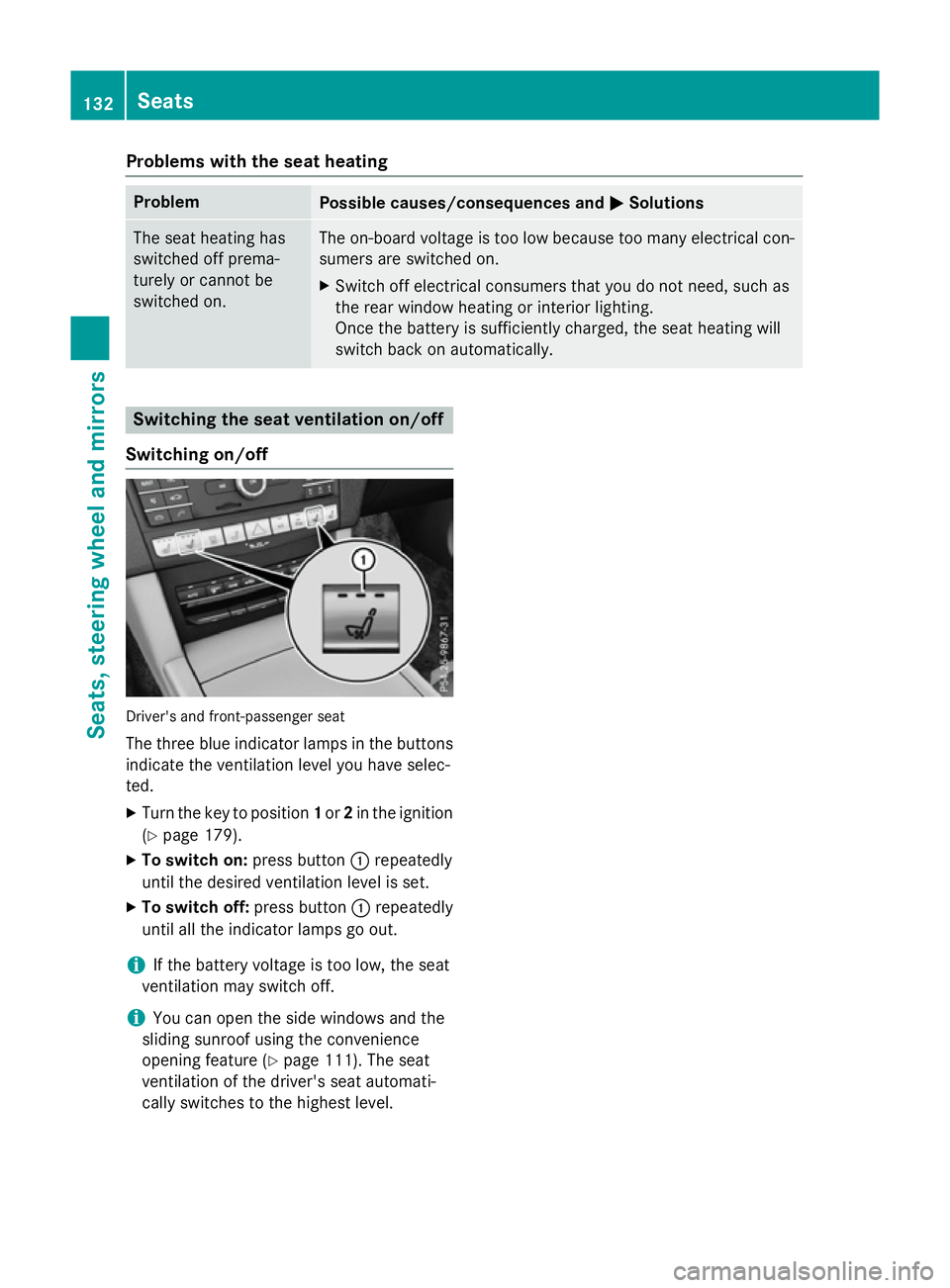
Switching on/off Driver's and front-passenger seat
The three blue indicator lamps in the buttons
indicate the ventilation level you have selec-
ted.
X Turn the key to position 1or 2in the ignition
(Y page 179).
X To switch on: press button:repeatedly
until the desired ventilation level is set.
X To switch off: press button:repeatedly
until all the indicator lamps go out.
i If the battery voltage is too low, the seat
ventilation may switch off.
i You can open the side windows and the
sliding sunroof using the convenience
opening feature (Y page 111). The seat
ventilation of the driver's seat automati-
cally switches to the highest level. 132
SeatsSeats, steering wheela
nd mirrors
Page 148 of 497
The blue
Kindicator lamp in the instru-
ment cluster lights up when the main-beam headlamps are switched on.
X To deactivate: move the combination
switch back to its normal position.
The blue Kindicator lamp in the instru-
ment cluster goes out.
Vehicles with Adaptive Highbeam Assist
Plus: when Adaptive Highbeam Assist Plus is
activated, it automatically controls activation
and deactivation of the main-beam head-
lamps (Y page 147).
Headlam pflasher X
To switch on: turn the key in the ignition
lock to position 1or 2,ors tart the engine.
X Pull the combination switch in the direction
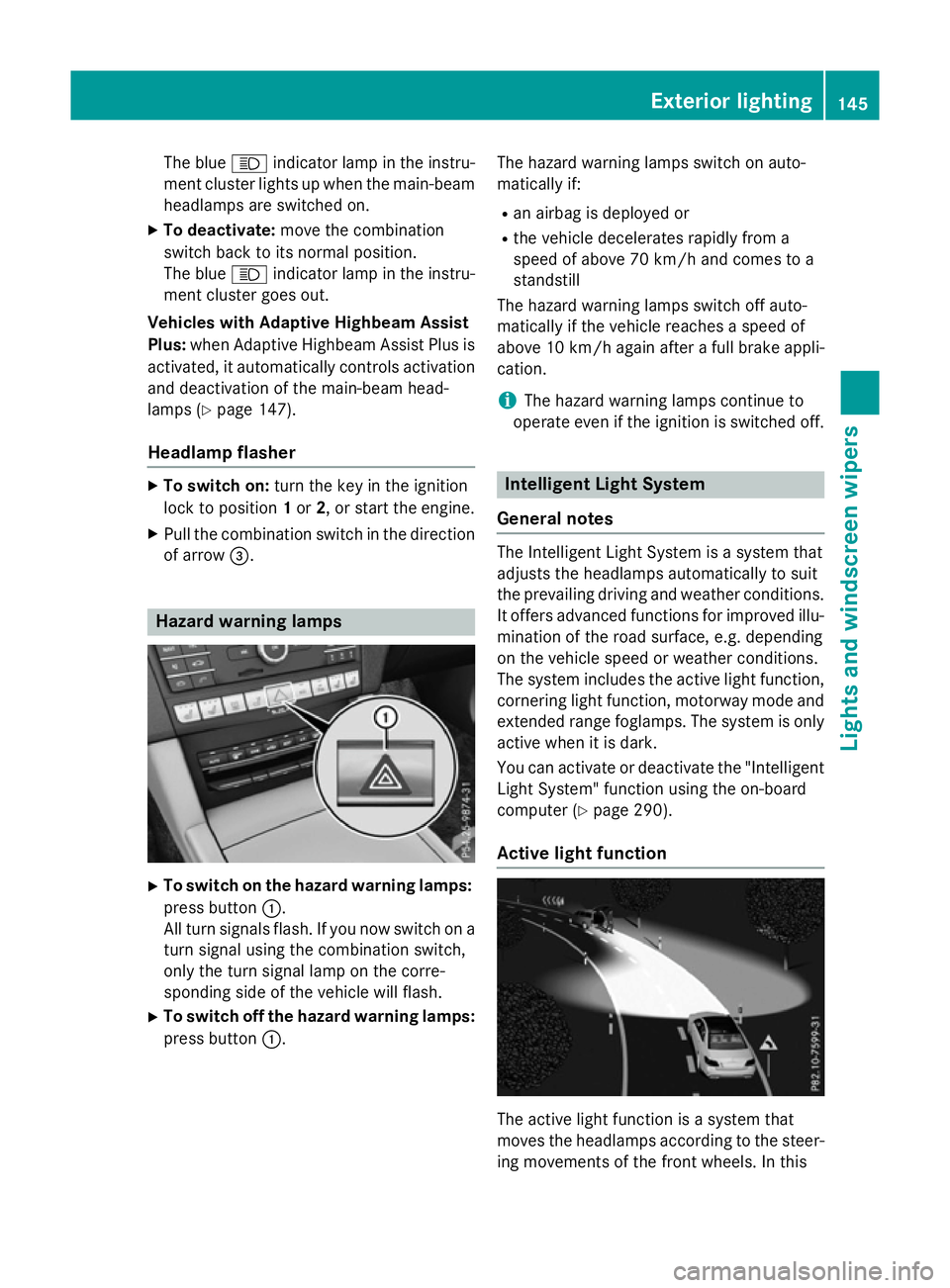
of arrow =. Hazard warning lamps
X
To switch on the hazard warning lamps:
press button :.
All turn signals flash. If you now switch on a turn signal using the combination switch,
only the turn signal lamp on the corre-
sponding side of the vehicle will flash.
X To switch off the hazard warning lamps:
press button :. The hazard warning lamps switch on auto-
matically if:
R an airbag is deployed or
R the vehicle decelerates rapidly from a
speed of above 70 km/ha nd comes to a
standstill
The hazard warning lamps switch off auto-
matically if the vehicle reaches aspeed of
above 10 km/ha gain afterafull brake appli-
cation.
i The hazard warning lamps continue to
operate even if the ignition is switched off. Intelligent Light System
General notes The Intelligent Light System is
asystem that
adjusts the headlamps automatically to suit
the prevailing driving and weather conditions.
It offers advanced functions for improved illu-
mination of the road surface, e.g. depending
on the vehicle speed or weather conditions.
The system includes the active light function, cornering light function, motorway mode and
extended range foglamps. The system is only active when it is dark.
You can activate or deactivate the "IntelligentLight System" function using the on-board
computer (Y page 290).
Active light function The active light function is
asystem that
moves the headlamps according to the steer-
ing movements of the front wheels. In this Exterior lighting
145Lights and windscreen wipers Z
Page 172 of 497
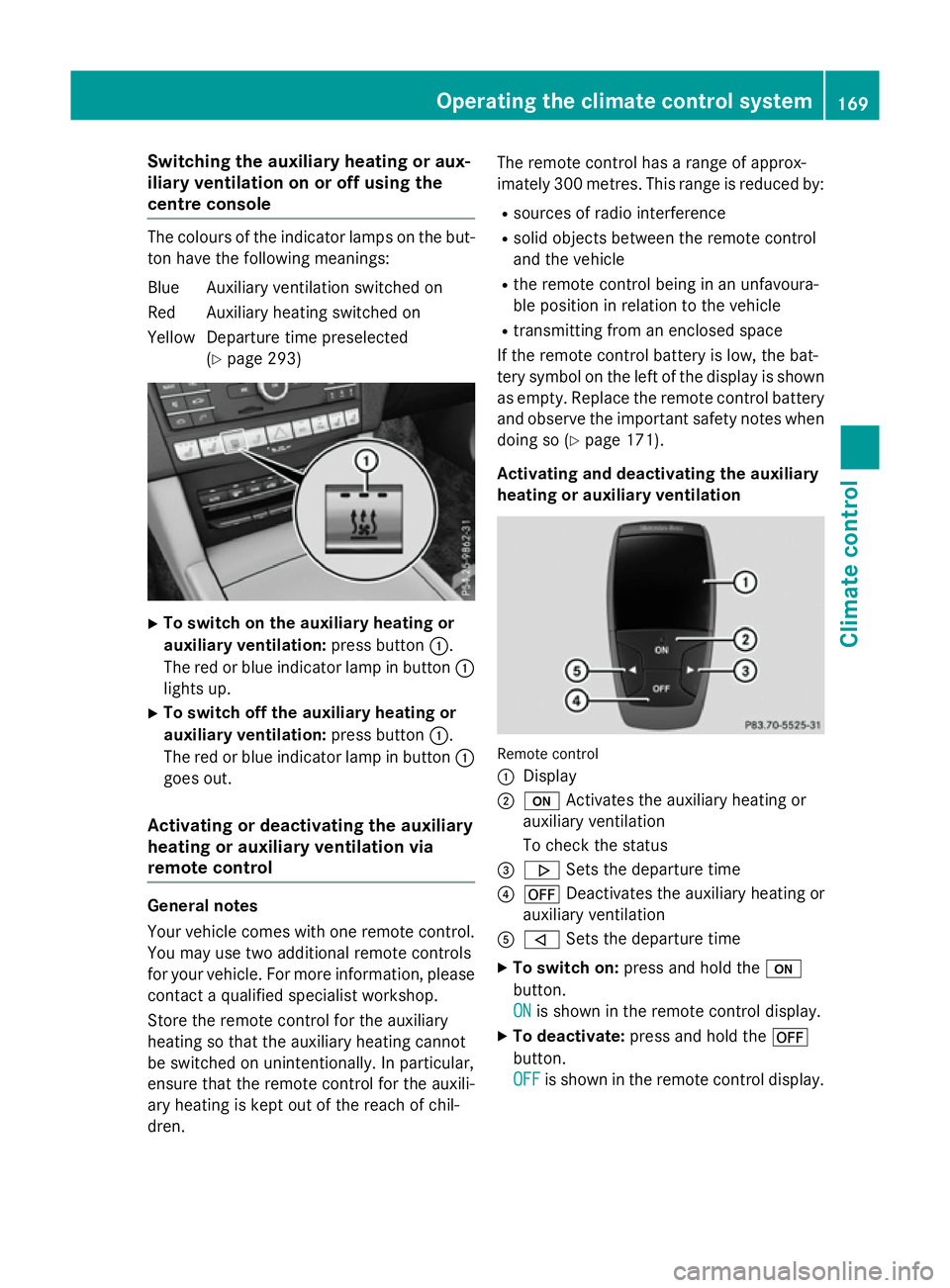
Switching the auxiliary heating or aux-
iliary ventilation on or off using the
centre console The colours of the indicator lamps on the but-
ton have the following meanings:
Blue Auxiliary ventilation switched on
Red Auxiliary heating switched on
Yellow Departure time preselected (Ypage 293) X
To switch on the auxiliary heating or
auxiliary ventilation: press button:.
The red or blue indicator lamp in button :
lights up.
X To switch off the auxiliary heating or
auxiliary ventilation: press button:.
The red or blue indicator lamp in button :
goes out.
Activating or deactivating the auxiliary
heating or auxiliary ventilation via
remote control General notes
Your vehicle comes with one remote control.
You may use two additional remote controls
for your vehicle. For more information ,please
contact aqualified specialist workshop.
Storet he remote control for the auxiliary
heating so that the auxiliary heating cannot
be switched on unintentionally. In particular,
ensure that the remote control for the auxili-
ary heating is kept out of the reach of chil-
dren. The remote control has
arange of approx-
imately 300 metres. This range is reduced by:
R sources of radio interference
R solid objectsb etween the remote control
and the vehicle
R the remote control being in an unfavoura-
ble position in relation to the vehicle
R transmittingf rom an enclosed space
If the remote control battery is low, the bat-
tery symbol on the left of the display is shown as empty. Replace the remote control battery
and observe the important safety notes when doing so (Y page 171).
Activating and deactivating the auxiliary
heating or auxiliary ventilation Remote control
:
Display
; u Activates the auxiliary heating or
auxiliary ventilation
To check the status
= . Sets the departure time
? ^ Deactivates the auxiliary heating or
auxiliary ventilation
A , Sets the departure time
X To switch on: press and hold the u
button.
ON ON is shown in the remote control display.
X To deactivate: press and hold the ^
button.
OFF OFF is shown in the remote control display. Operating the climate control system
169Climatecontrol Z
Page 197 of 497
AMG vehicles
When shifting down
,the double-clutch func-
tion is active regardless of th ecurrentl yselec-
te dd rivep rogram .The double-clutch function
reduce sload chang ereaction sand is condu-
civ etoas portydriving style. The soun dgen-
erated by th edouble-clutch function depends
on th edrivep rogram selected.
Kickdown Use kickdown for maximum acceleration:
X Depress th eaccelerato rpedal beyon dthe
pressur epoint.
The transmission shifts to alower gear
depending on th eengines peed.
X Eas eoff th eaccelerato rpedal once the
desired spee disreached.
The automatic transmission shifts bac kup.
Towing atrailer Towin
gatrailer is no tpossible wit hall mod-
els. Fo rfurther information ,see
(Y page 267).
X Drive in th emiddle of th eengines peed
range on uphill gradients.
X Manua ldrive program: depending on the
uphill or downhill gradient, shif tint oag ear
(Y page 197) in whic hthe engin ewill run in
th em iddle of th eengines pee drange. This
also applie sifcruise control ,DISTR ONIC
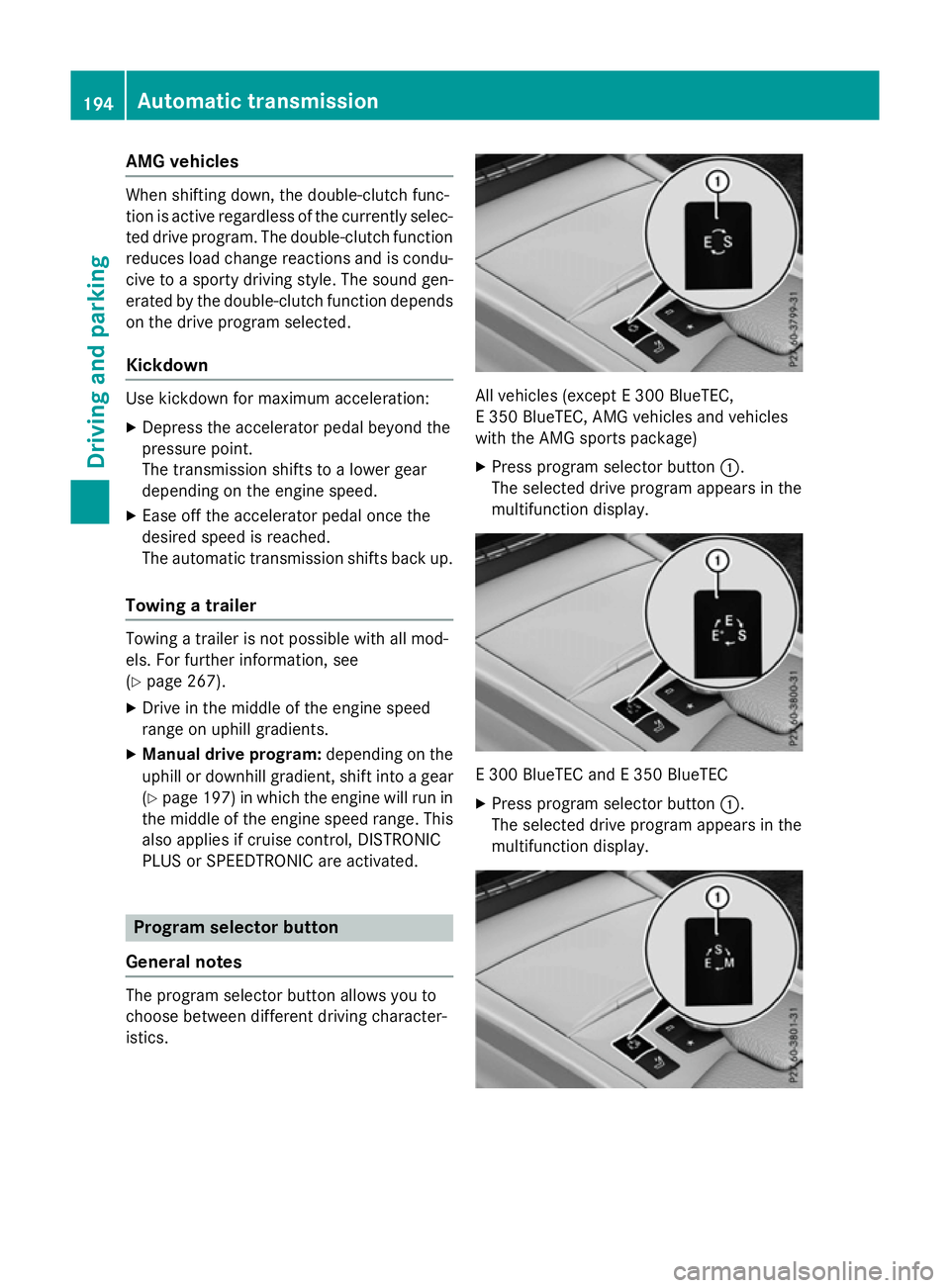
PLU SorS PEEDTR ONICare activated. Program selector button
Genera lnotes The program selector butto
nallows you to
choos ebetween differen tdriving character-
istics. All vehicles (except
E300 BlueTEC,
E3 50 BlueTEC, AM Gvehicles and vehicles
wit hthe AM Gsport spackage)
X Press program selector button :.
The selected driv eprogram appear sinthe
multifunction display. E3
00 BlueTE CandE3 50 BlueTEC
X Press program selector button :.
The selected driv eprogram appear sinthe
multifunction display. 194
Automatic trans
missionDriving andparking
Page 199 of 497
i
You can only change gear with the steer-
ing wheel gearshift paddles when the trans- missio nisinp ositionD. Automatic drive program
Automatic drive progra mEDrive program
E(drive program Con AMG
vehicles) is characterised by the following:
R comfort-oriented engin esettings.
R optimal fuel consumption resulting from
the automatic transmission shifting up
sooner.
R the vehicle pulling away more gently in
forward and reverse gears unless the accel-
erator pedal is depressed fully.
R increased sensitivity. This improves driving
stabilit yonslippery road surfaces, for
example.
R the automatic transmission shifting up
sooner. This result sinthe vehicle being
drive natl ower engin espeeds and the
wheels being less likely to spin.
Automatic drive progra mE+
(E 300 BlueTEC and E350 BlueTEC) Drive program
E+is characterised by the fol-
lowing:
R comfort-oriented engin eand automatic
transmission settings.
R optimal fuel consumption resulting from
the automatic transmission shifting up
sooner.
R the vehicle pulling away more gently in
forward and reverse gears unless the accel- erator pedal is depressed fully.
R increased sensitivity. This improves driving
stabilit yonslippery road surfaces, for
example.
R the automatic transmission shifting up
sooner. This result sinthe vehicle being drive
natl ower engin espeeds and the
wheels being less likely to spin.
R overrun mode up to aspeed of 160 km/h:
- the combustio nengin eisd isconnected
fro mt he drive train
- the engin espeed is equal to the engine
idling speed
Overrun mode can be activate dunder the fol-
lowing conditions:
R the type of road is suitable, e.g. no steep
gradients
R you are drivin gslower than 160 km/h
R you are no longer depressing the accelera-
tor pedal
Overrun mode is deactivate dunder the fol-
lowing conditions:
R you are drivin gfaster than 160 km/h
R you depres sthe accelerator pedal
R you depres sthe brak epedal
R you use the DIRECT SELECT lever to switch
the transmission position (Y page 190)
R you switc htodrive program Eor S
(Y page 194)
R ad rive assist or safet ysystem is required,
e.g. COLLISIO NPREVENTIO NASSISTP LUS
Automatic drive progra mS Drive program
S(or, in the case of AMG vehi-
cles, drive programs Sand S+)isc haracter-
ised by the following:
R sport yengin eand automatic transmission
settings.
R the automatic transmission shifting up
later.
R as aresult of the later automatic transmis-
sion shift points, the fuel consumption pos- sibly being higher. 196
Automatic transmissionDriving and parking
Page 200 of 497
Manual drive program M
General notes
In this drive program, you can briefly change
geary
ourself by using the steering wheel
gearshift paddles. The transmission must be
in position D.
You can activate manua ldrive program Min
the E,E+ (E 300 BlueTEC and E350 BlueTEC)
and Sautomatic drive programs.
i As wellast
emporary drive program M,
you can alsoa ctivate permanent drive pro-
gram M(Y page1 94).
Further information about permanent drive program M(Y page1 98).
Activating
X Shift the transmission to position D.
X Pullt he left-hand or right-hand steering
whee lgearshift paddle (Y page195).
Manual drive program Mis temporarily acti-
vated. The selected geara ndMappear in
the multifunction display.
Shiftin ggears
If you pullont he left or right-hand steering
whee lgearshift paddle,t he automatic trans-
mission switches to manua ldrive program M
for alimited amount of time. Depending on
which gearshift paddle is pulled,t he auto-
matic transmission immediatel yshifts into
the next gearupord own, if permitted.
X To shift up: pullthe right-hand steering
whee lgearshift paddle (Y page195).
The automatic transmission shifts up to the
next gear.
i If the maximu
mengine spee donthe cur-
rently engaged gearisr eachedand you
continue to accelerate, the automatic
transmission automatically shifts up in
order to prevent engine damage.
X To shift down: pullonthe left-hand steer-
ing whee lgearshift paddle (Y page195).
The automatic transmission shifts downto
the next gear. i
If the engine exceeds the maximum
engine spee dwhen shifting down, the auto-
matic transmission protects against engine
damage by not shifting down.
i Automatic downshifting occurs when
coasting.
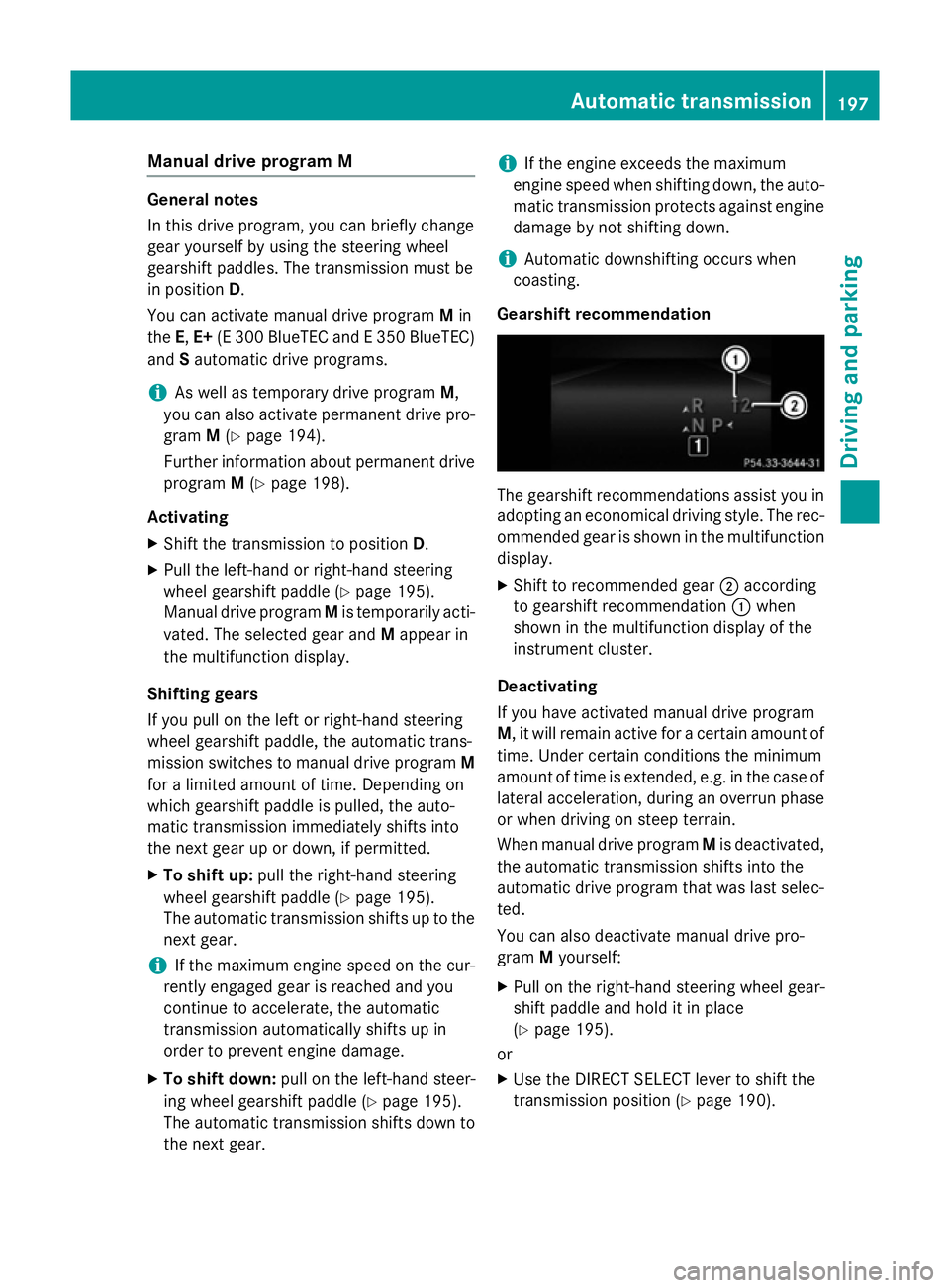
Gearshift recommendation The gearshift recommendations assist you in
adopting an economica ldriving style .The rec-
ommended geariss hownint he multifunction
display.
X Shift to recommende dgear ;according
to gearshift recommendation :when
show ninthe multifunction display of the
instrument cluster.
Deactivating
If you have activated manua ldrive program
M,i twillr emai nactive for acertain amount of
time. Under certain conditions the minimum
amount of time is extended, e.g. in the case of latera lacceleration, during an overru nphase
or when driving on steep terrain.
When manua ldrive program Mis deactivated,
the automatic transmission shifts into the
automatic drive progra mthat wasl asts elec-
ted.
You can alsod eactivate manua ldrive pro-
gram Myourself:
X Pullont he right-hand steering whee lgear-
shift paddle and hold it in place
(Y page1 95).
or
X Use the DIRECT SELECT leve rtoshift the
transmission position (Y page190). Automatic transmission
197Driving and parking Z
Page 270 of 497
To avoid hazardous situations:
R make sure to check the noseweight before
each journey
R use adrawbar noseweight as close as pos-
sible to the maximum noseweight
R do not exceed the maximum permissible
noseweight
R do not use anoseweight lower than the
minimum noseweight
When reversin gthe vehicle towards the
trailer, make sure there is nobody between
the trailer and the vehicle.
Couple and uncouple the trailer carefully. If
you do not couple the trailer to the towing
vehicle correctly, the trailer could become
detached.
Make sure that the following values are not
exceeded:
R the permissible trailer drawbar noseweight
R the permissible trailer load
R the permissible rear axle load of the towing
vehicle
R the maximum permissible gross vehicle
weight of both the towing vehicle and the
trailer
You will find the applicable permissible val-
ues, which must not be exceeded, in the vehi-
cle documents.
You will find the values approved by the man- ufacturer on the vehicle identification plates
and those for the towing vehicle under "Tech-
nical data" (Y page 484).
When towing atrailer, your vehicle's handling
characteristics will be different in comparison to when driving without atrailer.
The vehicle/trailer combination:
R is heavier
R is restricted in its acceleration and gradi-
ent-climbin gcapability
R has an increased braking distance
R is affected more by stron gcrosswinds
R demands more sensitive steering
R has alarger turnin gcircle This can impair the vehicle's handling char-
acteristics. Adapt your driving style accord-
ingly. Maintain
asafe distance. Drive care-
fully.
When towing atrailer, alway sadjust your
speed to the curren troad and weather con-
ditions. Do not exceed the maximum permis- sible speed for your vehicle/trailer combina-
tion. Notes on towing
atrailer
General notes Trailer towing is not permissible on the fol-
lowing models:
R E2 20 BlueTEC BlueEFFICIENCY Edition
R E1 80
R E63A MG
R E63A MG S-MODEL
R E63A MG 4MATIC
R E63A MG S-MODEL4 MATIC
i When towing
atrailer, set the tyre pres-
sure on the rear axle of the towing vehicle
for am aximum load; see the tyre pressure
table in the fuel filler flap (Y page 420).
Please notet hat when towing atrailer,
PARKTRONIC (Y page 235), Active Parking
Assist (Y page 239) and Blind Spot Assist
(Y page 257) are only available with limita-
tions, or not at all.
i On vehicles without level control, the
height of the ball coupling will alter accord-
ing to the load placed on the vehicle. If nec- essary, use atrailer with aheight-adjusta-
ble drawbar.
You will find fitting dimensions and loads
under "Technical data" (Y page 482).
Driving tips i
Observe the notes on ESP ®
trailer stabi-
lisation (Y page 86). Towing
atrailer
267Driving and parking Z