cruise control MERCEDES-BENZ E-CLASS SALOON 2016 User Guide
[x] Cancel search | Manufacturer: MERCEDES-BENZ, Model Year: 2016, Model line: E-CLASS SALOON, Model: MERCEDES-BENZ E-CLASS SALOON 2016Pages: 557, PDF Size: 11.09 MB
Page 203 of 557
or
#
Accelerate brie fly.
Yo ur vehicle pulls away and adapts its speed
to that of theve hicle in front. If no vehicle is
de tected in front, your vehicle accelerates to
th e set speed.
Ad opting the speed limit as thesto red speed
Re quirements:
R Speed Limit Pilot is activated in the multime‐
dia sy stem (→ page 231).
R Distance Pilot DISTRONIC is acti vated.
R The sy stem de tects a traf fic sign indicating a
speed limit. #
Brie fly pull the cruise control le verto wa rds
yo u3.
The displ ayed speed limit is adop ted as the
st ored speed. Your vehicle adapts its speed
to that of theve hicle in front, but only up to
th estored speed. If Speed Limit Pilot is acti‐
va ted, any de tected changes in the speed
limit are adop tedby the sy stem. Collision
warning
If Dis tance Pilot DISTRONIC is unable tosuf fi‐
ciently decele rate theve hicle in order topreve nt
it from approa ching theve hicle in front, you will
be warned visually and acousticall y.An intermit‐
te nt wa rning tone will then sound and the dis‐
ta nce warning lamp will light up in the instru‐
ment clus ter. #
Brake immediately in order toinc rease the
dis tance from theve hicle in front.
or #
Take evasive action pr ovided it is safe todo
so. Fu
nction of DRIVE PIL OT The DRIVE PI
LOT function is available only
on vehicles with the Driving Assistance
pa ckage.
DRIVE PIL OTincludes thefo llowing driving and
driving saf ety sy stems:
R Steering Pilot with Active Lane Change Assi st
( → page 200)
R Distance Pilot DISTRONIC (→ page 193) R
Speed Limit Pilot (→ page 193) Ste
ering Pilot Fu
nction of Steering Pilot
Ste ering Pilot is only available forve hicles
with the Driving Assistance Package.
R Steering Pilot is operational at speeds up to
21 0 km/h and helps youto stay inthe cent re
of the lane bymeans of moderate steering
inter ventions.
R It uses as a refere nce theve hicle in front or
th e lane markings, depending on the driven
speed.
R Steering Pilot requ ires you as the driver, to
ke ep your hands on thesteering wheel at all
times so that you are able tointer vene at any
time tocor rect the course of theve hicle and
ke ep it in lane.
R Steering Pilot can be overridden at any time
by steering theve hicle yourself.
R Ifth e sy stem de tects that there are no lane
markings, it uses theve hicle ahead as a ref‐
erence up toa speed of 130 km/h. 200
Driving and parking
Page 247 of 557
Instrument display
overview &
WARNING Risk of accident due toan
instrument display malfunction
If th e instrument display has failed or mal‐
functioned, you may not recognise function
re strictions applying tosaf etyre leva nt sys‐
te ms.
The operating saf ety of your vehicle may be
impaired. #
Drive on carefull y.#
Have theve hicle checked immediately
at a qualified specialist workshop. If
th e operating saf ety of your vehicle is
impaired, park theve hicle safely as soon as pos‐
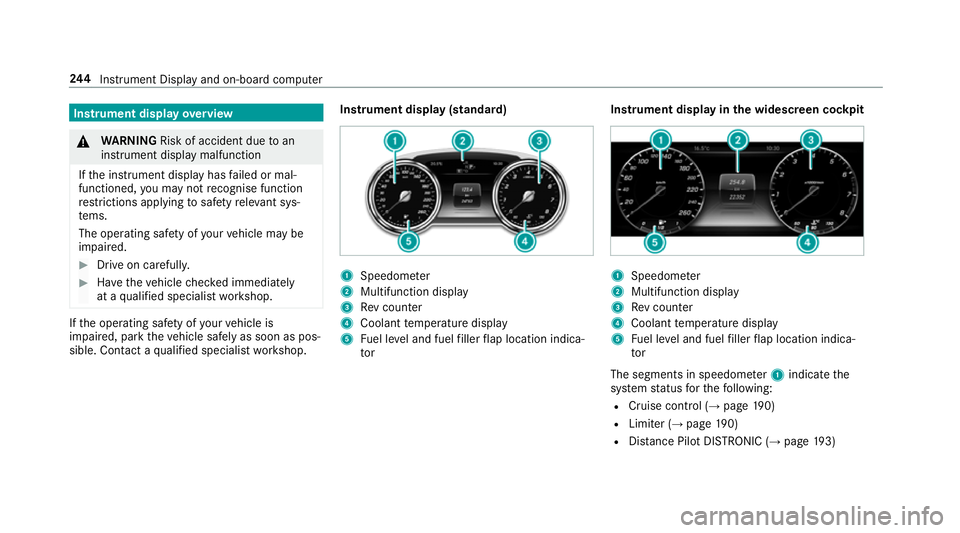
sible. Contact a qualified specialist workshop. Instrument display (standard) 1
Speedome ter
2 Multifunction display
3 Rev counter
4 Coolant temp erature display
5 Fuel le vel and fuel filler flap location indica‐
tor Instrument display in
the widescreen cockpit 1
Speedome ter
2 Multifunction display
3 Rev counter
4 Coolant temp erature display
5 Fuel le vel and fuel filler flap location indica‐
tor
The segments in speedome ter1 indica tethe
sy stem status forth efo llowing:
R Cruise control (→ page190)
R Limi ter (→ page 190)
R Distance Pilot DISTRONIC (→ page 193) 244
Instrument Display and on-board computer
Page 250 of 557
#
Toscroll in the menu bar: swipetothe left
or right on the left-hand Touch Control. #
Tocall up the menu or confirm the selec‐
tion: press the left-hand Touch Control. #
Toscroll through displa ysor lists in the
menu: swipe upwards or down wards on the
left-hand Touch Control. #
Tocall up the submenu or confirm the
selection: pressthe left-hand Touch Control. #
Toexitth e submenu: pressthe back button
on the left.
If yo u are br owsing a submenu and you press
and hold the back button on the left, the menu
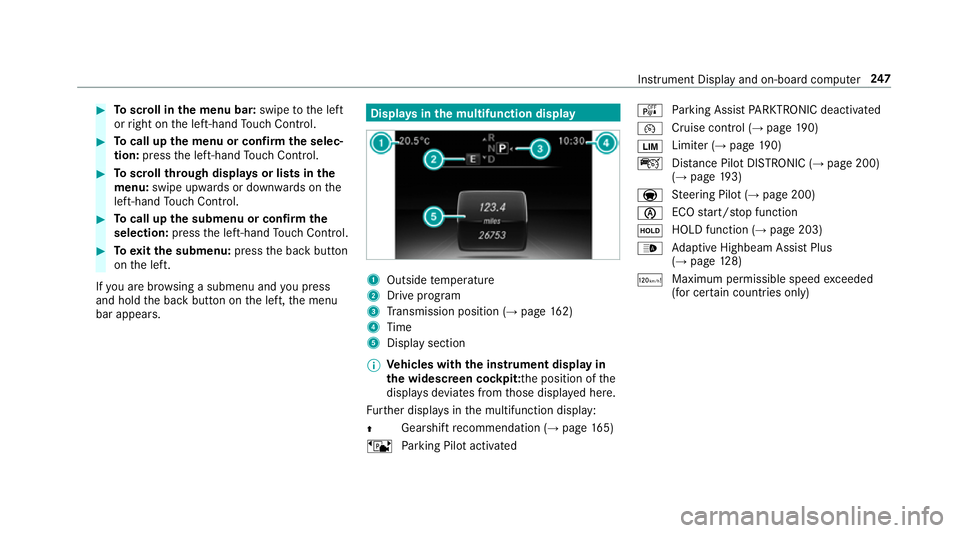
bar appears. Displa
ysinthe multifunction display 1
Outside temp erature
2 Drive prog ram
3 Transmission position (→ page162)
4 Time
5 Display section
% Ve
hicles with the instrument display in
th e widescreen cockpit: the position of the
displa ysdeviates from those displa yed here.
Fu rther displa ysinthe multifunction display:
Z Gearshift
recommendation (→ page 165)
ë Parking Pilot activated é
Parking Assist PARKTRONIC deacti vated
¯ Cruise cont
rol (→ page 190)
È Limi
ter (→ page 190)
ç Distance Pilot DISTRONIC (→ page 200)
(→ page 193)
a St
eering Pilot (→ page 200)
è ECO
start/ stop function
ë HOLD function (→
page 203)
_ Ad
aptive Highbeam Assist Plus
(→ page 128)
ð Maximum permissible speed
exceeded
(for cer tain countries only) Instrument Display and on-board computer
247
Page 259 of 557
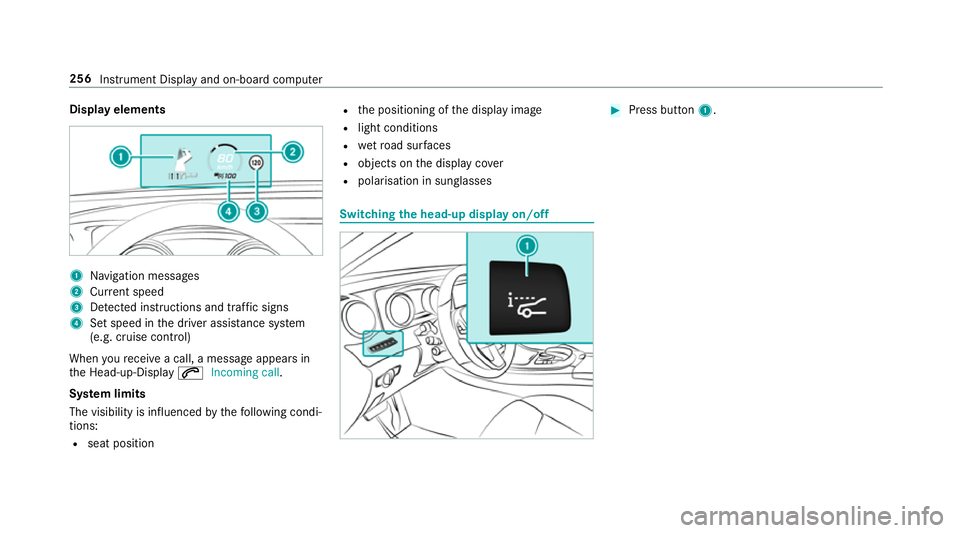
Display elements
1
Navigation messa ges
2 Current speed
3 Detected instructions and traf fic signs
4 Set speed in the driver assis tance sy stem
(e.g. cruise control)
When youre cei vea call, a message appears in
th e Head-up-Display 6Incoming call.
Sy stem limits
The visibility is influenced bythefo llowing condi‐
tions:
R seat position R
the positioning of the display image
R light conditions
R wetro ad sur faces
R objects on the display co ver
R polarisation in sunglasses Switching
the head-up display on/off #
Press button 1. 256
Instru ment Display and on-board computer
Page 464 of 557
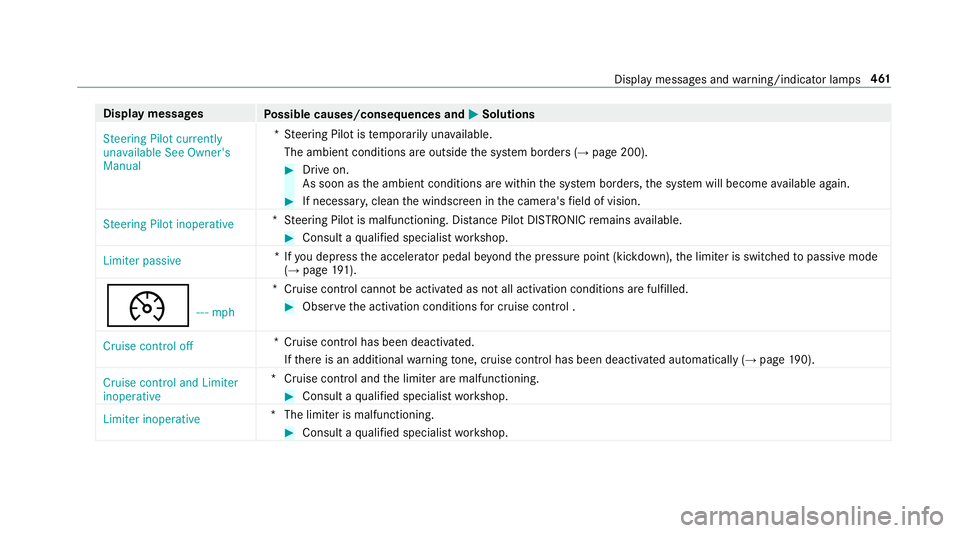
Display messages
Possible causes/consequences and M
MSolutions
Steering Pilot currently
unavailable See Owner's
Manual *S
teering Pilot is temp orarily una vailable.
The ambient conditions are outside the sy stem borders (→ page 200). #
Drive on.
As soon as the ambient conditions are within the sy stem borders, the sy stem will become available again. #
If necessar y,clean the windscreen in the camera's field of vision.
Steering Pilot inoperative *S
teering Pilot is malfunctioning. Dis tance Pilot DISTRONIC remains available. #
Consult a qualified specialist workshop.
Limiter passive *I
fyo u depress the accelera tor pedal be yond the pressure point (kickdown), the limiter is switched topassive mode
(→ page 191).
¯ - - - mph*C
ruise control cannot be activated as not all activation conditions are fulfilled. #
Obser vethe activation conditions for cruise control .
Cruise control off *C
ruise control has been deactivated.
If th ere is an additional warning tone, cruise control has been deacti vated automatically (→ page190).
Cruise control and Limiter
inoperative *C
ruise control and the limiter are malfunctioning. #
Consult a qualified specialist workshop.
Limiter inoperative *T
he limiter is malfunctioning. #
Consult a qualified specialist workshop. Display messages and
warning/indicator lamps 461
Page 466 of 557
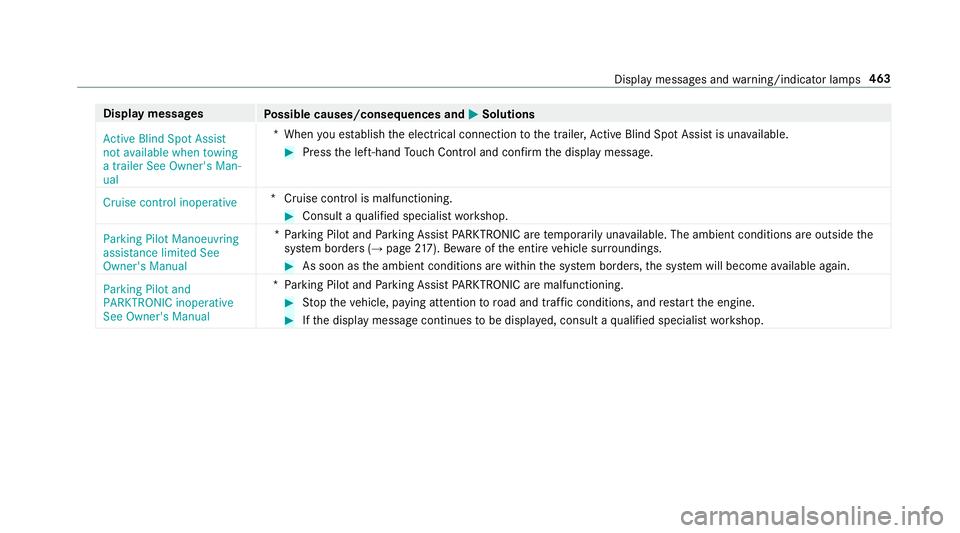
Display messages
Possible causes/consequences and M
MSolutions
Active Blind Spot Assist
not available when towing
a trailer See Owner's Man-
ual *W
hen you es tablish the electrical connection tothe trailer, Active Blind Spot Assi stis una vailable. #
Press the left-hand Touch Control and confirm the display message.
Cruise control inoperative *C
ruise control is malfunctioning. #
Consult a qualified specialist workshop.
Parking Pilot Manoeuvring
assistance limited See
Owner's Manual *P
arking Pilot and Parking Assist PARKTRONIC are temp orarily una vailable. The ambient conditions are outside the
sy stem borders (→ page217). Be wareofthe entire vehicle sur roundings. #
As soon as the ambient conditions are within the sy stem borders, the sy stem will become available again.
Parking Pilot and
PARKTRONIC inoperative
See Owner's Manual *P
arking Pilot and Parking Assist PARKTRONIC are malfunctioning. #
Stop theve hicle, paying attention toroad and traf fic conditions, and restart the engine. #
Ifth e display message continues tobe displa yed, consult a qualified specialist workshop. Display messages and
warning/indicator lamps 463
Page 513 of 557

1,
2, 3 ...
12 V so cket
see Soc ket (12 V)
230 V so cket ............................................ 11 9
360° Camera ............................................ 214
Assigning as a favo urite ...................... .217
Care .................................................... .374
Fu nction ............................................... 214
Selecting a view ................................... 216A
A/C function Activating/deactivating (control
panel) .................................................. 14 3
Ac tivating/deactivating (multimedia
sy stem) ................................................ 14 3
ABS (Anti-lock Braking Sy stem) ............ .180
Ac celeration
see Kickdown
Ac cess data
Editing ................................................ .332
Setting ................................................. 330 Ac
oustic locking verification signal
Swit ching on/off .................................. .65
Ac tive Blind Spot Assi st......................... 232
Ac tivating/deactivating ...................... .234
Brake application ................................. 232
Fu nction/no tes ................................... 232
Sy stem limits ....................................... 232
Tr ailer operation .................................. 232
Ac tive bonn et(pedestrian pr otection) .. 364
Operation ............................................ 364
Re setting ............................................. 364
Ac tive Brake Assi st................................. 185
Fu nction/no tes ................................... 185
Setting ................................................. 189
Ac tive Eme rgency Stop Assist ................ 201
Ac tive Lane Change Assi st..................... 201
Ac tive Lane Keeping Assist .................... 234
Ac tivating/deactivating ...................... .236
Fu nction .............................................. 234
Sensitivity (function/no tes) ................. 237
Setting the sensitivity .......................... 237
Sy stem limits ....................................... 234
Tr ailer operation .................................. 234 Ac
tive light function ................................ 12 6
Ad aptive brake lights ..............................19 0
Ad aptive cruise control
see Dis tance Pilot DISTRONIC
Ad aptive functions, MULTIBEAM LED
see Intelligent Light Sy stem
Ad aptive Highbeam Assist Plus
Ac tivating/deactivating ...................... .129
Fu nction .............................................. 12 8
Ad Blue ®
.................................................... 429
Ad ditives .............................................4 29
Filling capacity ................................... .430
Low outside temp eratures ...................4 29
No tes ................................................... 16 9
Purity ................................................... 429
Ad ditional door lo ck.................................. 68
Ad diti ves.................................................. 430
Ad Blue ®
............................................... 429
Engine oil ............................................ 430
Fu el ..................................................... 427
Ad diti ves (engine oil)
see Additives 51 0
Index
Page 520 of 557

COMAND
Touch App
see COMAND Touch
Combination swit ch
see Turn signal light
Compass .................................................. 306
Computer .................................................2 46
Connection status
Displ ays ............................................... 333
Overview ............................................. 333
Contacts ................................................... 312
Calling up ............................................ .312
Del eting .............................................. .314
Downloading (from mobile phone) ....... 312
Importing ............................................. 313
Information .......................................... 312
Making a call ........................................3 13
Na me form at ........................................ 313
Options ................................................ 313
Saving .................................................. 313
Controller Operating ............................................ 270
Con venience closing ................................. 81
Con venience opening ................................ 80 Coolant (engine)
Levelch eck ......................................... 369
No tes .................................................. 432
Cooling see Climate control
Co pyright ...................................................28
Cornering light function ..........................127
Co ver.......................................................... 78
Cross Traf fic Alert .................................. .227
Crosswind Assist Function/no tes ................................... 184
Cruise control .......................................... 19 0
Ac tivating ............................................ .191
Calling up a speed .............................. .191
Deactivating ......................................... 191
Fu nction .............................................. 19 0
Le ver ................................................... .191
Re quirements ...................................... 191
Selecting .............................................. 191
Setting a speed .................................... 191
St oring a speed .................................... 191
Sy stem limits ....................................... 19 0Cup holder
see Cup holde rs
Cup holders .............................................. 11 5
Fitting/removing (centre console) ....... 11 5
Re ar .................................................... .116 D
Dashboa rd
see Cockpit
Dashboard lighting ..................................2 48
Data acquisition Vehicle ................................................... 27
Data import/export Function/no tes ................................... 281
Importing/exporting ............................2 81
PIN pr otection for data export .............2 82
Data roaming
Ac tivating/deactivating (telephone
module) ............................................... 324
Declaration of Conformity Electromagnetic compatibility ............... 24
Jack ...................................................... .24
TIREFIT kit ............................................. 25 Index
517
Page 522 of 557
Ac
tive Lane Keeping Assist Camera
view restricted See Owner's Manual ... 458
Ac tive Lane Keeping Assist cur rently
una vailable See Owner's Manual .........457
Ac tive Lane Keeping Assist inopera‐
tive ...................................................... 457
bAc tive Light Sy stem inoperative .. 491
Ad aptive Highbeam Assist Plus Cam‐
era view restricted See Owner's
Manual ................................................ 493
Ad aptive Highbeam Assist Plus cur‐
re ntly una vailable See Owner's Man‐
ual ...................................................... .493
Ad aptive Highbeam Assist Plus inop‐
erative ................................................ .492
4Ad d 1 litre engine oil when next
re fuelling ............................................. 469
Air conditioning Malfunction See
Owner's Manual .................................. 485 Apply brake
todeselect Park (P)
position ...............................................4 81
À ATTENTION ASSIST inoperative ... 454
ÀAT TENTION ASSIS T:Take a
break! .................................................. 454
bAU TOlights inope rative ............... 492
Au xilia rybattery malfunction .............. 484
_Before starting the engine, turn
th esteering wheel. .............................. 485
Blind Spot Assist cur rently una vaila‐
ble See Owner's Manual ...................... 459
Blind Spot Assist inope rative ............... 459
Blind Spot Assi stnot available when
to wing a trailer See Owner's Manual ...4 62
Brake immediate ly............................... 447
 Changekey bat teries ...................4 78
Ø Check AdBlue See Owne r’s
Manual ................................................ 470
J Check brake fluid le vel................ 4474
Check eng. oil le v.when next
re fuelling ............................................. 467
jChe cktrailer hitch lo ck............... 481
hCheck tyre(s) ............................... 474
! Clean the fuel filter ...................... 472
Clutch overheated Avoid pulling away
fo r XX:XX mins ................................... .484
É Compressor is cooling .................457
? Coolant Stop vehicle Switch
engine off ............................................ 465
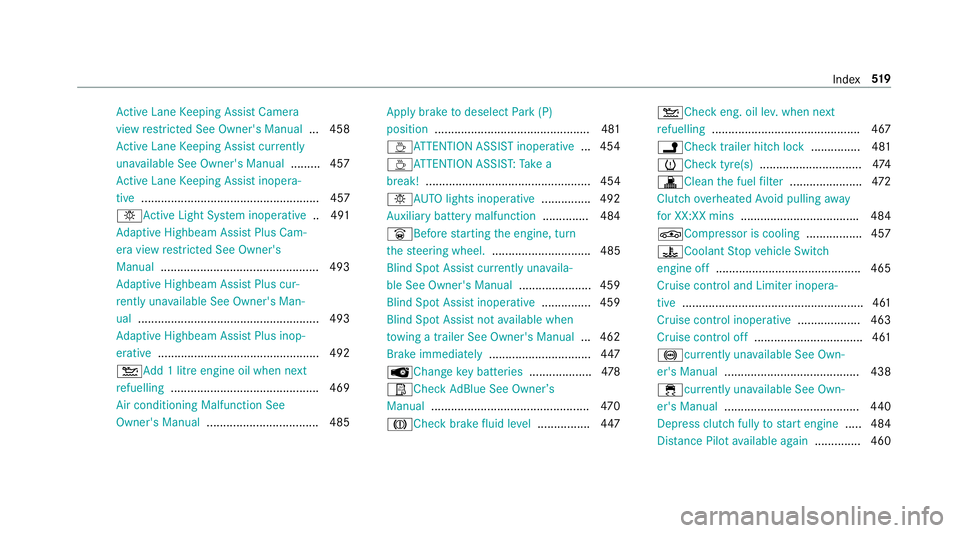
Cruise contro l and Limiter inope ra‐
tive ....................................................... 461
Cruise control inope rative ................... 463
Cruise control off ................................. 461
!cu rrently unavailable See Own‐
er's Manual ........................................ .438
÷cur rently una vailable See Own‐
er's Manual ........................................ .440
Depress clutch ful lyto start engine .....4 84
Dis tance Pilot available again .............. 460 Index
519
Page 526 of 557
Ad
aptive brake lights .......................... .190
BA S (Brake Assi stSystem) ...................1 81
EBD (Electronic Brake forc e Distribu‐
tion) ..................................................... 184
ESP ®
(Electronic Stability Prog ram)
Crosswind Assist ................................. 184
ESP ®
(Electronic Stability Prog ram)
trailer stabilisation .............................. .184
Overview ............................................. 180
Ra dar sensors ...................................... 17 9
Re sponsibility ...................................... 17 9
Driving saf ety sy stem
see ESP ®
(Elect ronic Stability Prog ram)
Driving sy stem
DY NA MIC BODY CONTROL .................. 205
Driving sy stem
see 360° Camera
see Active Blind Spot Assi st
see Active Lane Keeping Assist
see AIR BODY CONTROL
see ATTENTION ASSIST
see Blind Spot Assist
see Cruise control
see Dis tance Pilot DISTRONIC see DRIVE PIL
OT
see Driving saf ety sy stem
see HOLD function
see Limiter
see Parking Assist PARKTRONIC
see Parking Pilot
see Remo teParking Pilot
see Reversing camera
see Speed Limit Pilot
see Steering Pilot
see Traf fic Sign Assi st
Driving tips Driving abroad (symmetrical dipped
beam) .................................................. 12 3
Gene ral driving tips ............................ .156
Ru nning-in no tes ..................................1 56
Dr ow siness de tection
see ATTENTION ASSIST
Dr ow siness warning
see ATTENTION ASSIST
DY NA MIC BODY CONT ROL
Suspension .......................................... 205
Dynamic handling control sy stem
see ESP ®
(Elect ronic Stability Prog ram) Dynamic multicontour seat
Setting .................................................. .97
DY NA MIC SELECT ................................... .160
Configu ring drive program I ................. 161
Displ aying engine data ........................ .161
Displ aying vehicle data ........................ 161
Drive prog ram display ......................... .161
Drive prog rams ................................... .160
Fu nction .............................................. 16 0
Operating (DYNAMIC SELECT switch) .. 161 E
E10 ............................................................ 426
Easy entry feature
Operation/no tes ................................. 103
Setting ................................................. 103
Easy exitfeature
Operation/no tes ................................. 103
Setting ................................................. 103
EAS Y-PA CK boot box ................................ 11 3
Ad justing the height toany position .... .111
Care .................................................... .376
Ins talling/ removing .............................. 11 3 Index
523