door lock MERCEDES-BENZ E-CLASS SALOON 2016 User Guide
[x] Cancel search | Manufacturer: MERCEDES-BENZ, Model Year: 2016, Model line: E-CLASS SALOON, Model: MERCEDES-BENZ E-CLASS SALOON 2016Pages: 557, PDF Size: 11.09 MB
Page 73 of 557

Information about suitable mobile phones
can be obtained from your Mercedes-Benz
Service Centre or on the Internet at http://
www.mercedes-benz.com/connect.
% The function is only available in combination
with Mercedes me connect and on lyin cer‐
ta in countries.
% Protective cases around the mobile phone
can impair the functionality. #
Touch the door handle on the driver's door in
th e area where NFC aerial 1is located with
th e part of the mobile phone where the NFC
aerial is located.
The vehicle is loc ked or unloc ked alternately.
If yo u lose your mobile phone, deactivate the
"Digital Car Key in the smartphone" service in
Mercedes me connect at https://
www.mercedes.me.
% Mercedes-Benz recommends that you car ry
th e emer gency key in case of function
re strictions. Lo
cking and unlocking theve hicle with KEY‐
LESS-GO Re
quirements:
R The key must be outside theve hicle.
R The dis tance between theke y and theve hicle
must not exceed 1 m.
R The driver's door and the door at which the
door handle is used must bo thbe closed. #
Tounlo cktheve hicle: touch the inner sur‐
fa ce of the door handle. #
Tolock theve hicle: touch sensor sur face
1 or2. #
Convenience closing: touch recessed sen‐
sor su rface 2for an extended pe riod.
% For fur ther information on con venience clos‐
ing (→ page 81). 70
Opening and closing
Page 75 of 557

#
Todeactivate: press and hold button 1for
appr oximately five seconds until an acoustic
signal sounds. #
Toactivate: press and hold button 2for
appr oximately five seconds until an acoustic
signal sounds.
Danger of being loc ked out when the function is
activated:
R Ifth eve hicle is being tow star ted/pushed. R
On a roller dynamome ter. Un
locking/locking the driver's door using
th e emer gency key element %
Ifyo u wish tolock theve hicle entirely using
th e emer gency key,firs t press the button for
locking from the inside while the driver's
door is open. Then proceed tolock the driv‐
er's door using the emer gency key element. #
Insert the emer gency key in toopening 1in
th e co ver. #
Pull and hold the door handle. #
Pull the co ver on the emer gency key as
st ra ight as possible away from theve hicle
until it releases. #
Release the door handle. 72
Opening and closing
Page 77 of 557

#
Pull boot lid remo teoperating switch 1.#
Vehicles with HANDS-FREE ACCESS: use
yo ur foot to kick under the bumper
(→ page 76).
Ve hicles with boot lid conve nience closing:if
an object restricts the boot lid during the auto‐
matic opening process, the obs tacle de tection
st ops the boot lid. The obs tacle de tection func‐
tion is only an aid and is not a substitu teforyo ur
attentiveness. Closing
the boot lid &
WARNING Risk of inju ryfrom unsecu red
items in theve hicle
If objects, luggage or loads are not secured
or not secured suf ficientl y,they could slip,
tip ove r or be flung around and thereby hit
ve hicle occupants.
There is a risk of injur y,particularly in the
ev ent of sudden braking or a sudden change
in direction. #
Alw aysst ore objects in such a wayth at
th ey cannot be flung around. #
Before the journe y,secure objects, lug‐
ga ge or loads against slipping or tipping
ove r. &
WARNING Risk of becoming trapped
du ring au tomatic closing of the boot lid
Pa rts of the body could become trapped dur‐
ing automatic closing of the boot lid. More‐
ove r,people, e.g. children, may be standing
in the closing area or may enter the closing
area during the closing process. #
Make sure that nobody is in the vicinity
of the closing area during the closing
process. #
Use one of thefo llowing options tostop
th e closing process:
R Press thep button on thekey.
R Press or pull there mo teoperating
switch on the driver's door.
R Press the closing or locking button
on the boot lid. R
Pull the boot lid handle. Ve
hicles with HANDS-FREE ACCESS: it is also
possible tostop the closing process bymoving
yo ur foot in a kicking motion under there ar
bumper.
Yo u ha vethefo llowing options toclose the boot
lid: #
Pull the boot lid down using the handle
re cess and push it closed. #
Vehicles with boot lid conve nience clos‐
ing: pullthe boot lid handle. #
Vehicles with boot lid conve nience clos‐
ing: press and hold thep button on the
ke y (with theke y in the vicinity of theve hi‐
cle). 74
Opening and closing
Page 78 of 557

#
Vehicles with boot lid conve nience clos‐
ing: press closing button 1inthe boot lid. #
Vehicles with boot lid conve nience clos‐
ing and KEYLESS-GO: press locking button
2 inthe boot lid.
If a key is de tected outside theve hicle, the
boot lid closes and theve hicle is loc ked. #
Vehicles with boot lid conve nience clos‐
ing: press boot lid remo teoperating switch
1. #
Vehicles with HANDS-FREE ACCESS: use
yo ur foot to kick below the bumper
(→ page 76).
Au tomatic reve rsing function of the boot lid
If an object restricts the boot lid during the auto‐
matic closing process, the boot lid opens again automaticall
y.The automatic reve rsing function
is only an aid and is not a substitute foryo ur
attentiveness. #
When closing, make sure that no body parts
are in the closing area. &
WARNING Risk of becoming trapped
despi tereve rsing function
The reve rsing function does not react:
R tosoft, light and thin objects, e.g. fingers.
R overth e last 8 mm of the closing path.
In these situations in particular, there ve rsing
function cannot pr event someone being trap‐
ped. #
When closing, ma kesure that no body
parts are in the closing area. #
If someone is trapped, use one of the
fo llowing options:
R Press thep button on thekey.
R Press there mo teoperating switch
on the driver's door. Opening and closing
75
Page 91 of 557
R
The boot lid is opened.
R The bonnet is opened.
R Interior pr otection is triggered. (→ page 89)
R Tow- aw ay protection is triggered.
(→ page 88)
The ATA system is primed automatically af ter
appr oximately 10seconds:
R After locking theve hicle with thekey.
R After locking theve hicle using KEYLESS-GO. When
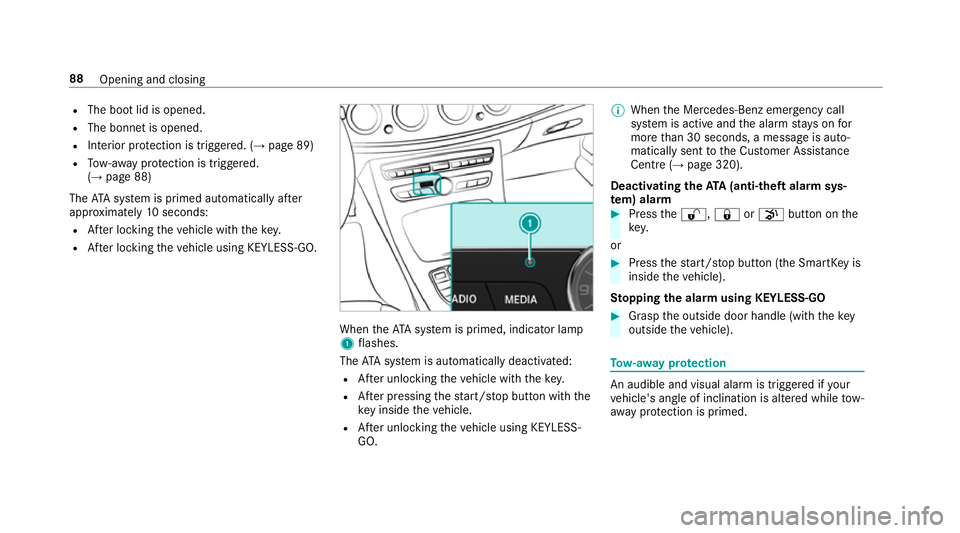
theATA system is primed, indicator lamp
1 flashes.
The ATA sy stem is automatically deactivated:
R After unlocking theve hicle with thekey.
R After pressing thest art/ stop button with the
ke y inside theve hicle.
R After unlocking theve hicle using KEYLESS-
GO. %
When the Mercedes‑Benz emer gency call
sy stem is active and the alarm stay s on for
more than 30 seconds, a message is auto‐
matically sent tothe Cus tomer Assis tance
Centre (→ page 320).
Deactivating theATA (anti-theft ala rmsys‐
te m) ala rm #
Press the%, &orp button on the
key.
or #
Press thest art/ stop button (the SmartK eyis
inside theve hicle).
St opping the ala rmusing KEYLESS-GO #
Grasp the outside door handle (with thekey
outside theve hicle). To
w- aw ay protection An audible and visual alarm is triggered if
your
ve hicle's angle of inclination is altered while tow-
aw ay protection is primed. 88
Opening and closing
Page 106 of 557
Easy entry and
exitfeature How
the easy entry and exitfeature operates &
WARNING Risk of accident when pulling
aw ay during the adjustment process of
th e easy exitfeature
‑ If you pull away while the easy entry and
ex itfeature is making adjustments, you could
lose cont rol of theve hicle. #
Alw ayswa it until the adjustment proc‐
ess is comple tebefore pulling away. &
WARNING Risk of becoming trapped
while adjusting the easy entry andexit
fe ature
When the easy entry andexitfeature adjusts
th esteering wheel, you and other vehicle
occupants – particularly children – could
become trapped. #
During the adjustment process of the
easy entry andexitfeature, make sure th
at no one has any body parts in the
sweep of thesteering wheel. #
Movethe adjustment le ver of thesteer‐
ing wheel if there is a risk of becoming
trapped bythesteering wheel.
The adjustment process is stopped. #
Never lea vechildren unat tended in the
ve hicle. #
When leaving theve hicle, alw aysta ke
th eke y with you and lock theve hicle.
This also applies tomobile phones if the
"Digital Car Key in the smartphone"
function is activated via the Mercedes
connect me web App. The easy ent
ryand exitfeature makes getting in
and out of your vehicle easier.
If th e easy entry andexitfeature is active, the
st eering wheel will mo veupwards in thefo llow‐
ing situations:
R you swit chthe ignition off
R you open the driver's door when the ignition
is switched on The
steering wheel mo ves back tothe last drive
position in thefo llowing cases:
R you swit chthe ignition on when the driver's
door is closed
R you close the driver's door when the ignition
is switched on
The last drive position of thesteering wheel is
st ored:
R when you swit choff the ignition
R using the last setting stored using the mem‐
ory function
If yo u press one of the memory function position
buttons, the adjustment process is stopped.
The crash-responsive exit aid only functions
when the easy entry andexitfeature is active.
Setting the easy entry and exitfeature
Multimedia sy stem:
, Vehicle .
î Vehicle set-
tings .
Easy Entry/Exit #
Activate Oor deacti vate ª the function. Seats and
stowing 103
Page 109 of 557
#
Alw ays be particular lycareful around
th eta ilpipe and theta ilpipe trim. #
Allow theve hicle parts tocool down
before youto uch them. The handling
characteristics of your vehicle are
dependent on the distribution of the load within
th eve hicle. You should bear thefo llowing in
mind when loading theve hicle:
R neverex ceed the maximum permissible
gross mass or the permissible axle loads for
th eve hicle (including occupants).
R the load must not pr otru de abo vethe upper
edge of the seat backrests.
R always place the load behind unoccupied
seats if possible.
R secure the load using the tie-down eyes and
distribute the load evenl y. Interior
stowage compa rtments Overvi
ewofthe front stowage compa rt‐
ments
Obse rveth e no tes on loading theve hicle
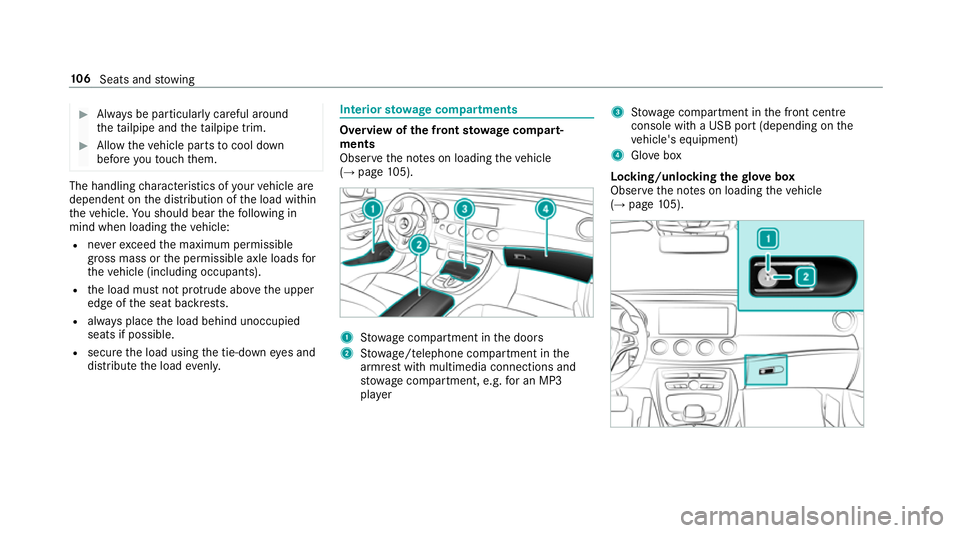
(→ page 105). 1
Stow age compartment in the doors
2 Stow age/telephone compartment in the
armrest with multimedia connections and
stow age compartment, e.g. for an MP3
pla yer 3
Stow age compartment in the front cent re
console wi tha USB port (depending on the
ve hicle's equipment)
4 Glovebox
Locking/unlocking thegl ove box
Obser vethe no tes on loading theve hicle
(→ page 105). 106
Seats and stowing
Page 179 of 557
Ra
dio equipment appr oval numbers for the
ga rage door opener
R Egypt: TAC.2 5111 51 293.WIR
R Ando rra: CE
R Austra lia: R-NZ
R Barbados: MED1578
R Chile: 2488/DFRS205 76/F-74
R European Union: CE
R Gibraltar: CE
R Iceland: CE
R Jordan: TRC/LPD/20 15/299
R Canada: 4112 A-MUAHL5
R Kuwa it:CE
R Liechtens tein: CE
R Mexico: RCPGEMU15-0448
R Monaco: CE
R New Zealand: R-NZ
R Norway: CE
R Russian Federation: notrequ ired
R Saudi Arabia: TA10525 R
Switzerland: CE
R South Africa: TA-20 15/1386
R Turkey: not requ ired
R United Arab Emirates: ER41849/15
R United States: NZLMUAHL5 Electric parking brake
Au
tomatically applying the electric parking
brake &
WARNING Risk of accident and inju ry
due tochildren left unat tended in the
ve hicle
If yo u lea vechildren unat tended in theve hi‐
cle, they may be able toset theve hicle in
motion, forex ample by:
R Releasing the parking brake.
R Shifting the automatic transmission out
of park position jor shifting the manual
transmission into neutral.
R Starting the engine. In addition,
they may operate vehicle equip‐
ment. #
Never lea vechildren and animals unat‐
te nded in theve hicle. #
When leaving theve hicle, alw aysta ke
th eke y with you and lock theve hicle.
This also applies tomobile phones if the
"Digital Car Key in the smartphone"
function is activated via the Mercedes
connect me web app. Ve
hicles with manual transmission:
The electric parking brake is applied while the
ve hicle is being kept stationary bythe HOLD
function if one of thefo llowing conditions are
fulfilled:
R The engine is switched off.
R The seat belt tongue is not inser ted in the
seat belt buckle of the driver's seat and the
driver's door is opened.
R There is a sy stem malfunction.
R The po wer supp lyis insuf ficient.
R The vehicle is stationary for a lengt hyperiod. 176
Driving and pa rking
Page 207 of 557
*
NO
TEDama gefrom auto matic braking If
Ac tive Brake Assi st, Dis tance Pilot
DISTRONIC or the HOLD function is activa‐
te d, theve hicle brakes automatically in cer‐
ta in situations.
To avo id damage totheve hicle, deactivate
th ese sy stems in thefo llowing or similar sit‐
uations: #
During towing #
In a car wash Re
quirements:
R The vehicle is stationar y.
R The driver's door is closed or the seat belt on
th e driver's side is fastened.
R The engine is running or has been au tomati‐
cally switched off bythe ECO start/ stop
function.
R The electric parking brake is released.
R Distance Pilot DISTRONIC is not acti vated.
R Vehicles with automatic transmission:
The transmission is in position h,kori. Ac
tivating the HOLD function #
Dep ress the brake pedal and af ter a short
time depress fur ther until theë display
appears in the multifunction displa y. #
Release the brake pedal.
Deactivating the HOLD function #
Depress the accelerator pedal topull away.
or #
Depress the brake pedal until theë dis‐
play disappears from the multifunction dis‐
pla y.
The HOLD function is deactivated in thefo llow‐
ing situations:
R If Dis tance Pilot DISTRONIC has been acti va‐
te d.
R Vehicles with automatic transmission:
When transmission position jis selected.
R When theve hicle is secured with the electric
parking brake. In
thefo llowing situations, theve hicle is held by
th e transmission position jorby the electric
parking brake:
R When the seat belt is unfas tened and the
driver's door is opened.
R When the engine is switched off.
R When there is a malfunction in the sy stem or
if th e po wer supp lyis insuf ficient.
Ve hicles with manual transmission:
The Brake immediately message may also
appear in the multifunction displa y: #
Immedia tely depress the brake pedal firm ly
until thewa rning message disappears.
The HOLD function is deactivated.
A horn sounds at regular inter vals if you turn off
th e engine, remo veyour seat belt and open the
driver's door while the HOLD function is activa‐
te d. If you attem pttolock theve hicle, the horn
to ne becomes louder. The vehicle cannot be
loc ked until you ha vedeactivated the HOLD
function. 204
Driving and parking
Page 229 of 557
#
Bring theve hicle toast andstill.
Area 2is activated. #
Toactivate Remo teParking Pilot, select
transmission position j.#
Select your ow nve hicle 3and confirm. #
Exit theve hicle. #
Ensure that all vehicle doors, windo wsand
th e boot lid or theta ilgate are closed. #
Start theRe mo teParking Pilot app. #
Using the mobile phone, drive theve hicle for‐
wa rds or backwards tothe desired position.
The parking manoeuvre requires a minimum
parking space size. If clearances get smaller dur‐
ing the parking manoeuvre, e.g. if theve hicle is
being driven into a garage , a message will
appear on the mobile phone. You will need to
confirm there duced clearances.
% On completion of the parking manoeuvre,
th eve hicle is automatically loc ked.
% You can find fur ther information in the oper‐
ating instructions forth eRe mo teParking
Pilot app http://www.me rcedes.me. Exiting a parking space with
explo ration
mode #
Unlock theve hicle. #
Start theRe mo teParking Pilot app within
one minute. #
Using the mobile phone, drive theve hicle for‐
wa rds or backwards tothe desired position.
% The outside mir rors are not automatically fol‐
ded out af terex iting a parking space.
Au thorising and de-authorising a mobile
phone forRe mo teParking Pilot
Multimedia sy stem:
, Vehicle .
k Assistance .
Parking
Pilot .
Remote Parking Pilot
Au thorising a new mobile phone
In order tobe able touse theRe mo teParking
Pilot function, you must authorise your mobile
phone. You can authorise up tosix mobile
phones. #
Select Devices:. #
Select Connect new device .
Re mo teParking Pilot is ready toconnect. #
Start theRe mo teParking Pilot app and
sear chforth eve hicle name.
A connection prom ptis displa yed. #
Ente rth e PIN.
De-authorising a mobile phone #
Select ¥Options . #
Select the mobile phone. #
Select De-authorise. #
Select Yes.
The mobile phone is dele ted from the list of
devices.
Drive Away Assist
% Drive AwayAssi stis only available forve hi‐
cles with automatic transmission.
Drive AwayAssi stcan reduce the se verity of an
impact when pulling away. If an obs tacle is
de tected in the direction of tr avel, theve hicle's
speed is brief lyreduced toappr ox. 2 km/h. If a
critical situation is de tected, a symbol appea rs
on the camera image of the multimedia sy stem. 226
Driving and parking