lights MERCEDES-BENZ E-CLASS SALOON 2017 User Guide
[x] Cancel search | Manufacturer: MERCEDES-BENZ, Model Year: 2017, Model line: E-CLASS SALOON, Model: MERCEDES-BENZ E-CLASS SALOON 2017Pages: 497, PDF Size: 10.38 MB
Page 126 of 497
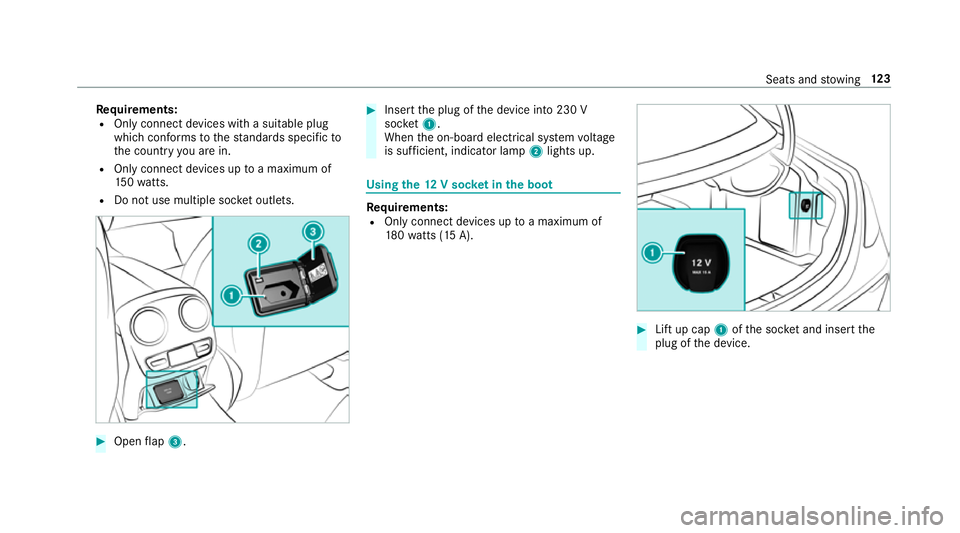
Re
quirements:
R Only connect devices with a suitable plug
which con form sto thest andards specific to
th e count ryyou are in.
R Only connect devices uptoa maximum of
15 0wa tts.
R Do not use multiple soc ket outlets. #
Open flap 3. #
Insert the plug of the device into 230 V
soc ket1.
When the on-board electrical sy stem voltage
is suf ficient, indicator la mp2lights up. Using
the12 V so cket inthe boot Re
quirements:
R Only connect devices up toa maximum of
18 0wa tts (15 A). #
Lift up cap 1ofthe soc ket and insert the
plug of the device. Seats and
stowing 12 3
Page 130 of 497
Exterior lighting
Note
s onchanging the lights when driving
abroad Ve
hicles with halogen or static LED head‐
lamps: It is not necessa ryto change the head‐
lamps. The legal requ irements are also met in
countries where people drive on theot her side
of thero ad.
Ve hicles with Intelligent Light Sy stem: Before
crossing the border into count ries where they
drive on theot her side, it is necessary toset the
headlamp sto symmetrical dipped beam
(→ page 135).
Af terch anging the headlamps:
R Oncoming tra ffic is not dazzled.
R The edge of thero ad is not illuminated as far
or as high.
R The "mo torw ay mode" and "enhanced fog
light" functions are not available.
The headlamps must be reset toasymm etrical
dipped beam af terre turning from ab road. Lighting sy
stems and your responsibility The
various lighting sy stems of theve hicle are
only aids. The driver of theve hicle is responsible
fo r cor rect vehicle illumination in accordance
with the pr evailing light and visibility conditions,
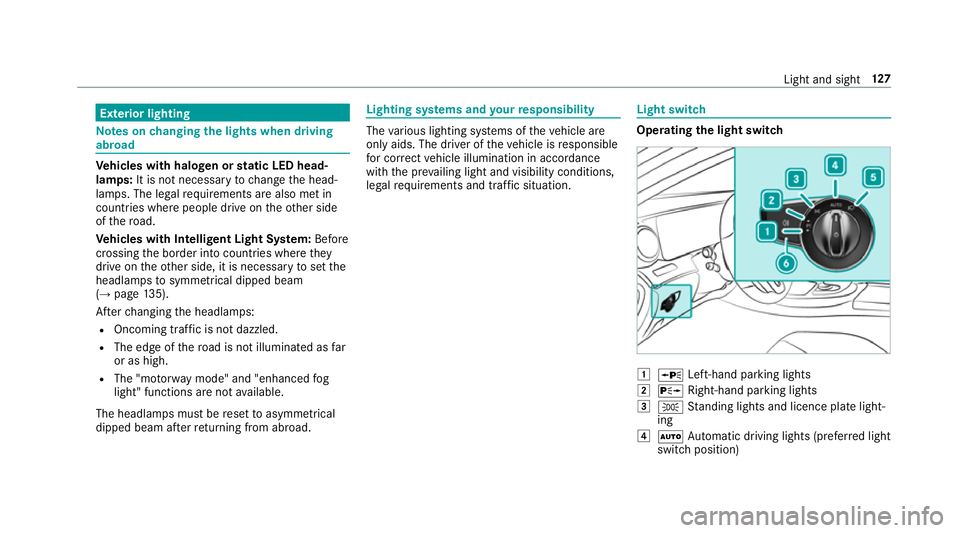
legal requirements and traf fic situation. Light switch
Ope
rating the light switch 1
W Left-hand pa rking lights
2 X Right-hand parking lights
3 T Standing lights and licence plate light‐
ing
4 Ã Automatic driving lights (prefer red light
switch position) Light and sight
127
Page 131 of 497
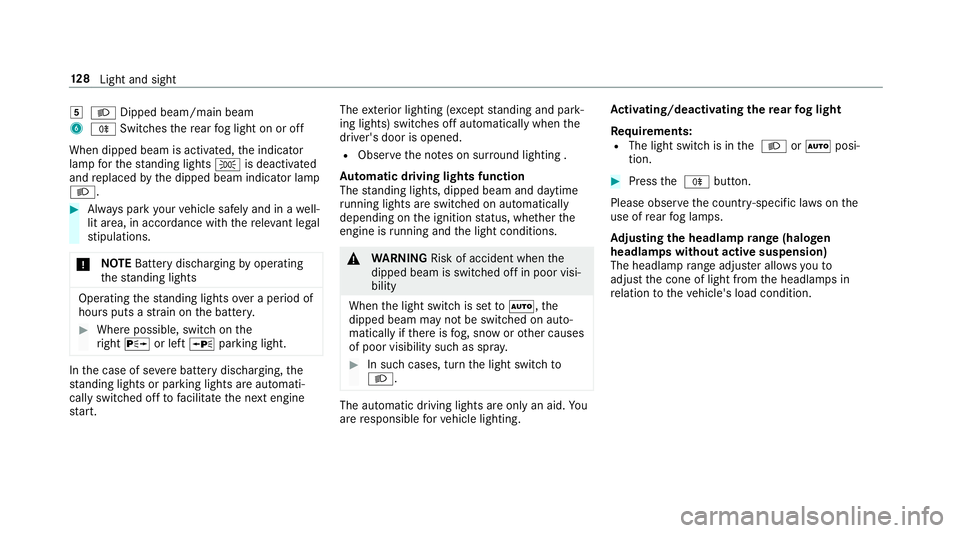
5
L Dipped beam/main beam
6 R Switches there ar fog light on or off
When dipped beam is activated, the indicator
lamp forth est anding lights Tis deactivated
and replaced bythe dipped beam indicator lamp
L. #
Alw ays park your vehicle safely and in a well-
lit area, in accordance with there leva nt le gal
st ipulations.
* NO
TEBattery discharging byoperating
th est anding lights Operating
thest anding lights over a period of
hours puts a stra in on the batter y. #
Where possible, switch on the
ri ght X or left Wparking light. In
the case of se vere battery discharging, the
st anding lights or parking lights are automati‐
cally swit ched off tofacilitate the next engine
st art. The
exterior lighting (e xcept standing and park‐
ing lights) swit ches off automatically when the
driver's door is opened.
R Obser vethe no tes on sur round lighting .
Au tomatic driving lights function
The standing lights, dipped beam and daytime
ru nning lights are switched on au tomatical ly
depending on the ignition status, whe ther the
engine is running and the light conditions. &
WARNING Risk of accident when the
dipped beam is switched off in poor visi‐
bility
When the light switch is set toà ,the
dipped beam may not be switched on auto‐
matically if there is fog, snow or other causes
of poor visibility such as spr ay. #
In such cases, turn the light switch to
L . The automatic driving lights are only an aid.
Yo u
are responsible forve hicle lighting. Ac
tivating/deactivating the rear fog light
Re quirements:
R The light switch is in the L orà posi‐
tion. #
Press the R button.
Please obser vethe count ry-specific la wsonthe
use of rear fog lamps.
Ad justing the headlamp range (halogen
headla mps without active suspension)
The headlamp range adjus ter allows youto
adjust the cone of light from the headlamps in
re lation totheve hicle's load condition. 12 8
Light and sight
Page 132 of 497
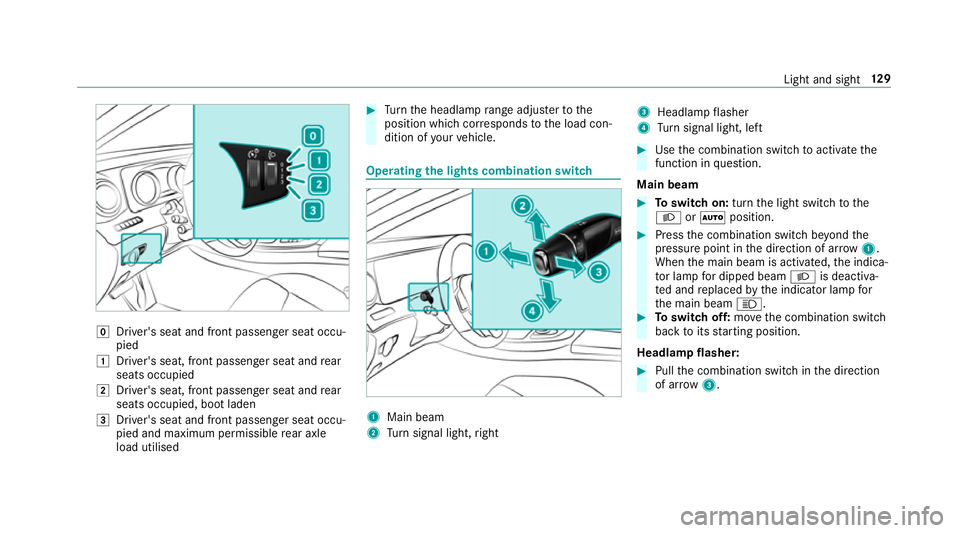
g
Driver's seat and front passenger seat occu‐
pied
1 Driver's seat, front passenger seat and rear
seats occupied
2 Driver's seat, front passenger seat and rear
seats occupied, boot laden
3 Driver's seat and front passenger seat occu‐
pied and maximum permissible rear axle
load utilised #
Turn the headlamp range adjus terto the
position which cor responds tothe load con‐
dition of your vehicle. Operating
the lights combination switch 1
Main beam
2 Turn signal light, right 3
Headlamp flasher
4 Turn signal light, left #
Use the combination switch toactivate the
function in question.
Main beam #
Toswitch on: turnthe light switch tothe
L orà position. #
Press the combination switch be yond the
pressure point in the direction of ar row1.
When the main beam is activated, the indica‐
to r lamp for dipped beam Lis deactiva‐
te d and replaced bythe indicator lamp for
th e main beam K. #
Toswitch off: movethe combination switch
back toits starting position.
Headla mpflasher: #
Pull the combination switch in the direction
of ar row3. Light and sight
12 9
Page 135 of 497
R
The GPS.
The function is not active: R Atspeeds below 80 km/h.
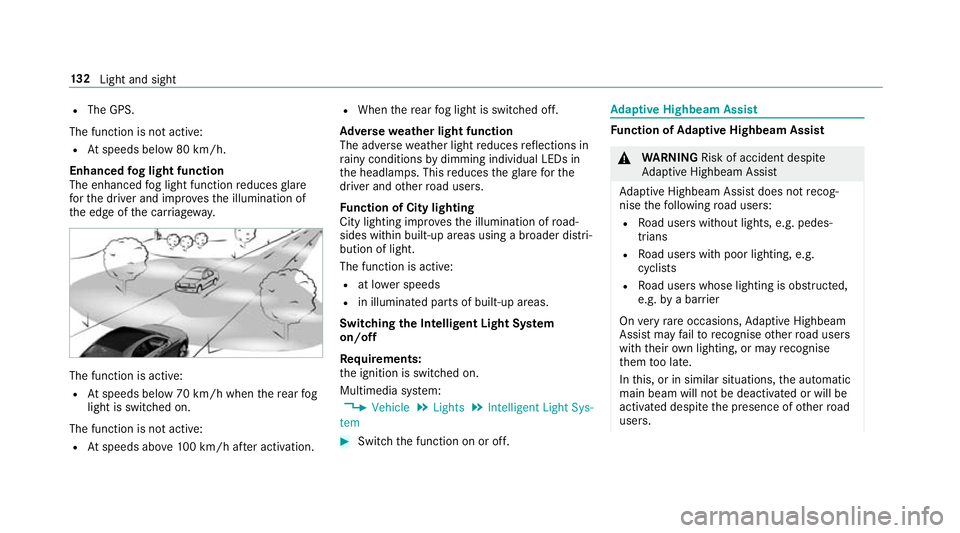
Enhanced fog light function
The enhanced fog light function reduces glare
fo rth e driver and impr ovesth e illumination of
th e edge of the car riag ewa y. The function is active:
R Atspeeds below 70 km/h when there ar fog
light is switched on.
The function is not active:
R Atspeeds abo ve100 km/h af ter activation. R
When there ar fog light is switched off.
Ad versewe ather light function
The adverse weather light reduces reflections in
ra iny conditions bydimming individual LEDs in
th e headlamps. This reduces theglare forthe
driver and other road users.
Fu nction of City lighting
City lighting impr ovesth e illumination of road‐
sides within built-up areas using a broader distri‐
bution of light.
The function is active:
R at lo wer speeds
R in illumina ted parts of built-up areas.
Switching the Intelligent Light Sy stem
on/off
Requ irements:
th e ignition is switched on.
Multimedia sy stem:
, Vehicle .
Lights .
Intelligent Light Sys-
tem #
Switch the function on or off. Ad
aptive Highbeam Assist Fu
nction of Adaptive Highbeam Assist &
WARNING Risk of accident despi te
Ad aptive Highbeam Assist
Ad aptive Highbeam Assist does not recog‐
nise thefo llowing road users:
R Road users without lights, e.g. pedes‐
trians
R Road users with poor lighting, e.g.
cyclists
R Road users whose lighting is obstructed,
e.g. bya bar rier
On very rare occasions, Adaptive Highbeam
Assist may failto recognise other road users
with their own lighting, or may recognise
th em too late.
In this, or in similar situations, the automatic
main beam will not be deactivated or will be
activated despite the presence of other road
users. 13 2
Light and sight
Page 137 of 497
Ad
aptive Highbeam Assist Plus Ad
aptive Highbeam Assist Plus function &
WARNING Risk of accident despi te
Ad aptive Highbeam Assist Plus
Ad aptive Highbeam Assist Plus does not rec‐
ognise thefo llowing road users:
R Road users without lights, e.g. pedes‐
trians
R Road users with poor lighting, e.g.
cyclists
R Road users whose lighting is obstructed,
e.g. bya bar rier
On very rare occasions, Adaptive Highbeam
Assist Plus may failto recognise other road
users that ha velights, or may recognise
th em too late.
In this, or in similar situations, the automatic
main beam will not be deactivated or will be
activated despite the presence of other road
users. #
Alw ays obser vethe tra ffic carefully and
switch off the main beam in good time. Sy
stem limitations
Ad aptive Highbeam Assist Plus cannot take into
account road, weather or traf fic conditions.
De tection may be restricted if:
R Visibility is impaired, forex ample in fog,
heavy rain or sno w.
R There is dirt on the sensors or the sensors
are obscured.
Ad aptive Highbeam Assist Plus is on lyan aid.
Yo u are responsible for adju sting theve hicle's
lighting tothe pr evailing light, visibility and traf‐
fi c conditions. Ad
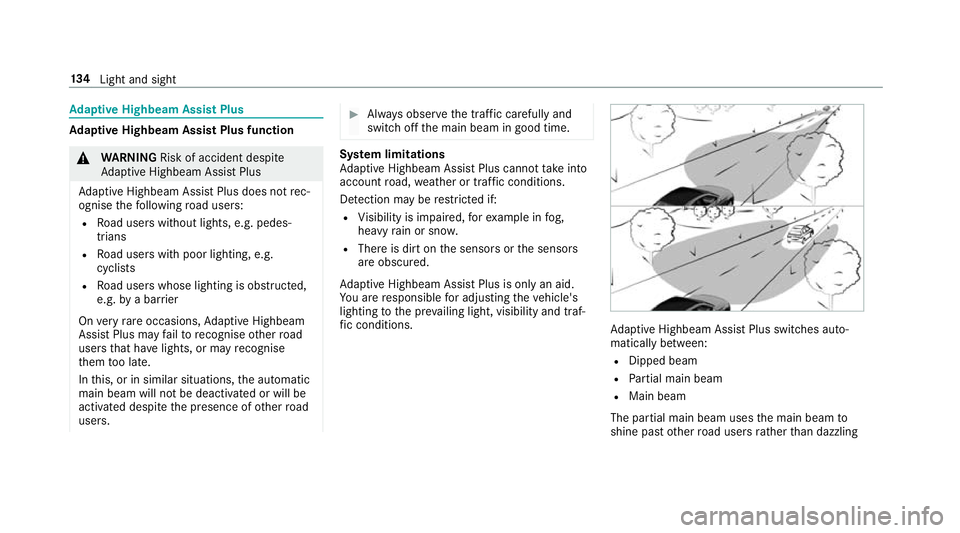
aptive Highbeam Assist Plus swit ches auto‐
matically between:
R Dipped beam
R Partial main beam
R Main beam
The partial main beam uses the main beam to
shine past other road users rath er than dazzling 134
Light and sight
Page 138 of 497
th
em. The vehicle in front is illuminated bythe
dipped beam.
At speeds abo ve30 km/h:
R If no other road users are de tected, the main
beam is automatically switched on.
R Ifot her road users are de tected, the partial
main beam is automatically switched on.
At speeds below 25 km/h or when there is suf fi‐
cient stre et lighting:
R The partial main beam switches off automati‐
call y.
R The main beam switches off automatically.
At speeds abo veappr ox. 50 km/h:
R The headlamp range of the dipped beam is
re gulated automatically based on the dis‐
ta nce to ot herroad users.
The sy stem's optical sensor is located behind
th e windscreen near theove rhead control panel. Switching
Adaptive Highbeam Assist Plus
on/off #
Toswitch on: turnthe light switch tothe
à position. #
Switch on the main beam using the combina‐
tion switch.
When the main beam is switched on auto‐
matically in the dar k,the _ indicator
lamp on the multifunction display comes on. #
Toswitch off: switch offthe main beam
using the combination switch. Setting
the dipped beam Multimedia sy
stem:
, Vehicle .
Lights .
Dipped-beam head-
lamp conversion #
Select Set for right-side traffic orSet for left-
side traffic. Setting
theex terior lighting switch-off delay
time Re
quirement:
R The light switch is in theà position.
Multimedia sy stem:
, Vehicle .
Lights .
Exterior lighting
delayed shut-off
If yo u swit chon this function, theex terior light‐
ing is switched on for a short time af terth eve hi‐
cle is switched off. #
Set a switch-off delay time. Switching
the locator lighting on/off Multimedia sy
stem:
, Vehicle .
Lights .
Locator illumina-
tion
The exterior lighting remains lit for 40 seconds
af te rth eve hicle is unloc ked. When youstart the
ve hicle, the locator lighting is switched off and
automatic driving lights are activated. #
Switch the function on or off. Light and sight
13 5
Page 139 of 497
Interior lighting
Ad
justing the in terior lighting Fr
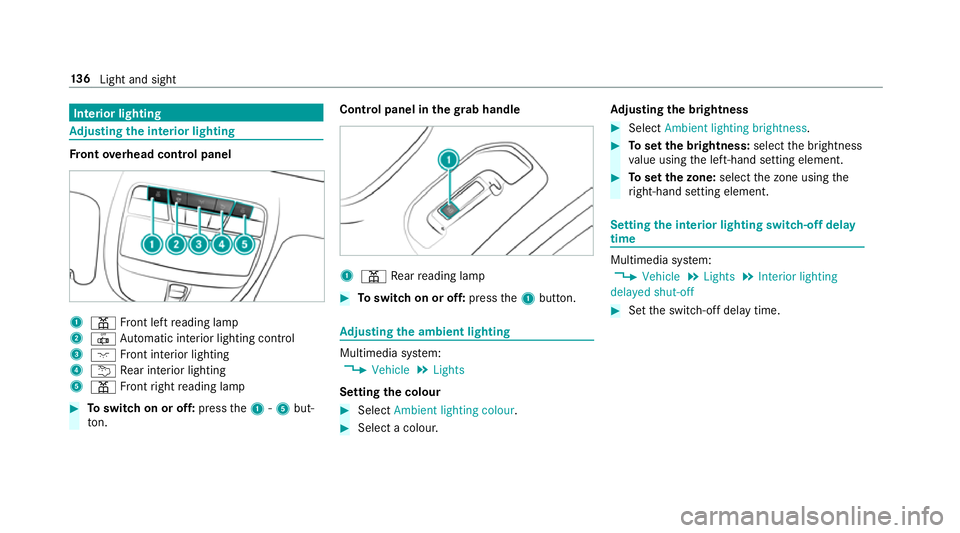
ont overhead control panel 1
p Front left reading lamp
2 | Automatic interior lighting control
3 c Front interior lighting
4 u Rear interior lighting
5 p Front right reading lamp #
Toswitch on or off: pressthe1 -5 but‐
to n. Control panel in the
grab handle 1
p Rear reading lamp #
Toswitch on or off: pressthe1 button. Ad
justing the ambient lighting Multimedia sy
stem:
, Vehicle .
Lights
Setting the colour #
Select Ambient lighting colour. #
Select a colour. Ad
justing the brightness #
Select Ambient lighting brightness . #
Toset the brightness: selectthe brightness
va lue using the left-hand setting element. #
Toset the zone: selectthe zone using the
ri ght-hand setting element. Setting
the interior lighting switch-off delay
time Multimedia sy
stem:
, Vehicle .
Lights .
Interior lighting
delayed shut-off #
Set the switch-off delay time. 13 6
Light and sight
Page 157 of 497
#
After heating or ventilating theve hicle
twice, drive for a longer period of time. Re
quirements:
R The fuel tank is filled toat least reser vefuel
le ve l. #
Set the desired temp erature using thew
button. #
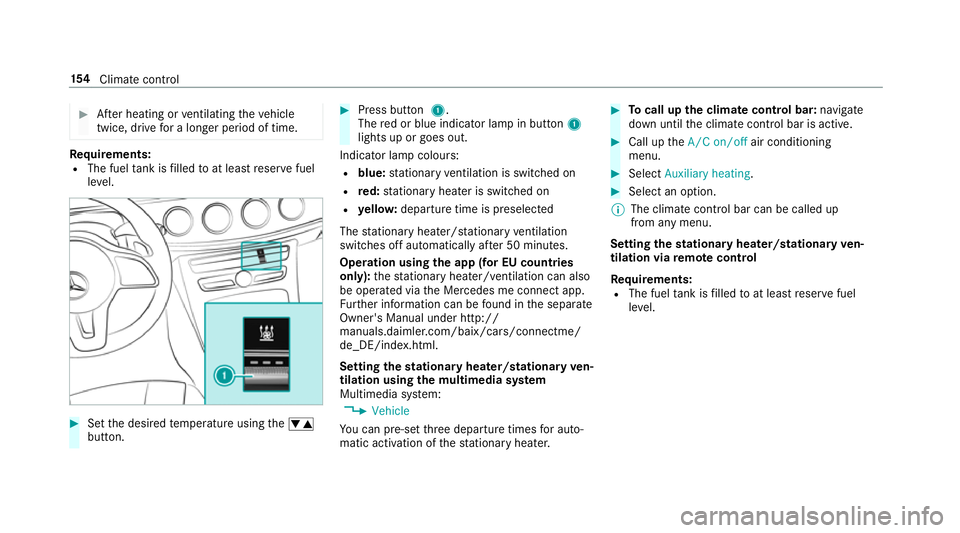
Press button 1.
The red or blue indicator lamp in button 1
lights up or goes out.
Indicator lamp colours: R blue: stationary ventilation is switched on
R red: stationary heater is swit ched on
R yello w: departure time is preselected
The stationary heater/ stationary ventilation
switches off au tomatically af ter 50 minutes.
Operation using the app (for EU count ries
only): thest ationary heater/ ventilation can also
be operated via the Mercedes me connect app.
Fu rther information can be found in the separate
Owner's Manual under http://
manuals.daimler.com/baix/cars/connectme/
de_DE/index.html.
Setting thest ationary heater/stationary ven‐
tilation using the multimedia sy stem
Multimedia sy stem:
, Vehicle
Yo u can pre-set thre e departure times for auto‐
matic activation of thest ationary heater. #
Tocall up the clima tecont rol bar: navigate
down until the climate control bar is active. #
Call up theA/C on/off air conditioning
menu. #
Select Auxiliary heating . #
Select an option.
% The climate control bar can be called up
from any menu.
Setting thest ationary heater/stationary ven‐
tilation via remo tecont rol
Re quirements:
R The fuel tank is filled toat least reser vefuel
le ve l. 15 4
Climate cont rol
Page 170 of 497
R
Vehicles with automatic transmission:
yo u shift out of transmission position j.
R Vehicles with automatic transmission:
yo u shift into transmission position hor
k.
R you depress the accelera tor pedal.
R youch ange theve hicle le vel.
R an automatic engine start is necessar y.
If th e engine was switched off bythe ECO start/
st op function and you lea vetheve hicle, a warn‐
ing tone sounds. The Vehicle is operational
Switch off the ignition before exiting display
messa gealso appears in the multifunction dis‐
pla y.Ifyo u do not swit choff the ignition, the
ignition is automatically switched off af ter one
minute.
Ve hicles with a 48 V on-board electrical sys‐
te m (EQ Boo sttech nology):
The engine is switched off automatically in the
fo llowing situations if all vehicle conditions for
an automatic engine stop are me t:
R you brake theve hicle toast andstill in trans‐
mission position hori. R
you en gage transmission position j.
R you depress the brake pedal when driving at
speeds below 20 km/h.
The needle of there v counter points tozero in
th e multifunction displa y.
The engine is restar ted automatically if:
R youre lease the brake pedal in transmission
position hwhen the HOLD function is not
active and theve hicle does not start to
mo ve.
R you en gage transmission position hork.
R youre lease the brake pedal and theve hicle
st arts tomo veon a gentle downhill gradient
at a speed below 5 km/h.
R you depress the accelera tor pedal.
R youch ange theve hicle le vel.
R an automatic engine start is necessar y.
If th e engine was switched off bythe ECO start/
st op function and you lea vetheve hicle, a warn‐
ing tone sounds. The Vehicle is operational
Switch off the ignition before exiting display
messa gealso appears in the multifunction dis‐ pla
y.Ifyo u do not swit choff the ignition, the
ignition is automatically switched off af ter one
minute.
Switching the ECO start/s top function
off/on #
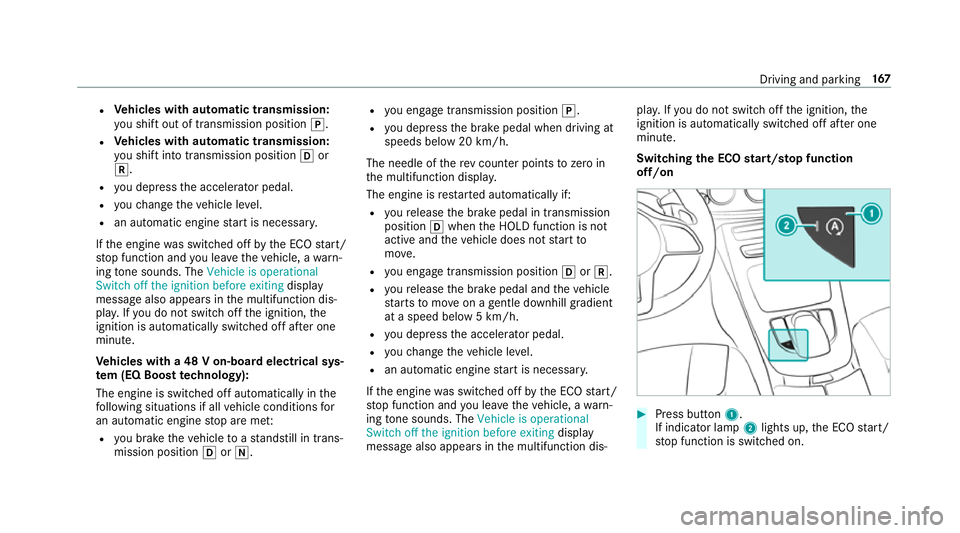
Press button 1.
If indicator la mp2lights up, the ECO start/
st op function is switched on. Driving and parking
167