lock MERCEDES-BENZ E-CLASS SALOON 2017 User Guide
[x] Cancel search | Manufacturer: MERCEDES-BENZ, Model Year: 2017, Model line: E-CLASS SALOON, Model: MERCEDES-BENZ E-CLASS SALOON 2017Pages: 497, PDF Size: 10.38 MB
Page 71 of 497
R
Anti-theft pr otection is reactivated
Do not keep theke yto get her with electronic
devices or me tal objects. This can af fect the
ke y's functionalit y.
% If battery check lamp 2does not light up
af te r pressing the% or& button, the
battery is dischar ged.
Changing theke y bat tery ( →page 69). Ac
tivating/deactivating the acoustic lo cking
ve rification signal Multimedia sy
stem:
, Vehicle .
Vehicle settings .
Acoustic
lock feedback #
Activate Oor deacti vate ª the function. Ac
tivating/deactivating the panic alarm Re
quirements:
% The panic alarm function is only available in
cer tain countries.
R The ignition is switched off. #
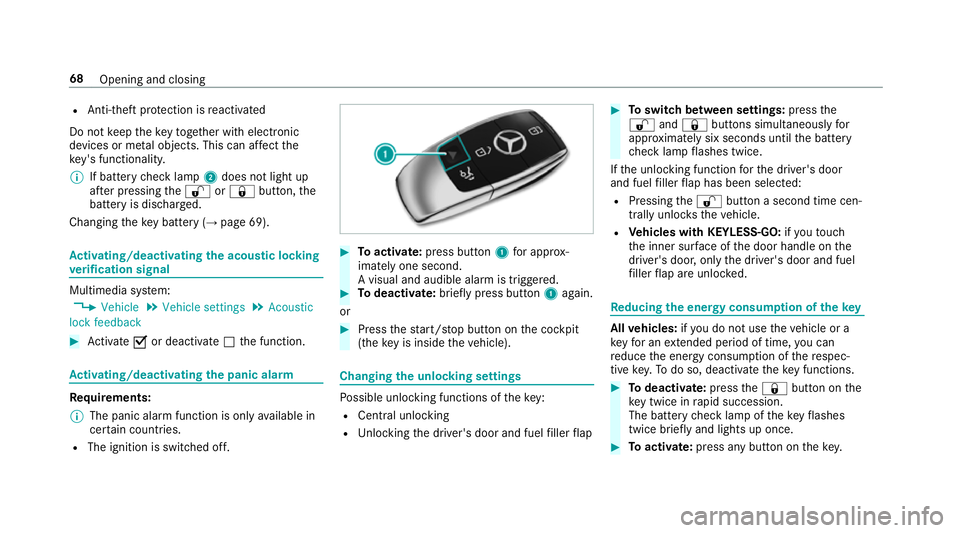
Toactivate: press button 1for appro x‐
ima tely one second.
A visual and audible alarm is triggered. #
Todeactivate: briefly press but ton1 again.
or #
Press thest art/ stop button on the cockpit
(the key is inside theve hicle). Changing
the unlocking settings Po
ssible unlocking functions of theke y:
R Central unlocking
R Unlocking the driver's door and fuel filler flap #
Toswitch between settings: pressthe
% and& buttons simultaneously for
appr oximately six seconds until the battery
ch eck lamp flashes twice.
If th e unlocking function forth e driver's door
and fuel filler flap has been selec ted:
R Pressing the% button a second time cen‐
trally unloc kstheve hicle.
R Vehicles with KEYLESS-GO: ifyo uto uch
th e inner sur face of the door handle on the
driver's door, only the driver's door and fuel
fi ller flap are unlo cked. Re
ducing the energy consu mption of the key All
vehicles: ifyo u do not use theve hicle or a
ke yfo r an extended pe riod of time, you can
re duce the energy consum ption of there spec‐
tive key. Todo so, deactivate theke y functions. #
Todeactivate: pressthe& button on the
ke y twice in rapid succession.
The battery check lamp of theke yflashes
twice brief lyand lights up once. #
Toactivate: press any button on thekey. 68
Opening and closing
Page 73 of 497
#
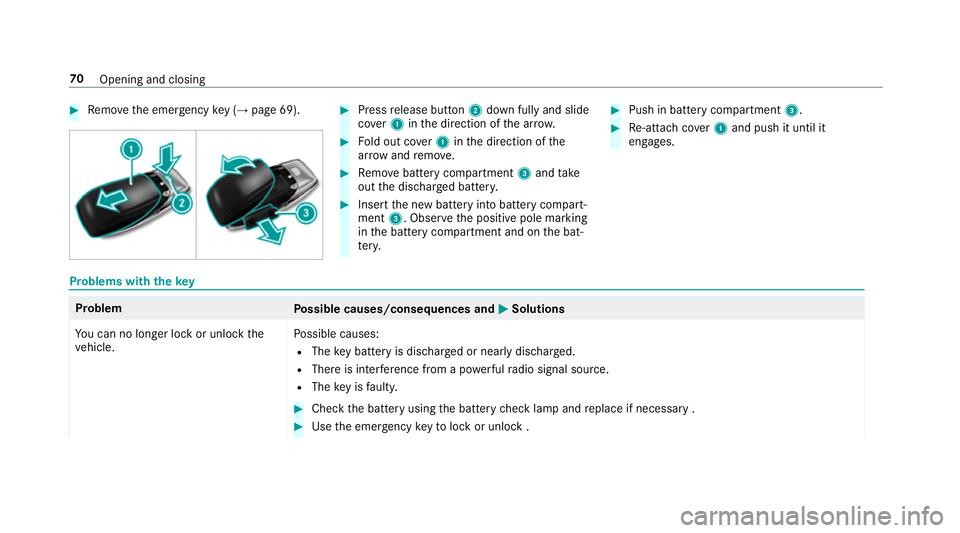
Remo vethe emer gency key ( → page 69). #
Press release button 2down fully and slide
co ver1 inthe direction of the ar row. #
Fold out co ver1 inthe direction of the
ar row and remo ve. #
Remo vebattery compartment 3and take
out the dischar ged batter y. #
Insert the new battery into battery compart‐
ment 3. Obser vethe positive pole marking
in the battery compartment and on the bat‐
te ry. #
Push in battery compartment 3. #
Re-attach co ver1 and push it until it
engages. Problems with
thekey Problem
Possible causes/consequences and M MSolutions
Yo u can no lon ger lock or unlock the
ve hicle. Po
ssible causes:
R The key bat tery is dischar ged or nearly dischar ged.
R There is inter fere nce from a po werful radio signal source.
R The key is faulty. #
Check the battery using the battery check lamp and replace if necessary . #
Use the emer gency keyto lock or unlock . 70
Opening and closing
Page 74 of 497
Problem
Possible causes/consequences and M
MSolutions #
Have theke ych ecked at a qualified specialist workshop.
Yo u ha velost a key. #
Have theke y deacti vated at a qualified specialist workshop. #
If necessar y,ha ve the loc kschanged as well. Doors
Note
s onthe additional door lock The additional door lock is only
available for
ve hicles forth eUni ted Kingdom. &
WARNING Risk of inju ryto persons
inside theve hicle when the additional
door lock is activated
If th e additional door lock is activated, the
doors can no longer be opened from the
inside.
If th ere are persons in theve hicle, they can
no longer le aveth eve hicle, e.g. in hazardous
situations. #
Never lea vepersons unattended in the
ve hicle, particularly children, elderly
persons or persons in need of help. #
Ifth ere are persons in theve hicle, do
not activate the additional door loc k. The additional door lock is automatically activa‐
te d:
R After locking theve hicle with thekey.
R After locking theve hicle using KEYLESS-GO.
% After locking theve hicle, the horn can be
operated for a short time.
% After locking theve hicle, pressing the button
to centrally unlock theve hicle from inside
will trigger an alarm (→ page72). If
th e additional door lock is activated, the doors
cann otbe opened from the inside.
Yo u can deactivate the additional door lock by
deactivating the interior pr otection (→ page 93). Un
locking/opening the doors from the inside #
United Kingdom onl y:obser vethe no tes on
th e additional door lock (→ page71). Opening and closing
71
Page 75 of 497
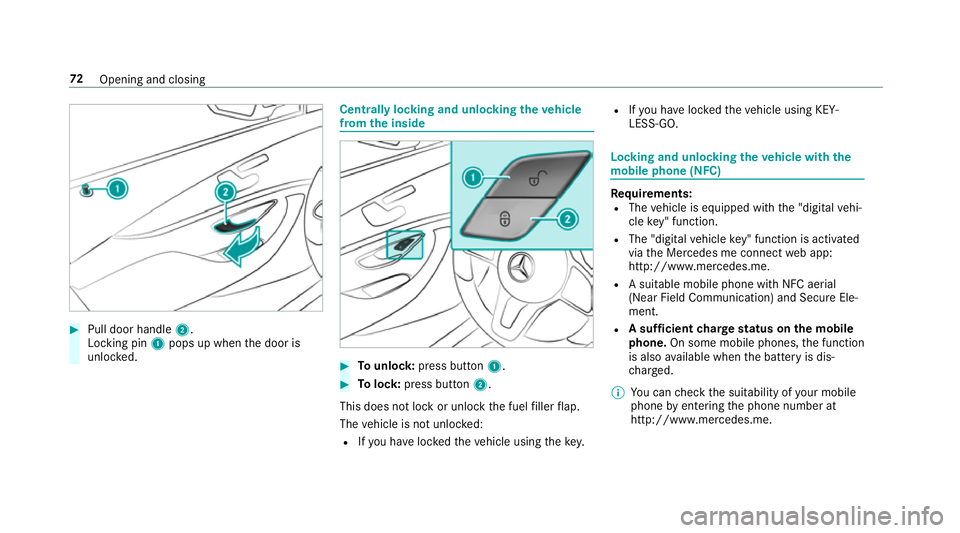
#
Pull door handle 2.
Locking pin 1pops up when the door is
unloc ked. Centrally locking and unlocking
theve hicle
from the inside #
Tounlo ck:press button 1. #
Tolock: press button 2.
This does not lock or unlock the fuel filler flap.
The vehicle is not unloc ked:
R Ifyo u ha veloc kedth eve hicle using thekey. R
Ifyo u ha veloc kedth eve hicle using KEY‐
LESS-GO. Locking and unlocking
theve hicle with the
mo bile phone (NFC) Re
quirements:
R The vehicle is equipped with the "digital vehi‐
cle key" function.
R The "digital vehicle key" function is activated
via the Mercedes me connect web app:
http://www.mercedes.me.
R A suitable mobile phone with NFC aerial
(Near Field Communication) and Secure Ele‐
ment.
R A suf ficient charge status on the mobile
phone. On some mobile phones, the function
is also available when the battery is dis‐
ch arge d.
% You can check the suitability of your mobile
phone byentering the phone number at
http://www.mercedes.me. 72
Opening and closing
Page 76 of 497
Information about suitable mobile phones
can be obtained from your Mercedes-Benz
service centre or at http://www.mercedes-
benz.com/connect.
% Protective cases around the mobile phone
can impair the functionality.
% You can also lock or unlo cktheve hicle with
a digital vehicle keyst icke r.
Fu rther information can be obtained at your
Mercedes-Benz Service Centre or via
http://www.mercedes-benz.com/connect.
% The function is on lyavailable in combination
with Mercedes me connect and on lyin cer‐
ta in countries.
If th eve hicle has been par kedfo r longer than
two weeks, the NFC aerial in the door handle is
deactivated. #
Pull door handle.
The NFC aerial is activated. #
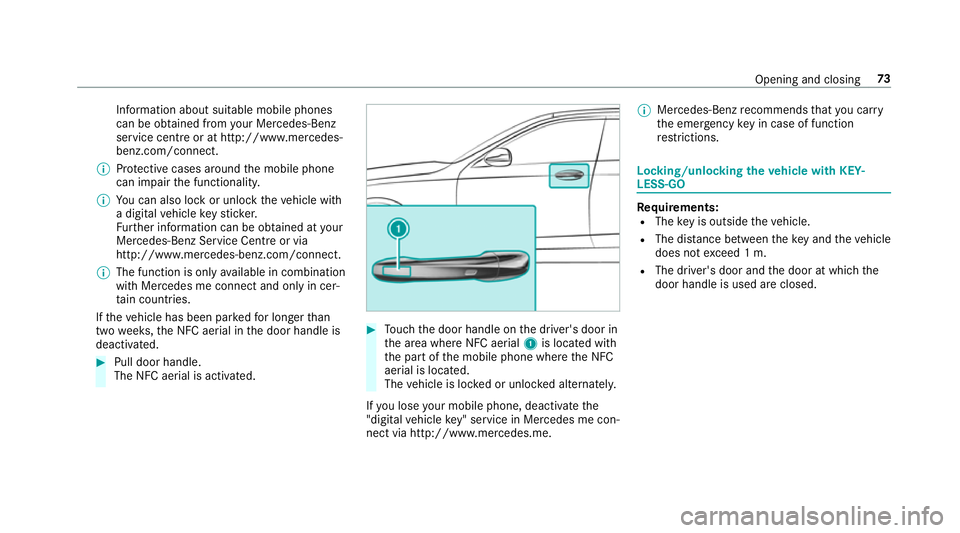
Touch the door handle on the driver's door in
th e area where NFC aerial 1is located with
th e part of the mobile phone where the NFC
aerial is located.
The vehicle is loc ked or unloc ked alternately.
If yo u lose your mobile phone, deactivate the
"digital vehicle key" service in Mercedes me con‐
nect via http://www.mercedes.me. %
Mercedes-Benz recommends that you car ry
th e emer gency key in case of function
re strictions. Lo
cking/unlocking theve hicle with KEY‐
LESS-GO Re
quirements:
R The key is outside theve hicle.
R The dis tance between theke y and theve hicle
does not exceed 1 m.
R The driver's door and the door at which the
door handle is used are closed. Opening and closing
73
Page 77 of 497
#
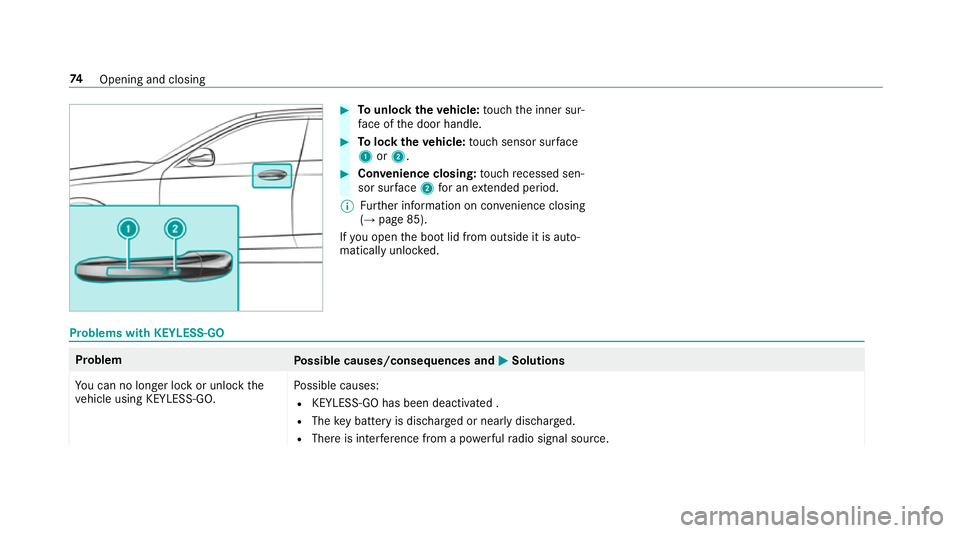
Tounlo cktheve hicle: touch the inner sur‐
fa ce of the door handle. #
Tolock theve hicle: touch sensor sur face
1 or2. #
Convenience closing: touch recessed sen‐
sor su rface 2for an extended pe riod.
% Further information on con venience closing
(→ page 85).
If yo u open the boot lid from outside it is auto‐
matically unloc ked. Problems with KEYLESS-GO
Problem
Possible causes/consequences and M
MSolutions
Yo u can no lon ger lock or unlock the
ve hicle using KEYLESS-GO. Po
ssible causes:
R KEYLESS-GO has been deactivated .
R The key bat tery is dischar ged or near lydischar ged.
R There is inter fere nce from a po werful radio signal source. 74
Opening and closing
Page 78 of 497
Problem
Possible causes/consequences and M
MSolutions
R The key is faulty. #
Activate KEYLESS-GO . #
Check the battery using the battery check lamp and replace if necessary . #
Use the emer gency keyto lock or unlock theve hicle . #
Have theve hicle and keych ecked at a qualified specialist workshop. Ac
tivating/deactivating the automatic lo ck‐
ing feature The
vehicle is loc ked automatically when the
ignition is switched on and the wheels are turn‐
ing fast erthan walking pace. #
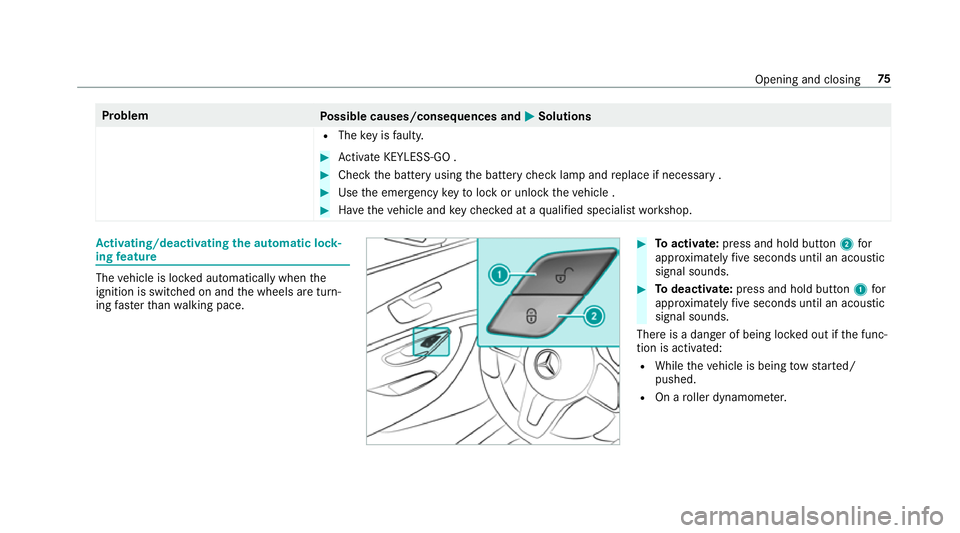
Toactivate: press and hold button 2for
appr oximately five seconds until an acoustic
signal sounds. #
Todeactivate: press and hold button 1for
appr oximately five seconds until an acoustic
signal sounds.
There is a danger of being loc ked out if the func‐
tion is activated:
R While theve hicle is being tow star ted/
pushed.
R On a roller dynamome ter. Opening and closing
75
Page 79 of 497
Locking/unlocking
the driver's door with the
emer gency key element %
Ifyo u wish tolock theve hicle entirely using
th e emer gency key element, firs t press the
button for locking from the inside while the
driver's door is open. Then proceed tolock
th e driver's door using the emer gency key
element. #
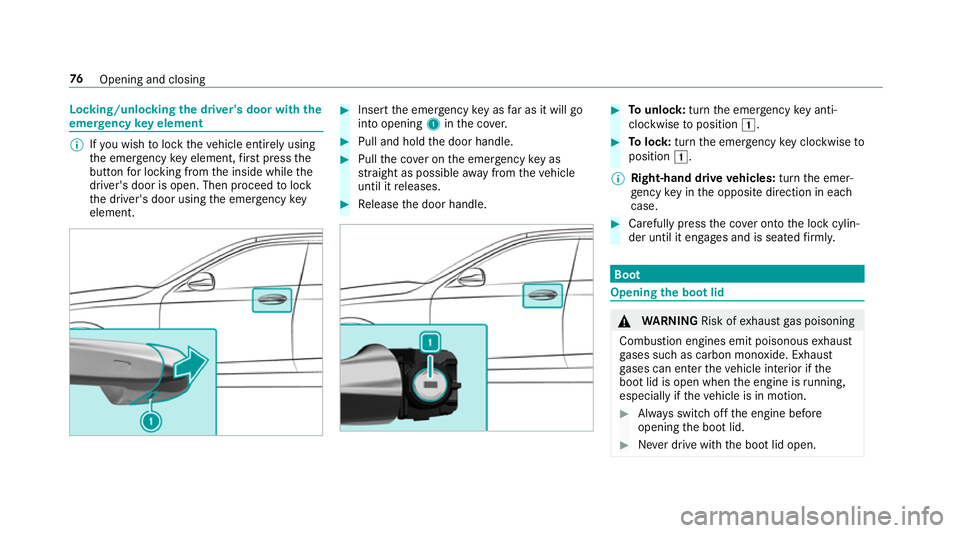
Insert the emer gency key as far as it will go
into opening 1inthe co ver. #
Pull and hold the door handle. #
Pull the co ver on the emer gency key as
st ra ight as possible away from theve hicle
until it releases. #
Release the door handle. #
Tounlo ck:turn the emer gency key anti-
clo ckwise toposition 1. #
Tolock: turnthe emer gency key clo ckwise to
position 1.
% Right-hand drive vehicles: turnthe emer‐
ge ncy key in the opposite direction in each
case. #
Carefully press the co ver onto the lock cylin‐
der until it engages and is seated firm ly. Boot
Opening the bo
otlid &
WARNING Risk ofexhaust gas poisoning
Combustion engines emit poisonous exhaust
ga ses such as carbon monoxide. Exhaust
ga ses can enter theve hicle interior if the
boot lid is open when the engine is running,
especially if theve hicle is in motion. #
Alw ays switch off the engine before
opening the boot lid. #
Never drive with the boot lid open. 76
Opening and closing
Page 81 of 497
#
Alw aysstow objects in such a wayth at
th ey cannot be thro wn around. #
Before the journe y,secure objects, lug‐
ga ge or loads against slipping or tipping
ove r. &
WARNING Risk of becoming trapped
du ring au tomatic closing of the boot lid
Pa rts of the body could become trapped dur‐
ing automatic closing of the boot lid. More‐
ove r,people, e.g. children, may be standing
in the closing area or may enter the closing
area during the closing process. #
Make sure that nobody is in the vicinity
of the closing area during the closing
process. #
Use one of thefo llowing options tostop
th e closing process:
R Press thep button on thekey.
R Press or pull there mo teoperating
switch on the driver's door.
R Press the closing or locking button
on the boot lid. R
Pull the boot lid handle. Ve
hicles with HANDS-FREE ACCESS: it is also
possible tostop the closing process bymoving
yo ur foot in a kicking motion under there ar
bumper.
Yo u ha vethefo llowing options toclose the
boot lid: #
Pull the boot lid down using the handle
re cess and push it closed. #
Vehicles with HANDS-FREE ACCESS: with
th e boot lid comple tely opened, kick your
fo ot below the bumper (→ page 79). #
Vehicles with boot lid conve nience clos‐
ing: pullthe boot lid handle. #
Vehicles with boot lid conve nience clos‐
ing and KEYLESS-GO: withthe boot lid com‐
ple tely opened, press and holdthep but‐
to n on theke y (with theke y in the vicinity of
th eve hicle). #
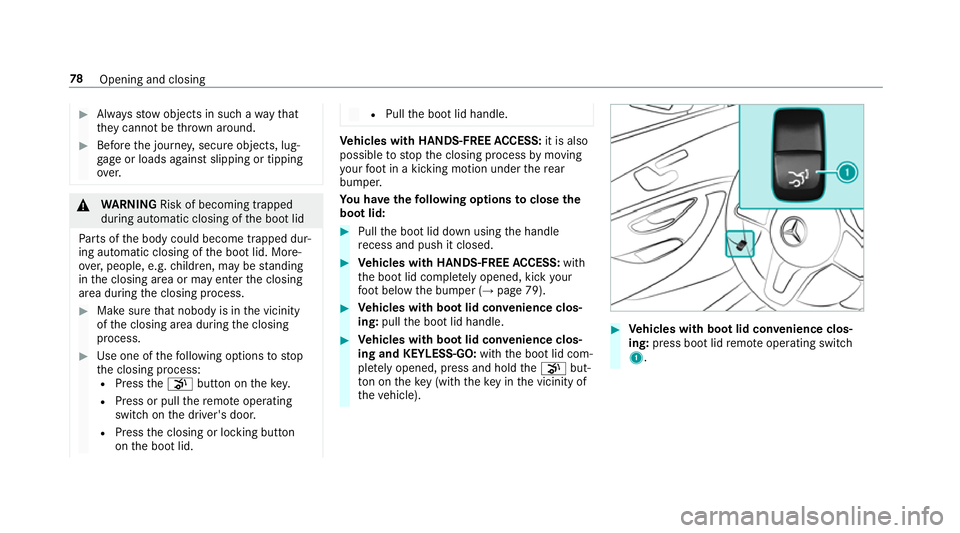
Vehicles with boot lid conve nience clos‐
ing: press boot lid remo teoperating switch
1. 78
Opening and closing
Page 82 of 497
#
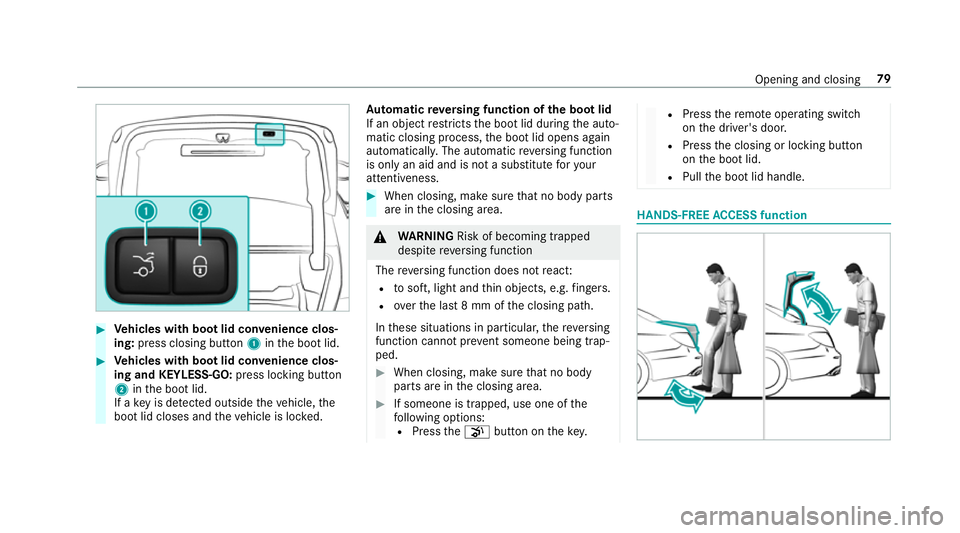
Vehicles with boot lid conve nience clos‐
ing: press closing button 1inthe boot lid. #
Vehicles with boot lid conve nience clos‐
ing and KEYLESS-GO: press locking button
2 inthe boot lid.
If a key is de tected outside theve hicle, the
boot lid closes and theve hicle is loc ked. Au
tomatic reve rsing function of the boot lid
If an object restricts the boot lid during the auto‐
matic closing process, the boot lid opens again
automaticall y.The automatic reve rsing function
is only an aid and is not a substitute foryo ur
attentiveness. #
When closing, make sure that no body parts
are in the closing area. &
WARNING Risk of becoming trapped
despi tereve rsing function
The reve rsing function does not react:
R tosoft, light and thin objects, e.g. fingers.
R overth e last 8 mm of the closing path.
In these situations in particular, there ve rsing
function cannot pr event someone being trap‐
ped. #
When closing, ma kesure that no body
parts are in the closing area. #
If someone is trapped, use one of the
fo llowing options:
R Press thep button on thekey. R
Press there mo teoperating switch
on the driver's door.
R Press the closing or locking button
on the boot lid.
R Pull the boot lid handle. HANDS-FREE
ACCESS function Opening and closing
79