fuel MERCEDES-BENZ E-CLASS SALOON 2017 Owner's Manual
[x] Cancel search | Manufacturer: MERCEDES-BENZ, Model Year: 2017, Model line: E-CLASS SALOON, Model: MERCEDES-BENZ E-CLASS SALOON 2017Pages: 497, PDF Size: 10.38 MB
Page 183 of 497
The
following announcements appear in order in
th e multifunction display when theAd Blue ®
tank
requ iresrefilling:
R Refill AdBlue See Owner's Manual . The
Ad Blue ®
re ser voir is down tothere ser ve
le ve l.
R Refill AdBlue No start in XXX km .Yo u can
on lydrive theve hicle overth e dis tance
shown. Top up AdBlue ®
as soon as possible.
R Refill AdBlue Start not possible. The vehicle
can no longer be star ted. Opening
theAd Blue ®
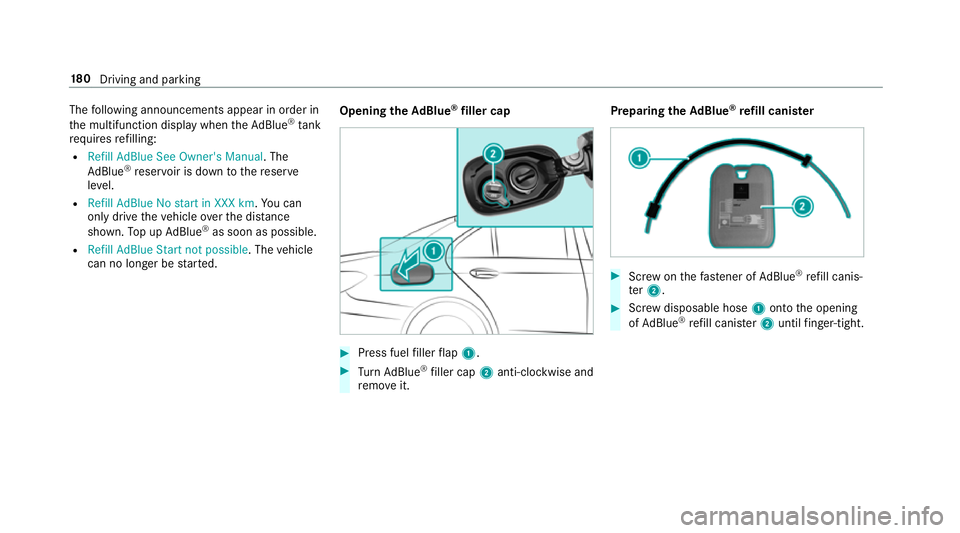
filler cap #
Press fuel filler flap 1. #
Turn AdBlue ®
filler cap 2anti-clockwise and
re mo veit. Preparing
theAd Blue ®
re fill canis ter #
Screw onthefast ener of AdBlue ®
re fill canis‐
te r2. #
Screw disposable hose 1onto the opening
of Ad Blue ®
re fill canis ter2 until finger-tight. 18 0
Driving and pa rking
Page 209 of 497
If
yo u activate the turn signal indicator tochange
lanes, theve hicle will accelerate more briskly to
th e set speed under thefo llowing conditions:
R Active Dis tance Assi stDISTRONIC is acti va‐
te d.
R Ifth e driving speed is higher than 70 km/h.
R Ifth e driven speed drops below thestored
speed.
R The sy stem cann otdetect a vehicle in there l‐
ev ant area of theov ertak ing lane.
Drive prog ram
The DYNA MIC SELECT switch allo wsyouto
ch ange the driving style of Active Dis tance
Assi stDISTRONIC. Depending on which drive
program is selected, the driving characteristics
can be geared towa rds fuel econom y,comfort or
dynamic per form ance (→ page170).
Sy stem limitations
Ac tive Dis tance Assi stDISTRONIC is acti vein
th e 0 km/h to200 km/h speed range.
Ve hicles with the Driving Assistance Pack‐
age: Active Dis tance Assi stDISTRONIC is acti ve
in the 0 km/h to210 km/h speed range. The sy
stem may be impaired or may not function
in thefo llowing ins tances, forex ample:
R In sn ow,ra in, fog, heavy spr ay, if there is
gl are, in direct sunlight or in great lyvarying
light conditions.
R The windsc reen in the area of the camera is
dirty, mis ted up, damaged or co vered.
R Ifth era dar sensors are dirty or co vered.
R On slippery roads, braking or accelerating
can cause the drive wheels tolose traction
and theve hicle could then skid.
R In multi-s torey car par ks,to llst ations or on
ro ads with steep uphill or downhill gradients.
Do not use Active Dis tance Assi stDISTRONIC in
th ese situations.
Tips
Pa y particular attention in thefo llowing traf fic
situations. In such situations, brake if necessar y.
Ac tive Dis tance Assi stDISTRONIC is then deacti‐
va ted:
R When cornering, entering and exiting a bend.
R When not driving in the cent reofthe lane. R
When other vehicles are changing lane.
R Ifth ere are nar row vehicles.
R Ifth ere are obs tacles and stationary vehi‐
cles.
R Ifth ere are crossing vehicles, pedestrians,
mo torcyc lists or cyclists.
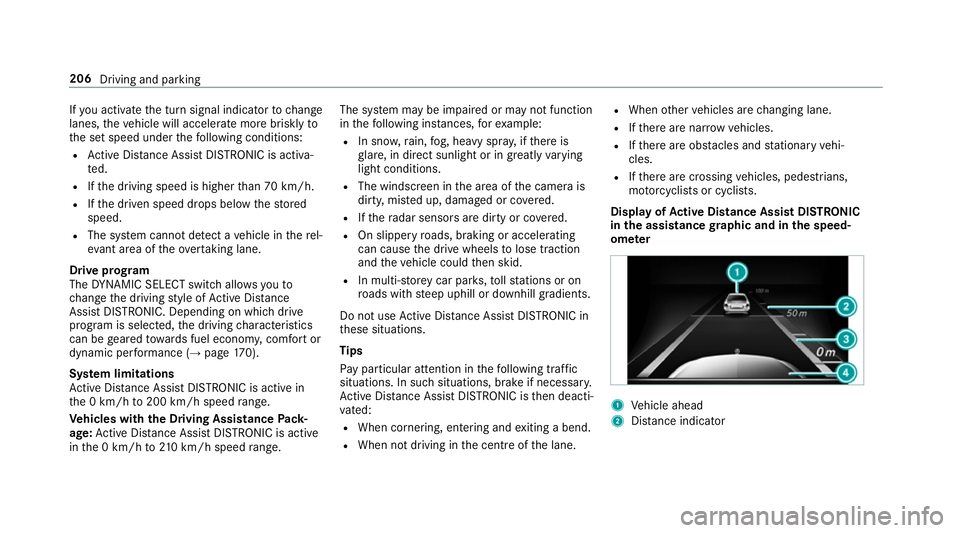
Display of Active Di stance Assist DIST RONIC
in the assistance graphic and in the speed‐
ome ter 1
Vehicle ahead
2 Distance indica tor 206
Driving and parking
Page 216 of 497
The HOLD function is deactivated in
thefo llow‐
ing situations:
R When Active Dis tance Assi stDISTRONIC is
acti vated.
R Vehicles with automatic transmission:
when transmission position jis selected.
R When theve hicle is secured with the electric
parking brake.
In thefo llowing situations, theve hicle is held by
th e transmission position jorby the electric
parking brake:
R When the seat belt is unfas tened and the
driver's door is opened.
R When the engine is switched off.
R When there is a malfunction in the sy stem or
if th e po wer supply is insuf ficient.
Ve hicles with manual transmission:
The Brake immediately message may also
appear in the multifunction displa y:#
Immedia tely depress the brake pedal firm ly
until thewa rning message disappears.
The HOLD function is deactivated. A horn sounds at
regular inter vals if you turn off
th e engine, remo veyour seat belt and open the
driver's door while the HOLD function is activa‐
te d. If you attem pttolock theve hicle, the horn
to ne becomes louder. The vehicle cannot be
loc ked until you ha vedeactivated the HOLD
function.
% Once you ha veswitched off the engine, you
cannot restart the engine until you ha ve
deactivated the HOLD function. DY
NA MIC BODY CONT ROL DY
NA MIC BODY CONTROL has thefo llowing
ch aracteristics:
R Variable damping characteristics
R Continual adjustment of the damping forc es
The damping characteristics adapt tothe cur rent
operating and driving situation.
The da mping is tuned individually for each wheel
and is af fected bythefo llowing factors:
R The road sur face conditions
R Vehicle load R
The drive program selected
The drive program can be adjus ted using the
DY NA MIC SELECT switch. AIR
BODY CONT ROL AIR
BODY CONT ROL function
AIR BODY CONTROL is an air suspension sy stem
with variable damping for impr oved driving com‐
fo rt. The all-round le vel control sy stem ensures
th e best possible suspension and const ant
ground clea rance, even wi tha laden vehicle.
When driving at speed, theve hicle is lo wered
automatically toimpr ovedriving saf ety and to
re duce fuel consum ption. The option of manually
adjusting theve hicle le vel is also available.
AIR BODY CONTROL comprises:
R Air suspension with variable spring rate
R Automatic le vel control sy stem
R Speed-dependent lo wering toreduce fuel
consum ption
R Manually selec table high-le vel setting for
grea ter ground clea rance Driving and pa
rking 213
Page 254 of 497
Instrument display
overview
Mercedes-AMG vehicles: be sure toobser ve
th e no tes in the Supplement. Otherwise, you
may failto recognise dangers. &
WARNING Risk of accident due toan
instrument display malfunction
If th e instrument display has failed or mal‐
functioned, you may not recognise function
re strictions applying tosaf etyre leva nt sys‐
te ms.
The operating saf ety of your vehicle may be
impaired. #
Drive on carefull y. #
Have theve hicle checked immediately
at a qualified specialist workshop. If
th e operating saf ety of your vehicle is
impaired, park theve hicle safely as soon as pos‐
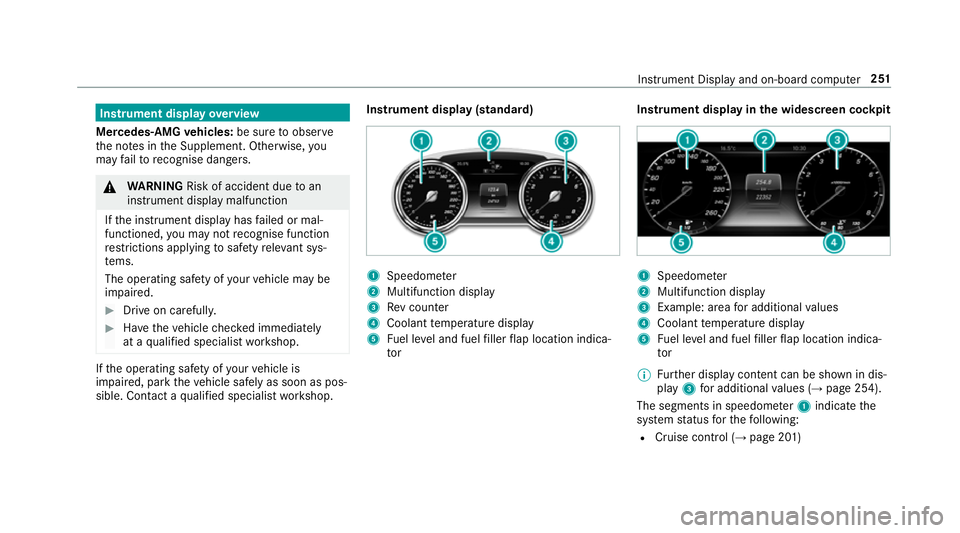
sible. Contact a qualified specialist workshop. Instrument display (standard)
1
Speedome ter
2 Multifunction display
3 Rev counter
4 Coolant temp erature display
5 Fuel le vel and fuel filler flap location indica‐
tor Instrument display in
the widescreen cockpit 1
Speedome ter
2 Multifunction display
3 Example: area for additional values
4 Coolant temp erature display
5 Fuel le vel and fuel filler flap location indica‐
tor
% Further display content can be shown in dis‐
play 3for additional values (→ page 254).
The segments in speedom eter 1 indicate the
sy stem status forth efo llowing:
R Cruise control (→ page 201) Instrument Display and on-board computer
251
Page 255 of 497
R
Limiter (→ page 202)
R Active Dis tance Assi stDISTRONIC
(→ page 205)
* NO
TEEngine dama gedue toexc essively
high engine speeds The engine will be damaged if
you drive with
th e engine in theov errevving range. #
Do not drive wi th the engine in theove r‐
re vving range. The fuel supply is inter
rupted toprotect the
engine when there d band in rev counter 3
(o ve rrev ving range) is reached.
During no rmal operating conditions, coolant
te mp erature display 4may rise to120 °C. &
WARNING Danger of bu rns when open‐
ing the bonn et
If yo u open the engine bonn etwhen the
engine has overheated or during a fire inthe
engine compartment, you could come into
contact with hot gases or other escaping
operating fluids. #
Before opening the bonn et, allow the
engine tocool down. #
Intheeve nt of a fire inthe engine com‐
partment, keep the engine bonn et
closed and call thefire service. Ve
hicles with a 48 V on-board electrical sys‐
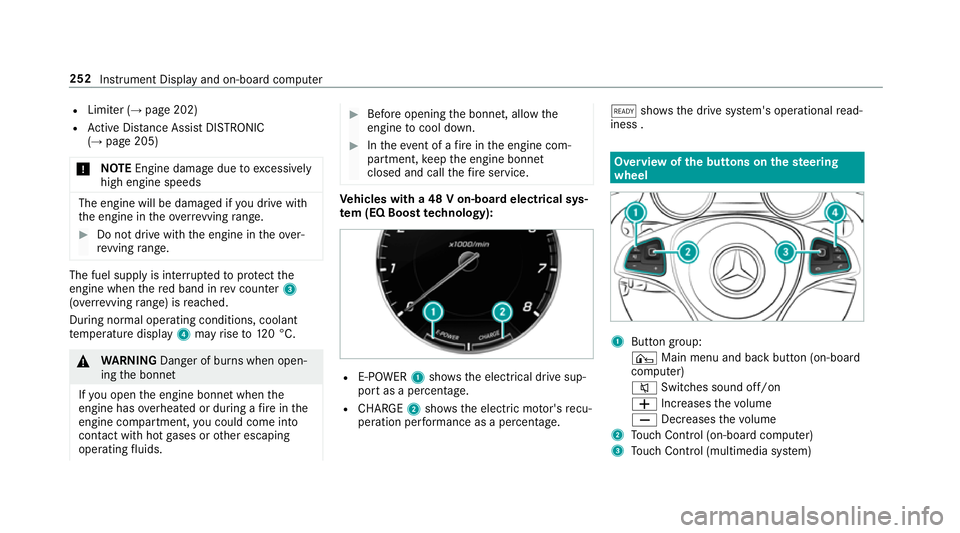
te m (EQ Boo sttech nology): R
E-POWER 1shows th e electrical drive sup‐
port as a percentage.
R CHARGE 2showsthe electric mo tor's recu‐
peration per form ance as a percen tage. õ
showsthe drive sy stem's operational read‐
iness . Overview of
the but tons on thest eering
wheel 1
Button group:
¤ Main menu and ba ckbutton (on-board
computer)
8 Switches sound off/on
W Increases thevo lume
X Decreases thevo lume
2 Touch Control (on-board co mputer)
3 Touch Control (multimedia sy stem) 252
Instrument Display and on-board computer
Page 260 of 497
R
Grey radar waves next tovehicle: Blind Spot
Assist activated
R Green radar waves next tovehicle: Blind Spot
Assist active
R Active Dis tance Assi stDISTRONIC displa ys
( → page 205) Calling up displa
ysintheTr ip menu On-board computer:
, Trip
% Ve
hicles with an instrument display in
th e widescreen cockpit: whenyou ha ve
th e design set toProgressive ,yo u can view
information on the journey in the left-hand
area of the instrument displa y.#
Toselect a displa y:swipe upwards or down‐
wa rds on the left-hand Touch Control.
Displa ysintheTripmenu:
R standard display
R range and cur rent fuel consu mption When
gliding mode is active (→ page175),
Gliding mode is displayed ins tead of the cur‐
re nt fuel consu mption.
A recuperation displ ayis also available for
cer tain engines. If there is only a small
amount of fuel left in the fuel tank, the dis‐
play sho wsave hicle being refuelled ins tead
of thera nge.
R ECO displ ay (→page 168)
R Trip computer From startandFrom reset
R Digital speedom eter
% Ve
hicles with an Instrument Display in
th eWi descreen Co ckpit: the digital speed‐
ome ter only appears in theClassic andSport
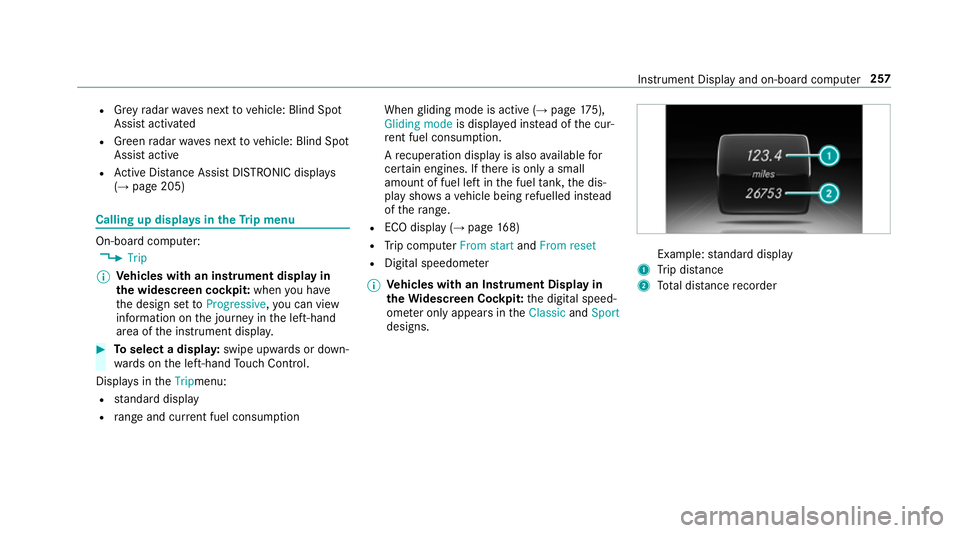
designs. Example:
standard display
1 Trip dis tance
2 Total dis tance recorder Instrument Display and on-board compu
ter257
Page 261 of 497
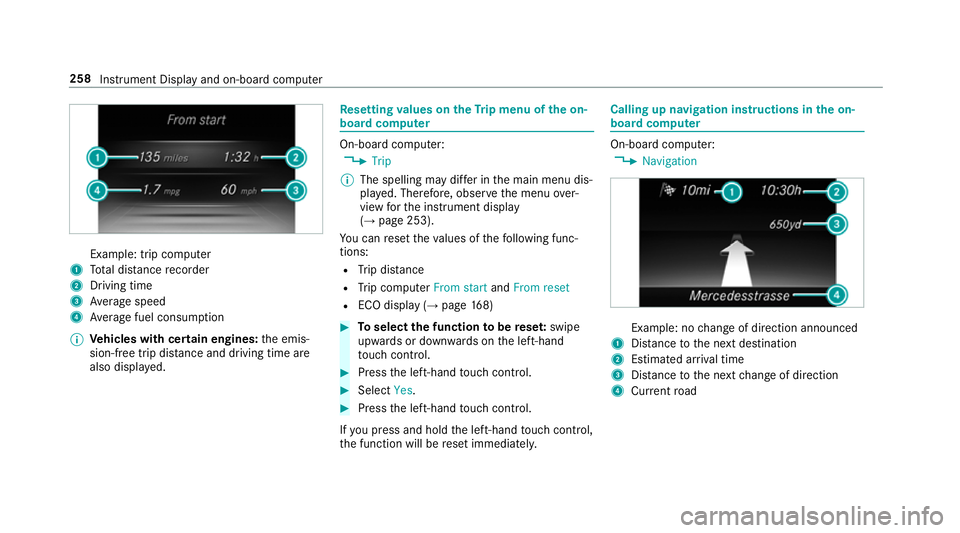
Example: trip computer
1 Total dis tance recorder
2 Driving time
3 Average speed
4 Average fuel consum ption
% Vehicles with cert ain engines:the emis‐
sion-free trip dis tance and driving time are
also displ ayed. Re
setting values on theTr ip menu of the on-
board compu ter On-board computer:
, Trip
% The spelling may dif fer in the main menu dis‐
pla yed. Therefore, obser vethe menu over‐
view forth e instrument display
(→ page 253).
Yo u can reset theva lues of thefo llowing func‐
tions:
R Trip dis tance
R Trip computer From startandFrom reset
R ECO display (→ page168) #
Toselect the function tobe rese t:swipe
upwards or down wards on the left-hand
to uch cont rol. #
Press the left-hand touch cont rol. #
Select Yes. #
Press the left-hand touch cont rol.
If yo u press and hold the left-hand touch cont rol,
th e function will be reset immediately. Calling up navigation instructions in
the on-
board compu ter On-board computer:
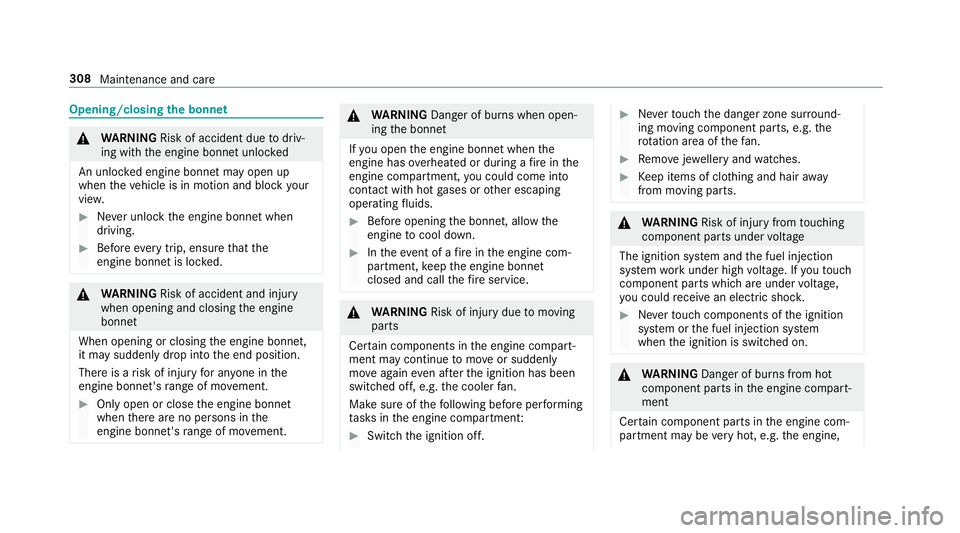
, Navigation Example: no
change of direction announced
1 Distance tothe next destination
2 Estimated ar riva l time
3 Distance tothe next change of direction
4 Current road 258
Instru ment Display and on-board computer
Page 311 of 497
Opening/closing
the bonnet &
WARNING Risk of accident due todriv‐
ing with the engine bonn etunlo cked
An unloc ked engine bonn etmay open up
when theve hicle is in motion and block your
vie w. #
Never unlock the engine bonn etwhen
driving. #
Before every trip, ensure that the
engine bonn etis loc ked. &
WARNING Risk of accident and inju ry
when opening and closing the engine
bonn et
When opening or closing the engine bonn et,
it may suddenly drop into the end position.
There is a risk of injury for an yone in the
engine bonn et's range of mo vement. #
Only open or close the engine bonn et
when there are no persons in the
engine bonn et's range of mo vement. &
WARNING Danger of bu rns when open‐
ing the bonn et
If yo u open the engine bonn etwhen the
engine has overheated or during a fire inthe
engine compartment, you could come into
contact with hot gases or other escaping
operating fluids. #
Before opening the bonn et, allow the
engine tocool down. #
Intheeve nt of a fire inthe engine com‐
partment, keep the engine bonn et
closed and call thefire service. &
WARNING Risk of inju rydue tomoving
parts
Cer tain components in the engine compart‐
ment may continue tomo veor suddenly
mo veagain even af terth e ignition has been
switched off, e.g. the cooler fan.
Ma kesure of thefo llowing before per form ing
ta sks in the engine compartmen t: #
Switch the ignition off. #
Neverto uch the danger zone sur round‐
ing moving co mponent parts, e.g. the
ro tation area of thefa n. #
Remo vejewe llery and watches. #
Keep items of clo thing and hair away
from moving parts. &
WARNING Risk of inju ryfrom touching
co mp onent parts under voltage
The ignition sy stem and the fuel injection
sy stem workunder high voltage. If youto uch
co mp onent parts which are under voltage,
yo u could recei vean electric shoc k. #
Neverto uch co mponents of the ignition
sy stem or the fuel injection sy stem
when the ignition is switched on. &
WARNING Danger of bu rns from hot
component parts in the engine compart‐
ment
Cer tain component parts in the engine com‐
partment may be very hot, e.g. the engine, 308
Maintenance and care
Page 319 of 497
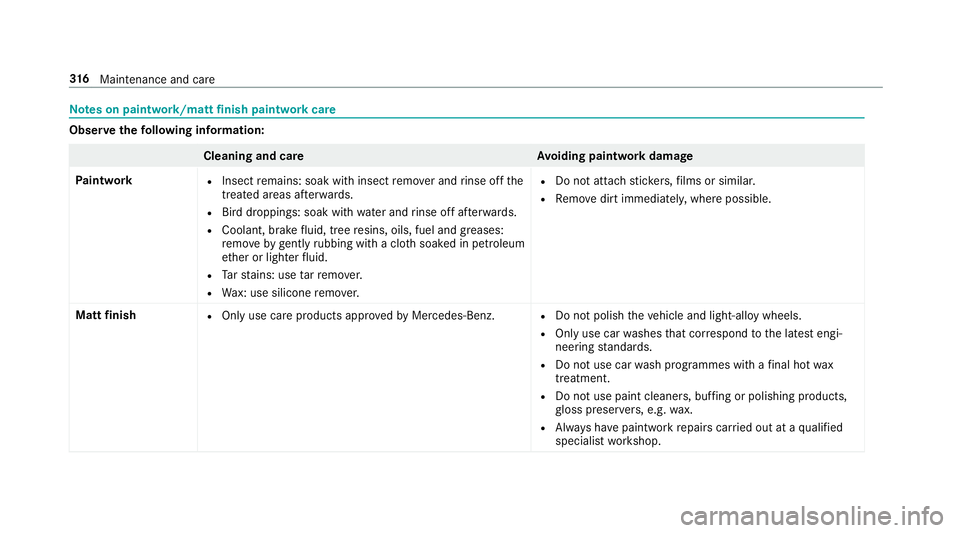
Note
s on paint work/matt finish paint workcare Obser
vethefo llowing information: Cleaning and car
eA voiding paintwork damage
Pa intwork R
Insect remains: soak with insect remo ver and rinse off the
trea ted areas af terw ards.
R Bird droppings: soak with water and rinse off af terw ards.
R Coolant, brake fluid, tree resins, oils, fuel and greases:
re mo veby gently rubbing with a clo thsoaked in petroleum
et her or lighter fluid.
R Tarst ains: use tarre mo ver.
R Wax: use silicone remo ver. R
Do not attach sticke rs,fi lms or similar.
R Remo vedirt immediatel y,where possible.
Matt finish R
Only use care products appr oved byMercedes-Benz. R
Do not polish theve hicle and light-alloy wheels.
R Only use car washes that cor respond tothe latest engi‐
neering standards.
R Do not use car wash programmes with a final hot wax
treatment.
R Do not use paint cleane rs, buf fing or polishing products,
gl oss preser vers, e.g. wax.
R Alw ays ha vepaintwork repairs car ried out at a qualified
specialist workshop. 316
Maintenance and care
Page 332 of 497
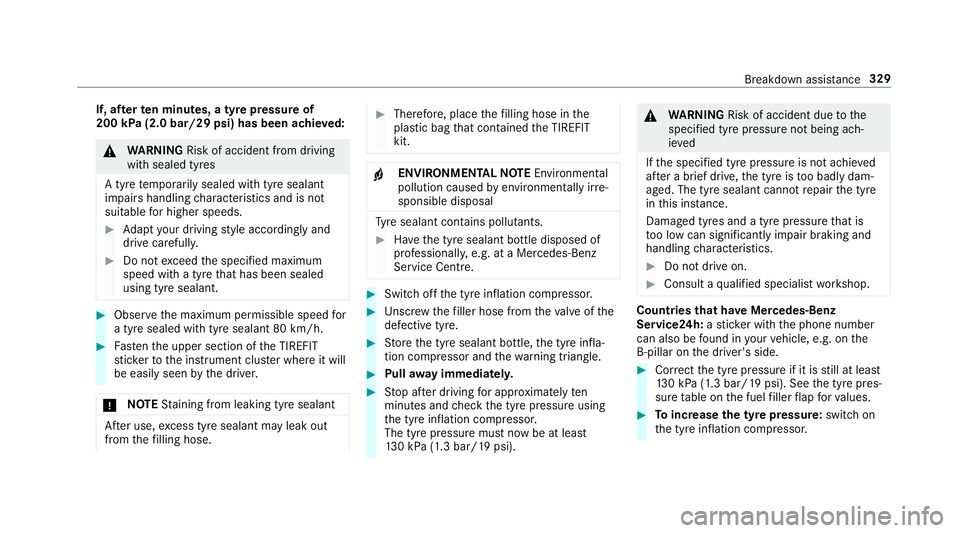
If, af
terte n minutes, a tyre pressure of
200 kPa (2.0 bar/29 psi) has been achie ved: &
WARNING Risk of accident from driving
wi th sealed tyres
A tyre temp orarily sealed with tyre sealant
impairs handling characteristics and is not
suitable for higher speeds. #
Adapt your driving style according lyand
drive carefull y. #
Do not exceed the specified maximum
speed with a tyre that has been sealed
using tyre sealant. #
Obse rveth e maximum permissible speed for
a tyre sealed with tyre sealant 80 km/h. #
Fasten the upper section of the TIREFIT
st icke rto the instrument clus ter where it will
be easi lyseen bythe driver.
* NO
TEStaining from leaking tyre sealant Af
ter use, excess tyre sealant may leak out
from thefilling hose. #
Therefore, place thefilling hose in the
plastic bag that con tained the TIREFIT
kit. +
ENVIRONMEN
TALNO TEEnvironmental
pollution caused byenvironmen tally ir re‐
sponsible disposal Ty
re sealant contains polluta nts. #
Have the tyre sealant bottle disposed of
professionall y,e.g. at a Mercedes-Benz
Service Centre. #
Switch off the tyre inflation compressor. #
Unscr ew thefiller hose from theva lve of the
defective tyre. #
Store the tyre sealant bottle, the tyre infla‐
tion compressor and thewa rning triangle. #
Pull away immediatel y. #
Stop af ter driving for appro ximately ten
minutes and check the tyre pressure using
th e tyre inflation compressor.
The tyre pressure must now be at least
13 0 kPa (1.3 bar/19 psi). &
WARNING Risk of accident due tothe
specified tyre pressure not being ach‐
ie ved
If th e specified tyre pressure is not achie ved
af te r a brief drive, the tyre is too badly dam‐
aged. The tyre sealant cannot repair the tyre
in this ins tance.
Dama ged tyres and a tyre pressure that is
to o low can significantly impair braking and
handling characteristics. #
Do not drive on. #
Consult a qualified specialist workshop. Countries
that ha veMercedes-Benz
Service24h: ast icke r with the phone number
can also be found in your vehicle, e.g. on the
B‑pillar on the driver's side. #
Cor rect the tyre pressure if it is still at least
13 0 kPa (1.3 bar/19 psi). See the tyre pres‐
sure table on the fuel filler flap forva lues. #
Toincrease the ty repressure: switch on
th e tyre inflation compressor. Breakdown assis
tance 329