engine MERCEDES-BENZ E-CLASS SALOON 2017 Workshop Manual
[x] Cancel search | Manufacturer: MERCEDES-BENZ, Model Year: 2017, Model line: E-CLASS SALOON, Model: MERCEDES-BENZ E-CLASS SALOON 2017Pages: 497, PDF Size: 10.38 MB
Page 205 of 497
If
yo u accelerate toove rtake, forex ample, the
st ored speed is not dele ted. If youre mo veyour
fo ot from the accelerator pedal af terove rtaking,
cruise control will resume speed regulation back
to thestored speed.
Yo u can operate cruise cont rol with the cruise
control le ver.
If yo ufa ilto adapt your driving style, cruise con‐
trol can neither reduce therisk of an accident
nor override the la wsof ph ysics. It cannot take
into account road, weather or traf fic conditions.
Cruise control is only an aid. You are responsible
fo rth e dis tance totheve hicle in front, forve hi‐
cle speed, for braking in good time and forst ay‐
ing in lane.
Sy stem limitations
Cruise control may be unable tomaintain the
st ored speed on uphill gradients. The stored
speed is resumed when the gradient evens out.
Change into a lo werge ar in good time on long
and steep downhill gradients. Take particular
no te ofthis when driving a laden vehicle. By
doing so, you will make use of the braking ef fect
of the engine. This relie vesth e load on the brake sy
stem and pr events the brakes from overheat‐
ing and wearing tooqu ickl y.
Do not use cruise control in thefo llowing situa‐
tions:
R In traf fic situations whi chrequ ire frequent
ch anges of speed, e.g. in heavy traf fic, on
winding roads.
R On slippe ryroads. Accelerating can cause
th e drive wheels tolose traction and the
ve hicle could then skid.
R Ifyo u are driving when visibility is poor.
Fu nction of the limi ter
The limiter restricts the speed of theve hicle. To
re duce the speed swiftly tothe set speed, the
limiter applies the brakes automaticall y.
Yo u can limit the speed as follo ws:
R Variable: for speed limits, e.g. in built-up
areas.
R Perm anen t:for long-term speed restrictions,
e.g. when driving wi thwinter tyres fitted.
If yo ufa ilto adapt your driving style, the limiter
can neither reduce therisk of an accident nor ov
erride the la wsof ph ysics. It cannot take into
account road, weather or traf fic conditions. The
limiter is only an aid. You are responsible forthe
dis tance totheve hicle in front, forve hicle
speed, for braking in good time and forst ay ing
in lane.
Yo u can operate theva riable limiter with the
cruise control le ver.Yo u can store any road
speed abo ve20 km/h. You can also per form
settings while theve hicle is stationary if the
ve hicle has been star ted.
Kickdown
If yo u depress the accelera tor pedal be yond the
pressure point (kickdown), the limiter switches
to passive mode. The Limiter passivemessage
appears in the multifunction displa y.
Af ter completion of kickdown, theva riable lim‐
iter is activated again in thefo llowing situations:
R Ifth e driven speed drops below thestored
speed.
R Ifth estored speed is called up.
R Ifyo ustore a new speed. 202
Driving and parking
Page 206 of 497
Operating cruise control or
theva riable lim‐
iter &
WARNING Risk of accident due to
unknown stored speed
If yo u call up thestored speed and this is
lo we rth an your cur rent speed, theve hicle
decelerates.
If yo u do not kn owthestored speed, the
ve hicle could decelerate unexpectedl y.#
Take into account the tra ffic situation
before calling up thestored speed. #
Ifth estored speed is not known, store
th e desired speed again. Change into a lo
werge ar in good time on long
and steep downhill gradients. Take particular
no te ofthis when driving a laden vehicle. By
doing so, you will make use of the braking ef fect
of the engine. This relie vesth e load on the brake
sy stem and pr events the brakes from overheat‐
ing and wearing tooqu ickl y. Re
quirements:
Cruise control:
R Cruise control is selected.
R ESP ®
must be activated, but not inter vening.
R The driving speed mu stbe at least 20 km/ h.
Va riable limiter:
R The vehicle has been star ted.
R The variable limiter is selec ted. #
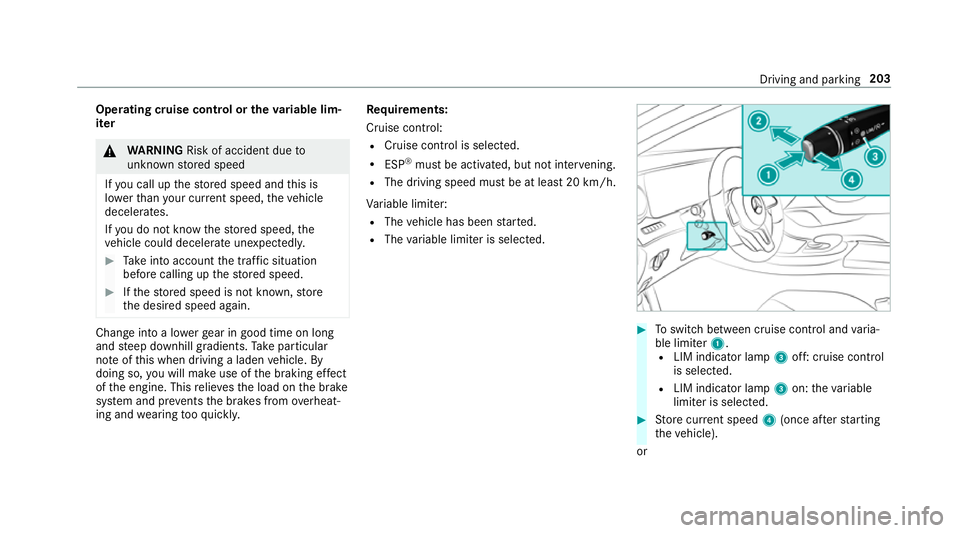
Toswitch between cruise contro l andvaria‐
ble limiter 1.
R LIM indicator lamp 3off: cruise control
is selec ted.
R LIM indicator lamp 3on: theva riable
limiter is selec ted. #
Store cur rent speed 4(once af terst arting
th eve hicle).
or Driving and parking
203
Page 207 of 497
#
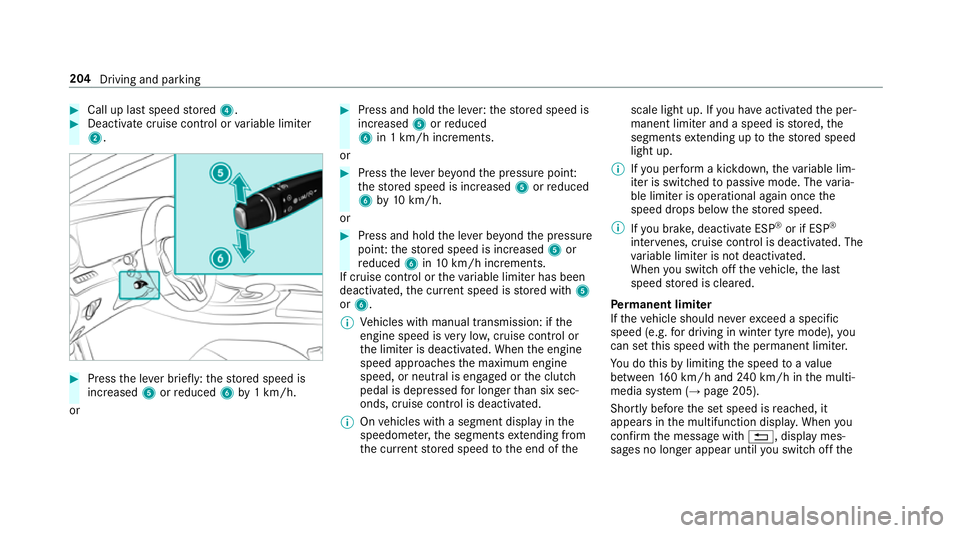
Call up last speed stored 4. #
Deactivate cruise contro l orvariable limiter
2. #
Press the le ver brief ly:th estored speed is
increased 5orreduced 6by1 km/h.
or #
Press and hold the le ver:thestored speed is
increased 5orreduced
6 in 1 km/h increments.
or #
Press the le ver be yond the pressure point:
th estored speed is increased 5orreduced
6 by10 km/h.
or #
Press and hold the le ver be yond the pressure
point: thestored speed is increased 5or
re duced 6in10 km/h increments.
If cruise control or theva riable limiter has been
deactivated, the cur rent speed is stored with 5
or 6.
% Vehicles with manual transmission: if the
engine speed is very low, cruise control or
th e limiter is deactivated. When the engine
speed approaches the maximum engine
speed, or neutral is engaged or the clutch
pedal is depressed for longer than six sec‐
onds, cruise control is deactivated.
% Onvehicles with a segment display in the
speedome ter,th e segments extending from
th e cur rent stored speed tothe end of the scale light up. If
you ha veactivated the per‐
manent limiter and a speed is stored, the
segments extending up tothestored speed
light up.
% Ifyo u per form a kickdown, theva riable lim‐
iter is swit ched topassive mode. The varia‐
ble limiter is operational again once the
speed drops below thestored speed.
% Ifyo u brake, deactivate ESP ®
or if ESP ®
inter venes, cruise control is deacti vated. The
va riable limiter is not deactivated.
When you swit choff theve hicle, the last
speed stored is cleared.
Pe rm anent limi ter
If th eve hicle should ne verexc eed a specific
speed (e.g. for driving in winter tyre mode), you
can set this speed with the permanent limiter.
Yo u do this by limiting the speed toava lue
between 160 km/h and 240 km/h in the multi‐
media sy stem (→ page 205).
Shortly before the set speed is reached, it
appears in the multifunction displa y.When you
confirm the message with %, display mes‐
sages no longer appear until you swit choff the 204
Driving and parking
Page 215 of 497
HOLD function
HOLD function
The HOLD function holds
theve hicle at a stand‐
st ill without requ iring youto depress the brake
pedal, e.g. when pulling away on steep slopes.
Sy stem limitations
R The incline must not be greaterth an 30%.
Ac tivating/deactivating the HOLD function &
WARNING Risk of an accident due tothe
HOLD function being activated when you
lea vetheve hicle
If yo u lea vetheve hicle while only the HOLD
function is braking theve hicle, theve hicle
can rollaw ay inthefo llowing situations:
R Ifth ere is a malfunction in the sy stem or
in the po wer supply.
R Ifth e HOLD function is deactivated by
depressing the accelera tor pedal or the
brake pedal, e.g. byave hicle occupant. R
Ifth e electrics in the engine compart‐
ment, the battery or the fuses are tam‐
pered with or if the battery is disconnec‐
te d. #
Alw ays deactivate the HOLD function
and secure theve hicle against rolling
aw ay before leaving theve hicle. *
NO
TEDama gefrom auto matic braking When
Active Brake Assi st,Ac tive Dis tance
Assi stDISTRONIC or the HOLD function are
activated, theve hicle brakes autonomously
in cer tain situations.
To avo id damage totheve hicle, deactivate
th ese sy stems in thefo llowing or similar sit‐
uations: #
During towing #
In a car wash Re
quirements:
R The vehicle is stationar y.
R The driver's door is closed or the seat belt on
th e driver's side is fastened. R
The engine is running or has been au tomati‐
cally switched off bythe ECO start/ stop
function.
R The electric parking brake is released.
R Active Dis tance Assi stDISTRONIC is not acti‐
va ted.
R Vehicles with automatic transmission: the
transmission is in position h,kori.
Ac tivating the HOLD function #
Dep ress the brake pedal and af ter a short
time depress fur ther until theë display
appears in the multifunction displa y. #
Release the brake pedal.
Deactivating the HOLD function #
Depress the accelerator pedal topull away.
or #
Depress the brake pedal until theë dis‐
play disappears from the multifunction dis‐
pla y. 212
Driving and pa rking
Page 216 of 497
The HOLD function is deactivated in
thefo llow‐
ing situations:
R When Active Dis tance Assi stDISTRONIC is
acti vated.
R Vehicles with automatic transmission:
when transmission position jis selected.
R When theve hicle is secured with the electric
parking brake.
In thefo llowing situations, theve hicle is held by
th e transmission position jorby the electric
parking brake:
R When the seat belt is unfas tened and the
driver's door is opened.
R When the engine is switched off.
R When there is a malfunction in the sy stem or
if th e po wer supply is insuf ficient.
Ve hicles with manual transmission:
The Brake immediately message may also
appear in the multifunction displa y:#
Immedia tely depress the brake pedal firm ly
until thewa rning message disappears.
The HOLD function is deactivated. A horn sounds at
regular inter vals if you turn off
th e engine, remo veyour seat belt and open the
driver's door while the HOLD function is activa‐
te d. If you attem pttolock theve hicle, the horn
to ne becomes louder. The vehicle cannot be
loc ked until you ha vedeactivated the HOLD
function.
% Once you ha veswitched off the engine, you
cannot restart the engine until you ha ve
deactivated the HOLD function. DY
NA MIC BODY CONT ROL DY
NA MIC BODY CONTROL has thefo llowing
ch aracteristics:
R Variable damping characteristics
R Continual adjustment of the damping forc es
The damping characteristics adapt tothe cur rent
operating and driving situation.
The da mping is tuned individually for each wheel
and is af fected bythefo llowing factors:
R The road sur face conditions
R Vehicle load R
The drive program selected
The drive program can be adjus ted using the
DY NA MIC SELECT switch. AIR
BODY CONT ROL AIR
BODY CONT ROL function
AIR BODY CONTROL is an air suspension sy stem
with variable damping for impr oved driving com‐
fo rt. The all-round le vel control sy stem ensures
th e best possible suspension and const ant
ground clea rance, even wi tha laden vehicle.
When driving at speed, theve hicle is lo wered
automatically toimpr ovedriving saf ety and to
re duce fuel consum ption. The option of manually
adjusting theve hicle le vel is also available.
AIR BODY CONTROL comprises:
R Air suspension with variable spring rate
R Automatic le vel control sy stem
R Speed-dependent lo wering toreduce fuel
consum ption
R Manually selec table high-le vel setting for
grea ter ground clea rance Driving and pa
rking 213
Page 221 of 497
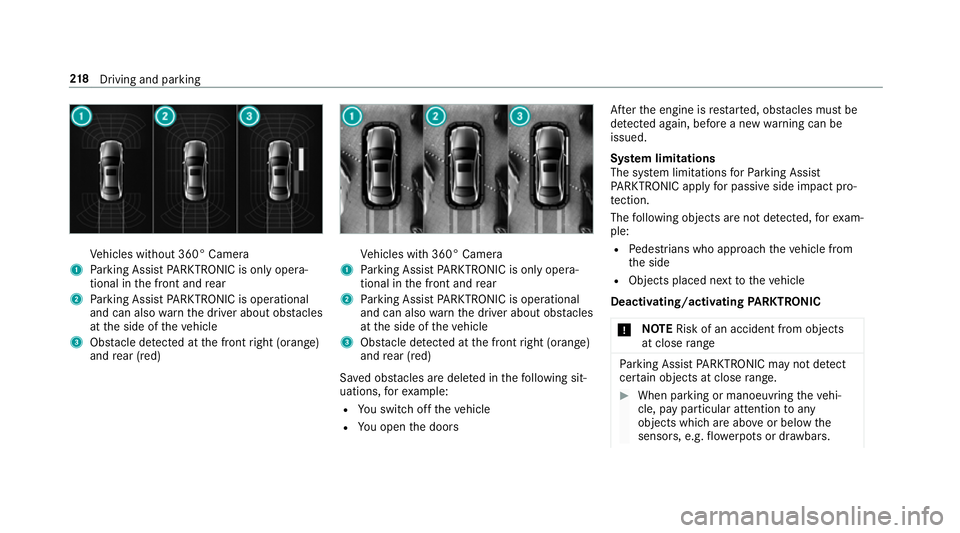
Ve
hicles without 360° Camera
1 Parking Assist PARKTRONIC is on ly opera‐
tional in the front and rear
2 Parking Assist PARKTRONIC is operational
and can also warnthe driver about obs tacles
at the side of theve hicle
3 Obstacle de tected at the front right (orange)
and rear (red) Ve
hicles with 360° Camera
1 Parking Assist PARKTRONIC is on ly opera‐
tional in the front and rear
2 Parking Assist PARKTRONIC is operational
and can also warnthe driver about obs tacles
at the side of theve hicle
3 Obstacle de tected at the front right (orange)
and rear (red)
Sa ved obs tacles are del eted in thefo llowing sit‐
uations, forex ample:
R You swit choff theve hicle
R You open the doors Af
terth e engine is restar ted, obs tacles must be
de tected again, before a new warning can be
issued.
Sy stem limitations
The sy stem limitations forPa rking Assist
PA RKTRONIC apply for passive side impact pro‐
te ction.
The following objects are not de tected, forex am‐
ple:
R Pedestrians who approach theve hicle from
th e side
R Objects placed next totheve hicle
Deactivating/activating PARKTRONIC
* NO
TERisk of an accident from objects
at close range Pa
rking Assist PARKTRONIC may not de tect
cer tain objects at close range. #
When pa rking or manoeuvring theve hi‐
cle, pay particular attention toany
objects which are abo veor below the
sensors, e.g. flowe rpots or dr awbars. 218
Driving and pa rking
Page 241 of 497
pla
y.Yo u can ackn owledge the message and
ta ke a break where necessar y.Ifyo u do not take
a break and ATTENTION ASSIST continues to
de tect increasing lapses in concentration, you
will be warned again af ter a minimum of
15 minutes. Yo
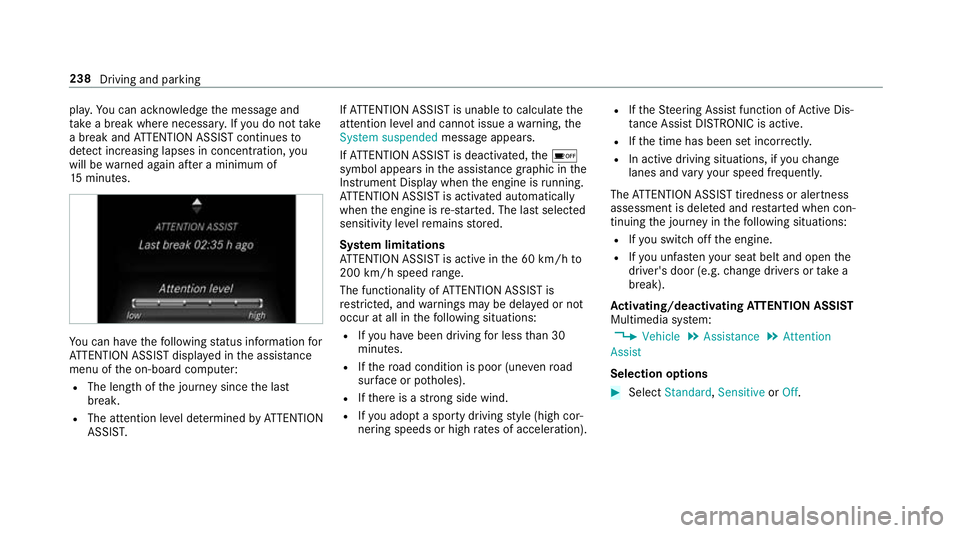
u can ha vethefo llowing status information for
AT TENTION ASSIST displa yed in the assis tance
menu of the on-board computer:
R The length of the journey since the last
break.
R The attention le vel de term ined byATTENTION
ASSIS T. If
AT TENTION ASSIST is unable tocalculate the
attention le vel and cannot issue a warning, the
System suspended messageappears.
If AT TENTION ASSIST is deactivated, theé
symbol appears in the assis tance graphic in the
Instrument Display when the engine is running.
AT TENTION ASSIST is activated automatically
when the engine is re-sta rted. The last selected
sensitivity le velre mains stored.
Sy stem limitations
AT TENTION ASSIST is active in the 60 km/h to
200 km/h speed range.
The functionality of ATTENTION ASSIST is
re stricted, and warnings may be dela yed or not
occur at all in thefo llowing situations:
R Ifyo u ha vebeen driving for less than 30
minutes.
R Ifth ero ad condition is poor (une venro ad
sur face or po tholes).
R Ifth ere is a strong side wind.
R Ifyo u adopt a sporty driving style (high cor‐
nering speeds or high rates of acceleration). R
Ifth eSt eering Assist function of Active Dis‐
ta nce Assi stDISTRONIC is acti ve.
R Ifth e time has been set incor rectly.
R In acti vedriving situations, if youch ange
lanes and vary your speed frequentl y.
The ATTENTION ASSIST tiredness or alertness
assessment is dele ted and restar ted when con‐
tinuing the journey in thefo llowing situations:
R Ifyo u swit choff the engine.
R Ifyo u unfas tenyo ur seat belt and open the
driver's door (e.g. change drivers or take a
break).
Ac tivating/deactivating ATTENTION ASSI ST
Multimedia sy stem:
, Vehicle .
Assistance .
Attention
Assist
Selection options #
Select Standard, SensitiveorOff. 238
Driving and parking
Page 255 of 497
R
Limiter (→ page 202)
R Active Dis tance Assi stDISTRONIC
(→ page 205)
* NO
TEEngine dama gedue toexc essively
high engine speeds The engine will be damaged if
you drive with
th e engine in theov errevving range. #
Do not drive wi th the engine in theove r‐
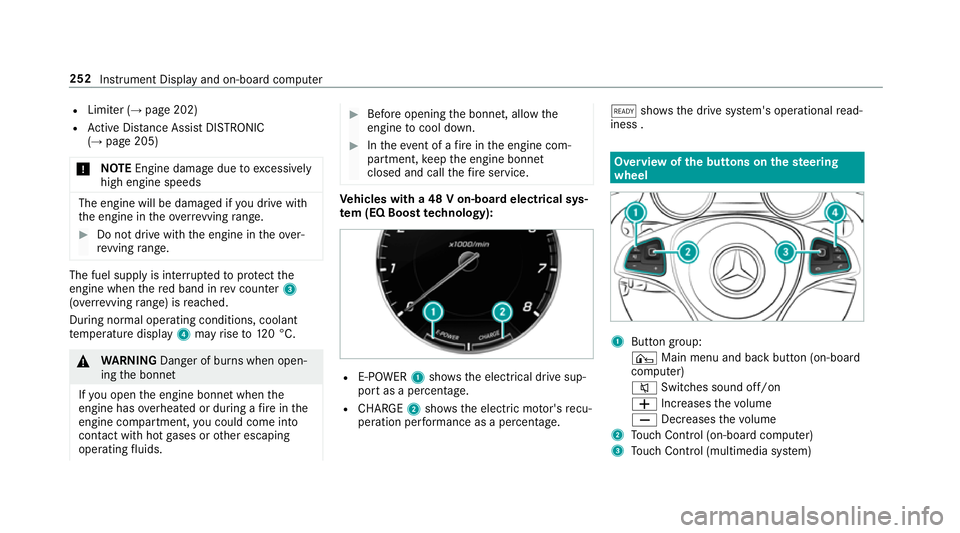
re vving range. The fuel supply is inter
rupted toprotect the
engine when there d band in rev counter 3
(o ve rrev ving range) is reached.
During no rmal operating conditions, coolant
te mp erature display 4may rise to120 °C. &
WARNING Danger of bu rns when open‐
ing the bonn et
If yo u open the engine bonn etwhen the
engine has overheated or during a fire inthe
engine compartment, you could come into
contact with hot gases or other escaping
operating fluids. #
Before opening the bonn et, allow the
engine tocool down. #
Intheeve nt of a fire inthe engine com‐
partment, keep the engine bonn et
closed and call thefire service. Ve
hicles with a 48 V on-board electrical sys‐
te m (EQ Boo sttech nology): R
E-POWER 1shows th e electrical drive sup‐
port as a percentage.
R CHARGE 2showsthe electric mo tor's recu‐
peration per form ance as a percen tage. õ
showsthe drive sy stem's operational read‐
iness . Overview of
the but tons on thest eering
wheel 1
Button group:
¤ Main menu and ba ckbutton (on-board
computer)
8 Switches sound off/on
W Increases thevo lume
X Decreases thevo lume
2 Touch Control (on-board co mputer)
3 Touch Control (multimedia sy stem) 252
Instrument Display and on-board computer
Page 259 of 497
Menus and submenus
Fu
nctions on the Service menu of the on-
board compu terOn-board computer:
, Service #
Toselect the function: swipe upwards or
down wards on the left-hand touch cont rol. #
Press the left-hand touch cont rol.
Fu nctions on theService menu:
R Message memory (→ page 381)
R AdBlue: Adblue ®
ra nge
R Tyres:
- Restarting the tyre pressure loss warning
sy stem (→ page 352)
- Checking tyre pressure with the tyre
pressure monitoring sy stem
(→ page 348)
- Restarting the tyre pressure monitoring
sy stem(→ page 348)
R ASSYST PLUS: Calling up the service due
date (→ page 306) R
Engine oil le vel Calling up
the assistant display On-board computer:
, Assistance
% Ve
hicles with the instrument display in
th e widescreen cockpit: whenyou ha ve
th e design set toProgressive ,yo u can view
th e assis tant displ ayinthe left-hand portion
of the instrument displa y.
The following displa ysare available from the
assis tant displ aymenu:
R Assis tant displ ay
R Attention le vel (→ page 237) #
Toswitch between the displa ys:swipe
upwards or down wards on the left-hand
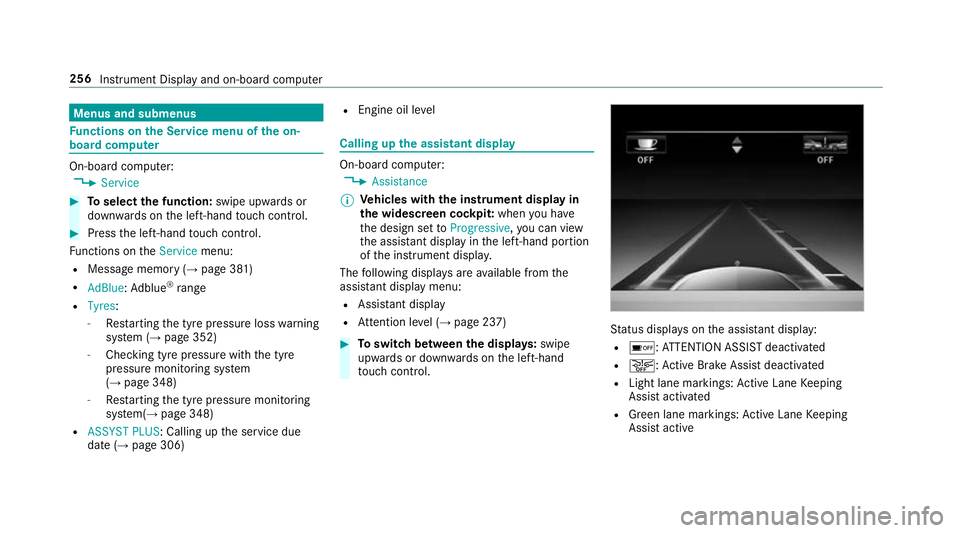
to uch cont rol. St
atus displa yson the assis tant displ ay:
R é :AT TENTION ASSIST deactivated
R æ: Active Brake Assi stdeactivated
R Light lane markings: Active Lane Keeping
Assist activated
R Green lane markings: Active Lane Keeping
Assist active 256
Instrument Display and on-board computer
Page 260 of 497
R
Grey radar waves next tovehicle: Blind Spot
Assist activated
R Green radar waves next tovehicle: Blind Spot
Assist active
R Active Dis tance Assi stDISTRONIC displa ys
( → page 205) Calling up displa
ysintheTr ip menu On-board computer:
, Trip
% Ve
hicles with an instrument display in
th e widescreen cockpit: whenyou ha ve
th e design set toProgressive ,yo u can view
information on the journey in the left-hand
area of the instrument displa y.#
Toselect a displa y:swipe upwards or down‐
wa rds on the left-hand Touch Control.
Displa ysintheTripmenu:
R standard display
R range and cur rent fuel consu mption When
gliding mode is active (→ page175),
Gliding mode is displayed ins tead of the cur‐
re nt fuel consu mption.
A recuperation displ ayis also available for
cer tain engines. If there is only a small
amount of fuel left in the fuel tank, the dis‐
play sho wsave hicle being refuelled ins tead
of thera nge.
R ECO displ ay (→page 168)
R Trip computer From startandFrom reset
R Digital speedom eter
% Ve
hicles with an Instrument Display in
th eWi descreen Co ckpit: the digital speed‐
ome ter only appears in theClassic andSport
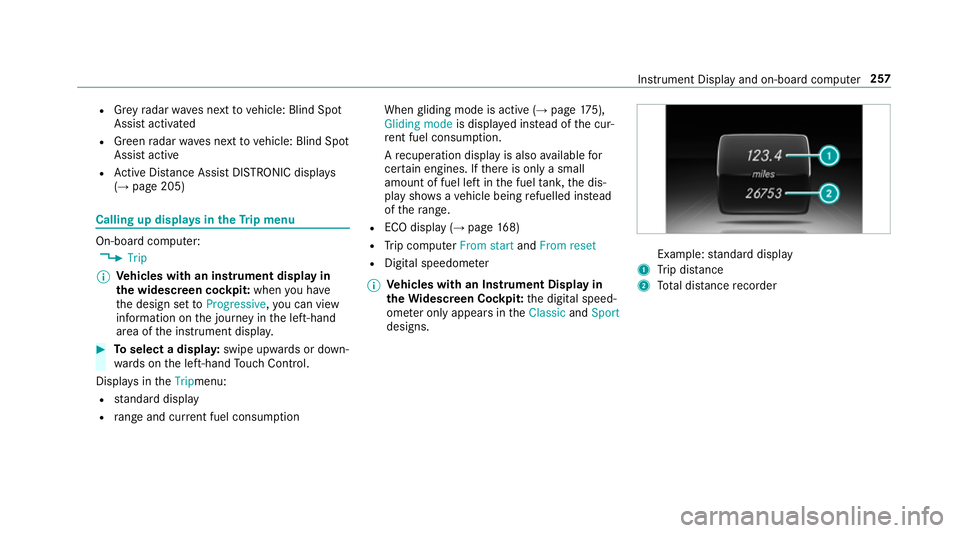
designs. Example:
standard display
1 Trip dis tance
2 Total dis tance recorder Instrument Display and on-board compu
ter257