steering MERCEDES-BENZ E-CLASS SALOON 2020 User Guide
[x] Cancel search | Manufacturer: MERCEDES-BENZ, Model Year: 2020, Model line: E-CLASS SALOON, Model: MERCEDES-BENZ E-CLASS SALOON 2020Pages: 477, PDF Size: 8.67 MB
Page 111 of 477
R
The po wer supp lyor the ignition is switched
on. #
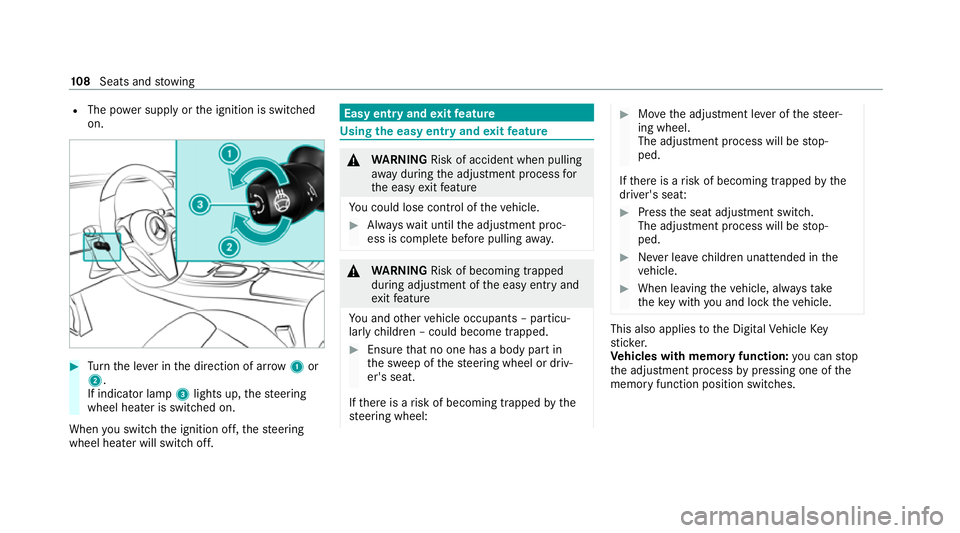
Turn the le ver in the direction of ar row1or
2.
If indicator lamp 3lights up, thesteering
wheel heater is switched on.
When you swit ch the ignition off, thesteering
wheel heater will switch off. Easy entry and
exitfeature Using
the easy entry and exitfeature &
WARNING Risk of accident when pulling
aw ay during the adjustment process for
th e easy exitfeature
Yo u could lose cont rol of theve hicle. #
Alw ayswa it until the adjustment proc‐
ess is comple tebefore pulling away. &
WARNING Risk of becoming trapped
du ring adjustment of the easy entry and
ex itfeature
Yo u and other vehicle occupants – particu‐
lar lych ildren – could become trapped. #
Ensure that no one has a body part in
th e sweep of thesteering wheel or driv‐
er's seat.
If th ere is a risk of becoming trapped bythe
st eering wheel: #
Movethe adjustment le ver of thesteer‐
ing wheel.
The adjustment process will be stop‐
ped.
If th ere is a risk of becoming trapped bythe
driver's seat: #
Press the seat adjustment switch.
The adjustment process will be stop‐
ped. #
Never lea vechildren unat tended in the
ve hicle. #
When leaving theve hicle, alw aysta ke
th eke y with you and lock theve hicle. This also applies
tothe Digital Vehicle Key
st icke r.
Ve hicles with memory function: you can stop
th e adjustment process bypressing one of the
memory function position switches. 108
Seats and stowing
Page 112 of 477
&
WARNING Risk of becoming trapped if
ch ildren activate the easy entry andexit
fe ature‑
Children could become trapped if they acti‐
va te the easy entry ‑ andexitfeature, particu‐
lar lywhen unat tended. #
Never lea vechildren unat tended in the
ve hicle. #
When leaving theve hicle, alw aysta ke
th eke y with you and lock theve hicle. This also applies
tothe Digital Vehicle Key
st icke r.
If th e easy entry andexitfeature is active, the
st eering wheel will mo veupwards and the driv‐
er's seat will mo veback in thefo llowing situa‐
tions:
R You swit chthe ignition off with the driver's
door open.
R You open the driver's door with the ignition
switched off.
% The steering wheel will then mo veupwards
on ly if it is not already as high as it will go. The driver's seat will
then mo vebackwards
only if it is not already in there armost posi‐
tion.
The steering wheel and the driver's seat will
mo veback tothe last drive position in thefo l‐
lowing cases:
R You swit chthe po wer supp lyor the ignition
on when the driver's door is closed
R You close the driver's door with the ignition
switched on.
The last drive position will be sa ved when:
R You swit chthe ignition off.
R Vehicles with memory function: you call
up the seat settings via the memory function.
R Vehicles with memory function: you sa ve
th e seat settings via the memory function.
Ve hicles with memory function: press one of
th e memory function memory position switches
to stop the adjustment process. Setting
the easy entry and exitfeature Multimedia sy
stem:
4 © 5
Settings 5
Vehicle
5 Automatic seat adjustment
5 Easy Entry/Exit #
Activate or deacti vate the function. Memory function
Fu
nction of the memory function &
WARNING Risk of an accident if the
memory function is used while driving
If yo u use the memory function on the driv‐
er's side while driving, you could lose cont rol
of theve hicle as a result of the adjustments
being made. #
Only use the memory function on the
driver's side when theve hicle is station‐
ar y. Seats and
stowing 109
Page 113 of 477
&
WARNING Risk of entrapment when set‐
ting the seat with the memory function
When the memory function adjusts the seat,
yo u and other vehicle occupants – particu‐
lar lych ildren – could become trapped. #
During the adjustment process of the
memory function, make sure that no
one has any body parts in the sweep of
th e seat. #
If someone becomes trapped, press a
preset position button or seat adjust‐
ment switch immediately. &
WARNING Risk of entrapment if the
memory function is activated bychildren
Children could become trapped if they acti‐
va te the memory function, particularly when
unattended. #
Never lea vechildren unat tended in the
ve hicle. #
When leaving theve hicle, alw aysta ke
th eke y with you and lock theve hicle. This also applies
tothe Digital Vehicle Key.
Yo u can use the memory function when the igni‐
tion is switched off.
Seat adjustments for up tothre e people can be
st ored and called up using the memory function.
Yo u can sa vesettings forth efo llowing sy stems:
R Seat, backrest and head restra int
R Steering wheel
R Outside mir rors
R Head-up display Operating
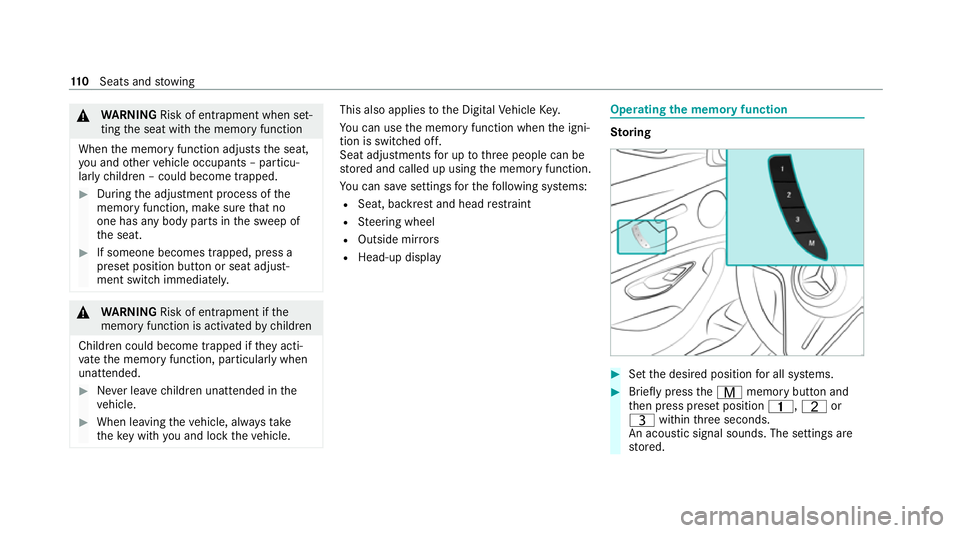
the memory function St
oring #
Set the desired position for all sy stems. #
Brief lypress theV memory button and
th en press preset position 4,Tor
U within thre e seconds.
An acoustic signal sounds. The settings are
st ored. 11 0
Seats and stowing
Page 122 of 477
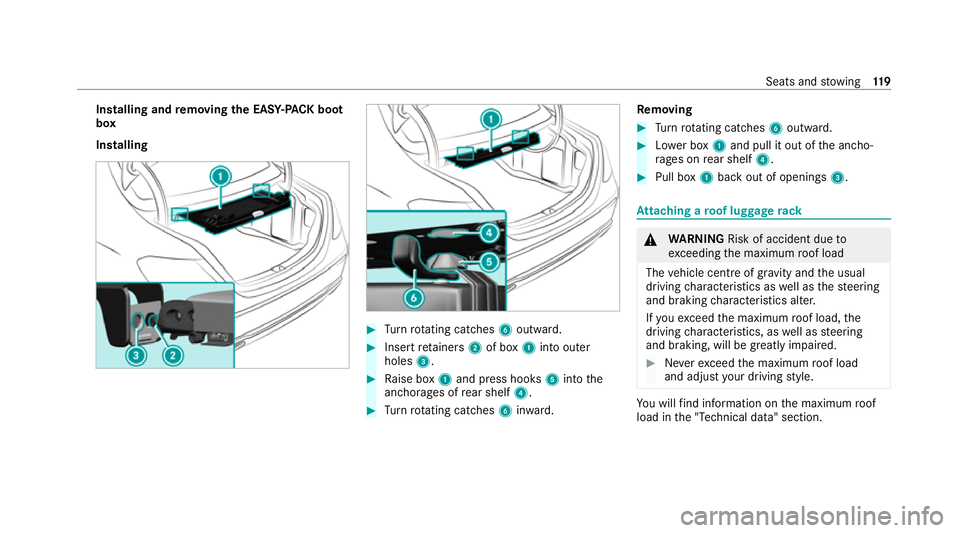
Installing and
removing the EA SY-PAC K boot
box
Installing #
Turn rotating catches 6outward. #
Inse rtretainers 2of box 1into outer
holes 3. #
Raise box 1and press hooks 5into the
anchorages of rear shelf 4. #
Turn rotating catches 6inwa rd. Re
moving #
Turn rotating catches 6outward. #
Lowe r box 1and pull it out of the ancho‐
ra ge s on rear shelf 4. #
Pull box 1back out of openings 3. At
taching a roof luggage rack &
WARNING Risk of accident due to
exc eeding the maximum roof load
The vehicle centre of gravity and the usual
driving characteristics as well as thesteering
and braking characteristics alter.
If yo uexc eed the maximum roof load, the
driving characteristics, as well as steering
and braking, will be greatly impaired. #
Neverexc eed the maximum roof load
and adjust your driving style. Yo
u will find information on the maximum roof
load in the "Technical data" section. Seats and
stowing 11 9
Page 132 of 477
The hazard
warning lights will switch on auto‐
matically if:
R the airbag has been deplo yed.
R theve hicle is heavily braked from a speed of
more than 70 km/h toast andstill.
When you pull away again, the hazard warning
light sy stem will switch off automatically at
appr oximately 10km/h. You can also swit choff
th e hazard warning light sy stem using but‐
to n1. Ad
aptive functions, MULTIBEAM LED Intelligent Light Sy
stem function
The MULTIBEAM LED headlamps adapt tothe
driving and weather situation and pr ovide exten‐
ded functions for impr oved illumination of the
ro ad.
The sy stem comprises thefo llowing functions:
R Active headla mps (/ page129)
R Cornering light (/ page129)
R Motorw ay mode (/ page130)
R Enhanced fog light function (/ page130) R
Adversewe ather light (/ page131)
R City lighting (/ page131)
The sy stem is active only when it is dar k.
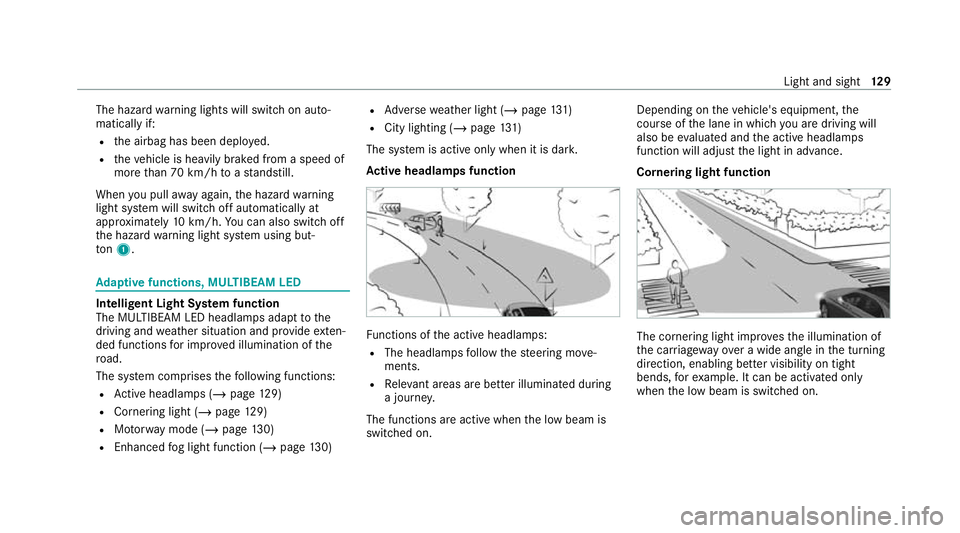
Ac tive headlamps function Fu
nctions of the active headlamps:
R The headlamps follow thesteering mo ve‐
ments.
R Releva nt areas are better illumina ted during
a journe y.
The functions are active when the low beam is
switched on. Depending on
theve hicle's equipment, the
cou rse of the lane in which you are driving will
also be evaluated and the active headlamps
function will adjust the light in advance.
Cornering light function The cornering light impr
ovesth e illumination of
th e car riag ewa yove r a wide angle in the turning
direction, enabling better visibility on tight
bends, forex ample. It can be activated on ly
when the low beam is switched on. Light and sight
12 9
Page 133 of 477
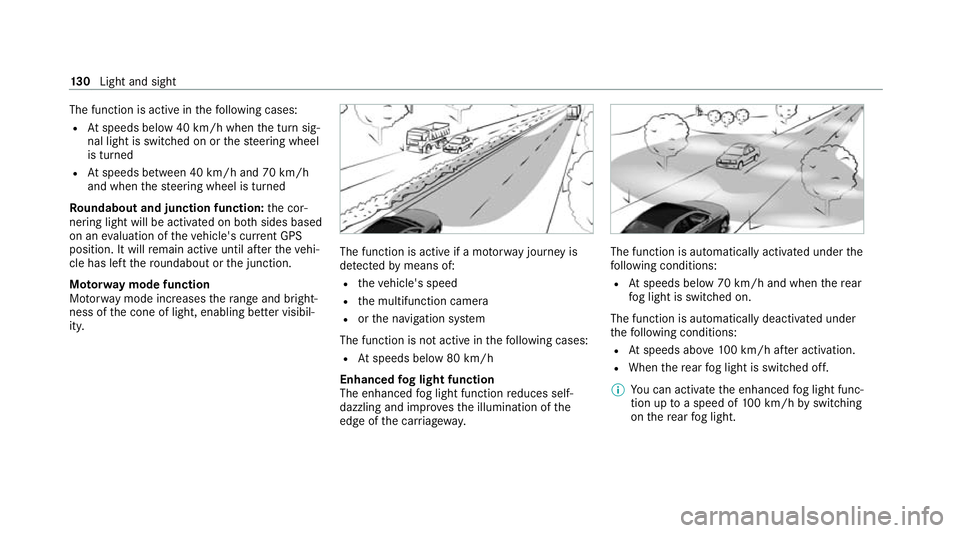
The function is active in
thefo llowing cases:
R Atspeeds below 40 km/h when the turn sig‐
nal light is switched on or thesteering wheel
is turned
R Atspeeds between 40 km/h and 70 km/h
and when thesteering wheel is turned
Ro undabout and junction function: the cor‐
nering light will be activated on bo thsides based
on an evaluation of theve hicle's cur rent GPS
position. It will remain active until af terth eve hi‐
cle has left thero undabout or the junction.
Mo torw ay mode function
Mo torw ay mode increases thera nge and bright‐
ness of the cone of light, enabling better visibil‐
ity. The function is active if a mo
torw ay jou rney is
de tected bymeans of:
R theve hicle's speed
R the multifunction camera
R orthe navigation sy stem
The function is not active in thefo llowing cases:
R Atspeeds below 80 km/h
Enhanced fog light function
The enhanced fog light function reduces self-
dazzling and impr ovesth e illumination of the
edge of the car riag ewa y. The function is automatically activated under
the
fo llowing conditions:
R Atspeeds below 70 km/h and when there ar
fo g light is switched on.
The function is automatically deactivated under
th efo llowing conditions:
R Atspeeds abo ve100 km/h af ter activation.
R When there ar fog light is switched off.
% You can activate the enhanced fog light func‐
tion up toa speed of 100 km/h byswitching
on there ar fog light. 13 0
Light and sight
Page 141 of 477
#
Foldthe wiper arms back onto the wind‐
screen. #
Switch on the ignition. #
Press theî button on the combination
switch.
The wiper arms will mo veinto the original
position. #
Switch the ignition off. Maintenance display #
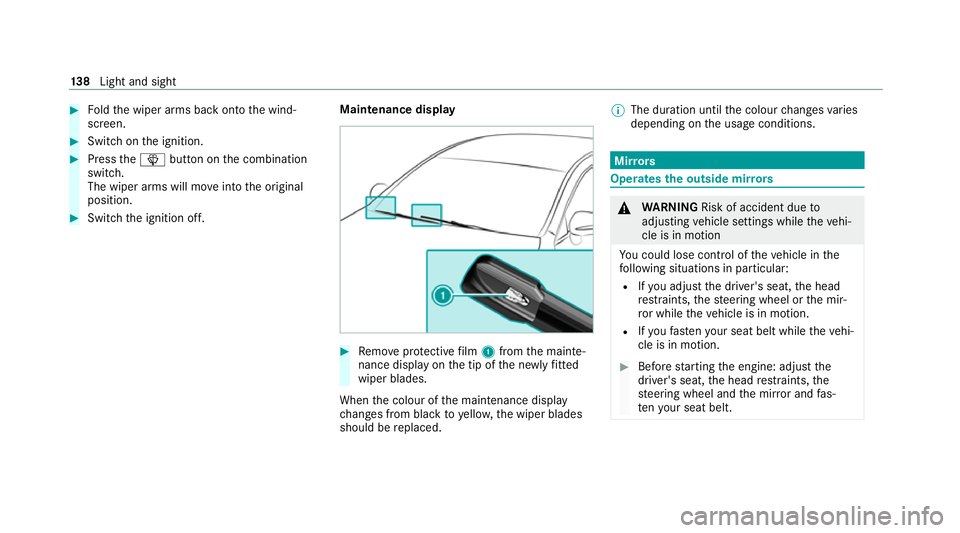
Remo veprotective film 1 from the mainte‐
nance display on the tip of the newly fitted
wiper blades.
When the colour of the maintenance display
ch anges from black to yellow, the wiper blades
should be replaced. %
The duration until the colour changes varies
depending on the usage conditions. Mir
rors Operates
the outside mir rors &
WARNING Risk of accident due to
adjusting vehicle settings while theve hi‐
cle is in motion
Yo u could lose cont rol of theve hicle in the
fo llowing situations in particular:
R Ifyo u adjust the driver's seat, the head
re stra ints, thesteering wheel or the mir‐
ro r while theve hicle is in motion.
R Ifyo ufast enyour seat belt while theve hi‐
cle is in motion. #
Before starting the engine: adjust the
driver's seat, the head restra ints, the
st eering wheel and the mir ror and fas‐
te nyo ur seat belt. 13 8
Light and sight
Page 157 of 477
Driving
Note
s on Mercedes-AMG vehicles Obser
vethe no tes on thefo llowing topics in the
Supplement, otherwise you may failto recognise
dangers.
% The availability of cer tain functions depends
on the equipment and model of theve hicle.
R Emotion Start
R Rear axle locking dif fere ntial
R AMG Performance exhaust sy stem
R AMG ceramic high-per form ance composite
brake sy stem
R RACE START
R DRIFT MODE
R AMG RIDE CONTROL +
R AMG steering-wheel buttons Switching on
the po wer supp lyor the igni‐
tion (without engine start) &
WARNING Risk of accident and inju ry
due tochildren left unat tended in the
ve hicle
If ch ildren are left unsupervised in theve hi‐
cle, they could, in pa rticular:
R open doors, thereby endangering other
persons or road users.
R get out and be stru ck byoncoming traf‐
fi c.
R ope rate ve hicle equipment and become
trapped, forex ample.
In addition, thech ildren could also set the
ve hicle in motion, forex ample by:
R releasing the parking brake.
R changing the transmission position.
R starting theve hicle. #
Never lea vechildren unat tended in the
ve hicle. #
When leaving theve hicle, alw aysta ke
th eke y with you and lock theve hicle. #
Keep theve hicle key out of reach of
ch ildren. This also applies
tothe Digital Vehicle Key
st icke r.
Re quirements:
R theke y is in theve hicle and is recognised.
R or: a Digi talVe hicle Keyst icke r is located in
th e mar ked space (/ page156).
R the brake pedal is not depressed. 15 4
Driving and pa rking
Page 162 of 477

te
m ef fectiveness is not reached until the
end of this teach-in process.
R brakepads, brake discs and tyres that are
either new or ha vebeen replaced only ach‐
ie ve optimum braking ef fect and grip af ter
se veral hundred kilom etre s of driving. Com‐
pensate forth ere duced braking ef fect by
applying greater forc eto the brake pedal. Note
s on optimised acceleration If all necessary
requirements and activation con‐
ditions are fulfilled, the best possible accelera‐
tion can be achie ved from a standstill.
Do not use the optimised acceleration on public
ro ads. Individual wheels could spin and you
could lose control of theve hicle. There is an
increased risk of skidding and/or accident.
Be sure toobser vethe saf ety no tes and informa‐
tion on ESP ®
(/ page 188). Pulling
away with optimised acceleration &
WARNING Risk of skidding and having
an accident from wheels spinning
When you use optimised acceleration, indi‐
vidual wheels could spin and you could lose
cont rol of theve hicle.
If ESP ®
is deactivated, there is a risk of skid‐
ding and accident! #
Make sure that no persons or obstacles
are in the close vicinity of your vehicle. Re
quirements:
R The vehicle is run in (/ page 158).
R theve hicle and tyres are in good condition.
R you are on a high-g rip ro adw ay.
R the engine and transmission are at normal
operating temp erature. *
NO
TEIncreased wear due tooptimised
acceleration When pulling
away with optimised accelera‐
tion, all components of the driv etra in are
subjected toave ry high load.
This can lead toinc reased component wear. #
Do not alw ays pull away with optimised
acceleration. #
Engage theh drive position (/ page170). #
Movethesteering wheel tothest ra ight-
ahead position. #
Select the sportiest available drive program
B orC(/ page167). #
Deactivating ESP ®
(/ page 190). #
Dep ress and hold the brake pedal firm ly wi th
yo ur left foot. #
With your right foot , fully depress the accel‐
erator pedal. Driving and parking
15 9
Page 165 of 477
Non-combus
ted fuel may get into the cata‐
lytic con verter. #
Only depress the accelera tor pedal
slightl y. #
Have the cause rectified immediately at
a qu alified specialist workshop. Note
s on driving on salt-treated roads
The braking ef fect is limited on salt-trea ted
ro ads.
Therefore, obse rveth efo llowing no tes:
R due tosalt build-up on the brake disks and
brakepads, the braking dis tance can increase
considerab lyor result in braking only on one
side
R maintain a much greater safe dis tance tothe
ve hicle in front
To remo vesalt build-up:
R brake occasionally while paying attention to
th e tra ffic conditions
R carefully depress the brake pedal at the end
of the journey and when starting the next
journey Note
s on aquaplaning
Aq uaplaning can take place once a cer tain
amount of water has accumulated on thero ad
sur face.
Obser vethefo llowing no tes during heavy precip‐
itation or in conditions in which aquaplaning may
occur:
R reduce speed
R avoid tyre ruts
R avoid sudden steering mo vements
R brake carefully
% Also obser vethe no tes on regular lych ecking
wheels and tyres (/ page 335).
Note s on driving through water on the road
sur face
Wa ter which has entered into theve hicle can
damage the engine, electrics and transmission.
Wa ter can also enter the air intake of the engine
and cause engine damage. Obser
vethefo llowing if you must drive thro ugh
wate r:
R The water,when calm, may only reach the
lo we r edge of theve hicle body.
R Drive at walking pace at most, otherwise
wate r can enter theve hicle interior or engine
compartment.
R Vehicles tr avelling in front, or oncoming vehi‐
cles, can create waves which may exceed the
maximum permissible dep thofthewa ter.
The braking ef fect of the brakes is reduced af ter
fo rd ing. Brake carefully while paying attention to
th e traf fic conditions until braking po wer has
been fully restored. ECO
start/s top function Ope
ration of the ECO start/s top function
* NO
TEMercedes-AMG vehicles #
Obser vethe no tes in the Supplement.
Yo u could otherwise failto recognise
dangers. 16 2
Driving and pa rking